Login

ChatGPT can now create interactive tools instead of just answering questions
OpenAI recently upgraded ChatGPT with its new GPT-6 model, which introduces a feature called Intelligent UI. It's one of the most interesting (and fun) additions and it means ChatGPT can now create interactive experiences with graphics, buttons, charts and more, all directly within the conversation window.
We've already put it to the test by asking ChatGPT to recreate retro games like Pac-Man and Pong. But Intelligent UI goes beyond games. There's no fixed format here, which means you can ask for something specific or let ChatGPT decide how best to present the information. Whether that's a map, a calculator or a custom-built tool with sliders and settings you can play around with.
So I wanted to see what else it could do. Especially whether ChatGPT could build interactive tools that are genuinely helpful rather than just entertaining. I tried six different ideas, from practical everyday tools to more experimental creations. Some prompts were deliberately detailed to see how closely ChatGPT would follow my instructions, while others gave it more freedom to decide what to build. Here's what happened.
1. An interior design app
Prompt:
"Build an interactive room design tool. Show a visual floor plan of a living room with a sofa, coffee table, TV, rug and two bookshelves. But let me change the furniture layout, select color schemes, toggle between different design styles and adjust furniture dimensions. I want the purpose of this to be to see whether the furniture fits and how much free floor space I’d have left."
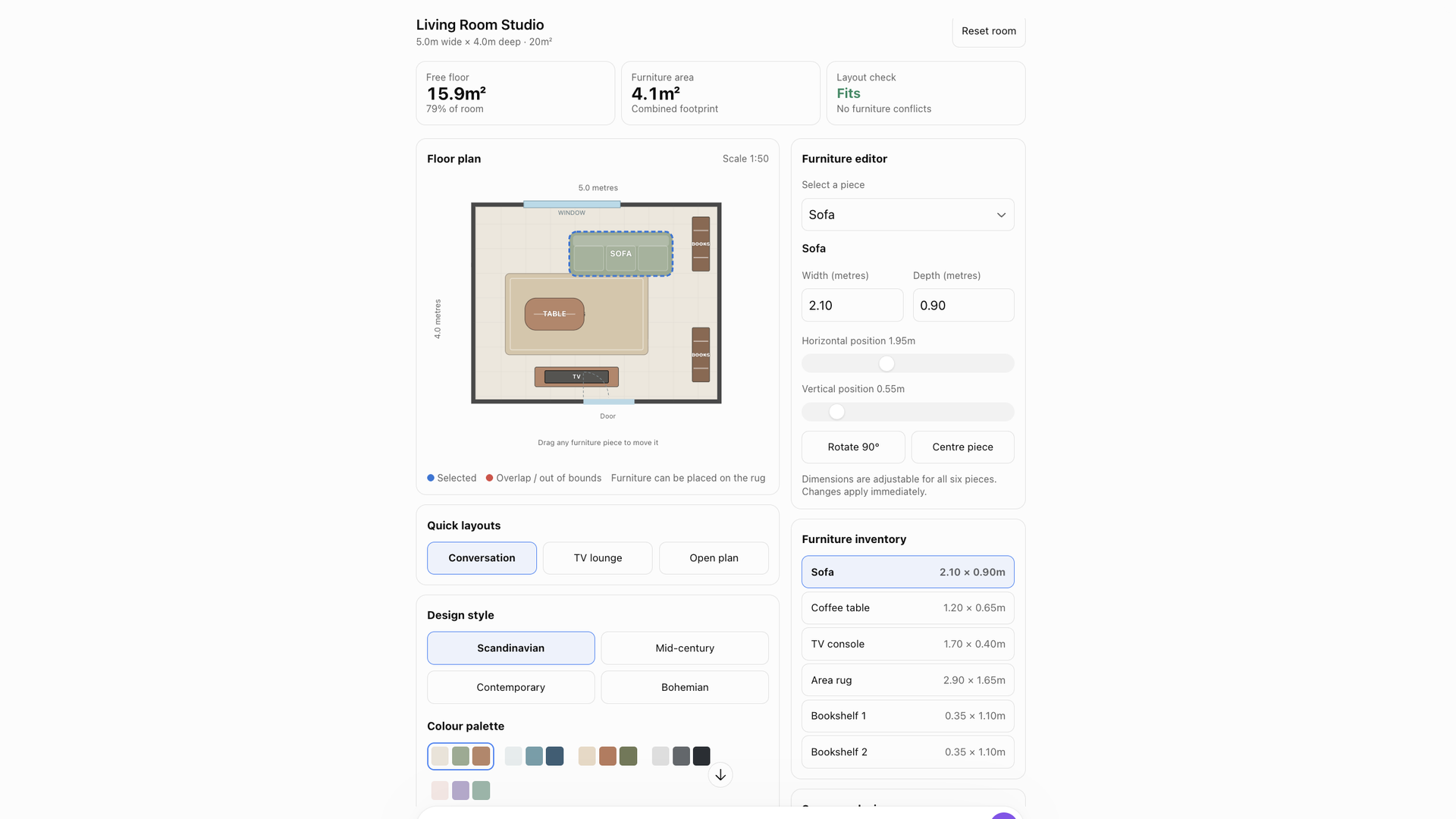
After creating games within the ChatGPT window last time, I wanted to see whether I could make something genuinely useful this time around.
I've always struggled to visualize how furniture will look in different spaces and I've been looking for an app that lets me experiment with different layouts for my new apartment. So I decided to make my own.
The results were what I was hoping for. An interactive room that lets me drag and drop furniture. And it was very fun to play around with. I liked how many customization options it offered and how quickly it responded when I made changes. Unfortunately, it couldn't make up for my lack of interior design skills. But it was useful for experimenting with layouts and getting a rough idea of how much space I'd have left.
Of course, I haven't verified how accurate its measurements or calculations are, so I wouldn't rely on it to make any big furniture purchases just yet. But I can imagine this becoming even more helpful with a few tweaks, especially if I added the exact dimensions of my rooms and furniture.
2. An ethical dilemma machine
Prompt:
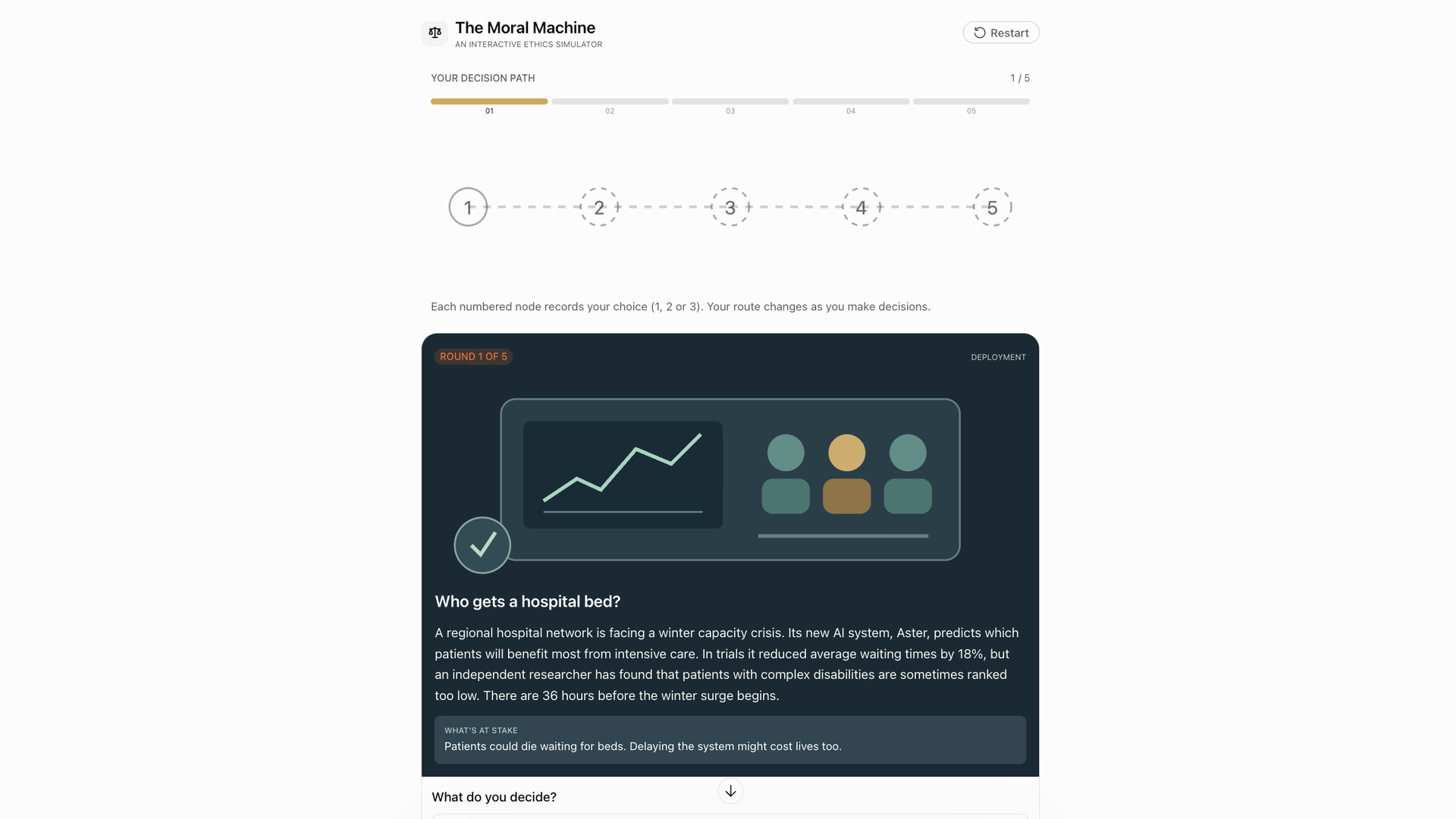
"Build an interactive ethical dilemma simulator. I want to explore difficult decisions involving artificial intelligence, privacy, technology and human behavior. Create an interface that presents me with a realistic, thought-provoking scenario and asks me to choose between possible actions. Give me a final breakdown of my decisions through different ethical frameworks."
My initial instinct with these experiments was to create cool little apps and tools similar to ones I'd seen before. Which makes sense, but I'm not entirely comfortable with the idea of using AI to recreate other people's work, even if I intentionally make things very different.
So I wondered whether I could try something a little more unusual, using the interactive UI to create a question-based experience. A lot of my work involves encouraging people to think more deeply about AI, so this seemed like a good opportunity to explore some of the ethical questions surrounding it.
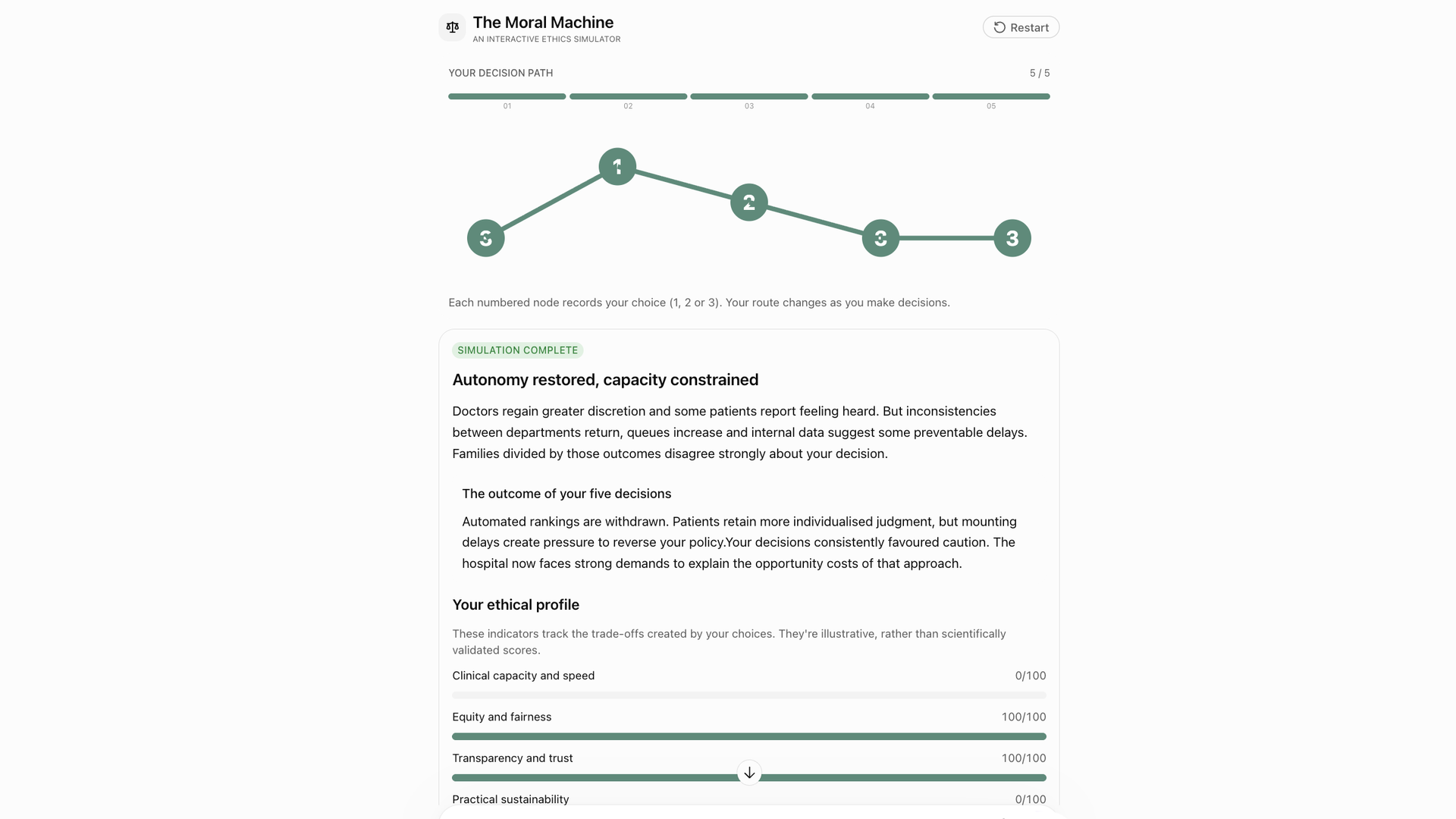
I really enjoyed the results of this one. ChatGPT created an interactive set of questions then charted the results. The dilemmas it chose were interesting and topical. And having to make decisions and then see them analyzed through different ethical frameworks genuinely got me thinking.
But I did wonder how deeply ChatGPT can really explore ethics. Sure, it can explain philosophical theories and apply them to different situations. But how far does that get us when we're asking a system without its own moral experience to help us navigate complicated human decisions?
So although I enjoyed the results of this one, I did question whether they mean anything. Which is very meta for a tool designed to get us thinking about things in different ways.
3. A life decision simulator
Prompt:
"Create an interactive 'What If?' life simulator. I want to explore how different lifestyle decisions affect my finances and free time over the next five years. Give me options for making changes to annual income, monthly living costs, weekly working hours, savings and investment returns. Let me play around with different scenarios, like only working four days a week, taking a six-month sabbatical, moving somewhere 25% cheaper and increasing my income by 15%."
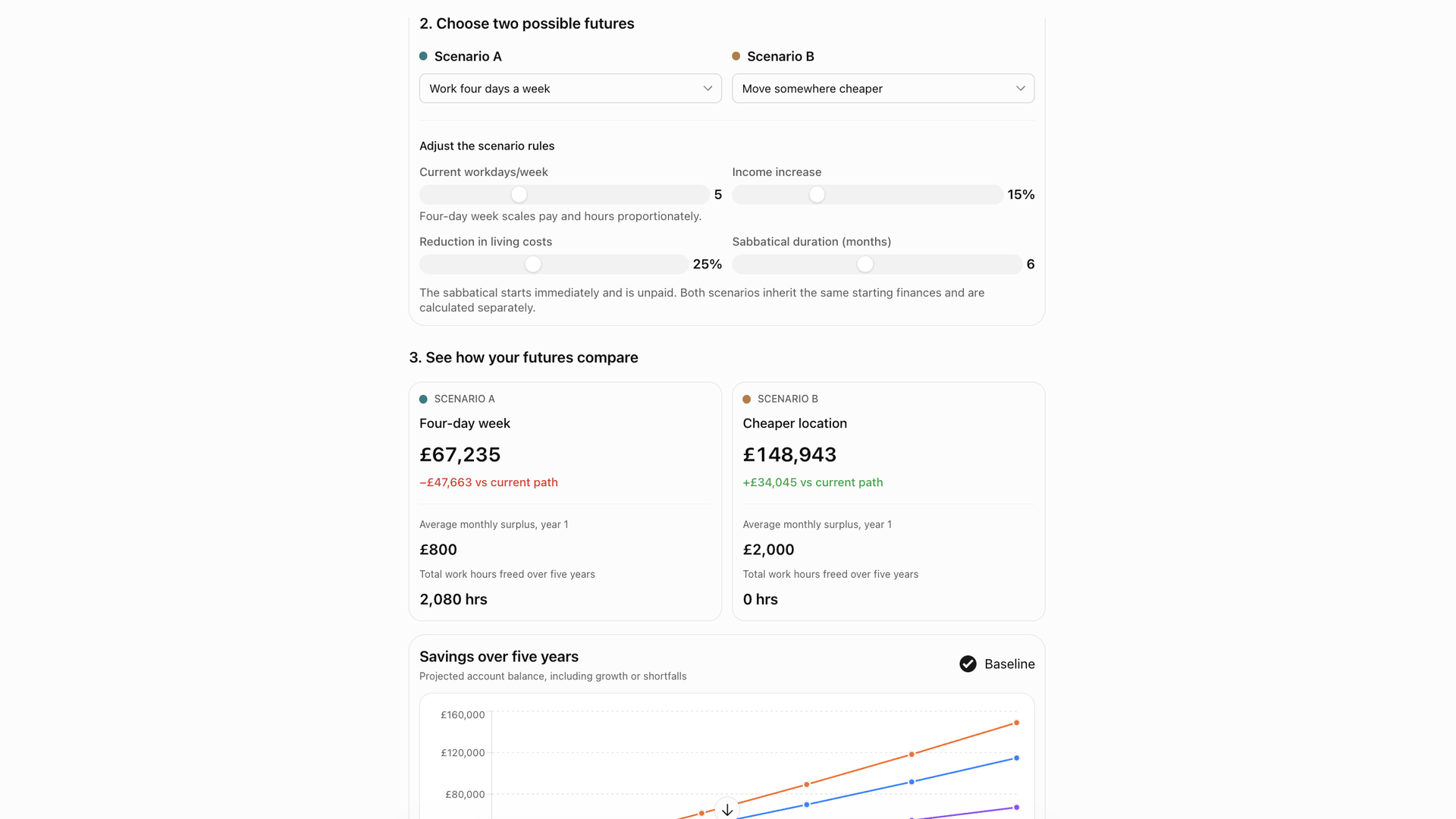
A lot of people have been telling me recently that they turn to AI for life advice. I've written about people who use ChatGPT like a life coach before, and I'm still very wary of them relying on it to make important personal decisions.
But it got me thinking. What if ChatGPT could help you work through those decisions using actual numbers, rather than simply offering advice?
I loved how this one turned out. ChatGPT presented all of the parameters I specified through a series of sliders that then updated the results in real-time.
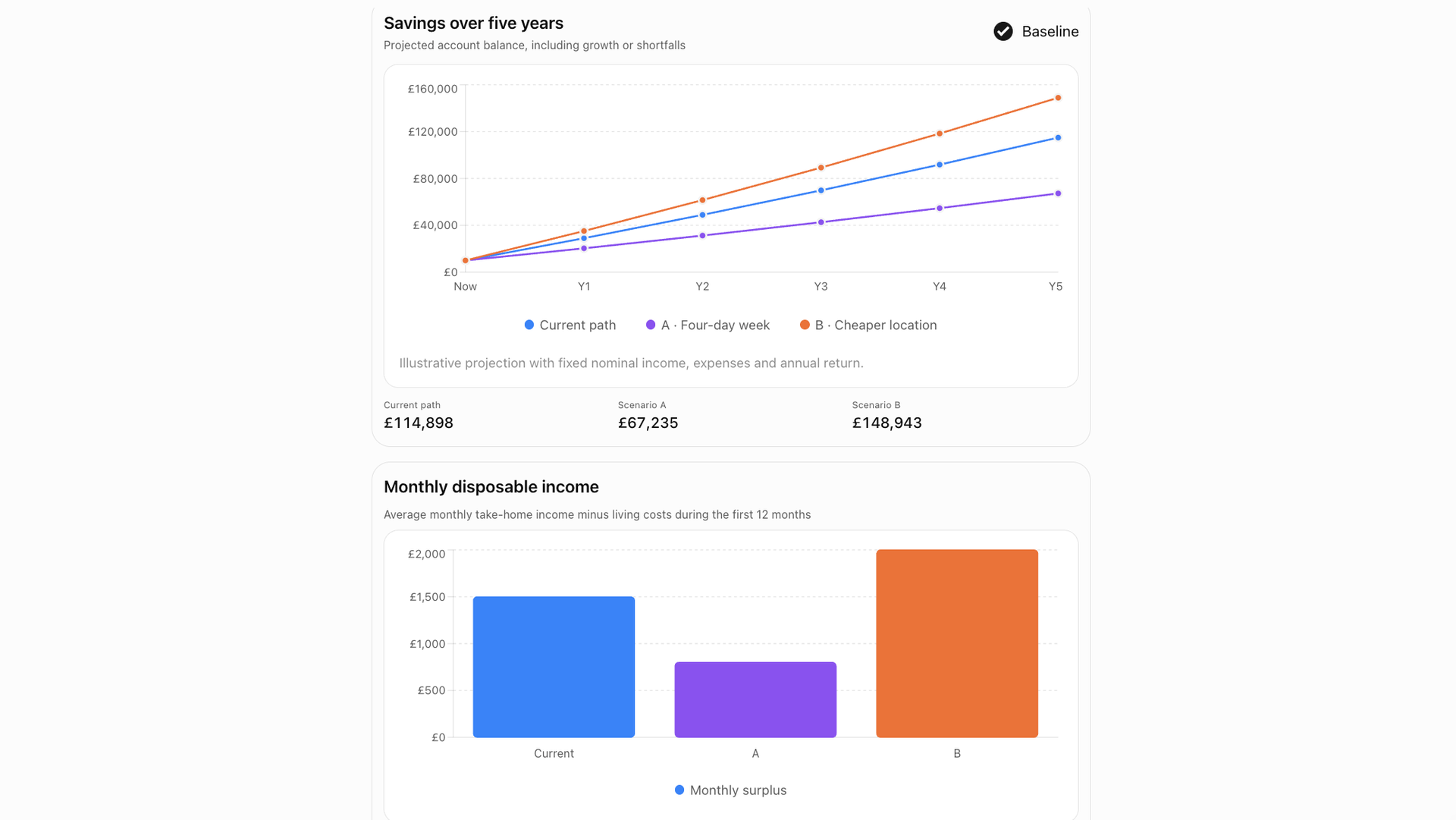
It was great to see how easy it was to make small adjustments to my circumstances and immediately see how they might affect my finances and free time over the next five years. I could experiment with different scenarios, compare the results and visualize the potential trade-offs much more clearly.
I think this could be even more useful with further customization. Of course, the results are only as reliable as the assumptions and calculations behind them, which I haven't independently verified. But as a way to explore different possibilities and get you thinking about decisions from another angle, I can see the appeal.
4. An interactive solar system
Prompt:
"Create an interactive solar system simulator. Show the Sun, Earth, Mars and Jupiter, with their orbits visualized. Give me sliders to change the Sun's mass, the Earth's orbital distance and the speed of time. I want buttons to reset the simulation and choose preset experiments, like 'What if the Sun had twice its mass?' and 'What if Earth moved 20% closer?' Update the visualization and show the predicted consequences for orbital period, gravitational force and planetary conditions."
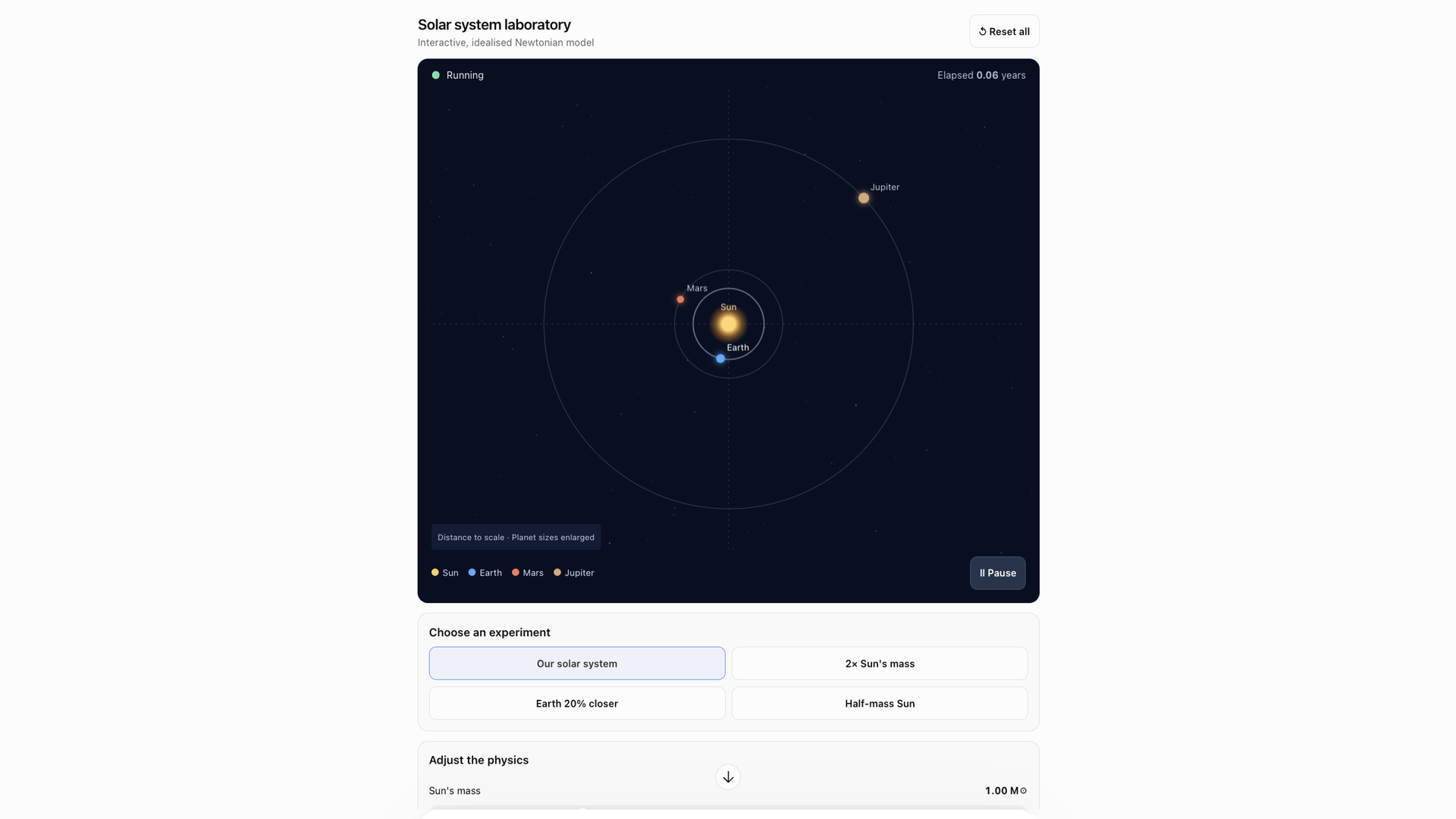
For this one, I decided to get really specific. Rather than simply describing the tool I wanted, I gave ChatGPT detailed instructions about the buttons, sliders and controls I wanted it to include.
In my other experiments, I'd given ChatGPT a fair bit of creative freedom, so it was interesting to see how well it could follow more precise instructions, too.
I particularly liked the potential of this one as a learning tool. For example, if you're studying the solar system, you could create your own simulations, experiment with different variables and see how they affect the planets and their orbits.
However, the problem is I couldn't tell just by looking at it whether the physics or calculations were accurate. That's really worth remembering here before we get too excited. A convincing visualization doesn't necessarily mean the science behind it is correct. That's definitely something to bear in mind if you're using tools like this to learn.
5. A holiday planning dashboard
Prompt:
"Build me an interactive holiday planner. Imagine I’m planning a 7-day trip to Lisbon for two people. Create a visual itinerary with an interactive map, daily activity cards, estimated spending and a running budget total. Make the itinerary and budget update when I change my preferences."

The last time I seriously consulted ChatGPT about travel, it started making up flights. But I know this is another common reason people turn to AI, which is why I wanted to see what it could create.
It came up with a travel guide with a few different parts, including a budget breakdown and an itinerary, which could both be adjusted. Now, the itinerary itself wasn't particularly exciting, and I think you'd find suggestions with a lot more personality and local knowledge on travel blogs. But I could see the appeal of having everything in one interactive dashboard, especially if you customized it around your own interests and budget.
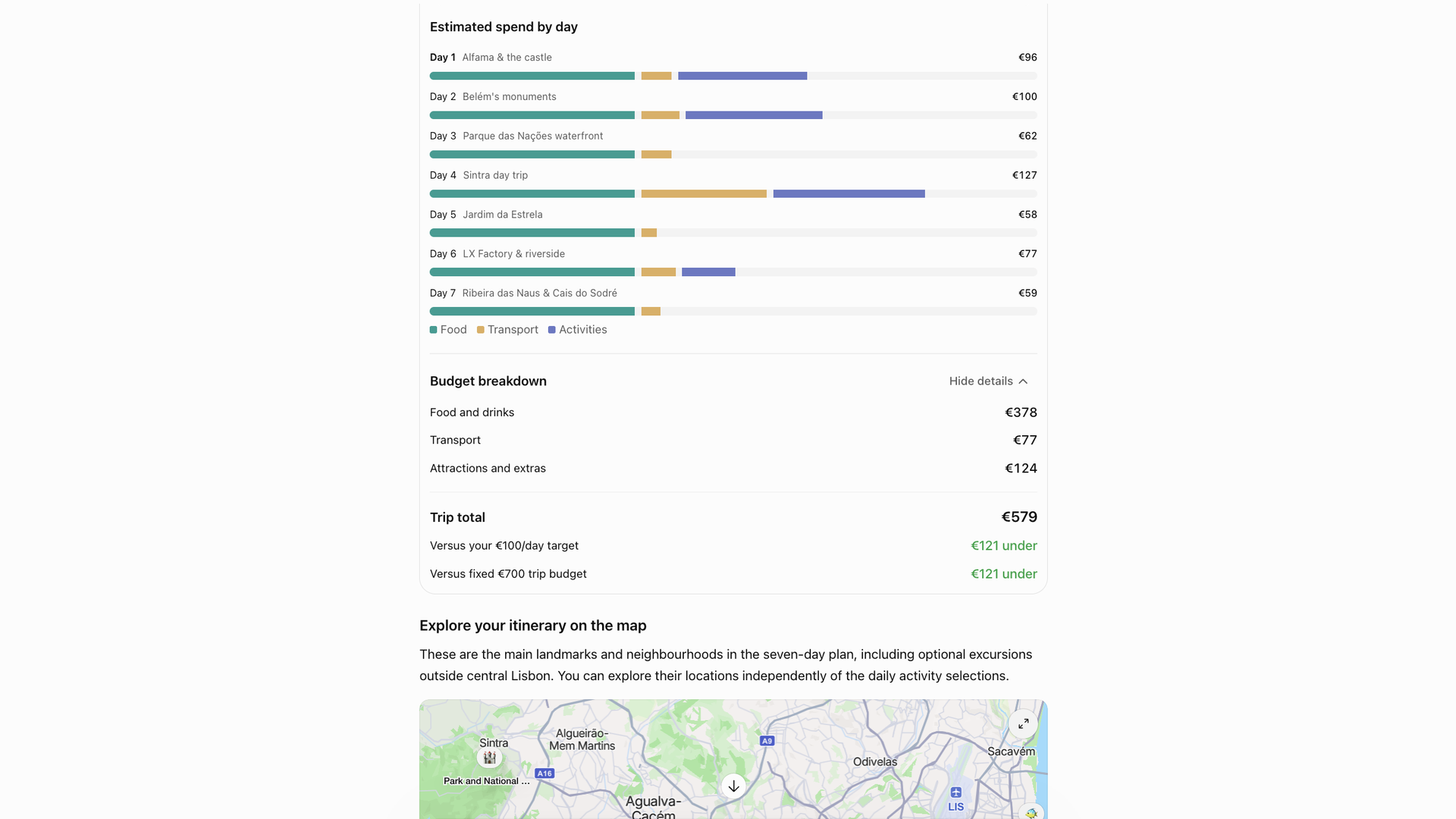
This was fun to play around with, and I think the most useful feature was being able to adjust the budget and preferences and immediately see how that affected the itinerary and estimated costs. That's something I can imagine being genuinely handy when weighing up different options.
I can see myself using something like this to play around with ideas and work out what I can afford. But given ChatGPT's track record with my travel plans, I won't be booking anything without checking the details myself first.
6. Color palette designer
Prompt:
"Create an interactive color palette designer. Take this photo and analyze the main colors in the image and build a visual interface that lets me experiment with different color combinations. Include the hex color code with each so I can use this when I redesign my website. Add interactive controls."
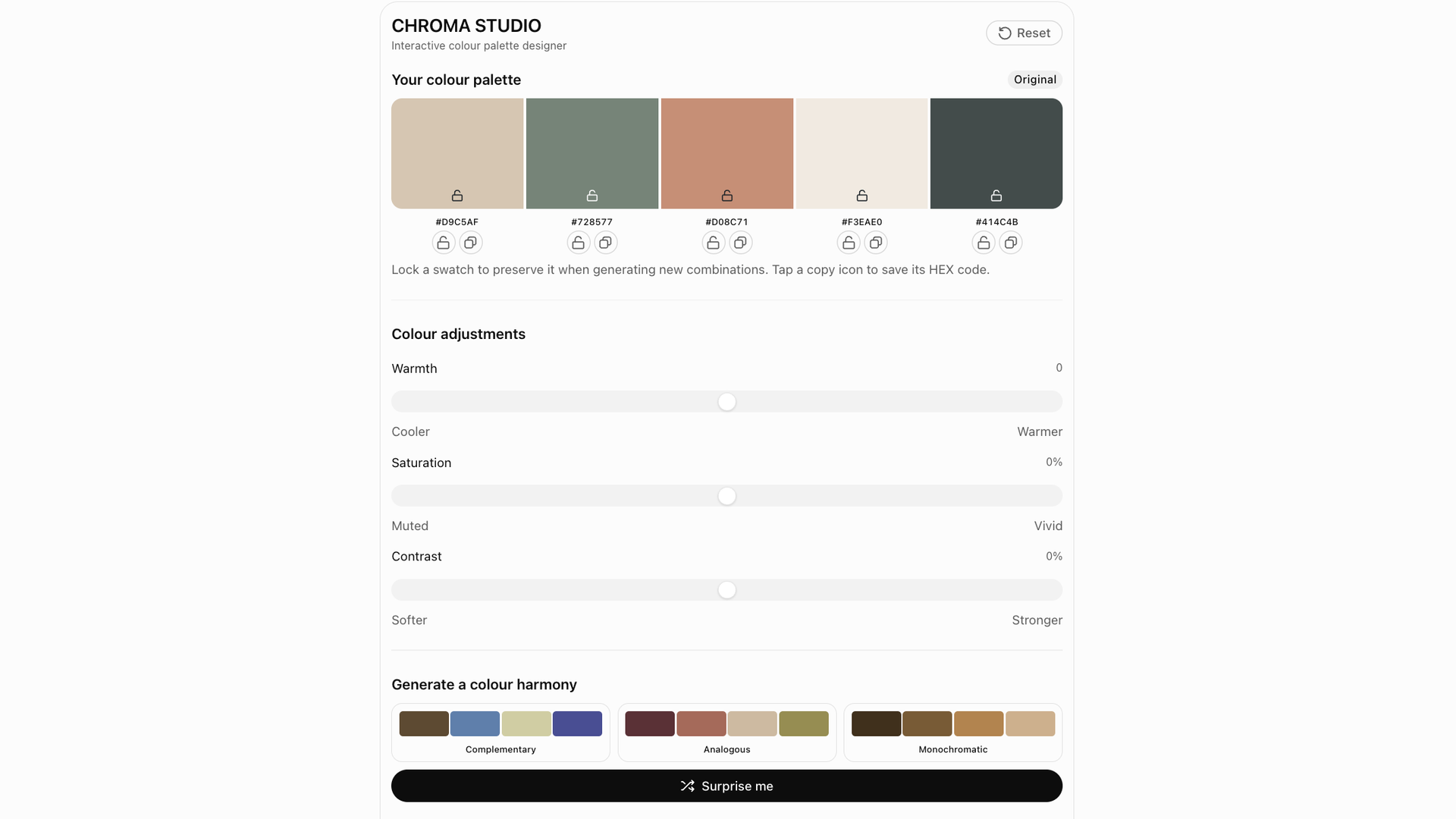
I'm redesigning my website at the moment, but I don't naturally have much of an eye for color. I've used color palette websites before, but I wanted something with a bit more flexibility and this actually worked really well.
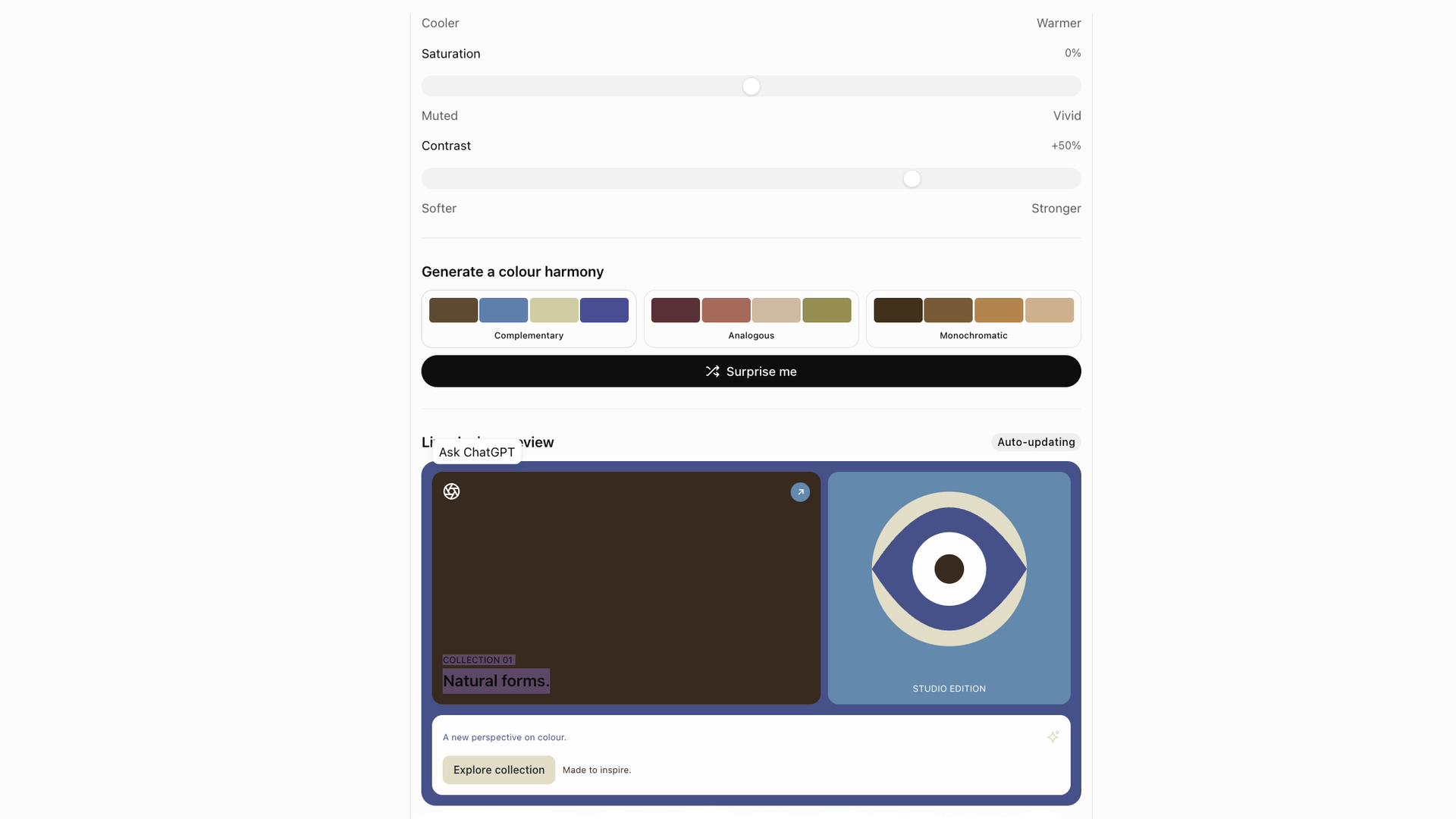
Out of all the experiments, this is probably the one I'm most likely to keep using. I liked being able to pull colors directly from an image, see the HEX codes and then tweak the combinations in a more interactive way. It felt practical rather than just novel.
I can see myself continuing to refine this one to get it closer to what I need. That said, I'd still want to sense check any palette before using it properly, especially for things like readability, contrast and accessibility.
All of these tools were fun to experiment with. But they weren't all equally useful. Some felt genuinely practical while others were a little more gimmicky. I got excited about a few of them when I saw they’d first been created and never thought to revisit them.
What stood out to me the most was that the best results came when I treated ChatGPT less like a magic machine and more like something I needed to guide carefully. If you want a tool that's actually useful from the Interactive UI feature, rather than just impressive for a few minutes, I think you have to be willing to tweak the prompt, customize the controls and iterate on the result.
I also think it’s important not to mistake the fact these tools look slick and interactive for them being more trustworthy than they necessarily are. This mattered less in the gaming experiment but a convincing interface doesn’t necessarily mean accurate calculations, reliable travel advice or sound scientific modelling, so a bit of caution here is still essential.
So yes, I might keep using some of them. I can see real potential in ideas like the color palette designer or the life decision simulator, especially because of how customizable they are. But there's also a reason dedicated apps still exist. In many cases, they're still more reliable, refined and most of the time better suited to the job.