
❌

Reading view

There are new articles available, click to refresh the page.

​​​​What’s new in Microsoft Security: July 2026

Every organization needs security that protects end to end with the speed and scale of AI. Microsoft’s vision is simple: security should be ambient and autonomous, just like the AI it protects.

As organizations scale AI and expand across environments, security teams need protection that covers every surface. This month’s updates help security and IT teams secure their AI environments, use AI to defend at speed and scale, and strengthen the foundations that AI-powered operations depend on. Here’s what’s new:

Project Perception brings agentic defense to security operations

Project Perception, newly announced, is a coordinated system of specialized agents, cybersecurity-focused models, and enterprise-wide signals that transform how security operates. The agents work as a team: red team agents expose weaknesses, blue team agents investigate cyberthreats, and green agents harden what’s found. These multi-agent autonomous workflows work as a team to operate in continuous loops to execute end-to-end security workflows.
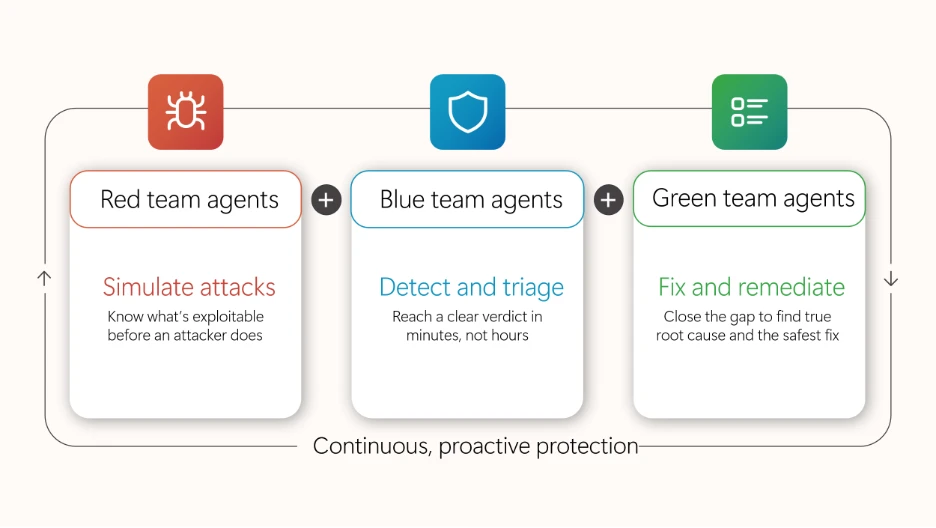
Diagram illustrating roles of Red, Blue, and Green team agents in continuous, proactive protection. Red team simulates attacks to identify exploits, Blue team detects and triages threats quickly, and Green team fixes and remediates issues to close gaps and ensure safe resolution.

Microsoft Defender secures the full AI attack surface, from inbox to cloud

Expanded Microsoft Defender protections are designed to reduce risks associated with day-to-day AI interactions, from email inboxes to cloud agent environments. New prompt injection protection in Microsoft Defender, now in preview, identifies and isolates emails containing malicious AI instructions before delivery, reducing the risk of prompt injection attacks reaching the inbox. Unified Defender posture and runtime protection for cloud agents in Microsoft Agent 365 consolidates security posture assessment and runtime protection for Microsoft Foundry, Microsoft Copilot Studio, and third party-managed agents, helping teams reduce AI-specific risk across the agent estate.

Accelerate detection, prioritization, and response with AI embedded in SecOps workflows

Security teams can accelerate detection, prioritization, and response to cyberthreats with AI embedded directly into security operations (SecOps) workflows through Microsoft Defender. Threat intelligence enhancements, including Microsoft Defender Threat Intelligence convergence and an enhanced Threat Intelligence Agent, bring more out-of-the-box intelligence and automation into the unified SecOps workflow, so teams can move from summary to action.

Strengthen the cloud, code, and identity foundations AI depends on

Microsoft Defender is strengthening the foundational protections that AI-era operations depend on across cloud, code, and identity. Cloud Security Posture Management extends coverage to serverless containers, giving teams visibility and continuous posture assessment across containerized workloads running on Azure Container Apps, Azure Container Instances, and Amazon Web Services Elastic Container Service (AWS ECS) on Fargate. New interconnected experiences between Defender and Microsoft Entra empower the security operations center (SOC) to disable compromised identities directly using a role-based access control (RBAC) mode that maintains least privilege. Microsoft Defender Experts services are also expanding: Microsoft Defender Experts Threat Intelligence delivers human-led, curated insight into the cyberthreats most relevant to each organization, and Microsoft Defender Experts MDR extends expert-run detection and response beyond the Microsoft estate into third-party and multicloud signals through Microsoft Sentinel.

Microsoft Entra strengthens identity across the AI-powered enterprise

Strengthen identity foundations for AI-powered operations

New capabilities in Microsoft Entra are designed to strengthen the identity foundations that AI-powered operations depend on. Tenant governance helps organizations discover, manage, and govern tenants across their environment with centralized policies and cross-tenant delegated administration. Microsoft Entra ID is making passkeys the default authentication experience, which helps reduce reliance on SMS and voice, strengthens phishing-resistant security, and makes for an easier transition away from Microsoft-provided telecom delivery, which will retire in 2027. Through new interconnected Entra and Defender experiences, identity and access management and SOC teams share user experience, RBAC, and agentic workflows that eliminate product seams so identity and security operations can work together.

Protect sensitive data in motion across software as a service (SaaS) and AI apps with Microsoft Purview and Microsoft Entra

Microsoft Purview now integrates with Microsoft Entra Internet Access to extend data security to the network layer, enabling real-time protection of sensitive data shared with unmanaged cloud and AI apps over the network. For example, when an employee attempts to upload sensitive customer data or proprietary information, including text and files, into shadow AI apps, sharing is detected and blocked before the data is leaked from the organization. Organizations now have a unified Microsoft solution to gain visibility into where organizational data is shared externally, to detect and block sensitive data in transit, and to enable consistent data protection across their environment without relying on third-party solutions.

Microsoft Purview strengthens data security, compliance, and investigation for AI

A new Microsoft Purview Data Loss Prevention (DLP) for Microsoft 365 Copilot protection, available in preview, now gives data security teams greater control over how Copilot leverages email content, given external sources can introduce sensitive, third-party, or unvetted information that organizations may not want to rely on. Now admins can exclude emails from external senders from being referenced, summarized, or used as grounding data for Copilot. For example, with this DLP policy in place, an employee working with an external collaborator can still rely on Copilot to leverage internal insights, while external conversations are automatically excluded from Copilot-generated responses. With the native integration between Microsoft Purview and Microsoft 365 Copilot, organizations can extend controls to AI interactions with minimal additional configuration, resulting in a more predictable and policy-aligned AI environment.

A new centralized Microsoft Purview Insider Risk Management alert experience simplifies the prioritization of the most pressing data risks by bringing agentic alert triage, enriched user details, and expanded analysis capabilities (such as notes infused on the Insider Risk Management case) into a single view. Helping power this experience, the Data Security Triage Agent includes an advanced AI reasoning layer, now generally available, that performs deeper, multi-step analysis across user, device, and data activity signals to surface the incidents most likely to require investigation while reducing noise. Analysts can filter across classic and Data Security Triage Agent attributes on a single page, preview agent summaries and user details without switching views, and document findings while the system automatically records status changes and escalations to maintain a clear investigation history. Together, the Insider Risk Management alert experience and Data Security Triage Agent help security teams investigate faster and with greater confidence.
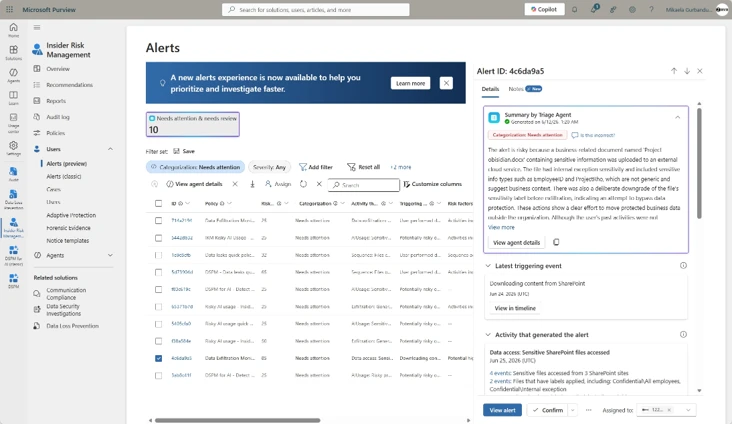
The unified Insider Risk Management alerts list, showing inline agent summaries, the new Categorization column, and combined classic and agent filtering on a single page.

Advanced endpoint management now broadly available

As of July 1, 2026, the capabilities of the Microsoft Intune Suite are included in Microsoft 365 E5, with select capabilities also available in Microsoft 365 E3, bringing advanced endpoint management to more organizations without added cost. IT and security teams can now apply advanced endpoint management capabilities to reduce standing admin rights, modernize certificate management, resolve issues quickly, streamline app delivery, and bring AI into workflows with Microsoft Security Copilot in Intune. Together, these capabilities strengthen the endpoint foundations that AI-powered operations depend on. See everything that’s now included in your plan and how to start putting it to work.

Stay In the Loop

Microsoft Security is focused on delivering innovations across our portfolio, along with research-driven insights and reports for the security community. In the Loop posts are your reliable source of what’s new across Microsoft Security and what it means for your security strategy. Check back for the next drop.

To learn more about Microsoft Security solutions, visit our website. Bookmark the Security blog to keep up with our expert coverage on security matters. Also, follow us on LinkedIn (Microsoft Security) and X (@MSFTSecurity) for the latest news and updates on cybersecurity.

The post ​​​​What’s new in Microsoft Security: July 2026 appeared first on Microsoft Security Blog.
​​​​What’s new in Microsoft Security: July 2026

Every organization needs security that protects end to end with the speed and scale of AI. Microsoft’s vision is simple: security should be ambient and autonomous, just like the AI it protects.

As organizations scale AI and expand across environments, security teams need protection that covers every surface. This month’s updates help security and IT teams secure their AI environments, use AI to defend at speed and scale, and strengthen the foundations that AI-powered operations depend on. Here’s what’s new:

Project Perception brings agentic defense to security operations

Project Perception, newly announced, is a coordinated system of specialized agents, cybersecurity-focused models, and enterprise-wide signals that transform how security operates. The agents work as a team: red team agents expose weaknesses, blue team agents investigate cyberthreats, and green agents harden what’s found. These multi-agent autonomous workflows work as a team to operate in continuous loops to execute end-to-end security workflows.

Diagram illustrating roles of Red, Blue, and Green team agents in continuous, proactive protection. Red team simulates attacks to identify exploits, Blue team detects and triages threats quickly, and Green team fixes and remediates issues to close gaps and ensure safe resolution.

Microsoft Defender secures the full AI attack surface, from inbox to cloud

Expanded Microsoft Defender protections are designed to reduce risks associated with day-to-day AI interactions, from email inboxes to cloud agent environments. New prompt injection protection in Microsoft Defender, now in preview, identifies and isolates emails containing malicious AI instructions before delivery, reducing the risk of prompt injection attacks reaching the inbox. Unified Defender posture and runtime protection for cloud agents in Microsoft Agent 365 consolidates security posture assessment and runtime protection for Microsoft Foundry, Microsoft Copilot Studio, and third party-managed agents, helping teams reduce AI-specific risk across the agent estate.

Accelerate detection, prioritization, and response with AI embedded in SecOps workflows

Security teams can accelerate detection, prioritization, and response to cyberthreats with AI embedded directly into security operations (SecOps) workflows through Microsoft Defender. Threat intelligence enhancements, including Microsoft Defender Threat Intelligence convergence and an enhanced Threat Intelligence Agent, bring more out-of-the-box intelligence and automation into the unified SecOps workflow, so teams can move from summary to action.

Strengthen the cloud, code, and identity foundations AI depends on

Microsoft Defender is strengthening the foundational protections that AI-era operations depend on across cloud, code, and identity. Cloud Security Posture Management extends coverage to serverless containers, giving teams visibility and continuous posture assessment across containerized workloads running on Azure Container Apps, Azure Container Instances, and Amazon Web Services Elastic Container Service (AWS ECS) on Fargate. New interconnected experiences between Defender and Microsoft Entra empower the security operations center (SOC) to disable compromised identities directly using a role-based access control (RBAC) mode that maintains least privilege. Microsoft Defender Experts services are also expanding: Microsoft Defender Experts Threat Intelligence delivers human-led, curated insight into the cyberthreats most relevant to each organization, and Microsoft Defender Experts MDR extends expert-run detection and response beyond the Microsoft estate into third-party and multicloud signals through Microsoft Sentinel.

Microsoft Entra strengthens identity across the AI-powered enterprise

Strengthen identity foundations for AI-powered operations

New capabilities in Microsoft Entra are designed to strengthen the identity foundations that AI-powered operations depend on. Tenant governance helps organizations discover, manage, and govern tenants across their environment with centralized policies and cross-tenant delegated administration. Microsoft Entra ID is making passkeys the default authentication experience, which helps reduce reliance on SMS and voice, strengthens phishing-resistant security, and makes for an easier transition away from Microsoft-provided telecom delivery, which will retire in 2027. Through new interconnected Entra and Defender experiences, identity and access management and SOC teams share user experience, RBAC, and agentic workflows that eliminate product seams so identity and security operations can work together.

Protect sensitive data in motion across software as a service (SaaS) and AI apps with Microsoft Purview and Microsoft Entra

Microsoft Purview now integrates with Microsoft Entra Internet Access to extend data security to the network layer, enabling real-time protection of sensitive data shared with unmanaged cloud and AI apps over the network. For example, when an employee attempts to upload sensitive customer data or proprietary information, including text and files, into shadow AI apps, sharing is detected and blocked before the data is leaked from the organization. Organizations now have a unified Microsoft solution to gain visibility into where organizational data is shared externally, to detect and block sensitive data in transit, and to enable consistent data protection across their environment without relying on third-party solutions.

Microsoft Purview strengthens data security, compliance, and investigation for AI

A new Microsoft Purview Data Loss Prevention (DLP) for Microsoft 365 Copilot protection, available in preview, now gives data security teams greater control over how Copilot leverages email content, given external sources can introduce sensitive, third-party, or unvetted information that organizations may not want to rely on. Now admins can exclude emails from external senders from being referenced, summarized, or used as grounding data for Copilot. For example, with this DLP policy in place, an employee working with an external collaborator can still rely on Copilot to leverage internal insights, while external conversations are automatically excluded from Copilot-generated responses. With the native integration between Microsoft Purview and Microsoft 365 Copilot, organizations can extend controls to AI interactions with minimal additional configuration, resulting in a more predictable and policy-aligned AI environment.

A new centralized Microsoft Purview Insider Risk Management alert experience simplifies the prioritization of the most pressing data risks by bringing agentic alert triage, enriched user details, and expanded analysis capabilities (such as notes infused on the Insider Risk Management case) into a single view. Helping power this experience, the Data Security Triage Agent includes an advanced AI reasoning layer, now generally available, that performs deeper, multi-step analysis across user, device, and data activity signals to surface the incidents most likely to require investigation while reducing noise. Analysts can filter across classic and Data Security Triage Agent attributes on a single page, preview agent summaries and user details without switching views, and document findings while the system automatically records status changes and escalations to maintain a clear investigation history. Together, the Insider Risk Management alert experience and Data Security Triage Agent help security teams investigate faster and with greater confidence.

The unified Insider Risk Management alerts list, showing inline agent summaries, the new Categorization column, and combined classic and agent filtering on a single page.

Advanced endpoint management now broadly available

As of July 1, 2026, the capabilities of the Microsoft Intune Suite are included in Microsoft 365 E5, with select capabilities also available in Microsoft 365 E3, bringing advanced endpoint management to more organizations without added cost. IT and security teams can now apply advanced endpoint management capabilities to reduce standing admin rights, modernize certificate management, resolve issues quickly, streamline app delivery, and bring AI into workflows with Microsoft Security Copilot in Intune. Together, these capabilities strengthen the endpoint foundations that AI-powered operations depend on. See everything that’s now included in your plan and how to start putting it to work.

Stay In the Loop

Microsoft Security is focused on delivering innovations across our portfolio, along with research-driven insights and reports for the security community. In the Loop posts are your reliable source of what’s new across Microsoft Security and what it means for your security strategy. Check back for the next drop.

To learn more about Microsoft Security solutions, visit our website. Bookmark the Security blog to keep up with our expert coverage on security matters. Also, follow us on LinkedIn (Microsoft Security) and X (@MSFTSecurity) for the latest news and updates on cybersecurity.

The post ​​​​What’s new in Microsoft Security: July 2026 appeared first on Microsoft Security Blog.
New Forrester Total Economic Impact™ study projects a 124% ROI from unifying with Microsoft Security

Across many industries, organizations are unifying security and putting AI agents to work. Security teams are utilizing agents that reason, decide, and act on their behalf, under their governance. At Microsoft, we see this firsthand—more than 80% of the Fortune 500 are already using AI.1 The promise of this moment is enormous. The responsibility that comes with it is just as significant. This year, Microsoft commissioned Forrester Consulting to conduct a Total Economic Impact™ (TEI) study for our AI-first, end-to-end security platform.

What end-to-end security delivers

Based on in-depth interviews with a survey of 362 customers and 11 security decision-makers using Microsoft Security solutions, the Forrester study revealed the impact of consolidating with Microsoft Security. To model the financial impact, Forrester aggregated insights into a single composite organization—a global business-to-business (B2B) company with 10,000 employees—and constructed a TEI framework that quantifies costs, benefits, and risks. Through its study, Forrester projected that an organization would experience the following over three years.

  • Up to 30% reduction in the likelihood of a breach
    Integrated protection across identities, endpoints, data, and infrastructure helps prevent attacks before they succeed.
  • Up to 25% reduction in cost to remediate remaining attacks
    End-to-end visibility and coordinated response cut the cost of incidents that do occur.
  • Up to 23% reduced annual technology spend
    Consolidating point solutions eliminates redundant tooling and the licensing and services that come with it.
  • Up to 32% avoided headcount growth
    Automation, integration, and self-service let teams scale without scaling proportionally.
  • 20% lower total cost of ownership—$3.0M in TCO savings
    A unified platform reduces the operating drag of running disconnected tools.
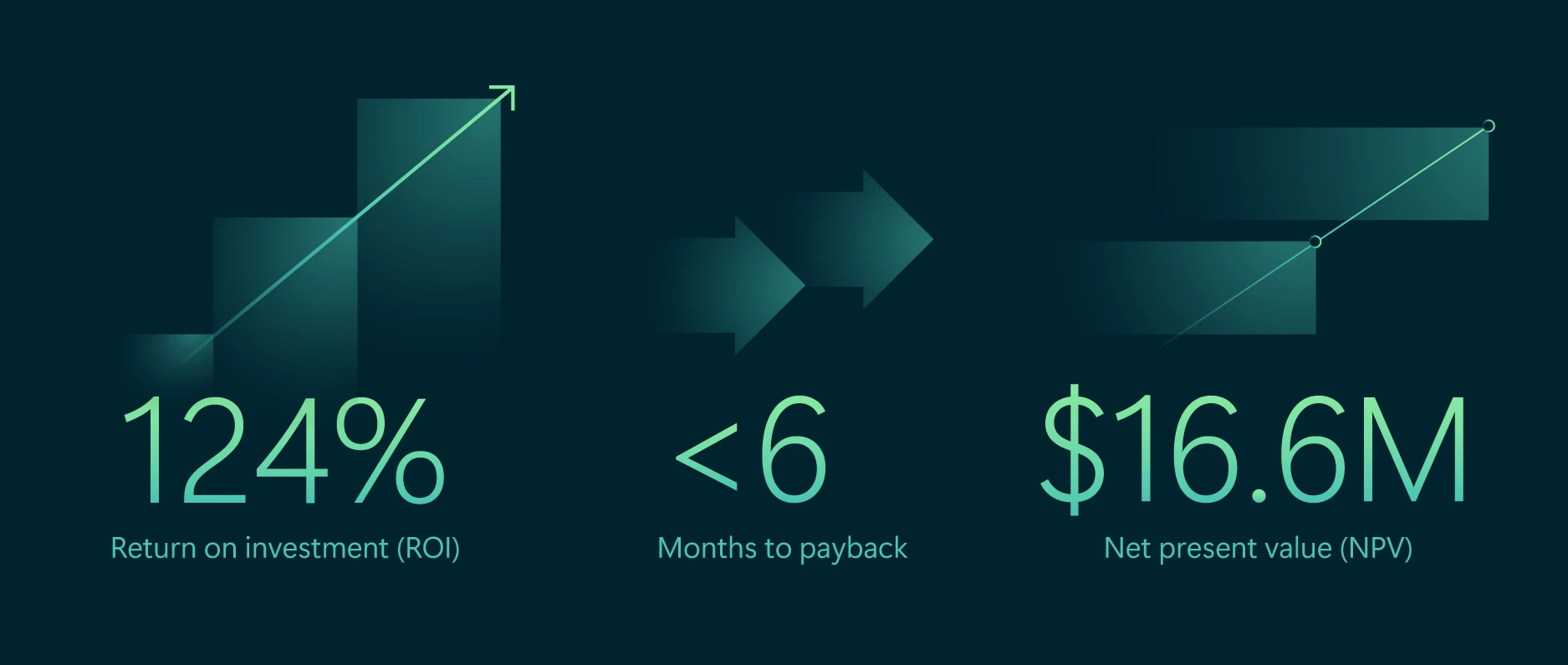
Graphic showing results from a commissioned Forrester Total Economic Impact (TEI) study: 124% return on investment, under six-month payback period, and $16.6 million net present value.

Based on interviews, Forrester’s financial analysis found that a composite organization experiences $30.0 million in benefits over three years versus $13.4 million in costs, resulting in a net present value (NPV) of $16.6 million and an ROI of 124%.

Read the full Forrester TEI study for a complete methodology, assumptions, and detailed financial analysis.

Microsoft Security allows us to deploy modern solutions and be on the leading edge of technologies at enterprise scale.” 

—Senior information security officer, NGO

Value beyond what’s measured

The numbers tell part of the story. What we hear from defenders and what the Forrester study reinforces is that the real value of consolidation shows up in the work itself: faster decisions, less friction, more time spent on the cyberthreats that matter. That’s especially true as AI changes both what cyberattackers can do and what defenders can build.

  • Security for AI – New solutions like Microsoft Agent 365 with foundations of Microsoft Security, extend identity, governance, and control to AI agents, so customers can adopt them with confidence. 
  • AI for Security – Microsoft Security Copilot, together with Microsoft Defender, Entra and Purview provides AI-assisted insights to help defenders investigate, prioritize, and respond to security incidents.
  • Security foundations for Zero Trust – Identity and access controls work consistently across the environment, without stitching together multiple vendors. 
  • Simplified hiring and skill development – Building on tools security teams already know makes it easier to recruit, onboard, and grow talent. 
  • Improved employee experience – Single sign-on and streamlined device onboarding reduce friction, so people can focus on their work. 

I like Microsoft because it’s the only vendor that provides a single view or a single location for all the security needs: cloud posture, endpoint protection management, data loss prevention. You don’t have that many vendors today that have the Swiss Army Knife-style platform.”

—Regional chief information security officer (CISO), engineering

An evolving playbook for the agentic era

An integrated approach to security is especially important as threat complexity grows—some organizations use an average of 45 security tools,2 which can increase operational overhead and limit visibility. At the same time, AI-powered threats are accelerating. As human-led AI agents begin to respond to threats, a connected security model becomes even more critical—extending consistent protections not only to traditional surfaces, but also to emerging layers such as prompts, models, plug-ins, and the agents themselves.

Security as the core primitive of the AI stack

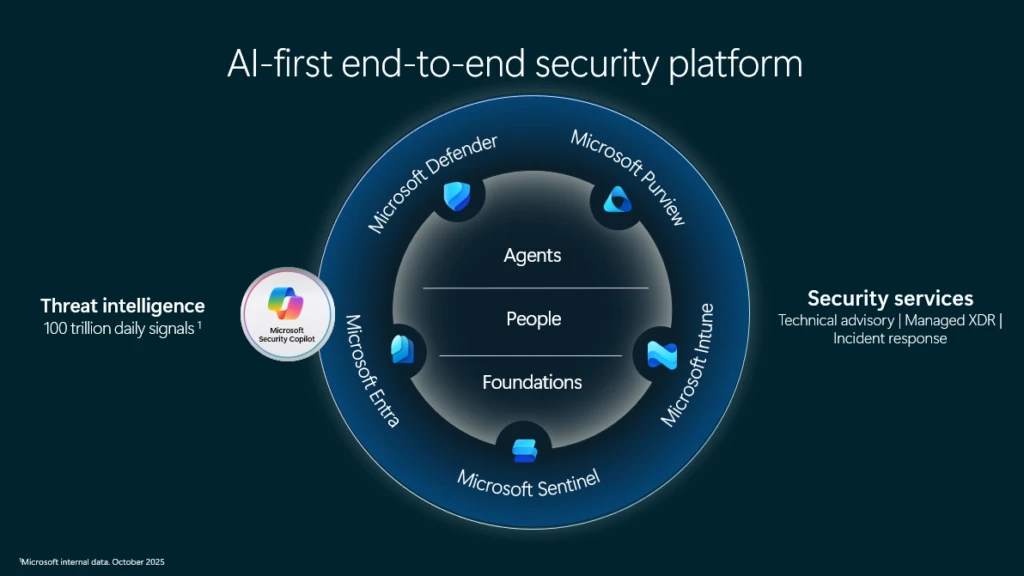
As security systems evolve to meet the demands of the agentic era, we see security differently. In the agentic era, security should be the core primitive of the AI stack—woven into and around every layer, ambient, and autonomous, like the AI it protects.

Diagram of a Microsoft AI-first end-to-end security platform, illustrating integrated solutions including Microsoft Defender, Sentinel, Entra, Intune, and Purview, supported by security services and threat intelligence across agents, people, and foundational layers.

This principle is why we built our platform end-to-end—from identity and endpoint management to data security, compliance, and threat protection—creating an agentic defense platform that unifies the security operations center (SOC) and uses AI to help defenders operate at machine speed with Microsoft Security Copilot. Microsoft Agent 365 extends on this foundation as the control plane for agents, giving security, IT, and business teams the visibility and controls they need to govern agents at scale. Built to work together natively, these aren’t separate products that happen to integrate. They’re a single platform designed for end-to-end security in the age of AI.

Microsoft has done an excellent job developing security agents such as identity and intelligence… Microsoft is innovating as fast as tech startups in the space.” 

—Global CISO, professional services

Built to secure what comes next

The era of agentic AI doesn’t just raise the stakes for security. It changes what security should be. Alongside our customers and our partners, we’re building the future of security. Read the full Forrester Total Economic Impact™ of Microsoft Security study. Explore end-to-end Security for AI to learn how to safeguard your AI platforms, apps, and agents with comprehensive solutions.

To learn more about Microsoft Security solutions, visit our website. Bookmark the Security blog to keep up with our expert coverage on security matters. Also, follow us on LinkedIn (Microsoft Security) and X (@MSFTSecurity) for the latest news and updates on cybersecurity.


1Cyber Pulse: An AI Security Report. Microsoft Security Insider.

2Gartner Identifies the Top Cybersecurity Trends for 2025,” March 3, 2025. https://www.gartner.com/en/newsroom/press-releases/2025-03-03-gartner-identifiesthe-top-cybersecuri…

The post New Forrester Total Economic Impact™ study projects a 124% ROI from unifying with Microsoft Security appeared first on Microsoft Security Blog.
Microsoft Build 2026: Securing code, agents, and models across the development lifecycle

Today, developers and security teams are caught in growing tension. AI is accelerating development and introducing new issues around insecure code, opaque models, data exposure, and compliance. Add the challenges of shadow AI and tool sprawl and the result is a widening gap between innovation and control. As developers move faster, security teams struggle to keep up with visibility, governance, and oversight. The resulting friction across the development lifecycle is forcing a tradeoff between speed and safety that doesn’t need to exist. Security needs to move upstream to become part of how developers actually work: built into their day-to-day tools and connected to the tools security teams use.

At Microsoft Build 2026, we are announcing new security tools and capabilities to give developers clear guidance in real time, scale with the complexity of tasks, and provide security teams with a consistent view across the full lifecycle so innovation can move fast and securely without the business losing control. Learn more about our solutions to help secure your code, secure your agents, and secure your models.

Secure your code

Today’s headlines reflect the tension around the power of AI models and the potential threat they pose when used to find and exploit vulnerabilities. It is forcing a shift as security teams look for solutions to help them safely harness the power of these models. At the same time, developers want to use these same models to efficiently identify real, exploitable risk and remediate it within their flow of work. That’s why we developed the Microsoft Security multi-model agentic scanning harness (codename MDASH) and added native integration between Microsoft Defender and GitHub Code Security (part of the former GitHub Advanced Security suite) to help both security and developer teams identify and close gaps early.

Discover and validate exploitable vulnerabilities with codename MDASH

The new Microsoft Security multi-model agentic scanning harness (codename MDASH) is available in an expanded preview for eligible organizations and now includes integration with Microsoft Defender. This new agentic security system orchestrates a pipeline of more than 100 specialized AI agents using an ensemble of models to discover, validate, and prove exploitability across codebases written in popular programming languages.

This approach is unique in the industry. Our multi-model agentic scanning harness uses a configurable panel of models, ranging from state-of-the-art (SOTA) models as the heavy reasoners, to more cost-effective models for high-volume operations. This allows us to trade speed, recall, and cost, and minimize dependency on any specific model.

The combination of multiple models, hundreds of agents, and over 100 trillion signals a day helps identify real risk over theoretical noise, to help teams focus on what can be exploited. The strategic implication is clear: AI vulnerability discovery has crossed from research curiosity into production-grade defense at enterprise scale, and the durable advantage lies in the agentic system around the model rather than any single model itself. MDASH recently jumped roughly 10% in less than three weeks to a new CyberGym industry benchmark score of 96.55%.

“At Accenture, we’re always looking toward the next frontier in protecting our clients and our enterprise. What Microsoft is building with MDASH reflects a meaningful shift from reactive, rule-based scanning to agentic systems that can reason across complex codebases like a skilled security researcher,” says Kris Burkhardt, Chief Information Security Officer at Accenture. Accenture is one of a select group of Security partners and Microsoft Intelligent Security Association (MISA) members that are engaged in the preview to shape MDASH and accelerate agentic AI vulnerability discovery.

Our partner engagements reflect a shared focus on moving from reactive detection to proactive identification of exploitable risk. “We’re seeing cyber threats evolve rapidly, with AI accelerating both the scale and sophistication of attacks. Microsoft’s investment in MDASH reflects a strong commitment to helping organizations stay ahead of this curve. Based on our early discussions and exposure to the innovation, we see strong potential for MDASH to simplify and strengthen SecOps, helping organizations operate with greater resilience and confidence,” says Morgan Adamski, Principal and Deputy Platform Leader of Cyber, Data, and Tech Risk at PwC US.

Together, we are partnering across the industry to use leading models paired with our platforms and expertise to deliver protection at scale. “We’re excited to work with Microsoft on MDASH because it addresses one of the most pressing challenges our customers face: reducing the time between discovering a vulnerability and taking meaningful action. Microsoft’s role as a trusted security vendor matters here—customers need innovation, but they also need confidence, governance, and a partner they can rely on. Our early experience with MDASH has been encouraging, and we see real opportunity for it to help organizations modernize how they approach vulnerability discovery and remediation,” says Jason Rader, Insight CISO.  

Reach out to your Microsoft account representative for more information on the expanded preview of codename MDASH.

Prioritize and remediate code vulnerabilities with Microsoft Defender and GitHub Code Security

While codename MDASH identifies and validates what’s truly exploitable, the integration between Microsoft Defender and GitHub Code Security (part of the former GitHub Advanced Security suite), now generally available, brings runtime context into development and security workflows so that teams can prioritize and address risks early minimizing the impact to human resources. Vulnerabilities discovered in code are automatically enriched with real production signals, such as internet exposure and data sensitivity to inform prioritization. Developers can then remediate issues using AI-assisted fixes that are generated, assigned, and validated through GitHub Copilot Autofix and the GitHub Copilot cloud agent.

To support responsible, coordinated disclosure of findings that represent both real and potential vulnerabilities, role-based access controls ensure that only authorized individuals can view and act on them. Together, the production signal enrichment, AI-assisted remediation, and secure handling of findings within a single workflow help security and developer teams focus on real risk and enable teams to act quickly.

Secure your agents

Agents are quickly becoming a new layer of the application stack. As developers build agents and move them into production, they need the tools to ship fast without sacrificing security, including built-in identity, governance, and safety testing. Security teams have overlapping needs: visibility into what’s running, control over what agents can access, and consistent governance across clouds and endpoints. Microsoft is delivering new solutions to help.

Build secure agents from day one

At Build 2026, Microsoft is introducing new capabilities to help developers build secure, enterprise-ready agents by default. With the general availability of the Agent 365 SDK, developers can integrate controls directly into their development workflows, bringing observability, access controls, and compliance enforcement into how agents are designed and deployed. This enables teams to build custom agents for any AI platform that are compliant, and enterprise-ready, and compose well with Agent 365.

Security extends beyond development and into how agents run. On Windows, the Microsoft Execution Container (MXC) SDK provides OS-level control over agent execution, giving developers and IT teams the ability to define containment and policy, applied by the OS through isolation technologies such as process and session isolation. Windows 365 for Agents, now generally available, enables you to run any agent in a fully isolated, policy-governed Cloud PC. Native Windows integration with Agent 365 provides a common foundation for observability, security, and governance, including built-in Intune capabilities to set policies that govern agent runtime execution and control how agents operate.

These new capabilities are now in early preview.

Observe, govern, and secure agents at scale with Agent 365—now including local agents

As agents proliferate across environments, gaining visibility and control over them becomes critical. Agent 365 introduces new capabilities to manage agent sprawl and risk, including an Agent 365 Agent Registry that surfaces unmanaged local agents discovered by Microsoft Defender, Microsoft Entra, and Microsoft Intune—all working together. The registry supports more than 20 types of local agents, including coding agents, AI desktop applications, and both local and remote Model Context Protocol (MCP) servers. From there, Intune policies can be used to block common execution methods for OpenClaw agents.

Security teams also need the ability to defend against emerging threats without slowing developer productivity. Microsoft Defender, Entra, and Intune work together to provide the visibility, runtime protections, and context needed to manage agent risk without slowing developer productivity. Defender enables analysts to investigate agent activity using advanced hunting and provides an exposure graph that helps teams understand how agents are connected across the network. Preview of these capabilities coming soon.

Protecting data is foundational to securing agents at scale. Microsoft Purview controls to prevent data exfiltration, Data Security Posture Management risk discovery, and agentic risk detection for coding agents Claude Code, GitHub Copilot, OpenAI Codex, and OpenClaw. This enables visibility on how local agents access sensitive data, runtime protections for risky prompts, and insights into unsafe agent behaviors. Microsoft Purview Audit also logs all agent activity for full traceability. Preview of these capabilities coming soon.

Trust agents with your data

Developers also need direct, real-time insight into data security posture and risk signals associated with the agents they build. With Purview data risk signals embedded in the Foundry Control Plane, generally available, these signals provide guidance to developers on where to enforce protections before sensitive data is exposed. For example, Purview flags in real time when an agent surfaces sensitive financial data during testing and guides developers to mask or restrict access before deployment.

To further reduce risk, Purview introduces runtime data loss prevention (DLP) for agent prompts in Foundry, in preview with Agent 365. This capability detects, blocks, and audits sensitive data before it is processed by the agent, ensuring that sensitive information never reaches AI models.

Secure your models

Before AI reaches production, teams need to verify that the models they depend on are safe. Now developers can inspect model artifacts, whether platform-native or bring-your-own, with Defender AI model scanning, in preview. To help close gaps early model Defender AI model scanning detects and blocks potentially vulnerable or compromised models across registries, workspaces, and CI/CD pipelines to verify model integrity before deployment.

Trust starts with security

There should never be a choice between innovation and safety.

The capabilities announced today span the full development lifecycle: discovering what’s exploitable, governing what’s running, protecting the data AI depends on, and verifying that agents behave as intended before they reach production. Microsoft security is embedded directly into the platforms and workflows developers already use, supporting innovation across Microsoft Foundry, Copilot Studio, GitHub, and open-source frameworks, and bringing discovery and governance to shadow AI.

But real progress in AI depends on more than breakthrough capabilities—it depends on whether organizations can trust the systems they are building and deploying. That is the common thread across the innovations announced at Build 2026 and the principle guiding our approach. Because the future of AI will belong not just to those who move fastest, but to those who can innovate with trust.

To learn more about Microsoft Security solutions, visit our website. Bookmark the Security blog to keep up with our expert coverage on security matters. Also, follow us on LinkedIn (Microsoft Security) and X (@MSFTSecurity) for the latest news and updates on cybersecurity. To learn more about how security is built into the Windows platform, explore the Windows Security book and Windows Server Security book.

The post Microsoft Build 2026: Securing code, agents, and models across the development lifecycle appeared first on Microsoft Security Blog.

Microsoft Build 2026: Securing code, agents, and models across the development lifecycle

Today, developers and security teams are caught in growing tension. AI is accelerating development and introducing new issues around insecure code, opaque models, data exposure, and compliance. Add the challenges of shadow AI and tool sprawl and the result is a widening gap between innovation and control. As developers move faster, security teams struggle to keep up with visibility, governance, and oversight. The resulting friction across the development lifecycle is forcing a tradeoff between speed and safety that doesn’t need to exist. Security needs to move upstream to become part of how developers actually work: built into their day-to-day tools and connected to the tools security teams use.

At Microsoft Build 2026, we are announcing new security tools and capabilities to give developers clear guidance in real time, scale with the complexity of tasks, and provide security teams with a consistent view across the full lifecycle so innovation can move fast and securely without the business losing control. Learn more about our solutions to help secure your code, secure your agents, and secure your models.

Secure your code

Today’s headlines reflect the tension around the power of AI models and the potential threat they pose when used to find and exploit vulnerabilities. It is forcing a shift as security teams look for solutions to help them safely harness the power of these models. At the same time, developers want to use these same models to efficiently identify real, exploitable risk and remediate it within their flow of work. That’s why we developed the Microsoft Security multi-model agentic scanning harness (codename MDASH) and added native integration between Microsoft Defender and GitHub Code Security (part of the former GitHub Advanced Security suite) to help both security and developer teams identify and close gaps early.

Discover and validate exploitable vulnerabilities with codename MDASH

The new Microsoft Security multi-model agentic scanning harness (codename MDASH) is available in an expanded preview for eligible organizations and now includes integration with Microsoft Defender. This new agentic security system orchestrates a pipeline of more than 100 specialized AI agents using an ensemble of models to discover, validate, and prove exploitability across codebases written in popular programming languages.

This approach is unique in the industry. Our multi-model agentic scanning harness uses a configurable panel of models, ranging from state-of-the-art (SOTA) models as the heavy reasoners, to more cost-effective models for high-volume operations. This allows us to trade speed, recall, and cost, and minimize dependency on any specific model.

The combination of multiple models, hundreds of agents, and over 100 trillion signals a day helps identify real risk over theoretical noise, to help teams focus on what can be exploited. The strategic implication is clear: AI vulnerability discovery has crossed from research curiosity into production-grade defense at enterprise scale, and the durable advantage lies in the agentic system around the model rather than any single model itself. MDASH recently jumped roughly 10% in less than three weeks to a new CyberGym industry benchmark score of 96.55%.

“At Accenture, we’re always looking toward the next frontier in protecting our clients and our enterprise. What Microsoft is building with MDASH reflects a meaningful shift from reactive, rule-based scanning to agentic systems that can reason across complex codebases like a skilled security researcher,” says Kris Burkhardt, Chief Information Security Officer at Accenture. Accenture is one of a select group of Security partners and Microsoft Intelligent Security Association (MISA) members that are engaged in the preview to shape MDASH and accelerate agentic AI vulnerability discovery.

Our partner engagements reflect a shared focus on moving from reactive detection to proactive identification of exploitable risk. “We’re seeing cyber threats evolve rapidly, with AI accelerating both the scale and sophistication of attacks. Microsoft’s investment in MDASH reflects a strong commitment to helping organizations stay ahead of this curve. Based on our early discussions and exposure to the innovation, we see strong potential for MDASH to simplify and strengthen SecOps, helping organizations operate with greater resilience and confidence,” says Morgan Adamski, Principal and Deputy Platform Leader of Cyber, Data, and Tech Risk at PwC US.

Together, we are partnering across the industry to use leading models paired with our platforms and expertise to deliver protection at scale. “We’re excited to work with Microsoft on MDASH because it addresses one of the most pressing challenges our customers face: reducing the time between discovering a vulnerability and taking meaningful action. Microsoft’s role as a trusted security vendor matters here—customers need innovation, but they also need confidence, governance, and a partner they can rely on. Our early experience with MDASH has been encouraging, and we see real opportunity for it to help organizations modernize how they approach vulnerability discovery and remediation,” says Jason Rader, Insight CISO.  

Reach out to your Microsoft account representative for more information on the expanded preview of codename MDASH.

Prioritize and remediate code vulnerabilities with Microsoft Defender and GitHub Code Security

While codename MDASH identifies and validates what’s truly exploitable, the integration between Microsoft Defender and GitHub Code Security (part of the former GitHub Advanced Security suite), now generally available, brings runtime context into development and security workflows so that teams can prioritize and address risks early minimizing the impact to human resources. Vulnerabilities discovered in code are automatically enriched with real production signals, such as internet exposure and data sensitivity to inform prioritization. Developers can then remediate issues using AI-assisted fixes that are generated, assigned, and validated through GitHub Copilot Autofix and the GitHub Copilot cloud agent.

To support responsible, coordinated disclosure of findings that represent both real and potential vulnerabilities, role-based access controls ensure that only authorized individuals can view and act on them. Together, the production signal enrichment, AI-assisted remediation, and secure handling of findings within a single workflow help security and developer teams focus on real risk and enable teams to act quickly.

Secure your agents

Agents are quickly becoming a new layer of the application stack. As developers build agents and move them into production, they need the tools to ship fast without sacrificing security, including built-in identity, governance, and safety testing. Security teams have overlapping needs: visibility into what’s running, control over what agents can access, and consistent governance across clouds and endpoints. Microsoft is delivering new solutions to help.

Build secure agents from day one

At Build 2026, Microsoft is introducing new capabilities to help developers build secure, enterprise-ready agents by default. With the general availability of the Agent 365 SDK, developers can integrate controls directly into their development workflows, bringing observability, access controls, and compliance enforcement into how agents are designed and deployed. This enables teams to build custom agents for any AI platform that are compliant, and enterprise-ready, and compose well with Agent 365.

Security extends beyond development and into how agents run. On Windows, the Microsoft Execution Container (MXC) SDK provides OS-level control over agent execution, giving developers and IT teams the ability to define containment and policy, applied by the OS through isolation technologies such as process and session isolation. Windows 365 for Agents, now generally available, enables you to run any agent in a fully isolated, policy-governed Cloud PC. Native Windows integration with Agent 365 provides a common foundation for observability, security, and governance, including built-in Intune capabilities to set policies that govern agent runtime execution and control how agents operate.

These new capabilities are now in early preview.

Observe, govern, and secure agents at scale with Agent 365—now including local agents

As agents proliferate across environments, gaining visibility and control over them becomes critical. Agent 365 introduces new capabilities to manage agent sprawl and risk, including an Agent 365 Agent Registry that surfaces unmanaged local agents discovered by Microsoft Defender, Microsoft Entra, and Microsoft Intune—all working together. The registry supports more than 20 types of local agents, including coding agents, AI desktop applications, and both local and remote Model Context Protocol (MCP) servers. From there, Intune policies can be used to block common execution methods for OpenClaw agents.

Security teams also need the ability to defend against emerging threats without slowing developer productivity. Microsoft Defender, Entra, and Intune work together to provide the visibility, runtime protections, and context needed to manage agent risk without slowing developer productivity. Defender enables analysts to investigate agent activity using advanced hunting and provides an exposure graph that helps teams understand how agents are connected across the network. Preview of these capabilities coming soon.

Protecting data is foundational to securing agents at scale. Microsoft Purview controls to prevent data exfiltration, Data Security Posture Management risk discovery, and agentic risk detection for coding agents Claude Code, GitHub Copilot, OpenAI Codex, and OpenClaw. This enables visibility on how local agents access sensitive data, runtime protections for risky prompts, and insights into unsafe agent behaviors. Microsoft Purview Audit also logs all agent activity for full traceability. Preview of these capabilities coming soon.

Trust agents with your data

Developers also need direct, real-time insight into data security posture and risk signals associated with the agents they build. With Purview data risk signals embedded in the Foundry Control Plane, generally available, these signals provide guidance to developers on where to enforce protections before sensitive data is exposed. For example, Purview flags in real time when an agent surfaces sensitive financial data during testing and guides developers to mask or restrict access before deployment.

To further reduce risk, Purview introduces runtime data loss prevention (DLP) for agent prompts in Foundry, in preview with Agent 365. This capability detects, blocks, and audits sensitive data before it is processed by the agent, ensuring that sensitive information never reaches AI models.

Secure your models

Before AI reaches production, teams need to verify that the models they depend on are safe. Now developers can inspect model artifacts, whether platform-native or bring-your-own, with Defender AI model scanning, in preview. To help close gaps early model Defender AI model scanning detects and blocks potentially vulnerable or compromised models across registries, workspaces, and CI/CD pipelines to verify model integrity before deployment.

Trust starts with security

There should never be a choice between innovation and safety.

The capabilities announced today span the full development lifecycle: discovering what’s exploitable, governing what’s running, protecting the data AI depends on, and verifying that agents behave as intended before they reach production. Microsoft security is embedded directly into the platforms and workflows developers already use, supporting innovation across Microsoft Foundry, Copilot Studio, GitHub, and open-source frameworks, and bringing discovery and governance to shadow AI.

But real progress in AI depends on more than breakthrough capabilities—it depends on whether organizations can trust the systems they are building and deploying. That is the common thread across the innovations announced at Build 2026 and the principle guiding our approach. Because the future of AI will belong not just to those who move fastest, but to those who can innovate with trust.

To learn more about Microsoft Security solutions, visit our website. Bookmark the Security blog to keep up with our expert coverage on security matters. Also, follow us on LinkedIn (Microsoft Security) and X (@MSFTSecurity) for the latest news and updates on cybersecurity. To learn more about how security is built into the Windows platform, explore the Windows Security book and Windows Server Security book.

The post Microsoft Build 2026: Securing code, agents, and models across the development lifecycle appeared first on Microsoft Security Blog.

What’s new in Microsoft Security: May 2026

At Microsoft, security innovations are purpose-built to help every organization protect end-to-end with the speed and scale of AI. Our vision is simple: security should be ambient and autonomous, just like the AI it protects. As organizations accelerate AI adoption, security teams are navigating new blind spots created by the broad distribution of agents, data, and identities across different tools and platforms. Microsoft Security’s latest updates extend visibility, control, and protection across your expanding ecosystem, from third-party apps like Claude to your cloud environments and multi-cloud infrastructure. Together, these updates help your team secure what matters most—agents, data, and identities—without slowing your own innovation. Here’s what’s new:

Microsoft Purview visibility now extends to Anthropic’s Claude

Security and compliance teams can now detect and investigate Claude usage alongside other cloud applications in their broader AI ecosystem. The new Claude Compliance API for Microsoft Purview delivers centralized visibility and oversight for Claude Enterprise activity enabling Microsoft Purview to provide insights on Claude interactions and audit log signals. This integration will provide visibility across Claude Enterprise, extending the Microsoft Purview experience and helping your teams protect sensitive data across your AI estate.  

New data security posture management experience in Microsoft Purview

The new Microsoft Purview Data Security Posture Management (DSPM) experience is now generally available. This solution unifies and streamlines DSPM across scenarios, from discovery to protection, all the way to remediation, allowing teams to investigate risks and take actions on the same workflow. The new experience delivers goal-oriented flows, deeper remediation, expanded reporting, and third-party visibility. Your teams can efficiently discover sensitive data, assess risk, and take action at scale.

Microsoft Purview Data Security Investigations extends investigative depth with custom examinations

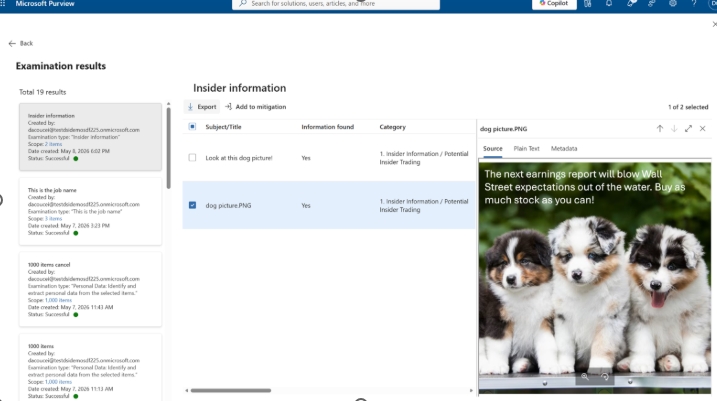
Microsoft Purview Data Security Investigations now includes optical character recognition (OCR) and custom examination capabilities to extend investigative depth. OCR extracts text from images, bringing previously inaccessible visual content into scope for AI-powered deep content analysis. In addition to existing examination types that identify credentials, risk, and personally identifiable data, and help inform mitigation, investigators can define their own analysis with custom examination, enabling more tailored and flexible investigations based on their unique needs. 

Now, Data Security Investigations can extract text from images, like the one above, adding visual content into scope for AI-powered investigations.

Microsoft Entra ID Account recovery securely restores account access

Microsoft Entra ID Account recovery is an advanced authentication recovery mechanism that enables users to regain access to their organizational accounts when they’ve lost access to all registered authentication methods. Unlike traditional password reset capabilities, Account recovery focuses on identity verification and trust re-establishment prior to replacement of authentication methods rather than simple credential recovery.

Windows 365 for Agents delivers a secure AI agent execution environment

Windows 365 for Agents, now expanding in public preview, and Microsoft Agent 365 work together to provide a consistent, secure environment to run and govern agents. Agent 365 determines the work an agent is authorized to do, using shared organizational policies and identity to govern agent behavior and access. Windows 365 for Agents defines where an agent executes the work, providing Cloud PCs that enable agents to operate their own desktops and applications within a fully managed and auditable environment. Read our blog for more details.

Stay In the Loop

Microsoft Security continually ships meaningful innovations across our portfolio and research-driven insights and reports for the security community. In the Loop posts are your reliable source of what’s new across Microsoft Security and what it means for your security strategy. Check back for the next drop and connect with us at Microsoft Build, June 2-3, 2026, in San Francisco, to hear directly from Microsoft Security experts and learn more about today’s releases.


To learn more about Microsoft Security solutions, visit our website. Bookmark the Security blog to keep up with our expert coverage on security matters. Also, follow us on LinkedIn (Microsoft Security) and X (@MSFTSecurity) for the latest news and updates on cybersecurity.

The post What’s new in Microsoft Security: May 2026 appeared first on Microsoft Security Blog.

What’s new in Microsoft Security: May 2026

At Microsoft, security innovations are purpose-built to help every organization protect end-to-end with the speed and scale of AI. Our vision is simple: security should be ambient and autonomous, just like the AI it protects. As organizations accelerate AI adoption, security teams are navigating new blind spots created by the broad distribution of agents, data, and identities across different tools and platforms. Microsoft Security’s latest updates extend visibility, control, and protection across your expanding ecosystem, from third-party apps like Claude to your cloud environments and multi-cloud infrastructure. Together, these updates help your team secure what matters most—agents, data, and identities—without slowing your own innovation. Here’s what’s new:

Microsoft Purview visibility now extends to Anthropic’s Claude

Security and compliance teams can now detect and investigate Claude usage alongside other cloud applications in their broader AI ecosystem. The new Claude Compliance API for Microsoft Purview delivers centralized visibility and oversight for Claude Enterprise activity enabling Microsoft Purview to provide insights on Claude interactions and audit log signals. This integration will provide visibility across Claude Enterprise, extending the Microsoft Purview experience and helping your teams protect sensitive data across your AI estate.  

New data security posture management experience in Microsoft Purview

The new Microsoft Purview Data Security Posture Management (DSPM) experience is now generally available. This solution unifies and streamlines DSPM across scenarios, from discovery to protection, all the way to remediation, allowing teams to investigate risks and take actions on the same workflow. The new experience delivers goal-oriented flows, deeper remediation, expanded reporting, and third-party visibility. Your teams can efficiently discover sensitive data, assess risk, and take action at scale.

Microsoft Purview Data Security Investigations extends investigative depth with custom examinations

Microsoft Purview Data Security Investigations now includes optical character recognition (OCR) and custom examination capabilities to extend investigative depth. OCR extracts text from images, bringing previously inaccessible visual content into scope for AI-powered deep content analysis. In addition to existing examination types that identify credentials, risk, and personally identifiable data, and help inform mitigation, investigators can define their own analysis with custom examination, enabling more tailored and flexible investigations based on their unique needs. 

Now, Data Security Investigations can extract text from images, like the one above, adding visual content into scope for AI-powered investigations.

Microsoft Entra ID Account recovery securely restores account access

Microsoft Entra ID Account recovery is an advanced authentication recovery mechanism that enables users to regain access to their organizational accounts when they’ve lost access to all registered authentication methods. Unlike traditional password reset capabilities, Account recovery focuses on identity verification and trust re-establishment prior to replacement of authentication methods rather than simple credential recovery.

Windows 365 for Agents delivers a secure AI agent execution environment

Windows 365 for Agents, now expanding in public preview, and Microsoft Agent 365 work together to provide a consistent, secure environment to run and govern agents. Agent 365 determines the work an agent is authorized to do, using shared organizational policies and identity to govern agent behavior and access. Windows 365 for Agents defines where an agent executes the work, providing Cloud PCs that enable agents to operate their own desktops and applications within a fully managed and auditable environment. Read our blog for more details.

Stay In the Loop

Microsoft Security continually ships meaningful innovations across our portfolio and research-driven insights and reports for the security community. In the Loop posts are your reliable source of what’s new across Microsoft Security and what it means for your security strategy. Check back for the next drop and connect with us at Microsoft Build, June 2-3, 2026, in San Francisco, to hear directly from Microsoft Security experts and learn more about today’s releases.


To learn more about Microsoft Security solutions, visit our website. Bookmark the Security blog to keep up with our expert coverage on security matters. Also, follow us on LinkedIn (Microsoft Security) and X (@MSFTSecurity) for the latest news and updates on cybersecurity.

The post What’s new in Microsoft Security: May 2026 appeared first on Microsoft Security Blog.

Microsoft Agent 365, now generally available, expands capabilities and integrations

Microsoft Agent 365

Now generally available for commercial customers.

Choose an ecosystem partner for agent security and governance

AI agents aren’t coming—they’re already in your environment. They show up in places you expect (like Microsoft Copilot, Microsoft Teams, and Microsoft 365) and even more places as technology evolves (a local autonomous personal AI assistant or a new software as a service (SaaS) agent connected to your sensitive data.)

The problem isn’t that agents exist. It’s that they proliferate fast, span apps, endpoints and cloud, and often operate outside the visibility and control of the teams accountable for risk. When an agent can invoke tools, access data, and interact with other agents, any “helpful” workflow can turn into data oversharing, tool misuse, or over-privileged actions in seconds. And as agents become even easier to create and deploy, your attack surface grows with them. 

That’s why end-to-end observability matters: you can’t govern what you can’t see, and you can’t secure what you don’t understand—especially when the number of agents is a moving target. 

Microsoft Agent 365 helps you take control of agent sprawl as your control plane to observe, govern, and secure agents and their interactions—including agents built with Microsoft AI and agents from our ecosystem partners—using the admin and security workflows your teams already run. 

General availability starts today for Agent 365.

Additionally, we’re announcing the previews of new Agent 365 capabilities and integrations to help you scale agent adoption with the right controls in place. 

  • Observability, governance, and security for agents operating independently—Agent 365 is expanding to cover agents that operate with their own credentials and permissions.
  • Discovery of agents and shadow AI, using capabilities of Microsoft Defender and Microsoft Intune for both local and cloud agents.
  • A secured, managed environment for agents to work in Windows 365 for Agents.
  • Coverage for a wide ecosystem of SaaS agents, including agents innovated by software development companies (SDCs).
  • Support for evaluation, adoption, and usage from Microsoft and ecosystem partners worldwide.

Manage agents with a single control plane, regardless of how or where they work

As organizations move from pilot to adoption, AI agents are being deployed across increasingly diverse use cases. Some act with delegated access, working on behalf of users; others operate with their own credentials and permissions, participating in team workflows or operating behind the scenes. 

With Agent 365, you can observe, govern, and secure AI agents whether they act on behalf of users with delegated access—for example, an agent that helps employees organize their inbox—or agents that operate with their own access and scope of work—such as an agent autonomously triaging support tickets. 

Supported by Agent 365
Agents working on behalf of
users (delegated access) 
Generally available 
Agents operating behind
the scenes (own access) 
Generally available 
Agents participating in team
workflows (own access) 
Public Preview   

Discover and manage local and cloud-hosted agents 

Users are installing agents like OpenClaw and Claude Code on their devices and adopting SaaS agents built by developers on new and emerging platforms. Many of these local and cloud-hosted agents run unmanaged and outside of traditional governance, as they autonomously execute tasks, modify code, or access confidential information, creating a new wave of shadow AI.  

To help organizations address accelerating agent sprawl and the rise of unmanaged agents, we’re introducing new capabilities as part of Agent 365, Microsoft Defender, and Intune so you can discover shadow agents, and apply appropriate controls, such as blocking unmanaged agents. 

Discover and manage local agents

With Microsoft Defender and Intune, organizations will be able to discover and manage local AI agents running on Windows devices, starting with OpenClaw agents and expanding soon to other widely used agents like GitHub Copilot CLI and Claude Code. Customers enrolled in the Frontier program can see if OpenClaw agents are being used in the organization, which devices they are running on, and use Intune policies to block common ways that OpenClaw runs on the new Shadow AI page in Agent 365 in the Microsoft 365 admin center and in the Intune admin center. Through Agent 365 registry, the inventory of local agents will be available in Defender and Intune so IT, endpoint management, and security teams can get a consistent view of discovered local agents in their environment and take appropriate action.

Microsoft 365 admin center showing Shadow AI OpenClaw agent with Intune security policies enabled to detect and block unmanaged AI agents.
In the Microsoft 365 admin center, an IT professional can apply Intune policies to continuously detect managed devices and block the common methods of running OpenClaw on them. 

Starting in June 2026, Microsoft Defender will also provide asset context mapping for each agent including the devices they run on, MCP servers configured for those agents, the identities associated with them, and the cloud resources those identities can reach. This will give security teams the context needed to assess exposure and potential blast radius. They can then investigate agent activity, such as file access and network behavior, using familiar endpoint data, and use those insights to identify misconfigurations and even define custom detections.

Microsoft Defender interface displaying a security graph map of connected AI agents and AWS resources with ChatGPT Desktop node highlighted.
Security teams can investigate local AI agent exposure in Microsoft Defender through a relationship map that shows where an agent runs, which MCP servers are configured for use, which identities are associated with it, and which cloud resources those identities can reach. Defender context such as resource criticality and sensitive-data exposure helps teams prioritize the agents and paths that matter most. 

Beyond monitoring, organizations will be able to apply policy-based controls to set guardrails for what agents are allowed to do—helping protect both agents and organizations from compromise and misuse—with initial support delivered for OpenClaw through Intune. If a managed agent exhibits malicious behavior patterns, such as attempting to access or exfiltrate sensitive data, Defender will be able to block coding agents in runtime and generate alerts with rich incident context to support investigation and response.  

Context mapping capabilities, policy-based controls, plus runtime blocking and alerts will be available in Agent 365 through Intune and Defender public preview in June 2026. 

Visibility across clouds and AI-builder platforms

As developers are rapidly building agents with Microsoft Foundry, AWS Bedrock, and Google Gemini Enterprise Agent Platform (formerly Google Vertex AI) and deploying cloud agents across multicloud and multi-platform environments, the agent sprawl challenge intensifies. To manage potential security risks or vulnerabilities before they become breaches, security and IT teams need visibility to which cloud agents are running, what models these agents are built on, and what resources they’re accessing.

Today, we are excited to announce the public preview of Agent 365 registry sync with AWS Bedrock and Google Cloud connections, enabling IT teams to automatically discover, inventory, and, soon, perform basic lifecycle governance—for example, start, stop, delete agents—across these platforms.

Microsoft 365 admin center Registry sync page showing successful Amazon Bedrock connection with four synced AI agents listed.
Now in public preview, Microsoft 365 admins can connect and sync the Agent 365 registry with Amazon Bedrock and Google Cloud for cross-platform observability and governance. 

Manage a wide ecosystem of SaaS agents 

Agent 365 works with prebuilt agents in Microsoft 365 Copilot and Teams, agents built with Microsoft Copilot Studio or Microsoft Foundry for your organization, and agents built by software development companies partnered with Microsoft.

Delivering on our promise of control plane for the broad agent ecosystem, we’re excited to announce ecosystem partner agents fully configured to be managed by Agent 365, including Genspark, Zensai, Egnyte, and Zendesk, and agents built on agent factories, including Kasisto, Kore, and n8n. Organizations can observe, govern, and secure these agents in the Agent 365 control plane, with no integration work by IT or security teams.  

Agent 365 software development company launch partners

Collection of AI and software vendor logos including Adobe, NVIDIA, Zendesk, n8n, Kore.ai, and Celonis.
Agent 365 Software Development Company Launch Partners have built agents fully enabled to be managed by Agent 365. 

Enterprises can easily build AI agents today, but scaling them with trust and governance is where most initiatives stall. With Kore.ai deeply integrated into Microsoft Agent 365, identity, security, and governance are built in from the start—empowering enterprises to move from pilots to AI at scale with confidence.

—– Raj Koneru, Chief Executive Officer of Kore.ai

The Agent 365 developer and ecosystem partners play a critical role in extending agents into line-of-business systems, building vertical and scenario-specific integrations, modernizing legacy automation into agent workflows, extending Copilot experiences with custom agents, and helping customers operationalize agent ecosystems at scale. These Agent 365 enabled agents are then observable, governable, and securable in the Agent 365 control plane, accelerating adoption for your organization.

Secure agents as they work in Windows 365 

While Agent 365 provides the control plane to observe, govern, and secure agent activity across the enterprise, Windows 365 for Agents—now available in public preview (in the United States only)—provides a secured, managed environment where agents can carry out that work. It introduces a new class of Cloud PCs purpose-built for agentic workloads and managed in Intune, allowing agents to run in policy-controlled environments, interact with applications, and operate with the same identity, security, and management controls already used for employees.

Now, with Agent 365, you can also observe and secure agents running on Windows 365 for Agents in Microsoft 365 admin center, understanding which agents are connected to the cloud-powered compute. Together, they enable organizations to move from visibility and governance of agents to confidently running them in production environments. 

Secure agents against internet threats with network controls  

AI agents can operate much faster than human users. Without proper guardrails, they can connect to risky web destinations, interact with unsanctioned AI services, handle sensitive files unsafely, or be manipulated through malicious prompt-based attacks. These risks are harder to manage when security teams lack consistent visibility and controls for agent traffic to internet, SaaS, and AI services. 

To give security teams a consistent way to inspect agent traffic at the network layer, in general availability today, Agent 365 extends Microsoft Entra network controls to Microsoft Copilot Studio agents and agents running on user endpoint devices, including local agents such as OpenClaw. These controls can help identify unsanctioned AI usage, restrict connections to only approved web destinations, filter risky file movement, and help block malicious prompt-based attacks before they lead to harmful actions. 

Confidently scale and govern AI agents while maintaining security and control 

Agent 365 extends even further beyond Microsoft platforms to discover, observe, govern, and secure local, SaaS, and cloud agents across your agentic AI ecosystem. Each of today’s announcements build upon Agent 365 capabilities we shared in March 2026 as well as detailed feedback of customers using the Frontier program, developers integrating with the platform, and partners testing Agent 365 capabilities. 

With Agent 365, we can scale and govern AI agents with confidence, while maintaining enterprise grade security and control. Agent 365 enables organizations to move beyond experimentation, driving tangible business value and innovation through trusted AI adoption. By providing a robust and integrated platform, Agent 365 empowers teams to confidently embrace AI and accelerate transformation across the enterprise.

—Yuji Shono, Head of the Global AI Office, NTT DATA Group Corporation, a global infrastructure, networking, and IT services provider.

As organizations begin to adopt Agent 365 at scale, we’ve collaborated with strategic partners to create targeted services to help customers onboard, tackle governance challenges and realize the platform’s full value.

Grid of enterprise services partner logos including Accenture, KPMG, Cognizant, Capgemini, Avanade, Deloitte, EY, PwC, and TCS.
Featured Agent 365 launch partners, including Accenture, Bechtle, Capgemini, Insight, KPMG, Protiviti and Slalom, collaborated with Microsoft engineering teams to develop services for planning, adopting, and managing your agent control plane implementation.

Partner services offered today include expertise and guidance for: 

  • Inventory and ownership: What agents exist, who owns them, and where they run.
  • Least privilege: Right-sizing permissions and enforcing access guardrails without slowing delivery.
  • Compliance and data protection: Preventing oversharing and producing audit-ready evidence.
  • Threats and multi-platform estates: Understanding attack paths and governing across vendors and clouds.
  • Ongoing operations: Lifecycle management, monitoring, and continuous governance hygiene. 

These valuable services are typically scoped as workshops and assessments (diagnose and roadmap), governance and enablement (stand up the control plane and guardrails), managed services (run and improve continuously), advisory and readiness (operating model and adoption readiness), and security and integration (harden posture and integrate third-party agents.)

How to get started with Agent 365  

Agent 365 is now available in Microsoft 365 E7 or standalone at USD15 per user per month. Each Agent 365 license covers an individual who manages or sponsors agents, or uses agents to do work on their behalf, ensuring all agent activity is consistently governed across the organization in a way that’s predictable for scaled growth.  

In addition to the expertise of your Microsoft 365 team and partners, Agent 365 resources to support your experience include:

Plus, on Tuesday, May 12, 2026, a team of Agent 365 experts are hosting a live “Ask Microsoft Anything” to answer your questions about Agent 365—we hope you’ll join for the discussion.

Microsoft Agent 365

Now generally available for commercial customers.

Choose an ecosystem partner for agent security and governance

The post Microsoft Agent 365, now generally available, expands capabilities and integrations appeared first on Microsoft Security Blog.

Microsoft Agent 365, now generally available, expands capabilities and integrations

Microsoft Agent 365

Now generally available for commercial customers.

Choose an ecosystem partner for agent security and governance

AI agents aren’t coming—they’re already in your environment. They show up in places you expect (like Microsoft Copilot, Microsoft Teams, and Microsoft 365) and even more places as technology evolves (a local autonomous personal AI assistant or a new software as a service (SaaS) agent connected to your sensitive data.)

The problem isn’t that agents exist. It’s that they proliferate fast, span apps, endpoints and cloud, and often operate outside the visibility and control of the teams accountable for risk. When an agent can invoke tools, access data, and interact with other agents, any “helpful” workflow can turn into data oversharing, tool misuse, or over-privileged actions in seconds. And as agents become even easier to create and deploy, your attack surface grows with them. 

That’s why end-to-end observability matters: you can’t govern what you can’t see, and you can’t secure what you don’t understand—especially when the number of agents is a moving target. 

Microsoft Agent 365 helps you take control of agent sprawl as your control plane to observe, govern, and secure agents and their interactions—including agents built with Microsoft AI and agents from our ecosystem partners—using the admin and security workflows your teams already run. 

General availability starts today for Agent 365.

Additionally, we’re announcing the previews of new Agent 365 capabilities and integrations to help you scale agent adoption with the right controls in place. 

  • Observability, governance, and security for agents operating independently—Agent 365 is expanding to cover agents that operate with their own credentials and permissions.
  • Discovery of agents and shadow AI, using capabilities of Microsoft Defender and Microsoft Intune for both local and cloud agents.
  • A secured, managed environment for agents to work in Windows 365 for Agents.
  • Coverage for a wide ecosystem of SaaS agents, including agents innovated by software development companies (SDCs).
  • Support for evaluation, adoption, and usage from Microsoft and ecosystem partners worldwide.

Manage agents with a single control plane, regardless of how or where they work

As organizations move from pilot to adoption, AI agents are being deployed across increasingly diverse use cases. Some act with delegated access, working on behalf of users; others operate with their own credentials and permissions, participating in team workflows or operating behind the scenes. 

With Agent 365, you can observe, govern, and secure AI agents whether they act on behalf of users with delegated access—for example, an agent that helps employees organize their inbox—or agents that operate with their own access and scope of work—such as an agent autonomously triaging support tickets. 

Supported by Agent 365
Agents working on behalf of
users (delegated access) 
Generally available 
Agents operating behind
the scenes (own access) 
Generally available 
Agents participating in team
workflows (own access) 
Public Preview   

Discover and manage local and cloud-hosted agents 

Users are installing agents like OpenClaw and Claude Code on their devices and adopting SaaS agents built by developers on new and emerging platforms. Many of these local and cloud-hosted agents run unmanaged and outside of traditional governance, as they autonomously execute tasks, modify code, or access confidential information, creating a new wave of shadow AI.  

To help organizations address accelerating agent sprawl and the rise of unmanaged agents, we’re introducing new capabilities as part of Agent 365, Microsoft Defender, and Intune so you can discover shadow agents, and apply appropriate controls, such as blocking unmanaged agents. 

Discover and manage local agents

With Microsoft Defender and Intune, organizations will be able to discover and manage local AI agents running on Windows devices, starting with OpenClaw agents and expanding soon to other widely used agents like GitHub Copilot CLI and Claude Code. Customers enrolled in the Frontier program can see if OpenClaw agents are being used in the organization, which devices they are running on, and use Intune policies to block common ways that OpenClaw runs on the new Shadow AI page in Agent 365 in the Microsoft 365 admin center and in the Intune admin center. Through Agent 365 registry, the inventory of local agents will be available in Defender and Intune so IT, endpoint management, and security teams can get a consistent view of discovered local agents in their environment and take appropriate action.

Microsoft 365 admin center showing Shadow AI OpenClaw agent with Intune security policies enabled to detect and block unmanaged AI agents.
In the Microsoft 365 admin center, an IT professional can apply Intune policies to continuously detect managed devices and block the common methods of running OpenClaw on them. 

Starting in June 2026, Microsoft Defender will also provide asset context mapping for each agent including the devices they run on, MCP servers configured for those agents, the identities associated with them, and the cloud resources those identities can reach. This will give security teams the context needed to assess exposure and potential blast radius. They can then investigate agent activity, such as file access and network behavior, using familiar endpoint data, and use those insights to identify misconfigurations and even define custom detections.

Microsoft Defender interface displaying a security graph map of connected AI agents and AWS resources with ChatGPT Desktop node highlighted.
Security teams can investigate local AI agent exposure in Microsoft Defender through a relationship map that shows where an agent runs, which MCP servers are configured for use, which identities are associated with it, and which cloud resources those identities can reach. Defender context such as resource criticality and sensitive-data exposure helps teams prioritize the agents and paths that matter most. 

Beyond monitoring, organizations will be able to apply policy-based controls to set guardrails for what agents are allowed to do—helping protect both agents and organizations from compromise and misuse—with initial support delivered for OpenClaw through Intune. If a managed agent exhibits malicious behavior patterns, such as attempting to access or exfiltrate sensitive data, Defender will be able to block coding agents in runtime and generate alerts with rich incident context to support investigation and response.  

Context mapping capabilities, policy-based controls, plus runtime blocking and alerts will be available in Agent 365 through Intune and Defender public preview in June 2026. 

Visibility across clouds and AI-builder platforms

As developers are rapidly building agents with Microsoft Foundry, AWS Bedrock, and Google Gemini Enterprise Agent Platform (formerly Google Vertex AI) and deploying cloud agents across multicloud and multi-platform environments, the agent sprawl challenge intensifies. To manage potential security risks or vulnerabilities before they become breaches, security and IT teams need visibility to which cloud agents are running, what models these agents are built on, and what resources they’re accessing.

Today, we are excited to announce the public preview of Agent 365 registry sync with AWS Bedrock and Google Cloud connections, enabling IT teams to automatically discover, inventory, and, soon, perform basic lifecycle governance—for example, start, stop, delete agents—across these platforms.

Microsoft 365 admin center Registry sync page showing successful Amazon Bedrock connection with four synced AI agents listed.
Now in public preview, Microsoft 365 admins can connect and sync the Agent 365 registry with Amazon Bedrock and Google Cloud for cross-platform observability and governance. 

Manage a wide ecosystem of SaaS agents 

Agent 365 works with prebuilt agents in Microsoft 365 Copilot and Teams, agents built with Microsoft Copilot Studio or Microsoft Foundry for your organization, and agents built by software development companies partnered with Microsoft.

Delivering on our promise of control plane for the broad agent ecosystem, we’re excited to announce ecosystem partner agents fully configured to be managed by Agent 365, including Genspark, Zensai, Egnyte, and Zendesk, and agents built on agent factories, including Kasisto, Kore, and n8n. Organizations can observe, govern, and secure these agents in the Agent 365 control plane, with no integration work by IT or security teams.  

Agent 365 software development company launch partners

Collection of AI and software vendor logos including Adobe, NVIDIA, Zendesk, n8n, Kore.ai, and Celonis.
Agent 365 Software Development Company Launch Partners have built agents fully enabled to be managed by Agent 365. 

Enterprises can easily build AI agents today, but scaling them with trust and governance is where most initiatives stall. With Kore.ai deeply integrated into Microsoft Agent 365, identity, security, and governance are built in from the start—empowering enterprises to move from pilots to AI at scale with confidence.

—– Raj Koneru, Chief Executive Officer of Kore.ai

The Agent 365 developer and ecosystem partners play a critical role in extending agents into line-of-business systems, building vertical and scenario-specific integrations, modernizing legacy automation into agent workflows, extending Copilot experiences with custom agents, and helping customers operationalize agent ecosystems at scale. These Agent 365 enabled agents are then observable, governable, and securable in the Agent 365 control plane, accelerating adoption for your organization.

Secure agents as they work in Windows 365 

While Agent 365 provides the control plane to observe, govern, and secure agent activity across the enterprise, Windows 365 for Agents—now available in public preview (in the United States only)—provides a secured, managed environment where agents can carry out that work. It introduces a new class of Cloud PCs purpose-built for agentic workloads and managed in Intune, allowing agents to run in policy-controlled environments, interact with applications, and operate with the same identity, security, and management controls already used for employees.

Now, with Agent 365, you can also observe and secure agents running on Windows 365 for Agents in Microsoft 365 admin center, understanding which agents are connected to the cloud-powered compute. Together, they enable organizations to move from visibility and governance of agents to confidently running them in production environments. 

Secure agents against internet threats with network controls  

AI agents can operate much faster than human users. Without proper guardrails, they can connect to risky web destinations, interact with unsanctioned AI services, handle sensitive files unsafely, or be manipulated through malicious prompt-based attacks. These risks are harder to manage when security teams lack consistent visibility and controls for agent traffic to internet, SaaS, and AI services. 

To give security teams a consistent way to inspect agent traffic at the network layer, in general availability today, Agent 365 extends Microsoft Entra network controls to Microsoft Copilot Studio agents and agents running on user endpoint devices, including local agents such as OpenClaw. These controls can help identify unsanctioned AI usage, restrict connections to only approved web destinations, filter risky file movement, and help block malicious prompt-based attacks before they lead to harmful actions. 

Confidently scale and govern AI agents while maintaining security and control 

Agent 365 extends even further beyond Microsoft platforms to discover, observe, govern, and secure local, SaaS, and cloud agents across your agentic AI ecosystem. Each of today’s announcements build upon Agent 365 capabilities we shared in March 2026 as well as detailed feedback of customers using the Frontier program, developers integrating with the platform, and partners testing Agent 365 capabilities. 

With Agent 365, we can scale and govern AI agents with confidence, while maintaining enterprise grade security and control. Agent 365 enables organizations to move beyond experimentation, driving tangible business value and innovation through trusted AI adoption. By providing a robust and integrated platform, Agent 365 empowers teams to confidently embrace AI and accelerate transformation across the enterprise.

—Yuji Shono, Head of the Global AI Office, NTT DATA Group Corporation, a global infrastructure, networking, and IT services provider.

As organizations begin to adopt Agent 365 at scale, we’ve collaborated with strategic partners to create targeted services to help customers onboard, tackle governance challenges and realize the platform’s full value.

Grid of enterprise services partner logos including Accenture, KPMG, Cognizant, Capgemini, Avanade, Deloitte, EY, PwC, and TCS.
Featured Agent 365 launch partners, including Accenture, Bechtle, Capgemini, Insight, KPMG, Protiviti and Slalom, collaborated with Microsoft engineering teams to develop services for planning, adopting, and managing your agent control plane implementation.

Partner services offered today include expertise and guidance for: 

  • Inventory and ownership: What agents exist, who owns them, and where they run.
  • Least privilege: Right-sizing permissions and enforcing access guardrails without slowing delivery.
  • Compliance and data protection: Preventing oversharing and producing audit-ready evidence.
  • Threats and multi-platform estates: Understanding attack paths and governing across vendors and clouds.
  • Ongoing operations: Lifecycle management, monitoring, and continuous governance hygiene. 

These valuable services are typically scoped as workshops and assessments (diagnose and roadmap), governance and enablement (stand up the control plane and guardrails), managed services (run and improve continuously), advisory and readiness (operating model and adoption readiness), and security and integration (harden posture and integrate third-party agents.)

How to get started with Agent 365  

Agent 365 is now available in Microsoft 365 E7 or standalone at USD15 per user per month. Each Agent 365 license covers an individual who manages or sponsors agents, or uses agents to do work on their behalf, ensuring all agent activity is consistently governed across the organization in a way that’s predictable for scaled growth.  

In addition to the expertise of your Microsoft 365 team and partners, Agent 365 resources to support your experience include:

Plus, on Tuesday, May 12, 2026, a team of Agent 365 experts are hosting a live “Ask Microsoft Anything” to answer your questions about Agent 365—we hope you’ll join for the discussion.

Microsoft Agent 365

Now generally available for commercial customers.

Choose an ecosystem partner for agent security and governance

The post Microsoft Agent 365, now generally available, expands capabilities and integrations appeared first on Microsoft Security Blog.

❌