Reading view

There are new articles available, click to refresh the page.

NYT Connections hints and answers for Tuesday, August 11 (game #1157)

Looking for a different day?

A new NYT Connections puzzle appears at midnight each day for your time zone – which means that some people are always playing 'today's game' while others are playing 'yesterday's'. If you're looking for Monday's puzzle instead then click here: NYT Connections hints and answers for Monday, August 10 (game #1156).

Good morning! Let's play Connections, the NYT's clever word game that challenges you to group answers in various categories. It can be tough, so read on if you need Connections hints.

What should you do once you've finished? Why, play some more word games of course. I've also got daily Strands hints and answers and Quordle hints and answers articles if you need help for those too, while Marc's Wordle today page covers the original viral word game.

SPOILER WARNING: Information about NYT Connections today is below, so don't read on if you don't want to know the answers.

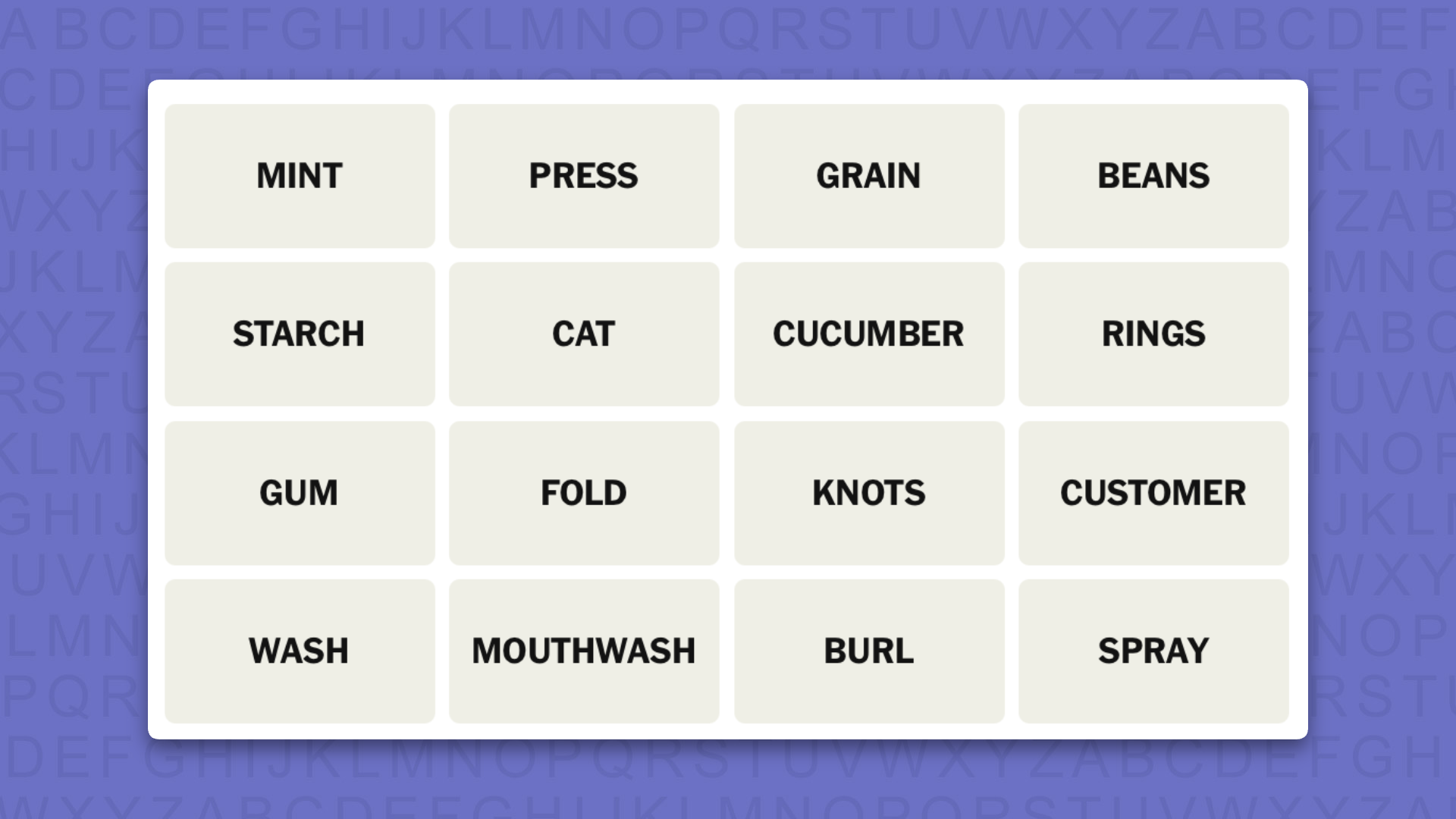
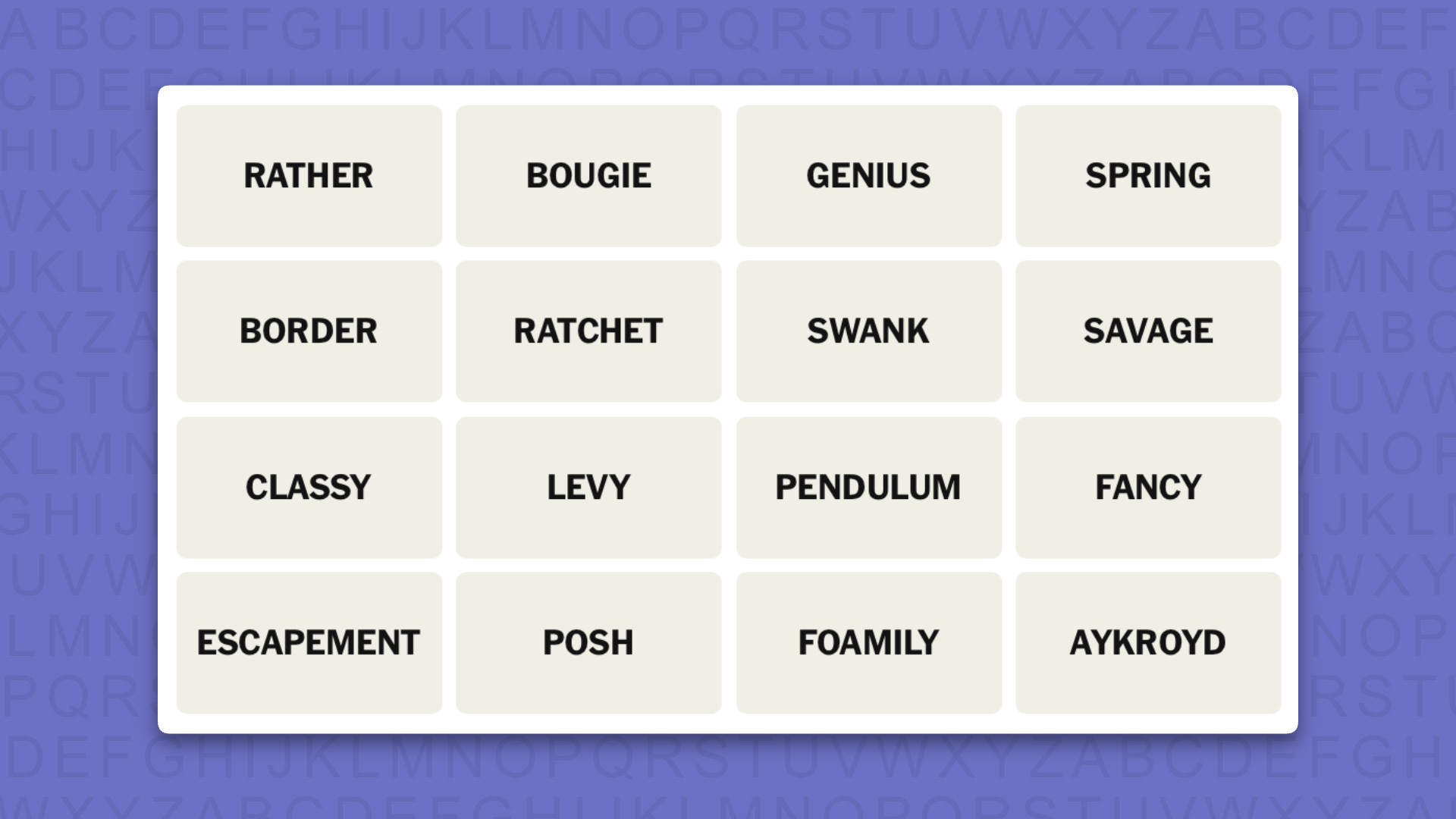
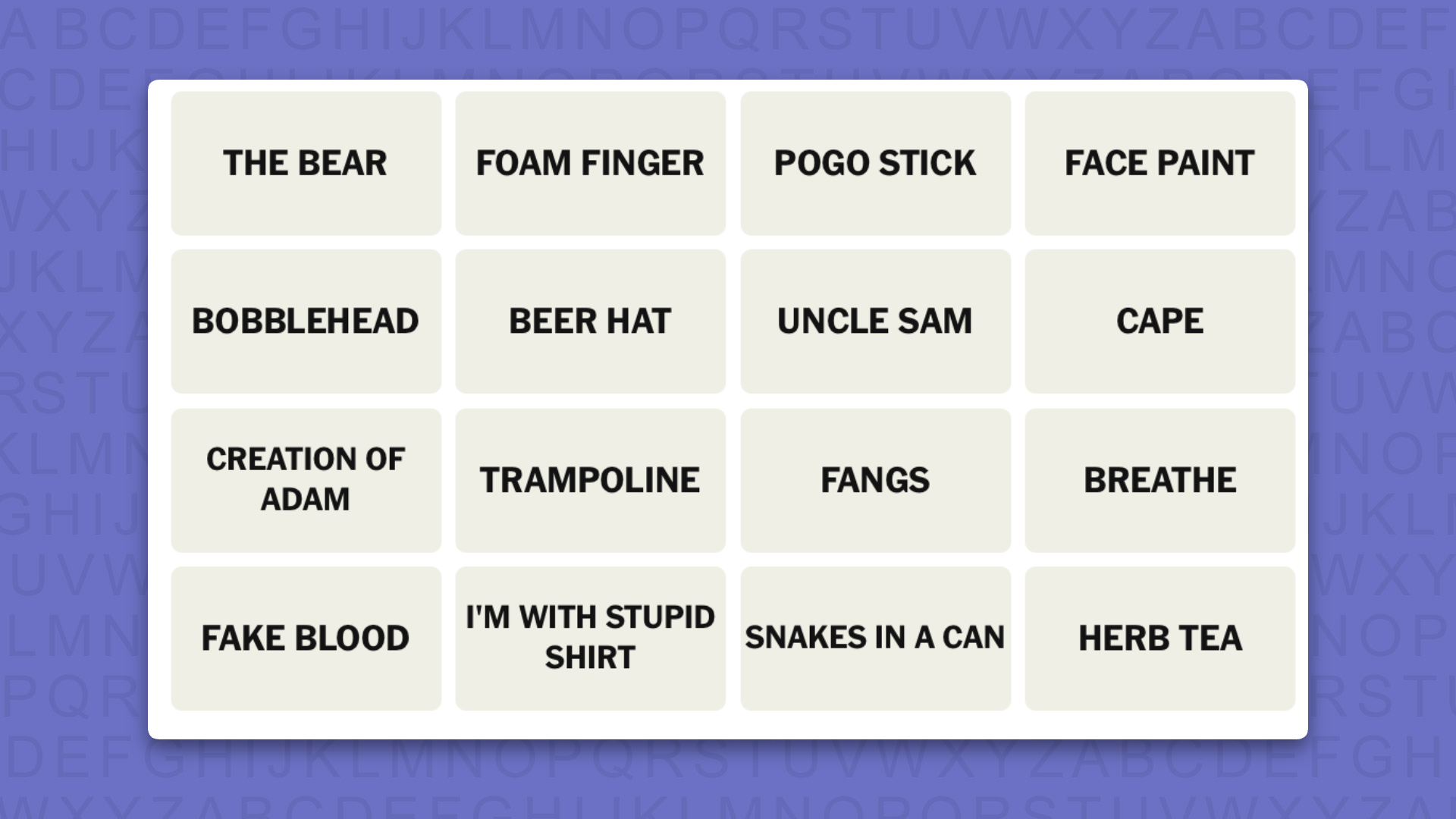
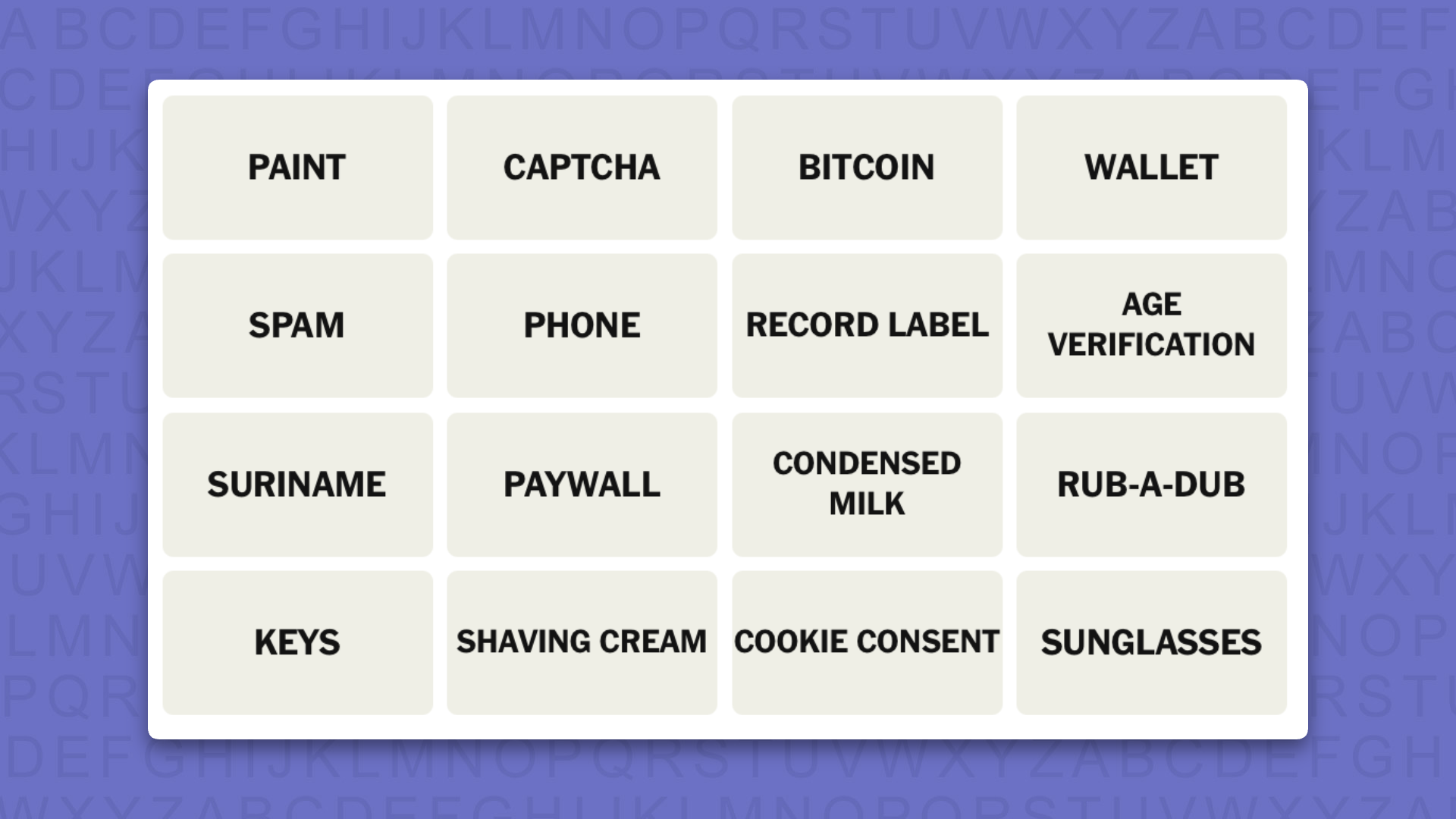
NYT Connections today (game #1157) - today's words

NYT Connections hints for game 1157 on a purple background

(Image credit: New York Times)

Today's NYT Connections words are…

  • TOAST
  • AYE
  • BRAVO
  • SOLD
  • BET
  • DONE
  • HISTORY
  • KNOWS
  • HARE
  • GOING
  • THROUGH
  • TWICE
  • ONCE
  • SUNK
  • TUNG
  • USA

NYT Connections today (game #1157) - hint #1 - group hints

What are some clues for today's NYT Connections groups?

  • YELLOW: Well and truly over
  • GREEN: On your TV
  • BLUE: Said after the final bid
  • PURPLE: Sounds like it’s on your face

Need more clues?

We're firmly in spoiler territory now, but read on if you want to know what the four theme answers are for today's NYT Connections puzzles…

NYT Connections today (game #1157) - hint #2 - group answers

What are the answers for today's NYT Connections groups?

  • YELLOW: DOOMED
  • GREEN: BASIC CABLE CHANNELS
  • BLUE: WORDS IN AN AUCTIONEER'S CHANT
  • PURPLE: HOMOPHONES OF FACIAL FEATURES

Right, the answers are below, so DO NOT SCROLL ANY FURTHER IF YOU DON'T WANT TO SEE THEM.

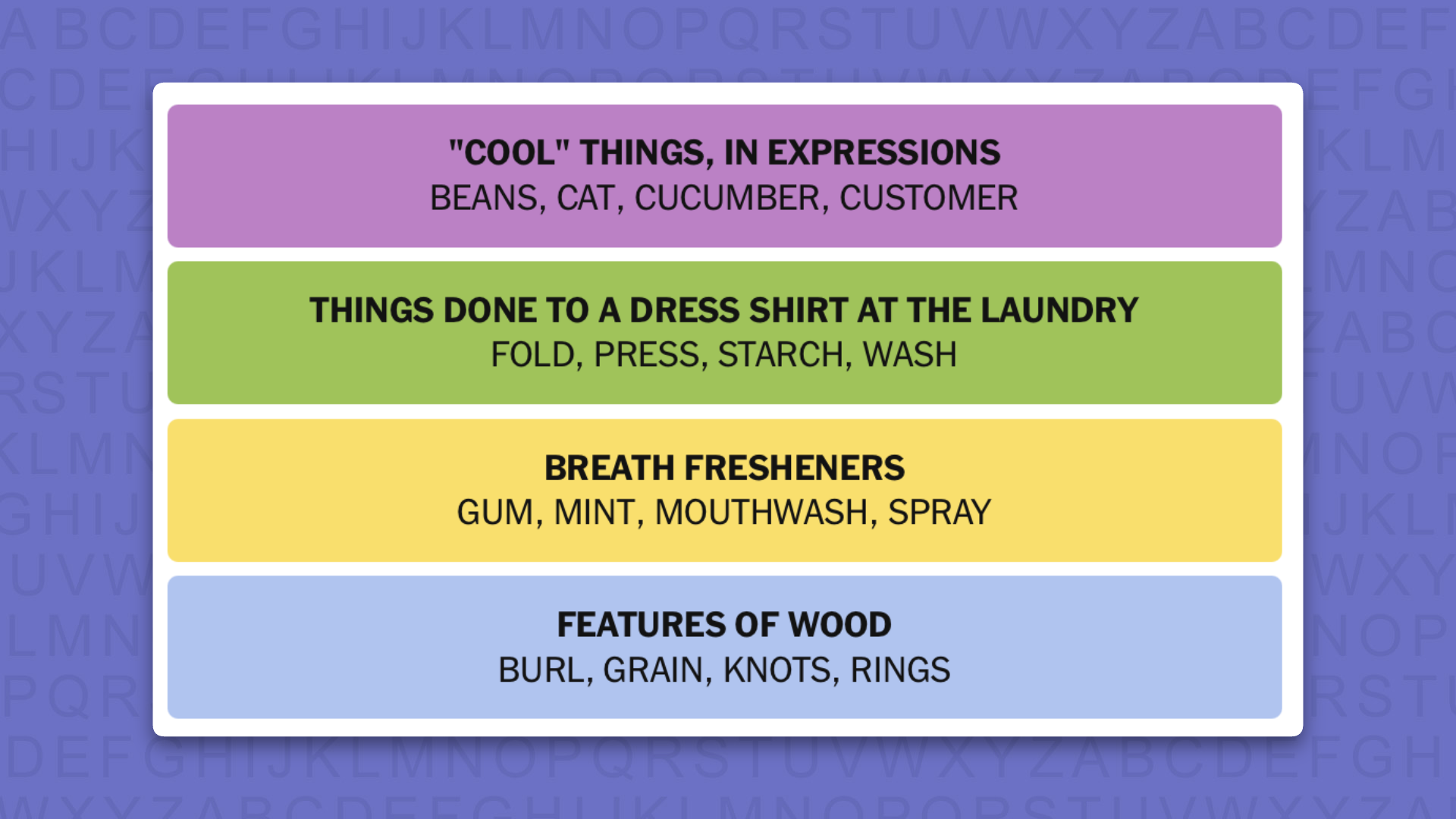
NYT Connections today (game #1157) - the answers

NYT Connections answers for game 1157 on a purple background

(Image credit: New York Times)

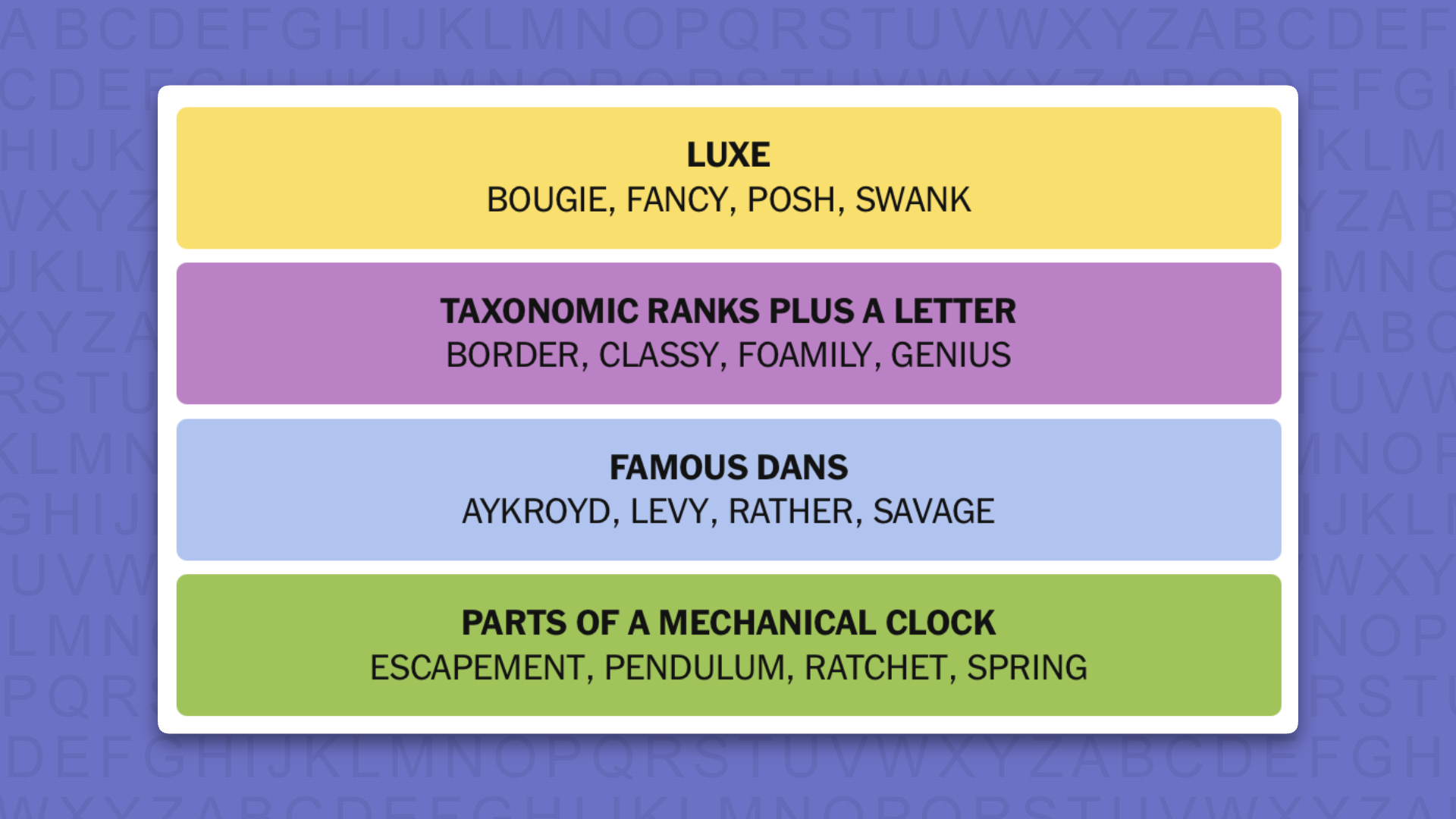
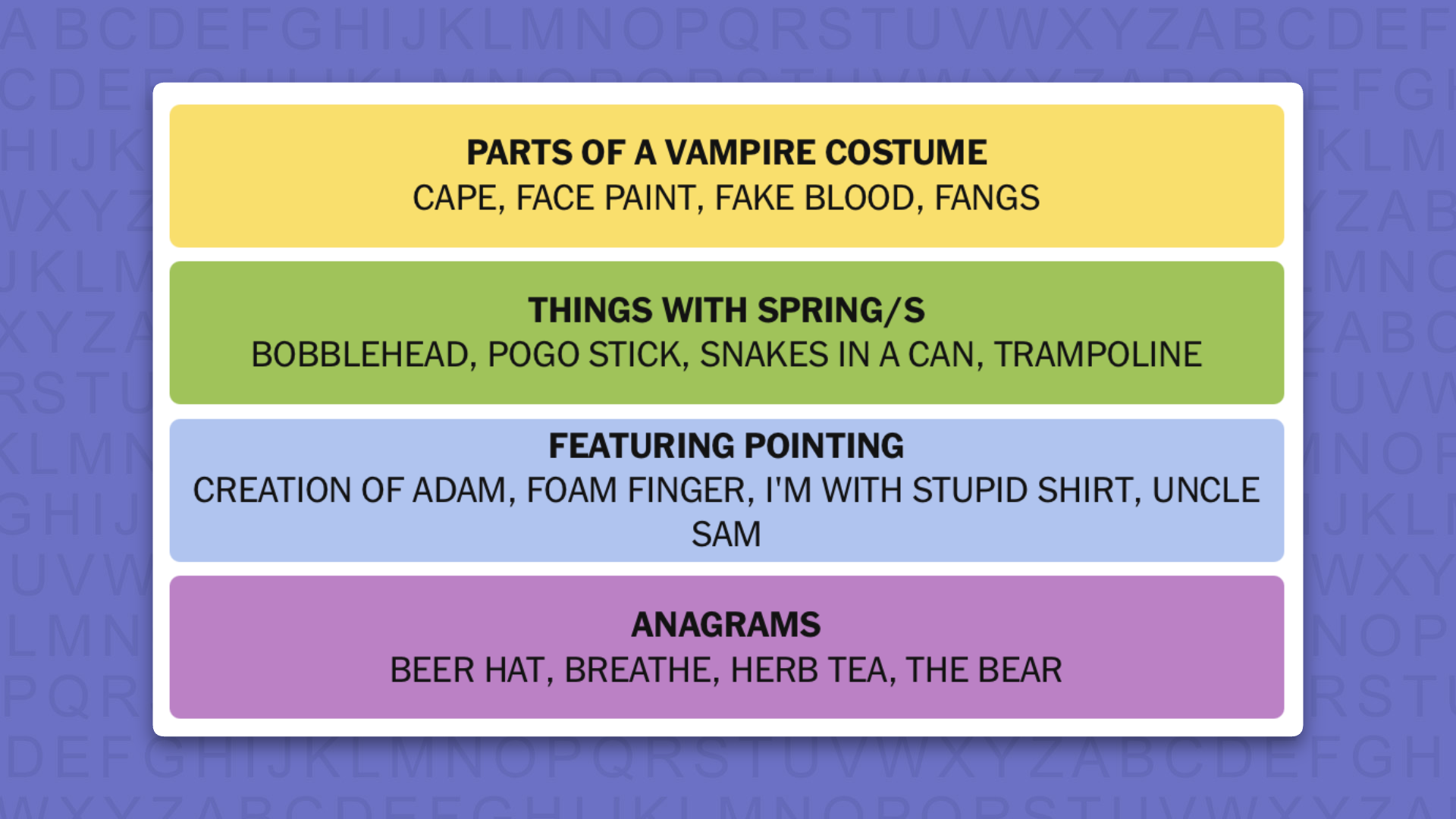
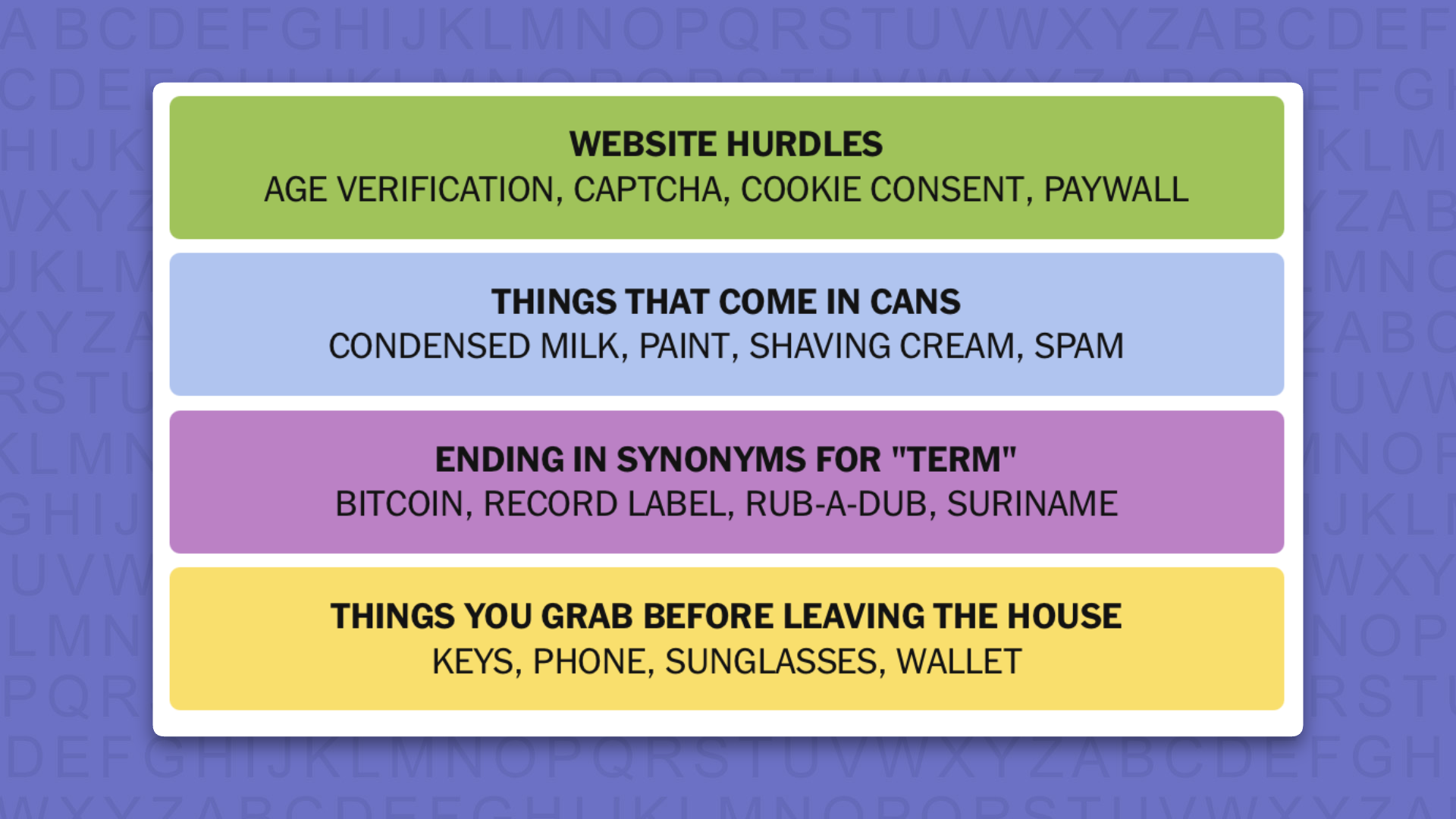
The answers to today's Connections, game #1157, are…

  • YELLOW: DOOMED: DONE, SUNK, THROUGH, TOAST
  • GREEN: BASIC CABLE CHANNELS: BET, BRAVO, HISTORY, USA
  • BLUE: WORDS IN AN AUCTIONEER'S CHANT: GOING, ONCE, SOLD, TWICE
  • PURPLE: HOMOPHONES OF FACIAL FEATURES: AYE, HARE, KNOWS, TUNG
  • My rating: Easy
  • My score: Perfect

It was very pleasant to see some tiles made up of single words after a run of two-worded tiles, but it didn’t make pouting the four groups together any easier.

That is until I had a blinding moment of revelation and remembered that I had watched the English Premier league on USA Network and BET, BRAVO and HISTORY were also TV stations of note, not that I know them as BASIC CABLE CHANNELS.

From here it all came together like a charm and I wondered why I was ever confused. That, though, is part of the magic that is Connections: bafflement and enlightenment within seconds.

Yesterday's NYT Connections answers (Monday, August 10, 2026, game #1156)

  • YELLOW: HAPHAZARDLY: ANY OLD HOW, AT RANDOM, HELTER-SKELTER, WILLY-NILLY
  • GREEN: WAYS TO RECEIVE EVENT TICKETS: MAIL DELIVERY, MOBILE TICKET, PRINT-AT-HOME, WILL CALL
  • BLUE: SECTIONS ON AN INVOICE: BALANCE DUE, BILL TO, ORDER NUMBER, UNIT PRICE
  • PURPLE: FAMOUS GOATEES: BILLY GOAT, COLONEL SANDERS, DOCTOR STRANGE, THE DEVIL

What is NYT Connections?

NYT Connections is one of several increasingly popular word games made by the New York Times. It challenges you to find groups of four items that share something in common, and each group has a different difficulty level: green is easy, yellow a little harder, blue often quite tough and purple usually very difficult.

On the plus side, you don't technically need to solve the final one, as you'll be able to answer that one by a process of elimination. What's more, you can make up to four mistakes, which gives you a little bit of breathing room.

It's a little more involved than something like Wordle, however, and there are plenty of opportunities for the game to trip you up with tricks. For instance, watch out for homophones and other word games that could disguise the answers.

It's playable for free via the NYT Games site on desktop or mobile.

'Everyone who bought this game should be eligible for a full refund': A digital-only Nintendo Switch game just became unplayable for those who paid for it — showing exactly why gamers are rebelling against Sony's disc-free PlayStation plans

  • Aliens: Fireteam Elite has been shut down on Nintendo Switch
  • The game was offered as a cloud version on the platform, which meant it relied on being streamed from a server over the internet
  • Those that spent money on the game do not appear to have been refunded

The Nintendo Switch version of Aliens: Fireteam Elite has been shut down, rendering it unplayable for those who bought it.

The game launched on Nintendo Switch on April 26, 2023, and unlike the versions available on other platforms, was a cloud version. That means it relied on being streamed from a server over an internet connection. A short demo version was available to try for free, but access to the full game cost $29.99.

There was even a $59.99 Ultimate Edition on offer, which threw in a raft of DLC, and means that some players would have paid 60 bucks for something that they can now no longer access at all.

Developer Cold Iron Studios quietly announced the shutdown back in March this year, sending a message to players thanking them for their support and confirming that the game "will be accessible until August 5, 2026" at which point buyers would "no longer be able to access the game."

It continued: "We apologize to our loyal customers for any inconvenience this may cause, and we appreciate your understanding. We hope you will continue to enjoy our other game titles."

Noticeably, there was no mention of any kind of refund for those who spent money on the game, and it doesn't appear that any affected players got one.

The news has picked up some steam on the r/gaming subreddit, with commenters rallying against cloud gaming and referencing fears surrounding the recent confirmation that Sony would be discontinuing the production of physical game discs in 2028 — pushing gamers towards digital formats.

"Everyone who bought this game should be eligible for a full refund," reads the top-rated comment. "This is why you don't buy a 'Cloud' version of a game," added another commenter. "It is a ticking clock."

One user wrote: "This is going to happen more and more as an all-digital future becomes standard... You don't own anything, you're just paying for the license to play something until it gets taken away."

A sequel, Aliens: Fireteam Elite 2, is expected to launch this year for PC, PlayStation 5, and Xbox Series X and Xbox Series S on August 25. It's also expected to come to Nintendo Switch 2 at a later date. Importantly, it won't be a cloud version, which will likely come as a relief to potential buyers.

NYT Connections hints and answers for Monday, August 10 (game #1156)

Looking for a different day?

A new NYT Connections puzzle appears at midnight each day for your time zone – which means that some people are always playing 'today's game' while others are playing 'yesterday's'. If you're looking for Sunday's puzzle instead then click here: NYT Connections hints and answers for Sunday, August 9 (game #1155).

Good morning! Let's play Connections, the NYT's clever word game that challenges you to group answers in various categories. It can be tough, so read on if you need Connections hints.

What should you do once you've finished? Why, play some more word games of course. I've also got daily Strands hints and answers and Quordle hints and answers articles if you need help for those too, while Marc's Wordle today page covers the original viral word game.

SPOILER WARNING: Information about NYT Connections today is below, so don't read on if you don't want to know the answers.

NYT Connections today (game #1156) - today's words

NYT Connections hints for game 1156 on a purple background

(Image credit: New York Times)

Today's NYT Connections words are…

  • BILLY GOAT
  • BALANCE DUE
  • WILLY-NILLY
  • MAIL DELIVERY
  • BILL TO
  • HELTER-SKELTER
  • WILL CALL
  • THE DEVIL
  • DOCTOR
  • STRANGE
  • ORDER NUMBER
  • ANY OLD HOW
  • MOBILE TICKET
  • UNIT PRICE
  • COLONEL SANDERS
  • PRINT-AT-HOME
  • AT RANDOM

NYT Connections today (game #1156) - hint #1 - group hints

What are some clues for today's NYT Connections groups?

  • YELLOW: All over the place
  • GREEN: Methods of concert entry
  • BLUE: Parts of a request for payment sheet
  • PURPLE: Notable small beard owners

Need more clues?

We're firmly in spoiler territory now, but read on if you want to know what the four theme answers are for today's NYT Connections puzzles…

NYT Connections today (game #1156) - hint #2 - group answers

What are the answers for today's NYT Connections groups?

  • YELLOW: HAPHAZARDLY
  • GREEN: WAYS TO RECEIVE EVENT TICKETS
  • BLUE: SECTIONS ON AN INVOICE
  • PURPLE: FAMOUS GOATEES

Right, the answers are below, so DO NOT SCROLL ANY FURTHER IF YOU DON'T WANT TO SEE THEM.

NYT Connections today (game #1156) - the answers

NYT Connections answers for game 1156 on a purple background

(Image credit: New York Times)

The answers to today's Connections, game #1156, are…

  • YELLOW: HAPHAZARDLY: ANY OLD HOW, AT RANDOM, HELTER-SKELTER, WILLY-NILLY
  • GREEN: WAYS TO RECEIVE EVENT TICKETS: MAIL DELIVERY, MOBILE TICKET, PRINT-AT-HOME, WILL CALL
  • BLUE: SECTIONS ON AN INVOICE: BALANCE DUE, BILL TO, ORDER NUMBER, UNIT PRICE
  • PURPLE: FAMOUS GOATEES: BILLY GOAT, COLONEL SANDERS, DOCTOR STRANGE, THE DEVIL
  • My rating: Hard
  • My score: 1 mistake

The key to my “purple first” success today was saying aloud to myself “not by the hair on my chinny chin-chin”. This in turn made me think of Colonel Saunders and his resplendent white goatee and although I have never seen Doctor Strange I was pretty sure I’d seen a poster of Benedict Cumberbatch sporting some hair on his chinny chin chin.

The other groups I found much harder and I made a mistake assembling the green group.

I knew that the thread was something to do with buying tickets, but didn’t understand WILL CALL, so selected ORDER NUMBER.

In the process, I remembered a recent concert I went to where the only entry was via MOBILE TICKET, but my phone battery was at 1%; I made it in just as the screen died.

Yesterday's NYT Connections answers (Sunday, August 9, 2026, game #1155)

  • YELLOW: TAKE A DIFFERENT APPROACH: CHANGE TACK, COURSE-CORRECT, RECALIBRATE, SHIFT GEARS
  • GREEN: CLASSIC CHILDREN'S BOOKS: CAPS FOR SALE, CORDUROY, GOODNIGHT MOON, MADELINE
  • BLUE: MOVIE SUBGENRES: BUDDY COP, NEO-NOIR, SPACE OPERA, SPAGHETTI WESTERN
  • PURPLE: THINGS PEOPLE TRY TO GET OUT OF: BAD DREAM, ESCAPE ROOM, JURY DUTY, LABYRINTH

What is NYT Connections?

NYT Connections is one of several increasingly popular word games made by the New York Times. It challenges you to find groups of four items that share something in common, and each group has a different difficulty level: green is easy, yellow a little harder, blue often quite tough and purple usually very difficult.

On the plus side, you don't technically need to solve the final one, as you'll be able to answer that one by a process of elimination. What's more, you can make up to four mistakes, which gives you a little bit of breathing room.

It's a little more involved than something like Wordle, however, and there are plenty of opportunities for the game to trip you up with tricks. For instance, watch out for homophones and other word games that could disguise the answers.

It's playable for free via the NYT Games site on desktop or mobile.

I’d recommend this Switch 2 all-in-one case over Nintendo’s official version having tested them both — and there’s one clear reason why

Turtle Beach PlayTrek 2-in-1 Case for Nintendo Switch 2: review

The Turtle Beach PlayTrek 2-in-1 makes a good first impression. It’s quite sleek for a large Switch 2 carrying case, and also rather stylish. This is thanks to the dark grey color and the surprisingly elegant suede strip that runs around it, offset to the right. It features subtle blue and orange stitching, a nice detail and a nod to the color coding of the Joy-Con 2 controllers.

Turtle Beach PlayTrek 2-in-1 Case for Nintendo Switch 2

(Image credit: Future)

The material of the entire unit also impressed me with its ruggedness. The shell of the main compartment feels solid, too, with only a slight amount of flex. As for the detachable travel case on top, I appreciated the small rubber strip that runs along its back edge, as it provides a little more durability and protection when opening it up. What’s more, the entire case is pleasingly light and slender, which is all the more impressive considering what it’s designed to carry.

The zips are similarly well-made, with a reasonably long string and a thin plastic topper that’s easy to grip. However, I did find them a little awkward to open at times, as the lids of both the travel case and main compartment have a tendency to sag inwards, slightly obscuring the teeth. This is a minor issue, though, and not one that’s likely to frustrate.

Turtle Beach PlayTrek 2-in-1 Case for Nintendo Switch 2

(Image credit: Future)

It’s quite versatile in terms of storage. As mentioned, and as the name suggests, there are two elements to the PlayTrek 2-in-1. The first is the travel case, which is attached via hook-and-loop fastening. This feels quite strong, so I wasn’t worried about it detaching unintentionally. The case houses the console and up to 14 game cards, courtesy of the elastic slots attached to the screen protector flap. The inner part of the lid features zipped netting for storing other accessories, such as cables and the like. There’s no carrying handle, though, which is an oversight.

The fit for the console is very snug, and the case itself is thin all over with next to no extraneous bulk. This makes it great for tucking into a backpack, like the best Nintendo Switch 2 accessories. However, it isn’t a hard shell; it flexes quite readily, so I wouldn’t be confident stacking anything heavy on top of it.

By contrast, the main compartment feels sturdy. The sides can bend inwards quite easily, but the same isn’t true of its corners, so I wouldn’t be concerned if it were subjected to outward forces.

Turtle Beach PlayTrek 2-in-1 Case for Nintendo Switch 2

(Image credit: Future)

Inside there are inserts for the console, the dock, the Joy-Cons, the charger, and a large gamepad, such as the Switch 2 Pro Controller. I managed to fit the GameSir G7 Pro here instead, which is one of the best Nintendo Switch 2 controllers you can buy, with ease. The fit was snug and secure, as it was for all the other parts. Nothing moved out of place when I threw the loaded case up and down and spun it upside down several times.

The mold material is also just about soft enough to prevent scratching or marking the items within. However, during the course of my test, the glue adhering one side of the mold base to the bottom of the case failed, coming loose.

Turtle Beach PlayTrek 2-in-1 Case for Nintendo Switch 2

(Image credit: Future)

Obviously this was disappointing, although it’s possible I got unlucky with my particular unit. Regardless, it at least suggests some quality control issues. Despite the failure, I wasn’t too concerned that this would compromise the security of my contents: the other side of the base remained affixed, and since it sits tightly within the compartment, I wouldn’t be worried if all the glue came unstuck.

There are two straps adorning the main compartment. There’s a small carrying handle with a soft neoprene cover that’s very soft and comfortable in the hand. It provides just enough slack, although it's quite tight, which makes it awkward to move out of the way when accessing the main compartment and detaching the travel case; the handle slid out of one of its buckles accidentally on numerous occasions. On the other hand, this tightness does help to pin down the travel case on top, adding an extra layer of security to the hook-and-loop fastening.

Turtle Beach PlayTrek 2-in-1 Case for Nintendo Switch 2

(Image credit: Future)

The shoulder strap is a typical affair, with its nylon design and plastic karabiners. It's a small shame these and the buckles aren’t made of metal, but I guess this helps to keep the weight down. Fortunately, the karabiners are very solid, which can make them a little tough to remove, but this is a price I’m willing to pay for the security they offer in return.

The length of the strap is adjustable to a reasonable degree, although it could perhaps offer more slack to more easily accommodate taller users. The padded cover over the adjustment buckle is a little thin and lacks the cushioning of the neoprene carrying handle, but I still found it sufficient to prevent the strap digging into my skin.

At $50, the PlayTrek 2-in-1 is a reasonable price for such a feature-filled carrying case. It also has the quality to match, aside from the aforementioned issue with the inner mold. And since it’s cheaper than Nintendo’s own counterpart, it’s a compelling alternative.

Turtle Beach PlayTrek 2-in-1 Case for Nintendo Switch 2 review: Price & specs

Price

$49.99 / £39.99 (about AU$70)

Dimensions

5.83 x 12.60 x 7.99in / 148 x 320 x 203mm

Weight

1.78lbs / 809g

Number of game card slots

14

Compartments

7

Handle

Yes

Color

Grey

Should I buy the Turtle Beach PlayTrek 2-in-1 Case for Nintendo Switch 2?

Scorecard

Attributes

Notes

Rating

Design

Light and bulk-free, while still providing enough protection. The travel case is a bit too soft, though.

4 / 5

Storage

There’s plenty of room for your entire gaming setup, which is all the more impressive given its slender form.

5 / 5

Value

It’s not exactly cheap, but it’s cheaper than Nintendo’s equivalent, yet has more features and storage space.

4.5 / 5

Buy it if…

You want versatility
With its detachable travel case and space for your Switch 2 and its accessories, this really is the all-encompassing solution for transporting your setup.

You want to keep the bulk down
It’s relatively slender and pleasingly light without being too flimsy.

Don't buy it if…

You want a tough travel case
The detachable travel case isn’t as solid as many others, which is a shame.

You want an unfussy handle
The strap handle is awkward to move out of the way when opening the main compartment.

Turtle Beach PlayTrek 2-in-1 Case for Nintendo Switch 2 review: Also consider

Nintendo Switch 2 All-In-One Carrying Case
As Nintendo’s official carrying case, you’d imagine the quality would be high here. And indeed it is, but it’s more expensive than the PlayTrek, yet less solid and with fewer features. There aren’t as many game card slots, and there’s no detachable travel case. Read our full Nintendo Switch 2 All-In-One Carrying Case review.

How I tested the Turtle Beach PlayTrek 2-in-1 Case for Nintendo Switch 2

Turtle Beach PlayTrek 2-in-1 Case for Nintendo Switch 2

(Image credit: Future)

I tested this case for a few days, storing the Switch 2 in the travel case compartment, as well as in the main compartment along with the dock, Joy-Cons, and a large controller.

I carried the case around, via both the handle and the shoulder strap, and regularly removed and replaced the handle to test how easy this was. I also tested the zips thoroughly by opening and closing them repeatedly.

I threw the case up and down and spun it upside down several times to test both the hold of the detachable travel case and the hold provided by the inner molds of the main compartment.

‘There's never been a better time to be a Pokémon Go player’: 10 years on, VP of game development says there’s plenty still to come

When it comes to mobile games, few remain culturally relevant for a decade, and none have shadows that loom quite as large as Pokémon Go. Now in its tenth year, the app remains a phenomenon.

It’s undergone massive changes since it first launched back in 2016; just as much as its players, our phones, and the world around us. Still, there’s a fondness that bookended much of my early 20s that I share with many players old and new; it’s also one I felt radiate from Kim Adams, VP of game development, when we sat down to discuss the title’s legacy and future as it celebrates this significant milestone.

Spotting the Togepi plush sat just in the frame of my Zoom camera capture, Adams’ affinity for the game and its players was immediately clear: “Togekiss is my favorite, but Mr. Mime is a close second, just because Mr. Mime is so strange!”

Everyone has different potential

What struck Adams most upon joining the Pokémon Go team was the relationship between the players and the game. “There's a loyalty and a love for the game that is really special, and I feel unlike any other game.“

“It’s how [players] have integrated the game into their lives. There's a group in Austin, Texas, who meets every Wednesday night to raid together, and then they all go to this very small local restaurant to have tacos. That's their thing, every week.”

Some groups use Pokémon Go as a vessel to organize park cleanups or local food drives, she says, and of course there are the many players who've met their life partner playing the game — one lucky couple even tied the knot in an official Pokémon Go wedding last year.

In numbers, that loyalty feels all the more tangible. “Ten years is a long time. We've had over 800 million people play the game during that time. People have walked over 50 billion kilometers. They've made almost a billion friends in the game. They've caught a trillion Pokémon, and that's across 150 countries.”

For Adams, though, her proudest achievements boil down to how the team behind Pokémon Go “stayed true to our mission of inspiring people to explore the world together, and we haven't really wavered from that.”

That evolution spans a decade of new features, from PvP battles and Buddies to more recent additions like Dynamax, with many built around the game’s core social foundations.

Adams feels “particularly proud” of the app’s first UGC feature, Routes, which launched in 2023. “When I go to a new city, I immediately look at what Routes are nearby, and I try different Routes so that I can see the neighborhood through the eyes of a local in a way that I couldn't otherwise… we currently have seven million Routes in the game across the world.”

Whether it’s through Routes, Raids or rankings, Pokémon Go’s expansive audience is at the core of its success, and it’s something Adams seems acutely aware of. “I really love some of the smaller quality of life improvements that we've made with existing features, because we're listening to players, right? Those always get a great reception because people know that we're interested in making improvements continually.”

Pokemon GO Professor with Pikachu and Mew

(Image credit: Niantic)

The circumstances of one’s birth are irrelevant

You never know what’s around the corner, but a global crisis like COVID-19 was unlikely to be on anyone’s business plan in the last ten years. So, how does an app with a core mission of going outside and playing with friends grapple with a pandemic that saw millions of people stuck at home?

Initially, with some difficulty, Adams explains, “When Covid first struck in March of 2020, we had three live events planned within the next three months. But of course, as things developed, it was literally illegal to go outside your home, depending on what region you were in in the world. So we had to cancel those.”

The problem almost became a philosophical one, in a sense. Adam contrasts her previous experience working with products that had “incredible tech in search of a purpose” with Pokémon Go’s reverse approach: “We started with this lovely mission to get people outside connecting, and we have this incredible and deep tech stack that supports that purpose… using the real world as our game board, and having a game that's designed to play outdoors with other people is not always easy.”

As a result, the game had to see some radical changes to meet its players where they were. “We had to make some pivots to support indoor play, which we had never designed for before. But the great thing that came out of that was it forced us to imagine what live events could be like if thousands of people weren't in the same physical location.”

That, she says, was the genesis of Pokémon Go’s global live events, making it possible for players around the world to join in the fun without being at a specific location. “Now we have the best of both worlds, where we kick off the season with three major live events across the world, and then we follow on with this global event afterwards.”

This program has totally caught fire: now we have over 3,000 across the world. At this point, we're only limited to how quickly we can thoughtfully onboard people.

Kim Adams, VP of game development

Later, the Community Ambassador Program launched in July 2022 as part of the Campfire app, cementing the platform-level approach to bringing players together by offering passionate players who love the game the chance to apply to become a community ambassador and host local weekly or monthly meetups.

“This program has totally caught fire: now we have over 3,000 across the world. At this point, we're only limited to how quickly we can thoughtfully onboard people. The nurturing of those relationships is really important to us because it keeps our finger on the pulse of how players are actually feeling about everything that we implement into the game. We've even brought them into the office from all over to pick their brains.”

“It’s so great — I used campfire, and I connected with folks a couple weeks ago. I went to a local park that I hadn't been to to play [with them]. I've raided in hotel lobbies with employees before. This community is really tight.”

Charizard and Snorlax being caught in Pokemon GO

Screenshots of Pokémon Go from way back in 2017... ah, the nostalgia

If you don't struggle, you don't improve

Still, every rose has its thorns, and not every change to Pokémon Go has been received with open arms. For example, changes to remote raid price hikes, which allowed players in more remote areas or those with accessibility needs to join in the fun more easily, remain unresolved despite large-scale community outcry.

Despite this, though, Adams says the mission remains the same: “to inspire people to play everywhere in every community across the world.” To catch ‘em all, one might say.

That includes players in more rural areas who are most affected by the game’s distribution of players and in-game features; a group Adams remains committed to servicing. “Over the years, we've done major map updates where we've added two and a half billion spawn points, and a lot of those are in rural areas… with tens of millions of players every day, there's never anyone who's too far away from you who also plays Pokémon Go.”

Quality is an ongoing issue that we're really looking at. We're doubling down on this year.

Kim Adams, VP of game development

There’s always room for growth though, she acknowledges. “I’m really proud of the strong, talented, committed team that we've built, who truly aspire to bring the best experiences to players every day. Along those lines, quality is an ongoing issue that we're really looking at. We're doubling down on this year.”

I asked what the team would do differently, given the chance, from its ten-year tenure, and what Adams shared shapes much of what we can expect in the years to come: “We would probably invest even more in the core foundations of the technical implementation of the game so we could really deliver more solidly on the promises that we make to players, so that's something we're taking a close look at.

“We've had a minute to breathe now post-acquisition and really take a solid look at how we make improvements. We're also taking a look at design across the game; there have been so many elements added over the years that we're doing a pass, making sure that everything is as straightforward as possible for folks.”

Adams points to the Pokémon Go Times Square takeover as a career highlight.

The future is now, thanks to science!

Did you know TechRadar now has membership?

Various tech product cutouts next to the words 'Insider TechRadar Learn More'

(Image credit: Future)

Become a TechRadar Insider by simply clicking 'Join Now' at the top of this page. Have a question? Please email membership@techradar.com

Pokémon Go has seen many evolutions in its 10-year history as a mobile app, but when I ask Adams about her wildest dreams for the future of the game, she reflects on some of her previous experiences in the XR space. “This is my personal wish — I'm not making a company statement — my personal wish is that as wearables continue to develop into something more robust and scalable and light, I'd love the opportunity to explore playing our game truly heads up and hands free.

“If — or how — that may come together is still very much TBD, dependent upon what happens in the hardware space, which we're always tracking. I'm always having meetings, and we're doing some experimentation on our side, just to make sure that we keep up with the tech, and when it's ready, that is something that I would love to dig into further.”

I’ll let it be known in writing here that I pitched Pokéball-themed round-frame smart specs, for what it’s worth. Low-hanging fruit? Absolutely, but I’d have no shame in hitting the streets wearing those bad boys.

Beyond that, the immediate future for the app offers plenty to keep the team and players busy. “We're cooking up some really exciting new features. We still have the rest of our 10th anniversary year with lots of fun things coming up. I truly feel there's never been a better time to be a Pokémon Go player than right now.”

You can download Pokémon Go for iOS and Android via the App Store and Google Play Store.

NYT Connections hints and answers for Sunday, August 9 (game #1155)

Looking for a different day?

A new NYT Connections puzzle appears at midnight each day for your time zone – which means that some people are always playing 'today's game' while others are playing 'yesterday's'. If you're looking for Saturday's puzzle instead then click here: NYT Connections hints and answers for Saturday, August 8 (game #1154).

Good morning! Let's play Connections, the NYT's clever word game that challenges you to group answers in various categories. It can be tough, so read on if you need Connections hints.

What should you do once you've finished? Why, play some more word games of course. I've also got daily Strands hints and answers and Quordle hints and answers articles if you need help for those too, while Marc's Wordle today page covers the original viral word game.

SPOILER WARNING: Information about NYT Connections today is below, so don't read on if you don't want to know the answers.

NYT Connections today (game #1155) - today's words

NYT Connections hints for game 1155 on a purple background

(Image credit: New York Times)

Today's NYT Connections words are…

  • SHIFT GEARS
  • JURY DUTY
  • SPACE OPERA
  • LABYRINTH
  • CAPS FOR SALE
  • ESCAPE ROOM
  • NEO-NOIR
  • COURSE-CORRECT
  • BAD DREAM
  • BUDDY COP
  • CORDUROY
  • CHANGE TACK
  • MADELINE
  • RECALIBRATE
  • SPAGHETTI WESTERN
  • GOODNIGHT MOON

NYT Connections today (game #1155) - hint #1 - group hints

What are some clues for today's NYT Connections groups?

  • YELLOW: Take a new path
  • GREEN: Bedtime stories
  • BLUE: Types of fims
  • PURPLE: In need of an exit strategy

Need more clues?

We're firmly in spoiler territory now, but read on if you want to know what the four theme answers are for today's NYT Connections puzzles…

NYT Connections today (game #1155) - hint #2 - group answers

What are the answers for today's NYT Connections groups?

  • YELLOW: TAKE A DIFFERENT APPROACH
  • GREEN: CLASSIC CHILDREN'S BOOKS
  • BLUE: MOVIE SUBGENRES
  • PURPLE: THINGS PEOPLE TRY TO GET OUT OF

Right, the answers are below, so DO NOT SCROLL ANY FURTHER IF YOU DON'T WANT TO SEE THEM.

NYT Connections today (game #1155) - the answers

NYT Connections answers for game 1155 on a purple background

(Image credit: New York Times)

The answers to today's Connections, game #1155, are…

  • YELLOW: TAKE A DIFFERENT APPROACH: CHANGE TACK, COURSE-CORRECT, RECALIBRATE, SHIFT GEARS
  • GREEN: CLASSIC CHILDREN'S BOOKS: CAPS FOR SALE, CORDUROY, GOODNIGHT MOON, MADELINE
  • BLUE: MOVIE SUBGENRES: BUDDY COP, NEO-NOIR, SPACE OPERA, SPAGHETTI WESTERN
  • PURPLE: THINGS PEOPLE TRY TO GET OUT OF: BAD DREAM, ESCAPE ROOM, JURY DUTY, LABYRINTH
  • My rating: Easy
  • My score: Perfect

Everyone’s knows that GOODNIGHT MOON is one of a handful of CLASSIC CHILDREN’S BOOKS (the “bowl full of mush” always puzzled me) and I was sure MADELINE was too, but I couldn’t see any others — so decided to put this possible group to one side. In fact, you could say I decided to TAKE A DIFFERENT APPROACH.

After landing the yellow group I decided that SPACE OPERA and SPAGHETTI WESTERN belonged together and guessed that NEO-NOIR and BUDDY COP could also be labeled as MOVIE SUBGENRES.

With eight tiles left the titles of children’s books were not popping out for me, so I took a risk connecting things that sounded like you could get trapped in and added JURY DUTY as a random fourth tile.

Yesterday's NYT Connections answers (Saturday, August 8, 2026, game #1154)

  • YELLOW: QUAINT EXPRESSIONS OF EXCITEMENT: HOT DOG, HURRAH, WHOOPEE, YAHOO
  • GREEN: CONVEY: COUCH, EXPRESS, FRAME, PHRASE
  • BLUE: WORDS ABBREVIATED WITH LETTERS AS HOMOPHONES: CUTIE, EASY, EFFECTS, I OWE YOU
  • PURPLE: SAFETY _____: BELT, GOGGLES, PIN, RAZOR

What is NYT Connections?

NYT Connections is one of several increasingly popular word games made by the New York Times. It challenges you to find groups of four items that share something in common, and each group has a different difficulty level: green is easy, yellow a little harder, blue often quite tough and purple usually very difficult.

On the plus side, you don't technically need to solve the final one, as you'll be able to answer that one by a process of elimination. What's more, you can make up to four mistakes, which gives you a little bit of breathing room.

It's a little more involved than something like Wordle, however, and there are plenty of opportunities for the game to trip you up with tricks. For instance, watch out for homophones and other word games that could disguise the answers.

It's playable for free via the NYT Games site on desktop or mobile.

‘A capable controller with plenty of adjustments’: while this Nintendo Switch 2 and PC gamepad looks like an Xbox controller, it hides some serious upgrades — but there are a few sticking points you need to know about

Gulikit KK3 Max: One-minute review

The GuliKit KK3 Max might look like a standard controller, but it has plenty of extras and features on board.

Adopting the familiar form of the Xbox’s gamepad, the KK3 Max doesn’t exactly push the boundaries in terms of design. But given how comfortable and convenient the shape and layout are, it’s hard to complain about its lack of originality.

There are also a few extra flourishes that add some interest. The matte white finish of my review unit was rather fetching, while the front panel is incredibly smooth, smoother than any other I’ve felt before. Its construction also feels quite solid, rivaling the builds of the best PC controllers.

This premium feel extends to the buttons, since there’s very little wobble to any of them. The same can be said of the various sets of levers for the four back buttons, although a fair amount of force is required to insert them.

Hand holding GuliKit KK3 Max with pink wall in background

(Image credit: Future)

Despite the lack of software, there are still plenty of input-related customizations and settings available via various button combinations. These range from basic adjustments, such as the vibration intensity and stick sensitivity, to more advanced features, such as motion control and macro recording.

The overall performance of the KK3 Max is pretty good. Most of the buttons are responsive and satisfying to press. The triggers offer a fair amount of control, although I found their travel distance a little too short for my preferences. The sticks also lack the precision of the best, although they move easily and quickly. Motion controls are also inconsistent: I found they performed well with Nintendo Switch games, but were less effective on PC and mobile titles.

I’m happy to report that I had no issues with connectivity on any system I tried the KK3 Max with. Whether it was to my PC via the USB dongle or to my Switch and Android tablet via Bluetooth, the KK3 Max connected quickly to them all and I didn’t experience any dropouts or lag. Hotswitching between devices is also easy thanks to the dedicated button for this purpose, although it can take several presses for the button to respond.

The current multiplatform controller market is certainly a competitive one, with an increasing number of entrants offering increasingly better value. At $79.99 / £65.99 / AU$113.95, the KK3 Max is dangerously close in price to some real standouts, such as the Steam Controller and the GameSir G7 Pro 8K, and more expensive than the 8BitDo Pro 3, another highly capable controller. It mightn’t quite match up to its cohort, but the KK3 Max is still a gamepad to consider if you prefer onboard adjustments and like to have plenty of back buttons.

Back of GuliKit KK3 Max with back button attachments next to it, on desk with pink wall in background

(Image credit: Future)

Gulikit KK3 Max review: Price & availability

  • $79.99 / £65.99 / AU$113.95
  • Available now in various colorways
  • Premium pricing puts it against big hitters

The GuliKit KK3 Max costs $79.99 / £65.99 / AU$113.95 and is available now from Amazon. Three colorways are available: black, white, and grey.

This pricing places the KK3 Max at the premium end of the market. It comes close to some big names in this space, such as the new Steam Controller. This has the advantage of touchpads for controlling the mouse cursor, and we found its gyroscope controls performed very well, unlike the KK3 Max’s. It isn’t compatible with the Switch or Switch 2, though.

The KK3 Max is also more expensive than the 8BitDo Pro 3, which has class-leading performance. We particularly loved its smooth analog sticks and triggers, as well as its phenomenal D-pad. It’s very customizable, too, thanks to its accompanying software — something the KK3 Max lacks.

Gulikit KK3 Max review: Specs

Gulikit KK3 Max

Price

$79.99 / £65.99 / AU$113.95

Weight

9.7oz / 275g

Dimensions

6 x 4.3 x 1.3in / 154.7 x 108.1 x 32.4mm

Compatibility

PC, Switch, Switch 2, Android, iOS

Connection type

Wireless (2.4GHz, Bluetooth), Wired (USB-C)

Battery life

15-28 hours

Back of GuliKit KK3 Max with back button levers attached, on a desk with pink wall in background

(Image credit: Future)

Gulikit KK3 Max review: Design and features

  • Super smooth surface
  • No extra D-pad hats or stick caps
  • No software

The KK3 Max has a simple and conventional design, replicating the form and layout of the best Xbox controllers. This is no bad thing, though, since such gamepads are among the most ergonomic and comfortable out there. Along with many others, I’m also particularly fond of the asymmetric analog sticks, since this moves the D-pad to a position that makes it easier to use with either thumb.

What may prove more divisive, however, is the relatively small size of the entire unit. I don’t have particularly large hands, but both my thumbs and forefingers tended to overhang the sticks and triggers respectively. I was able to adjust my grip to compensate without sacrificing comfort or security, but others might find this more of a problem.

There are some extra touches to the KK3 Max’s design that set it apart from the crowd. The brilliant white matte finish of my review unit is quite eye-catching, as is the subtle yet effective RGB lighting around the sticks, which also has a practical function that I’ll come to later.

Close-up of right analog stick on GuliKit KK3 Max, on a grey desk

(Image credit: Future)

The front plate is incredibly smooth to the touch, smoother than any other controller I’ve experienced. However, this plate isn’t magnetically attached as it is on other gamepads, allowing for easy removal for the sake of customization and reordering or replacing buttons.

You can still remove the KK3 Max’s face buttons — you’ll just need to use the included puller to do so, which is thankfully easy to use. You can’t directly swap the X with the Y button or the A with the B, though, since they have different depths and curvatures. Rather, duplicates of each button are included in the box with the appropriate depth and curvature for swapping their position. This seems like a rather inefficient solution to me, and just means you have more bits of plastic in your life than you otherwise would.

I can’t complain about their quality, though. They’re pleasantly smooth and stable, with only a marginal amount of play, while their transparent design is quite fetching. The D-pad also feels stable, although it’s a shame you can't replace the hat, as different designs can make a real difference to feel and performance, and would cater to more preferences. Fortunately, I found it quite ergonomic; even though it adopts the traditional four-point shape, its rounded edges make it better for rolling between directions.

Close-up of left analog stick on GuliKit KK3 Max, on a grey desk

(Image credit: Future)

The triggers are also comfortable. They have rounded outside edges, which makes them soft on the finger, as well as a dotted texture to provide grip. The analog stick caps are reasonably small but have an ergonomic shape and a soft finish. Their edges are slightly textured, although this is less prominent than other examples, so those with sweaty thumbs might slip off them. They are removable, but GuliKit doesn’t provide any extra sets in the box, which is a shame. The sticks themselves are quite tall and suitably planted, with a negligible amount of play.

More solid are the back button levers. Despite how they look, they’re not made from metal, but they are reassuringly sturdy. They actually require a fair amount of force to insert in their slots, but once in place, I felt pretty confident that they weren’t going to come loose. They come in different shapes, with two sets of paddle-like levers and a set that looks more like bumpers.

Close-up of top of GuliKit KK3 Max, on a grey desk with pink wall in background

(Image credit: Future)

There’s no software for customizing the inputs of the KK3 Max, which is a shame. However, there are still plenty of adjustments you can make and features to enable using various button combinations. You can alter the sensitivity of the analog sticks, with three levels to choose from, as well as toggle Dead Zone mode for them. You can also enable the Motion Aim Assist mode, letting you assign gyroscopic controls when either the left stick or the left trigger is held. Again, there are three levels of sensitivity to choose from here.

Other settings include a toggle for the D-pad between four- and eight-direction modes, A and B and X and Y swaps, and a Rapid Trigger function with two modes to choose from: one where the chosen input triggers repeatedly when held, and the other when it’s merely pressed. An autopilot mode and a macro recorder are available, too.

All these adjustments are quite easy to make, and there are some useful indicators that let you know what settings have been selected. For instance, the sticks light different colors depending on which of the three sensitivity levels is set, and the pad rumbles once, twice, or thrice depending on which of the three sensitivities of the Motion Aim Assist is set. However, I still would’ve preferred software for convenience's sake; it’s always nice to see your settings represented graphically, and having to remember all the button combinations is a hassle I could do without.

Three-quarter view of GuliKit KK3 Max, on a desk with pink wall in background

(Image credit: Future)

Gulikit KK3 Max review: Performance

  • Solid button feel
  • Slightly imprecise sticks
  • Motion controls are mixed

In action, the KK3 Max acquits itself rather well. The face buttons are tactile and well-damped, and only require a light touch to press, which makes them feel snappy. However, they don’t provide the best feedback, and there are times when it can be difficult to feel them actually being pressed. Thankfully, however, this didn’t result in presses failing to register, in my experience.

The bumpers are more clicky, but still have enough dampening to make presses satisfying. However, I found their position a little too high, which can make reaching them a little difficult. I should say that I encounter this problem on quite a few gamepads, but here it’s particularly acute.

In fact, I found the back buttons more usable than the bumpers, which isn’t something I can say about a lot of other controllers with back buttons. Their travel might be shallow, no matter which lever you decide to attach, but there’s enough dampening and feedback to make them viable as replacements for other inputs. I didn’t accidentally trigger them when gripping the KK3 Max tightly, either. The shapes of the various levers are easy to use, although I did find that the lower paddles were best used with two fingers rather than one.

View of  top of GuliKit KK3 Max, leaning on plinth on desk with pink wall in background

(Image credit: Future)

The triggers are resistant enough to provide adequate control when performing graduated presses, something I especially appreciate when playing racing games such as Assetto Corsa that require precise acceleration and braking inputs. Their relatively shallow travel does negate this aspect somewhat, but I still found them just about up to the task. They’re also light enough to perform rapid inputs when needed, and to prevent fatigue from setting in during prolonged holds.

The sticks move freely and quickly, with a fast rebound that makes them feel snappy. Aiming was quite accurate when I played 007 First Light, although they don’t offer the smoothest motion, with small but frequent jumps and unexpected accelerations affecting my accuracy. Thankfully, their aforementioned height didn’t pose a problem when moving them around, although it did cause some instability when pressing in the L3 and R3 buttons, with accidental directional movements often accompanying them.

The gyroscopic motion controls are mixed in terms of their performance. When I played The Legend of Zelda: Tears of the Kingdom on my Switch, they were smooth when aiming the bow, and on a par with the best Nintendo Switch controllers. However, with games on other platforms, such as First Light on PC and Hitman Blood Money — Reprisal on Android, they were jerky and restrictive in terms of movement. No matter how many times I recalibrated them using the onboard function to do this, they didn’t improve on these systems.

I had no issues connecting the KK3 Max to my Windows 11 PC, Switch, or Android tablet via Bluetooth or the USB dongle. The handy button for hot-switching between devices is also useful, and hot-switching itself proved quick in my experience. However, the button doesn’t operate that well, taking a few too many presses to actually respond.

Should I buy the Gulikit KK3 Max?

Buy it if…

You want a comfortable gamepad
The ergonomic shape of the KK3 Max, combined with the super smooth front panel and rounded triggers, make it comfortable to use — although those with particularly large hands might struggle with it.

You want plenty of back buttons
With four back buttons and three different kinds of lever attachments for them, the KK3 Max is great for those who like to trigger inputs with their fingers rather than their thumbs.

Don't buy it if…

You want software
Even though you can customize the inputs of the KK3 Max, you’ll need to do this with button combinations, as there’s no companion app.

You want the best stick performance
The sticks aren’t quite as smooth or precise as those in the best gamepads.

Gulikit KK3 Max review: Also consider

GuliKit KK3 Max

8BitDo Pro 3

Valve Steam Controller (2026)

Price

$79.99 / £65.99 / AU$113.95

$59.99 / £40 (around AU$84)

$99 / £85 / AU$149

Weight

9.7oz / 275g

8.5oz / 242g

10.3oz / 292g

Dimensions

6 x 4.3 x 1.3in / 154.7 x 108.1 x 32.4mm

6.1 x 3.9 x 2.6in / 154 x 101 x 65mm

4.4 x 6.3 x 2.2in / 111 x 159 x 57mm

Compatibility

PC, Switch, Switch 2, Android, iOS

Switch, Switch 2, PC, Android, iOS

PC, Mac, Android, iOS

Connection type

Wireless (2.4GHz, Bluetooth), Wired (USB-C)

Wireless (2.4GHz, Bluetooth), Wired (USB-C)

Steam Controller Puck, USB, Bluetooth

Battery life

15-28 hours

15-20 hours

35+ hours

Valve Steam Controller (2026)
Valve’s latest iteration of the Steam Controller was highly anticipated, and in our view it didn’t disappoint. We found it offered great all-round performance, thanks to its TMR analog sticks and excellent gyro controls. Unlike other controllers, it also features touchpads for controlling cursor movement, making it a real boon for PC players. It doesn’t have the wide-ranging platform support of others, though.

Read our full Valve Steam Controller (2026) review.

8BitDo Pro 3
If you want to spend less on a controller but still want great performance, look no further than the 8BitDo Pro 3. We loved the performance of its sticks, triggers, and D-pad, and we found its shape supremely comfortable, while still staying faithful to the old SNES gamepad it’s keen to emulate. It also has great software with plenty of customizations.

Read our full 8BitDo Pro 3 review.

Side view of GuliKit KK3 Max on desk

(Image credit: Future)

How I tested the Gulikit KK3 Max

  • Tested consistently for a few days
  • Played a variety of games on multiple devices
  • Plenty of controller experience

I tested the Gulikit KK3 Max for a few days, during which time I played a number of games on most of the platforms the controller is compatible with. I used it on my Windows 11 PC via the 2.4GHz wireless USB dongle, and on my Switch and Samsung Galaxy Tab S11 tablet via Bluetooth.

I made sure to play a variety of games across these platforms to test every facet of the controller’s performance. I played 007 First Light on PC, which is a good test for the accuracy and precision of analog sticks, as well as Hitman: Blood Money — Reprisal on my tablet for the same purpose. I also played Assetto Corsa, which is not only a good test for the sticks but also for the control offered by the triggers. I also played The Legend of Zelda: Tears of the Kingdom on Switch, primarily to test the motion controls, as the game and console handle such controls very well.

I’ve been gaming for decades, and have used numerous gamepads with numerous systems in that time. I’ve also reviewed a number of other controllers, from budget offerings to high-performing premium models.

How to choose your first mechanical keyboard — and why it's simpler than the internet wants you to think

Go onto any forum or mechanical keyboard subreddit these days, and it can be a minefield as to what people recommend. It's an essential wall of noise with regards to size, shape, switch type and even more that can be daunting if you're a first-timer or you're someone getting back into the hobby after years of being out of it.

I was speaking to a fellow tech journalist at Computex 2026 a few months ago, and he raised this exact point with me. After being out of the hobby for several years, he'd come back to find it being more confusing than ever before, which completely switched him off.

Likewise, I've often thought we've reached a state of choice paralysis compared to where the hobby was, say, a decade ago. Back then, you had only a handful of switch choices, and while we've since seen the democratisation of hot-swappable sockets, machined aluminium chassis and open-source software, it can be horribly overwhelming when it comes to the decisions that actually matter — layout, switch feel, and budget.

Before I go any further, let me give you my credentials – I've been a tech journalist for the best part of a decade, reviewing keyboards from brands big and small, and I've been involved in the mechanical keyboard hobby since before it hit the mainstream. I've seen this market go from a small niche to something that can feel genuinely impenetrable if you're coming to it fresh.

To be truthful, it doesn't have to be that complicated. Underneath all of that noise, choosing your first mechanical keyboard still comes down to a few simple decisions, which I'll guide you through below.

A range of gaming keyboards

(Image credit: Future)

1. Pick a size

It might seem a bit of a strange, but a good starting point is thinking about what size of keyboard you'd like. I don't mean the physical dimensions of the 'board, rather the layout and arrangement of the keys.

Keyboards can come in all shapes and sizes, ranging from the typical full-size 100% down to ridiculously tiny 40% keyboards. So, let's divide them into categories.

Firstly, we've got between 60% and 65% layouts, which eschew a lot of features, such as a function row, nav cluster and number pad in the name of saving as much desk space as possible. These layouts have been popularised by gamers who need desk space for sweeping mouse movements and find the elements mentioned above quite redundant. Between the two, a 65% layout adds arrow keys and some navigation keys, which I think are non-negotiable for productivity work, but your mileage may vary.

Moving up a tad, we go to between 75% and TKL, or tenkeyless, keyboards. These bring back the function row and navigation cluster, giving you a lot more functionality than smaller layouts, while still chopping off the number pad. Personally, this is my favourite option, and I think a strong middle ground if you want to save space without sacrificing too much. I use this kind of layout a lot of the time, for what it's worth.

Then, you can go bigger, up to 96% and full-size 100% options that give you everything and the kitchen sink, number pad and all. It's what you're most likely used to, and if the number pad has become non-negotiable, then it's one of your only options. Opting for a 96%, also known as a '1800 layout', keyboard can give you the number pad while moving some keys around to save a little bit of desk space, if you want a slight compromise.

The Keychron Q6 Max mechanical keyboard against a blue background.

(Image credit: Future / Alex Blake)

2. Pick a switch

This is perhaps the most difficult section, as each switch feels different, and we've got so many options these days it can be hard to know what's best for you. Muddying the waters further, the old color categories aren't quite as clear cut as they used to be.

For instance, a Red switch would usually be light and linear, a Black switch a heavier linear switch, a Blue switch tactile and loud with an audible click and a Brown switch soft tactile, with a slight bump halfway down the keypress.

Now, however, we've got switches named after everything from all the colors of the rainbow to planets, birds and more besides, and it can be so difficult to understand the minutiae behind how each switch feels.

My genuine advice is to order a switch tester – there are lots of them floating about on the internet – which can give you a range of different types of switch in one convenient place, and help you decide what you like.

Macro photo of blue mechanical keyboard switches

(Image credit: Thedavidpen / Shutterstock)

When you've selected a tester, pay attention to how each switch feels – the worst thing you can do is bash each of them in turn with as much force as you can. Pay close attention to how it feels under finger with regard to consistency of the operating force as you go down the travel, and whether you like something that's linear with a smooth keypress or tactile, be it with a click or a bump.

Once you've honed in on a switch you like, then you can do some digging into which keyboard features those switches. Or, if you're up for a little bit of work, then you can pick up a bare-bones chassis with a hot-swappable PCB – this means it comes with no switches or keycaps, which you'll need to supply yourself.

Going for something hot-swappable is a key piece of advice I think – it saves the hassle of soldering, and gives you more freedom and choice. It's also dead easy to assemble a keyboard this way, even if you haven't done it before. Each switch will have little pins on the underside – line these up with holes in the PCB and push straight down until you hear it click into place. I recommend picking up more than enough switches to give you some spares in case you bend pins when putting them into the hot-swap sockets on the PCB.

The point here is that everybody has a different preference for switches and how they feel. There are other considerations, such as lubrication, which can make a switch feel smoother, and the acoustics of a case and how this plays into the sound signature you'd like, but that's getting into the weeds a little. It's important to make sure your case doesn't have any rattle or ping and has some form of sound dampening, but that's as far as I'd go at this point.

Top view of the replaceable keyboard keycaps

(Image credit: tanit boonruen / Getty)

3. Set your budget

Pricing is arguably as integral as any other point of consideration for choosing a keyboard, as your budget can decide what kind you end up getting. It's worth going in with a list of features you'd like; good things to look for include PBT keycaps, good wireless connectivity and a sturdy chassis.

It's possible to get some excellent affordable choices (i.e. around £50–£70 / $60–$80) that seem to pack in everything when it comes to features: hot-swappable switches, versatile wireless connectivity, addressable RGB lighting and all the rest of it, but outside of a few options, some seem to sacrifice build quality by being mostly plastic, which can feel quite cheap and scratchy. At this tier, I'd do your research carefully and lean towards boards with a reputation for punching above their weight rather than just grabbing whatever looks good on paper.

Spending a little more and going into the very low triple figures is likely to net you a strong choice from the likes of Keychron with advanced software support and a machined aluminum chassis. That aluminum build makes a tangible difference in practice — it adds rigidity, dampens unwanted noise and gives the keyboard a solidity that plastic boards rarely match. I'm a great lover of the likes of the Q1 Pro and others from its range, which are an excellent starting point in the mid-range.

Beyond that, you can go further into the hundreds with something fully custom or a pre-built choice from the array of boutique manufacturers you'll find online. This isn't what I'd recommend to someone just starting out in the hobby — rather, it's something to consider if you're already knee-deep and have some spare cash to put towards making something truly personal. But it's worth knowing that world exists, because once you've caught the bug, it's a very natural place to end up.

keyboard

(Image credit: Shutterstock / Roman Samborskyi)

Final thoughts

There are some elements here, such as even more niche layouts, that I haven't even touched on in this article, which proves how deep the mechanical keyboard hobby goes. However, that isn't the point of this article – it's just a (reasonably) quick explainer of key things to look for when you're picking up your first mechanical keyboard.

If you're ready to start shopping, I've looked at plenty of options at a range of prices I feel are worth your time over the years, while the wider TechRadar crew has reviewed hundreds of keyboards that are worth a mention. The Keychron Q1 Pro is a strong starting point (or there's the Q1 Ultra 8K if you want even more features at a premium price). Likewise, at a more affordable price point, the Gamakay TK75 V2 and Epomaker P65 are well-reviewed choices that tick the right boxes in my book. For a more comprehensive overview, our best keyboards guide is regularly updated and a good place to browse.

Ultimately, though, you can go in any direction you want to, and that's the beauty of this hobby. Just stick to some of the advice given here, and you should be in good stead to get a keyboard that's feature-rich, has the feel you're looking for, and at a price that isn't out of your budget.

NYT Connections hints and answers for Saturday, August 8 (game #1154)

Looking for a different day?

A new NYT Connections puzzle appears at midnight each day for your time zone – which means that some people are always playing 'today's game' while others are playing 'yesterday's'. If you're looking for Friday's puzzle instead then click here: NYT Connections hints and answers for Friday, August 7 (game #1153).

Good morning! Let's play Connections, the NYT's clever word game that challenges you to group answers in various categories. It can be tough, so read on if you need Connections hints.

What should you do once you've finished? Why, play some more word games of course. I've also got daily Strands hints and answers and Quordle hints and answers articles if you need help for those too, while Marc's Wordle today page covers the original viral word game.

SPOILER WARNING: Information about NYT Connections today is below, so don't read on if you don't want to know the answers.

NYT Connections today (game #1154) - today's words

NYT Connections hints for game 1154 on a purple background

(Image credit: New York Times)

Today's NYT Connections words are…

  • EASY
  • WHOOPEE
  • BELT
  • GOGGLES
  • CUTIE
  • PHRASE
  • PIN
  • COUCH
  • HOT DOG
  • EFFECTS
  • EXPRESS
  • RAZOR
  • I OWE YOU
  • YAHOO
  • FRAME
  • HURRAH

NYT Connections today (game #1154) - hint #1 - group hints

What are some clues for today's NYT Connections groups?

  • YELLOW: Jolly hockeystick type phrases
  • GREEN: How you say it
  • BLUE: Shortened with a letter
  • PURPLE: Begin with a secure word

Need more clues?

We're firmly in spoiler territory now, but read on if you want to know what the four theme answers are for today's NYT Connections puzzles…

NYT Connections today (game #1154) - hint #2 - group answers

What are the answers for today's NYT Connections groups?

  • YELLOW: QUAINT EXPRESSIONS OF EXCITEMENT
  • GREEN: CONVEY
  • BLUE: WORDS ABBREVIATED WITH LETTERS AS HOMOPHONES
  • PURPLE: SAFETY _____

Right, the answers are below, so DO NOT SCROLL ANY FURTHER IF YOU DON'T WANT TO SEE THEM.

NYT Connections today (game #1154) - the answers

NYT Connections answers for game 1154 on a purple background

(Image credit: New York Times)

The answers to today's Connections, game #1154, are…

  • YELLOW: QUAINT EXPRESSIONS OF EXCITEMENT: HOT DOG, HURRAH, WHOOPEE, YAHOO
  • GREEN: CONVEY: COUCH, EXPRESS, FRAME, PHRASE
  • BLUE: WORDS ABBREVIATED WITH LETTERS AS HOMOPHONES: CUTIE, EASY, EFFECTS, I OWE YOU
  • PURPLE: SAFETY _____: BELT, GOGGLES, PIN, RAZOR
  • My rating: Hard
  • My score: 1 mistake

I watch the occasional black and white movie from the 1930s and they are always saying things like HOT DOG, HURRAH, WHOOPEE, YAHOO, so this yellow group came easily enough.

My error came with the purple group. I saw that SAFETY was a link between BELT, PIN and GOGGLES but plumped for PHRASE as my fourth tile — I was thinking this is an expression people use in wrestling or something when things have got too serious.

Meanwhile, I'm glad I managed to collect the four words meaning CONVEY, as WORDS ABBREVIATED WITH LETTERS AS HOMOPHONES flew way over my head.

Yesterday's NYT Connections answers (Friday, August 7, 2026, game #1153)

  • YELLOW: COMPONENTS OF A CANDLE: FRAGRANCE, JAR, WAX, WICK
  • GREEN: COLD THINGS: LIQUID NITROGEN, REFRIGERATOR, SNOW, SUNDAE
  • BLUE: PARTS OF AN ELEVATOR: BUTTONS, CABLES, MOTOR, SHAFT
  • PURPLE: STARTING WITH MALE ANIMALS: BUCKYBALL, JACKPOT, RAMBO, TOMATILLO

What is NYT Connections?

NYT Connections is one of several increasingly popular word games made by the New York Times. It challenges you to find groups of four items that share something in common, and each group has a different difficulty level: green is easy, yellow a little harder, blue often quite tough and purple usually very difficult.

On the plus side, you don't technically need to solve the final one, as you'll be able to answer that one by a process of elimination. What's more, you can make up to four mistakes, which gives you a little bit of breathing room.

It's a little more involved than something like Wordle, however, and there are plenty of opportunities for the game to trip you up with tricks. For instance, watch out for homophones and other word games that could disguise the answers.

It's playable for free via the NYT Games site on desktop or mobile.

Wondering why GTA 6 is a code in a box? Take-Two CEO says it’s because gaming is now ‘well over 90% digital’

  • Take-Two CEO Strauss Zelnick has explained why physical copies of Grand Theft Auto 6 come with a code in a box
  • Zelnick said the company's business is "well over 90% digital"
  • He adds that Rockstar priced the Standard and Ultimate Editions well and that "the pre-orders have been exceptional"

Take-Two CEO Strauss Zelnick has defended the publisher's decision to release physical editions of Grand Theft Auto 6 with just a digital download code in the box rather than a game disc.

During an investor Q&A session, Zelnick was asked to comment on Sony's plan to end production of game discs in January 2028. While the CEO didn't directly address the matter, he did suggest that a physical edition of GTA 6 won't matter because its business is over 90% digital (via Jason Schreier).

"Our business is well over 90% digitally distributed," Zelnick said. "It's already a digital business."

When Rockstar Games finally announced the price of GTA 6, it also confirmed that physical copies won't come with a disc, but a code instead which stirred up a bit of controversy.

Until now, Take-Two hasn't addressed the situation, but it seems that the publisher's decision to forgo discs is down to digital sales being more lucrative for the company.

Speaking separately with The Game Business about the same matter, the outlet mentioned that retail has been a key marketing channel for games such as GTA, which Zelnick said was "a good point" and "is why we offer code-in-a-box," and once again mentioned that its business "is well over 90% digital."

Take-Two also revealed (via Variety) that it earned $1.39 billion from GTA 6 pre-orders in just five days with what Zelnick called "unprecedented and astonishing" sales.

Players have the option to choose between a $79.99 / £69.99 Standard Edition and a $99.99 / £89.99 Ultimate Edition, the latter of which comes with an exclusive collection of additional content, which has also rubbed some fans the wrong way.

But according to Zelnick, Rockstar priced the editions just right.

"I think that Rockstar got it right in terms of the pricing of this standard edition and the pricing of the deluxe edition [Ultimate Edition], and I think there’s no doubt that consumers are really excited about both,” Zelnick said.

"And I think depending on your own ability to pay and how avid a consumer you are, you can choose between them. But the pre-orders have been exceptional, and we’re happy with the mix as well."

GTA 6 launches on November 19 for PS5, Xbox Series X, and Series S. A new look at the game, titled 'Grand Theft Auto 6: An Extended Look,' will premiere on Netflix on August 27.

I tested Turtle Beach’s newest controller, and I can’t imagine using anything else for GTA 6 — it’s got an illuminated skyline and tropical vibes; what more could you want?

Turtle Beach Pacific Skyline Wireless Controller: One-minute review

The Turtle Beach Pacific Skyline is the best-looking Xbox controller that I’ve ever tested. The face plate, complete with its illustration of a San Diego skyline dripping with inviting tropical vibes, is gorgeous and pairs wonderfully with the contrasting baby blue buttons and bright pink thumbstick caps.

The Pacific Skyline has a hidden trick up its sleeve as well — stunning RGB lighting that illuminates the city’s major buildings when the controller is turned on and can be customized with a variety of colours and presets without the need for any companion software. It’s genuinely a beautiful bit of hardware, and there’s nothing else quite like it on the market.

I’m sure the look was also closely inspired by Grand Theft Auto 6 as it’s very reminiscent of the game’s bright promotional art, and I already know that this will be my go-to gamepad when I venture into the neon-soaked streets of Vice City on Xbox Series X.

The aesthetics are great, but the controller also performs well overall — even if it’s not particularly feature-rich. The TMR thumbsticks are responsive and smooth, the rear buttons are easy to remap on the fly, and the built-in audio controls are genuinely useful and effective, giving you some compelling reasons to choose it over the stock Xbox Wireless Controller aside from just the look.

Yes, there are some controllers with even more features available for around the same price, just look at the GameSir G7 Pro, but you simply won’t find anything that’s this visually appealing elsewhere.

The Turtle Beach Pacific Skyline Wireless Controller on a clean wooden surface.
Future
The Turtle Beach Pacific Skyline Wireless Controller on a clean wooden surface.
Future
The Turtle Beach Pacific Skyline Wireless Controller on a clean wooden surface.
Future

Turtle Beach Pacific Skyline Wireless Controller: Price and availability

  • Available in the US and UK
  • Costs $89.99 / £79.99 / around AU$150
  • You’re paying a premium for the design

The Turtle Beach Pacific Skyline Wireless Controller is readily available in the US and UK via the Turtle Beach website, where it costs $89.99 / £79.99 (that’s roughly AU$150). This model does not seem to have made its way to Australia yet.

It’s a solid price given the feature set, but you’re definitely paying a bit of a premium for the design, and alternatives like the GameSir G7 Pro deliver more features for the same cost.

Still, it’s worth it if you're considering the likes of the standard Xbox Wireless Controller but are willing to splash out for a nicer and more unique design.

Turtle Beach Pacific Skyline Wireless Controller: Specs

Price

$89.99 / £79.99 / around AU$150

Weight

7.04oz / 200g

Dimensions

6.22 x 4.09 x 2.36in / 158 x 104 x 60mm


Compatibility

PC, Xbox Series X, Xbox Series S, Xbox One

Connection type

Bluetooth, Wired (USB-C), 2.4Ghz wireless dongle

Battery life

~20 hours

Turtle Beach Pacific Skyline Wireless Controller: Design and features

  • Stunning tropical aesthetic
  • Standard Xbox controller form factor
  • Rear inputs and on-board controls

Out of the box, the first thing you’re going to notice about the Turtle Beach Pacific Skyline Wireless Controller is its beautiful design. Turtle Beach says that the pink and baby blue look was inspired by the ‘Xbox pastel project’ — which saw a selection of third-party gamepads with pastel aesthetics hit the market a few years ago.

I think there’s another clear inspiration, though: GTA 6. Covered in palm trees, with views of a beach and a city skyline (in this case, San Diego, the home of Turtle Beach), it’s a perfect match for the highly anticipated upcoming open-world game.

I imagine this pad is Turtle Beach’s way of getting in on the GTA 6 hype, but that’s certainly not a complaint as I think the result is stunning. The bright colors really pop, and the design is detailed enough to pore over without being too distracting.

The Turtle Beach Pacific Skyline Wireless Controller on a clean wooden surface.

(Image credit: Future)

There is also some brilliant RGB lighting when you turn on the pad, which lights up to reveal an otherwise hidden skyline. It looks truly brilliant and surprisingly tasteful, especially if you set it to a static illumination in a custom color.

In terms of layout, the Turtle Beach Pacific Skyline Wireless Controller is very close to the standard Xbox gamepad.

The overall shapes are extremely similar, though side by side you will notice that the Pacific Skyline has slightly softer corners and fatter grips. The Turtle Beach pad does have three extra buttons: a microphone mute button (which can also be pressed to access on-board functions) and two customizable rear paddles.

If you look at the D-pad, you will notice a few small markings. Hold the microphone mute button and tap up or down to raise or lower the volume of your connected headphones, while left and right adjust game chat balance. The controls are intuitive and easy to remember, and genuinely quite useful as it means that you don’t have to fiddle around with system menus to adjust game volume if you’re playing with wired headphones connected via the controller's 3.5mm jack.

The controller doesn't feature any removable batteries, and is instead charged via a USB Type-C cable. A generous roughly 10ft / 300cm one is included in the box along with a USB dongle. Sadly, neither the cable nor the dongle are pink or blue to match the controller — a missed opportunity to make them stand out against those of other pads.

The Turtle Beach Pacific Skyline Wireless Controller on a clean wooden surface.

(Image credit: Future)

Turtle Beach Pacific Skyline Wireless Controller: Performance

  • Delivers well-rounded performance
  • Basic but functional software
  • Very lightweight

The Turtle Beach Pacific Skyline Wireless Controller delivers basically everything you could want from a basic Xbox Wireless Controller alternative. The thumbsticks are smooth and responsive, the buttons are satisfying to press and well-sized, and additional features like the volume mixing and rear inputs work just as you would expect.

It certainly doesn’t reinvent the wheel in any respect, but the performance is exactly what you would want and expect at this price. There are more versatile options out there, though I think this is reasonable when, realistically, you’re mainly buying this particular controller for its looks.

The controller is compatible with two pieces of companion software: the Swarm II mobile app and the Turtle Beach - PDP Control Hub. Both offer similar options and are rather basic, mainly there for adjusting vibration strength, remapping buttons, and tweaking thumbstick dead zones.

My only real complaint using the controller is that the materials simply don’t feel as premium as the Xbox Wireless Controller. I think a lot of that comes down to the weight: the Turtle Beach Pacific Skyline Wireless Controller is very light, making it comfortable in the hands but meaning it lacks that reassuring heftiness. The back of the grips is also completely smooth, and I found myself missing the more grippy texture of the original pad.

The Pacific Skyline controller gains back the upper hand with its built-in battery. It lasts for about 20 hours per charge — roughly on par with Microsoft’s pad, all without the need to fiddle with pricey AAs every time you need to top it up.

The Turtle Beach Pacific Skyline Wireless Controller on a clean wooden surface.

(Image credit: Future)

Should I buy the Turtle Beach Pacific Skyline Wireless Controller?

Buy it if…

You love the aesthetic
There’s simply no controller out there that looks like the Turtle Beach Pacific Skyline. It’s a must-have if you’re enamoured with its appearance like me.

You want a no-nonsense Xbox gamepad
The Turtle Beach Pacific Skyline Wireless Controller has fewer features than some alternatives, making it very easy to use.

Don’t buy it if…

You want maximum value
The stock Xbox Wireless Controller is cheaper than this model and could be a better choice if you’re on a budget. Performance is similar, and you only miss a few extra features.

Also consider...

Not keen on the Turtle Beach Pacific Skyline Wireless Controller? Here are two alternatives to weigh up.

Turtle Beach Pacific Skyline Wireless Controller

Xbox Wireless Controller

GameSir G7 Pro

Price

$89.99 / £79.99 / around AU$150

$59.99 / £54.99 / AU$74.99

$79.99 / £89.99 (around AU$114)

Weight

7.04oz / 200g

9.76oz / 275g

9.6oz / 272g

Dimensions

6.22 x 4.09 x 2.36in / 158 x 104 x 60mm

6.02 x 4.01 x 2.40in / 153mm x 102mm x 61mm

6.9 x 6.8 x 3.7in / 177 x 173 x 94mm

Compatibility

PC, Xbox Series X, Xbox Series S, Xbox One

Xbox Series X, Xbox Series S, Xbox One, PC, Android, iOS

Xbox Series X|S, Xbox One, PC

Connection type

Bluetooth, Wired (USB-C), 2.4Ghz wireless dongle

Wireless (Xbox, Bluetooth), Wired (USB-C)

Wireless (2.4GHz, Bluetooth), Wired (USB-C)

Battery life

~20 hours

20-40 hours

Around 12 hours

Xbox Wireless Controller
The stock Xbox Wireless Controller is a decent alternative if you're after a cheaper Xbox or PC controller. You lose the remappable rear buttons and the lovely design, though.

Read our full Xbox Wireless Controller review

GameSir G7 Pro
The GameSir G7 Pro shows that you can get even more features for the price of the Turtle Beach Pacific Skyline Wireless Controller. It offers a 1000Hz polling rate and dual-mode triggers

Read our full GameSir G7 Pro review

How I tested the Turtle Beach Pacific Skyline Wireless Controller

  • Tested for multiple weeks
  • Used as primary controller for Xbox and PC
  • Compared to other gamepads

I tested the Turtle Beach Pacific Skyline Wireless Controller for more than two weeks, using it as my primary gamepad for both Xbox and PC play.

During that time, I experienced a wide range of games with it, including driving titles such as Sonic Racing: CrossWorlds, Forza Horizon 3, and Forza Horizon 6, plus shooters like Gears of War Reloaded.

Throughout my time with the controller, I compared it to my hands-on testing of other Xbox controllers, including the standard model and those by competitors like GameSir and PowerA.

Read more about how we test

First reviewed August 2026

'The level of pre-orders is unprecedented' — Take-Two reportedly made $1.39 billion in sales during GTA 6's pre-order period

  • Take-Two Interactive says it drew in $1.39 billion in sales during Grand Theft Auto 6's pre-order period
  • Take-Two CEO Strauss Zelnick says the game had an "exceptional start to pre-orders"
  • Specific sales numbers are undisclosed, but Zelnick says "the level of pre-orders is unprecedented and astonishing"

Take-Two Interactive has reported earnings of $1.39 billion during Grand Theft Auto 6's pre-order period.

As reported by Variety, during a recent call with analysts, the Rockstar Games parent company said the sales were recorded from April 1 to June 30, the quarter in which it opened GTA 6 pre-orders. It's worth highlighting that pre-orders were open for just five days during this quarter, which makes them numbers especially astonishing.

Take-Two CEO Strauss Zelnick said that the game had an "exceptional start to pre-orders", but couldn't disclose specific sales numbers.

"I can say that the level of pre-orders is unprecedented and astonishing, and we’re very grateful for that,” Zelnick said. “But they are so unprecedented that we just don’t know how it’ll translate into sales, which is a question I answered earlier. We genuinely don’t, and we just don’t believe in claiming victory before it occurs."

The publisher's $1.39 billion in total net bookings for the quarter wasn't broken down by title in the report, explaining the figure reflected “better-than-expected performance” from the NBA 2K, which was up 7%, and GTA franchises, which rose by 3%.

GTA 6 launches on November 19, and analysts have determined that the biggest game of all time could generate over $5 billion by the end of its launch week.

Video game market research firm Newzoo previously reported that the game earned roughly $180 million in digital pre-order sales across the US and the five largest European markets during the last week of June, which kicked off "the strongest pre-order campaign ever recorded."

"Placed on the sales curve GTA 6 is likely to follow, that puts it on pace for $3.3 - $5.2 billion in cumulative global sales by the end of launch week," it said.

There is just under four months to GTA 6's launch, but fans will be able to get a fresh look at the game on August 27 with the premiere of 'Grand Theft Auto 6: An Extended Look' on Netflix.

It doesn't seem like Nintendo plans to drop cartridges anytime soon, as the Switch 2 maker reports 38.5% of its sales are physical

  • Nintendo has reported that 61.5% of its sales between March 30 and June 30, 2026, were digital purchases
  • This means 38.5% were physical sales
  • Digital sales also include other add-on software and downloadable content (DLC)

While Sony commits to ending the production of game discs, Nintendo has reported that almost 40% of its software sales are physical.

That's according to Nintendo's latest financial report for the first quarter of fiscal year ending March 2027, which confirms that between March 30 and June 30, 2026, 61.5% of Nintendo's sales were from digital purchases, meaning 38.5% came from physical sales.

The Mario maker reports that in the previous quarter, it earned 132.7 billion yen from digital sales alone, a 90% year-on-year increase and a 2.2% increase in the proportion of digital sales compared to the same time last year.

Software sales for the Switch 2 also increased by 9.2% year-on-year to 9.46 million units, and original Switch software increased by 38.6% year-on-year to 33.81 million units.

However, Nintendo confirmed the 61.5% digital sales include other software, such as Switch Online subscriptions, Switch 2 Edition upgrades, download-only titles, and downloadable content (DLC) purchases, which would boost digital sales. It also doesn't include digital copies of Mario Kart World, that would be bundled with a console.

Meanwhile, for physical units, net sales for software bundled with hardware are classified as hardware sales.

"As a result, although bundled software such as Mario Kart World is included in the number of software units sold, the corresponding revenue is not recognized as software sales or digital sales," Nintendo said.

Nevertheless, the ratio is significant, and 38.5% in physical sales suggests that Nintendo doesn't plan to abandon boxed games any time soon, unlike Sony.

The PlayStation company shared its plan to retire the production of game discs by January 2028 last month, and has recently confirmed that it is "cautiously" moving forward with its decision despite the backlash (via IGN).

Although some game companies are willing to fight to keep physical games alive, Capcom has recently stated it's unlikely to be significantly impacted by the death of physical games, because 90% of its unit sales are digital.

I didn't think the Inzone M10S gaming monitor could get much better, then I tried the new Inzone M10S 2

Sony Inzone M10S 2: Two-minute review

The Sony Inzone M10S was one of the best gaming monitors of 2024, offering uncompromising performance and a suite of practical tournament-ready features that made it the perfect choice for both professional and aspiring esports players.

Now Sony is back with the Inzone M10S 2, a successor that delivers a number of small but nevertheless impactful upgrades while maintaining everything that made the original so good. It’s the same 2560 x 1440 resolution, but feels even snappier thanks to an increased 540Hz refresh rate and a lower 0.02ms response time. There’s even a dual mode, letting you bump the resolution down to 720p for a staggering 720Hz picture — invaluable for Counter-Strike 2 or Rocket League.

If that wasn’t enough, it’s now even brighter, coming in at up to 1,500 nits rather than 1,300, with the same rich colors and impressive contrast. There’s a new anti-glare coating on this model as well, which does a fantastic job of keeping glare at bay. You barely see any kind of reflections, even in a brightly lit room with ring lights and lamps pointed directly at the screen, preventing possible distractions in a tournament setting.

I did note that the matte texture makes it prone to smudging and quite hard to clean, though, which might be a little frustrating if you accidentally touch the panel while setting up.

The Sony Inzone M10S 2 monitor at a desk setup.

(Image credit: Future)

Like its predecessor, the Inzone M10S 2 is packed with handy esports features like a dedicated 24.5-inch display mode, the ability to set up on-screen timers and crosshairs, or an option to display a frame rate counter to check your performance.

They’re all accessible via the monitor’s options menu, or the easy-to-use Inzone Hub software. The software even lets you import and export your setup, meaning you can take your at-home profile to a competition and access the exact same settings every time.

As this is a Sony product, it shouldn't come as much of a surprise that it also has a dedicated PlayStation 5 mode, which is activated automatically when the system is plugged in and optimizes the picture for console play.

It’s all brought together by a market-leading stand. The base included with the original Sony Inzone M10S is one of the best I’ve ever used, with a low-profile disc-shaped base that fits underneath your keyboard, plenty of vertical adjustment, and a full 360 degrees of rotation. The version that comes with the Inzone M10S is even better, benefiting from an additional few degrees of tilt to ensure a comfortable viewing experience no matter how you’re seated.

The Sony Inzone M10S 2 monitor at a desk setup.

(Image credit: Future)

Sony Inzone M10S 2: Price and availability

  • Costs $1,099.99 / £1,199 / roughly AU$2,300
  • Same price that the original M10S launched at
  • The older model is now cheaper, though

The Sony Inzone M10S 2 is far from cheap, but it’s not really competing with most other gaming monitors. You can easily find capable 4K screens for far less than this price, such as the Gigabyte M32UC, which is going to be a better fit for those seeking to play cinematic games like Horizon Forbidden West or The Last of Us Part 1 on PC or console.

The Inzone M10S 2 is instead positioned as an alternative to models offered by dedicated esports brands such as BenQ Zowie. The Zowie XL2586X+ is a good point of comparison, as it’s very similarly priced at roughly $1,000 / £1,150 / AU$1,799. That model features a 600Hz 1080p TN panel designed for the best possible motion clarity. While technically faster, you lose out on the higher-resolution picture, more vibrant OLED colors, and stylish design of the M10S 2.

If you’re looking at the Inzone M10S 2, then the original Sony Inzone M10S, which is still sold alongside this newer model, is also a viable alternative. The M10S is now easy to find around $900 / £990 / roughly AU$1,600, so it comes in a decent chunk cheaper — though you do lose the spec upgrades.

Sony Inzone M10S 2: Specs

Sony Inzone M10S 2

Price

$1,099.99 / £1,199 / roughly AU$2,300

Panel size

26.5in / 67.3cm

Panel type

OLED

Resolution

2560 x 1440

Brightness

1,500 nit

HDR

HDR10

Pixel response

0.02 ms gray-to-gray

Refresh rate

540Hz (or 720Hz HD)

Sony Inzone M10S 2: Design and features

  • Sleek and attractive
  • Brilliant included stand
  • Wealth of ports

The design of the Sony Inzone M10S 2 hasn’t changed that much from the original M10S — but that’s certainly not a bad thing. This is a sleek and attractive-looking monitor that comes bundled with a fantastic stand. Its base is a low-profile, 4 mm thin metal disk that fits comfortably underneath a keyboard and connects to a robust stand that keeps the monitor impressively stable.

You get the same full 360-degree rotation too, so you can freely show your screen to teammates in a match. The large power button and the thumbstick used to edit settings are still as intuitive and easy to use as before, and it retains smart design features like a power indicator LED that’s set off to the side so that it doesn’t shine in your eyes as you play.

The ports are identical to the original M10S as well: DisplayPort, two HDMI 2.1 ports, an upstream USB Type-C alongside two downstream USB Type-A ports for peripherals, a 3.5mm audio jack, and a single USB Type-A port reserved for software updates (accomplished with a USB stick). Its major software features are also unchanged, so you still get support for Nvidia G-Sync, HDR, and a suite of visual modes including an FPS Pro+ mode developed in collaboration with esports team Fnatic.

This isn’t the best looking aesthetically, but it makes it far easier to see key visual cues like the red dots that indicate rival players in a match of Call of Duty: Black Ops 7 or even obscured enemies in Valorant.

In terms of what’s actually new, it’s a subtle distinction but the M10S 2 benefits from a wider -5 to 35 degree tilt range (its predecessor tilted at -5 to 25 degrees), which allows for even more flexibility in your seating position (the monitor also supports a 100 x 100 mm VESA mount, if you would prefer to use a third-party arm).

The Inzone M10S 2 is also coated with a new ‘Super Anti-glare Film’. It’s incredibly effective, and means you can play unimpeded with a literal torch pointed at the display. The matte texture does make it very prone to picking up smudges, though.

The Sony Inzone M10S 2 monitor at a desk setup.
Future
The Sony Inzone M10S 2 monitor at a desk setup.
Future

Sony Inzone M10S 2: Performance

  • 540Hz refresh rate is incredibly smooth
  • Beautiful, vibrant colors and strong brightness
  • Perfect for competitive games

The Sony Inzone M10S 2 looks pretty dim and unimpressive out of the box. The culprit? The power-saving mode is on by default. Once you turn that off and crank the brightness up to about 80%, the vibrant OLED colors are absolutely lush and look gorgeous. The sRGB profile is a good choice if you want color accuracy, and is usually my preference when using monitors, but I found the slightly poppier appearance of the standard preset very appealing.

The enhanced brightness of this model is immediately noticeable compared to the original M10s and, along with the effective anti-glare coating, ensures that the picture remains visible in even harsh lighting conditions like direct sunlight or with the display positioned next to a desk lamp.

In games, the performance is simply perfect. The 540Hz refresh rate is beautifully smooth, and motion is impressively clear. It elevates titles like Counter-Strike 2, where the enhanced smoothness genuinely helps with target tracking. The 0.02ms GtG response time certainly helps everything feel snappy, and sits among the fastest on the market.

The Sony Inzone M10S 2 monitor at a desk setup.

(Image credit: Future)

Although my Nvidia RTX 4080 Ti-powered rig didn’t break a sweat achieving a stable 540fps frame rate at 1440p, you can comfortably lower the resolution to 1080p and maintain a decent level of picture quality — especially in the dedicated 23.5-inch display mode. Things feel even better if you take advantage of the dual-mode feature and crank it up even further to 720Hz at 720p, though this does come at a noticeable cost to picture quality.

Competitive first-person shooter titles are what this monitor was made for, but that doesn’t mean that it delivers poor performance in other genres. The grim world of Warhammer: 40,000 Space Marine 2 looked absolutely gorgeous with expressive colors and strong contrast, while Forza Horizon 6 benefitted hugely from the smoothness of VRR.

Even if I wouldn’t recommend buying the Inzone M10S 2 exclusively to play those kinds of games when cheaper 4K options are available, it’s good to know that you will still be able to enjoy a wide range of titles if you’re an aspiring esports player who picks one up for both practice sessions and home use.

Should you buy the Sony Inzone M10S 2?

Buy it if...

You need the best esports performance
The Sony Inzone M10S 2 is perfect for competitive play thanks to its smooth 540Hz refresh, excellent motion clarity, and suite of tournament-ready software features.

You want a versatile display as well
When you’re not practicing for your next tournament, the Sony Inzone M10S 2 is still a capable display with vibrant OLED colors that benefit a wide range of genres.

You’re after top-tier design
Although the design of the Sony Inzone M10S 2 is almost identical to its predecessor, that’s not a bad thing. Its stand is still one of the best on the market

Don't buy it if...

You’re not serious about competitive play
When you’re spending this amount of money on a display, you need to be serious about competitive play. Otherwise, there are cheaper 4K options available that are better suited to general use.

Also consider

Here’s how the Sony Inzone M10S 2 stacks up against the original model, plus a 4K alternative for those that want something for more general use.

Sony Inzone M10S 2

Sony Inzone M10S

Gigabyte M32UC

Price

$1,099.99 / £1,199 / roughly AU$2,300

~$900 / £990 / around AU$1,900

$799 / £681 / around AU$1,500

Panel size

26.5in / 67.3cm

26.5in / 67.3cm

32in / 81.3cm

Panel type

OLED

OLED

LCD

Resolution

2560 x 1440

2560 x 1440

3840 x 2160

Brightness

1,500 nit

1300 nit

350 nits

HDR

HDR True Black 400

HDR True Black 400

HDR True Black 400

Pixel response

0.02 ms gray-to-gray

0.03ms gray-to-gray

1 ms

Refresh rate

540Hz (or 720Hz HD)

480Hz

144Hz

Sony Inzone M10S
The original Sony Inzone M10S is now available for a bit cheaper than the M10S 2. You lose a few key upgrades, but it’s worth considering if you want to spend a little less on an otherwise capable esports display.

Read our full Sony Inzone M10S review

Gigabyte M32UC
The Gigabyte M32UC is the monitor I point to when I recommend something for general use. It’s 4K at 144Hz and perfect for PS5 and PC. It’s not a good fit for esports, but it’s much cheaper than the Inzone M10S 2.

Read our full Gigabyte M32UC review

How I tested the Sony Inzone M10S 2

  • Tested for over two weeks
  • Used as primary display
  • Evaluated with a wide range of games

I tested the Sony Inzone M10S for more than two weeks, using it as my primary monitor for PC, PS5, and Xbox Series X. Throughout my time with it, I tested a wide range of titles, ranging from esports favorites Counter-Strike 2, Rocket League, Fortnite, and Tom Clancy’s Rainbow Six Siege to popular shooters such as Battlefield 6 and Call of Duty: Black Ops 7.

I also tried a selection of more traditional games, such as Assassin’s Creed Shadows and Stellar Blade, to elevate its more general performance. During my time with the monitor, I endeavored to test each of its available features using both the built-in settings options and the compatible Inzone Hub software.

Read more about how we test

First reviewed August 2026

NYT Connections hints and answers for Friday, August 7 (game #1153)

Looking for a different day?

A new NYT Connections puzzle appears at midnight each day for your time zone – which means that some people are always playing 'today's game' while others are playing 'yesterday's'. If you're looking for Thursday's puzzle instead then click here: NYT Connections hints and answers for Thursday, August 6 (game #1152).

Good morning! Let's play Connections, the NYT's clever word game that challenges you to group answers in various categories. It can be tough, so read on if you need Connections hints.

What should you do once you've finished? Why, play some more word games of course. I've also got daily Strands hints and answers and Quordle hints and answers articles if you need help for those too, while Marc's Wordle today page covers the original viral word game.

SPOILER WARNING: Information about NYT Connections today is below, so don't read on if you don't want to know the answers.

NYT Connections today (game #1153) - today's words

NYT Connections hints for game 1153 on a purple background

(Image credit: New York Times)

Today's NYT Connections words are…

  • JACKPOT
  • MOTOR
  • SNOW
  • JAR
  • WICK
  • SUNDAE
  • RAMBO
  • BUTTONS
  • TOMATILLO
  • SHAFT
  • WAX
  • BUCKYBALL
  • LIQUID NITROGEN
  • FRAGRANCE
  • CABLES
  • REFRIGERATOR

NYT Connections today (game #1153) - hint #1 - group hints

What are some clues for today's NYT Connections groups?

  • YELLOW: Parts of thing you light
  • GREEN: Frozen
  • BLUE: Elements of a lift (in the UK)
  • PURPLE: Begin with a masculine beast

Need more clues?

We're firmly in spoiler territory now, but read on if you want to know what the four theme answers are for today's NYT Connections puzzles…

NYT Connections today (game #1153) - hint #2 - group answers

What are the answers for today's NYT Connections groups?

  • YELLOW: COMPONENTS OF A CANDLE
  • GREEN: COLD THINGS
  • BLUE: PARTS OF AN ELEVATOR
  • PURPLE: STARTING WITH MALE ANIMALS

Right, the answers are below, so DO NOT SCROLL ANY FURTHER IF YOU DON'T WANT TO SEE THEM.

NYT Connections today (game #1153) - the answers

NYT Connections answers for game 1153 on a purple background

(Image credit: New York Times)

The answers to today's Connections, game #1153, are…

  • YELLOW: COMPONENTS OF A CANDLE: FRAGRANCE, JAR, WAX, WICK
  • GREEN: COLD THINGS: LIQUID NITROGEN, REFRIGERATOR, SNOW, SUNDAE
  • BLUE: PARTS OF AN ELEVATOR: BUTTONS, CABLES, MOTOR, SHAFT
  • PURPLE: STARTING WITH MALE ANIMALS: BUCKYBALL, JACKPOT, RAMBO, TOMATILLO
  • My rating: Hard
  • My score: 2 mistakes

“Solid” was Connections’ assessment of my performance today, which is very generous considering I messed up both COMPONENTS OF A CANDLE and COLD THINGS.

For COLD THINGS I thought it was specifically about keeping things cold, but after feeling confident about LIQUID NITROGEN, REFRIGERATOR, and SNOW, I panicked and selected JAR.

Next, I was certain we were looking for something to do with candles but instead of JAR I picked SHAFT, reasoning that it described the shape of a traditional candle.

Yesterday's NYT Connections answers (Thursday, August 6, 2026, game #1152)

  • YELLOW: CLASSIC WOODEN TOYS: ALPHABET BLOCKS, CUP-AND-BALL, JACOB'S LADDER, LINCOLN LOGS
  • GREEN: PLACES WITH LANES: BOWLING ALLEY, FREEWAY, SUPERMARKET, SWIMMING POOL
  • BLUE: ICONIC ROMAN LANDMARKS: COLOSSEUM, PANTHEON, SPANISH STEPS, TREVI FOUNTAIN
  • PURPLE: PLACES WITH NETS: BARCLAYS CENTER, FISHING BOAT, HOCKEY RINK, TENNIS COURT

What is NYT Connections?

NYT Connections is one of several increasingly popular word games made by the New York Times. It challenges you to find groups of four items that share something in common, and each group has a different difficulty level: green is easy, yellow a little harder, blue often quite tough and purple usually very difficult.

On the plus side, you don't technically need to solve the final one, as you'll be able to answer that one by a process of elimination. What's more, you can make up to four mistakes, which gives you a little bit of breathing room.

It's a little more involved than something like Wordle, however, and there are plenty of opportunities for the game to trip you up with tricks. For instance, watch out for homophones and other word games that could disguise the answers.

It's playable for free via the NYT Games site on desktop or mobile.

Capcom says 'approximately 90%' of its sales are digital — and isn't worried about the death of physical games

  • Capcom doesn't think it will be impacted by the physical game market's decline
  • The Resident Evil publisher says "approximately 90% of our unit sales are digital" and it doesn't "anticipate a significant impact at this time"
  • Sony recently announced plans to end the production of game discs

Capcom has revealed that 90% of its unit sales are digital, so it's unlikely to be significantly impacted by the steady decline of the physical game market.

Things are not looking great for physical media. We recently learned that Sony plans to end physical disc production by January 2028, a decision that has driven a huge wedge between it and the PlayStation fanbase.

Organizations like the Entertainment Retailers Association (ERA) have also condemned the plan, calling it "a triumph of corporate convenience over consumer choice" and said that "the industry should be embracing every legitimate way consumers want to buy games, not narrowing their choices."

"Digital distribution has transformed gaming and is hugely popular, but it should complement physical formats, not replace them," CEO Kim Bayley said. "Consumers deserve the freedom to choose how they buy their entertainment. Removing discs doesn’t represent progress – it simply removes choice. That’s bad for gamers, bad for retailers and ultimately bad for the long-term health and preservation of our games industry."

With Sony seemingly steadfast in its decision despite the backlash, there's also speculation that the PS6 could be an all-digital console. Xbox is also reportedly working on a disc-to-digital feature, which would allow players to digitize their existing physical Xbox game library, and it all seems to be pointing towards a future where digital will reign over physical media; analysts also determine that the $7.2 billion second-hand video game market could be in danger as a result of Sony's decision.

While some game companies are willing to fight to keep physical games alive, others such as Capcom don't necessarily see it as a negative for the company, for now.

During its latest investor Q&A (via IGN), the Resident Evil publisher responded to a query about whether it would be impacted by these recent developments to the physical game market.

"Approximately 90% of our unit sales are digital," Capcom said. "We do not anticipate a significant impact at this time."

In its Q1 financial results, the publisher also revealed that Resident Evil Requiem has now sold over eight million units, noting that the series continues to "increase in popularity with a broad, global audience while sales of the previous titles in the series also grew steadily due to pricing initiatives." However, it's unclear what the divide is between digital and physical sales.

Elsewhere, Sony is reportedly notifying consumers of its decision to end physical disc production in less than two years, with new labels on PS5 consoles.

Ghost Recon Wildlands finally gets a 4K 60fps mode for current-gen consoles and PC, a time of day feature, new difficulty options, and more as Ubisoft aims to increase 'player freedom'

  • Ghost Recon Wildlands is getting a new 60fps 4K resolution mode for current-gen consoles and PC
  • Additional gameplay and UI features have also been added "to improve immersion"
  • Game director Benjamin Lemaire says the team wanted to "give more tools to imagine scenarios while respecting the game systems"

As Tom Clancy's Ghost Recon series celebrates its 25th anniversary, Ubisoft has announced a free Ghost Recon Wildlands 60fps 4K resolution mode for current-gen consoles and PC, alongside other gameplay improvements.

Revealed during the Ghost Recon 25th anniversary showcase today, the 60fps 4K resolution update will be available on PS5, Xbox Series X, Xbox Series S, and PC.

Ubisoft Bordeaux's creative director Olivier Leonardia and game director Benjamin Lemaire shared more details about the patch, explaining that the team has "listened to all your comments and suggestions" and wanted to deliver on the feature.

But that's not all. The development team went "further" and delivered something called "Ghost Parameters," new gameplay and UI features for both casual and role-playing enthusiasts.

"We wanted to find new ways to improve immersion," Lemaire said, "to give more tools to imagine scenarios while respecting the game systems."

Some of these tools include features that were previously exclusive to the Ghost and other PvE modes, such as authentic reloading, the choice between one or two primary weapons, and optional friendly fire "to enable more realistic play."

"It basically gives more freedom to create the craziest possible scenarios," the game director explained.

On the UI side, players can tune more game elements to their liking, including an intel HUD, input reminders, deactivating the glow on highlighted items and weapon crates, deactivating the preview of throwable items, and more.

The update also adds a time of day feature, a way to define weather controls and fix it to your preference, "so if you want to play a specific mission or scenario at night in the rain, you can do so."

On top of all this, difficulty levels are changing to presets, so players can tweak difficulty parameters however they like. Whether that be adjusting the health regeneration delay, enemy endurance, or vehicle breakability, this option offers "more freedom and a more personalized experience."

Alongside these new features and 60fps/4K resolutions, Ubisoft has launched a free-to-play downloadable content (DLC) for Wildlands, featuring a new story mission and a "complex antagonist" known as La Llorona.

Ghost Recon Wildlands gets a new story mission called Last Rites that introduces 'a new kind of danger' as Ubisoft confirms the next game is in development and is now 'ready to put it to the test'

  • A new Ghost Recon game is in development
  • Ubisoft is asking players to sign up for its Ghost Recon Insider Program for closed testing
  • A free Ghost Recon Wildlands DLC, Last Rites, has also been released

Ubisoft has confirmed that a new Ghost Recon game is in development as it launches a free story mission for Ghost Recon Wildlands titled Last Rites.

Announced during the Ghost Recon 25th anniversary showcase today, the publisher confirmed that "For the past few years, we've been building the next chapter of Ghost Recon," and it's now ready for private testing.

"We want to deliver a fun, fresh experience that stays true to everything that defines Ghost Recon: tactical action, large scale operations, credible military storytelling, and of course, the Ghost Unit," said Live Producer Irina-Gabriela Popa.

With the launch of the new Ghost Recon Insider Program, players who sign up at via the official website will get early access to closed tests and provide feedback to the development team.

Alongside news of a brand new game and the return of the fan-favorite Predator mission, Ubisoft has also released Last Rites, a free-to-play downloadable content (DLC) for Wildlands, featuring a new story mission.

In Last Rites, players will face a new threat named La Llorona in Bolivia, a "complex antagonist" with a dark backstory, on the path to redemption, but also revenge, as well as her cultists, Los Penitentes.

"We crafted this new experience with a view to keeping players on the back foot. So think low visibility, difficult terrain, little to no support, and new gameplay elements that introduce a new kind of danger," said creative director Olivier Leonardia.

"As for La Llorona, players will progressively come to realize that things are not exactly as they were when they started the mission. As they gradually peel off the layers of her world, the mission shifts into something far more unsettling."

Leonardia added, "Ghost Recon wouldn’t be where it is today without the passion, dedication, and feedback of its community over the past 25 years. With Last Rites, we wanted to create an experience that honours that legacy—something that feels authentic to longtime Ghosts, celebrates what makes this franchise special, and reflects our appreciation for the players who have been with us every step of the way."

Ubisoft has also confirmed that a 60fps 4K resolution mode for current-gen consoles and PC, alongside other gameplay improvements and features, will be added to Wildlands.

To celebrate the series' anniversary, Ghost Recon Wildlands and Ghost Recon Breakpoint will be free to play from August 6 to August 10, and fans can claim Ghost Recon: Future Soldier for free on PC through Ubisoft Connect from August 6 to August 13.

In September, the Ghost Recon Breakpoint 25th Anniversary Bundle will also be available and will include free items such as the M4A1 Tactical Brown, Wolf Enhanced Helmet, and Opheis Mk.II Hunter.

I spent three hours with Onimusha: Way of the Sword — and its spectacular sword action has me more convinced than ever that Capcom can’t miss

A new entry in Capcom's cult-classic Onimusha franchise has been a long time coming, and there was no better time than now for its resurgence, during the developer's largely successful RE Engine era.

So far, it seems that the resurgence will pay off extremely well: I spent three hours with the upcoming demon-hunting slasher, Onimusha: Way of the Sword, and I came away absolutely amazed by just how well Capcom has taken the formula from previous entries and modernized it brilliantly.

Onimusha: Way of the Sword absolutely shines within every combat encounter, with its weighty, methodical, and stylish sword clashes. It very much reminds me of From Software's Sekiro: Shadows Die Twice, which might sound concerning for those who aren't fans of excessively hard souls games.

You can throw that thought out, though: Way of the Sword is a challenging but very accessible and enjoyable experience, with a variety of boss battles that will test your mettle.

However, with enough practice via boss rematches or against standard enemies in training arenas, similar to previous entries, you'll become accustomed to its combat in no time.

Poised to be the best yet

Rasho-gan's boss battle was intense; a clash with one of the best-designed demons in the game I saw. The opening cutscene was creepy, and it quickly became apparent how cruel the demons are. (Video credit: Capcom)

Onimusha: Way of the Sword is poised to be the best entry in the franchise, without a doubt. It's fair to say that potential acclaim is heavily carried by Capcom's magical RE Engine, responsible for major hits like Resident Evil 4 (2023), Resident Evil Requiem, Monster Hunter World, and other titles in both franchises for almost a decade.

Visuals are at their best in Onimusha: Way of the Sword. Character models, environment details, and the art style all lend to the immersive samurai demon-hunting experience Capcom is trying to deliver — but it's not just about visuals.

I spoke highly of the animations during combat in my coverage of the public demo. After the three-hour preview, I'm convinced that Onimusha: Way of the Sword will set a new standard for sword clashes and how detailed they are.

The 'Issen' technique (evident in the video above) was a core aspect of combat in previous titles and is back and better than ever. It allows players to perform a deadly counterattack right before an enemy attack, and it was a maneuver I spent plenty of time practicing during the preview.

It's not easy to pull off, as it requires very precise timing, but it comes in clutch when outnumbered or facing off against the three tough bosses during my preview (which I won't spoil), by doing plenty of stagger damage. Once I unlocked Chain Issen, I could take out multiple enemies in rapid fashion — and the new flashy and stylish animation makes it so much more satisfying.

Byakue is the hardest boss I've come across in Way of the Sword so far, with constant erratic and unpredictable movements. You've got to have your guard up at all times against this one. (Video credit: Capcom)

My mention of stagger damage is important because Onimusha: Way of the Sword's combat, especially during boss battles where parries are pivotal, reminds me very much of From Software's Sekiro: Shadows Die Twice. Again, this isn't a souls-like, so don't expect much similarity to Sekiro elsewhere, and thankfully, Way of the Sword is much more forgiving for mistimed parries.

However, the sword clashes with bosses like Byakue are incredibly well designed, with audio and visuals that are fantastically gripping, creating the same back-and-forth flow that worked so well in Sekiro.

The great thing is that it seems as though Capcom has used Sekiro as inspiration for combat and built on it, adding extra details like a brief slowdown and zoom when a perfect parry is performed, creating openings for further attacks.

Onimusha: Way of the Sword is also not heavily reliant on parries in normal enemy encounters or boss battles, thanks to the presence of perfect dodges and Issen. Those three elements combined make for a pleasant experience — and outside of the practice arena, there are side quests you can take on for non-player characters (NPCs) with semi-open hubs (similar to Resident Evil 4's boat segment) to explore.

Wind-Whipper is a secondary weapon, but it's certainly a room clearer. It saved me numerous times when encountering more formidable foes while travelling across one of the game's semi-open hubs. (Video credit: Capcom)

Perhaps the only worry I do have is that Way of the Sword seemingly won't have any other primary weapons for Miyamoto Musashi, the main protagonist, to wield. There are indeed secondary weapons, but they are seemingly limited to Oni Armaments, which can only be used when their meters are filled when engaging in duels.

Don't get me wrong, those secondary weapons like the Two Celestials (dual blades) and the Wind-Whipper spear-like weapon I unlocked in my three-hour run are great — but I'm hoping there are enough skills for Musashi's katana to keep gameplay fresh through the game's runtime.

Either way, I'm incredibly excited for Onimusha: Way of the Sword's launch on September 4, 2026, releasing on PS5, Xbox Series X, Xbox Series S, Nintendo Switch 2, and PC — and I'm sure it will be yet another massive hit.

GTA 5 actor says 'I must've auditioned for over 60 characters' for GTA 6, but Rockstar ghosted him — 'I feel like someone who's in love with a girl and then she just dumped me'

  • Grand Theft Auto 5 actor Robert Bogue says he auditioned for over 60 GTA 6 roles
  • He says he "badly wanted to work on GTA 6," but Rockstar Games never called him back
  • Bogue is known for playing FIB agent Steve Haines in GTA 5

Grand Theft Auto 5 actor Robert Bogue has revealed that he auditioned for more than 60 roles in Grand Theft Auto 6, but Rockstar Games never called back.

This comes from a recent chat conducted by X user Burak, who direct messaged Bogue on Instagram to ask him questions about GTA 6 (via IGN).

The actor, who is known for playing FIB agent Steve Haines in GTA 5, revealed that he auditioned for over 60 characters, big and small, but Rockstar didn't respond or provide any other feedback.

"I'm a little bit down on Rockstar right now," Bogue told Burak. "I had such a great time working with them. [...] I so badly wanted to work on GTA 6. I must've auditioned for over 60 characters. Some were big, some were small. I didn't care. I just wanted to be in it. I didn't get any of them, and they never called me about any of them. I was so disappointed.

"I thought maybe they have an unofficial policy where they don't reuse actors, because I thought, 'You're gonna say no to me 60 times? Even for a small character?' So, I'm a little frustrated by them. I feel like someone who's in love with a girl and then she just dumped me."

Bogue stated he doesn't know any details about GTA 6 beyond what's been released to the public, and following the chat, said that he didn't want to put Rockstar in hot water with his comments, but it was the truth.

"I'm sorry to throw Rockstar under the bus publicly about how many auditions I've had, but the truth is the truth," he said. "At the end of the day, the actor's life is about rejection. It's just, sometimes you need a victory once in a while."

GTA 6 arrives on November 19 for PS5, Xbox Series X, and Series S.

In case you missed it, Rockstar just announced that a special presentation for GTA 6 will be revealed on August 27. Titled Grand Theft Auto 6: An Extended Look, the video will premiere on Netflix and later be available on YouTube.

❌