Watch the Laver Cup 2026 live streams as the ninth edition of the tournament gets underway on 25 September at the O2 Arena in London.
Yannick Noah and Andre Agassi will serve as team captains once again this year, returning from the previous year. Last year's winners were Team World, as they defeated Team Europe 15–9 to earn their third title. Each team has confirmed six participants for the tournament in the United Kingdom.
Acting as tennis' version of the Ryder Cup, the competition sees six players from Team World face off against six players from Team Europe. There are nine singles matches and three doubles matches, giving 12 matches in total, with each day seeing four matches take place.
Unlike a normal tournament, players aren't simply knocked out after losing, on Friday, a win is worth one point, on Saturday a win is worth two points and on Sunday a win is worth three points. With 12 matches taking place, there are 24 total points available. The winner is the team that amasses the most points across the three days.
Here's how to watch the Laver Cup 2026 from anywhere in the world. We've also listed the the players, recent winners and prize money below.
Can you watch the Laver Cup 2026 for FREE?
Yes. Free Laver Cup 2026 coverage is being provided by RTVE in Spain and onL'Équipe in France
Traveling abroad right now? You can use a VPN to watch the Laver Cup 2026 for free as if you were right at home.
Use a VPN to watch Laver Cup 2026 live streams
A VPN is handy piece of software that can make your device appear as if it's back in your home country, so you can unlock your usual service. The best VPN right now? We recommend NordVPN – it does everything and comes with up to 75% off.
Not having a VPN is like leaving your front door wide open in a busy city – anyone can walk right in and take a peek.
TechRadar regularly reviews all the biggest and best VPN providers and NordVPN is our #1 choice.
✅ Up to 75% off today ✅ 3 extra months free ✅ Unlocks 9Now
Get NordVPN and stream Laver Cup 2026 from anywhere.View Deal
How to watch Laver Cup 2026 live streams in the US
Laver Cup 2026 coverage is being provided by Tennis Channel in the US.
Tennis Channel which has US broadcast rights for the US, starts their subscription plan pricing at $11.99/month for full streaming access.
You can also access the Tennis Channel via cord-cutting subscription with all of Sling, YouTube TV and Fubo having it with their sports add-on packages.
Outside of the US? Use a VPN while you're traveling away from home to unlock your stream.
How to watch Laver Cup 2026 live streams in the UK
(Image credit: Other)
In the UK, live Laver Cup 2026 coverage is being provided by Sky Sports.
Sky Sports packages start at £35/month with £20/month pricing available for those who are already customers. You can also tune in via a NOW Sports membership that carries the Sky Sports channels.
If you're out of the UK but still want to tune in, explore the VPN route set out above, which will help you access your accounts from anywhere.
How to watch Laver Cup 2026 live streams in Australia
(Image credit: free)
Stan Sport will have exhaustive coverage of all three days of the tournament. Stan Sport costs AU$20/month on top of a Stan subscription, which itself starts at AU$9.99/month.
Not in Australia right now? You can simply use a VPN like NordVPN to watch all the action as if you were back home.
How to watch Laver Cup 2026 live streams in New Zealand
The Laver Cup 2026 will be shown exclusively in New Zealand on Sky Sport.
You can access Sky Sport through satellite TV or get a live stream, with the Sky Sport Now subscription service starting at NZ$29.99 per day or NZ$59.99 per month.
Not in New Zealand right now? You can simply use a VPN like NordVPN to watch all the action as if you were back home.
How to watch Laver Cup 2026 live streams in Canada
(Image credit: Other)
In Canada, the Laver Cup 2026 is exclusive to TSN.
If you don't have cable, the TSN Plus streaming service costs CA$24.99/month or CA$249.99/year.
Outside Canada? The VPN route set out above will help you access TSN from anywhere in the world.
Laver Cup 2026 FAQs
What is the Laver Cup 2026?
Laver Cup 2026: Explained
The Laver Cup is a unique team tennis competition that sees some of the world's best players go head-to-head as part of either Team Europe or Team World.
First held in 2017, the event was created by Roger Federer and his management company, TEAM8, in partnership with Tennis Australia and the ATP. It is named after Australian tennis legend Rod Laver, who is widely regarded as one of the greatest players in the history of the sport.
Unlike the four Grand Slam tournaments, where players compete individually, the Laver Cup is a team event. Six players represent Team Europe, while six players represent Team World. The teams are led by captains, with legendary former players often taking charge. For 2026, Yannick Noah is captaining Team Europe, while Andre Agassi is leading Team World.
The competition takes place over three days, with four matches played each day. There are singles and doubles matches throughout the weekend, with players representing their respective teams rather than competing for individual ranking points.
One of the most distinctive aspects of the Laver Cup is its scoring system. Matches become increasingly valuable as the weekend progresses.
On Friday, each match win is worth one point. On Saturday, a win is worth two points, while Sunday's matches are worth three points each. With 12 matches scheduled across the three days, there are 24 points available in total.
The first team to reach 13 points wins the Laver Cup.
Who is competing at the 2026 Laver Cup?
Confirmed: Laver Cup 2026 players
Team Europe
1. Carlos Alcaraz 2. Alexander Zverev 3. Flavio Cobolli 4. Rafael Jodar 5. Jakub Mensik 6. Casper Ruud
Team World
1. Taylor Fritz 2. Alex de Minaur 3. Learner Tien 4. Alexander Bublik 5. Brandon Nakashima 6. Francisco Cerúndolo
Who are the recent Laver Cup winners?
Past winners
2017 Prague 🇨🇿 🇪🇺 Team Europe (15–9)
2018 Chicago 🇺🇸 🇪🇺 Team Europe (13–8)
2019 Geneva 🇨🇭🇪🇺 Team Europe (13–11)
2020 Not held due to Covid-19
2021 Boston 🇺🇸 🇪🇺 Team Europe (14–1)
2022 London 🇬🇧 🌎 Team World (13–8)
2023 Vancouver 🇨🇦 🌎 Team World (13–2)
2024 Berlin 🇩🇪 🇪🇺 Team Europe (13–11)
2025 San Francisco 🇺🇸 🌎 Team World (15–9)
What is the Laver Cup 2026 schedule?
Friday 25 September
13:00, day session: match 1 (singles)
Followed by: match 2 (singles)
19:00, night session: match 3 (singles)
Followed by: match 4 (doubles)
Saturday 26 September
13:00, day session: match 5 (singles)
Followed by: match 6 (singles)
19:00, night session: match 7 (singles)
Followed by: match 8 (doubles)
Sunday 27 September
12:00, day session: match 9 (doubles)
If required, followed by: match 10 (singles)
If required, followed by: match 11 (singles)
If required, followed by: match 12 (doubles)
What is the Laver Cup 2026 prize money?
For the 2026 Laver Cup, the total prize purse is US$1.5 million.
The official Laver Cup confirms that each of the six players on the winning team receives $250,000, while there is no prize money for the losing team.
But there is another payment, as the players also receive an appearance fee, which is separate from the $250,000 prize money.
That fee is determined by each player's ATP singles ranking immediately after the 2026 French Open. So the players aren't simply playing for the $250,000 — everyone receives an appearance fee for taking part, regardless of whether their team wins or loses.
For example, Carlos Alcaraz, who was ranked No. 2 after Roland-Garros, receives the highest appearance fee among the 2026 players, according to Sporting News.
We test and review VPN services in the context of legal recreational uses. For example:1. Accessing a service from another country (subject to the terms and conditions of that service).2. Protecting your online security and strengthening your online privacy when abroad.We do not support or condone the illegal or malicious use of VPN services. Consuming pirated content that is paid-for is neither endorsed nor approved by Future Publishing.
Watch Dolphins vs Roosters in the first NRL 2026 preliminary final of the weekend, as the Phins face the side based in the Sydney suburbs for a spot in the Grand Final. In just their fourth year of existence, the Dolphins host the team they played in their first-ever NRL game in 2023, at Suncorp Stadium.
The Dolphins have all the confidence heading into this after beating the Warriors 26-16 in their own backyard in the qualifying final two weeks ago. That win came after a 66-0 humbling by the Sharks in July that had threatened to derail the Phins' season but Kristian Woolf's side are now many people's team to beat. Led by impressive English center Herbie Farnworth and the superb halfback Isaiya Katoa, they have August's 26-12 victory over the Roosters in recent memory, too.
Playing in their 13th Finals Series in the past 14 seasons, the Roosters have all the experience that the Dolphins lack. The side from the Sydney suburbs were last premiership champions in 2019 and James Tedesco, Daniel Tupou, Victor Radley, Angus Crichton and Nat Butcher are all still squad members seven years on, with Crichton back from injury in last week's 46-10 victory over the Sharks. Mark Nawaqanitawase will be desperate to extend his farewell NRL campaign by one more game before switching codes to Japan, while Daly Cherry-Evans moves back to five-eighth after Sam Walker returns at halfback.
Here's how to watch Dolphins vs Roosters from anywhere in the world.
Can you watch Dolphins vs Roosters for free?
Yes! 9Now are showing the Dolphins vs Roosters game for free to those in Australia.
Every game of the NRL finals series is being broadcasted on free Australian streaming service, 9Now. That includes this massive Preliminary final between Dolphins and Roosters.
Use a VPN to watch Dolphins vs Roosters live streams
A VPN is a handy piece of software that can make your device appear as if it's back in your home country, so you can unlock your usual streaming services. The best VPN right now? We recommend NordVPN – it does everything and comes with up to 75% off.
Not having a VPN is like leaving your front door wide open in a busy city – anyone can walk right in and take a peek.
TechRadar regularly reviews all the biggest and best VPN providers and NordVPN is our #1 choice.
✅ Up to 75% off today ✅ 3 extra months free ✅ Unlocks 9Now
Get NordVPN and stream Dolphins vs Roosters live from anywhere.View Deal
How to watch Dolphins vs Roosters live streams in the USA
NRL fans in the US can watch Dolphins vs Roosters in the NRL Preliminary Final 2026 on either FS2 or Fox One.
Dedicated streaming service Fox One costs $19.99 per month after a 3-day FREE trial.
If you want a more comprehensive cable alternative, access to the Fox One app is also available through a Sling TV plan. It comes with the provider's Select ($29.99 a month) and Blue plans ($54.99 a month).
FS2 is carried by several other OTT streaming platforms as well, including YouTube TV and Fubo – both of which offer new customers a free trial.
One further way to watch this and the rest of the 2026 NRL finals is through the dedicated Watch NRL streaming platform. It costs $72 for an NRL Finals Pass that includes all the remaining games.
Outside of the US? Use a VPN whilst you're traveling away from home to unlock your stream.
How to watch Dolphins vs Roosters live streams in Australia
In Australia, the Dolphins vs Roosters preliminary final is on the free-to-air Channel 9 and via the 9Now streaming service.
If you're out of Australia but still want to tune in, explore the VPN route set out above, which will help you access your accounts from anywhere.
How to watch Dolphins vs Roosters live streams in New Zealand
Sky Sport NZ is the NRL rights holder in New Zealand. The action from Brisbane will go out on Sky Sport 1 on TV.
You can access Sky Sport through satellite TV or get a live stream with the Sky Sport Now subscription service starting at $29.99 per day or $59.99 per month.
Overseas?NordVPN will give you access to your home streaming service.
How to watch Dolphins vs Roosters live streams in the UK
Dolphins vs Roosters is being shown on Sky Sports in the UK, via the Sky Sports Mix channel.
Sky Sports plans start from £35 a month or £20 if you're an existing Sky television subscriber. Alternatively, grab a Now Sports subscription from £14.99 a day or £34.99 a month.
NRL obsessives can also watch this and every other game of the season with on the dedicated Watch NRL platform. It costs £57 for the remainder of the season.
Outside the UK right now? Use NordVPN to access your preferred coverage of the NRL Finals Series 2026.
How to watch Dolphins vs Roosters live streams in Canada
Dolphins vs Roosters coverage in the NRL is going out online via Sportsnet in Canada. Log in with your cable details or, of you're a cord cutter, grab a Sportsnet+ streaming service subscription (from $29.99 a month / $249.99 a year).
The Watch NRL platform will also show the fixture – click through for pricing.
If you already subscribe to one of these services but find yourself outside Canada this weekend, download a VPN and watch NRL Preliminary Finals 2026 as if you were back at home.
How to watch Dolphins vs Roosters live streams in Rest of World
Every single match of the 2026 NRL Premiership season, including the Preliminary Finals, will be shown on the dedicated Watch NRL streaming platform, which is available in all territories except for Australia, New Zealand, the Pacific Islands and other selected sanctioned jurisdictions (e.g. Russia, Belarus, Cuba, Iran, North Korea).
Check the website for pricing in your region. Once subscribed, you can stream Watch NRL on phones, tablets, laptops, or the Apple TV app.
Many countries also show games on TV and online through their domestic broadcasters.
What is the Dolphins vs Roosters start time?
Friday, September 25 at 7.50pm AEST local time. That's 5.50am ET in the US, 10.50am BST in the UK.
What are the Dolphins vs Roosters teams?
Dolphins
1. Hamiso Tabuai-Fidow, 2. Jamayne Isaako, 3. Jack Bostock, 4. Herbie Farnworth, 5. Selwyn Cobbo, 6. Kodi Nikorima, 7. Isaiya Katoa, 8. Thomas Flegler, 9. Jeremy Marshall-King, 10. Tom Gilbert, 11. Max Plath, 12. Kulikefu Finefeuiaki, 13. Morgan Knowles
Replacements: 14. Kurt Donoghoe, 15. Ray Stone, 16. Francis Molo, 17. Connelly Lemuelu, 18. Felise Kaufusi, 19. Bradley Schneider
Roosters
1. James Tedesco, 2. Daniel Tupou, 3. Billy Smith, 4. Robert Toia, 5. Mark Nawaquanitawase 6. Daly Cherry-Evans, 7. Sam Walker, 8. Naufahu Whyte, 9. Reece Robson, 10. Lindsay Collins, 11. Salesi Foketi, 12. Siua Wong, 13. Victor Radley
We test and review VPN services in the context of legal recreational uses. For example:1. Accessing a service from another country (subject to the terms and conditions of that service).2. Protecting your online security and strengthening your online privacy when abroad.We do not support or condone the illegal or malicious use of VPN services. Consuming pirated content that is paid-for is neither endorsed nor approved by Future Publishing.
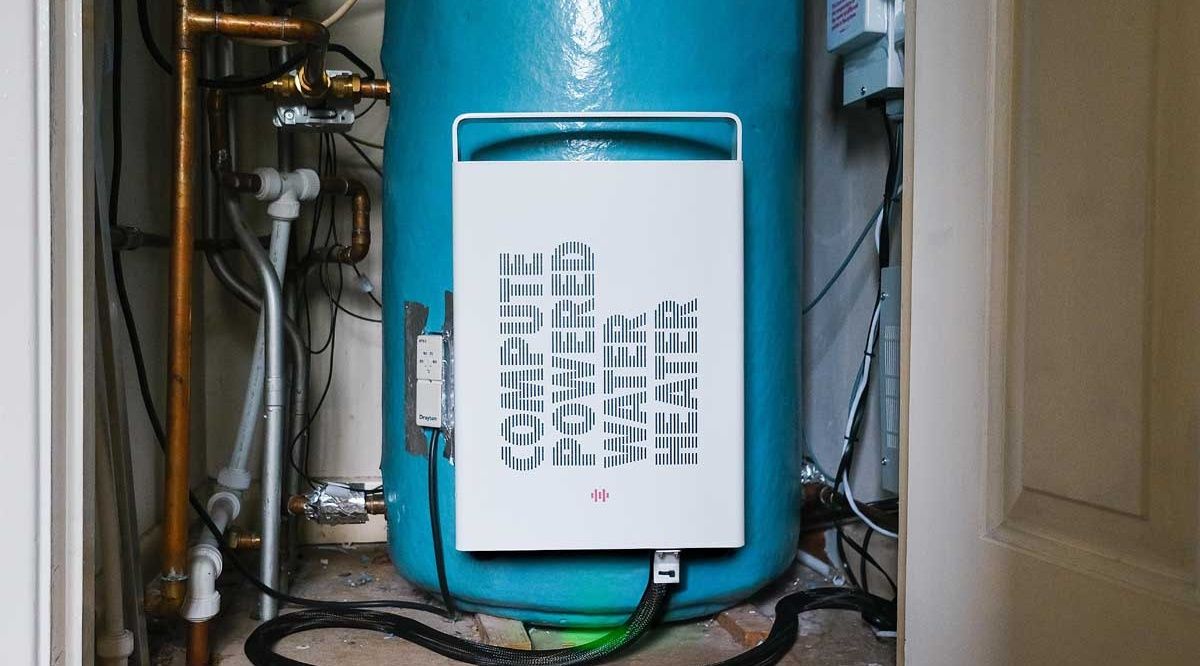
Householders are getting free hot water from Heata, a company that installs rented servers in homes
Heat generated by the servers is passed to the water supply for showers and hot taps
Heata pays for any additional electricity used, ensuring homeowners win and businesses have their data stored safely
What happens to waste heat from servers? In a server room or data center, the heat is removed through industrial cooling systems and exhausted. But what if it could be reused? What if that heat could be used to keep domestic heating bills down?
Heata is one of several companies across the UK and Europe delivering solutions to server space and heating costs. Domestic waste-heat use appears to be a growing industry, and offers homeowners the chance to cut bills significantly while giving businesses low-cost server space.
The idea is simple: install a server in the home, rent the server space to businesses, and donate the heat generated by compute processes to the home, reducing their energy bills in the process.
How servers heat homes
If you’ve worked in a server room, you know how hot things can get, particularly if there is a problem with the extraction system. This is the starting point for these so-called “data furnaces” where the heat from an active compute unit is used to heat water. Heata say that the waste heat from a single data center could provide hot water for around 30,000 homes, which puts it into context.
Their model is simple: a compute model is attached to a hot water cylinder, heating the water and reducing the requirement for gas heating. Homes need fast broadband to provide fast data routing to the compute module, and Heata pays for additional electricity used by the mini server. It aims to provide around 80% of heat for the heating system, reducing domestic gas bills considerably.
Like Heata, Wales-based Thermify is looking for trial customers. Their system is a little different, relying on a HeatHub, within which a cluster of Raspberry Pi Compute Modules are generating data solutions and heat.
Compatible boilers
While the having a server or compute unit in a remote part of your property to assist in heating the water – essentially using the same electricity twice – might seem an attractive option, it does not come without shortcomings. For example, there is the issue of compatibility.
With the Heata example, only vented hot water cylinders can be used. Unvented, pressurised cylinders are not compatible. Other providers of similar data-to-heat services can provide the heated water in other ways – for example, Thermify uses its HeatHub to replace a home’s boiler.
With no new homes permitted to have gas boilers installed from 2027 onward, an alternative to hot water is needed, and companies turning data into heat could be the best solution.
Premiere: Friday, September 25 (Canada, Australia)
Winning the beer league championship title becomes an all-consuming obsession for coach Joanne Pico (Jess Salgueiro) after her girlfriend and co-founder of the Public Lass Brovaries, a team for LGBTQ women and non-binary players, dumps her and joins a rival team in 10-part softball mockumentary Slo Pitch.
The comparisons with Heated Rivalry are obvious, all the moreso because Emily Hampshire and Nadine Bhabha are in both shows. Slo Pitch, however, predates the smash-hit hockey series. It started out as a cult web series in 2020, and its co-creators are heavily involved in the TV adaptation, with J Stevens directing, Gwenlyn Cumyn and Karen Knox starring, the trio having reunited to pen the series.
Boris (Knox) is a beer-obsessed German in pursuit of a green card marriage, Ann (Cumyn) is a bisexual lothario and the Toronto Blue Gays serve as the Brovaries' arch foes in the web series. The issue is that the Blue Gays are actually good, whereas the booze-swilling Brovaries are the league's six-time wooden spoon recipients.
Season 1 mockuments the Brovaries' misadventures over the course of a summer, complete with sexy carwash fundraisers gone wrong, awkward encounters with conservative-politician sponsors and petty feuds, all in the service of winning the breakup.
Read on as we explain how to watch Slo Pitch from anywhere.
How to watch Slo Pitch online now
Slo Pitch is only currently available in Australia and Canada with the US and UK still awaiting firm release dates.
A VPN is a handy piece of software that can make your device appear as if it's back in your home country and unlock your usual streaming services. The best VPN right now? We recommend NordVPN – it does everything and comes with up to 75% off.
Not having a VPN is like leaving your front door wide open in a busy city – anyone can walk right in and take a peek.
TechRadar regularly reviews all the biggest and best VPN providers and NordVPN is our #1 choice.
✅ Up to 75% Off Today ✅ 3 Extra Months Free ✅ Unlocks Crave & HBO Max
Get NordVPN and stream Slo Pitch from anywhere.VIEW DEAL ON
Can I watch Slo Pitch in the US?
Any plans to release Slo Pitch in the US are firmly under wraps at the time of writing.
For now, a VPN will help you tune in if you're spending time in the US from Canada or Australia. NordVPN is our recommended provider, and you can find out why with our in-depth NordVPN review.
How to watch Slo Pitch in the UK
Sky will be home to Slo Pitch in the UK, but at the time of writing its release date is yet to be announced.
Visiting the UK from Canada or Australia? Use NordVPN to watch Slo Pitch.
How to watch Slo Pitch in Canada
Crave is home to Slo Pitch in Canada, where a double-header of episodes air each Friday, starting September 25.
Prices start at CA$11.99/month and CA$119.99/year.
Away from home? You can access your subscriptions by downloading a VPN and pointing your location back to the UK.
How to watch Slo Pitch in Australia
Slo Pitch airs on HBO Max in Australia, with a double-header of episodes coming out each Friday following the premiere on September 25.
Prices start at AU$11.99/month and AU$119.99/year.
Outside Australia? Aussies away from home can use a VPN to unblock HBO Max and watch Slo Pitch as they would at home.
Slo Pitch – Need to Know
Slo Pitch trailer
When is the Slo Pitch release date?
Slo Pitch premieres in Canada and Australia with a double-header on Friday, September 25. Two episodes will follow each week until October 23.
Slo Pitch cast
Jess Salgueiro as Joanne Pico
Karen Knox as Boris
Gwenlyn Cumyn as Ann
Chelsea Muirhead as Sasha
Emma Hunter as Barb
Lane Webber as Lee
Khadijah Roberts-Abdullah as Zari
Amanda Cordner as Mel
Emily Hampshire as Leanne
Varun Saranga
Laura De Carteret
Don MacLean Jr.
Nadine Bhabha
Carolyn Taylor
Chris Locke as League Commissioner
Chris Sandiford
Ayami Sato as herself
We test and review VPN services in the context of legal recreational uses. For example:1. Accessing a service from another country (subject to the terms and conditions of that service).2. Protecting your online security and strengthening your online privacy when abroad.We do not support or condone the illegal or malicious use of VPN services. Consuming pirated content that is paid-for is neither endorsed nor approved by Future Publishing.
Summer is officially over, and the cooler weather is a perfect excuse, if you needed one, to cosy up at home with a Lego kit. So what does Lego have new in for October? It's not quite as extensive a lineup as I've seen in previous months — and there's a disappointing lack of Spooky Season sets — but there are still some gems worth checking out.
One standout addition is the Santa Holiday Countdown; a jolly Mr Claus perched in a chimney with an adjustable countdown clock set into it. Listen, I know it's too early to be thinking about holiday season, but apparently Lego didn't get that memo — and I have a feeling this one is going to be popular. If you're an early celebrator, there's also a Buddy the Elf (complete with candy canes, one of the four main food groups) joining the lineup.
For UK residents and fellow Bristolians in particular, I'm very pleased to see Aardman making an overdue Lego debut. You can now swap plasticine for bricks and build your own Wallace & Gromit on motorbike and sidecar. And while this US lineup is sorely lacking in new kits for Halloween, Brits can at least have the option of a couple of new Wednesday themed sets. Have fun sorting out all those black and gray bricks.
Scroll down to explore all the new Lego sets for October.
Video doorbells used to be fixtures in sci-fi media as futuristic tech, but fast-forward to 2026, almost anyone can install one in their home for not much money or effort, with a lot of the best video doorbells making for an easy home security upgrade.
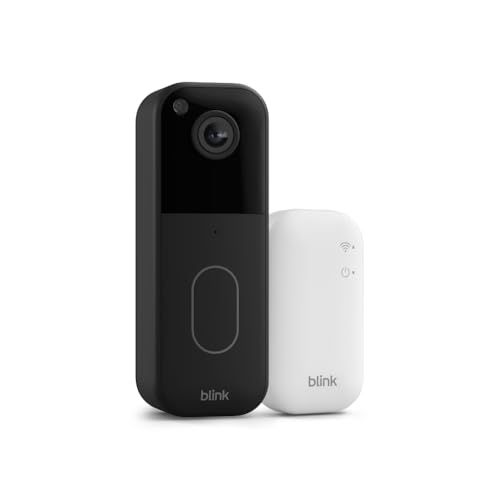
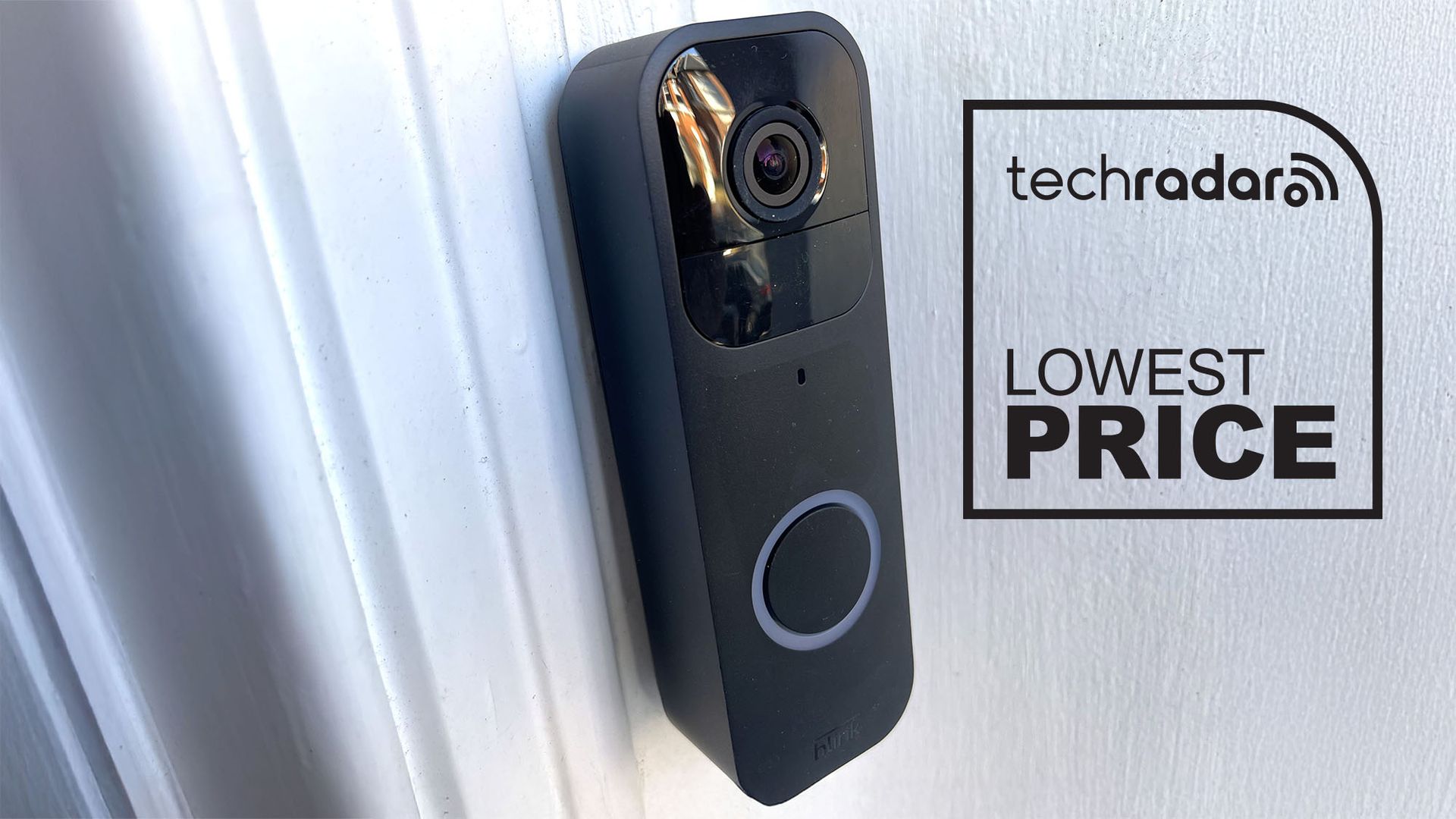
In our Blink Video Doorbell review, we called it one of the easiest security systems to install, with two different mounting options to suit any household, and setting it up within the Blink mobile app with the included Sync Module Core (which serves as the central system hub) takes just three steps.
Our tester found that it has good image quality at 1440p resolution and 30 frames per second, stable video connection, a wide 150º horizontal field of view and battery life rated for up to two years via three AA lithium batteries.
There’s no included indoor chime, but you can pair this doorbell with a Blink Mini camera that’s sold separately (but you can also buy a bundle with two Blink Mini 2K+ cameras for AU$48) or connect via the Alexa app on your phone to an Amazon Fire Stick or Amazon Echo Show to let you see who’s at your door on your TV or smart display.
As mentioned above, lots of features are locked behind a subscription plan, including video recording, cloud video storage, video sharing, person and vehicle detection, even photo capture. The Blink Basic Plan applies to just one device for AU$4.95 per month or AU$49.95 per year, while Blink Plus lets you add an unlimited number of Blink devices for AU$15 per month or AU$150 per year. For most households, though, the former is a good starting point at a reasonable price, which is made even more enticing by the device’s whopping 72% price drop.
Although Sheldon (Jim Parsons) and Leonard (Johnny Galecki) don't appear in the finale — remember, they built the multiversal machine that Stuart (Kevin Sussman) has been responsible for breaking, this season's finale takes us back to where it all began in a different way.
Indeed, as Kevin, Denise (Lauren Lapkus), Kripke (John Ross Bowie), and Bert (Brian Posehn) arrive in yet another alternate universe, they're confronted with others versions of themselves filming the HBO Max show in front of a live studio audience.
Aside from Georgie & Mandy's First Marriage, creators haven't used a sitcom studio multicam format since TBBT itself.... but the Easter eggs don't stop there.
For Posehn and Bowie, the entire thing was "surreal," but could it indicate more of what we can expect to see in the future, including the already greenlit SFtStU season 2?
'It felt like the old show but wildly different'
"Episode 10 definitely felt the most surreal for me," Posehn told me.
"It was interesting because it was the only time during the entire run of this show that we had a studio audience there," Bowie added. "It felt like a real mix of being like the old show, but also feeling wildly different."
"We were back on that same stage, weren't we? Stage 25," Posehn continuds. "That's our old stage, so that was really weird."
You heard correctly. As the gang point out, while leaving the live studio audience behind, they've been plopped onto Stage 25 on the Warner Bros. studio lot in Burbank, California. The stage was named lot is officially named "The Big Bang Theory Stage" in honor of the aforementioned sitcom's 10-season run.
Fun fact: Stage 25 is one of only five stages on the entire lot to be named after a show, with the other four being The Ellen DeGeneres Show, E.R., Friends, and Two and Half Men. Stage 25 is part of the public lot tour, but that's the closest we've been to reviving its TBBT spirit, until now.
"The whole thing was just extremely trippy and fun," Bowie agreed.
I hope more of these incredibly obvious tributes to the original series are made in Stuart Fails to Save the Universe season 2, purely for the fun and whimsy of it. I don't massively mind if Sheldon and Leonard never turn up, but I do want Chuck Lorre to bring George Cooper back to life... but that's another story.
Thunderobot uses SSD storage to help its 64GB laptop run huge AI models
The M7000 can reportedly run GPT-OSS-120B despite having 64GB of memory
Phison's aiDAPTIV+ technology turns part of the SSD into an AI cache
Thunderobot has released the AI Master M7000, a 16-inch mobile workstation built around AMD's Ryzen AI Max+ 395 processor.
The M7000 comes with 64GB of LPDDR5X-8000 memory and Radeon 8060S integrated graphics for demanding workloads.
Its 768GB drive incorporates an 85GB caching layer designed to help AI workloads handle models exceeding available system memory.
AI workloads get an unusual storage assist
The M7000 uses LPDDR5X-8000 memory, while its processor provides 16 cores, 32 threads, boost speeds reaching 5.1GHz, and an XDNA 2 neural processor.
AMD rates the neural hardware at 50 TOPS, while the Radeon 8060S configuration reaches as many as 40 compute units for graphics and accelerated workloads.
Thunderobot says the device can run GPT-OSS-120B locally, despite having 64GB of physical memory available for applications and operating-system requirements.
Its unified memory architecture allows processor and graphics resources to access shared memory, supporting workloads that frequently move substantial model data.
The additional cache comes from Phison’s aiDAPTIV+ technology, which uses part of the internal storage to hold data associated with artificial intelligence workloads.
Rather than functioning as conventional RAM, this arrangement keeps selected information on the SSD when unified memory capacity becomes restrictive during demanding workloads.
Such information can include Key-Value cache, less-active mixture-of-experts components, and model data that applications may require again during processing.
Phison has also shown this storage approach with computers carrying considerably less memory, including a 32GB laptop running the same 120B model.
The technology addresses a limitation faced by large local models, where available memory can restrict the performance of certain workloads.
A 160W mobile workstation with unusually high specifications
Thunderobot gives the M7000 a 160W operating profile supported by two fans and three heat pipes for sustained processing.
The device also uses a 2560×1600 display running at 165Hz, with 500-nit brightness and complete sRGB coverage for color-sensitive work.
Power comes from a 99Wh battery, while the chassis weighs 2.45kg despite its workstation-oriented hardware and cooling requirements.
The display and cooling configuration add considerable hardware capability without changing the notebook’s emphasis on local computing.
For connectivity, this device includes OCuLink, USB-C supporting 40Gbps transfers, HDMI 2.1 FRL, 2.5Gb Ethernet, and a UHS-II microSD reader.
OCuLink provides another high-speed connection for compatible external hardware, giving users added expansion options beyond the laptop's built-in resources.
Thunderobot lists the M7000's Chinese retail price at 24,999 yuan, which converts to roughly $3,733 based on current exchange rates.
That figure places the device well beyond typical gaming budgets, despite the company's product lineup historically centering on gaming hardware.
This device instead reads as an artificial intelligence laptop, given how conspicuously its marketing and branding lean toward AI use cases.
Yet it remains surprising that the caching arrangement still falls short of matching genuine additional system memory in practice.
Cache-to-Cache lets separate AI models exchange internal information without generating text
A learned Fuser converts one model’s internal data for another
C2C uses selective gating to control which layers receive information
Researchers from Tsinghua University have published a paper describing a technique that lets separate AI models exchange information without producing any text.
The method, called Cache-to-Cache (C2C), has already been accepted at ICLR 2026 and ships with open-source code available to developers.
It targets a specific inefficiency present whenever multiple language models work together inside a shared pipeline.
Skipping words entirely
When two AI models cooperate today, one has to turn its thinking into written sentences before the other can read them.
That writing step takes real computing time and throws away small details buried inside the first model's raw thinking process.
Every AI model keeps a working memory of everything it has processed so far, known technically as a cache.
C2C skips typed language entirely by letting one model pass that working memory straight into a second model's memory bank.
A small assistance program called a Fuser handles this handoff, reshaping and rotating the information so the second model can actually use it.
Different AI models store their memories using completely different internal layouts, sizes, and structures from one another.
Simply dumping one model's raw memory into another would likely confuse it or cause its answers to fall apart.
To prevent that, C2C includes a smart filter that decides which pieces of incoming memory are worth absorbing immediately.
Some internal layers accept the new information right away, while other layers keep reasoning independently without any outside interference.
According to the researchers, this setup makes AI models run between 100% and 150% faster during shared collaborative tasks.
That upper figure works out to roughly two and a half times quicker than the usual back-and-forth typing process.
The team also reports accuracy gains as high as 14.2% when models work together instead of operating entirely alone.
Compared against older setups where models still communicate through typed text, accuracy reportedly improved by 3.1% to 5.4%.
Why does this method have limits
This approach currently works only with open-weight models, since it requires direct access to a model's internal cache and layer structure.
Most popular AI tools, the kind ordinary people chat with online, hide those internal details completely from outside users.
That means everyday apps like certain chatbots cannot use this shortcut unless their own creators build it in privately.
Nobody outside these companies currently knows for certain whether anyone has started using a similar method internally.
The research team argues that typed language has always slowed machines down since it forces them to think like humans do.
That argument deserves some caution, since the same team that built the system also ran every test proving it works well.
Whether this speeds things up as much as claimed will depend on other external testing of the system.
Durabook Z14I-DX3 rugged laptop has three 14-inch, sunlight-readable 1,200-nit touchscreens
At 9.8 kg and a mammoth 137.5 mm thick, it may suit vehicles and fixed positions rather than dismounted crews in the field
It could also be targeting customers at command posts and in drone teams
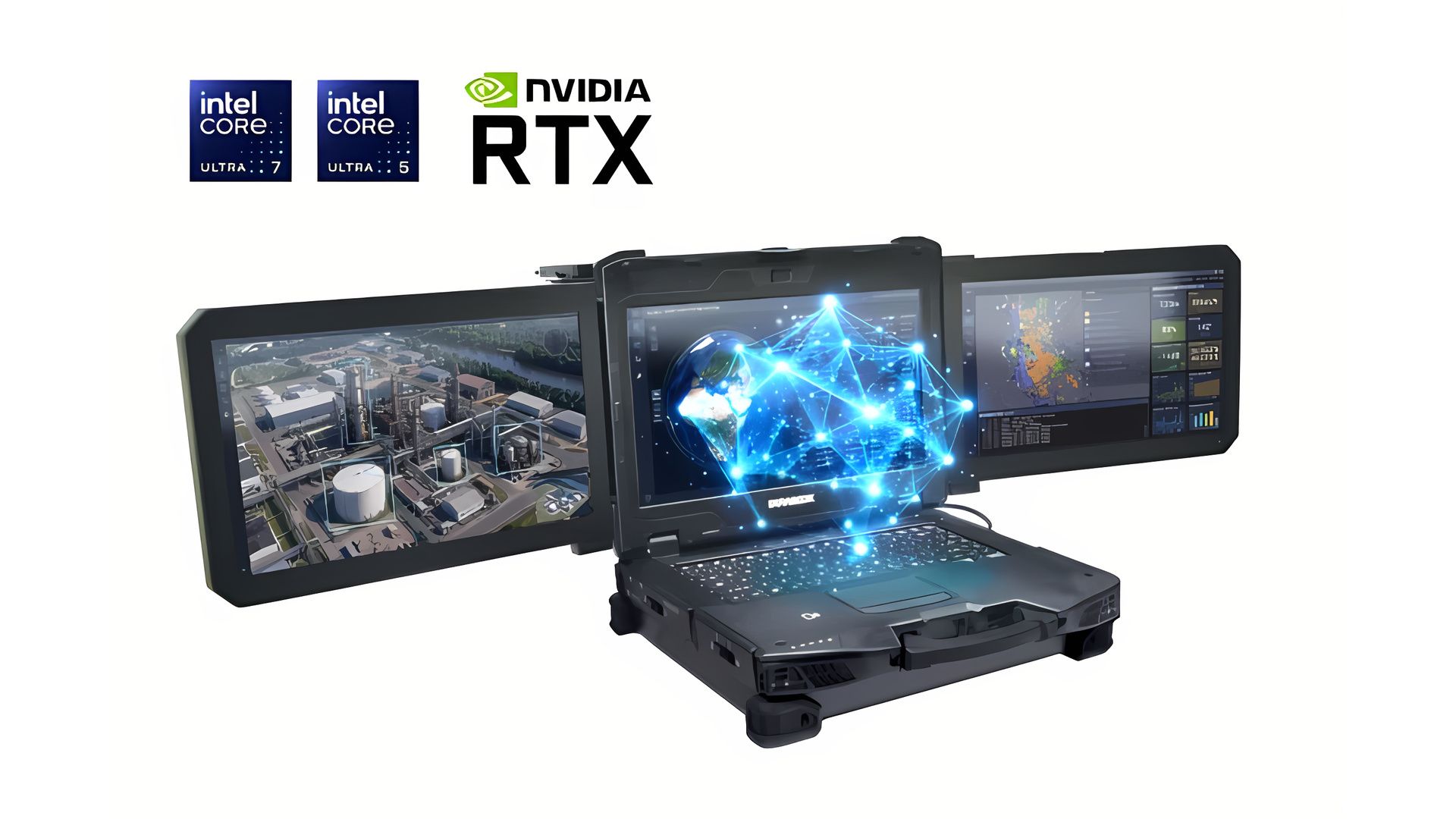
Durabook's latest rugged workstation laptop is less a notebook and more a capable folding command post, bringing power, durability, and plenty of screen real estate in tow.
The Z14I-DX3 pairs a conventional rugged clamshell with two extra full HD touch panels hinged to either side of the lid.
When folded, the side panels sit over the main display for transport; when opened, the three 14-inch screens form a mammoth 48:9 workspace for a client base that is expected to be overwhelmingly military.
Built around today's command post needs
While Durabook's press release says it is now available to order, it doesn't list a price on-site and instead directs users to request a quote for what it calls one of the most unique rugged laptops on the battlefield.
Durabook pitches the machine at defense, public safety, utilities, field engineering, and maritime users, describing it as a mobile command center where drone control and telemetry, mission maps, live video, and sensor data sit side by side instead of being juggled on a single display.
It also goes out of its way to make the screen component legible in all environments while focusing on utility: all three panels are 1,200-nit DynaVue sunlight-readable touchscreens with finger, water, glove, and stylus modes, and brightness can be synced across the set or adjusted per panel, as per Durabook's announcement.
This design choice makes the most sense when you consider who the workstation laptop serves: military customers. Each panel can run a separate application, so a drone team could keep a live feed on one screen, a map on another, and telemetry or communications on the third.
A single AC power adapter powers the whole setup, which can be configured with up to an Nvidia RTX ADA 5000 GPU that caps at 682 TOPS of AI performance, enabling offline image recognition and video analysis through on-device AI support.
Its I/O offerings also cater to the assumption that it might be plugging into military hardware, much of which uses legacy connections: Thunderbolt 4 and Wi-Fi 7 sit alongside two serial ports, VGA, an ExpressCard 54 slot, and a 41-pin pogo docking connector, plus dual gigabit Ethernet, HDMI, a smart card reader, and dual SIM with eSIM, with GPS, 4G, and 5G as options.
Durabook durability credentials include MIL-STD-810H testing for shock, vibration, altitude, freeze/thaw, high and low temperature, temperature shock, humidity, explosive atmosphere, and solar radiation, plus MIL-STD-461G for electromagnetic emissions and susceptibility, and an operating range of -29°C to 63°C.
Its weight class, however, rules it out as a portable device you can run around with, with a listed weight of 9.8kg (21.6 lb) and a thickness of 137.5 mm when closed, not including an adapter or carrying case.
This matters for drone teams that may already be carrying other hardware, including the drones they often deploy themselves; the Durabook offering suits fixed positions, shelters, or a vehicle better than a device that can be lugged around with relative ease.
For now, a 'workstation' class laptop that offers plenty of durability, a last-generation AI GPU, and a low-powered CPU might check a lot of battlefield boxes, but would be hard to compare in terms of raw performance to modern gaming laptops or even traditional workstations, both of which pack in significant amounts of power even if they skip the two additional screens - but that might just be the point.
A new Quordle puzzle appears at midnight each day for your time zone – which means that some people are always playing 'today's game' while others are playing 'yesterday's'. If you're looking for Thursday's puzzle instead then click here: Quordle hints and answers for Thursday, September 24 (game #1704).
Quordle was one of the original Wordle alternatives and is still going strong now more than 1,500 games later. It offers a genuine challenge, though, so read on if you need some Quordle hints today — or scroll down further for the answers.
Enjoy playing word games? You can also check out my NYT Connections today and NYT Strands today pages for hints and answers for those puzzles, while Marc's Wordle today column covers the original viral word game.
SPOILER WARNING: Information about Quordle today is below, so don't read on if you don't want to know the answers.
Quordle today (game #1705) — hint #1 — Vowels
How many different vowels are in Quordle today?
• The number of different vowels in Quordle today is 4*.
* Note that by vowel we mean the five standard vowels (A, E, I, O, U), not Y (which is sometimes counted as a vowel too).
Quordle today (game #1705) — hint #2 — repeated letters
Do any of today's Quordle answers contain repeated letters?
• The number of Quordle answers containing a repeated letter today is 2.
Quordle today (game #1705) — hint #3 — uncommon letters
Do the letters Q, Z, X or J appear in Quordle today?
• No. None of Q, Z, X or J appear among today's Quordle answers.
What letters do today's Quordle answers start with?
• S
• F
• G
• G
Right, the answers are below, so DO NOT SCROLL ANY FURTHER IF YOU DON'T WANT TO SEE THEM.
Quordle today (game #1705) — the answers
(Image credit: Merriam-Webster)
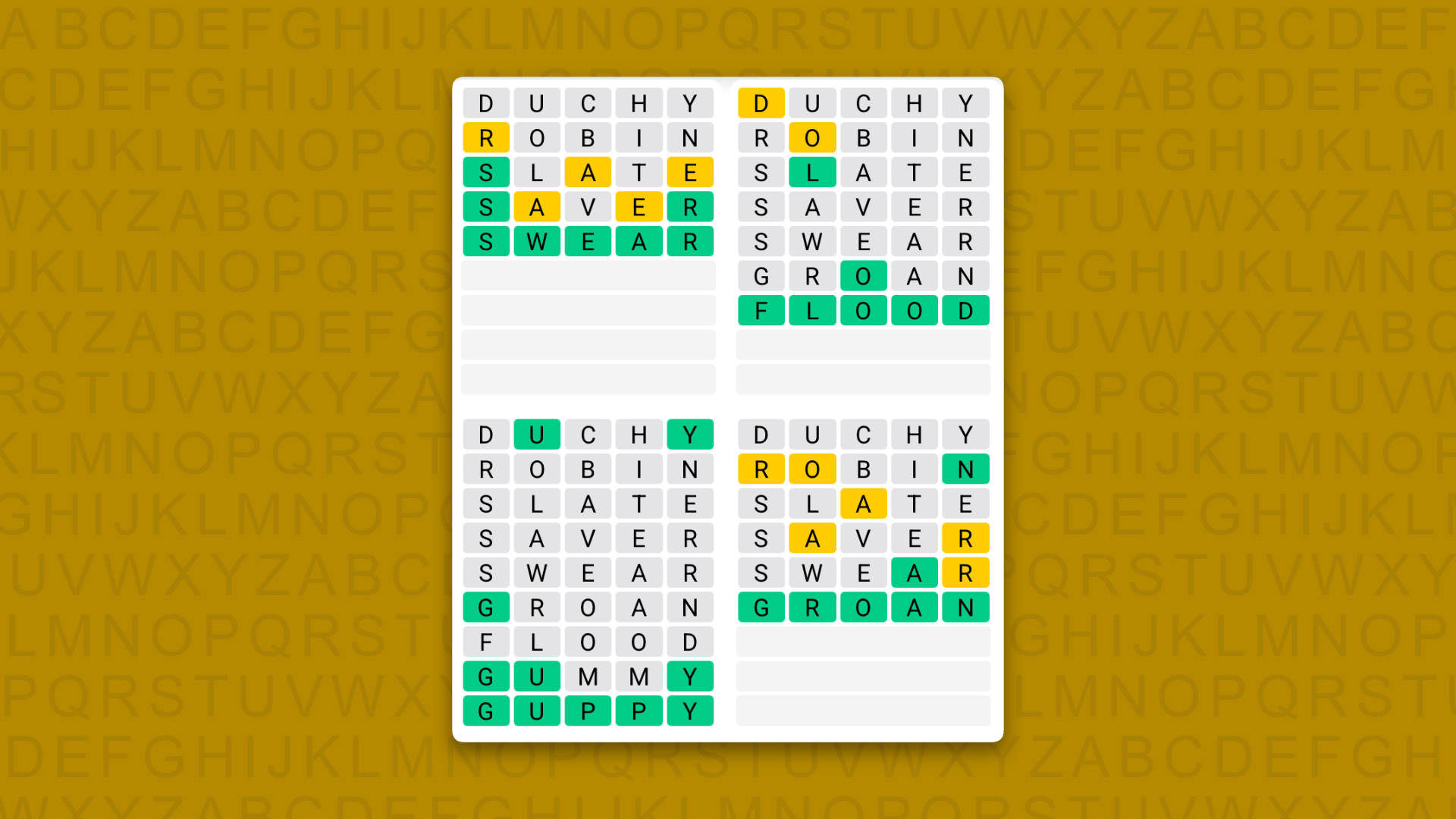
The answers to today's Quordle, game #1705, are…
SWEAR
FLOOD
GUPPY
GROAN
A close call today.
Even though I only had nine letters left — and four of them were J,Q, X and Z — I still made very hard work of getting GUPPY. In my defense, though, “gummy” is a far more likely word, isn't it?
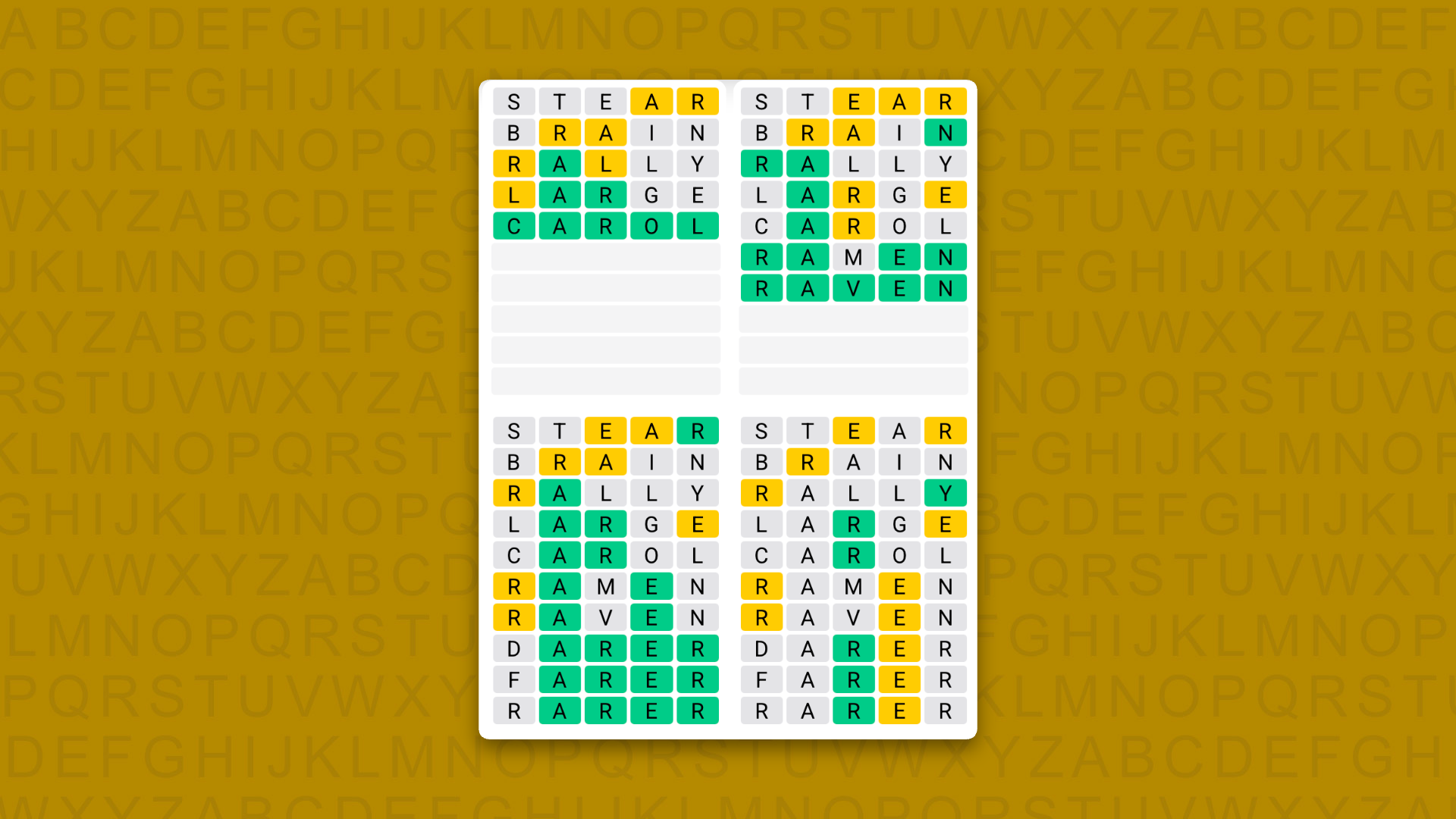
Daily Sequence today (game #1705) — the answers
(Image credit: Merriam-Webster)
The answers to today's Quordle Daily Sequence, game #1705, are…
A new NYT Connections puzzle appears at midnight each day for your time zone – which means that some people are always playing 'today's game' while others are playing 'yesterday's'. If you're looking for Thursday's puzzle instead then click here: NYT Connections hints and answers for Thursday, September 24 (game #1201).
Good morning! Let's play Connections, the NYT's clever word game that challenges you to group answers in various categories. It can be tough, so read on if you need Connections hints.
What should you do once you've finished? Why, play some more word games of course. I've also got daily Strands hints and answers and Quordle hints and answers articles if you need help for those too, while Marc's Wordle today page covers the original viral word game.
SPOILER WARNING: Information about NYT Connections today is below, so don't read on if you don't want to know the answers.
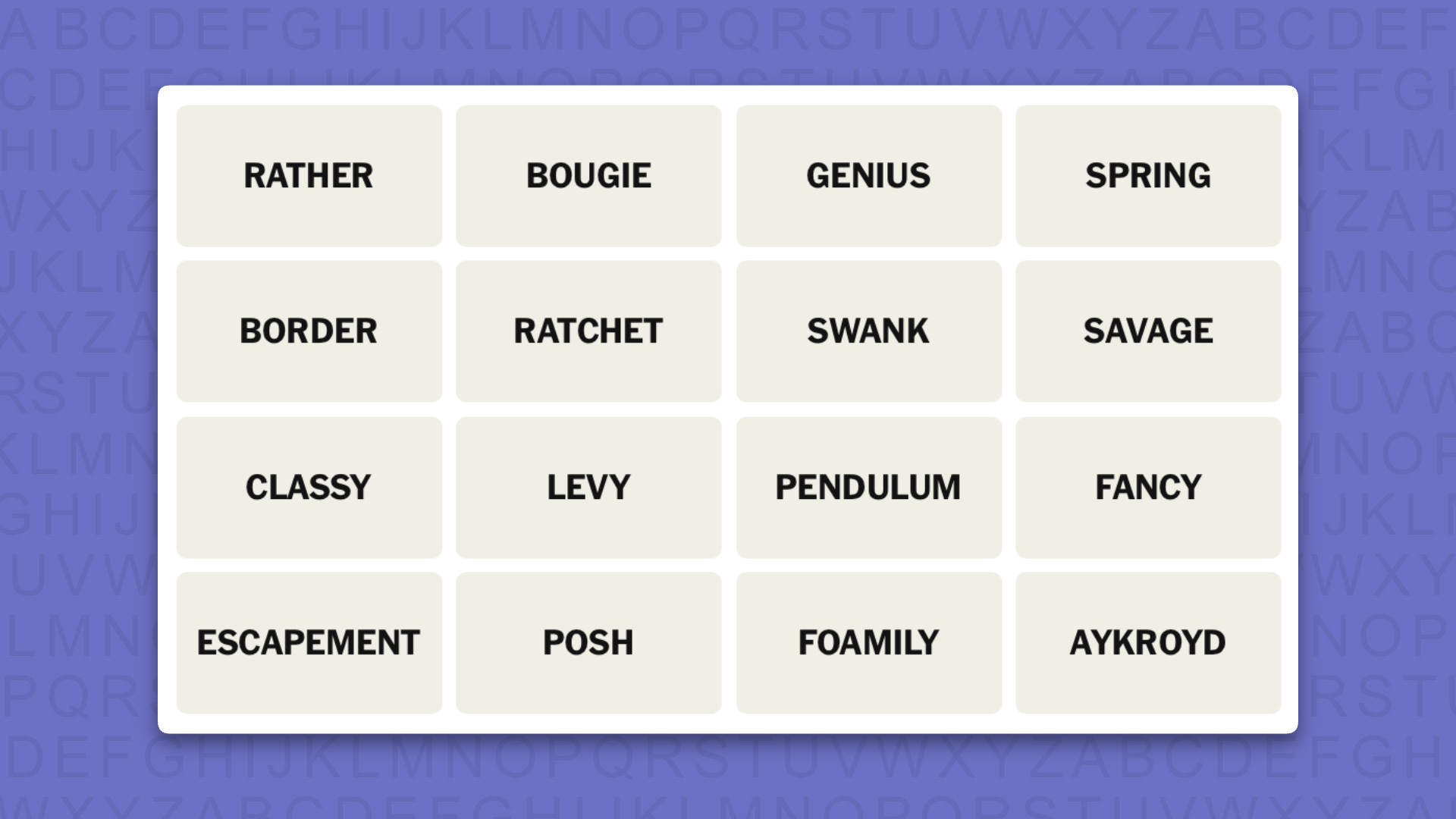
NYT Connections today (game #1202) - today's words
(Image credit: New York Times)
Today's NYT Connections words are…
RATHER
BOUGIE
GENIUS
SPRING
BORDER
RATCHET
SWANK
SAVAGE
CLASSY
LEVY
PENDULUM
FANCY
ESCAPEMENT
POSH
FOAMILY
AYKROYD
NYT Connections today (game #1202) - hint #1 - group hints
What are some clues for today's NYT Connections groups?
YELLOW: Classy stuff
GREEN: Elements of a timepiece
BLUE: Daniels of note
PURPLE: Ranked with added character
Need more clues?
We're firmly in spoiler territory now, but read on if you want to know what the four theme answers are for today's NYT Connections puzzles…
NYT Connections today (game #1202) - hint #2 - group answers
What are the answers for today's NYT Connections groups?
YELLOW: LUXE
GREEN: PARTS OF A MECHANICAL CLOCK
BLUE: FAMOUS DANS
PURPLE: TAXONOMIC RANKS PLUS A LETTER
Right, the answers are below, so DO NOT SCROLL ANY FURTHER IF YOU DON'T WANT TO SEE THEM.
NYT Connections today (game #1202) - the answers
(Image credit: New York Times)
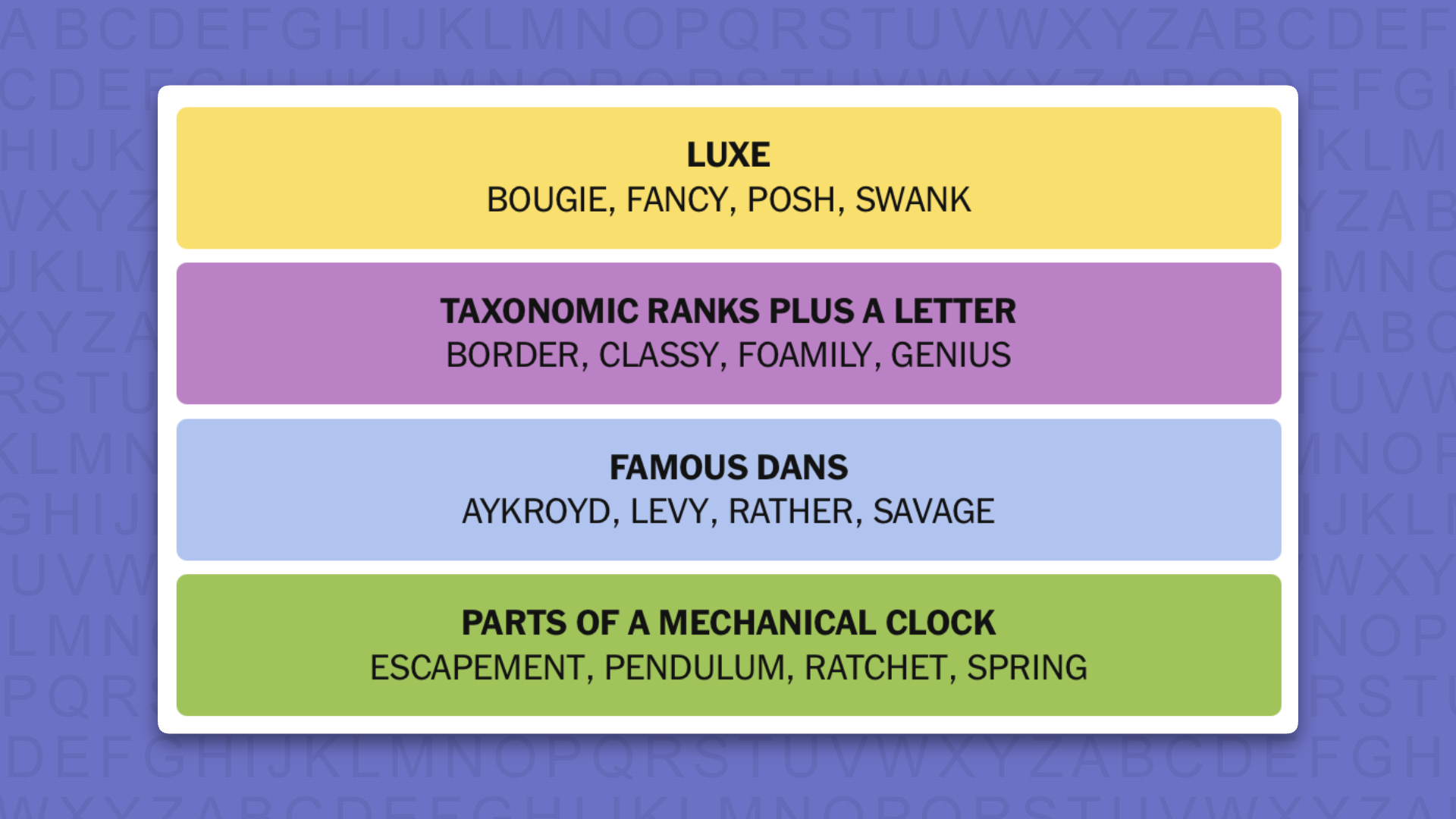
The answers to today's Connections, game #1202, are…
YELLOW: LUXE: BOUGIE, FANCY, POSH, SWANK
GREEN: PARTS OF A MECHANICAL CLOCK: ESCAPEMENT, PENDULUM, RATCHET, SPRING
BLUE: FAMOUS DANS: AYKROYD, LEVY, RATHER, SAVAGE
PURPLE: TAXONOMIC RANKS PLUS A LETTER: BORDER, CLASSY, FOAMILY, GENIUS
My rating: Hard
My score: Perfect
The tile AYKROYD surely meant that we were looking for FAMOUS DANS, but after linking LEVY and RATHER I hit a blank, so decided this was a group I would come back to.
Ruling out the possibility that SWANK was about famous Hilarys, I took the obvious path and ended up with the yellow group of LUXE in its rightful place as the first thing I put together.
After this, though, I went off script and guessed the purple group of TAXONOMIC RANKS PLUS A LETTER (when you see them you see them) before returning to my collection of Daniels and taking a punt on SAVAGE, whom I now know is a purveyor of “no-nonsense sex and relationship advice”.
Yesterday's NYT Connections answers (Thursday, September 24, 2026, game #1201)
YELLOW: PARTS OF A VAMPIRE COSTUME: CAPE, FACE PAINT, FAKE BLOOD, FANGS
GREEN: THINGS WITH SPRING/S: BOBBLEHEAD, POGO STICK, SNAKES IN A CAN, TRAMPOLINE
BLUE: FEATURING POINTING: CREATION OF ADAM, FOAM FINGER, I'M WITH STUPID SHIRT, UNCLE SAM
PURPLE: ANAGRAMS: BEER HAT, BREATHE, HERB TEA, THE BEAR
What is NYT Connections?
NYT Connections is one of several increasingly popular word games made by the New York Times. It challenges you to find groups of four items that share something in common, and each group has a different difficulty level: green is easy, yellow a little harder, blue often quite tough and purple usually very difficult.
On the plus side, you don't technically need to solve the final one, as you'll be able to answer that one by a process of elimination. What's more, you can make up to four mistakes, which gives you a little bit of breathing room.
It's a little more involved than something like Wordle, however, and there are plenty of opportunities for the game to trip you up with tricks. For instance, watch out for homophones and other word games that could disguise the answers.
It's playable for free via the NYT Games site on desktop or mobile.
A new NYT Strands puzzle appears at midnight each day for your time zone – which means that some people are always playing 'today's game' while others are playing 'yesterday's'. If you're looking for Thursday's puzzle instead then click here: NYT Strands hints and answers for Thursday, September 24 (game #935).
Strands is the NYT's latest word game after the likes of Wordle, Spelling Bee and Connections – and it's great fun. It can be difficult, though, so read on for my Strands hints.
Want more word-based fun? Then check out my NYT Connections today and Quordle today pages for hints and answers for those games, and Marc's Wordle today page for the original viral word game.
SPOILER WARNING: Information about NYT Strands today is below, so don't read on if you don't want to know the answers.
NYT Strands today (game #936) - hint #1 - today's theme
What is the theme of today's NYT Strands?
• Today's NYT Strands theme is… 1x1, etc…
NYT Strands today (game #936) - hint #2 - clue words
Play any of these words to unlock the in-game hints system.
BEST
REST
FARE
BARE
THEY
STIR
NYT Strands today (game #936) - hint #3 - spangram letters
How many letters are in today's spangram?
• Spangram has 12 letters
NYT Strands today (game #936) - hint #4 - spangram position
What are two sides of the board that today's spangram touches?
• First side: left, 4th row
• Last side: left, 5th row
Right, the answers are below, so DO NOT SCROLL ANY FURTHER IF YOU DON'T WANT TO SEE THEM.
NYT Strands today (game #936) - the answers
(Image credit: New York Times)
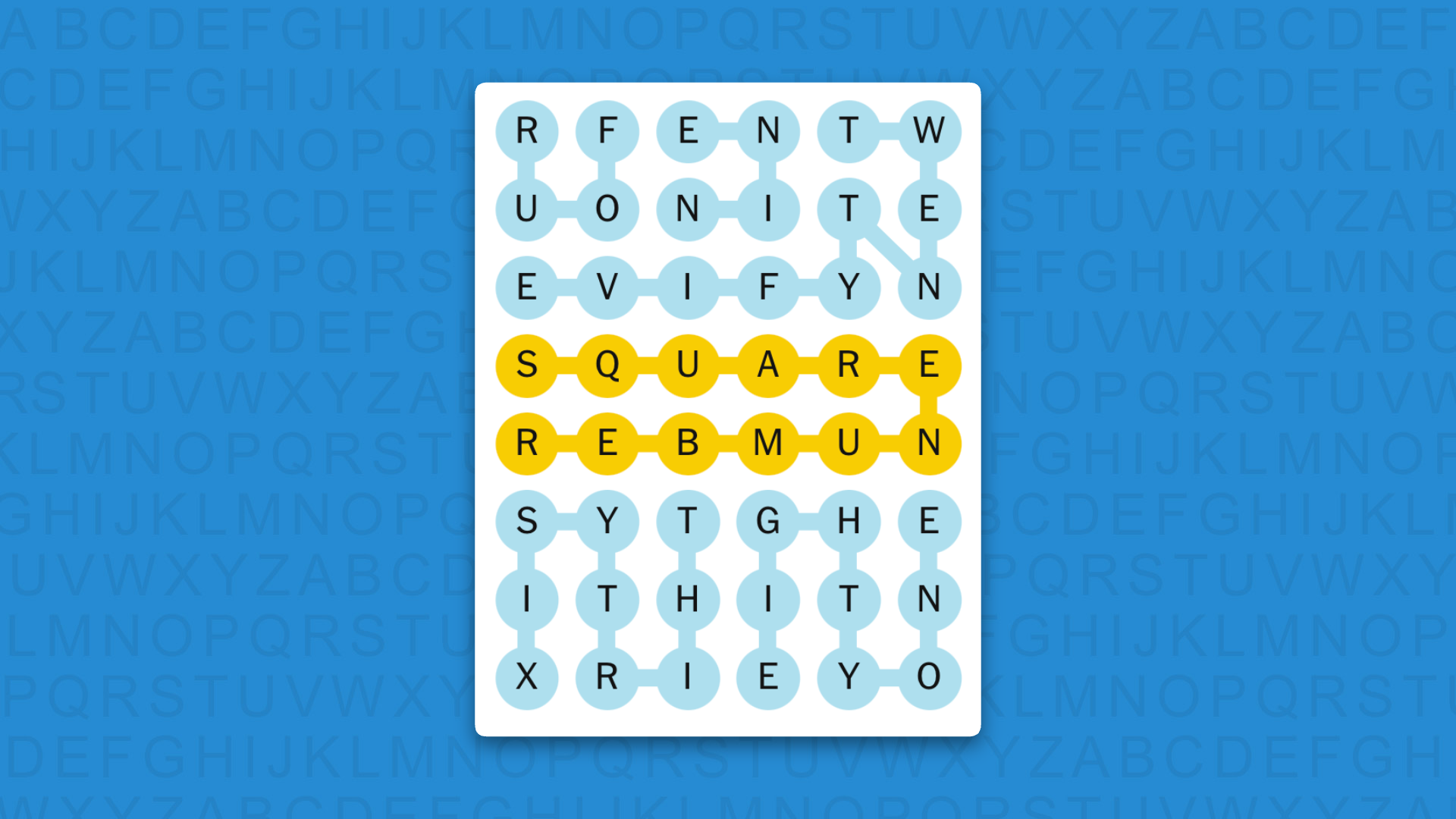
The answers to today's Strands, game #936, are…
NINE
TWENTYFIVE
FOUR
EIGHTYONE
THIRTYSIX
SPANGRAM: SQUARENUMBER
My rating: Easy
My score: Perfect
Is it just me or is this game missing a few words?
We have FOUR, which is the SQUARENUMBER of two, and NINE (the square of three), but then we miss sixteen (the square of four) before jumping back in again with TWENTYFIVE (the square of five) and THIRTYSIX (the square of six). However, we then skip seven and eight, before resuming with EIGHTYONE, the square of nine.
Maybe I'm overthinking this…
Anyway, this quibble aside, the hardest aspect of this game was trying to find the non-game words for this column. There really were barely any, so I hope you didn’t need hints.
Yesterday's NYT Strands answers (Thursday, September 24, game #935)
SANDBOX
TREEHOUSE
SWINGS
POOL
TRAMPOLINE
FORT
SPANGRAM: BACKYARD
What is NYT Strands?
Strands is the NYT's not-so-new-any-more word game, following Wordle and Connections. It's now a fully fledged member of the NYT's games stable that has been running for a year and which can be played on the NYT Games site on desktop or mobile.
I've got a full guide to how to play NYT Strands, complete with tips for solving it, so check that out if you're struggling to beat it each day.
Tektronix's DPO718AX brings eight synchronized channels of up to 25GHz each to the 7 Series and can double as a Windows 10 PC
The EPYC 3351, T1000, 96GB RAM, 1.6TB SSD configuration the oscilloscope offers makes it more than capable of running most modern OSes
Prices start at an eye-watering $308,000 for the base configuration, which can be further modified as per end-user needs
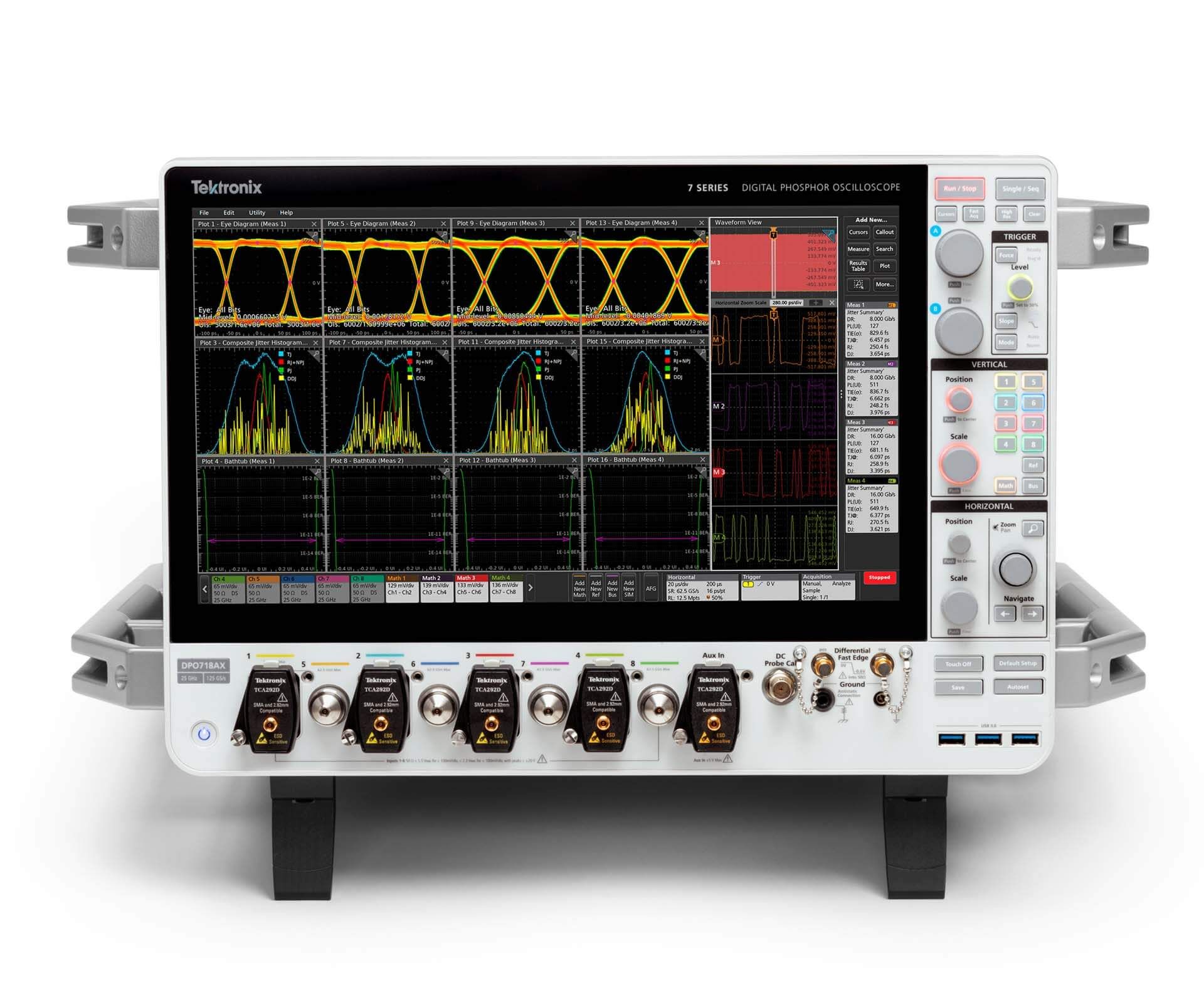
Tektronix has added an eight-channel model to its flagship 7 Series oscilloscope line, and much of the attention it has drawn has gone to the computer it houses as part of the configuration.
The DPO718AX hosts a 12-core AMD EPYC processor, an Nvidia T1000 graphics card, 96GB of RAM, a removable NVMe SSD with at least 1.6TB of capacity, a 15.6-inch 1080p touchscreen, and an optional Windows 10 drive, all in a chassis that Tektronix's datasheet puts at 38.1kg.
This has drawn sharp comparisons to actual Windows-based PCs amid a RAM and memory shortage, including one by CNX Software, which said that the instrument "looks like a high-end PC running Linux (or Windows 10 LTSC)."
A powerful PC in its own right, albeit with dated components
None of the computer hardware listed for the DPO718AX is new or recently released. The AMD EPYC Embedded 3351 CPU is one of the oldest hardware offerings in play here, featuring AMD's first-generation Zen cores and a February 2018 release date.
While the SSD storage speed is unspecified, it is safe to assume it will be capped by the PCIe 3.0 support the EPYC CPU provides to the system. The 96GB of memory on offer can also safely be assumed to be DDR4, as the CPU supports only DDR4 configurations. Despite these limitations, the CPU does offer a 12-core, 24-thread configuration with a rated boost clock of 3GHz that should handle most tasks with relative ease.
The Nvidia T1000 GPU is an entry-level, workstation-class GPU built around its Turing architecture, with a release date of May 2021. The oscilloscope comes with an FHD touch-screen display and can output video up to QHD via DisplayPort, with a capped refresh rate of 60Hz.
The oscilloscope can also run Windows 10 natively, and it matters more than you might think: it is required for the compliance and RF analysis software the DPO718AX supports. The DPOs do not come with an installation by default; the Windows 10 LTSC 2021 installation is available on a secondary, removable drive that users can opt for if needed.
Since the integrated AMD CPU supports TPM 2.0, you could theoretically run Windows 11 on a device that costs hundreds of thousands of dollars, but the aging hardware, low-clocked CPU, and dated internals would make it a terrible PC replacement, even if one had the money to splurge on such an endeavor.
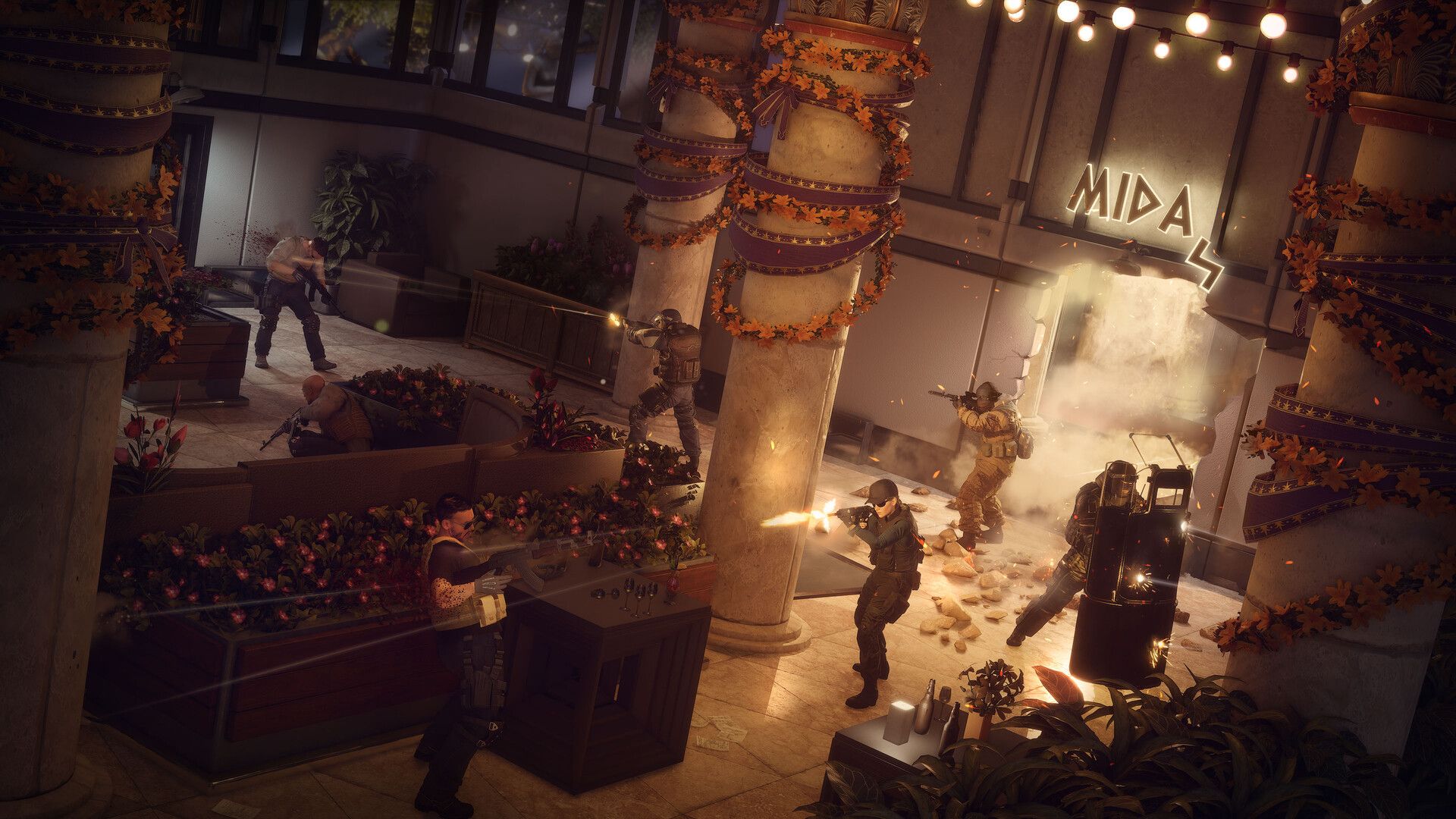
Rainbow Six Tactics game director Martial Potron says the game's fatigue and injury system will encourage players to try other Operators
Operators can go out of commission if they're injured, pushing players to shuffle through the roster
Potron says this also reminds players that Operators are "human"
Rainbow Six Tactics won't let fans repeatedly play the same Operator like in Rainbow Six Siege, but will encourage players to experiment with the entire roster using two new gameplay systems instead.
Rainbow Six Siege fans have a favorite Operator, whether it's Ash, Smoke, Fuze, Hibana, or someone else on the massive roster. But in Rainbow Six Tactics, Ubisoft's turn-based tactics spin-off, the fatigue and injury systems will force players to try other characters across a variety of missions.
"It's a way to push players to use their tools and shuffle their roster," game director Martial Potron told TechRadar Gaming at Gamescom. "So fatigue is one way, injuries is another way."
Potron explained that Operators are human beings, so it makes sense that these special agents will be out of commission for some time if they get injured during a mission; unlike in Siege, where objective-based game rounds will reset a player's health each time.
"I think it's also a good way to remind people that Operators are humans," the director said. "A bullet is a bullet. It's very dangerous. That's why reconning is important. If you don't recon, it may happen that there is someone hidden and he shoots you, and and you get you get injured. You don't have your Operator for two missions."
He added that the fatigue system serves the same purpose and "forces players to readjust their roster" whenever they send Operators on missions; he said this may seem negative, but the game will inform players which Operators will fit certain missions.
For example, a mission that requires players to save targets wouldn't suit Ash, who uses explosives, so a more close-range or precise Operator would be best.
"So depending on who I am facing, I will also readjust my roster because they really are meant to counter other enemies," Portron said. "So there is this negative side of humanity, and there is a positive side of Operators being very good against some part of the challenges."
A Ford patent shows multi-use front trunk including a TV-housing option
Images look very like the Ford Fathom, which is coming in 2027
Ford's EV pickup will start at $28,350 (around £20,970 / AU$39,540)
Ford's upcoming Fathom electric truck could have a very unusual addition: a small front trunk that could house a TV, for the ultimate tailgating upgrade.
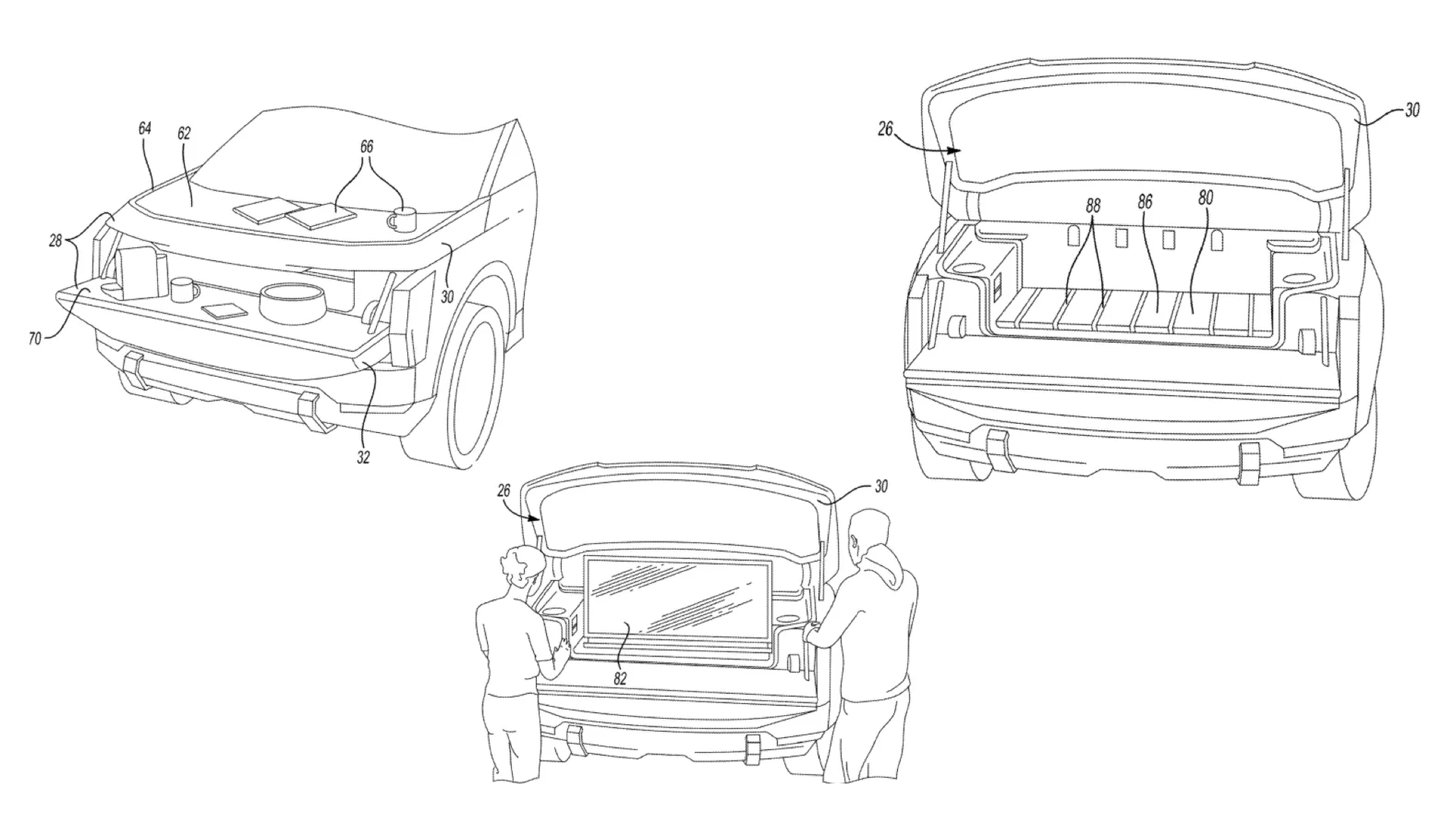
As Electrek reports, Ford has filed a patent with several diagrams showing a fold-out, tailgate-style area in the front of an unnamed vehicle that's believed to be the Fathom.
The design takes advantage of EVs' lack of a traditional engine compartment, which means you can have storage space at the front of the car or truck. It appears to offer a large, flat space like you'd find in a pickup such as Ford F-150 Lightning, plus a fold-out tailgate that can be used for multiple purposes, including holding a TV, presumably to be powered by the battery while you sit in camp chairs with a six-pack.
(Image credit: Ford / USPTO)
What the patents say about Ford's Fathom's frunk
The design looks well-suited to tailgate parties, and for camping trips and anywhere else a TV might be watched — so for example if you were selling products at a market you could use the back of the Fathom to carry your goods and your stall and your tailgate TV to show the promo video.
And you shouldn't need to worry about the TV draining your battery: the Fathom is expected to have a large battery for over 300 miles of range, so a TV isn't going to make a big dent in that capacity.
The TV isn't the only interesting idea here. The patent suggests that the top of the hood could be swappable, enabling you to replace it so you can put things on it — such as food or tools — without spoiling your vehicle's finish. Presumably the design would also include a storage space for those swappable bits rather having you leave them lying loose around on the frunk's floor.
As for the rest of the upcoming EV, Ford has been drip-feeding details for months now: it's a midsize pickup with more passenger room than a Toyota RAV4, it's launching in early 2027 and it'll have a surprisingly low starting price of $28,350. It comes with Apple Maps integration, CarPlay and Android Auto.
What we don't know yet is what it really looks like: as you can see from the image at the top of the article, the images Ford have released so far are camouflaged. But from what we've seen of the shape it looks suitably tough, and it's priced very aggressively. Ford promises that the camo will come off in 2027.
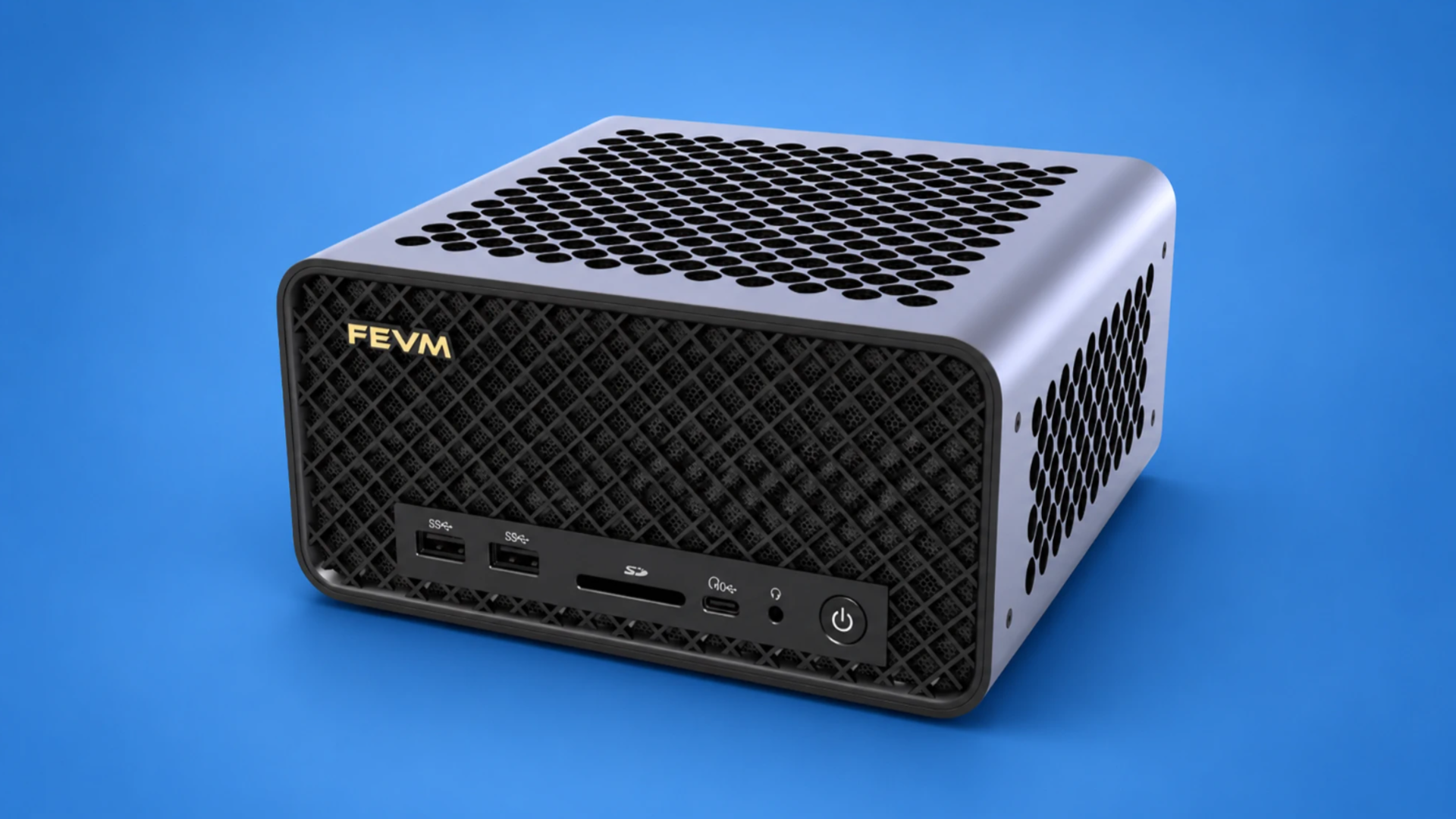
FEVM FA80G mini PCpacks a desktop Ryzen 9 9950X3D inside a 2.6-liter chassis
The FA80G pairs AMD’s gaming-focused processor with Nvidia’s 24GB mobile flagship
Nvidia gives the RTX 5090 Laptop GPU 150W inside this compact system
FEVM has unveiled a new compact desktop system pairing the Ryzen 9 9950X3D processor with a 24GB RTX 5090 Laptop GPU.
The pairing sits inside FEVM's FA80G chassis, a compact system built around AMD's AM5 desktop platform rather than mobile silicon components.
The flagship processor contains 16 cores, reaches 5.7GHz and carries 144MB of cache through AMD’s 3D V Cache technology.
Ryzen 9 9950X3D and RTX 5090 pack serious power
FEVM allows the processor to receive up to 90W, while the accompanying RTX 5090 Laptop GPU can receive up to 150W.
Nvidia’s mobile graphics processor has 10,496 CUDA cores, 24GB of GDDR7 memory and 896GB/s memory bandwidth.
It also supports hardware ray tracing, DLSS 4 and Multi Frame Generation, giving the FA80G several features associated with current high-end PC gaming.
The desktop processor is equally important, as the 9950X3D is designed for high-performance gaming workloads rather than conventional mobile computing.
This mini PC also supports up to 128GB of DDR5 memory via two slots, while two M.2 2280 connectors support drives reaching 4TB.
FEVM separates processor and graphics cooling, assigning four heat pipes to each component across the device’s internal thermal arrangement.
The company rates full load noise at 42dB, with CPU temperatures below 85°C and GPU temperatures below 80°C.
For connectivity, this device includes HDMI 2.0, HDMI 2.1, two DisplayPort 2.0 outputs, USB-C, USB-A, an SD reader and dual 2.5GbE.
FEVM has the hardware for a serious M5 Ultra gaming comparison
In comparison to Apple’s top M5 Ultra Mac Studio, the FA80G takes a more conventional high-end PC approach to gaming hardware.
The M5 Ultra offers up to 36 CPU cores, 80 GPU cores, 512GB unified memory and 1.2TB/s memory bandwidth.
Apple also includes hardware-accelerated ray tracing, Neural Accelerators and a 32-core Neural Engine within its highest M5 Ultra configuration.
Those specs give the Mac Studio substantial graphics and compute resources for professional rendering, video production and artificial intelligence workloads.
For gaming, however, the FA80G CPU and GPU combo fits the Windows PC gaming environment more directly.
It also supports DLSS 4, ray reconstruction, frame generation and Multi Frame Generation across its RTX 50 series gaming hardware.
Apple supports advanced gaming technologies through Metal, MetalFX and its Game Porting Toolkit, including tools for bringing Windows games onto Mac.
That means the M5 Ultra is capable of modern gaming, but developers must still account for Apple’s Metal-based gaming environment.
The FEVM instead combines established Windows gaming hardware with Nvidia’s dedicated graphics stack and AMD’s gaming-focused desktop processor.
For a device specifically judged by gaming hardware, that makes the FA80G’s specification unusually aggressive for a 2.6-liter system.
The M5 Ultra remains a much larger compute platform in memory capacity and integrated resources, but the FEVM is built differently for gaming
The flagship configuration of FEVM's FA80G costs ¥22,299 (about $3,300), before adding memory and storage to the bare-bone system.
Picking the Samsung Galaxy S26 FE to be your next phone would be a good decision. But whether it’s the best decision is the chewier question.
As has been the case for the past several years, Samsung has launched one final version of its Galaxy S flagship phones just before summer is out (in the US and UK, at least). This “Fan Edition” device aims to provide a more streamlined experience, focused on camera capabilities and AI, at a more approachable price.
However, Samsung has this all backwards. The Galaxy S26 FE’s cameras range from OK to weak, and the AI tools will soon be available on older models. Plus, the price hike this year makes the phone a little less of a bargain.
Arguably, the real reasons you’ll want a Galaxy S26 FE are its big screen, fast charging, strong battery life, and surprisingly good gaming performance. But then, if those are your priorities, you may still be better off looking elsewhere.
Confused yet? Hopefully the rest of my Galaxy S26 FE review will clear things up.
Samsung Galaxy S26 FE review: Price and availability
Starts at $699 /£699 / AU$1,149
The Galaxy S26 FE first went on sale on September 4, 2026. It costs $699 / £699 / AU$1,149 for the standard version, which is $50 / £50 / AU$50 more than the Galaxy S25 FE cost when it launched.
As a result, it means there’s a $200 / £180 / AU$400 difference between this phone and the cheapest full-fat Samsung Galaxy S26, or a $400 / £400 / AU$700 gap if you compare it to the similarly-sized Galaxy S26 Plus. However, those Galaxy S26 models have twice as much storage as the S26 FE by default, which makes direct comparison a little complicated.
Also, keep in mind that you get six free months of Google AI Pro (worth about $120 / £114 / AU$200 at current subscription prices) with the purchase of the S26 FE. It’s an offer worth taking advantage of for the 5TB of cloud storage capacity alone, let alone the extra Gemini powers.
Samsung Galaxy S26 FE pricing
US price
UK price
AU price
128GB
$699
£699
AU$1,149
256GB
$799
£799
AU$1,299
512GB
Not available
£949
AU$1,599
Value score: 3.5 / 5
Samsung Galaxy S26 FE review: Specs
Before we continue, here’s a rundown of the Galaxy S26 FE’s hardware.
No major updates from previous model other than new colors
Worthy of the Galaxy S name in terms of looks and durability
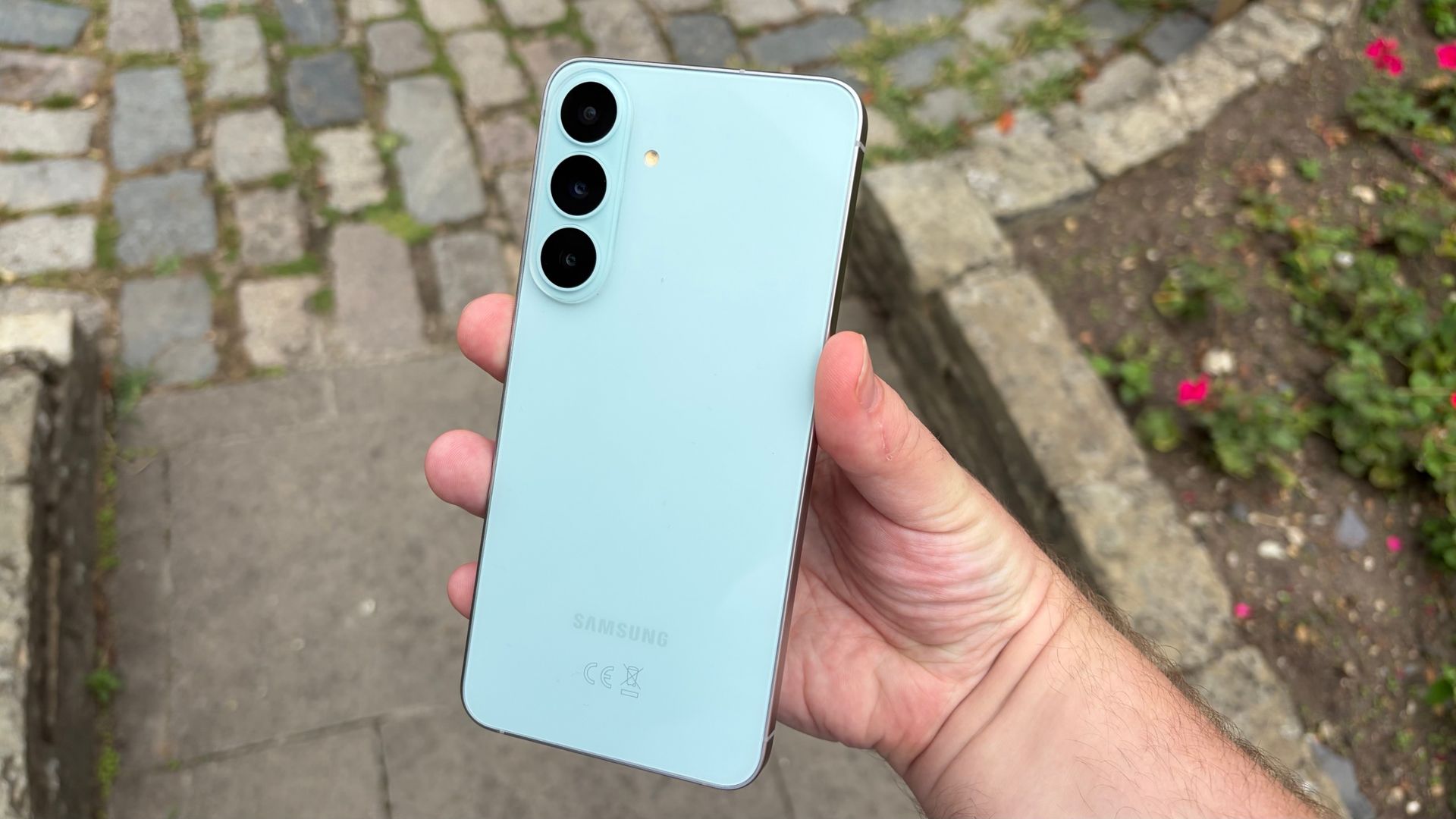
Looks-wise, there are no major body changes between the Galaxy S26 FE and the S25 FE — not that Samsung really needed to make any.
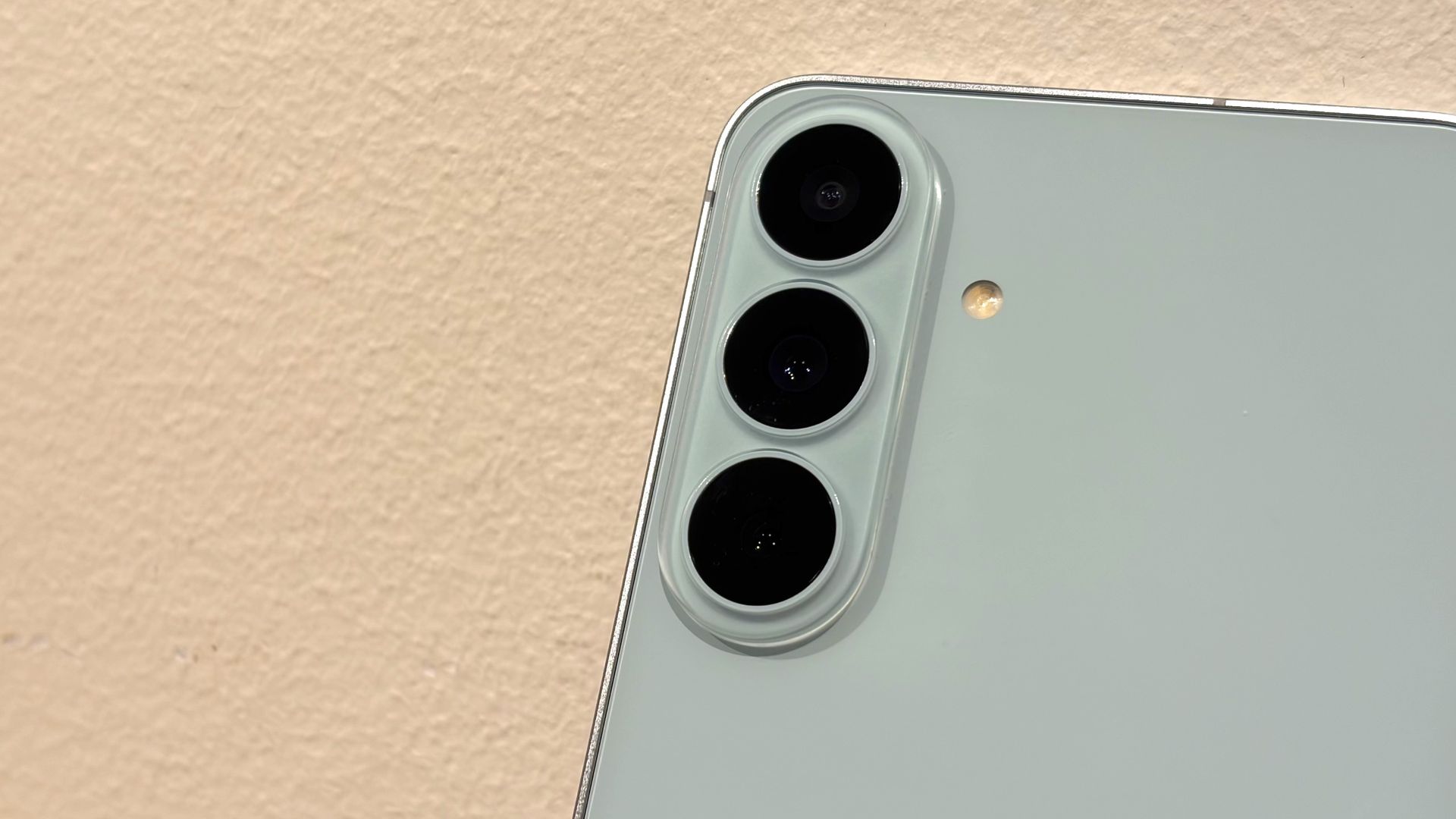
You still have three camera lenses embedded directly into the back of the phone, then flat rails with rounded corners around the sides, leading to a big display with a single centered selfie camera on the front.
Unless you’re able to tell the S26 FE apart from a regular S26 by the color of the handset, the big telltales that you’re holding an FE are the shiny back panel, instead of a matte texture, and the larger chin bezel under the display.
(Image credit: Richard Priday / TechRadar)
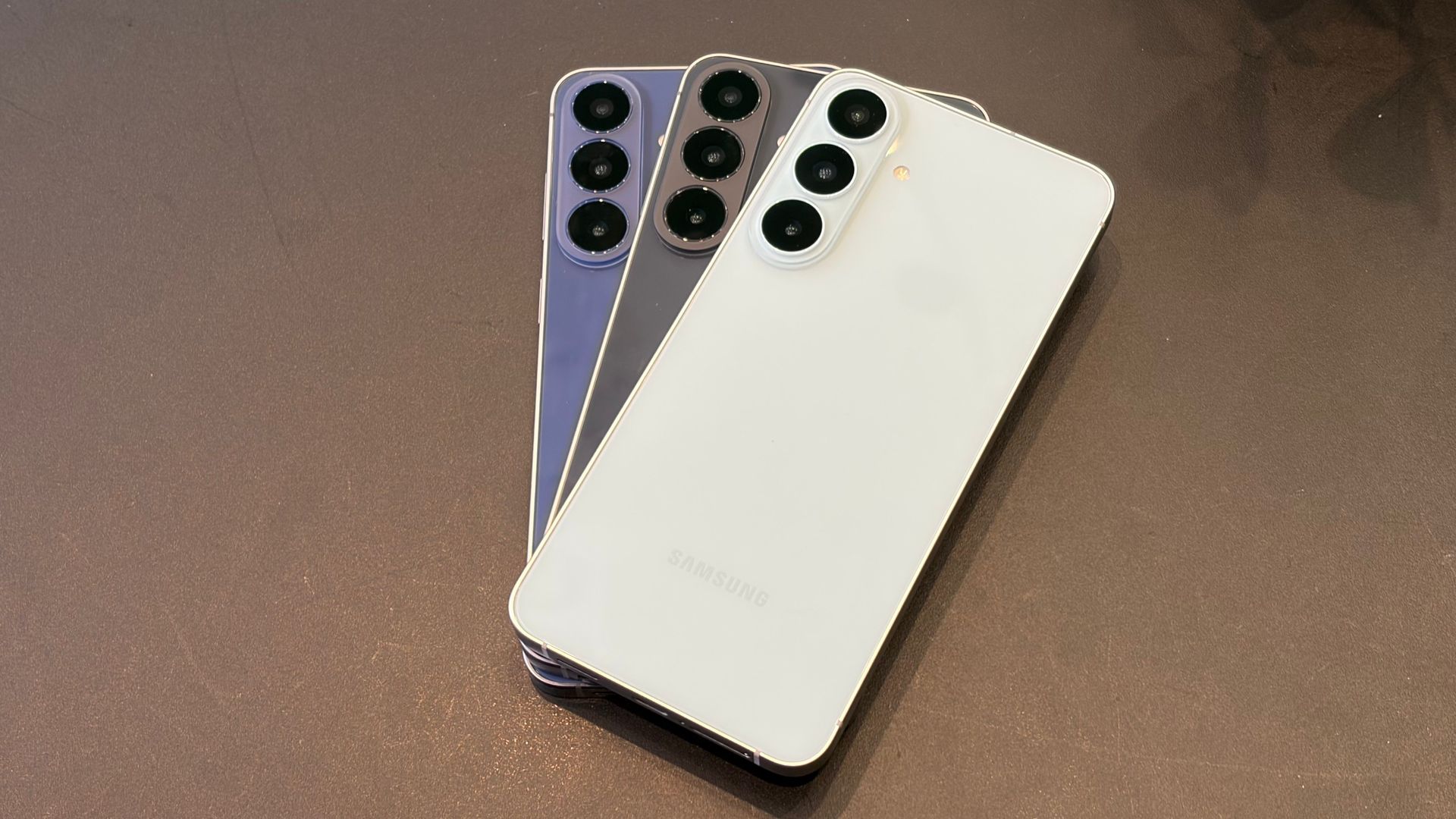
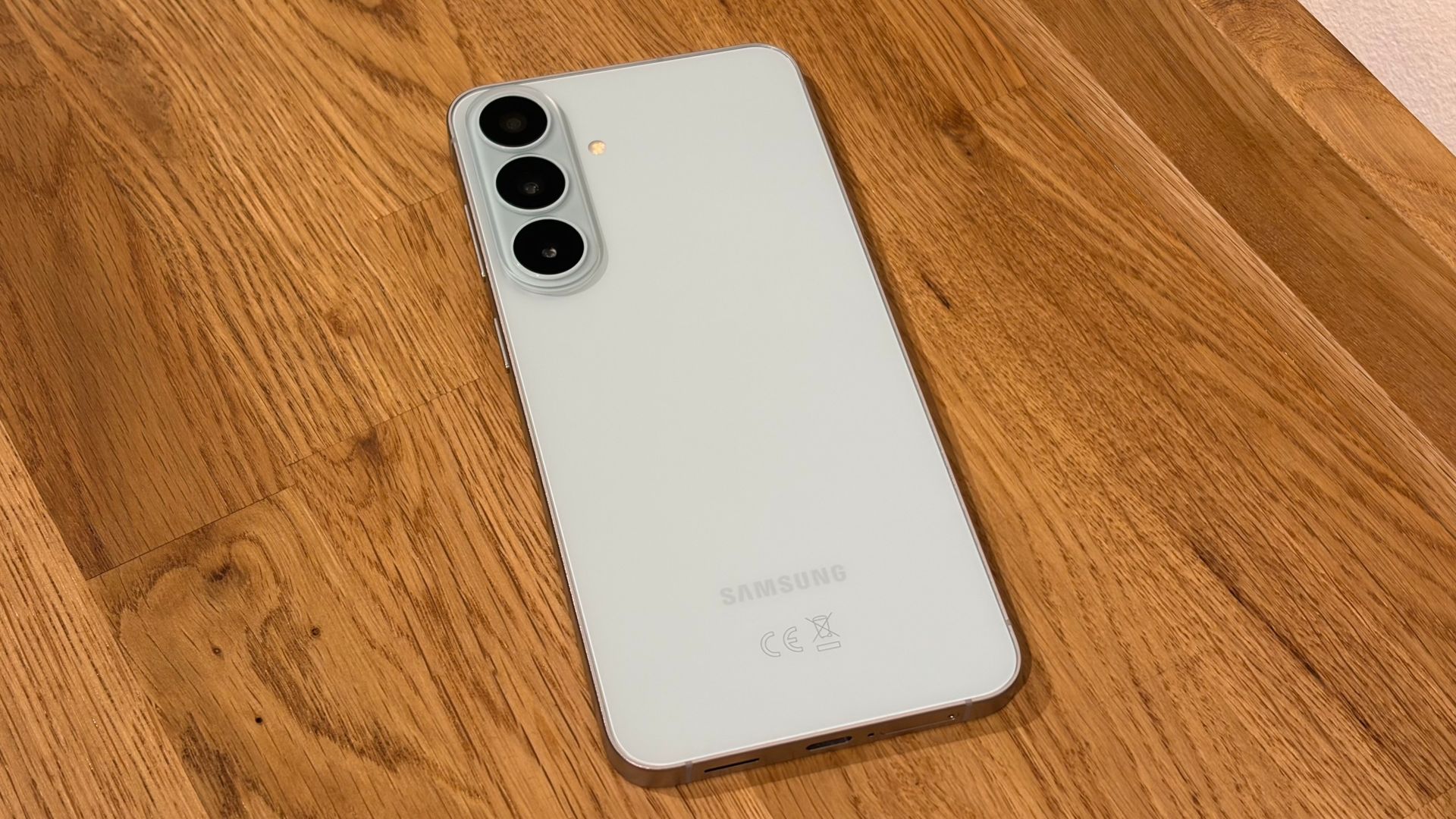
Speaking of colors, Samsung’s three offerings are Graphite, Blueberry and Pistachio (pictured). The gray option will satisfy anyone who isn’t fussed about the color of their phone, or who knows they’ll be using a case to add some style to their new handset, but I do like both the blue and pale green options for the balance they strike between boldness and subtlety.
Like the other Galaxy S26 models, the S26 FE is rated IP68 for water/dust-resistance, which we expect from any flagship phone launching today. However, it uses Gorilla Glass Victus Plus on both sides to protect against scratches and smashes, which is a generation behind what you get on the S26 or S26 Plus.
Design score: 4 / 5
Samsung Galaxy S26 FE review: Display
(Image credit: Richard Priday / TechRadar)
Big and colorful, but lower-spec resolution and brightness
Larger bezels than other Galaxy S phones
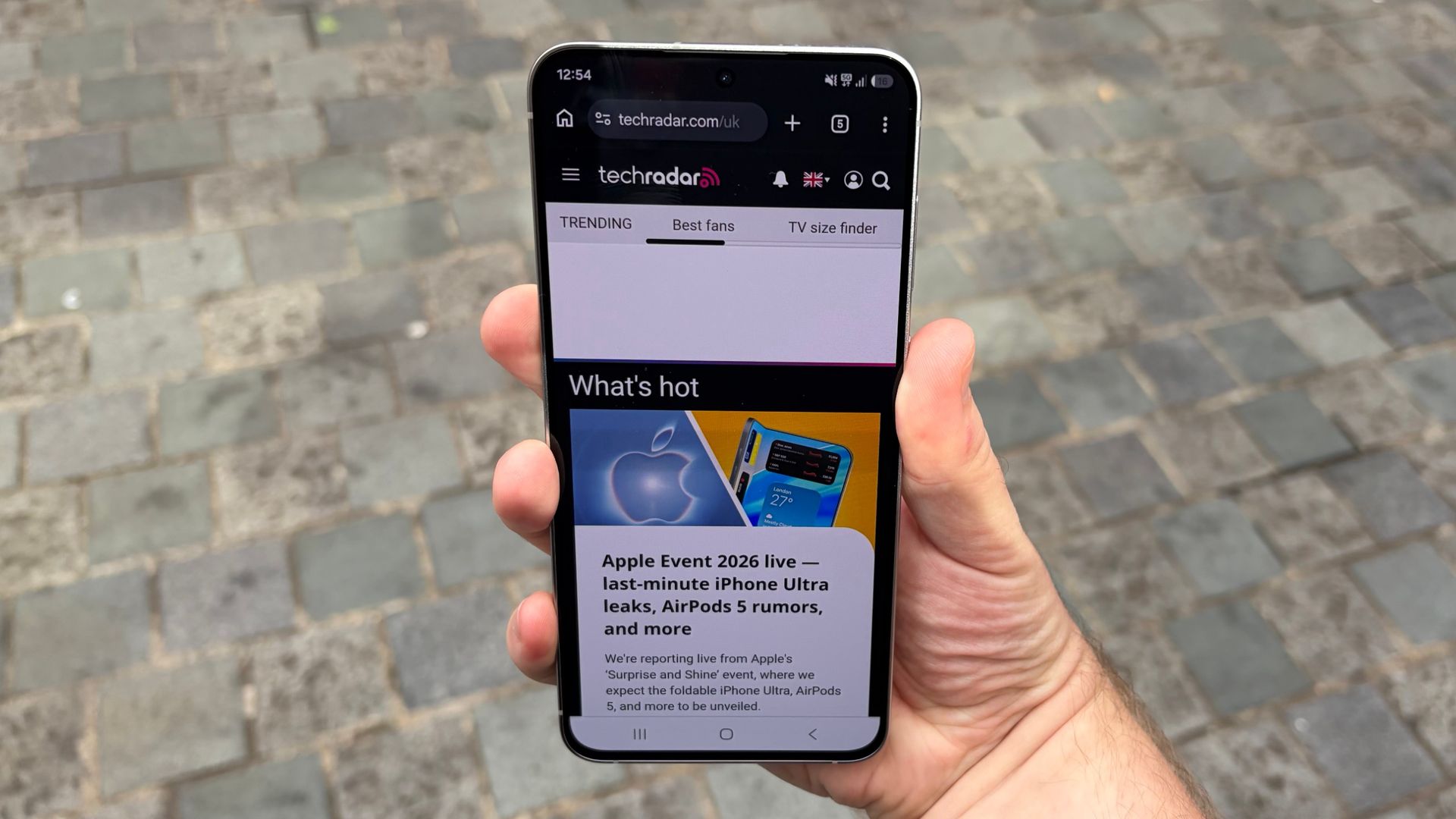
The 6.7-inch AMOLED display of the Galaxy S26 FE matches the size of the Galaxy S26 Plus’ display, but that’s where the similarities end. The FE’s panel only reaches an FHD resolution, rather than the Plus’ more detailed QHD, and peaks at 1,900 nits of brightness according to Samsung’s testing, rather than the 2,600-nit rating of the other S26 models.
Even though the S26 FE can’t deliver as much brightness or as many pixels as Samsung’s top-tier displays, the detail and the colors of the FE’s panel are still strong, and the screen remains fairly legible even out in what remains of the summer sun.
The bezels around the Galaxy S26 FE’s display are thicker than they are on the Galaxy S26 Plus or other premium Samsung phones, which is an understandable limitation given the FE’s lower price. It doesn’t interfere with whatever you want to watch on the screen, but it’s a difference you’ll notice if you have used other recent Galaxy S phones.
Display score: 3.5 / 5
Samsung Galaxy S26 FE review: Software
(Image credit: Richard Priday / TechRadar)
Samsung’s latest OS comes pre-installed
Seven more generations of updates have been promised
The Galaxy S26 FE comes pre-installed with OneUI 9, Samsung’s take on Android 17. That actually puts it ahead of the other Galaxy S26 models, which currently can only access OneUI 9 as a beta version.
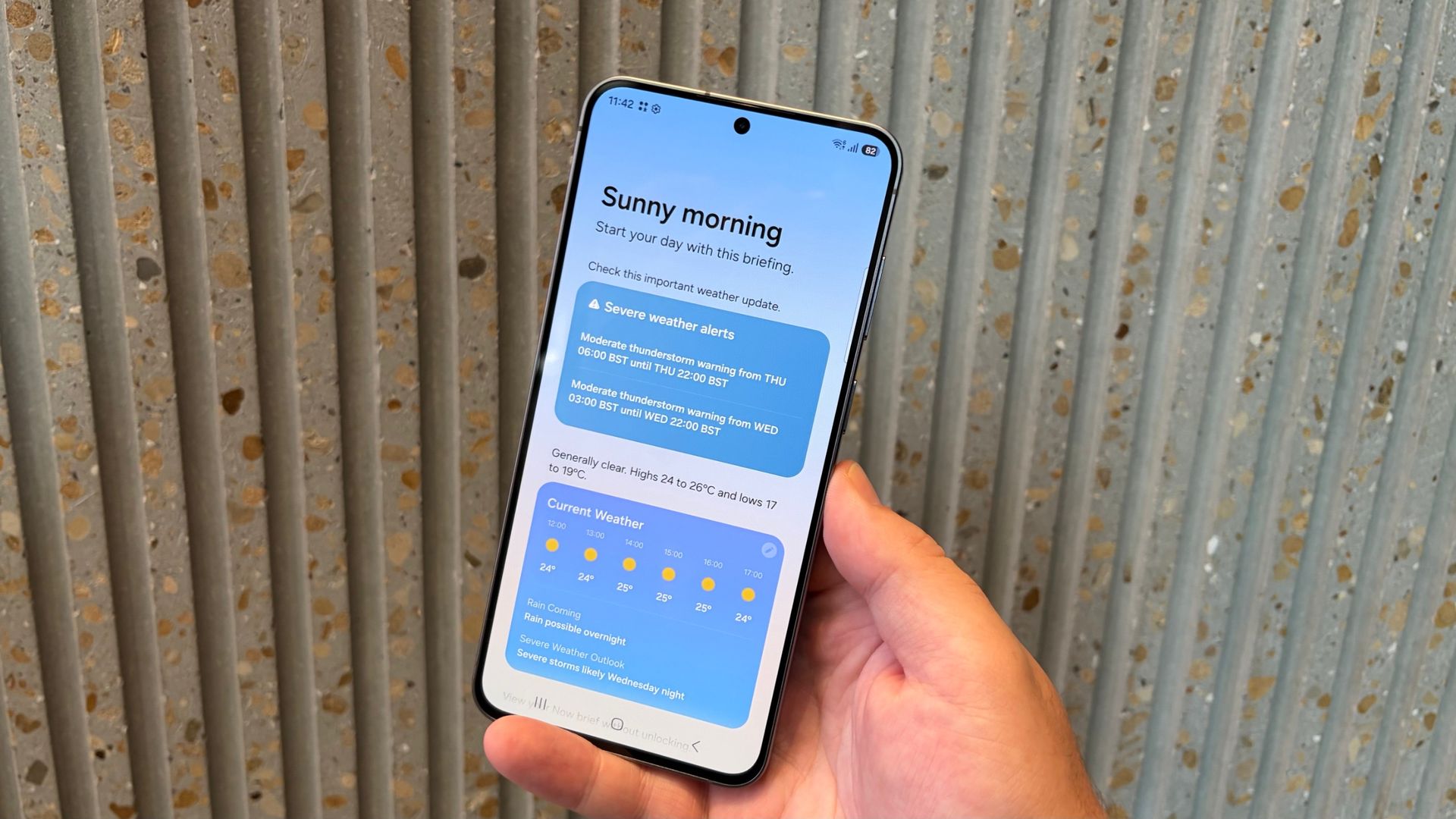
OneUI 9 gives the FE a lot of tools to play with. My FanCam — the video subject tracking tool which just debuted on the much more expensive Galaxy Z Fold 8/ Galaxy Flip 8 series — is here and works just as capably. That’s joined by other AI-powered editing features like Photo Assist and Audio Eraser.
(Image credit: Richard Priday / TechRadar)
Meanwhile, for productivity, you have Now Brief and its new custom cards option to give you even more personalized updates all in one place, more supported apps for Now Nudge, plus expanded cross-app functions and Gemini.
Perhaps most importantly for the Galaxy S26 FE, it comes with Samsung’s full seven generations of Android and seven years of security updates promise. That’s the same as other Galaxy S models, and one additional year over what the cheaper Galaxy A57 gets, which is crucial for the value proposition of the S26 FE.
Software score: 4 / 5
Samsung Galaxy S26 FE review: Cameras
(Image credit: Richard Priday / TechRadar)
Minor upgrades but identical sensors to previous model
The main and selfie cameras are good, but the ultra-wide and telephoto cameras lag behind
The Galaxy S26 FE’s camera loadout has a 50MP main rear lens as its centerpiece. You also have 12MP ultra-wide and 8MP 3x telephoto cameras on the back, as well as a 12MP selfie camera embedded in the display. This is the same basic setup as the Galaxy S25 FE, and also what you'll find on the Galaxy S26 and Galaxy S26 Plus, except that the more expensive phones get a higher-resolution 10MP zoom camera instead.
Our first example is a main camera shot of some brightly colored buildings in London’s Soho neighborhood. It’s a tricky one for any camera to balance due to the shaded shopfronts on the left side and the sky and brightly lit building in the center and right side. The Galaxy S26 FE still has some detail to offer in the shadowed brickwork, but Samsung’s strength in bright colors is on full display on the other half of this particular image.
Keeping with the main camera but looking out at the London Eye at night, we see another strong attempt from the Galaxy S26 FE. There’s some softness in the details, but the balance of colors between the lights and the night sky still makes for an appealing shot.
Looking across a sun-scorched park with the ultra-wide camera, we see a shot with plenty of scenery in it, with little to no distortion at the edges. The brightness and colors could use work, though, as even accounting for the patchy grass and overcast sky, things look overly drab.
The two shots of the church bell tower, one at 2x magnification using the S26 FE’s main camera and the other using the 3x telephoto camera, reveal how best to zoom in with this phone’s particular cameras. The in-sensor 2x zoom still keeps the subtleties of the colors and markings within the brickwork and foliage of the shot, thanks to the 50MP main sensor having plenty of pixels to spare even when zoomed in. However, while the telephoto camera has greater reach, the resulting image is darker and flatter, as you might expect from the lower-resolution sensor. It’s more of a trade-off than I’d like to see on a flagship phone’s zoom camera.
I’m normally a fan of Samsung selfies, but I’m not sure I like how the highlights are exposed in this particular shot. Samsung’s excellent portrait algorithm has applied the perfect level of bokeh to this image, however, cutting around my head, and especially my glasses, accurately and applying a gentle blur to the leaves behind.
Having gone through these samples, you’ll see that the Galaxy S26 FE’s photography potential is reasonable, at least for what are arguably the two most important cameras. For future generations of S FE, though, Samsung could do with upping its game if it wants to continue claiming this is a flagship product.
Camera score: 3 / 5
Samsung Galaxy S26 FE review: Performance
(Image credit: Richard Priday / TechRadar)
The Exynos 2500 chip is a good performer, especially for graphics
8GB of RAM is limiting for a premium phone in 2026
Here’s an area where I was pleasantly surprised by the Galaxy S26 FE. Samsung’s own Exynos 2500 chipset sits inside the S26 FE, rather than the Snapdragon 8 Elite Gen 5 chip that basically all the other top Samsungs of 2026 are using. But that hasn’t stopped the S26 FE from turning in some decent scores.
As the table below reveals, the Exynos 2500 lags behind slightly in CPU single-core results, but is on par with or ahead of the pack on the rest of the tests. It’s a long way out in front on the Solar Bay benchmark, no doubt thanks to the Exynos’ GPU, which is well-suited to the ray-tracing graphics that this test focuses on.
Samsung Galaxy S26 FE benchmark scores
Samsung Galaxy S26 FE
Geekbench 6 single-core
2,361
Geekbench 6 multi-core
7,831
3DMark Wild Life Extreme Stress Test best
5,116
3DMark Wild Life Extreme Stress Test low
3,456
3DMark Solar Bay
10,526
Bearing only 8GB of RAM compared to the 12GB in other premium Samsung phones, the Galaxy S26 FE does struggle with multitasking or intensive apps. While you can still game on this phone happily, it’s not a handset you’ll want to do anything more practical on than standard browsing and messaging.
Performance score: 4 / 5
Samsung Galaxy S26 FE review: Battery
(Image credit: Richard Priday / TechRadar)
The same battery/charging hardware as the more expensive S26 Plus
Battery life day-to-day is good, while charging is plenty fast enough
Samsung offers the same 4,900mAh battery capacity in the Galaxy S26 FE as it does in the Galaxy S26 Plus. However, according to Samsung’s official battery estimates, the S26 FE doesn’t offer the same battery life, managing 29 hours of video playback compared to the S26 Plus’ 31 hours or the S26’s 30 hours.
For me, I used about 40% of the phone’s battery during a typical day’s use. This included some work, some photography, and some social media scrolling and video watching. The Galaxy S26 FE could definitely survive two days of regular use before needing to charge, as you would hope from a phone with this size of battery.
The Galaxy S26 FE is still equipped for 45W wired charging and 15W wireless charging. That’s the same wired speed as the S26 Plus and Ultra, but the wireless charging is slower, since the FE is not Qi2 compatible.
Using a 45W charger, Samsung estimates a 69% refill for the S26 FE in half an hour. In my own test, I found the S26 FE managed to fill to 43% in 15 minutes and to 100% in 58 minutes. Considering the battery life this phone can manage, a complete refuel in under an hour and getting over two-fifths full in a quarter-hour isn’t bad at all, even if faster options are out there.
Battery score: 4 / 5
Should you buy the Samsung Galaxy S26 FE?
Samsung Galaxy S26 FE scorecard
Attributes
Notes
Rating
Value
The cheapest Galaxy S26 model, although not by much post-price hike.
3.5/5
Design
Looks like any other Galaxy S26, except with some fun, unique colors and slightly less durable materials.
4/5
Display
Big and colorful, but lacking detail.
3.5/5
Software
Samsung’s best features come pre-installed, but will soon be available on older phones too.
4/5
Camera
The main and selfie cameras produce strong photos, but the phone’s let down by its ultra-wide and telephoto lenses.
3/5
Performance
A below average RAM capacity is understandable for the price, and the phone still plays games really well.
4/5
Battery
Less efficient than other S26 models, but still long-lasting and fairly fast-charging.
4/5
Buy it if…
You want the big premium Samsung experience for the smallest possible price The Galaxy S26 FE is the cheapest Galaxy S26, and joint second largest. If you want a big display and long battery life from Samsung for less, then this is the model for you.
Exclusive software and AI features don’t interest you You do get some excellent tools and toys to play with within One UI 9, but since this update will come to older Samsungs soon enough, this isn’t a phone to buy for this reason alone.
Your performance needs are about average If you like to play games on your phone, or know you’ll spend long days away from a charger, the S26 FE will suit you well. It doesn’t offer the very best in either power or battery life, but arguably it’s a case of diminishing returns if you spend any more than this.
Don’t buy it if…
You care about photography Taking snaps with the main and selfie cameras on the S26 FE is easy and results in great photos. But if you want more detail or know you like taking ultra-wide or zoom shots, there are many other phones that will suit you better.
You want the best long-term value While the S26 FE is cheaper to buy right now, we’d recommend looking at one of Samsung’s more expensive S26 models, or those of another Android brand, if you’re hoping to get as many happy years out of your new phone as possible.
If you’re willing to spend even a few dollars/pounds more The Galaxy S26 FE sits just below the starting price of typical flagship phones. That means you could save yourself 100 bucks or so, or you can spend the extra and unlock the next tier of hardware and features that could provide far more value to you.
Samsung Galaxy S26 FE review: Also consider
Samsung Galaxy S26 Plus
It’s quite a bit more expensive, but as an investment, it may be worth spending the extra money over the Galaxy S26 FE’s price to secure a phone that outperforms it on every important metric.
Costing only two hundred bucks more than the S26 FE, the standard S26 gives you the premium Samsung experience at the best possible price, even if the display is quite a bit smaller.
☑️ 100s of smartphones reviewed ☑️ 15 years of product testing ☑️ Over 16,000 products reviewed in total ☑️ Nearly 200,000 hours testing tech
I reviewed the Samsung Galaxy S26 FE over the course of two weeks as a work phone, using it for writing stories, answering emails and messages, watching video and playing games. I did this both at home and on the move with a SIM card installed.
Specific tests included running Geekbench 6 CPU benchmarks and 3DMark graphics benchmarks, a charging speed test using a compatible third-party charger, the taking of hundreds of photos across all of the S26 FE’s cameras to test image quality, and the careful monitoring of battery drain during use to figure out how reasonable the manufacturer’s battery life promises are.
The Bentley Torcan is a high-performance SUV that can reach 375 miles on a charge
The most powerful models will boast 876bhp
The debut EV will share parts with Porsche Cayenne Electric
Bentley has been teasing its debut all-electric model for months now, revealing tasty morsels about its orchestral synthesized engine notes, and futuristic styling inspired by the EXP 15 Concept Car, but we finally have the full details.
Based on Porsche’s PPE architecture (they all belong to the Volkswagen Group, after all), the upcoming Torcal will measure five meters long, making it slightly shorter than a Bentayga, and will borrow many of the chassis, suspension and powertrain components from its Porsche sibling.
Bentley doesn’t like too many mentions of the shared underpinnings, so has made a big deal about its “bold new design language, rooted in Bentley’s DNA”.
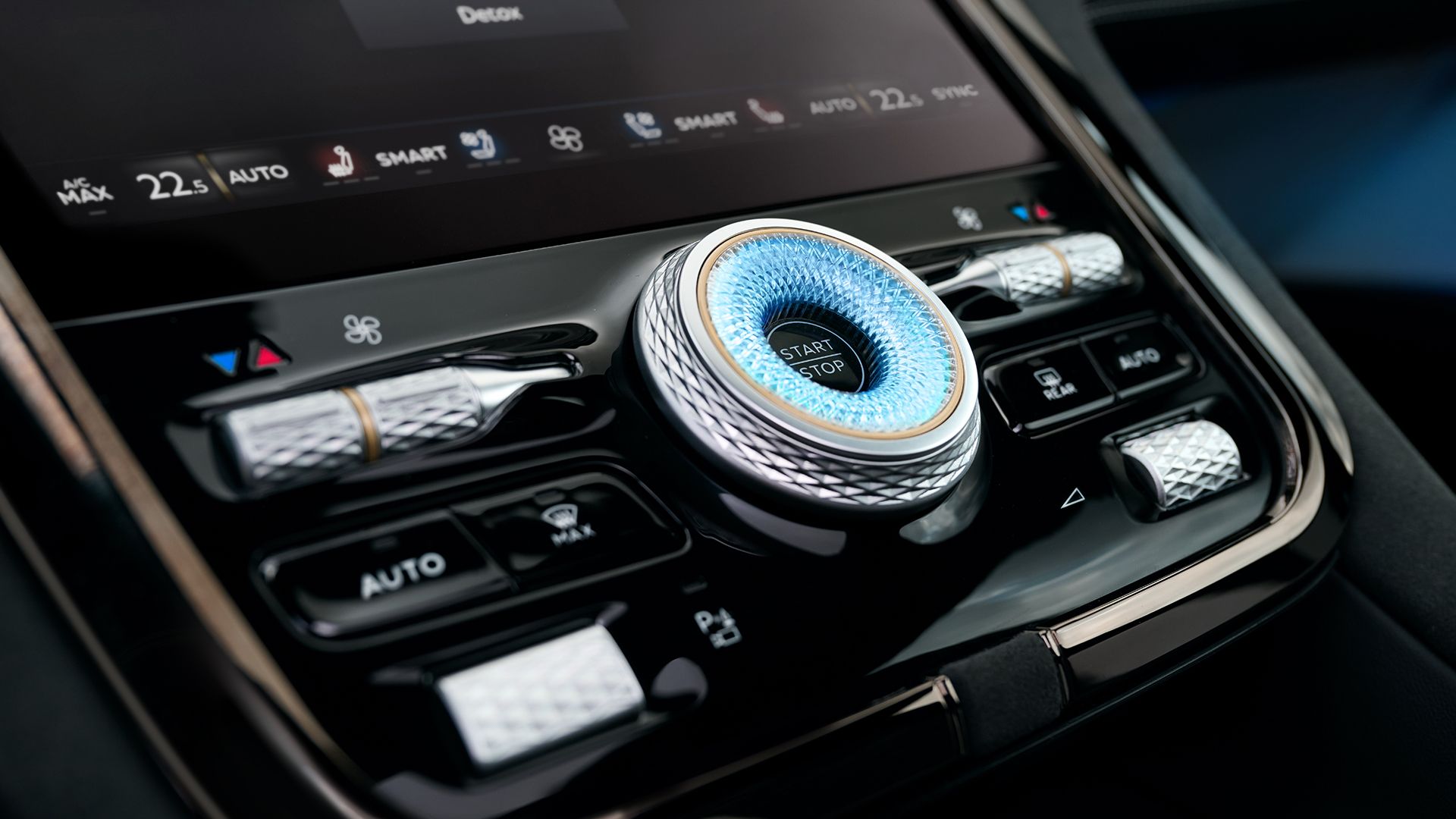
Expect an imposing illuminated front grille, sculpted surfaces and powerful rear haunches.
It looks as if Bentley’s idea of an electrified SUV just ate a Continental GT and hasn't digested it yet, but that’s no bad thing. It is the antithesis of Ferrari’s approach with the Luce — that’s to say Torcal looks and feels reassuringly Bentley.
BentleyBentleyBentleyBentley
As for the powertrain, the dual-motor setup makes the Torcal the most powerful Bentley ever, with a whopping 876bhp in the range-topping S model.
That’s not quite the 1,140hp of the monstrous Porsche Cayenne Turbo Electric, but will be sufficient for a 2.8-second sprint to 60mph from rest in the sportier S version — enough to embarrass many supercars.
Bentley says it wants the Torcal to be used “year-round” so offers a massive 113kWh battery pack that delivers a range of up to 375 miles.
Better still, it can be charged at speeds of up to 400kW, meaning a 10-80% top-up session takes less than 20 minutes, potentially.
Analysis: the sound of the future
(Image credit: Bentley)
The British marque has scrapped its plans to go all-electric by 2030, instead opting to offer a selection of powertrains for customers.
After all, it is synonymous with booming V8 and V12 engines, which have historically delivered restrained but potent soundtracks to many models.
Not wanting to lose this USP in its debut EV, Bentley has turned to real instruments — drums, viola and bass guitar — to create what it refers to as the “Bentley Dynamic Symphony”, which is supposed to represent the subtle variations and tiny imperfections of a big V8 engine.
This “human-generated” soundtrack will provide aural feedback to the driver as the revs rise, becoming louder in Sport mode.
Apparently, even the indicator note stems from a recording of hammers striking leather in the Bentley workshop, while the touchscreen feedback noises are taken from the sound of a crystal glass.
Naturally, the interior is festooned with physical knurled controls and dials, while a special Comfort Mode within the infotainment offering delivers fewer distractions, while the option of a digital detox sees all but the most essential information hidden to allow attention to move away from screens.
According to sources, prices start at £173,300 (around $230,00/AU$326,000) for the Torcal or £199,300 (around $263,000/AU$375,000 for the Torcal S, and first deliveries are expected in Summer 2027.
A chatbot invented entirely false cargo details about a Chinese vessel
Armed troops prepared to board the ship before anyone checked the source
Military aircraft were already active when officials caught the error
A false intelligence assessment nearly triggered a US military invasion of a Chinese vessel after AI-assisted analysis wrongly identified its cargo.
The report circulated during the Iran conflict and prompted preparations to intercept the vessel before officials discovered serious problems with its underlying information.
Sources told CNN that armed personnel were preparing to board while military aircraft supported preparations, creating a potentially dangerous confrontation between major powers.
AI-assisted analysis produced the mistaken assessment
The episode began when an analyst examined intelligence concerning the ship's manifest and used a chatbot to interpret information.
Sources said the system combined publicly available material with classified signals information before producing an incorrect assessment about the vessel's cargo.
The analyst subsequently used AI again to prepare the findings in a standard intelligence format that was distributed among military officials.
Officials only examined the underlying information shortly before the planned operation, revealing that the reported cargo identification was wrong.
The source described the assessment as “entirely false,” while CNN reported that another source said it “almost started a war.”
The exact material that the chatbot misidentified has not been disclosed publicly, leaving important details about the original error unavailable.
The Pentagon and the military command responsible for Pacific special operations did not provide comments on the incident.
The episode comes as the US military expands its use of AI tools across intelligence, operations, administration, and battlefield decision-making.
In January, Defense Secretary Pete Hegseth announced an AI strategy intended to accelerate deployment across military missions and organizational functions.
“We will unleash experimentation, eliminate bureaucratic barriers, focus our investments and demonstrate the execution approach needed to ensure we lead in military AI,” Hegseth said.
The strategy includes programs for intelligence work, operational planning, enterprise functions, and wider access to generative AI systems.
The department later said more than 1.3 million personnel had used GenAI.mil, generating tens of millions of prompts within five months.
The incident exposes a difficult verification problem
The reported mistake involved more than an inaccurate chatbot response because its output entered a process used for consequential military decisions.
Once incorrect information appeared in a formal assessment, officials receiving the document had to determine whether its underlying evidence supported the conclusion.
There is no information on which verification procedures were applied before the assessment reached personnel preparing the maritime operation.
It also remains unclear whether the analyst knew that the chatbot had introduced an incorrect interpretation before the report circulated.
According to CNN, different military organizations use different AI systems, while officials have described varying practices for checking information produced by them.
That fragmented environment makes it difficult to identify a single verification process governing every AI-assisted intelligence product across the military.
AI tools can make military analysis faster and easier, yet their potential for significant errors requires strict human verification before operational decisions.
That need becomes more important when intelligence concerns a rival country, where an incorrect assessment involving a military vessel could trigger retaliation.
A mistaken attack could then escalate tensions between the countries involved, potentially producing a wider armed confrontation or prolonged political and military conflict.

 Login
Login