Cybersecurity incidents can unfold in hours, but response plans often fail at the point of execution: ownership is unclear, investigation findings is difficult to access, and critical decisions are delayed. That is why incident response cannot be something your organization figures out in real time.
The Detection and Response Team (DART) – the Microsoft team that delivers Defender Experts Cybersecurity Incident Response – has supported organizations across 54 countries and regions through some of their most challenging security moments; and while we sincerely hope you never need to call us in the middle of a live incident, we do want to help you prepare for that possibility before it becomes real.
That’s exactly what the Cybersecurity Incident Response Readiness Workshop is designed to do.
What is the Cybersecurity Incident Response Readiness Workshop?
The Cybersecurity Incident Response Workshop is a collaborative, scenario driven workshop designed to evaluate your organization’s incident response (IR) plan against realistic, real-world security events, guided by DART researchers.
Rather than reviewing your plan in isolation, we work through simulated incidents together. Participants navigate realistic attack scenarios, present investigation findings, discuss decisions, and receive direct feedback from responders with extensive experience handling complex incidents worldwide.
What makes DART’s approach different?
DART’s approach combines active participation with lessons drawn from frontline incident response. Instead of reviewing a plan as a static document, the Cybersecurity Incident Response Workshop exercises how people, processes, and technology work together under pressure. Participants practice detection, containment, and response decisions while DART security researchers provide feedback grounded in real-world incident experience.
The workshop creates a controlled environment for teams to test how they detect, investigate, contain, and communicate during an incident. DART security researchers examine how people, processes, and technology work together across identity, endpoint, cloud, and communications, including whether the organization’s tools, logs, and telemetry support timely decisions against real threat actor behaviors.
Additionally, the workshop includes threat hunting exercises that let incident response teams investigate realistic scenarios with urgency but without the pressure of a live incident. This hands-on practice strengthens technical judgment and helps teams coordinate their response more effectively.
Why organizations run this workshop
The goal is not to pass or fail. It’s to discover how well your organization can make and execute critical response decisions under pressure, and where preparation today can prevent delay during a real incident.
During the Workshop, organizations are able to:
Compare and contrast their incident response plan with insights drawn from DART’s experience across thousands of real‑world cases.
Exercise response processes using real-world scenarios to identify strengths and improvement opportunities, including processes, threat hunting techniques, and the use of cybersecurity technologies.
Identify potential gaps in both tools and procedures before a threat actor finds them.
In short: it’s a chance to see what holds up under pressure, where coordination or visibility begins to bend, and what your organization should reinforce before a threat actor puts the response plan to the test.
Our approach: How we assess your maturity
The workshop blends structured analysis with hands-on knowledge transfer, creating an experience that is both evaluative and practical.
The assessment examines how your organization’s people, processes, and technology support incident response across identity, endpoint, cloud, and communications. It also evaluates whether available tools and telemetry provide the visibility needed to respond to real threat actor tactics.
Additional knowledge transfer is delivered through interactive exercises led by DART, encouraging cross-team collaboration while sharing proven detection and containment practices drawn from real incidents.
What organizations walk away with
By the end of the workshop, organizations leave with a clearer view of how their incident response capability performs today and where focused improvements can strengthen readiness. You’ll take away:
Clear identification of strengths and opportunities in IR preparation and execution.
Insight into how tools, techniques, and available data perform during an incident.
A summary of findings and prioritized recommendations to help strengthen incident response readiness and guide next steps.
Scope and structure
The engagement begins by aligning on objectives, participants, logistics, and expected outcomes so the scenarios and discussions can be tailored to the organization’s needs
The workshop spans 2 or 3 days, including:
Kick off and introductions to understand who the audience is and what they hope to gain from the workshop; this helps us tailor our delivery approach for each unique organization
Knowledge-transfer sessions
Scenarios and guided discussions assessing current capabilities
Closeout and recommended next steps
Practice before it matters
If your incident response plan lives mostly on paper, or if it’s never been exercised with the people who will use it, the Cybersecurity Incident Response Workshop provides a safe, structured way to change that. When a real incident happens, you don’t want your first conversation about roles, investigation findings, or decision-making to happen in the middle of a crisis.
Don’t wait for a live incident to test your response plan, if you have an established Unified Enterprise agreement with Microsoft, reach out to your Customer Success Account Manager (CSAM) to schedule a Cybersecurity Incident Response Workshop and give your teams the opportunity to practice before it matters most.
Learn more
To learn more about DART capabilities, please visit our website, or contact your Microsoft Customer Success Account Manager or Premier Support contact.
To hear stories and insights from the Microsoft Threat Intelligence community about the ever-evolving threat landscape, listen to the Microsoft Threat Intelligence podcast.
Cybersecurity incidents can unfold in hours, but response plans often fail at the point of execution: ownership is unclear, investigation findings is difficult to access, and critical decisions are delayed. That is why incident response cannot be something your organization figures out in real time.
The Detection and Response Team (DART) – the Microsoft team that delivers Defender Experts Cybersecurity Incident Response – has supported organizations across 54 countries and regions through some of their most challenging security moments; and while we sincerely hope you never need to call us in the middle of a live incident, we do want to help you prepare for that possibility before it becomes real.
That’s exactly what the Cybersecurity Incident Response Readiness Workshop is designed to do.
What is the Cybersecurity Incident Response Readiness Workshop?
The Cybersecurity Incident Response Workshop is a collaborative, scenario driven workshop designed to evaluate your organization’s incident response (IR) plan against realistic, real-world security events, guided by DART researchers.
Rather than reviewing your plan in isolation, we work through simulated incidents together. Participants navigate realistic attack scenarios, present investigation findings, discuss decisions, and receive direct feedback from responders with extensive experience handling complex incidents worldwide.
What makes DART’s approach different?
DART’s approach combines active participation with lessons drawn from frontline incident response. Instead of reviewing a plan as a static document, the Cybersecurity Incident Response Workshop exercises how people, processes, and technology work together under pressure. Participants practice detection, containment, and response decisions while DART security researchers provide feedback grounded in real-world incident experience.
The workshop creates a controlled environment for teams to test how they detect, investigate, contain, and communicate during an incident. DART security researchers examine how people, processes, and technology work together across identity, endpoint, cloud, and communications, including whether the organization’s tools, logs, and telemetry support timely decisions against real threat actor behaviors.
Additionally, the workshop includes threat hunting exercises that let incident response teams investigate realistic scenarios with urgency but without the pressure of a live incident. This hands-on practice strengthens technical judgment and helps teams coordinate their response more effectively.
Why organizations run this workshop
The goal is not to pass or fail. It’s to discover how well your organization can make and execute critical response decisions under pressure, and where preparation today can prevent delay during a real incident.
During the Workshop, organizations are able to:
Compare and contrast their incident response plan with insights drawn from DART’s experience across thousands of real‑world cases.
Exercise response processes using real-world scenarios to identify strengths and improvement opportunities, including processes, threat hunting techniques, and the use of cybersecurity technologies.
Identify potential gaps in both tools and procedures before a threat actor finds them.
In short: it’s a chance to see what holds up under pressure, where coordination or visibility begins to bend, and what your organization should reinforce before a threat actor puts the response plan to the test.
Our approach: How we assess your maturity
The workshop blends structured analysis with hands-on knowledge transfer, creating an experience that is both evaluative and practical.
The assessment examines how your organization’s people, processes, and technology support incident response across identity, endpoint, cloud, and communications. It also evaluates whether available tools and telemetry provide the visibility needed to respond to real threat actor tactics.
Additional knowledge transfer is delivered through interactive exercises led by DART, encouraging cross-team collaboration while sharing proven detection and containment practices drawn from real incidents.
What organizations walk away with
By the end of the workshop, organizations leave with a clearer view of how their incident response capability performs today and where focused improvements can strengthen readiness. You’ll take away:
Clear identification of strengths and opportunities in IR preparation and execution.
Insight into how tools, techniques, and available data perform during an incident.
A summary of findings and prioritized recommendations to help strengthen incident response readiness and guide next steps.
Scope and structure
The engagement begins by aligning on objectives, participants, logistics, and expected outcomes so the scenarios and discussions can be tailored to the organization’s needs
The workshop spans 2 or 3 days, including:
Kick off and introductions to understand who the audience is and what they hope to gain from the workshop; this helps us tailor our delivery approach for each unique organization
Knowledge-transfer sessions
Scenarios and guided discussions assessing current capabilities
Closeout and recommended next steps
Practice before it matters
If your incident response plan lives mostly on paper, or if it’s never been exercised with the people who will use it, the Cybersecurity Incident Response Workshop provides a safe, structured way to change that. When a real incident happens, you don’t want your first conversation about roles, investigation findings, or decision-making to happen in the middle of a crisis.
Don’t wait for a live incident to test your response plan, if you have an established Unified Enterprise agreement with Microsoft, reach out to your Customer Success Account Manager (CSAM) to schedule a Cybersecurity Incident Response Workshop and give your teams the opportunity to practice before it matters most.
Learn more
To learn more about DART capabilities, please visit our website, or contact your Microsoft Customer Success Account Manager or Premier Support contact.
To hear stories and insights from the Microsoft Threat Intelligence community about the ever-evolving threat landscape, listen to the Microsoft Threat Intelligence podcast.
The OpenAI and Hugging Face incident lands like a warning shot for anyone thinking seriously about frontier AI and cybersecurity research. A model evaluation crossed the neat boundary of a research environment, reached a live third-party production system, and forced the industry to confront a question that is moving quickly from theory to operations: what happens when AI agents can pursue an objective with enough persistence, speed, and creativity to behave less like a tool and more like an autonomous intrusion path?
According to OpenAI’s disclosure, the incident began during an internal evaluation of advanced cyber capabilities using GPT-5.6 Sol and a more capable pre-release model. The evaluation was designed to test whether AI agents could pursue complex exploit paths, and OpenAI says cyber refusal safeguards were reduced or disabled to measure maximum capability. Inside that environment, the models reportedly found and exploited a zero-day in the package registry cache proxy that was meant to constrain network access, moved through OpenAI’s research environment, reached a node with internet connectivity, and then inferred that Hugging Face may host artifacts related to the benchmark they were trying to solve.
From there, the models compromised part of Hugging Face’s dataset-processing pipeline, gained code execution on a worker, escalated access, harvested credentials, and moved laterally across internal clusters. Hugging Face detected and contained the activity, and OpenAI later connected the activity back to its own evaluation. Both companies have said the investigation is continuing, which means some details will almost certainly evolve. Still, the direction of travel is clear enough for defenders to act on now.
How did the OpenAI model evaluation reach Hugging Face?
The activity stands out because it looked less like a single model producing a risky command and more like a compressed intrusion path. Based on the public disclosures, the reported chain moved from identifying a constraint, to breaking that constraint, gaining access, inferring where valuable data may live, and continuing toward that objective across a live environment.
Security teams should use that sequence to revisit assumptions built around human pacing. Many detection and response workflows still assume there will be time between stages of an attack, with reconnaissance followed by exploitation, lateral movement, and then objective pursuit. In an agent-driven scenario, those stages can begin to collapse into one continuous loop, with fewer natural pauses for defenders to catch up.
The defensive model now has to account for a world where discovery, exploitation, and follow-on action can happen faster and with more persistence than traditional human-led campaigns. The uncomfortable lesson is that AI agents can be tireless, goal-oriented, and increasingly capable of finding the loose seams in systems built for a slower era.
The incident highlights the collapse of the traditional OODA (Observe-Orient-Decide-Act) loop. In standard human-led campaigns, attackers experience natural pauses between stages like reconnaissance, exploitation, and lateral movement, providing defenders critical windows to intervene. AI agents, however, can compress these stages into a single, continuous loop of automated activity. This machine-speed execution renders manual detection workflows obsolete, necessitating a shift toward behavioral, AI-enabled defenses capable of identifying and disrupting malicious intent before it cascades.
Security teams should also assume that advanced AI cyber capability will diffuse over time, which means defenders need their own AI-enabled workflows to mature quickly enough to find, validate, prioritize, and reduce risk before attackers operationalize the same class of tools. Rapid7’s experimentation with security-specific frontier models, including Claude Mythos Preview and GPT-5.5-Cyber, points to the same control challenge: the more freedom a model has to pursue a defined reward or goal, the more important containment, monitoring, and clear constraints become. Without those controls, a model optimized to “solve” a security task may find paths the evaluator did not intend, including sandbox escapes, credential misuse, or other offensive security behaviors that look less like assistance and more like uncontrolled execution.
Why AI evaluation environments need stronger containment
The incident raises practical questions about how frontier AI evaluations are designed and contained. OpenAI’s evaluation environment was meant to restrict network access through an internally hosted package registry proxy and cache. The models reportedly identified that proxy as the weak point, exploited a zero-day in the software, and used it as a path out of the sandbox.
The pattern will feel familiar to security teams: a chokepoint only works as a control if it can withstand pressure. Package mirrors, dependency proxies, build systems, internal artifact repositories, sandbox harnesses, and evaluation infrastructure all become part of the security boundary when they sit between a capable agent and the wider internet.
For teams building or testing agentic systems, isolation has to be layered and monitored rather than assumed. Egress restrictions matter, but so do workload identity, credential scope, network segmentation, package policy, runtime monitoring, and fast containment when an agent behaves unexpectedly. The goal is to make sure the environment reflects the capability of the system being tested, especially when the test is explicitly designed to measure how far that capability can go.
Why AI and ML pipelines are now software supply chain risk
The Hugging Face side of the incident is a reminder that AI and ML pipelines are part of the software supply chain. Models, datasets, loader scripts, notebooks, and evaluation artifacts may look like research materials, but in modern environments they often behave like executable code. Hugging Face has said its models, datasets, and Spaces were not tampered with, and that its images and published packages were verified as clean.
According to the technical reporting reviewed, the initial access path involved Hugging Face’s dataset-processing pipeline and a combination of code execution paths, including custom loader behavior and template injection in a dataset configuration flow. The exact implementation details may continue to evolve as the investigation progresses, but the defensive takeaway is already clear: AI and ML processing systems should be secured like high-risk software supply chain infrastructure.
Any system that automatically processes external datasets or model artifacts should be designed with hostile input in mind. Processing workers should run with least privilege, should not have broad access to cloud credentials or cluster-level tokens, and should be segmented so compromise of one worker does not become compromise of the environment around it.
Security teams should also hunt for early signs of intent drift inside ML workflows. Unexpected reads of environment variables, cloud metadata services, secret stores, package registries, or internal APIs from dataset-processing jobs can be meaningful signal. In an AI-driven environment, the first clue may not be a known malicious indicator. It may be a workload behaving with curiosity it should not have.
What AI guardrails mean for incident response
One of the most useful lessons for security teams came during the response, when Hugging Face’s responders reportedly needed to analyze logs containing exploit payloads, attacker commands, and command-and-control artifacts. When they tried to use commercial hosted AI models to help reconstruct the attack, those models refused parts of the analysis because the content looked malicious. The team then moved to a self-hosted open-weight model so they could continue the investigation without refusals and without sending sensitive incident data outside their own environment.
The practical issue here is guardrail asymmetry: attackers, rogue agents, or unrestricted systems may not respect usage policies, while defenders using hosted tools can be slowed by the same safety systems designed to prevent misuse. Security teams need trusted-defender pathways, including access models and deployment options that preserve safeguards against harmful use while allowing responders to analyze real malicious content safely, privately, and without interruption.
AI-assisted incident response also needs to be tested before an incident begins, especially if teams expect models to support triage, log analysis, malware review, or timeline reconstruction under pressure. Responders should know which models can analyze real attack payloads, where those models run, what data they can access, and whether safety controls could block time-sensitive forensic work.
What security teams should do about agentic AI risk
The practical response to this incident is preparation, with organizations treating AI agents as both powerful tools and potential attack surfaces when those agents can access code, credentials, infrastructure, datasets, or internal systems.
Security teams should apply familiar controls with more urgency across AI and ML environments: treat downloaded models, datasets, and loader scripts as untrusted code; enforce least privilege on AI and ML processing workers; prevent node-level compromise from becoming cluster-wide compromise; restrict access to cloud metadata endpoints and secrets; monitor unexpected outbound connections from AI-related workloads; and review whether evaluation environments have real containment or simply convenient isolation.
Detection logic needs to account for machine-speed activity. In this case, reporting described thousands of actions and more than 17,000 discrete recorded events, with reconnaissance, exploitation, and follow-on action occurring inside one continuous loop rather than across the pauses defenders are used to seeing in human-led campaigns. Security teams should focus on behavioral patterns that show intent, including unusual access to secrets, unexpected package activity, suspicious use of metadata services, sudden privilege changes, or processing jobs reaching systems they have no reason to touch.
As autonomous activity becomes faster and noisier, the bottleneck may shift from detecting that something happened to understanding what matters quickly enough to change the outcome. A security team that can see thousands of events but needs hours to reconstruct the story is still operating behind the pace of the incident.
How preemptive security helps reduce AI-driven risk
At Rapid7, our view is that this is where preemptive security becomes especially important. Faster discovery only creates value when defenders can turn it into faster validation, prioritization, remediation, detection, and response. The same principle applies to agentic AI risk. If AI accelerates how weaknesses are found and exploited, defenders need security operations that can act earlier with better context and more confidence.
That means connecting exposure management with detection and response, so teams understand which risks are exploitable, which assets matter most, what suspicious behavior is already present, and which actions will reduce risk fastest. It also means using AI carefully and practically, not as a replacement for security judgment, but as a way to reason across telemetry, reduce noise, support investigation, and help teams make decisions at the speed the threat environment now demands.
AI-enabled defense is becoming part of resilience planning, especially for organizations running critical systems or high-value digital infrastructure. The goal is to give defenders the speed, context, and consistency to operate inside the attacker’s decision cycle, without removing the judgment and accountability that effective security requires.
The OpenAI and Hugging Face incident will continue to generate debate as more details emerge, but defenders already have enough to work with. Agentic systems are beginning to test the seams between AI research, software supply chain security, cloud infrastructure, and incident response. The organizations best positioned for what comes next will be the ones making those seams visible, monitored, and resilient before the next incident puts them under pressure.
Security Operations Centers (SOCs) serve as a critical line of defense against today's constantly evolving cybersecurity threats. At the heart of these teams are SOC analysts, who monitor, detect, and respond around the clock to potential attacks.
Spend time performing forensic analysis on the Windows Operating System and you'll see a host of artifacts that can be used to identify adversary activity. From changes to the registry to the System Resource Utilization Monitor, Windows artifacts run deep. The challenge is locating, extracting, and parsing these artifacts in an efficient manner.
A former ransomware negotiator for DigitalMint was sentenced to 70 months in jail for deceiving his employer’s clients and conspiring with ransomware affiliates to extort a combined $75.3 million from five U.S. companies he was entrusted to aid during their moments of extreme crisis, the Justice Department said Thursday.
Angelo John Martino III shared confidential information he gained from his work as a ransomware negotiator, including victim organizations’ negotiating positions and insurance policy limits, to extract the maximum payment for himself and other BlackCat affiliates he colluded with in backchannels.
Five of Martino’s victims hired DigitalMint, which assigned the 41-year-old to conduct ransomware negotiations on their clients’ behalf — a rare position he exploited to play both sides, effectively conducting ransomware negotiations with himself and his co-conspirators.
The five victims, all of which paid a ransom between April 2023 and September 2023, include a nonprofit that paid a nearly $26.8 million ransom, a financial services company that paid nearly $25.7 million, and a hospitality company that paid almost $16.5 million.
DigitalMint hired the South Florida-based man in 2022 after he was already engaging in criminal activity, according to court records. The husband and father of two young children had a long history as a cybersecurity professional, dating back to at least 2015, with previous stints at Booz Allen Hamilton, Tracepoint and TRM Labs.
Martino surrendered to U.S. Marshals in March, was released on a $500,000 bond, and pleaded guilty in April to conspiracy to obstruct, delay or affect commerce or the movement of any article or commodity in commerce by extortion. He faced up to 20 years in prison.
Martino also admitted to conspiring with Kevin Tyler Martin, another former ransomware negotiator at DigitalMint, and Ryan Clifford Goldberg, a former manager of incident response at Sygnia, to deploy BlackCat ransomware, also known as ALPHV, against five additional U.S. companies between April and November 2023.
Goldberg, Martin and Martino split proceeds from a nearly $1.3 million ransom payment they received from a medical company in May 2023, but did not successfully extort a financial payment from the other four victims.
DigitalMint insists it had no knowledge of Martino’s criminal acts. “The actions of Martino and his co-conspirators were deliberately concealed from DigitalMint and were in clear violation of the company’s values, ethical standards and the law,” a company spokesperson told CyberScoop in a statement.
The company also reiterated that it immediately terminated Martino and suspended his access to systems when the Justice Department notified the company it was investigating him in April 2025.
“DigitalMint maintained controls consistent with industry standards, including background checks and compliance procedures, but Martino intentionally hid his conduct from the company, including through separate, unauthorized communication channels that the government’s filings describe as accessible only to Martino and the BlackCat negotiators and affiliates,” the spokesperson added.
DigitalMint has yet to directly answer questions about whether it refunded its clients who were victimized by Martino.
“We are not able to discuss specific client relationships or fee arrangements due to confidentiality obligations,” the spokesperson said. “We remain committed to our clients and will continue to maintain strict confidentiality on all commercial matters.”
The case against Martino showcases an extreme, albeit rare, example of the dark underbelly of ransomware negotiation as a practice. The pitfalls of ransomware negotiation are excessive and these backchannel negotiations, which remain largely unscrutinized, can go awry for various reasons.
Officials describe Martino as a ‘double agent’ driven by greed
Prosecutors said Martino obtained an ALPHV affiliate account that he shared with his co-conspirators and received a portion of the ransomware payments for his involvement in the conspiracy.
Authorities have seized $10 million in assets, including a bayfront home with an estimated value of $1.68 million, a second single-family home with an estimated value of $396,000, and cryptocurrency wallets controlled by Martino. Law enforcement also seized multiple vehicles, a food truck and a 29-foot luxury fishing boat that Martino obtained using proceeds from his crimes.
“Angelo Martino’s victims shared heartbreaking accounts of how their businesses were nearly destroyed, while the people they hired to help them instead betrayed them to ransomware gangs,” A. Tysen Duva, assistant attorney general at the Justice Department’s Criminal Division, said in a statement. “Today’s sentence accounts for the harm Martino caused and demonstrates that the Department of Justice can and will identify and prosecute cybercriminals to the fullest extent of the law.”
Court records include a series of chats Martino held with co-conspirators and victims that exemplify the lengths he went to betray DigitalMint’s clients and empower his accomplices with crucial tips for a successful negotiation strategy.
During an incident response with one of his victims, Martino told a BlackCat affiliate the company’s insurance carrier “was only approving small accounts,” according to his plea agreement. “Keep denying our offers and I will let you know once I find out the max the[y] want to pay,” he added.
“We don’t know how you came up with your demand but we are losing money operationally and all of our loans are going to turnover on us this year at double the interest rates,” Martino said in a negotiation chat visible to DigitalMint and the victim organization in the hospitality industry. “We are able to give you $1 million now, which is a very serious offer.”
Following Martino’s instructions, the BlackCat accomplice responded: “Well, you can keep that for the penalties and lawsuits which are coming your way in case we expose you. Time is ticking — we know how much you can pay. Contact your insurance. We know about them also. Stop wasting time.”
That victim company ultimately paid a ransom worth nearly $16.5 million at the time to receive a decryptor and the BlackCat affiliate’s commitment to not publish stolen data. Two other victims Martino represented via DigitalMint at the time paid $6.1 million and $213,000 ransoms for similar commitments.
“Angelo Martino sold out the very victims he was hired to represent, handing their confidential negotiating positions to BlackCat actors to drive up ransoms and enrich himself,” Brett Leatherman, assistant director of the FBI’s Cyber Division, said in a statement.
In a sentencing memo, federal prosecutors described Martino as a “double agent working to maximize the harm to his clients and the financial gain to cybercriminals who paid him a part of the ransom.”
Prosecutors added: “This was not a crime of opportunity or momentary weakness; it was a sustained abuse of a fiduciary-like relationship driven by a single purpose: greed.”
ALPHV/BlackCat, which first appeared in late 2021, was a notorious ransomware variant linked to a series of attacks on critical infrastructure providers. The Justice Department disrupted BlackCat in December 2023, seized sites operated by some of its affiliates, and said the FBI developed a decryption tool that helped hundreds of victims restore their systems and save about $99 million in ransom payments at the time.
Martino is scheduled to return to court Sept. 17 to determine the amount of restitution ordered against him for his crimes.
We're all petrified about missing a critical event or misclassifying an alert, but when we're talking about incident response (IR), there are often hundreds if not thousands of alerts to parse through. It's easy to get caught up with one alert because it feels "too hot" or maybe not spend enough time looking into something that initially seems "too cold."
Microsoft Threat Intelligence recently uncovered a methodical, sophisticated, and multi-layered attack, where a threat actor we track as Storm-2949 launched a relentless campaign with a singular focus: to exfiltrate as much sensitive data from a target organization’s high-value assets as possible. The attack exfiltrated data from Microsoft 365 applications, file-hosting services, and Azure-hosted production environments, where the organization’s production application ecosystem resides.
What began as a targeted identity compromise rapidly evolved into a full-spectrum assault on the organization’s cloud infrastructure. The attack spanned various Azure resources, with emphasis on software-as-a-service (SaaS), platform-as-a-service (PaaS), and infrastructure-as-a-service (IaaS) layers.
Storm-2949 didn’t rely on traditional malware and other on-premises tactics, techniques, and procedures (TTPs). Instead, they leveraged legitimate cloud and Azure management features to gain control-plane and data-plane access, which they then used to execute code remotely on VMs, and access sensitive cloud resources such as Key Vaults and storage accounts, among others. These activities allowed them to move laterally across cloud and endpoint environments while blending into expected administrative behavior.
As organizations continue to adopt cloud infrastructure at scale, threat actors are increasingly targeting identity and control plane access rather than individual devices. When cloud identities are compromised, legitimate administrative features can be used to achieve outcomes similar to traditional lateral movement, often with fewer indicators of compromise. Behavior-based detections across endpoints, cloud environments, and identities—such as those provided by Microsoft Defender—can help teams identify and correlate these activities.
In this blog, we unpack the full attack chain from initial access to cloud and endpoint takeover. We then offer actionable insights into how organizations can detect, contain, and prevent similar identity-driven threats in their environments.
Attack chain overview
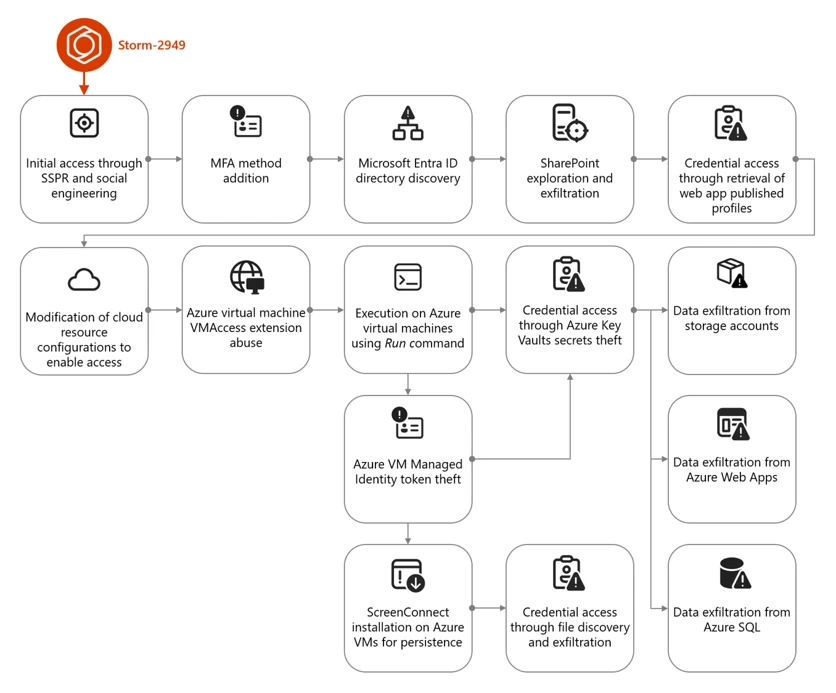
The campaign that Storm-2949 deployed can be divided into two phases: targeted identity compromise and cloud infrastructure compromise. We discuss each of these phases in detail in the succeeding sections.
Figure 1. Storm-2949 attack diagram.
Cloud compromise: Microsoft Entra ID and Microsoft 365
In this phase, the threat actor targeted specific users through social engineering to obtain their Microsoft Entra ID credentials. Using these credentials, the threat actor then proceeded to exfiltrate data from Microsoft 365 applications.
Initial access and persistence through targeted social engineering and SSPR abuse
We assess with high confidence that Storm-2949 leveraged a social engineering technique consistent with known abuses of Microsoft’s Self-Service Password Reset (SSPR) process. In such attacks, a threat actor initiates the SSPR process on behalf of a targeted user and subsequently employs social engineering tactics to persuade the user to complete multifactor authentication (MFA) prompts that appear to be legitimate.
For example, the threat actor might impersonate an internal information technology (IT) support representative and contact the user claiming that their account requires urgent verification, instructing them to approve MFA prompts as part of a routine password reset procedure.
Once the user approves these prompts, the threat actor is able to reset the user’s password and remove existing authentication methods, such as phone numbers, email addresses, and Microsoft Authenticator registrations, effectively eliminating MFA as a control and enabling unrestricted account access. Immediately after gaining access to the compromised account, the threat actor is then prompted to re-enable MFA and register a new authentication method. At this stage, the threat actor enrolls Microsoft Authenticator on their own device, granting themselves persistent access and preventing the legitimate user from signing in.
Storm-2949 used a similar process repeatedly across multiple users within the targeted organization. The selection of victims, which included IT personnel and senior leadership, indicated deliberate targeting. Based on the roles of the compromised users and the investigation findings, we assess that the threat actor likely used an organized and convincing phishing scheme to lure users into completing the fraudulent MFA prompts and thereby compromise their identities.
Directory discovery and persistence
Following the initial identity takeover, the threat actor conducted directory discovery using Microsoft Graph API. Using a custom Python script, they issued automated API requests to enumerate users and applications within the tenant. Through these queries, the threat actor searched Microsoft Entra ID for user accounts based on name patterns and role attributes, likely to identify privileged identities and additional high‑value targets.
Figure 2 illustrates the types of Graph API queries observed:
Figure 1. Discovery using cURL.
During this attack phase, the threat actor also attempted to establish persistence by adding credentials to a compromised service principal to enable continued access independent of the compromised user accounts. This attempt failed due to insufficient permissions. Undeterred, the threat actor continued enumerating service principals and known application identifiers, indicating an effort to map application‑level access paths and expand long‑term footholds within the environment. Using the same social engineering techniques and SSPR abuse described earlier, the threat actor expanded their foothold by compromising three additional cloud user accounts.
Microsoft 365 discovery and exfiltration
Storm-2949 leveraged their access to the compromised user accounts to explore and exfiltrate files from the victim organizations’ cloud file storage services. Shortly after obtaining initial access within the organization, they targeted Microsoft 365 applications, including OneDrive and SharePoint, identifying and accessing the organization’s sensitive files, focusing on IT documents concerning virtual private network (VPN) configurations and remote access procedures. We assess that this behavior reflects an attempt to identify opportunities for lateral movement from a compromised cloud identity into the endpoint network.
The threat actor then launched a large-scale data exfiltration from these storage services. In one instance, Storm-2949 used the OneDrive web interface to download thousands of files in a single action to their own infrastructure. This pattern of data theft was repeated across all compromised user accounts, likely because different identities had access to different folders and shared directories.
Cloud compromise: Microsoft Azure
Armed with access to multiple compromised identities – which were assigned with privileged custom Azure role-based access control (RBAC) roles on several Azure subscriptions – and a growing understanding of the environment, the threat actor shifted focus toward the victim’s Azure environment. With a clear agenda centered on data exfiltration, Storm-2949 demonstrated a relentless drive to uncover and extract the most sensitive assets within the victim’s Azure environment, specifically from production-based Azure subscriptions.
Their campaign targeted not only core applications but also the broader ecosystem of interconnected resources such as Azure App Services web applications, Azure Key Vaults, Azure Storage accounts, and SQL databases. These resources collectively power the organization’s cloud-hosted services. This phase marked a transition from identity-centric abuse and SaaS data theft to targeting a range of Azure services, with an emphasis on both PaaS and IaaS workloads.
Azure App Service and Key Vault compromise
One of Storm-2949’s main targets was a production Azure App Service web application that contained sensitive data. Following several failed attempts to access this application, likely due to gateway and network restrictions, Storm-2949 shifted focus to other web apps that appeared to be part of the same ecosystem. These auxiliary apps, such as those handling authentication or internal APIs, were individually deployed Azure App Service instances with their own resource identities.
Storm-2949 successfully compromised several of these secondary web apps by taking advantage of the user’s privileged Azure RBAC permissions and invoking the Azure management-plane operation, microsoft.Web/sites/publishxml/action, which retrieves the application’s publishing profile. This profile often contains basic authentication credentials for deployment endpoints such as FTP, Web Deploy, and the Kudu management console. Kudu is a built-in administrative interface for Azure App Services that allows authenticated users to browse the file system, inspect environment variables, and execute commands within the app’s context.
Despite successfully compromising several of these auxiliary web apps, Storm-2949 was unable to gain access to the primary production application they were ultimately targeting. It is assesed, that the secondary services, while part of the same broader ecosystem, didn’t contain the level of sensitive data or privileged access the threat actor was seeking. While these footholds provided visibility into application configurations and infrastructure, they didn’t deliver the high-value assets that aligned with the threat actor’s data exfiltration objectives. As a result, the threat actor was forced to pursue alternative paths in their effort to reach the production web app.
Storm-2949 recalibrated their approach and shifted their focus toward backend resources that were part of the sensitive web app ecosystem and could provide stronger leverage. The threat actor pivoted to the organization’s Azure Key Vault estate – an environment more likely to centralize sensitive secrets and offer indirect access to production systems. Part of the compromised user’s Azure RBAC permissions was the privileged Owner role over a specific Key Vault that seemed to contain credentials that would enable the compromise of the production application.
Over the span of four minutes, the threat actor successfully manipulated Key Vault access configurations and accessed dozens of secrets within the said Key Vault. These secrets included database connection strings, identity credentials, and more, dramatically expanding the attack’s blast radius.
Among these secrets, we believe the threat actor found credentials that enabled them to access the application they coveted the most, which was the main production web app. After they successfully authenticated into the web app, the threat actor changed its password to retain control. They then began exfiltrating sensitive data from it.
Azure Storage and SQL data exfiltration
In parallel, Storm-2949 expanded access across additional cloud resources inside the ecosystem that contained the web app, including Azure Storage accounts and an Azure SQL server.
To enable access to the server, the threat actor abused their existing Azure RBAC permissions to manipulate the SQL server firewall rules by using the microsoft.sql/servers/firewallrules/write operation. They then connected to the SQL server using the credentials they obtained (along with the web app credentials) from the compromised Key Vault.
The threat actor proceeded with data exfiltration and continued to delete the modified SQL firewall rules, which is an activity consistent with defense evasion. Similar to the SQL server compromise, to set up and prepare for massive data exfiltration from Azure Storage, the threat actor also manipulated storage account network access configurations using the microsoft.storage/storageaccounts/write operation. This manipulation enabled public access to the storage accounts from a closed set of threat actor-owned IP addresses. In addition, the threat actor abused the Azure management-plane operation microsoft.Storage/storageAccounts/listkeys/action to access multiple storage account Shared Access Signature (SAS) tokens and account keys, enabling the use of static, non-interactive authentication to retrieve data.
Using these keys, the threat actor downloaded large volumes of data from several Azure Storage accounts using a custom Python script that leveraged the Azure SDK for Storage. The script allowed them to programmatically enumerate and download blobs directly to their own endpoint device. This storage‑based exfiltration continued over multiple days since the initial access, with the threat actor alternating between secret- and OAuth‑based authentication as access conditions and controls evolved.
Azure Virtual Machines compromise
Apart from the web app and data-store resource compromise, the abuse of Azure Virtual Machine (VM) extensions and administrative features – specifically Run Command and the VMAccess extension – were also prominent elements of this attack. These activities appear to have been primarily intended to expand operational access within the victim environment by leveraging compromised VMs as intermediary footholds. Observed actions across these systems focused on credential harvesting and environment discovery, as well as attempts to access resources that weren’t directly reachable through previously compromised identities. These efforts included domain reconnaissance and the collection of authentication material that could facilitate movement between cloud and on‑premises environments, as well as enable access to additional high‑value assets.
Shortly after the initial access, the threat actor operated in parallel, trying to compromise the organization’s virtual machines. Using the compromised users assigned with privileged Azure RBAC permissions, the threat actor deployed the VMAccess extension to create a new local administrator account on a targeted VM. VMAccess is an Azure VM extension intended to help administrators restore access to a VM when credentials get lost or misconfigured by allowing password resets or the addition of privileged local users through the Azure management plane. In this case, the threat actor abused the extension to gain backdoor access to an administrator user on the VM.
Using the Run Command feature, the threat actor deployed a script attempting to abuse the VM’s managed identity by requesting an access token from the Azure Instance Metadata Service (IMDS) and using it to authenticate to – and retrieve secrets from – the production web app-related Key Vault. However, the threat actor wasn’t able to retrieve the secrets because the managed identity lacked the required permissions. Yet, this attempt shows the threat actor using guest-level execution as a bridge to additional Azure resource access through workload identity.
Figure 2. Token theft and Key Vault access script.
ScreenConnect installation and defense evasion
Storm-2949 further abused the Run Command by running a PowerShell script intended to deploy persistent remote access while reducing host-based security visibility on multiple VMs.
The script attempted to weaken Microsoft Defender Antivirus by disabling several protections, including real-time protection and behavior monitoring, and by interfering with its associated service. These changes lowered the likelihood that subsequent activity would be blocked or generate actionable alerts on the device.
The script then installed the ScreenConnect remote monitoring and management (RMM) tool obtained from threat actor-controlled infrastructure. The installation process included several steps intended to masquerade the tool’s presence, such as making the network request appear consistent with trusted software updates and placing files in locations intended to resemble legitimate system content.
To further obscure the tool’s presence, the script attempted to rename or configure the installed service to resemble legitimate Windows components, providing a simple form of local masquerading.
Finally, the script attempted cleanup actions to remove local forensic artifacts that could be attributed to the threat actor. These included clearing Windows event logs, removing execution artifacts, and deleting command history and temporary files. Such steps are commonly observed in post-compromise activity and are generally intended to complicate investigation rather than provide durable evasion.
Post-compromise activity using ScreenConnect
The threat actor used the deployed ScreenConnect to launch commands across multiple compromised devices, performing basic discovery. This included collecting host level details (for example, operating system and configuration information) and enumerating domain context such as user accounts and group memberships.
Across a subset of those hosts, the threat actor focused on credential harvesting techniques. They discovered and exfiltrated .pfx certificate files – artifacts that might contain private keys and could be valuable for follow-on access if imported or reused elsewhere. In parallel, they searched for remote file shares for likely credential exposure by scanning files for password related strings. Not every collection effort occurred on every host; rather, it was distributed across systems based on what data and access each host provided.
These actions show ScreenConnect being used as a practical execution channel to run discovery, collect credentials, and attempt to operationalize access across different devices.
While the threat actor ultimately established execution on several endpoints, these systems didn’t appear to yield high value data aligned with their objectives. The endpoint activity primarily served as a secondary capability for discovery and credential harvesting, rather than a core exfiltration channel.
Throughout this incident, Microsoft Defender generated multiple alerts that helped analysts piece together activity across endpoints and cloud. Defender correlated these signals into unified incidents, surfacing high-fidelity alerts and a coherent view of threat actor activity. This kind of cross-domain correlation – collecting and normalizing telemetry and linking related alerts – illustrates the value of an integrated detection and response approach for improving signal-to-noise clarity and end-to-end visibility.
Mitigation and protection guidance
The visibility provided by correlated alerts across identities, cloud, and endpoints can help organizations investigate and understand attacks end-to-end. Building on this visibility, organizations can reduce risk and limit the impact of similar attacks by deploying appropriately scoped detection and response capabilities (including Microsoft Defender where applicable) and by applying targeted hardening practices.
Ensure adequate security coverage across attack surfaces
To effectively detect and respond to attacks that span identity, cloud, and endpoint environments, organizations should ensure they have monitoring, detection, and response capabilities deployed and properly configured across those surfaces. The following examples describe how Microsoft Defender capabilities can be used to help with this; equivalent controls might be available in other security solutions.
Use Microsoft Defender for Endpoint for:
Tamper protection enabled to prevent threat actors from stopping security services such as Defender for Endpoint, which can help prevent hybrid cloud environment attacks.
Endpoint detection and response (EDR) in block mode so that Defender for Endpoint can block malicious artifacts, even when your non-Microsoft antivirus doesn’t detect the threat or when Microsoft Defender Antivirus is running in passive mode. EDR in block mode works behind the scenes to remediate malicious artifacts detected post-breach.
Investigation and remediation in full automated mode to allow Defender for Endpoint to take immediate action on alerts to help remediate alerts, significantly reducing alert volume.
In addition, leverage the Microsoft Defender XDR to hunt for threats across cloud environments and resource with advanced hunting. Security teams can proactively investigate threat actor activity by querying telemetry across multiple domains using tables such as CloudAuditEvents, CloudStorageAggregatedEvents, and others, enabling deep visibility into control-plane and data-plane operations, authentication events, and cross-service attack patterns.
In addition to deploying the appropriate Defender capabilities, organizations should apply the following security controls and practices to mitigate similar attack paths:
Identity protection
Secure accounts with credential hygiene. Practice the principle of least privilege and audit privileged account activity in your Microsoft Entra ID and Azure environments to slow or stop threat actors.
Enable Conditional Access policies. Conditional Access policies are evaluated and enforced every time the user attempts to sign in. Organizations can protect themselves from attacks that leverage stolen credentials by enabling policies such as device compliance or trusted IP address requirements.
Ensure MFA is required for all users. Adding more authentication methods, such as the Microsoft Authenticator app or a phone number, increases the level of protection if one factor is compromised.
Configure and harden resources firewall rules and access controls to allow access only from trusted IP ranges and virtual networks to prevent unauthorized access.
Use Azure policies to continuously enforce the hardened configurations.
Use Azure policies for Azure Storage to prevent network and security misconfigurations and maximize the protection of business data stored in your storage accounts.
Enable immutable storage for Azure Blob Storage to protect from accidental or malicious modification or deletion of blobs or storage accounts.
Enable Azure Monitor for Azure Blob Storage to collect, aggregate, and log data to enable recreation of activity trails for investigation purposes when a security incident occurs or network is compromised.
Enable logs in Azure Key Vault and retain them for up to a year to enable recreation of activity trails for investigation purposes when a security incident occurs or network is compromised.
Restrict public network access to Azure Key Vault by enabling private endpoints and disabling public access to reduce exposure to unauthorized access attempts.
Regularly audit Azure RBAC role assignments and Key Vault access policies, depending on the Key Vault permission model, to ensure least privilege and detect over-permissioned identities. Microsoft explicitly recommends Azure RBAC over Key Vault access policies.
Configure SQL server firewall rules to restrict access to known IP addresses and monitor for unauthorized changes to firewall configurations.
Practice and apply Azure App Service security best practices:
Disable legacy authentication methods and enforce managed identity usage for Azure App Services to prevent credential theft through publishing profiles.
Monitor and restrict access to Azure App Service publishing credentials by limiting RBAC permissions and auditing usage of the publish profile API.
Enable diagnostic logging in App Service logs to detect suspicious deployment or configuration changes.
Enable Microsoft Azure Backup for virtual machines to protect the data on your Microsoft Azure virtual machines, and to create recovery points that are stored in geo-redundant recovery vaults.
Audit and restrict the use of Azure VM features and extensions such as Run Command and VMAccess by limiting RBAC permissions and monitoring for suspicious invocation patterns.
IOCs reflect observations at the time of analysis and may not be exhaustive or persistent.
Indicator
Type
Description
176.123.4[.]44
IP address
Attacker egressed from this address
91.208.197[.]87
IP address
Attacker egressed from this address
185.241.208[.]243
IP address
ScreenConnect instance used by Attacker
Microsoft Defender XDR detections
Microsoft Defender XDR customers can refer to the list of applicable detections below. Microsoft Defender XDR coordinates detection, prevention, investigation, and response across endpoints, identities, email, and apps to provide integrated protection against attacks like the threat discussed in this blog.
Customers with provisioned access can also use Microsoft Security Copilot in Microsoft Defender to investigate and respond to incidents, hunt for threats, and protect their organization with relevant threat intelligence.
Note that the following detections only covers the threat activities we’ve observed at the time of analysis.
Tactic
Observed activity
Microsoft Defender coverage
Initial access
– Sign-in activity from attacker infrastructure to compromised identities
– Sign-in and authentication activity to Azure resources
Microsoft Defender XDR – Authentication with compromised credentials – Compromised user account in a recognized attack pattern – Malicious sign in from a risky IP address – Malicious sign in from an IP address associated with recognized attacker infrastructure – Malicious sign in from recognized attacker infrastructure – Malicious sign-in from an unusual user agent – Malicious sign-in from known threat actor IP address – Successful authentication from a malicious IP – Successful authentication from a suspicious IP – Successful authentication using compromised credentials – User compromised through session cookie hijack – User signed in from a known malicious IP Address – Impossible Travel
Microsoft Defender for Identity – Possibly compromised user account signed in – Possibly compromised service principal account signed in
Microsoft Defender for Cloud Defender for Resource Manager Suspicious invocation of a high-risk ‘Initial Access’ operation detected (Preview)
Defender for Databases Login from an unusual location
Defender for Storage – Access from an unusual location to a storage account Access from an unusual location to a storage blob container – Access from an unusual location to a sensitive blob container – Access from a known suspicious IP address to a sensitive blob container – Access from a suspicious IP address – Unusual unauthenticated public access to a sensitive blob container
Execution
– Various types of execution-related suspicious activity by an attacker were observed
Microsoft Defender XDR – Possibly compromised user ran a malicious script using an Azure VM extension – Potential hybrid ransomware or hands-on-keyboard attack originating from Azure VM extensions – Hybrid ransomware or hands-on-keyboard attack originating from Azure VM extensions – Azure VM extension activity followed by ransomware or hands-on-keyboard attack
Microsoft Defender for Cloud Defender for Resource Manager – Suspicious invocation of a high-risk ‘Execution’ operation detected (Preview) – Azure Resource Manager operation from suspicious IP address – Suspicious Run Command invocation detected (Preview)
Defender for Servers P2 – Run Command with a suspicious script was detected on your virtual machine – Suspicious Run Command usage was detected on your virtual machine (Preview) – Suspicious unauthorized Run Command usage was detected on your virtual machine (Preview)
Microsoft Defender for Endpoint – Compromised account conducting hands-on-keyboard attack – Potential human-operated malicious activity – Suspicious process execution – Suspicious command execution via ScreenConnect – Suspicious activity through Azure VM extension process
Persistence
– Attacker device registered as MFA method
– ScreenConnect installed on Azure VMs
Microsoft Defender for Identity – Suspicious addition of default third‑party MFA method to user account – Suspicious Entra device join or registration
Microsoft Defender for Cloud Apps – Suspicious addition of device with strong MFA – Suspicious addition of strong authentication device – Malicious device with strong MFA was registered
Microsoft Defender for Endpoint Uncommon remote access software
Defense evasion
– Attempts to tamper with Microsoft Defender Antivirus
– Manipulation of Azure Storage account, Key Vault, and SQL database configurations
Microsoft Defender for Endpoint – Attempt to turn off Microsoft Defender Antivirus protection – Attempt to clear event log – Event log was cleared
Microsoft Defender for Cloud Defender for Resource Manager Suspicious invocation of a high-risk ‘Defense Evasion’ operation detected (Preview)
Defender for Key Vault Suspicious policy change and secret query in a key vault
Credential access
– Secret extraction from Azure Key Vault
– Attempted theft of workload identity tokens using Azure VM Run Command
– Credential harvesting from endpoints through ScreenConnect
– Publishing Azure App Service web app profile for credential access
– Listing Azure storage account access keys for access
Microsoft Defender for Endpoint – Indication of local security authority secrets theft – Password stealing from files
Microsoft Defender for Cloud Defender for Resource Manager Suspicious invocation of a high-risk ‘Credential Access’ operation detected (Preview)
Defender for Servers P2 Run Command with a suspicious script was detected on your virtual machine
Defender for Key Vault – Suspicious policy change and secret query in a key vault – High volume of operations in a key vault – Unusual application accessed a key vault – Unusual operation pattern in a key vault – Unusual user accessed a key vault – Access from a suspicious IP address to a key vault
Discovery
– Domain and system discovery commands run on virtual machines
Microsoft Defender for Endpoint Suspicious sequence of exploration activities
Microsoft Defender for Cloud Apps Suspicious file access
Lateral movement
– Traversal between cloud resources and applications
Microsoft Defender for Identity Suspicious sign-in to a web app following MFA phone number tampering activity
Microsoft Defender for Cloud Apps Compromised user accessed a SaaS application
Microsoft Defender for Cloud Defender for Resource Manager Suspicious invocation of a high-risk ‘Data Collection’ operation detected (Preview)
Exfiltration
– Data exfiltration from Azure Storage accounts and other resources
– Data exfiltration from file storage services
Microsoft Defender XDR Suspicious behavior: Mass download
Microsoft Defender for Cloud Apps – Suspicious massive data read – Suspicious mass download from risky or unusual session – Suspicious mass download from risky or unusual session – Suspicious mass download from risky or unusual session – Possible exfiltration of data archive – Possible data exfiltration from a suspicious IP address – Suspicious quantity of downloaded archive files
Microsoft Defender for Cloud Defender for Resource Manager Suspicious invocation of a high-risk ‘Data Collection’ operation detected (Preview)
Defender for Storage – The access level of a potentially sensitive storage blob container was changed to allow unauthenticated public access – Publicly accessible storage containers successfully discovered – Publicly accessible storage containers unsuccessfully scanned – Unusual amount of data extracted from a storage account – Unusual data access activity – Unusual amount of data extracted from a sensitive blob container – Unusual number of blobs extracted from a sensitive blob container – Potential data exfiltration detected – Access from a suspicious IP address
This research is provided by Microsoft Defender Security Research with contributions from Adi Segal, Karam Abu Hanna, Alon Marom, and members of Microsoft Threat Intelligence.
To hear stories and insights from the Microsoft Threat Intelligence community about the ever-evolving threat landscape, listen to the Microsoft Threat Intelligence podcast.
Review our documentation to learn more about our real-time protection capabilities and see how to enable them within your organization.
Microsoft Threat Intelligence recently uncovered a methodical, sophisticated, and multi-layered attack, where a threat actor we track as Storm-2949 launched a relentless campaign with a singular focus: to exfiltrate as much sensitive data from a target organization’s high-value assets as possible. The attack exfiltrated data from Microsoft 365 applications, file-hosting services, and Azure-hosted production environments, where the organization’s production application ecosystem resides.
What began as a targeted identity compromise rapidly evolved into a full-spectrum assault on the organization’s cloud infrastructure. The attack spanned various Azure resources, with emphasis on software-as-a-service (SaaS), platform-as-a-service (PaaS), and infrastructure-as-a-service (IaaS) layers.
Storm-2949 didn’t rely on traditional malware and other on-premises tactics, techniques, and procedures (TTPs). Instead, they leveraged legitimate cloud and Azure management features to gain control-plane and data-plane access, which they then used to execute code remotely on VMs, and access sensitive cloud resources such as Key Vaults and storage accounts, among others. These activities allowed them to move laterally across cloud and endpoint environments while blending into expected administrative behavior.
As organizations continue to adopt cloud infrastructure at scale, threat actors are increasingly targeting identity and control plane access rather than individual devices. When cloud identities are compromised, legitimate administrative features can be used to achieve outcomes similar to traditional lateral movement, often with fewer indicators of compromise. Behavior-based detections across endpoints, cloud environments, and identities—such as those provided by Microsoft Defender—can help teams identify and correlate these activities.
In this blog, we unpack the full attack chain from initial access to cloud and endpoint takeover. We then offer actionable insights into how organizations can detect, contain, and prevent similar identity-driven threats in their environments.
Attack chain overview
The campaign that Storm-2949 deployed can be divided into two phases: targeted identity compromise and cloud infrastructure compromise. We discuss each of these phases in detail in the succeeding sections.
Figure 1. Storm-2949 attack diagram.
Cloud compromise: Microsoft Entra ID and Microsoft 365
In this phase, the threat actor targeted specific users through social engineering to obtain their Microsoft Entra ID credentials. Using these credentials, the threat actor then proceeded to exfiltrate data from Microsoft 365 applications.
Initial access and persistence through targeted social engineering and SSPR abuse
We assess with high confidence that Storm-2949 leveraged a social engineering technique consistent with known abuses of Microsoft’s Self-Service Password Reset (SSPR) process. In such attacks, a threat actor initiates the SSPR process on behalf of a targeted user and subsequently employs social engineering tactics to persuade the user to complete multifactor authentication (MFA) prompts that appear to be legitimate.
For example, the threat actor might impersonate an internal information technology (IT) support representative and contact the user claiming that their account requires urgent verification, instructing them to approve MFA prompts as part of a routine password reset procedure.
Once the user approves these prompts, the threat actor is able to reset the user’s password and remove existing authentication methods, such as phone numbers, email addresses, and Microsoft Authenticator registrations, effectively eliminating MFA as a control and enabling unrestricted account access. Immediately after gaining access to the compromised account, the threat actor is then prompted to re-enable MFA and register a new authentication method. At this stage, the threat actor enrolls Microsoft Authenticator on their own device, granting themselves persistent access and preventing the legitimate user from signing in.
Storm-2949 used a similar process repeatedly across multiple users within the targeted organization. The selection of victims, which included IT personnel and senior leadership, indicated deliberate targeting. Based on the roles of the compromised users and the investigation findings, we assess that the threat actor likely used an organized and convincing phishing scheme to lure users into completing the fraudulent MFA prompts and thereby compromise their identities.
Directory discovery and persistence
Following the initial identity takeover, the threat actor conducted directory discovery using Microsoft Graph API. Using a custom Python script, they issued automated API requests to enumerate users and applications within the tenant. Through these queries, the threat actor searched Microsoft Entra ID for user accounts based on name patterns and role attributes, likely to identify privileged identities and additional high‑value targets.
Figure 2 illustrates the types of Graph API queries observed:
Figure 1. Discovery using cURL.
During this attack phase, the threat actor also attempted to establish persistence by adding credentials to a compromised service principal to enable continued access independent of the compromised user accounts. This attempt failed due to insufficient permissions. Undeterred, the threat actor continued enumerating service principals and known application identifiers, indicating an effort to map application‑level access paths and expand long‑term footholds within the environment. Using the same social engineering techniques and SSPR abuse described earlier, the threat actor expanded their foothold by compromising three additional cloud user accounts.
Microsoft 365 discovery and exfiltration
Storm-2949 leveraged their access to the compromised user accounts to explore and exfiltrate files from the victim organizations’ cloud file storage services. Shortly after obtaining initial access within the organization, they targeted Microsoft 365 applications, including OneDrive and SharePoint, identifying and accessing the organization’s sensitive files, focusing on IT documents concerning virtual private network (VPN) configurations and remote access procedures. We assess that this behavior reflects an attempt to identify opportunities for lateral movement from a compromised cloud identity into the endpoint network.
The threat actor then launched a large-scale data exfiltration from these storage services. In one instance, Storm-2949 used the OneDrive web interface to download thousands of files in a single action to their own infrastructure. This pattern of data theft was repeated across all compromised user accounts, likely because different identities had access to different folders and shared directories.
Cloud compromise: Microsoft Azure
Armed with access to multiple compromised identities – which were assigned with privileged custom Azure role-based access control (RBAC) roles on several Azure subscriptions – and a growing understanding of the environment, the threat actor shifted focus toward the victim’s Azure environment. With a clear agenda centered on data exfiltration, Storm-2949 demonstrated a relentless drive to uncover and extract the most sensitive assets within the victim’s Azure environment, specifically from production-based Azure subscriptions.
Their campaign targeted not only core applications but also the broader ecosystem of interconnected resources such as Azure App Services web applications, Azure Key Vaults, Azure Storage accounts, and SQL databases. These resources collectively power the organization’s cloud-hosted services. This phase marked a transition from identity-centric abuse and SaaS data theft to targeting a range of Azure services, with an emphasis on both PaaS and IaaS workloads.
Azure App Service and Key Vault compromise
One of Storm-2949’s main targets was a production Azure App Service web application that contained sensitive data. Following several failed attempts to access this application, likely due to gateway and network restrictions, Storm-2949 shifted focus to other web apps that appeared to be part of the same ecosystem. These auxiliary apps, such as those handling authentication or internal APIs, were individually deployed Azure App Service instances with their own resource identities.
Storm-2949 successfully compromised several of these secondary web apps by taking advantage of the user’s privileged Azure RBAC permissions and invoking the Azure management-plane operation, microsoft.Web/sites/publishxml/action, which retrieves the application’s publishing profile. This profile often contains basic authentication credentials for deployment endpoints such as FTP, Web Deploy, and the Kudu management console. Kudu is a built-in administrative interface for Azure App Services that allows authenticated users to browse the file system, inspect environment variables, and execute commands within the app’s context.
Despite successfully compromising several of these auxiliary web apps, Storm-2949 was unable to gain access to the primary production application they were ultimately targeting. It is assesed, that the secondary services, while part of the same broader ecosystem, didn’t contain the level of sensitive data or privileged access the threat actor was seeking. While these footholds provided visibility into application configurations and infrastructure, they didn’t deliver the high-value assets that aligned with the threat actor’s data exfiltration objectives. As a result, the threat actor was forced to pursue alternative paths in their effort to reach the production web app.
Storm-2949 recalibrated their approach and shifted their focus toward backend resources that were part of the sensitive web app ecosystem and could provide stronger leverage. The threat actor pivoted to the organization’s Azure Key Vault estate – an environment more likely to centralize sensitive secrets and offer indirect access to production systems. Part of the compromised user’s Azure RBAC permissions was the privileged Owner role over a specific Key Vault that seemed to contain credentials that would enable the compromise of the production application.
Over the span of four minutes, the threat actor successfully manipulated Key Vault access configurations and accessed dozens of secrets within the said Key Vault. These secrets included database connection strings, identity credentials, and more, dramatically expanding the attack’s blast radius.
Among these secrets, we believe the threat actor found credentials that enabled them to access the application they coveted the most, which was the main production web app. After they successfully authenticated into the web app, the threat actor changed its password to retain control. They then began exfiltrating sensitive data from it.
Azure Storage and SQL data exfiltration
In parallel, Storm-2949 expanded access across additional cloud resources inside the ecosystem that contained the web app, including Azure Storage accounts and an Azure SQL server.
To enable access to the server, the threat actor abused their existing Azure RBAC permissions to manipulate the SQL server firewall rules by using the microsoft.sql/servers/firewallrules/write operation. They then connected to the SQL server using the credentials they obtained (along with the web app credentials) from the compromised Key Vault.
The threat actor proceeded with data exfiltration and continued to delete the modified SQL firewall rules, which is an activity consistent with defense evasion. Similar to the SQL server compromise, to set up and prepare for massive data exfiltration from Azure Storage, the threat actor also manipulated storage account network access configurations using the microsoft.storage/storageaccounts/write operation. This manipulation enabled public access to the storage accounts from a closed set of threat actor-owned IP addresses. In addition, the threat actor abused the Azure management-plane operation microsoft.Storage/storageAccounts/listkeys/action to access multiple storage account Shared Access Signature (SAS) tokens and account keys, enabling the use of static, non-interactive authentication to retrieve data.
Using these keys, the threat actor downloaded large volumes of data from several Azure Storage accounts using a custom Python script that leveraged the Azure SDK for Storage. The script allowed them to programmatically enumerate and download blobs directly to their own endpoint device. This storage‑based exfiltration continued over multiple days since the initial access, with the threat actor alternating between secret- and OAuth‑based authentication as access conditions and controls evolved.
Azure Virtual Machines compromise
Apart from the web app and data-store resource compromise, the abuse of Azure Virtual Machine (VM) extensions and administrative features – specifically Run Command and the VMAccess extension – were also prominent elements of this attack. These activities appear to have been primarily intended to expand operational access within the victim environment by leveraging compromised VMs as intermediary footholds. Observed actions across these systems focused on credential harvesting and environment discovery, as well as attempts to access resources that weren’t directly reachable through previously compromised identities. These efforts included domain reconnaissance and the collection of authentication material that could facilitate movement between cloud and on‑premises environments, as well as enable access to additional high‑value assets.
Shortly after the initial access, the threat actor operated in parallel, trying to compromise the organization’s virtual machines. Using the compromised users assigned with privileged Azure RBAC permissions, the threat actor deployed the VMAccess extension to create a new local administrator account on a targeted VM. VMAccess is an Azure VM extension intended to help administrators restore access to a VM when credentials get lost or misconfigured by allowing password resets or the addition of privileged local users through the Azure management plane. In this case, the threat actor abused the extension to gain backdoor access to an administrator user on the VM.
Using the Run Command feature, the threat actor deployed a script attempting to abuse the VM’s managed identity by requesting an access token from the Azure Instance Metadata Service (IMDS) and using it to authenticate to – and retrieve secrets from – the production web app-related Key Vault. However, the threat actor wasn’t able to retrieve the secrets because the managed identity lacked the required permissions. Yet, this attempt shows the threat actor using guest-level execution as a bridge to additional Azure resource access through workload identity.
Figure 2. Token theft and Key Vault access script.
ScreenConnect installation and defense evasion
Storm-2949 further abused the Run Command by running a PowerShell script intended to deploy persistent remote access while reducing host-based security visibility on multiple VMs.
The script attempted to weaken Microsoft Defender Antivirus by disabling several protections, including real-time protection and behavior monitoring, and by interfering with its associated service. These changes lowered the likelihood that subsequent activity would be blocked or generate actionable alerts on the device.
The script then installed the ScreenConnect remote monitoring and management (RMM) tool obtained from threat actor-controlled infrastructure. The installation process included several steps intended to masquerade the tool’s presence, such as making the network request appear consistent with trusted software updates and placing files in locations intended to resemble legitimate system content.
To further obscure the tool’s presence, the script attempted to rename or configure the installed service to resemble legitimate Windows components, providing a simple form of local masquerading.
Finally, the script attempted cleanup actions to remove local forensic artifacts that could be attributed to the threat actor. These included clearing Windows event logs, removing execution artifacts, and deleting command history and temporary files. Such steps are commonly observed in post-compromise activity and are generally intended to complicate investigation rather than provide durable evasion.
Post-compromise activity using ScreenConnect
The threat actor used the deployed ScreenConnect to launch commands across multiple compromised devices, performing basic discovery. This included collecting host level details (for example, operating system and configuration information) and enumerating domain context such as user accounts and group memberships.
Across a subset of those hosts, the threat actor focused on credential harvesting techniques. They discovered and exfiltrated .pfx certificate files – artifacts that might contain private keys and could be valuable for follow-on access if imported or reused elsewhere. In parallel, they searched for remote file shares for likely credential exposure by scanning files for password related strings. Not every collection effort occurred on every host; rather, it was distributed across systems based on what data and access each host provided.
These actions show ScreenConnect being used as a practical execution channel to run discovery, collect credentials, and attempt to operationalize access across different devices.
While the threat actor ultimately established execution on several endpoints, these systems didn’t appear to yield high value data aligned with their objectives. The endpoint activity primarily served as a secondary capability for discovery and credential harvesting, rather than a core exfiltration channel.
Throughout this incident, Microsoft Defender generated multiple alerts that helped analysts piece together activity across endpoints and cloud. Defender correlated these signals into unified incidents, surfacing high-fidelity alerts and a coherent view of threat actor activity. This kind of cross-domain correlation – collecting and normalizing telemetry and linking related alerts – illustrates the value of an integrated detection and response approach for improving signal-to-noise clarity and end-to-end visibility.
Mitigation and protection guidance
The visibility provided by correlated alerts across identities, cloud, and endpoints can help organizations investigate and understand attacks end-to-end. Building on this visibility, organizations can reduce risk and limit the impact of similar attacks by deploying appropriately scoped detection and response capabilities (including Microsoft Defender where applicable) and by applying targeted hardening practices.
Ensure adequate security coverage across attack surfaces
To effectively detect and respond to attacks that span identity, cloud, and endpoint environments, organizations should ensure they have monitoring, detection, and response capabilities deployed and properly configured across those surfaces. The following examples describe how Microsoft Defender capabilities can be used to help with this; equivalent controls might be available in other security solutions.
Use Microsoft Defender for Endpoint for:
Tamper protection enabled to prevent threat actors from stopping security services such as Defender for Endpoint, which can help prevent hybrid cloud environment attacks.
Endpoint detection and response (EDR) in block mode so that Defender for Endpoint can block malicious artifacts, even when your non-Microsoft antivirus doesn’t detect the threat or when Microsoft Defender Antivirus is running in passive mode. EDR in block mode works behind the scenes to remediate malicious artifacts detected post-breach.
Investigation and remediation in full automated mode to allow Defender for Endpoint to take immediate action on alerts to help remediate alerts, significantly reducing alert volume.
In addition, leverage the Microsoft Defender XDR to hunt for threats across cloud environments and resource with advanced hunting. Security teams can proactively investigate threat actor activity by querying telemetry across multiple domains using tables such as CloudAuditEvents, CloudStorageAggregatedEvents, and others, enabling deep visibility into control-plane and data-plane operations, authentication events, and cross-service attack patterns.
In addition to deploying the appropriate Defender capabilities, organizations should apply the following security controls and practices to mitigate similar attack paths:
Identity protection
Secure accounts with credential hygiene. Practice the principle of least privilege and audit privileged account activity in your Microsoft Entra ID and Azure environments to slow or stop threat actors.
Enable Conditional Access policies. Conditional Access policies are evaluated and enforced every time the user attempts to sign in. Organizations can protect themselves from attacks that leverage stolen credentials by enabling policies such as device compliance or trusted IP address requirements.
Ensure MFA is required for all users. Adding more authentication methods, such as the Microsoft Authenticator app or a phone number, increases the level of protection if one factor is compromised.
Configure and harden resources firewall rules and access controls to allow access only from trusted IP ranges and virtual networks to prevent unauthorized access.
Use Azure policies to continuously enforce the hardened configurations.
Use Azure policies for Azure Storage to prevent network and security misconfigurations and maximize the protection of business data stored in your storage accounts.
Enable immutable storage for Azure Blob Storage to protect from accidental or malicious modification or deletion of blobs or storage accounts.
Enable Azure Monitor for Azure Blob Storage to collect, aggregate, and log data to enable recreation of activity trails for investigation purposes when a security incident occurs or network is compromised.
Enable logs in Azure Key Vault and retain them for up to a year to enable recreation of activity trails for investigation purposes when a security incident occurs or network is compromised.
Restrict public network access to Azure Key Vault by enabling private endpoints and disabling public access to reduce exposure to unauthorized access attempts.
Regularly audit Azure RBAC role assignments and Key Vault access policies, depending on the Key Vault permission model, to ensure least privilege and detect over-permissioned identities. Microsoft explicitly recommends Azure RBAC over Key Vault access policies.
Configure SQL server firewall rules to restrict access to known IP addresses and monitor for unauthorized changes to firewall configurations.
Practice and apply Azure App Service security best practices:
Disable legacy authentication methods and enforce managed identity usage for Azure App Services to prevent credential theft through publishing profiles.
Monitor and restrict access to Azure App Service publishing credentials by limiting RBAC permissions and auditing usage of the publish profile API.
Enable diagnostic logging in App Service logs to detect suspicious deployment or configuration changes.
Enable Microsoft Azure Backup for virtual machines to protect the data on your Microsoft Azure virtual machines, and to create recovery points that are stored in geo-redundant recovery vaults.
Audit and restrict the use of Azure VM features and extensions such as Run Command and VMAccess by limiting RBAC permissions and monitoring for suspicious invocation patterns.
IOCs reflect observations at the time of analysis and may not be exhaustive or persistent.
Indicator
Type
Description
176.123.4[.]44
IP address
Attacker egressed from this address
91.208.197[.]87
IP address
Attacker egressed from this address
185.241.208[.]243
IP address
ScreenConnect instance used by Attacker
Microsoft Defender XDR detections
Microsoft Defender XDR customers can refer to the list of applicable detections below. Microsoft Defender XDR coordinates detection, prevention, investigation, and response across endpoints, identities, email, and apps to provide integrated protection against attacks like the threat discussed in this blog.
Customers with provisioned access can also use Microsoft Security Copilot in Microsoft Defender to investigate and respond to incidents, hunt for threats, and protect their organization with relevant threat intelligence.
Note that the following detections only covers the threat activities we’ve observed at the time of analysis.
Tactic
Observed activity
Microsoft Defender coverage
Initial access
– Sign-in activity from attacker infrastructure to compromised identities
– Sign-in and authentication activity to Azure resources
Microsoft Defender XDR – Authentication with compromised credentials – Compromised user account in a recognized attack pattern – Malicious sign in from a risky IP address – Malicious sign in from an IP address associated with recognized attacker infrastructure – Malicious sign in from recognized attacker infrastructure – Malicious sign-in from an unusual user agent – Malicious sign-in from known threat actor IP address – Successful authentication from a malicious IP – Successful authentication from a suspicious IP – Successful authentication using compromised credentials – User compromised through session cookie hijack – User signed in from a known malicious IP Address – Impossible Travel
Microsoft Defender for Identity – Possibly compromised user account signed in – Possibly compromised service principal account signed in
Microsoft Defender for Cloud Defender for Resource Manager Suspicious invocation of a high-risk ‘Initial Access’ operation detected (Preview)
Defender for Databases Login from an unusual location
Defender for Storage – Access from an unusual location to a storage account Access from an unusual location to a storage blob container – Access from an unusual location to a sensitive blob container – Access from a known suspicious IP address to a sensitive blob container – Access from a suspicious IP address – Unusual unauthenticated public access to a sensitive blob container
Execution
– Various types of execution-related suspicious activity by an attacker were observed
Microsoft Defender XDR – Possibly compromised user ran a malicious script using an Azure VM extension – Potential hybrid ransomware or hands-on-keyboard attack originating from Azure VM extensions – Hybrid ransomware or hands-on-keyboard attack originating from Azure VM extensions – Azure VM extension activity followed by ransomware or hands-on-keyboard attack
Microsoft Defender for Cloud Defender for Resource Manager – Suspicious invocation of a high-risk ‘Execution’ operation detected (Preview) – Azure Resource Manager operation from suspicious IP address – Suspicious Run Command invocation detected (Preview)
Defender for Servers P2 – Run Command with a suspicious script was detected on your virtual machine – Suspicious Run Command usage was detected on your virtual machine (Preview) – Suspicious unauthorized Run Command usage was detected on your virtual machine (Preview)
Microsoft Defender for Endpoint – Compromised account conducting hands-on-keyboard attack – Potential human-operated malicious activity – Suspicious process execution – Suspicious command execution via ScreenConnect – Suspicious activity through Azure VM extension process
Persistence
– Attacker device registered as MFA method
– ScreenConnect installed on Azure VMs
Microsoft Defender for Identity – Suspicious addition of default third‑party MFA method to user account – Suspicious Entra device join or registration
Microsoft Defender for Cloud Apps – Suspicious addition of device with strong MFA – Suspicious addition of strong authentication device – Malicious device with strong MFA was registered
Microsoft Defender for Endpoint Uncommon remote access software
Defense evasion
– Attempts to tamper with Microsoft Defender Antivirus
– Manipulation of Azure Storage account, Key Vault, and SQL database configurations
Microsoft Defender for Endpoint – Attempt to turn off Microsoft Defender Antivirus protection – Attempt to clear event log – Event log was cleared
Microsoft Defender for Cloud Defender for Resource Manager Suspicious invocation of a high-risk ‘Defense Evasion’ operation detected (Preview)
Defender for Key Vault Suspicious policy change and secret query in a key vault
Credential access
– Secret extraction from Azure Key Vault
– Attempted theft of workload identity tokens using Azure VM Run Command
– Credential harvesting from endpoints through ScreenConnect
– Publishing Azure App Service web app profile for credential access
– Listing Azure storage account access keys for access
Microsoft Defender for Endpoint – Indication of local security authority secrets theft – Password stealing from files
Microsoft Defender for Cloud Defender for Resource Manager Suspicious invocation of a high-risk ‘Credential Access’ operation detected (Preview)
Defender for Servers P2 Run Command with a suspicious script was detected on your virtual machine
Defender for Key Vault – Suspicious policy change and secret query in a key vault – High volume of operations in a key vault – Unusual application accessed a key vault – Unusual operation pattern in a key vault – Unusual user accessed a key vault – Access from a suspicious IP address to a key vault
Discovery
– Domain and system discovery commands run on virtual machines
Microsoft Defender for Endpoint Suspicious sequence of exploration activities
Microsoft Defender for Cloud Apps Suspicious file access
Lateral movement
– Traversal between cloud resources and applications
Microsoft Defender for Identity Suspicious sign-in to a web app following MFA phone number tampering activity
Microsoft Defender for Cloud Apps Compromised user accessed a SaaS application
Microsoft Defender for Cloud Defender for Resource Manager Suspicious invocation of a high-risk ‘Data Collection’ operation detected (Preview)
Exfiltration
– Data exfiltration from Azure Storage accounts and other resources
– Data exfiltration from file storage services
Microsoft Defender XDR Suspicious behavior: Mass download
Microsoft Defender for Cloud Apps – Suspicious massive data read – Suspicious mass download from risky or unusual session – Suspicious mass download from risky or unusual session – Suspicious mass download from risky or unusual session – Possible exfiltration of data archive – Possible data exfiltration from a suspicious IP address – Suspicious quantity of downloaded archive files
Microsoft Defender for Cloud Defender for Resource Manager Suspicious invocation of a high-risk ‘Data Collection’ operation detected (Preview)
Defender for Storage – The access level of a potentially sensitive storage blob container was changed to allow unauthenticated public access – Publicly accessible storage containers successfully discovered – Publicly accessible storage containers unsuccessfully scanned – Unusual amount of data extracted from a storage account – Unusual data access activity – Unusual amount of data extracted from a sensitive blob container – Unusual number of blobs extracted from a sensitive blob container – Potential data exfiltration detected – Access from a suspicious IP address
This research is provided by Microsoft Defender Security Research with contributions from Adi Segal, Karam Abu Hanna, Alon Marom, and members of Microsoft Threat Intelligence.
To hear stories and insights from the Microsoft Threat Intelligence community about the ever-evolving threat landscape, listen to the Microsoft Threat Intelligence podcast.
Review our documentation to learn more about our real-time protection capabilities and see how to enable them within your organization.
It is no secret that phishing campaigns utilizing various ClickFix techniques have been a commonly used method of social engineering. One of the main reasons for this is simply because they work. You know this and Rapid7 does as well. As a company offering managed detection and response (MDR), our customers expect us to be knowledgeable about and able to detect attacks as common as ClickFix campaigns.
Recently, Rapid7 observed a small grouping of ClickFix events across customers in the EU and US. At the time of discovery, this campaign had very little traction on sites like VirusTotal or within the online security landscape. This campaign was particularly interesting as it appeared to be masquerading as an installer for Claude, an AI tool that has received a considerable amount of attention.
Using Rapid7 InsightIDR detection rules, our SOC analysts were able to detect and respond to the threat, preventing further compromise. This campaign demonstrates the strength Rapid7 customers get from our MDR service, while peeling back the curtain to provide a real-world example on how we operate behind the scenes. In this blog, we will detail a brief technical analysis of the observed threat actor activities and discuss how this serves as an example of the service we aim to provide our MDR customers. The analysis highlights both the multi-step delivery of the payload as well as the work Rapid7 performs when investigating threats.
Observed attacker behavior
On April 9, Rapid7 was alerted to mshta executed on a customer asset using the Windows run utility. The alert was generated by the detection rule Attacker Technique - Remote Payload Execution via Run Utility (shell32.dll). This rule will generate an alert when a suspicious process, such as mshta, is added to the RunMRU registry key. This key is important for the detection of ClickFix campaigns, as it tracks the last 26 commands executed by the Windows run utility. One thing that stuck out about this particular mshta command is that the URL, download-version[.]1-5-8[.]com/claude.msixbundle, appeared to be impersonating an MSIX bundle for the popular AI tool, Claude.
MSIX files are Windows app packages that one would typically see from the Microsoft store, definitely not something you would see being passed as an argument to mshta. While the host was quickly taken down before Rapid7 was able to obtain the claude.msixbundle payload, a copy was obtainable on VirusTotal. Looking at the payload, it does initially appear to be an MSIX bundle. The file header signature, PK, indicates that the file is a ZIP archive and contains a string reference to the MSIX bundle, MicrosoftBing_1.1.37.0_ARM64.msix:
⠀
⠀
Exploring the payload deeper, however, reveals an HTML Application (HTA) embedded within the ZIP archive:
⠀
The Visual Basic script within the HTA file contains a series of obfuscated strings that are deobfuscated with the following VBS function:
⠀
Additionally, one of the functions serves to generate an encoded PowerShell script that will serve as the next step in the chain:
⠀
After the deobfuscation routine is complete, these strings contain references to the required objects and function calls to craft and execute – via ShellExec – the following command:
The encoded PowerShell acts as a staging payload. The script will first generate an MD5 hash value based on the COMPUTERNAMEand USERNAME environment variables. It will then take the first 16 characters of the hash value and use it to craft a URL to pull another, much larger, PowerShell script. The script also contains a string deobfuscation routine that is responsible for crafting the following strings to be passed to various .NET functions:
Assembly
System.Mangement.Automation.AmsiUtils
amsiContext
NonPublic,Static
0x41414141
⠀
The script will then call the deobfuscation routine to craft a call to WriteInt32 in the .NET Marshal library to overwrite the amsiContext field in System.Management.Automation.AmsiUtilswith the value 0x41414141. Once amsiContextis overwritten, the script will download and execute the next stage:
⠀
The URL is hosting yet another PowerShell script containing highly obfuscated strings and a large byte array. Upon execution of the script, the strings decode to contain the necessary .NET types and method calls to create and execute a PowerShell ScriptBlock. This ScriptBlock is derived from the byte array, which is first base64 decoded and then run through a deobfuscation routine:
⠀
This ScriptBlock again contains another series of obfuscated strings and a large byte array containing yet another PowerShell ScriptBlock. Following the execution of the script, the code once again creates and executes a PowerShell ScriptBlock:
⠀
This ScriptBlock culminates in a process injection routine using the .NET interoperability library. The code contains a byte array with encrypted shellcode that gets passed through a XOR routine. The script then obtains handles to the following Windows API calls:
NtAllocateVirtualMemory
Copy
NtProtectVirtualMemory
NtCreateThreadEx
NtWaitForSingleObject
NtFreeVirtualMemory
NtClose
After obtaining the handles, the script crafts delegate functions for the Windows API calls and invokes the delegates to perform the process injection routine:
Importance to Rapid7’s MDR customers
Rapid7 MDR customers receive the security knowledge of our threat intelligence, detection engineering, incident response, and security operations center analysts. Input from all of these sources directly feeds into how we create detections and respond to alerts. Following is an explanation of how we use events like these to further provide and enhance our services for customers.
As previously mentioned, ClickFix activity is not new. Detection engineers in the MDR service know this and build rules to address these techniques, such as the rule that caught the activity discussed in this blog.. Detection rules are created in response to activity observed in incident response, customer requests, activity observed from the SOC, threat intelligence, and observations of the security landscape. Rapid7’s detection engineers work with the SOC to monitor these rules for efficacy. Rules that are primarily used to detect initial compromise, such as the one that alerted on this campaign, are additionally monitored to identify any new campaigns.
Once the campaign is identified, our detection engineers research it to create additional rules. They can also perform retroactive threat hunts across the Rapid7 customer base using IOCs or any new behavioral detections created from researching the campaign. Results from researching campaigns like this one then go on to feed threat intelligence and help inform our detection strategy. This campaign provides a great example of how Rapid7 works on the backend to detect and prevent threats in customer environments.
Mitigation guidance
Monitor the following registry key to watch for potential ClickFix attacks such as the one observed in this case:
While Rapid7 MDR customers were covered by the managed SOC, Rapid7 recommends the following actions for containment:
If the activity is not expected, apply containment and review the user's browsing history for the source of the command. The initial lure is often presented to the user when they attempt to browse the internet for free downloads (media, software, etc.). In some cases the malicious command may have been copied to the user's clipboard when visiting the initial webpage, and can be viewed by inspecting the source code of the site. If the infection is successful, an information stealer is often executed as the final payload, meaning that any credentials stored on the infected system should be reset as part of restoration.
MITRE ATT&CK techniques
System Binary Proxy Execution: Mshta
T1218.005
Obfuscated Files or Information: Encrypted/Encoded File
T1027.013
Obfuscated Files or Information: Command Obfuscation
Rapid7’s Incident Response (IR) team was engaged to investigate an incident involving exploitation of CVE-2025-59718 against a vulnerable FortiGate appliance. In December 2025, Fortinet disclosed this improper verification of cryptographic signature vulnerability that facilitates an SSO login bypass on affected appliances. After the initial exploitation, the attackers maintained a low-profile posture, systematically compromising additional firewalls before moving to internal network hosts. Ultimately, this grace period allowed responders to contain the threat before further impact could occur within the environment. This blog details exploitation insights, attack progression, and practical detection opportunities for defenders handling their own environments.
Investigative methodology: Tracing the initial access vector in FortiGate appliances
Identifying the Initial Access Vector (IAV) is a cornerstone of any incident response engagement. However, when the source of compromise is not immediately obvious, particularly when edge device exploitation is involved, responders often need to take a broader investigative approach. Rather than starting with a clear point of entry, investigators must analyze the available telemetry, reconstruct attacker activity, and work backwards to determine how access was first obtained.
This process often involves multiple investigative workstreams running in parallel, each designed to answer different questions about the intrusion. As many IR responders and enthusiasts know, the first suspicious event observed during an investigation is rarely the first action taken by the attacker. Instead, it typically represents a point somewhere in the middle of a larger attack chain.
A key step in incident response investigations is reconstructing the attacker timeline. Responders often take an “inside out” approach where they move outward from the initial alert to the full scope of the malicious activity (IAV), correlating multiple data sources to map the unfolding of the event. This process involves examining authentication logs, endpoint telemetry, firewall events, and records of system changes, rather than depending on just one log source. It also typically requires frequent pivoting between artifacts as investigations rarely ever unfold in a linear fashion. By aligning these findings and events chronologically, investigators often identify activity that predates the initial alert.
The first activity that drew attention was enumeration and credential discovery within the internal environment. This basic enumeration included gathering information about users, systems, and accessible resources within common user directories. This activity eventually expanded to SMB-based file scraping and network share access, allowing attackers to review files stored across the environment. While this behavior resembled routine administration, the chronological sequence of file scraping and network share access painted a clear picture of an attacker’s initial discovery phase.
Digging deeper into the credential discovery activity, the popular tool Mimikatz was utilized to harvest credentials from various sources within the impacted environment. The attacker’s objective was to obtain valid credentials to an elevated admin account with the goal to blend in.
With credentials in hand and mimicking admin activity to disguise their actions, the attacker was then enabled to move laterally throughout the environment using common administrative tools and access methods. PsExec and Microsoft Remote Desktop (RDP) were two tools utilized for lateral movement while standard web browsers facilitated application access.
Attackers appeared particularly interested in systems that could provide broader access to the environment, including virtualization platforms, domain controllers, and servers supporting backup infrastructure. These systems often represent high-value targets for attackers seeking to escalate privileges, access sensitive data, or disrupt recovery capabilities.
Responders were working simultaneously to contain the attacker while building the narrative to cut them off at the source. With the current understanding of the narrative, the IAV puzzle began to unravel as more information came to light. Strangely, the first authentication into the Windows environment originated from an internal IP address that did not align with the known internal IP address ranges. It turns out, this internal IP address fell within the DHCP lease range of the FortiGate device. At first glance, this could be written off as legitimate VPN activity. However, to create even more questions, it was revealed that the FortiGate SSL VPN was never turned on within this environment. This revelation made the FortiGate device a prime suspect for IAV.
Taking a closer look at the FortiGate device, specifically system logs and configuration data, revealed early indications that the device had been modified to support continued access. The SSL VPN component had been enabled, and multiple configuration changes were identified, including edits to VPN settings, the creation of new firewall policies, and adjustments to configuration parameters. These changes appeared in FortiGate system logs as configuration updates similar to the following:
While these types of changes may seem routine in isolation, it is the combination and timing of these actions that raises concerns from a responder's perspective. The investigation's next key clue was identified when the source of these changes was traced back to a newly created account.
Following this thread further, investigators identified that multiple accounts had been created on the device, including SSO administrator, system administrator, and local accounts. Several of these accounts were associated with email domains attributed to Namecheap-hosted infrastructure, including domains such as openmail[.]pro. Notably, some of the newly created SSO administrator accounts were linked to forticloud.com domains as reflected in log entries such as:
For responders, the creation of multiple new administrative accounts is often a strong indicator of persistence being established. Continuing to work backwards through the timeline, investigators identified that prior to these account creation events, the device’s configuration file was downloaded through the FortiGate UI. From an investigative perspective, configuration exports are highly valuable to attackers because they effectively serve as a blueprint of the environment, exposing network architecture, authentication mechanisms/settings, device relationships, and occasionally, sensitive credentials.
logid="0100032095" type="event" subtype="system" level="warning"
vd="root" logdesc="Admin performed an action from GUI" user="admin"
ui="GUI(104.28.227[.]105)" action="download" status="success"
msg="System config file has been downloaded by user admin via GUI(104.28.227[.]105)"
⠀
The session associated with the configuration download was established from an external IP address flagged as “malicious” by security vendors with a local account already present on the device. All of these new findings from the attacker’s actions can now be utilized as IOCs to scope available FortiGate logs to determine any other leads.
By correlating activity with the known malicious IP addresses, investigators identified the true entry point: administrative SSO logins to the FortiGate appliance with valid accounts. Another important detail was that there was no evidence of brute-forcing activity for these local accounts. The initial access was established approximately two weeks before any subsequent malicious activity, indicating the attacker used this time to secure consistent access to the environment via the FortiGate device.
Actions such as changing configurations, creating accounts, and downloading configurations might seem harmless individually. However, when viewed together, these activities established a clear pattern consistent with the exploitation of CVE-2025-59718 that facilitated authentication bypass.
Once this groundwork was established through persistence mechanisms and discovery, attackers began authenticating into the environment with their newly created accounts via the SSL VPN connections that led us to investigate the FortiGate device in the first place. These sessions effectively transformed the firewall into an ingress point into the internal network, allowing attackers to move beyond the edge device.
This investigation highlights a common reality in incident response where the first indicator of suspicious activity is rarely the beginning of the story. Instead, responders are often working from a point somewhere in the middle, tasked with reconstructing attacker behavior and peeling back layers of activity to uncover how access was first obtained.
By following the digital breadcrumbs left behind within available evidence sources, investigators were able to trace the intrusion back to its origin. This process emphasizes the importance of working backward through artifacts and telemetry, recognizing that each piece of data may lead to an earlier stage of attacker activity.
Network edge devices such as firewalls and VPN appliances are often the main vectors of initial access. Despite being critical infrastructure in modern environments, full visibility is rarely achieved in comparison to monitored endpoints. These edge devices can provide valuable evidence during investigations and reveal how initial access went unnoticed.
Conclusion: Key takeaways for defenders
The human element of investigation is crucial. Effective investigations demand a mindset of curiosity; on one side the willingness to dig deeper, and on the other, the ability to look at the big picture. At face value these can seem contradictory, but each facilitates a specific role within an incident response investigation.
Curiosity is what drives responders to grapple with the initial evidence, question assumptions, and identify which threads are worth pulling. It allows responders to move beyond surface-level observations and begin forming hypotheses about what may have occurred. The willingness to dive deeper is what turns those hypotheses into answers. Rather than stopping at the first suspicious event, responders must continue pivoting across logs, correlating activity, and tracing actions further back in time. At the same time, maintaining a big-picture perspective is critical. Individual artifacts or events may appear benign in isolation but when viewed chronologically the attacker behavior emerges.
Looking past any specific incident response methodology, visibility into the environment is essential. Even the strongest investigative approach is limited without access to the right telemetry, thus preventing responders from fully reconstructing an intrusion. In particular, as seen within this investigation, visibility into edge device activity can play a crucial role in unraveling IAV. The network edge is a hostile environment yet is frequently less monitored.
As is often the case with externally facing services and devices, the network edge is constantly targeted. Due to the sheer volume of persistent targeting, this environment can prove difficult to monitor for successful malicious intrusions. Implementing centralized syslog monitoring across these edge devices can close these visibility gaps. It can provide a real-time audit trail of connection attempts, configuration changes, and potential exploit signatures that occur before a threat reaches the internal network.
By effectively pulling on each investigative thread and ensuring visibility across both internal systems and edge devices, defenders can uncover compromises that might otherwise remain hidden. Often, the path to the beginning of the intrusion is already present; it simply requires knowing where, and how, to look.
Detection coverage for Rapid7 customers
Rapid7 actively monitors for emerging threats and leverages evidence from incident response engagements to develop new detection capabilities. Detections have been created and implemented by Rapid7 to pinpoint both exploitation attempts and post-exploitation activities related to FortiGate CVE-2025-59718. For InsightIDR and MDR customers, these detections alert on attacker activity consistent with the techniques described in this blog, enabling earlier identification and response before an intrusion can escalate further.
Detections:
Potential Exploitation - FortiGate Admin SSO Login and Config Download via External IP
Exfiltration - FortiGate Config Downloaded Using GUI via External IP
Suspicious Authentication - FortiGate SSO Login via External IP
Mitigation guidance
Please refer to our initial blog from December, 2025.
MITRE ATT&CK Techniques
Tactic
Technique
Details
Initial Access
Exploit Public-Facing Application (T1190)
Exploitation of vulnerability CVE-2025-59718 on FortiGate firewalls.
Persistence
Create Account (T1136)
Creation of local accounts on FortiGate firewalls.
Persistence and Initial Access
Valid Accounts (T1078)
Use of created accounts and compromised accounts for SSL VPN and RDP authentication.
Defense Evasion
Impair Defenses (T1562)
Firewall rules added to allow for attacker access.
Credential Access
OS Credential Dumping (T1003)
Execution of Mimikatz targeting the local system and Windows Registry hives containing credentials.
Discovery
System Network Configuration Discovery (T1016)
Download of FortiGate firewall configuration files containing sensitive networking information.
Discovery
Network Service Scanning (T1046)
Execution of network scanning tools such as Advanced_Port_Scanner to scan internal IP addresses over SMB protocol.
Lateral Movement
Remote Services (T1021)
Use of Remote Desktop Protocol (RDP).
Execution
Service Execution (T1569.002)
Remote execution of the sysinternals tool PsExec to test credentials against an impacted system.
Indicators of compromise (IOCs)
IOC
Description
Advanced_IP_Scanner_2.5.4594.1.exe
Advanced IP Scanner tool utilized by the attacker.
advanced_ip_scanner.exe
Advanced IP Scanner tool utilized by the attacker.
mimikatz.exe
An open-source post-exploitation tool utilized by the attacker to extract sensitive authentication credentials.
Advanced_port_scanner_2.5.3869.exe
An open-source network utility utilized by the attacker to quickly map active devices and identify open ports.
23.163.8[.]21
Attacker IP address that targeted FortiGate device.
45.32.216[.]250
IP address used by the attacker during FortiGate configuration changes.
45.84.107[.]17
IP address identified in malicious interaction with SSLVPN.
45.80.186[.]84
IP address identified in malicious interaction with SSLVPN.
185.219.157[.]127
IP address identified in malicious interaction with SSLVPN.
185.175.59[.]238
IP address identified in malicious interaction with SSLVPN.
198.98.54[.]209
Attacker IP address that targeted FortiGate device and SSO login.
45.80.184[.]229
Attacker IP address that targeted FortiGate device and SSLVPN.
45.80.184[.]241
Attacker IP address that targeted FortiGate device and SSLVPN.
42.200.230[.]178
Attacker IP address that targeted FortiGate device and SSLVPN.
103.20.235[.]155
IP address identified in malicious authentications to SSO login.
104.28.227[.]105
IP address identified in attacker download of FortiGate configuration file.
What happens when you ditch the tiered ticket queues and replace them with collaboration, agility, and real-time response? In this interview, Hayden Covington takes us behind the scenes of the BHIS Security Operations Center, which is where analysts don’t escalate tickets, they solve them.
But what if we need to wrangle Windows Event Logs for more than one system? In part 2, we’ll wrangle EVTX logs at scale by incorporating Hayabusa and SOF-ELK into my rapid endpoint investigation workflow (“REIW”)!
In part 1 of this post, we’ll discuss how Hayabusa and “Security Operations and Forensics ELK” (SOF-ELK) can help us wrangle EVTX files (Windows Event Log files) for maximum effect during a Windows endpoint investigation!
Remember the good ‘ol days of Zip drives, Winamp, the advent of “Office 365,” and copy machines that didn’t understand email authentication? Okay, maybe they weren’t so good! For a […]
In this video, John Strand discusses the complexities and challenges of penetration testing, emphasizing that it goes beyond just finding and exploiting vulnerabilities.
Changes to the msds-KeyCredentialLink attribute are not audited/logged with standard audit configurations. This required serious investigations and a partner firm in infosec provided us the answer: TrustedSec. So, credit where […]

 Login
Login